
Autenticación WiFi empresarial sin Active Directory ni un servidor local
Esta guía explica cómo implementar una autenticación WiFi WPA2/3-Enterprise segura sin un Active Directory local, Windows NPS o servidor RADIUS. Cubre la incompatibilidad de protocolos entre los proveedores de identidad en la nube y 802.1X, los argumentos a favor de EAP-TLS sobre PEAP-MSCHAPv2 y cómo implementar RADIUS en la nube con certificados emitidos por MDM contra Microsoft Entra ID, Okta o Google Workspace. Escrita para líderes de TI en organizaciones cloud-first y con un alto uso de Mac/Chromebook que están listas para retirar la infraestructura local.
Escucha esta guía
Ver transcripción del podcast
Parte de nuestra serie principal: Enterprise WiFi Security Guide →
Management-Summary
Die meisten Unternehmen haben ihre Identitätsverwaltung in die Cloud verlagert. Microsoft Entra ID, Okta und Google Workspace verwalten heute Benutzer, Gruppen und Zugriffsrichtlinien für E-Mails, SaaS-Apps und die Geräteverwaltung. Doch das Enterprise-WiFi hat nicht Schritt gehalten. Access Points erwarten immer noch einen RADIUS-Server. Dieser RADIUS-Server war in der Vergangenheit meist ein Windows Network Policy Server (NPS), der mit einem lokalen Active Directory-Domänencontroller verbunden war.
Diese Diskrepanz zwingt IT-Teams dazu, eine redundante lokale Infrastruktur zu unterhalten, nur um das WiFi am Laufen zu halten. Die Lösung ist Cloud-RADIUS: ein vollständig verwalteter Authentifizierungsdienst, der RADIUS mit Ihren Access Points und OAuth2, SCIM sowie SAML mit Ihrem Cloud-Identity-Provider spricht. Kombinieren Sie dies mit der Bereitstellung von EAP-TLS-Zertifikaten über Ihr MDM, und Sie erhalten eine vollständige 802.1X-Bereitstellung – ganz ohne lokale Server, ohne OS-Patching und mit sofortigem Entzug von Zugriffsrechten direkt über Ihr Cloud-Verzeichnis.
Purple betreibt Cloud-RADIUS an über 80.000 Standorten weltweit mit einer Ausfallsicherheit von 99,999 % (interne Daten von Purple, 2024) und nativen Integrationen für Microsoft Entra ID, Okta und Google Workspace. In weniger als einer Stunde können Sie auf Ihren bestehenden Access Points von Cisco Meraki, HPE Aruba, Ruckus, Juniper Mist, Ubiquiti UniFi, Cambium, Extreme oder Fortinet live gehen.
Technischer Deep-Dive
Die Protokoll-Diskrepanz als Kern des Problems
Die grundlegende Herausforderung besteht darin, dass Cloud-Identity-Provider und WiFi-Access-Points völlig unterschiedliche Sprachen sprechen. Microsoft Entra ID (ehemals Azure AD) authentifiziert Benutzer über SAML, OIDC und OAuth2 – also die Protokolle, die Browser und SaaS-Apps nutzen. WiFi-Access-Points verwenden RADIUS (Remote Authentication Dial-In User Service, RFC 2865), ein UDP-basiertes Protokoll aus den 1990er-Jahren, das für Wählleitungen und VPNs entwickelt wurde. Microsoft hat nie einen nativen RADIUS-Endpunkt für Entra ID bereitgestellt. Sie können einen Meraki- oder Aruba-Access-Point nicht direkt auf Azure verweisen und erwarten, dass 802.1X funktioniert.
Das ist die Hürde, an die jedes Cloud-First-IT-Team stößt, wenn es versucht, das Mitarbeiter-WiFi mit WPA2-Enterprise oder WPA3-Enterprise zu sichern. Es braucht eine Brücke zwischen dem Access Point und dem Cloud-Identity-Provider. Diese Brücke ist Cloud-RADIUS.
Warum PEAP-MSCHAPv2 ohne Active Directory scheitert
In der Vergangenheit basierten 802.1X-Bereitstellungen auf PEAP-MSCHAPv2 (Protected Extensible Authentication Protocol mit Microsoft Challenge Handshake Authentication Protocol Version 2). Der Benutzer gab seinen Benutzernamen und sein Passwort ein, der Access Point leitete die Anfrage an den RADIUS-Server weiter und der RADIUS-Server glich das Passwort mit einem in Active Directory gespeicherten NTLM-Hash ab.
Microsoft Entra ID speichert keine NTLM-Hashes. Dies ist keine Konfigurationslücke, sondern eine bewusste architektonische Entscheidung. Entra ID ist ein moderner Cloud-Identity-Provider, kein Domänencontroller. Folglich kann ein RADIUS-Server, der auf Entra ID verweist, eine PEAP-MSCHAPv2-Anfrage nicht validieren. Der einzige Weg, PEAP mit Entra ID zu nutzen, besteht darin, Entra Domain Services bereitzustellen – ein kostenpflichtiges, verwaltetes Active Directory, das mit Entra ID synchronisiert wird – und NPS darauf aufzusetzen. Damit führen Sie genau das wieder ein, was Sie eigentlich abschaffen wollten: Windows Server-VMs, OS-Patching, NTLM-Hash-Speicherung und manuelle Zertifikatsverwaltung.
EAP-TLS: Die richtige Lösung für Cloud-First-Unternehmen
EAP-TLS (Extensible Authentication Protocol-Transport Layer Security, RFC 5216) ersetzt Passwörter durch digitale X.509-Zertifikate. Das Gerät legt dem RADIUS-Server ein Zertifikat vor. Der RADIUS-Server validiert das Zertifikat anhand einer vertrauenswürdigen Zertifizierungsstelle (Certificate Authority, CA). Da bei diesem Austausch kein Passwort übertragen wird, benötigt der RADIUS-Server keinen NTLM-Hash-Speicher. Er muss lediglich der CA vertrauen und die Gruppenmitgliedschaft des Benutzers im Identity-Provider prüfen, um das richtige VLAN und die passende Zugriffsrichtlinie anzuwenden.
EAP-TLS ist von Haus aus phishing-resistent. Es gibt keine Anmeldedaten, die gestohlen werden könnten. Es erfüllt die CISA-Richtlinien für phishing-resistente Multi-Faktor-Authentifizierung und entspricht den PCI-DSS-Anforderungen für starke Authentifizierung in Netzwerken, die Karteninhaberdaten verarbeiten. Es ist die von IEEE 802.1X empfohlene Authentifizierungsmethode für verwaltete Geräteflotten.
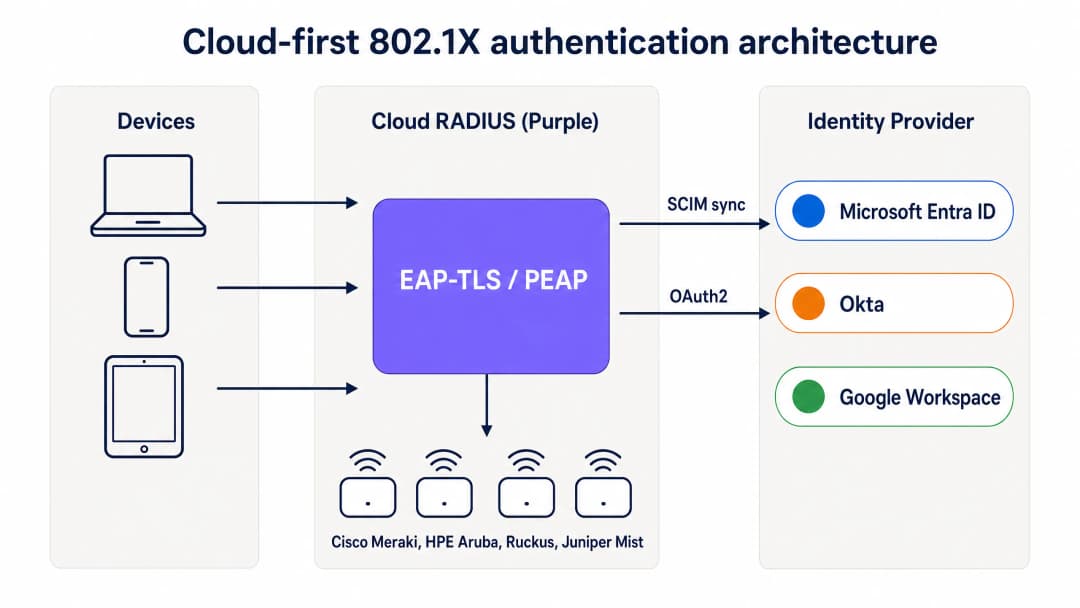
Cloud-First-802.1X-Authentifizierungsarchitektur: Geräte authentifizieren sich über EAP-TLS über den Cloud-RADIUS von Purple, der Zertifikate validiert und gruppenbasierte Richtlinien von Entra ID, Okta oder Google Workspace anwendet.
Wie MDM die lokale CA ersetzt
In einer traditionellen 802.1X-Bereitstellung wurden Zertifikate von einer lokalen Zertifizierungsstelle ausgestellt, auf der Active Directory Certificate Services (AD CS) lief. In einer Cloud-First-Bereitstellung übernimmt das MDM diese Rolle mithilfe von SCEP (Simple Certificate Enrollment Protocol). Microsoft Intune, Jamf Pro und andere MDM-Plattformen können Zertifikate von einer in der Cloud gehosteten CA anfordern und diese geräuschlos auf verwaltete Geräte übertragen.
Der Ablauf sieht wie folgt aus: Der IT-Administrator erstellt im MDM ein SCEP-Zertifikatsprofil, das auf die Gerätegruppen ausgerichtet ist, die WiFi-Zugriff benötigen. Das MDM pusht das Zertifikat automatisch auf Windows-, macOS-, iOS-, iPadOS-, Android Enterprise- und ChromeOS-Geräte. Der Benutzer bemerkt davon nichts. Das Zertifikat ist an die Geräteidentität im MDM gebunden und verlängert sich vor dem Ablauf automatisch. Wenn sich das Gerät mit dem WiFi verbindet, legt es das Zertifikat dem Cloud-RADIUS-Server vor. Dieser validiert es anhand der CA und wendet die entsprechende Netzwerkrichtlinie an.
Für Unternehmen, die Microsoft Intune nutzen, bietet Microsoft Cloud PKI eine vollständig verwaltete CA, die sich direkt in Intune-SCEP-Profile integrieren lässt. Dadurch wird ein lokaler NDES-Server (Network Device Enrollment Service) überflüssig. Für von Jamf verwaltete Mac- und iOS-Flotten erfüllt die integrierte CA von Jamf oder eine Cloud-CA eines Drittanbieters denselben Zweck.
SCIM und sofortiger Entzug von Zugriffsrechten
Einer der betrieblich wichtigsten Aspekte von Cloud-RADIUS ist das SCIM-Provisioning (System for Cross-domain Identity Management). SCIM is ein offener Standard, der Identitätsänderungen in Echtzeit von der Single Source of Truth – Ihrem Cloud-Identity-Provider – an abhängige Systeme überträgt. Wenn ein Mitarbeiter in Entra ID oder Okta deaktiviert wird, überträgt SCIM diese Änderung sofort an den Cloud-RADIUS-Dienst. Beim nächsten Authentifizierungsversuch des Geräts gibt der RADIUS-Server ein Access-Reject zurück. Wenn auf dem Access Point ein kurzes Sitzungs-Timeout konfiguriert ist, wird das Gerät innerhalb weniger Minuten nach der Deaktivierung des Kontos aus dem Netzwerk entfernt.
Dies ist eine erhebliche Sicherheitsverbesserung gegenüber Netzwerken mit gemeinsam genutzten PSKs (wo der Zugriff nur durch Ändern des Passworts auf allen Geräten entzogen werden kann) und gegenüber älteren RADIUS-Bereitstellungen, die auf periodischen LDAP-Synchronisierungen mit einem Zeitfenster von Stunden oder Tagen basieren.
RadSec: Sicherung des RADIUS-Verkehrs über das Internet
Klassisches RADIUS verwendet UDP und bietet nur eine grundlegende Nachrichtenauthentifizierung. Wenn sich Ihr RADIUS-Server im selben Rechenzentrum wie Ihre Access Points befindet, ist das akzeptabel. Wenn Ihr RADIUS-Server jedoch ein Cloud-Dienst ist, läuft der Authentifizierungsverkehr über das öffentliche Internet. RadSec (RADIUS over TLS, RFC 6614) verschlüsselt den RADIUS-Austausch mittels TLS und sorgt so für Vertraulichkeit und Integrität des Authentifizierungsverkehrs. Purple unterstützt RadSec nativ, mit einem IPsec-Fallback für Access Points, die RadSec noch nicht unterstützen.
¿Tiene preguntas sobre su configuración específica?
Nuestro equipo trabaja con gestores de espacios, responsables de TI e ingenieros de redes en 80 000 establecimientos. Reserve una llamada de 20 minutos y le mostraremos cómo lo resolvieron otros profesionales como usted.
Implementierungsleitfaden
Die Bereitstellung von Cloud-RADIUS mit EAP-TLS erfordert vier koordinierte Schritte. Eine Pilot-SSID kann in weniger als einer Stunde live gehen, wenn Entra ID und ein MDM bereits vorhanden sind.
Schritt 1: Cloud-RADIUS mit Ihrem Identity-Provider verbinden
Verbinden Sie Purple über die OAuth2-Admin-Zustimmung (für Entra ID) oder ein API-Token (für Okta und Google Workspace) mit Ihrem Identity-Provider. Dies autorisiert Purple, Benutzer, Gruppen und Gruppenmitgliedschaften aus dem Verzeichnis auszulesen. Konfigurieren Sie das SCIM-Provisioning, um Änderungen des Benutzerstatus in Echtzeit an Purple zu übertragen. Es werden keine Anmeldedaten von Dienstprinzipalen auf der Festplatte gespeichert. Gruppenänderungen werden beim nächsten Authentifizierungsereignis wirksam, nicht nach einem festen Synchronisierungszeitplan.
Schritt 2: MDM und SCEP-Profil konfigurieren
Erstellen Sie in Microsoft Intune ein Profil für vertrauenswürdige Zertifikate für den CA-Root und anschließend ein SCEP-Zertifikatsprofil, das auf die von Purple verwaltete CA verweist. Richten Sie beide Profile auf die Gerätegruppen aus, die WiFi-Zugriff benötigen. Konfigurieren Sie für Jamf eine SCEP-Payload in einem Konfigurationsprofil. Das MDM pusht die Zertifikate geräuschlos. Überprüfen Sie die Zertifikatsbereitstellung im MDM-Compliance-Dashboard, bevor Sie fortfahren.
Schritt 3: Netzwerkrichtlinien im Cloud-RADIUS-Dashboard definieren
Erstellen Sie RADIUS-Richtlinien, die Gruppen des Identity-Providers bestimmten VLANs und Zugriffskontrollen zuweisen. Weisen Sie beispielsweise der Entra ID-Gruppe „Staff-Finance“ das VLAN 20 mit vollem Internetzugriff zu und der Gruppe „Staff-Contractors“ das VLAN 30 mit zeitlich begrenztem Zugriff, der automatisch abläuft. Das Dashboard von Purple wendet diese Richtlinien direkt beim Authentifizierungsvorgang an, ohne dass Änderungen an der Firewall erforderlich sind.
Schritt 4: Access-Point-Konfiguration aktualisieren
Aktualisieren Sie die SSID-Konfiguration auf Ihren Access Points, um WPA2-Enterprise oder WPA3-Enterprise mit 802.1X zu verwenden. Geben Sie die Hostnamen oder IP-Adressen der primären und sekundären Cloud-RADIUS-Endpunkte von Purple zusammen mit dem Shared Secret ein. Konfigurieren Sie die Access Points so, dass sie eine dynamische VLAN-Zuweisung basierend auf den von Purple zurückgegebenen RADIUS-Attributen nutzen. Testen Sie dies mit einer einzelnen SSID auf einer Auswahl von Access Points, bevor Sie den Rollout für den gesamten Standort durchführen.

Cloud-RADIUS vs. lokaler RADIUS: Ein direkter Vergleich in Bezug auf Bereitstellungszeit, Active Directory-Abhängigkeit, Hochverfügbarkeit, OS-Patching, Identitätsintegration und Zertifikats-Lebenszyklusmanagement.
Best Practices
Diese Empfehlungen spiegeln die IEEE-802.1X-Standards, die PCI-DSS-v4.0-Anforderungen und die Betriebserfahrung an den über 80.000 Standorten von Purple wider.
Schreiben Sie EAP-TLS für verwaltete Geräte vor. Passwörter sind anfällig für Phishing und Credential Stuffing. Zertifikate bieten einen kryptografischen Identitäts- und Geräte-Compliance-Nachweis. EAP-TLS ist die einzige 802.1X-Methode, die von Haus aus phishing-resistent ist.
Nutzen Sie SCIM für den sofortigen Entzug von Zugriffsrechten. Periodische LDAP-Synchronisierungen lassen ein Zeitfenster offen, in dem ein ausgeschiedener Mitarbeiter weiterhin Netzwerkzugriff hat. SCIM stellt sicher, dass der Zugriff in dem Moment entzogen wird, in dem das Konto im Identity-Provider deaktiviert wird.
Stellen Sie Multi-Region-RADIUS bereit. Konfigurieren Sie Ihre Access Points mit mindestens zwei RADIUS-Endpunkten in verschiedenen geografischen Regionen. Purple bietet standardmäßig ein Active-Active-Multi-Region-Failover, das in Sekundenschnelle umschaltet.
Segmentieren Sie den Datenverkehr mit dynamischen VLANs. Nutzen Sie die Gruppenmitgliedschaften des Identity-Providers, um Benutzer dynamisch bestimmten VLANs zuzuweisen. Dies isoliert sensiblen Datenverkehr und begrenzt das Schadensausmaß eines kompromittierten Geräts, ohne dass manuelle Änderungen an der Firewall erforderlich sind.
Aktivieren Sie RadSec. Wenn Ihre Access Points RadSec unterstützen, aktivieren Sie es, um den Authentifizierungsverkehr zwischen dem Access Point und dem Cloud-RADIUS-Server zu verschlüsseln. Dies ist besonders wichtig für Filialen und Standorte, an denen sich der Access Point in einem nicht vertrauenswürdigen Netzwerksegment befindet.
Überwachen Sie den Zertifikats-Lebenszyklus. Stellen Sie die automatische MDM-Verlängerung so ein, dass sie bei 80 % der Zertifikatslaufzeit ausgelöst wird. Bei einem einjährigen Zertifikat beginnt die Verlängerung nach 10 Monaten. Richten Sie Warnmeldungen für Geräte ein, bei denen die Verlängerung vor Ablauf des Zertifikats fehlschlägt.
Für eine umfassendere Betrachtung von Sicherheitsstandards und Frameworks für Enterprise-WiFi lesen Sie unseren Leitfaden Enterprise WiFi Security: A Complete Guide for 2026 .
Fehlerbehebung und Risikominimierung
Der Übergang zu Cloud-RADIUS bringt neue Abhängigkeiten mit sich. Bereiten Sie sich auf diese häufigen Fehlerszenarien vor, bevor sie den Produktivbetrieb beeinträchtigen.
Ablauf von Zertifikaten. Wenn ein Gerätezertifikat abläuft, bevor das MDM es verlängert, schlägt die Authentifizierung des Geräts geräuschlos fehl. Der Benutzer sieht eine Fehlermeldung ohne Erklärung. Beugen Sie dem vor, indem Sie die automatische MDM-Verlängerung auf 80 % der Zertifikatslaufzeit einstellen und das MDM-Compliance-Dashboard auf Geräte mit bald ablaufenden Zertifikaten überwachen.
MDM-Synchronisierungsfehler. Ein Gerät, das die MDM-Compliance-Richtlinien nicht mehr erfüllt oder sich nicht meldet, erhält möglicherweise kein verlängertes Zertifikat. Implementieren Sie Compliance-Richtlinien, die fehlerhafte Geräte kennzeichnen und Administratoren warnen, bevor das Zertifikat abläuft.
Firewall blockiert RADIUS-Verkehr. Die Access Points müssen die Cloud-RADIUS-Endpunkte über den UDP-Port 1812 (Authentifizierung) und den UDP-Port 1813 (Accounting) oder über den TCP-Port 2083 für RadSec erreichen können. Ausgehende Firewall-Regeln in Filialen blockieren diese Ports häufig. Testen Sie die Erreichbarkeit aus dem Management-VLAN des Access Points vor der Bereitstellung.
SCIM-Provisionierungsfehler. Wenn die SCIM-Verbindung zwischen dem Identity-Provider und Purple unterbrochen wird, werden Änderungen des Benutzerstatus nicht übertragen. Überwachen Sie den SCIM-Synchronisierungsstatus sowohl im Identity-Provider als auch im Purple-Dashboard. Richten Sie Warnmeldungen für Synchronisierungsfehler ein.
Altsysteme ohne Zertifikatsunterstützung. IoT-Geräte, Drucker und ältere Hardware unterstützen EAP-TLS möglicherweise nicht. Verwenden Sie für diese Geräte iPSK (individual pre-shared keys) anstelle eines gemeinsam genutzten PSK. Purple unterstützt iPSK nativ, weist jedem Gerät einen eindeutigen Schlüssel zu und platziert jedes Gerät im richtigen VLAN, ohne dass eine 802.1X-Supplicant-Unterstützung erforderlich ist.
ROI und geschäftliche Auswirkungen
Die migration von lokalem RADIUS zu Cloud-RADIUS bietet messbaren Mehrwert für Infrastruktur, Betrieb und Sicherheit.
| Dimension | Lokaler NPS | Cloud-RADIUS (Purple) |
|---|---|---|
| Infrastrukturkosten | Windows Server-Lizenzen, VM-Rechenleistung, Speicher | Abonnement pro AP, keine Server-Hardware |
| Bereitstellungszeit | Tage bis Wochen | Unter einer Stunde |
| Hochverfügbarkeit | Manuell – zwei Server plus Replikation | Multi-Region Active-Active, Standard |
| OS-Patching | Monatlich, durch Ihr Team | Vom Anbieter verwaltet |
| WiFi-Helpdesk-Tickets | Hoch – Passwort-Resets, manuelles Onboarding | Um 80 % reduziert (Kundendaten von Purple) |
| Entzug von Zugriffsrechten | Stunden bis Tage via LDAP-Sync | Sekunden via SCIM |
IT-Teams, die das Mitarbeiter-WiFi von Purple nutzen, verzeichnen in der Regel einen Rückgang der WiFi-Support-Tickets um 80 % (interne Daten von Purple, 2024), was auf den Wegfall von Passwort-Resets und manuellem Geräte-Onboarding zurückzuführen ist. Die zertifikatsbasierte Authentifizierung erfüllt zudem die PCI-DSS-Anforderung 8.3 für starke Authentifizierung und die ISO 27001-Maßnahme A.9.4 für die System- und Anwendungszugriffskontrolle, was den Audit-Aufwand für Ihr Sicherheitsteam verringert.
Für Unternehmen in den Bereichen Einzelhandel und Gastgewerbe reduziert die Möglichkeit, Mitarbeiter-WiFi und Gäste-WiFi über ein einziges Cloud-Dashboard mit einer einheitlichen Identitätsebene zu verwalten, die betriebliche Komplexität an mehreren Standorten. Für Transportunternehmen und Gesundheitsdienstleister erfüllen der sofortige Entzug von Zugriffsrechten und der vollständige Audit-Trail regulatorische Anforderungen ohne zusätzliche Tools.
Die WiFi Analytics -Ebene von Purple ergänzt die Authentifizierungsinfrastruktur um Belegungsdaten und Daten zum hybriden Arbeiten. So wird das Mitarbeiter-WiFi von einer Kostenstelle zu einer Quelle für betriebliche Erkenntnisse.
Weiterführende Literatur: Enterprise WiFi Security: A Complete Guide for 2026 – OpenWrt Custom Firmware Integration with Purple WiFi
Definiciones clave
802.1X
Un estándar IEEE (IEEE 802.1X-2020) para el control de acceso a la red basado en puertos. Requiere que los dispositivos se autentiquen antes de que el punto de acceso otorgue acceso a la red, utilizando un intercambio EAP mediado por un servidor RADIUS.
Los equipos de TI utilizan 802.1X para garantizar que solo los usuarios y dispositivos autorizados se conecten a la red corporativa. Proporciona cifrado por usuario, claves por sesión y un historial de auditoría completo de cada evento de conexión.
RADIUS
Remote Authentication Dial-In User Service (RFC 2865). Un protocolo de red que proporciona una gestión centralizada de Autenticación, Autorización y Contabilidad (AAA) para el acceso a la red.
Los puntos de acceso reenvían cada solicitud de conexión al servidor RADIUS, el cual decide si admite el dispositivo y qué VLAN le asigna. RADIUS en la nube reemplaza a los servidores locales NPS o FreeRADIUS.
EAP-TLS
Extensible Authentication Protocol-Transport Layer Security (RFC 5216). Un método de autenticación 802.1X que utiliza un intercambio mutuo de certificados X.509 en lugar de contraseñas.
EAP-TLS es el estándar de oro para flotas de dispositivos administrados. Es resistente al phishing, no requiere almacenamiento de hashes de contraseñas y es el único método 802.1X que cumple con la guía de MFA resistente al phishing de la CISA.
PEAP-MSCHAPv2
Protected Extensible Authentication Protocol con Microsoft Challenge Handshake Authentication Protocol versión 2. Un método 802.1X heredado que valida contraseñas contra hashes NTLM almacenados en Active Directory.
PEAP-MSCHAPv2 falla en entornos exclusivamente en la nube porque Entra ID no almacena hashes NTLM. Las organizaciones que migran desde un AD local deben reemplazar PEAP con EAP-TLS.
SCEP
Simple Certificate Enrollment Protocol. Un protocolo utilizado por las plataformas MDM para solicitar e instalar certificados digitales en dispositivos de forma automática, sin interacción del usuario.
Los equipos de TI utilizan SCEP con Intune o Jamf para aprovisionar silenciosamente certificados WiFi en los dispositivos de los empleados. SCEP reemplaza al servidor local NDES (Network Device Enrollment Service) en implementaciones cloud-first.
SCIM
System for Cross-domain Identity Management (RFC 7644). Un estándar abierto que automatiza el intercambio en tiempo real de información de identidad de usuarios entre sistemas de TI.
SCIM garantiza que cuando se deshabilita a un empleado en Entra ID u Okta, ese cambio se envíe al servicio RADIUS en la nube de inmediato, revocando el acceso WiFi en cuestión de segundos en lugar de horas.
NPS
Network Policy Server. La implementación de RADIUS de Microsoft, que generalmente se ejecuta en Windows Server como parte de un entorno de Active Directory local.
Las organizaciones cloud-first están retirando NPS para eliminar las máquinas virtuales de Windows Server, el parchado del sistema operativo y la dependencia de un Active Directory local. RADIUS en la nube es el reemplazo directo.
RadSec
RADIUS sobre TLS (RFC 6614). Un protocolo que cifra el tráfico de autenticación RADIUS mediante TLS, reemplazando el transporte de texto claro basado en UDP utilizado por el RADIUS tradicional.
RadSec es esencial cuando se utiliza RADIUS en la nube, ya que el tráfico de autenticación debe atravesar el internet público entre el punto de acceso y el servicio en la nube. Purple es compatible con RadSec de forma nativa.
iPSK
Individual Pre-Shared Key. Una variante de WPA2-Personal que asigna una clave precompartida única a cada dispositivo, en lugar de una única clave compartida para todos los dispositivos.
iPSK se utiliza para dispositivos IoT, impresoras y otro hardware que no es compatible con 802.1X EAP-TLS. Proporciona responsabilidad por dispositivo y asignación de VLAN sin requerir soporte de certificados.
Dynamic VLAN
Una técnica de segmentación de red en la que el servidor RADIUS devuelve un identificador de VLAN en la respuesta Access-Accept, y el punto de acceso coloca el dispositivo en esa VLAN automáticamente.
Las VLANs dinámicas permiten a los equipos de TI segmentar al personal, contratistas, dispositivos IoT e invitados en segmentos de red separados según su pertenencia a grupos del proveedor de identidad, sin cambios manuales en el firewall.
Ejemplos resueltos
Una cadena minorista de 400 sucursales necesita proteger la red WiFi del personal en todas sus ubicaciones. Utilizan puntos de acceso Cisco Meraki y Microsoft Entra ID con Intune para la gestión de dispositivos. Actualmente usan una PSK compartida WPA2-Personal porque no tienen un Active Directory local para ejecutar NPS. Una auditoría interna reciente señaló la PSK compartida como una brecha de cumplimiento de PCI DSS.
La cadena implementa el RADIUS en la nube de Purple. Primero, conectan Purple a Entra ID mediante el consentimiento de administrador de OAuth y configuran el aprovisionamiento SCIM. En Intune, crean un Perfil de Certificado de Confianza para la CA raíz de Purple y un perfil de certificado SCEP asignado al grupo de dispositivos 'Staff-Retail'. Intune envía silenciosamente los certificados a todas las terminales de punto de venta y tabletas del personal administradas. En el panel de Meraki, actualizan el SSID del personal a WPA2-Enterprise, ingresan los endpoints primario y secundario de RADIUS en la nube de Purple y habilitan la asignación dinámica de VLAN. Cuando un dispositivo se conecta, presenta su certificado emitido por Intune, Purple lo valida contra la CA y verifica el grupo de Entra ID, y el dispositivo se coloca en la VLAN 10 (red del personal) o VLAN 20 (red de administración) según su pertenencia al grupo. Se retira la PSK compartida. El despliegue en las 400 sucursales toma un fin de semana, ya que no se implementa hardware en el sitio, solo cambios de configuración de SSID en Meraki.
Una universidad de 15,000 estudiantes utiliza Google Workspace como su proveedor de identidad principal. El equipo de TI desea proporcionar WiFi seguro para el personal y los estudiantes en un entorno BYOD de MacBooks, Chromebooks y teléfonos Android. No tienen un Active Directory local ni interés en administrar servidores.
La universidad integra el RADIUS en la nube de Purple con Google Workspace. Para las Chromebooks administradas, utilizan Google Admin para enviar un perfil de certificado WiFi a través de SCEP, registrando silenciosamente cada dispositivo. Para las MacBooks y teléfonos Android de tipo BYOD, implementan una aplicación ligera de incorporación que autentica al usuario con sus credenciales de Google e instala un certificado en el dispositivo con un solo toque. Las conexiones posteriores utilizan EAP-TLS de forma silenciosa. Purple mapea las Unidades Organizativas de Google Workspace a VLANs: el personal se asigna a la VLAN 10, los estudiantes a la VLAN 20 y los visitantes invitados a un SSID con Captive Portal. Cuando un estudiante se gradúa y se suspende su cuenta de Google, SCIM envía el cambio a Purple y su acceso WiFi se revoca en cuestión de minutos.
Preguntas de práctica
Q1. Su organización se ha migrado por completo de un Active Directory local a Microsoft Entra ID. Su WiFi del personal actual utiliza PEAP-MSCHAPv2 contra un servidor NPS que estaba unido al dominio antiguo. Después de desmantelar el controlador de dominio, el personal informa que ya no puede conectarse al WiFi. ¿Cuál es la causa raíz y cuál es la solución correcta a largo plazo?
Sugerencia: Considere lo que PEAP-MSCHAPv2 requiere del directorio y si Entra ID lo proporciona.
Ver respuesta modelo
La causa raíz es que PEAP-MSCHAPv2 requiere que el servidor RADIUS valide la contraseña del usuario contra un hash NTLM almacenado en Active Directory. Con el controlador de dominio desmantelado, NPS no tiene un directorio contra el cual validar. Entra ID no almacena hashes NTLM, por lo que NPS no puede redirigirse a Entra ID. La solución correcta a largo plazo es reemplazar NPS con un servicio RADIUS en la nube, migrar de PEAP-MSCHAPv2 a EAP-TLS y usar el MDM (Intune) para emitir certificados de dispositivo a través de SCEP. Esto elimina la dependencia de cualquier directorio local.
Q2. Está implementando RADIUS en la nube para una flota de 200 MacBooks corporativas administradas por Jamf Pro. Su proveedor de identidad es Okta. ¿Cuál es la forma más segura y operativamente eficiente de aprovisionar las credenciales de WiFi en estos dispositivos?
Sugerencia: Busque un método que no requiera interacción del usuario, evite contraseñas y se integre con su MDM existente.
Ver respuesta modelo
Configure Jamf Pro para usar SCEP para enviar silenciosamente certificados de dispositivo a las MacBooks. Cree una carga útil SCEP en un perfil de configuración de Jamf, apuntando a la CA administrada por su proveedor de RADIUS en la nube. Asigne el perfil al grupo de dispositivos correspondiente. Jamf enviará el certificado a cada MacBook automáticamente, sin interacción del usuario. Configure el perfil de WiFi en el mismo perfil de configuración para usar EAP-TLS con el certificado emitido por SCEP. Conecte el servicio RADIUS en la nube a Okta a través de SCIM para garantizar que cuando se deshabilite a un empleado en Okta, su acceso WiFi se revoque de inmediato.
Q3. Un empleado es despedido a las 9:00 a. m. de un lunes. Recursos Humanos deshabilita su cuenta de Entra ID a las 9:05 a. m. A las 9:30 a. m., una alerta de seguridad muestra que la laptop del empleado todavía está conectada al WiFi corporativo desde el estacionamiento. ¿Qué configuración falta y cómo se soluciona?
Sugerencia: ¿Cómo se entera el servidor RADIUS de que el estado del usuario ha cambiado en el proveedor de identidad?
Ver respuesta modelo
La implementación depende de sincronizaciones periódicas de LDAP en lugar del aprovisionamiento SCIM. La sincronización de LDAP aún no se ha ejecutado desde que se deshabilitó la cuenta, por lo que el servicio RADIUS en la nube todavía considera al usuario como activo. La solución es habilitar el aprovisionamiento SCIM entre Entra ID y el servicio RADIUS en la nube. SCIM envía los cambios de estado del usuario en tiempo real, por lo que cuando la cuenta se deshabilita en Entra ID a las 9:05 a. m., el servicio RADIUS recibe el cambio de inmediato. La próxima vez que el dispositivo intente volver a autenticarse (controlado por el tiempo de espera de la sesión en el punto de acceso), recibirá un Access-Reject. Configurar un tiempo de espera de sesión corto (de 15 a 30 minutos) en el punto de acceso limita la ventana máxima entre la inhabilitación de la cuenta y la expulsión de la red.
Q4. Su establecimiento cuenta con 50 dispositivos IoT (reproductores de señalización digital, sensores ambientales e impresoras) que no son compatibles con 802.1X EAP-TLS. ¿Cómo protege estos dispositivos en la misma infraestructura WiFi que la red de su personal con EAP-TLS?
Sugerencia: Considere qué método de autenticación proporciona responsabilidad por dispositivo sin requerir soporte de certificados.
Ver respuesta modelo
Utilice iPSK (claves individuales precompartidas) para los dispositivos IoT. Asigne una clave precompartida única a cada dispositivo en el panel de RADIUS en la nube, junto con una asignación de VLAN. Cada dispositivo se autentica con su clave única, la cual el servidor RADIUS valida y utiliza para colocar el dispositivo en la VLAN de IoT, aislada de la red del personal. Si un dispositivo se ve comprometido o se retira del servicio, usted revoca únicamente la clave de ese dispositivo sin afectar a ningún otro. Este enfoque proporciona responsabilidad por dispositivo y segmentación de red sin requerir soporte de suplicante 802.1X en el hardware de IoT.
Continúe leyendo esta serie
Cómo revocar el acceso a WiFi cuando un empleado se va
Esta guía muestra a los equipos de TI y de operaciones de recintos cómo eliminar el acceso de WiFi de personal cuando un empleado se va sin interrumpir al resto de la plantilla. Compara 802.1X basado en certificados, iPSK específicos de identidad y la desaprobación impulsada por SCIM, para luego proporcionar un manual de ejecución para el mismo día, un método de prueba y un modelo de evidencia de auditoría.
WiFi seguro para BYOD: Incorporación con certificados Passpoint vs xPSK (iPSK)
Una guía técnica completa para equipos de TI sobre cómo proteger los dispositivos no gestionados de empleados y estudiantes (BYOD) mediante certificados Passpoint EAP-TLS de instalación sin intervención frente a tecnologías xPSK específicas de cada proveedor (iPSK/easyPSK, DPSK, PPSK, MPSK).
WPA2 Personal frente a Enterprise: ¿cuál es la diferencia y cuál debería utilizar?
Esta guía de referencia técnica ofrece una comparación detallada de los protocolos de seguridad WPA2 Personal y WPA2 Enterprise en entornos de WiFi empresariales. Describe las diferencias de arquitectura, las metodologías de implementación y las implicaciones de seguridad de cada estándar para ayudar a los arquitectos de red y a los líderes de TI a tomar decisiones de implementación fundamentadas.
¿Tiene preguntas sobre su configuración específica?
Nuestro equipo trabaja con gestores de espacios, responsables de TI e ingenieros de redes en 80 000 establecimientos. Reserve una llamada de 20 minutos y le mostraremos cómo lo resolvieron otros profesionales como usted.