
Comprensión de Cisco SUDI: Identidad de Dispositivo Basada en Hardware en el Control de Acceso a la Red
Esta guía detalla la arquitectura técnica de Cisco SUDI, explicando cómo la identidad anclada en hardware protege el control de acceso a la red. Proporciona pasos de implementación prácticos para que los líderes de TI implementen la autenticación 802.1X EAP-TLS y automaticen el aprovisionamiento Zero Touch en instalaciones empresariales.
Video overview
Escucha esta guía
Ver transcripción del podcast
Parte de nuestra serie principal: Guía de Seguridad de WiFi Empresarial →

Resumen Ejecutivo
La autenticación por hardware protege la base física de las redes empresariales. El Cisco Secure Unique Device Identifier (SUDI) proporciona una identidad inmutable y verificable criptográficamente para los dispositivos de infraestructura, integrada directamente en un chip resistente a manipulaciones durante su fabricación. Para los líderes de TI que gestionan implementaciones a gran escala en los sectores de hotelería, comercio minorista y sector público, SUDI elimina el riesgo de hardware no autorizado y permite un aprovisionamiento sin intervención (Zero Touch Provisioning) automatizado.
Esta guía detalla la arquitectura técnica de Cisco SUDI, su integración con el Control de Acceso a la Red (NAC) IEEE 802.1X y los pasos operativos necesarios para implementar y mantener la identidad basada en hardware a escala. Aprenderá cómo realizar la transición de un esquema vulnerable de omisión de dirección MAC a una autenticación sólida EAP-TLS, cómo gestionar el ciclo de vida del certificado SUDI-2099 y cómo alinear la seguridad de la infraestructura con las plataformas de gestión de identidad de usuarios como Purple.
Análisis Técnico Detallado
La Arquitectura de la Identidad por Hardware
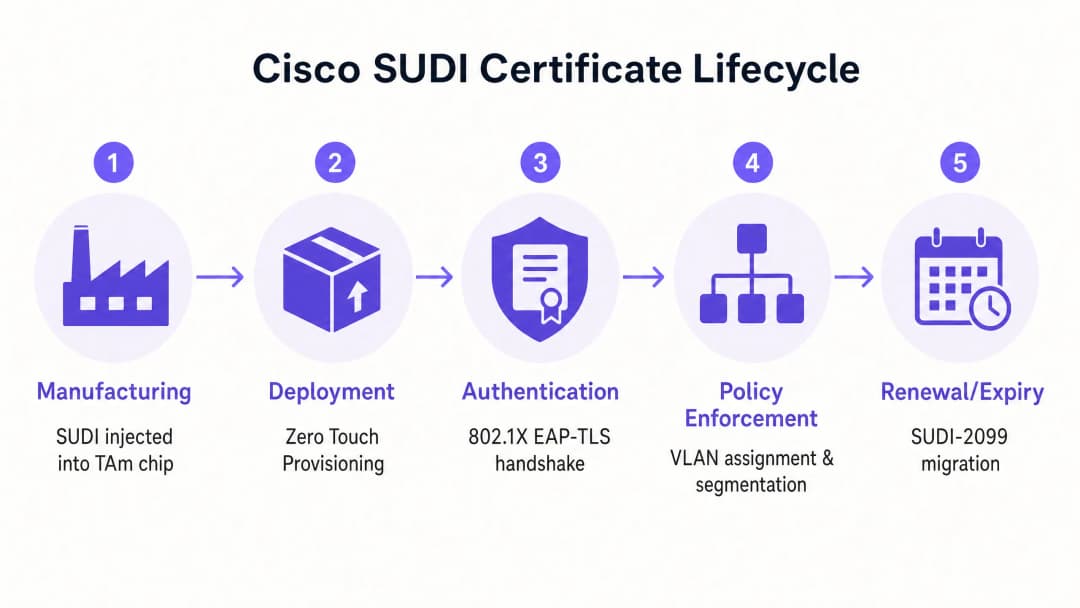
El Cisco Secure Unique Device Identifier (SUDI) es un certificado X.509v3 que proporciona una identidad permanente para los dispositivos de red. A diferencia de los certificados de software que los equipos de TI generan e implementan, Cisco introduce el certificado SUDI y su par de claves asociado en el dispositivo durante el proceso de fabricación.
El certificado se almacena de forma segura en el módulo Trust Anchor (TAm), un chip patentado y resistente a manipulaciones. El TAm genera la clave privada de forma interna, garantizando que nunca pueda ser exportada o clonada. Esta raíz de confianza de hardware garantiza que, si un dispositivo se autentica correctamente mediante su SUDI, se trata de un producto Cisco legítimo.
SUDI implementa el estándar IEEE 802.1AR para Identificadores Seguros de Dispositivos. Bajo este estándar, el certificado proporcionado por el fabricante se conoce como Identificador Inicial de Dispositivo (IDevID). Las organizaciones pueden complementar el IDevID con un Identificador de Dispositivo Localmente Significativo (LDevID) emitido por su propia Infraestructura de Clave Pública (PKI) empresarial.

Integración con el Control de Acceso a la Red
En un entorno empresarial, SUDI se integra con los sistemas de Control de Acceso a la Red (NAC) principalmente a través de la autenticación basada en puertos IEEE 802.1X. Cuando un punto de acceso o switch Cisco se conecta a la red, actúa como un suplicante y presenta su certificado SUDI a un servidor RADIUS, como Cisco Identity Services Engine (ISE).
El proceso de autenticación utiliza el Protocolo de Autenticación Extensible con Seguridad de la Capa de Transporte (EAP-TLS). El servidor RADIUS valida el certificado SUDI contra la Infraestructura de Clave Pública de Cisco. Una vez validado, el servidor RADIUS autoriza el dispositivo y lo asigna a la VLAN correcta según la política de acceso a la red.
Este enfoque reemplaza al Bypass de Dirección MAC (MAB), un método heredado que depende de direcciones MAC que se pueden suplantar fácilmente. El método MAB proporciona cero garantía criptográfica de la identidad del dispositivo, lo que deja a las redes vulnerables a puntos de acceso no autorizados.
Huella Digital de Hardware y Detección de Manipulación
El módulo Trust Anchor proporciona más que un almacenamiento seguro. Protege activamente el dispositivo contra la manipulación física durante el tránsito o la implementación.
Durante la fabricación, Cisco registra una huella digital criptográfica de los componentes críticos de hardware, como CPU y ASIC. Esta huella digital se almacena de forma permanente en el TAm. Cuando el dispositivo se inicia, el firmware UEFI calcula una nueva huella digital del hardware observado y la compara con la huella digital maestra en el TAm. Si las huellas digitales no coinciden, el dispositivo detiene el proceso de inicio. Este mecanismo garantiza que el hardware implementado en un hotel o tienda minorista no se haya visto comprometido entre la fábrica y el sitio de instalación.
¿Tiene preguntas sobre su configuración específica?
Nuestro equipo trabaja con gestores de espacios, responsables de TI e ingenieros de redes en 80 000 establecimientos. Reserve una llamada de 20 minutos y le mostraremos cómo lo resolvieron otros profesionales como usted.
Guía de Implementación
La implementación de la autenticación basada en SUDI requiere la coordinación entre su infraestructura de conmutación, su servidor RADIUS y su plataforma de gestión de red. Siga estos pasos para implementar la identidad de hardware.
Paso 1: Configurar la Confianza de RADIUS
Su servidor RADIUS debe confiar en la Autoridad de Certificación de Cisco que emitió el SUDI.
- Descargue los certificados de la CA Raíz de Cisco y de la CA ACT2 SUDI desde el portal PKI de Cisco.
- Importe estos certificados en el almacén de certificados de confianza de su servidor RADIUS (por ejemplo, Cisco ISE).
- Configure el servidor RADIUS para utilizar estos certificados para la autenticación EAP-TLS.
Paso 2: Definir Políticas 802.1X
Cree políticas de autenticación específicas para los dispositivos de infraestructura, independientes de las políticas de autenticación de usuarios.
- Cree un conjunto de políticas en Cisco ISE que coincida con los atributos del certificado SUDI (por ejemplo, comparando el Nombre Alternativo del Sujeto con los PID de dispositivo esperados).
- Asigne las autenticaciones exitosas a la VLAN de gestión de infraestructura.
- Configure una VLAN de cuarentena para los dispositivos que fallen la autenticación SUDI. No configure un respaldo a MAB para los puertos de infraestructura.
Paso 3: Habilitar el Aprovisionamiento sin Intervención (Zero Touch Provisioning)
Utilice SUDI para automatizar la incorporación de dispositivos.
- Configure su sistema de gestión de red (como Cisco Catalyst Center) para que actúe como el servidor ZTP.
- Cuando un nuevo dispositivo se conecta, presenta su certificado SUDI.
- El sistema de gestión verifica el certificado, confirma el número de serie del dispositivo contra la base de datos de inventario y envía la configuración inicial.
Paso 4: Gestionar la migración a SUDI-2099
Los certificados SUDI emitidos antes de mayo de 2019 caducan ya sea 10 años después de la fecha de fabricación o el 14 de mayo de 2029, lo que ocurra primero. Cuando un SUDI expira, las funciones que dependen de él, incluyendo HTTPS, SSH y Zero Touch Provisioning, fallarán.
Cisco ha introducido certificados SUDI-2099, los cuales permanecen vigentes hasta diciembre de 2099. Para garantizar la continuidad:
- Realice una auditoría de su inventario utilizando el comando
show crypto pki certificateen dispositivos IOS-XE. Verifique la fecha de finalización (end date) del punto de confianzaCISCO_IDEVID_SUDI. - Actualice el hardware afectado a las versiones de software recomendadas. Por ejemplo, los switches Catalyst 9200 requieren IOS-XE 17.12.2 o posterior para gestionar correctamente la fecha de vencimiento de 2099.
Mejores prácticas
Para maximizar los beneficios de seguridad de la identidad basada en hardware, siga estos principios neutrales del proveedor.
- Aplicar EAP-TLS estricto: Requiera EAP-TLS para todos los dispositivos de infraestructura. No permita métodos de EAP más débiles como PEAP para la autenticación de dispositivos.
- Aislar la identidad de la infraestructura de la identidad del usuario: SUDI autentica el hardware, no al usuario. Utilice una plataforma dedicada para gestionar la identidad humana. Por ejemplo, utilice Purple para gestionar la autenticación de invitados, la captura de consentimiento y la recopilación de datos de primera mano, mientras confía en SUDI para proteger el hardware subyacente Cisco Meraki o HPE Aruba.
- Automatizar el monitoreo de certificados: Implemente herramientas de monitoreo para realizar un seguimiento de las fechas de vencimiento de los certificados en toda su infraestructura. El monitoreo proactivo evita fallas repentinas de autenticación.
- Implementar microsegmentación: Utilice la identidad verificada por SUDI para asignar dispositivos a VLANs estrictamente controladas. Un punto de acceso sólo debe tener alcanzabilidad de red hacia su controlador y sistemas de gestión, nada más.
Solución de problemas y mitigación de riesgos
Al implementar la autenticación basada en SUDI, prepárese para estos modos de falla comunes.
| Modo de falla | Causa raíz | Estrategia de mitigación |
|---|---|---|
| Falla la autenticación EAP-TLS | El servidor RADIUS no tiene los certificados CA raíz o intermedio de Cisco correctos. | Verifique que la cadena de confianza completa de Cisco esté instalada en el almacén de confianza del servidor RADIUS. |
| El dispositivo se niega a arrancar | La huella digital del hardware calculada al arrancar no coincide con la huella digital maestra en el TAm. | Considere el dispositivo como comprometido. Devuelva el hardware al proveedor a través del proceso RMA. |
| Falla el acceso de gestión | El certificado SUDI ha expirado, interrumpiendo la autenticación de certificados HTTPS y SSH. | Actualice el firmware del dispositivo a una versión compatible con SUDI-2099, o implemente un LDevID utilizando la PKI de su empresa. |
| Dispositivo no autorizado obtiene acceso | El puerto del switch está configurado para recurrir a la omisión de dirección MAC (MAB) si falla 802.1X. | Elimine las configuraciones de respaldo de MAB de los puertos de infraestructura. Aplique una política 802.1X estricta. |
ROI e impacto empresarial
La implementación de la identidad de dispositivos basada en hardware ofrece un valor empresarial medible en tres áreas.
1. Costos de aprovisionamiento reducidos El aprovisionamiento sin intervención (Zero Touch Provisioning) protegido por SUDI elimina la preparación manual. En lugar de que un ingeniero pase 45 minutos preconfigurando un punto de acceso antes de enviarlo a una tienda minorista, el dispositivo se envía directamente desde el distribuidor. Se autentica de forma segura al conectarse y descarga su configuración automáticamente. Para una implementación minorista de 500 sitios, esto ahorra aproximadamente 375 horas de ingeniería.
2. Eliminación del riesgo de dispositivos no autorizados Al dejar de utilizar la omisión de dirección MAC en favor de la identidad de hardware criptográfica, elimina el riesgo de que un atacante conecte un dispositivo no autorizado a un puerto de infraestructura. Esto respalda directamente el cumplimiento de los requisitos de PCI-DSS y ISO 27001 para el control de acceso a la red.
3. Límites de identidad claros La implementación de SUDI establece un límite arquitectónico limpio. La capa de hardware se autentica criptográficamente, lo que le permite concentrar sus recursos en la capa de identidad del usuario. Cuando integra una plataforma como Purple para administrar el WiFi de invitados y las Métricas de WiFi, lo hace sobre una base de infraestructura verificable y segura.
Definiciones clave
SUDI (Identificador Único y Seguro de Dispositivo)
Un certificado X.509v3 y una clave privada asociada integrados en un dispositivo Cisco durante la fabricación para proporcionar una identidad de hardware inmutable.
Utilizado por los equipos de TI para verificar criptográficamente que un dispositivo que se conecta a la red es un producto genuino de Cisco.
TAm (Módulo de Anclaje de Confianza)
Un chip de hardware patentado y resistente a manipulaciones que almacena de forma segura el certificado SUDI, genera claves criptográficas y gestiona la identificación por huella digital del hardware.
Proporciona la raíz de confianza de hardware. Si el TAm se ve comprometido, el dispositivo no podrá arrancar ni autenticarse.
IDevID (Identificador Inicial de Dispositivo)
El identificador de dispositivo seguro instalado por el fabricante y definido por el estándar IEEE 802.1AR. Cisco SUDI es una implementación de un IDevID.
Proporciona la identidad fundacional de un dispositivo antes de integrarlo en el propio entorno PKI de una organización.
LDevID (Identificador de Dispositivo Localmente Significativo)
Un certificado de dispositivo emitido por la propia infraestructura de clave pública (PKI) empresarial de una organización, que complementa al IDevID del fabricante.
Se utiliza cuando los equipos de TI requieren que los dispositivos se autentiquen mediante certificados emitidos por su CA corporativa interna en lugar de la CA del proveedor.
IEEE 802.1X
El estándar IEEE para el control de acceso a redes basado en puertos, que proporciona un mecanismo de autenticación para los dispositivos que desean conectarse a una LAN o WLAN.
El protocolo principal utilizado para aplicar la seguridad de red, garantizando que solo los dispositivos y usuarios autorizados puedan enviar tráfico a través de un puerto de switch.
EAP-TLS (Extensible Authentication Protocol-Transport Layer Security)
Un protocolo de autenticación altamente seguro que requiere que tanto el cliente como el servidor de autenticación demuestren sus identidades utilizando certificados digitales.
El método específico utilizado dentro de 802.1X para validar el certificado SUDI entre el dispositivo de red y el servidor RADIUS.
Zero Touch Provisioning (ZTP)
Un proceso automatizado que permite aprovisionar y configurar dispositivos de red de forma automática sin intervención manual.
SUDI protege ZTP al garantizar que el sistema de gestión solo envíe configuraciones a hardware genuino y verificado.
MAC Address Bypass (MAB)
Un método de autenticación heredado en el que un switch utiliza la dirección MAC del dispositivo que se conecta como su credencial de identidad.
Un método de respaldo inseguro que debe eliminarse y reemplazarse por la autenticación 802.1X basada en SUDI.
Ejemplos resueltos
Un hotel de 400 habitaciones está actualizando su infraestructura de red y necesita implementar 250 nuevos puntos de acceso Cisco Catalyst. El equipo de TI desea evitar la configuración manual de cada dispositivo antes de la instalación, garantizando al mismo tiempo que ningún dispositivo no autorizado pueda unirse a la VLAN de gestión.
- El equipo de TI configura Cisco ISE con la CA raíz de Cisco para confiar en los certificados SUDI.
- Crean una política 802.1X en ISE que asigna los dispositivos que presentan un SUDI válido a una VLAN de aprovisionamiento restringida.
- Los puntos de acceso se envían directamente al hotel y se conectan a los switches PoE.
- Cada AP arranca, presenta su SUDI a través de EAP-TLS y es autenticado por ISE.
- El sistema de gestión (Catalyst Centre) verifica el número de serie, aprovisiona el AP e ISE cambia el puerto a la VLAN de gestión de producción.
Una cadena minorista nacional con 1,200 tiendas descubre que sus switches heredados utilizan la omisión de dirección MAC (MAB) para autenticar los puntos de acceso. Necesitan migrar a un estándar seguro sin causar interrupciones en el servicio de las tiendas.
- El equipo de red audita el inventario de switches para confirmar que todos los dispositivos son compatibles con 802.1X y SUDI.
- Implementan los certificados de la CA de Cisco en su infraestructura RADIUS.
- Configuran los puertos de los switches en "modo monitor" (autenticación abierta), lo que permite que los dispositivos intenten usar 802.1X EAP-TLS mediante SUDI mientras recurren a MAB si fallan, pero registrando los resultados.
- Después de verificar en los registros de RADIUS que todos los AP legítimos se están autenticando con éxito a través de SUDI, cambian los puertos a "modo cerrado", aplicando un control estricto de 802.1X y deshabilitando MAB.
Preguntas de práctica
Q1. Está implementando 50 nuevos switches Cisco Catalyst en un entorno de estadio. La política de seguridad exige una autenticación 802.1X estricta para todos los dispositivos de infraestructura. Durante las pruebas, los switches no logran autenticarse en su servidor Cisco ISE. ¿Cuál es la causa más probable?
Sugerencia: Considere la cadena de confianza requerida para la autenticación EAP-TLS.
Ver respuesta modelo
Al servidor Cisco ISE le faltan los certificados Cisco Root CA o ACT2 SUDI CA en su almacén de certificados de confianza. Sin estos, ISE no puede validar el certificado SUDI presentado por los switches. Debe descargar los certificados del portal PKI de Cisco e importarlos en ISE.
Q2. Un ingeniero de redes propone configurar los puertos del switch para que intenten primero la autenticación 802.1X, pero que recurran a MAC Address Bypass (MAB) si el dispositivo no tiene un certificado válido. ¿Por qué debería rechazar esta propuesta para los puertos de infraestructura?
Sugerencia: Evalúe la robustez de seguridad del mecanismo de respaldo.
Ver respuesta modelo
Recurrir a MAB debilita todo el modelo de seguridad. Un atacante podría simplemente conectar un dispositivo no autorizado, esperar a que expire el tiempo de espera de 802.1X y suplantar la dirección MAC de un punto de acceso legítimo para obtener acceso a la VLAN de infraestructura. Los puertos de infraestructura deben aplicar 802.1X estricto con SUDI, y los dispositivos no compatibles deben colocarse en una VLAN de cuarentena restringida.
Q3. Está auditando una red de switches Catalyst 9200 implementados en 2018. Ejecuta el comando "show crypto pki certificate" y nota que el trustpoint CISCO_IDEVID_SUDI expira en mayo de 2029. ¿Qué medida debe tomar para evitar futuras interrupciones?
Sugerencia: Revise los requisitos de migración de SUDI-2099 para el hardware heredado.
Ver respuesta modelo
Debe actualizar el software IOS-XE en los switches Catalyst 9200 a la versión 17.12.2 o posterior. Esta actualización garantiza que el hardware admita correctamente la extensión de certificado SUDI-2099, lo que prolonga la identidad válida del dispositivo hasta diciembre de 2099 y evita fallas de autenticación en servicios como HTTPS y ZTP.
Continúe leyendo esta serie
Cómo segmentar de forma segura las redes WiFi del personal y de invitados: mejores prácticas para LAN empresariales
Esta guía proporciona a los administradores de TI y arquitectos de red un modelo técnico e independiente de proveedores para proteger las LAN empresariales mediante la segmentación adecuada del tráfico de WiFi del personal y de invitados. Abarca la autenticación 802.1X, RADIUS en la nube, el aislamiento de VLAN y la gestión del ciclo de vida de las credenciales necesaria para eliminar las contraseñas compartidas y proteger los activos corporativos.
Best DNS filtering: a comprehensive guide for businesses
Esta guía de referencia técnica explica cómo el filtrado DNS empresarial protege las redes públicas al bloquear dominios maliciosos en la capa de resolución, antes de que se establezca una conexión. Ofrece a los directores de TI, arquitectos de red y equipos de operaciones de establecimientos la arquitectura de implementación, la configuración de firewall y el contexto de cumplimiento que necesitan para proteger el WiFi de invitados en entornos de hotelería, comercio minorista y sector público. Purple Shield bloquea malware, botnets y contenido inapropiado a nivel DNS en más de 80,000 establecimientos activos.
Comprensión de Cisco SUDI: Identidad anclada por hardware en el control de acceso seguro a la red
Esta guía explica cómo Cisco SUDI proporciona una identidad criptográficamente segura y anclada por hardware para la infraestructura de red empresarial. Aprenda cómo reemplazar las direcciones MAC vulnerables a la suplantación por certificados 802.1AR inmutables para proteger el control de acceso a la red de su recinto.
¿Tiene preguntas sobre su configuración específica?
Nuestro equipo trabaja con gestores de espacios, responsables de TI e ingenieros de redes en 80 000 establecimientos. Reserve una llamada de 20 minutos y le mostraremos cómo lo resolvieron otros profesionales como usted.