
El Impacto de los Anuncios de Video en el Rendimiento de la Red de Invitados
Esta guía explora cómo los anuncios de video de reproducción automática consumen silenciosamente el rendimiento de la red de invitados en entornos de alta densidad. Ofrece estrategias prácticas e independientes del proveedor para que los gerentes de TI y los arquitectos de red recuperen ancho de banda utilizando el filtrado DNS en el borde.
Escucha esta guía
Ver transcripción del podcast

Resumen Ejecutivo
Para los CTOs y arquitectos de red que gestionan recintos de alta densidad —como estadios, centros de Retail , entornos de Hospitality y centros de Transport — el rendimiento del WiFi de invitados es una métrica operativa crítica. Sin embargo, la planificación estándar de la capacidad de la red a menudo pasa por alto un drenaje silencioso y estructural del ancho de banda: los anuncios de video de reproducción automática.
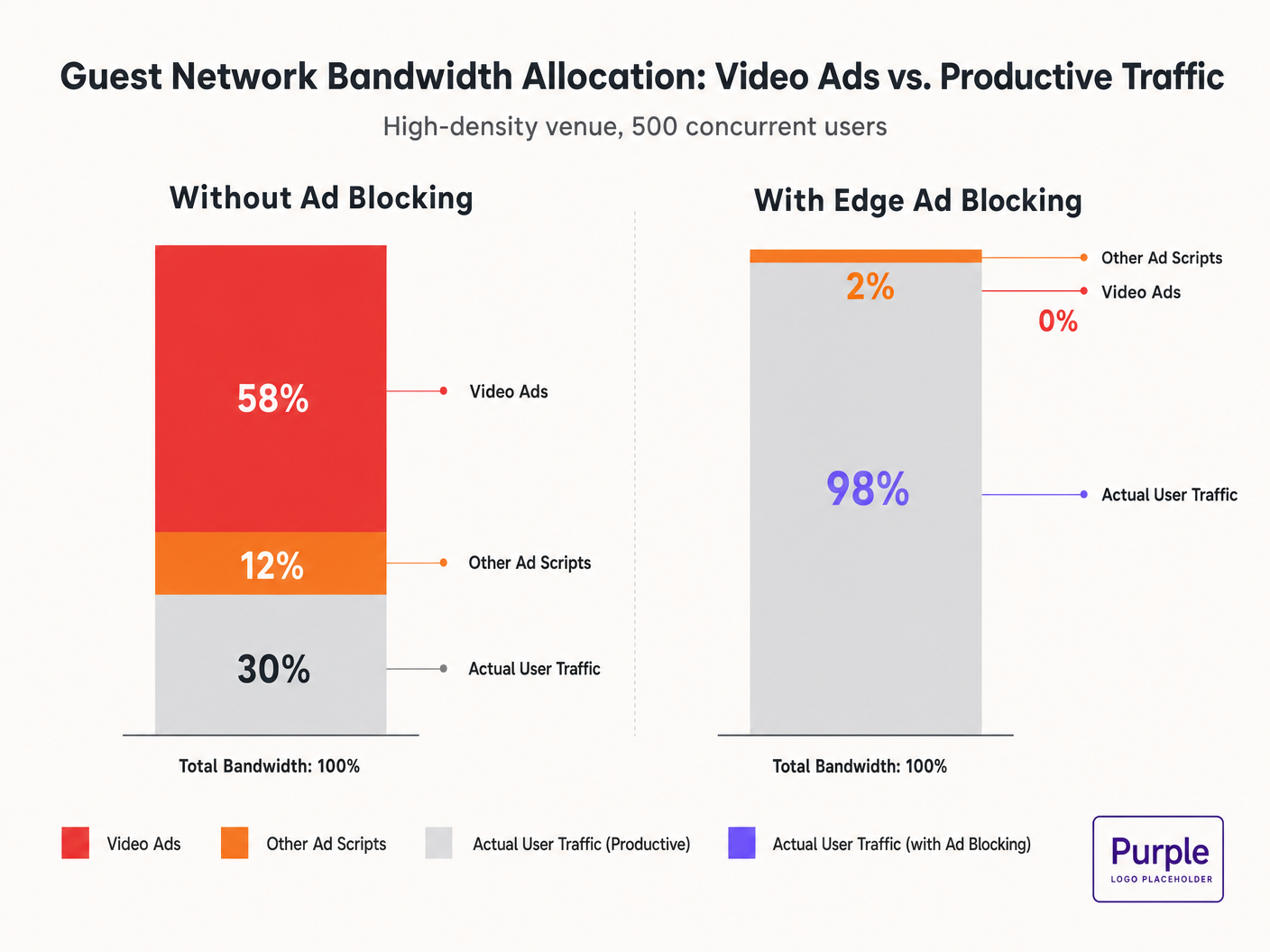
Cuando los invitados se conectan a la red y navegan por propiedades web estándar, sus dispositivos inician docenas de conexiones en segundo plano a redes de entrega de anuncios. Estas transmisiones de video de tasa de bits adaptativa pueden consumir entre el 50% y el 70% del rendimiento disponible, degradando la experiencia para todos los usuarios y saturando los enlaces de backhaul. Esta guía detalla la mecánica técnica de este drenaje de ancho de banda y proporciona un plan independiente del proveedor para mitigarlo en el borde utilizando el filtrado DNS. Al implementar estas estrategias, los recintos pueden mejorar drásticamente el rendimiento del Guest WiFi , reducir los costos de infraestructura y mejorar el cumplimiento sin esperar un ciclo de actualización de hardware.
Escuche nuestro informe sobre este tema:
Análisis Técnico Detallado: La Física de la Saturación de Red Impulsada por Anuncios
La Anatomía de una Solicitud Web
Cuando un usuario en una red de invitados accede a un sitio web con publicidad, el comportamiento del navegador es altamente agresivo. Una sola carga de página típicamente activa conexiones a 8-40 dominios de terceros separados, incluyendo intercambios de anuncios, Demand-Side Platforms (DSPs) y Content Delivery Networks (CDNs).
La Penalización de Ancho de Banda por Anuncios de Video
Los anuncios de video, particularmente los formatos pre-roll y mid-roll servidos por los principales intercambios, se entregan como transmisiones de tasa de bits adaptativa. La CDN sondea el ancho de banda disponible y sirve la transmisión de la más alta calidad posible. En un entorno de alta densidad con 500 usuarios concurrentes, si el 20% de los usuarios activan una transmisión de anuncios de 1080p a 4-8 Mbps, la demanda agregada se dispara instantáneamente en 400-800 Mbps. Este tráfico no solicitado elude la configuración estándar de Calidad de Servicio (QoS) porque se origina en conexiones HTTPS legítimas.
Consumo de Tiempo de Aire e Ineficiencia Espectral
Más allá de la saturación del backhaul, los anuncios de video consumen valioso tiempo de aire de radio. En un medio inalámbrico compartido, cada dispositivo que recibe activamente una transmisión de alta tasa de bits reduce las oportunidades de transmisión para otros dispositivos. Si bien el estándar IEEE 802.11ax (Wi-Fi 6) introdujo OFDMA y BSS Colouring para mejorar la eficiencia espectral, estos mecanismos no pueden compensar el gran volumen de datos demandado por las redes de anuncios. La capa de radio se congestiona, lo que lleva a un aumento de la latencia y la pérdida de paquetes para el tráfico productivo.
Cascadas de Latencia en la Resolución DNS
La entrega de anuncios se basa en complejas cadenas de redirección. Una sola impresión de anuncio puede requerir de 6 a 12 búsquedas DNS antes de que se inicie la transmisión de video. En una implementación densa, esto aumenta exponencialmente la carga en el resolvedor DNS local. Cuando el resolvedor se convierte en un cuello de botella, la latencia se propaga en cascada, causando una degradación perceptible en la carga de la página para cada usuario en la red.
Guía de Implementación: Arquitectura de Filtrado DNS en el Borde
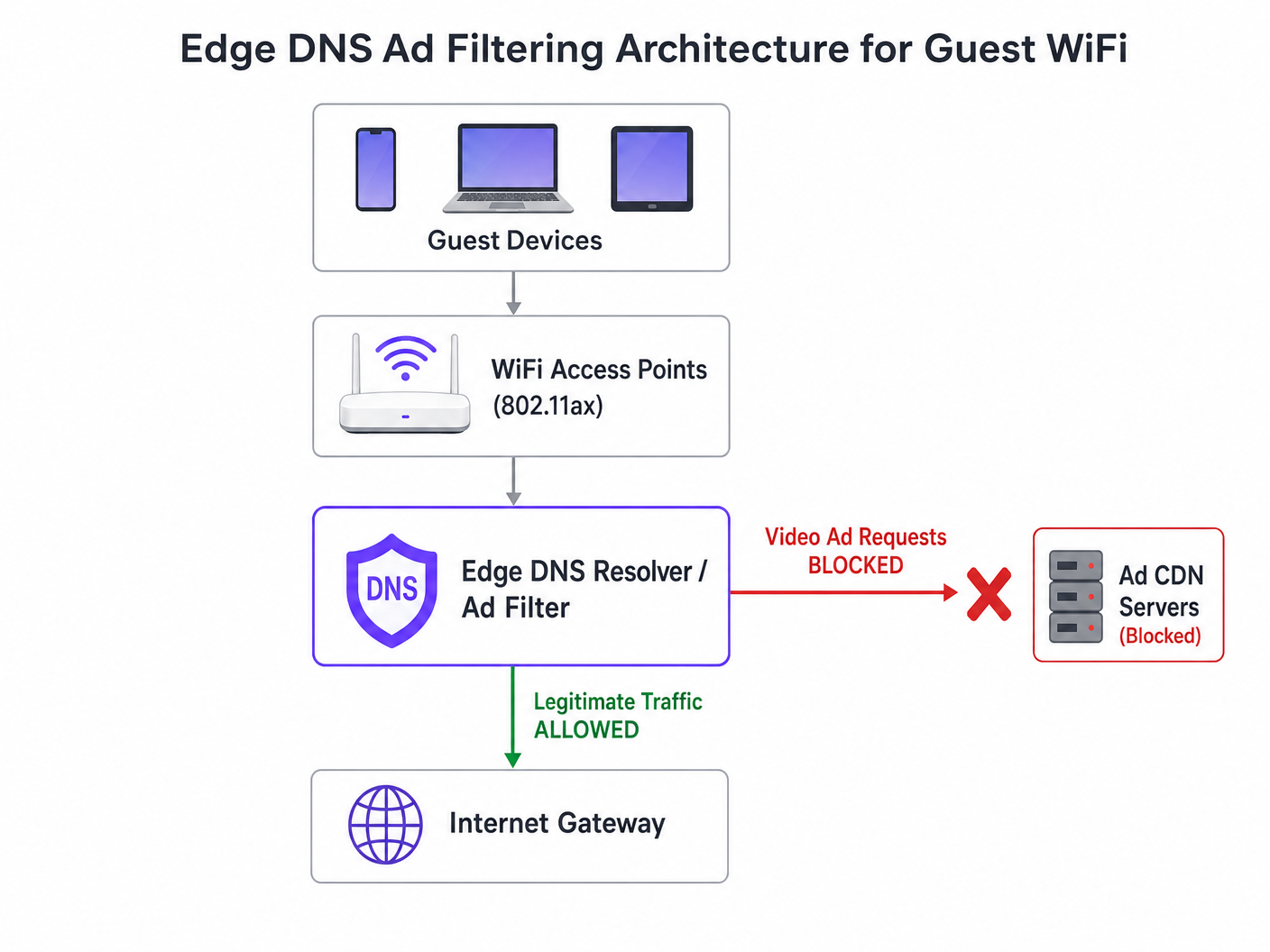
La intervención arquitectónica más efectiva es el filtrado DNS en el borde. Al bloquear los dominios de la red de anuncios a nivel del resolvedor, la red evita que la conexión TCP se establezca. Este enfoque es sin estado, escala linealmente y añade una latencia insignificante.
Estrategia de Despliegue Paso a Paso
- Instrumentación Pasiva: Implemente el registro DNS pasivo en la red de invitados durante 48-72 horas para establecer un perfil de tráfico de referencia. Identifique los dominios más consultados y su volumen. Utilice plataformas como WiFi Analytics para visualizar estos datos.
- Aplicación Conservadora de Listas de Bloqueo: No implemente listas de bloqueo comunitarias masivas (por ejemplo, la lista de Steven Black) el primer día. Comience con los 500 principales dominios conocidos de entrega de anuncios de video. Valide que la entrega de contenido legítimo no se vea afectada.
- Configuración DNS de Horizonte Dividido: Asegure una estricta separación entre la infraestructura DNS corporativa y de invitados. La política de filtrado debe estar limitada exclusivamente a la VLAN de invitados para evitar interrupciones operativas.
- Mantenimiento Automatizado de Listas de Bloqueo: Las redes de anuncios rotan dinámicamente los dominios y utilizan Algoritmos de Generación de Dominios (DGAs). Configure el resolvedor para obtener inteligencia de amenazas actualizada y fuentes de listas de bloqueo al menos cada 4 horas.
- Manejo de DNS sobre HTTPS (DoH): Los navegadores modernos pueden intentar eludir los resolvedores locales utilizando DoH. Mitigue esto bloqueando el puerto TCP/UDP 443 saliente a rangos de IP de proveedores de DoH conocidos, forzando el retorno al resolvedor proporcionado por la red.
Para una inmersión más profunda en los detalles de configuración, consulte nuestra guía sobre Mejora de las Velocidades de WiFi Bloqueando Redes de Anuncios en el Borde .
Mejores Prácticas y Cumplimiento
Privacidad desde el Diseño (GDPR Artículo 25)
La implementación del filtrado DNS en el borde se alinea con los principios de privacidad desde el diseño de GDPR. Al prevenir conexiones a dominios de seguimiento de terceros, la red protege inherentemente los datos de los invitados de la recolección no autorizada. Esta postura proactiva reduce la carga de cumplimiento del recinto.
Segmentación de Red (PCI DSS)
Para retail y hospitalrecintos que procesan pagos, PCI DSS exige una segmentación de red estricta. El filtrado DNS refuerza este límite al garantizar que los dispositivos de los invitados no puedan actuar inadvertidamente como conductos para cargas útiles maliciosas entregadas a través de redes publicitarias comprometidas (malvertising).
Experiencia de Usuario Transparente
A diferencia de los intersticiales de Captive Portal o la inspección profunda de paquetes, el filtrado DNS es transparente. El usuario experimenta cargas de página más rápidas y un menor consumo de batería. Si un espacio publicitario no se carga, generalmente se contrae o muestra un espacio en blanco, lo que rara vez es percibido como una falla de red por el usuario.
Resolución de Problemas y Mitigación de Riesgos
| Modo de Falla | Causa Raíz | Estrategia de Mitigación |
|---|---|---|
| Bloqueo excesivo de contenido legítimo | Bloqueo a nivel de raíz de CDNs compartidas (ej., Akamai, Fastly). | Implementar filtrado a nivel de subdominio. Mantener una lista de permitidos robusta para servicios críticos del recinto. |
| Filtrado eludido por DoH | Navegadores que utilizan resolvedores DoH codificados. | Ruta nula para IPs de proveedores DoH conocidos. Implementar políticas de tunelización dividida si se utiliza gestión de dispositivos móviles (MDM). |
| Agotamiento de CPU del resolvedor | Infraestructura DNS subdimensionada que maneja respuestas NXDOMAIN excesivas. | Proveer resolvedores con CPU/RAM adecuados. Usar el almacenamiento en caché agresivamente. Considerar resolvedores recursivos alojados en la nube para mayor elasticidad. |
ROI e Impacto Comercial
El impacto comercial del filtrado DNS en el borde es inmediato y medible:
- Recuperación de Ancho de Banda: Los recintos suelen recuperar entre el 30% y el 50% de su ancho de banda de red para invitados, retrasando costosas actualizaciones de backhaul.
- Mejora de la Satisfacción del Invitado: Las cargas de página más rápidas y la conectividad confiable se correlacionan directamente con puntuaciones Net Promoter Score (NPS) más altas y reseñas positivas del recinto.
- Eficiencia Operacional: La reducción de tickets de soporte relacionados con "WiFi lento" permite a los equipos de TI centrarse en iniciativas estratégicas, como la implementación del Modo de Mapas sin Conexión o la expansión de integraciones de ciudades inteligentes, como lo ha impulsado nuestro liderazgo (ver Purple Nombra a Iain Fox como VP de Crecimiento ).
- Postura de Seguridad Mejorada: El bloqueo proactivo de malvertising y dominios de seguimiento simplifica las auditorías de seguridad y los informes de cumplimiento. Obtenga más información sobre cómo mantener una postura segura en nuestro artículo: Explique qué es la pista de auditoría para la seguridad de TI en 2026 .
Definiciones clave
Edge DNS Filtering
The practice of blocking access to specific domains at the local DNS resolver level, preventing devices from resolving the IP addresses of known ad networks.
Used by IT teams to silently drop unwanted traffic before a TCP connection is even attempted, saving bandwidth and improving performance.
Adaptive Bitrate Streaming (ABR)
A technology that dynamically adjusts the quality of a video stream based on the user's available bandwidth.
Ad networks use ABR to serve the highest possible quality video, which aggressively consumes available guest WiFi throughput.
Split-Horizon DNS
A configuration where different DNS responses are provided depending on the source IP address of the query (e.g., guest vs. corporate).
Essential for applying restrictive filtering policies to guest networks without impacting back-office operations.
DNS over HTTPS (DoH)
A protocol for performing remote DNS resolution via the HTTPS protocol, encrypting the queries.
DoH can bypass local edge filtering; network architects must actively block known DoH providers to enforce local DNS policies.
BSS Colouring
A Wi-Fi 6 (802.11ax) feature that adds a 'colour' identifier to transmissions, allowing access points to ignore traffic from overlapping networks.
Improves radio efficiency in dense venues, but does not solve the backhaul saturation caused by video ads.
NXDOMAIN
A DNS response code indicating that the requested domain name does not exist.
The standard response returned by a filtering resolver when a device attempts to query a blocked ad network domain.
Domain Generation Algorithm (DGA)
Techniques used by malware and some aggressive ad networks to periodically generate new domain names to evade static blocklists.
Requires IT teams to use dynamic, frequently updated threat intelligence feeds rather than static hosts files.
Malvertising
The use of online advertising to distribute malware or redirect users to malicious websites.
Blocking ad networks at the edge inherently protects guest devices from these threats, improving the venue's security posture.
Ejemplos resueltos
A 400-room hotel is experiencing severe guest WiFi degradation every evening between 19:00 and 22:00. The 1 Gbps backhaul is saturated, but the property management system (PMS) shows only 600 connected devices. How should the network architect address this without upgrading the circuit?
- Implement passive DNS logging on the guest VLAN to analyze the traffic profile during the peak window. 2. Identify the top bandwidth-consuming domains, which are likely video ad CDNs. 3. Deploy a recursive DNS resolver with a curated blocklist targeting these specific ad networks. 4. Configure the guest DHCP scope to assign the new resolver. 5. Monitor bandwidth utilization; expect a 30-40% reduction in peak load.
A stadium IT director wants to implement DNS ad blocking but is concerned about breaking the venue's own mobile app, which uses a third-party analytics SDK.
- Audit the mobile app's network dependencies using a proxy tool. 2. Identify the specific API endpoints required for the app's functionality. 3. Add these specific FQDNs (Fully Qualified Domain Names) to the DNS resolver's allowlist, superseding any blocklist policies. 4. Roll out the filtering policy to a subset of access points (e.g., one concourse) for beta testing before a venue-wide deployment.
Preguntas de práctica
Q1. A retail chain wants to deploy DNS filtering across 500 stores. They currently use a cloud-managed firewall solution. Should they deploy local DNS resolvers at each store or route all DNS queries to a centralized cloud resolver?
Sugerencia: Consider the latency impact of DNS queries on page load times.
Ver respuesta modelo
They should route queries to a centralized cloud resolver with geographically distributed points of presence (PoPs), provided the latency to the nearest PoP is under 20ms. Deploying and maintaining 500 local resolvers introduces significant operational overhead. Cloud resolvers offer centralized policy management and automated blocklist updates, which is ideal for a distributed retail environment.
Q2. After implementing a DNS blocklist, the marketing team reports that the venue's captive portal splash page is failing to load for some users. What is the most likely cause?
Sugerencia: Captive portals often rely on external resources for tracking or authentication.
Ver respuesta modelo
The blocklist has likely inadvertently blocked a CDN or tracking pixel domain (e.g., Google Analytics or a social login API) that the captive portal depends on. The architect must review the DNS logs for the captive portal's walled garden IP range, identify the blocked dependency, and add it to the allowlist.
Q3. A conference centre is hosting a digital marketing summit. The IT director is concerned that blocking ad networks will disrupt the attendees' ability to work and demonstrate their products. How should this be handled?
Sugerencia: Network policies can be segmented by SSID or VLAN.
Ver respuesta modelo
The IT director should provision a dedicated SSID/VLAN for the summit attendees with a bypass policy that uses unfiltered DNS resolvers (e.g., 8.8.8.8). The standard guest WiFi network can remain filtered. This provides the necessary access for the specific event without compromising the performance of the general public network.