LAN vs WAN enterprise architecture and bandwidth calculator
Model internal Local Area Network switching demand, external Wide Area Network transport costs, and zero trust segmentation across your multi-site locations.
Topology Parameters
| Architectural Dimension | Local Area Network (LAN) | Wide Area Network (WAN) |
|---|---|---|
| Geographic Scope | Single room, office floor, or localized contiguous campus footprint (< 2 km) | Connects geographically dispersed buildings, cities, countries, or remote branches |
| Bandwidth Capacity | 1 Gbps to 100 Gbps wire speeds via internal switching and WiFi 6E/7 | 50 Mbps to 10 Gbps depending on telecom leased circuits and internet breakout |
| Propagation Latency | Ultra-low propagation latency (< 1 millisecond within the local switch fabric) | 5 ms to 80 ms round-trip time depending on physical distance and peering hops |
| Infrastructure Ownership | Owned, managed, and maintained directly by the enterprise internal IT team | Carriers, telecom providers, and cloud service providers own the transit fiber |
| Primary Core Protocols | IEEE 802.3 Ethernet, IEEE 802.11 WiFi, 802.1Q VLAN trunking, Spanning Tree (RSTP) | BGP (Border Gateway Protocol), IPsec VPN, SD-WAN dynamic overlays, MPLS L3VPN |
| Security Perimeter | 802.1X NAC, port security, VLAN segmentation, and captive portal guest isolation | Next-Generation Firewalls (NGFW), SASE ZTNA, Cloud Access Security Brokers (CASB) |
Ready to optimize your campus LAN and multi-site WAN architecture?
Learn how Purple offloads guest captive portal traffic directly at the network edge, protecting corporate bandwidth and delivering enterprise-grade compliance.
De nombreuses équipes pensent avoir un problème de WiFi alors qu'elles ont un problème d'architecture réseau.
Cela se manifeste dès qu'une entreprise se développe au-delà d'un seul site. Un hôtel à Londres dispose d'un WiFi invité rapide, d'un accès fiable pour le personnel et d'appareils opérationnels segmentés. Puis, un deuxième établissement ouvre à Manchester. Le même flux de connexion ne fonctionne pas partout, l'application des politiques devient incohérente et les tickets d'assistance commencent à s'accumuler concernant l'itinérance, les identifiants et la visibilité à distance.
C'est là que la différence entre lan et wan cesse d'être un sujet théorique pour devenir un enjeu opérationnel. Pour les opérateurs de l'hôtellerie, du commerce de détail, de la santé et du secteur résidentiel, la question clé n'est pas seulement de savoir ce qu'est un LAN et ce qu'est un WAN. Il s'agit de comprendre comment chacun d'eux affecte les performances, la sécurité, l'expérience client, la charge de support et le ROI.
Connecter votre entreprise d'une seule pièce au monde entier
Un groupe hôtelier en pleine croissance est un excellent exemple, car il met rapidement le problème en évidence.
Au sein d'un seul établissement, l'équipe réseau peut faire fonctionner les choses de manière optimale. Les appareils de la réception se connectent de manière fiable. Les terminaux de paiement restent isolés. Le trafic des invités est séparé de celui du personnel. Un invité qui revient se connecte au WiFi de l'établissement et s'attend à bénéficier d'une expérience fluide tout au long de son séjour.
La complication commence lorsque cette même entreprise a besoin d'un accès cohérent sur plusieurs sites. L'établissement de Londres dispose d'un environnement local. Celui de Manchester en a un autre. Chacun possède ses propres commutateurs, points d'accès, câblages, politiques locales et spécificités locales.
Un membre du personnel qui se déplace entre plusieurs sites ne devrait pas avoir à suivre un processus d'intégration différent dans chaque bâtiment. Un invité qui s'est authentifié une fois ne devrait pas être confronté à une reconnexion fastidieuse à chaque fois qu'il visite un autre établissement de la chaîne. Une équipe informatique régionale ne devrait pas avoir à dépanner chaque site comme s'il s'agissait d'une île isolée.
Cette distinction représente la différence pratique entre un LAN, qui dessert un environnement local, et un WAN, qui relie les sites entre eux à distance. Si vous avez besoin d'un rappel sur le fonctionnement opérationnel de la connectivité étendue, le guide de Purple sur ce qu'est un réseau étendu et son fonctionnement présente une vue d'ensemble.
Où se manifeste l'impact sur l'activité
Les points de friction ont tendance à être familiers :
- Incohérence de l'accès invité. Un site offre une intégration fluide. Un autre se comporte différemment en raison d'une dérive de configuration locale.
- Friction de mobilité du personnel. Les employés se déplacent entre les sites, mais leurs règles d'accès ne les suivent pas correctement.
- Lacunes de supervision centrale. Le siège social peut voir certains événements, mais pas assez pour appliquer une posture de sécurité unique partout.
- Délais de support. Les équipes perdent du temps à déterminer si le problème provient de la commutation locale, de la conception du réseau sans fil, des performances du FAI ou du routage inter-sites.
Le moyen le plus rapide d'améliorer la connectivité multi-site est d'arrêter de traiter chaque site comme un projet WiFi autonome.
Sur un seul site, c'est la qualité locale qui importe le plus. Sur plusieurs sites, la relation entre la qualité locale et la conception intersite importe davantage. C'est là que l'architecture justifie son investissement.
Définir le LAN et le WAN au-delà de la simple dimension géographique
La plupart des définitions commencent par la distance. Un LAN couvre une zone plus petite. Un WAN couvre une zone plus grande. C'est exact, mais ce n'est pas la distinction qui s'avère utile lors de la conception ou du dépannage.
La manière la plus pertinente d'aborder la question est de penser en termes de contrôle.
Ce qui définit un LAN
Un Local Area Network (LAN) est la partie de l'environnement que vous construisez et gérez directement. Cela inclut vos commutateurs, le câblage structuré, les points d'accès sans fil, la conception des VLAN, les règles d'authentification locales et les politiques de segmentation au sein d'un site.
En termes pratiques, le LAN est l'espace où votre équipe dispose de la plus grande autorité pour façonner les résultats. Vous décidez de la manière dont le trafic des invités est isolé des appareils du personnel. Vous contrôlez la densité des points d'accès. Vous pouvez ajuster le comportement d'itinérance, la conception des plages DHCP, les SSIDs et les liaisons montantes des commutateurs.
Si le sans-fil fait partie de cette réflexion, il est utile de séparer la couverture sans-fil locale de l'architecture globale. Le guide explicatif de Purple sur ce qu'est un réseau WLAN est utile pour faire cette distinction.
Ce qui définit un WAN
Un Wide Area Network connecte des LAN distincts. Il s'étend au-delà d'un seul bâtiment ou campus et dépend d'une infrastructure que l'entreprise ne possède pas entièrement. Cela peut inclure des lignes louées, des services de fibre optique, le transit internet, le routage des fournisseurs ou des superpositions construites sur les services des opérateurs.
Cette frontière de propriété change absolument tout.
Avec un WAN, votre équipe conçoit toujours la politique de routage, les priorités de trafic, les contrôles d'accès et la logique de basculement. Mais le chemin de transport physique appartient souvent à un tiers. Cela signifie que les performances et la résilience dépendent à la fois de vos décisions et du réseau de l'opérateur.
Pourquoi la propriété importe plus que la distance
La distance est le symptôme. La propriété est la cause fondamentale de ce compromis.
Un LAN est plus rapide à ajuster, plus facile à segmenter et plus simple à inspecter car l'environnement est local et contrôlé. Un WAN est ce qui permet à une entreprise de fonctionner à travers plusieurs villes ou régions, mais il introduit des dépendances vis-à-vis des fournisseurs, un routage plus complexe et une surface d'attaque plus grande.
Si vous possédez le chemin, vous pouvez corriger le problème. Si vous louez le chemin, vous devez concevoir en fonction de l'incertitude.
Cette formulation est bien plus utile que de dire qu'un réseau est petit et que l'autre est grand. Elle explique pourquoi les réseaux LAN semblent souvent prévisibles tandis que les réseaux WAN exigent plus de planification, plus de surveillance et une discipline politique plus stricte.
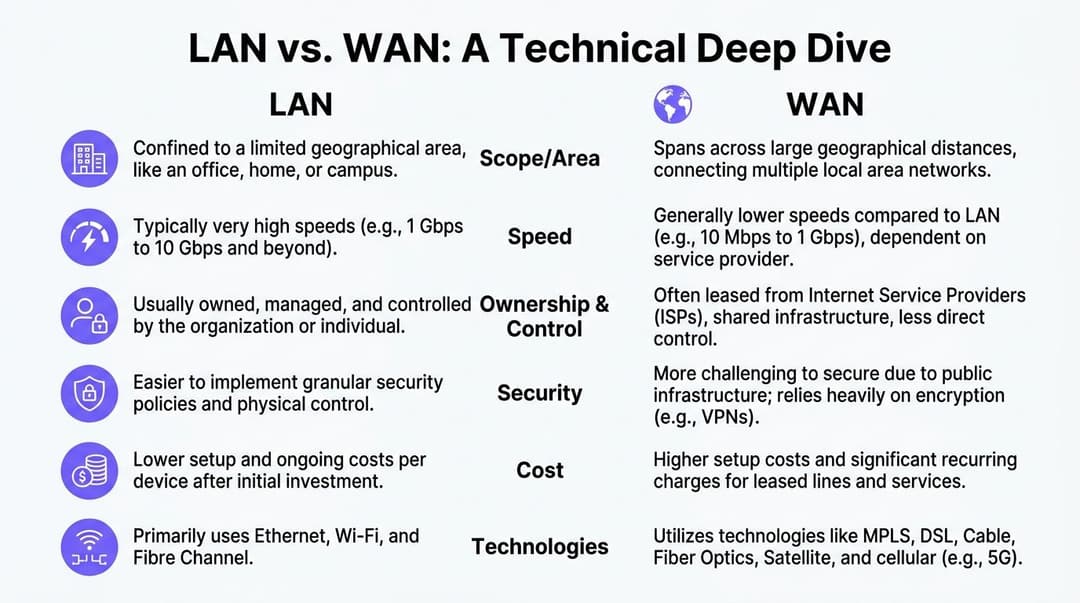
Analyse technique approfondie - Une comparaison côte à côte
Lorsque les équipes recherchent la différence entre LAN et WAN, elles veulent souvent une réponse claire. En pratique, elles ont besoin d'une matrice. La vitesse, la latence, la gigue, le comportement de routage et le contrôle opérationnel comptent tous.
Le comparatif ci-dessous est le moyen le plus rapide de s'orienter.
| Attribut | LAN | WAN |
|---|---|---|
| Rôle principal | Connecte les appareils au sein d'un même site | Connecte des sites distincts et leurs réseaux locaux |
| Contrôle de l'infrastructure | Principalement détenu et exploité par l'organisation | Dépend généralement du transport de l'opérateur ou du FAI |
| Objectif de conception type | Performances locales, segmentation, accès | Routage inter-sites, résilience, cohérence des politiques |
| Modèle de trafic | Trafic est-ouest et accès local à l'intérieur d'un bâtiment | Trafic nord-sud et de site à site sur de longues distances |
| Idéal pour | Hôtels, bureaux, campus, magasins, services hospitaliers, appartements au sein d'une même propriété | Groupes hôteliers, chaînes de vente au détail, établissements de santé distribués, opérations régionales |
Performances et comportement de transport
Dans les environnements d'entreprise au Royaume-Uni, les réseaux LAN atteignent des débits de 10 à 100 Gbps avec une latence inférieure à 1 ms pour le trafic intra-site, tandis que les réseaux WAN s'appuyant sur des lignes louées fournissent souvent 1 à 10 Gbps avec une latence de 20 à 50 ms, et la gigue WAN peut être de 5 à 15 ms contre moins de 1 ms pour un LAN, selon l'analyse de conception de réseau LAN vs WAN de Nile.
Ces chiffres correspondent à ce que les équipes réseau constatent sur le terrain. La commutation locale est rapide car le trafic reste proche de l'utilisateur et évite le routage du fournisseur à travers les régions. Le trafic inter-sites prend plus de temps car les paquets doivent traverser des chemins externes, franchir des limites routées et faire face à des conditions réseau plus larges.
Cette différence a plus d'importance que ce à quoi s'attendent de nombreux acheteurs.
Une recherche PMS hôtelière au sein d'un seul établissement peut sembler instantanée sur un LAN bien conçu. La même transaction, lorsqu'elle dépend de services via un WAN, peut sembler irrégulière si la liaison est encombrée ou si la voix, les analyses et le trafic des invités se disputent le même chemin.
Protocoles et architecture
Un LAN repose fortement sur la commutation de niveau 2 et la conception sans fil locale. Un WAN dépend davantage du routage de niveau 3, de la sélection des chemins, des services de transport et des politiques entre les sites.
Cela influence la manière dont les dysfonctionnements apparaissent :
- Les pannes LAN se manifestent souvent par une mauvaise itinérance, des problèmes de DHCP locaux, une mauvaise configuration des commutateurs, un câblage défectueux ou des AP surchargés.
- Les pannes WAN apparaissent souvent sous la forme d'une lenteur des applications entre les sites, de sessions vocales saccadées, de tâches de synchronisation retardées ou d'un accès cloud intermittent depuis les succursales.
La création de sous-réseaux se situe pile au milieu de tout cela. C'est l'un des outils clés pour contenir les domaines de diffusion, appliquer les limites de politique et rendre une conception locale gérable avant même que le trafic n'atteigne une bordure routée. L'article de Purple offrant un aperçu du masquage de sous-réseau est utile si vous souhaitez obtenir une vision plus concrète de l'impact de ces limites sur la conception.
Modèle de sécurité
Le modèle de sécurité LAN concerne principalement les limites de confiance internes. Le modèle de sécurité WAN concerne le transport sécurisé à travers des environnements que vous ne contrôlez pas entièrement.
Au sein d'un site, les équipes peuvent appliquer une segmentation pour les invités, le personnel, les points de vente, l'IoT et les systèmes de back-office. L'accès physique est plus facile à restreindre. La posture de l'appareil est plus facile à observer. La politique sans fil peut être alignée sur des espaces et des groupes d'utilisateurs spécifiques.
À l'échelle d'un WAN, l'entreprise doit réfléchir plus attentivement au chiffrement, à la confiance des routes, à la propagation des identités, à la résilience des tunnels et à la dérive des règles entre les sites. Un réseau local faible est dangereux. Un modèle de confiance inter-sites faible est pire encore, car il peut propager le risque d'un site à de nombreux autres.
Coût et effort opérationnel
Les dépenses LAN ont tendance à être concentrées au départ. Vous concevez, installez et gérez l'infrastructure locale. Les dépenses WAN sont souvent plus persistantes car les contrats de transport, de support et de fournisseurs se poursuivent mois après mois.
L'effort opérationnel suit le même schéma. Un LAN récompense une bonne conception par sa prévisibilité. Un WAN ne devient jamais simple. Il devient seulement bien géré.
Le test pratique est simple. Si un problème survient, votre équipe peut-elle le résoudre directement, ou a-t-elle besoin d'un ticket opérateur avant que tout changement ne soit possible ?
Cette réponse vous indique s'il s'agit d'un problème lié au réseau LAN ou au réseau WAN.
LAN et WAN dans des scénarios de déploiement concrets
Le choix de l'architecture varie selon le secteur d'activité. Les termes restent les mêmes, mais les points de tension se déplacent.
Campus de santé
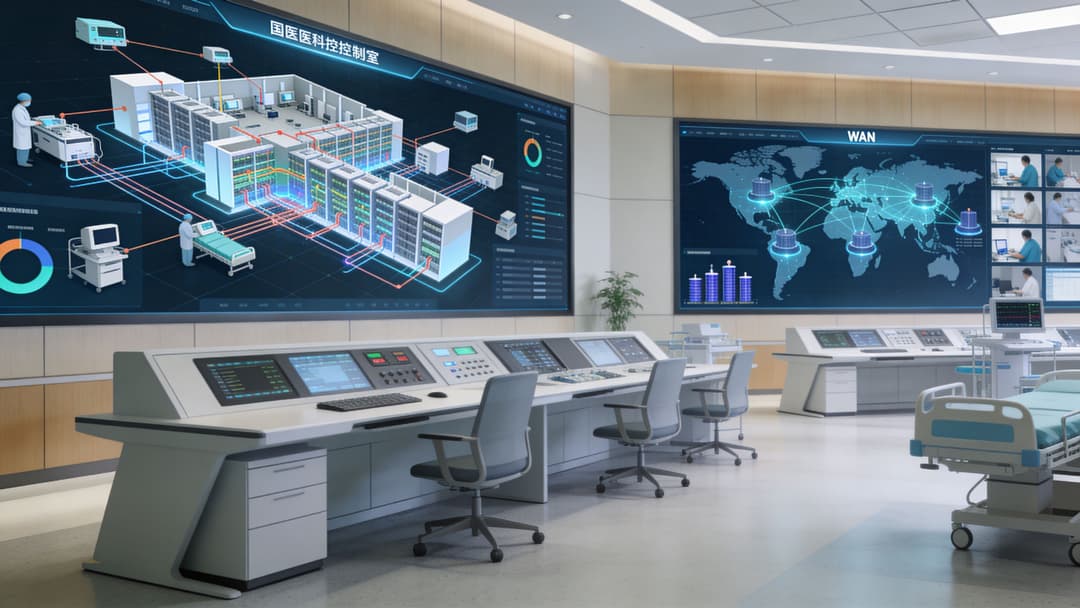
Un grand campus hospitalier dépend d'un LAN discipliné plus que presque tout autre environnement. Les systèmes cliniques, l'imagerie, la surveillance, les postes de travail administratifs, l'accès des invités et les appareils connectés ont tous besoin de performances locales prévisibles.
L'aspect inter-sites est crucial lorsque des groupements relient des cliniques, des bureaux et des installations distantes. C'est là que les contraintes du WAN commencent à affecter l'expérience utilisateur et le risque opérationnel. Selon les conseils du NCSC du Royaume-Uni cités par Purple, les réseaux WAN utilisant l'infrastructure publique des FAI font face à des risques d'interception 30 à 50 % plus élevés que les réseaux LAN, tandis que les réseaux LAN zero-trust peuvent atteindre une perte de paquets inférieure à 0,5 % et les réseaux WAN peuvent connaître une perte de 2 à 5 % en cas de congestion, ce qui est particulièrement pertinent pour les environnements multisites de la santé et de l'hôtellerie dans l'analyse de Purple sur la différence entre LAN et WAN.
Dans le secteur de la santé, cela signifie que la segmentation locale n'est pas facultative. Le trafic clinique, l'accès du personnel, le WiFi invité et les systèmes opérationnels ne peuvent pas tous coexister sur un réseau plat et être considérés comme sécurisés.
Groupes hôteliers
Un seul hôtel relève principalement d'un défi LAN. La couverture, l'authentification, l'accès du personnel, l'accueil des clients et l'isolation des appareils se gèrent tous au niveau de l'établissement.
Une chaîne d'hôtels se transforme rapidement en un défi WAN car la promesse de la marque doit voyager entre les sites. Les clients s'attendent à un standard unique. Les équipes opérationnelles attendent un modèle de politique unique. Les équipes de sécurité attendent une méthode unique pour révoquer, intégrer et auditer les accès.
Le mode de défaillance ici est bien connu. Chaque établissement est construit de manière légèrement différente au fil du temps. Un site met à jour ses SSIDs. Un autre modifie la politique de ses commutateurs. Un troisième gère les appareils du personnel en dehors des normes centrales. L'invité fait face à un manque de cohérence, tandis que l'équipe informatique constate des écarts de configuration.
Réseaux de points de vente
Le secteur du commerce de détail sollicite davantage le réseau WAN que celui de l'hôtellerie.
Chaque boutique a besoin d'un réseau local solide pour les caisses, les appareils du personnel, la signalisation numérique et le WiFi des clients. Mais la principale dépendance de l'entreprise est inter-sites. Les systèmes de stock, les rapports, les prix, les promotions et les données clients doivent circuler entre les succursales et les systèmes centraux sans devenir fragiles.
Si le réseau LAN d'une filiale est sain mais que le chemin WAN est médiocre, les équipes blâment souvent le WiFi de la boutique en premier. C'est une erreur coûteuse car elle envoie les ingénieurs au mauvais niveau de la pile.
Logement multi-locataire
Le secteur résidentiel, le BTR et les logements étudiants présentent un modèle différent. Il existe un LAN de bâtiment, une bordure internet publique et de nombreuses expériences de locataires semi-privées cohabitant au sein du même espace.
Cela change l'objectif de conception. Il ne suffit pas de fournir une couverture. Les opérateurs ont besoin d'une simplicité semblable à celle d'un domicile pour les résidents et d'une isolation claire entre les locataires, le personnel et les opérations du bâtiment. Dans ces environnements, la frontière entre un réseau local et un service d'accès plus large peut rapidement s'estomper si la segmentation est faible.
Dans les bâtiments partagés, la commodité sans isolation devient d'abord un problème de support technique, et très rapidement après, un problème de sécurité.
Le bon modèle de déploiement dépend de l'entreprise. Mais dans tous les cas, une règle prévaut. Un réseau local rapide ne résout pas un réseau inter-sites mal conçu, et un WAN performant ne sauve pas un site mal segmenté.
Unifier votre réseau grâce à une authentification WiFi moderne
La plupart des organisations ne souhaitent pas avoir des expériences réseau distinctes. Elles se retrouvent pourtant avec cette situation parce que leurs réseaux LAN et WAN ont évolué de manière indépendante.
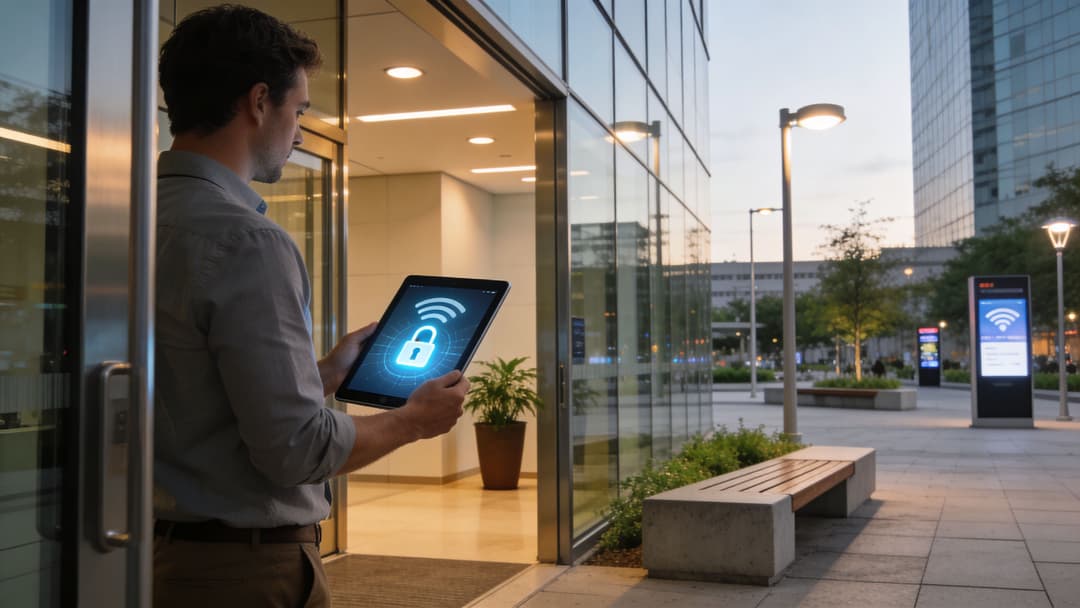
C'est pourquoi l'identité est devenue la passerelle pratique entre l'accès local et les opérations distribuées. Au lieu de lier l'accès à un seul SSID, un seul site ou un seul mot de passe partagé, les plateformes modernes lient l'accès à un utilisateur, un appareil, un certificat ou un enregistrement d'annuaire.
Pourquoi l'authentification constitue désormais le plan de contrôle
L'ancien modèle était simple mais fragile. Placer les utilisateurs sur un Captive Portal. Donner au personnel un identifiant partagé. Espérer que chaque site configure la politique de la même manière. Gérer les exceptions manuellement.
Cette approche montre ses limites à grande échelle.
L'accès basé sur l'identité modifie le modèle opérationnel. L'authentification du personnel peut suivre un annuaire cloud tel que Microsoft Entra ID, Okta ou Google Workspace. L'accès invité peut s'appuyer sur une intégration sans mot de passe et des flux basés sur des certificats plutôt que sur des interactions répétées avec le Captive Portal. Les appareils existants peuvent toujours être gérés via des méthodes conçues pour le matériel contraint. L'utilisateur n'a plus à se soucier de savoir s'il se trouve sur un réseau local dans un établissement ou sur un autre réseau local ailleurs. La politique d'accès suit l'identité au lieu de rester bloquée dans la configuration d'un seul site.
Ce que cela donne en pratique
Un modèle multi-site solide intègre les éléments suivants :
- Pour les invités. Connexion sans mot de passe, connectivité chiffrée dès le premier paquet, et des visites de retour qui ne ressemblent pas à une nouvelle inscription à chaque fois.
- Pour le personnel. Un accès lié à l'annuaire qui peut être provisionné et révoqué de manière centralisée, sans prolifération de mots de passe locaux.
- Pour les opérations. Une segmentation claire entre le trafic des invités, des employés et le trafic opérationnel, même lorsque le parc de matériel comprend plusieurs fournisseurs.
- Pour les administrateurs. Une interface unique pour la logique d'accès et d'authentification, plutôt qu'un ensemble d'exceptions spécifiques à chaque site.
Une option dans cette catégorie est Purple, qui fournit une authentification WiFi basée sur l'identité avec la prise en charge de OpenRoaming et Passpoint, s'intègre à des plateformes telles que Entra ID et Okta, et fonctionne sur les environnements de différents fournisseurs, notamment Meraki, Aruba, Ruckus, Mist et UniFi.
L'argument du retour sur investissement est plus fort que par le passé
Il ne s'agit pas seulement d'un débat autour de la sécurité.
Les entreprises britanniques ont signalé une hausse de 15 % des coûts de bande passante WAN en 2025, et une étude a révélé que l'utilisation d'intégrations CRM pour exploiter les données WiFi a augmenté la fréquentation du commerce de détail au Royaume-Uni de 18 % grâce au marketing personnalisé, selon le résumé de CBT Nuggets sur les technologies WAN et les tendances associées des entreprises britanniques.
Cela est important car les responsables réseau doivent désormais justifier les dépenses au-delà du seul temps de fonctionnement. Un meilleur modèle d'accès peut réduire les frictions de support, améliorer la cohérence entre les sites et aider à transformer les interactions WiFi de premier niveau en quelque chose d'utile sur le plan commercial.
Les investissements réseau les plus solides accomplissent désormais deux tâches à la fois. Ils réduisent la charge opérationnelle et créent des données plus propres pour l'entreprise.
C'est le changement que beaucoup d'équipes ont manqué. Le LAN et le WAN restent des infrastructures. Mais l'authentification, les analyses et les politiques sont les domaines où se situe désormais une grande partie de la valeur commerciale.
Diagnostiquer les goulots d'étranglement LAN vs WAN avec NetForge
Lors du dépannage des ralentissements réseau, il est essentiel de déterminer si la latence se produit au sein du réseau local (LAN) ou sur la liaison du réseau étendu (WAN) pour garantir une résolution rapide.
NetForge by Purple simplifie l'analyse LAN et WAN. Il intègre un suivi continu du chemin saut par saut, la découverte de commutateurs de couche 2, des calculateurs d'IP et de sous-réseaux, ainsi qu'un terminal chiffré au sein d'un outil de bureau unique et gratuit. Les techniciens peuvent identifier instantanément quel saut spécifique - qu'il s'agisse d'un commutateur LAN interne ou d'une passerelle WAN en amont - génère des pertes de paquets ou des pics de latence. NetForge fonctionne entièrement hors ligne sur Windows et macOS sans qu'aucun compte ne soit requis.
Téléchargez gratuitement le multi-outil réseau NetForge pour les équipes informatiques.
Bonnes pratiques réseau et dépannage pour 2026
Le meilleur modèle opérationnel pour 2026 n'est pas de traiter le LAN et le WAN comme des disciplines distinctes avec des propriétaires et des priorités séparés. C'est ainsi que se créent les zones d'ombre.
Le réseau JANET du Royaume-Uni est un excellent rappel historique. Il est passé d'une interconnexion LAN en 1984 à un WAN complet en 1991. Ce modèle reflète ce que de nombreuses entreprises vivent encore aujourd'hui. Elles commencent par des sites locaux solides, puis découvrent que les liaisons entre eux nécessitent tout autant d'attention en matière de conception. Comme le souligne l'article de GeeksforGeeks sur la différence entre LAN et WAN, 92 % des entreprises britanniques utilisent des réseaux LAN pour le WiFi mais seulement 45 % disposent de réseaux WAN optimisés.
Diagnostiquer d'abord la bonne couche
Lorsqu'une application fonctionne mal au sein d'une filiale, commencez par vous demander où se situe le ralentissement.
- Vérifiez les conditions locales. Recherchez une saturation des AP, un conflit de liaison montante de switch, des erreurs de segmentation ou une mauvaise itinérance (roaming) au sein de l'établissement.
- Testez le chemin inter-sites. Si l'expérience locale est bonne mais que les applications cloud ou centrales sont lentes, le WAN est probablement le goulot d'étranglement.
- Examinez la cohérence des politiques. De nombreux problèmes « aléatoires » proviennent d'un site qui s'écarte de la configuration standard.
- Inspectez les dépendances d'authentification. Si les utilisateurs peuvent s'associer mais n'obtiennent pas l'accès approprié, les flux d'identité peuvent être en échec plutôt que le transport lui-même.
Bâtir pour la résilience opérationnelle
Quelques pratiques continuent de porter leurs fruits :
- Segmentez de manière agressive. Séparez les systèmes invités, le personnel, l'IoT et les systèmes opérationnels au niveau du LAN.
- Utilisez le SD-WAN lorsque cela est pertinent. La sélection dynamique du chemin peut améliorer la résilience et atténuer l'impact des problèmes de fournisseur.
- Centralisez l'identité. L'accès doit suivre l'utilisateur et l'appareil, et non dépendre d'un secret local statique.
- Faites de la maintenance une discipline. Des routines structurées telles que la maintenance informatique préventive aident à détecter les dérives, le matériel vieillissant et les problèmes de configuration avant qu'ils ne provoquent des pannes.
- Documentez les exceptions. Les modifications locales non enregistrées constituent l'une des principales raisons pour lesquelles les réseaux multi-sites deviennent plus difficiles à gérer au fil du temps.
Ce qui fonctionne et ce qui ne fonctionne pas
Ce qui fonctionne est ennuyeux au meilleur sens du terme. Des architectures standardisées. Une segmentation claire. Une identité centralisée. Un contrôle des changements mesuré. Une bonne observabilité.
Ce qui ne fonctionne pas, c'est de s'appuyer sur des mots de passe partagés, de supposer que chaque problème de performance vient du "WiFi", ou de laisser chaque site évoluer de son côté parce que cela semblait plus rapide sur le moment.
Une entreprise ne peut tolérer un réseau désordonné sur un site que pendant un certain temps. Sur plusieurs sites, le coût se traduit par des efforts d'assistance, une exposition aux risques de sécurité et une expérience client incohérente.
Si votre équipe cherche à unifier l'accès des invités, l'authentification du personnel et l'application des politiques sur plusieurs sites, Purple mérite d'être évalué dans le cadre de cette architecture. Il se superpose à l'infrastructure réseau existante et aide à standardiser un accès sécurisé et sans mot de passe dans les environnements distribués, sans imposer une approche de remplacement complet.