

What Is RADIUS? How RADIUS Servers Secure WiFi Networks
This authoritative technical reference guide explains how RADIUS (Remote Authentication Dial-In User Service) underpins enterprise WiFi security through the IEEE 802.1X framework, covering architecture, deployment, and compliance. Designed for IT managers, network architects, and venue operations directors, it provides actionable guidance on moving from shared Pre-Shared Keys to per-user authentication with dynamic policy enforcement. The guide also maps RADIUS integration points to Purple's guest WiFi and analytics platform, with concrete case studies from hospitality and retail environments.
🎧 Listen to this Guide
View Transcript

Executive Summary
For enterprise network architects and IT directors, securing wireless access across distributed venues requires more than a shared password. As device density scales across hospitality, retail, and public sectors, the limitations of Pre-Shared Keys (PSK) and basic captive portals become critical vulnerabilities. Remote Authentication Dial-In User Service (RADIUS) provides the foundational architecture for robust, scalable WiFi security.
This technical reference guide details how RADIUS operates within the 802.1X framework to deliver per-user authentication, dynamic policy enforcement, and comprehensive audit trails. By centralising identity management, RADIUS enables zero-trust network access, mitigating the risks of credential sharing and unauthorised access while ensuring compliance with stringent data protection standards. We explore the core components, deployment methodologies, and how integrating RADIUS with platforms like Purple's Guest WiFi infrastructure streamlines operations while enhancing security posture.
Technical Deep-Dive: RADIUS and 802.1X Architecture
RADIUS is an application-layer protocol operating over UDP (traditionally port 1812 for authentication and 1813 for accounting) that provides centralised Authentication, Authorisation, and Accounting (AAA) management for users connecting to a network service.
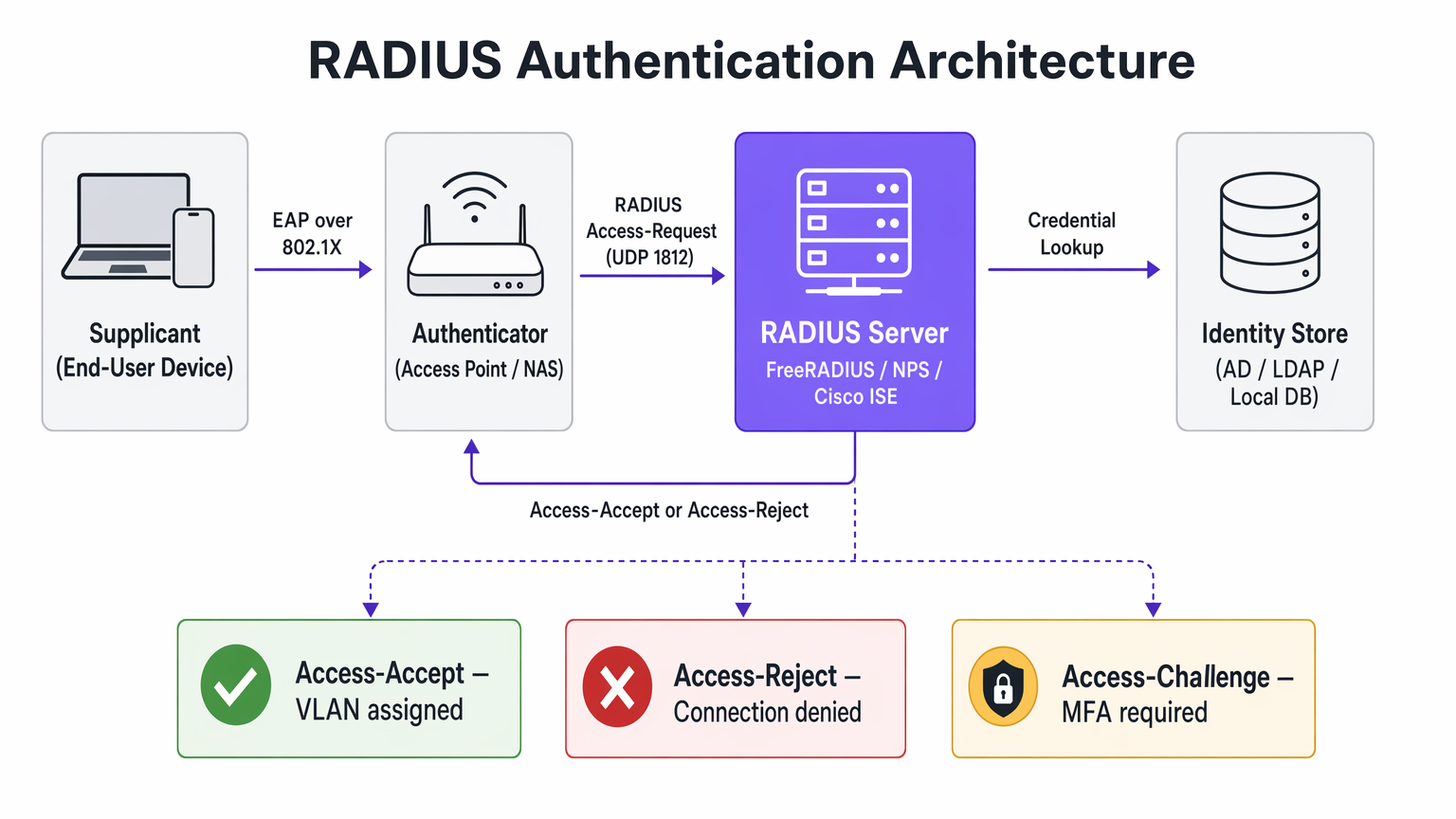
When securing enterprise WiFi, RADIUS acts as the authentication server within the IEEE 802.1X framework. This architecture consists of three primary components:
The Supplicant is the end-user device — laptop, smartphone, or IoT device — requesting network access. The Authenticator is the Network Access Server (NAS), typically the wireless access point or switch, which blocks all traffic until authentication is successful. The Authentication Server is the RADIUS server itself, which validates credentials against an identity store such as Active Directory, LDAP, or a cloud identity provider.
The Authentication Flow
When a device associates with an 802.1X-enabled SSID, the access point restricts all traffic except Extensible Authentication Protocol (EAP) messages. The Authenticator sends an EAP-Request/Identity packet to the Supplicant. The Supplicant responds with an EAP-Response/Identity, which the Authenticator encapsulates into a RADIUS Access-Request packet and forwards to the RADIUS server. The RADIUS server negotiates an EAP method — such as EAP-TLS or PEAP-MSCHAPv2 — with the Supplicant to securely exchange credentials. Upon successful validation against the identity store, the RADIUS server returns a RADIUS Access-Accept packet. This packet often contains Vendor-Specific Attributes (VSAs) that instruct the Authenticator to apply specific policies, such as assigning the user to a particular VLAN or applying bandwidth limits.
EAP Methods and Security Posture
The security of a RADIUS deployment relies heavily on the chosen EAP method. EAP-TLS (Transport Layer Security) is the gold standard for enterprise security. It requires both server and client certificates, eliminating the reliance on passwords and mitigating credential theft. However, it demands a robust Public Key Infrastructure (PKI) and Mobile Device Management (MDM) for certificate provisioning. PEAP (Protected EAP) creates an encrypted TLS tunnel between the Supplicant and the RADIUS server, within which inner authentication — typically MSCHAPv2 using a username and password — occurs. While easier to deploy than EAP-TLS, it is vulnerable to credential harvesting if users bypass server certificate validation warnings.
The Accounting Function
Beyond authentication and authorisation, RADIUS provides detailed accounting records. Every session start, stop, and interim update is logged — capturing the user identity, device MAC address, session duration, and data transferred. This audit trail is a compliance requirement under PCI DSS for Retail environments and supports GDPR access control obligations. Integrating this data with WiFi Analytics platforms extends its value into operational intelligence.
Implementation Guide: Deploying RADIUS for Enterprise WiFi
Deploying RADIUS requires careful planning to ensure high availability, low latency, and a seamless user experience.
Architecture and Sizing
RADIUS is a critical path for network access. Deploy redundant RADIUS servers across geographically diverse data centres or availability zones. Configure Authenticators with primary and secondary RADIUS server IP addresses to enable automatic failover. RADIUS authentication is sensitive to latency — high latency can cause EAP timeouts, resulting in failed connections. Position RADIUS servers close to the network edge where feasible, or utilise cloud RADIUS solutions with global points of presence.
Integration with Identity Stores
The RADIUS server must communicate with your source of truth for user identity. For on-premises deployments, integration with Microsoft Active Directory via Network Policy Server (NPS) or FreeRADIUS with LDAP bindings is standard. Modern deployments increasingly leverage cloud identity providers (IdPs) like Azure AD, Okta, or Google Workspace. This often requires deploying a RADIUS proxy or utilising cloud RADIUS services that natively bridge the RADIUS protocol to SAML and OIDC APIs.
Policy Enforcement and Segmentation
Leverage RADIUS attributes to dynamically assign network policies based on user identity or group membership. Rather than broadcasting multiple SSIDs for diffesegment user groups — Staff, Management, IoT — broadcast a single 802.1X SSID. The RADIUS server returns the Tunnel-Private-Group-ID attribute to assign the user to the appropriate VLAN dynamically. Apply Access Control Lists (ACLs) based on RADIUS responses to restrict access to sensitive internal resources, implementing Role-Based Access Control (RBAC) at the network layer.

Best Practices and Compliance
Implementing RADIUS is a key component of aligning with industry standards and regulatory frameworks.
Securing the RADIUS Infrastructure
RADIUS uses a shared secret to encrypt communication between the Authenticator and the RADIUS server. Use strong, randomly generated shared secrets — a minimum of 32 characters — and rotate them periodically. Place RADIUS servers in a secure, isolated management VLAN. Restrict access using strict firewall rules, allowing only UDP 1812 and 1813 from known Authenticators. If using EAP-TLS or PEAP, ensure the RADIUS server certificate is issued by a Certificate Authority (CA) trusted by client devices, and monitor certificate expiration dates rigorously.
Compliance Considerations
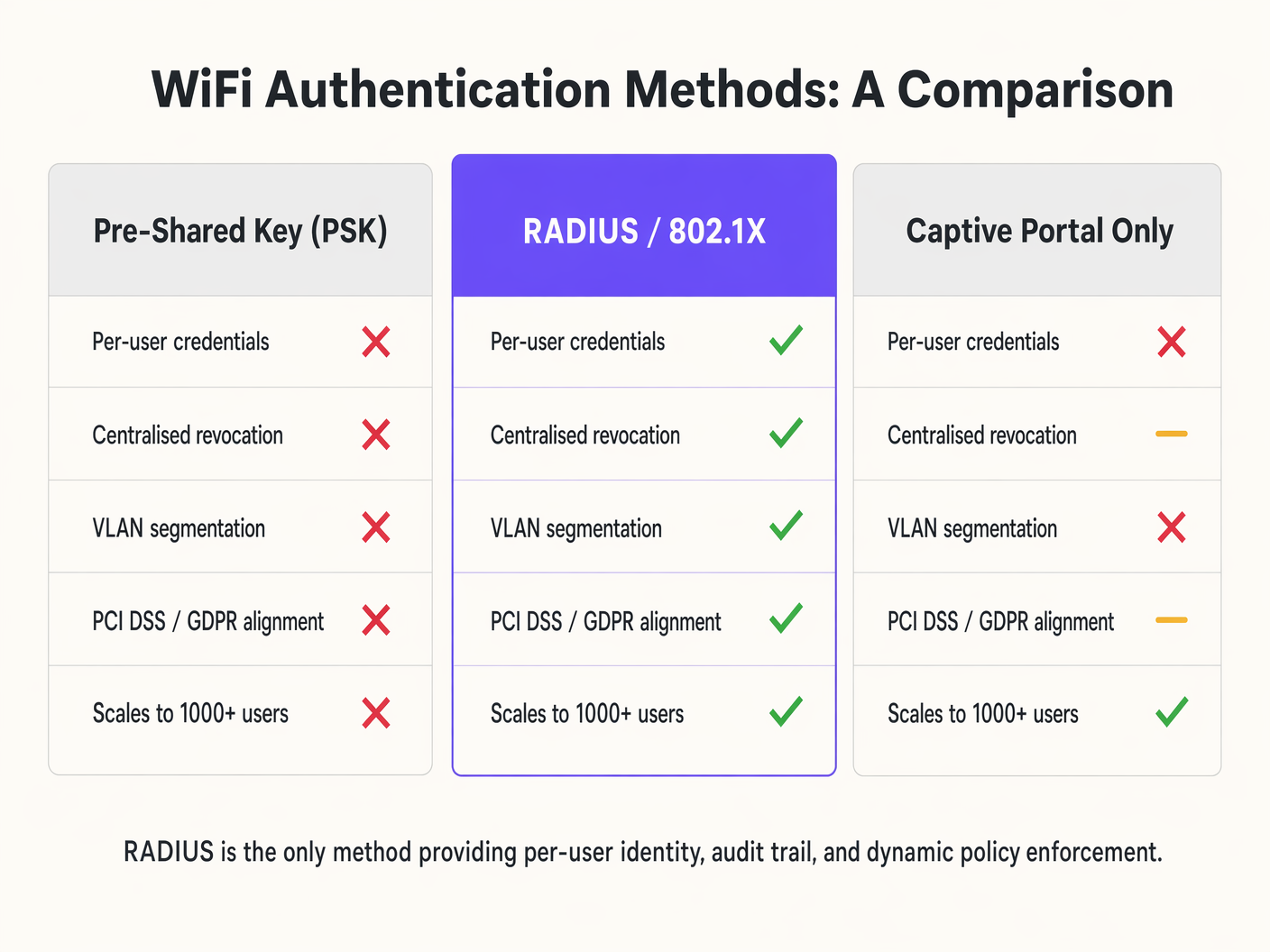
For Retail environments handling payment card data, RADIUS satisfies PCI DSS requirements for unique user identification and strong cryptography for wireless networks. For Healthcare environments, RADIUS provides the access control and audit trail required under data protection frameworks. By providing individual accountability, RADIUS supports GDPR requirements for data security and access control. Integrating RADIUS with a WiFi Analytics platform allows for compliant data collection and retention policies. Understanding the interplay between RADIUS and wireless encryption standards is also critical — our guide WPA, WPA2 and WPA3: What's the Difference and Which Should You Use? covers the encryption layer in detail.
Troubleshooting & Risk Mitigation
When RADIUS authentication fails, the impact is immediate: users cannot connect. A systematic troubleshooting approach is essential.
Shared Secret Mismatch is the most common configuration error. If the shared secret on the AP does not match the server, the RADIUS server will silently drop the Access-Request packets. The symptom is a client connection timeout with no corresponding logs on the RADIUS server. EAP Timeouts are caused by network latency between the AP and the RADIUS server, or an overloaded RADIUS server. The symptom is clients being repeatedly prompted for credentials or failing to connect during peak times. Certificate Trust Issues occur when the client device does not trust the CA that signed the RADIUS server certificate, causing the EAP negotiation to terminate. The symptom is a certificate warning on the client or a silent connection failure. Identity Store Connectivity failures occur when the RADIUS server cannot reach Active Directory or LDAP to validate credentials, resulting in authentication failures despite correct credentials.
To mitigate these risks, aggregate RADIUS logs into a SIEM or central logging platform for real-time monitoring and alerting. Deploy synthetic probes that continuously simulate 802.1X authentications to detect latency or availability issues before they impact users. For organisations with distributed estates, understanding how RADIUS fits into the broader WAN architecture is valuable — The Core SD WAN Benefits for Modern Businesses provides relevant context on network design principles.
ROI & Business Impact
Transitioning to a RADIUS-backed 802.1X architecture requires investment in infrastructure and configuration, but the return is significant for enterprise environments.
Operational Efficiency
RADIUS eliminates the need to manually update and distribute Pre-Shared Keys when an employee leaves or a key is compromised. Integration with MDM platforms allows for zero-touch provisioning of certificates or profiles, simplifying device onboarding. For Hospitality operators managing hundreds of staff devices across multiple properties, this operational simplification translates directly to reduced IT overheads. For Transport hubs managing thousands of concurrent connections, the scalability of RADIUS is non-negotiable.
Enhanced Security and Analytics
Granular access control and dynamic VLAN assignment reduce the blast radius of a potential breach by limiting lateral movement. RADIUS accounting data provides rich insights into network utilisation and user behaviour. When integrated with Purple's platform, this data enhances analytics capabilities, driving better operational decisions across venue types. The combination of secure authentication and actionable analytics represents the full value proposition of enterprise WiFi infrastructure.
Key Terms & Definitions
RADIUS (Remote Authentication Dial-In User Service)
A networking protocol providing centralised Authentication, Authorization, and Accounting (AAA) management for users connecting to a network service. Operates over UDP ports 1812 (authentication) and 1813 (accounting).
The core infrastructure required to move from shared passwords to individual user identities on an enterprise WiFi network.
802.1X
An IEEE standard for port-based Network Access Control (PNAC), providing an authentication mechanism to devices wishing to attach to a LAN or WLAN. It defines the roles of Supplicant, Authenticator, and Authentication Server.
The framework that utilises RADIUS to secure enterprise wireless networks. Any enterprise WiFi deployment targeting WPA2-Enterprise or WPA3-Enterprise must implement 802.1X.
Supplicant
The client device — laptop, smartphone, or IoT device — that wishes to attach to the network and must provide credentials to the Authenticator.
The endpoint that requires configuration, often via MDM, to support the chosen EAP method and trust the RADIUS server's certificate.
Authenticator
The network device — typically a wireless Access Point or an 802.1X-capable switch — that facilitates the authentication process by relaying EAP messages between the Supplicant and the RADIUS server.
The infrastructure component that enforces the block or allow decision based on the RADIUS server's response. It is the 'bouncer' of the network.
EAP (Extensible Authentication Protocol)
An authentication framework that defines a set of negotiable authentication methods (EAP methods) used to carry credentials securely between the Supplicant and the Authentication Server.
The protocol that carries the actual authentication credentials — certificates, passwords — securely over the air within the 802.1X framework.
EAP-TLS (EAP Transport Layer Security)
An EAP method that uses mutual TLS authentication, requiring both the RADIUS server and the client device to present valid digital certificates. It eliminates password-based authentication entirely.
The most secure method for wireless authentication. Recommended for all corporate-managed devices where an MDM platform can provision client certificates.
VSA (Vendor-Specific Attribute)
Custom attributes within a RADIUS packet that allow network vendors to support proprietary or extended features beyond the standard RADIUS attribute set defined in RFC 2865.
Used extensively for advanced policy enforcement, including dynamic VLAN assignment (Tunnel-Private-Group-ID), bandwidth limits, and applying specific firewall roles to authenticated sessions.
Shared Secret
A text string known only to the Authenticator and the RADIUS server, used to verify the integrity of RADIUS packets and encrypt the password field within Access-Request packets.
A critical security parameter. A mismatch between the AP and the server causes silent packet drops and is the most common cause of authentication failure in new deployments.
NAS (Network Access Server)
The network device — typically an Access Point or switch — that acts as the Authenticator in the 802.1X framework, enforcing access control based on RADIUS decisions.
Often used interchangeably with 'Authenticator' in RADIUS documentation and vendor configuration guides.
PEAP (Protected EAP)
An EAP method that establishes an encrypted TLS tunnel between the Supplicant and the RADIUS server, within which a simpler inner authentication method (typically MSCHAPv2) is used to validate username and password credentials.
A pragmatic choice for BYOD environments where deploying client certificates is impractical. Requires strict enforcement of server certificate validation on client devices to prevent credential harvesting attacks.
Case Studies
A 200-room hotel needs to segment its wireless network. Currently, they use a single PSK for staff and a captive portal for guests. Staff devices — tablets for housekeeping, laptops for management — are intermingled on the same subnet. How should they redesign this using RADIUS?
Deploy a cloud-hosted RADIUS server integrated with the hotel's Azure AD. Configure the wireless access points to use 802.1X authentication pointing to the RADIUS server. In Azure AD, create security groups for 'Housekeeping' and 'Management'. On the RADIUS server, configure network policies: if the authenticating user is a member of the 'Housekeeping' group, return Access-Accept with the RADIUS attribute Tunnel-Private-Group-ID set to VLAN 20. If the user is in 'Management', return VLAN 30. Deploy MDM profiles via Intune to staff devices with EAP-TLS certificates for seamless, password-free authentication. Guest access continues via a separate SSID using Purple's captive portal for data capture and terms acceptance.
A retail chain with 80 stores is experiencing frequent WiFi connection drops for their handheld inventory scanners during peak holiday shopping hours. The scanners use PEAP-MSCHAPv2 against a central RADIUS server located in a regional data centre connected via a managed MPLS WAN.
Analyse RADIUS server logs to confirm EAP timeouts correlating with peak traffic periods. Measure the round-trip latency between the store APs and the RADIUS server — if this exceeds 150ms, EAP timeouts become likely. Implement local survivability at the branch level by deploying a lightweight RADIUS proxy or edge appliance at each store that caches session credentials for a defined period. Alternatively, migrate to a cloud RADIUS service with regional points of presence to reduce WAN dependency. Adjust the EAP timeout and retry parameters on the wireless controllers to accommodate the measured latency. For the longer term, evaluate migrating scanner authentication to MAC Authentication Bypass (MAB) with strict VLAN assignment, reducing the authentication overhead for non-interactive IoT devices.
Scenario Analysis
Q1. Your organisation is migrating from a single PSK to 802.1X. You have a mix of corporate-owned laptops managed via Intune and employee BYOD smartphones. What EAP methods should you deploy for each device category, and what are the key configuration requirements for each?
💡 Hint:Consider the certificate provisioning capabilities available for managed versus unmanaged devices, and the security trade-offs of password-based versus certificate-based authentication.
Show Recommended Approach
Deploy EAP-TLS for corporate-owned laptops, utilising Intune to silently push the required client certificates via a SCEP or PKCS profile. This eliminates password-based authentication and provides the strongest security posture. For BYOD smartphones where client certificate management is impractical, deploy PEAP-MSCHAPv2, allowing users to authenticate with their corporate username and password within a protected TLS tunnel. Critically, configure the RADIUS server to present a certificate from a well-known CA, and enforce server certificate validation on client devices via a WiFi configuration profile to prevent rogue AP attacks. Consider separating BYOD devices onto a restricted VLAN with limited access to internal resources.
Q2. After deploying a new RADIUS server for a stadium's staff WiFi, clients are failing to connect. The AP logs show 'RADIUS Server Timeout'. Network team confirms UDP 1812 is open between the APs and the RADIUS server. What is the most likely root cause, and what is your diagnostic process?
💡 Hint:The RADIUS server will silently discard packets if a specific security parameter does not match, producing a timeout on the AP side with no corresponding log entry on the server.
Show Recommended Approach
The most likely cause is a Shared Secret mismatch. If the shared secret configured on the Access Point does not exactly match the shared secret configured for that AP's IP address on the RADIUS server, the server will drop the Access-Request packets without generating an authentication failure log entry. The diagnostic process is: (1) Check the RADIUS server logs — if there are zero entries for the AP's IP address, the server is discarding packets, pointing to a shared secret mismatch. (2) Verify the shared secret on both the AP and the RADIUS server client configuration, checking for trailing spaces or character encoding issues. (3) If shared secrets match, use a packet capture on the RADIUS server's network interface to confirm packets are arriving. (4) If packets arrive but are dropped, verify the AP's source IP address matches the client IP configured on the RADIUS server.
Q3. A public sector venue wants to offer seamless, secure WiFi to visitors from partner government departments, allowing them to authenticate using their home organisation's credentials without requiring a separate guest account. How does RADIUS enable this, and what are the key security considerations?
💡 Hint:Think about how RADIUS requests can be forwarded between different organisations based on the identity realm, and what trust relationships must be established.
Show Recommended Approach
This is achieved using a RADIUS Proxy architecture, similar to the eduroam or govroam models. The local RADIUS server is configured as a proxy. When it receives an Access-Request, it inspects the realm — the domain portion of the username, such as user@department.gov.uk . If the realm belongs to a partner organisation, the local server forwards the Access-Request to the partner's RADIUS server over a pre-established, encrypted RADIUS proxy connection. The partner server authenticates the user against its own identity store and returns the result to the local server, which relays it to the AP. Key security considerations include: establishing formal trust agreements with each partner organisation; using RadSec (RADIUS over TLS) rather than standard UDP for proxy connections to encrypt traffic in transit; validating that the partner RADIUS server's certificate is trusted before accepting proxied responses; and defining clear policies for what network access level to grant to visiting users from each partner realm.




