
WiFi Roaming समस्याओं के निदान के लिए एक चरण-दर-चरण मार्गदर्शिका
यह व्यापक मार्गदर्शिका उद्यम IT लीडरों और नेटवर्क आर्किटेक्ट्स को WiFi roaming समस्याओं के निदान और समाधान के लिए एक आधिकारिक, चरण-दर-चरण कार्यप्रणाली प्रदान करती है। IEEE 802.11k/v/r मानकों के तकनीकी गहन अध्ययन को वास्तविक दुनिया के केस स्टडीज और पैकेट-स्तरीय विश्लेषण के साथ जोड़कर, यह संदर्भ टीमों को 'sticky client' समस्या को समाप्त करने और निर्बाध मोबाइल कनेक्टिविटी प्रदान करने के लिए सक्षम बनाता है। इसमें RF साइट सर्वेक्षण और नियंत्रक कॉन्फ़िगरेशन ऑडिट से लेकर ओवर-द-एयर पैकेट कैप्चर विश्लेषण और समाधान के बाद के सत्यापन तक का पूरा नैदानिक वर्कफ़्लो शामिल है।
इस गाइड को सुनें
पॉडकास्ट ट्रांसक्रिप्ट देखें
हमारी मुख्य श्रृंखला का हिस्सा: WiFi RF Engineering Guide →
WiFi roaming & AP handoff diagnostic tool
Troubleshoot sticky clients, handoff VoIP packet drops, 802.1X re-authentication delays, and AP oscillation across enterprise wireless architectures.
Sticky Client Syndrome (Lack of 802.11v BSS Transition / Power Asymmetry)
Severity: HighThe client stays associated to an AP at -78 dBm or lower despite standing adjacent to a stronger AP (-52 dBm). Often caused by missing 802.11v BSS transition management, excessive 2.4 GHz transmit power masking 5 GHz advantages, or disabled neighbor reports (802.11k).
Technical root cause factors:
- Client driver roaming algorithm triggers only when signal drops below device threshold (e.g., iOS roams at -70 dBm, macOS at -75 dBm).
- Without 802.11k neighbor reports, client must perform full active/passive scanning across all channels, delaying handoff.
- Equal Tx power on 2.4 GHz and 5 GHz creates cell overlap asymmetry: 2.4 GHz propagates further, trapping clients on congested lower bands.
Actionable remediation steps:
- Enable 802.11k (Neighbor Reports) and 802.11v (BSS Transition Management) on the target RF profile.
- Reduce 2.4 GHz transmit power by 6 to 9 dBm relative to 5 GHz (e.g., 2.4 GHz @ 11 dBm, 5 GHz @ 17 dBm).
- Configure minimum RSSI / Disassociate Low RSSI clients threshold to -75 dBm or -78 dBm to force de-authentication when clients cling.
- Ensure AP cell edge overlap is calibrated to 15-20% at -67 dBm for high-density voice and enterprise environments.
# Cisco Meraki Dashboard:
Wireless > Configure > Radio Settings > RF Profiles > Enable 802.11k & 802.11v

# Aruba Central / CLI:
wlan ssid-profile <SSID>
  dot11k
  dot11v
  advertise-ap-name
  min-rssi -75
Need an enterprise RF site survey & roaming audit?
Purple provides cloud-managed captive portals, 802.1X identity-based networking, and RF location analytics for thousands of high-density venues worldwide.
कार्यकारी सारांश (Executive Summary)
आधुनिक एंटरप्राइज वेन्यू में - चाहे वह लग्जरी होटल हो, मल्टी-फ्लोर रिटेल फ्लैगशिप हो, खचाखच भरा स्टेडियम हो, या फैला हुआ कॉर्पोरेट कैंपस हो - वायरलेस कनेक्टिविटी अब एक स्थिर सुविधा नहीं बल्कि एक गतिशील परिचालन आधारशिला है। जैसे-जैसे उपयोगकर्ता, कर्मचारी और IoT डिवाइस इन भौतिक स्थानों में आगे बढ़ते हैं, उनके डिवाइस को एक एक्सेस पॉइंट (AP) से दूसरे एक्सेस पॉइंट पर निर्बाध रूप से स्विच होना चाहिए। जब वह ट्रांजिशन विफल या धीमा हो जाता है, तो इसके परिणाम तत्काल और महंगे होते हैं: ड्रॉप हुई VoIP कॉल, फ्रोजन वीडियो कॉन्फ्रेंस, अटके हुए मोबाइल पॉइंट-ऑफ-सेल (mPOS) ट्रांजैक्शन, और खराब यूजर एक्सपीरियंस जो सीधे तौर पर ब्रांड की प्रतिष्ठा और वेन्यू के ROI को नुकसान पहुंचाता है।
यह तकनीकी संदर्भ गाइड नेटवर्क आर्किटेक्ट्स, CTO और IT प्रबंधकों को WiFi रोमिंग विफलताओं की पहचान करने, उन्हें अलग करने और हल करने के लिए एक सटीक, चरण-दर-चरण नैदानिक ढांचा (diagnostic framework) प्रदान करती है। हम सामान्य समस्या निवारण सलाह से आगे बढ़कर IEEE 802.11k, 802.11v, और 802.11r संशोधनों का गहन आर्किटेक्चरल विश्लेषण प्रदान करते हैं। इन प्रोटोकॉल के पैकेट-स्तरीय मैकेनिक्स को समझकर और उन्नत डायग्नोस्टिक टूलिंग को तैनात करके - जिसमें मल्टी-चैनल ओवर-द-एयर (OTA) पैकेट कैप्चर और क्लाइंट-साइड लॉगिंग शामिल है - IT टीमें व्यवस्थित रूप से कुख्यात "sticky client" समस्या को हल कर सकती हैं।
इसके अतिरिक्त, यह गाइड फास्ट रोमिंग और केंद्रीकृत सत्र प्रबंधन (centralised session management) के बीच महत्वपूर्ण एकीकरण की खोज करती है, जिससे यह स्पष्ट होता है कि कैसे Purple के Guest WiFi और WiFi Analytics जैसे प्लेटफॉर्म यह सुनिश्चित करते हैं कि बिना बार-बार Captive Portal लॉगिन के हजारों APs में गेस्ट ऑथेंटिकेशन सेशन बने रहें। Hospitality और Retail क्षेत्रों के वास्तविक दुनिया के केस स्टडीज के माध्यम से, यह गाइड एंटरप्राइज IT टीमों को वह व्यावहारिक रणनीतियां देती है जिनकी उन्हें लचीला, उच्च-प्रदर्शन वायरलेस इन्फ्रास्ट्रक्चर तैनात करने की आवश्यकता है।
तकनीकी गहन विश्लेषण: WiFi रोमिंग के मैकेनिक्स
रोमिंग विफलताओं का निदान करने के लिए, आपको सबसे पहले यह समझना होगा कि रोमिंग मूल रूप से एक क्लाइंट-साइड निर्णय है। हालांकि इन्फ्रास्ट्रक्चर इसमें सहायता कर सकता है, लेकिन क्लाइंट डिवाइस ही यह तय करता है कि कब स्कैन करना है, किस टारगेट AP को चुनना है, और कब हैंडऑफ शुरू करना है।
रोमिंग के तीन चरण (The Three Phases of Roaming)
प्रत्येक रोमिंग इवेंट में तीन क्रमिक चरण होते हैं। पहला चरण स्कैनिंग (खोज) है: क्लाइंट डिवाइस को पता चलता है कि उसका वर्तमान कनेक्शन खराब हो रहा है (आमतौर पर RSSI थ्रेशोल्ड के आधार पर) और वह उम्मीदवार APs को खोजने के लिए या तो एक्टिव स्कैन (चैनलों पर प्रोब रिक्वेस्ट भेजना) या पैसिव स्कैन (बीकन सुनना) करता है। दूसरा चरण AP चयन (निर्णय) है: क्लाइंट सिग्नल की ताकत (RSSI), सिग्नल-टू-नॉइज़ अनुपात (SNR), चैनल लोड और समर्थित क्षमताओं के आधार पर उम्मीदवारों का मूल्यांकन करता है, और सर्वोत्तम लक्ष्य का चयन करता है। तीसरा चरण हैंडऑफ (निष्पादन) है: क्लाइंट अपने वर्तमान AP (BSSID) से डिस्कनेक्ट हो जाता है और नए के साथ जुड़ जाता है, जिसमें प्रमाणीकरण, पुन: जुड़ाव और क्रिप्टोग्राफिक की (key) हैंडशेक शामिल है।
"स्टिकी क्लाइंट" की समस्या और RSSI थ्रेशोल्ड
सबसे आम रोमिंग विफलता स्टिकी क्लाइंट घटना है। यह तब होता है जब एक क्लाइंट डिवाइस सीधे एक मजबूत, नजदीकी AP के नीचे खड़े होने के बावजूद एक दूर के, कमजोर AP (अक्सर -75 dBm से -85 dBm की RSSI पर) से जुड़ा रहता है। ऐसा इसलिए होता है क्योंकि क्लाइंट का आंतरिक रोमिंग थ्रेशोल्ड (आमतौर पर ऑपरेटिंग सिस्टम के आधार पर लगभग -70 dBm से -75 dBm) पार नहीं हुआ है, या क्योंकि उसके ड्राइवर एल्गोरिदम ठीक से अनुकूलित नहीं हैं।
स्टिकी क्लाइंट न केवल कम थ्रूपुट और उच्च पैकेट हानि से पीड़ित होते हैं - बल्कि वे पूरे सेल के प्रदर्शन को भी खराब करते हैं। चूंकि वे कम भौतिक डेटा दरों (PHY दरों) पर संचारित करते हैं, वे असमान रूप से अधिक एयरटाइम की खपत करते हैं, जिससे उसी चैनल को साझा करने वाले हर दूसरे डिवाइस के लिए एयरटाइम की कमी हो जाती है।
रोमिंग सहायता फ्रेमवर्क: 802.11k, 802.11v, और 802.11r
क्लाइंट की अक्षमताओं को कम करने के लिए, IEEE ने तीन प्रमुख मानक पेश किए जो रोमिंग को केवल क्लाइंट-आधारित प्रक्रिया से बदलकर एक सहयोगी, बुनियादी ढांचे की सहायता वाली प्रक्रिया में बदल देते हैं।
| मानक | नाम | मुख्य कार्यप्रणाली | व्यावहारिक लाभ |
|---|---|---|---|
| IEEE 802.11k | रेडियो रिसोर्स मैनेजमेंट | एक नेबर रिपोर्ट प्रदान करता है जिसमें आस-पास के APs और उनके चैनलों की एक क्यूरेटेड सूची होती है | फुल-बैंड एक्टिव स्कैनिंग को समाप्त करता है, जिससे खोज का समय >100ms से घटकर <10ms हो जाता है |
| IEEE 802.11v | BSS ट्रांज़िशन मैनेजमेंट | AP को क्लाइंट्स को निर्देशित करने के लिए BTM रिक्वेस्ट फ्रेम भेजने की अनुमति देता है | नेटवर्क को "स्टिकी" या ओवरलोडेड क्लाइंट्स को सक्रिय रूप से इष्टतम AP पर निर्देशित करने में सक्षम बनाता है |
| IEEE 802.11r | फास्ट BSS ट्रांज़िशन (FT) | APs पर क्रिप्टोग्राफिक की (key) सामग्री को पहले से वितरित करने के लिए एक मोबिलिटी डोमेन स्थापित करता है | 802.1X/EAP हैंडशेक को संक्षिप्त करता है, जिससे हैंडऑफ का समय 200 - 400ms से घटकर <50ms हो जाता है |
व्यवहार में 802.11k नेबर रिपोर्ट्स
जब एक 802.11k-सक्षम क्लाइंट यह देखता है कि उसका RSSI एक विशिष्ट सीमा से नीचे गिर गया है, तो वह अपने वर्तमान AP को 802.11k नेबर रिपोर्ट रिक्वेस्ट भेजता है। AP पड़ोसी BSSID और उनके ऑपरेटिंग चैनलों की एक सूची के साथ प्रतिक्रिया देता है। 5 GHz बैंड में सभी 25+ चैनलों को स्कैन करने के बजाय, क्लाइंट केवल रिपोर्ट में सूचीबद्ध 3 या 4 चैनलों को स्कैन करता है, जिससे लेटेंसी और बैटरी की खपत नाटकीय रूप से कम हो जाती है।
802.11v BSS ट्रांजिशन मैनेजमेंट (BTM)
802.11v के तहत, इन्फ्रास्ट्रक्चर सक्रिय रूप से सुझाव दे सकता है कि क्लाइंट रोम करे। यदि कोई AP ओवरलोडेड है या क्लाइंट के सिग्नल में गिरावट का पता लगाता है, तो यह 802.11v BTM रिक्वेस्ट फ़्रेम भेजता है। इस फ़्रेम में एक पसंदीदा टारगेट BSSID शामिल होता है। हालांकि क्लाइंट तकनीकी रूप से इस अनुरोध को अनदेखा कर सकता है, आधुनिक ऑपरेटिंग सिस्टम (iOS, Android, Windows) अपने रोमिंग निर्णयों में 802.11v के सुझावों को बहुत अधिक महत्व देते हैं।
802.11r फ़ास्ट BSS ट्रांजिशन (FT) की पदानुक्रम
WPA2/WPA3-Enterprise (802.1X) द्वारा सुरक्षित एंटरप्राइज नेटवर्क पर, एक सामान्य रोम के लिए RADIUS सर्वर के साथ पूर्ण EAP एक्सचेंज की आवश्यकता होती है, जिसमें 400 मिलीसेकंड तक का समय लग सकता है। 802.11r तीन-स्तरीय की (key) पदानुक्रम बनाकर इसे बायपास करता है। प्रारंभिक 802.1X ऑथेंटिकेशन के दौरान MSK (Master Session Key) जनरेट की जाती है। PMK-R0 (Pairwise Master Key Level 0) की-होल्डर (आमतौर पर वायरलेस कंट्रोलर) द्वारा रखी जाती है। PMK-R1 (Pairwise Master Key Level 1) को PMK-R0 से प्राप्त किया जाता है और उसी मोबिलिटी डोमेन के भीतर प्रत्येक AP को पहले से वितरित किया जाता है। जब क्लाइंट एक नए AP पर रोम करता है, तो वह अपना PMK-R1 आइडेंटिफायर प्रस्तुत करता है। टारगेट AP के पास पहले से ही संबंधित की होती है, जिससे क्लाइंट को एसोसिएशन और 4-वे हैंडशेक को एक ही एक्सचेंज में पूरा करने की अनुमति मिलती है, जो आमतौर पर 50 मिलीसेकंड से कम समय में होता है।
अपने विशिष्ट सेटअप को लेकर कोई सवाल हैं?
हमारी टीम 80,000 से अधिक वेन्यू में वेन्यू ऑपरेटरों, IT मैनेजरों और नेटवर्क इंजीनियरों के साथ काम करती है। 20 मिनट का कॉल बुक करें और हम आपको दिखाएंगे कि आपके जैसे अन्य लोगों ने इसे कैसे हल किया।
चरण-दर-चरण नैदानिक वर्कफ़्लो
रोमिंग समस्याओं के निदान के लिए एक व्यवस्थित, वैज्ञानिक दृष्टिकोण की आवश्यकता होती है। निम्नलिखित छह-चरणों वाला फ्रेमवर्क रोमिंग विफलताओं को व्यवस्थित रूप से अलग करने और हल करने के लिए डिज़ाइन किया गया है।
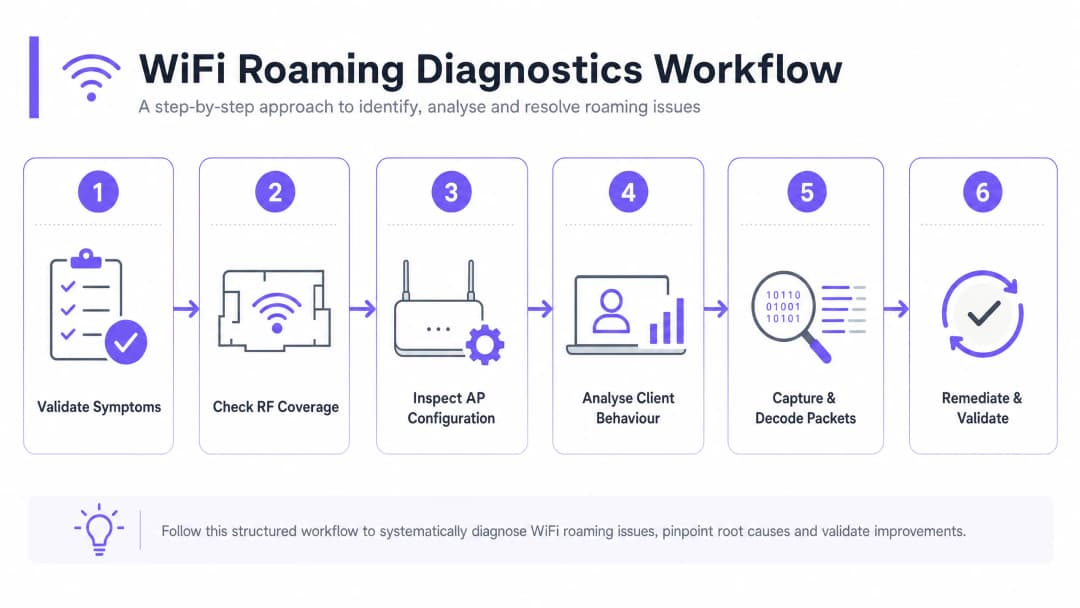
चरण 1: लक्षणों और दायरे को मान्य करें
समस्या के दायरे को परिभाषित करने के लिए अनुभवजन्य डेटा एकत्र करके शुरुआत करें। यदि रोमिंग समस्याएं सभी डिवाइसों को प्रभावित करती हैं, तो यह आमतौर पर एक आर्किटेक्चरल या फिजिकल डिप्लॉयमेंट त्रुटि को इंगित करता है - जैसे कि खराब AP प्लेसमेंट, अत्यधिक चैनल ओवरलैप, या गलत तरीके से कॉन्फ़िगर की गई कंट्रोलर सेटिंग्स। यदि समस्या डिवाइस-विशिष्ट है, तो यह आमतौर पर क्लाइंट ड्राइवर बग, विशिष्ट बैंड या चैनलों (जैसे DFS चैनल) के लिए समर्थन की कमी, या अत्यधिक आक्रामक आंतरिक रोमिंग सीमा की ओर इशारा करता है।
चरण 2: RF कवरेज और सिग्नल ओवरलैप की जांच करें
रोमिंग विफलता का प्रमुख भौतिक कारण गलत AP स्पेसिंग है। यदि AP बहुत दूर-दूर हैं, तो उनके बीच डेड ज़ोन या कमज़ोर सिग्नल वाले क्षेत्र मौजूद होते हैं। यदि वे बहुत पास हैं, तो क्लाइंट रोम नहीं करेंगे क्योंकि मूल AP का सिग्नल बहुत मजबूत रहता है, जिससे "स्टिकी क्लाइंट" की समस्या पैदा होती है।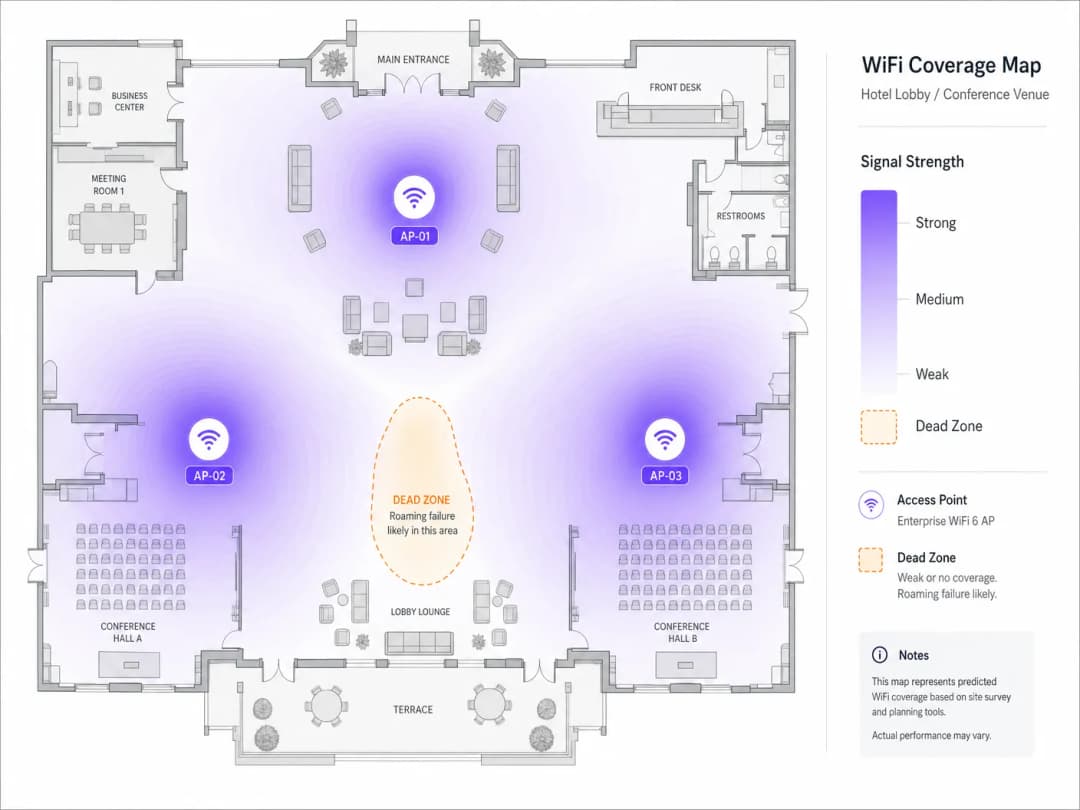
एक समर्पित WiFi विश्लेषक (analyser) के साथ एक सक्रिय साइट सर्वेक्षण करें। लक्षित मीट्रिक सेल सीमा पर पड़ोसी APs से -67 dBm की ओवरलैपिंग सिग्नल शक्ति है। उच्च-घनत्व वाले वातावरण में, 20% से 30% सेल ओवरलैप का लक्ष्य रखें। सत्यापित करें कि ओवरलैप करने वाले APs एक ही चैनल पर काम नहीं कर रहे हैं। सह-चैनल हस्तक्षेप (CCI) को कम करने के लिए, 5 GHz बैंड में, गैर-ओवरलैपिंग 20 MHz या 40 MHz चैनलों का उपयोग करें।
चरण 3: AP और कंट्रोलर कॉन्फ़िगरेशन की समीक्षा करें
सुनिश्चित करें कि वायरलेस कंट्रोलर को रोमिंग सहायता सुविधाओं का समर्थन और प्रसारण करने के लिए कॉन्फ़िगर किया गया है। सत्यापित करें कि SSID नाम, सुरक्षा प्रकार (जैसे WPA3-Enterprise), और VLAN असाइनमेंट सभी APs पर पूरी तरह से सुसंगत हैं। लक्षित SSID पर 802.11k, 802.11v, और 802.11r सक्षम करें। WPA2/WPA3 ट्रांज़िशन मोड चलाते समय सावधानी बरतें, क्योंकि कुछ पुराने क्लाइंट डिवाइस बीकन फ्रेम में जटिल सूचना तत्वों (IEs) को पार्स करने में संघर्ष करते हैं, जिससे एसोसिएशन विफल हो जाता है।
चरण 4: क्लाइंट व्यवहार और ड्राइवर सेटिंग्स का विश्लेषण करें
यदि इन्फ्रास्ट्रक्चर सही ढंग से कॉन्फ़िगर किया गया है, तो क्लाइंट डिवाइस की जांच करें। सुनिश्चित करें कि क्लाइंट NIC ड्राइवर - विशेष रूप से Windows पर Intel और Realtek चिपसेट - नवीनतम एंटरप्राइज-प्रमाणित संस्करणों में अपडेट किए गए हैं। Windows क्लाइंट पर, Device Manager > Network Adapters > Wireless Adapter Properties > Advanced पर जाएं, और क्लाइंट को बेहतर APs के लिए जल्द ही स्कैन करने के लिए मजबूर करने के लिए "Roaming Aggressiveness" को "Medium-High" या "High" पर समायोजित करें। सत्यापित करें कि क्लाइंट डिवाइस डायनेमिक फ़्रीक्वेंसी सिलेक्शन (DFS) चैनलों का समर्थन करते हैं। यदि APs DFS चैनलों (52–144) पर हैं और क्लाइंट उनका समर्थन नहीं करता है, तो क्लाइंट कभी भी उन APs पर रोम नहीं करेगा, जिससे कवरेज ब्लाइंड स्पॉट बन जाएंगे।
चरण 5: ओवर द एयर (OTA) पैकेट कैप्चर और डिकोड करें
वायरलेस समस्या निवारण का स्वर्ण मानक ओवर-द-एयर (OTA) पैकेट कैप्चर है। रोमिंग इवेंट को कैप्चर करने के लिए, आपको स्रोत और लक्ष्य दोनों APs के चैनलों पर एक साथ वायरलेस फ्रेम कैप्चर करने होंगे। पैकेट कैप्चर डिवाइस को उस भौतिक क्षेत्र में रखें जहां रोमिंग होती है और प्रबंधन फ्रेम को अलग करने के लिए निम्नलिखित Wireshark फ़िल्टर लागू करें:
wlan.fc.type_subtype == 0x00 || wlan.fc.type_subtype == 0x01 || wlan.fc.type_subtype == 0x0b || wlan.fc.type_subtype == 0x0c
एक स्वस्थ 802.11r ओवर-द-एयर रोम में, आपको यह देखना चाहिए: क्लाइंट लक्ष्य AP को Fast BSS Transition Information Element (FTIE) और Mobility Domain Information Element (MDIE) युक्त एक Reassociation Request भेजता है, जिसके बाद स्थिति कोड 0x0000 (Success) के साथ एक Reassociation Response आता है, जिसमें रीअसोसिएशन फ्रेम के भीतर 4-way हैंडशेक एम्बेडेड होता है।
यदि रोम विफल हो जाता है, तो Reassociation Response में स्टेटस कोड की जांच करें। स्टेटस कोड 0x000c (एसोसिएशन अस्वीकृत) आम तौर पर यह दर्शाता है कि लक्षित AP ओवरलोड है। स्टेटस कोड 0x001e (सुरक्षा कारणों से एसोसिएशन अस्वीकृत) FT कुंजी वार्तालाप बेमेल होने का संकेत देता है। यदि क्लाइंट Reassociation Request के बजाय एक मानक Association Request भेजता है, तो यह पूर्ण प्रमाणीकरण कर रहा है - जो यह दर्शाता है कि AP पर 802.11r अक्षम है, या क्लाइंट इस प्रोटोकॉल का समर्थन नहीं करता है।
चरण 6: सुधारें और मान्य करें
आवश्यक भौतिक या तार्किक परिवर्तन करें, फिर परिणामों को मान्य करें। AP ट्रांसमिट पावर को समायोजित करें - एक स्पष्ट 5 GHz प्राथमिकता बनाए रखने के लिए 2.4 GHz पावर को 6 - 9 dBm और 5 GHz पावर को 12 - 15 dBm पर सेट करना एक सामान्य सर्वोत्तम अभ्यास है। BSS Minimum Rate (डेटा दर प्रूनिंग) को समायोजित करें: लीगेसी दरों (1, 2, 5.5, 11 Mbps) को अक्षम करें और क्लाइंट्स को जल्दी रोम करने के लिए मजबूर करने और स्टिकी क्लाइंट व्यवहार को रोकने के लिए न्यूनतम अनिवार्य दर को 12 Mbps या 24 Mbps पर सेट करें। कार्यक्रम स्थल पर घूमते समय निरंतर पिंग या VoIP परीक्षण चलाकर मान्य करें, यह सुनिश्चित करते हुए कि शून्य पैकेट नुकसान के साथ हैंडऑफ समय 50ms से कम रहे।
सर्वोत्तम अभ्यास और उद्योग मानक
1. एकीकृत सुरक्षा और नेटवर्क एक्सेस कंट्रोल (NAC)
निर्बाध रोमिंग के लिए पूरे कार्यक्रम स्थल में सुसंगत प्रमाणीकरण की आवश्यकता होती है। एंटरप्राइज-ग्रेड सुरक्षा तैनात करते समय, अपने वायरलेस इंफ्रास्ट्रक्चर को एक केंद्रीकृत RADIUS या NAC समाधान के साथ एकीकृत करें। इस आर्किटेक्चर के विस्तृत गाइड के लिए, हमारा गाइड देखें: क्लाउड RADIUS के साथ 802.1X प्रमाणीकरण कैसे लागू करें। वेंडर विकल्पों का मूल्यांकन करने के लिए, 2026 के लिए 10 सर्वश्रेष्ठ नेटवर्क एक्सेस कंट्रोल (NAC) समाधान की हमारी समीक्षा देखें।
2. SSIDs का भौतिक और तार्किक पृथक्करण
आधुनिक और लीगेसी उपकरणों के मिश्रण वाले वातावरण में, एकल-SSID कॉन्फ़िगरेशन संगतता समस्याएं पैदा कर सकता है। अनुशंसित दृष्टिकोण तीन अलग-अलग SSIDs बनाए रखना है: WPA3-Enterprise और 802.11k/v/r सक्षम के साथ एक Corporate/Staff SSID; Purple के Guest WiFi प्लेटफॉर्म द्वारा संचालित एक Guest SSID, जिसमें प्रत्येक रोम पर पुनः प्रमाणीकरण को रोकने के लिए MAC कैशिंग और 8-घंटे का सत्र टाइमआउट हो; और 802.11r का समर्थन न करने वाले उपकरणों के लिए WPA2-PSK के साथ 2.4 GHz तक सीमित एक Legacy/IoT SSID।
3. अनुपालन और नियामक मानक
रिटेल वातावरण में, PCI-DSS दायरे के भीतर आने वाले उपकरणों (जैसे कि मोबाइल पॉइंट-ऑफ-सेल mPOS टर्मिनल) को सुरक्षित रूप से रोम करना चाहिए। यह सुनिश्चित करें कि WPA3-Enterprise लागू हो और रोमिंग क्लाइंट्स को "इविल ट्विन" हमलों से बचाने के लिए रॉग AP डिटेक्शन सक्षम करें। उपयोगकर्ता रोमिंग पैटर्न और ड्वेल समय को ट्रैक करने के लिए WiFi Analytics का उपयोग करते समय, यह सुनिश्चित करें कि GDPR के अनुरूप रहने के लिए संग्रह के बिंदु पर ही MAC पते को क्रिप्टोग्राफ़िक रूप से सॉल्ट और हैश किया गया हो।
AP हार्डवेयर चयन और परिनियोजन (deployment) के सर्वोत्तम तरीकों के संदर्भ के लिए, हमारी Cisco Wireless APs: 2026 Guide to Products & Deployment मार्गदर्शिका देखें। शिक्षा परिवेश के लिए, इस मार्गदर्शिका के सिद्धांत समान रूप से लागू होते हैं - WiFi in Schools: The 2026 Administrator & IT Guide देखें।
वास्तविक दुनिया के केस स्टडीज
केस स्टडी 1: 500-कमरों के लग्जरी होटल में रोमिंग विफलताओं का समाधान
500 कमरों, कॉन्फ्रेंस स्पेस और एक बड़े लॉबी लाउंज वाले एक बहु-मंजिला लग्जरी होटल को लॉबी से अतिथि कमरों की ओर जाने पर ड्रॉप हुई VoIP कॉल और टूटे हुए VPN सेशन की लगातार मेहमानों की शिकायतें मिल रही थीं। कर्मचारियों ने यह भी बताया कि उनके मोबाइल हाउसकीपिंग टैबलेट अक्सर डिस्कनेक्ट हो जाते थे, जिससे कमरों की स्थिति के अपडेट में देरी होती थी।
एक व्यापक RF ऑडिट ने दो प्राथमिक समस्याओं का खुलासा किया। पहला, APs 2.4 GHz और 5 GHz दोनों पर अधिकतम ट्रांसमिट पावर (20+ dBm) पर चल रहे थे, जिससे अत्यधिक कवरेज ओवरलैप हो रहा था और अतिथि कमरों में क्लाइंट डिवाइस लॉबी APs से "चिपके" रह जाते थे। दूसरा, पुराने डिवाइस की अनुकूलता की चिंताओं के कारण मुख्य अतिथि SSID पर 802.11r को अक्षम कर दिया गया था।
सुधारों में शामिल थे: 2.4 GHz पर AP ट्रांसमिट पावर को 8 dBm और 5 GHz पर 14 dBm में समायोजित करना; 802.11k, 802.11v, और 802.11r (ओवर-द-एयर FT) को सक्षम करना; 12 Mbps से नीचे की अनिवार्य डेटा दरों को हटाना; और वायरलेस कंट्रोलर को MAC कैशिंग और 8-घंटे के सेशन टाइमआउट के साथ Purple के hospitality WiFi प्लेटफॉर्म के साथ एकीकृत करना। परिणामस्वरूप, औसत रोमिंग हैंडऑफ लेटेंसी 380 मिलीसेकंड से गिरकर 42 मिलीसेकंड हो गई, VoIP कॉल ड्रॉप पूरी तरह से समाप्त हो गए, और WiFi कनेक्टिविटी के लिए अतिथि संतुष्टि स्कोर 30 दिनों के भीतर 48% बढ़ गया।
केस स्टडी 2: एक वैश्विक रिटेलर के लिए mPOS रोमिंग को अनुकूलित करना
तीन मंजिलों में फैला एक हाई-डेंसिटी फ्लैगशिप रिटेल स्टोर चेकआउट के लिए मोबाइल पॉइंट-ऑफ-सेल (mPOS) टर्मिनलों का उपयोग कर रहा था। पीक शॉपिंग अवधि के दौरान, mPOS टर्मिनल अक्सर लेनदेन पूरा करने में विफल हो जाते थे क्योंकि सेल्स सहयोगी रिटेल फ्लोर पर ग्राहकों के साथ घूमते थे।
ओवर-द-एयर पैकेट कैप्चर से पता चला कि mPOS टर्मिनलों ने स्टिकी क्लाइंट व्यवहार प्रदर्शित किया, ग्राउंड फ्लोर पर रहते हुए भी वे तीसरी मंजिल के APs से जुड़े रहे। जब उन्होंने आखिरकार रोम करने का प्रयास किया, तो 802.11r की कमी ने एक पूर्ण 802.1X/EAP पुन: प्रमाणीकरण (re-authentication) के लिए मजबूर किया, जो को-चैनल हस्तक्षेप के कारण अत्यधिक चैनल उपयोग (85%) के कारण समाप्त (timed out) हो गया।
समाधान में शामिल थे: गैर-ओवरलैपिंग 20 MHz चैनलों का उपयोग करने के लिए चैनल योजना को फिर से डिजाइन करना (चैनल उपयोग को 35% से कम करना); 802.11k और 802.11v सक्षम करना; स्टोर संचालन के लिए सक्षम 802.11r के साथ एक समर्पित छिपे हुए SSID को लागू करना; और चेकआउट कतारों के पास AP प्लेसमेंट को अनुकूलित करने के लिए retail परिनियोजन मार्गदर्शन से परामर्श करना। इसका परिणाम शून्य विफल mPOS लेनदेन, औसत लेनदेन पूरा होने के समय में 14 सेकंड की कमी, सीधे तौर पर चेकआउट कतारों को छोटा करना और पीक-ऑवर बिक्री थ्रूपुट को बढ़ाना था।
ROI और व्यावसायिक प्रभाव
WiFi roaming को अनुकूलित करना एक रणनीतिक व्यावसायिक निवेश है जो मापने योग्य वित्तीय और परिचालन लाभ प्रदान करता है। transport और healthcare जैसे क्षेत्रों में, मोबाइल उपकरणों पर कर्मचारियों की निर्भरता पूर्ण होती है। जब क्लिनिकल कर्मचारियों या लॉजिस्टिक्स कार्यकर्ताओं को roaming ड्रॉप का अनुभव होता है, तो महत्वपूर्ण वर्कफ़्लो ठप हो जाते हैं। हैंडऑफ़ लेटेंसी को 50 मिलीसेकंड से नीचे कम करके, संगठन प्रशासनिक देरी को समाप्त करते हैं और सीधे कर्मचारियों के उपयोग और परिचालन थ्रूपुट में सुधार करते हैं।
आतिथ्य और आयोजनों में, guest WiFi ग्राहकों की संतुष्टि का एक प्राथमिक चालक है। एक निर्बाध वायरलेस अनुभव मेहमानों को साइट पर लंबे समय तक रुकने के लिए प्रोत्साहित करता है, जिससे भोजन, पेय और खुदरा सेवाओं पर माध्यमिक खर्च बढ़ता है। Purple के WiFi Analytics का लाभ उठाकर, वेन्यू ऑपरेटर मूवमेंट जर्नी को ट्रैक कर सकते हैं और वास्तविक समय के ड्वेल डेटा के आधार पर कर्मचारियों की रोस्टरिंग और रिटेल लेआउट को अनुकूलित कर सकते हैं।
जैसे-जैसे वेन्यू OpenRoaming और प्रोफाइल-आधारित प्रमाणीकरण को व्यापक रूप से अपनाने के लिए तैयार हो रहे हैं, एक पूरी तरह से ट्यून किया गया roaming बुनियादी ढांचा एक पूर्व शर्त है। आज 802.11k/v/r को तैनात करके, संगठन खुद को वैश्विक roaming संघों के साथ निर्बाध एकीकरण के लिए तैयार करते हैं, जिससे नए मुद्रीकरण चैनल खुलते हैं और नेटवर्क प्रभाव को बढ़ावा मिलता है जो आधुनिक डिजिटल वेन्यू को परिभाषित करते हैं।
-
संदर्भ
- [1] WiFi Roaming and Handoff: 802.11r and 802.11k Explained
- [2] Cisco Wireless APs: 2026 Guide to Products & Deployment
- [3] How to Implement 802.1X Authentication with Cloud RADIUS
- [4] 10 Best Network Access Control (NAC) Solutions for 2026
- [5] WiFi in Schools: The 2026 Administrator & IT Guide
- [6] Understanding and Troubleshooting Client Roaming Issues
- [7] Troubleshooting WiFi Connectivity and Roaming Problems
मुख्य परिभाषाएं
Sticky Client
एक वायरलेस डिवाइस जो एक मजबूत, करीब के एक्सेस पॉइंट की उपलब्धता के बावजूद एक दूर के, कमजोर एक्सेस पॉइंट से जुड़ा रहता है।
Sticky client कम भौतिक डेटा दरों पर प्रसारण करके अपने स्वयं के प्रदर्शन को खराब करते हैं और अन्य उपकरणों के एयरटाइम को कम करते हैं। वे उद्यम स्थानों में रोमिंग से संबंधित शिकायतों के सबसे आम मूल कारण हैं।
802.11r (Fast BSS Transition)
एक IEEE संशोधन जो क्रिप्टोग्राफिक कुंजी सामग्री को मोबिलिटी डोमेन (Mobility Domain) के भीतर APs पर पहले से वितरित करने की अनुमति देता है, जिससे हैंडऑफ ऑथेंटिकेशन का समय 200-400ms से घटकर 50ms से भी कम हो जाता है।
VoIP, वीडियो कॉन्फ्रेंसिंग और मोबाइल भुगतान जैसे रियल-टाइम एप्लिकेशन्स के लिए महत्वपूर्ण। रोमिंग के दौरान कॉल ड्रॉप की समस्या को खत्म करने के लिए सबसे प्रभावशाली एकल मानक।
802.11k (रेडियो रिसोर्स मैनेजमेंट)
एक IEEE संशोधन जो क्लाइंट डिवाइसों को उनके वर्तमान AP से नेबर रिपोर्ट (Neighbour Report) - आस-पास के APs और उनके ऑपरेटिंग चैनलों की एक क्यूरेटेड सूची - का अनुरोध करने की अनुमति देता है।
क्लाइंट को फुल-बैंड एक्टिव स्कैन करने की आवश्यकता को समाप्त करता है, जिससे रोमिंग खोज का समय 100ms से अधिक से घटकर 10ms से भी कम हो जाता है।
802.11v (BSS ट्रांजिशन मैनेजमेंट)
एक IEEE संशोधन जो वायरलेस इन्फ्रास्ट्रक्चर को क्लाइंट डिवाइसों पर BTM अनुरोध फ़्रेम भेजने में सक्षम बनाता है, जो रोमिंग के लिए इष्टतम लक्षित APs का सुझाव देता है।
नेटवर्क एडमिनिस्ट्रेटर द्वारा क्लाइंट्स को लोड-बैलेंस करने और स्टिकी क्लाइंट समस्याओं को सक्रिय रूप से हल करने के लिए उपयोग किया जाता है। विशेष रूप से iOS और आधुनिक Android डिवाइसों पर प्रभावी।
मोबिलिटी डोमेन (Mobility Domain)
एक वायरलेस नेटवर्क के भीतर एक्सेस पॉइंट्स का एक लॉजिकल ग्रुपिंग जो 802.11r क्रिप्टोग्राफिक कुंजियों को साझा करते हैं और सदस्यों के बीच फास्ट रोमिंग का समर्थन करते हैं।
क्लाइंट केवल तभी फास्ट BSS ट्रांजिशन (FT) कर सकते हैं जब वे एक ही मोबिलिटी डोमेन से संबंधित APs के बीच रोमिंग कर रहे हों। गलत तरीके से कॉन्फ़िगर किए गए मोबिलिटी डोमेन ID, 802.11r विफलताओं का एक सामान्य कारण हैं।
पेयरवाइज मास्टर की (PMK)
प्रारंभिक 802.1X या WPA प्री-शेयर्ड की ऑथेंटिकेशन के दौरान स्थापित शीर्ष-स्तरीय क्रिप्टोग्राफिक कुंजी, जिससे सभी सेशन कुंजियां निकाली जाती हैं।
802.11r में, PMK को PMK-R0 (कंट्रोलर द्वारा रखा गया) और PMK-R1 (APs को पहले से वितरित) में विभाजित किया जाता है ताकि बिना किसी पूर्ण RADIUS राउंड-ट्रिप के त्वरित हैंडऑफ की सुविधा मिल सके।
BSS न्यूनतम दर
सबसे कम डेटा दर जो एक एक्सेस पॉइंट किसी क्लाइंट को SSID से जुड़े रहने के दौरान उपयोग करने की अनुमति देगा। जो क्लाइंट इस दर को बनाए नहीं रख सकते उन्हें डिस्कनेक्ट कर दिया जाता है।
कम दरों को हटाना (जैसे, न्यूनतम 12 Mbps सेट करना) एक प्राकृतिक रोमिंग ट्रिगर के रूप में कार्य करता है, जिससे स्टिकी क्लाइंट्स को एक नया AP खोजने के लिए मजबूर होना पड़ता है जब उनकी भौतिक डेटा दर थ्रेशोल्ड से नीचे गिर जाती है।
को-चैनल इंटरफेरेंस (CCI)
एक ही भौतिक क्षेत्र में एक ही फ्रीक्वेंसी चैनल पर काम करने वाले कई एक्सेस पॉइंट्स के कारण होने वाला RF इंटरफेरेंस, जो डिवाइसों को ट्रांसमिट करने के लिए अपनी बारी का इंतजार करने के लिए मजबूर करता है।
CCI एयरटाइम कन्टेंशन को बढ़ाता है और रोमिंग मैनेजमेंट फ़्रेमों में देरी या बाधा उत्पन्न कर सकता है, जिससे हैंडऑफ विफल हो जाते हैं। यह घनी आबादी वाले नेटवर्क में रोमिंग विफलताओं का एक प्राथमिक कारण है।
ओवर-द-एयर (OTA) पैकेट कैप्चर
एक वायरलेस डायग्नोस्टिक तकनीक जहां मॉनिटर मोड में एक डिवाइस किसी विशिष्ट चैनल पर ट्रांसमिट होने वाले सभी 802.11 फ़्रेमों को कैप्चर करता है, जिसमें मैनेजमेंट, कंट्रोल और डेटा फ़्रेम शामिल हैं।
रोमिंग विफलताओं के निदान के लिए सबसे बेहतरीन मानक। इंजीनियर्स को हैंडऑफ इवेंट के दौरान ऑथेंटिकेशन, एसोसिएशन और री-एसोसिएशन फ़्रेम के सटीक क्रम का निरीक्षण करने की अनुमति देता है।
हल किए गए उदाहरण
एक बड़े सम्मेलन केंद्र में जहां 80 एक्सेस पॉइंट हैं, जब इवेंट स्टाफ प्रदर्शनी हॉल के बीच घूमता है तो वायरलेस VoIP बैज (Vocera) पर गंभीर ऑडियो ड्रॉप्स का अनुभव होता है। नेटवर्क स्थानीय RADIUS सर्वर के साथ WPA2-Enterprise (802.1X) प्रमाणीकरण का उपयोग करता है।
- चैनल 36 और 44 (मुख्य हॉल में आस-पास के AP के ऑपरेटिंग चैनल) पर एक OTA पैकेट कैप्चर करें। 2. पहचानें कि VoIP बैज हर roam पर पूर्ण EAP-TLS प्रमाणीकरण कर रहे हैं, जिसमें औसतन 340ms लग रहा है, जो रीयल-टाइम वॉयस के लिए आवश्यक 50ms की सीमा से अधिक है। 3. स्टाफ SSID के लिए नियंत्रक पर 802.11r (Fast BSS Transition) सक्षम करें। 4. बैज हार्डवेयर के साथ अधिकतम अनुकूलता सुनिश्चित करने के लिए 802.11r मोड को 'FT over-the-Air' पर कॉन्फ़िगर करें। 5. सक्रिय स्कैनिंग की आवश्यकता को समाप्त करने के लिए 802.11k Neighbour Reports सक्षम करें। 6. बैज को दूर के AP से चिपकने से रोकने के लिए BSS न्यूनतम दर को 12 Mbps पर सेट करें। 7. Wireshark में roam समय को सत्यापित करें: पुष्टि करें कि पुनः जुड़ाव विनिमय में 32ms का समय लगता है और वॉयस ट्रैफ़िक निर्बाध रहता है।
मोबाइल पॉइंट-ऑफ़-सेल (mPOS) iPads को तैनात करने वाला एक प्रमुख रिटेल फ्लैगशिप स्टोर ट्रांजैक्शन विफलताओं का अनुभव करता है। iPads तीसरी मंजिल के AP से चिपके रहते हैं, भले ही उन्हें ग्राउंड फ्लोर चेकआउट क्षेत्र में ले जाया जाए, जिसके परिणामस्वरूप -78 dBm का RSSI और उच्च पुनः प्रयास दरें होती हैं।
- तीसरी मंजिल और ग्राउंड फ्लोर के AP के बीच सिग्नल ओवरलैप को मापने के लिए एक RF साइट सर्वेक्षण करें। 2. पता लगाएं कि तीसरी मंजिल के AP अधिकतम शक्ति (20 dBm) पर प्रसारित कर रहे हैं, जो फर्श के तख्तों के माध्यम से रिस रहे हैं और ग्राउंड फ्लोर पर एक मजबूत लेकिन कम गुणवत्ता वाला सिग्नल बना रहे हैं। 3. 5 GHz रेडियो की ट्रांसमिट शक्ति को घटाकर 14 dBm और 2.4 GHz रेडियो को 8 dBm करें। 4. वायरलेस नियंत्रक पर 802.11v BSS Transition Management (BTM) सक्षम करें। 5. नियंत्रक पर -72 dBm की न्यूनतम एसोसिएशन RSSI सीमा कॉन्फ़िगर करें। जब किसी iPad का RSSI -72 dBm से नीचे गिरता है, तो AP ग्राउंड फ्लोर के AP का सुझाव देते हुए एक 802.11v BTM अनुरोध भेजेगा। 6. सत्यापित करें कि iPads भौतिक सीमा को पार करने के 45ms के भीतर ग्राउंड फ्लोर के AP पर सफलतापूर्वक roam करते हैं।
अभ्यास प्रश्न
Q1. एक वेयरहाउस ऑपरेटर की रिपोर्ट है कि गलियारों के बीच फोर्कलिफ्ट चलाते समय हैंडहेल्ड बारकोड स्कैनर अक्सर ERP सिस्टम से डिस्कनेक्ट हो जाते हैं। नेटवर्क में 802.11r सक्षम है, लेकिन स्कैनर 802.11r का समर्थन नहीं करते हैं। सबसे अच्छी तत्काल सुधारात्मक रणनीति क्या है?
संकेत: पुराने क्लाइंट्स की 802.11r के साथ अनुकूलता पर विचार करें और प्राथमिक एंटरप्राइज नेटवर्क को प्रभावित किए बिना उन्हें कैसे अलग किया जाए।
मॉडल उत्तर देखें
चूंकि बारकोड स्कैनर 802.11r का समर्थन नहीं करते हैं, वे या तो 802.11r-सक्षम SSID से कनेक्ट होने में विफल हो जाएंगे या धीमे, मानक 802.1X ऑथेंटिकेशन का अनुभव करेंगे। अनुशंसित दृष्टिकोण WPA2-PSK और केवल 2.4 GHz रेडियो का उपयोग करके विशेष रूप से वेयरहाउस स्कैनर्स के लिए एक समर्पित, अलग SSID बनाना है। यह पुराने ट्रैफ़िक को अलग करता है, 802.11r अनुकूलता समस्याओं से बचाता है, और बुनियादी प्री-शेयर्ड की हैंडओवर का उपयोग करके स्थिर रोमिंग सुनिश्चित करता है, जिसे स्कैनर मूल रूप से समर्थन करते हैं। 802.11r वाला प्राथमिक एंटरप्राइज SSID आधुनिक डिवाइसों के लिए बरकरार रह सकता है।
Q2. रोमिंग विफलता के पैकेट कैप्चर विश्लेषण के दौरान, आप देखते हैं कि क्लाइंट डिवाइस लक्षित AP पर जाते समय Reassociation Request (Type 0x02) के बजाय Association Request (Type 0x00) भेजता है। यह आपको रोमिंग स्थिति के बारे में क्या बताता है, और इसके तीन सबसे संभावित मूल कारण क्या हैं?
संकेत: फास्ट रोमिंग और मोबिलिटी डोमेन (Mobility Domain) सदस्यता के संदर्भ में एक एसोसिएशन और एक री-एसोसिएशन फ़्रेम के बीच अंतर का विश्लेषण करें।
मॉडल उत्तर देखें
एक Association Request यह दर्शाता है कि क्लाइंट 802.11r फास्ट हैंडऑफ करने के बजाय पूरी तरह से नए सिरे से नया कनेक्शन शुरू कर रहा है। यह FT तंत्र को बायपास करता है और पूर्ण 802.1X/EAP पुनः प्रमाणीकरण के लिए बाध्य करता है। तीन सबसे संभावित मूल कारण हैं: 1) क्लाइंट डिवाइस 802.11r का समर्थन नहीं करता है (डिवाइस विनिर्देश शीट के खिलाफ सत्यापित करें); 2) लक्षित SSID पर 802.11r अक्षम है (कंट्रोलर कॉन्फ़िगरेशन की जांच करें); या 3) लक्षित AP स्रोत AP की तुलना में एक अलग मोबिलिटी डोमेन ID से संबंधित है, जो कुंजी साझाकरण को रोकता है (सत्यापित करें कि सभी AP कंट्रोलर में एक ही मोबिलिटी डोमेन ID साझा करते हैं)।
Q3. एक IT मैनेजर देखता है कि 802.11v BSS ट्रांजिशन मैनेजमेंट को सक्षम करने के बाद, कई पुराने लैपटॉप क्लाइंट रोमिंग करने के बजाय अक्सर नेटवर्क से पूरी तरह से डिस्कनेक्ट हो जाते हैं। इसका संभावित कारण क्या है, और इसका समाधान कैसे किया जाना चाहिए?
संकेत: सोचें कि पुराने या खराब कोड वाले क्लाइंट ड्राइवर 802.11v BTM Request फ्रेम को कैसे संभालते हैं और ड्राइवर अनुरोध की क्या व्याख्या करता है।
मॉडल उत्तर देखें
कुछ पुराने या खराब कोड वाले क्लाइंट ड्राइवर 802.11v BTM Request फ्रेम को सही ढंग से पार्स नहीं करते हैं। सुझाए गए लक्षित AP का मूल्यांकन करने के बजाय, वे अनुरोध को एक डी-ऑथेंटिकेशन या डिस्कनेक्शन कमांड के रूप में व्याख्या करते हैं, जिससे वे नेटवर्क से पूरी तरह से हट जाते हैं। समाधान के चरण हैं: 1) समस्या का सामना कर रहे विशिष्ट क्लाइंट MAC पतों की पहचान करें; 2) उनके वायरलेस NIC ड्राइवरों को नवीनतम संस्करण में अपडेट करें; 3) यदि ड्राइवर अपडेट संभव नहीं हैं, तो उन उपकरणों के लिए एक अलग लीगेसी SSID पर 802.11v को अक्षम करें, या कंट्रोलर की स्टीयरिंग आक्रामकता को 'निष्क्रिय' मोड पर कॉन्फ़िगर करें, जिससे क्लाइंट जबरन डिस्कनेक्ट हुए बिना BTM अनुरोध को अनदेखा कर सके।
अक्सर पूछे जाने वाले प्रश्न
What causes sticky client issues in enterprise WiFi networks?
Sticky clients occur when a device clings to an enterprise WiFi access point at low signal (-75 dBm or lower) instead of roaming to an adjacent AP with stronger RSSI. The primary causes are missing 802.11v BSS Transition Management, unequal transmit power between 2.4 GHz and 5 GHz radios, missing 802.11k neighbor reports, or an uncalibrated cell overlap where minimum RSSI thresholds are not configured.
What is the optimal RSSI threshold for enterprise WiFi roaming handoff?
Most enterprise WiFi clients initiate roaming scans when signal drops below -70 dBm (iOS triggers at -70 dBm; macOS triggers at -75 dBm). Access points should be calibrated to maintain 15% to 20% cell overlap at -67 dBm for voice and high-density environments. Setting a minimum RSSI disconnect threshold between -75 dBm and -78 dBm prevents client stagnation without causing premature coverage drops.
How do 802.11k, 802.11v, and 802.11r collaborate during roaming?
802.11k provides the client with a radio neighbor list so it scans only candidate channels rather than the full RF spectrum. 802.11v enables the controller to send BSS Transition Management frames requesting the client steer to a specific AP. 802.11r (Fast BSS Transition) pre-authenticates the client's encryption keys (PMK-R1) with target APs, slashing 802.1X WiFi handoff latency from 800ms down to under 30ms.
Why do VoIP and video calls drop during WiFi access point handoff?
Real-time voice (VoIP) and video sessions drop when WiFi roaming handoff latency exceeds 50ms to 100ms, overflowing RTP packet jitter buffers. In networks without 802.11r FT, an 802.1X client must execute a full EAP exchange and RADIUS round-trip upon every AP change, creating 400ms to 1200ms delays. Enabling 802.11r and verifying upstream WMM / DSCP 46 (Expedited Forwarding) QoS prevents voice packet drop.
How do you prevent WiFi client bouncing (ping-pong) between two APs?
Client ping-pong occurs when two adjacent WiFi access points provide identical signal levels (for example, fluctuating between -64 dBm and -65 dBm) with excessive cell overlap (>30%). To eliminate oscillation, reduce AP transmit power to achieve a 15% to 20% cell edge, configure an 802.11v roaming hysteresis delta of 6 dBm, and set dynamic Radio Resource Management (RRM) sensitivity to conservative intervals.
How does Purple help enterprise venues optimize WiFi roaming and performance?
Purple provides hardware-agnostic cloud captive portals and enterprise WiFi management across Cisco Meraki, HPE Aruba, Ruckus, Juniper Mist, Fortinet, and Ubiquiti UniFi networks. Purple automates guest onboarding, monitors client connection health and venue dwell times, and integrates with 802.1X identity platforms to deliver seamless, drop-free wireless mobility.
इस श्रृंखला में आगे पढ़ें
Corporate WiFi पर VoIP और वीडियो कॉल के लिए Roaming अनुकूलन
यह गाइड IT मैनेजरों, नेटवर्क आर्किटेक्ट्स और CTOs को कॉर्पोरेट स्टाफ नेटवर्क पर निर्बाध VoIP और वीडियो कॉल का समर्थन करने के लिए WiFi roaming को अनुकूलित करने के लिए एक व्यापक, वेंडर-तटस्थ खाका प्रदान करती है। इसमें IEEE 802.11k/r/v प्रोटोकॉल स्टैक, WMM QoS कॉन्फ़िगरेशन, RF सेल डिज़ाइन और सब-50ms हैंडऑफ़ लेटेंसी प्राप्त करने के लिए आवश्यक एंड-टू-एंड वायर्ड QoS मैपिंग शामिल है। हॉस्पिटैलिटी, रिटेल, हेल्थकेयर और बड़े-स्थल वाले वातावरण में लागू, इस संदर्भ गाइड में वास्तविक दुनिया के कार्यान्वयन परिदृश्य, समस्या निवारण फ्रेमवर्क और एक मापने योग्य ROI विश्लेषण शामिल हैं।
सर्वोत्तम चैनल प्लानिंग के लिए RSSI और सिग्नल की ताकत को समझना
यह गाइड सर्वोत्तम चैनल प्लानिंग के लिए RSSI, सिग्नल-टू-नॉइज रेशियो (SNR), और RF प्रोपेगेशन सिद्धांतों की व्यापक तकनीकी जानकारी प्रदान करती है। यह IT प्रबंधकों, नेटवर्क आर्किटेक्ट्स और वेन्यू ऑपरेशंस डायरेक्टरों को को-चैनल और एडजसेंट चैनल इंटरफेरेंस को कम करने, AP प्लेसमेंट को अनुकूलित करने, और हॉस्पिटैलिटी, रिटेल एवं सार्वजनिक क्षेत्र के वातावरण में मापने योग्य व्यावसायिक प्रभाव के लिए एनालिटिक्स का लाभ उठाने की व्यावहारिक रणनीतियों से लैस करती है।
20MHz बनाम 40MHz बनाम 80MHz: आपको किस चैनल चौड़ाई का उपयोग करना चाहिए?
यह गाइड IT प्रबंधकों, नेटवर्क आर्किटेक्ट्स और वेन्यू ऑपरेशंस निदेशकों के लिए हॉस्पिटैलिटी, रिटेल, इवेंट्स और सार्वजनिक क्षेत्र के वातावरण में एंटरप्राइज डिप्लॉयमेंट में सही WiFi चैनल चौड़ाई - 20MHz, 40MHz, या 80MHz - चुनने पर एक निश्चित, वेंडर-न्यूट्रल तकनीकी संदर्भ प्रदान करती है। इसमें बुनियादी IEEE 802.11 मैकेनिक्स, वास्तविक दुनिया की क्षमता के समझौता और स्टेप-बाय-स्टेप डिप्लॉयमेंट मार्गदर्शन शामिल है ताकि टीमों को इस तिमाही में सही निर्णय लेने में मदद मिल सके। किसी भी वायरलेस LAN डिज़ाइन में चैनल चौड़ाई का चयन सबसे अधिक प्रभाव डालने वाले निर्णयों में से एक है, जो सीधे थ्रूपुट, हस्तक्षेप, क्लाइंट डेंसिटी सपोर्ट और गेस्ट-फेसिंग सेवाओं की विश्वसनीयता को प्रभावित करता है।
अपने विशिष्ट सेटअप को लेकर कोई सवाल हैं?
हमारी टीम 80,000 से अधिक वेन्यू में वेन्यू ऑपरेटरों, IT मैनेजरों और नेटवर्क इंजीनियरों के साथ काम करती है। 20 मिनट का कॉल बुक करें और हम आपको दिखाएंगे कि आपके जैसे अन्य लोगों ने इसे कैसे हल किया।