
मल्टी-टेनंट वातावरणासाठी VLAN विभागणीच्या सर्वोत्तम पद्धती
हे मार्गदर्शक IT व्यवस्थापक, नेटवर्क आर्किटेक्ट्स, CTOs आणि व्हेन्यू ऑपरेशन्स डायरेक्टर्सना मल्टी-टेनंट WiFi वातावरणात VLAN विभागणी लागू करण्यासाठी एक अधिकृत, व्हेंडर-तटस्थ ब्लू प्रिंट प्रदान करते. यामध्ये IEEE 802.1Q मानके, 802.1X आणि RADIUS द्वारे डायनॅमिक VLAN असाइनमेंट, आणि हॉस्पिटॅलिटी, रिटेल, स्टेडियम व सार्वजनिक क्षेत्रातील व्हेन्यूसाठी स्टेप-बाय-स्टेप उपयोजन मार्गदर्शन समाविष्ट आहे. सामायिक भौतिक पायाभूत सुविधांवर PCI DSS आणि GDPR अनुपालन, लॅटरल मूव्हमेंट प्रतिबंध आणि उच्च कार्यक्षमतेची वायरलेस कनेक्टिव्हिटी प्रदान करण्यासाठी योग्य VLAN विभागणी हे मूलभूत नियंत्रण आहे.
Video overview
हे मार्गदर्शक ऐका
पॉडकास्ट ट्रान्सक्रिप्ट पहा
आमच्या मुख्य मालिकेचा भाग: मल्टी-टेनंट WiFi मार्गदर्शक →
Multi-tenant WiFi VLAN segmentation architect
Model isolated Layer 2 broadcast domains, Dynamic VLAN Assignment, subnet sizing, and switch trunking for residential MDUs, commercial offices, and mixed-use real estate.
Dynamic RADIUS attributes (RFC 2868 / 3580)
Pass these standard IETF attributes from Cloud RADIUS in the Access-Accept packet to dynamically steer authenticated tenant clients into isolated VLANs without broadcasting multiple SSIDs.
Cisco Meraki switch & AP trunk template
MS Cloud-Managed Switches & MR Access Points
Per-tenant VLAN mechanism: Identity PSK (iPSK) with RADIUS or Group Policies
Trunk form: Switchport mode trunk, allowed VLANs all / native VLAN 999
# Cisco Meraki dashboard configuration (MS switches + MR access points)
# Meraki MS is dashboard-managed: there is no switch CLI to paste into.
# Apply the following in the Meraki dashboard.
#
# Switch > Switch ports > (select AP uplink ports) > Edit:
#   Type:            Trunk
#   Native VLAN:     999 (unused, so untagged frames are discarded)
#   Allowed VLANs:   10,20,25,30,99,101-180
#   RSTP:            Enabled
#   Port isolation:  Disabled (an AP trunk carries many client MACs;
#                    do not apply port security to it)
#
# Wireless > SSIDs:
#   VLAN 10 - Property Staff & Leasing Operations
#   VLAN 20 - Building Operations (HVAC, CCTV, Elevators)
#   VLAN 25 - Smart Infrastructure & Door Access IoT
#   VLAN 30 - Visitor & Shared Amenity WiFi
#   VLAN 99 - Network Infrastructure & AP Management
#   Resident SSID -> WPA2/WPA3-Personal with Identity PSK (iPSK),
#                    per-tenant VLAN from the 101-180 pool
#   Staff SSID    -> WPA3-Enterprise 802.1X, VLAN 10
# Guest SSID -> Open + Purple captive portal, VLAN 30, client isolation ONDeploy automated multi-tenant WiFi with Purple
Eliminate resident WiFi friction and secure your property infrastructure. Speak with Purple's network solutions engineers to deploy automated iPSK onboarding, Cloud RADIUS Dynamic VLAN Assignment, and unified guest WiFi management across your property portfolio.
Executive Summary
आधुनिक एंटरप्राइझ फिजिकल व्हेन्यूजसाठी - ज्यामध्ये मल्टी-साईट Retail पोर्टफोलिओ आणि विस्तीर्ण Hospitality इस्टेट्सपासून ते हाय-डेन्सिटी स्टेडियम्स आणि Healthcare सुविधांचा समावेश होतो - नेटवर्क सेगमेंटेशन हा आता ऐच्छिक पर्याय उरलेला नाही; ती एक मूलभूत आर्किटेक्चरल गरज आहे. एकाच, फ्लॅट फिजिकल नेटवर्कवर मल्टी-टेनंट पर्यावरण व्यवस्थापित करणे ही एक गंभीर ऑपरेशनल जोखीम आहे. हे संवेदनशील कॉर्पोरेट डेटाला लॅटरल सुरक्षा धोक्यांच्या समोर उघडे पाडते, ब्रॉडकास्ट कंजेशनमुळे वायरलेस परफॉर्मन्स कमी करते आणि रेग्युलेटरी कंप्लायन्स ऑडिट्स गुंतागुंतीचे करते.
IEEE 802.1Q मानका अंतर्गत परिभाषित केलेले Virtual Local Area Networks (VLANs), सामायिक फिजिकल इन्फ्रास्ट्रक्चरवर विविध युझर ग्रुप्स, टेनंट संस्था आणि डिव्हाइसचे प्रकार विलग करण्यासाठी आवश्यक लॉजिकल पार्टिशनिंग प्रदान करतात. विशिष्ट वायरलेस SSIDs चे समर्पित VLANs शी मॅपिंग करून, नेटवर्क आर्किटेक्ट्स वायर्ड स्विच फॅब्रिकवर ग्रॅन्युलर सुरक्षा पॉलिसी आणि ट्रॅफिक नियंत्रण लागू करू शकतात. शिवाय, IEEE 802.1X आणि RADIUS द्वारे डायनॅमिक VLAN असाइनमेंट सारख्या प्रगत तंत्रज्ञानाची अंमलबजावणी करून व्हेन्यू त्यांचे रेडिओ फ्रिक्वेन्सी (RF) पर्यावरण एकाच सुरक्षित SSID मध्ये एकत्रित करू शकतात, ज्यामुळे अनेक SSIDs ब्रॉडकास्ट केल्यामुळे होणारी गंभीर परफॉर्मन्स घट पूर्णपणे थांबते.
हे मार्गदर्शक IT व्यवस्थापक, नेटवर्क आर्किटेक्ट्स, CTOs आणि व्हेन्यू ऑपरेशन्स डायरेक्टर्ससाठी एक अधिकृत तांत्रिक संदर्भ म्हणून काम करते. हे सुरक्षित, स्केल करण्यायोग्य VLAN सेगमेंटेशन आर्किटेक्चर डिझाइन आणि अंमलात आणण्यासाठी व्हेंडर-न्यूट्रल, कृतीयोग्य ब्ल्यूप्रिंट्स प्रदान करते. या पद्धतींना Purple च्या एंटरप्राइझ Guest WiFi आणि WiFi Analytics प्लॅटफॉर्म्ससह समाविष्ट करून, संस्था मजबूत लेयर 2 आयसोलेशन साध्य करू शकतात, PCI-DSS आणि GDPR चे अनुपालन सुलभ करू शकतात आणि व्हेन्यूचा ROI वाढवणारा हाय-परफॉर्मन्स, सुरक्षित वायरलेस अनुभव देऊ शकतात.
Technical Deep-Dive
सिंगल-ऑक्युपंट नेटवर्कमधून सुरक्षित मल्टी-टेनंट आर्किटेक्चरमध्ये स्थलांतरित होण्यासाठी फ्लॅट, इंप्लिसिट-ट्रस्ट मॉडेलकडून सेगमेंटेड, झिरो-ट्रस्ट फ्रेमवर्ककडे जाणे आवश्यक आहे. सुरक्षा, परफॉर्मन्स किंवा गोपनीयतेशी तडजोड न करता एकाच सामायिक फिजिकल इन्फ्रास्ट्रक्चरवर अनेक स्वतंत्र टेनंट्स, गेस्ट नेटवर्क्स आणि ऑपरेशनल डिव्हाइसेस एकत्र अस्तित्त्वात राहतील याची खात्री करणे हे याचे ध्येय आहे.
802.1Q VLAN Tagging Protocol
लॉजिकल नेटवर्क सेगमेंटेशनचा पाया Virtual Local Area Network (VLAN) आहे, जे IEEE 802.1Q अंतर्गत प्रमाणित आहे. एका मानक इथरनेट फ्रेममध्ये, एक 802.1Q हेडर सोर्स MAC ॲड्रेस आणि इथरटाईप फील्ड्स दरम्यान 4-बायट टॅग समाविष्ट करतो. या टॅगमध्ये 12-बिट VLAN Identifier (VID) असतो, जो 4,094 पर्यंत युनिक लॉजिकल सेगमेंट्सना सपोर्ट करतो (VLAN IDs 1 आणि 4095 आरक्षित आहेत).
जेव्हा एखादा वायरलेस क्लायंट Access Point (AP) शी कनेक्ट होतो, तेव्हा AP त्या क्लायंटच्या ट्रॅफिकला विशिष्ट SSID शी जोडतो. त्यानंतर AP क्लायंटच्या वायरलेस फ्रेम्सना इथरनेट फ्रेम्समध्ये एन्कॅप्स्युलेट करतो आणि त्यांना स्विच पोर्टवर फॉरवर्ड करण्यापूर्वी मॅप केलेल्या VLAN ID सह टॅग करतो. एकाच वेळी अनेक VLANs साठी ट्रॅफिक वाहून नेण्यासाठी APs शी कनेक्ट होणारे फिजिकल स्विच पोर्ट्स 802.1Q Trunk Ports म्हणून कॉन्फिगर केलेले असणे आवश्यक आहे, तर सिंगल टेनंट वायर्ड उपकरणांशी कनेक्ट होणारे पोर्ट्स एकाच VLAN ला नियुक्त केलेले Access Ports म्हणून कॉन्फिगर केले जातात.
मल्टिपल SSIDs चा ओव्हरहेड आणि परफॉर्मन्स खर्च
मल्टी-टेनंट सेगमेंटेशनसाठी एक सामान्य पण त्रुटी असलेला दृष्टिकोन म्हणजे प्रत्येक टेनंटसाठी एक युनिक SSID ब्रॉडकास्ट करणे (उदा. TenantA_WiFi, TenantB_WiFi, TenantC_WiFi). AP द्वारे ब्रॉडकास्ट केल्या जाणाऱ्या प्रत्येक SSID ने बीकन फ्रेम्स ट्रान्समिट करणे आवश्यक आहे - सामान्यतः दर १०२.४ मिलिसेकंदांनी - अगदी कमीत कमी बेसिक मँडेटरी डेटा रेटवर (अनेकदा 1 Mbps किंवा 6 Mbps) जेणेकरून जुन्या क्लायंटची सुसंगतता सुनिश्चित होईल.
जसजशी SSIDs ची संख्या वाढते, तसतसा मॅनेजमेंट ओव्हरहेडद्वारे वापरला जाणारा एअरटाइम लक्षणीयरीत्या वाढतो. एकाच AP वर ८ SSIDs ब्रॉडकास्ट केल्याने केवळ बीकन ओव्हरहेडसाठी उपलब्ध वायरलेस एअरटाइमच्या ३०% पर्यंत वापर होऊ शकतो, ज्यामुळे वास्तविक वापरकर्ता डेटासाठी केवळ ७०% उरतो. शॉपिंग मॉल्स किंवा कॉन्फरन्स सेंटर्स सारख्या हाय-डेन्सिटी वातावरणात, यामुळे हाय लेटन्सी, पॅकेट लॉस आणि थ्रूपुटमध्ये गंभीर घट होते. सर्वोत्तम पद्धतीनुसार ब्रॉडकास्ट केलेल्या SSIDs ची संख्या प्रति रेडिओ बँड जास्तीत जास्त ३ ते ४ पर्यंत मर्यादित ठेवणे आवश्यक आहे.
802.1X आणि RADIUS द्वारे डायनॅमिक VLAN असाइनमेंट
कडक टेनंट आयसोलेशन राखून मल्टिपल SSIDs च्या मर्यादांना मागे टाकण्यासाठी, नेटवर्क आर्किटेक्ट्स Dynamic VLAN Assignment (DVA) तैनात करतात. हे आर्किटेक्चर IEEE 802.1X ऑथेंटिकेशनचा वापर करून वायरलेस वातावरणाला एकाच सुरक्षित SSID मध्ये (उदा. Enterprise_Secure) एकत्रित करते.
802.1X फ्रेमवर्कमध्ये तीन महत्त्वाचे घटक असतात:
१. Supplicant: क्लायंट डिव्हाइस ज्यामध्ये 802.1X चे समर्थन करणारे सॉफ्टवेअर चालत आहे (उदा. Windows, macOS, iOS, Android). २. Authenticator: वायरलेस AP किंवा वायरलेस LAN कंट्रोलर (WLC) जो अधिकृत होईपर्यंत क्लायंटकडील सर्व नॉन-ऑथेंटिकेशन ट्रॅफिक ब्लॉक करतो. ३. Authentication Server: एक RADIUS सर्व्हर जो आयडेंटिटी स्टोअरशी (उदा. Active Directory, LDAP, किंवा क्लाउड आयडेंटिटी प्रोव्हाइडर्स) समाकलित केलेला असतो.
ऑथेंटिकेशन हँडशेक दरम्यान, क्लायंट एकाच सुरक्षित SSID शी कनेक्ट होतो आणि क्रेडेंशियल्स किंवा क्लायंट सर्टिफिकेट प्रदान करतो (EAP-TLS किंवा PEAP द्वारे). AP हे RADIUS सर्व्हरकडे फॉरवर्ड करतो. यशस्वी व्हॅलिडेशनवर, RADIUS सर्व्हर एक Access-Accept मेसेज पाठवतो ज्यामध्ये विशिष्ट IETF मानक ॲट्रिब्युट्स असतात, जे AP ला क्लायंटचे सेशन त्यांच्या नियुक्त केलेल्या VLAN वर डायनॅमिकली असाइन करण्याचे निर्देश देतात:
- Tunnel-Type (64):
VLANवर सेट (व्हॅल्यू १३) - Tunnel-Medium-Type (65):
802वर सेट करा (मूल्य 6) - Tunnel-Private-Group-ID (81): विशिष्ट VLAN ID स्ट्रिंगवर सेट करा (उदा. भाडेकरू A साठी
"101", भाडेकरू B साठी"102")
AP ला हे गुणधर्म प्राप्त होतात, ते पोर्ट अनब्लॉक करते आणि त्या क्लायंटच्या MAC पत्त्यावरून येणारा पुढील सर्व ट्रॅफिक निर्दिष्ट केलेल्या VLAN वर मॅप करते. यामुळे वेगवेगळ्या संस्थांमधील शेकडो वापरकर्ते एकाच भौतिक AP वरील अगदी त्याच SSID शी कनेक्ट होऊ शकतात आणि Layer 2 वर एकमेकांपासून पूर्णपणे वेगळे राहू शकतात. या आर्किटेक्चरचा वापर करण्याच्या तपशीलवार माहितीसाठी, How to Implement 802.1X Authentication with Cloud RADIUS वरील मार्गदर्शक पहा.
Broadcast Domain Containment आणि Layer 2 Security
भौतिक नेटवर्कचे लहान लॉजिकल VLAN मध्ये विभाजन करून, ब्रॉडकास्ट डोमेन मर्यादित केले जातात. ARP, DHCP आणि mDNS सारखे मानक नेटवर्क प्रोटोकॉल ब्रॉडकास्ट फ्रेम्सवर अवलंबून असतात जे ब्रॉडकास्ट डोमेनमधील प्रत्येक उपकरणाला पाठवले जातात. हजारो उपकरणे असलेल्या मोठ्या, फ्लॅट नेटवर्कवर, हा "गोंधळ" मोठ्या प्रमाणात वायरलेस एअरटाइम आणि क्लायंट उपकरणांवरील प्रोसेसिंग सायकल वापरतो. ब्रॉडकास्ट केवळ वैयक्तिक VLAN सबनेटपुरते मर्यादित केल्याने ओव्हरहेड लक्षणीयरित्या कमी होते, ब्रॉडकास्ट वादळ टळतात आणि एकूण नेटवर्क थ्रूपुट वाढते.
याव्यतिरिक्त, अतिथी SSIDs वर Client Isolation (ज्याला पीअर-टू-पीअर ब्लॉकिंग देखील म्हणतात) सक्षम करून Layer 2 आयसोलेशन अधिक मजबूत केले जाते. हे एकाच VLAN वरील वायरलेस क्लायंटना एकमेकांशी थेट संवाद साधण्यापासून रोखते, ज्यामुळे लॅटरल स्कॅनिंग, पॅकेट स्निफिंग आणि मॅन-इन-द-मिडल हल्ल्यांचा धोका कमी होतो.
तुमच्या विशिष्ट सेटअपबद्दल काही प्रश्न आहेत का?
आमची टीम ८०,००० हून अधिक वेन्यूजमधील वेन्यू ऑपरेटर्स, IT मॅनेजर्स आणि नेटवर्क इंजिनिअर्ससोबत काम करते. २० मिनिटांचा कॉल बुक करा आणि तुमच्यासारख्या इतरांनी ही समस्या कशी सोडवली हे आम्ही तुम्हाला दाखवू.
Implementation Guide
सुरक्षित मल्टि-भाडेकरू VLAN आर्किटेक्चर तैनात करण्यासाठी वायरलेस एज, वायर्ड स्विच फॅब्रिक आणि मुख्य फायरवॉलमध्ये समन्वित कॉन्फिगरेशन आवश्यक आहे. खालील टप्प्याटप्प्याने दिलेला डिप्लॉयमेंट प्लॅन कोणत्याही व्हेंडरसाठी वापरता येण्याजोगा आहे आणि एंटरप्राइझ मानकांशी सुसंगत आहे.
Step 1: Logical Design आणि IP Subnet Allocation
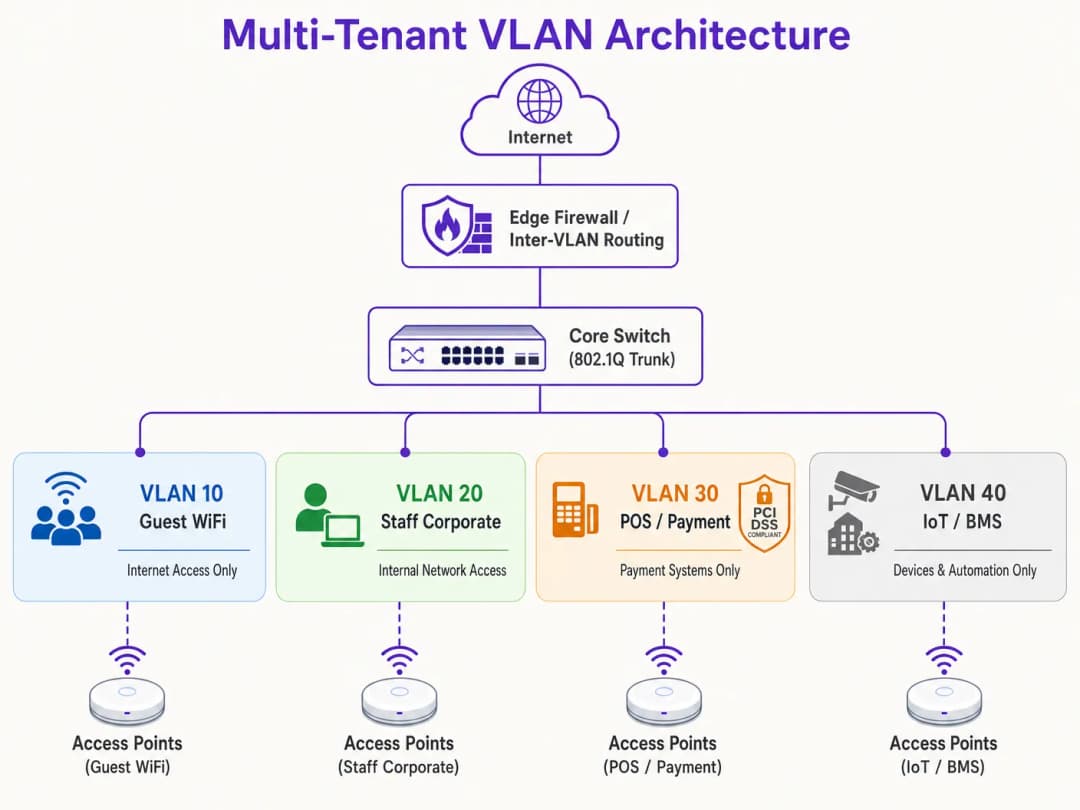
कोणतेही हार्डवेअर कॉन्फिगर करण्यापूर्वी, एक व्यापक लॉजिकल नेटवर्क मॅप तयार करा. प्रत्येक ट्रॅफिक क्लाससाठी स्वतंत्र VLAN IDs, IP सबनेट आणि सुरक्षा झोन नियुक्त करा.
| विभागाचे नाव | VLAN ID | IP Subnet / CIDR | सुरक्षा झोन | प्राथमिक ऑथेंटिकेशन |
|---|---|---|---|---|
| Network Management | VLAN 10 | 10.10.10.0/24 | Management | Static / Out-of-Band |
| Guest WiFi (Purple) | VLAN 20 | 172.16.0.0/20 | Guest (फक्त इंटरनेट) | Open + Captive Portal |
| Corporate Staff | VLAN 30 | 10.10.30.0/23 | Internal Corporate | WPA3-Enterprise (802.1X) |
| POS / Payments | VLAN 40 | 192.168.40.0/24 | PCI-CDE (प्रतिबंधित) | WPA3-Enterprise / MAB |
| IoT / Building Systems | VLAN 50 | 10.10.50.0/24 | IoT (प्रतिबंधित) | WPA3-SAE / Dynamic PSK |
महत्त्वाचा नियम: कोणत्याही सक्रिय ट्रॅफिक किंवा मॅनेजमेंटसाठी कधीही VLAN 1 चा वापर करू नका. सर्व ट्रंक पोर्ट्सवर VLAN 1 निष्क्रिय करा आणि VLAN हॉप्पिंग हल्ले रोखण्यासाठी नेटिव्ह VLAN बदलून न वापरलेला, नॉन-राउटेबल VLAN ID (उदा. VLAN 999) करा.
Step 2: Wired Switch Fabric Configuration
लॉजिकल VLAN संरचनेला सपोर्ट करण्यासाठी कोअर, डिस्ट्रिब्यूशन आणि ऍक्सेस स्विचेस कॉन्फिगर करा. APs ला थेट जोडलेले स्विच पोर्ट्स अनेक VLANs वाहून नेणारे असावेत आणि ते 802.1Q ट्रंक पोर्ट्स म्हणून कॉन्फिगर केलेले असावेत. सुरक्षेचा धोका कमी करण्यासाठी प्रत्येक ट्रंकवर कोणत्या VLANs ला परवानगी आहे हे स्पष्टपणे परिभाषित करा. सिंगल वायर्ड डिव्हाइसेसशी (जसे की स्टॅटिक POS टर्मिनल किंवा रिसेप्शनिस्टचा PC) कनेक्ट होणारे पोर्ट्स ऍक्सेस मोडवर सेट केले पाहिजेत आणि एकाच VLAN ला नियुक्त केले पाहिजेत.
पायरी ३: Wireless LAN Controller आणि AP कॉन्फिगरेशन
वायरलेस SSIDs ना त्यांच्या संबंधित VLANs शी मॅप करा आणि एज सुरक्षा नियंत्रणे कॉन्फिगर करा. Guest SSID साठी, सुरक्षा Open किंवा WPA3-Enhanced Open (OWE) वर कॉन्फिगर करा जेणेकरून संधीसाधू वायरलेस एन्क्रिप्शन प्रदान करता येईल, Client Isolation सक्षम करा, आणि GDPR सुसंगत युझर ऑनबोर्डिंग आणि ऍनालिटिक्ससाठी Purple च्या क्लाउड-व्यवस्थापित captive portal कडे रिडायरेक्ट करा. Corporate SSID साठी, 802.1X सह WPA3-Enterprise कॉन्फिगर करा, प्रायमरी आणि सेकंडरी RADIUS सर्व्हर पत्ते परिभाषित करा, आणि अखंड रोमिंगसाठी 802.11r Fast BSS Transition आणि Opportunistic Key Caching सक्षम करा. IoT डिव्हाइसेससाठी, मजबूत, रोटेट केलेल्या पासफ्रेससह WPA3-SAE तैनात करा किंवा वैयक्तिक डिव्हाइसेसना युनिक की नियुक्त करण्यासाठी आणि त्यांना सब-VLANs मध्ये डायनॅमिकली मॅप करण्यासाठी Multi-PSK (MPSK) लागू करा.
पायरी ४: कोअर Firewall आणि इंटर-VLAN राउटिंग पॉलिसी
VLAN आर्किटेक्चरची सुरक्षा ही पूर्णपणे इंटर-VLAN राउटिंग नियंत्रित करणाऱ्या firewall नियमांवर अवलंबून असते. firewall वर कडक Default-Deny पॉलिसी लागू केली पाहिजे, ज्यामध्ये फक्त स्पष्टपणे परवानगी असलेल्या प्रवाहांनाच मंजुरी दिली जाईल.

Guest Zone (VLAN 20) साठी, पोर्ट ८० आणि ४४३ वर WAN कडे जाणाऱ्या आउटबाउंड ट्रॅफिकला परवानगी द्या, आणि DNS आणि DHCP सेवांना UDP ट्रॅफिकची परवानगी द्या. अंतर्गत सबनेट्स कडे जाणारा सर्व ट्रॅफिक नाकारा. POS Zone (VLAN 40) साठी, पोर्ट ४४३ वर केवळ नियुक्त केलेल्या पेमेंट गेटवे IP पत्त्यांवर आउटबाउंड TCP ट्रॅफिकला परवानगी द्या आणि इतर सर्व VLANs कडील आणि त्यांच्याकडे जाणारा सर्व ट्रॅफिक नाकारा. IoT Zone (VLAN 50) साठी, केवळ विशिष्ट उत्पादक अपडेट सर्व्हर्स आणि स्थानिक व्यवस्थापन नियंत्रकांकडे जाणाऱ्या आउटबाउंड ट्रॅफिकला परवानगी द्या आणि इतर सर्व अंतर्गत आणि बाह्य ट्रॅफिक नाकारा.
सर्वोत्तम पद्धती
दीर्घकालीन स्थिरता, उच्च कार्यक्षमता आणि कडक सुरक्षा सुनिश्चित करण्यासाठी, या उद्योग-मानक VLAN डिझाइन तत्त्वांचे पालन करा.
Management Plane Isolation ही तडजोड न करण्यासारखी गोष्ट आहे. नेटवर्क व्यवस्थापन VLAN वर एंड-युझर ट्रॅफिकला कधीही परवानगी देऊ नका. APs, स्विचेस, राउटर आणि WLCs चे IP पत्ते एका समर्पित, अत्यंत प्रतिबंधित व्यवस्थापन VLAN वर प्राप्त झाले पाहिजेत. या VLAN चा ऍक्सेस केवळ अधिकृत प्रशासक उपकरणांपुरता मर्यादित असावा, आदर्शपणे सुरक्षित VPN किंवा भौतिक कन्सोल पोर्टद्वारे. जर एखाद्या हल्लेखोराने व्यवस्थापन प्लेनचा ऍक्सेस मिळवला, तर त्यांचे संपूर्ण नेटवर्क इन्फ्रास्ट्रक्चरवर प्रभावी नियंत्रण होते.
बहु-साइट ऑपरेटरसाठी Standardised VLAN Schema आवश्यक आहे. ५०० स्टोअर्स असलेली रिटेल साखळी किंवा ५० प्रॉपर्टीज असलेला हॉटेल ब्रँड यासारख्या बहु-साइट पोर्टफोलिओ व्यवस्थापित करणाऱ्या संस्थांसाठी - प्रत्येक साइटवर सातत्याने लागू केलेले टेम्पलेट केलेले VLAN schema वापरा. VLAN ID शी जुळण्यासाठी IP ॲड्रेसमध्ये सातत्यपूर्ण थर्ड ऑक्टेट वापरल्याने संपूर्ण इस्टेटमधील रिमोट ट्रबलशूटिंग, WLC टेम्पलेट डिप्लॉयमेंट आणि फायरवॉल नियम व्यवस्थापन सुलभ होते. हा दृष्टिकोन नवीन साइट्स ऑनबोर्ड करण्यासाठी आवश्यक असलेला वेळ देखील कमालीचा कमी करतो.
DHCP Lease Time Optimisation हे IP ॲड्रेस संपण्यापासून रोखते. हाय-डेन्सिटी वातावरणात, DHCP lease times काळजीपूर्वक व्यवस्थापित केले पाहिजेत. Guest WiFi विभागासाठी, जिथे युजर्स वारंवार येतात आणि जातात, तिथे DHCP Lease Time १ ते २ तास सेट करा. अंतर्गत कॉर्पोरेट नेटवर्कसाठी, ८ ते २४ तासांचा मानक lease time योग्य आहे. स्थानिक DNS सर्व्हर्स अतिथी नेटवर्कसाठी उघडे पडणार नाहीत याची खात्री करा; अंतर्गत सर्व्हरचा भार कमी करण्यासाठी सार्वजनिक, फिल्टर केलेल्या DNS रिझोल्व्हर्स वापरण्यासाठी अतिथी VLANs कॉन्फिगर करा.
Compliance Alignment आर्किटेक्चरमध्ये पहिल्या दिवसापासूनच समाविष्ट केले पाहिजे. PCI-DSS आवश्यकता १.२ कार्डधारक डेटा पर्यावरण (CDE) आणि इतर नेटवर्क दरम्यान ट्रॅफिक मर्यादित करण्यासाठी फायरवॉल स्थापित करणे अनिवार्य करते. POS टर्मिनल्स एका समर्पित VLAN वर वेगळे करून, ठिकाणाचे उर्वरित नेटवर्क कठोर आणि खर्चिक PCI अनुपालन मूल्यांकनातून वगळले जाते. अतिथी युजरचे ट्रॅफिक वेगळे करून आणि Purple च्या Captive Portal द्वारे संमती व्यवस्थापित करून GDPR चे "Privacy by Design" तत्व पूर्ण केले जाते. सर्व SSIDs वर WPA3 चा अवलंब वेगाने केला पाहिजे, कारण WPA3-Personal चे Simultaneous Authentication of Equals (SAE) प्रोटोकॉल WPA2-PSK मध्ये असलेल्या ऑफलाइन डिक्शनरी अटॅकच्या त्रुटी दूर करते. ॲक्सेस कंट्रोल आर्किटेक्चरवरील अधिक मार्गदर्शनासाठी, 10 Best Network Access Control (NAC) Solutions for 2026 पहा.
Troubleshooting & Risk Mitigation
अतिशय बारकाईने डिझाइन केलेल्या VLAN आर्किटेक्चरमध्ये देखील ऑपरेशनल समस्या उद्भवू शकतात. खालील सर्वात सामान्य त्रुटी आणि त्यांचे तांत्रिक उपाय दिले आहेत.
VLAN Leakage and Misconfigured Trunk Ports हे डिप्लॉयमेंटनंतरच्या सपोर्ट तिकीट्सचे सर्वात वारंवार उद्भवणारे मूळ कारण आहे. याचे लक्षण म्हणजे वायरलेस क्लायंट विशिष्ट SSID वर यशस्वीरित्या ऑथेंटिकेट होतात परंतु IP ॲड्रेस मिळविण्यात अयशस्वी ठरतात. याचे मूळ कारण म्हणजे AP शी कनेक्ट केलेला स्विच पोर्ट चुकीचा कॉन्फिगर केला गेला आहे: एकतर लक्ष्यित VLAN ला 802.1X ट्रंकवर परवानगी नाही किंवा स्विचच्या स्थानिक डेटाबेसमध्ये VLAN तयार केले गेले नाही. स्विच ट्रंक कॉन्फिगरेशनची पडताळणी करा आणि स्विच पोर्टवरील अनुमत VLAN सूची AP वर कॉन्फिगर केलेल्या SSIDs शी जुळत असल्याची खात्री करा. कोणत्याही बदलानंतर नेहमी स्विच कॉन्फिगरेशनचे ऑडिट करा आणि कमिशनिंग दरम्यान त्यांची पडताळणी करा.
DHCP Relay Failures तेव्हा उद्भवतात जेव्हा नवीन तयार केलेल्या VLAN कडे Layer 3 इंटरफेसवर संबंधित IP Helper Address कॉन्फिगर केलेला नसतो. DHCP विनंत्या या ब्रॉडकास्ट पॅकेट्स असल्याने, त्या रिले एजंटशिवाय VLAN च्या सीमा ओलांडू शकत नाहीत. जर DHCP सर्व्हर क्लायंटपेक्षा वेगळ्या VLAN वर असेल, तर राउटर किंवा Layer 3 स्विच सेंट्रल DHCP सर्व्हरकडे निर्देशित करणाऱ्या IP Helper Address सह कॉन्फिगर केलेला असणे आवश्यक आहे.
RADIUS Certificate Expiration हा एक छुपा धोका आहे जो संपूर्ण एंटरप्राइझ नेटवर्क एकाच वेळी निकामी करू शकतो. याचे लक्षण असे आहे की सर्व 802.1X ऑथेंटिकेटेड क्लायंट अचानक कनेक्ट होण्यास असमर्थ ठरतात आणि क्लायंट डिव्हाइसेसवर सर्टिफिकेट वॉर्निंग एरर्स दिसतात. सर्टिफिकेट संपण्याच्या ३० दिवस आधी ट्रिगर होणारे ऑटोमेटेड मॉनिटरिंग अलर्ट्स तैनात करा, आणि मॅन्युअल चुका टाळण्यासाठी ऑटोमेटेड सर्टिफिकेट रिन्यूअल पाईपलाईन्स लागू करा.
SSID Proliferation and RF Congestion हे उत्तम सिग्नल स्ट्रेंथ आणि हाय-स्पीड बॅकहॉल असूनही हाय लेटन्सी आणि स्लो स्पीडच्या रूपात दिसून येते. याचे मूळ कारण म्हणजे मॅनेजमेंट ओव्हरहेड आणि को - चॅनेल इंटरफेरन्समुळे होणारा अतिरिक्त चॅनेल वापर आहे. SSIDs एकत्रित करा, Dynamic VLAN Assignment कडे वळा, जास्त गर्दीच्या भागातील काही विशिष्ट APs वरील 2.4 GHz रेडिओ बंद करा आणि ड्युअल - बँड क्लायंटना अधिक स्पष्ट 5 GHz आणि 6 GHz बँड्सकडे नेण्यासाठी बँड स्टीयरिंग सक्तीचे करा.
ROI आणि व्यावसायिक प्रभाव
एक मजबूत VLAN सेगमेंटेशन धोरण लागू केल्याने वेन्यू ऑपरेटर्स आणि एंटरप्राइझ संस्थांसाठी महत्त्वपूर्ण आणि मोजता येण्याजोगे व्यावसायिक मूल्य मिळते.
PCI Audit Scope Minimisation थेट खर्च बचत प्रदान करते. क्रेडिट कार्ड पेमेंट प्रक्रियेत गुंतलेल्या वेन्यूसाठी, सपाट नेटवर्क संपूर्ण इन्फ्रास्ट्रक्चरला PCI DSS अनुपालनाच्या कक्षेमध्ये आणते. याचा अर्थ प्रत्येक स्विच, AP, सर्व्हर आणि ऑफिस पीसीचे ऑडिट केले जाणे आवश्यक आहे, ज्यामुळे अनुपालन मूल्यांकन, पेनिट्रेशन टेस्टिंग आणि प्रशासकीय ओव्हरहेडमध्ये दरवर्षी हजारो पौंड खर्च होतात. नेटवर्कचे सेगमेंटेशन करून आणि कठोर फायरवॉल नियंत्रणांसह कार्डधारक डेटा एन्व्हायरनमेंट एका समर्पित POS VLAN वर वेगळे करून, ऑडिटची कक्षा केवळ त्या VLAN पुरती मर्यादित केली जाते. कक्षेमधील या कपातीमुळे अनुपालन खर्च ७०% पर्यंत कमी होऊ शकतो आणि अनुपालन न केल्याबद्दलच्या दंडाचा धोका मोठ्या प्रमाणात कमी होतो.
Breach Cost Mitigation हा सर्वोच्च मूल्याचा सुरक्षा परिणाम आहे. गंभीर डेटा ब्रीचेसचे मुख्य कारण म्हणजे लॅटरल मूव्हमेंट आहे, जिथे आक्रमणकर्ता कमी सुरक्षिततेच्या डिव्हाइसवर प्रवेश मिळवतो आणि उच्च मूल्याचे डेटाबेस किंवा POS सिस्टम्सशी तडजोड करण्यासाठी सपाट नेटवर्कवर नेव्हिगेट करतो. VLAN सेगमेंटेशन, कठोर इंटर - VLAN फायरवॉल नियमांसह एकत्रितपणे, हा मार्ग पूर्णपणे काढून टाकते. जर VLAN 50 वरील एखाद्या IoT डिव्हाइसशी तडजोड झाली, तर आक्रमणकर्ता त्या लॉजिकल सेगमेंटमध्ये अडकतो. ब्रीचचा परिणाम मर्यादित होतो आणि संवेदनशील कॉर्पोरेट मालमत्तेचे रक्षण होते. Guest Analytics and Revenue Monetisation हे नेटवर्कचे रूपांतर एका खर्च केंद्राकडून एका धोरणात्मक मालमत्तेमध्ये करते. योग्यरित्या विभागलेले नेटवर्क वेन्यू ऑपरेटरना अंतर्गत सुरक्षिततेचा धोका न पत्करता सुरक्षितपणे उच्च दर्जाचे Guest WiFi प्रदान करण्यास अनुमती देते. पाहुण्यांच्या ट्रॅफिकला एका समर्पित VLAN द्वारे Purple च्या प्लॅटफॉर्मवर निर्देशित करून, वेन्यू थेट CRM आणि मार्केटिंग ऑटोमेशन प्लॅटफॉर्मसह एकत्रित केलेल्या ब्रँडेड captive portal द्वारे मौल्यवान फर्स्ट-पार्टी ग्राहक डेटा मिळवू शकतात. हे लक्ष्यित विपणन मोहिमा सक्षम करते, ग्राहकांची निष्ठा वाढवते आणि ऑपरेटरना त्यांच्या वायरलेस इन्फ्रास्ट्रक्चरचा वापर टियर बँडविड्थ अपग्रेड आणि captive portal स्प्लॅश पेजवरील जाहिरातींद्वारे कमाई करण्यासाठी करण्यास अनुमती देते. विश्लेषणे व्यवसायाचे परिणाम कसे चालवतात याबद्दल सखोल माहितीसाठी, Purple च्या WiFi Analytics प्लॅटफॉर्मचे दस्तऐवजीकरण पहा.
संदर्भ
- Cisco Wireless APs: 2026 Guide to Products & Deployment
- 10 Best Network Access Control (NAC) Solutions for 2026
- WiFi in Schools: The 2026 Administrator & IT Guide
- How to Implement 802.1X Authentication with Cloud RADIUS
- Purple Guest WiFi Platform
- Purple WiFi Analytics Platform
- Hospitality WiFi Solutions
- Retail WiFi Solutions
- Transport WiFi Solutions
महत्वाच्या व्याख्या
VLAN (Virtual Local Area Network)
नेटवर्क डिव्हाइसेसचे एक लॉजिकल ग्रुपिंग जे त्यांच्या प्रत्यक्ष स्थानाचा विचार न करता ते एकाच फिजिकल LAN वर असल्यासारखे संवाद साधतात. IEEE 802.1Q अंतर्गत परिभाषित केलेले, VLANs इथरनेट फ्रेम हेडरमध्ये एम्बेड केलेले १२-बिट VLAN आयडेंटिफायर (VID) वापरून एका सिंगल फिजिकल स्विच फॅब्रिकला एकाधिक आयसोलेटेड ब्रॉडकास्ट डोमेन्समध्ये विभाजित करतात.
शेअर केलेल्या फिजिकल इन्फ्रास्ट्रक्चरवर गेस्ट, कर्मचारी, POS आणि IoT ट्रॅफिक वेगळे करण्यासाठी IT टीम्स मुख्य यंत्रणा म्हणून VLANs चा वापर करतात. VLANs शिवाय, सर्व डिव्हाइसेस एकच ब्रॉडकास्ट डोमेन शेअर करतात, ज्यामुळे सुरक्षितता आणि परफॉर्मन्सचे धोके निर्माण होतात.
802.1Q Trunk Port
प्रत्येक इथरनेट फ्रेमला त्याच्या संबंधित VLAN ID सह टॅग करून एकाच वेळी अनेक VLAN साठी ट्रॅफिक वाहून नेण्यासाठी कॉन्फिगर केलेला एक स्विच पोर्ट. ट्रंक पोर्ट स्विचेसमधील आणि ॲक्सेस पॉइंट्सकडे टॅग केलेल्या फ्रेम्स वाहून नेतो, तर ॲक्सेस पोर्ट्स केवळ एकाच VLAN साठी अनटॅग केलेल्या फ्रेम्स वाहून नेतात.
नेटवर्क इंजिनिअर्स ऍक्सेस पॉईंट्सला जोडलेल्या स्विच इंटरफेसवर आणि स्विचेसमधील अपलिंक पोर्ट्सवर ट्रंक पोर्ट्स कॉन्फिगर करतात. एक चुकीचे कॉन्फिगर केलेले ट्रंक पोर्ट - जिथे परवानगी असलेल्या VLAN लिस्टमध्ये आवश्यक VLAN समाविष्ट नसतो - हे डिप्लॉयमेंटनंतर कनेक्टिव्हिटी अयशस्वी होण्याचे सर्वात सामान्य कारण आहे.
Dynamic VLAN Assignment (DVA)
एक आर्किटेक्चर जे IEEE 802.1X ऑथेंटिकेशन आणि RADIUS सर्व्हरचा वापर करून वायरलेस क्लायंटला त्यांनी कनेक्ट केलेल्या SSID ऐवजी त्यांच्या ऑथेंटिकेट केलेल्या ओळखीच्या आधारावर डायनॅमिकपणे विशिष्ट VLAN वर नियुक्त करते. RADIUS सर्व्हर AP ला कोणता VLAN नियुक्त करायचा हे सांगण्यासाठी Access-Accept संदेशामध्ये IETF मानक ॲट्रिब्युट्स (Tunnel-Type, Tunnel-Medium-Type, Tunnel-Private-Group-ID) परत करतो.
मल्टी-टेनंट इमारतींसाठी DVA हा शिफारस केलेला दृष्टिकोन आहे जिथे एकापेक्षा जास्त SSIDs ब्रॉडकास्ट केल्याने RF कामगिरी खालावू शकते. हे एकाच SSID ला त्यांच्या दरम्यान पूर्ण Layer 2 आयसोलेशनसह अनेक टेनंट संस्थांना सेवा देण्याची परवानगी देते.
RADIUS (Remote Authentication Dial-In User Service)
एक क्लायंट-सर्व्हर नेटवर्किंग प्रोटोकॉल जो नेटवर्क ॲक्सेससाठी केंद्रीकृत ऑथेंटिकेशन, ऑथरायझेशन आणि अकाउंटिंग (AAA) व्यवस्थापन प्रदान करतो. WiFi च्या संदर्भात, वायरलेस कंट्रोलर RADIUS क्लायंट म्हणून काम करतो, वायरलेस क्लायंटकडून ऑथेंटिकेशन विनंत्या RADIUS सर्व्हरकडे पाठवतो, जो आयडेंटिटी स्टोअर (Active Directory, LDAP, इत्यादी) विरूद्ध क्रेडेंशियल्सची पडताळणी करतो आणि VLAN असाइनमेंट्ससह ऑथरायझेशन ॲट्रिब्युट्स परत करतो.
RADIUS हा एंटरप्राइझ WiFi सुरक्षेचा कणा आहे. IT टीम्स प्रति-वापरकर्ता आणि प्रति-डिव्हाइस नेटवर्क पॉलिसी लागू करण्यासाठी RADIUS सर्व्हर (जसे की Microsoft NPS, FreeRADIUS, किंवा क्लाउड RADIUS सेवा) तैनात करतात, ज्यामध्ये Dynamic VLAN Assignment आणि सर्टिफिकेट-आधारित ऑथेंटिकेशन समाविष्ट आहे.
PCI DSS (Payment Card Industry Data Security Standard)
क्रेडिट कार्ड माहिती स्वीकारणाऱ्या, प्रक्रिया करणाऱ्या, संग्रहित करणाऱ्या किंवा ट्रान्समिट करणाऱ्या सर्व कंपन्यांनी सुरक्षित वातावरण राखले पाहिजे हे सुनिश्चित करण्यासाठी डिझाइन केलेल्या सुरक्षा मानकांचा संच. PCI DSS आवश्यकता 1 नेटवर्क सुरक्षा नियंत्रणे स्थापित आणि राखणे बंधनकारक करते, ज्यामध्ये कार्डधारक डेटा पर्यावरण (CDE) आणि इतर नेटवर्क्समधील ट्रॅफिक मर्यादित करणाऱ्या फायरवॉल्सचा समावेश आहे.
POS टर्मिनल्स किंवा पेमेंट प्रोसेसिंग सिस्टम असलेल्या व्हेन्यू ऑपरेटरनी PCI DSS चे पालन करणे आवश्यक आहे. योग्य VLAN सेगमेंटेशन CDE ला एका समर्पित VLAN मध्ये आयसोलेट करते, ज्यामुळे PCI ऑडिटची व्याप्ती संपूर्ण नेटवर्कऐवजी केवळ त्या सेगमेंट आणि त्यावर नियंत्रण ठेवणाऱ्या फायरवॉल पॉलिसीजपुरती मर्यादित होते.
Broadcast Domain
ग्रुपमधील कोणत्याही एका डिव्हाइसद्वारे पाठवलेली ब्रॉडकास्ट फ्रेम प्राप्त करणाऱ्या सर्व नेटवर्क डिव्हाइसेसचा संच. एका फ्लॅट, अनसेगमेंटेड नेटवर्कवर, सर्व डिव्हाइसेस एकच ब्रॉडकास्ट डोमेन शेअर करतात. VLANs नेटवर्कला लहान ब्रॉडकास्ट डोमेनमध्ये विभाजित करतात, ज्यामुळे ब्रॉडकास्ट ट्रॅफिक (ARP, DHCP, mDNS) केवळ त्या VLAN मधील डिव्हाइसेसपुरते मर्यादित राहते.
शेकडो किंवा हजारो कनेक्टेड डिव्हाइसेस असलेल्या हाय-डेन्सिटी व्हेन्यूजमध्ये, एक मोठा ब्रॉडकास्ट डोमेन प्रचंड प्रमाणात ब्रॉडकास्ट ट्रॅफिक तयार करतो ज्यामुळे वायरलेस एअरटाइम वाया जातो आणि कामगिरी खालावते. VLANs च्या माध्यमातून ब्रॉडकास्ट डोमेनचा आकार कमी करणे हे प्राथमिक परफॉर्मन्स ऑप्टिमायझेशनचे तंत्र आहे.
WPA3-Enterprise
सध्याचे एंटरप्राइझ-ग्रेड WiFi सुरक्षा मानक, जे प्रति-वापरकर्ता किंवा प्रति-डिव्हाइस ऑथेंटिकेशनसाठी IEEE 802.1X ऑथेंटिकेशन आणि EAP (Extensible Authentication Protocol) वापरते. WPA3-Enterprise 128-बिट (मानक) किंवा 192-बिट (उच्च-सुरक्षा मोड) क्रिप्टोग्राफिक संरक्षण प्रदान करते आणि WPA2 च्या 4-way हँडशेकशी संबंधित असुरक्षितता दूर करते.
IT टीम्सनी सर्व कॉर्पोरेट आणि नियंत्रित SSIDs (कर्मचारी, POS) वर WPA3-Enterprise तैनात केले पाहिजे. यासाठी RADIUS सर्व्हर आणि एकतर क्लायंट सर्टिफिकेट्स (EAP-TLS) किंवा युझरनेम/पासवर्ड क्रेडेंशियल्स (PEAP-MSCHAPv2) आवश्यक आहेत. WPA3-Enterprise हे PCI DSS-सुसंगत वायरलेस डिप्लॉयमेंट्ससाठी आवश्यक असलेले ऑथेंटिकेशन मानक आहे.
Client Isolation (Peer-to-Peer Blocking)
एक वायरलेस ॲक्सेस पॉइंट वैशिष्ट्य जे समान SSID शी कनेक्ट केलेल्या डिव्हाइसेसना लेअर २ वर एकमेकांशी थेट संवाद साधण्यापासून रोखते. सक्षम केल्यावर, सर्व इंटर - क्लायंट ट्रॅफिक AP वर ब्लॉक केले जाते, ज्यामुळे ते दुसऱ्या डिव्हाइसपर्यंत पोहोचण्यापूर्वी फायरवॉलमधून जाणे बंधनकारक होते.
सर्व गेस्ट WiFi SSID वर क्लायंट आयसोलेशन हे अनिवार्य कॉन्फिगरेशन आहे. त्याशिवाय, गेस्ट नेटवर्कवरील एखादा दुर्भावनापूर्ण युझर त्याच SSID वरील इतर गेस्ट डिव्हाइसेस स्कॅन, प्रोब आणि त्यांच्यावर हल्ला करू शकतो. GDPR चे पालन करण्यासाठी देखील हे आवश्यक आहे, कारण हे एका गेस्टला दुसऱ्या गेस्टची अनएन्क्रिप्टेड ट्रॅफिक इंटरसेप्ट करण्यापासून रोखते.
MAC Authentication Bypass (MAB)
एक फॉलबॅक ऑथेंटिकेशन मेकॅनिझम जे 802.1X ऑथेंटिकेशन करण्यास अक्षम असलेल्या डिव्हाइसेसना (जसे की प्रिंटर, स्मार्ट टीव्ही आणि IoT सेन्सर्स) त्यांच्या MAC ॲड्रेसचा वापर करून नेटवर्कवर ऑथेंटिकेट करण्याची परवानगी देते. RADIUS सर्व्हर अधिकृत डिव्हाइसेसच्या MAC ॲड्रेससह आधीच भरलेला असतो आणि यशस्वी MAB विनंतीनंतर योग्य VLAN असाइनमेंट परत करतो.
IT टीम्स मल्टी - टेनंट वातावरणात IoT आणि लेगसी डिव्हाइसेससाठी MAB वापरतात. MAC ॲड्रेस स्पूफ केले जाऊ शकत असल्याने, MAB नेहमी असाइन केलेल्या VLAN वरील कठोर फायरवॉल ACLs सोबत एकत्र केले पाहिजे, ज्यामुळे डिव्हाइसचा नेटवर्क ॲक्सेस केवळ त्याला आवश्यक असलेल्या विशिष्ट बाह्य सेवांपुरता मर्यादित राहील.
Native VLAN
802.1Q ट्रंक पोर्टवरील अनटॅग केलेल्या ट्रॅफिकला असाइन केलेले VLAN. बहुतांश स्विचेसवर डीफॉल्टनुसार, VLAN 1 हे नेटिव्ह VLAN असते. ट्रंक पोर्टवर येणाऱ्या अनटॅग केलेल्या फ्रेम्स नेटिव्ह VLAN ला असाइन केल्या जातात. VLAN हॉपरसाठी हा एक सुप्रसिद्ध अटॅक व्हेक्टर आहे, जिथे आक्रमणकर्ता त्याच्या VLAN मधून सुटण्यासाठी डबल - टॅग केलेल्या फ्रेम्स पाठवतो.
सर्व ट्रंक पोर्ट्सवरील नेटिव्ह VLAN बदलून ते न वापरलेल्या, नॉन - राउटेबल VLAN ID वर (उदा. VLAN 999) करणे आणि कोणत्याही ॲक्टिव्ह डिव्हाइसेसना VLAN 1 वर असाइन केले जाणार नाही याची खात्री करणे ही सर्वोत्तम पद्धत आहे. कोणत्याही PCI DSS सुसंगत नेटवर्क डिझाइनमध्ये ही एक अनिवार्य हार्डनिंग पायरी आहे.
सोडवलेली उदाहरणे
12 मालमत्ता चालवणाऱ्या ३५० खोल्यांच्या हॉटेल समूहाला त्यांच्या नेटवर्क पायाभूत सुविधांचे एकत्रिकरण करणे आवश्यक आहे. सध्या, प्रत्येक मालमत्ता अतिथी खोल्या, कर्मचाऱ्यांचे लॅपटॉप, रेस्टॉरंट POS टर्मिनल्स, CCTV कॅमेरे, HVAC कंट्रोलर्स आणि एकापेक्षा जास्त एकाच वेळी कार्यक्रम असणाऱ्या कॉन्फरन्स सेंटरसाठी एकच फ्लॅट नेटवर्क चालवते. IT संचालकांनी निदर्शनास आणून दिले आहे की संपूर्ण नेटवर्क PCI DSS अनुपालनाच्या कक्षेत येते, ज्यामुळे ऑडिट फी आणि सुधारणांच्या कामासाठी समूहाला दरवर्षी अंदाजे £४५,००० खर्च येतो. नेटवर्कची पुनर्रचना कशी करावी?
याचे समाधान म्हणजे प्रमाणित टेम्पलेट वापरून सर्व १२ मालमत्तांमध्ये सातत्यपूर्णपणे तैनात केलेली पाच-VLAN आर्किटेक्चर रचना आहे. VLAN १० (मॅनेजमेंट, 10.XX.10.0/24) केवळ स्विच, AP आणि WLC मॅनेजमेंट ट्रॅफिक वाहून नेते, जे केवळ समर्पित ॲडमिन VPN द्वारे उपलब्ध होते. VLAN २० (Guest WiFi, 172.16.0.0/20) GDPR-अनुपालक ऑनबोर्डिंग आणि ॲनालिटिक्ससाठी सर्व गेस्ट ट्रॅफिक Purple च्या कॅप्टिव्ह पोर्टलद्वारे (captive portal) पाठवते, ज्यामध्ये क्लायंट आयसोलेशन सक्षम असते आणि IP एक्झॉशन टाळण्यासाठी २ तासांचा DHCP लीज टाईम असतो. VLAN ३० (स्टाफ कॉर्पोरेट, 10.XX.30.0/23) क्लाउड RADIUS सेवेद्वारे समूहाच्या Azure AD विरुद्ध 802.1X प्रमाणीकरणासह WPA3-Enterprise वापरते. VLAN ४० (POS/पेमेंट, 192.168.40.0/24) हा एक कठोरपणे वेगळा केलेला PCI-CDE विभाग आहे, ज्यामध्ये केवळ पेमेंट गेटवे प्रदात्याच्या IP पत्त्यांवर आउटबाउंड HTTPS ला परवानगी देणारे डिफॉल्ट-डिनाय फायरवॉल धोरण असते. VLAN ५० (IoT/BMS, 10.XX.50.0/24) सर्व CCTV, HVAC, स्मार्ट लॉक आणि बिल्डिंग मॅनेजमेंट डिव्हाइसेसना त्यांच्या संबंधित व्यवस्थापन प्लॅटफॉर्मपुरत्या मर्यादित असलेल्या इग्रेस फिल्टरिंगसह वेगळे करते. कॉन्फरन्स सेंटरचे नियोजन WLC डॅशबोर्डद्वारे तात्पुरते इव्हेंट VLANs (VLAN ६०-९९) प्रोव्हिजन करून केले जाते, ज्यामध्ये प्रत्येक इव्हेंटसाठी सानुकूल Purple कॅप्टिव्ह पोर्टल आणि बँडविड्थ मर्यादा असतात. प्रमाणित थर्ड-ऑक्टेट IP स्कीम (XX = साइट नंबर) NOC टीमला केवळ त्याच्या IP पत्त्यावरून कोणत्याही डिव्हाइसची साइट आणि विभाग ओळखण्याची परवानगी देते, ज्यामुळे ट्रबलशूटिंगचा वेळ लक्षणीयरीत्या कमी होतो.
२२० स्टोअर्स असलेल्या राष्ट्रीय रिटेल साखळीला मोठ्या प्रमाणावर WiFi परफॉर्मन्सच्या तक्रारी येत आहेत. प्रत्येक स्टोअरमध्ये २०० Mbps फायबर कनेक्शन असूनही, ग्राहक आणि कर्मचारी ५ Mbps पेक्षा कमी स्पीड असल्याची तक्रार करत आहेत. एका ऑडिटमधून समोर आले आहे की प्रत्येक स्टोअरचे ऍक्सेस पॉईंट्स ९ SSIDs ब्रॉडकास्ट करत आहेत: एक ग्राहकांसाठी, एक कर्मचाऱ्यांसाठी, एक POS साठी, एक CCTV साठी, एक डिजिटल सायनेजसाठी, एक स्टॉक मॅनेजमेंट हँडहेल्ड्ससाठी, एक थर्ड-पार्टी लॉजिस्टिक्स भागीदारासाठी, एक कॉफी शॉप कन्सेशनसाठी आणि आधीच्या प्रोव्हाइडरचा एक जुना SSID जो कधीही बंद केला गेला नव्हता. सुरक्षितता राखून परफॉर्मन्सच्या समस्या सोडवण्यासाठी नेटवर्कचे रिडिझाइन कसे केले पाहिजे?
याचे सोल्यूशन हे तीन-टप्प्यांमधील एकत्रीकरण आहे. टप्पा १ (त्वरित): जुना SSID आणि झिरो ऍक्टिव्ह क्लायंट असलेले कोणतेही SSIDs त्वरित बंद करा. यामुळे बीकन ओव्हरहेड ९ SSIDs वरून थेट ७ वर येतो. टप्पा २ (३०-दिवसांचा रोलआउट): कर्मचारी, स्टॉक मॅनेजमेंट हँडहेल्ड्स, लॉजिस्टिक्स भागीदार आणि डिजिटल सायनेज SSIDs चे 802.1X आणि RADIUS द्वारे डायनॅमिक VLAN असाइनमेंट वापरून एकाच एंटरप्राइझ SSID मध्ये एकत्रीकरण करा. प्रत्येक युझर ग्रुप त्यांच्या कॉर्पोरेट क्रेडेंशियल किंवा डिव्हाइस सर्टिफिकेटसह ऑथेंटिकेट करतो आणि RADIUS सर्व्हर त्यांना त्यांच्या समर्पित VLAN वर (कर्मचाऱ्यांसाठी VLAN ३०, IoT/हँडहेल्ड्ससाठी VLAN ५०, लॉजिस्टिक्ससाठी VLAN ६०, सायनेजसाठी VLAN ७०) असाइन करण्यासाठी योग्य Tunnel-Private-Group-ID ॲट्रिब्यूट पाठवतो. यामुळे SSID ची संख्या ७ वरून ४ वर येते. टप्पा ३ (६०-दिवसांचा रोलआउट): कॉफी शॉप कन्सेशनला स्वतंत्र Purple कॅप्टिव्ह पोर्टल इन्स्टन्ससह एका समर्पित VLAN वर स्थलांतरित करा आणि POS व CCTV SSIDs चे त्यांच्या संबंधित आयसोलेटेड VLANs वर एकत्रीकरण करा. अंतिम आर्किटेक्चर ३ SSIDs ब्रॉडकास्ट करते: डायनॅमिक VLAN असाइनमेंटसह एक एंटरप्राइझ SSID, Purple च्या कॅप्टिव्ह पोर्टलद्वारे एक गेस्ट/कस्टमर WiFi आणि एक POS SSID. ड्युअल-बँड क्लायंटना ५ GHz वर पाठवण्यासाठी सर्व APs वर बँड स्टिअरिंग सुरू करा आणि कोणत्याही एका युझरला अपलिंक ब्लॉक करण्यापासून रोखण्यासाठी गेस्ट VLAN वर प्रति-क्लायंट रेट लिमिटिंग (१० Mbps डाऊनस्ट्रीम) कॉन्फिगर करा.
सराव प्रश्न
Q1. एक कॉन्फरन्स सेंटर ऑपरेटर २०० ॲक्सेस पॉइंट्ससह ५०,००० चौ. फूट जागा चालवतो. ते सध्या ६ SSID ब्रॉडकास्ट करतात: एक इव्हेंट उपस्थितांसाठी, एक प्रदर्शकांसाठी, एक सेंटर कर्मचाऱ्यांसाठी, एक AV उपकरणांसाठी, एक केटरिंग POS टर्मिनल्ससाठी आणि एक बिल्डिंग मॅनेजमेंट सिस्टमसाठी. IT मॅनेजर अहवाल देतो की मोठ्या इव्हेंट दरम्यान WiFi कार्यक्षमता खराब असते, १ Gbps फायबर अपलिंक असूनही सरासरी क्लायंटचा वेग ३ Mbps च्या खाली घसरतो. हे व्हेन्यू PCI DSS ऑडिटची तयारी देखील करत आहे. कार्यक्षमता आणि अनुपालन या दोन्ही समस्यांचे निराकरण करण्यासाठी तुम्ही वायरलेस आर्किटेक्चरचे रीडिझाइन कसे कराल?
टीप: डायनॅमिक VLAN असाइनमेंट वापरून कोणते SSID एकत्रित केले जाऊ शकतात, कोणत्या ट्रॅफिक क्लासेसवर PCI DSS चे परिणाम होतात आणि हाय - डेंसिटी वातावरणात SSID बीकन ओव्हरहेड कार्यक्षमतेच्या समस्येस कशा प्रकारे कारणीभूत ठरतो याचा विचार करा.
नमुना उत्तर पहा
हे रीडिझाइन कॉर्पोरेट विभागांसाठी डायनॅमिक VLAN असाइनमेंट वापरून ६ SSID चे ३ SSID मध्ये एकत्रीकरण करते. SSID १ (इव्हेंट उपस्थित): WPA3-Enhanced Open सह ओपन SSID, VLAN २० शी मॅप केलेले, GDPR सुसंगत ऑनबोर्डिंग आणि प्रति - क्लायंट दर मर्यादा (१० Mbps डाउनस्ट्रिम) साठी Purple च्या कॅप्टिव्ह पोर्टलद्वारे राउट केलेले. क्लायंट आयसोलेशन सक्षम केले आहे. SSID २ (एंटरप्राइझ सुरक्षित): डायनॅमिक VLAN असाइनमेंटसह 802.1X वापरणारे सिंगल WPA3-Enterprise SSID. प्रदर्शक नोंदणीच्या वेळी जारी केलेल्या तात्पुरत्या क्रेडेंशियल्ससह ऑथेंटिकेट करतात आणि त्यांना VLAN ६० (केवळ इंटरनेट, आयसोलेटेड) वर ठेवले जाते. सेंटर कर्मचारी कॉर्पोरेट AD क्रेडेंशियल्ससह ऑथेंटिकेट करतात आणि त्यांना VLAN ३० (अंतर्गत ॲक्सेस) वर ठेवले जाते. AV उपकरणे MAC Authentication Bypass वापरतात आणि त्यांना VLAN ५० (AV मॅनेजमेंट सर्व्हरपुरते मर्यादित) वर ठेवले जाते. SSID ३ (POS सुरक्षित): केटरिंग POS टर्मिनल्ससाठी समर्पित WPA3-Enterprise SSID, VLAN ४० (PCI-CDE) वर मॅप केलेले. कठोर फायरवॉल नियम पेमेंट गेटवेवर केवळ आउटबाउंड HTTPS ला अनुमती देतात. बिल्डिंग मॅनेजमेंट सिस्टम शक्य तिथे VLAN ५० वरील वायर्ड कनेक्शनवर किंवा वायरलेस आवश्यक असल्यास समर्पित IoT SSID वर स्थलांतरित केल्या जातात. ६ वरून ३ SSID पर्यंत कमी केल्याने बीकन ओव्हरहेड अंदाजे १५-२०% कमी होतो, ज्यामुळे उपलब्ध एअरटाइम आणि क्लायंट थ्रूपुट थेट सुधारतो. PCI ऑडिटची व्याप्ती VLAN ४० आणि त्याच्या फायरवॉल पॉलिसी पुरती मर्यादित केली जाते, ज्यामुळे PCI DSS आवश्यकता १.२ आणि १.३ पूर्ण होते.
Q2. एक नेटवर्क आर्किटेक्ट नवीन ८०-युनिट मिश्र-वापर व्यावसायिक इमारतीसाठी WiFi पायाभूत सुविधांची रचना करत आहे. या इमारतीमध्ये १५ स्वतंत्र व्यावसायिक भाडेकरू, तळमजल्यावर एक कॅफे आणि सामायिक को-वर्किंग स्पेस असतील. प्रत्येक भाडेकरूला इतर भाडेकरूंपासून पूर्ण नेटवर्क आयसोलेशन, स्वतःचे बँडविड्थ वाटप आणि स्वतःची उपकरणे कनेक्ट करण्याची क्षमता आवश्यक आहे. इमारत मालकाला संपूर्ण पायाभूत सुविधांचे केंद्रीकृत व्यवस्थापन करायचे आहे आणि नवीन भाडेकरूंना ३० मिनिटांत ऑनबोर्ड करायचे आहे. आपण कोणत्या आर्किटेक्चरची शिफारस कराल आणि डिझाइनचे मुख्य निर्णय काय असतील?
टीप: प्रत्येक भाडेकरूसाठी स्वतंत्र SSID सह प्रति भाडेकरू VLANs विरूद्ध एकाच SSID सह Dynamic VLAN Assignment यामधील फायद्या-तोट्यांचा विचार करा. जलद भाडेकरू ऑनबोर्डिंग आणि केंद्रीकृत व्यवस्थापनासाठी आवश्यक असलेल्या ऑपरेशनल गरजांचा विचार करा.
नमुना उत्तर पहा
शिफारस केलेले आर्किटेक्चर म्हणजे सर्व व्यावसायिक भाडेकरूंसाठी एकाच एंटरप्राइझ SSID सह Dynamic VLAN Assignment मॉडेल आणि कॅफे व को-वर्किंग स्पेससाठी स्वतंत्र गेस्ट SSID आहे. प्रत्येक भाडेकरूला एक युनिक VLAN ID (उदा. भाडेकरूंसाठी VLAN 101-115, को-वर्किंगसाठी VLAN 200, कॅफेसाठी VLAN 201) दिला जातो. RADIUS सर्व्हर क्लाउड आयडेंटिटी प्रोव्हाइडरसह समाकलित केला जातो जो प्रति भाडेकरू युझर डिरेक्टरीला सपोर्ट करतो. जेव्हा नवीन भाडेकरू ऑनबोर्ड केला जातो, तेव्हा ॲडमिनिस्ट्रेटर कोर स्विचवर एक नवीन VLAN तयार करतो, नवीन सबनेटसाठी DHCP स्कोप कॉन्फिगर करतो, सर्व ट्रंक पोर्ट्सवरील अलाउड लिस्टमध्ये VLAN जोडतो, आयडेंटिटी प्रोव्हाइडरमध्ये एक नवीन भाडेकरू ग्रुप तयार करतो आणि त्या भाडेकरूच्या युझर्ससाठी नवीन VLAN ID परत करण्यासाठी RADIUS सर्व्हर कॉन्फिगर करतो. ही संपूर्ण प्रक्रिया टेम्पलेटद्वारे ३० मिनिटांपेक्षा कमी वेळेत पूर्ण केली जाऊ शकते. प्रत्येक भाडेकरूचे VLAN इतर सर्व भाडेकरूंच्या VLAN पासून डिफॉल्ट-डिनाय इंटर-VLAN फायरवॉल पॉलिसीद्वारे आयसोलेट केले जाते. प्रति भाडेकरू बँडविड्थ पॉलिसी QoS प्रोफाइलचा वापर करून WLC वर लागू केल्या जातात, ज्यामुळे प्रत्येक भाडेकरूला त्यांच्या करारातील बँडविड्थ टियरची हमी मिळते. कॅफे आणि को-वर्किंग गेस्ट SSID VLAN 200 वर Purple च्या captive portal द्वारे रूट केले जातात, जे इमारत मालकाला व्हिजिटर ॲनालिटिक्स आणि ब्रँडेड ऑनबोर्डिंग अनुभव प्रदान करतात. मुख्य डिझाइन निर्णय हा प्रति भाडेकरू SSIDs ऐवजी एकच एंटरप्राइझ SSID वापरणे हा आहे, कारण प्रति भाडेकरू SSID वापरल्यास १५ पर्यंत SSIDs ब्रॉडकास्ट करावे लागतील आणि त्यामुळे हाय-डेन्सिटी इमारत वातावरणात RF कामगिरी गंभीरपणे खालावेल.
Q3. एका मोठ्या रिटेल चेनच्या IT मॅनेजरला एका नियमित नेटवर्क ऑडिट दरम्यान असे आढळले की ३०० स्टोअर्समधील सर्व ट्रंक पोर्ट्सवर VLAN 1 हे नेटिव्ह VLAN म्हणून वापरले जात आहे, आणि वायरलेस कंट्रोलर्स ॲक्सेस करण्यासाठीचे मॅनेजमेंट SSID हे गेस्ट WiFi नेटवर्कसारख्याच सबनेटवर आहे. सुरक्षा टीमने याला गंभीर असुरक्षितता (critical vulnerability) म्हणून चिन्हांकित केले आहे. यासाठी कोणते त्वरित दुरुस्तीचे उपाय केले पाहिजेत आणि या समस्यांचे निराकरण न केल्यास कोणता धोका संभवतो?
टीप: नेटिव्ह VLAN म्हणून VLAN 1 मुळे उद्भवू शकणाऱ्या विशिष्ट अटॅक वेक्टर्सचा (VLAN hopping) विचार करा, तसेच व्यवस्थापन ट्रॅफिक गेस्ट नेटवर्कवरून ॲक्सेस करता येण्याच्या परिणामांचा विचार करा. जोखमीच्या तीव्रतेनुसार दुरुस्तीच्या उपायांना प्राधान्य द्या.
नमुना उत्तर पहा
प्राधान्यक्रमानुसार तात्काळ निवारण: पायरी १ (गंभीर - त्याच दिवशी): व्यवस्थापन SSID वेगळे करा. जर गेस्ट नेटवर्कवरून व्यवस्थापन SSID ला ॲक्सेस मिळत असेल, तर ते पूर्णपणे अक्षम करा. सर्व वायरलेस कंट्रोलर व्यवस्थापन ॲक्सेसला एका समर्पित Management VLAN (उदा. VLAN 10) वर हलवा ज्याचा ॲक्सेस साइट-टू-साइट VPN किंवा समर्पित व्यवस्थापन वर्कस्टेशन्सद्वारे केवळ प्रशासक डिव्हाइसेसपुरता मर्यादित असेल. यामुळे सर्वात गंभीर धोका नाहीसा होतो: गेस्ट नेटवर्कवरील एखादा गेस्ट युझर किंवा हल्ला करणारा वायरलेस कंट्रोलर्सचा ॲक्सेस मिळवून संपूर्ण वायरलेस इन्फ्रास्ट्रक्चरची पुनर्रचना किंवा ते अक्षम करू शकत नाही. पायरी २ (उच्च - १ आठवड्याच्या आत): सर्व ट्रंक पोर्ट्सवरील मूळ VLAN ला VLAN 1 वरून बदलून न वापरलेल्या, नॉन-राउटेबल VLAN (उदा. VLAN 999) वर करा. VLAN 1 ला कोणतेही सक्रिय डिव्हाइसेस नियुक्त केलेले नाहीत याची खात्री करा. यामुळे VLAN hopping हल्ल्याचा धोका कमी होतो, जिथे हल्ला करणारा त्यांच्या VLAN मधून बाहेर पडण्यासाठी आणि दुसऱ्या VLAN च्या ट्रॅफिकचा ॲक्सेस मिळवण्यासाठी डबल-टॅग केलेले 802.1Q फ्रेम्स पाठवतो. पायरी ३ (मध्यम - ३० दिवसांच्या आत): सर्व ३०० स्टोअर्समध्ये संपूर्ण ट्रंक पोर्ट ऑडिट करा जेणेकरून प्रत्येक ट्रंक पोर्टवरील परवानगी असलेल्या VLAN ची यादी स्पष्टपणे परिभाषित केली आहे आणि ती डिझाइन दस्तऐवजाशी जुळते आहे याची पडताळणी होईल. त्या ठिकाणी आवश्यक नसलेले कोणतेही VLAN ट्रंक पोर्ट्सवरून काढून टाका. या समस्यांचे निवारण न केल्यास उद्भवणारा धोका गंभीर आहे: गेस्ट WiFi नेटवर्कवरील हल्ला करणारा संभाव्यतः वायरलेस कंट्रोलर व्यवस्थापन इंटरफेसपर्यंत पोहोचू शकतो, SSID कॉन्फिगरेशन सुधारू शकतो, प्री-शेअर्ड की मिळवू शकतो, ट्रॅफिक रिडायरेक्ट करू शकतो किंवा संपूर्ण वायरलेस इन्फ्रास्ट्रक्चर अक्षम करू शकतो. VLAN 1 मूळ VLAN असुरक्षिततेमुळे हल्ला करणाऱ्याला गेस्ट VLAN मधून सुटण्याची आणि POS टर्मिनल्स किंवा अंतर्गत सर्व्हरचा ॲक्सेस मिळवण्याची परवानगी मिळू शकते, ज्यामुळे PCI-DSS चे उल्लंघन होऊन गैर-अनुपालनासाठी प्रति महिना £१,००,००० पर्यंत दंड होऊ शकतो.
वारंवार विचारले जाणारे प्रश्न
How do you set up separate networks on a shared internet connection for residents, leasing office staff, and smart building devices?
To isolate different user groups on a shared high-speed uplink without deploying multiple physical networks, configure IEEE 802.1Q VLAN tagging on your core switch and wireless access points. Create dedicated VLANs with private IP subnets: for example, VLAN 10 for Leasing Office Staff (authenticated via 802.1X/WPA3-Enterprise), VLAN 20 for Building Management Systems and IoT (using MAC Authentication Bypass and strict outbound ACLs), VLAN 30 for Public Guest WiFi (with Layer 2 client isolation and a captive portal), and dynamic per-tenant VLANs (VLAN 100-500) for residents using Identity PSK (iPSK) or Dynamic VLAN Assignment. Enforce stateful inter-VLAN firewall rules that prevent traffic between segments while allowing outbound WAN internet access.
What is the difference between SSID-based VLAN tagging and Dynamic VLAN Assignment (DVA)?
SSID-based VLAN tagging binds a specific SSID statically to a single VLAN ID. In multi-tenant environments with dozens or hundreds of tenants, creating separate SSIDs for each tenant creates severe RF management overhead, beacon congestion, and degraded airtime efficiency. Dynamic VLAN Assignment (DVA) solves this by broadcasting a single common SSID. When a user connects and authenticates via 802.1X, the central RADIUS server inspects their identity and returns RFC 2868 and RFC 3580 attributes (Tunnel-Type = VLAN, Tunnel-Medium-Type = 802, Tunnel-Private-Group-ID = VLAN_ID), dynamically steering that client into their dedicated, isolated VLAN without extra broadcast airtime.
How does Layer 2 client isolation prevent lateral movement between tenants?
Layer 2 Client Isolation (also called Private VLAN or station isolation) instructs access points and switch ports to drop direct peer-to-peer unicast, multicast, and broadcast frames between devices connected to the same wireless radio or broadcast domain. This prevents malicious actors or compromised endpoints from running ARP poisoning, port scanning, man-in-the-middle (MITM) attacks, or discovering unencrypted network services on neighboring resident devices. All communication is forced upstream to the Layer 3 default gateway, where stateful firewall rules inspect or block inter-device traffic.
How does VLAN segmentation protect cardholder data (PCI DSS 4.0) in mixed-use retail and office properties?
PCI DSS 4.0 Requirement 1 mandates strict network security controls to isolate the Cardholder Data Environment (CDE) from all untrusted and non-essential networks. By placing Point of Sale (POS) terminals, payment gateways, and merchant hardware on a dedicated, isolated VLAN (e.g., VLAN 40), organizations ensure that tenant devices, corporate office workstations, and public guest WiFi have zero Layer 2 or Layer 3 access to payment systems. Stateful firewall access control lists (ACLs) must restrict ingress and egress traffic exclusively to authorized payment processing endpoints and outbound encrypted TLS channels.
How do you prevent Apple AirPlay, Chromecast, and smart home mDNS traffic from bleeding across tenant units?
Smart home streaming and IoT devices rely on multicast DNS (mDNS) and Simple Service Discovery Protocol (SSDP) on local broadcast domains (224.0.0.251 / UDP 5353). In an unsegmented or flat multi-tenant network, every tenant would see and control every neighboring Apple TV, printer, and smart speaker in the entire building. Isolating each tenant into their own micro-VLAN or using Identity PSK (iPSK) with Personal Area Network (PAN) containment confines multicast and broadcast packets strictly to that tenant's authorized devices, preventing cross-unit casting and privacy breaches.
या मालिकेमध्ये पुढे वाचा
निवासी इमारतींमध्ये हॉटेल-स्टाईल अतिथी WiFi का अयशस्वी ठरते
तुम्ही निदान करू शकाल की BTR ब्लॉक्स, विद्यार्थी वसतिगृहे आणि MDUs मधील रहिवासी वारंवार WiFi दोषांची तक्रार का करत आहेत आणि ते दुरुस्त करणारे ऑथेंटिकेशन मॉडेल निवडू शकाल. याचे उत्तर म्हणजे तुमच्या विद्यमान ऍक्सेस पॉइंट्सवर प्रति-घरगुती iPSK की देणे आणि अभ्यागतांसाठी स्वतंत्र captive portal नेटवर्क ठेवणे.
बहुभाडेकरू कार्यालयीन इमारतींसाठी WiFi नेटवर्कचे डिझाइन करणे
हे मार्गदर्शक IT व्यवस्थापक, नेटवर्क आर्किटेक्ट आणि CTOs ना बहुभाडेकरू कार्यालयीन इमारतींमध्ये स्केलेबल, सुरक्षित आणि वेगळे केलेले WiFi नेटवर्क डिझाइन करण्यासाठी विक्रेता-तटस्थ ब्लू प्रिंट प्रदान करते. यामध्ये IEEE 802.1Q अंतर्गत VLAN विभाजन, 802.1X आणि RADIUS द्वारे डायनॅमिक VLAN असाइनमेंट, हाय-डेन्सिटी वातावरणासाठी RF नियोजन, आणि GDPR आणि PCI-DSS अंतर्गत अनुपालन बाबींचा समावेश आहे. स्थळ संचालक आणि इमारत व्यवस्थापकांना प्रत्यक्ष उपयोजनापूर्वी उपयुक्त आर्किटेक्चर मार्गदर्शन, वास्तविक-जगातील केस स्टडीज आणि टाळण्यासारख्या कॉन्फिगरेशन त्रुटी मिळतील.
Mean time to innocence: WiFi चे दोषारोपण कसे टाळायचे
Mean time to innocence (MTTI) हा एक महत्त्वाचा मेट्रिक आहे जो नेटवर्कची समस्या ही त्यांची चूक नाही हे सिद्ध करण्यासाठी आयटी टीम्स किती वेळ घालवतात हे ठरवतो. हा मार्गदर्शक मल्टी-टेनंट वातावरणात एकमेकांवर दोषारोप करणे टाळण्यासाठी आणि सरासरी रिझोल्यूशन वेळ (MTTR) कमी करण्यासाठी सामायिक पुराव्यांच्या मदतीने पाच-पाच पायऱ्यांची एक ऑब्झर्वेबिलिटी कार्यपद्धती तपशीलवार सांगतो.
तुमच्या विशिष्ट सेटअपबद्दल काही प्रश्न आहेत का?
आमची टीम ८०,००० हून अधिक वेन्यूजमधील वेन्यू ऑपरेटर्स, IT मॅनेजर्स आणि नेटवर्क इंजिनिअर्ससोबत काम करते. २० मिनिटांचा कॉल बुक करा आणि तुमच्यासारख्या इतरांनी ही समस्या कशी सोडवली हे आम्ही तुम्हाला दाखवू.