
VLAN-Segmentierung: Best Practices für mandantenfähige Umgebungen
Dieser Leitfaden bietet IT-Managern, Netzwerkarchitekten, CTOs und Leitern des Standortbetriebs ein maßgebliches, herstellerneutrales Konzept für die Implementierung der VLAN-Segmentierung in mandantenfähigen WiFi-Umgebungen. Er behandelt den IEEE-802.1Q-Standard, die dynamische VLAN-Zuweisung über 802.1X und RADIUS sowie eine schrittweise Anleitung zur Bereitstellung in der Hotellerie, im Einzelhandel, in Stadien und im öffentlichen Sektor. Eine ordnungsgemäße VLAN-Segmentierung ist die grundlegende Sicherheitsmaßnahme für die PCI-DSS- und GDPR-Konformität, die Verhinderung von Lateral Movement und die Bereitstellung von leistungsstarker drahtloser Konnektivität über eine gemeinsam genutzte physische Infrastruktur.
Video overview
Diesen Leitfaden anhören
Podcast-Transkript ansehen
Teil unserer Kernserie: Leitfaden für mandantenfähiges WiFi →
Multi-tenant WiFi VLAN segmentation architect
Model isolated Layer 2 broadcast domains, Dynamic VLAN Assignment, subnet sizing, and switch trunking for residential MDUs, commercial offices, and mixed-use real estate.
Dynamic RADIUS attributes (RFC 2868 / 3580)
Pass these standard IETF attributes from Cloud RADIUS in the Access-Accept packet to dynamically steer authenticated tenant clients into isolated VLANs without broadcasting multiple SSIDs.
Cisco Meraki switch & AP trunk template
MS Cloud-Managed Switches & MR Access Points
Per-tenant VLAN mechanism: Identity PSK (iPSK) with RADIUS or Group Policies
Trunk form: Switchport mode trunk, allowed VLANs all / native VLAN 999
# Cisco Meraki dashboard configuration (MS switches + MR access points)
# Meraki MS is dashboard-managed: there is no switch CLI to paste into.
# Apply the following in the Meraki dashboard.
#
# Switch > Switch ports > (select AP uplink ports) > Edit:
#   Type:            Trunk
#   Native VLAN:     999 (unused, so untagged frames are discarded)
#   Allowed VLANs:   10,20,25,30,99,101-180
#   RSTP:            Enabled
#   Port isolation:  Disabled (an AP trunk carries many client MACs;
#                    do not apply port security to it)
#
# Wireless > SSIDs:
#   VLAN 10 - Property Staff & Leasing Operations
#   VLAN 20 - Building Operations (HVAC, CCTV, Elevators)
#   VLAN 25 - Smart Infrastructure & Door Access IoT
#   VLAN 30 - Visitor & Shared Amenity WiFi
#   VLAN 99 - Network Infrastructure & AP Management
#   Resident SSID -> WPA2/WPA3-Personal with Identity PSK (iPSK),
#                    per-tenant VLAN from the 101-180 pool
#   Staff SSID    -> WPA3-Enterprise 802.1X, VLAN 10
# Guest SSID -> Open + Purple captive portal, VLAN 30, client isolation ONDeploy automated multi-tenant WiFi with Purple
Eliminate resident WiFi friction and secure your property infrastructure. Speak with Purple's network solutions engineers to deploy automated iPSK onboarding, Cloud RADIUS Dynamic VLAN Assignment, and unified guest WiFi management across your property portfolio.
Executive Summary
Für moderne physische Großunternehmen - von standortübergreifenden Portfolios im Einzelhandel und weitläufigen Hotellerie-Liegenschaften bis hin zu hochfrequentierten Stadien und Einrichtungen im Gesundheitswesen - ist die Netzwerksegmentierung keine optionale Best Practice mehr, sondern eine grundlegende architektonische Anforderung. Die Verwaltung einer Multi-Tenant-Umgebung auf einem einzigen, flachen physischen Netzwerk stellt ein kritisches betriebliches Risiko dar. Sie setzt sensible Unternehmensdaten lateralen Sicherheitsbedrohungen aus, beeinträchtigt die WLAN-Leistung durch Broadcast-Überlastung und verkompliziert Audits zur regulatorischen Compliance.
Virtual Local Area Networks (VLANs), definiert unter dem IEEE 802.1Q-Standard, bieten die logische Partitionierung, die erforderlich ist, um verschiedene Benutzergruppen, Mandantenorganisationen und Gerätetypen über eine gemeinsame physische Infrastruktur zu isolieren. Durch die Zuordnung bestimmter Wireless Service Set Identifiers (SSIDs) zu dedizierten VLANs können Netzwerkarchitekten granulare Sicherheitsrichtlinien und Datenverkehrsbegrenzungen auf der kabelgebundenen Switch-Ebene durchsetzen. Darüber hinaus ermöglicht die Implementierung fortschrittlicher Techniken wie der dynamischen VLAN-Zuweisung über IEEE 802.1X und RADIUS den Veranstaltungsorten, ihre Hochfrequenz-Umgebung (HF) in einer einzigen sicheren SSID zu konsolidieren. Dies eliminiert den gravierenden Leistungsabfall, der durch das Ausstrahlen mehrerer SSIDs verursacht wird.
Dieser Leitfaden dient als maßgebliche technische Referenz für IT-Manager, Netzwerkarchitekten, CTOs und Leiter des Veranstaltungsbetriebs. Er bietet herstellerneutrale, direkt umsetzbare Konzepte für den Entwurf und die Implementierung einer sicheren, skalierbaren VLAN-Segmentierungsarchitektur. Durch die Integration dieser Praktiken mit den Enterprise-Plattformen für Guest WiFi und WiFi Analytics von Purple können Unternehmen eine robuste Layer-2-Isolierung erreichen, die Einhaltung von PCI-DSS und GDPR rationalisieren und ein leistungsstarkes, sicheres WLAN-Erlebnis bereitstellen, das den ROI des Veranstaltungsorts steigert.
Technischer Deep-Dive
Der Übergang von einem Netzwerk für einen einzelnen Nutzer zu einer sicheren Multi-Tenant-Architektur erfordert den Wechsel von einem flachen, impliziten Vertrauensmodell zu einem segmentierten Zero-Trust-Framework. Das Ziel besteht darin, sicherzustellen, dass mehrere unabhängige Mandanten, Gastnetzwerke und betriebliche Geräte auf einer gemeinsamen physischen Infrastruktur koexistieren, ohne die Sicherheit, Leistung oder Privatsphäre zu beeinträchtigen.
Das 802.1Q-VLAN-Tagging-Protokoll
Die Grundlage der logischen Netzwerksegmentierung ist das Virtual Local Area Network (VLAN), standardisiert unter IEEE 802.1Q. In einem Standard-Ethernet-Frame fügt ein 802.1Q-Header ein 4-Byte-Tag zwischen der Quell-MAC-Adresse und den EtherType-Feldern ein. Dieses Tag enthält einen 12-Bit VLAN Identifier (VID), der bis zu 4.094 eindeutige logische Segmente unterstützt (die VLAN-IDs 1 und 4095 sind reserviert).
Wenn ein Wireless-Client eine Verbindung mit einem Access Point (AP) herstellt, ordnet der AP den Datenverkehr dieses Clients einer bestimmten SSID zu. Der AP kapselt dann die Wireless-Frames des Clients in Ethernet-Frames und versieht sie mit dem gemappten VLAN ID-Tag, bevor er sie an den Switch-Port weiterleitet. Die physischen Switch-Ports, die mit den APs verbunden sind, müssen als 802.1Q Trunk-Ports konfiguriert sein, um den Datenverkehr für mehrere VLANs gleichzeitig zu übertragen, während Ports, die mit kabelgebundenen Einzelmieter-Geräten verbunden sind, als Access-Ports konfiguriert werden, die einem einzelnen VLAN zugewiesen sind.
Der Overhead und Performance-Verlust durch mehrere SSIDs
Ein häufiger, aber fehlerhafter Ansatz zur Segmentierung von Multi-Tenant-Umgebungen besteht darin, für jeden Mandanten eine eigene SSID auszustrahlen (z. B. TenantA_WiFi, TenantB_WiFi, TenantC_WiFi). Jede von einem AP ausgestrahlte SSID muss Beacon-Frames übertragen - in der Regel alle 102,4 Millisekunden - und zwar mit der niedrigsten obligatorischen Basisdatenrate (häufig 1 Mbps oder 6 Mbps), um die Kompatibilität mit älteren Client-Geräten zu gewährleisten.
Mit zunehmender Anzahl von SSIDs steigt die durch den Management-Overhead verbrauchte Airtime erheblich an. Das Ausstrahlen von 8 SSIDs auf einem einzigen AP kann bis zu 30 % der verfügbaren Wireless-Airtime allein für den Beacon-Overhead verbrauchen, sodass nur 70 % für die tatsächlichen Benutzerdaten übrig bleiben. In Umgebungen mit hoher Dichte wie Einkaufszentren oder Konferenzzentren führt dies zu hohen Latenzzeiten, Paketverlusten und einer drastischen Reduzierung des Durchsatzes. Die Best Practice sieht vor, die Anzahl der ausgestrahlten SSIDs auf ein Maximum von 3 bis 4 pro Funkband zu beschränken.
Dynamische VLAN-Zuweisung über 802.1X und RADIUS
Um die Einschränkungen mehrerer SSIDs zu umgehen und gleichzeitig eine strikte Mandantentrennung aufrechtzuerhalten, implementieren Netzwerkarchitekten die Dynamische VLAN-Zuweisung (DVA). Diese Architektur konsolidiert die Wireless-Umgebung in einer einzigen sicheren SSID (z. B. Enterprise_Secure) unter Verwendung der IEEE 802.1X Authentifizierung.
Das 802.1X-Framework umfasst drei Hauptkomponenten:
- Supplicant: Das Client-Gerät, auf dem eine Software läuft, die 802.1X unterstützt (z. B. Windows, macOS, iOS, Android).
- Authenticator: Der Wireless AP oder Wireless LAN Controller (WLC), der den gesamten Nicht-Authentifizierungs-Datenverkehr des Clients blockiert, bis dieser autorisiert ist.
- Authentication Server: Ein RADIUS-Server (Remote Authentication Dial-In User Service), der in ein Identitätsverzeichnis (z. B. Active Directory, LDAP oder Cloud-Identity-Provider) integriert ist.
Während des Authentifizierungs-Handshakes verbindet sich der Client mit der einzelnen sicheren SSID und gibt Anmeldedaten oder ein Client-Zertifikat an (über EAP-TLS oder PEAP). Der AP leitet diese an den RADIUS-Server weiter. Nach erfolgreicher Validierung gibt der RADIUS-Server eine Access-Accept-Nachricht zurück, die spezifische IETF-Standardattribute enthält, die den AP anweisen, die Sitzung des Clients dynamisch dem zugewiesenen VLAN zuzuordnen:
- Tunnel-Type (64): Eingestellt auf
VLAN(Wert 13) - Tunnel-Medium-Type (65): Auf
802(Wert 6) festlegen - Tunnel-Private-Group-ID (81): Auf die spezifische VLAN-ID-Zeichenfolge festlegen (z. B.
"101"für Mandant A,"102"für Mandant B)
Der AP empfängt diese Attribute, gibt den Port frei und leitet den gesamten nachfolgenden Datenverkehr von der MAC-Adresse dieses Clients an das angegebene VLAN weiter. Dies ermöglicht es Hunderten von Benutzern aus verschiedenen Organisationen, sich mit derselben SSID auf demselben physischen AP zu verbinden, während sie auf Layer 2 vollständig voneinander isoliert bleiben. Eine detaillierte Anleitung zur Bereitstellung dieser Architektur finden Sie im Leitfaden How to Implement 802.1X Authentication with Cloud RADIUS.
Begrenzung von Broadcast-Domänen und Layer 2 Sicherheit
Durch die Segmentierung eines physischen Netzwerks in kleinere logische VLANs werden Broadcast-Domänen eingegrenzt. Standard-Netzwerkprotokolle wie ARP, DHCP und mDNS basieren auf Broadcast-Frames, die an jedes Gerät in der Broadcast-Domäne gesendet werden. In einem großen, flachen Netzwerk mit Tausenden von Geräten verbraucht dieses „Grundrauschen“ erhebliche Sendezeit im drahtlosen Netzwerk und Verarbeitungszyklen auf den Client-Geräten. Die Beschränkung von Broadcasts auf einzelne VLAN-Subnetze reduziert den Overhead drastisch, verhindert Broadcast-Stürme und erhöht den gesamten Netzwerkdurchsatz.
Darüber hinaus wird die Layer 2 Isolation durch die Aktivierung der Client Isolation (auch bekannt als Peer-to-Peer-Blocking) auf Guest SSIDs verbessert. Dies verhindert, dass drahtlose Clients im selben VLAN direkt miteinander kommunizieren, und mindert das Risiko von lateralem Scannen, Packet Sniffing und Man-in-the-Middle-Angriffen.
Haben Sie Fragen zu Ihrem spezifischen Setup?
Unser Team arbeitet mit Standortbetreibern, IT-Managern und Netzwerktechnikern an über 80.000 Standorten zusammen. Buchen Sie ein 20-minütiges Gespräch und wir zeigen Ihnen, wie andere diese Herausforderungen gelöst haben.
Implementierungsleitfaden
Die Bereitstellung einer sicheren mandantenfähigen VLAN-Architektur erfordert eine koordinierte Konfiguration über den Wireless Edge, die kabelgebundene Switch-Infrastruktur und die Core-Firewall. Der folgende Schritt-für-Schritt-Bereitstellungsplan ist herstellerunabhängig und an Unternehmensstandards ausgerichtet.
Schritt 1: Logisches Design und IP-Subnetz-Zuweisung
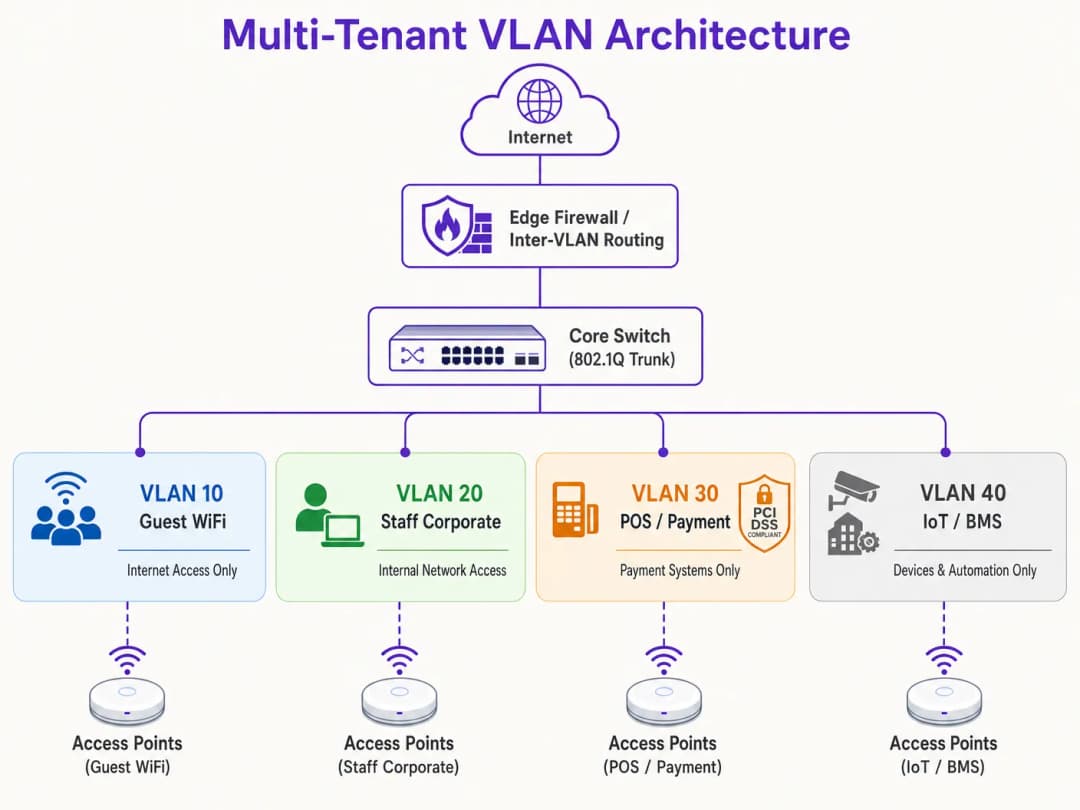
Erstellen Sie vor der Konfiguration von Hardware einen umfassenden logischen Netzwerkplan. Weisen Sie jeder Datenverkehrsklasse eindeutige VLAN-IDs, IP-Subnetze und Sicherheitszonen zu.
| Segmentname | VLAN ID | IP-Subnetz / CIDR | Sicherheitszone | Primäre Authentifizierung |
|---|---|---|---|---|
| Netzwerkmanagement | VLAN 10 | 10.10.10.0/24 | Management | Statisch / Out-of-Band |
| Guest WiFi (Purple) | VLAN 20 | 172.16.0.0/20 | Guest (nur Internet) | Offen + Captive Portal |
| Unternehmensmitarbeiter | VLAN 30 | 10.10.30.0/23 | Internes Unternehmen | WPA3-Enterprise (802.1X) |
| POS / Kassensysteme | VLAN 40 | 192.168.40.0/24 | PCI-CDE (Eingeschränkt) | WPA3-Enterprise / MAB |
| IoT / Gebäudetechnik | VLAN 50 | 10.10.50.0/24 | IoT (Eingeschränkt) | WPA3-SAE / Dynamic PSK |
Kritische Regel: Verwenden Sie VLAN 1 niemals für aktiven Datenverkehr oder Management. Deaktivieren Sie VLAN 1 auf allen Trunk-Ports und ändern Sie das Native VLAN in eine ungenutzte, nicht routingfähige VLAN-ID (z. B. VLAN 999), um VLAN-Hopping-Angriffe zu verhindern.
Schritt 2: Konfiguration der kabelgebundenen Switch-Infrastruktur
Konfigurieren Sie die Core-, Distribution- und Access-Switches so, dass sie die logische VLAN-Struktur unterstützen. Die direkt mit den APs verbundenen Switch-Ports müssen mehrere VLANs übertragen und als 802.1Q-Trunk-Ports konfiguriert werden. Definieren Sie explizit, welche VLANs auf jedem Trunk zulässig sind, um die Sicherheitsangriffsfläche zu minimieren. Ports, die mit einzelnen kabelgebundenen Geräten verbunden sind (z. B. einem statischen POS-Terminal oder dem PC einer Empfangskraft), müssen auf den Access-Modus eingestellt und einem einzelnen VLAN zugewiesen werden.
Schritt 3: Wireless LAN Controller und AP-Konfiguration
Ordnen Sie die Wireless SSIDs ihren jeweiligen VLANs zu und konfigurieren Sie die Sicherheitskontrollen am Netzwerkrand. Konfigurieren Sie für die Guest-SSID die Sicherheit auf Offen oder WPA3-Enhanced Open (OWE), um eine opportunistische drahtlose Verschlüsselung bereitzustellen, aktivieren Sie die Client Isolation und leiten Sie auf das Cloud-gesteuerte Captive Portal von Purple um, um ein GDPR-konformes Benutzer-Onboarding und Analysen zu ermöglichen. Konfigurieren Sie für die Corporate-SSID WPA3-Enterprise mit 802.1X, definieren Sie die primären und sekundären RADIUS-Serveradressen und aktivieren Sie 802.11r Fast BSS Transition sowie Opportunistic Key Caching für ein nahtloses Roaming. Stellen Sie für IoT-Geräte WPA3-SAE mit einer starken, rotierenden Passphrase bereit oder implementieren Sie Multi-PSK (MPSK), um einzelnen Geräten eindeutige Schlüssel zuzuweisen und diese dynamisch Unter-VLANs zuzuordnen.
Schritt 4: Core-Firewall und Inter-VLAN-Routing-Richtlinie
Die Sicherheit einer VLAN-Architektur hängt vollständig von den Firewall-Regeln ab, die das Inter-VLAN-Routing regeln. An der Firewall muss eine strikte Default-Deny-Richtlinie erzwungen werden, bei der nur explizit genehmigte Datenströme zulässig sind.

Erlauben Sie für die Guest-Zone (VLAN 20) ausgehenden Datenverkehr zum WAN auf den Ports 80 und 443 sowie UDP-Datenverkehr zu DNS- und DHCP-Diensten. Blockieren Sie jeglichen Datenverkehr zu internen Subnetzen. Erlauben Sie für die POS-Zone (VLAN 40) ausgehenden TCP-Datenverkehr nur zu den IP-Adressen der designierten Zahlungs-Gateways auf Port 443 und blockieren Sie jeglichen Datenverkehr von und zu allen anderen VLANs. Erlauben Sie für die IoT-Zone (VLAN 50) ausgehenden Datenverkehr nur zu spezifischen Update-Servern der Hersteller und lokalen Management-Controllern und blockieren Sie allen anderen internen und externen Datenverkehr.
Best Practices
Um langfristige Stabilität, hohe Leistung und strenge Sicherheit zu gewährleisten, halten Sie sich an diese branchenüblichen VLAN-Designprinzipien.
Isolierung der Management-Ebene ist nicht verhandelbar. Erlauben Sie niemals Endbenutzer-Datenverkehr im Netzwerk-Management-VLAN. APs, Switches, Router und WLCs sollten ihre IP-Adressen in einem dedizierten, stark eingeschränkten Management-VLAN erhalten. Der Zugriff auf dieses VLAN muss auf autorisierte Administratorgeräte beschränkt sein, im Idealfall über ein sicheres VPN oder einen physischen Konsolen-Port. Wenn ein Angreifer Zugriff auf die Management-Ebene erhält, hat er die effektive Kontrolle über die gesamte Netzwerkinfrastruktur.
Standardised VLAN Schema is essential for multi-site operators. For organisations managing multi-site portfolios - such as a retail chain with 500 stores or a hotel brand with 50 properties - implement a templated VLAN schema applied consistently across every site. Using a consistent third octet in the IP address to match the VLAN ID simplifies remote troubleshooting, WLC template deployment, and firewall rule management across the entire estate. This approach also dramatically reduces the time required to onboard new sites.
DHCP Lease Time Optimisation prevents IP address exhaustion. In high-density environments, DHCP lease times must be carefully managed. For the Guest WiFi segment, where users frequently cycle in and out, set the DHCP Lease Time to 1 to 2 hours. For internal corporate networks, a standard lease time of 8 to 24 hours is appropriate. Ensure that local DNS servers are not exposed to guest networks; configure guest VLANs to use public, filtered DNS resolvers to reduce internal server load.
Compliance Alignment must be built into the architecture from day one. PCI DSS Requirement 1.2 mandates the installation of firewalls to restrict traffic between the Cardholder Data Environment (CDE) and other networks. By isolating POS terminals on a dedicated VLAN, the rest of the venue's network is excluded from the rigorous and costly PCI compliance assessment. GDPR's "Privacy by Design" principle is satisfied by isolating guest user traffic and managing consent via Purple's captive portal. WPA3 adoption should be accelerated across all SSIDs, as WPA3-Personal's Simultaneous Authentication of Equals (SAE) protocol eliminates the offline dictionary attack vulnerability present in WPA2-PSK. For further guidance on access control architecture, see the 10 Best Network Access Control (NAC) Solutions for 2026.
Troubleshooting & Risk Mitigation
Even a meticulously designed VLAN architecture can encounter operational issues. The following are the most common failure modes and their technical mitigations.
VLAN Leakage and Misconfigured Trunk Ports is the most frequent root cause of post-deployment support tickets. The symptom is wireless clients authenticating successfully to a specific SSID but failing to receive an IP address. The root cause is that the switch port connected to the AP is misconfigured: either the target VLAN is not allowed on the 802.1Q trunk, or the VLAN has not been created in the switch's local database. Verify the switch trunk configuration and ensure that the allowed VLAN list on the switch port matches the SSIDs configured on the AP. Always audit switch configurations after any change and validate them during commissioning.
DHCP-Relay-Fehler treten auf, wenn für ein neu erstelltes VLAN keine entsprechende IP-Helper-Adresse auf der Layer-3-Schnittstelle konfiguriert ist. Da DHCP-Anfragen Broadcast-Pakete sind, können sie ohne einen Relay-Agenten keine VLAN-Grenzen überschreiten. Wenn sich der DHCP-Server in einem anderen VLAN als die Clients befindet, muss der Router oder Layer-3-Switch mit einer IP-Helper-Adresse konfiguriert werden, die auf den zentralen DHCP-Server verweist.
Der Ablauf von RADIUS-Zertifikaten ist ein stilles Risiko, das dazu führen kann, dass ein gesamtes Unternehmensnetzwerk gleichzeitig ausfällt. Das Symptom ist, dass alle über 802.1X authentifizierten Clients plötzlich keine Verbindung mehr herstellen können, wobei Zertifikatswarnungen auf den Client-Geräten angezeigt werden. Richten Sie automatisierte Überwachungswarnungen ein, die 30 Tage vor Ablauf des Zertifikats ausgelöst werden, und implementieren Sie automatisierte Pipelines zur Zertifikatsverlängerung, um manuelle Versäumnisse zu vermeiden.
SSID-Proliferation und HF-Überlastung äußern sich in hoher Latenz und geringen Geschwindigkeiten trotz hervorragender Signalstärke und schnellem Backhaul. Die Ursache ist eine übermäßige Kanalauslastung durch Management-Overhead und Gleichkanalstörungen. Konsolidieren Sie SSIDs, wechseln Sie zur dynamischen VLAN-Zuweisung, deaktivieren Sie das 2,4-GHz-Funkmodul auf einer Teilmenge von APs in Bereichen mit hoher Dichte und erzwingen Sie Band-Steering, um Dual-Band-Clients in die saubereren 5-GHz- und 6-GHz-Bänder zu leiten.
ROI & geschäftliche Auswirkungen
Die Implementierung einer robusten VLAN-Segmentierungsstrategie bringt für Standortbetreiber und Unternehmen einen erheblichen, messbaren geschäftlichen Nutzen.
Die Minimierung des PCI-Audit-Umfangs führt zu direkten Kosteneinsparungen. Für Standorte, die Kreditkartenzahlungen verarbeiten, macht ein flaches Netzwerk die gesamte Infrastruktur für die PCI-DSS-Compliance relevant. Dies bedeutet, dass jeder Switch, jeder AP, jeder Server und jeder Büro-PC auditiert werden muss, was jährlich Zehntausende von Pfund für Compliance-Bewertungen, Penetrationstests und administrativen Aufwand kostet. Durch die Segmentierung des Netzwerks und die Isolierung der Karteninhaber-Datenumgebung in einem dedizierten POS-VLAN mit strengen Firewall-Kontrollen wird der Audit-Umfang ausschließlich auf dieses VLAN beschränkt. Diese Reduzierung des Umfangs kann die Compliance-Kosten um bis zu 70 % senken und das Risiko von Strafen bei Nichteinhaltung drastisch reduzieren.
Die Schadensbegrenzung bei Sicherheitsverletzungen ist das wertvollste Sicherheitsergebnis. Der Haupttreiber für schwerwiegende Datenpannen ist die laterale Bewegung, bei der ein Angreifer Zugriff auf ein Gerät mit geringer Sicherheit erlangt und sich über ein flaches Netzwerk bewegt, um hochwertige Datenbanken oder POS-Systeme zu kompromittieren. Die VLAN-Segmentierung in Verbindung mit strengen Firewall-Regeln zwischen den VLANs eliminiert diesen Vektor vollständig. Wenn ein IoT-Gerät in VLAN 50 kompromittiert wird, sitzt der Angreifer in diesem logischen Segment fest. Der Schadensradius der Sicherheitsverletzung wird minimiert und sensible Unternehmenswerte werden geschützt. Guest Analytics und Umsatzmonetarisierung verwandelt das Netzwerk von einem Kostenfaktor in einen strategischen Mehrwert. Ein ordnungsgemäß segmentiertes Netzwerk ermöglicht es Betreibern, sicheres und hochwertiges Guest WiFi anzubieten, ohne die interne Sicherheit zu gefährden. Durch die Weiterleitung des Gastdatenverkehrs über ein dediziertes VLAN an die Plattform von Purple können Betreiber wertvolle First-Party-Kundendaten über ein gebrandetes Captive Portal erfassen, das direkt in CRM- und Marketing-Automatisierungsplattformen integriert ist. Dies ermöglicht zielgerichtete Marketingkampagnen, steigert die Kundenbindung und erlaubt es Betreibern, ihre kabellose Infrastruktur durch gestaffelte Bandbreiten-Upgrades und Werbung auf der Startseite des Captive Portal zu monetarisieren. Weitere Informationen darüber, wie Analysen den Geschäftserfolg steigern, finden Sie in der Dokumentation zur WiFi Analytics Plattform von Purple.
-
Referenzen
- Cisco Wireless APs: Leitfaden 2026 für Produkte & Bereitstellung
- Die 10 besten Network Access Control (NAC) Lösungen für 2026
- WiFi in Schulen: Der Leitfaden 2026 für Administratoren & IT
- So implementieren Sie die 802.1X Authentifizierung mit Cloud RADIUS
- Purple Guest WiFi Plattform
- Purple WiFi Analytics Plattform
- Gastronomie WiFi Lösungen
- Einzelhandel WiFi Lösungen
- Transport WiFi Lösungen
Schlüsseldefinitionen
VLAN (Virtual Local Area Network)
Eine logische Gruppierung von Netzwerkgeräten, die so kommunizieren, als befänden sie sich im selben physischen LAN, unabhängig von ihrem physischen Standort. Definiert unter IEEE 802.1Q partitionieren VLANs eine einzelne physische Switch-Fabric in mehrere isolierte Broadcast-Domänen unter Verwendung einer im Ethernet-Frame-Header eingebetteten 12-Bit-VLAN-ID (VID).
IT-Teams begegnen VLANs als primärem Mechanismus zur Trennung von Gast-, Mitarbeiter-, POS- und IoT-Datenverkehr auf einer gemeinsam genutzten physischen Infrastruktur. Ohne VLANs teilen sich alle Geräte eine einzige Broadcast-Domäne, was Sicherheits- und Leistungsrisiken birgt.
802.1Q Trunk Port
Ein Switch-Port, der so konfiguriert ist, dass er Datenverkehr für mehrere VLANs gleichzeitig überträgt, indem er jeden Ethernet-Frame mit seiner entsprechenden VLAN ID kennzeichnet (Tagging). Der Trunk-Port überträgt getaggte Frames zwischen Switches und zu Access Points, während Access-Ports nur ungetaggte Frames für ein einzelnes VLAN übertragen.
Netzwerkingenieure konfigurieren Trunk-Ports an den Switch-Schnittstellen, die mit Access Points verbunden sind, sowie an Uplink-Ports zwischen Switches. Ein falsch konfigurierter Trunk-Port - bei dem ein benötigtes VLAN nicht in der Liste der zulässigen VLANs enthalten ist - ist die häufigste Ursache für Verbindungsfehler nach der Bereitstellung.
Dynamic VLAN Assignment (DVA)
Eine Architektur, die IEEE 802.1X-Authentifizierung und einen RADIUS-Server verwendet, um einen Wireless-Client basierend auf seiner authentifizierten Identität dynamisch einem bestimmten VLAN zuzuweisen, anstatt der SSID, mit der er sich verbunden hat. Der RADIUS-Server gibt IETF-Standardattribute (Tunnel-Type, Tunnel-Medium-Type, Tunnel-Private-Group-ID) in der Access-Accept-Nachricht zurück, um dem AP mitzuteilen, welches VLAN zugewiesen werden soll.
DVA ist der empfohlene Ansatz für Gebäude mit mehreren Mietern, bei denen das Ausstrahlen mehrerer SSIDs die HF-Leistung beeinträchtigen würde. Es ermöglicht einer einzigen SSID, mehrere Mieterorganisationen mit vollständiger Layer-2-Isolierung untereinander zu bedienen.
RADIUS (Remote Authentication Dial-In User Service)
Ein Client-Server-Netzwerkprotokoll, das eine zentralisierte Verwaltung für Authentifizierung, Autorisierung und Accounting (AAA) für den Netzwerkzugriff bereitstellt. Im WiFi-Kontext fungiert der Wireless-Controller als RADIUS-Client, der Authentifizierungsanfragen von Wireless-Clients an den RADIUS-Server weiterleitet, welcher die Anmeldedaten mit einem Identitätsspeicher (Active Directory, LDAP usw.) abgleicht und Autorisierungsattribute einschließlich VLAN-Zuweisungen zurückgibt.
RADIUS ist das Rückgrat der Enterprise-WiFi-Sicherheit. IT-Teams stellen RADIUS-Server (wie Microsoft NPS, FreeRADIUS oder Cloud-RADIUS-Services) bereit, um Richtlinien pro Benutzer und Gerät durchzusetzen, einschließlich Dynamic VLAN Assignment und zertifikatsbasierter Authentifizierung.
PCI DSS (Payment Card Industry Data Security Standard)
Eine Reihe von Sicherheitsstandards, die sicherstellen sollen, dass alle Unternehmen, die Kreditkarteninformationen akzeptieren, verarbeiten, speichern oder übertragen, eine sichere Umgebung aufrechterhalten. Die PCI DSS-Anforderung 1 schreibt die Installation und Wartung von Netzwerksicherheitskontrollen vor, einschließlich Firewalls, die den Datenverkehr zwischen der Cardholder Data Environment (CDE) und anderen Netzwerken einschränken.
Betreiber von Veranstaltungsorten mit POS-Terminals oder Zahlungsabwicklungssystemen müssen PCI DSS einhalten. Eine ordnungsgemäße VLAN-Segmentierung isoliert die CDE in einem dedizierten VLAN und reduziert den Umfang des PCI-Audits auf dieses Segment und die dafür geltenden Firewall-Richtlinien, anstatt auf das gesamte Netzwerk.
Broadcast-Domäne
Die Gruppe aller Netzwerkgeräte, die einen Broadcast-Frame empfangen, der von einem beliebigen Gerät in der Gruppe gesendet wird. In einem flachen, unsegmentierten Netzwerk teilen sich alle Geräte eine einzige Broadcast-Domäne. VLANs unterteilen das Netzwerk in kleinere Broadcast-Domänen und beschränken den Broadcast-Datenverkehr (ARP, DHCP, mDNS) nur auf die Geräte innerhalb dieses VLANs.
In hochfrequentierten Veranstaltungsorten mit Hunderten oder Tausenden von verbundenen Geräten erzeugt eine einzige große Broadcast-Domäne enorme Mengen an Broadcast-Datenverkehr, der die Wireless-Sendezeit beansprucht und die Leistung beeinträchtigt. Die Reduzierung der Broadcast-Domänengröße über VLANs ist eine primäre Methode zur Leistungsoptimierung.
WPA3-Enterprise
Der aktuelle Sicherheitsstandard für Enterprise-WiFi, der IEEE 802.1X-Authentifizierung und EAP (Extensible Authentication Protocol) für die Authentifizierung pro Benutzer oder pro Gerät verwendet. WPA3-Enterprise bietet einen kryptografischen Schutz von 128-Bit (Standard) oder 192-Bit (Hochsicherheitsmodus) und eliminiert die mit dem 4-Wege-Handshake von WPA2 verbundenen Sicherheitslücken.
IT-Teams sollten WPA3-Enterprise auf allen Unternehmens- und regulierten SSIDs (Personal, POS) bereitstellen. Es erfordert einen RADIUS-Server und entweder Client-Zertifikate (EAP-TLS) oder Benutzername/Passwort-Anmeldedaten (PEAP-MSCHAPv2). WPA3-Enterprise ist der Authentifizierungsstandard, der für PCI DSS-konforme Wireless-Bereitstellungen erforderlich ist.
Client-Isolierung (Peer-to-Peer-Blockierung)
Eine Funktion für drahtlose Access Points, die verhindert, dass an dieselbe SSID angeschlossene Geräte auf Layer 2 direkt miteinander kommunizieren. Wenn sie aktiviert ist, wird der gesamte Datenverkehr zwischen den Clients am AP blockiert, was ihn zwingt, die Firewall zu passieren, bevor er ein anderes Gerät erreicht.
Die Client-Isolierung ist eine obligatorische Konfiguration für alle Gäste-WiFi-SSIDs. Ohne sie kann ein böswilliger Benutzer im Gästenetzwerk andere Geräte auf derselben SSID scannen, ausspionieren und angreifen. Sie ist auch eine Voraussetzung für die GDPR-Konformität, da sie verhindert, dass ein Gast den unverschlüsselten Datenverkehr eines anderen Gasts abfängt.
MAC Authentication Bypass (MAB)
Ein Fallback-Authentifizierungsmechanismus, der es Geräten, die keine 802.1X-Authentifizierung durchführen können (wie Drucker, Smart-TVs und IoT-Sensoren), ermöglicht, sich über ihre MAC-Adresse am Netzwerk zu authentifizieren. Der RADIUS-Server wird vorab mit den MAC-Adressen der autorisierten Geräte befüllt und gibt nach einer erfolgreichen MAB-Anfrage die entsprechende VLAN-Zuweisung zurück.
IT-Teams verwenden MAB für IoT- und Altsysteme in Multi-Tenant-Umgebungen. Da MAC-Adressen gefälscht werden können, sollte MAB immer mit strengen Firewall-ACLs auf dem zugewiesenen VLAN kombiniert werden, um den Netzwerkzugriff des Geräts auf die spezifischen externen Dienste zu beschränken, die es benötigt.
Natives VLAN
Das VLAN, das nicht getaggtem Datenverkehr auf einem 802.1Q-Trunk-Port zugewiesen wird. Standardmäßig ist auf den meisten Switches VLAN 1 das native VLAN. Nicht getaggte Frames, die an einem Trunk-Port ankommen, werden dem nativen VLAN zugewiesen. Dies ist ein bekannter Angriffsvektor für VLAN-Hopping, bei dem ein Angreifer doppelt getaggte Frames sendet, um aus seinem VLAN auszubrechen.
Es entspricht der Best Practice, das native VLAN auf allen Trunk-Ports auf eine ungenutzte, nicht routingfähige VLAN-ID (z. B. VLAN 999) zu ändern und sicherzustellen, dass dem VLAN 1 keine aktiven Geräte zugewiesen sind. Dies ist ein obligatorischer Härtungsschritt in jedem PCI DSS-konformen Netzwerkdesign.
Ausgearbeitete Beispiele
Eine Hotelgruppe mit 350 Zimmern und 12 Standorten muss ihre Netzwerkinfrastruktur konsolidieren. Derzeit betreibt jeder Standort ein einziges flaches Netzwerk, das für Gästezimmer, Laptops der Mitarbeiter, POS-Terminals in Restaurants, Überwachungskameras, HLK-Steuerungen und ein Konferenzzentrum mit mehreren gleichzeitigen Veranstaltern genutzt wird. Der IT-Leiter hat darauf hingewiesen, dass das gesamte Netzwerk in den Geltungsbereich der PCI-DSS-Konformität fällt, was die Gruppe jährlich rund 45.000 £ an Audit-Gebühren und Behebungsmaßnahmen kostet. Wie sollte das Netzwerk neu gestaltet werden?
Die Lösung ist eine Fünf-VLAN-Architektur, die über ein standardisiertes Template an allen 12 Standorten einheitlich bereitgestellt wird. VLAN 10 (Management, 10.XX.10.0/24) überträgt nur den Management-Traffic von Switches, APs und WLCs und ist ausschließlich über ein dediziertes Administrator-VPN zugänglich. VLAN 20 (Gäste-WiFi, 172.16.0.0/20) leitet den gesamten Gäste-Traffic über das Captive Portal von Purple für ein GDPR-konformes Onboarding und Analysen, mit aktivierter Client-Isolierung und einer 2-stündigen DHCP-Lease-Zeit, um eine IP-Erschöpfung zu verhindern. VLAN 30 (Mitarbeiter-Unternehmensnetzwerk, 10.XX.30.0/23) verwendet WPA3-Enterprise mit 802.1X-Authentifizierung gegenüber dem Azure AD der Gruppe über einen Cloud-RADIUS-Dienst. VLAN 40 (POS/Zahlungsverkehr, 192.168.40.0/24) ist ein streng isoliertes PCI-CDE-Segment mit einer Default-Deny-Firewall-Richtlinie, die nur ausgehendes HTTPS an die IP-Adressen des Zahlungs-Gateway-Anbieters zulässt. VLAN 50 (IoT/BMS, 10.XX.50.0/24) isoliert alle Überwachungskameras, HLK-Anlagen, intelligenten Schlösser und Gebäudemanagementgeräte, wobei die ausgehende Filterung auf deren jeweilige Management-Plattformen beschränkt ist. Das Konferenzzentrum wird durch die Bereitstellung temporärer Event-VLANs (VLAN 60-99) über das WLC-Dashboard versorgt, jeweils mit einem maßgeschneiderten Purple Captive Portal und Bandbreitenbegrenzungen. Das standardisierte IP-Schema im dritten Oktett (XX = Standortnummer) ermöglicht es dem NOC-Team, den Standort und das Segment jedes Geräts allein anhand seiner IP-Adresse zu identifizieren, was die Fehlerbehebungszeit drastisch verkürzt.
Eine nationale Einzelhandelskette mit 220 Filialen ist mit weitreichenden Beschwerden über die WiFi-Leistung konfrontiert. Trotz 200 Mbps Glasfaseranschlüssen in jeder Filiale berichten Kunden und Mitarbeiter von Geschwindigkeiten unter 5 Mbps. Eine Überprüfung ergibt, dass die Access Points jeder Filiale 9 SSIDs ausstrahlen: eine für Kunden, eine für Mitarbeiter, eine für POS, eine für CCTV, eine für digitale Beschilderung, eine für Handhelds der Bestandsverwaltung, eine für einen Logistikpartner eines Drittanbieters, eine für ein Café-Konzessionsgeschäft und eine veraltete SSID eines früheren Anbieters, die nie außer Betrieb genommen wurde. Wie sollte das Netzwerk neu konzipiert werden, um die Leistungsprobleme zu beheben und gleichzeitig die Sicherheit zu gewährleisten?
Die Lösung ist eine Konsolidierung in drei Phasen. Phase 1 (Sofort): Die veraltete SSID sowie alle SSIDs mit null aktiven Clients werden sofort außer Betrieb genommen. Dies allein reduziert den Beacon-Overhead von 9 SSIDs auf 7. Phase 2 (30-Tage-Rollout): Konsolidierung der SSIDs für Mitarbeiter, Bestandsverwaltung, Logistikpartner und digitale Beschilderung in einer einzigen Enterprise-SSID mittels Dynamic VLAN Assignment über 802.1X und RADIUS. Jede Benutzergruppe authentifiziert sich mit ihren Unternehmensanmeldedaten oder dem Gerätezertifikat, und der RADIUS-Server gibt das entsprechende Tunnel-Private-Group-ID-Attribut zurück, um sie ihrem dedizierten VLAN zuzuweisen (VLAN 30 für Mitarbeiter, VLAN 50 für IoT/Handhelds, VLAN 60 für Logistik, VLAN 70 für Beschilderung). Dadurch wird die Anzahl der SSIDs von 7 auf 4 reduziert. Phase 3 (60-Tage-Rollout): Migration des Café-Konzessionsgeschäfts auf ein dediziertes VLAN mit einer separaten Purple Captive Portal-Instanz und Konsolidierung der POS- und CCTV-SSIDs auf ihren jeweiligen isolierten VLANs. Die endgültige Architektur strahlt 3 SSIDs aus: eine Enterprise-SSID mit Dynamic VLAN Assignment, ein Gast-/Kunden-WiFi über das Captive Portal von Purple und eine POS-SSID. Aktivieren Sie das Band Steering auf allen APs, um Dual-Band-Clients auf 5 GHz zu verlagern, und konfigurieren Sie eine Ratenbegrenzung pro Client auf dem Gast-VLAN (10 Mbps Downstream), um zu verhindern, dass ein einzelner Benutzer den Uplink überlastet.
Übungsfragen
Q1. Der Betreiber eines Konferenzzentrums verwaltet einen 50.000 Quadratfuß großen Veranstaltungsort mit 200 Access Points. Derzeit werden 6 SSIDs ausgestrahlt: eine für Event-Teilnehmer, eine für Aussteller, eine für das Personal des Veranstaltungsorts, eine für AV-Geräte, eine für Catering-Kassenterminals (POS) und eine für Gebäudemanagementsysteme. Der IT-Manager berichtet, dass die WiFi-Performance bei Großveranstaltungen schlecht ist und die durchschnittlichen Client-Geschwindigkeiten trotz eines 1-Gbps-Glasfaser-Uplinks auf unter 3 Mbps sinken. Der Veranstaltungsort bereitet sich zudem auf ein PCI DSS-Audit vor. Wie würden Sie die Wireless-Architektur umgestalten, um sowohl die Performance- als auch die Compliance-Probleme zu lösen?
Hinweis: Überlegen Sie, welche SSIDs mithilfe von Dynamic VLAN Assignment konsolidiert werden können, welche Datenverkehrsklassen Auswirkungen auf PCI DSS haben und wie der SSID-Beacon-Overhead zum Performance-Problem in einer High-Density-Umgebung beiträgt.
Musterlösung anzeigen
Das Redesign konsolidiert die 6 SSIDs auf 3 unter Verwendung von Dynamic VLAN Assignment für die Unternehmenssegmente. SSID 1 (Event-Teilnehmer): Offene SSID mit WPA3-Enhanced Open, zugewiesen an VLAN 20, geroutet über das Captive Portal von Purple für eine GDPR-konforme Anmeldung und Ratenbegrenzung pro Client (10 Mbps Downstream). Client-Isolierung aktiviert. SSID 2 (Enterprise Secure): Eine einzige WPA3-Enterprise-SSID mit 802.1X und Dynamic VLAN Assignment. Aussteller authentifizieren sich mit temporären Anmeldedaten, die bei der Registrierung ausgegeben werden, und werden im VLAN 60 (nur Internet, isoliert) platziert. Das Personal des Veranstaltungsorts authentifiziert sich mit den Active Directory-Anmeldedaten des Unternehmens und wird im VLAN 30 (interner Zugriff) platziert. AV-Geräte nutzen den MAC Authentication Bypass und werden im VLAN 50 platziert (beschränkt auf AV-Managementserver). SSID 3 (POS Secure): Dedizierte WPA3-Enterprise-SSID für Catering-Kassenterminals, zugewiesen an VLAN 40 (PCI-CDE). Strenge Firewall-Regeln erlauben nur ausgehendes HTTPS zum Payment-Gateway. Gebäudemanagementsysteme werden nach Möglichkeit auf eine kabelgebundene Verbindung im VLAN 50 migriert oder auf eine dedizierte IoT-SSID, falls eine drahtlose Verbindung erforderlich ist. Die Reduzierung von 6 auf 3 SSIDs eliminiert ca. 15 - 20 % des Beacon-Overheads, was die verfügbare Sendezeit und den Client-Durchsatz direkt verbessert. Der Umfang des PCI-Audits wird auf VLAN 40 und dessen Firewall-Richtlinien reduziert, was die PCI DSS-Anforderungen 1.2 und 1.3 erfüllt.
Q2. Ein Netzwerkarchitekt entwirft die WiFi Infrastruktur für ein neues, gemischt genutztes Geschäftsgebäude mit 80 Einheiten. Das Gebäude wird 15 unabhängige Geschäftskunden, ein Café im Erdgeschoss und gemeinsam genutzte Co-Working-Bereiche beherbergen. Jeder Mandant benötigt eine vollständige Netzwerkisolierung von anderen Mandanten, eine eigene Bandbreitenzuweisung und die Möglichkeit, eigene Geräte anzuschließen. Der Gebäudeeigentümer möchte die gesamte Infrastruktur zentral verwalten und neue Mandanten innerhalb von 30 Minuten integrieren. Welche Architektur würden Sie empfehlen und was sind die wichtigsten Designentscheidungen?
Hinweis: Berücksichtigen Sie die Abwägungen zwischen mandantenfähigen VLANs mit dedizierten SSIDs gegenüber einer Dynamic VLAN Assignment mit einer einzigen SSID. Denken Sie an die betrieblichen Anforderungen für ein schnelles Onboarding von Mandanten und eine zentrale Verwaltung.
Musterlösung anzeigen
Die empfohlene Architektur ist ein Dynamic VLAN Assignment Modell mit einer einzigen Enterprise SSID für alle Geschäftskunden, ergänzt durch eine separate Gast-SSID für das Café und die Co-Working-Bereiche. Jedem Mandanten wird eine eindeutige VLAN ID zugewiesen (z. B. VLAN 101-115 für Mandanten, VLAN 200 für Co-Working, VLAN 201 für das Café). Der RADIUS-Server wird in einen Cloud-Identity-Provider integriert, der mandantenspezifische Benutzerverzeichnisse unterstützt. Wenn ein neuer Mandant integriert wird, erstellt der Administrator ein neues VLAN auf dem Core-Switch, konfiguriert einen DHCP-Bereich für das neue Subnetz, fügt das VLAN zur Liste der erlaubten VLANs auf allen Trunk-Ports hinzu, erstellt eine neue Mandantengruppe im Identity-Provider und konfiguriert den RADIUS-Server so, dass er die neue VLAN ID für die Benutzer dieses Mandanten zurückgibt. Dieser gesamte Prozess kann als Vorlage standardisiert und in weniger als 30 Minuten abgeschlossen werden. Das VLAN jedes Mandanten ist von allen anderen Mandanten-VLANs durch eine Default-Deny Inter-VLAN-Firewall-Richtlinie isoliert. Mandantenspezifische Bandbreitenrichtlinien werden am WLC mithilfe von QoS-Profilen durchgesetzt, wodurch jedem Mandanten seine vertraglich vereinbarte Bandbreitenstufe garantiert wird. Die Gast-SSID für das Café und den Co-Working-Bereich wird über das Captive Portal von Purple auf VLAN 200 geleitet, wodurch der Gebäudeeigentümer Besucheranalysen und ein gebrandetes Onboarding-Erlebnis erhält. Die wichtigste Designentscheidung besteht darin, eine einzige Enterprise SSID anstelle von mandantenspezifischen SSIDs zu verwenden, da letzteres die Ausstrahlung von bis zu 15 SSIDs erfordern und die HF-Leistung in der Umgebung mit hoher Dichte drastisch verschlechtern würde.
Q3. Ein IT-Manager einer großen Einzelhandelskette stellt bei einer routinemäßigen Netzwerküberprüfung fest, dass VLAN 1 auf allen Trunk-Ports in 300 Filialen als natives VLAN verwendet wird und dass sich die Management-SSID für den Zugriff auf die Wireless-Controller im selben Subnetz wie das Gast-WiFi befindet. Das Sicherheitsteam hat dies als kritische Schwachstelle eingestuft. Welche sofortigen Behebungsmaßnahmen sollten ergriffen werden und welches Risiko besteht, wenn diese Probleme nicht behoben werden?
Hinweis: Berücksichtigen Sie die spezifischen Angriffsvektoren, die VLAN 1 als natives VLAN ermöglicht (VLAN-Hopping), sowie die Auswirkungen, wenn der Management-Datenverkehr vom Gastnetzwerk aus zugänglich ist. Priorisieren Sie die Behebungsmaßnahmen nach Risikoschweregrad.
Musterlösung anzeigen
Sofortige Behebung in der Reihenfolge der Priorität: Schritt 1 (Kritisch - am selben Tag): Isolieren Sie die Management SSID. Deaktivieren Sie die Management SSID vollständig, wenn sie vom Gastnetzwerk aus erreichbar ist. Verschieben Sie den gesamten Management-Zugriff des Wireless Controllers in ein dediziertes Management VLAN (z. B. VLAN 10), wobei der Zugriff über ein Site-to-Site VPN oder dedizierte Management-Workstations auf Administratorgeräte beschränkt ist. Dies eliminiert das kritischste Risiko: dass ein Gastbenutzer oder Angreifer im Gastnetzwerk Zugriff auf die Wireless Controller erlangt und die gesamte Wireless-Infrastruktur neu konfiguriert oder deaktiviert. Schritt 2 (Hoch - innerhalb von 1 Woche): Ändern Sie das native VLAN auf allen Trunk Ports von VLAN 1 auf ein ungenutztes, nicht routingfähiges VLAN (z. B. VLAN 999). Stellen Sie sicher, dass VLAN 1 keine aktiven Geräte zugewiesen sind. Dies mindert den Angriffsvektor des VLAN-Hoppings, bei dem ein Angreifer doppelt getaggte 802.1Q-Frames sendet, um aus seinem VLAN zu entkommen und Zugriff auf den Datenverkehr eines anderen VLANs zu erhalten. Schritt 3 (Mittel - innerhalb von 30 Tagen): Führen Sie ein vollständiges Trunk-Port-Audit in allen 300 Filialen durch, um zu überprüfen, ob die Liste der erlaubten VLANs an jedem Trunk Port explizit definiert ist und mit der Designdokumentation übereinstimmt. Entfernen Sie alle VLANs von Trunk Ports, die an diesem Standort nicht benötigt werden. Das Risiko, diese Probleme ungelöst zu lassen, ist schwerwiegend: Ein Angreifer im Gast WiFi Netzwerk könnte möglicherweise die Management-Schnittstelle des Wireless Controllers erreichen, SSID-Konfigurationen ändern, Pre-Shared Keys extrahieren, Datenverkehr umleiten oder die gesamte Wireless-Infrastruktur deaktivieren. Die native VLAN 1-Schwachstelle könnte es einem Angreifer ermöglichen, aus dem Gast VLAN zu entkommen und auf POS-Terminals oder interne Server zuzugreifen, was zu einer Verletzung des PCI-DSS-Standards mit potenziellen Geldstrafen von bis zu 100.000 £ pro Monat der Nichteinhaltung führen kann.
Häufig gestellte Fragen
Wie richtet man auf einer gemeinsam genutzten Internetverbindung separate Netzwerke für Bewohner, das Personal des Leasing-Büros und Smart-Building-Geräte ein?
Um verschiedene Benutzergruppen auf einer gemeinsam genutzten Hochgeschwindigkeitsverbindung zu isolieren, ohne mehrere physische Netzwerke aufzubauen, konfigurieren Sie IEEE 802.1Q VLAN-Tagging auf Ihrem Core-Switch und Ihren Wireless Access Points. Erstellen Sie dedizierte VLANs mit privaten IP-Subnetzen: zum Beispiel VLAN 10 für das Personal des Leasing-Büros (authentifiziert über 802.1X/WPA3-Enterprise), VLAN 20 für Gebäudemanagementsysteme und IoT (unter Verwendung von MAC Authentication Bypass und strengen Outbound-ACLs), VLAN 30 für das öffentliche Gäste-WiFi (mit Layer-2-Client-Isolierung und einem Captive Portal) und dynamische VLANs je Mandant (VLAN 100-500) für Bewohner, die Identity PSK (iPSK) oder eine dynamische VLAN-Zuweisung nutzen. Setzen Sie Stateful-Inter-VLAN-Firewall-Regeln durch, die den Verkehr zwischen den Segmenten verhindern, während der ausgehende WAN-Internetzugang erlaubt ist.
Was ist der Unterschied zwischen SSID-basiertem VLAN-Tagging und dynamischer VLAN-Zuweisung (DVA)?
SSID-basiertes VLAN-Tagging bindet eine bestimmte SSID statisch an eine einzelne VLAN-ID. In Multi-Tenant-Umgebungen mit Dutzenden oder Hunderten von Mandanten führt das Erstellen separater SSIDs für jeden Mandanten zu einem enormen RF-Verwaltungsaufwand, Beacon-Überlastung und einer verringerten Effizienz der Sendezeit. Die dynamische VLAN-Zuweisung (DVA) löst dies, indem sie eine einzige gemeinsame SSID ausstrahlt. Wenn sich ein Benutzer verbindet und über 802.1X authentifiziert, prüft der zentrale RADIUS-Server seine Identität und gibt die Attribute RFC 2868 und RFC 3580 zurück (Tunnel-Type = VLAN, Tunnel-Medium-Type = 802, Tunnel-Private-Group-ID = VLAN_ID), wodurch dieser Client dynamisch in sein dediziertes, isoliertes VLAN geleitet wird - ohne zusätzliche Broadcast-Sendezeit.
Wie verhindert die Layer 2 Client Isolation laterale Bewegungen zwischen verschiedenen Mietern?
Layer 2 Client Isolation (auch als Private VLAN oder Stationsisolation bezeichnet) weist Access Points und Switch-Ports an, direkte Peer-to-Peer-Unicast-, Multicast- und Broadcast-Frames zwischen Geräten zu verwerfen, die mit demselben Funknetzwerk oder derselben Broadcast-Domäne verbunden sind. Dies verhindert, dass böswillige Akteure oder kompromittierte Endpunkte ARP-Poisoning, Port-Scans oder Man-in-the-Middle-Angriffe (MITM) ausführen oder unverschlüsselte Netzwerkdienste auf benachbarten Geräten im selben Netzwerk erkennen. Die gesamte Kommunikation wird erzwungen an das Layer 3 Default Gateway weitergeleitet, wo Stateful-Firewall-Regeln den Datenverkehr zwischen den Geräten überprüfen oder blockieren.
Wie schützt die VLAN-Segmentierung die Karteninhaberdaten (PCI-DSS 4.0) in gemischt genutzten Einzelhandels- und Büroimmobilien?
Die Anforderung 1 von PCI-DSS 4.0 schreibt strenge Netzwerksicherheitskontrollen vor, um die Karteninhaber-Datenumgebung (CDE) von allen nicht vertrauenswürdigen und nicht absolut notwendigen Netzwerken zu isolieren. Durch die Platzierung von Point of Sale (POS) Terminals, Payment Gateways und Händler-Hardware in einem dedizierten, isolierten VLAN (z. B. VLAN 40) stellen Unternehmen sicher, dass Mietergeräte, Arbeitsplatzrechner der Hauptverwaltung und das öffentliche Gast-WiFi keinerlei Layer 2- oder Layer 3-Zugriff auf die Zahlungssysteme haben. Stateful-Firewall-Zugriffskontrolllisten (ACLs) müssen den ein- und ausgehenden Datenverkehr ausschließlich auf autorisierte Zahlungsverarbeitungs-Endpunkte und ausgehende verschlüsselte TLS-Kanäle beschränken.
Wie wird verhindert, dass Apple AirPlay, Chromecast und Smart-Home-mDNS-Datenverkehr in die Wohneinheiten anderer Mieter gelangt?
Smart-Home-Streaming- und IoT-Geräte basieren auf Multicast DNS (mDNS) und dem Simple Service Discovery Protocol (SSDP) in lokalen Broadcast-Domänen (224.0.0.251 / UDP 5353). In einem unsegmentierten oder flachen Netzwerk mit mehreren Mietern könnte jeder Mieter jedes benachbarte Apple TV, jeden Drucker und jeden intelligenten Lautsprecher im gesamten Gebäude sehen und steuern. Die Isolierung jedes Mieters in ein eigenes Mikro-VLAN oder die Verwendung von Identity PSK (iPSK) mit Personal Area Network (PAN) Containment beschränkt Multicast- und Broadcast-Pakete streng auf die autorisierten Geräte dieses Mieters und verhindert so herstellerübergreifendes Streaming und Datenschutzverletzungen.
Weiterlesen in dieser Reihe
Warum Gäste-WiFi im Hotel-Stil in Wohngebäuden scheitert
Sie werden in der Lage sein, zu diagnostizieren, warum Bewohner in BTR-Blocks, Studentenheimen und MDUs ständig WiFi-Störungen melden, und das passende Authentifizierungsmodell wählen, um diese zu beheben. Die Lösung ist ein pro Haushalt vergebener iPSK-Schlüssel auf Ihren bestehenden Access Points, während für Besucher ein separates Captive Portal-Netzwerk bereitgehalten wird.
Entwurf von WiFi Netzwerken für Bürogebäude mit mehreren Mietern
Dieser Leitfaden bietet IT-Managern, Netzwerkarchitekten und CTOs ein herstellerneutrales Konzept für den Entwurf skalierbarer, sicherer und isolierter WiFi Netzwerke in Bürogebäuden mit mehreren Mietern. Er behandelt VLAN-Segmentierung nach IEEE 802.1Q, dynamische VLAN-Zuweisung über 802.1X und RADIUS, RF-Planung für Umgebungen mit hoher Dichte sowie Compliance-Anforderungen unter GDPR und PCI-DSS. Betreiber von Veranstaltungsorten und Gebäudemanager finden hier praxisnahe Architektur-Richtlinien, reale Fallstudien und Konfigurationsfehler, die es vor der Bereitstellung zu vermeiden gilt.
Mean Time to Innocence: So beweisen Sie, dass es nicht am WiFi liegt
Mean Time to Innocence (MTTI) ist die entscheidende Kennzahl, die definiert, wie viel Zeit IT-Teams damit verbringen, zu beweisen, dass ein Netzwerkproblem nicht ihre Schuld ist. Dieser Leitfaden beschreibt eine fünfstufige Observability-Methodik, um gegenseitige Schuldzuweisungen in mandantenfähigen Umgebungen zu eliminieren und diese durch gemeinsame Beweise zu ersetzen, um die Mean Time to Resolution (MTTR) zu senken.
Haben Sie Fragen zu Ihrem spezifischen Setup?
Unser Team arbeitet mit Standortbetreibern, IT-Managern und Netzwerktechnikern an über 80.000 Standorten zusammen. Buchen Sie ein 20-minütiges Gespräch und wir zeigen Ihnen, wie andere diese Herausforderungen gelöst haben.