
মাল্টি-টেন্যান্ট এনভায়রনমেন্টের জন্য VLAN সেগমেন্টেশনের সেরা অনুশীলন
এই নির্দেশিকাটি IT ম্যানেজার, নেটওয়ার্ক আর্কিটেক্ট, CTO এবং ভেন্যু অপারেশন ডিরেক্টরদের মাল্টি-টেন্যান্ট WiFi এনভায়রনমেন্টে VLAN সেগমেন্টেশন বাস্তবায়নের জন্য একটি নির্ভরযোগ্য, ভেন্ডর-নিরপেক্ষ ব্লুপ্রিন্ট প্রদান করে। এতে IEEE 802.1Q স্ট্যান্ডার্ড, 802.1X এবং RADIUS-এর মাধ্যমে ডায়নামিক VLAN অ্যাসাইনমেন্ট এবং হসপিটালিটি, রিটেইল, স্টেডিয়াম ও পাবলিক-সেক্টর ভেন্যুগুলির জন্য ধাপে ধাপে ডিপ্লয়মেন্টের নির্দেশনা অন্তর্ভুক্ত রয়েছে। শেয়ারড ফিজিক্যাল ইনফ্রাস্ট্রাকচারের উপর উচ্চ-পারফরম্যান্স ওয়্যারলেস কানেক্টিভিটি প্রদান, লেটারাল মুভমেন্ট প্রতিরোধ এবং PCI DSS ও GDPR কমপ্লায়েন্সের জন্য সঠিক VLAN সেগমেন্টেশন হলো একটি মৌলিক নিয়ন্ত্রণ ব্যবস্থা।
Video overview
এই গাইডটি শুনুন
পডকাস্ট ট্রান্সক্রিপ্ট দেখুন
আমাদের মূল সিরিজের অংশ: মাল্টি-টেন্যান্ট WiFi নির্দেশিকা →
Multi-tenant WiFi VLAN segmentation architect
Model isolated Layer 2 broadcast domains, Dynamic VLAN Assignment, subnet sizing, and switch trunking for residential MDUs, commercial offices, and mixed-use real estate.
Dynamic RADIUS attributes (RFC 2868 / 3580)
Pass these standard IETF attributes from Cloud RADIUS in the Access-Accept packet to dynamically steer authenticated tenant clients into isolated VLANs without broadcasting multiple SSIDs.
Cisco Meraki switch & AP trunk template
MS Cloud-Managed Switches & MR Access Points
Per-tenant VLAN mechanism: Identity PSK (iPSK) with RADIUS or Group Policies
Trunk form: Switchport mode trunk, allowed VLANs all / native VLAN 999
# Cisco Meraki dashboard configuration (MS switches + MR access points)
# Meraki MS is dashboard-managed: there is no switch CLI to paste into.
# Apply the following in the Meraki dashboard.
#
# Switch > Switch ports > (select AP uplink ports) > Edit:
#   Type:            Trunk
#   Native VLAN:     999 (unused, so untagged frames are discarded)
#   Allowed VLANs:   10,20,25,30,99,101-180
#   RSTP:            Enabled
#   Port isolation:  Disabled (an AP trunk carries many client MACs;
#                    do not apply port security to it)
#
# Wireless > SSIDs:
#   VLAN 10 - Property Staff & Leasing Operations
#   VLAN 20 - Building Operations (HVAC, CCTV, Elevators)
#   VLAN 25 - Smart Infrastructure & Door Access IoT
#   VLAN 30 - Visitor & Shared Amenity WiFi
#   VLAN 99 - Network Infrastructure & AP Management
#   Resident SSID -> WPA2/WPA3-Personal with Identity PSK (iPSK),
#                    per-tenant VLAN from the 101-180 pool
#   Staff SSID    -> WPA3-Enterprise 802.1X, VLAN 10
# Guest SSID -> Open + Purple captive portal, VLAN 30, client isolation ONDeploy automated multi-tenant WiFi with Purple
Eliminate resident WiFi friction and secure your property infrastructure. Speak with Purple's network solutions engineers to deploy automated iPSK onboarding, Cloud RADIUS Dynamic VLAN Assignment, and unified guest WiFi management across your property portfolio.
Executive Summary
আধুনিক এন্টারপ্রাইজ ফিজিক্যাল ভেন্যুগুলোর জন্য - যার মধ্যে মাল্টি-সাইট Retail পোর্টফোলিও এবং বিস্তৃত Hospitality এস্টেট থেকে শুরু করে উচ্চ-ঘনত্বের স্টেডিয়াম এবং Healthcare সুবিধা রয়েছে - নেটওয়ার্ক সেগমেন্টেশন এখন আর কোনো ঐচ্ছিক সর্বোত্তম অনুশীলন নয়; এটি একটি মৌলিক আর্কিটেকচারাল প্রয়োজনীয়তা। একটি একক, ফ্ল্যাট ফিজিক্যাল নেটওয়ার্কে একটি মাল্টি-টেন্যান্ট পরিবেশ পরিচালনা করা একটি গুরুতর অপারেশনাল দায়বদ্ধতা। এটি সংবেদনশীল কর্পোরেট ডেটাকে ল্যাটারাল সিকিউরিটি হুমকির সম্মুখীন করে, ব্রডকাস্ট কনজেশনের কারণে ওয়্যারলেস পারফরম্যান্স হ্রাস করে এবং নিয়ন্ত্রক কমপ্লায়েন্স অডিটকে জটিল করে তোলে।
IEEE 802.1Q স্ট্যান্ডার্ডের অধীনে সংজ্ঞায়িত ভার্চুয়াল লোকাল এরিয়া নেটওয়ার্ক (VLANs), একটি শেয়ার্ড ফিজিক্যাল ইনফ্রাস্ট্রাকচারের মাধ্যমে বিভিন্ন ব্যবহারকারী গ্রুপ, টেন্যান্ট সংস্থা এবং ডিভাইসের ধরনগুলোকে আলাদা করার জন্য প্রয়োজনীয় লজিক্যাল পার্টিশনিং প্রদান করে। নির্দিষ্ট ওয়্যারলেস SSIDs গুলোকে ডেডিকেটেড VLANs এর সাথে ম্যাপ করার মাধ্যমে, নেটওয়ার্ক আর্কিটেক্টরা ওয়্যার্ড সুইচ ফ্যাব্রিকে দানাদার নিরাপত্তা নীতি এবং ট্রাফিক কন্টেনমেন্ট প্রয়োগ করতে পারেন। তদুপরি, IEEE 802.1X এবং RADIUS এর মাধ্যমে ডাইনামিক VLAN অ্যাসাইনমেন্টের মতো উন্নত কৌশলগুলো প্রয়োগ করার মাধ্যমে ভেন্যুগুলো তাদের রেডিও ফ্রিকোয়েন্সি (RF) পরিবেশকে একটি একক সুরক্ষিত SSID-এ একত্রিত করতে পারে, যা একাধিক SSID ব্রডকাস্ট করার কারণে সৃষ্ট মারাত্মক পারফরম্যান্স হ্রাস দূর করে।
এই গাইডটি IT ম্যানেজার, নেটওয়ার্ক আর্কিটেক্ট, CTOs এবং ভেন্যু অপারেশন ডিরেক্টরদের জন্য একটি প্রামাণ্য প্রযুক্তিগত রেফারেন্স হিসেবে কাজ করে। এটি একটি সুরক্ষিত, স্কেলযোগ্য VLAN সেগমেন্টেশন আর্কিটেকচার ডিজাইন এবং বাস্তবায়নের জন্য ভেন্ডর-নিরপেক্ষ, কার্যকরী ব্লুপ্রিন্ট সরবরাহ করে। Purple এর এন্টারপ্রাইজ Guest WiFi এবং WiFi Analytics প্ল্যাটফর্মগুলোর সাথে এই অনুশীলনগুলোকে একীভূত করার মাধ্যমে, সংস্থাগুলো শক্তিশালী লেয়ার 2 আইসোলেশন অর্জন করতে পারে, PCI-DSS এবং GDPR এর সাথে কমপ্লায়েন্স সহজতর করতে পারে এবং একটি উচ্চ-পারফরম্যান্স, সুরক্ষিত ওয়্যারলেস অভিজ্ঞতা প্রদান করতে পারে যা ভেন্যুর ROI বৃদ্ধি করে।
Technical Deep-Dive
একটি একক-দখলদার নেটওয়ার্ক থেকে একটি সুরক্ষিত মাল্টি-টেন্যান্ট আর্কিটেকচারে রূপান্তরের জন্য একটি ফ্ল্যাট, ইমপ্লিসিট-ট্রাস্ট মডেল থেকে একটি সেগমেন্টেড, জিরো-ট্রাস্ট ফ্রেমওয়ার্কে স্থানান্তরিত হওয়া প্রয়োজন। লক্ষ্য হলো একাধিক স্বাধীন টেন্যান্ট, গেস্ট নেটওয়ার্ক এবং অপারেশনাল ডিভাইসগুলো যাতে নিরাপত্তা, পারফরম্যান্স বা গোপনীয়তার সাথে আপস না করে একটি শেয়ার্ড ফিজিক্যাল ইনফ্রাস্ট্রাকচারে সহাবস্থান করতে পারে তা নিশ্চিত করা।
The 802.1Q VLAN Tagging Protocol
লজিক্যাল নেটওয়ার্ক সেগমেন্টেশনের ভিত্তি হলো ভার্চুয়াল লোকাল এরিয়া নেটওয়ার্ক (VLAN), যা IEEE 802.1Q এর অধীনে স্ট্যান্ডার্ডাইজড। একটি স্ট্যান্ডার্ড ইথারনেট ফ্রেমে, একটি 802.1Q হেডার সোর্স MAC অ্যাড্রেস এবং ইথারটাইপ ফিল্ডের মধ্যে একটি 4-বাইট ট্যাগ সন্নিবেশ করায়। এই ট্যাগে একটি 12-বিট VLAN Identifier (VID) থাকে, যা 4,094টি পর্যন্ত অনন্য লজিক্যাল সেগমেন্ট সমর্থন করে (VLAN IDs 1 এবং 4095 সংরক্ষিত)।
যখন একটি ওয়্যারলেস ক্লায়েন্ট একটি অ্যাক্সেস পয়েন্ট (AP) এর সাথে সংযুক্ত হয়, তখন AP সেই ক্লায়েন্টের ট্রাফিককে একটি নির্দিষ্ট SSID এর সাথে যুক্ত করে। AP তখন ক্লায়েন্টের ওয়্যারলেস ফ্রেমগুলিকে ইথারনেট ফ্রেমে এনক্যাপসুলেট করে, সেগুলিকে সুইচ পোর্টে ফরোয়ার্ড করার আগে ম্যাপ করা VLAN ID দিয়ে ট্যাগ করে। AP-এর সাথে সংযোগকারী ফিজিক্যাল সুইচ পোর্টগুলিকে অবশ্যই 802.1Q Trunk Ports হিসেবে কনফিগার করতে হবে যাতে একসাথে একাধিক VLAN-এর ট্রাফিক বহন করা যায়, যেখানে সিঙ্গেল-টেন্যান্ট ওয়্যার্ড ডিভাইসের সাথে সংযোগকারী পোর্টগুলি একটি একক VLAN-এ অ্যাসাইন করা Access Ports হিসেবে কনফিগার করা হয়।
একাধিক SSID-এর ওভারহেড এবং পারফরম্যান্স খরচ
মাল্টি-টেন্যান্ট সেগমেন্টেশনের একটি সাধারণ কিন্তু ত্রুটিপূর্ণ পদ্ধতি হলো প্রতিটি টেন্যান্টের জন্য একটি ইউনিক SSID ব্রডকাস্ট করা (যেমন, TenantA_WiFi, TenantB_WiFi, TenantC_WiFi)। একটি AP দ্বারা ব্রডকাস্ট করা প্রতিটি SSID-কে অবশ্যই বীকন ফ্রেম ট্রান্সমিট করতে হবে - সাধারণত প্রতি ১০২.৪ মিলিসেকেন্ডে - সর্বনিম্ন বেসিক ম্যান্ডেটরি ডেটা রেটে (প্রায়শই 1 Mbps বা 6 Mbps) যাতে লেগাসি ক্লায়েন্ট সামঞ্জস্যতা নিশ্চিত করা যায়।
SSID-এর সংখ্যা বাড়ার সাথে সাথে ম্যানেজমেন্ট ওভারহেড দ্বারা ব্যবহৃত এয়ারটাইম উল্লেখযোগ্যভাবে বৃদ্ধি পায়। একটি একক AP-তে ৮টি SSID ব্রডকাস্ট করলে শুধুমাত্র বীকন ওভারহেডের জন্য উপলব্ধ ওয়্যারলেস এয়ারটাইমের ৩০% পর্যন্ত ব্যয় হতে পারে, যার ফলে প্রকৃত ব্যবহারকারীর ডেটার জন্য কেবল ৭০% অবশিষ্ট থাকে। শপিং মল বা কনফারেন্স সেন্টারের মতো হাই-ডেনসিটি পরিবেশে এটি উচ্চ লেটেন্সি, প্যাকেট লস এবং মারাত্মক থ্রুপুট হ্রাসের দিকে পরিচালিত করে। সর্বোত্তম অনুশীলন নির্দেশ করে যে ব্রডকাস্ট করা SSID-এর সংখ্যা প্রতি রেডিও ব্যান্ডে সর্বোচ্চ ৩ থেকে ৪টির মধ্যে সীমাবদ্ধ রাখতে হবে।
802.1X এবং RADIUS-এর মাধ্যমে ডায়নামিক VLAN অ্যাসাইনমেন্ট
কঠোর টেন্যান্ট আইসোলেশন বজায় রেখে একাধিক SSID-এর সীমাবদ্ধতা এড়াতে নেটওয়ার্ক আর্কিটেক্টরা Dynamic VLAN Assignment (DVA) স্থাপন করেন। এই আর্কিটেকচারটি IEEE 802.1X প্রমাণীকরণ ব্যবহার করে ওয়্যারলেস পরিবেশকে একটি একক সুরক্ষিত SSID-এ (যেমন, Enterprise_Secure) একীভূত করে।
802.1X ফ্রেমওয়ার্কটি তিনটি মূল উপাদান নিয়ে গঠিত:
১. Supplicant: ক্লায়েন্ট ডিভাইস যা 802.1X সমর্থনকারী সফ্টওয়্যার চালায় (যেমন, Windows, macOS, iOS, Android)। ২. Authenticator: ওয়্যারলেস AP বা ওয়্যারলেস ল্যান কন্ট্রোলার (WLC) যা অনুমোদিত না হওয়া পর্যন্ত ক্লায়েন্ট থেকে সমস্ত নন-অথেন্টিকেশন ট্রাফিক ব্লক করে। ৩. Authentication Server: একটি RADIUS (Remote Authentication Dial-In User Service) সার্ভার যা একটি আইডেন্টিটি স্টোরের সাথে একীভূত (যেমন, Active Directory, LDAP, বা ক্লাউড আইডেন্টিটি প্রোভাইডার)।
প্রমাণীকরণ হ্যান্ডশেকের সময়, ক্লায়েন্ট একক সুরক্ষিত SSID-এর সাথে সংযোগ স্থাপন করে এবং প্রমাণপত্র বা একটি ক্লায়েন্ট সার্টিফিকেট প্রদান করে (EAP-TLS বা PEAP-এর মাধ্যমে)। AP এটি RADIUS সার্ভারে ফরোয়ার্ড করে। সফল যাচাইকরণের পর, RADIUS সার্ভার একটি Access-Accept বার্তা ফেরত পাঠায় যাতে নির্দিষ্ট IETF স্ট্যান্ডার্ড অ্যাট্রিবিউট থাকে যা AP-কে ক্লায়েন্টের সেশনটিকে তাদের নির্ধারিত VLAN-এ ডায়নামিকভাবে অ্যাসাইন করার নির্দেশ দেয়:
- Tunnel-Type (64):
VLANহিসেবে সেট করা (Value 13) - Tunnel-Medium-Type (65): এটি
802(Value 6) হিসেবে সেট করুন - Tunnel-Private-Group-ID (81): এটি নির্দিষ্ট VLAN ID স্ট্রিং হিসেবে সেট করুন (যেমন, টেন্যান্ট A এর জন্য
"101", টেন্যান্ট B এর জন্য"102")
AP এই অ্যাট্রিবিউটগুলো গ্রহণ করে, পোর্টটি আনব্লক করে এবং সেই ক্লায়েন্টের MAC অ্যাড্রেস থেকে পরবর্তী সমস্ত ট্রাফিককে নির্দিষ্ট VLAN-এ ম্যাপ করে। এটি বিভিন্ন সংস্থার শত শত ব্যবহারকারীকে একই ফিজিক্যাল AP-তে ঠিক একই SSID-এর সাথে সংযোগ করার অনুমতি দেয় এবং Layer 2-এ একে অপরের থেকে সম্পূর্ণ বিচ্ছিন্ন রাখে। এই আর্কিটেকচারটি স্থাপন করার একটি বিস্তারিত নির্দেশিকার জন্য, How to Implement 802.1X Authentication with Cloud RADIUS সংক্রান্ত গাইডটি দেখুন।
ব্রডকাস্ট ডোমেন কন্টেনমেন্ট এবং Layer 2 সিকিউরিটি
একটি ফিজিক্যাল নেটওয়ার্ককে ছোট লজিক্যাল VLAN-এ বিভক্ত করার মাধ্যমে, ব্রডকাস্ট ডোমেনগুলো সংকুচিত হয়। ARP, DHCP এবং mDNS-এর মতো স্ট্যান্ডার্ড নেটওয়ার্ক প্রোটোকলগুলো ব্রডকাস্ট ফ্রেমের উপর নির্ভর করে যা ব্রডকাস্ট ডোমেনের প্রতিটি ডিভাইসে পাঠানো হয়। হাজার হাজার ডিভাইস বিশিষ্ট একটি বড়, ফ্ল্যাট নেটওয়ার্কে, এই অতিরিক্ত ডেটা আদান-প্রদান ওয়্যারলেস এয়ারটাইম এবং ক্লায়েন্ট ডিভাইসের প্রসেসিং সাইকেলকে উল্লেখযোগ্যভাবে গ্রাস করে। ব্রডকাস্টগুলোকে পৃথক VLAN সাবনেটে সীমাবদ্ধ রাখলে তা ওভারহেড নাটকীয়ভাবে হ্রাস করে, ব্রডকাস্ট স্টর্ম প্রতিরোধ করে এবং সামগ্রিক নেটওয়ার্ক থ্রুপুট বৃদ্ধি করে।
তাছাড়া, গেস্ট SSID-গুলোতে Client Isolation (যা Peer-to-Peer Blocking নামেও পরিচিত) সক্ষম করার মাধ্যমে Layer 2 আইসোলেশন আরও উন্নত করা হয়। এটি একই VLAN-এ থাকা ওয়্যারলেস ক্লায়েন্টদের একে অপরের সাথে সরাসরি যোগাযোগ করতে বাধা দেয়, যা ল্যাটারাল স্ক্যানিং, প্যাকেট স্নিফিং এবং ম্যান-ইন-দ্য-মিডল অ্যাটাকের ঝুঁকি হ্রাস করে।
আপনার নির্দিষ্ট সেটআপ নিয়ে কোনো প্রশ্ন আছে?
আমাদের টিম ৮০,০০০ ভেন্যুতে ভেন্যু অপারেটর, IT ম্যানেজার এবং নেটওয়ার্ক ইঞ্জিনিয়ারদের সাথে কাজ করে। একটি ২০ মিনিটের কল বুক করুন এবং আপনার মতো অন্যরা কীভাবে এর সমাধান করেছেন তা আমরা আপনাকে দেখাব।
বাস্তবায়ন নির্দেশিকা
একটি সুরক্ষিত মাল্টি-টেন্যান্ট VLAN আর্কিটেকচার স্থাপনের জন্য ওয়্যারলেস এজ, ওয়্যার্ড সুইচ ফ্যাব্রিক এবং কোর ফায়ারওয়ালের মধ্যে সমন্বিত কনফিগারেশন প্রয়োজন। নিচের ধাপে ধাপে সাজানো ডেপ্লয়মেন্ট ব্লুপ্রিন্টটি ভেন্ডর-নিরপেক্ষ এবং এন্টারপ্রাইজ স্ট্যান্ডার্ডের সাথে সামঞ্জস্যপূর্ণ।
ধাপ ১: লজিক্যাল ডিজাইন এবং IP সাবনেট বরাদ্দকরণ
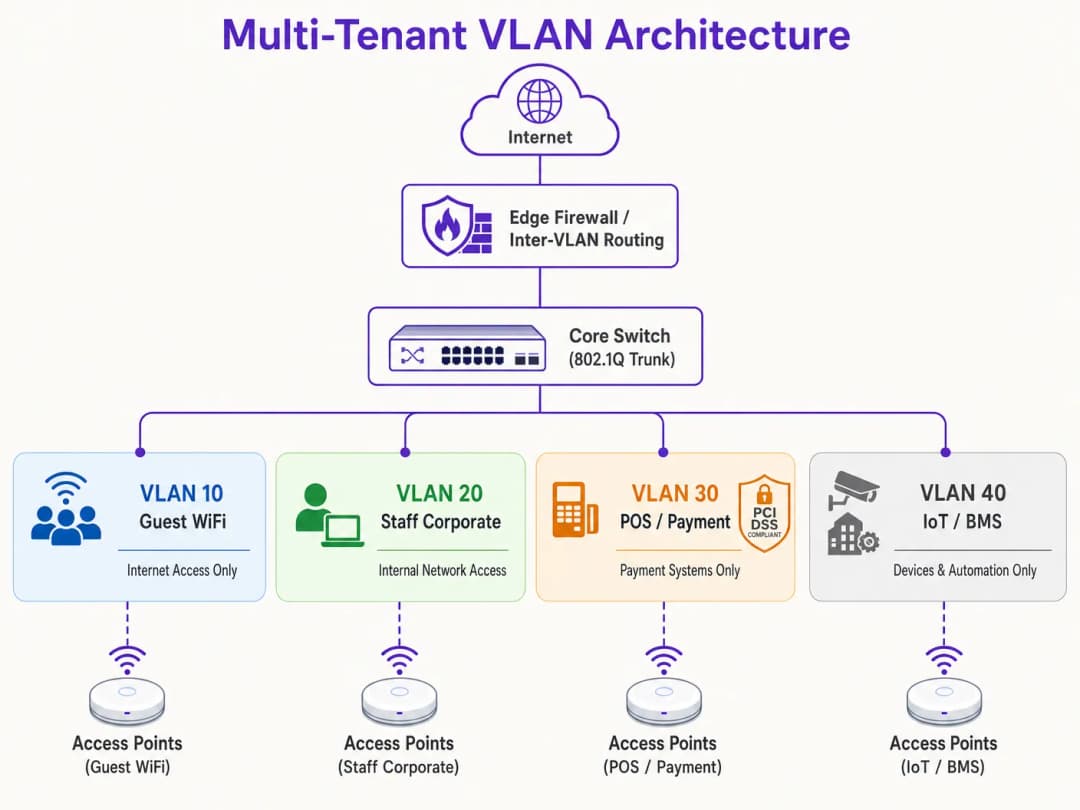
যেকোনো হার্ডওয়্যার কনফিগার করার আগে, একটি বিস্তৃত লজিক্যাল নেটওয়ার্ক ম্যাপ তৈরি করুন। প্রতিটি ট্রাফিক ক্লাসের জন্য আলাদা VLAN ID, IP সাবনেট এবং সিকিউরিটি জোন বরাদ্দ করুন।
| সেগমেন্টের নাম | VLAN ID | IP সাবনেট / CIDR | সিকিউরিটি জোন | প্রাথমিক অথেন্টিকেশন |
|---|---|---|---|---|
| নেটওয়ার্ক ম্যানেজমেন্ট | VLAN 10 | 10.10.10.0/24 | ম্যানেজমেন্ট | স্ট্যাটিক / আউট-অফ-ব্যান্ড |
| গেস্ট WiFi (Purple) | VLAN 20 | 172.16.0.0/20 | গেস্ট (শুধুমাত্র ইন্টারনেট) | ওপেন + Captive Portal |
| কর্পোরেট স্টাফ | VLAN 30 | 10.10.30.0/23 | ইন্টারনাল কর্পোরেট | WPA3-Enterprise (802.1X) |
| POS / পেমেন্ট | VLAN 40 | 192.168.40.0/24 | PCI-CDE (সীমাবদ্ধ) | WPA3-Enterprise / MAB |
| IoT / বিল্ডিং সিস্টেম | VLAN 50 | 10.10.50.0/24 | IoT (সীমাবদ্ধ) | WPA3-SAE / ডায়নামিক PSK |
গুরুত্বপূর্ণ নিয়ম: কোনো সক্রিয় ট্রাফিক বা ম্যানেজমেন্টের জন্য কখনো VLAN 1 ব্যবহার করবেন না। সমস্ত ট্রাঙ্ক পোর্টে VLAN 1 নিষ্ক্রিয় করুন এবং VLAN হপিং অ্যাটাক প্রতিরোধ করতে নেটিভ VLAN-কে একটি অব্যবহৃত, নন-রাউটেবল VLAN ID-তে (যেমন, VLAN 999) পরিবর্তন করুন।
ধাপ ২: ওয়্যার্ড সুইচ ফ্যাব্রিক কনফিগারেশন
লজিক্যাল VLAN স্ট্রাকচার সমর্থন করার জন্য কোর, ডিস্ট্রিবিউশন এবং অ্যাক্সেস সুইচ কনফিগার করুন। APs-এর সাথে সরাসরি সংযুক্ত সুইচ পোর্টগুলোতে অবশ্যই একাধিক VLAN থাকতে হবে এবং সেগুলোকে 802.1Q ট্রাঙ্ক পোর্ট হিসেবে কনফিগার করতে হবে। নিরাপত্তার ঝুঁকি কমানোর জন্য প্রতিটি ট্রাঙ্কে কোন কোন VLAN অনুমোদিত তা স্পষ্টভাবে নির্ধারণ করুন। একক ওয়্যার্ড ডিভাইসের (যেমন একটি স্ট্যাটিক POS টার্মিনাল বা রিসেপশনিস্টের PC) সাথে সংযুক্ত পোর্টগুলোকে অবশ্যই অ্যাক্সেস মোডে সেট করতে হবে এবং একটি একক VLAN-এ অ্যাসাইন করতে হবে।
ধাপ ৩: ওয়্যারলেস LAN কন্ট্রোলার এবং AP কনফিগারেশন
ওয়্যারলেস SSIDs গুলোকে তাদের নিজস্ব VLANs-এর সাথে ম্যাপ করুন এবং এজ সিকিউরিটি কন্ট্রোল কনফিগার করুন। গেস্ট SSID-এর জন্য, সুযোগসন্ধানী ওয়্যারলেস এনক্রিপশন প্রদান করতে সিকিউরিটি Open বা WPA3-Enhanced Open (OWE) তে কনফিগার করুন, Client Isolation চালু করুন, এবং GDPR-সম্মত ব্যবহারকারী অনবোর্ডিং ও অ্যানালিটিক্সের জন্য Purple-এর ক্লাউড-ম্যানেজড Captive Portal-এ রিডাইরেক্ট করুন। কর্পোরেট SSID-এর জন্য, 802.1X সহ WPA3-Enterprise কনফিগার করুন, প্রাইমারি এবং সেকেন্ডারি RADIUS সার্ভার অ্যাড্রেস নির্ধারণ করুন, এবং নির্বিঘ্ন রোমিংয়ের জন্য 802.11r ফাস্ট BSS ট্রানজিশন এবং অপরচুনিস্টিক কী ক্যাশিং সক্ষম করুন। IoT ডিভাইসের জন্য, একটি শক্তিশালী, রোটেটেড পাসফ্রেজ সহ WPA3-SAE স্থাপন করুন, অথবা ব্যক্তিগত ডিভাইসে অনন্য কী অ্যাসাইন করতে এবং সেগুলোকে ডাইনামিকভাবে সাব-VLANs-এ ম্যাপ করতে Multi-PSK (MPSK) প্রয়োগ করুন।
ধাপ ৪: কোর ফায়ারওয়াল এবং ইন্টার-VLAN রাউটিং পলিসি
একটি VLAN আর্কিটেকচারের নিরাপত্তা সম্পূর্ণভাবে ইন্টার-VLAN রাউটিং নিয়ন্ত্রণকারী ফায়ারওয়াল নিয়মের উপর নির্ভরশীল। ফায়ারওয়ালে একটি কঠোর Default-Deny পলিসি প্রয়োগ করতে হবে, যেখানে শুধুমাত্র স্পষ্টভাবে অনুমোদিত প্রবাহেরই অনুমতি থাকবে।

গেস্ট জোন (VLAN 20) এর জন্য, পোর্ট ৮০ এবং ৪৪৩-এ WAN-এ আউটবাউন্ড ট্রাফিকের অনুমতি দিন এবং DNS ও DHCP সার্ভিসে UDP ট্রাফিকের অনুমতি দিন। ইন্টারনাল সাবনেটে সমস্ত ট্রাফিক ব্লক (Deny) করুন। POS জোন (VLAN 40) এর জন্য, পোর্ট ৪৪৩-এ শুধুমাত্র নির্দিষ্ট পেমেন্ট গেটওয়ে IP অ্যাড্রেসগুলোতে আউটবাউন্ড TCP ট্রাফিকের অনুমতি দিন এবং অন্য সমস্ত VLAN থেকে ও সেগুলোতে সমস্ত ট্রাফিক ব্লক করুন। IoT জোন (VLAN 50) এর জন্য, শুধুমাত্র নির্দিষ্ট ম্যানুফ্যাকচারার আপডেট সার্ভার এবং লোকাল ম্যানেজমেন্ট কন্ট্রোলারে আউটবাউন্ড ট্রাফিকের অনুমতি দিন এবং অন্য সমস্ত ইন্টারনাল ও এক্সটারনাল ট্রাফিক ব্লক করুন।
সেরা অনুশীলনসমূহ
দীর্ঘমেয়াদী স্থিতিশীলতা, উচ্চ পারফরম্যান্স এবং কঠোর নিরাপত্তা নিশ্চিত করতে, এই ইন্ডাস্ট্রি-স্ট্যান্ডার্ড VLAN ডিজাইন নীতিগুলো মেনে চলুন।
ম্যানেজমেন্ট প্লেন আইসোলেশন আলোচনার ঊর্ধ্বে। নেটওয়ার্ক ম্যানেজমেন্ট VLAN-এ কখনোই এন্ড-ইউজার ট্রাফিকের অনুমতি দেবেন না। APs, সুইচ, রাউটার এবং WLCs-এর IP অ্যাড্রেসগুলো একটি ডেডিকেটেড, অত্যন্ত সীমাবদ্ধ ম্যানেজমেন্ট VLAN-এ পাওয়া উচিত। এই VLAN-এ অ্যাক্সেস শুধুমাত্র অনুমোদিত অ্যাডমিনিস্ট্রেটর ডিভাইসের মধ্যে সীমাবদ্ধ থাকতে হবে, আদর্শভাবে একটি সুরক্ষিত VPN বা ফিজিক্যাল কনসোল পোর্টের মাধ্যমে। যদি কোনো আক্রমণকারী ম্যানেজমেন্ট প্লেনে অ্যাক্সেস পেয়ে যায়, তবে পুরো নেটওয়ার্ক পরিকাঠামোর ওপর তাদের কার্যকর নিয়ন্ত্রণ চলে আসে।
Standardised VLAN Schema multi-site অপারেটরদের জন্য অপরিহার্য। যেসব প্রতিষ্ঠান মাল্টি-সাইট পোর্টফোলিও পরিচালনা করছে - যেমন ৫০০টি স্টোর সহ একটি রিটেইল চেইন বা ৫০টি প্রপার্টি সহ একটি হোটেল ব্র্যান্ড - তাদের জন্য একটি টেমপ্লেটেড VLAN schema বাস্তবায়ন করুন যা প্রতিটি সাইট জুড়ে ধারাবাহিকভাবে প্রয়োগ করা হয়। VLAN ID-এর সাথে মেলানোর জন্য IP ঠিকানায় একটি ধারাবাহিক থার্ড অক্টেট ব্যবহার করা সম্পূর্ণ এস্টেট জুড়ে দূরবর্তী সমস্যা সমাধান, WLC টেমপ্লেট ডিপ্লয়মেন্ট এবং ফায়ারওয়াল নিয়ম পরিচালনাকে সহজ করে। এই পদ্ধতিটি নতুন সাইট যুক্ত করার জন্য প্রয়োজনীয় সময়কেও নাটকীয়ভাবে হ্রাস করে।
DHCP Lease Time Optimisation IP ঠিকানার ঘাটতি রোধ করে। হাই-ডেনসিটি পরিবেশে, DHCP লিজের সময়গুলি যত্ন সহকারে পরিচালনা করা আবশ্যক। Guest WiFi সেগমেন্টের জন্য, যেখানে ব্যবহারকারীরা প্রায়শই যাতায়াত করে, DHCP Lease Time ১ থেকে ২ ঘন্টা নির্ধারণ করুন। অভ্যন্তরীণ কর্পোরেট নেটওয়ার্কের জন্য, ৮ থেকে ২৪ ঘন্টার একটি স্ট্যান্ডার্ড লিজ সময় উপযুক্ত। স্থানীয় DNS সার্ভারগুলি যেন গেস্ট নেটওয়ার্কের কাছে উন্মুক্ত না হয় তা নিশ্চিত করুন; অভ্যন্তরীণ সার্ভারের লোড কমাতে পাবলিক, ফিল্টারড DNS রিজলভার ব্যবহার করতে গেস্ট VLAN-গুলি কনফিগার করুন।
Compliance Alignment প্রথম দিন থেকেই আর্কিটেকচারের সাথে যুক্ত থাকতে হবে। PCI DSS রিকোয়ারমেন্ট ১.২-এ কার্ডহোল্ডার ডেটা এনভায়রনমেন্ট (CDE) এবং অন্যান্য নেটওয়ার্কের মধ্যে ট্র্যাফিক সীমিত করতে ফায়ারওয়াল ইনস্টল করার নির্দেশ দেওয়া হয়েছে। একটি ডেডিকেটেড VLAN-এ POS টার্মিনালগুলিকে আইসোলেট করার মাধ্যমে, ভেন্যুর বাকি নেটওয়ার্ক কঠোর এবং ব্যয়বহুল PCI সম্মতি মূল্যায়ন থেকে বাদ পড়ে। GDPR-এর "Privacy by Design" নীতি গেস্ট ব্যবহারকারীর ট্র্যাফিক আইসোলেট করে এবং Purple-এর captive portal-এর মাধ্যমে সম্মতি পরিচালনা করে পূরণ করা হয়। সমস্ত SSID জুড়ে WPA3 গ্রহণ ত্বরান্বিত করা উচিত, কারণ WPA3-Personal-এর Simultaneous Authentication of Equals (SAE) প্রোটোকল WPA2-PSK-এ বিদ্যমান অফলাইন ডিকশনারি অ্যাটাকের দুর্বলতা দূর করে। অ্যাক্সেস কন্ট্রোল আর্কিটেকচার সম্পর্কে আরও নির্দেশনার জন্য, 10 Best Network Access Control (NAC) Solutions for 2026 দেখুন।
Troubleshooting & Risk Mitigation
এমনকি একটি নিখুঁতভাবে ডিজাইন করা VLAN আর্কিটেকচারও অপারেশনাল সমস্যার সম্মুখীন হতে পারে। নিচে সবচেয়ে সাধারণ ব্যর্থতার ধরন এবং তাদের প্রযুক্তিগত সমাধানগুলি দেওয়া হলো।
VLAN Leakage and Misconfigured Trunk Ports হলো ডিপ্লয়মেন্ট-পরবর্তী সহায়তা টিকিটগুলির সবচেয়ে ঘন ঘন মূল কারণ। এর লক্ষণ হলো ওয়্যারলেস ক্লায়েন্টরা একটি নির্দিষ্ট SSID-এ সফলভাবে প্রমাণীকরণ করছে কিন্তু একটি IP ঠিকানা পেতে ব্যর্থ হচ্ছে। মূল কারণ হলো AP-এর সাথে সংযুক্ত সুইচ পোর্টটি ভুলভাবে কনফিগার করা হয়েছে: হয় টার্গেট VLAN 802.1Q ট্রাঙ্কে অনুমোদিত নয়, অথবা সুইচের স্থানীয় ডেটাবেসে VLAN তৈরি করা হয়নি। সুইচের ট্রাঙ্ক কনফিগারেশন যাচাই করুন এবং নিশ্চিত করুন যে সুইচ পোর্টে অনুমোদিত VLAN তালিকাটি AP-তে কনফিগার করা SSID-গুলির সাথে মিলে যাচ্ছে। যেকোনো পরিবর্তনের পর সর্বদা সুইচের কনফিগারেশন অডিট করুন এবং কমিশনিংয়ের সময় সেগুলি যাচাই করুন।
DHCP Relay Failures ঘটে যখন একটি নতুন তৈরি করা VLAN-এর লেয়ার 3 ইন্টারফেসে কোনো সংশ্লিষ্ট IP Helper Address কনফিগার করা থাকে না। যেহেতু DHCP অনুরোধগুলো ব্রডকাস্ট প্যাকেট, তাই একটি রিলে এজেন্ট ছাড়া সেগুলো VLAN সীমানা অতিক্রম করতে পারে না। যদি DHCP সার্ভারটি ক্লায়েন্টদের থেকে ভিন্ন একটি VLAN-এ থাকে, তবে রাউটার বা লেয়ার 3 সুইচে অবশ্যই কেন্দ্রীভূত DHCP সার্ভারকে নির্দেশকারী একটি IP Helper Address কনফিগার করতে হবে।
RADIUS Certificate Expiration হলো একটি নীরব ঝুঁকি যা পুরো এন্টারপ্রাইজ নেটওয়ার্ককে একসাথে অচল করে দিতে পারে। এর লক্ষণ হলো সমস্ত 802.1X-এর মাধ্যমে প্রমাণীকৃত ক্লায়েন্টরা হঠাৎ করে সংযুক্ত হতে ব্যর্থ হয় এবং ক্লায়েন্ট ডিভাইসে সার্টিফিকেট সতর্কতার ত্রুটি দেখায়। সার্টিফিকেট মেয়াদ শেষ হওয়ার ৩০ দিন আগে ট্রিগার হওয়া স্বয়ংক্রিয় মনিটরিং অ্যালার্ট স্থাপন করুন এবং ম্যানুয়াল ত্রুটি এড়াতে স্বয়ংক্রিয় সার্টিফিকেট রিনিউয়াল পাইপলাইন বাস্তবায়ন করুন।
SSID Proliferation and RF Congestion চমৎকার সিগন্যাল স্ট্রেন্থ এবং হাই-স্পিড ব্যাকহল থাকা সত্ত্বেও উচ্চ লেটেন্সি এবং ধীর গতির মাধ্যমে প্রকাশ পায়। এর মূল কারণ হলো ম্যানেজমেন্ট ওভারহেড এবং কো-চ্যানেল ইন্টারফারেন্স থেকে অতিরিক্ত চ্যানেল ব্যবহার। SSIDs একত্রিত করুন, Dynamic VLAN Assignment-এ স্থানান্তরিত হন, উচ্চ-ঘনত্বের এলাকায় APs-এর একটি সাবসেটে ২.৪ গিগাহার্জ রেডিও নিষ্ক্রিয় করুন এবং ডুয়াল-ব্যান্ড ক্লায়েন্টদের আরও পরিষ্কার ৫ গিগাহার্জ এবং ৬ গিগাহার্জ ব্যান্ডে নিয়ে যেতে ব্যান্ড স্টিয়ারিং প্রয়োগ করুন।
-
ROI ও ব্যবসায়িক প্রভাব
একটি শক্তিশালী VLAN সেগমেন্টেশন কৌশল বাস্তবায়ন ভেন্যু অপারেটর এবং এন্টারপ্রাইজ সংস্থাগুলোর জন্য উল্লেখযোগ্য, পরিমাপযোগ্য ব্যবসায়িক মূল্য নিয়ে আসে।
PCI Audit Scope Minimisation সরাসরি খরচ বাঁচায়। ক্রেডিট কার্ডের পেমেন্ট প্রসেস করা ভেন্যুগুলোর জন্য, একটি ফ্ল্যাট নেটওয়ার্ক পুরো ইনফ্রাস্ট্রাকচারকে PCI DSS কমপ্লায়েন্সের আওতাভুক্ত করে ফেলে। এর অর্থ হলো প্রতিটি সুইচ, AP, সার্ভার এবং অফিসের পিসি অডিট করতে হবে, যার ফলে কমপ্লায়েন্স মূল্যায়ন, পেনিট্রেশন টেস্টিং এবং প্রশাসনিক খরচে প্রতি বছর হাজার হাজার পাউন্ড ব্যয় হয়। নেটওয়ার্ক সেগমেন্ট করার মাধ্যমে এবং কঠোর ফায়ারওয়াল কন্ট্রোল সহ একটি ডেডিকেটেড POS VLAN-এ কার্ডহোল্ডার ডেটা এনভায়রনমেন্ট আলাদা করার মাধ্যমে, অডিটের পরিধি কেবল সেই VLAN-এর মধ্যেই সীমাবদ্ধ থাকে। পরিধির এই হ্রাস কমপ্লায়েন্স খরচ ৭০% পর্যন্ত কমাতে পারে এবং নন-কমপ্লায়েন্স পেনাল্টির ঝুঁকি মারাত্মকভাবে হ্রাস করতে পারে।
Breach Cost Mitigation হলো সবচেয়ে উচ্চ-মূল্যের নিরাপত্তা ফলাফল। মারাত্মক ডেটা ব্রিচগুলোর প্রাথমিক কারণ হলো ল্যাটারাল মুভমেন্ট, যেখানে একজন আক্রমণকারী একটি কম-নিরাপত্তার ডিভাইসে অ্যাক্সেস পায় এবং উচ্চ-মূল্যের ডেটাবেস বা POS সিস্টেমগুলোর ক্ষতি করতে একটি ফ্ল্যাট নেটওয়ার্কের মাধ্যমে চলাচল করে। VLAN সেগমেন্টেশন, কঠোর ইন্টার-VLAN ফায়ারওয়াল নিয়মের সাথে যুক্ত হয়ে, এই ভেক্টরটিকে সম্পূর্ণরূপে নির্মূল করে। যদি VLAN 50-তে থাকা একটি IoT ডিভাইস আক্রান্ত হয়, তবে আক্রমণকারী সেই লজিক্যাল সেগমেন্টের মধ্যেই আটকে থাকবে। এতে লঙ্ঘনের প্রভাবের পরিধি ন্যূনতম হয়ে যায় এবং সংবেদনশীল কর্পোরেট সম্পদ সুরক্ষিত থাকে।Guest Analytics and Revenue Monetisation নেটওয়ার্ককে একটি ব্যয় কেন্দ্র থেকে একটি কৌশলগত সম্পদে রূপান্তরিত করে। একটি সঠিকভাবে বিভক্ত নেটওয়ার্ক ভেন্যু অপারেটরদের অভ্যন্তরীণ নিরাপত্তার ঝুঁকি না নিয়ে নিরাপদে উচ্চ মানের Guest WiFi অফার করার সুবিধা দেয়। একটি ডেডিকেটেড VLAN-এর মাধ্যমে গেস্ট ট্রাফিককে Purple-এর প্ল্যাটফর্মে রাউট করার মাধ্যমে, ভেন্যুগুলো সরাসরি CRM এবং মার্কেটিং অটোমেশন প্ল্যাটফর্মের সাথে সংহত একটি ব্র্যান্ডেড captive portal-এর মাধ্যমে মূল্যবান ফার্স্ট-পার্টি কাস্টমার ডেটা সংগ্রহ করতে পারে। এটি লক্ষ্যযুক্ত মার্কেটিং ক্যাম্পেইন সক্ষম করে, গ্রাহকের আনুগত্য বাড়ায় এবং অপারেটরদের captive portal স্প্ল্যাশ পেজে বিজ্ঞাপন এবং টায়ার্ড ব্যান্ডউইথ আপগ্রেডের মাধ্যমে তাদের ওয়্যারলেস পরিকাঠামো থেকে আয় করার সুযোগ দেয়। অ্যানালিটিক্স কীভাবে ব্যবসায়িক ফলাফলকে ত্বরান্বিত করে সে সম্পর্কে আরও বিশদ ধারণার জন্য, Purple-এর WiFi Analytics প্ল্যাটফর্মের ডকুমেন্টেশন দেখুন।
References
- Cisco Wireless APs: 2026 Guide to Products & Deployment
- 10 Best Network Access Control (NAC) Solutions for 2026
- WiFi in Schools: The 2026 Administrator & IT Guide
- How to Implement 802.1X Authentication with Cloud RADIUS
- Purple Guest WiFi Platform
- Purple WiFi Analytics Platform
- Hospitality WiFi Solutions
- Retail WiFi Solutions
- Transport WiFi Solutions
মূল সংজ্ঞাসমূহ
VLAN (Virtual Local Area Network)
নেটওয়ার্ক ডিভাইসগুলির একটি লজিক্যাল গ্রুপিং যা তাদের ফিজিক্যাল লোকেশন নির্বিশেষে এমনভাবে যোগাযোগ করে যেন তারা একই ফিজিক্যাল LAN-এ রয়েছে। IEEE 802.1Q এর অধীনে সংজ্ঞায়িত, VLAN-গুলি ইথারনেট ফ্রেম হেডারে এম্বেড করা একটি ১২-বিট VLAN আইডেন্টিফায়ার (VID) ব্যবহার করে একটি একক ফিজিক্যাল সুইচ ফ্যাব্রিককে একাধিক আইসোলেটেড ব্রডকাস্ট ডোমেনে বিভক্ত করে।
শেয়ার্ড ফিজিক্যাল ইনফ্রাস্ট্রাকচারে গেস্ট, স্টাফ, POS এবং IoT ট্রাফিক আলাদা করার প্রাথমিক মাধ্যম হিসেবে IT টিমগুলো VLAN-এর মুখোমুখি হয়। VLAN ছাড়া সব ডিভাইস একটি একক ব্রডকাস্ট ডোমেন শেয়ার করে, যা নিরাপত্তা ও পারফরম্যান্সের ঝুঁকি তৈরি করে।
802.1Q Trunk Port
প্রতিটি ইথারনেট ফ্রেমকে তার সংশ্লিষ্ট VLAN ID দিয়ে ট্যাগ করে একসাথে একাধিক VLAN-এর ট্রাফিক বহন করার জন্য কনফিগার করা একটি সুইচ পোর্ট। ট্রাঙ্ক পোর্টটি সুইচের মধ্যে এবং অ্যাক্সেস পয়েন্টগুলিতে ট্যাগ করা ফ্রেমগুলি বহন করে, যখন অ্যাক্সেস পোর্টগুলি কেবল একটি একক VLAN-এর জন্য আনট্যাগ করা ফ্রেম বহন করে।
নেটওয়ার্ক ইঞ্জিনিয়াররা অ্যাক্সেস পয়েন্টের সাথে সংযুক্ত সুইচ ইন্টারফেস এবং সুইচের মধ্যবর্তী আপলিঙ্ক পোর্টগুলিতে ট্রাঙ্ক পোর্ট কনফিগার করেন। একটি ভুল কনফিগার করা ট্রাঙ্ক পোর্ট - যেখানে অনুমোদিত VLAN তালিকায় একটি প্রয়োজনীয় VLAN অন্তর্ভুক্ত থাকে না - তা পোস্ট-ডিপ্লয়মেন্ট কানেক্টিভিটি ব্যর্থতার সবচেয়ে সাধারণ কারণ।
Dynamic VLAN Assignment (DVA)
এমন একটি আর্কিটেকচার যা ওয়্যারলেস ক্লায়েন্ট যে SSID-তে সংযুক্ত হয়েছে তার পরিবর্তে তাদের প্রমাণিত পরিচয়ের ভিত্তিতে গতিশীলভাবে একটি নির্দিষ্ট VLAN-এ অ্যাসাইন করতে IEEE 802.1X প্রমাণীকরণ এবং একটি RADIUS সার্ভার ব্যবহার করে। RADIUS সার্ভারটি AP-কে কোন VLAN অ্যাসাইন করতে হবে তা নির্দেশ করার জন্য Access-Accept বার্তায় IETF স্ট্যান্ডার্ড অ্যাট্রিবিউট (Tunnel-Type, Tunnel-Medium-Type, Tunnel-Private-Group-ID) ফেরত পাঠায়।
বহু-ভাড়াটিয়া ভবনের জন্য DVA একটি প্রস্তাবিত পদ্ধতি যেখানে একাধিক SSID ব্রডকাস্ট করলে RF পারফরম্যান্স হ্রাস পাবে। এটি একটি একক SSID-কে তাদের মধ্যে সম্পূর্ণ লেয়ার ২ আইসোলেশন সহ একাধিক ভাড়াটিয়া সংস্থাকে পরিষেবা দেওয়ার অনুমতি দেয়।
RADIUS (Remote Authentication Dial-In User Service)
একটি ক্লায়েন্ট - সার্ভার নেটওয়ার্কিং প্রোটোকল যা নেটওয়ার্ক অ্যাক্সেসের জন্য সেন্ট্রালাইজড প্রমাণীকরণ, অনুমোদন এবং অ্যাকাউন্টিং (AAA) ব্যবস্থাপনা প্রদান করে। WiFi-এর ক্ষেত্রে, ওয়্যারলেস কন্ট্রোলারটি RADIUS ক্লায়েন্ট হিসেবে কাজ করে, ওয়্যারলেস ক্লায়েন্টদের থেকে প্রমাণীকরণ অনুরোধগুলি RADIUS সার্ভারে ফরোয়ার্ড করে, যা একটি আইডেন্টিটি স্টোরের (Active Directory, LDAP ইত্যাদি) বিপরীতে শংসাপত্রগুলি যাচাই করে এবং VLAN অ্যাসাইনমেন্ট সহ অনুমোদনের বৈশিষ্ট্যগুলি ফেরত পাঠায়।
RADIUS হলো এন্টারপ্রাইজ WiFi নিরাপত্তার মেরুদণ্ড। আইটি টিমগুলি প্রতি-ব্যবহারকারী এবং প্রতি-ডিভাইস নেটওয়ার্ক নীতিগুলি প্রয়োগ করতে RADIUS সার্ভার (যেমন Microsoft NPS, FreeRADIUS বা ক্লাউড RADIUS পরিষেবা) স্থাপন করে, যার মধ্যে Dynamic VLAN Assignment এবং সার্টিফিকেট-ভিত্তিক প্রমাণীকরণ অন্তর্ভুক্ত রয়েছে।
PCI DSS (Payment Card Industry Data Security Standard)
নিরাপত্তা মানদণ্ডের একটি সেট যা ক্রেডিট কার্ডের তথ্য গ্রহণ, প্রক্রিয়াকরণ, সংরক্ষণ বা প্রেরণকারী সমস্ত কোম্পানি যাতে একটি নিরাপদ পরিবেশ বজায় রাখে তা নিশ্চিত করার জন্য ডিজাইন করা হয়েছে। PCI DSS প্রয়োজনীয়তা ১ নেটওয়ার্ক নিরাপত্তা নিয়ন্ত্রণের ইনস্টলেশন এবং রক্ষণাবেক্ষণ বাধ্যতামূলক করে, যার মধ্যে কার্ডহোল্ডার ডেটা এনভায়রনমেন্ট (CDE) এবং অন্যান্য নেটওয়ার্কের মধ্যে ট্রাফিক সীমাবদ্ধকারী ফায়ারওয়াল অন্তর্ভুক্ত রয়েছে।
POS টার্মিনাল বা পেমেন্ট প্রসেসিং সিস্টেম সহ ভেন্যু অপারেটরদের অবশ্যই PCI DSS মেনে চলতে হবে। সঠিক VLAN সেগমেন্টেশন CDE-কে একটি ডেডিকেটেড VLAN-এ আইসোলেট করে, যা সম্পূর্ণ নেটওয়ার্কের পরিবর্তে কেবল সেই সেগমেন্ট এবং এটি পরিচালনাকারী ফায়ারওয়াল নীতিগুলিতে PCI অডিটের পরিধিকে সীমাবদ্ধ করে।
ব্রডকাস্ট ডোমেন
গ্রুপের যেকোনো একটি ডিভাইস দ্বারা পাঠানো ব্রডকাস্ট ফ্রেম গ্রহণ করবে এমন সমস্ত নেটওয়ার্ক ডিভাইসের সেট। একটি ফ্ল্যাট, আনসেগমেন্টেড নেটওয়ার্কে, সমস্ত ডিভাইস একটি একক ব্রডকাস্ট ডোমেন শেয়ার করে। VLAN নেটওয়ার্ককে ছোট ব্রডকাস্ট ডোমেনে বিভক্ত করে, যার ফলে ব্রডকাস্ট ট্রাফিক (ARP, DHCP, mDNS) কেবল সেই VLAN-এর মধ্যে থাকা ডিভাইসগুলিতেই সীমাবদ্ধ থাকে।
শত শত বা হাজার হাজার সংযুক্ত ডিভাইস সহ উচ্চ-ঘনত্বের ভেন্যুগুলিতে, একটি একক বৃহৎ ব্রডকাস্ট ডোমেন বিপুল পরিমাণে ব্রডকাস্ট ট্রাফিক তৈরি করে যা ওয়্যারলেস এয়ারটাইম গ্রাস করে এবং পারফরম্যান্স হ্রাস করে। VLAN-এর মাধ্যমে ব্রডকাস্ট ডোমেনের আকার হ্রাস করা একটি প্রাথমিক পারফরম্যান্স অপ্টিমাইজেশন কৌশল।
WPA3-Enterprise
বর্তমান এন্টারপ্রাইজ-গ্রেড WiFi নিরাপত্তা মানদণ্ড, যা প্রতি-ব্যবহারকারী বা প্রতি-ডিভাইস প্রমাণীকরণের জন্য IEEE 802.1X প্রমাণীকরণ এবং EAP (Extensible Authentication Protocol) ব্যবহার করে। WPA3-Enterprise ১২৮-বিট (স্ট্যান্ডার্ড) বা ১৯২-বিট (উচ্চ-নিরাপত্তা মোড) ক্রিপ্টোগ্রাফিক সুরক্ষা প্রদান করে এবং WPA2-এর ৪-ওয়ে হ্যান্ডশেকের সাথে সম্পর্কিত দুর্বলতাগুলি দূর করে।
আইটি টিমগুলির উচিত সমস্ত কর্পোরেট এবং নিয়ন্ত্রিত SSID (কর্মী, POS) এ WPA3-Enterprise স্থাপন করা। এর জন্য একটি RADIUS সার্ভার এবং হয় ক্লায়েন্ট সার্টিফিকেট (EAP-TLS) অথবা ব্যবহারকারীর নাম/পাসওয়ার্ড শংসাপত্র (PEAP) প্রয়োজন। PCI DSS-সম্মত ওয়্যারলেস স্থাপনার জন্য WPA3-Enterprise হলো প্রয়োজনীয় প্রমাণীকরণ মানদণ্ড।
ক্লায়েন্ট আইসোলেশন (পিয়ার-টু-পিয়ার ব্লকিং)
একটি ওয়্যারলেস অ্যাক্সেস পয়েন্ট ফিচার যা একই SSID-এর সাথে সংযুক্ত ডিভাইসগুলিকে লেয়ার ২-এ একে অপরের সাথে সরাসরি যোগাযোগ করতে বাধা দেয়। এটি সক্রিয় থাকলে, সমস্ত ইন্টার-ক্লায়েন্ট ট্র্যাফিক AP-তে ব্লক হয়ে যায়, যার ফলে এটি অন্য ডিভাইসে পৌঁছানোর আগে ফায়ারওয়াল অতিক্রম করতে বাধ্য হয়।
সমস্ত গেস্ট WiFi SSID-তে ক্লায়েন্ট আইসোলেশন একটি বাধ্যতামূলক কনফিগারেশন। এটি ছাড়া, গেস্ট নেটওয়ার্কের একজন ক্ষতিকারক ব্যবহারকারী একই SSID-তে থাকা অন্যান্য গেস্ট ডিভাইসগুলিকে স্ক্যান, প্রোব এবং আক্রমণ করতে পারে। এটি GDPR কমপ্লায়েন্সের জন্যও একটি প্রয়োজনীয়তা, কারণ এটি একজন গেস্টকে অন্য গেস্টের আনএনক্রিপ্টেড ট্র্যাফিক ইন্টারসেপ্ট করতে বাধা দেয়।
MAC Authentication Bypass (MAB)
একটি ফলব্যাক প্রমাণীকরণ প্রক্রিয়া যা 802.1X প্রমাণীকরণে অক্ষম ডিভাইসগুলিকে (যেমন প্রিন্টার, স্মার্ট টিভি এবং IoT সেন্সর) তাদের MAC অ্যাড্রেস ব্যবহার করে নেটওয়ার্কে প্রমাণীকরণ করতে দেয়। RADIUS সার্ভারটি অনুমোদিত ডিভাইসগুলির MAC অ্যাড্রেস দিয়ে আগে থেকেই সাজানো থাকে এবং একটি সফল MAB অনুরোধের পর উপযুক্ত VLAN অ্যাসাইনমেন্ট ফেরত দেয়।
IT টিমগুলি মাল্টি-টেন্যান্ট পরিবেশে IoT এবং লেগ্যাসি ডিভাইসগুলির জন্য MAB ব্যবহার করে। যেহেতু MAC অ্যাড্রেস স্পুফ করা সম্ভব, তাই অ্যাসাইন করা VLAN-এ কঠোর ফায়ারওয়াল ACL-এর সাথে MAB সর্বদা সংযুক্ত করা উচিত, যা ডিভাইসের নেটওয়ার্ক অ্যাক্সেসকে শুধুমাত্র তার প্রয়োজনীয় নির্দিষ্ট বাহ্যিক পরিষেবাগুলিতে সীমাবদ্ধ করে।
Native VLAN
একটি 802.1Q ট্রাঙ্ক পোর্টে আনট্যাগড ট্র্যাফিকের জন্য নির্ধারিত VLAN। বেশিরভাগ সুইচে ডিফল্টভাবে, VLAN 1 হলো native VLAN। ট্রাঙ্ক পোর্টে আসা আনট্যাগড ফ্রেমগুলি native VLAN-এ অ্যাসাইন করা হয়। এটি VLAN হপিং-এর জন্য একটি সুপরিচিত অ্যাটাক ভেক্টর, যেখানে একজন আক্রমণকারী তাদের VLAN থেকে বের হতে ডাবল-ট্যাগড ফ্রেম পাঠায়।
সর্বোত্তম অনুশীলন হলো সমস্ত ট্রাঙ্ক পোর্টে native VLAN-কে একটি অব্যবহৃত, নন-রাউটেবল VLAN ID-তে (যেমন, VLAN 999) পরিবর্তন করা এবং VLAN 1-এ কোনো সক্রিয় ডিভাইস অ্যাসাইন না করা নিশ্চিত করা। এটি যেকোনো PCI DSS-কমপ্লায়েন্ট নেটওয়ার্ক ডিজাইনে একটি বাধ্যতামূলক হার্ডেনিং পদক্ষেপ।
সমাধানকৃত উদাহরণসমূহ
১২টি প্রপার্টি পরিচালনাকারী একটি ৩৫০-রুমের হোটেল গ্রুপকে তাদের নেটওয়ার্ক ইনফ্রাস্ট্রাকচার একত্রিত করতে হবে। বর্তমানে, প্রতিটি প্রপার্টি একটি একক ফ্ল্যাট নেটওয়ার্কের মাধ্যমে পরিচালিত হচ্ছে যা গেস্ট রুম, কর্মীদের ল্যাপটপ, রেস্তোরাঁ POS টার্মিনাল, CCTV ক্যামেরা, HVAC কন্ট্রোলার এবং একই সাথে একাধিক ইভেন্ট পরিচালনাকারী একটি কনফারেন্স সেন্টারকে পরিষেবা প্রদান করে। IT ডিরেক্টর জানিয়েছেন যে সম্পূর্ণ নেটওয়ার্কটি PCI DSS কমপ্লায়েন্সের আওতাভুক্ত, যার ফলে অডিট ফি এবং প্রতিকারমূলক কাজের জন্য গ্রুপের প্রতি বছর প্রায় £৪৫,০০০ খরচ হচ্ছে। নেটওয়ার্কটি কীভাবে নতুন করে ডিজাইন করা উচিত?
সমাধানটি হলো একটি স্ট্যান্ডার্ডাইজড টেমপ্লেট ব্যবহার করে সমস্ত ১২টি প্রপার্টিতে অভিন্নভাবে একটি ফাইভ-VLAN আর্কিটেকচার ডিপ্লয় করা। VLAN ১০ (ম্যানেজমেন্ট, 10.XX.10.0/24) শুধুমাত্র সুইচ, AP এবং WLC ম্যানেজমেন্ট ট্রাফিক বহন করে, যা একচেটিয়াভাবে একটি ডেডিকেটেড অ্যাডমিন VPN-এর মাধ্যমে অ্যাক্সেসযোগ্য। VLAN ২০ (গেস্ট WiFi, 172.16.0.0/20) GDPR-কমপ্লায়েন্ট অনবোর্ডিং এবং অ্যানালিটিক্সের জন্য Purple-এর captive portal-এর মাধ্যমে সমস্ত গেস্ট ট্রাফিক রাউট করে, যেখানে ক্লায়েন্ট আইসোলেশন সক্রিয় থাকে এবং IP এক্সহস্টশন প্রতিরোধ করতে একটি ২-ঘণ্টার DHCP লিজ টাইম থাকে। VLAN ৩০ (স্টাফ কর্পোরেট, 10.XX.30.0/23) একটি ক্লাউড RADIUS পরিষেবার মাধ্যমে গ্রুপের Azure AD-এর বিপরীতে 802.1X অথেন্টিকেশন সহ WPA3-Enterprise ব্যবহার করে। VLAN ৪০ (POS/পেমেন্টস, 192.168.40.0/24) হলো একটি কঠোরভাবে আইসোলেটেড PCI-CDE সেগমেন্ট, যেখানে একটি ডিফল্ট-ডিনাই ফায়ারওয়াল পলিসি শুধুমাত্র পেমেন্ট গেটওয়ে প্রোভাইডারের IP অ্যাড্রেসগুলিতে আউটবাউন্ড HTTPS-এর অনুমতি দেয়। VLAN ৫০ (IoT/BMS, 10.XX.50.0/24) সমস্ত CCTV, HVAC, স্মার্ট লক এবং বিল্ডিং ম্যানেজমেন্ট ডিভাইসগুলিকে আলাদা করে, যেখানে ইগ্রেস ফিল্টারিং শুধুমাত্র তাদের নিজস্ব ম্যানেজমেন্ট প্ল্যাটফর্মগুলিতে সীমাবদ্ধ থাকে। কনফারেন্স সেন্টারটি WLC ড্যাশবোর্ডের মাধ্যমে সাময়িক ইভেন্ট VLAN (VLAN ৬০-৯৯) প্রোভিশন করার মাধ্যমে পরিচালিত হয়, যার প্রতিটিতে একটি কাস্টম Purple captive portal এবং ব্যান্ডউইথ লিমিট থাকে। স্ট্যান্ডার্ডাইজড থার্ড-অক্টেট IP স্কিম (XX = সাইট নম্বর) NOC টিমকে শুধুমাত্র IP অ্যাড্রেস থেকেই যেকোনো ডিভাইসের সাইট এবং সেগমেন্ট সনাক্ত করতে সাহায্য করে, যা ট্রাবলশুটিংয়ের সময় নাটকীয়ভাবে কমিয়ে দেয়।
২২০টি স্টোর বিশিষ্ট একটি জাতীয় রিটেল চেইন ব্যাপক মাত্রায় WiFi পারফরম্যান্স সংক্রান্ত অভিযোগের সম্মুখীন হচ্ছে। প্রতিটি স্টোরে ২০০ Mbps ফাইবার কানেকশন থাকা সত্ত্বেও, গ্রাহক এবং কর্মীরা ৫ Mbps-এরও কম স্পিড পাচ্ছেন বলে জানাচ্ছেন। একটি অডিটে দেখা গেছে যে প্রতিটি স্টোরের অ্যাক্সেস পয়েন্ট থেকে ৯টি SSID ব্রডকাস্ট করা হচ্ছে: একটি গ্রাহকদের জন্য, একটি কর্মীদের জন্য, একটি POS-এর জন্য, একটি CCTV-র জন্য, একটি ডিজিটাল সাইনেজের জন্য, একটি স্টক ম্যানেজমেন্ট হ্যান্ডহেল্ডের জন্য, একটি থার্ড-পার্টি লজিস্টিকস পার্টনারের জন্য, একটি কফি শপ কনসেশনের জন্য এবং পূর্ববর্তী প্রোভাইডারের একটি লেগাসি SSID যা কখনই নিষ্ক্রিয় করা হয়নি। নিরাপত্তা বজায় রেখে পারফরম্যান্সের এই সমস্যাগুলি সমাধান করতে নেটওয়ার্কটিকে কীভাবে নতুন করে ডিজাইন করা উচিত?
এর সমাধান হলো একটি তিন-পর্যায়ের একত্রীকরণ। ফেজ ১ (তাত্ক্ষণিক): অবিলম্বে লেগাসি SSID এবং শূন্য অ্যাক্টিভ ক্লায়েন্ট সহ যেকোনো SSID নিষ্ক্রিয় করুন। শুধুমাত্র এটি করার মাধ্যমেই বিকন ওভারহেড ৯টি SSID থেকে কমে ৭টিতে নেমে আসবে। ফেজ ২ (৩০ দিনের রোলআউট): 802.1X এবং RADIUS-এর মাধ্যমে ডায়নামিক VLAN অ্যাসাইনমেন্ট ব্যবহার করে কর্মী, স্টক ম্যানেজমেন্ট হ্যান্ডহেল্ড, লজিস্টিকস পার্টনার এবং ডিজিটাল সাইনেজ SSID-গুলিকে একটি একক এন্টারপ্রাইজ SSID-তে একত্রিত করুন। প্রতিটি ব্যবহারকারী গ্রুপ তাদের কর্পোরেট ক্রেডেনশিয়াল বা ডিভাইস সার্টিফিকেট দিয়ে অথেন্টিকেট করবে এবং RADIUS সার্ভার তাদের ডেডিকেটেড VLAN-এ (কর্মীদের জন্য VLAN ৩০, IoT/হ্যান্ডহেল্ডের জন্য VLAN ৫০, লজিস্টিকসের জন্য VLAN ৬০, সাইনেজের জন্য VLAN ৭০) অ্যাসাইন করতে উপযুক্ত টানেল-প্রাইভেট-গ্রুপ-আইডি অ্যাট্রিবিউট প্রদান করবে। এটি SSID-এর সংখ্যা ৭ থেকে কমিয়ে ৪-এ নামিয়ে আনবে। ফেজ ৩ (৬০ দিনের রোলআউট): কফি শপ কনসেশনটিকে একটি পৃথক Purple captive portal ইনস্ট্যান্স সহ একটি ডেডিকেটেড VLAN-এ মাইগ্রেট করুন এবং POS ও CCTV SSID-গুলিকে তাদের নিজ নিজ আইসোলেটেড VLAN-এ একত্রিত করুন। চূড়ান্ত আর্কিটেকচারে ৩টি SSID ব্রডকাস্ট করা হবে: ডায়নামিক VLAN অ্যাসাইনমেন্ট সহ একটি এন্টারপ্রাইজ SSID, Purple-এর captive portal-এর মাধ্যমে একটি গেস্ট/গ্রাহক WiFi এবং একটি POS SSID। ডুয়াল-ব্যান্ড ক্লায়েন্টদের ৫ GHz-এ পাঠাতে সমস্ত AP-তে ব্যান্ড স্টিয়ারিং সক্ষম করুন এবং গেস্ট VLAN-এ ক্লায়েন্ট প্রতি রেট লিমিটিং (১০ Mbps ডাউনস্ট্রিম) কনফিগার করুন যাতে কোনো একক ব্যবহারকারী আপলিঙ্ককে সম্পূর্ণরূপে ব্লক করতে না পারে।
অনুশীলনী প্রশ্নসমূহ
Q1. একজন কনফারেন্স সেন্টার অপারেটর ২০০টি অ্যাক্সেস পয়েন্ট সহ ৫০,০০০ বর্গফুটের একটি ভেন্যু পরিচালনা করেন। তারা বর্তমানে ৬টি SSID ব্রডকাস্ট করছেন: একটি ইভেন্টে অংশগ্রহণকারীদের জন্য, একটি এক্সিবিটরদের জন্য, একটি ভেন্যু কর্মীদের জন্য, একটি AV সরঞ্জামের জন্য, একটি ক্যাটারিং POS টার্মিনালের জন্য এবং একটি বিল্ডিং ম্যানেজমেন্ট সিস্টেমের জন্য। IT ম্যানেজার জানিয়েছেন যে বড় ইভেন্টগুলির সময় WiFi পারফরম্যান্স অত্যন্ত খারাপ থাকে, যেখানে ১ Gbps ফাইবার আপলিঙ্ক থাকা সত্ত্বেও গড় ক্লায়েন্ট স্পিড ৩ Mbps-এর নিচে নেমে যায়। ভেন্যুটি একটি PCI DSS অডিটের জন্যও প্রস্তুতি নিচ্ছে। পারফরম্যান্স এবং কমপ্লায়েন্স উভয় সমস্যার সমাধান করতে আপনি ওয়্যারলেস আর্কিটেকচার কীভাবে নতুন করে ডিজাইন করবেন?
ইঙ্গিত: Dynamic VLAN Assignment ব্যবহার করে কোন SSID-গুলি একত্রিত করা যেতে পারে, কোন ট্র্যাফিক ক্লাসগুলির PCI DSS প্রভাব রয়েছে এবং উচ্চ-ঘনত্বের পরিবেশে SSID বিকন ওভারহেড কীভাবে পারফরম্যান্সের সমস্যা তৈরি করে তা বিবেচনা করুন।
মডেল উত্তর দেখুন
নতুন ডিজাইনটি কর্পোরেট সেগমেন্টের জন্য Dynamic VLAN Assignment ব্যবহার করে ৬টি SSID-কে কমিয়ে ৩টিতে নিয়ে আসে। SSID ১ (ইভেন্টে অংশগ্রহণকারী): WPA3-Enhanced Open সহ ওপেন SSID, VLAN 20-তে ম্যাপ করা, GDPR-কমপ্লায়েন্ট অনবোর্ডিং এবং প্রতি-ক্লায়েন্ট রেট লিমিটিং (১০ Mbps ডাউনস্ট্রিম) এর জন্য Purple-এর captive portal-এর মাধ্যমে রাউট করা। ক্লায়েন্ট আইসোলেশন সক্রিয় করা হয়েছে। SSID ২ (এন্টারপ্রাইজ সিকিউর): Dynamic VLAN Assignment সহ 802.1X ব্যবহার করে একটি একক WPA3-Enterprise SSID। এক্সিবিটররা রেজিস্ট্রেশনের সময় দেওয়া সাময়িক ক্রেডেনশিয়াল দিয়ে প্রমাণীকরণ করেন এবং তাদের VLAN 60-তে (শুধুমাত্র ইন্টারনেট, আইসোলেটেড) রাখা হয়। ভেন্যু কর্মীরা কর্পোরেট AD ক্রেডেনশিয়াল দিয়ে প্রমাণীকরণ করেন এবং তাদের VLAN 30-তে (অভ্যন্তরীণ অ্যাক্সেস) রাখা হয়। AV সরঞ্জাম MAC Authentication Bypass ব্যবহার করে এবং VLAN 50-তে (AV ম্যানেজমেন্ট সার্ভারে সীমাবদ্ধ) রাখা হয়। SSID ৩ (POS সিকিউর): ক্যাটারিং POS টার্মিনালগুলির জন্য ডেডিকেটেড WPA3-Enterprise SSID, VLAN 40 (PCI-CDE)-তে ম্যাপ করা। কঠোর ফায়ারওয়াল নিয়ম পেমেন্ট গেটওয়েতে শুধুমাত্র আউটবাউন্ড HTTPS-এর অনুমতি দেয়। বিল্ডিং ম্যানেজমেন্ট সিস্টেমগুলিকে সম্ভব হলে VLAN 50-তে একটি ওয়্যার্ড কানেকশনে স্থানান্তরিত করা হয়, অথবা ওয়্যারলেস প্রয়োজন হলে একটি ডেডিকেটেড IoT SSID-তে রাখা হয়। ৬টি থেকে ৩টি SSID-এ নামিয়ে আনার ফলে বিকন ওভারহেড প্রায় ১৫ - ২০% হ্রাস পায়, যা সরাসরি উপলব্ধ এয়ারটাইম এবং ক্লায়েন্ট থ্রুপুট উন্নত করে। PCI অডিটের পরিধি কেবল VLAN 40 এবং এর ফায়ারওয়াল পলিসিগুলিতে সীমাবদ্ধ হয়, যা PCI DSS প্রয়োজনীয়তা ১.২ এবং ১.৩ পূরণ করে।
Q2. একজন নেটওয়ার্ক আর্কিটেক্ট একটি নতুন ৮০টি ইউনিটের মিশ্র ব্যবহারের বাণিজ্যিক ভবনের জন্য WiFi পরিকাঠামো ডিজাইন করছেন। এই ভবনে ১৫টি স্বাধীন ব্যবসায়িক টেন্যান্ট, নিচতলায় একটি ক্যাফে এবং শেয়ার্ড কো-ওয়ার্কিং স্পেস থাকবে। প্রতিটি টেন্যান্টের অন্যান্য টেন্যান্ট থেকে সম্পূর্ণ নেটওয়ার্ক আইসোলেশন, নিজস্ব ব্যান্ডউইথ বরাদ্দ এবং তাদের নিজস্ব ডিভাইস সংযুক্ত করার ক্ষমতা প্রয়োজন। ভবনের মালিক সম্পূর্ণ পরিকাঠামো কেন্দ্রীয়ভাবে পরিচালনা করতে চান এবং ৩০ মিনিটের মধ্যে নতুন টেন্যান্ট যুক্ত করতে চান। আপনি কোন আর্কিটেকচার সুপারিশ করবেন এবং মূল ডিজাইন সিদ্ধান্তগুলো কী হবে?
ইঙ্গিত: প্রতিটি টেন্যান্টের জন্য ডেডিকেটেড SSID সহ VLAN বনাম একটি মাত্র SSID সহ Dynamic VLAN Assignment ব্যবহারের ভালো-মন্দ দিকগুলো বিবেচনা করুন। দ্রুত নতুন টেন্যান্ট যুক্ত করার অপারেশনাল প্রয়োজনীয়তা এবং কেন্দ্রীভূত ম্যানেজমেন্টের কথা ভাবুন।
মডেল উত্তর দেখুন
সুপারিশকৃত আর্কিটেকচার হলো সমস্ত ব্যবসায়িক টেন্যান্টের জন্য একটি একক এন্টারপ্রাইজ SSID সহ একটি Dynamic VLAN Assignment মডেল, যার সাথে ক্যাফে এবং কো-ওয়ার্কিং স্পেসের জন্য একটি পৃথক গেস্ট SSID থাকবে। প্রতিটি টেন্যান্টকে একটি অনন্য VLAN ID বরাদ্দ করা হয় (যেমন, টেন্যান্টদের জন্য VLAN ১০১-১১৫, কো-ওয়ার্কিংয়ের জন্য VLAN ২০০, ক্যাফের জন্য VLAN ২০১)। RADIUS সার্ভারটি একটি ক্লাউড আইডেন্টিটি প্রোভাইডারের সাথে একীভূত করা হয় যা প্রতি টেন্যান্টের ব্যবহারকারী ডিরেক্টরি সমর্থন করে। যখন একজন নতুন টেন্যান্ট যুক্ত করা হয়, তখন প্রশাসক কোর সুইচে একটি নতুন VLAN তৈরি করেন, নতুন সাবনেটের জন্য একটি DHCP স্কোপ কনফিগার করেন, সমস্ত ট্রাঙ্ক পোর্টে অনুমোদিত তালিকায় VLAN-টি যোগ করেন, আইডেন্টিটি প্রোভাইডারে একটি নতুন টেন্যান্ট গ্রুপ তৈরি করেন এবং RADIUS সার্ভারকে সেই টেন্যান্টের ব্যবহারকারীদের জন্য নতুন VLAN ID ফেরত দেওয়ার জন্য কনফিগার করেন। এই সম্পূর্ণ প্রক্রিয়াটি টেমপ্লেট করা সম্ভব এবং ৩০ মিনিটেরও কম সময়ে সম্পন্ন করা যায়। প্রতিটি টেন্যান্টের VLAN একটি ডিফল্ট-ডিনাই ইন্টার-VLAN ফায়ারওয়াল পলিসির মাধ্যমে অন্যান্য সমস্ত টেন্যান্টের VLAN থেকে আইসোলেট করা থাকে। QoS প্রোফাইল ব্যবহার করে WLC-তে প্রতি টেন্যান্টের ব্যান্ডউইথ পলিসি প্রয়োগ করা হয়, যা প্রতিটি টেন্যান্টকে তাদের চুক্তিবদ্ধ ব্যান্ডউইথ স্তরের নিশ্চয়তা দেয়। ক্যাফে এবং কো-ওয়ার্কিং গেস্ট SSID-টি VLAN ২০০-এ Purple-এর Captive Portal-এর মাধ্যমে রাউট করা হয়, যা ভবনের মালিককে ভিজিটর অ্যানালিটিক্স এবং একটি ব্র্যান্ডেড অনবোর্ডিং অভিজ্ঞতা প্রদান করে। মূল ডিজাইনের সিদ্ধান্ত হলো প্রতি টেন্যান্টের জন্য আলাদা SSID-এর পরিবর্তে একটি একক এন্টারপ্রাইজ SSID ব্যবহার করা, কারণ পৃথক SSID ব্যবহার করলে ১৫টি পর্যন্ত SSID ব্রডকাস্ট করতে হবে যা উচ্চ-ঘনত্বের ভবনের পরিবেশে RF কার্যক্ষমতাকে মারাত্মকভাবে হ্রাস করবে।
Q3. একটি বড় রিটেল চেইনের একজন আইটি ম্যানেজার একটি রুটিন নেটওয়ার্ক অডিটের সময় আবিষ্কার করেন যে ৩০০টি স্টোর জুড়েই সমস্ত ট্রাঙ্ক পোর্টে VLAN ১ নেটিভ VLAN হিসেবে ব্যবহৃত হচ্ছে, এবং ওয়্যারলেস কন্ট্রোলার অ্যাক্সেস করার ম্যানেজমেন্ট SSID-টি গেস্ট WiFi নেটওয়ার্কের মতো একই সাবনেটে রয়েছে। সিকিউরিটি টিম এটিকে একটি অত্যন্ত ঝুঁকিপূর্ণ দুর্বলতা হিসেবে চিহ্নিত করেছে। অবিলম্বে কী কী প্রতিকারমূলক পদক্ষেপ নেওয়া উচিত এবং এই সমস্যাগুলোর সমাধান না করা হলে ঝুঁকি কী হতে পারে?
ইঙ্গিত: নেটিভ VLAN হিসেবে VLAN ১ ব্যবহারের ফলে যে সুনির্দিষ্ট অ্যাটাক ভেক্টর তৈরি হয় (VLAN hopping), এবং গেস্ট নেটওয়ার্ক থেকে ম্যানেজমেন্ট ট্রাফিকের অ্যাক্সেসযোগ্যতার প্রভাবগুলো বিবেচনা করুন। ঝুঁকির গুরুত্ব অনুযায়ী প্রতিকারমূলক পদক্ষেপগুলোকে অগ্রাধিকার দিন।
মডেল উত্তর দেখুন
অগ্রাধিকারের ভিত্তিতে অবিলম্বে সমাধান করার পদক্ষেপ: ধাপ ১ (গুরুত্বপূর্ণ - একই দিনে): ম্যানেজমেন্ট SSID আলাদা করুন। যদি এটি গেস্ট নেটওয়ার্ক থেকে অ্যাক্সেসযোগ্য হয় তবে ম্যানেজমেন্ট SSID সম্পূর্ণরূপে নিষ্ক্রিয় করুন। সমস্ত ওয়্যারলেস কন্ট্রোলার ম্যানেজমেন্ট অ্যাক্সেস একটি ডেডিকেটেড ম্যানেজমেন্ট VLAN (যেমন, VLAN 10)-এ স্থানান্তর করুন, যেখানে সাইট-টু-সাইট VPN বা ডেডিকেটেড ম্যানেজমেন্ট ওয়ার্কস্টেশনের মাধ্যমে শুধুমাত্র অ্যাডমিনিস্ট্রেটর ডিভাইসের জন্য অ্যাক্সেস সীমাবদ্ধ থাকবে। এটি সবচেয়ে গুরুত্বপূর্ণ ঝুঁকি দূর করে: গেস্ট নেটওয়ার্কে থাকা কোনো গেস্ট ব্যবহারকারী বা আক্রমণকারী ওয়্যারলেস কন্ট্রোলারগুলোতে অ্যাক্সেস পেয়ে সম্পূর্ণ ওয়্যারলেস পরিকাঠামো পুনরায় কনফিগার বা নিষ্ক্রিয় করতে পারে। ধাপ ২ (উচ্চ - ১ সপ্তাহের মধ্যে): সমস্ত ট্রাঙ্ক পোর্টে নেটিভ VLAN-কে VLAN 1 থেকে একটি অব্যবহৃত, নন-রাউটেবল VLAN (যেমন, VLAN 999)-এ পরিবর্তন করুন। নিশ্চিত করুন যে কোনো সক্রিয় ডিভাইস যেন VLAN 1-এ বরাদ্দ না থাকে। এটি VLAN হপিং অ্যাটাক ভেক্টরকে প্রশমিত করে, যেখানে একজন আক্রমণকারী তাদের VLAN থেকে এড়াতে এবং অন্য একটি VLAN-এর ট্রাফিকের অ্যাক্সেস পেতে ডাবল-ট্যাগযুক্ত 802.1Q ফ্রেম পাঠায়। ধাপ ৩ (মাঝারি - ৩০ দিনের মধ্যে): প্রতিটি ট্রাঙ্ক পোর্টে অনুমোদিত VLAN তালিকাটি স্পষ্টভাবে সংজ্ঞায়িত এবং ডিজাইন ডকুমেন্টেশনের সাথে মিলেছে কিনা তা যাচাই করতে সমস্ত ৩০০টি স্টোরে একটি সম্পূর্ণ ট্রাঙ্ক পোর্ট অডিট পরিচালনা করুন। ট্রাঙ্ক পোর্ট থেকে এমন যেকোনো VLAN সরিয়ে ফেলুন যা সেই অবস্থানে প্রয়োজন নেই। এই সমস্যাগুলো সমাধান না করার ঝুঁকি অত্যন্ত মারাত্মক: গেস্ট WiFi নেটওয়ার্কে থাকা একজন আক্রমণকারী সম্ভাব্যভাবে ওয়্যারলেস কন্ট্রোলার ম্যানেজমেন্ট ইন্টারফেসে পৌঁছাতে পারে, SSID কনফিগারেশন পরিবর্তন করতে পারে, প্রি-শেয়ার্ড কীগুলো বের করতে পারে, ট্রাফিক রিডাইরেক্ট করতে পারে বা সম্পূর্ণ ওয়্যারলেস পরিকাঠামো নিষ্ক্রিয় করতে পারে। VLAN 1 নেটিভ VLAN দুর্বলতার কারণে একজন আক্রমণকারী গেস্ট VLAN থেকে এড়াতে পারে এবং POS টার্মিনাল বা অভ্যন্তরীণ সার্ভারগুলো অ্যাক্সেস করতে পারে, যার ফলে প্রতি মাসে অ-সম্মতির জন্য £100,000 পর্যন্ত সম্ভাব্য জরিমানা সহ PCI DSS লঙ্ঘন হতে পারে।
প্রায়শই জিজ্ঞাসিত প্রশ্নাবলী
How do you set up separate networks on a shared internet connection for residents, leasing office staff, and smart building devices?
To isolate different user groups on a shared high-speed uplink without deploying multiple physical networks, configure IEEE 802.1Q VLAN tagging on your core switch and wireless access points. Create dedicated VLANs with private IP subnets: for example, VLAN 10 for Leasing Office Staff (authenticated via 802.1X/WPA3-Enterprise), VLAN 20 for Building Management Systems and IoT (using MAC Authentication Bypass and strict outbound ACLs), VLAN 30 for Public Guest WiFi (with Layer 2 client isolation and a captive portal), and dynamic per-tenant VLANs (VLAN 100-500) for residents using Identity PSK (iPSK) or Dynamic VLAN Assignment. Enforce stateful inter-VLAN firewall rules that prevent traffic between segments while allowing outbound WAN internet access.
What is the difference between SSID-based VLAN tagging and Dynamic VLAN Assignment (DVA)?
SSID-based VLAN tagging binds a specific SSID statically to a single VLAN ID. In multi-tenant environments with dozens or hundreds of tenants, creating separate SSIDs for each tenant creates severe RF management overhead, beacon congestion, and degraded airtime efficiency. Dynamic VLAN Assignment (DVA) solves this by broadcasting a single common SSID. When a user connects and authenticates via 802.1X, the central RADIUS server inspects their identity and returns RFC 2868 and RFC 3580 attributes (Tunnel-Type = VLAN, Tunnel-Medium-Type = 802, Tunnel-Private-Group-ID = VLAN_ID), dynamically steering that client into their dedicated, isolated VLAN without extra broadcast airtime.
How does Layer 2 client isolation prevent lateral movement between tenants?
Layer 2 Client Isolation (also called Private VLAN or station isolation) instructs access points and switch ports to drop direct peer-to-peer unicast, multicast, and broadcast frames between devices connected to the same wireless radio or broadcast domain. This prevents malicious actors or compromised endpoints from running ARP poisoning, port scanning, man-in-the-middle (MITM) attacks, or discovering unencrypted network services on neighboring resident devices. All communication is forced upstream to the Layer 3 default gateway, where stateful firewall rules inspect or block inter-device traffic.
How does VLAN segmentation protect cardholder data (PCI DSS 4.0) in mixed-use retail and office properties?
PCI DSS 4.0 Requirement 1 mandates strict network security controls to isolate the Cardholder Data Environment (CDE) from all untrusted and non-essential networks. By placing Point of Sale (POS) terminals, payment gateways, and merchant hardware on a dedicated, isolated VLAN (e.g., VLAN 40), organizations ensure that tenant devices, corporate office workstations, and public guest WiFi have zero Layer 2 or Layer 3 access to payment systems. Stateful firewall access control lists (ACLs) must restrict ingress and egress traffic exclusively to authorized payment processing endpoints and outbound encrypted TLS channels.
How do you prevent Apple AirPlay, Chromecast, and smart home mDNS traffic from bleeding across tenant units?
Smart home streaming and IoT devices rely on multicast DNS (mDNS) and Simple Service Discovery Protocol (SSDP) on local broadcast domains (224.0.0.251 / UDP 5353). In an unsegmented or flat multi-tenant network, every tenant would see and control every neighboring Apple TV, printer, and smart speaker in the entire building. Isolating each tenant into their own micro-VLAN or using Identity PSK (iPSK) with Personal Area Network (PAN) containment confines multicast and broadcast packets strictly to that tenant's authorized devices, preventing cross-unit casting and privacy breaches.
এই সিরিজে পড়া চালিয়ে যান
আবাসিক ভবনে কেন হোটেল-স্টাইলের গেস্ট WiFi ব্যর্থ হয়
আপনি বুঝতে পারবেন কেন BTR ব্লক, স্টুডেন্ট হল এবং MDU-তে বসবাসকারীরা ক্রমাগত WiFi ত্রুটির অভিযোগ করে থাকেন এবং এমন একটি প্রমাণীকরণ মডেল বেছে নিতে পারবেন যা এই সমস্যা সমাধান করে। এর উত্তর হলো আপনার বিদ্যমান অ্যাক্সেস পয়েন্টে প্রতিটি পরিবারের জন্য একটি করে iPSK কী ব্যবহার করা এবং একই সাথে দর্শনার্থীদের জন্য একটি পৃথক captive portal নেটওয়ার্ক রাখা।
Multi-Tenant অফিস বিল্ডিংয়ের জন্য WiFi নেটওয়ার্ক ডিজাইন করা
এই নির্দেশিকাটি IT ম্যানেজার, নেটওয়ার্ক আর্কিটেক্ট এবং CTO-দের মাল্টি-টেন্যান্ট অফিস বিল্ডিং জুড়ে স্কেলযোগ্য, নিরাপদ এবং বিচ্ছিন্ন WiFi নেটওয়ার্ক ডিজাইন করার জন্য একটি ভেন্ডর-নিরপেক্ষ ব্লুপ্রিন্ট প্রদান করে। এতে IEEE 802.1Q-এর অধীনে VLAN সেগমেন্টেশন, 802.1X এবং RADIUS-এর মাধ্যমে ডাইনামিক VLAN অ্যাসাইনমেন্ট, উচ্চ-ঘনত্বের পরিবেশের জন্য RF প্ল্যানিং এবং GDPR ও PCI-DSS-এর অধীনে কমপ্লায়েন্স সংক্রান্ত বিষয়গুলো কভার করা হয়েছে। ভেন্যু অপারেটর এবং বিল্ডিং ম্যানেজাররা এখানে কার্যকর আর্কিটেকচারাল নির্দেশিকা, বাস্তব-জগতের কেস স্টাডি এবং ডেপ্লয়মেন্টের আগে এড়ানোর মতো কনফিগারেশন ত্রুটিগুলো খুঁজে পাবেন।
Mean time to innocence: কীভাবে প্রমাণ করবেন যে এটি WiFi এর সমস্যা নয়
Mean time to innocence (MTTI) হলো একটি গুরুত্বপূর্ণ মেট্রিক যা নির্ধারণ করে যে IT টিমগুলো একটি নেটওয়ার্ক সমস্যা তাদের কারণে ঘটেনি তা প্রমাণ করতে কতটা সময় ব্যয় করে। এই নির্দেশিকাটি মাল্টি-টেন্যান্ট পরিবেশে দোষারোপের খেলা বন্ধ করতে এবং পারস্পরিক প্রমাণের মাধ্যমে সমাধান করার গড় সময় (MTTR) কমিয়ে আনতে একটি পাঁচ ধাপের অবজারভেবিলিটি পদ্ধতি বিস্তারিতভাবে আলোচনা করে।
আপনার নির্দিষ্ট সেটআপ নিয়ে কোনো প্রশ্ন আছে?
আমাদের টিম ৮০,০০০ ভেন্যুতে ভেন্যু অপারেটর, IT ম্যানেজার এবং নেটওয়ার্ক ইঞ্জিনিয়ারদের সাথে কাজ করে। একটি ২০ মিনিটের কল বুক করুন এবং আপনার মতো অন্যরা কীভাবে এর সমাধান করেছেন তা আমরা আপনাকে দেখাব।