
NAC च्या सहाय्याने K-12 शाळांचे नेटवर्क सुरक्षित ठेवण्यासाठी सर्वोत्कृष्ट पद्धती
हे तांत्रिक संदर्भ मार्गदर्शक IT लीडर्ससाठी K-12 शाळांच्या वातावरणात Network Access Control (NAC) चे आर्किटेक्चर तयार करण्यासाठी, ते तैनात करण्यासाठी आणि व्यवस्थापित करण्यासाठी कृतीयोग्य धोरणे प्रदान करते. यामध्ये 802.1X ऑथेंटिकेशन आणि VLAN सेगमेंटेशनपासून ते MAB आणि MPSK द्वारे IoT डिव्हाइसेस हाताळण्यापर्यंतच्या आवश्यक विषयांचा समावेश आहे, ज्यामुळे मजबूत सुरक्षा आणि नियमांचे पालन सुनिश्चित होते.
हे मार्गदर्शक ऐका
पॉडकास्ट ट्रान्सक्रिप्ट पहा
आमच्या मुख्य मालिकेचा भाग: Enterprise WiFi Security Guide →
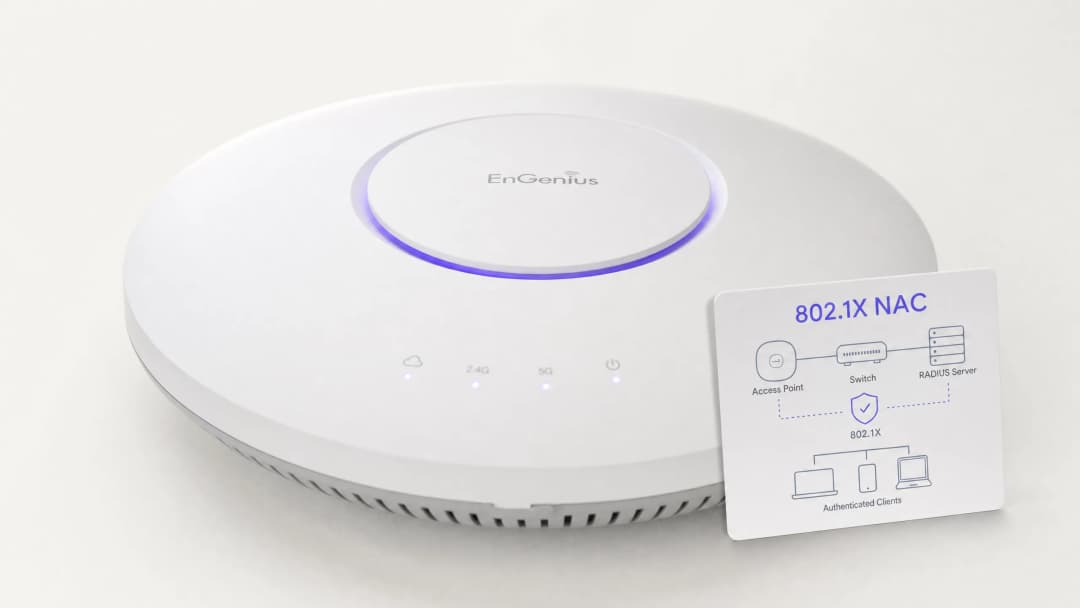
कार्यकारी सारांश (Executive Summary)
K-12 शाळांचे नेटवर्क सुरक्षित करणे हे मुळात जोखीम कमी करणे, ओळख व्यवस्थापन आणि अनुपालन या गोष्टींवर आधारित आहे. IT नेत्यांसमोर कर्मचारी, विद्यार्थी, अभ्यागत आणि कंत्राटदार यांच्यासह अत्यंत वैविध्यपूर्ण वापरकर्ता वर्गाला अखंड प्रवेश प्रदान करण्याचे आणि त्याच वेळी स्मार्टबोर्ड आणि सुरक्षा कॅमेऱ्यांसारख्या वेगाने वाढणाऱ्या IoT साधनांचे संरक्षण करण्याचे आव्हानात्मक काम असते. Network Access Control (NAC), जे IEEE 802.1X द्वारे संचलित आहे, ते मजबूत नेटवर्क विभाजनासाठी आवश्यक पायाभूत रचना प्रदान करते, ज्यामुळे कोणत्याही उपकरणाला नेटवर्क प्रवेश देण्यापूर्वी ते प्रमाणीकृत, अधिकृत आणि योग्यरित्या विलग केले असल्याचे सुनिश्चित होते.
हे मार्गदर्शक शैक्षणिक वातावरणात NAC तैनात करण्यासाठी सर्वसमावेशक तांत्रिक फ्रेमवर्क प्रदान करते. यामध्ये RADIUS एकत्रीकरण, VLAN आर्किटेक्चर, एंडपॉईंट पोश्चर चेकिंग आणि सुरक्षित पाहुण्यांच्या (guest) ऑनबोर्डिंगसाठीच्या सर्वोत्तम पद्धती सविस्तरपणे स्पष्ट केल्या आहेत. या धोरणांची अंमलबजावणी करून, वेन्यू ऑपरेशन्स डायरेक्टर आणि नेटवर्क आर्किटेक्ट हे हल्ल्याचा धोका लक्षणीयरीत्या कमी करू शकतात, संवेदनशील सुरक्षा डेटाचे रक्षण करू शकतात आणि शाळेच्या कार्यक्षमतेत तडजोड न करता GDPR आणि CIPA सारख्या नियामक मानकांचे काटेकोर पालन करू शकतात.
सखोल तांत्रिक माहिती (Technical Deep-Dive)
NAC चे मूळ तत्व म्हणजे नेटवर्कच्या सीमेवर zero trust (शून्य विश्वास) पाळणे हे आहे. जेव्हा एखादे उपकरण (supplicant) ॲक्सेस स्विच किंवा वायरलेस ॲक्सेस पॉईंटशी (authenticator) जोडले जाते, तेव्हा ते उपकरण मर्यादित स्थितीत ठेवले जाते. Authenticator हे उपकरण 802.1X प्रोटोकॉलचा वापर करून प्रमाणीकरण सर्व्हरकडे (साधारणपणे RADIUS सर्व्हरकडे) क्रेडेन्शियल्स पाठवते. केवळ प्रमाणीकरण यशस्वी झाल्यावर आणि पॉलिसी मूल्यांकन पूर्ण झाल्यानंतरच, विशिष्ट Access Control Lists (ACLs) सह उपकरणाला योग्य VLAN वर नियुक्त केले जाते.
802.1X प्रोटोकॉल आणि EAP पद्धती
Extensible Authentication Protocol (EAP) फ्रेमवर्क हे 802.1X मधील विविध प्रमाणीकरण पद्धतींसाठी ट्रान्सपोर्ट मेकॅनिझम प्रदान करते. K-12 वातावरणात, सर्वात सामान्य अंमलबजावणी पुढीलप्रमाणे आहे:
- PEAP-MSCHAPv2: हे सामान्यत: कर्मचारी आणि विद्यार्थ्यांच्या उपकरणांसाठी Active Directory क्रेडेन्शियल्सद्वारे प्रमाणीकृत करण्यासाठी वापरले जाते. हे तैनात करणे सोपे असले, तरी क्लायंटने सर्व्हर प्रमाणपत्राची काटेकोरपणे पडताळणी न केल्यास यात क्रेडेन्शियल चोरीच्या हल्ल्यांचा धोका असतो.
- EAP-TLS: हे एंटरप्राइझ सुरक्षेसाठी सर्वोच्च मानक मानले जाते. हे परस्पर, प्रमाणपत्र-आधारित प्रमाणीकरणावर अवलंबून असते, ज्यामुळे पासवर्डची गरज पूर्णपणे नष्ट होते. व्यवस्थापित उपकरणांसाठी (जसे की शाळेने दिलेले Chromebooks किंवा कर्मचाऱ्यांचे लॅपटॉप) याची जोरदार शिफारस केली जाते, जिथे Public Key Infrastructure (PKI) किंवा मोबाईल डिव्हाइस व्यवस्थापन (MDM) सोल्यूशन आवश्यक प्रमाणपत्रे स्वयंचलितपणे व्यवस्थापित करू शकते.
वायरलेस सुरक्षा मानके: WPA3-Enterprise
वायरलेस नेटवर्कसाठी, WPA3-Enterprise हा सध्याचा बेंचमार्क आहे. हे डीऑथेंटिकेशन हल्ले रोखण्यासाठी प्रोटेक्टेड मॅनेजमेंट फ्रेम्स (PMF) अनिवार्य करते आणि अत्यंत संवेदनशील वातावरणासाठी (जसे की कर्मचारी/अॅडमिन नेटवर्क) 192-बिट सुरक्षा मोड ऑफर करते. विद्यार्थी नेटवर्कसाठी जिथे BYOD परिस्थितीमुळे WPA3-Enterprise खूप गुंतागुंतीचे असू शकते, तिथे Simultaneous Authentication of Equals (SAE) सह WPA3-Personal हे ऑफलाइन डिक्शनरी हल्ल्यांविरुद्ध मजबूत संरक्षण प्रदान करते, जे जुन्या WPA2-PSK मानकापेक्षा लक्षणीय सुधारणा आहे.
नेटवर्क सेगमेंटेशन आर्किटेक्चर
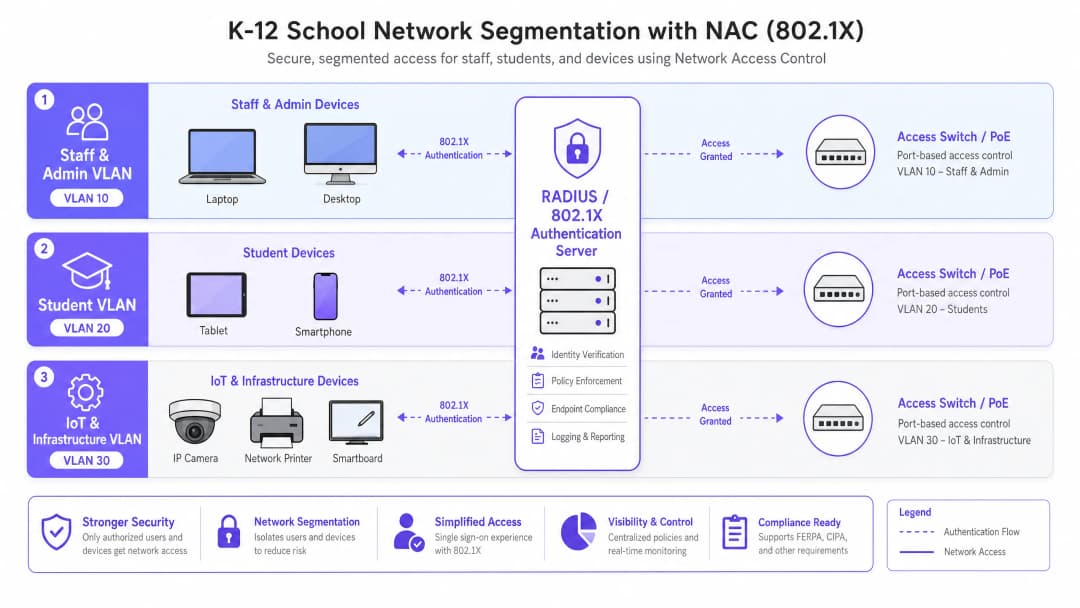
प्रभावी NAC हे कडक नेटवर्क सेगमेंटेशनवर अवलंबून असते. फ्लॅट नेटवर्क आर्किटेक्चर ही एक गंभीर असुरक्षितता आहे. एका मानक K-12 उपयोजनामध्ये, किमान, खालील VLAN रचना लागू केली पाहिजे:
- स्टाफ आणि अॅडमिन VLAN: अंतर्गत संसाधने, MIS सिस्टम आणि इंटरनेटवर पूर्ण प्रवेश. इतर VLAN मधील लेटरल हालचालींवर काटेकोरपणे प्रतिबंध आहे.
- विद्यार्थी VLAN: कडक कंटेंट फिल्टरिंगसह फिल्टर केलेला इंटरनेट प्रवेश. कर्मचारी संसाधने किंवा व्यवस्थापन इंटरफेसवर कोणताही प्रवेश नाही.
- IoT आणि इन्फ्रास्ट्रक्चर VLAN: यामध्ये स्मार्टबोर्ड, IP कॅमेरे आणि बिल्डिंग मॅनेजमेंट सिस्टम असतात. एखाद्या विशिष्ट डिव्हाइसला स्पष्टपणे आवश्यकता असल्याशिवाय या VLAN ला आउटबाउंड इंटरनेट प्रवेश नसावा आणि ते वापरकर्ता VLAN पासून वेगळे केले जावे.
- गेस्ट VLAN: केवळ-इंटरनेट प्रवेश, सर्व अंतर्गत नेटवर्कपासून वेगळे केलेले, सहसा अटींचे स्वीकृती आणि ओळख कॅप्चर करण्यासाठी Captive Portal द्वारे संरक्षित केलेले असते.
तुमच्या विशिष्ट सेटअपबद्दल काही प्रश्न आहेत का?
आमची टीम ८०,००० हून अधिक वेन्यूजमधील वेन्यू ऑपरेटर्स, IT मॅनेजर्स आणि नेटवर्क इंजिनिअर्ससोबत काम करते. २० मिनिटांचा कॉल बुक करा आणि तुमच्यासारख्या इतरांनी ही समस्या कशी सोडवली हे आम्ही तुम्हाला दाखवू.
अंमलबजावणी मार्गदर्शक
शैक्षणिक कामकाजात व्यत्यय आणू नये म्हणून NAC उपयोजित करण्यासाठी टप्प्याटप्प्याने, पद्धतशीर दृष्टिकोन आवश्यक आहे.
टप्पा 1: शोध आणि ऑडिट
कोणतीही अंमलबजावणी सुरू करण्यापूर्वी, सर्वसमावेशक नेटवर्क ऑडिट करा. सर्व कनेक्ट केलेली डिव्हाइसेस शोधण्यासाठी, शॅडो IT (अनधिकृत स्विचेस किंवा अॅक्सेस पॉईंट्स) ओळखण्यासाठी आणि नेटवर्कच्या सद्यस्थितीचे दस्तऐवजीकरण करण्यासाठी साधनांचा वापर करा. वारसा डिव्हाइसेससाठी अचूक MAC Authentication Bypass (MAB) व्हाइटलिस्ट तयार करण्यासाठी हा टप्पा महत्त्वपूर्ण आहे.
टप्पा 2: RADIUS इन्फ्रास्ट्रक्चर उपयोजन
तुमचे RADIUS इन्फ्रास्ट्रक्चर उपयोजित करा. ऑन-प्रिमाइसेस Active Directory वापरत असल्यास, नेटवर्क पॉलिसी सर्व्हर (NPS) हा एक सामान्य पर्याय आहे. क्लाउड-केंद्रित वातावरणासाठी (Azure AD, Google Workspace), क्लाउड RADIUS सोल्यूशन्स सुलभ एकत्रीकरण ऑफर करतात. RADIUS सर्व्हर तुमच्या डिरेक्टरी सेवेशी संवाद साधण्यासाठी योग्यरित्या कॉन्फिगर केला असल्याची आणि फायरवॉल नियम LDAP/LDAPS ट्रॅफिकला अनुमती देतात याची खात्री करा.
टप्पा 3: मॉनिटर मोड
अॅक्सेस स्विचेस आणि वायरलेस कंट्रोलर्सवर मॉनिटर मोड (कधीकधी याला ओपन मोड म्हटले जाते) मध्ये 802.1X सक्षम करा. या स्थितीमध्ये, ऑथेंटिकेटर 802.1X क्रेडेंशियल्सचे मूल्यमापन करतो आणि त्याचे परिणाम लॉग करतो, परंतु ऑथेंटिकेशन अयशस्वी झाल्यावर प्रवेश अडवत नाही. हे आयटी टीमला नेटवर्कमध्ये कोणताही अडथळा न आणता चुकीचे कॉन्फिगर केलेले डिव्हाइसेस, गहाळ झालेली सर्टिफिकेट्स किंवा MAB ची आवश्यकता असलेले जुने डिव्हाइसेस ओळखण्यास मदत करते.
टप्पा 4: अंमलबजावणी आणि विभागणी
एकदा मॉनिटर मोड लॉग्जमध्ये उच्च यश दर दिसू लागला आणि सर्व त्रुटींचे निवारण झाले की, 802.1X ऑथेंटिकेशन लागू करण्यास सुरुवात करा. हे टप्प्याटप्प्याने लागू करा - आधी पायलट ग्रुपपासून (उदा. आयटी विभाग) सुरुवात करा, नंतर कर्मचाऱ्यांपर्यंत आणि शेवटी विद्यार्थ्यांपर्यंत याचा विस्तार करा. युझर्सना त्यांच्या डिरेक्टरी ग्रुप मेंबरशिपच्या आधारे योग्य नेटवर्क सेगमेंटमध्ये ठेवले जाईल याची खात्री करण्यासाठी RADIUS ॲट्रिब्युट्स (Tunnel-Type, Tunnel-Medium-Type, Tunnel-Private-Group-ID) द्वारे डायनॅमिक VLAN असाइनमेंट लागू करा.

सर्वोत्तम पद्धती
- IoT साठी MAB आणि MPSK लागू करा: जुन्या डिव्हाइसेस आणि हेडलेस IoT एंडपॉइंट्समध्ये बहुधा 802.1X सप्लिकंट नसतो. जुन्या उपकरणांसाठी MAC Authentication Bypass (MAB) वापरा, परंतु आधुनिक IoT डिव्हाइसेससाठी Multi-PSK (MPSK) ला प्राधान्य द्या. MPSK प्रत्येक डिव्हाइसला एक युनिक प्री-शेअर्ड की असाइन करते, ज्यामुळे एखादी की लीक झाली तरी उर्वरित नेटवर्क सुरक्षित राहते. सविस्तर कॉन्फिगरेशनसाठी, Managing IoT Device Security with NAC and MPSK हे मार्गदर्शक पहा.
- एंडपॉइंट पॉश्चर चेकिंग सक्तीचे करा: केवळ साध्या ऑथेंटिकेशनच्या पलीकडे जाऊन पॉश्चर चेक्स समाकलित करा. प्रवेश देण्यापूर्वी, एंडपॉइंट्समध्ये सक्रिय अँटीव्हायरस सॉफ्टवेअर आहे, ते पूर्णपणे पॅच केलेले आहेत आणि डिस्क एन्क्रिप्शन सक्षम आहे याची खात्री NAC सोल्यूशनने केली पाहिजे. नियमांचे पालन न करणारे डिव्हाइसेस रिमेडिएशन VLAN मध्ये पाठवले जावेत.
- गेस्ट अॅक्सेस अॅनालिटिक्ससोबत समाकलित करा: गेस्ट नेटवर्क पूर्णपणे वेगळे आणि नियमांचे पालन करणारे असावे. Guest WiFi सारख्या प्लॅटफॉर्मचे एकत्रीकरण केल्याने पाहुण्यांचा प्रवेश सुरक्षित आणि GDPR-सुसंगत राहतो आणि ठिकाणाचा वापर आणि लोकांची ये-जा समजून घेण्यासाठी महत्त्वपूर्ण WiFi Analytics देखील मिळतात.
- शक्य तिथे सर्टिफिकेट-आधारित ऑथेंटिकेशन (EAP-TLS) वापरा: मॅनेज्ड डिव्हाइसेससाठी, EAP-TLS पासवर्डवरील अवलंबित्व काढून टाकते, ज्यामुळे क्रेडेंशियल चोरी आणि फिशिंग हल्ल्यांचा धोका मोठ्या प्रमाणात कमी होतो.
त्रुटी निवारण आणि जोखीम कमी करणे
सामान्य बिघाड प्रकार
- प्रमाणपत्र ट्रस्ट त्रुटी: जर PEAP ऑथेंटिकेशन दरम्यान BYOD युजर्सना अविश्वासू सर्व्हर प्रमाणपत्र स्वीकारण्यास सांगितले गेले, तर त्यांना सुरक्षा चेतावणींकडे दुर्लक्ष करण्याची सवय लागते, ज्यामुळे फिशिंगची मोठी असुरक्षितता निर्माण होते. उपाय: RADIUS सर्व्हरसाठी नेहमी सार्वजनिकरित्या विश्वसनीय असलेल्या सर्टिफिकेट ऑथॉरिटी (CA) ने स्वाक्षरित केलेले प्रमाणपत्र वापरा किंवा MDM द्वारे सर्व व्यवस्थापित डिव्हाइसेसवर अंतर्गत CA रूट प्रमाणपत्र पुश केल्याची खात्री करा.
- डिरेक्टरी इंटिग्रेशन अपयश: जर RADIUS सर्व्हर डिरेक्टरी सेवेशी संपर्क साधू शकत नसेल (उदाहरणार्थ, AD डोमेन कंट्रोलर्स पोहोचण्याबाहेर असतील किंवा सेवा खात्याचा पासवर्ड कालबाह्य झाला असेल), तर RADIUS ऑथेंटिकेशन अयशस्वी होईल. उपाय: रिडंडंट RADIUS सर्व्हर्स लागू करा आणि डिरेक्टरी इंटिग्रेशनच्या स्थितीचे सतत निरीक्षण करा.
- "प्रिंटरची समस्या" (जुने डिव्हाइस लॉकआउट): पूर्ण MAB व्हाईटलिस्टशिवाय 802.1X लागू केल्यास जुने प्रिंटर, AV उपकरणे आणि जुने स्मार्टबोर्ड त्वरित डिस्कनेक्ट होतील. उपाय: मॉनिटर मोड टप्पा अत्यंत आवश्यक आहे. प्रत्येक नॉन-ऑथेंटिकेटिंग डिव्हाइस ओळखले आणि प्रोफाईल केले जाईपर्यंत अंमलबजावणीच्या टप्प्याकडे जाऊ नका.
ROI आणि व्यावसायिक प्रभाव
NAC ही प्रामुख्याने सुरक्षा आणि अनुपालन (compliance) मधील गुंतवणूक असली, तरी ती मोजण्यायोग्य व्यावसायिक मूल्य प्रदान करते:
- जोखीम कमी करणे: विद्यार्थ्यांच्या रेकॉर्डचा समावेश असलेल्या डेटा ब्रीचचा आर्थिक आणि प्रतिष्ठेचा खर्च अत्यंत विनाशकारी असू शकतो. NAC हल्ल्याचे क्षेत्र लक्षणीयरीत्या कमी करते आणि संभाव्य ब्रीचेसला रोखून त्यांना मर्यादित करते.
- ऑपरेशनल कार्यक्षमता: डायनॅमिक VLAN असाइनमेंटमुळे स्विच पोर्ट्स मॅन्युअली कॉन्फिगर करण्याचा प्रशासकीय त्रास कमी होतो. IT कर्मचारी VLAN व्यवस्थापित करण्यात कमी वेळ आणि धोरणात्मक उपक्रमांवर अधिक वेळ घालवू शकतात.
- अनुपालनाची खात्री: एक मजबूत NAC डिप्लॉयमेंट GDPR, CIPA आणि स्थानिक सुरक्षा नियमांचे अनुपालन सिद्ध करण्यासाठी आवश्यक असलेले ऑडिट ट्रेल्स आणि ऍक्सेस कंट्रोल्स प्रदान करते, ज्यामुळे ऑडिट सोपे होते आणि कायदेशीर जोखीम कमी होते.
महत्वाच्या व्याख्या
Network Access Control (NAC)
एक सुरक्षा आर्किटेक्चर जे नेटवर्कवर प्रवेश करण्याचा प्रयत्न करणाऱ्या डिव्हाइसेसवर धोरण लागू करते, ज्यामुळे केवळ ऑथेंटिकेट झालेल्या आणि नियमांचे पालन करणाऱ्या डिव्हाइसेसनाच प्रवेश दिला जाईल याची खात्री होते.
अनधिकृत प्रवेश रोखण्यासाठी आणि वापरकर्त्याच्या भूमिकांच्या आधारे (उदा. कर्मचारी विरुद्ध विद्यार्थी) नेटवर्क ट्रॅफिकचे वर्गीकरण करण्यासाठी IT टीम्ससाठी आवश्यक आहे.
IEEE 802.1X
पोर्ट-आधारित Network Access Control साठीचा IEEE मानक, जो LAN किंवा WLAN शी कनेक्ट करू इच्छिणाऱ्या डिव्हाइसेसना ऑथेंटिकेशन यंत्रणा प्रदान करतो.
एक मूलभूत प्रोटोकॉल जो स्विच आणि ऍक्सेस पॉईंट्सना नेटवर्क प्रवेश देण्यापूर्वी वापरकर्त्याची ओळख सत्यापित करण्याची परवानगी देतो.
RADIUS (Remote Authentication Dial-In User Service)
एक नेटवर्किंग प्रोटोकॉल जो नेटवर्क सेवा कनेक्ट करणाऱ्या आणि वापरणाऱ्या वापरकर्त्यांसाठी केंद्रीकृत Authentication, Authorisation, आणि Accounting (AAA) व्यवस्थापन प्रदान करतो.
NAC तैनातीचा मुख्य 'मेंदू', जो डिरेक्टरीच्या (जसे की Active Directory) विरूद्ध क्रेडेंशियल्स सत्यापित करण्यासाठी आणि VLANs नियुक्त करण्यासाठी जबाबदार असतो.
MAC Authentication Bypass (MAB)
802.1X ला सपोर्ट न करणाऱ्या डिव्हाइसेसना पूर्व-मंजूर व्हाइटलिस्टच्या विरूद्ध क्रेडेंशियल म्हणून त्यांचे MAC ॲड्रेस वापरून ऑथेंटिकेट करण्यासाठी वापरले जाणारे तंत्रज्ञान.
आधुनिक डिव्हाइसेससाठी आवश्यक असलेल्या 802.1X च्या अटीशी तडजोड न करता, जुने प्रिंटर आणि स्मार्टबोर्ड यांसारख्या जुन्या डिव्हाइसेसना नेटवर्कवर परवानगी देण्यासाठी अत्यंत महत्त्वाचे आहे.
Multi-PSK (MPSK)
एक वायरलेस सुरक्षा वैशिष्ट्य जे एकाच SSID वर एकाधिक अद्वितीय प्री-शेअर्ड की वापरण्याची परवानगी देते, ज्यामध्ये प्रत्येक की विशिष्ट नेटवर्क धोरणे किंवा VLANs नियुक्त करते.
आधुनिक IoT उपकरणांना सुरक्षित ठेवण्यासाठी सर्वोत्तम सराव पद्धत जी 802.1X प्रमाणीकरण करू शकत नाहीत, त्यांना सुरक्षितपणे वेगळे (isolating) करते.
डायनॅमिक VLAN असाइनमेंट
अशी प्रक्रिया जिथे एक RADIUS सर्व्हर स्विच किंवा ॲक्सेस पॉइंटला प्रमाणीकृत वापरकर्त्याला त्यांच्या डिरेक्टरी ग्रुप सदस्यतेच्या आधारावर विशिष्ट VLAN मध्ये ठेवण्याचे निर्देश देतो.
एकाच SSID किंवा स्विच पोर्ट कॉन्फिगरेशनला एकाधिक वापरकर्त्यांच्या प्रकारांना सुरक्षितपणे सेवा देण्याची परवानगी देऊन प्रशासकीय ओव्हरहेड कमी करते.
EAP-TLS (एक्स्टेंसिबल ऑथेंटिकेशन प्रोटोकॉल - ट्रान्सपोर्ट लेयर सिक्युरिटी)
एक 802.1X प्रमाणीकरण पद्धत ज्यामध्ये क्लायंट आणि सर्व्हर यांच्यात परस्पर प्रमाणपत्र प्रमाणीकरण आवश्यक असते, ज्यामुळे पासवर्डचा वापर पूर्णपणे बंद होतो.
सर्वात सुरक्षित प्रमाणीकरण पद्धत, क्रेडेन्शियल चोरी रोखण्यासाठी शाळेने जारी केलेल्या व्यवस्थापित उपकरणांसाठी अत्यंत शिफारसीय आहे.
एंडपॉइंट पश्चर चेकिंग
नेटवर्क प्रवेश मंजूर करण्यापूर्वी एखाद्या उपकरणाच्या सुरक्षा स्थितीचे (उदा. अँटीव्हायरस स्थिती, OS पॅच पातळी) मूल्यमापन करण्याची प्रक्रिया.
हे सुनिश्चित करते की प्रमाणीकृत वापरकर्ते देखील तडजोड केलेल्या किंवा पॅच न केलेल्या उपकरणांद्वारे नेटवर्कमध्ये मालवेअर आणू शकत नाहीत.
सोडवलेली उदाहरणे
एका १५०० विद्यार्थी असलेल्या माध्यमिक शाळेला संपूर्ण कॅम्पसमध्ये २०० नवीन वायरलेस पर्यावरणीय सेन्सर्स तैनात करायचे आहेत. हे सेन्सर्स केवळ WPA2-Personal ला सपोर्ट करतात आणि त्यांच्याकडे 802.1X सप्लिकंट नाही. मुख्य नेटवर्कशी तडजोड न करता नेटवर्क आर्किटेक्टने हे डिव्हाइसेस कसे सुरक्षित करावेत?
आर्किटेक्टने IoT डिव्हाइसेससाठी एक समर्पित हिडन SSID तैनात केला पाहिजे आणि Multi-PSK (MPSK) लागू केले पाहिजे. प्रत्येक सेन्सरला (किंवा सेन्सर्सच्या समूहाला) एक युनिक, गुंतागुंतीची प्री-शेअर्ड की दिली जाते. वायरलेस कंट्रोलर किंवा RADIUS सर्व्हर हे या विशिष्ट कीज 'IoT आणि इन्फ्रास्ट्रक्चर VLAN' शी मॅप करण्यासाठी कॉन्फिगर केले जातात. या VLAN वर कठोर ACLs लागू करणे आवश्यक आहे, जे स्टाफ आणि विद्यार्थ्यांच्या VLAN मधील सर्व प्रवेश नाकारतात आणि आऊटबाउंड इंटरनेट प्रवेश केवळ पर्यावरणीय सेन्सर्ससाठी आवश्यक असलेल्या विशिष्ट क्लाउड एंडपॉइंट्स पुरताच मर्यादित करतात.
BYOD विद्यार्थ्यांच्या डिव्हाइसेससाठी 802.1X (PEAP-MSCHAPv2) च्या रोलआउट दरम्यान, IT हेल्पडेस्ककडे विद्यार्थ्यांकडून त्यांच्या डिव्हाइसेसवर 'untrusted network certificate' बद्दल चेतावणी येत असल्याचे सांगणारे अनेक तिकीट्स येत आहेत. याचे निराकरण कसे करावे?
ही समस्या उद्भवते कारण RADIUS सर्व्हर शाळेच्या अंतर्गत, खाजगी सर्टिफिकेट ऑथॉरिटी (CA) द्वारे स्वाक्षरी केलेले सर्टिफिकेट वापरत आहे, ज्यावर BYOD डिव्हाइसेस मूलतः विश्वास ठेवत नाहीत. यावर तात्काळ उपाय म्हणजे RADIUS सर्व्हरचे सर्टिफिकेट बदलून त्याऐवजी मोठ्या प्रमाणावर मान्यताप्राप्त सार्वजनिक CA (उदा. DigiCert, Let's Encrypt) द्वारे जारी केलेले सर्टिफिकेट वापरणे. दीर्घकालीन विचार करता, शाळेने एक ऑनबोर्डिंग पोर्टल लागू केले पाहिजे जे सप्लिकंट सुरक्षितपणे कॉन्फिगर करेल आणि डिव्हाइस कनेक्ट करण्याचा प्रयत्न करण्यापूर्वी आवश्यक ट्रस्ट अँकर्स स्थापित करेल.
सराव प्रश्न
Q1. एक शाळा जिल्हा त्यांच्या डिरेक्टरी सेवा पूर्णपणे Google Workspace वर स्थलांतरित करत आहे आणि स्थानिक Active Directory टप्प्याटप्प्याने बंद करत आहे. ते सध्या RADIUS साठी NPS वापरतात. त्यांच्या व्यवस्थापित Chromebooks च्या ताफ्यासाठी 802.1X प्रमाणीकरण राखण्यासाठी कोणत्या आर्किटेक्चरल बदलाची आवश्यकता आहे?
टीप: Chromebooks मूळतः कसे प्रमाणीकरण करतात आणि AD काढून टाकल्यावर कोणत्या पायाभूत सुविधांची आवश्यकता आहे याचा विचार करा.
नमुना उत्तर पहा
जिल्ह्याने क्लाउड RADIUS प्रदात्याकडे (उदा. SecureW2, Foxpass) स्थलांतरित केले पाहिजे जे Google Workspace शी मूळतः समाकलित होते किंवा त्यांच्या परवाना श्रेणीमध्ये उपलब्ध असल्यास Google च्या स्वतःच्या क्लाउड RADIUS क्षमतांचा वापर करावा. त्यांनी Google Admin Console द्वारे Chromebooks ला EAP-TLS वापरण्यासाठी कॉन्फिगर केले पाहिजे, Google च्या प्रमाणपत्र व्यवस्थापनाद्वारे स्वयंचलितपणे प्रदान केलेल्या डिव्हाइस प्रमाणपत्रांचा लाभ घेतला पाहिजे, ज्यामुळे पासवर्ड आणि स्थानिक NPS सर्व्हरवरील अवलंबित्व पूर्णपणे संपुष्टात येईल.
Q2. नेटवर्क ऑडिट दरम्यान, IT टीमला क्लासरूमच्या वॉल पोर्टमध्ये प्लग केलेला एक ग्राहक-दर्जाचा वायरलेस राउटर आढळतो, जो लपविलेला SSID ब्रॉडकास्ट करत आहे. योग्यरित्या कॉन्फिगर केलेले NAC सोल्यूशन या शॅडो IT ला नेटवर्कशी तडजोड करण्यापासून कसे रोखते?
टीप: जेव्हा एखादे अव्यवस्थित उपकरण कनेक्ट केले जाते तेव्हा स्विच पोर्ट स्तरावर काय होते याचा विचार करा.
नमुना उत्तर पहा
वायर्ड स्विच पोर्ट्सवर 802.1X लागू केल्यामुळे, ग्राहक राउटरचे प्रमाणीकरण अपयशी ठरेल कारण त्यात वैध क्रेडेन्शियल्स किंवा प्रमाणपत्र नाही. स्विच पोर्ट एकतर अनधिकृत स्थितीत राहील (सर्व रहदारी ब्लॉक करेल) किंवा पोर्टला वेगळ्या रेमेडिएशन VLAN मध्ये डायनॅमिकली नियुक्त करेल. याव्यतिरिक्त, एंटरप्राइझ NAC सोल्यूशन्स एकाच पोर्टच्या मागे NAT किंवा एकाधिक MAC पत्त्यांचे अस्तित्व शोधू शकतात, ज्यामुळे रॉग उपकरणाला वेगळे करण्यासाठी स्वयंचलित पोर्ट शटडाउन ट्रिगर होते.
Q3. एका मोठ्या शैक्षणिक कॅम्पसमधील व्हेन्यू ऑपरेशन्स डायरेक्टर क्रीडा स्पर्धेदरम्यान येणाऱ्या पालकांसाठी अखंड WiFi प्रवेश देऊ इच्छितात, परंतु IT टीमला GDPR अनुपालन आणि नेटवर्क सुरक्षेची काळजी वाटत आहे. शिफारस केलेला दृष्टिकोन काय आहे?
टीप: प्रवेश सुलभता आणि वापरकर्ता डेटा कॅप्चर करण्यासाठी कायदेशीर आवश्यकता यामधील समतोलाचा विचार करा.
नमुना उत्तर पहा
IT टीमने एक समर्पित Guest VLAN प्रदान केले पाहिजे जे सर्व अंतर्गत संसाधनांपासून कठोरपणे वेगळे असेल आणि ज्याला केवळ-इंटरनेट प्रवेश असेल. त्यांनी ऑनबोर्डिंग हाताळण्यासाठी Purple च्या Guest WiFi प्लॅटफॉर्मसारखे Captive Portal सोल्यूशन तैनात केले पाहिजे. हे सुनिश्चित करते कि अभ्यागतांनी प्रवेश मिळवण्यापूर्वी अटी व शर्ती स्वीकारल्या पाहिजेत आणि डेटा प्रक्रियेसाठी स्पष्ट संमती दिली पाहिजे, ज्यामुळे मुख्य नेटवर्क सुरक्षित ठेवून GDPR आवश्यकता पूर्ण होतील.
या मालिकेमध्ये पुढे वाचा
PPSK WPA3: वैशिष्ट्ये आणि उपयोजन मॉडेल्सची तुलना
हे तांत्रिक संदर्भ मार्गदर्शक PPSK आणि WPA3-SAE ची तुलना करते, मल्टी-टेनंट वातावरणासाठी त्यांचे आर्किटेक्चरल फरक आणि उपयोजन मॉडेल्स स्पष्ट करते. हे IT व्यवस्थापक आणि मालमत्ता विकासकांसाठी Purple च्या ओळख-आधारित उपायांचा वापर करून सुरक्षित, स्वतंत्र WiFi नेटवर्क मिळवण्याबाबत व्यावहारिक मार्गदर्शन प्रदान करते.
कर्मचारी WiFi साठी बँडविड्थ व्यवस्थापित करणे: शेपिंग, QoS आणि ट्रॅफिक कमी करणे
हे मार्गदर्शक व्यावसायिक ठिकाणी कर्मचारी WiFi साठी बँडविड्थ व्यवस्थापित करण्याच्या व्यावहारिक पद्धतींचे तपशील देते. यामध्ये ट्रॅफिक शेपिंग, QoS अंमलबजावणी आणि पायाभूत सुविधांमध्ये सुधारणा न करता Purple Shield तैनात केल्याने नेटवर्क लोड कसा कमी होतो याचा समावेश आहे.
Per-Device PSK (iPSK, DPSK, MPSK) चा वापर करून WiFi SSID ची संख्या कशी कमी करावी
हा अधिकृत तांत्रिक संदर्भ मार्गदर्शक स्पष्ट करतो की IT टीम्स प्रति-डिव्हाइस PSK (xPSK) चा वापर करून एकाच SSID मध्ये एकाधिक विशिष्ट उद्देशांसाठी तयार केलेले नेटवर्क्स एकत्र करून SSID बीकन ओव्हरहेडमुळे होणारी WiFi परफॉर्मन्सची घसरण कशी दूर करू शकतात. यामध्ये Cisco iPSK, HPE Aruba MPSK, Ruckus DPSK, Juniper Mist PPSK, आणि Ubiquiti UniFi PPSK मधील व्हेंडर लँडस्केपचा समावेश आहे, ज्यामध्ये डायनॅमिक VLAN असाइनमेंट, IoT ऑनबोर्डिंग आणि PCI DSS अनुपालनावर व्यावहारिक अंमलबजावणीचे मार्गदर्शन आहे. हॉस्पिटॅलिटी, रिटेल, स्टेडियम आणि सार्वजनिक क्षेत्रातील संस्थांमधील वेन्यू ऑपरेटर्सना यामध्ये कृतीयोग्य आर्किटेक्चर मार्गदर्शन आणि वास्तविक जगातील व्यावहारिक उदाहरणे मिळतील.
तुमच्या विशिष्ट सेटअपबद्दल काही प्रश्न आहेत का?
आमची टीम ८०,००० हून अधिक वेन्यूजमधील वेन्यू ऑपरेटर्स, IT मॅनेजर्स आणि नेटवर्क इंजिनिअर्ससोबत काम करते. २० मिनिटांचा कॉल बुक करा आणि तुमच्यासारख्या इतरांनी ही समस्या कशी सोडवली हे आम्ही तुम्हाला दाखवू.