
Best Practices for Securing K-12 School Networks with NAC
This technical reference guide provides actionable strategies for IT leaders to architect, deploy, and manage Network Access Control (NAC) in K-12 school environments. It covers essential topics from 802.1X authentication and VLAN segmentation to handling IoT devices with MAB and MPSK, ensuring robust safeguarding and compliance.
Video overview
Listen to this guide
View podcast transcript
Part of our core series: Enterprise WiFi Security Guide →
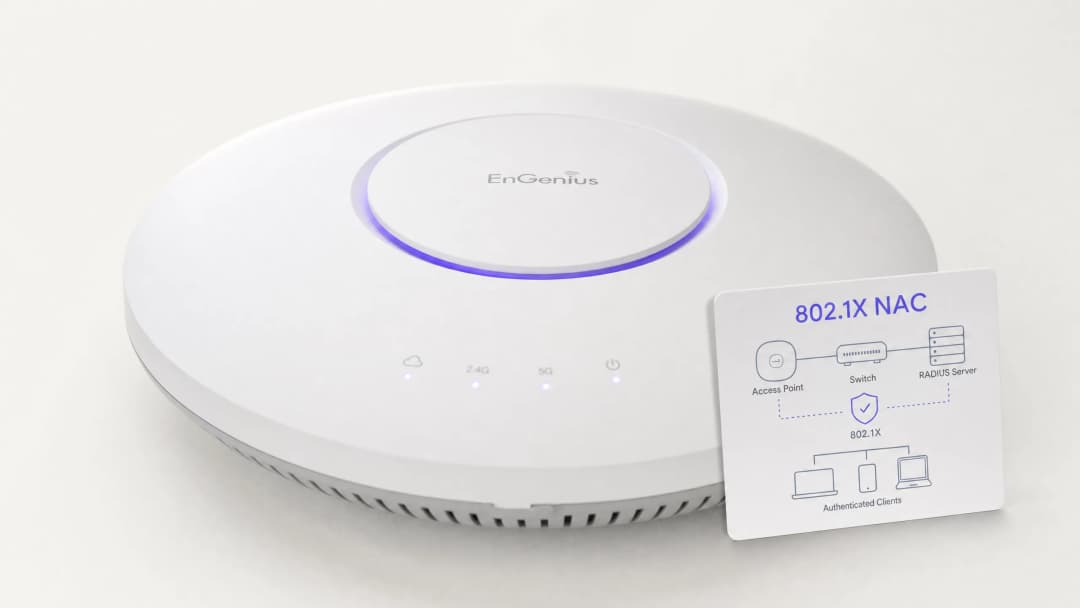
Executive Summary
Securing K-12 school networks is fundamentally an exercise in risk mitigation, identity management, and compliance. IT leaders face the complex challenge of providing seamless access for a highly diverse user base - including staff, students, visitors, and contractors - while protecting a growing array of IoT devices such as smartboards and security cameras. Network Access Control (NAC), driven by IEEE 802.1X, provides the architectural foundation for robust network segmentation, ensuring devices are authenticated, authorized, and appropriately isolated before being granted network access.
This guide provides a comprehensive technical framework for deploying NAC in educational environments. It details best practices for RADIUS integration, VLAN architecture, endpoint posture checking, and secure guest onboarding. By implementing these strategies, venue operations directors and network architects can significantly reduce the attack surface, protect sensitive safeguarding data, and maintain strict adherence to regulatory standards (such as CCPA/CPRA and CIPA) without compromising the school's operational efficiency.
Technical Deep-Dive
The core principle of NAC is zero trust at the network edge. When a device (the supplicant) connects to an access switch or wireless access point (the authenticator), the device is placed in a restricted state. The authenticator forwards credentials to an authentication server (typically a RADIUS server) using the 802.1X protocol. Only once authentication succeeds and policy evaluation passes is the device assigned to the appropriate VLAN with specific Access Control Lists (ACLs).
The 802.1X Protocol and EAP Methods
The Extensible Authentication Protocol (EAP) framework provides the transport mechanism for various authentication methods within 802.1X. In K-12 environments, the most common implementations are:
- PEAP-MSCHAPv2: Typically used for staff and student devices authenticating against Active Directory credentials. While easier to deploy, it is susceptible to credential theft attacks if clients do not strictly validate the server certificate.
- EAP-TLS: The gold standard for enterprise security. It relies on mutual, certificate-based authentication, eliminating the need for passwords entirely. It is strongly recommended for managed devices (such as school-issued Chromebooks or staff laptops), where a Public Key Infrastructure (PKI) or Mobile Device Management (MDM) solution can automatically provision the necessary certificates.
Wireless Security Standards: WPA3-Enterprise
For wireless networks, WPA3-Enterprise is the current benchmark. It mandates Protected Management Frames (PMF) to prevent deauthentication attacks and offers a 192-bit security mode for highly sensitive environments (such as staff/admin networks). For student networks where WPA3-Enterprise may be too complex due to BYOD scenarios, WPA3-Personal with Simultaneous Authentication of Equals (SAE) provides robust protection against offline dictionary attacks, a significant improvement over the legacy WPA2-PSK standard.
Network Segmentation Architecture
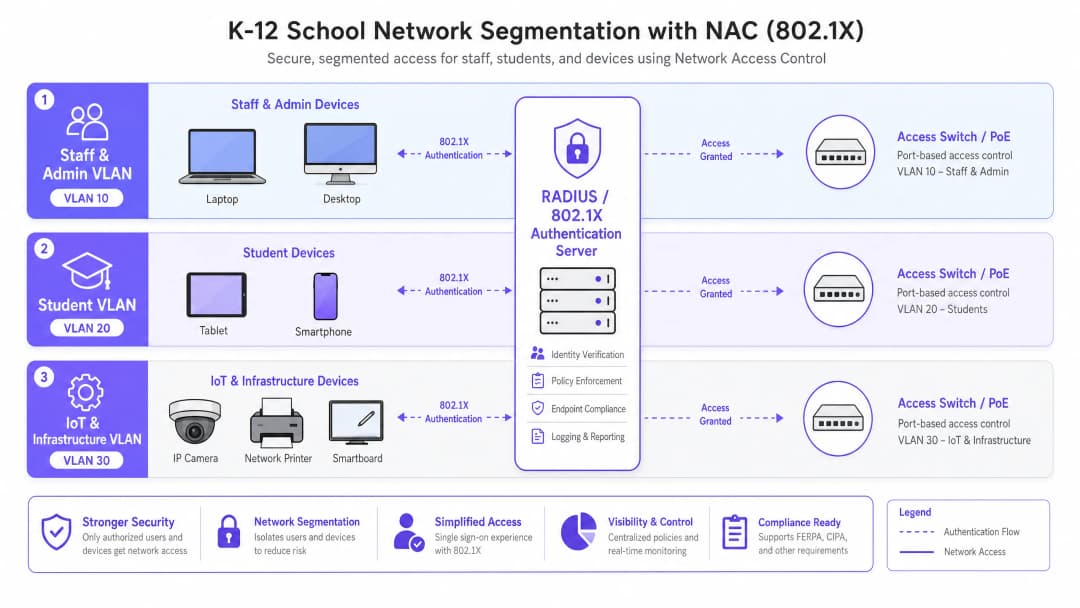
Effective NAC relies on strict network segmentation. A flat network architecture is a critical vulnerability. A standard K-12 deployment should implement, at minimum, the following VLAN structure:
- Staff and Admin VLAN: Full access to internal resources, SIS systems, and the internet. Lateral movement from other VLANs is strictly restricted.
- Student VLAN: Filtered internet access with strict content filtering enforced. No access to staff resources or management interfaces.
- IoT and Infrastructure VLAN: Houses smartboards, IP cameras, and building management systems. This VLAN should have no outbound internet access unless a specific device explicitly requires it, and should be isolated from user VLANs.
- Guest VLAN: Internet-only access, isolated from all internal networks, typically fronted by a Captive Portal for terms acceptance and identity capture.
Got questions about your specific setup?
Our team works with venue operators, IT managers, and network engineers across 80,000 venues. Book a 20-minute call and we will show you how others like you solved it.
Implementation Guide
Deploying NAC requires a phased, methodical approach to avoid disrupting educational operations.
Phase 1: Discovery and Audit
Before implementing any enforcement, conduct a comprehensive network audit. Use tooling to discover all connected devices, identify shadow IT (unauthorized switches or access points), and document the current state of the network. This phase is critical for building an accurate MAC Authentication Bypass (MAB) allowlist for legacy devices.
Phase 2: RADIUS Infrastructure Deployment
Deploy your RADIUS infrastructure. If using on-premises Active Directory, Network Policy Server (NPS) is a common choice. For cloud-centric environments (Azure AD, Google Workspace), cloud RADIUS solutions offer simplified integration. Ensure the RADIUS server is correctly configured to communicate with your directory service and that firewall rules permit LDAP/LDAPS traffic.
Phase 3: Monitor Mode
Enable 802.1X in monitor mode (sometimes called open mode) on access switches and wireless controllers. In this state, the authenticator evaluates 802.1X credentials and logs the results, but does not block access when authentication fails. This allows the IT team to identify misconfigured devices, missing certificates, or legacy devices requiring MAB without causing network outages.
Phase 4: Enforcement and Segmentation
Once monitor mode logs show a high success rate and all anomalies have been resolved, begin enforcing 802.1X authentication. Roll out in stages - start with a pilot group (for example, the IT department), then extend to staff, and finally to students. Implement dynamic VLAN assignment via RADIUS attributes (Tunnel-Type, Tunnel-Medium-Type, Tunnel-Private-Group-ID) to ensure users are placed into the correct network segment based on their directory group membership.

Best Practices
- Implement MAB and MPSK for IoT: Legacy devices and headless IoT endpoints often lack an 802.1X supplicant. Use MAC Authentication Bypass (MAB) for legacy equipment, but prefer Multi-PSK (MPSK) for modern IoT devices. MPSK assigns a unique pre-shared key to each device, ensuring that even if one key is compromised, the rest of the network remains secure. For a detailed configuration walkthrough, see the Managing IoT Device Security with NAC and MPSK guide.
- Enforce endpoint posture checking: Go beyond simple authentication by integrating posture checks. Before granting access, the NAC solution should verify that endpoints have active antivirus software, are fully patched, and have disk encryption enabled. Non-compliant devices should be placed into a remediation VLAN.
- Integrate guest access with analytics: The guest network must be isolated and compliant. Integrating a platform like Guest WiFi ensures visitor access is secure, CCPA/CPRA-compliant, and provides valuable WiFi Analytics for understanding venue usage and traffic.
- Use certificate-based authentication (EAP-TLS) wherever possible: For managed devices, EAP-TLS removes the reliance on passwords, dramatically reducing the risk of credential theft and phishing attacks.
Troubleshooting and Risk Mitigation
Common Failure Modes
- Certificate trust errors: If BYOD users are prompted to accept an untrusted server certificate during PEAP authentication, they are trained to ignore security warnings, creating a huge phishing vulnerability. Mitigation: Always use a certificate signed by a publicly trusted Certificate Authority (CA) for the RADIUS server, or ensure the internal CA root certificate is pushed to all managed devices via MDM.
- Directory integration failures: If the RADIUS server cannot communicate with the directory service (for example, AD domain controllers are unreachable, or a service account password has expired), RADIUS authentication will fail. Mitigation: Implement redundant RADIUS servers and continuously monitor directory integration health.
- The "printer problem" (legacy device lockout): Enforcing 802.1X without a complete MAB whitelist will immediately disconnect legacy printers, AV equipment, and older smartboards. Mitigation: The monitor mode phase is essential. Do not move to enforcement until every non-authenticating device has been identified and profiled.
ROI and Business Impact
While NAC is primarily a security and compliance investment, it delivers measurable business value:
- Risk mitigation: The financial and reputational cost of a data breach involving student records is catastrophic. NAC drastically reduces the attack surface and prevents lateral movement, containing potential breaches.
- Operational efficiency: Dynamic VLAN assignment reduces the administrative overhead of manually configuring switch ports. IT staff spend less time managing VLANs and more time on strategic initiatives.
- Compliance assurance: A robust NAC deployment provides the audit trails and access controls needed to demonstrate compliance with GDPR, CIPA, and local safeguarding regulations, simplifying audits and reducing legal risk.
Key Definitions
Network Access Control (NAC)
A security architecture that enforces policy on devices attempting to access a network, ensuring only authenticated and compliant devices are granted entry.
Essential for IT teams to prevent unauthorized access and segment network traffic based on user roles (e.g., staff vs. student).
IEEE 802.1X
The IEEE standard for port-based Network Access Control, providing an authentication mechanism to devices wishing to attach to a LAN or WLAN.
The foundational protocol that allows switches and access points to verify user identity before granting network access.
RADIUS (Remote Authentication Dial-In User Service)
A networking protocol that provides centralized Authentication, Authorization, and Accounting (AAA) management for users who connect and use a network service.
The 'brain' of the NAC deployment, responsible for verifying credentials against a directory (like Active Directory) and assigning VLANs.
MAC Authentication Bypass (MAB)
A technique used to authenticate devices that do not support 802.1X by using their MAC address as the credential against a pre-approved allowlist.
Crucial for allowing legacy devices like older printers and smartboards onto the network without compromising the 802.1X requirement for modern devices.
Multi-PSK (MPSK)
A wireless security feature that allows multiple unique Pre-Shared Keys to be used on a single SSID, with each key assigning specific network policies or VLANs.
The best practice for securing modern IoT devices that cannot perform 802.1X authentication, isolating them securely.
Dynamic VLAN Assignment
The process where a RADIUS server instructs the switch or access point to place an authenticated user into a specific VLAN based on their directory group membership.
Reduces administrative overhead by allowing a single SSID or switch port configuration to serve multiple user types securely.
EAP-TLS (Extensible Authentication Protocol - Transport Layer Security)
An 802.1X authentication method that requires mutual certificate authentication between the client and the server, eliminating the use of passwords.
The most secure authentication method, highly recommended for school-issued managed devices to prevent credential theft.
Endpoint Posture Checking
The process of evaluating a device's security state (e.g., antivirus status, OS patch level) before granting it network access.
Ensures that even authenticated users cannot introduce malware into the network via compromised or unpatched devices.
Worked Examples
A 1500-student high school needs to deploy 200 new wireless environmental sensors across the campus. These sensors only support WPA2-Personal and do not have an 802.1X supplicant. How should the network architect secure these devices without compromising the main network?
The architect should deploy a dedicated hidden SSID for IoT devices and implement Multi-PSK (MPSK). Each sensor (or group of sensors) is assigned a unique, complex pre-shared key. The wireless controller or RADIUS server is configured to map these specific keys to the isolated 'IoT & Infrastructure VLAN'. This VLAN must have strict ACLs applied, denying all access to the Staff and Student VLANs, and restricting outbound internet access only to the specific cloud endpoints required by the environmental sensors.
During the rollout of 802.1X (PEAP-MSCHAPv2) for BYOD student devices, the IT help desk is overwhelmed with tickets from students reporting that their devices are warning them about an 'untrusted network certificate'. How should this be resolved?
The issue occurs because the RADIUS server is using a certificate signed by the school's internal, private Certificate Authority (CA), which the BYOD devices do not natively trust. The immediate fix is to replace the RADIUS server's certificate with one issued by a widely recognized public CA (e.g., DigiCert, Let's Encrypt). Long-term, the school should implement an onboarding portal that securely configures the supplicant and installs the necessary trust anchors before the device attempts to connect.
Practice Questions
Q1. A school district is migrating its directory services entirely to Google Workspace and phasing out on-premises Active Directory. They currently use NPS for RADIUS. What architectural change is required to maintain 802.1X authentication for their fleet of managed Chromebooks?
Hint: Consider how Chromebooks authenticate natively and what infrastructure is needed when AD is removed.
View model answer
The district should migrate to a cloud RADIUS provider (e.g., SecureW2, Foxpass) that integrates natively with Google Workspace, or utilize Google's own Cloud RADIUS capabilities if available in their licensing tier. They should configure the Chromebooks via the Google Admin Console to use EAP-TLS, leveraging device certificates automatically provisioned by Google's certificate management, completely removing the reliance on passwords and on-premises NPS servers.
Q2. During a network audit, the IT team discovers a consumer-grade wireless router plugged into a classroom wall port, broadcasting a hidden SSID. How does a properly configured NAC solution prevent this shadow IT from compromising the network?
Hint: Think about what happens at the switch port level when an unmanaged device is connected.
View model answer
With 802.1X enforced on the wired switch ports, the consumer router will fail authentication because it lacks valid credentials or a certificate. The switch port will either remain in an unauthorized state (blocking all traffic) or dynamically assign the port to an isolated remediation VLAN. Additionally, enterprise NAC solutions can detect the presence of NAT or multiple MAC addresses behind a single port, triggering an automatic port shutdown to isolate the rogue device.
Q3. A venue operations director at a large educational campus wants to provide seamless WiFi access for visiting parents during a sports tournament, but the IT team is concerned about CCPA/CPRA compliance and network security. What is the recommended approach?
Hint: Consider the balance between ease of access and the legal requirements for capturing user data.
View model answer
The IT team should provision a dedicated Guest VLAN that is strictly isolated from all internal resources and has internet-only access. They should deploy a captive portal solution, such as Purple's Guest WiFi platform, to handle onboarding. This ensures that visitors must accept the terms and conditions and provide explicit consent for data processing before gaining access, satisfying CCPA/CPRA requirements while keeping the core network secure.
Continue reading in this series
PPSK wpa3: comparing features and deployment models
This technical reference guide compares PPSK and WPA3-SAE, explaining their architectural differences and deployment models for multi-tenant environments. It provides actionable guidance for IT managers and property developers on achieving secure, isolated WiFi networks using Purple's identity-based solutions.
Managing Bandwidth for Staff WiFi: Shaping, QoS and Reducing Traffic
This guide details practical methods for managing bandwidth for staff WiFi in enterprise venues. It covers traffic shaping, QoS implementation, and how deploying Purple Shield reduces network load without requiring infrastructure upgrades.
How to Reduce the Number of WiFi SSIDs Using Per-Device PSK (iPSK, DPSK, MPSK)
This authoritative technical reference guide explains how IT teams can eliminate WiFi performance degradation caused by SSID beacon overhead by collapsing multiple purpose-built networks into a single SSID using per-device PSK (xPSK). It covers the vendor landscape across Cisco iPSK, HPE Aruba MPSK, Ruckus DPSK, Juniper Mist PPSK, and Ubiquiti UniFi PPSK, with practical implementation guidance on dynamic VLAN assignment, IoT onboarding, and PCI DSS compliance. Venue operators in hospitality, retail, stadiums, and public-sector organisations will find actionable architecture guidance and real-world worked examples.
Got questions about your specific setup?
Our team works with venue operators, IT managers, and network engineers across 80,000 venues. Book a 20-minute call and we will show you how others like you solved it.