
मल्टी-टेनंट वातावरणासाठी VLAN सेगमेंटेशनच्या सर्वोत्तम पद्धती
हे मार्गदर्शक IT व्यवस्थापक, नेटवर्क आर्किटेक्ट्स, CTOs आणि ठिकाण ऑपरेशन्स संचालकांना मल्टी-टेनंट WiFi वातावरणात VLAN सेगमेंटेशन अंमलात आणण्यासाठी एक अधिकृत, वेंडर-न्यूट्रल ब्ल्यूप्रिंट प्रदान करते. यामध्ये IEEE 802.1Q मानक, 802.1X आणि RADIUS द्वारे Dynamic VLAN Assignment, आणि हॉस्पिटॅलिटी, रिटेल, स्टेडियम आणि सार्वजनिक क्षेत्रातील ठिकाणांसाठी टप्प्याटप्प्याने अंमलबजावणीचे मार्गदर्शन समाविष्ट आहे. योग्य VLAN सेगमेंटेशन हे PCI-DSS आणि GDPR अनुपालनासाठी, लॅटरल मूव्हमेंट रोखण्यासाठी आणि सामायिक भौतिक पायाभूत सुविधांवर उच्च-कार्यक्षमता वायरलेस कनेक्टिव्हिटी प्रदान करण्यासाठी मूलभूत नियंत्रण आहे.
हे मार्गदर्शक ऐका
पॉडकास्ट ट्रान्सक्रिप्ट पहा
आमच्या मुख्य मालिकेचा भाग: Multi-Tenant WiFi Guide →
कार्यकारी सारांश
आधुनिक एंटरप्राइझ भौतिक ठिकाणांसाठी — ज्यामध्ये मल्टी-साइट Retail पोर्टफोलिओ आणि विस्तीर्ण Hospitality इस्टेट्सपासून ते हाय-डेन्सिटी स्टेडियम्स आणि Healthcare सुविधांचा समावेश आहे — नेटवर्क सेगमेंटेशन ही आता केवळ एक पर्यायी सर्वोत्तम पद्धत राहिलेली नाही; ती एक मूलभूत आर्किटेक्चरल आवश्यकता आहे. एकाच, फ्लॅट भौतिक नेटवर्कवर मल्टी-टेनंट वातावरण व्यवस्थापित करणे ही एक गंभीर ऑपरेशनल जोखीम आहे. यामुळे संवेदनशील कॉर्पोरेट डेटा लॅटरल सुरक्षा धोक्यांच्या संपर्कात येतो, ब्रॉडकास्ट गर्दीमुळे वायरलेस कार्यक्षमता खालावते आणि नियामक अनुपालन ऑडिट क्लिष्ट होते.
IEEE 802.1Q मानकांतर्गत परिभाषित केलेले व्हर्च्युअल लोकल एरिया नेटवर्क्स (VLANs), सामायिक भौतिक पायाभूत सुविधांवर स्वतंत्र वापरकर्ता गट, टेनंट संस्था आणि डिव्हाइस प्रकार वेगळे करण्यासाठी आवश्यक असलेले लॉजिकल पार्टिशनिंग प्रदान करतात. विशिष्ट वायरलेस Service Set Identifiers (SSIDs) ला समर्पित VLANs शी मॅप करून, नेटवर्क आर्किटेक्ट्स वायर्ड स्विच फॅब्रिकवर तपशीलवार सुरक्षा धोरणे आणि ट्रॅफिक नियंत्रण लागू करू शकतात. शिवाय, IEEE 802.1X आणि RADIUS द्वारे डायनॅमिक VLAN असाइनमेंट सारख्या प्रगत तंत्रज्ञानाची अंमलबजावणी केल्याने ठिकाणांना त्यांचे रेडिओ फ्रिक्वेन्सी (RF) वातावरण एकाच सुरक्षित SSID मध्ये एकत्रित करण्याची परवानगी मिळते, ज्यामुळे एकाधिक SSIDs ब्रॉडकास्ट केल्यामुळे होणारी गंभीर कार्यक्षमता घट दूर होते.
हे मार्गदर्शक IT व्यवस्थापक, नेटवर्क आर्किटेक्ट्स, CTOs आणि ठिकाण ऑपरेशन्स संचालकांसाठी एक अधिकृत तांत्रिक संदर्भ म्हणून काम करते. हे सुरक्षित, स्केलेबल VLAN सेगमेंटेशन आर्किटेक्चर डिझाइन आणि अंमलात आणण्यासाठी वेंडर-न्यूट्रल, कृतीयोग्य ब्ल्यूप्रिंट्स प्रदान करते. या पद्धतींना Purple च्या एंटरप्राइझ Guest WiFi आणि WiFi Analytics प्लॅटफॉर्मसह एकत्रित करून, संस्था मजबूत Layer 2 आयसोलेशन मिळवू शकतात, PCI-DSS आणि GDPR चे अनुपालन सुलभ करू शकतात आणि ठिकाणाचा ROI वाढवणारा उच्च-कार्यक्षमता, सुरक्षित वायरलेस अनुभव देऊ शकतात.
तांत्रिक सखोल विश्लेषण
सिंगल-ऑक्युपंट नेटवर्कवरून सुरक्षित मल्टी-टेनंट आर्किटेक्चरवर स्थलांतरित होण्यासाठी फ्लॅट, इम्प्लिसिट-ट्रस्ट मॉडेलकडून सेगमेंटेड, झिरो-ट्रस्ट फ्रेमवर्ककडे जाणे आवश्यक आहे. सुरक्षा, कार्यक्षमता किंवा गोपनीयतेशी तडजोड न करता सामायिक भौतिक पायाभूत सुविधांवर एकाधिक स्वतंत्र टेनंट्स, अतिथी नेटवर्क्स आणि ऑपरेशनल डिव्हायसेस एकत्र राहतील याची खात्री करणे हे ध्येय आहे.
802.1Q VLAN टॅगिंग प्रोटोकॉल
लॉजिकल नेटवर्क सेगमेंटेशनचा पाया व्हर्च्युअल लोकल एरिया नेटवर्क (VLAN) आहे, जे IEEE 802.1Q अंतर्गत प्रमाणित आहे. मानक इथरनेट फ्रेममध्ये, 802.1Q हेडर सोर्स MAC ॲड्रेस आणि EtherType फील्ड्सच्या दरम्यान 4-बाइट टॅग समाविष्ट करते. इस टॅगमध्ये 12-बिट VLAN आयडेंटिफायर (VID) असतो, जो 4,094 पर्यंत अनन्य लॉजिकल सेगमेंट्सना सपोर्ट करतो (VLAN IDs 1 आणि 4095 राखीव आहेत).
जेव्हा एखादा वायरलेस क्लायंट ॲक्सेस पॉईंट (AP) शी कनेक्ट होतो, तेव्हा AP त्या क्लायंटच्या ट्रॅफिकला विशिष्ट SSID शी जोडतो. त्यानंतर AP क्लायंटच्या वायरलेस फ्रेम्सना इथरनेट फ्रेम्समध्ये एन्कॅप्स्युलेट करतो, स्विच पोर्टवर फॉरवर्ड करण्यापूर्वी त्यांना मॅप केलेल्या VLAN ID सह टॅग करतो. एकाच वेळी अनेक VLANs चे ट्रॅफिक वाहून नेण्यासाठी APs शी कनेक्ट होणारे भौतिक स्विच पोर्ट्स 802.1Q Trunk Ports म्हणून कॉन्फिगर केलेले असणे आवश्यक आहे, तर सिंगल-टेनंट वायर्ड डिव्हाइसेसशी कनेक्ट होणारे पोर्ट्स एकाच VLAN ला नियुक्त केलेले Access Ports म्हणून कॉन्फिगर केले जातात.
एकाधिक SSIDs चा ओव्हरहेड आणि कार्यक्षमतेचा खर्च
मल्टी-टेनंट सेगमेंटेशनसाठी प्रत्येक टेनंटसाठी एक अनन्य SSID ब्रॉडकास्ट करणे (उदा. TenantA_WiFi, TenantB_WiFi, TenantC_WiFi) हा एक सामान्य परंतु त्रुटीयुक्त दृष्टिकोन आहे. जुन्या क्लायंट सुसंगततेची खात्री करण्यासाठी AP द्वारे ब्रॉडकास्ट केलेल्या प्रत्येक SSID ने बीकन फ्रेम्स — सामान्यतः दर 102.4 मिलिसेकंदांनी — सर्वात कमी मूलभूत अनिवार्य डेटा दराने (अनेकदा 1 Mbps किंवा 6 Mbps) ट्रान्समिट करणे आवश्यक आहे.
SSIDs ची संख्या वाढल्याने, व्यवस्थापन ओव्हरहेडद्वारे वापरला जाणारा एअरटाइम लक्षणीयरीत्या वाढतो. एकाच AP वर 8 SSIDs ब्रॉडकास्ट केल्याने केवळ बीकन ओव्हरहेडसाठी उपलब्ध वायरलेस एअरटाइमचा 30% पर्यंत वापर होऊ शकतो, ज्यामुळे वास्तविक वापरकर्ता डेटासाठी केवळ 70% उरतो. शॉपिंग मॉल्स किंवा कॉन्फरन्स सेंटर्ससारख्या हाय-डेन्सिटी वातावरणात, यामुळे हाय लेटन्सी, पॅकेट लॉस आणि गंभीर थ्रूपुट घट होते. सर्वोत्तम पद्धतीनुसार ब्रॉडकास्ट केलेल्या SSIDs ची संख्या प्रति रद्दियो बँड कमाल 3 ते 4 पर्यंत मर्यादित ठेवणे आवश्यक आहे.
802.1X आणि RADIUS द्वारे डायनॅमिक VLAN असाइनमेंट
कडक टेनंट आयसोलेशन राखून एकाधिक SSIDs च्या मर्यादा टाळण्यासाठी, नेटवर्क आर्किटेक्ट्स Dynamic VLAN Assignment (DVA) तैनात करतात. हे आर्किटेक्चर IEEE 802.1X ऑथेंटिकेशनचा वापर करून वायरलेस वातावरणाला एकाच सुरक्षित SSID (उदा. Enterprise_Secure) मध्ये एकत्रित करते.
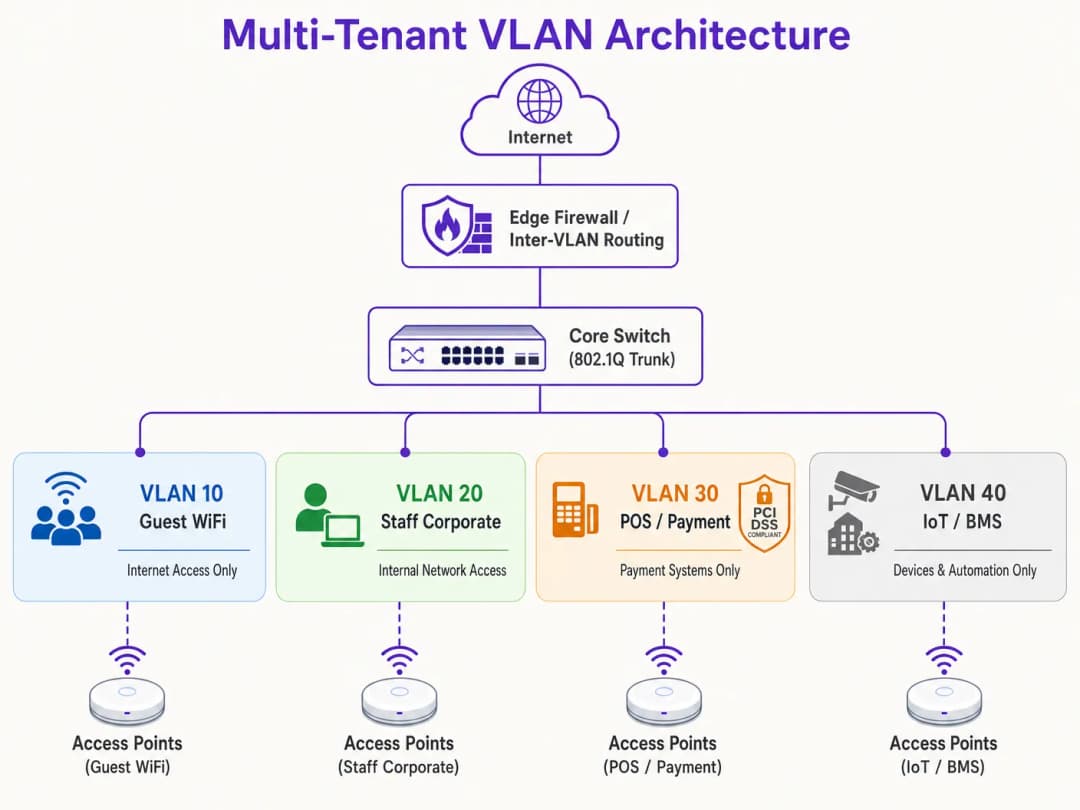
802.1X फ्रेमवर्कमध्ये तीन मुख्य घटक समाविष्ट आहेत:
- Supplicant: 802.1X ला सपोर्ट करणारे सॉफ्टवेअर चालवणारे क्लायंट डिव्हाइस (उदा. Windows, macOS, iOS, Android).
- Authenticator: वायरलेस AP किंवा वायरलेस LAN कंट्रोलर (WLC) जो अधिकृत होईपर्यंत क्लायंटकडून येणारे सर्व नॉन-ऑथेंटिकेशन ट्रॅफिक ब्लॉक करतो.
- Authentication Server: आयडेंटिटी स्टोअर (उदा. Active Directory, LDAP, किंवा क्लाउड आयडेंटिटी प्रोव्हाइडर्स) सह एकत्रित केलेला Remote Authentication Dial-In User Service (RADIUS) सर्व्हर.
ऑथेंटिकेशन हँडशेक दरम्यान, क्लायंट एकाच सुरक्षित SSID शी कनेक्ट होतो आणि क्रेडेंशियल्स किंवा क्लायंट सर्टिफिकेट (EAP-TLS किंवा PEAP द्वारे) प्रदान करतो. AP हे RADIUS सर्व्हरकडे फॉरवर्ड करतो. यशस्वी पडताळणीनंतर, RADIUS सर्व्हर विशिष्ट IETF मानक ॲट्रिब्युट्स असलेले Access-Accept संदेश परत पाठवतो जे AP ला क्लायंटचे सेशन त्यांच्या नियुक्त केलेल्या VLAN वर डायनॅमिकली असाइन करण्याचे निर्देश देतात:
- Tunnel-Type (64):
VLANवर सेट करा (मूल्य 13) - Tunnel-Medium-Type (65):
802वर सेट करा (मूल्य 6) - Tunnel-Private-Group-ID (81): विशिष्ट VLAN ID स्ट्रिंगवर सेट करा (उदा. Tenant A साठी
"101", Tenant B साठी"102")
AP हे ॲट्रिब्युट्स प्राप्त करतो, पोर्ट अनब्लॉक करतो आणि त्या क्लायंटच्या MAC ॲड्रेसवरून येणारे सर्व पुढील ट्रॅफिक निर्दिष्ट VLAN वर मॅप करतो. हे वेगवेगळ्या संस्थांमधील शेकडो वापरकर्त्यांना एकाच भौतिक AP वरील अगदी त्याच SSID शी कनेक्ट होण्याची परवानगी देते आणि तरीही ते Layer 2 वर एकमेकांपासून पूर्णपणे वेगळे राहतात. हे आर्किटेक्चर तैनात करण्याच्या तपशीलवार माहितीसाठी, How to Implement 802.1X Authentication with Cloud RADIUS वरील मार्गदर्शक पहा.
ब्रॉडकास्ट डोमेन नियंत्रण आणि Layer 2 सुरक्षा
भौतिक नेटवर्कला लहान लॉजिकल VLANs मध्ये विभाजित करून, ब्रॉडकास्ट डोमेन्स मर्यादित केले जातात. ARP, DHCP आणि mDNS सारखे मानक नेटवर्क प्रोटोकॉल्स ब्रॉडकास्ट फ्रेम्सवर अवलंबून असतात जे ब्रॉडकास्ट डोमेनमधील प्रत्येक डिव्हाइसला पाठवले जातात. हजारो डिव्हाइसेस असलेल्या मोठ्या, फ्लॅट नेटवर्कवर, हे "चॅटर" लक्षणीय वायरलेस एअरटाइम आणि क्लायंट डिव्हाइसेसवरील प्रोसेसिंग सायकल वापरते. ब्रॉडकास्ट वैयक्तिक VLAN सबनेट्सपुरते मर्यादित ठेवल्याने ओव्हरहेड नाट्यमयरित्या कमी होते, ब्रॉडकास्ट वादळ टळतात आणि एकूण नेटवर्क थ्रूपुट वाढतो.
शिवाय, अतिथी SSIDs वर Client Isolation (ज्याला पीअर-टू-पीअर ब्लॉकिंग देखील म्हटले जाते) सक्षम करून Layer 2 आयसोलेशन वाढवले जाते. हे एकाच VLAN वरील वायरलेस क्लायंट्सना एकमेकांशी थेट संवाद साधण्यापासून रोखते, ज्यामुळे लॅटरल स्कॅनिंग, पॅकेट स्निफिंग आणि मॅन-इन-द-मिडल हल्ल्यांचा धोका कमी होतो.
तुमच्या विशिष्ट सेटअपबद्दल काही प्रश्न आहेत का?
आमची टीम ८०,००० हून अधिक वेन्यूजमधील वेन्यू ऑपरेटर्स, IT मॅनेजर्स आणि नेटवर्क इंजिनिअर्ससोबत काम करते. २० मिनिटांचा कॉल बुक करा आणि तुमच्यासारख्या इतरांनी ही समस्या कशी सोडवली हे आम्ही तुम्हाला दाखवू.
अंमलबजावणी मार्गदर्शक
सुरक्षित मल्टी-टेनंट VLAN आर्किटेक्चर तैनात करण्यासाठी वायरलेस एज, वायर्ड स्विच फॅब्रिक आणि कोर फायरवॉलवर समन्वित कॉन्फिगरेशन आवश्यक आहे. खालील टप्प्याटप्प्याने दिलेली अंमलबजावणी ब्ल्यूप्रिंट वेंडर-न्यूट्रल आहे आणि एंटरप्राइझ मानकांशी सुसंगत आहे.
पायरी 1: लॉजिकल डिझाइन आणि IP सबनेट वाटप
कोणतेही हार्डवेअर कॉन्फिगर करण्यापूर्वी, एक व्यापक लॉजिकल नेटवर्क मॅप तयार करा. प्रत्येक ट्रॅफिक क्लासला स्वतंत्र VLAN IDs, IP सबनेट्स आणि सुरक्षा झोन नियुक्त करा.
| सेगमेंटचे नाव | VLAN ID | IP सबनेट / CIDR | सुरक्षा झोन | प्राथमिक ऑथेंटिकेशन |
|---|---|---|---|---|
| नेटवर्क व्यवस्थापन | VLAN 10 | 10.10.10.0/24 | व्यवस्थापन | स्टॅटिक / आउट-ऑफ-बँड |
| Guest WiFi (Purple) | VLAN 20 | 172.16.0.0/20 | अतिथी (केवळ इंटरनेट) | Open + कॅप्टिव्ह पोर्टल |
| कॉर्पोरेट कर्मचारी | VLAN 30 | 10.10.30.0/23 | अंतर्गत कॉर्पोरेट | WPA3-Enterprise (802.1X) |
| POS / पेमेंट | VLAN 40 | 192.168.40.0/24 | PCI-CDE (मर्यादित) | WPA3-Enterprise / MAB |
| IoT / बिल्डिंग सिस्टम्स | VLAN 50 | 10.10.50.0/24 | IoT (मर्यादित) | WPA3-SAE / Dynamic PSK |
महत्त्वाचा नियम: कोणत्याही सक्रिय ट्रॅफिक किंवा व्यवस्थापनासाठी कधीही VLAN 1 वापरू नका. सर्व ट्रंक पोर्ट्सवर VLAN 1 निष्क्रिय करा आणि VLAN हॉपर हल्ले रोखण्यासाठी Native VLAN एका न वापरलेल्या, नॉन-राउटेबल VLAN ID वर (उदा. VLAN 999) बदला.
पायरी 2: वायर्ड स्विच फॅब्रिक कॉन्फिगरेशन
लॉजिकल VLAN रचनेला सपोर्ट करण्यासाठी कोर, डिस्ट्रिब्युशन आणि ॲक्सेस स्विचेस कॉन्फिगर करा. APs शी थेट जोडलेले स्विच पोर्ट्स एकाधिक VLANs वाहून नेणारे असावेत आणि ते 802.1Q ट्रंक पोर्ट्स म्हणून कॉन्फिगर केलेले असावेत. सुरक्षेचा धोका कमी करण्यासाठी प्रत्येक ट्रंकवर कोणत्या VLANs ला परवानगी आहे हे स्पष्टपणे परिभाषित करा. सिंगल वायर्ड डिव्हाइसेसशी (जसे की स्टॅटिक POS टर्मिनल किंवा रिसेप्शनिस्टचा PC) कनेक्ट होणारे पोर्ट्स ॲक्सेस मोडवर सेट केले पाहिजेत आणि एकाच VLAN ला नियुक्त केले पाहिजेत.
पायरी 3: वायरलेस LAN कंट्रोलर आणि AP कॉन्फिगरेशन
वायरलेस SSIDs ना त्यांच्या संबंधित VLANs वर मॅप करा आणि एज सुरक्षा नियंत्रणे कॉन्फिगर करा. अतिथी SSID साठी, संधीसाधू वायरलेस एन्क्रिप्शन प्रदान करण्यासाठी सुरक्षा Open किंवा WPA3-Enhanced Open (OWE) वर कॉन्फिगर करा, Client Isolation सक्षम करा आणि GDPR-सुसंगत वापरकर्ता ऑनबोर्डिंग आणि विश्लेषणासाठी Purple च्या क्लाउड-व्यवस्थापित कॅप्टिव्ह पोर्टलवर रिडायरेक्ट करा. कॉर्पोरेट SSID साठी, 802.1X सह WPA3-Enterprise कॉन्फिगर करा, प्राथमिक आणि दुय्यम RADIUS सर्व्हर पत्ते परिभाषित करा आणि अखंड रोमिंगसाठी 802.11r Fast BSS Transition आणि Opportunistic Key Caching सक्षम करा. IoT डिव्हाइसेससाठी, मजबूत, रोटेट केलेल्या पासफ्रेजसह WPA3-SAE तैनात करा, किंवा वैयक्तिक डिव्हाइसेसना अनन्य की नियुक्त करण्यासाठी आणि त्यांना सब-VLANs वर डायनॅमिकली मॅप करण्यासाठी Multi-PSK (MPSK) लागू करा.
पायरी 4: कोर फायरवॉल आणि Inter-VLAN राउटिंग पॉलिसी
VLAN आर्किटेक्चरची सुरक्षा पूर्णपणे inter-VLAN राउटिंग नियंत्रित करणाऱ्या फायरवॉल नियमांवर अवलंबून असते. फायरवॉलवर कडक Default-Deny पॉलिसी लागू केली पाहिजे, ज्यामध्ये केवळ स्पष्टपणे परवानगी असलेल्या प्रवाहांनाच मंजुरी दिली जाईल.

अतिथी झोन (VLAN 20) साठी, पोर्ट 80 आणि 443 वर WAN कडे जाणाऱ्या आउटबाउंड ट्रॅफिकला परवानगी द्या आणि DNS आणि DHCP सेवांसाठी UDP ट्रॅफिकला परवानगी द्या. अंतर्गत सबनेट्सवरील सर्व ट्रॅफिक नाकारा. POS झोन (VLAN 40) साठी, पोर्ट 443 वर केवळ नियुक्त केलेल्या पेमेंट गेटवे IP पत्त्यांवर आउटबाउंड TCP ट्रॅफिकला परवानगी द्या आणि इतर सर्व VLANs कडील आणि कडे जाणारे सर्व ट्रॅफिक नाकारा. IoT झोन (VLAN 50) साठी, केवळ विशिष्ट उत्पादक अपडेट सर्व्हर्स आणि स्थानिक व्यवस्थापन कंट्रोलर्सकडे जाणाऱ्या आउटबाउंड ट्रॅफिकला परवानगी द्या आणि इतर सर्व अंतर्गत आणि बाह्य ट्रॅफिक नाकारा.
सर्वोत्तम पद्धती
दीर्घकालीन स्थिरता, उच्च कार्यक्षमता आणि कडक सुरक्षा सुनिश्चित करण्यासाठी, या उद्योग-मानक VLAN डिझाइन तत्त्वांचे पालन करा.
Management Plane Isolation बाबत कोणतीही तडजोड केली जाऊ शकत नाही. नेटवर्क व्यवस्थापन VLAN वर कधीही एंड-युझर ट्रॅफिकला परवानगी देऊ नका. APs, स्विचेस, राउटर आणि WLCs ने त्यांचे IP पत्ते एका समर्पित, अत्यंत प्रतिबंधित व्यवस्थापन VLAN वर मिळवले पाहिजेत. या VLAN वरील प्रवेश अधिकृत प्रशासक डिव्हाइसेसपुरता मर्यादित असणे आवश्यक आहे, आदर्शपणे सुरक्षित VPN किंवा भौतिक कन्सोल पोर्टद्वारे. जर एखाद्या हल्लेखोराने व्यवस्थापन प्लेनमध्ये प्रवेश मिळवला, तर त्याचे संपूर्ण नेटवर्क पायाभूत सुविधांवर प्रभावी नियंत्रण येते.
मल्टी-साइट ऑपरेटर्ससाठी Standardised VLAN Schema आवश्यक आहे. मल्टी-साइट पोर्टफोलिओ व्यवस्थापित करणाऱ्या संस्थांसाठी — जसे की 500 स्टोअर्स असलेली रिटेल साखळी किंवा 50 हॉटेल्स असलेला हॉटेल ब्रँड — प्रत्येक साइटवर सुसंगतपणे लागू केलेली टेम्पलेट केलेली VLAN योजना अंमलात आणा. VLAN ID शी जुळण्यासाठी IP पत्त्यामध्ये सुसंगत तिसरा ऑक्टेट वापरल्याने संपूर्ण इस्टेटमध्ये रिमोट ट्रबलशूटिंग, WLC टेम्पलेट डिप्लॉयमेंट आणि फायरवॉल नियम व्यवस्थापन सुलभ होते. हा दृष्टिकोन नवीन साइट्स ऑनबोर्ड करण्यासाठी लागणारा वेळ देखील नाट्यमयरित्या कमी करतो.
DHCP Lease Time Optimisation IP पत्ता संपण्यापासून रोखते. हाय-डेन्सिटी वातावरणात, DHCP लीज वेळेचे काळजीपूर्वक व्यवस्थापन केले पाहिजे. अतिथी WiFi सेगमेंटसाठी, जिथे वापरकर्ते वारंवार येतात आणि जातात, तिथे DHCP लीज वेळ 1 ते 2 तासांवर सेट करा. अंतर्गत कॉर्पोरेट नेटवर्क्ससाठी, 8 ते 24 तासांची मानक लीज वेळ योग्य आहे. स्थानिक DNS सर्व्हर्स अतिथी नेटवर्क्सच्या संपर्कात येणार नाहीत याची खात्री करा; अंतर्गत सर्व्हरचा भार कमी करण्यासाठी सार्वजनिक, फिल्टर केलेले DNS रिझॉल्व्हर्स वापरण्यासाठी अतिथी VLANs कॉन्फिगर करा.
Compliance Alignment पहिल्या दिवसापासूनच आर्किटेक्चरमध्ये समाविष्ट केले पाहिजे. PCI-DSS आवश्यकता 1.2 कार्डधारक डेटा वातावरण (CDE) आणि इतर नेटवर्क्समधील ट्रॅफिक मर्यादित करण्यासाठी फायरवॉल स्थापित करणे अनिवार्य करते. एका समर्पित VLAN वर POS टर्मिनल्स वेगळे करून, ठिकाणाचे उर्वरित नेटवर्क कठोर आणि खर्चिक PCI अनुपालन मूल्यांकनातून वगळले जाते. अतिथी वापरकर्त्यांचे ट्रॅफिक वेगळे करून आणि Purple च्या कॅप्टिव्ह पोर्टलद्वारे संमती व्यवस्थापित करून GDPR चे "Privacy by Design" तत्व पूर्ण केले जाते. सर्व SSIDs वर WPA3 चा अवलंब जलद केला पाहिजे, कारण WPA3-Personal चा Simultaneous Authentication of Equals (SAE) प्रोटोकॉल WPA2-PSK मध्ये असलेला ऑफलाइन डिक्शनरी हल्ल्याचा धोका दूर करतो. ॲक्सेस कंट्रोल आर्किटेक्चरवरील पुढील मार्गदर्शनासाठी, 10 Best Network Access Control (NAC) Solutions for 2026 पहा.
ट्रबलशूटिंग आणि जोखीम कमी करणे
अत्यंत काळजीपूर्वक डिझाइन केलेल्या VLAN आर्किटेक्चरमध्ये देखील ऑपरेशनल समस्या उद्भवू शकतात. खालील सर्वात सामान्य बिघाड प्रकार आणि त्यांचे तांत्रिक उपाय दिले आहेत.
VLAN Leakage and Misconfigured Trunk Ports हे अंमलबजावणीनंतरच्या सपोर्ट तिकिटांचे सर्वात वारंवार येणारे मूळ कारण आहे. याचे लक्षण म्हणजे वायरलेस क्लायंट विशिष्ट SSID वर यशस्वीरित्या ऑथेंटिकेट होतात परंतु IP पत्ता प्राप्त करण्यात अयशस्वी ठरतात. याचे मूळ कारण असे आहे की AP शी जोडलेले स्विच पोर्ट चुकीचे कॉन्फिगर केले गेले आहे: एकतर लक्ष्य VLAN ला 802.1Q ट्रंकवर परवानगी नाही, किंवा स्विचच्या स्थानिक डेटाबेसमध्ये VLAN तयार केले गेले नाही. स्विच ट्रंक कॉन्फिगरेशनची पडताळणी करा आणि स्विच पोर्टवरील परवानगी असलेल्या VLAN ची सूची AP वर कॉन्फिगर केलेल्या SSIDs शी जुळत असल्याची खात्री करा. कोणत्याही बदलानंतर नेहमी स्विच कॉन्फिगरेशनचे ऑडिट करा आणि कमिशनिंग दरम्यान त्यांची पडताळणी करा.
DHCP Relay Failures तेव्हा घडतात जेव्हा नवीन तयार केलेल्या VLAN कडे Layer 3 इंटरफेसवर कॉन्फिगर केलेला संबंधित IP Helper Address नसतो. DHCP विनंत्या ब्रॉडकास्ट पॅकेट्स असल्याने, त्या रिले एजंटशिवाय VLAN सीमा ओलांडू शकत नाहीत. जर DHCP सर्व्हर क्लायंटपेक्षा वेगळ्या VLAN वर असेल, तर राउटर किंवा Layer 3 स्विच केंद्रीकृत DHCP सर्व्हरकडे निर्देशित करणाऱ्या IP Helper Address सह कॉन्फिगर केलेला असणे आवश्यक आहे.
RADIUS Certificate Expiration ही एक सुप्त जोखीम आहे जी संपूर्ण एंटरप्राइझ नेटवर्क एकाच वेळी निकामी करू शकते. याचे लक्षण म्हणजे सर्व 802.1X-ऑथेंटिकेटेड क्लायंट अचानक कनेक्ट होण्यास अपयशी ठरतात आणि क्लायंट डिव्हाइसेसवर सर्टिफिकेट चेतावणी त्रुटी दिसतात. सर्टिफिकेट संपण्याच्या 30 दिवस आधी ट्रिगर होणारे स्वयंचलित मॉनिटरिंग अलर्ट तैनात करा आणि मानवी त्रुटी टाळण्यासाठी स्वयंचलित सर्टिफिकेट नूतनीकरण पाइपलाइन लागू करा.
SSID Proliferation and RF Congestion उत्कृष्ट सिग्नल ताकद आणि हाय-स्पीड बॅकहॉल असूनही हाय लेटन्सी आणि संथ गतीच्या स्वरूपात प्रकट होते. याचे मूळ कारण व्यवस्थापन ओव्हरहेड आणि को-चॅनेल इंटरफेरन्समुळे होणारा अति चॅनेल वापर आहे. SSIDs एकत्रित करा, Dynamic VLAN Assignment कडे वळा, हाय-डेन्सिटी क्षेत्रातील APs च्या उपसंचावर 2.4 GHz रद्दिओ निष्क्रिय करा आणि ड्युअल-बँड क्लायंटना अधिक चांगल्या 5 GHz आणि 6 GHz बँडवर पाठवण्यासाठी बँड स्टीयरिंग लागू करा.
ROI आणि व्यावसायिक प्रभाव
मजबूत VLAN सेगमेंटेशन धोरण लागू केल्याने ठिकाण ऑपरेटर आणि एंटरप्राइझ संस्थांसाठी महत्त्वपूर्ण, मोजता येणारा व्यावसायिक फायदा मिळतो.
PCI Audit Scope Minimisation थेट खर्च बचत प्रदान करते. क्रेडिट कार्ड पेमेंट प्रक्रियेत गुंतलेल्या ठिकाणांसाठी, फ्लॅट नेटवर्क संपूर्ण पायाभूत सुविधांना PCI-DSS अनुपालनाच्या कक्षेत आणते. याचा अर्थ असा की प्रत्येक स्विच, AP, सर्व्हर आणि ऑफिस PC चे ऑडिट केले जाणे आवश्यक आहे, ज्यासाठी अनुपालन मूल्यांकन, पेनिट्रेशन टेस्टिंग आणि प्रशासकीय ओव्हरहेडमध्ये दरवर्षी हजारो पौंड खर्च होतात. नेटवर्कचे विभाजन करून आणि कार्डधारक डेटा वातावरणाला कडक फायरवॉल नियंत्रणांसह समर्पित POS VLAN वर वेगळे करून, ऑडिटची व्याप्ती केवळ त्या VLAN पुरती मर्यादित केली जाते. व्याप्तीमधील ही घट अनुपालन खर्च 70% पर्यंत कमी करू शकते आणि अनुपालन न केल्याबद्दलच्या दंडाचा धोका लक्षणीयरीत्या कमी करू शकते.
Breach Cost Mitigation हा सर्वोच्च मूल्याचा सुरक्षा परिणाम आहे. गंभीर डेटा उल्लंघनाचा मुख्य चालक म्हणजे लॅटरल मूव्हमेंट आहे, जिथे एखादा हल्लेखोर कमी-सुरक्षा असलेल्या डिव्हाइसवर प्रवेश मिळवतो आणि उच्च-मूल्य डेटाबेस किंवा POS सिस्टम्सशी तडजोड करण्यासाठी फ्लॅट नेटवर्कवर फिरतो. VLAN सेगमेंटेशन, कडक inter-VLAN फायरवॉल नियमांसह एकत्रितपणे, हा मार्ग पूर्णपणे काढून टाकते. जर VLAN 50 वरील एखाद्या IoT डिव्हाइसशी तडजोड झाली, तर हल्लेखोर त्याच लॉजिकल सेगमेंटमध्ये अडकतो. उल्लंघनाची व्याप्ती मर्यादित केली जाते, ज्यामुळे संवेदनशील कॉर्पोरेट मालमत्तेचे रक्षण होते.
Guest Analytics and Revenue Monetisation नेटवर्कला कॉस्ट सेंटरमधून धोरणात्मक मालमत्तेत रूपांतरित करते. योग्यरित्या सेगमेंट केलेले नेटवर्क ठिकाण ऑपरेटरना अंतर्गत सुरक्षेचा धोका न पत्करता सुरक्षितपणे उच्च-गुणवत्तेचे Guest WiFi ऑफर करण्याची परवानगी देते. अतिथी ट्रॅफिकला समर्पित VLAN द्वारे Purple च्या प्लॅटफॉर्मवर राउट करून, ठिकाणे ब्रँडेड कॅप्टिव्ह पोर्टलद्वारे मौल्यवान फर्स्ट-पार्टी ग्राहक डेटा कॅप्चर करू शकतात, जो थेट CRM आणि मार्केटिंग ऑटोमेशन प्लॅटफॉर्मसह एकत्रित केला जातो. हे लक्ष्यित विपणन मोहिमा सक्षम करते, ग्राहकांची निष्ठा वाढवते आणि ऑपरेटरना त्यांच्या वायरलेस पायाभूत सुविधांचे टायर्ड बँडविड्थ अपग्रेड्स आणि कॅप्टिव्ह पोर्टल स्प्लॅश पेजवरील जाहिरातींद्वारे कमाई करण्याची परवानगी देते. विश्लेषणे व्यावसायिक परिणाम कसे चालवतात याच्या सखोल माहितीसाठी, Purple च्या WiFi Analytics प्लॅटफॉर्मचे दस्तऐवजीकरण पहा.
संदर्भ
- Cisco Wireless APs: उत्पादने आणि अंमलबजावणीसाठी 2026 मार्गदर्शक
- 2026 साठी 10 सर्वोत्तम Network Access Control (NAC) सोल्यूशन्स
- शाळांमध्ये WiFi: 2026 प्रशासक आणि IT मार्गदर्शक
- Cloud RADIUS सह 802.1X ऑथेंटिकेशन कसे अंमलात आणावे
- Purple Guest WiFi प्लॅटफॉर्म
- Purple WiFi Analytics प्लॅटफॉर्म
- Hospitality WiFi सोल्यूशन्स
- Retail WiFi सोल्यूशन्स
- परिवहन WiFi सोल्यूशन्स
महत्वाच्या व्याख्या
VLAN (Virtual Local Area Network)
नेटवर्क डिव्हाइसेसचा एक लॉजिकल गट जो त्यांच्या भौतिक स्थानाचा विचार न करता ते एकाच भौतिक LAN वर असल्यासारखा संवाद साधतो. IEEE 802.1Q अंतर्गत परिभाषित केलेले, VLANs इथरनेट फ्रेम हेडरमध्ये एम्बेड केलेल्या 12-बिट VLAN आयडेंटिफायर (VID) चा वापर करून एकाच भौतिक स्विच फॅब्रिकला एकाधिक वेगळ्या ब्रॉडकास्ट डोमेन्समध्ये विभाजित करतात.
सामायिक भौतिक पायाभूत सुविधांवर अतिथी, कर्मचारी, POS आणि IoT ट्रॅफिक वेगळे करण्यासाठी IT टीम्स प्राथमिक यंत्रणा म्हणून VLANs चा वापर करतात. VLANs शिवाय, सर्व डिव्हाइसेस एकच ब्रॉडकास्ट डोमेन सामायिक करतात, ज्यामुळे सुरक्षा आणि कार्यक्षमतेचे धोके निर्माण होतात.
802.1Q Trunk Port
प्रत्येक इथरनेट फ्रेमला त्याच्या संबंधित VLAN ID सह टॅग करून एकाच वेळी अनेक VLANs चे ट्रॅफिक वाहून नेण्यासाठी कॉन्फिगर केलेले स्विच पोर्ट. ट्रंक पोर्ट स्विचेस दरम्यान आणि ॲक्सेस पॉईंट्सकडे टॅग केलेल्या फ्रेम्स वाहून नेतो, तर ॲक्सेस पोर्ट्स एकाच VLAN साठी केवळ अनटॅग केलेल्या फ्रेम्स वाहून नेतात.
नेटवर्क इंजिनिअर्स ॲक्सेस पॉईंट्सशी जोडलेल्या स्विच इंटरफेसवर आणि स्विचेसमधील अपलिंक पोर्ट्सवर ट्रंक पोर्ट्स कॉन्फिगर करतात. एक चुकीचा कॉन्फिगर केलेला ट्रंक पोर्ट - जिथे परवानगी असलेल्या VLAN सूचीमध्ये आवश्यक VLAN समाविष्ट नसतो - हा अंमलबजावणीनंतरच्या कनेक्टिव्हिटी अपयशाचे सर्वात सामान्य कारण आहे.
Dynamic VLAN Assignment (DVA)
एक आर्किटेक्चर जे वायरलेस क्लायंटला ते ज्या SSID शी कनेक्ट झाले आहेत त्याऐवजी त्यांच्या ऑथेंटिकेटेड ओळखीच्या आधारे विशिष्ट VLAN वर डायनॅमिकली नियुक्त करण्यासाठी IEEE 802.1X ऑथेंटिकेशन आणि RADIUS सर्व्हरचा वापर करते. AP ला कोणता VLAN नियुक्त करायचा याचे निर्देश देण्यासाठी RADIUS सर्व्हर Access-Accept संदेशामध्ये IETF मानक ॲट्रिब्युट्स (Tunnel-Type, Tunnel-Medium-Type, Tunnel-Private-Group-ID) परत करतो.
मल्टी-टेनंट इमारतींसाठी DVA हा शिफारस केलेला दृष्टिकोन आहे जिथे एकाधिक SSIDs ब्रॉडकास्ट केल्याने RF कार्यक्षमता खालावू शकते. हे एकाच SSID ला त्यांच्यामध्ये पूर्ण Layer 2 आयसोलेशनसह एकाधिक टेनंट संस्थांना सेवा देण्याची परवानगी देते.
RADIUS (Remote Authentication Dial-In User Service)
एक क्लायंट-सर्व्हर नेटवर्किंग प्रोटोकॉल जो नेटवर्क प्रवेशासाठी केंद्रीकृत Authentication, Authorisation, and Accounting (AAA) व्यवस्थापन प्रदान करतो. WiFi संदर्भात, वायरलेस कंट्रोलर RADIUS क्लायंट म्हणून काम करतो, वायरलेस क्लायंटकडून ऑथेंटिकेशन विनंत्या RADIUS सर्व्हरकडे फॉरवर्ड करतो, जो आयडेंटिटी स्टोअर (Active Directory, LDAP, इ.) विरुद्ध क्रेडेंशियल्सची पडताळणी करतो आणि VLAN असाइनमेंट्ससह ऑथरायझेशन ॲट्रिब्युट्स परत करतो.
RADIUS हा एंटरप्राइझ WiFi सुरक्षेचा कणा आहे. IT टीम्स प्रति-वापरकर्ता आणि प्रति-डिव्हाइस नेटवर्क धोरणे लागू करण्यासाठी RADIUS सर्व्हर्स (जसे की Microsoft NPS, FreeRADIUS, किंवा क्लाउड RADIUS सेवा) तैनात करतात, ज्यामध्ये Dynamic VLAN Assignment आणि सर्टिफिकेट-आधारित ऑथेंटिकेशन समाविष्ट आहे.
PCI DSS (Payment Card Industry Data Security Standard)
क्रेडिट कार्ड माहिती स्वीकारणाऱ्या, प्रक्रिया करणाऱ्या, स्टोअर करणाऱ्या किंवा ट्रान्समिट करणाऱ्या सर्व कंपन्यांनी सुरक्षित वातावरण राखले पाहिजे याची खात्री करण्यासाठी डिझाइन केलेल्या सुरक्षा मानकांचा संच. PCI-DSS आवश्यकता 1 नेटवर्क सुरक्षा नियंत्रणे स्थापित करणे आणि राखणे अनिवार्य करते, ज्यामध्ये कार्डधारक डेटा वातावरण (CDE) आणि इतर नेटवर्क्समधील ट्रॅफिक मर्यादित करणाऱ्या फायरवॉलचा समावेश आहे.
POS टर्मिनल्स किंवा पेमेंट प्रोसेसिंग सिस्टम्स असलेल्या ठिकाण ऑपरेटरनी PCI-DSS चे पालन करणे आवश्यक आहे. योग्य VLAN सेगमेंटेशन CDE ला समर्पित VLAN वर वेगळे करते, ज्यामुळे संपूर्ण नेटवर्कऐवजी केवळ त्या सेगमेंट आणि त्यावर नियंत्रण ठेवणाऱ्या फायरवॉल पॉलिसींपुरती PCI ऑडिटची व्याप्ती मर्यादित होते.
Broadcast Domain
गटातील कोणत्याही एका डिव्हाइसद्वारे पाठवलेली ब्रॉडकास्ट फ्रेम प्राप्त करणाऱ्या सर्व नेटवर्क डिव्हाइसेसचा संच. फ्लॅट, अनसेगमेंटेड नेटवर्कवर, सर्व डिव्हाइसेस एकच ब्रॉडकास्ट डोमेन सामायिक करतात. VLANs नेटवर्कला लहान ब्रॉडकास्ट डोमेन्समध्ये विभाजित करतात, ब्रॉडकास्ट ट्रॅफिक (ARP, DHCP, mDNS) केवळ त्या VLAN मधील डिव्हाइसेसपुरते मर्यादित ठेवतात.
शेकडो किंवा हजारो कनेक्टेड डिव्हाइसेस असलेल्या हाय-डेन्सिटी ठिकाणी, एकच मोठे ब्रॉडकास्ट डोमेन प्रचंड प्रमाणात ब्रॉडकास्ट ट्रॅफिक निर्माण करते जे वायरलेस एअरटाइम वापरते आणि कार्यक्षमता कमी करते. VLANs द्वारे ब्रॉडकास्ट डोमेनचा आकार कमी करणे हे एक प्राथमिक कार्यक्षमता ऑप्टिमायझेशन तंत्र आहे.
WPA3-Enterprise
IEEE 802.1X ऑथेंटिकेशन आणि प्रति-वापरकर्ता किंवा प्रति-डिव्हाइस ऑथेंटिकेशनसाठी EAP (Extensible Authentication Protocol) वापरणारे सध्याचे एंटरप्राइझ-ग्रेड WiFi सुरक्षा मानक. WPA3-Enterprise 128-बिट (मानक) किंवा 192-बिट (उच्च-सुरक्षा मोड) क्रिप्टोग्राफिक संरक्षण प्रदान करते आणि WPA2 च्या 4-वे हँडशेशी संबंधित धोके दूर करते.
IT टीम्सनी सर्व कॉर्पोरेट आणि नियंत्रित SSIDs (कर्मचारी, POS) वर WPA3-Enterprise तैनात केले पाहिजे. यासाठी RADIUS सर्व्हर आणि एकतर क्लायंट सर्टिफिकेट्स (EAP-TLS) किंवा युझरनेम/पासवर्ड क्रेडेंशियल्स (PEAP-MSCHAPv2) आवश्यक आहेत. PCI-DSS-सुसंगत वायरलेस अंमलबजावणीसाठी WPA3-Enterprise हे आवश्यक ऑथेंटिकेशन मानक आहे.
Client Isolation (Peer-to-Peer Blocking)
एक वायरलेस ॲक्सेस पॉईंट वैशिष्ट्य जे एकाच SSID शी कनेक्ट केलेल्या डिव्हाइसेसना Layer 2 वर एकमेकांशी थेट संवाद साधण्यापासून रोखते. सक्षम केल्यावर, सर्व इंटर-क्लायंट ट्रॅफिक AP वर ब्लॉक केले जाते, ज्यामुळे दुसऱ्या डिव्हाइसपर्यंत पोहोचण्यापूर्वी त्याला फायरवॉलमधून जाणे भाग पडते.
सर्व अतिथी WiFi SSIDs वर Client Isolation हे एक अनिवार्य कॉन्फिगरेशन आहे. त्याशिवाय, अतिथी नेटवर्कवरील एखादा दुर्भावनायुक्त वापरकर्ता त्याच SSID वरील इतर अतिथी डिव्हाइसेस स्कॅन करू शकतो, तपासू शकतो आणि त्यांच्यावर हल्ला करू शकतो. हे GDPR अनुपालनासाठी देखील आवश्यक आहे, कारण ते एका अतिथीला दुसऱ्या अतिथीचे अनएन्क्रिप्टेड ट्रॅफिक इंटरसेप्ट करण्यापासून रोखते.
MAC Authentication Bypass (MAB)
एक फॉलबॅक ऑथेंटिकेशन यंत्रणा जी 802.1X ऑथेंटिकेशन करण्यास असमर्थ असलेल्या डिव्हाइसेसना (जसे की प्रिंटर, स्मार्ट टीव्ही आणि IoT सेन्सर्स) त्यांच्या MAC पत्त्याचा वापर करून नेटवर्कवर ऑथेंटिकेट करण्याची परवानगी देते. RADIUS सर्व्हर अधिकृत डिव्हाइसेसच्या MAC पत्त्यांसह आधीच भरलेला असतो आणि यशस्वी MAB विनंतीवर योग्य VLAN असाइनमेंट परत करतो.
IT टीम्स मल्टी-टेनंट वातावरणात IoT आणि जुन्या डिव्हाइसेससाठी MAB चा वापर करतात. MAC पत्ते स्पूफ केले जाऊ शकत असल्याने, नियुक्त केलेल्या VLAN वर MAB नेहमी कडक फायरवॉल ACLs सह एकत्रित केले पाहिजे, ज्यामुळे डिव्हाइसचा नेटवर्क प्रवेश केवळ त्याला आवश्यक असलेल्या विशिष्ट बाह्य सेवांपुरता मर्यादित राहील.
Native VLAN
802.1Q ट्रंक पोर्टवर अनटॅग केलेल्या ट्रॅफिकला नियुक्त केलेले VLAN. बहुतेक स्विचेसवर डीफॉल्टनुसार, VLAN 1 हे native VLAN असते. ट्रंक पोर्टवर येणाऱ्या अनटॅग केलेल्या फ्रेम्स native VLAN ला नियुक्त केल्या जातात. VLAN हॉपरसाठी हा एक सुप्रसिद्ध हल्ला मार्ग आहे, जिथे हल्लेखोर त्यांच्या VLAN मधून बाहेर पडण्यासाठी डबल-टॅग केलेल्या फ्रेम्स पाठवतो.
सर्वोत्तम पद्धत म्हणजे सर्व ट्रंक पोर्ट्सवरील native VLAN एका न वापरलेल्या, नॉन-राउटेबल VLAN ID वर (उदा. VLAN 999) बदलणे आणि VLAN 1 ला कोणतेही सक्रिय डिव्हाइसेस नियुक्त केलेले नाहीत याची खात्री करणे. कोणत्याही PCI-DSS-सुसंगत नेटवर्क डिझाइनमध्ये ही एक अनिवार्य सुरक्षा पायरी आहे.
सोडवलेली उदाहरणे
12 मालमत्ता चालवणाऱ्या 350 खोल्यांच्या हॉटेल समूहाला त्यांच्या नेटवर्क पायाभूत सुविधांचे एकत्रीकरण करणे आवश्यक आहे. सध्या, प्रत्येक मालमत्ता अतिथी खोल्या, कर्मचाऱ्यांचे लॅपटॉप, रेस्टॉरंट POS टर्मिनल्स, CCTV कॅमेरे, HVAC कंट्रोलर्स आणि एकाच वेळी अनेक कार्यक्रम आयोजित करणाऱ्या कॉन्फरन्स सेंटरसाठी एकच फ्लॅट नेटवर्क चालवते. IT संचालकांनी निदर्शनास आणून दिले आहे की संपूर्ण नेटवर्क PCI-DSS अनुपालनाच्या कक्षेत आहे, ज्यामुळे समूहाला ऑडिट फी आणि सुधारणा कामांमध्ये दरवर्षी अंदाजे £45,000 खर्च येतो. नेटवर्कचे पुन्हा डिझाइन कसे केले पाहिजे?
याचे समाधान म्हणजे प्रमाणित टेम्पलेट वापरून सर्व 12 मालमत्तांवर सुसंगतपणे तैनात केलेले पाच-VLAN आर्किटेक्चर आहे. VLAN 10 (व्यवस्थापन, 10.XX.10.0/24) केवळ स्विच, AP आणि WLC व्यवस्थापन ट्रॅफिक वाहून नेते, जे केवळ समर्पित ॲडमिन VPN द्वारे प्रवेशयोग्य आहे. VLAN 20 (Guest WiFi, 172.16.0.0/20) सर्व अतिथी ट्रॅफिकला GDPR-सुसंगत ऑनबोर्डिंग आणि विश्लेषणासाठी Purple च्या कॅप्टिव्ह पोर्टलद्वारे राउट करते, ज्यामध्ये क्लायंट आयसोलेशन सक्षम असते आणि IP संपणे टाळण्यासाठी 2-तासांची DHCP लीज वेळ असते. VLAN 30 (कर्मचारी कॉर्पोरेट, 10.XX.30.0/23) क्लाउड RADIUS सेवेद्वारे समूहाच्या Azure AD विरुद्ध 802.1X ऑथेंटिकेशनसह WPA3-Enterprise वापरते. VLAN 40 (POS/पेमेंट, 192.168.40.0/24) हा एक कडकपणे वेगळा केलेला PCI-CDE सेगमेंट आहे ज्यामध्ये default-deny फायरवॉल पॉलिसी आहे जी केवळ पेमेंट गेटवे प्रोव्हाइडरच्या IP पत्त्यांवर आउटबाउंड HTTPS ला परवानगी देते. VLAN 50 (IoT/BMS, 10.XX.50.0/24) सर्व CCTV, HVAC, स्मार्ट लॉक्स आणि बिल्डिंग मॅनेजमेंट डिव्हायसेसना त्यांच्या संबंधित व्यवस्थापन प्लॅटफॉर्मपुरते मर्यादित इग्रेस फिल्टरिंगसह वेगळे करते. कॉन्फरन्स सेंटर WLC डॅशबोर्डद्वारे तात्पुरते इव्हेंट VLANs (VLAN 60-99) प्रोव्हिजन करून हाताळले जाते, ज्यामध्ये प्रत्येकासाठी सानुकूल Purple कॅप्टिव्ह पोर्टल आणि बँडविड्थ मर्यादा असतात. प्रमाणित थर्ड-ऑक्टेट IP योजना (XX = साइट क्रमांक) NOC टीमला केवळ त्याच्या IP पत्त्यावरून कोणत्याही डिव्हाइसची साइट आणि सेगमेंट ओळखण्याची परवानगी देते, ज्यामुळे ट्रबल्सशूटिंगचा वेळ नाट्यमयरित्या कमी होतो.
220 स्टोअर्स असलेल्या एका राष्ट्रीय रिटेल साखळीला मोठ्या प्रमाणावर WiFi कार्यक्षमतेच्या तक्रारींचा सामना करावा लागत आहे. प्रत्येक स्टोअरमध्ये 200 Mbps फायबर कनेक्शन्स असूनही, ग्राहक आणि कर्मचारी 5 Mbps पेक्षा कमी गतीची नोंद करत आहेत. एका ऑडिटमधून असे दिसून आले आहे कि प्रत्येक स्टोअरचे ॲक्सेस पॉईंट्स 9 SSIDs ब्रॉडकास्ट करत आहेत: एक ग्राहकांसाठी, एक कर्मचाऱ्यांसाठी, एक POS साठी, एक CCTV साठी, एक डिजिटल साईनसाठी, एक स्टॉक व्यवस्थापन हँडहेल्ड्ससाठी, एक थर्ड-पार्टी लॉजिस्टिक्स भागीदारासाठी, एक कॉफी शॉप सवलतीसाठी आणि मागील प्रोव्हाइडरचा एक जुना SSID जो कधीही बंद केला गेला नव्हता. सुरक्षा राखून कार्यक्षमतेच्या समस्या सोडवण्यासाठी नेटवर्कचे पुन्हा डिझाइन कसे केले पाहिजे?
याचे समाधान तीन-टप्प्यांचे एकत्रीकरण आहे. टप्पा 1 (तात्काळ): जुना SSID आणि शून्य सक्रिय क्लायंट केलेले कोणतेही SSIDs त्वरित बंद करा. यामुळेच बीकन ओव्हरहेड 9 SSIDs वरून 7 वर येतो. टप्पा 2 (30-दिवसांची अंमलबजावणी): 802.1X आणि RADIUS द्वारे Dynamic VLAN Assignment चा वापर करून कर्मचारी, स्टॉक व्यवस्थापन हँडहेल्ड्स, लॉजिस्टिक्स भागीदार आणि डिजिटल साईन SSIDs एकाच एंटरप्राइझ SSID मध्ये एकत्रित करा. प्रत्येक वापरकर्ता गट त्यांच्या कॉर्पोरेट क्रेडेंशियल्स किंवा डिव्हाइस सर्टिफिकेटसह ऑथेंटिकेट करतो आणि RADIUS सर्व्हर त्यांना त्यांच्या समर्पित VLAN वर (कर्मचाऱ्यांसाठी VLAN 30, IoT/हँडहेल्ड्ससाठी VLAN 50, लॉजिस्टिक्ससाठी VLAN 60, साईनसाठी VLAN 70) नियुक्त करण्यासाठी योग्य Tunnel-Private-Group-ID ॲट्रिब्युट परत करतो. यामुळे SSID संख्या 7 वरून 4 वर येते. टप्पा 3 (60-दिवसांची अंमलबजावणी): कॉफी शॉप सवलतीला स्वतंत्र Purple कॅप्टिव्ह पोर्टल इन्स्टन्ससह समर्पित VLAN वर स्थलांतरित करा आणि POS आणि CCTV SSIDs त्यांच्या संबंधित वेगळ्या VLANs वर एकत्रित करा. अंतिम आर्किटेक्चर 3 SSIDs ब्रॉडकास्ट करते: Dynamic VLAN Assignment सह एक एंटरप्राइझ SSID, Purple च्या कॅप्टिव्ह पोर्टलद्वारे एक अतिथी/ग्राहक WiFi आणि एक POS SSID. ड्युअल-बँड क्लायंटना 5 GHz वर पाठवण्यासाठी सर्व APs वर बँड स्टीयरिंग सक्षम करा आणि कोणताही एक वापरकर्ता अपलिंक संपवू नये म्हणून अतिथी VLAN वर प्रति-क्लायंट रेट लिमिटिंग (10 Mbps डाउनस्ट्रीम) कॉन्फिगर करा.
सराव प्रश्न
Q1. एक कॉन्फरन्स सेंटर ऑपरेटर 200 ॲक्सेस पॉईंट्ससह 50,000 स्क्वेअर फूटचे ठिकाण चालवतो. ते सध्या 6 SSIDs ब्रॉडकास्ट करतात: एक इव्हेंट उपस्थितांसाठी, एक प्रदर्शकांसाठी, एक ठिकाण कर्मचाऱ्यांसाठी, एक AV उपकरणांसाठी, एक केटरिंग POS टर्मिनल्ससाठी आणि एक बिल्डिंग मॅनेजमेंट सिस्टम्ससाठी. IT व्यवस्थापक नोंदवतात की मोठ्या इव्हेंट्स दरम्यान WiFi कार्यक्षमता खराब असते, 1 Gbps फायबर अपलिंक असूनही सरासरी क्लायंट गती 3 Mbps पेक्षा कमी होते. हे ठिकाण PCI-DSS ऑडिटची तयारी देखील करत आहे. कार्यक्षमता आणि अनुपालन या दोन्ही समस्या सोडवण्यासाठी तुम्ही वायरलेस आर्किटेक्चरचे पुन्हा डिझाइन कसे कराल?
टीप: Dynamic VLAN Assignment चा वापर करून कोणते SSIDs एकत्रित केले जाऊ शकतात, कोणत्या ट्रॅफिक क्लासेसचे PCI-DSS परिणाम आहेत आणि SSID बीकन ओव्हरहेड हाय-डेन्सिटी वातावरणात कार्यक्षमतेच्या समस्येस कसा कारणीभूत ठरतो याचा विचार करा.
नमुना उत्तर पहा
पुन्हा डिझाइन केलेले आर्किटेक्चर कॉर्पोरेट सेगमेंट्ससाठी Dynamic VLAN Assignment चा वापर करून 6 SSIDs वरून 3 वर एकत्रित करते. SSID 1 (इव्हेंट उपस्थित): WPA3-Enhanced Open सह Open SSID, VLAN 20 वर मॅप केलेले, GDPR-सुसंगत ऑनबोर्डिंग आणि प्रति-क्लायंट रेट लिमिटिंग (10 Mbps डाउनस्ट्रीम) साठी Purple च्या कॅप्टिव्ह पोर्टलद्वारे राउट केलेले. Client isolation सक्षम. SSID 2 (एंटरप्राइझ सुरक्षित): Dynamic VLAN Assignment सह 802.1X वापरणारे सिंगल WPA3-Enterprise SSID. प्रदर्शक नोंदणीच्या वेळी जारी केलेल्या तात्पुरत्या क्रेडेंशियल्ससह ऑथेंटिकेट करतात आणि त्यांना VLAN 60 (केवळ इंटरनेट, वेगळे केलेले) वर ठेवले जाते. ठिकाण कर्मचारी कॉर्पोरेट AD क्रेडेंशियल्ससह ऑथेंटिकेट करतात आणि त्यांना VLAN 30 (अंतर्गत प्रवेश) वर ठेवले जाते. AV उपकरणे MAC Authentication Bypass वापरतात आणि त्यांना VLAN 50 (AV व्यवस्थापन सर्व्हर्सपुरते मर्यादित) वर ठेवले जाते. SSID 3 (POS सुरक्षित): केटरिंग POS टर्मिनल्ससाठी समर्पित WPA3-Enterprise SSID, VLAN 40 (PCI-CDE) वर मॅप केलेले. कडक फायरवॉल नियम केवळ पेमेंट गेटवेकडे जाणाऱ्या आउटबाउंड HTTPS ला परवानगी देतात. बिल्डिंग मॅनेजमेंट सिस्टम्स शक्य तिथे VLAN 50 वरील वायर्ड कनेक्शनवर स्थलांतरित केल्या जातात, किंवा वायरलेस आवश्यक असल्यास समर्पित IoT SSID वर स्थलांतरित केल्या जातात. 6 वरून 3 SSIDs पर्यंत कमी केल्याने बीकन ओव्हरहेड अंदाजे 15-20% कमी होतो, ज्यामुळे थेट उपलब्ध एअरटाइम आणि क्लायंट थ्रूपुट सुधारतो. PCI ऑडिटची व्याप्ती VLAN 40 आणि त्याच्या फायरवॉल पॉलिसींपुरती मर्यादित केली जाते, ज्यामुळे PCI-DSS आवश्यकता 1.2 आणि 1.3 पूर्ण होते.
Q2. एक network architect नवीन 80-युनिट मिश्र-वापर व्यावसायिक इमारतीसाठी WiFi पायाभूत सुविधा डिझाइन करत आहे. या इमारतीमध्ये 15 स्वतंत्र व्यावसायिक टेनंट्स, तळमजल्यावर एक कॅफे आणि सामायिक को-वर्किंग स्पेस असतील. प्रत्येक टेनंटला इतर टेनंट्सपासून पूर्ण नेटवर्क आयसोलेशन, त्यांचे स्वतःचे बँडविड्थ वाटप आणि त्यांचे स्वतःचे डिव्हाइसेस कनेक्ट करण्याची क्षमता आवश्यक आहे. इमारतीच्या मालकाला संपूर्ण पायाभूत सुविधा केंद्रीकृत पद्धतीने व्यवस्थापित करायच्या आहेत आणि नवीन टेनंट्सना 30 मिनिटांत ऑनबोर्ड करायचे आहे. तुम्ही कोणत्या आर्किटेक्चरची शिफारस कराल आणि मुख्य डिझाइन निर्णय कोणते आहेत?
टीप: समर्पित SSIDs सह प्रति-टेनंट VLANs विरुद्ध एकाच SSID सह Dynamic VLAN Assignment मधील तडजोडीचा विचार करा. जलद टेनंट ऑनबोर्डिंग आणि केंद्रीकृत व्यवस्थापनासाठी ऑपरेशनल आवश्यकतांबद्दल विचार करा.
नमुना उत्तर पहा
शिफारस केलेले आर्किटेक्चर सर्व व्यावसायिक टेनंट्ससाठी एकाच एंटरप्राइझ SSID सह Dynamic VLAN Assignment मॉडेल आहे, ज्याला कॅफे आणि को-वर्किंग स्पेससाठी स्वतंत्र अतिथी SSID ची जोड दिली जाईल. प्रत्येक टेनंटला एक अनन्य VLAN ID नियुक्त केला जातो (उदा. टेनंट्ससाठी VLAN 101-115, को-वर्किंगसाठी VLAN 200, कॅफेसाठी VLAN 201). RADIUS सर्व्हर प्रति-टेनंट वापरकर्ता डिरेक्टरींना सपोर्ट करणाऱ्या क्लाउड आयडेंटिटी प्रोव्हाइडरसह एकत्रित केला जातो. जेव्हा एखादा नवीन टेनंट ऑनबोर्ड केला जातो, तेव्हा प्रशासक कोर स्विचवर नवीन VLAN तयार करतो, नवीन सबनेटसाठी DHCP व्याप्ती कॉन्फिगर करतो, सर्व ट्रंक पोर्ट्सवरील परवानगी असलेल्या सूचीमध्ये VLAN जोडतो, आयडेंटिटी प्रोव्हाइडरमध्ये नवीन टेनंट गट तयार करतो आणि त्या टेनंटच्या वापरकर्त्यांसाठी नवीन VLAN ID परत करण्यासाठी RADIUS सर्व्हर कॉन्फिगर करतो. ही संपूर्ण प्रक्रिया टेम्पलेट केली जाऊ शकते आणि 30 मिनिटांपेक्षा कमी वेळात पूर्ण केली जाऊ शकते. प्रत्येक टेनंटचा VLAN इतर सर्व टेनंट VLANs पासून default-deny inter-VLAN फायरवॉल पॉलिसीद्वारे वेगळा केला जातो. प्रति-टेनंट बँडविड्थ धोरणे QoS प्रोफाइल्सचा वापर करून WLC वर लागू केली जातात, ज्यामुळे प्रत्येक टेनंटला त्यांच्या करारातील बँडविड्थ टियरची हमी मिळते. कॅफे आणि को-वर्किंग अतिथी SSID VLAN 200 वर Purple च्या कॅप्टिव्ह पोर्टलद्वारे राउट होते, ज्यामुळे इमारतीच्या मालकाला अभ्यागत विश्लेषणे आणि ब्रँडेड ऑनबोर्डिंग अनुभव मिळतो. मुख्य डिझाइन निर्णय प्रति-टेनंट SSIDs ऐवजी एकाच एंटरप्राइझ SSID चा वापर करणे हा आहे, ज्यासाठी 15 SSIDs पर्यंत ब्रॉडकास्ट करावे लागले असते आणि यामुळे हाय-डेन्सिटी इमारतीच्या वातावरणात RF कार्यक्षमता गंभीरपणे खालावली असती.
Q3. एका मोठ्या रिटेल साखळीतील IT व्यवस्थापकाला नियमित नेटवर्क ऑडिट दरम्यान असे आढळले की 300 स्टोअर्समधील सर्व ट्रंक पोर्ट्सवर VLAN 1 हे native VLAN म्हणून वापरले जात आहे, आणि वायरलेस कंट्रोलर्समध्ये प्रवेश करण्यासाठी व्यवस्थापन SSID अतिथी WiFi नेटवर्कसारख्याच सबनेटवर आहे. सुरक्षा टीमने याला एक गंभीर असुरक्षितता म्हणून चिन्हांकित केले आहे. कोणते तात्काळ सुधारात्मक पावले उचलली पाहिजेत, आणि या समस्यांचे निराकरण न केल्यास काय धोका आहे?
टीप: VLAN 1 हे native VLAN म्हणून सक्षम करणारे विशिष्ट हल्ला मार्ग (VLAN हॉपर) आणि अतिथी नेटवर्कवरून व्यवस्थापन ट्रॅफिक प्रवेशयोग्य असण्याचे परिणाम विचारात घ्या. जोखीम तीव्रतेनुसार सुधारणा पायऱ्यांना प्राधान्य द्या.
नमुना उत्तर पहा
प्राधान्यक्रमानुसार तात्काळ सुधारणा: पायरी 1 (गंभीर - त्याच दिवशी): व्यवस्थापन SSID वेगळे करा. अतिथी नेटवर्कवरून प्रवेशयोग्य असल्यास व्यवस्थापन SSID पूर्णपणे निष्क्रिय करा. सर्व वायरलेस कंट्रोलर व्यवस्थापन प्रवेश एका समर्पित व्यवस्थापन VLAN वर (उदा. VLAN 10) हलवा, ज्याचा प्रवेश साइट-टू-साइट VPN किंवा समर्पित व्यवस्थापन वर्कस्टेशन्सद्वारे प्रशासक डिव्हाइसेसपुरता मर्यादित असेल. यामुळे सर्वात गंभीर धोका टळतो: अतिथी नेटवर्कवरील अतिथी वापरकर्ता किंवा हल्लेखोर वायरलेस कंट्रोलर्समध्ये प्रवेश मिळवू शकतो आणि संपूर्ण वायरलेस पायाभूत सुविधा पुन्हा कॉन्फिगर किंवा निष्क्रिय करू शकतो. पायरी 2 (उच्च - 1 आठवड्याच्या आत): सर्व ट्रंक पोर्ट्सवरील native VLAN, VLAN 1 वरून न वापरलेल्या, नॉन-राउटेबल VLAN वर (उदा. VLAN 999) बदला. VLAN 1 ला कोणतेही सक्रिय डिव्हाइसेस नियुक्त केलेले नाहीत याची खात्री करा. यामुळे VLAN हॉपर हल्ला मार्ग कमी होतो, जिथे हल्लेखोर त्याच्या VLAN मधून बाहेर पडण्यासाठी आणि दुसऱ्या VLAN च्या ट्रॅफिकमध्ये प्रवेश मिळवण्यासाठी डबल-टॅग केलेल्या 802.1Q फ्रेम्स पाठवतो. पायरी 3 (मध्यम - 30 दिवसांच्या आत): प्रत्येक ट्रंक पोर्टवरील परवानगी असलेल्या VLAN ची सूची स्पष्टपणे परिभाषित केली आहे आणि ती डिझाइन दस्तऐवजाशी जुळत आहे याची पडताळणी करण्यासाठी सर्व 300 स्टोअर्समध्ये संपूर्ण ट्रंक पोर्ट ऑडिट करा. त्या ठिकाणी आवश्यक नसलेले कोणतेही VLANs ट्रंक पोर्ट्सवरून काढून टाका. या समस्यांचे निराकरण न केल्यास धोका गंभीर आहे: अतिथी WiFi नेटवर्कवरील हल्लेखोर वायरलेस कंट्रोलर व्यवस्थापन इंटरफेसपर्यंत पोहोचू शकतो, SSID कॉन्फिगरेशन सुधारू शकतो, प्री-शेअर्ड की काढू शकतो, ट्रॅफिक रिडायरेक्ट करू शकतो किंवा संपूर्ण वायरलेस पायाभूत सुविधा निष्क्रिय करू शकतो. VLAN 1 native VLAN असुरक्षिततेमुळे हल्लेखोर अतिथी VLAN मधून बाहेर पडू शकतो आणि POS टर्मिनल्स किंवा अंतर्गत सर्व्हर्समध्ये प्रवेश करू शकतो, ज्यामुळे PCI-DSS चे उल्लंघन होऊन अनुपालन न केल्याबद्दल दरमहा £100,000 पर्यंतचा संभाव्य दंड होऊ शकतो.
या मालिकेमध्ये पुढे वाचा
बहुभाडेकरू कार्यालयीन इमारतींसाठी WiFi नेटवर्कचे डिझाइन करणे
हे मार्गदर्शक IT व्यवस्थापक, नेटवर्क आर्किटेक्ट आणि CTOs ना बहुभाडेकरू कार्यालयीन इमारतींमध्ये स्केलेबल, सुरक्षित आणि वेगळे केलेले WiFi नेटवर्क डिझाइन करण्यासाठी विक्रेता-तटस्थ ब्लू प्रिंट प्रदान करते. यामध्ये IEEE 802.1Q अंतर्गत VLAN विभाजन, 802.1X आणि RADIUS द्वारे डायनॅमिक VLAN असाइनमेंट, हाय-डेन्सिटी वातावरणासाठी RF नियोजन, आणि GDPR आणि PCI-DSS अंतर्गत अनुपालन बाबींचा समावेश आहे. स्थळ संचालक आणि इमारत व्यवस्थापकांना प्रत्यक्ष उपयोजनापूर्वी उपयुक्त आर्किटेक्चर मार्गदर्शन, वास्तविक-जगातील केस स्टडीज आणि टाळण्यासारख्या कॉन्फिगरेशन त्रुटी मिळतील.
Mean time to innocence: WiFi चे दोषारोपण कसे टाळायचे
Mean time to innocence (MTTI) हा एक महत्त्वाचा मेट्रिक आहे जो नेटवर्कची समस्या ही त्यांची चूक नाही हे सिद्ध करण्यासाठी आयटी टीम्स किती वेळ घालवतात हे ठरवतो. हा मार्गदर्शक मल्टी-टेनंट वातावरणात एकमेकांवर दोषारोप करणे टाळण्यासाठी आणि सरासरी रिझोल्यूशन वेळ (MTTR) कमी करण्यासाठी सामायिक पुराव्यांच्या मदतीने पाच-पाच पायऱ्यांची एक ऑब्झर्वेबिलिटी कार्यपद्धती तपशीलवार सांगतो.
सामायिक WiFi इन्फ्रास्ट्रक्चरसाठी कायदेशीर आणि अनुपालन आवश्यकता
हे अधिकृत तांत्रिक संदर्भ मार्गदर्शक सामायिक WiFi इन्फ्रास्ट्रक्चर उपयोजित आणि व्यवस्थापित करण्यासाठी महत्त्वाच्या कायदेशीर, नियामक आणि आर्किटेक्चरल आवश्यकतांचे वर्णन करते. हे IT व्यवस्थापक, नेटवर्क आर्किटेक्ट आणि वेन्यू ऑपरेटर्सना मजबूत डेटा संरक्षण, कठोर पेमेंट सुरक्षा अनुपालन आणि एंटरप्राइझ मानके वापरून उच्च-कार्यक्षमता भाडेकरू अलगाव सुनिश्चित करण्यासाठी कृती करण्यायोग्य फ्रेमवर्क प्रदान करते.
तुमच्या विशिष्ट सेटअपबद्दल काही प्रश्न आहेत का?
आमची टीम ८०,००० हून अधिक वेन्यूजमधील वेन्यू ऑपरेटर्स, IT मॅनेजर्स आणि नेटवर्क इंजिनिअर्ससोबत काम करते. २० मिनिटांचा कॉल बुक करा आणि तुमच्यासारख्या इतरांनी ही समस्या कशी सोडवली हे आम्ही तुम्हाला दाखवू.