
WiFi इंटरफेरन्स कसा स्कॅन करावा आणि सर्वोत्तम चॅनल कसा शोधावा
हे सर्वसमावेशक तांत्रिक मार्गदर्शक एंटरप्राइझ IT लीडर्सना RF इंटरफेरन्स ओळखण्यासाठी आणि इष्टतम 5GHz चॅनेल्स निवडण्यासाठी कृतीयोग्य पद्धती प्रदान करते. नवीन हार्डवेअर गुंतवणुकीची आवश्यकता नसताना थ्रूपुट वाढवण्यासाठी आणि लेटन्सी कमी करण्यासाठी यामध्ये स्पेक्ट्रम विश्लेषण, DFS चे निकष आणि व्यावहारिक डिप्लॉयमेंट धोरणे समाविष्ट आहेत.
हे मार्गदर्शक ऐका
पॉडकास्ट ट्रान्सक्रिप्ट पहा
आमच्या मुख्य मालिकेचा भाग: Guest WiFi Guide →
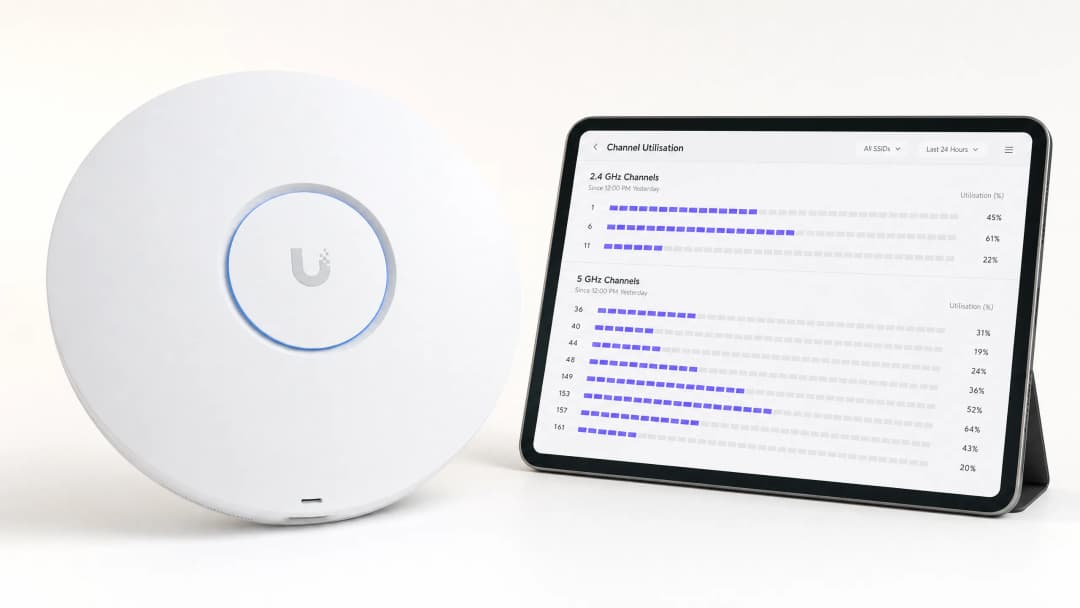
कार्यकारी सारांश (Executive Summary)
उच्च-घनता असलेल्या ठिकाणांचे व्यवस्थापन करणाऱ्या एंटरप्राइझ IT संचालकांसाठी, 5GHz उपयोजनांसाठी सर्वोत्तम चॅनेल ओळखणे हा एक अत्यंत महत्त्वाचा ऑपरेशनल आदेश आहे. खराब चॅनेल निवडीमुळे लेटन्सी वाढते, रोमिंग अयशस्वी होते आणि थ्रूपुट कमी होतो, ज्याचा थेट परिणाम वापरकर्त्याच्या अनुभवावर आणि ठिकाणाच्या कामकाजावर होतो.
हे तांत्रिक संदर्भ मार्गदर्शक RF हस्तक्षेप ओळखण्यासाठी, स्पेक्ट्रम विश्लेषण करण्यासाठी आणि 5GHz बँडमध्ये इष्टतम चॅनेल निवडण्यासाठी एक पद्धतशीर कार्यपद्धती स्पष्ट करते. प्रतिक्रियात्मक समस्य निवारणाऐवजी सक्रिय RF व्यवस्थापनाकडे वळून, IT टीम्स नवीन ॲक्सेस पॉइंट्स खरेदी करण्याचा भांडवली खर्च न करता थ्रूपुट वाढवू शकतात, को-चॅनेल स्पर्धा कमी करू शकतात आणि उच्च डिव्हाइस घनतेला सपोर्ट करू शकतात.
तुम्ही किरकोळ विक्रीच्या ठिकाणी Guest WiFi उपयोजित करत असाल किंवा बॅक-ऑफ-हाऊस ऑपरेशनल तंत्रज्ञान सुरक्षित करत असाल, चॅनेलच्या वापराची समज असणे ही मजबूत वायरलेस आर्किटेक्चरची पायाभरणी आहे.
तांत्रिक सखोल विश्लेषण: 5GHz स्पेक्ट्रम आणि हस्तक्षेपाचे घटक
5GHz लँडस्केप समजून घेणे
मर्यादित 2.4GHz बँडच्या उलट, ज्यामध्ये केवळ तीन नॉन-ओव्हरलॅपिंग चॅनेल मिळतात, 5GHz स्पेक्ट्रम २५ पर्यंत नॉन-ओव्हरलॅपिंग 20MHz चॅनेल प्रदान करतो (नियामक क्षेत्रावर अवलंबून). तथापि, सर्व 5GHz चॅनेल सारखे नसतात. ते विशिष्ट Unlicensed National Information Infrastructure (UNII) बँडमध्ये विभागलेले आहेत, ज्यांचे प्रत्येकाचे स्वतंत्र ऑपरेशनल नियम आहेत.
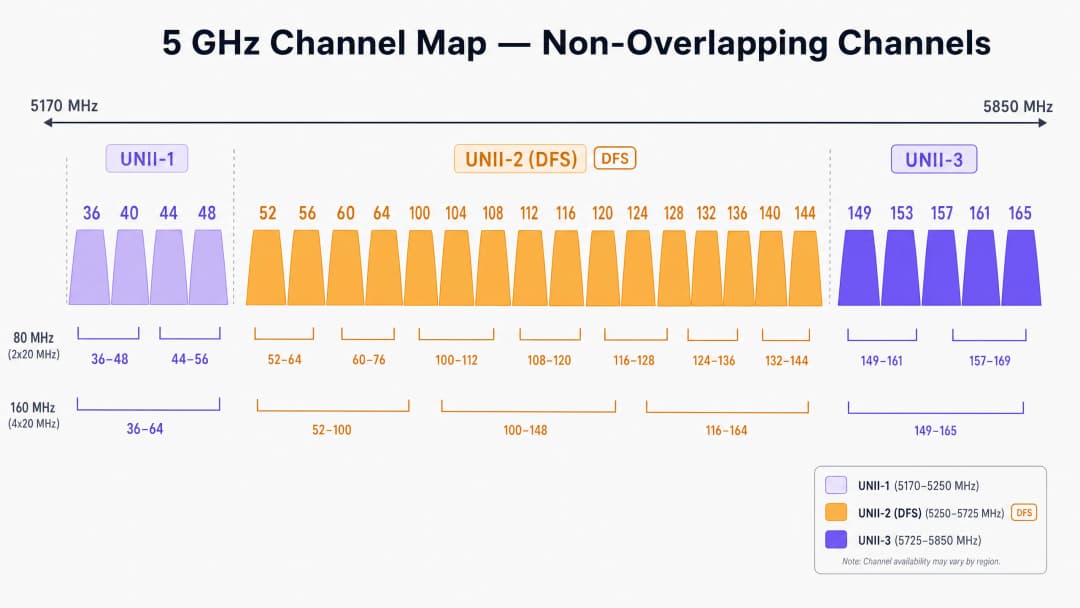
UNII-1 आणि UNII-3: सुरक्षित क्षेत्र
UNII-1 (36, 40, 44, 48) आणि UNII-3 (149, 153, 157, 161, 165) बँडमधील चॅनेल सामान्यतः बऱ्याच क्षेत्रांमध्ये रडार हस्तक्षेपाच्या मर्यादांपासून मुक्त असतात. Retail किंवा Hospitality मधील उच्च-घनतेच्या उपयोजनांसाठी, हे चॅनेल तुमच्या चॅनेल योजनेसाठी सर्वात कमी जोखमीचे प्रस्थान बिंदू दर्शवतात. UNII-3 थोड्या उच्च फ्रिक्वेन्सीवर कार्यरत असल्याने, भिंतींमधून त्याला थोडा जास्त अडथळा (attenuation) येतो, जे शेजारील खोल्या किंवा मजल्यांमधील को-चॅनेल हस्तक्षेप मर्यादित करण्यासाठी प्रत्यक्षात फायदेशीर ठरू शकते.
UNII-2 आणि DFS (Dynamic Frequency Selection)
UNII-2 बँड (चॅनेल ५२-१४४) विद्यमान लष्करी आणि हवामान रडार प्रणालींसह स्पेक्ट्रम सामायिक करतात. हे चॅनेल वापरण्यासाठी, ॲक्सेस पॉइंट्सनी DFS ला सपोर्ट करणे आवश्यक आहे. जर AP ला रडार पल्स आढळली, तर त्याने ताबडतोब चॅनेल रिकामे केले पाहिजे आणि तो ३० मिनिटांपर्यंत तेथे परत येऊ शकत नाही.विमानतळ, बंदरे किंवा हवामान केंद्रांजवळील वातावरणात, DFS इव्हेंटमुळे अचानक, न समजणारे क्लायंट डिस्कनेक्शन्स होऊ शकतात. जर तुमच्या ठिकाणी अधूनमधून ड्रॉपआउट होत असतील, तर DFS इव्हेंटसाठी कंट्रोलर लॉग तपासणे ही पहिली अनिवार्य पायरी आहे.
हस्तक्षेपाचे (Interference) प्रकार
एंटरप्राइझ वायरलेस नेटवर्कमधील हस्तक्षेप सामान्यत: दोन श्रेणींमध्ये येतो:
- को-चॅनेल हस्तक्षेप (CCI): जेव्हा एकाधिक APs (तुमचे किंवा शेजाऱ्याचे) एकाच चॅनेलवर कार्यरत असतात तेव्हा हे घडते. कारण WiFi हे Carrier Sense Multiple Access with Collision Avoidance (CSMA/CA) द्वारे नियंत्रित हाफ-डुप्लेक्स माध्यम आहे, त्यामुळे एकाच चॅनेलवरील सर्व उपकरणांना डेटा ट्रान्समिट करण्यासाठी त्यांच्या पाळीची प्रतीक्षा करावी लागते. जास्त CCI मुळे एअरटाइम संघर्ष वाढतो आणि लेटन्सी वाढते.
- Non-WiFi हस्तक्षेप: 802.11 प्रोटोकॉलचे पालन न करता 5GHz बँडमध्ये RF ऊर्जा उत्सर्जित करणारी उपकरणे. यामध्ये कॉर्डलेस फोन, वायरलेस AV ट्रान्समिटर्स आणि प्रोप्रायटरी IoT सेन्सर्स हे सामान्य घटक आहेत. CCI च्या विपरीत, non-WiFi हस्तक्षेपामुळे नॉईज फ्लोअर वाढतो, ज्यामुळे WiFi फ्रेम्स खराब होतात आणि रिट्रान्समिशन सुरू होते.
तुमच्या विशिष्ट सेटअपबद्दल काही प्रश्न आहेत का?
आमची टीम ८०,००० हून अधिक वेन्यूजमधील वेन्यू ऑपरेटर्स, IT मॅनेजर्स आणि नेटवर्क इंजिनिअर्ससोबत काम करते. २० मिनिटांचा कॉल बुक करा आणि तुमच्यासारख्या इतरांनी ही समस्या कशी सोडवली हे आम्ही तुम्हाला दाखवू.
अंमलबजावणी मार्गदर्शक: स्कॅनिंग आणि चॅनेल निवड
5GHz साठी सर्वोत्तम चॅनेल निश्चित करण्यासाठी, तुम्हाला डीफॉल्ट "Auto-RF" सेटिंग्जच्या पलीकडे जावे लागेल आणि संरचित स्कॅनिंग पद्धत लागू करावी लागेल.
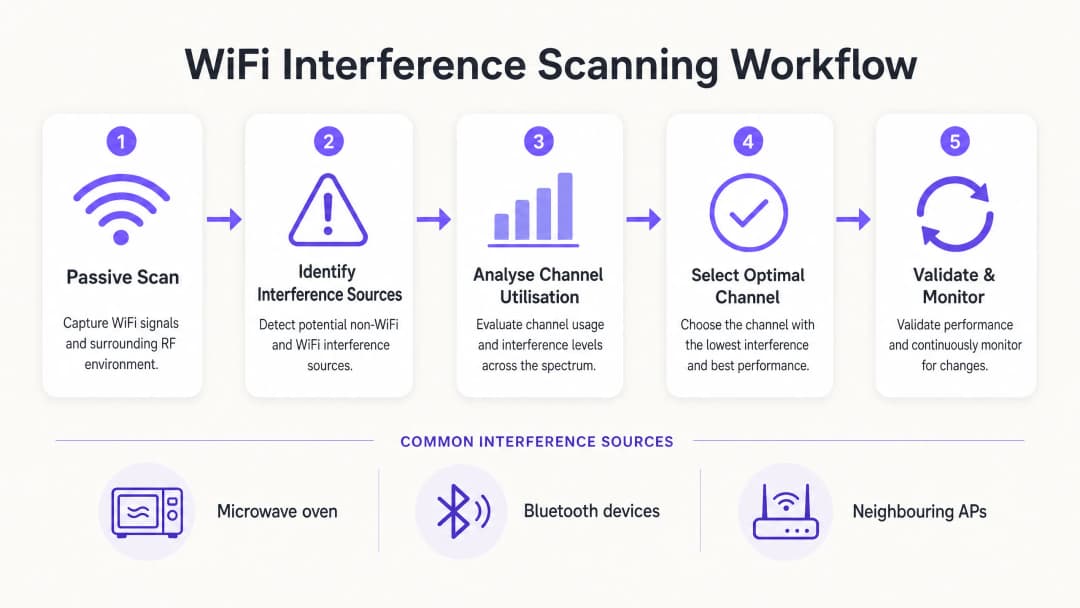
पायरी 1: बेसलाइन वातावरण तयार करा
बदल करण्यापूर्वी, एक बेसलाइन स्थापित करा. पुढील गोष्टी कॅप्चर करण्यासाठी तुमच्या कंट्रोलरच्या अंगभूत मॉनिटरिंग टूल्सचा वापर करा किंवा WiFi Analytics प्लॅटफॉर्मसह समाकलित करा:
- सरासरी आणि पीक चॅनेल वापर टक्केवारी.
- क्लायंट असोसिएशन दर आणि रोमिंग यश मेट्रिक्स.
- पीक ऑपरेशनल तासांमध्ये बेसलाइन थ्रुपुट.
महत्त्वाचा नियम: तुमचे प्राथमिक RF स्कॅनिंग कधीही रिकाम्या ठिकाणी करू नका. रविवारी पहाटे 2:00 वाजता केलेले स्कॅन कॉन्फरन्समध्ये उपस्थित 5,000 लोकांद्वारे निर्माण होणारा हस्तक्षेप दर्शवू शकत नाही.
पायरी 2: स्पेक्ट्रम विश्लेषण (Spectrum Analysis) करा
केवळ मानक AP स्कॅनिंगवर अवलंबून राहिल्याने केवळ इतर 802.11 नेटवर्क शोधले जातात. Non-WiFi हस्तक्षेप ओळखण्यासाठी, तुम्हाला हार्डवेअर स्पेक्ट्रम विश्लेषणाची आवश्यकता असते.
- टियर 1 (मूलभूत): कंट्रोलर-आधारित AP स्पेक्ट्रम मॉनिटर्स. अनेक एंटरप्राइझ APs मध्ये एक समर्पित स्कॅनिंग रेडिओ असतो जो non-WiFi स्वाक्षरी ओळखू शकतो.
- टियर 2 (प्रगत): Ekahau Sidekick किंवा MetaGeek Chanalyzer सारखे समर्पित हार्डवेअर. ही साधने संपूर्ण स्पेक्ट्रममधील कच्ची RF ऊर्जा कॅप्चर करतात, ज्यामुळे अभियंत्यांना ब्लूटूथ उपकरणे, AV ट्रान्समिटर्स किंवा सदोष हार्डवेअरच्या विशिष्ट स्वाक्षऱ्या ओळखता येतात.
पायरी 3: चॅनेल वापराचे विश्लेषण करा
चॅनेलचा वापर हा कार्यक्षमतेसाठी सर्वात महत्त्वाचा मॅट्रिक आहे. हे चॅनेल व्यस्त असण्याच्या वेळेची टक्केवारी दर्शवते (एकतर डेटा ट्रान्समिट करणे किंवा हस्तक्षेपामुळे ब्लॉक असणे).
- < 20%: उत्कृष्ट. उच्च-थ्रुपुट ॲप्लिकेशन्ससाठी भरपूर क्षमता आहे.
- २०% - ५०%: सक्रिय व्यावसायिक वातावरणासाठी सामान्य.
- > ७०%: गंभीर मर्यादा. ७०% वापराच्या स्तरावर, लेटन्सी वेगाने वाढते आणि युझरचा अनुभव खालावतो.
जर एखादा AP त्याच्या ५GHz चॅनेलवर >७०% वापर दर्शवत असेल, तर त्वरित उपाययोजना करणे आवश्यक आहे.
पायरी ४: इष्टतम चॅनेल निवडा
५GHz साठी सर्वोत्तम चॅनेल निवडताना, या निर्णय मॅट्रिक्सचे अनुसरण करा:
१. व्यस्त वेळेत < २०% वापर असलेले चॅनेल ओळखा. २. DFS शी संबंधित डिस्कनेक्शन टाळण्यासाठी UNII-1 आणि UNII-3 चॅनेल्सना प्राधान्य द्या, विशेषतः रुग्णालयांचे आपत्कालीन विभाग ( Healthcare ) किंवा जास्त गर्दीचे ट्रान्सपोर्ट हब ( Transport ) यांसारख्या गंभीर क्षेत्रांमध्ये. ३. जर UNII-1/3 पूर्णपणे भरले असतील, तर निवडकपणे DFS चॅनेल्स (UNII-2) सक्षम करा, परंतु पुढील १४ दिवसांसाठी रडार डिटेक्शन इव्हेंट्ससाठी लॉगचे बारकाईने निरीक्षण करा. ४. अत्यंत दाट लोकसंख्या असलेल्या वातावरणात (जसे की स्टेडियम) २०MHz चॅनेल रुंदीचे प्रमाणीकरण करा. केवळ कमी गर्दीच्या भागात जेथे उच्च वैयक्तिक थ्रूपुट आवश्यक आहे तिथेच ४०MHz किंवा ८०MHz बॉन्डेड चॅनेल्स वापरा.
सर्वोत्तम पद्धती आणि समस्येचे निवारण
हाय-डेन्सिटी झोनमध्ये ऑटो-चॅनेल निष्क्रिय करा
रेडिओ रिसोर्स मॅनेजमेंट (RRM) आणि ऑटो-चॅनेल अल्गोरिदम मानक ऑफिस वातावरणासाठी पुरेसे असले तरी, ते गुंतागुंतीच्या ठिकाणांवर वारंवार अपयशी ठरतात. थेट कार्यक्रमादरम्यान अनियंत्रित चॅनेल बदलांमुळे मोठ्या प्रमाणावर क्लायंट डिस्कनेक्ट होऊ शकतात. स्टेडियम किंवा मोठ्या कॉन्फरन्स सेंटरमध्ये, एक स्थिर, काळजीपूर्वक नियोजन केलेले चॅनेल डिझाइन अनिवार्य आहे.
सेलचा आकार कमी करा
जर सर्व ५GHz चॅनेल्स उच्च वापर दर्शवत असतील, तर चॅनेल बदलून समस्येचे निवारण होणार नाही. त्याऐवजी, तुम्हाला तुमच्या APs च्या RF फूटप्रिंट कमी करून को-चॅनेल इंटरफेरन्स कमी करावा लागेल. APs चे ट्रान्समिट (Tx) पॉवर कमी करा आणि किमान अनिवार्य डेटा रेट वाढवा (उदा. १२ Mbps किंवा २४ Mbps खालील रेट निष्क्रिय करा). हे क्लायंट्सना लवकर रोम करण्यास भाग पाडते आणि दूरच्या क्लायंट्सना जास्त एअरटाइम वापरण्यापासून रोखते.
संबंधित वाचन
पायाभूत सुविधांच्या ऑप्टिमायझेशनच्या पुढील धोरणांसाठी, आमचे मार्गदर्शन वाचा How to Improve WiFi Speed Without Buying New Access Points (किंवा जर्मन आवृत्ती: Wie man die WiFi-Geschwindigkeit verbessert, ohne neue Access Points zu kaufen ). आधुनिक ऍक्सेसच्या माहितीसाठी, How a wi fi assistant Enables Passwordless Access in 2026 आणि आमचे अलीकडील Offline Maps Mode launch पहा. तसेच, Iain Fox Announcement मध्ये आमच्या धोरणात्मक दिशेबद्दल वाचा.
ROI आणि व्यावसायिक प्रभाव
५GHz चॅनेल वाटप ऑप्टिमाइझ केल्याने कोणत्याही CapEx गुंतवणुकीशिवाय मोजता येण्याजोगा व्यावसायिक फायदा मिळतो:
| मेट्रिक | ऑप्टिमायझेशनपूर्वी (सामान्य) | ऑप्टिमायझेशननंतरचे लक्ष्य | व्यावसायिक प्रभाव | | चॅनेल वापर | > ७५% | < ४०% | पीक अवर्स दरम्यान लॅटन्सी स्पाइक्स दूर करते. | | Roaming मधील अपयश | १०-१५% | < २% | फिरत्या कर्मचाऱ्यांसाठी अखंड व्हॉइस/व्हिडिओ कॉल्स. | | सपोर्ट तिकीट | जास्त प्रमाण (ड्रॉपआउट्स) | नगण्य | IT ऑपरेशन्स खर्च (OpEx) कमी करते. | | CapEx टाळणे | लागू नाही | जास्त | महागड्या हार्डवेअर रिफ्रेशची आवश्यकता पुढे ढकलते. |
RF स्पेक्ट्रमला एक अदृश्य युटिलिटी समजण्याऐवजी व्यवस्थापित मालमत्ता मानून, IT लीडर्स त्यांची वायरलेस इन्फ्रास्ट्रक्चर आधुनिक एंटरप्राइझ ऑपरेशन्सच्या वाढत्या मागण्यांना सपोर्ट करेल याची खात्री करू शकतात.
महत्वाच्या व्याख्या
Co-Channel Interference (CCI)
जेव्हा एकाधिक ॲक्सेस पॉइंट्स अगदी एकाच चॅनेलवर कार्यरत असतात, ज्यामुळे त्यांना एअरटाइम शेअर करावा लागतो, तेव्हा निर्माण होणारा इंटरफेरन्स.
दाट डिप्लॉयमेंटमध्ये संथ WiFi चे मुख्य कारण CCI आहे. IT टीम्सनी चॅनेल रियूजचे काळजीपूर्वक नियोजन करून आणि AP ट्रान्समिट पॉवर व्यवस्थापित करून CCI व्यवस्थापित करणे आवश्यक आहे.
Dynamic Frequency Selection (DFS)
रडार प्रणाली शोधण्यासाठी आणि चॅनेल स्वयंचलितपणे रिकामे करण्यासाठी UNII-2 बँडमध्ये कार्यरत असलेल्या उपकरणांसाठी एक नियामक आवश्यकता.
DFS चॅनेल्स मौल्यवान अतिरिक्त स्पेक्ट्रम ऑफर करत असले तरी, रडार डिटेक्शन इव्हेंट्समुळे अचानक क्लायंट डिस्कनेक्ट होऊ शकतात, ज्यामुळे विमानतळ किंवा हवामान केंद्रांजवळ ते वापरणे जोखमीचे ठरते.
Channel Utilisation
विशिष्ट RF चॅनेल डेटा ट्रान्समिट करण्यात किंवा प्राप्त करण्यात व्यस्त असलेला, किंवा इंटरफेरन्समुळे ब्लॉक झालेला वेळेचा टक्केवारीचा दर.
WiFi आरोग्यासाठी हा सर्वात महत्त्वाचा मेट्रिक आहे. उच्च वापर (>७०%) थेट खराब वापरकर्ता अनुभव आणि उच्च लेटन्सीशी संबंधित असतो.
UNII Bands
Unlicensed National Information Infrastructure रेडिओ बँड्स. 5GHz स्पेक्ट्रम UNII-1, UNII-2 (DFS), आणि UNII-3 मध्ये विभागलेला आहे.
चॅनेल नियोजनासाठी UNII बँडचे नियम समजून घेणे आवश्यक आहे, कारण वेगवेगळ्या बँडमध्ये भिन्न ट्रान्समिट पॉवर मर्यादा आणि रडार टाळण्याच्या आवश्यकता असतात.
CSMA/CA
Carrier Sense Multiple Access with Collision Avoidance. चॅनेलवर एका वेळी केवळ एकच उपकरण ट्रान्समिट करेल याची खात्री करण्यासाठी WiFi वापरत असलेला प्रोटोकॉल.
WiFi हे हाफ-डुप्लेक्स असल्याने आणि CSMA/CA वापरत असल्याने, ते इंटरफेरन्ससाठी अत्यंत संवेदनशील असते. चॅनेलमध्ये नॉइझ असल्यास, उपकरणे ट्रान्समिट करण्यासाठी अनिश्चित काळासाठी थांबतील.
Spectrum Analysis
केवळ WiFi फ्रेम्स डीकोड करण्याऐवजी, फ्रिक्वेन्सी बँडमधील थेट RF ऊर्जेचे मोजमाप करण्याची प्रक्रिया.
मायक्रोवेव्ह, Bluetooth डिव्हाइस किंवा सदोष AV उपकरणे यांसारखे नॉन-WiFi हस्तक्षेप स्त्रोत शोधण्यासाठी हे अत्यंत आवश्यक आहे, जे मानक AP स्कॅन्स शोधू शकत नाहीत.
RSSI
Received Signal Strength Indicator. एखादे डिव्हाइस ऍक्सेस पॉईंटवरील सिग्नल किती चांगल्या प्रकारे प्राप्त करू शकते याचे मोजमाप.
चॅनलचा वापर जास्त असल्यास किंवा हस्तक्षेप असल्यास, उत्कृष्ट कामगिरीसाठी मजबूत RSSI आवश्यक असला, तरी तो पुरेसा नाही.
Bonded Channels
कमाल सैद्धांतिक थ्रुपुट वाढवण्यासाठी एकाधिक 20MHz चॅनल्स एकत्र करून विस्तीर्ण चॅनल (उदा. 40MHz, 80MHz) तयार करणे.
चॅनल्स बाँड केल्याने उपलब्ध असलेल्या नॉन-ओव्हरलॅपिंग चॅनल्सची एकूण संख्या कमी होते, ज्यामुळे हाय-डेन्सिटी एंटरप्राइझ उपयोजनांसाठी हा एक अयोग्य पर्याय ठरतो.
सोडवलेली उदाहरणे
एका गजबजलेल्या शहरी भागातील ४०० खोल्यांच्या हॉटेलमध्ये संध्याकाळच्या गर्दीच्या वेळी (संध्याकाळी ७ ते रात्री १०) WiFi डिस्कनेक्ट होण्याबाबत अतिथींच्या तीव्र तक्रारी येत आहेत. कंट्रोलर दर्शवतो की APs यादृच्छिकपणे चॅनेल बदलत आहेत आणि 5GHz बँडवरील चॅनेल वापर वारंवार ८५% पेक्षा जास्त होतो.
१. गर्दीच्या वेळेत अनपेक्षित चॅनेल बदल थांबवण्यासाठी कंट्रोलरचे Auto-RF/RRM वैशिष्ट्य निष्क्रिय करा. २. इंटरफेरन्सची खरी पातळी कॅप्चर करण्यासाठी विशेषतः संध्याकाळी ७ ते रात्री १० दरम्यान पॅसिव्ह RF स्कॅन करा. ३. शेजारचे निवासी राउटर्स UNII-1 चॅनेल्स ओव्हरलोड करत असल्याचे ओळखा. ४. हे ठिकाण विमानतळाजवळ नसल्याने, हॉटेलचे कॉरिडॉर APs मॅन्युअली DFS चॅनेल्सवर (UNII-2) रिअसाइन करा. ५. सेलचा आकार लहान करण्यासाठी आणि शेजारील खोल्यांमधील को - चॅनेल इंटरफेरन्स कमी करण्यासाठी AP ट्रान्समिट पॉवर 3dBm ने कमी करा.
एक रिटेल वितरण केंद्र इन्व्हेंटरी मॅनेजमेंटसाठी हँडहेल्ड स्कॅनर्सवर अवलंबून असते. मजबूत सिग्नल स्ट्रेंथ (-60 dBm) असूनही, गल्ल्यांमधून फिरताना स्कॅनर्स वारंवार डिस्कनेक्ट होतात. APs हे 5GHz बँडवर 80MHz चॅनेल विड्थ वापरण्यासाठी कॉन्फिगर केलेले आहेत.
१. 80MHz चॅनेल विड्थ ऐवजी 20MHz चॅनेल विड्थ वापरण्यासाठी संपूर्ण 5GHz चॅनेल प्लॅन पुन्हा कॉन्फिगर करा. २. स्लो क्लायंट्स कमी करण्यासाठी आणि एअरटाइम जलद मोकळा करण्यासाठी किमान आवश्यक डेटा रेट २४ Mbps पर्यंत वाढवा. ३. स्पेक्ट्रम विश्लेषक वापरून नॉन-WiFi इंटरफेरन्ससाठी पर्यावरणाचे ऑडिट करा, कारण औद्योगिक वातावरणात अनेकदा जुने RF उपकरणे असतात.
सराव प्रश्न
Q1. तुम्ही एका आंतरराष्ट्रीय विमानतळापासून 2 मैल अंतरावर असलेल्या हॉस्पिटलमध्ये WiFi तैनात करत आहात. IT संचालकांना क्षमता वाढवण्यासाठी सर्व उपलब्ध 5GHz चॅनल्स वापरायचे आहेत. तुम्ही UNII-2 (DFS) चॅनल्स वापरण्याची शिफारस कराल का?
टीप: UNII-2 चॅनल्सवर हवामान आणि विमान वाहतूक रडार प्रणालींच्या होणाऱ्या प्रभावाचा विचार करा.
नमुना उत्तर पहा
नाही, याला अजिबात प्रोत्साहन दिले जात नाही. मुख्य विमानतळाच्या जवळ असल्यामुळे वारंवार रडार डिटेक्शन इव्हेंट्स होण्याची दाट शक्यता असते. जेव्हा AP रडार शोधतो, तेव्हा त्याने ताबडतोब सर्व क्लायंट्स डिस्कनेक्ट केले पाहिजेत आणि तो चॅनल रिकामा केला पाहिजे. हॉस्पिटलच्या वातावरणात जिथे गंभीर वैद्यकीय टेलिमेट्री WiFi वर अवलंबून असू शकते, तिथे हे अचानक होणारे डिस्कनेक्शन्स अस्वीकार्य ऑपरेशनल धोका निर्माण करतात. त्यामुळे केवळ UNII-1 आणि UNII-3 चॅनल्सचाच वापर करा.
Q2. स्टेडियममधील एका उपयोजनामध्ये सामन्यादरम्यान मोठ्या प्रमाणावर को-चॅनल हस्तक्षेप (CCI) होत आहे. 'वेग वाढवण्यासाठी' APs सध्या 5GHz बँडवर 80MHz चॅनल रुंदीवर सेट केले आहेत. आपण कोणता आर्किटेक्चरल बदल लागू केला पाहिजे?
टीप: चॅनलची रुंदी आणि उपलब्ध नॉन-ओव्हरलॅपिंग चॅनल्सची संख्या यांच्यातील संबंधाचा विचार करा.
नमुना उत्तर पहा
संपूर्ण उपयोजनामध्ये चॅनलची रुंदी 80MHz वरून 20MHz पर्यंत कमी करा. 80MHz चॅनल्स वापरल्याने प्रति AP चार मानक 20MHz चॅनल्स वापरले जातात, ज्यामुळे उपलब्ध नॉन-ओव्हरलॅपिंग चॅनल्सची संख्या मोठ्या प्रमाणात कमी होते. स्टेडियममध्ये, एकाच डिव्हाइससाठी पीक थ्रुपुट मिळवण्यापेक्षा क्षमता (हजारो डिव्हाइसेस हाताळणे) अत्यंत महत्त्वाची असते. पुन्हा 20MHz चॅनल्स वापरल्याने तब्बल 25 नॉन-ओव्हरलॅपिंग चॅनल्स मिळतात, ज्यामुळे CCI मोठ्या प्रमाणात कमी होतो.
Q3. एक रिटेल स्टोअर नोंदवते की त्यांचे वायरलेस पॉईंट-ऑफ-सेल (POS) टर्मिनल्स वारंवार ऑफलाइन जातात, परंतु केवळ दुपारी 12:00 ते दुपारी 2:00 च्या दरम्यान. मानक AP लॉग्स मजबूत सिग्नल स्ट्रेंथ दर्शवतात. पुढील ट्रबलशूटिंग पायरी काय असावी?
टीप: दुपारी 12 ते 2 या वेळेत रिटेल किंवा ऑफिसच्या वातावरणात काय घडते?
नमुना उत्तर पहा
दुपारी 12:00 ते दुपारी 2:00 या वेळेत (Ekahau Sidekick सारखे साधन वापरून) हार्डवेअर स्पेक्ट्रम विश्लेषण करा. ही विशिष्ट वेळ नॉन-WiFi हस्तक्षेपाचा दाट संशय निर्माण करते, जो कदाचित स्टाफ ब्रेक रूममधील मायक्रोवेव्ह ओव्हनमुळे असू शकतो. मानक AP स्कॅन्स केवळ WiFi फ्रेम्स डीकोड करतात आणि मायक्रोवेव्हमधील थेट RF ऊर्जा 'पाहू' शकत नाहीत, जी 2.4GHz बँडमध्ये कार्य करते आणि WiFi ट्रान्समिशन पूर्णपणे खंडित करू शकते.
या मालिकेमध्ये पुढे वाचा
सर्वोत्तम चॅनेल नियोजनासाठी RSSI आणि सिग्नलची ताकद समजून घेणे
हे मार्गदर्शक सर्वोत्तम चॅनेल नियोजनासाठी RSSI, सिग्नल-टू-नॉइज रेशो (SNR) आणि RF प्रोपॅगेशन सिद्धांतात एक सर्वसमावेशक तांत्रिक सखोल माहिती प्रदान करते. हे IT व्यवस्थापक, नेटवर्क आर्किटेक्ट आणि वेन्यू ऑपरेशन्स डायरेक्टर्सना को-चॅनेल आणि शेजारील चॅनेल इंटरफेरियन्स कमी करण्यासाठी, AP प्लेसमेंट ऑप्टिमाइझ करण्यासाठी आणि हॉस्पिटॅलिटी, रिटेल आणि सार्वजनिक क्षेत्रातील वातावरणात मोजता येण्याजोग्या व्यावसायिक प्रभावासाठी ॲनालिटिक्सचा वापर करण्यासाठी कृतीयोग्य धोरणे प्रदान करते.
20MHz vs 40MHz vs 80MHz: आपण कोणती चॅनेल विड्थ वापरावी?
हा मार्गदर्शक IT व्यवस्थापक, नेटवर्क आर्किटेक्ट आणि वेन्यू ऑपरेशन्स डायरेक्टर्सना हॉस्पिटॅलिटी, रिटेल, इव्हेंट्स आणि सार्वजनिक क्षेत्रातील व्यावसायिक वातावरणात योग्य WiFi चॅनेल विड्थ - 20MHz, 40MHz किंवा 80MHz - निवडण्याबाबत एक निश्चित, वेंडर-तटस्थ तांत्रिक संदर्भ प्रदान करतो. यामध्ये मूलभूत IEEE 802.11 मेकॅनिक्स, प्रत्यक्ष वापरातील कॅपॅसिटी तडजोडी आणि टीम्सना या तिमाहीत योग्य निर्णय घेण्यास मदत करण्यासाठी टप्प्याटप्प्याने उपयोजन मार्गदर्शन समाविष्ट आहे. चॅनेल विड्थ निवड समजून घेणे हा कोणत्याही वायरलेस LAN डिझाइनमधील सर्वात महत्त्वाच्या निर्णयांपैकी एक आहे, ज्याचा थेट परिणाम थ्रूपुट, इंटरफेरन्स, क्लायंट डेन्सिटी सपोर्ट आणि अतिथी-केंद्रित सेवांच्या विश्वासार्हतेवर होतो.
WiFi 6 विरुद्ध WiFi 5: हे चॅनेल इंटरफेरन्स सोडवते का?
हे मार्गदर्शक WiFi 6 (802.11ax) हे OFDMA आणि BSS Coloring द्वारे हाय-डेन्सिटी एंटरप्राइझ वातावरणात चॅनेल इंटरफेरन्सचे निवारण कसे करते याचे तांत्रिक सखोल विश्लेषण प्रदान करते. हे IT व्यवस्थापक, network architects, आणि CTOs ना व्यावहारिक अंमलबजावणी धोरणे, हॉस्पिटॅलिटी आणि हेल्थकेअरमधील वास्तविक केस स्टडीज आणि ज्या ठिकाणी वायरलेस कामगिरी व्यवसायासाठी अत्यंत महत्त्वाची आहे अशा ठिकाणी इन्फ्रास्ट्रक्चर अपग्रेडच्या ROI चे मूल्यमापन करण्यासाठी एक फ्रेमवर्क प्रदान करते.
तुमच्या विशिष्ट सेटअपबद्दल काही प्रश्न आहेत का?
आमची टीम ८०,००० हून अधिक वेन्यूजमधील वेन्यू ऑपरेटर्स, IT मॅनेजर्स आणि नेटवर्क इंजिनिअर्ससोबत काम करते. २० मिनिटांचा कॉल बुक करा आणि तुमच्यासारख्या इतरांनी ही समस्या कशी सोडवली हे आम्ही तुम्हाला दाखवू.