
如何掃描 WiFi 干擾並尋找最佳通道
本綜合技術指南為企業 IT 主管提供識別射頻干擾和選擇最佳 5GHz 通道的實用方法。內容涵蓋頻譜分析、DFS 考量以及實用的部署策略,旨在無需新增硬體投資的情況下,最大化吞吐量並降低延遲。
收聽此指南
查看播客逐字稿
核心系列的一部分:Guest WiFi Guide →
執行摘要
對於管理高密度場域的企業 IT 總監而言,為 5GHz 部署尋找最佳頻道是一項關鍵的營運任務。不當的頻道選擇會導致延遲飆升、漫遊失敗和吞吐量下降,直接影響使用者體驗和場域營運。
本技術參考指南概述了識別射頻干擾、執行頻譜分析以及在 5GHz 頻段中選擇最佳頻道的系統化方法。藉由從被動式排障轉變為主動式射頻管理,IT 團隊可以最大化吞吐量、減輕同頻道競爭,並支援更高的裝置密度,而無需投入資本支出購買新的基地台。
無論您是在零售物業部署 Guest WiFi,還是確保後勤營運技術的安全,瞭解頻道利用率都是構建強健無線架構的基礎。
技術深入探討:5GHz 頻譜與干擾向量
瞭解 5GHz 頻譜配置
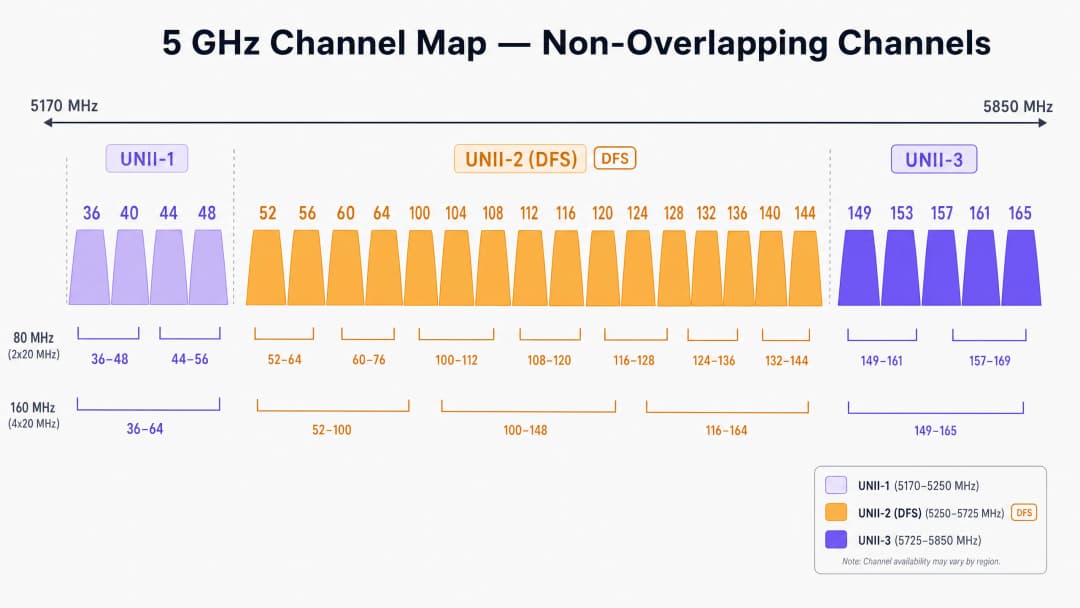
與僅提供三個互不重疊頻道的受限 2.4GHz 頻段不同,5GHz 頻譜提供多達 25 個互不重疊的 20MHz 頻道(取決於法規管轄區)。然而,並非所有 5GHz 頻道都是一樣的。它們被劃分為特定的無授權國家資訊基礎設施(UNII)頻段,每個頻段都有不同的營運規則。
UNII-1 和 UNII-3:安全避風港
在大多數地區,UNII-1(36、40、44、48)和 UNII-3(149、153、157、161、165)頻段中的頻道通常不受雷達干擾限制。對於 Retail 或 Hospitality 的高密度部署,這些頻道代表了您頻道計劃中風險最低的起點。由於 UNII-3 運作在稍高的頻率上,它穿過牆壁時的衰減略高,這實際上有利於限制相鄰房間或樓層之間的同頻道干擾。
UNII-2 和 DFS (Dynamic Frequency Selection)
UNII-2 頻段(頻道 52–144)與現有的軍用及氣象雷達系統共用頻譜。若要使用這些頻道,基地台必須支援 DFS。如果 AP 偵測到雷達脈衝,必須立即騰出該頻道,且在 30 分鐘內不得返回。
在機場、港口或氣象站附近的環境中,DFS 事件可能會導致突然且無法解釋的用戶端斷線。如果您的場域遇到間歇性斷線,檢查控制器記錄中的 DFS 事件是必不可少的第一步。
干擾類型
企業無線網路中的干擾通常分為以下兩類:
- 同頻道干擾 (CCI):當多個 AP(您的或鄰近的)在同一個頻道上運作時會發生這種情況。因為 WiFi 是一種受載波感測多重存取/碰撞規避 (CSMA/CA) 機制控制的半雙工媒介,同頻道上的所有設備都必須輪流傳輸。高 CCI 會導致空口時間爭用增加並提高延遲。
- 非 WiFi 干擾:在 5GHz 頻段發射射頻能量但不遵循 802.11 協定的設備。常見的干擾源包括無線電話、無線影音傳輸器和專有 IoT 感測器。與 CCI 不同,非 WiFi 干擾會提高底噪,損壞 WiFi 訊框並觸發重傳。
實作指南:掃描與頻道選擇
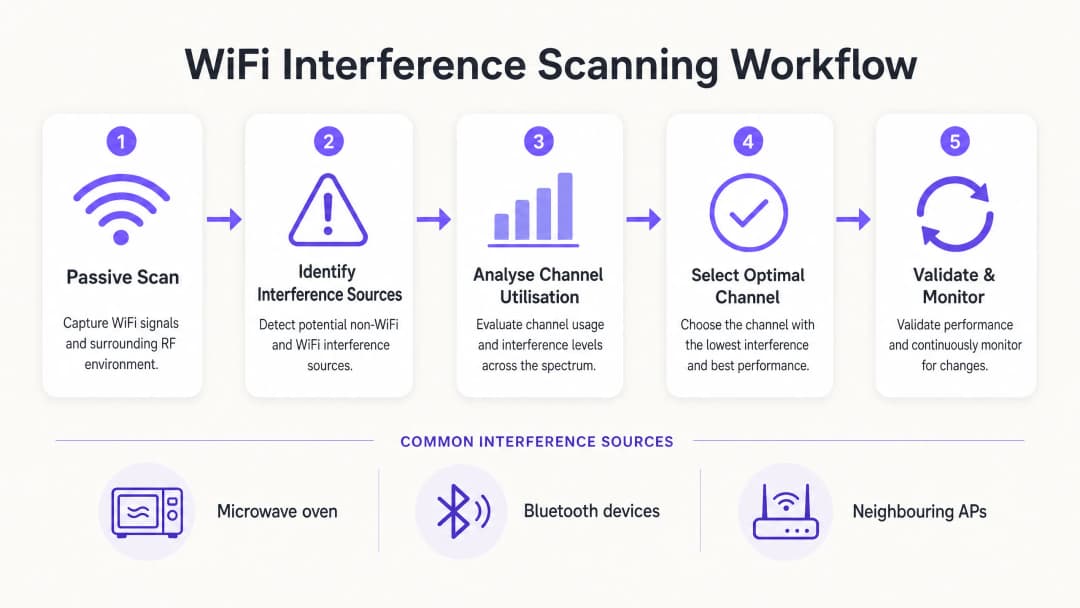
要確定 5GHz 的最佳頻道,您必須超越預設的 "Auto-RF" 設定,並實施結構化的掃描方法。
步驟 1:建立環境基準
在進行任何變更之前,請先建立基準。利用您控制器的內建監控工具或與 WiFi Analytics 平台整合,以擷取:
- 平均與尖峰頻道使用率百分比。
- 用戶端關聯率與漫遊成功指標。
- 尖峰營運時間內的基本吞吐量。
關鍵規則: 絕不要在空無一人的場域中進行首次射頻掃描。週日凌晨 2:00 的掃描無法顯現會議中 5,000 名與會者所產生的干擾。
步驟 2:執行頻譜分析
僅依賴標準的 AP 掃描只能偵測到其他 802.11 網路。要識別非 WiFi 干擾,您需要硬體頻譜分析。
- 層級 1(基本):基於控制器的 AP 頻譜監控器。許多企業級 AP 都配有專用的掃描射頻,可以識別非 WiFi 特徵。
- 層級 2(進階):專用硬體,例如 Ekahau Sidekick 或 MetaGeek Chanalyzer。這些工具可擷取整個頻譜中的原始射頻能量,使工程師能夠識別藍牙設備、影音傳輸器或故障硬體的特定特徵。
步驟 3:分析頻道使用率
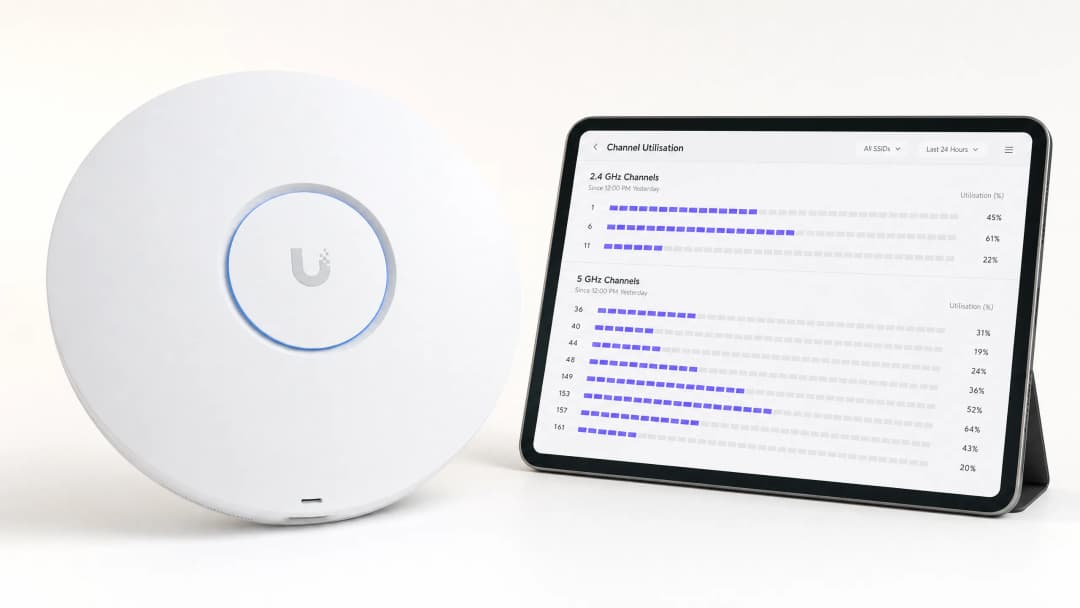
頻道使用率是決定效能最關鍵的指標。它代表頻道處於忙碌狀態(正在傳輸數據或被干擾阻斷)的時間百分比。
- < 20%:極佳。有充足的容量供高吞吐量應用程式使用。
- 20% - 50%:對於活躍的企業環境屬正常範圍。
- > 70%:關鍵臨界值。當使用率達到 70% 時,延遲會呈指數級暴增,客戶端體驗也會迅速惡化。
如果 AP 報告其 5GHz 頻道的使用率 >70%,則需要立即進行修復。
步驟 4:選擇最佳頻道
為 5GHz 選擇最佳頻道時,請遵循以下決策矩陣:
- 在尖峰時段識別使用率 < 20% 的頻道。
- 優先選擇 UNII-1 和 UNII-3 頻道,以避免與 DFS 相關的斷線,特別是在醫院急診室(醫療保健)或高流量交通樞紐(交通運輸)等關鍵區域。
- 如果 UNII-1/3 已飽和,請選擇性地啟用 DFS 頻道 (UNII-2),但在接下來的 14 天內要積極監控記錄中的雷達偵測事件。
- 在超高密度環境(如體育場)中標準化使用 20MHz 頻道寬度。僅在需要峰值單一吞吐量的低密度區域使用 40MHz 或 80MHz 的綁定頻道。
最佳實踐與疑難排解
在高密度區域停用自動頻道
雖然無線電資源管理 (RRM) 和自動頻道演算法對於標準辦公室環境已足夠,但它們在複雜的場地中經常失敗。在現場活動期間不受控制的頻道變更可能會導致大規模的客戶端斷線。在體育場或大型會議中心,強制要求進行靜態、精心規劃的頻道設計。
縮小細胞大小
如果所有 5GHz 頻道都顯示高使用率,則變更頻道無法解決問題。相反地,您必須透過縮小 AP 的射頻覆蓋範圍來減少同頻道干擾。降低 AP 的發射 (Tx) 功率並提高最低強制資料速率(例如:停用低於 12 Mbps 或 24 Mbps 的速率)。這會強迫客戶端更早進行漫遊,並防止遠處的客戶端消耗過多的空口時間。
延伸閱讀
如需進一步瞭解優化基礎架構的策略,請閱讀我們的指南:如何在不購買新無線基地台的情況下提高 WiFi 速度(或德文版本:Wie man die WiFi-Geschwindigkeit verbessert, ohne neue Access Points zu kaufen)。如需瞭解現代存取的洞察,請參閱 WiFi 助手如何在 2026 年實現無密碼存取 以及我們最近發布的 離線地圖模式發布。此外,亦可閱讀我們在 Iain Fox 聲明 中的策略方向。
投資報酬率與商業影響
優化 5GHz 頻道分配可在無需資本支出的情況下提供可衡量的商業價值:
| 指標 | 優化前(典型) | 優化後目標 | 商業影響 |
|---|---|---|---|
| 頻道利用率 | > 75% | < 40% | 消除尖峰時段的延遲突波。 |
| 漫遊失敗 | 10-15% | < 2% | 為漫遊員工提供無縫的語音 / 視訊通話。 |
| 支援工單 | 高數量 (斷線) | 極少 | 降低 IT 營運支出 (OpEx)。 |
| 避免資本支出 | 不適用 | 高 | 延後對昂貴硬體進行升級換代的需求。 |
透過將射頻頻譜視為受管理的資產,而非無形的公用事業,IT 領導者可以確保其無線基礎架構支援現代企業營運日益增長的需求。
關鍵定義
同通道干擾 (CCI)
當多個存取點在完全相同的通道上運作時引起的干擾,迫使它們共享空閒時間。
CCI 是密集部署中 WiFi 緩慢的主要原因。IT 團隊必須透過仔細規劃通道重用和管理 AP 傳輸功率來管理 CCI。
動態頻率選擇 (DFS)
在 UNII-2 頻段中運作的裝置偵測雷達系統並自動騰出通道的法規要求。
雖然 DFS 通道提供了寶貴的額外頻譜,但雷達偵測事件可能會導致用戶端突然斷線,因此在機場或氣象站附近使用這些通道具有風險。
通道利用率
特定射頻通道忙於傳輸或接收數據,或被干擾阻斷的時間百分比。
這是 WiFi 健康狀況最關鍵的指標。高利用率(>70%)與糟糕的使用者體驗和高延遲直接相關。
UNII 頻段
免授權國家資訊基礎設施無線電頻段。5GHz 頻譜分為 UNII-1、UNII-2(DFS)和 UNII-3。
了解 UNII 頻段規則對於通道規劃至關重要,因為不同的頻段有不同的傳輸功率限制和雷達規避要求。
CSMA/CA
載波偵聽多路存取/衝突規避。WiFi 用於確保一次只有一個裝置在通道上傳輸的協定。
由於 WiFi 為半雙工並使用 CSMA/CA,因此對干擾高度敏感。如果通道雜訊多,裝置將無限期等待傳輸。
頻譜分析
測量跨頻段原始射頻(RF)能量的過程,而不僅僅是解碼 WiFi 訊框。
對於尋找微波爐、Bluetooth 裝置或故障影音設備等非 WiFi 干擾源至關重要,這些是標準 AP 掃描無法偵測到的。
RSSI
接收訊號強度指示。用以衡量裝置接收來自基地台訊號品質的測量值。
雖然強大的 RSSI 是必要條件,但如果頻道利用率過高或存在干擾,這並不足以保證良好的效能。
Bonded Channels
將多個 20MHz 頻道合併為更寬的頻道(例如:40MHz、80MHz),以提高理論上的最大吞吐量。
綁定頻道會減少可用且互不重疊的頻道總數,因此不適合用於高密度的企業部署。
範例
一家位於密集城市中心、擁有 400 間客房的飯店,在晚上尖峰時段(下午 7 點至晚上 10 點)遭遇房客強烈抱怨 WiFi 斷線。控制器顯示 AP 正在隨機更改通道,且 5GHz 頻段的通道利用率經常超過 85%。
- 停用控制器的 Auto-RF/RRM 功能,以停止尖峰時段不可預測的通道變更。 2. 專門在下午 7 點至晚上 10 點之間進行被動射頻掃描,以擷取真實的干擾基準。 3. 確認鄰近的住宅路由器正在飽和 UNII-1 通道。 4. 手動將飯店走廊的 AP 重新分配到 DFS 通道(UNII-2),因為該場地不靠近機場。 5. 將 AP 傳輸功率降低 3dBm,以縮小資料池大小並減少相鄰客房之間的同通道干擾。
一家零售配送中心依賴手持式掃描器進行庫存管理。儘管訊號強度很強(-60 dBm),但掃描器在通道之間移動時經常斷線。AP 配置為在 5GHz 頻段上使用 80MHz 通道寬度。
- 重新配置整個 5GHz 通道計劃,使用 20MHz 通道寬度代替 80MHz。 2. 將最低強制資料速率提高到 24 Mbps,以清除慢速用戶端並更快釋放空閒時間。 3. 使用頻譜分析儀稽核環境中是否存在非 WiFi 干擾,因為工業環境通常擁有舊型的射頻設備。
練習題
Q1. 您正在一間距離大型國際機場 2 英里的醫院部署 WiFi。IT 主管希望使用所有可用的 5GHz 頻道以最大化容量。您會推薦使用 UNII-2(DFS)頻道嗎?
提示:考量天氣和航空雷達系統對 UNII-2 頻道的影響。
查看標準答案
不,強烈不建議。由於鄰近大型機場,極有可能頻繁觸發雷達偵測事件。當 AP 偵測到雷達時,必須立即中斷所有用戶端連線並避開該頻道。在醫院環境中,關鍵的醫療遙測系統可能依賴 WiFi,這些突發的斷線會帶來無法接受的營運風險。建議堅持使用 UNII-1 和 UNII-3 頻道。
Q2. 某體育場的部署在賽事期間遭受嚴重的同頻道干擾(CCI)。目前 AP 在 5GHz 頻段上設置為 80MHz 頻道寬度以「最大化速度」。您應該實施什麼架構調整?
提示:思考頻道寬度與可用互不重疊頻道數量之間的關係。
查看標準答案
將整個部署的頻道寬度從 80MHz 降至 20MHz。使用 80MHz 頻道會使每個 AP 消耗四個標準的 20MHz 頻道,從而急劇減少可用且不重疊的頻道數量。在體育場中,容量(處理數千台裝置)遠比單一裝置的尖峰吞吐量重要。恢復到 20MHz 頻道可提供多達 25 個互不重疊的頻道,從而大幅減少 CCI。
Q3. 某零售店回報其無線銷售點(POS)終端機經常斷線,但僅發生在中午 12:00 到下午 2:00 之間。標準 AP 記錄顯示訊號強度良好。下一步的疑難排解步驟是什麼?
提示:零售或辦公環境在中午 12 點到下午 2 點之間會發生什麼事?
查看標準答案
在中午 12:00 - 下午 2:00 期間使用硬體頻譜分析工具(例如 Ekahau Sidekick)進行分析。這個特定的時間段強烈暗示存在非 WiFi 干擾,極可能來自員工休息室的微波爐。標準 AP 掃描只能解碼 WiFi 訊框,無法「看到」來自微波爐的原始射頻(RF)能量,微波爐運作於 2.4GHz 頻段,會完全破壞 WiFi 傳輸。
繼續閱讀本系列
深入瞭解 RSSI 與訊號強度以實現最佳頻道規劃
本指南提供有關 RSSI、訊號雜訊比 (SNR) 及射頻 (RF) 傳播原理的全面技術深入剖析,以實現最佳頻道規劃。它為 IT 經理、網路架構師和場所營運總監提供實用策略,以減輕同頻道干擾與相鄰頻道干擾、最佳化 AP 部署,並利用分析工具在旅宿、零售和公共部門環境中產生可衡量的業務影響。
WiFi 6 對決 WiFi 5:它能解決通道干擾嗎?
本指南深入探討 WiFi 6 (802.11ax) 如何透過 OFDMA 與 BSS Coloring 技術,解決高密度企業環境中的通道干擾問題。它為 IT 經理、網路架構師和 CTO 提供了實用的部署策略、來自旅宿業與醫療業的真實案例研究,以及一個用於評估在無線網路效能至關重要的場所中進行基礎設施升級 ROI 的框架。
高密度場域的最佳 WiFi 頻道
為體育館、競技場和大型公共場所等高密度環境選擇和優化 WiFi 頻道的權威技術參考。內容涵蓋射頻(RF)物理學、5 GHz 與 6 GHz 頻段的頻道複用策略,以及為 IT 主管提供的實用部署指南。
對於您的特定設置有任何疑問嗎?
我們的團隊與超過 80,000 個場域的場域營運商、IT 經理和網路工程師合作。立即預約 20 分鐘的通話,我們將向您展示其他與您相似的用戶是如何解決此問題的。