

Guest WiFi टेक स्टॅक: मल्टी-साइट ब्रँड्ससाठी खरेदीदाराचे मार्गदर्शक
मल्टी-साइट ठिकाणांच्या ऑपरेटर्ससाठी एक सर्वसमावेशक तांत्रिक खरेदीदार मार्गदर्शक, जे आधुनिक Guest WiFi टेक स्टॅकच्या सहा स्तरांचे तपशीलवार वर्णन करते. हे APs, नेटवर्क कंट्रोलर्स, RADIUS authentication, Captive Portals, analytics आणि CRM एकत्रीकरणासाठी कार्यवाहीयोग्य मूल्यांकन निकष प्रदान करते, ज्यामुळे IT नेत्यांना 'बनवा की खरेदी करा' या निर्णयांमध्ये मार्गदर्शन करण्यास मदत होते.
🎧 हे मार्गदर्शक ऐका
ट्रान्सक्रिप्ट पहा

कार्यकारी सारांश
मल्टी-साइट ठिकाणांचे व्यवस्थापन करणाऱ्या IT नेत्यांसाठी— रिटेल इस्टेट्स आणि हॉस्पिटॅलिटी समूहांपासून ते हेल्थकेअर सुविधा आणि ट्रान्सपोर्ट हबपर्यंत—Guest WiFi हे मूलभूत सुविधेपासून एक धोरणात्मक मालमत्ता बनले आहे. एक आधुनिक Guest WiFi टेक स्टॅक नेटवर्क ऑपरेशन्स, डेटा अनुपालन आणि ग्राहक बुद्धिमत्ता यांच्या छेदनबिंदूवर स्थित आहे.
तथापि, अनेक संस्था खंडित विक्रेता लँडस्केपमुळे संघर्ष करतात, ज्यामुळे डेटा सायलो, एकत्रीकरण अडथळे आणि अनुपालन धोके निर्माण होतात. हे खरेदीदार मार्गदर्शक Guest WiFi टेक स्टॅकच्या सहा महत्त्वपूर्ण स्तरांचे विश्लेषण करते. हे एक विक्रेता-तटस्थ मूल्यांकन फ्रेमवर्क प्रदान करते, ज्यामुळे CTOs आणि नेटवर्क आर्किटेक्ट्सना त्यांची सध्याची पायाभूत सुविधांचे मूल्यांकन करण्यास, एकत्रीकरण बिंदू समजून घेण्यासाठी आणि त्यांचे Guest WiFi प्लॅटफॉर्म तयार करायचे, खरेदी करायचे की समाकलित करायचे याबद्दल माहितीपूर्ण निर्णय घेण्यासाठी मदत होते.
तांत्रिक सखोल विश्लेषण: स्टॅकचे सहा स्तर
एक मजबूत Guest WiFi आर्किटेक्चर सहा भिन्न स्तरांवर आधारित आहे. या स्तरांचे स्वतंत्रपणे मूल्यांकन करणे ही एक सामान्य आर्किटेक्चरल त्रुटी आहे; त्यांचे एकत्रीकरणामध्येच खरे मूल्य आहे.
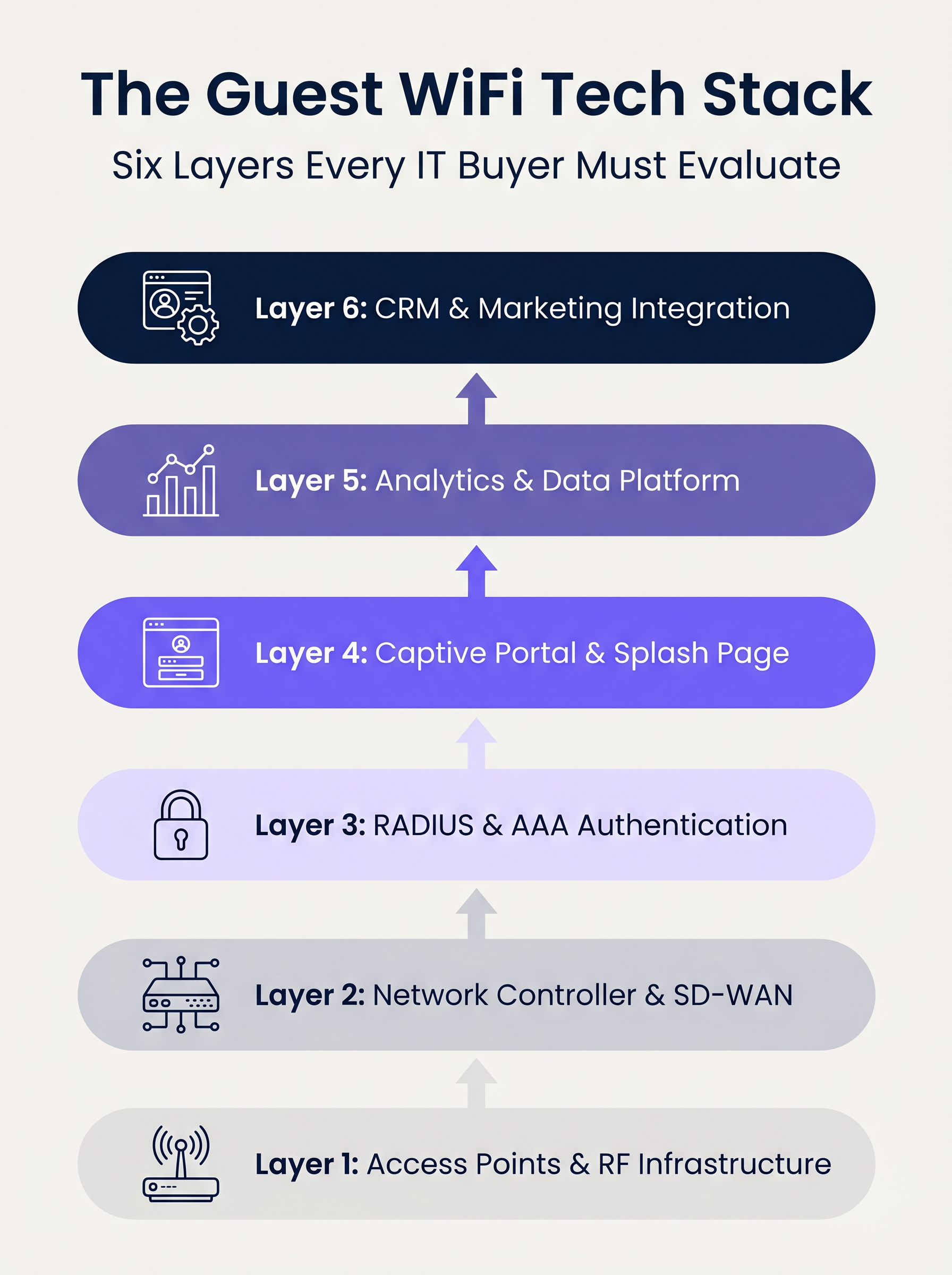
स्तर 1: Access Points आणि RF इन्फ्रास्ट्रक्चर
स्टॅकचा पाया रेडिओ फ्रिक्वेन्सी हार्डवेअर आहे. एंटरप्राइझ डिप्लॉयमेंट्समध्ये, Cisco Meraki, Aruba, Ruckus आणि Extreme Networks सारखे विक्रेते आघाडीवर आहेत. मल्टी-साइट डिप्लॉयमेंट्ससाठी APs चे मूल्यांकन करताना, केंद्रीकृत व्यवस्थापन क्षमता आणि झिरो-टच प्रोव्हिजनिंगच्या तुलनेत कच्चा थ्रूपुट दुय्यम असतो.
प्रमुख विचार:
- मानके: Wi-Fi 6 (802.11ax) हे मूलभूत आहे. स्पेक्ट्रमची गर्दी ही प्राथमिक मर्यादा असलेल्या उच्च-घनतेच्या वातावरणासाठी (उदा. स्टेडियम) Wi-Fi 6E निर्दिष्ट केले पाहिजे.
- सुरक्षा: WPA3 समर्थन अनिवार्य आहे, विशेषतः PCI DSS च्या कार्यक्षेत्रातील ठिकाणांसाठी.
- एकत्रीकरण: AP कंट्रोलरने अपस्ट्रीम ऑथेंटिकेशन आणि analytics स्तरांसह अखंड एकत्रीकरणासाठी मजबूत APIs उघड केले पाहिजेत.
स्तर 2: नेटवर्क कंट्रोलर आणि SD-WAN
हा स्तर ऑर्केस्ट्रेशन, धोरण अंमलबजावणी आणि ट्रॅफिक सेगमेंटेशन हाताळतो. लेगसी MPLS वरून SD-WAN आर्किटेक्चर्सकडे संक्रमणामुळे मल्टी-साइट नेटवर्क व्यवस्थापनात बदल झाला आहे. SD-WAN स्थानिक इंटरनेट ब्रेकआउटसह केंद्रीकृत धोरण परिभाषा सक्षम करते, ज्यामुळे प्रशासकांना संपूर्ण इस्टेटमध्ये बँडविड्थ कॅप्स आणि सामग्री फिल्टरिंग समान रीतीने लागू करता येते. या आर्किटेक्चरल बदलांच्या सखोल माहितीसाठी, आधुनिक व्यवसायांसाठी मुख्य SD WAN फायदे पुनरावलोकन करा.
स्तर 3: RADIUS आणि AAA ऑथेंटिकेशन
ऑथेंटिकेशन, ऑथोरायझेशन आणि अकाउंटिंग (AAA) हे Guest डिप्लॉयमेंट्समध्ये वारंवार सर्वात कमकुवत दुवा असते. ओपन नेटवर्क्स किंवा साध्या प्री-शेअर्ड कीज (PSKs) वर अवलंबून राहिल्याने ठिकाणाला महत्त्वपूर्ण सुरक्षा आणि अनुपालन धोक्यांना सामोरे जावे लागते.
मजबूत RADIUS बॅकएंडसह IEEE 802.1X लागू केल्याने प्रति-वापरकर्ता ऑथेंटिकेशन आणि सेशन अकाउंटिंग सक्षम होते. FreeRADIUS हा एक व्यवहार्य ओपन-सोर्स पर्याय असला तरी, एंटरप्राइझ डिप्लॉयमेंट्सना सामान्यतः स्केल, रिडंडन्सी आणि Captive Portal सह एकत्रीकरण हाताळण्यासाठी क्लाउड-होस्टेड, व्यवस्थापित RADIUS सेवेची आवश्यकता असते.
स्तर 4: Captive Portal आणि स्प्लॅश पेज
Captive Portal हे नेटवर्क ॲक्सेस आणि ब्रँड अनुभवाचा छेदनबिंदू आहे. तांत्रिकदृष्ट्या योग्य पोर्टलने HTTP वर DNS हायजॅकिंगसारख्या अप्रचलित तंत्रांवर अवलंबून न राहता डिव्हाइस-विशिष्ट Captive नेटवर्क असिस्टंट्स (उदा. Apple CNA) अखंडपणे हाताळले पाहिजेत.
याव्यतिरिक्त, GDPR आणि CCPA सारख्या फ्रेमवर्क अंतर्गत वापरकर्त्याची संमती मिळवण्यासाठी पोर्टल हे प्राथमिक यंत्रणा आहे. याने सोशल लॉगिनसाठी OAuth 2.0 ला समर्थन दिले पाहिजे आणि अपरिवर्तनीय, ऑडिट-तयार संमती रेकॉर्ड तयार केले पाहिजेत.
स्तर 5: Analytics आणि डेटा प्लॅटफॉर्म
हा स्तर नेटवर्क टेलीमेट्रीला कार्यवाहीयोग्य बुद्धिमत्तेत रूपांतरित करतो. प्रेझेन्स analytics मुळे थांबण्याचा वेळ आणि पाऊलखुणांचा मागोवा घेतला जातो, परंतु रणनीतिक मूल्य ओळख निराकरणामध्ये आहे—डिव्हाइस MAC ॲड्रेसला प्रमाणित वापरकर्ता प्रोफाइलशी जोडणे.
iOS 14 आणि Android 10 मध्ये डीफॉल्टनुसार MAC ॲड्रेस रँडमायझेशन लागू केल्यामुळे, केवळ डिव्हाइस आयडेंटिफायर्सवर अवलंबून राहणे कालबाह्य झाले आहे. ओळख-आधारित analytics अचूक, अनुपालन-अनुरूप अंतर्दृष्टी प्रदान करतात. हा डेटा कसा मूल्य निर्माण करतो याच्या सखोल माहितीसाठी, आमच्या WiFi Analytics क्षमता आणि रिटेल WiFi: ट्रॅफिक Analytics पासून वैयक्तिकृत इन-स्टोअर अनुभवांपर्यंत यावरील आमचे विशिष्ट मार्गदर्शक एक्सप्लोर करा.
स्तर 6: CRM आणि मार्केटिंग एकत्रीकरण
शीर्ष स्तर नेटवर्क डेटाचे व्यावसायिक परिणामांमध्ये रूपांतर करते, Salesforce, HubSpot किंवा bespoke Customer Data Platforms (CDPs) सारख्या प्लॅटफॉर्मसह द्वि-दिशात्मक API एकत्रीकरणाद्वारे. जेव्हा एखादा ज्ञात Guest नेटवर्कवर ऑथेंटिकेट करतो, तेव्हा रिअल-टाइम वेबहुक्सने स्वयंचलित वर्कफ्लो—जसे की लॉयल्टी पॉइंट अपडेट्स किंवा वैयक्तिकृत मेसेजिंग—ट्रिगर केले पाहिजेत.
अंमलबजावणी मार्गदर्शक
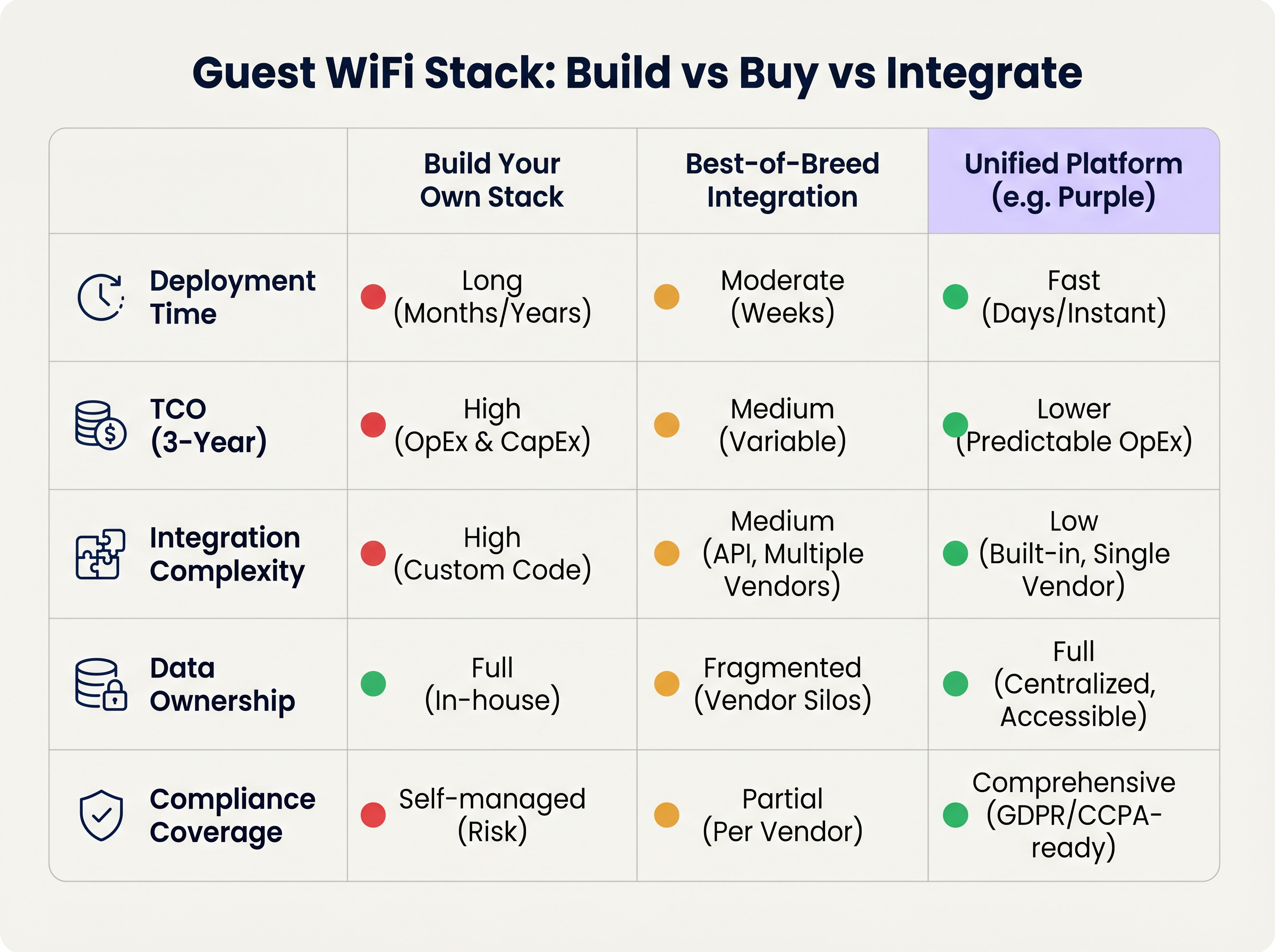
मल्टी-साइट Guest WiFi स्टॅक डिप्लॉय करताना, IT नेत्यांना एक मूलभूत आर्किटेक्चरल निर्णय घ्यावा लागतो: तयार करा, खरेदी करा किंवा समाकलित करा.
दृष्टिकोन 1: तुमचा स्वतःचा स्टॅक तयार करा
AP विक्रेता, एक कस्टम RADIUS सर्व्हर, एक bespoke Captive Portal आणि एक घरगुती analytics पाइपलाइन एकत्र जोडल्याने जास्तीत जास्त नियंत्रण मिळते परंतु त्यासाठी महत्त्वपूर्ण अभियांत्रिकी संसाधने लागतात. एकूण मालकी खर्च (TCO) चालू देखभाल, अनुपालन व्यवस्थापन आणि API अद्यतनांकडे मोठ्या प्रमाणात झुकलेला असतो.
दृष्टिकोन 2: बेस्ट-ऑफ-ब्रीड एकत्रीकरण
प्रत्येक स्तरावर सर्वोत्तम विक्रेता निवडणे आणि त्यांना API द्वारे एकत्रित करणे हे परिपक्व IT संस्थांमध्ये सामान्य आहे. तथापि, एकत्रीकरणाची जटिलता जास्त असते. विक्रेता अद्यतने API कनेक्शन खंडित करू शकतात, डेटा मॉडेल्स अनेकदा भिन्न असतात आणि अनेक सपोर्ट डेस्कवर समस्यानिवारण केल्याने Mean Time to Resolution (MTTR) वाढते.
दृष्टिकोन 3: एकीकृत प्लॅटफॉर्म (The Purple Approach)
एक एकीकृत प्लॅटफॉर्म विद्यमान Layer 1 आणि Layer 2 पायाभूत सुविधांवर कार्य करतो, प्रमाणीकरण, captive portal, विश्लेषणे आणि CRM एकत्रीकरण एकाच उपायात एकत्रित करतो. हा दृष्टिकोन उपयोजन वेळ मोठ्या प्रमाणात कमी करतो, अंदाजे OpEx द्वारे TCO कमी करतो आणि अनुपालन व्यवस्थापन केंद्रीकृत करतो. उदाहरणार्थ, Purple 90 पेक्षा जास्त AP विक्रेत्यांशी अखंडपणे एकत्रित होते, ज्यामुळे हार्डवेअर लॉक-इन टाळता येते आणि एंटरप्राइझ-ग्रेड विश्लेषणे प्रदान केली जातात.
सर्वोत्तम पद्धती
- पोर्टलला हार्डवेअरपासून वेगळे करा: तुमच्या AP विक्रेत्याने प्रदान केलेला मूळ captive portal वापरणे टाळा. पोर्टल स्तर वेगळे केल्याने तुम्ही भविष्यात वेगळ्या हार्डवेअर विक्रेत्याकडे स्थलांतरित झाल्यासही तुमचा अतिथी डेटा आणि सानुकूल कार्यप्रवाह टिकवून ठेवता.
- कठोर VLAN विभाजन लागू करा: प्रत्येक साइटवर किमान तीन SSIDs ठेवा: Corporate (802.1X), Guest (Captive Portal), आणि IoT (Isolated VLAN). गेस्ट VLAN ला कॉर्पोरेट नेटवर्कवर कोणताही मार्ग नाही याची खात्री करा आणि कठोर फायरवॉल धोरणांद्वारे रहदारी प्रतिबंधित करा.
- डिव्हाइसेससाठी नव्हे, तर ओळखीसाठी डिझाइन करा: चालू असलेल्या OS-स्तरीय गोपनीयता बदलांपासून भविष्यात सुरक्षित राहण्यासाठी MAC ॲड्रेसऐवजी प्रमाणित वापरकर्ता प्रोफाइलभोवती तुमची विश्लेषण पाइपलाइन तयार करा.
समस्यानिवारण आणि जोखीम कमी करणे
- MAC Randomisation अपयश: जर विश्लेषणे कमी पुनरावृत्ती दरांसह कृत्रिमरित्या वाढलेली अभ्यागत संख्या दर्शवत असतील, तर MAC randomisation डेटाला विकृत करत असण्याची शक्यता आहे. उपाय: वापरकर्ता ओळखीशी विश्लेषणे जोडण्यासाठी captive portal प्रमाणीकरण लागू करा.
- Captive Portal ट्रिगर होत नाही: क्लायंट डिव्हाइसवर कठोर HTTPS अंमलबजावणी (HSTS) किंवा OS Captive Network Assistant च्या अयोग्य हाताळणीमुळे हे अनेकदा घडते. उपाय: पोर्टल पायाभूत सुविधा वैध SSL प्रमाणपत्रे वापरते आणि Apple आणि Google द्वारे captive नेटवर्क शोधण्यासाठी वापरल्या जाणाऱ्या विशिष्ट URLs योग्यरित्या इंटरसेप्ट करते याची खात्री करा.
- अनुपालन ऑडिट्स: विक्रेत्यांमध्ये विसंगत डेटा धारणा धोरणांमुळे खंडित स्टॅक अनेकदा GDPR ऑडिट्समध्ये अयशस्वी होतात. उपाय: संमती व्यवस्थापन आणि डेटा धारणा एका एकीकृत प्लॅटफॉर्ममध्ये केंद्रीकृत करा जो सत्याचा एकमेव स्रोत म्हणून कार्य करतो.
ROI आणि व्यावसायिक परिणाम
आधुनिक गेस्ट WiFi स्टॅकचा ROI दोन घटकांवर मोजला जातो: IT कार्यक्षमता आणि व्यावसायिक मूल्य.
- IT कार्यक्षमता: केंद्रीकृत व्यवस्थापन आणि एकीकृत प्लॅटफॉर्म दृष्टिकोन उपयोजन वेळ महिन्यांवरून दिवसांवर आणतो. स्वयंचलित ऑनबोर्डिंग आणि झिरो-टच प्रोव्हिजनिंगमुळे नेटवर्क ॲक्सेसशी संबंधित Tier 1 सपोर्ट तिकिटे 40% पर्यंत कमी होतात.
- व्यावसायिक मूल्य: फर्स्ट-पार्टी डेटा कॅप्चर करून आणि CRM प्रणालींशी एकत्रित करून, ठिकाणे WiFi-आधारित मार्केटिंग मोहिमांना थेट महसूल देऊ शकतात. किरकोळ वातावरणात, प्रोफाइल-आधारित प्रमाणीकरण आणि लक्ष्यित सहभाग ग्राहकांचे आजीवन मूल्य लक्षणीयरीत्या वाढवू शकतात, ज्यामुळे नेटवर्क खर्च केंद्रातून महसूल-निर्माण करणाऱ्या मालमत्तेत रूपांतरित होते.
महत्त्वाच्या संज्ञा आणि व्याख्या
IEEE 802.1X
An IEEE Standard for port-based Network Access Control (PNAC) that provides an authentication mechanism to devices wishing to attach to a LAN or WLAN.
Essential for securing corporate networks and advanced guest deployments, moving beyond simple shared passwords.
RADIUS (Remote Authentication Dial-In User Service)
A networking protocol that provides centralised Authentication, Authorization, and Accounting (AAA) management for users who connect and use a network service.
The backend engine that validates user credentials and tracks session data in a secure guest WiFi deployment.
Captive Network Assistant (CNA)
The pseudo-browser built into mobile operating systems (iOS, Android) that automatically detects a captive portal and prompts the user to log in.
If a WiFi platform does not interact correctly with the CNA, users will experience a broken login flow and assume the network is down.
MAC Randomisation
A privacy feature in modern mobile OSs where the device broadcasts a fake, rotating MAC address to public networks rather than its true hardware address.
This feature breaks legacy presence analytics systems that rely on MAC addresses to count unique visitors and track dwell time.
Identity Resolution
The process of matching a network connection event to a known, authenticated customer profile within a database.
The critical step that turns anonymous network traffic into actionable marketing intelligence.
Zero-Touch Provisioning (ZTP)
A deployment method where network devices (like APs) automatically download their configuration from a central controller the moment they are plugged in.
Crucial for multi-site operators to deploy infrastructure rapidly without requiring highly skilled engineers on-site.
WPA3
The latest generation of Wi-Fi security, providing enhanced cryptographic strength and better protection against brute-force attacks.
A mandatory requirement for any modern network deployment, especially those processing payments or handling sensitive data.
Webhook
A method for augmenting or altering the behaviour of a web page or web application with custom callbacks, triggered by specific events.
Used to push real-time data from the WiFi platform to a CRM (e.g., triggering a welcome email the moment a guest connects).
केस स्टडीज
A 200-site retail chain needs to upgrade its legacy guest WiFi. They currently use Cisco Meraki APs with the native Meraki splash page, but marketing cannot export the data easily, and IT is concerned about GDPR compliance regarding data retention.
The chain should retain their Meraki Layer 1/2 infrastructure to avoid massive CapEx. They must deploy a unified Layer 4-6 platform (like Purple) via API integration with the Meraki dashboard. The new architecture will use Meraki for RF delivery and SD-WAN routing, while the unified platform handles the captive portal, RADIUS authentication, and consent capture. The platform will automatically enforce a 12-month data retention policy to satisfy GDPR requirements and provide a bi-directional API sync to their central CRM.
A large stadium complex experiences severe captive portal timeouts and authentication failures during half-time when 15,000 users attempt to connect simultaneously.
The issue is a bottleneck at the Layer 3 (RADIUS) and Layer 4 (Portal) infrastructure, which cannot handle the concurrent connection spikes. The solution requires migrating from an on-premise RADIUS server to an auto-scaling cloud RADIUS service. Additionally, the AP configuration must be optimised to aggressively drop weak client connections (Minimum Bitrate requirements) to preserve airtime, and the captive portal must be served via a robust CDN to handle the burst in HTTP requests.
परिस्थिती विश्लेषण
Q1. You are the IT Director for a 50-site hospital trust. You need to deploy guest WiFi that captures user demographics, but you are subject to strict data sovereignty and compliance audits. A vendor proposes a solution where the APs handle authentication and send data directly to their proprietary cloud analytics tool. Do you accept?
💡 संकेत:Consider the implications of hardware lock-in and audit requirements for data processing agreements.
शिफारस केलेला दृष्टिकोन दाखवा
Reject the proposal. Relying on the AP vendor's proprietary cloud tool creates hardware lock-in and fragments compliance management. Instead, implement a unified platform that overlays the AP infrastructure. This ensures you maintain ownership of the data, can enforce granular consent and retention policies centrally, and can switch AP hardware in the future without losing your compliance architecture or historical data.
Q2. A retail brand wants to trigger an immediate push notification via their mobile app when a high-tier loyalty member walks into a store. They currently rely on MAC address tracking from their APs to detect presence. Why will this fail, and how should it be architected?
💡 संकेत:Think about modern mobile OS privacy features and the difference between presence and identity.
शिफारस केलेला दृष्टिकोन दाखवा
This will fail because iOS and Android use MAC randomisation, meaning the APs will see a different, fake MAC address each time the device connects, making it impossible to reliably identify the loyalty member passively. The architecture must shift to identity resolution via authentication. The user must authenticate via the captive portal (or via an integration like OpenRoaming/Passpoint), binding their session to their profile. Once authenticated, the WiFi platform can use a webhook to signal the CRM/App backend to trigger the notification.
Q3. During a network refresh, you are evaluating Wi-Fi 6 vs Wi-Fi 6E for a chain of small coffee shops (max capacity 40 people). The Wi-Fi 6E access points are 40% more expensive. Which do you choose?
💡 संकेत:Consider the primary benefit of the 6 GHz band and the density of the environment.
शिफारस केलेला दृष्टिकोन दाखवा
Choose Wi-Fi 6. Wi-Fi 6E introduces the 6 GHz band, which is highly beneficial for relieving spectrum congestion in ultra-high-density environments like stadiums or large auditoriums. For a small coffee shop with a maximum capacity of 40 concurrent users, spectrum congestion is unlikely to be a critical issue. Wi-Fi 6 provides sufficient throughput and efficiency features (like OFDMA) at a lower CapEx, improving the overall ROI of the deployment.
महत्त्वाचे निष्कर्ष
- ✓A modern guest WiFi stack consists of six layers: AP infrastructure, Network Controller, RADIUS, Captive Portal, Analytics, and CRM Integration.
- ✓Evaluating these layers in isolation leads to integration complexity, data silos, and compliance risks.
- ✓Mobile OS MAC randomisation means analytics must be anchored to authenticated user identities, not device MAC addresses.
- ✓Decoupling the captive portal and analytics platform from the physical access points prevents hardware lock-in and protects historical data.
- ✓For most multi-site operators, a Unified Platform approach delivers the fastest time-to-value and lowest TCO compared to building in-house or integrating multiple vendors.
- ✓Robust compliance architecture (GDPR/CCPA) requires centralised consent capture and automated data retention policies.




