

La pile technologique du WiFi invité : Un guide d'achat pour les marques multisites
Un guide d'achat technique complet pour les opérateurs de sites multisites, détaillant les six couches d'une pile technologique WiFi invité moderne. Il fournit des critères d'évaluation exploitables pour les APs, les contrôleurs réseau, l'authentification RADIUS, les captive portals, l'analyse et l'intégration CRM, aidant les leaders informatiques à prendre des décisions éclairées entre construire ou acheter.
🎧 Écouter ce guide
Voir la transcription

Résumé Exécutif
Pour les leaders informatiques gérant des sites multisites — des domaines du Commerce de détail et des groupes d' Hôtellerie aux établissements de Santé et aux pôles de Transport — le WiFi invité est passé d'un service de base à un atout stratégique. Une pile technologique WiFi invité moderne se situe à l'intersection des opérations réseau, de la conformité des données et de l'intelligence client.
Cependant, de nombreuses organisations sont confrontées à des paysages de fournisseurs fragmentés, créant des silos de données, des goulots d'étranglement d'intégration et des risques de conformité. Ce guide d'achat décortique les six couches critiques de la pile technologique WiFi invité. Il fournit un cadre d'évaluation neutre vis-à-vis des fournisseurs pour aider les CTOs et les architectes réseau à évaluer leur infrastructure actuelle, à comprendre les points d'intégration et à prendre des décisions éclairées quant à la construction, l'achat ou l'intégration de leur plateforme WiFi invité .
Plongée technique : Les six couches de la pile
Une architecture WiFi invité robuste est construite sur six couches distinctes. L'évaluation de ces couches de manière isolée est une erreur architecturale courante ; la véritable valeur réside dans l'intégration entre elles.
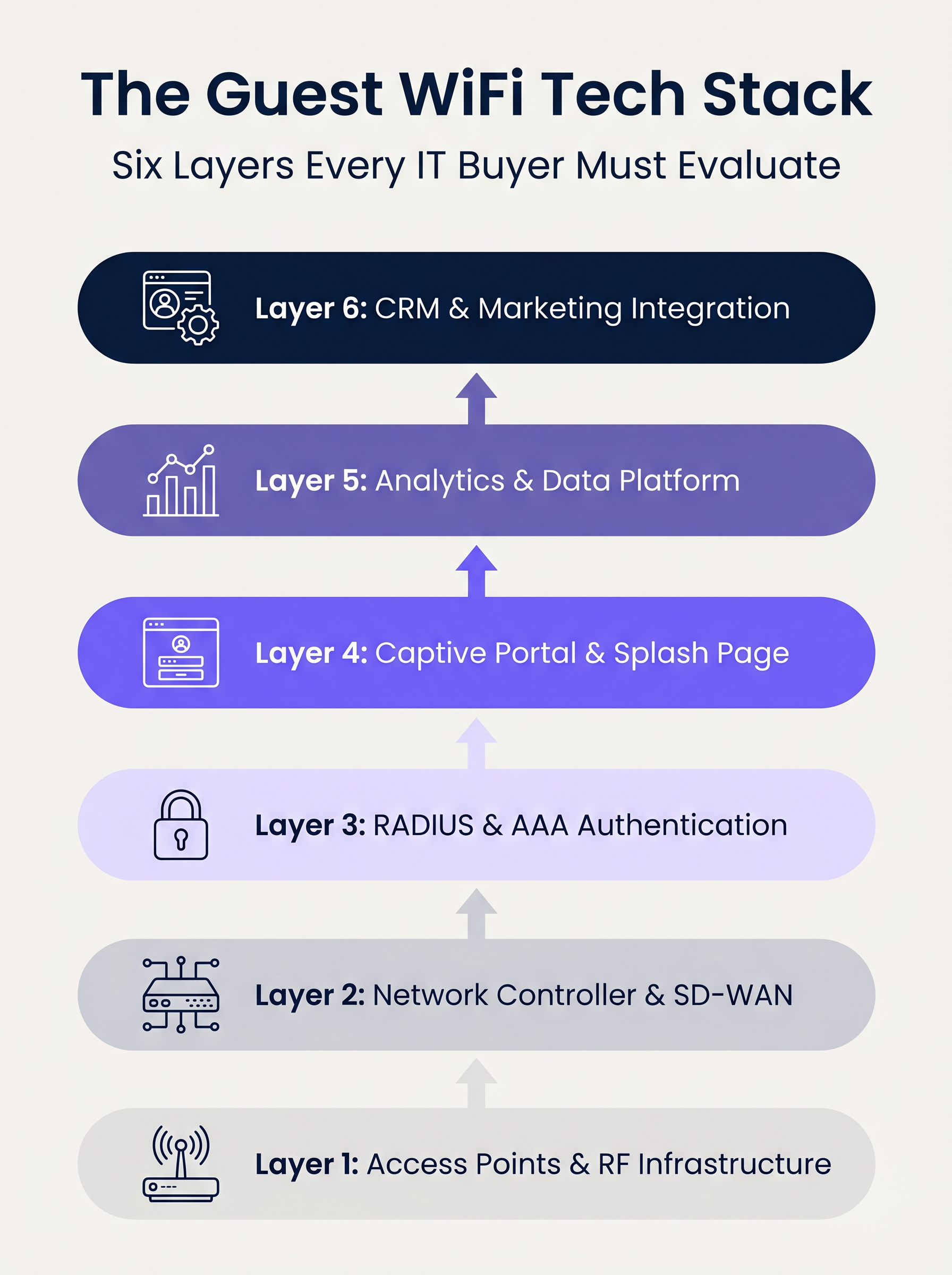
Couche 1 : Points d'accès et infrastructure RF
Le fondement de la pile est le matériel de radiofréquence. Dans les déploiements d'entreprise, des fournisseurs comme Cisco Meraki, Aruba, Ruckus et Extreme Networks dominent. Lors de l'évaluation des APs pour les déploiements multisites, le débit brut est secondaire par rapport aux capacités de gestion centralisée et au provisionnement sans contact.
Considérations clés :
- Normes : Le Wi-Fi 6 (802.11ax) est la référence. Le Wi-Fi 6E doit être spécifié pour les environnements à haute densité (par exemple, les stades) où la congestion du spectre est une contrainte majeure.
- Sécurité : Le support WPA3 est obligatoire, en particulier pour les sites relevant du champ d'application de la norme PCI DSS.
- Intégration : Le contrôleur d'AP doit exposer des APIs robustes pour une intégration transparente avec les couches d'authentification et d'analyse en amont.
Couche 2 : Contrôleur réseau et SD-WAN
Cette couche gère l'orchestration, l'application des politiques et la segmentation du trafic. La transition des architectures MPLS héritées vers les architectures SD-WAN a transformé la gestion des réseaux multisites. Le SD-WAN permet une définition centralisée des politiques avec une sortie Internet locale, permettant aux administrateurs d'appliquer des plafonds de bande passante et un filtrage de contenu uniformément sur l'ensemble du domaine. Pour une compréhension plus approfondie de ces changements architecturaux, consultez Les avantages clés du SD-WAN pour les entreprises modernes .
Couche 3 : Authentification RADIUS et AAA
L'authentification, l'autorisation et la comptabilité (AAA) est fréquemment le maillon faible des déploiements invités. S'appuyer sur des réseaux ouverts ou de simples clés pré-partagées (PSKs) expose le site à des risques importants en matière de sécurité et de conformité.
L'implémentation de l'IEEE 802.1X avec un backend RADIUS robuste permet l'authentification par utilisateur et la comptabilité des sessions. Bien que FreeRADIUS soit une option open-source viable, les déploiements d'entreprise nécessitent généralement un service RADIUS géré et hébergé dans le cloud pour gérer l'échelle, la redondance et l'intégration avec le captive portal.
Couche 4 : Portail Captif et Page d'accueil
Le captive portal est l'intersection de l'accès réseau et de l'expérience de marque. Un portail techniquement solide doit gérer les assistants de réseau captif spécifiques aux appareils (par exemple, Apple CNA) de manière transparente, sans s'appuyer sur des techniques obsolètes comme le détournement DNS via HTTP.
De plus, le portail est le mécanisme principal pour recueillir le consentement de l'utilisateur dans le cadre de réglementations comme le GDPR et le CCPA. Il doit prendre en charge OAuth 2.0 pour les connexions sociales et générer des enregistrements de consentement immuables et prêts pour l'audit.
Couche 5 : Plateforme d'analyse et de données
Cette couche transforme la télémétrie réseau en intelligence exploitable. L'analyse de présence suit le temps de séjour et l'affluence, mais la valeur stratégique réside dans la résolution d'identité — lier une adresse MAC d'appareil à un profil utilisateur authentifié.
Avec iOS 14 et Android 10 implémentant la randomisation des adresses MAC par défaut, s'appuyer uniquement sur les identifiants d'appareil est obsolète. L'analyse basée sur l'identité fournit des informations précises et conformes. Pour un aperçu complet de la façon dont ces données génèrent de la valeur, explorez nos capacités d' Analyse WiFi et notre guide spécifique sur Le WiFi en magasin : De l'analyse du trafic aux expériences personnalisées en magasin .
Couche 6 : Intégration CRM et Marketing
La couche supérieure convertit les données réseau en résultats commerciaux via des intégrations API bidirectionnelles avec des plateformes comme Salesforce, HubSpot ou des plateformes de données clients (CDPs) sur mesure. Des webhooks en temps réel devraient déclencher des flux de travail automatisés — tels que des mises à jour de points de fidélité ou des messages personnalisés — dès qu'un invité connu s'authentifie sur le réseau.
Guide d'implémentation
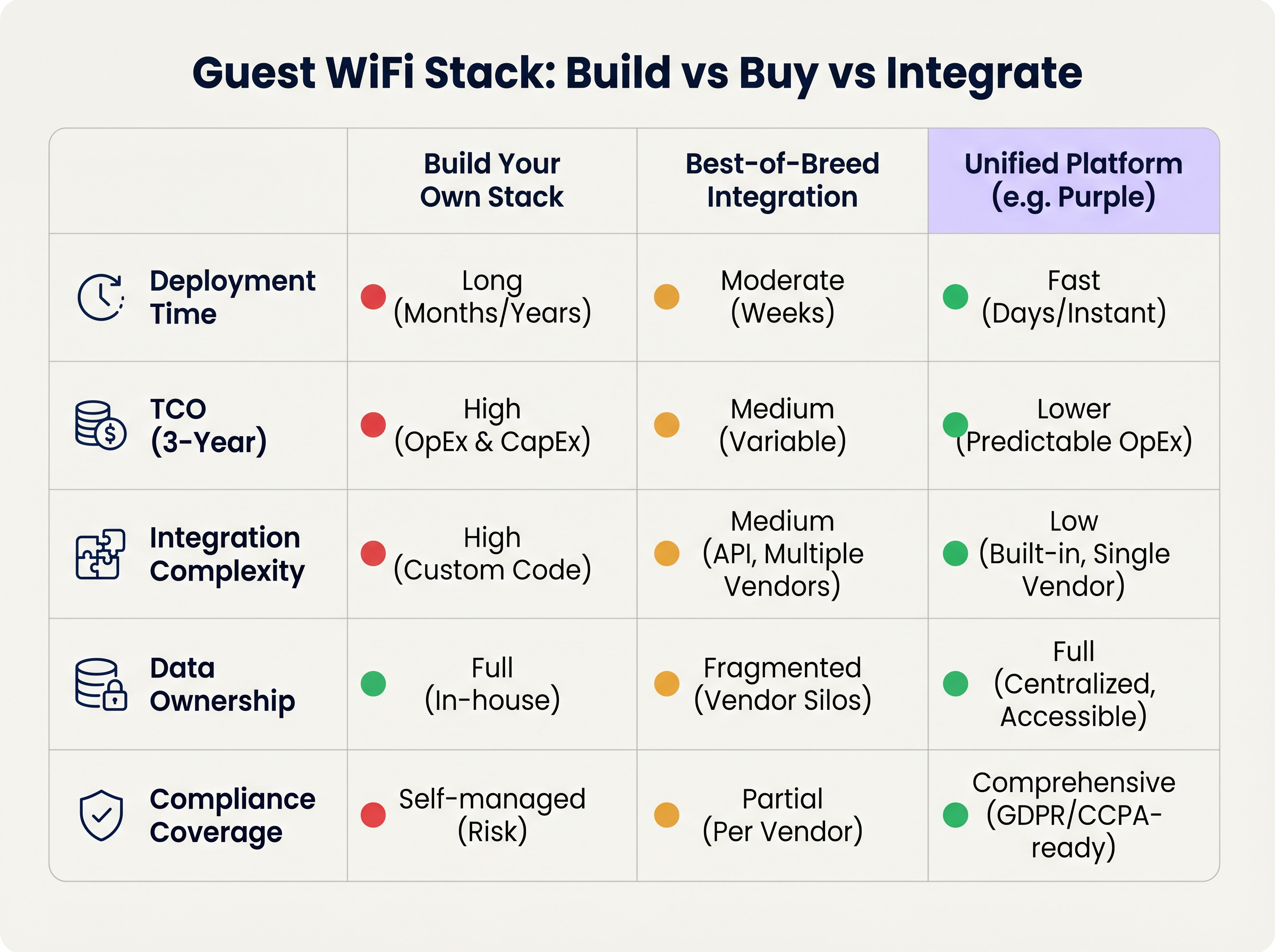
Lors du déploiement d'une pile WiFi invité multisite, les leaders informatiques sont confrontés à une décision architecturale fondamentale : Construire, Acheter ou Intégrer.
Approche 1 : Construire sa propre pile
Assembler un fournisseur d'AP, un serveur RADIUS personnalisé, un captive portal sur mesure et un pipeline d'analyse interne offre un contrôle maximal mais nécessite des ressources d'ingénierie importantes. Le coût total de possession (TCO) est fortement orienté vers la maintenance continue, la gestion de la conformité et les mises à jour d'API.
Approche 2 : Intégration des meilleures solutions
La sélection du fournisseur optimal à chaque couche et leur intégration via des API est courante dans les organisations informatiques matures. Cependant, la complexité de l'intégration est élevée. Les mises à jour des fournisseurs peuvent rompre les connexions API, les modèles de données divergent souvent, et le dépannage à travers plusieurs services d'assistance augmente le temps moyen de résolution (MTTR).
Approche 3 : Plateforme unifiée (L'approche Purple)
Une plateforme unifiée superpose l'infrastructure existante de couche 1 et de couche 2, consolidant l'authentification, le captive portal, l'analyse et l'intégration CRM en une solution unique. Cette approche réduit drastiquement le temps de déploiement, diminue le TCO grâce à des OpEx prévisibles, et centralise la gestion de la conformité. Purple, par exemple, s'intègre de manière transparente avec plus de 90 fournisseurs de points d'accès, évitant le verrouillage matériel tout en offrant des analyses de niveau entreprise.
Bonnes pratiques
- Désolidariser le portail du matériel : Évitez d'utiliser le captive portal natif fourni par votre fournisseur de points d'accès. La séparation de la couche portail garantit que vous conservez vos données d'invités et vos flux de travail personnalisés même si vous migrez vers un autre fournisseur de matériel à l'avenir.
- Mettre en œuvre une segmentation VLAN stricte : Maintenez un minimum de trois SSIDs par site : Entreprise (802.1X), Invité (Captive Portal), et IoT (VLAN isolé). Assurez-vous que le VLAN invité n'a pas de route vers le réseau d'entreprise et restreignez le trafic via des politiques de pare-feu strictes.
- Concevoir pour l'identité, pas pour les appareils : Structurez votre pipeline d'analyse autour des profils d'utilisateurs authentifiés plutôt que des adresses MAC pour anticiper les changements de confidentialité au niveau du système d'exploitation.
Dépannage et atténuation des risques
- Échecs de randomisation MAC : Si les analyses montrent un nombre de visiteurs artificiellement gonflé avec de faibles taux de répétition, la randomisation MAC fausse probablement les données. Atténuation : Imposer l'authentification par captive portal pour ancrer les analyses à l'identité de l'utilisateur.
- Captive Portal non déclenché : Souvent causé par l'application stricte du HTTPS (HSTS) sur l'appareil client ou une mauvaise gestion de l'assistant de réseau captif du système d'exploitation. Atténuation : Assurez-vous que l'infrastructure du portail utilise des certificats SSL valides et intercepte correctement les URL spécifiques utilisées par Apple et Google pour détecter les réseaux captifs.
- Audits de conformité : Les architectures fragmentées échouent souvent aux audits GDPR en raison de politiques de rétention des données incohérentes entre les fournisseurs. Atténuation : Centralisez la gestion du consentement et la rétention des données au sein d'une plateforme unifiée qui agit comme source unique de vérité.
ROI et impact commercial
Le ROI d'une architecture WiFi moderne pour invités est mesuré selon deux vecteurs : l'efficacité informatique et la valeur commerciale.
- Efficacité informatique : La gestion centralisée et l'approche de plateforme unifiée réduisent les temps de déploiement de plusieurs mois à quelques jours. L'intégration automatisée et le provisionnement sans intervention réduisent les tickets de support de niveau 1 liés à l'accès réseau jusqu'à 40 %.
- Valeur commerciale : En capturant des données de première partie et en les intégrant aux systèmes CRM, les établissements peuvent attribuer directement des revenus aux campagnes marketing basées sur le WiFi. Dans les environnements de vente au détail, l'authentification basée sur le profil et l'engagement ciblé peuvent augmenter considérablement la valeur vie client, transformant le réseau d'un centre de coûts en un actif générateur de revenus.
Termes clés et définitions
IEEE 802.1X
An IEEE Standard for port-based Network Access Control (PNAC) that provides an authentication mechanism to devices wishing to attach to a LAN or WLAN.
Essential for securing corporate networks and advanced guest deployments, moving beyond simple shared passwords.
RADIUS (Remote Authentication Dial-In User Service)
A networking protocol that provides centralised Authentication, Authorization, and Accounting (AAA) management for users who connect and use a network service.
The backend engine that validates user credentials and tracks session data in a secure guest WiFi deployment.
Captive Network Assistant (CNA)
The pseudo-browser built into mobile operating systems (iOS, Android) that automatically detects a captive portal and prompts the user to log in.
If a WiFi platform does not interact correctly with the CNA, users will experience a broken login flow and assume the network is down.
MAC Randomisation
A privacy feature in modern mobile OSs where the device broadcasts a fake, rotating MAC address to public networks rather than its true hardware address.
This feature breaks legacy presence analytics systems that rely on MAC addresses to count unique visitors and track dwell time.
Identity Resolution
The process of matching a network connection event to a known, authenticated customer profile within a database.
The critical step that turns anonymous network traffic into actionable marketing intelligence.
Zero-Touch Provisioning (ZTP)
A deployment method where network devices (like APs) automatically download their configuration from a central controller the moment they are plugged in.
Crucial for multi-site operators to deploy infrastructure rapidly without requiring highly skilled engineers on-site.
WPA3
The latest generation of Wi-Fi security, providing enhanced cryptographic strength and better protection against brute-force attacks.
A mandatory requirement for any modern network deployment, especially those processing payments or handling sensitive data.
Webhook
A method for augmenting or altering the behaviour of a web page or web application with custom callbacks, triggered by specific events.
Used to push real-time data from the WiFi platform to a CRM (e.g., triggering a welcome email the moment a guest connects).
Études de cas
A 200-site retail chain needs to upgrade its legacy guest WiFi. They currently use Cisco Meraki APs with the native Meraki splash page, but marketing cannot export the data easily, and IT is concerned about GDPR compliance regarding data retention.
The chain should retain their Meraki Layer 1/2 infrastructure to avoid massive CapEx. They must deploy a unified Layer 4-6 platform (like Purple) via API integration with the Meraki dashboard. The new architecture will use Meraki for RF delivery and SD-WAN routing, while the unified platform handles the captive portal, RADIUS authentication, and consent capture. The platform will automatically enforce a 12-month data retention policy to satisfy GDPR requirements and provide a bi-directional API sync to their central CRM.
A large stadium complex experiences severe captive portal timeouts and authentication failures during half-time when 15,000 users attempt to connect simultaneously.
The issue is a bottleneck at the Layer 3 (RADIUS) and Layer 4 (Portal) infrastructure, which cannot handle the concurrent connection spikes. The solution requires migrating from an on-premise RADIUS server to an auto-scaling cloud RADIUS service. Additionally, the AP configuration must be optimised to aggressively drop weak client connections (Minimum Bitrate requirements) to preserve airtime, and the captive portal must be served via a robust CDN to handle the burst in HTTP requests.
Analyse de scénario
Q1. You are the IT Director for a 50-site hospital trust. You need to deploy guest WiFi that captures user demographics, but you are subject to strict data sovereignty and compliance audits. A vendor proposes a solution where the APs handle authentication and send data directly to their proprietary cloud analytics tool. Do you accept?
💡 Astuce :Consider the implications of hardware lock-in and audit requirements for data processing agreements.
Afficher l'approche recommandée
Reject the proposal. Relying on the AP vendor's proprietary cloud tool creates hardware lock-in and fragments compliance management. Instead, implement a unified platform that overlays the AP infrastructure. This ensures you maintain ownership of the data, can enforce granular consent and retention policies centrally, and can switch AP hardware in the future without losing your compliance architecture or historical data.
Q2. A retail brand wants to trigger an immediate push notification via their mobile app when a high-tier loyalty member walks into a store. They currently rely on MAC address tracking from their APs to detect presence. Why will this fail, and how should it be architected?
💡 Astuce :Think about modern mobile OS privacy features and the difference between presence and identity.
Afficher l'approche recommandée
This will fail because iOS and Android use MAC randomisation, meaning the APs will see a different, fake MAC address each time the device connects, making it impossible to reliably identify the loyalty member passively. The architecture must shift to identity resolution via authentication. The user must authenticate via the captive portal (or via an integration like OpenRoaming/Passpoint), binding their session to their profile. Once authenticated, the WiFi platform can use a webhook to signal the CRM/App backend to trigger the notification.
Q3. During a network refresh, you are evaluating Wi-Fi 6 vs Wi-Fi 6E for a chain of small coffee shops (max capacity 40 people). The Wi-Fi 6E access points are 40% more expensive. Which do you choose?
💡 Astuce :Consider the primary benefit of the 6 GHz band and the density of the environment.
Afficher l'approche recommandée
Choose Wi-Fi 6. Wi-Fi 6E introduces the 6 GHz band, which is highly beneficial for relieving spectrum congestion in ultra-high-density environments like stadiums or large auditoriums. For a small coffee shop with a maximum capacity of 40 concurrent users, spectrum congestion is unlikely to be a critical issue. Wi-Fi 6 provides sufficient throughput and efficiency features (like OFDMA) at a lower CapEx, improving the overall ROI of the deployment.
Points clés à retenir
- ✓A modern guest WiFi stack consists of six layers: AP infrastructure, Network Controller, RADIUS, Captive Portal, Analytics, and CRM Integration.
- ✓Evaluating these layers in isolation leads to integration complexity, data silos, and compliance risks.
- ✓Mobile OS MAC randomisation means analytics must be anchored to authenticated user identities, not device MAC addresses.
- ✓Decoupling the captive portal and analytics platform from the physical access points prevents hardware lock-in and protects historical data.
- ✓For most multi-site operators, a Unified Platform approach delivers the fastest time-to-value and lowest TCO compared to building in-house or integrating multiple vendors.
- ✓Robust compliance architecture (GDPR/CCPA) requires centralised consent capture and automated data retention policies.




