

The Guest WiFi Tech Stack: A Buyer's Guide for Multi-Site Brands
A comprehensive technical buyer's guide for multi-site venue operators detailing the six layers of a modern guest WiFi tech stack. It provides actionable evaluation criteria for APs, network controllers, RADIUS authentication, captive portals, analytics, and CRM integration, helping IT leaders navigate build vs. buy decisions.
🎧 Listen to this Guide
View Transcript
Executive Summary
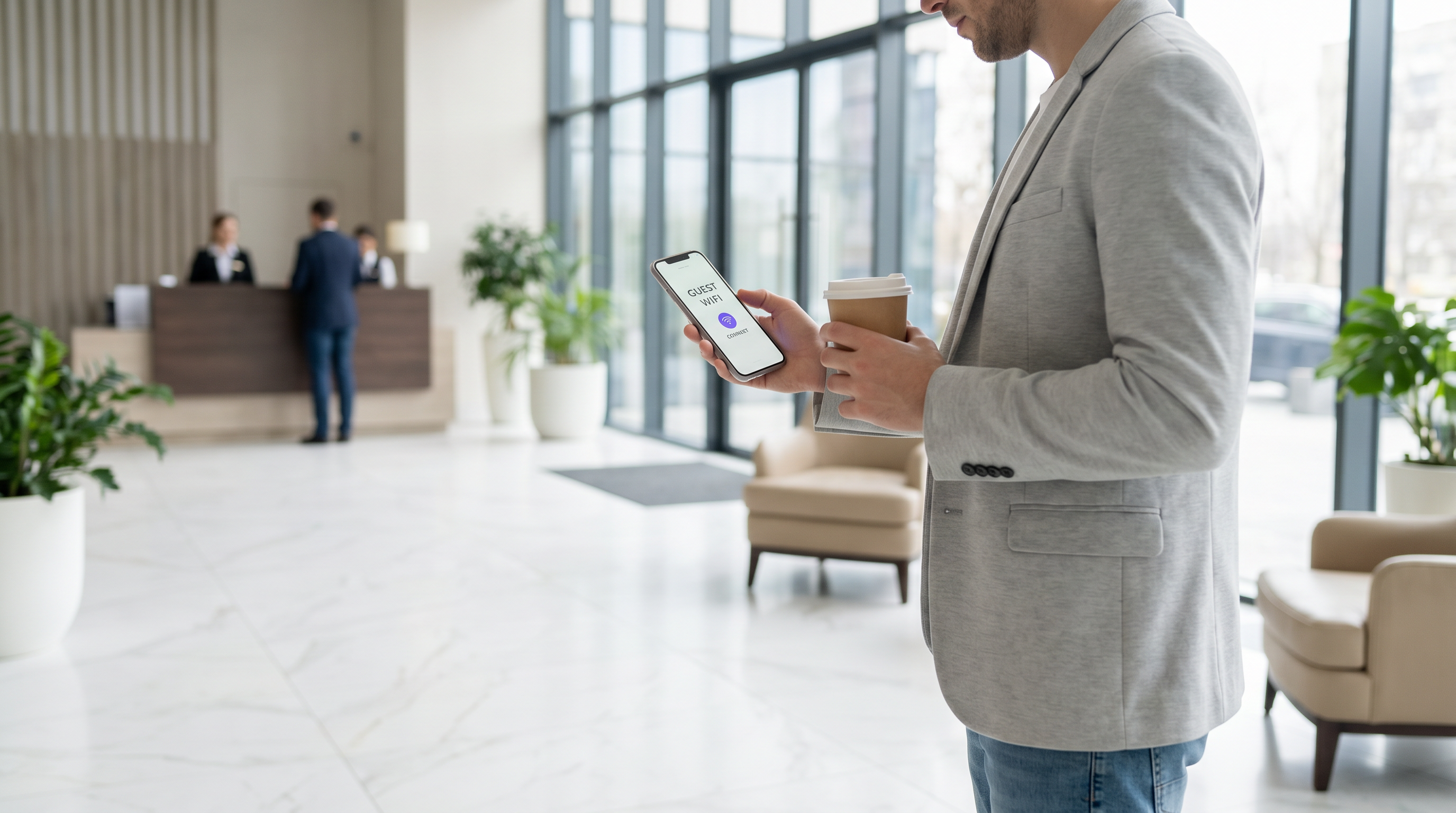
For IT leaders managing multi-site venues—from Retail estates and Hospitality groups to Healthcare facilities and Transport hubs—guest WiFi has evolved from a basic amenity into a strategic asset. A modern guest WiFi tech stack sits at the intersection of network operations, data compliance, and customer intelligence.
However, many organisations struggle with fragmented vendor landscapes, creating data silos, integration bottlenecks, and compliance risks. This buyer's guide dissects the six critical layers of the guest WiFi tech stack. It provides a vendor-neutral evaluation framework to help CTOs and network architects assess their current infrastructure, understand the integration points, and make informed decisions on whether to build, buy, or integrate their Guest WiFi platform.
Technical Deep-Dive: The Six Layers of the Stack
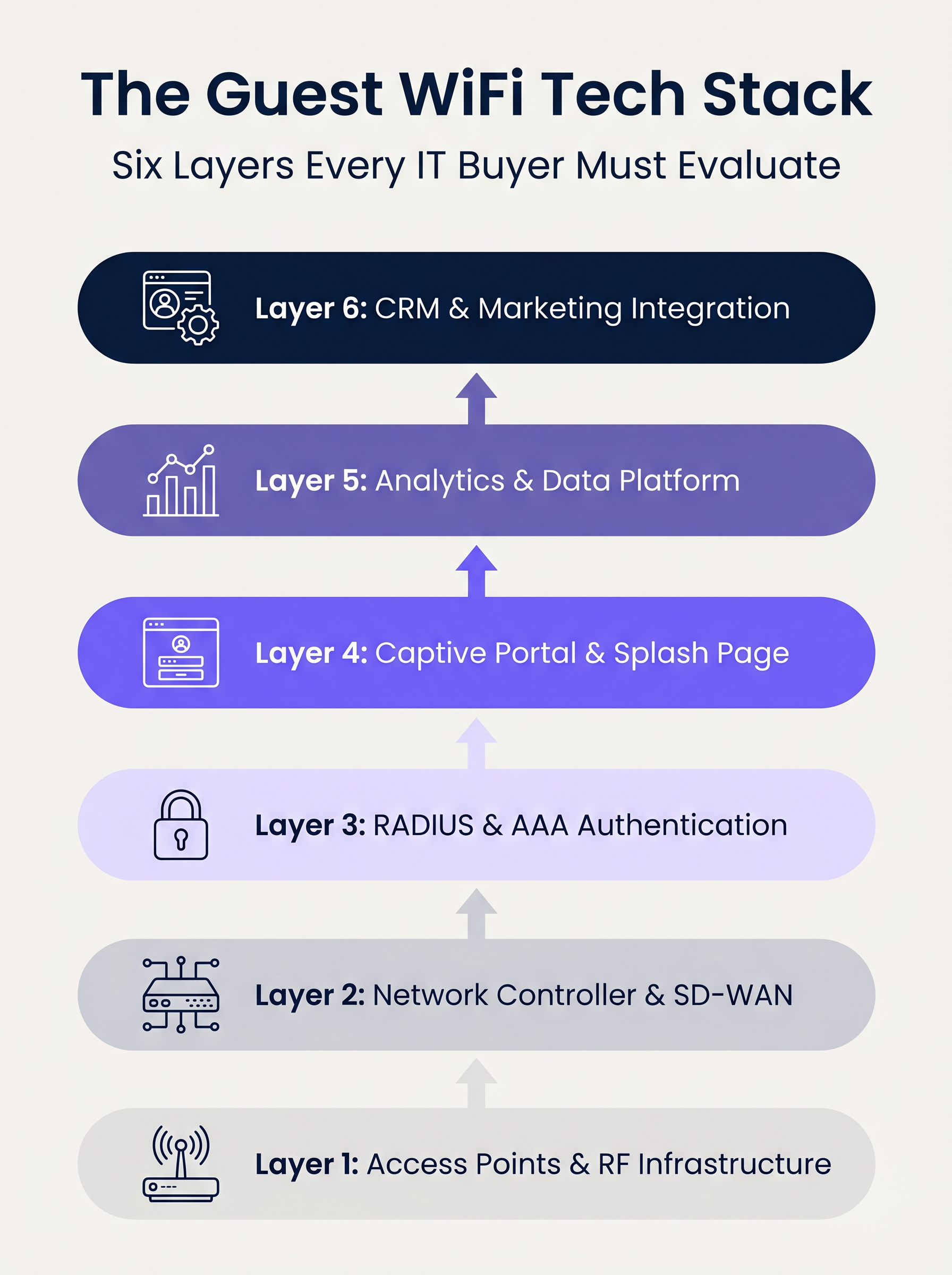
A robust guest WiFi architecture is built on six distinct layers. Evaluating these layers in isolation is a common architectural flaw; the true value lies in the integration between them.
Layer 1: Access Points & RF Infrastructure
The foundation of the stack is the radio frequency hardware. In enterprise deployments, vendors like Cisco Meraki, Aruba, Ruckus, and Extreme Networks dominate. When evaluating APs for multi-site deployments, raw throughput is secondary to centralised management capabilities and zero-touch provisioning.
Key Considerations:
- Standards: Wi-Fi 6 (802.11ax) is the baseline. Wi-Fi 6E should be specified for high-density environments (e.g., stadiums) where spectrum congestion is a primary constraint.
- Security: WPA3 support is mandatory, particularly for venues within PCI DSS scope.
- Integration: The AP controller must expose robust APIs for seamless integration with upstream authentication and analytics layers.
Layer 2: Network Controller & SD-WAN
This layer handles orchestration, policy enforcement, and traffic segmentation. The transition from legacy MPLS to SD-WAN architectures has transformed multi-site network management. SD-WAN enables centralised policy definition with local internet breakout, allowing administrators to enforce bandwidth caps and content filtering uniformly across the estate. For a deeper understanding of these architectural shifts, review The Core SD WAN Benefits for Modern Businesses .
Layer 3: RADIUS & AAA Authentication
Authentication, Authorisation, and Accounting (AAA) is frequently the weakest link in guest deployments. Relying on open networks or simple Pre-Shared Keys (PSKs) exposes the venue to significant security and compliance risks.
Implementing IEEE 802.1X with a robust RADIUS backend enables per-user authentication and session accounting. While FreeRADIUS is a viable open-source option, enterprise deployments typically require a cloud-hosted, managed RADIUS service to handle scale, redundancy, and integration with the captive portal.
Layer 4: Captive Portal & Splash Page
The captive portal is the intersection of network access and brand experience. A technically sound portal must handle device-specific captive network assistants (e.g., Apple CNA) seamlessly without relying on deprecated techniques like DNS hijacking over HTTP.
Furthermore, the portal is the primary mechanism for capturing user consent under frameworks like GDPR and CCPA. It must support OAuth 2.0 for social logins and generate immutable, audit-ready consent records.
Layer 5: Analytics & Data Platform
This layer transforms network telemetry into actionable intelligence. Presence analytics track dwell time and footfall, but the strategic value lies in identity resolution—binding a device MAC address to an authenticated user profile.
With iOS 14 and Android 10 implementing MAC address randomisation by default, relying solely on device identifiers is obsolete. Identity-based analytics provide accurate, compliant insights. For a comprehensive look at how this data drives value, explore our WiFi Analytics capabilities and our specific guide on Retail WiFi: From Traffic Analytics to Personalised In-Store Experiences .
Layer 6: CRM & Marketing Integration
The top layer converts network data into business outcomes via bi-directional API integrations with platforms like Salesforce, HubSpot, or bespoke Customer Data Platforms (CDPs). Real-time webhooks should trigger automated workflows—such as loyalty point updates or personalised messaging—the moment a known guest authenticates on the network.
Implementation Guide
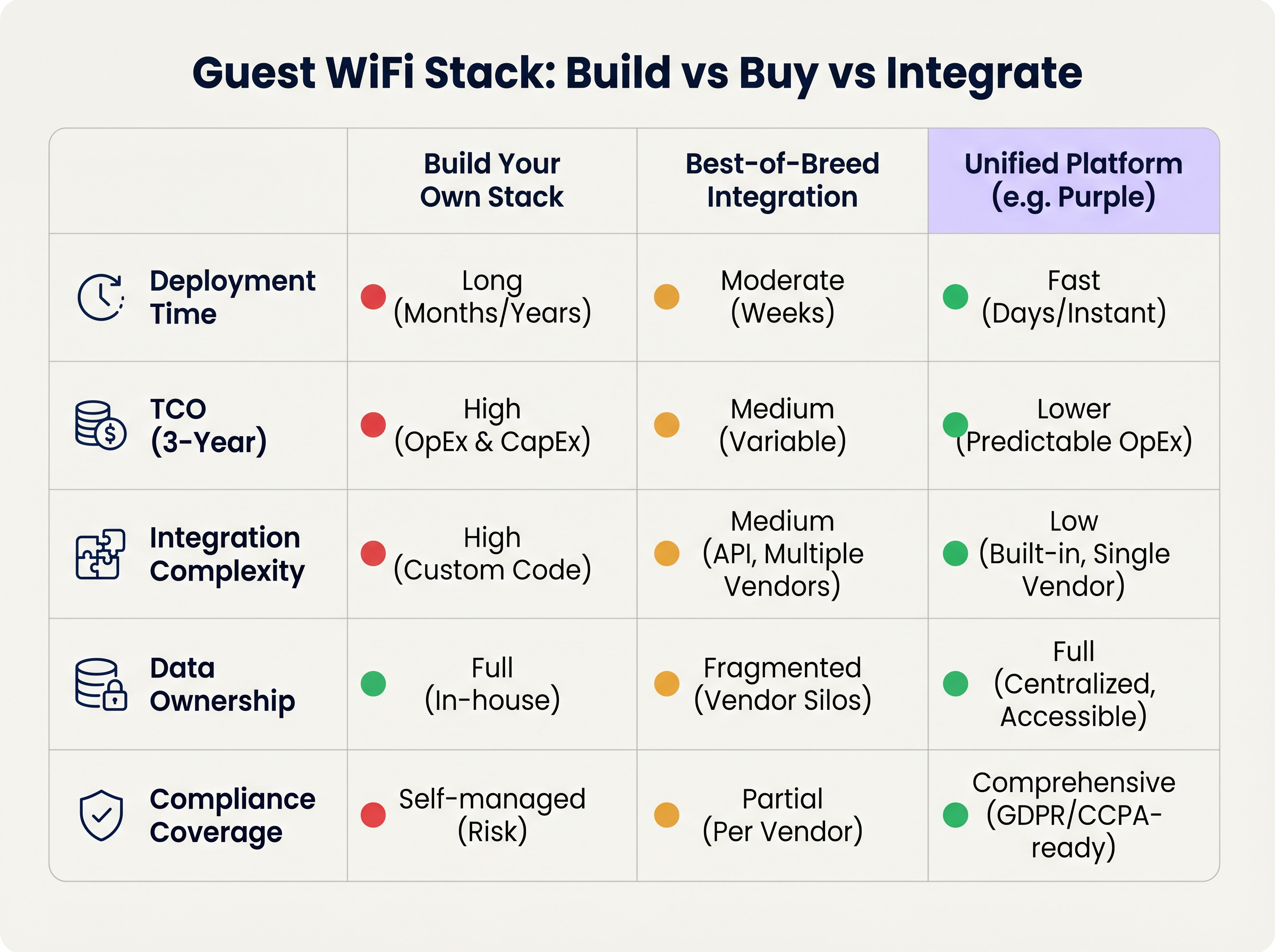
When deploying a multi-site guest WiFi stack, IT leaders face a fundamental architectural decision: Build, Buy, or Integrate.
Approach 1: Build Your Own Stack
Stitching together an AP vendor, a custom RADIUS server, a bespoke captive portal, and an in-house analytics pipeline offers maximum control but requires significant engineering resources. The Total Cost of Ownership (TCO) is heavily skewed towards ongoing maintenance, compliance management, and API updates.
Approach 2: Best-of-Breed Integration
Selecting the optimal vendor at each layer and integrating them via APIs is common in mature IT organisations. However, integration complexity is high. Vendor updates can break API connections, data models often diverge, and troubleshooting across multiple support desks increases Mean Time to Resolution (MTTR).
Approach 3: Unified Platform (The Purple Approach)
A unified platform overlays existing Layer 1 and Layer 2 infrastructure, consolidating authentication, captive portal, analytics, and CRM integration into a single solution. This approach drastically reduces deployment time, lowers TCO through predictable OpEx, and centralises compliance management. Purple, for instance, integrates seamlessly with over 90 AP vendors, preventing hardware lock-in while delivering enterprise-grade analytics.
Best Practices
- Decouple the Portal from the Hardware: Avoid using the native captive portal provided by your AP vendor. Separating the portal layer ensures you retain your guest data and custom workflows even if you migrate to a different hardware vendor in the future.
- Implement Strict VLAN Segmentation: Maintain a minimum of three SSIDs per site: Corporate (802.1X), Guest (Captive Portal), and IoT (Isolated VLAN). Ensure the guest VLAN has no route to the corporate network and restrict traffic via strict firewall policies.
- Design for Identity, Not Devices: Architect your analytics pipeline around authenticated user profiles rather than MAC addresses to future-proof against ongoing OS-level privacy changes.
Troubleshooting & Risk Mitigation
- MAC Randomisation Failures: If analytics show artificially inflated visitor counts with low repeat rates, MAC randomisation is likely skewing the data. Mitigation: Enforce captive portal authentication to anchor analytics to user identity.
- Captive Portal Not Triggering: Often caused by strict HTTPS enforcement (HSTS) on the client device or improper handling of the OS Captive Network Assistant. Mitigation: Ensure the portal infrastructure uses valid SSL certificates and properly intercepts the specific URLs used by Apple and Google to detect captive networks.
- Compliance Audits: Fragmented stacks often fail GDPR audits due to inconsistent data retention policies across vendors. Mitigation: Centralise consent management and data retention within a unified platform that acts as the single source of truth.
ROI & Business Impact
The ROI of a modern guest WiFi stack is measured across two vectors: IT efficiency and commercial value.
- IT Efficiency: Centralised management and a unified platform approach reduce deployment times from months to days. Automated onboarding and zero-touch provisioning lower Tier 1 support tickets related to network access by up to 40%.
- Commercial Value: By capturing first-party data and integrating it with CRM systems, venues can directly attribute revenue to WiFi-driven marketing campaigns. In retail environments, profile-based authentication and targeted engagement can increase customer lifetime value significantly, transforming the network from a cost centre into a revenue-generating asset.
Key Terms & Definitions
IEEE 802.1X
An IEEE Standard for port-based Network Access Control (PNAC) that provides an authentication mechanism to devices wishing to attach to a LAN or WLAN.
Essential for securing corporate networks and advanced guest deployments, moving beyond simple shared passwords.
RADIUS (Remote Authentication Dial-In User Service)
A networking protocol that provides centralised Authentication, Authorization, and Accounting (AAA) management for users who connect and use a network service.
The backend engine that validates user credentials and tracks session data in a secure guest WiFi deployment.
Captive Network Assistant (CNA)
The pseudo-browser built into mobile operating systems (iOS, Android) that automatically detects a captive portal and prompts the user to log in.
If a WiFi platform does not interact correctly with the CNA, users will experience a broken login flow and assume the network is down.
MAC Randomisation
A privacy feature in modern mobile OSs where the device broadcasts a fake, rotating MAC address to public networks rather than its true hardware address.
This feature breaks legacy presence analytics systems that rely on MAC addresses to count unique visitors and track dwell time.
Identity Resolution
The process of matching a network connection event to a known, authenticated customer profile within a database.
The critical step that turns anonymous network traffic into actionable marketing intelligence.
Zero-Touch Provisioning (ZTP)
A deployment method where network devices (like APs) automatically download their configuration from a central controller the moment they are plugged in.
Crucial for multi-site operators to deploy infrastructure rapidly without requiring highly skilled engineers on-site.
WPA3
The latest generation of Wi-Fi security, providing enhanced cryptographic strength and better protection against brute-force attacks.
A mandatory requirement for any modern network deployment, especially those processing payments or handling sensitive data.
Webhook
A method for augmenting or altering the behaviour of a web page or web application with custom callbacks, triggered by specific events.
Used to push real-time data from the WiFi platform to a CRM (e.g., triggering a welcome email the moment a guest connects).
Case Studies
A 200-site retail chain needs to upgrade its legacy guest WiFi. They currently use Cisco Meraki APs with the native Meraki splash page, but marketing cannot export the data easily, and IT is concerned about GDPR compliance regarding data retention.
The chain should retain their Meraki Layer 1/2 infrastructure to avoid massive CapEx. They must deploy a unified Layer 4-6 platform (like Purple) via API integration with the Meraki dashboard. The new architecture will use Meraki for RF delivery and SD-WAN routing, while the unified platform handles the captive portal, RADIUS authentication, and consent capture. The platform will automatically enforce a 12-month data retention policy to satisfy GDPR requirements and provide a bi-directional API sync to their central CRM.
A large stadium complex experiences severe captive portal timeouts and authentication failures during half-time when 15,000 users attempt to connect simultaneously.
The issue is a bottleneck at the Layer 3 (RADIUS) and Layer 4 (Portal) infrastructure, which cannot handle the concurrent connection spikes. The solution requires migrating from an on-premise RADIUS server to an auto-scaling cloud RADIUS service. Additionally, the AP configuration must be optimised to aggressively drop weak client connections (Minimum Bitrate requirements) to preserve airtime, and the captive portal must be served via a robust CDN to handle the burst in HTTP requests.
Scenario Analysis
Q1. You are the IT Director for a 50-site hospital trust. You need to deploy guest WiFi that captures user demographics, but you are subject to strict data sovereignty and compliance audits. A vendor proposes a solution where the APs handle authentication and send data directly to their proprietary cloud analytics tool. Do you accept?
💡 Hint:Consider the implications of hardware lock-in and audit requirements for data processing agreements.
Show Recommended Approach
Reject the proposal. Relying on the AP vendor's proprietary cloud tool creates hardware lock-in and fragments compliance management. Instead, implement a unified platform that overlays the AP infrastructure. This ensures you maintain ownership of the data, can enforce granular consent and retention policies centrally, and can switch AP hardware in the future without losing your compliance architecture or historical data.
Q2. A retail brand wants to trigger an immediate push notification via their mobile app when a high-tier loyalty member walks into a store. They currently rely on MAC address tracking from their APs to detect presence. Why will this fail, and how should it be architected?
💡 Hint:Think about modern mobile OS privacy features and the difference between presence and identity.
Show Recommended Approach
This will fail because iOS and Android use MAC randomisation, meaning the APs will see a different, fake MAC address each time the device connects, making it impossible to reliably identify the loyalty member passively. The architecture must shift to identity resolution via authentication. The user must authenticate via the captive portal (or via an integration like OpenRoaming/Passpoint), binding their session to their profile. Once authenticated, the WiFi platform can use a webhook to signal the CRM/App backend to trigger the notification.
Q3. During a network refresh, you are evaluating Wi-Fi 6 vs Wi-Fi 6E for a chain of small coffee shops (max capacity 40 people). The Wi-Fi 6E access points are 40% more expensive. Which do you choose?
💡 Hint:Consider the primary benefit of the 6 GHz band and the density of the environment.
Show Recommended Approach
Choose Wi-Fi 6. Wi-Fi 6E introduces the 6 GHz band, which is highly beneficial for relieving spectrum congestion in ultra-high-density environments like stadiums or large auditoriums. For a small coffee shop with a maximum capacity of 40 concurrent users, spectrum congestion is unlikely to be a critical issue. Wi-Fi 6 provides sufficient throughput and efficiency features (like OFDMA) at a lower CapEx, improving the overall ROI of the deployment.
Key Takeaways
- ✓A modern guest WiFi stack consists of six layers: AP infrastructure, Network Controller, RADIUS, Captive Portal, Analytics, and CRM Integration.
- ✓Evaluating these layers in isolation leads to integration complexity, data silos, and compliance risks.
- ✓Mobile OS MAC randomisation means analytics must be anchored to authenticated user identities, not device MAC addresses.
- ✓Decoupling the captive portal and analytics platform from the physical access points prevents hardware lock-in and protects historical data.
- ✓For most multi-site operators, a Unified Platform approach delivers the fastest time-to-value and lowest TCO compared to building in-house or integrating multiple vendors.
- ✓Robust compliance architecture (GDPR/CCPA) requires centralised consent capture and automated data retention policies.




