

Lo stack tecnologico del WiFi per gli ospiti: Una guida all'acquisto per marchi multi-sito
Una guida tecnica completa all'acquisto per operatori di sedi multi-sito che descrive i sei livelli di un moderno stack tecnologico WiFi per gli ospiti. Fornisce criteri di valutazione pratici per AP, controller di rete, autenticazione RADIUS, Captive Portal, analisi e integrazione CRM, aiutando i responsabili IT a orientarsi tra le decisioni di costruzione interna o acquisto.
🎧 Ascolta questa guida
Visualizza trascrizione

Riepilogo Esecutivo
Per i responsabili IT che gestiscono sedi multi-sito — da proprietà Retail e gruppi Hospitality a strutture Healthcare e hub di Transport — il WiFi per gli ospiti si è evoluto da un servizio di base a un asset strategico. Un moderno stack tecnologico WiFi per gli ospiti si trova all'intersezione tra operazioni di rete, conformità dei dati e customer intelligence.
Tuttavia, molte organizzazioni si confrontano con panorami di fornitori frammentati, creando silos di dati, colli di bottiglia nell'integrazione e rischi di conformità. Questa guida all'acquisto analizza i sei livelli critici dello stack tecnologico WiFi per gli ospiti. Fornisce un framework di valutazione neutrale rispetto al fornitore per aiutare CTO e architetti di rete a valutare la loro infrastruttura attuale, comprendere i punti di integrazione e prendere decisioni informate se costruire, acquistare o integrare la loro piattaforma Guest WiFi .
Approfondimento Tecnico: I Sei Livelli dello Stack
Un'architettura WiFi per gli ospiti robusta è costruita su sei livelli distinti. Valutare questi livelli in isolamento è un errore architettonico comune; il vero valore risiede nell'integrazione tra di essi.
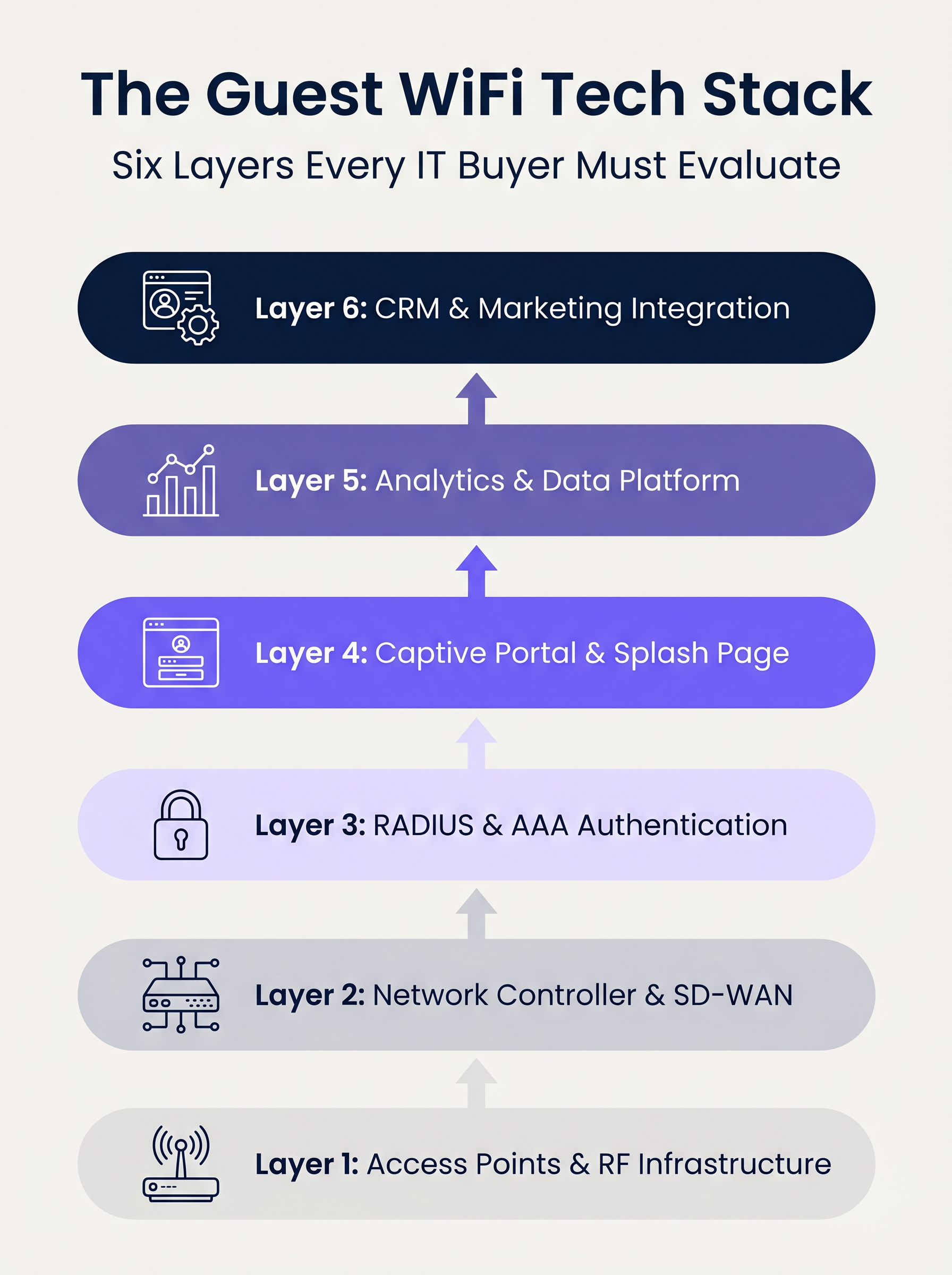
Livello 1: Access Point e Infrastruttura RF
La base dello stack è l'hardware a radiofrequenza. Nelle implementazioni aziendali, dominano fornitori come Cisco Meraki, Aruba, Ruckus ed Extreme Networks. Quando si valutano gli AP per implementazioni multi-sito, la velocità effettiva grezza è secondaria rispetto alle capacità di gestione centralizzata e al provisioning zero-touch.
Considerazioni Chiave:
- Standard: Wi-Fi 6 (802.11ax) è la base. Wi-Fi 6E dovrebbe essere specificato per ambienti ad alta densità (es. stadi) dove la congestione dello spettro è un vincolo primario.
- Sicurezza: Il supporto WPA3 è obbligatorio, in particolare per le sedi che rientrano nell'ambito PCI DSS.
- Integrazione: Il controller AP deve esporre API robuste per un'integrazione senza soluzione di continuità con i livelli di autenticazione e analisi a monte.
Livello 2: Controller di Rete e SD-WAN
Questo livello gestisce l'orchestrazione, l'applicazione delle policy e la segmentazione del traffico. La transizione da MPLS legacy ad architetture SD-WAN ha trasformato la gestione delle reti multi-sito. SD-WAN consente la definizione centralizzata delle policy con breakout internet locale, permettendo agli amministratori di applicare limiti di larghezza di banda e filtraggio dei contenuti in modo uniforme su tutta la proprietà. Per una comprensione più approfondita di questi cambiamenti architettonici, consulta I Vantaggi Chiave dell'SD WAN per le Aziende Moderne .
Livello 3: Autenticazione RADIUS e AAA
Autenticazione, Autorizzazione e Contabilità (AAA) è spesso l'anello più debole nelle implementazioni per gli ospiti. Affidarsi a reti aperte o a semplici Pre-Shared Keys (PSK) espone la sede a significativi rischi di sicurezza e conformità.
L'implementazione di IEEE 802.1X con un backend RADIUS robusto consente l'autenticazione per utente e la contabilità delle sessioni. Mentre FreeRADIUS è un'opzione open-source valida, le implementazioni aziendali richiedono tipicamente un servizio RADIUS gestito e ospitato nel cloud per gestire la scalabilità, la ridondanza e l'integrazione con il Captive Portal.
Livello 4: Captive Portal e Splash Page
Il Captive Portal è l'intersezione tra accesso alla rete ed esperienza del brand. Un portale tecnicamente valido deve gestire gli assistenti di rete captive specifici del dispositivo (es. Apple CNA) senza soluzione di continuità, senza fare affidamento su tecniche deprecate come il DNS hijacking su HTTP.
Inoltre, il portale è il meccanismo primario per acquisire il consenso dell'utente nell'ambito di framework come GDPR e CCPA. Deve supportare OAuth 2.0 per i social login e generare registri di consenso immutabili e pronti per l'audit.
Livello 5: Piattaforma di Analisi e Dati
Questo livello trasforma la telemetria di rete in intelligenza azionabile. L'analisi della presenza traccia il tempo di permanenza e il flusso di visitatori, ma il valore strategico risiede nella risoluzione dell'identità — collegando un indirizzo MAC del dispositivo a un profilo utente autenticato.
Con iOS 14 e Android 10 che implementano la randomizzazione dell'indirizzo MAC per impostazione predefinita, affidarsi esclusivamente agli identificatori di dispositivo è obsoleto. Le analisi basate sull'identità forniscono insight accurati e conformi. Per uno sguardo completo su come questi dati generano valore, esplora le nostre capacità di WiFi Analytics e la nostra guida specifica su Retail WiFi: dall'analisi del traffico alle esperienze personalizzate in negozio .
Livello 6: Integrazione CRM e Marketing
Il livello superiore converte i dati di rete in risultati di business tramite integrazioni API bidirezionali con piattaforme come Salesforce, HubSpot o Customer Data Platforms (CDP) personalizzate. I webhook in tempo reale dovrebbero attivare flussi di lavoro automatizzati — come aggiornamenti dei punti fedeltà o messaggistica personalizzata — nel momento in cui un ospite conosciuto si autentica sulla rete.
Guida all'Implementazione
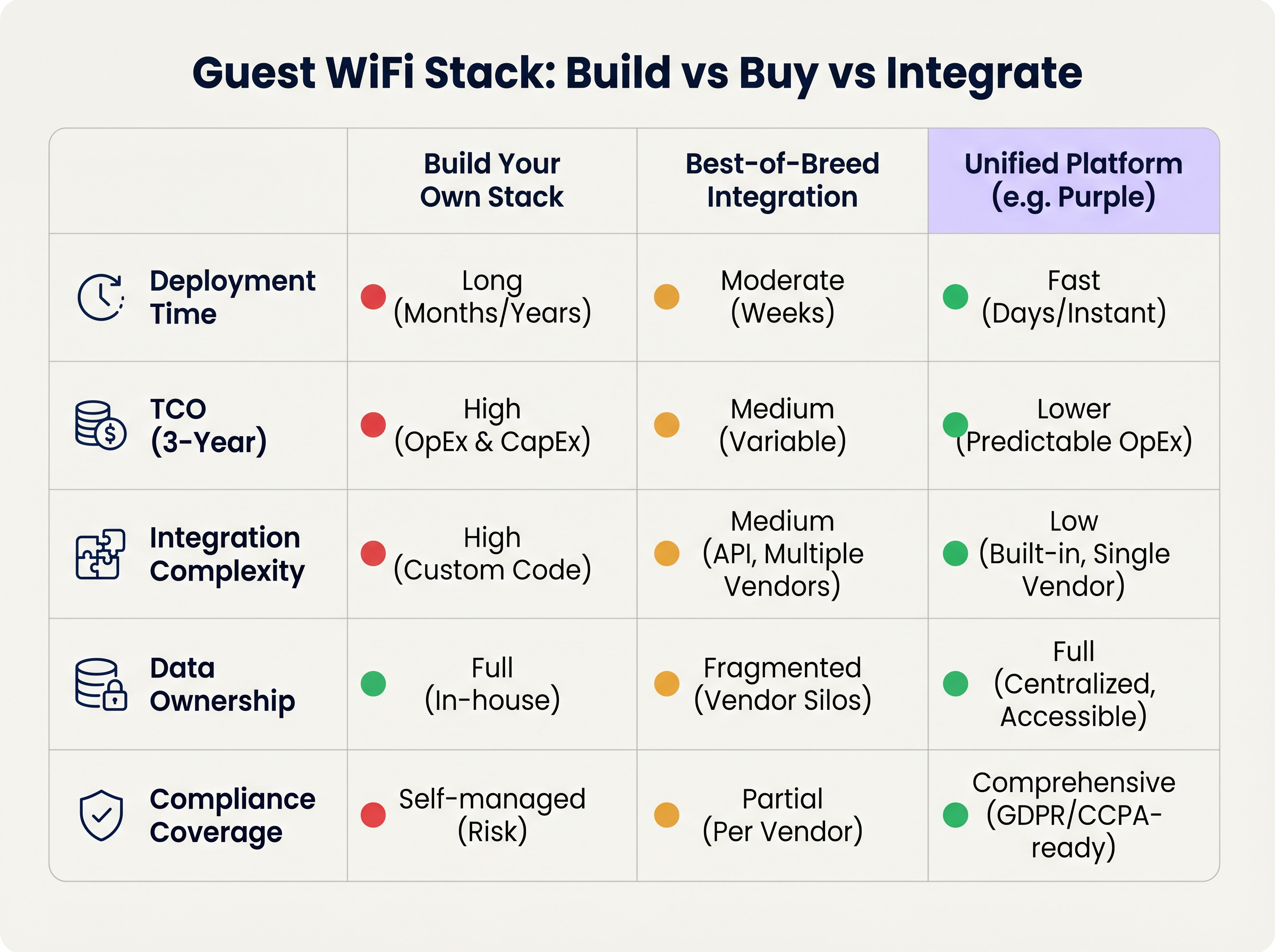
Quando si implementa uno stack WiFi per gli ospiti multi-sito, i responsabili IT si trovano di fronte a una decisione architettonica fondamentale: Costruire, Acquistare o Integrare.
Approccio 1: Costruire il Proprio Stack
Assemblare un fornitore di AP, un server RADIUS personalizzato, un Captive Portal su misura e una pipeline di analisi interna offre il massimo controllo ma richiede significative risorse ingegneristiche. Il Costo Totale di Proprietà (TCO) è fortemente orientato verso la manutenzione continua, la gestione della conformità e gli aggiornamenti API.
Approccio 2: Integrazione Best-of-Breed
La selezione del fornitore ottimale per ogni livello e la loro integrazione tramite API è comune nelle organizzazioni IT mature. Tuttavia, la complessità dell'integrazione è elevata. Gli aggiornamenti dei fornitori possono interrompere le connessioni API, i modelli di dati spesso divergono e la risoluzione dei problemi attraverso più desk di supporto aumenta il Mean Time to Resolution (MTTR).
Approccio 3: Piattaforma Unificata (L'Approccio Purple)
Una piattaforma unificata si sovrappone all'infrastruttura Layer 1 e Layer 2 esistente, consolidando autenticazione, captive portal, analisi e integrazione CRM in un'unica soluzione. Questo approccio riduce drasticamente i tempi di implementazione, abbassa il TCO attraverso OpEx prevedibili e centralizza la gestione della conformità. Purple, ad esempio, si integra perfettamente con oltre 90 fornitori di AP, prevenendo il lock-in hardware e fornendo analisi di livello enterprise.
Best Practice
- Scollegare il Portal dall'Hardware: Evitare di utilizzare il captive portal nativo fornito dal proprio fornitore di AP. Separare il livello del portal garantisce di conservare i dati degli ospiti e i flussi di lavoro personalizzati anche in caso di migrazione a un fornitore hardware diverso in futuro.
- Implementare una Segmentazione VLAN Rigorosa: Mantenere un minimo di tre SSIDs per sito: Corporate (802.1X), Guest (Captive Portal) e IoT (Isolated VLAN). Assicurarsi che la VLAN guest non abbia percorsi verso la rete aziendale e limitare il traffico tramite rigide policy firewall.
- Progettare per l'Identità, Non per i Dispositivi: Architettare la pipeline di analisi attorno ai profili utente autenticati piuttosto che agli indirizzi MAC per essere a prova di futuro contro i continui cambiamenti della privacy a livello di OS.
Risoluzione dei Problemi e Mitigazione del Rischio
- Errori di Randomizzazione MAC: Se le analisi mostrano conteggi di visitatori artificialmente gonfiati con bassi tassi di ripetizione, la randomizzazione MAC sta probabilmente distorcendo i dati. Mitigazione: Applicare l'autenticazione tramite captive portal per ancorare le analisi all'identità dell'utente.
- Captive Portal Non Attivato: Spesso causato da una rigorosa applicazione HTTPS (HSTS) sul dispositivo client o da una gestione impropria dell'Assistente di Rete Captive del sistema operativo. Mitigazione: Assicurarsi che l'infrastruttura del portal utilizzi certificati SSL validi e intercetti correttamente gli URL specifici utilizzati da Apple e Google per rilevare le reti captive.
- Audit di Conformità: Stack frammentati spesso falliscono gli audit GDPR a causa di politiche di conservazione dei dati incoerenti tra i fornitori. Mitigazione: Centralizzare la gestione del consenso e la conservazione dei dati all'interno di una piattaforma unificata che funga da unica fonte di verità.
ROI e Impatto Commerciale
Il ROI di uno stack WiFi per ospiti moderno è misurato su due vettori: efficienza IT e valore commerciale.
- Efficienza IT: La gestione centralizzata e un approccio di piattaforma unificata riducono i tempi di implementazione da mesi a giorni. L'onboarding automatizzato e il provisioning zero-touch riducono i ticket di supporto di Livello 1 relativi all'accesso alla rete fino al 40%.
- Valore Commerciale: Acquisendo dati di prima parte e integrandoli con i sistemi CRM, le sedi possono attribuire direttamente i ricavi a campagne di marketing basate sul WiFi. Negli ambienti retail, l'autenticazione basata su profilo e l'engagement mirato possono aumentare significativamente il valore a vita del cliente, trasformando la rete da centro di costo a risorsa generatrice di entrate.
Termini chiave e definizioni
IEEE 802.1X
An IEEE Standard for port-based Network Access Control (PNAC) that provides an authentication mechanism to devices wishing to attach to a LAN or WLAN.
Essential for securing corporate networks and advanced guest deployments, moving beyond simple shared passwords.
RADIUS (Remote Authentication Dial-In User Service)
A networking protocol that provides centralised Authentication, Authorization, and Accounting (AAA) management for users who connect and use a network service.
The backend engine that validates user credentials and tracks session data in a secure guest WiFi deployment.
Captive Network Assistant (CNA)
The pseudo-browser built into mobile operating systems (iOS, Android) that automatically detects a captive portal and prompts the user to log in.
If a WiFi platform does not interact correctly with the CNA, users will experience a broken login flow and assume the network is down.
MAC Randomisation
A privacy feature in modern mobile OSs where the device broadcasts a fake, rotating MAC address to public networks rather than its true hardware address.
This feature breaks legacy presence analytics systems that rely on MAC addresses to count unique visitors and track dwell time.
Identity Resolution
The process of matching a network connection event to a known, authenticated customer profile within a database.
The critical step that turns anonymous network traffic into actionable marketing intelligence.
Zero-Touch Provisioning (ZTP)
A deployment method where network devices (like APs) automatically download their configuration from a central controller the moment they are plugged in.
Crucial for multi-site operators to deploy infrastructure rapidly without requiring highly skilled engineers on-site.
WPA3
The latest generation of Wi-Fi security, providing enhanced cryptographic strength and better protection against brute-force attacks.
A mandatory requirement for any modern network deployment, especially those processing payments or handling sensitive data.
Webhook
A method for augmenting or altering the behaviour of a web page or web application with custom callbacks, triggered by specific events.
Used to push real-time data from the WiFi platform to a CRM (e.g., triggering a welcome email the moment a guest connects).
Casi di studio
A 200-site retail chain needs to upgrade its legacy guest WiFi. They currently use Cisco Meraki APs with the native Meraki splash page, but marketing cannot export the data easily, and IT is concerned about GDPR compliance regarding data retention.
The chain should retain their Meraki Layer 1/2 infrastructure to avoid massive CapEx. They must deploy a unified Layer 4-6 platform (like Purple) via API integration with the Meraki dashboard. The new architecture will use Meraki for RF delivery and SD-WAN routing, while the unified platform handles the captive portal, RADIUS authentication, and consent capture. The platform will automatically enforce a 12-month data retention policy to satisfy GDPR requirements and provide a bi-directional API sync to their central CRM.
A large stadium complex experiences severe captive portal timeouts and authentication failures during half-time when 15,000 users attempt to connect simultaneously.
The issue is a bottleneck at the Layer 3 (RADIUS) and Layer 4 (Portal) infrastructure, which cannot handle the concurrent connection spikes. The solution requires migrating from an on-premise RADIUS server to an auto-scaling cloud RADIUS service. Additionally, the AP configuration must be optimised to aggressively drop weak client connections (Minimum Bitrate requirements) to preserve airtime, and the captive portal must be served via a robust CDN to handle the burst in HTTP requests.
Analisi degli scenari
Q1. You are the IT Director for a 50-site hospital trust. You need to deploy guest WiFi that captures user demographics, but you are subject to strict data sovereignty and compliance audits. A vendor proposes a solution where the APs handle authentication and send data directly to their proprietary cloud analytics tool. Do you accept?
💡 Suggerimento:Consider the implications of hardware lock-in and audit requirements for data processing agreements.
Mostra l'approccio consigliato
Reject the proposal. Relying on the AP vendor's proprietary cloud tool creates hardware lock-in and fragments compliance management. Instead, implement a unified platform that overlays the AP infrastructure. This ensures you maintain ownership of the data, can enforce granular consent and retention policies centrally, and can switch AP hardware in the future without losing your compliance architecture or historical data.
Q2. A retail brand wants to trigger an immediate push notification via their mobile app when a high-tier loyalty member walks into a store. They currently rely on MAC address tracking from their APs to detect presence. Why will this fail, and how should it be architected?
💡 Suggerimento:Think about modern mobile OS privacy features and the difference between presence and identity.
Mostra l'approccio consigliato
This will fail because iOS and Android use MAC randomisation, meaning the APs will see a different, fake MAC address each time the device connects, making it impossible to reliably identify the loyalty member passively. The architecture must shift to identity resolution via authentication. The user must authenticate via the captive portal (or via an integration like OpenRoaming/Passpoint), binding their session to their profile. Once authenticated, the WiFi platform can use a webhook to signal the CRM/App backend to trigger the notification.
Q3. During a network refresh, you are evaluating Wi-Fi 6 vs Wi-Fi 6E for a chain of small coffee shops (max capacity 40 people). The Wi-Fi 6E access points are 40% more expensive. Which do you choose?
💡 Suggerimento:Consider the primary benefit of the 6 GHz band and the density of the environment.
Mostra l'approccio consigliato
Choose Wi-Fi 6. Wi-Fi 6E introduces the 6 GHz band, which is highly beneficial for relieving spectrum congestion in ultra-high-density environments like stadiums or large auditoriums. For a small coffee shop with a maximum capacity of 40 concurrent users, spectrum congestion is unlikely to be a critical issue. Wi-Fi 6 provides sufficient throughput and efficiency features (like OFDMA) at a lower CapEx, improving the overall ROI of the deployment.
Punti chiave
- ✓A modern guest WiFi stack consists of six layers: AP infrastructure, Network Controller, RADIUS, Captive Portal, Analytics, and CRM Integration.
- ✓Evaluating these layers in isolation leads to integration complexity, data silos, and compliance risks.
- ✓Mobile OS MAC randomisation means analytics must be anchored to authenticated user identities, not device MAC addresses.
- ✓Decoupling the captive portal and analytics platform from the physical access points prevents hardware lock-in and protects historical data.
- ✓For most multi-site operators, a Unified Platform approach delivers the fastest time-to-value and lowest TCO compared to building in-house or integrating multiple vendors.
- ✓Robust compliance architecture (GDPR/CCPA) requires centralised consent capture and automated data retention policies.




