

Der Guest WiFi Tech Stack: Ein Einkaufsführer für Marken mit mehreren Standorten
Ein umfassender technischer Einkaufsführer für Betreiber von Standorten mit mehreren Filialen, der die sechs Schichten eines modernen Guest WiFi Tech Stacks detailliert beschreibt. Er bietet umsetzbare Bewertungskriterien für APs, Netzwerk-Controller, RADIUS authentication, Captive Portals, Analytics und CRM integration und hilft IT-Führungskräften, Entscheidungen zwischen Eigenentwicklung und Kauf zu treffen.
🎧 Diesen Leitfaden anhören
Transkript anzeigen

Zusammenfassung für die Geschäftsleitung
Für IT-Führungskräfte, die Standorte mit mehreren Filialen verwalten – von Einzelhandels -Immobilien und Gastgewerbe -Gruppen bis hin zu Gesundheitseinrichtungen und Verkehrsknotenpunkten – hat sich Guest WiFi von einer grundlegenden Annehmlichkeit zu einem strategischen Asset entwickelt. Ein moderner Guest WiFi Tech Stack befindet sich an der Schnittstelle von Netzwerkoperationen, Datenkonformität und Kundenintelligenz.
Viele Organisationen kämpfen jedoch mit fragmentierten Anbieterlandschaften, die Datensilos, Integrationsengpässe und Compliance-Risiken schaffen. Dieser Einkaufsführer analysiert die sechs kritischen Schichten des Guest WiFi Tech Stacks. Er bietet einen anbieterneutralen Bewertungsrahmen, um CTOs und Netzwerkarchitekten dabei zu unterstützen, ihre aktuelle Infrastruktur zu bewerten, die Integrationspunkte zu verstehen und fundierte Entscheidungen darüber zu treffen, ob sie ihre Guest WiFi -Plattform selbst entwickeln, kaufen oder integrieren sollen.
Technischer Deep-Dive: Die sechs Schichten des Stacks
Eine robuste Guest WiFi-Architektur basiert auf sechs verschiedenen Schichten. Die isolierte Bewertung dieser Schichten ist ein häufiger Architekturfehler; der wahre Wert liegt in der Integration zwischen ihnen.
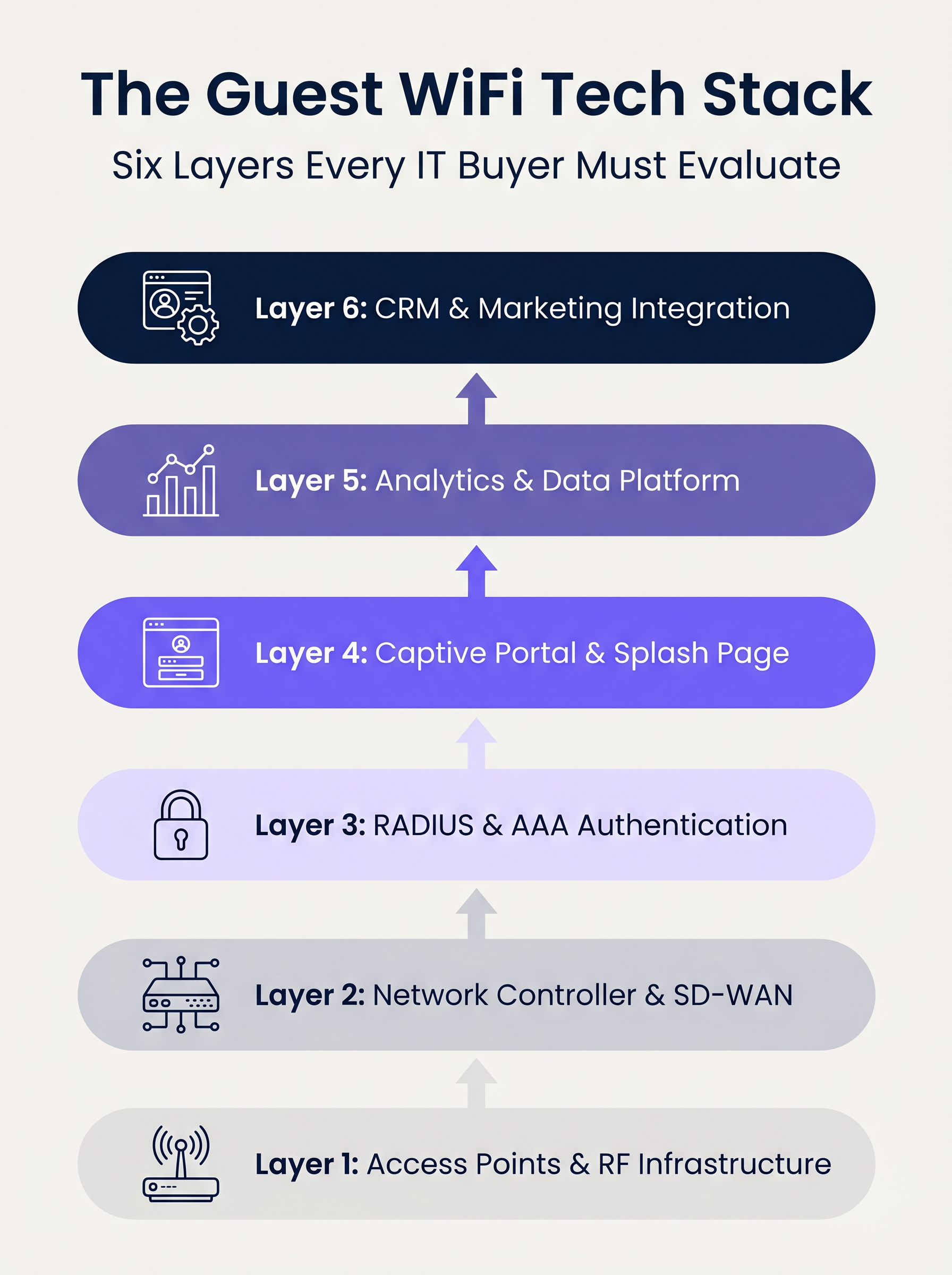
Schicht 1: Access Points & HF-Infrastruktur
Die Grundlage des Stacks ist die Hochfrequenzhardware. Bei Unternehmensimplementierungen dominieren Anbieter wie Cisco Meraki, Aruba, Ruckus und Extreme Networks. Bei der Bewertung von APs für Multi-Site-Implementierungen ist der reine Durchsatz zweitrangig gegenüber zentralisierten Verwaltungsfunktionen und Zero-Touch-Provisioning.
Wichtige Überlegungen:
- Standards: Wi-Fi 6 (802.11ax) ist die Basis. Wi-Fi 6E sollte für Umgebungen mit hoher Dichte (z. B. Stadien) spezifiziert werden, in denen Spektrumüberlastung eine primäre Einschränkung darstellt.
- Sicherheit: WPA3-Unterstützung ist obligatorisch, insbesondere für Standorte, die unter den PCI DSS-Geltungsbereich fallen.
- Integration: Der AP-Controller muss robuste APIs für die nahtlose Integration mit übergeordneten Authentifizierungs- und Analytics-Schichten bereitstellen.
Schicht 2: Netzwerk-Controller & SD-WAN
Diese Schicht übernimmt Orchestrierung, Richtliniendurchsetzung und Verkehrssegmentierung. Der Übergang von älteren MPLS- zu SD-WAN-Architekturen hat das Multi-Site-Netzwerkmanagement transformiert. SD-WAN ermöglicht eine zentralisierte Richtliniendefinition mit lokalem Internet-Breakout, wodurch Administratoren Bandbreitenbegrenzungen und Inhaltsfilterung einheitlich über den gesamten Standort durchsetzen können. Für ein tieferes Verständnis dieser architektonischen Veränderungen lesen Sie Die wichtigsten SD-WAN-Vorteile für moderne Unternehmen .
Schicht 3: RADIUS & AAA Authentication
Authentication, Authorisation, and Accounting (AAA) ist häufig das schwächste Glied bei Gastimplementierungen. Das Vertrauen auf offene Netzwerke oder einfache Pre-Shared Keys (PSKs) setzt den Standort erheblichen Sicherheits- und Compliance-Risiken aus.
Die Implementierung von IEEE 802.1X mit einem robusten RADIUS-Backend ermöglicht die Authentifizierung pro Benutzer und die Sitzungsabrechnung. Während FreeRADIUS eine praktikable Open-Source-Option ist, erfordern Unternehmensimplementierungen typischerweise einen Cloud-gehosteten, verwalteten RADIUS-Dienst, um Skalierung, Redundanz und Integration mit dem Captive Portal zu handhaben.
Schicht 4: Captive Portal & Splash Page
Das Captive Portal ist die Schnittstelle zwischen Netzwerkzugang und Markenerlebnis. Ein technisch einwandfreies Portal muss gerätespezifische Captive Network Assistants (z. B. Apple CNA) nahtlos handhaben, ohne auf veraltete Techniken wie DNS-Hijacking über HTTP zurückzugreifen.
Darüber hinaus ist das Portal der primäre Mechanismus zur Erfassung der Benutzerzustimmung im Rahmen von Frameworks wie GDPR und CCPA. Es muss OAuth 2.0 für soziale Logins unterstützen und unveränderliche, prüfbereite Zustimmungsdatensätze generieren.
Schicht 5: Analytics & Datenplattform
Diese Schicht wandelt Netzwerktelemetrie in umsetzbare Intelligenz um. Präsenz-Analytics verfolgen Verweildauer und Besucherfrequenz, aber der strategische Wert liegt in der Identitätsauflösung – der Verknüpfung einer Geräte-MAC-Adresse mit einem authentifizierten Benutzerprofil.
Da iOS 14 und Android 10 standardmäßig die MAC-Adressen-Randomisierung implementieren, ist das alleinige Vertrauen auf Geräte-Identifikatoren obsolet. Identitätsbasierte Analytics liefern genaue, konforme Einblicke. Für einen umfassenden Überblick darüber, wie diese Daten Wert schaffen, erkunden Sie unsere WiFi Analytics -Funktionen und unseren spezifischen Leitfaden zu Retail WiFi: Von Traffic Analytics zu personalisierten In-Store-Erlebnissen .
Schicht 6: CRM & Marketing-Integration
Die oberste Schicht wandelt Netzwerkdaten in Geschäftsergebnisse um, über bidirektionale API-Integrationen mit Plattformen wie Salesforce, HubSpot oder maßgeschneiderten Customer Data Platforms (CDPs). Echtzeit-Webhooks sollten automatisierte Workflows auslösen – wie z. B. die Aktualisierung von Treuepunkten oder personalisierte Nachrichten – sobald sich ein bekannter Gast im Netzwerk authentifiziert.
Implementierungsleitfaden
Beim Einsatz eines Multi-Site Guest WiFi Stacks stehen IT-Führungskräfte vor einer grundlegenden architektonischen Entscheidung: Selbst entwickeln, kaufen oder integrieren.
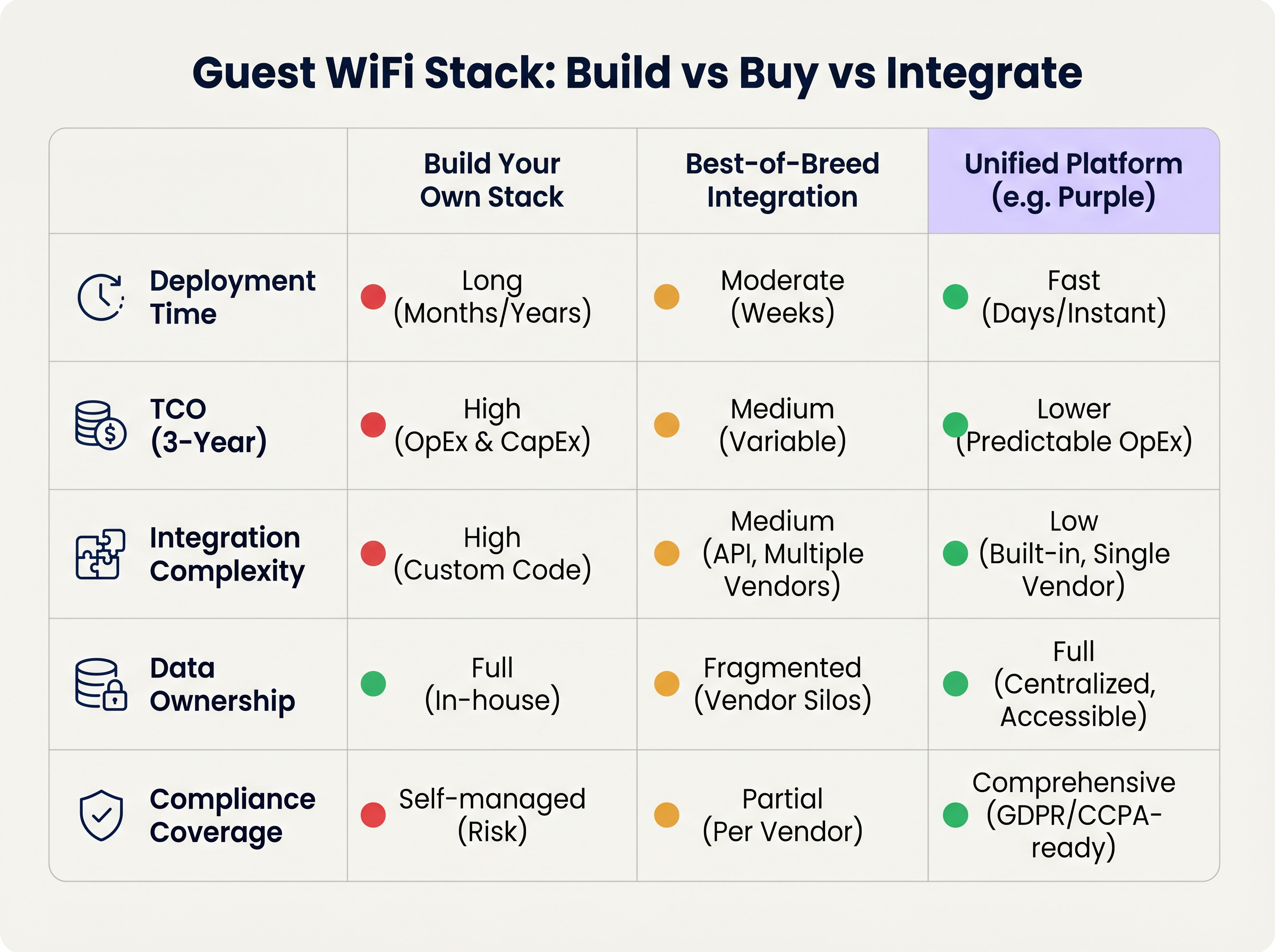
Ansatz 1: Eigenentwicklung des Stacks
Das Zusammenfügen eines AP-Anbieters, eines benutzerdefinierten RADIUS-Servers, eines maßgeschneiderten Captive Portals und einer selbst entwickelten Analytics-Pipeline bietet maximale Kontrolle, erfordert jedoch erhebliche technische Ressourcen. Die Gesamtbetriebskosten (TCO) sind stark auf laufende Wartung, Compliance-Management und API-Updates ausgerichtet.
Ansatz 2: Best-of-Breed-Integration
Die Auswahl des optimalen Anbieters auf jeder Ebene und deren Integration über APIs ist in reifen IT-Organisationen üblich. Die Integrationskomplexität ist jedoch hoch. Anbieter-Updates können API-Verbindungen unterbrechen, Datenmodelle weichen oft voneinander ab, und die Fehlerbehebung über mehrere Support-Desks hinweg erhöht die mittlere Reparaturzeit (MTTR).
Ansatz 3: Einheitliche Plattform (Der Purple Ansatz)
Eine einheitliche Plattform überlagert die bestehende Layer-1- und Layer-2-Infrastruktur und konsolidiert Authentifizierung, Captive Portal, Analysen und CRM-Integration in einer einzigen Lösung. Dieser Ansatz reduziert die Bereitstellungszeit drastisch, senkt die TCO durch vorhersehbare OpEx und zentralisiert das Compliance-Management. Purple integriert sich beispielsweise nahtlos mit über 90 AP-Anbietern, verhindert Hardware-Lock-in und liefert gleichzeitig Analysen auf Unternehmensniveau.
Best Practices
- Portal von der Hardware entkoppeln: Vermeiden Sie die Verwendung des nativen Captive Portal Ihres AP-Anbieters. Die Trennung der Portal-Ebene stellt sicher, dass Sie Ihre Gastdaten und benutzerdefinierten Workflows auch dann behalten, wenn Sie zukünftig zu einem anderen Hardware-Anbieter migrieren.
- Strikte VLAN-Segmentierung implementieren: Halten Sie mindestens drei SSIDs pro Standort vor: Corporate (802.1X), Guest (Captive Portal) und IoT (Isoliertes VLAN). Stellen Sie sicher, dass das Guest VLAN keine Route zum Unternehmensnetzwerk hat und beschränken Sie den Datenverkehr über strikte Firewall-Richtlinien.
- Design für Identität, nicht für Geräte: Gestalten Sie Ihre Analyse-Pipeline um authentifizierte Benutzerprofile statt um MAC-Adressen, um sich gegen laufende OS-Ebene-Datenschutzänderungen abzusichern.
Fehlerbehebung & Risikominderung
- Fehler bei der MAC-Randomisierung: Wenn Analysen künstlich erhöhte Besucherzahlen mit niedrigen Wiederholungsraten zeigen, verzerrt die MAC-Randomisierung wahrscheinlich die Daten. Abhilfe: Erzwingen Sie die Captive Portal-Authentifizierung, um Analysen an die Benutzeridentität zu koppeln.
- Captive Portal wird nicht ausgelöst: Oft verursacht durch strikte HTTPS-Erzwingung (HSTS) auf dem Client-Gerät oder unsachgemäße Handhabung des OS Captive Network Assistant. Abhilfe: Stellen Sie sicher, dass die Portal-Infrastruktur gültige SSL-Zertifikate verwendet und die spezifischen URLs, die von Apple und Google zur Erkennung von Captive Networks verwendet werden, korrekt abfängt.
- Compliance Audits: Fragmentierte Stacks scheitern oft an GDPR-Audits aufgrund inkonsistenter Datenaufbewahrungsrichtlinien verschiedener Anbieter. Abhilfe: Zentralisieren Sie das Einwilligungsmanagement und die Datenaufbewahrung innerhalb einer einheitlichen Plattform, die als einzige Quelle der Wahrheit dient.
ROI & Geschäftlicher Nutzen
Der ROI eines modernen Guest WiFi-Stacks wird anhand von zwei Vektoren gemessen: IT-Effizienz und kommerzieller Wert.
- IT-Effizienz: Zentralisiertes Management und ein einheitlicher Plattformansatz reduzieren die Bereitstellungszeiten von Monaten auf Tage. Automatisiertes Onboarding und Zero-Touch-Provisioning senken die Tier-1-Support-Tickets im Zusammenhang mit dem Netzwerkzugang um bis zu 40%.
- Kommerzieller Wert: Durch die Erfassung von First-Party-Daten und deren Integration in CRM-Systeme können Veranstaltungsorte Einnahmen direkt auf WiFi-gesteuerte Marketingkampagnen zurückführen. Im Einzelhandel können profilbasierte Authentifizierung und gezieltes Engagement den Customer Lifetime Value erheblich steigern und das Netzwerk von einem Kostenfaktor in einen umsatzgenerierenden Vermögenswert verwandeln.
Schlüsselbegriffe & Definitionen
IEEE 802.1X
An IEEE Standard for port-based Network Access Control (PNAC) that provides an authentication mechanism to devices wishing to attach to a LAN or WLAN.
Essential for securing corporate networks and advanced guest deployments, moving beyond simple shared passwords.
RADIUS (Remote Authentication Dial-In User Service)
A networking protocol that provides centralised Authentication, Authorization, and Accounting (AAA) management for users who connect and use a network service.
The backend engine that validates user credentials and tracks session data in a secure guest WiFi deployment.
Captive Network Assistant (CNA)
The pseudo-browser built into mobile operating systems (iOS, Android) that automatically detects a captive portal and prompts the user to log in.
If a WiFi platform does not interact correctly with the CNA, users will experience a broken login flow and assume the network is down.
MAC Randomisation
A privacy feature in modern mobile OSs where the device broadcasts a fake, rotating MAC address to public networks rather than its true hardware address.
This feature breaks legacy presence analytics systems that rely on MAC addresses to count unique visitors and track dwell time.
Identity Resolution
The process of matching a network connection event to a known, authenticated customer profile within a database.
The critical step that turns anonymous network traffic into actionable marketing intelligence.
Zero-Touch Provisioning (ZTP)
A deployment method where network devices (like APs) automatically download their configuration from a central controller the moment they are plugged in.
Crucial for multi-site operators to deploy infrastructure rapidly without requiring highly skilled engineers on-site.
WPA3
The latest generation of Wi-Fi security, providing enhanced cryptographic strength and better protection against brute-force attacks.
A mandatory requirement for any modern network deployment, especially those processing payments or handling sensitive data.
Webhook
A method for augmenting or altering the behaviour of a web page or web application with custom callbacks, triggered by specific events.
Used to push real-time data from the WiFi platform to a CRM (e.g., triggering a welcome email the moment a guest connects).
Fallstudien
A 200-site retail chain needs to upgrade its legacy guest WiFi. They currently use Cisco Meraki APs with the native Meraki splash page, but marketing cannot export the data easily, and IT is concerned about GDPR compliance regarding data retention.
The chain should retain their Meraki Layer 1/2 infrastructure to avoid massive CapEx. They must deploy a unified Layer 4-6 platform (like Purple) via API integration with the Meraki dashboard. The new architecture will use Meraki for RF delivery and SD-WAN routing, while the unified platform handles the captive portal, RADIUS authentication, and consent capture. The platform will automatically enforce a 12-month data retention policy to satisfy GDPR requirements and provide a bi-directional API sync to their central CRM.
A large stadium complex experiences severe captive portal timeouts and authentication failures during half-time when 15,000 users attempt to connect simultaneously.
The issue is a bottleneck at the Layer 3 (RADIUS) and Layer 4 (Portal) infrastructure, which cannot handle the concurrent connection spikes. The solution requires migrating from an on-premise RADIUS server to an auto-scaling cloud RADIUS service. Additionally, the AP configuration must be optimised to aggressively drop weak client connections (Minimum Bitrate requirements) to preserve airtime, and the captive portal must be served via a robust CDN to handle the burst in HTTP requests.
Szenarioanalyse
Q1. You are the IT Director for a 50-site hospital trust. You need to deploy guest WiFi that captures user demographics, but you are subject to strict data sovereignty and compliance audits. A vendor proposes a solution where the APs handle authentication and send data directly to their proprietary cloud analytics tool. Do you accept?
💡 Hinweis:Consider the implications of hardware lock-in and audit requirements for data processing agreements.
Empfohlenen Ansatz anzeigen
Reject the proposal. Relying on the AP vendor's proprietary cloud tool creates hardware lock-in and fragments compliance management. Instead, implement a unified platform that overlays the AP infrastructure. This ensures you maintain ownership of the data, can enforce granular consent and retention policies centrally, and can switch AP hardware in the future without losing your compliance architecture or historical data.
Q2. A retail brand wants to trigger an immediate push notification via their mobile app when a high-tier loyalty member walks into a store. They currently rely on MAC address tracking from their APs to detect presence. Why will this fail, and how should it be architected?
💡 Hinweis:Think about modern mobile OS privacy features and the difference between presence and identity.
Empfohlenen Ansatz anzeigen
This will fail because iOS and Android use MAC randomisation, meaning the APs will see a different, fake MAC address each time the device connects, making it impossible to reliably identify the loyalty member passively. The architecture must shift to identity resolution via authentication. The user must authenticate via the captive portal (or via an integration like OpenRoaming/Passpoint), binding their session to their profile. Once authenticated, the WiFi platform can use a webhook to signal the CRM/App backend to trigger the notification.
Q3. During a network refresh, you are evaluating Wi-Fi 6 vs Wi-Fi 6E for a chain of small coffee shops (max capacity 40 people). The Wi-Fi 6E access points are 40% more expensive. Which do you choose?
💡 Hinweis:Consider the primary benefit of the 6 GHz band and the density of the environment.
Empfohlenen Ansatz anzeigen
Choose Wi-Fi 6. Wi-Fi 6E introduces the 6 GHz band, which is highly beneficial for relieving spectrum congestion in ultra-high-density environments like stadiums or large auditoriums. For a small coffee shop with a maximum capacity of 40 concurrent users, spectrum congestion is unlikely to be a critical issue. Wi-Fi 6 provides sufficient throughput and efficiency features (like OFDMA) at a lower CapEx, improving the overall ROI of the deployment.
Wichtigste Erkenntnisse
- ✓A modern guest WiFi stack consists of six layers: AP infrastructure, Network Controller, RADIUS, Captive Portal, Analytics, and CRM Integration.
- ✓Evaluating these layers in isolation leads to integration complexity, data silos, and compliance risks.
- ✓Mobile OS MAC randomisation means analytics must be anchored to authenticated user identities, not device MAC addresses.
- ✓Decoupling the captive portal and analytics platform from the physical access points prevents hardware lock-in and protects historical data.
- ✓For most multi-site operators, a Unified Platform approach delivers the fastest time-to-value and lowest TCO compared to building in-house or integrating multiple vendors.
- ✓Robust compliance architecture (GDPR/CCPA) requires centralised consent capture and automated data retention policies.




