
ধীরগতির WiFi কর্মক্ষমতা নির্ণয় করতে প্যাকেট ক্যাপচার (PCAP) ব্যবহার করা
এই টেকনিক্যাল রেফারেন্স গাইডটি IT ম্যানেজার, নেটওয়ার্ক আর্কিটেক্ট এবং ভেন্যু অপারেশনস ডিরেক্টরদের প্যাকেট ক্যাপচার (PCAP) বিশ্লেষণের মাধ্যমে ধীরগতির এন্টারপ্রাইজ WiFi কর্মক্ষমতা নির্ণয় এবং সমাধান করার জন্য একটি কাঠামোগত, প্যাকেট-স্তরের পদ্ধতি প্রদান করে। রিট্রান্সমিশন রেট, এয়ারটাইম ব্যবহার এবং ফিজিক্যাল লেয়ার মেটাডেটা সহ র 802.11 ফ্রেমগুলি ব্যবচ্ছেদ করে টিমগুলি নিখুঁতভাবে তারযুক্ত বা অ্যাপ্লিকেশন সমস্যা থেকে RF-লেয়ারের বাধাগুলিকে আলাদা করতে পারে। হোটেল, রিটেল চেইন, স্টেডিয়াম এবং কনফারেন্স সেন্টার সহ উচ্চ-ঘনত্বের ভেন্যুগুলিতে প্রযোজ্য এই গাইডটি নেটওয়ার্কের ক্ষমতা পুনরুদ্ধার করতে এবং গেস্টদের অভিজ্ঞতা সুরক্ষিত করতে কার্যকর ডায়াগনস্টিক ওয়ার্কফ্লো, বাস্তব-ক্ষেত্রের কেস স্টাডি এবং কনফিগারেশন প্রতিকারের পদক্ষেপগুলি সরবরাহ করে।
Video overview
এই গাইডটি শুনুন
পডকাস্ট ট্রান্সক্রিপ্ট দেখুন
আমাদের মূল সিরিজের অংশ: গেস্ট WiFi গাইড →
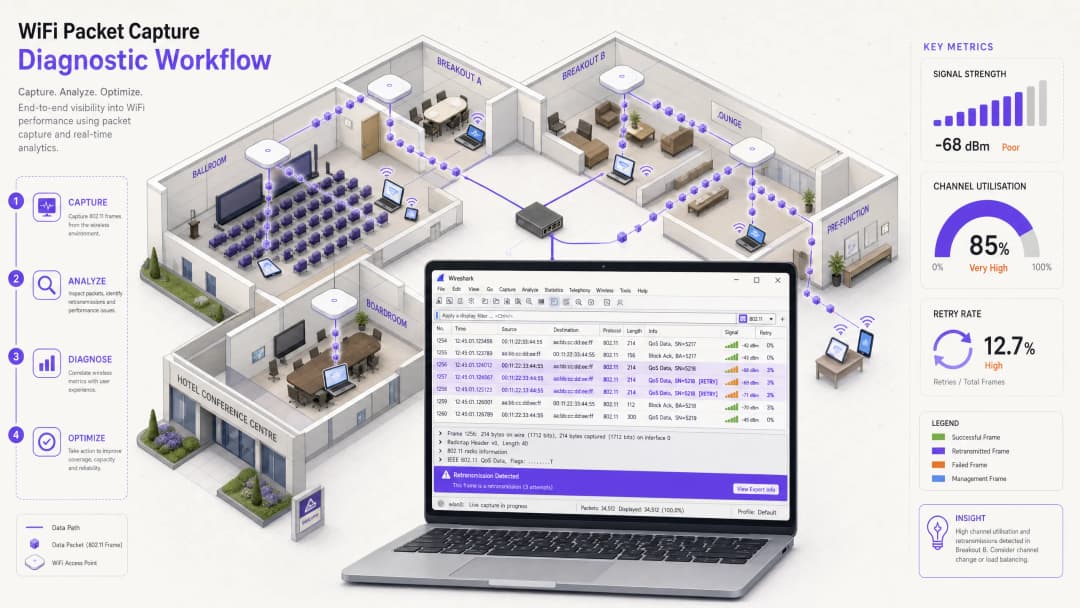
Executive Summary
Chief Technology Officers (CTOs), নেটওয়ার্ক আর্কিটেক্ট এবং ভেন্যু অপারেশনস ডিরেক্টরদের জন্য, "ধীরগতির WiFi" হলো কর্মক্ষমতা এবং অতিথিদের সন্তুষ্টির জন্য একটি ক্রমাগত হুমকি। যদিও স্ট্যান্ডার্ড নেটওয়ার্ক ম্যানেজমেন্ট ড্যাশবোর্ডগুলি উচ্চ-স্তরের হেলথ স্কোর প্রদান করে, সেগুলি প্রায়শই ওয়্যারলেস পারফরম্যান্স হ্রাসের মূল কারণগুলিকে অস্পষ্ট করে দেয়। হোটেল কনফারেন্স সেন্টার, রিটেল মল এবং স্টেডিয়ামের মতো উচ্চ-ঘনত্বপূর্ণ পরিবেশে দীর্ঘস্থায়ী পারফরম্যান্সের সমস্যাগুলি সমাধান করতে - আইটি টিমকে কেবল বাহ্যিক মেট্রিক্সের বাইরে গিয়ে সরাসরি ওয়্যারলেস ফ্রেমগুলি বিশ্লেষণ করতে হবে।
প্যাকেট ক্যাপচার (PCAP) বিশ্লেষণ ব্যবহার করা হলো সবচেয়ে সুনির্দিষ্ট এবং সঠিক পদ্ধতি, যা নেটওয়ার্ক ইঞ্জিনিয়ারিং টিমকে ফিজিক্যাল এবং ডেটা লিঙ্ক লেয়ারে ক্লায়েন্ট ডিভাইস এবং অ্যাক্সেস পয়েন্টগুলির মধ্যে যোগাযোগের একটি গভীর বিশ্লেষণ করার অনুমতি দেয়। এই প্রযুক্তিগত রেফারেন্স নির্দেশিকাটি 802.11 ফ্রেম ক্যাপচার এবং বিশ্লেষণ করার জন্য একটি সুগঠিত, ভেন্ডর-নিরপেক্ষ পদ্ধতির রূপরেখা প্রদান করে। ফ্রেম রিট্রান্সমিশন রেট, চ্যানেল ইউটিলাইজেশন এবং এয়ারটাইম স্টারভেশনের মতো গুরুত্বপূর্ণ সূচকগুলির ওপর ফোকাস করে, নেটওয়ার্ক অ্যাডমিনিস্ট্রেটররা ওয়্যারলেস ফিজিক্যাল-লেয়ারের সমস্যাগুলিকে ওয়্যার্ড ব্যাকহল বা অ্যাপ্লিকেশনের বাধা থেকে আলাদা করতে পারেন। এই ডায়াগনস্টিক পদ্ধতিগুলি প্রয়োগ করার পাশাপাশি Guest WiFi এবং WiFi Analytics-এর মতো এন্টারপ্রাইজ-গ্রেড সমাধানগুলি ব্যবহার করে একটি সমস্যাক্রান্ত নেটওয়ার্ক ইউটিলিটিকে একটি উচ্চ-পারফরম্যান্স এবং উচ্চ-ROI ব্যবসায়িক সম্পদে রূপান্তরিত করা যেতে পারে।
Technical Deep-Dive
802.11 Medium এবং Monitor Mode-এর প্রয়োজনীয়তা
ওয়্যারলেস পারফরম্যান্স সঠিকভাবে বিশ্লেষণ করতে, নেটওয়ার্ক আর্কিটেক্টদের অবশ্যই বুঝতে হবে যে ওয়্যারলেস মাধ্যমটি একটি সুইচ্ড ওয়্যার্ড নেটওয়ার্কের চেয়ে সম্পূর্ণ আলাদা। ওয়্যারলেস হলো একটি শেয়ার্ড, হাফ-ডুপ্লেক্স মাধ্যম যেখানে যেকোনো মিলি-সেকেন্ডে একটি নির্দিষ্ট চ্যানেলে কেবল একটি ডিভাইস ট্রান্সমিট করতে পারে। তদুপরি, স্ট্যান্ডার্ড ওয়্যারলেস নেটওয়ার্ক ইন্টারফেস কার্ড (NICs) "ম্যানেজড" বা "স্টেশন" মোডে কাজ করে, যার অর্থ তারা তাদের নিজস্ব MAC অ্যাড্রেসে স্পষ্টভাবে পাঠানো হয়নি এমন যেকোনো ফ্রেম বাতিল করে দেয়। ওয়্যারলেস যোগাযোগের সম্পূর্ণ চিত্র ক্যাপচার করতে, ক্যাপচারিং স্টেশনকে অবশ্যই Monitor Mode-এ কনফিগার করা একটি অ্যাডাপ্টার ব্যবহার করতে হবে।
Monitor Mode বনাম Promiscuous Mode: ওয়্যার্ড নেটওয়ার্কগুলিতে promiscuous মোড NIC-কে লোকাল ব্রডকাস্ট ডোমেনের সমস্ত প্যাকেট ক্যাপচার করতে দেয়, তবে এটি ওয়্যারলেস ফ্রেম হেডারের ক্ষেত্রে কাজ করে না। Monitor mode একটি ওয়্যারলেস অ্যাডাপ্টারকে একটি নির্দিষ্ট চ্যানেলে বাতাসে থাকা সমস্ত 802.11 ফ্রেম প্যাসিভভাবে স্নিফ বা ক্যাপচার করতে সাহায্য করে, যা কোনো AP-এর সাথে যুক্ত না হয়েও ম্যানেজমেন্ট এবং কন্ট্রোল ফ্রেমের পাশাপাশি ডেটা পে-লোড ক্যাপচার করতে সক্ষম করে।
802.11 ফ্রেম স্ট্রাকচার এবং Radiotap হেডার
Monitor mode-এ ক্যাপচার করা প্রতিটি ওয়্যারলেস প্যাকেটের শুরুতে ক্যাপচারিং ড্রাইভার দ্বারা একটি Radiotap Header যুক্ত করা হয়। এই হেডারটি বাতাসে ভ্রমণ করে না; পরিবর্তে, এটি স্নিফিং রেডিও NIC দ্বারা ক্যাপচার করা অত্যন্ত গুরুত্বপূর্ণ ফিজিক্যাল-লেয়ার মেটাডেটা প্রদান করে। প্রধান ফিজিক্যাল-লেয়ার মেট্রিক্সের মধ্যে রয়েছে চ্যানেল এবং ফ্রিকোয়েন্সি (যা যাচাই করে যে ক্যাপচারটি কাঙ্ক্ষিত চ্যানেলে নেওয়া হয়েছে কিনা), dBm-এ সিগন্যালের শক্তি (RSSI), এবং যে ডেটা রেটে নির্দিষ্ট ফ্রেমটি ট্রান্সমিট করা হয়েছিল।
Radiotap হেডারের নিচে থাকে 802.11 MAC হেডার, যা ফ্রেমগুলোকে তিনটি প্রাথমিক ক্যাটাগরিতে ভাগ করে:
| ফ্রেমের ধরন | প্রাথমিক সাব-টাইপ | পারফরম্যান্স ডায়াগনস্টিকসে ভূমিকা |
|---|---|---|
| ম্যানেজমেন্ট | Beacon, Probe Request/Response, Association, Deauthentication | এর উচ্চ ভলিউম কভারেজ গ্যাপ, আক্রমণাত্মক রোমিং বা লেগ্যাসি ক্লায়েন্ট ওভারহেড নির্দেশ করে। |
| কন্ট্রোল | ACK, Block ACK, RTS, CTS | রি-ট্রান্সমিশন (ACK-এর অভাব) সংঘর্ষ বা ইন্টারফেয়ারেন্স নির্দেশ করে। RTS/CTS হিডেন নোড সনাক্ত করতে সাহায্য করে। |
| ডেটা | QoS Data, Null Function | কম রেটের ডেটা ফ্রেমের উচ্চ অনুপাত এয়ারটাইম ঘাটতি (airtime starvation) নির্দেশ করে। |
ফ্রেম রি-ট্রান্সমিশন এবং এয়ারটাইম ঘাটতি
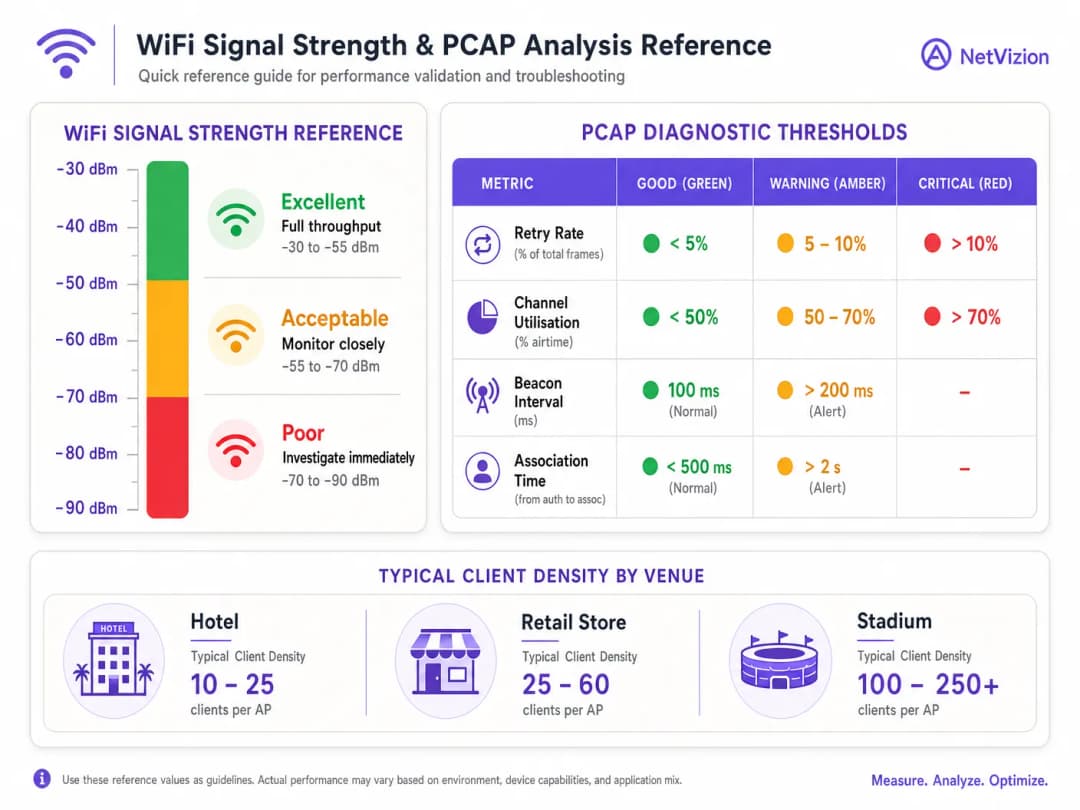
যেহেতু ট্রান্সমিশনের সময় 802.11-এ কলিশন ডিটেকশন বা সংঘর্ষ সনাক্তকরণের ব্যবস্থা নেই, তাই এটি ইতিবাচক স্বীকৃতির (positive acknowledgement) উপর নির্ভর করে। প্রতিটি ইউনিকাস্ট ফ্রেম অবশ্যই গ্রহণকারী রেডিও দ্বারা একটি কন্ট্রোল ACK ফ্রেমের মাধ্যমে স্বীকৃত হতে হবে। প্রেরক যদি একটি নির্দিষ্ট টাইমআউট উইন্ডোর মধ্যে কোনো ACK না পায়, তবে এটি তার রিট্রাই কাউন্টার বৃদ্ধি করে এবং ফ্রেমটি পুনরায় ট্রান্সমিট করে। একটি স্বাস্থ্যকর এন্টারপ্রাইজ সেটআপে, 802.11 Retry Rate অবশ্যই 5%-এর নিচে থাকা উচিত। retry rate 10% অতিক্রম করলে তা থ্রুপুট এবং লেটেন্সিতে ক্রমাগত অবনতি ঘটায়।
এয়ারটাইম স্টারভেশন (Airtime starvation) তখন ঘটে যখন দুর্বল সিগন্যাল স্ট্রেন্থ বা লেগ্যাসি ক্ষমতাসম্পন্ন ক্লায়েন্ট ডিভাইসগুলো কম হারে, যেমন ১ Mbps বা ৬ Mbps-এ ডেটা ট্রান্সমিট করে। যেহেতু এই কম হারের ফ্রেমগুলো উচ্চ হারের 802.11ac/ax ফ্রেমের তুলনায় ট্রান্সমিট হতে উল্লেখযোগ্যভাবে বেশি সময় নেয়, তাই একটিমাত্র দূরবর্তী ক্লায়েন্ট উপলব্ধ এয়ারটাইমের একটি বড় অংশ ব্যবহার করে ফেলতে পারে, যা কাছাকাছি থাকা উচ্চ-গতির ক্লায়েন্টদের মাধ্যমটি ব্যবহার করা থেকে বঞ্চিত করে। এটি Hospitality এবং Retail পরিবেশে ধীরগতির WiFi-এর সবচেয়ে সাধারণ এবং ভুলভাবে নির্ণয় করা কারণগুলোর একটি।
Implementation Guide
ধাপে ধাপে ওয়্যারলেস প্যাকেট ক্যাপচার ওয়ার্কফ্লো
PCAP ব্যবহার করে ধীরগতির WiFi পারফরম্যান্স স্বাধীনভাবে বিশ্লেষণ এবং নির্ণয় করতে, নেটওয়ার্ক ইঞ্জিনিয়ারিং টিমের এই কাঠামোগত পাঁচ ধাপের ডায়াগনস্টিক ওয়ার্কফ্লো অনুসরণ করা উচিত।
 ধাপ ১: ক্যাপচার সেটআপ এবং চ্যানেল লকিং। একটি ডেডিকেটেড এক্সটার্নাল USB ওয়্যারলেস অ্যাডাপ্টার ব্যবহার করুন যা মনিটর মোড সমর্থন করে। একটি সাইট সার্ভে টুল বা AP কন্ট্রোলার ড্যাশবোর্ড ব্যবহার করে দুর্বল পারফর্ম করা AP-এর চ্যানেলটি সনাক্ত করুন। স্নিফিং অ্যাডাপ্টারটিকে মনিটর মোডে কনফিগার করুন এবং এটিকে সেই নির্দিষ্ট চ্যানেল ও চ্যানেল উইডথে লক করুন। ক্যাপচারিং ল্যাপটপটিকে প্রভাবিত ক্লায়েন্ট ডিভাইসের কাছাকাছি রাখুন যাতে স্নিফার একই RF পরিবেশের অভিজ্ঞতা পায়।
ধাপ ২: ফিজিক্যাল-লেয়ার হেলথ যাচাইকরণ। উচ্চ-স্তরের প্রোটোকল বিশ্লেষণ করার আগে, Radiotap হেডার-এর মধ্যে ফিজিক্যাল-লেয়ার বৈশিষ্ট্যগুলো যাচাই করুন। নিশ্চিত করুন যে ক্লায়েন্টের RSSI অন্তত -৬৭ dBm এবং নয়েজ ফ্লোর -৯৫ dBm-এর নিচে রয়েছে, যা হাই-ডেনসিটি ভয়েস এবং ডেটা সমর্থন করতে ২৮ dB বা তার বেশি SNR প্রদান করে। ক্লায়েন্ট কম MCS (Modulation and Coding Scheme) ইনডেক্সে ট্রান্সমিট করছে কিনা তা পরীক্ষা করুন; যদি ফ্রেমগুলো ক্রমাগত MCS ২-এর নিচে পাঠানো হয়, তাহলে ক্লায়েন্টটি দুর্বল সিগন্যাল কোয়ালিটি বা শারীরিক প্রতিবন্ধকতায় ভুগছে।
ধাপ ৩: ফিল্টার এবং ৮হে ২.১১ ফ্রেম বিশ্লেষণ। Wireshark-এ PCAP খুলুন এবং সমস্যাটি শ্রেণীবদ্ধ করতে নির্দিষ্ট ডিসপ্লে ফিল্টার প্রয়োগ করুন। একটি নির্দিষ্ট ক্লায়েন্ট MAC অ্যাড্রেস আলাদা করতে, wlan.addr == [Client_MAC] ব্যবহার করুন। রিট্রান্সমিশনের জন্য ফিল্টার করতে, wlan.fc.retry == 1 ব্যবহার করুন। ম্যানেজমেন্ট ফ্রেম ওভারহেড পর্যবেক্ষণ করতে, wlan.fc.type == 0 ব্যবহার করুন। চ্যানেল ইউটিলাইজেশন পরিদর্শন করতে, Statistics > I/O Graph-এ যান এবং প্রতি সেকেন্ডে মোট প্যাকেটের বিপরীতে প্রতি সেকেন্ডে রিট্রাই প্যাকেট প্লট করুন।
ধাপ ৪: মূল কারণ সনাক্ত করুন। নির্ধারিত পারফরম্যান্স থ্রেশহোল্ডের বিপরীতে ফিল্টার করা ডেটা বিশ্লেষণ করুন। ভালো সিগন্যাল স্ট্রেন্থ থাকা সত্ত্বেও ১০% এর বেশি হাই রিট্রাই রেট একটি Hidden Node সমস্যা বা নন-WiFi ইন্টারফারেন্সের কারণে সৃষ্ট ফ্রেম কলিশন নির্দেশ করে। উচ্চ এয়ারটাইম ব্যবহারের সাথে কম ডেটা রেট লেগাসি ক্লায়েন্ট বা দূরের ডিভাইসের কারণে সৃষ্ট Airtime Starvation নির্দেশ করে। অতিরিক্ত প্রোব রিকোয়েস্ট এবং রেসপন্স "স্টিকি ক্লায়েন্ট" আচরণ বা দুর্বল AP কভারেজ সীমানা নির্দেশ করে।
ধাপ ৫: প্রতিকার প্রয়োগ করুন এবং পুনরায় পরীক্ষা করুন। সনাক্ত করা মূল কারণের উপর ভিত্তি করে উপযুক্ত কনফিগারেশন পরিবর্তনগুলি প্রয়োগ করুন। লেগাসি ডেটা রেট (১, ২, ৫.৫, ১১ Mbps) নিষ্ক্রিয় করুন এবং ন্যূনতম বেসিক রেট 12 Mbps বা 24 Mbps এ সেট করুন। হিডেন নোড সমস্যার জন্য, AP-তে RTS/CTS থ্রেশহোল্ড কনফিগার করুন। কো-চ্যানেল ইন্টারফারেন্স কমাতে AP ট্রান্সমিট পাওয়ার সামঞ্জস্য করুন। রিট্রাই রেট ৫% এর নিচে নেমে গেছে এবং গড় ডেটা রেট বেড়েছে কিনা তা যাচাই করতে একটি ফলো-আপ PCAP চালান। অথেন্টিকেশন এবং অ্যাক্সেস কন্ট্রোল সম্পর্কিত বিস্তারিত গাইডের জন্য, How to Implement 802.1X Authentication with Cloud RADIUS দেখুন।
আপনার নির্দিষ্ট সেটআপ নিয়ে কোনো প্রশ্ন আছে?
আমাদের টিম ৮০,০০০ ভেন্যুতে ভেন্যু অপারেটর, IT ম্যানেজার এবং নেটওয়ার্ক ইঞ্জিনিয়ারদের সাথে কাজ করে। একটি ২০ মিনিটের কল বুক করুন এবং আপনার মতো অন্যরা কীভাবে এর সমাধান করেছেন তা আমরা আপনাকে দেখাব।
সেরা অনুশীলনসমূহ
এন্টারপ্রাইজ নেটওয়ার্ক ডায়াগনস্টিকস করার সময়, নির্ভুল ডায়াগনস্টিকস এবং দীর্ঘমেয়াদী স্থিতিশীলতা নিশ্চিত করতে সলিউশন আর্কিটেক্টদের শিল্প-মানসম্পন্ন এবং ভেন্ডর-নিরপেক্ষ সেরা অনুশীলনগুলি মেনে চলা উচিত।
ইন্টেলিজেন্ট এবং ট্রিগারড ক্যাপচার ব্যবহার করুন। শত শত AP জুড়ে অবিচ্ছিন্ন, সম্পূর্ণ-প্যাকেট ক্যাপচারের জন্য প্রচুর স্টোরেজের প্রয়োজন হয়। এর পরিবর্তে, আধুনিক নেটওয়ার্ক ম্যানেজমেন্ট প্ল্যাটফর্মগুলি ব্যবহার করুন যা ট্রিগারড PCAPs সমর্থন করে। যখন কোনো ক্লায়েন্ট অ্যাসোসিয়েশন ব্যর্থতা, উচ্চ DHCP লেটেন্সি বা অতিরিক্ত 802.11 রিট্রাইয়ের সম্মুখীন হয়, তখন Cisco Catalyst Center বা Aruba Central এর মতো প্ল্যাটফর্মগুলি স্বয়ংক্রিয়ভাবে একটি রোলিং-বাফার PCAP ট্রিগার করতে পারে। এই পদ্ধতিটি Healthcare এবং Transport পরিবেশের জন্য অত্যন্ত প্রাসঙ্গিক যেখানে নেটওয়ার্ক নির্ভরযোগ্যতা অত্যন্ত গুরুত্বপূর্ণ।
ওয়ারলেস বনাম ওয়্যার্ড পারফরম্যান্সের প্রতিবন্ধকতা আলাদা করুন। একটি "ধীরগতির WiFi" সংক্রান্ত অভিযোগ সত্যিই একটি ওয়্যারলেস সমস্যা কিনা তা সর্বদা যাচাই করুন। আপনার PCAP-এ 802.11 রিট্রাই রেটের সাথে HTTP রেসপন্স টাইম বা TCP রাউন্ড-ট্রিপ টাইম (RTT) তুলনা করুন। যদি TCP RTT বেশি হয় কিন্তু 802.11 রিট্রাই রেট কম হয় (৩% এর নিচে), তবে প্রতিবন্ধকতাটি ওয়্যার্ড নেটওয়ার্ক, DHCP সার্ভার, DNS রেজোলিউশন বা WAN গেটওয়েতে রয়েছে। যদি 802.11 রিট্রাই রেট বেশি হয় (১০% এর উপরে), তবে সমস্যাটি সম্পূর্ণরূপে ওয়্যারলেস RF ডোমেনের মধ্যে রয়েছে।
ক্যাপচার করার সময় কমপ্লায়েন্স এবং নিরাপত্তা বজায় রাখুন। পাবলিক স্পেস বা কর্পোরেট পরিবেশে র ওয়্যারলেস প্যাকেট ক্যাপচার করা সংবেদনশীল ব্যবহারকারীর ডেটা উন্মুক্ত করতে পারে, যা সম্ভাব্যভাবে GDPR-এর মতো গোপনীয়তা নিয়ম বা PCI DSS-এর মতো সুরক্ষা মান লঙ্ঘন করতে পারে। WPA3 বা WPA2 Enterprise ব্যবহারকারী সুরক্ষিত পরিবেশে, ডেটা পেলোডগুলি ওভার-দ্য-এয়ার এনক্রিপ্ট করা হয়, যা ব্যবহারকারীর গোপনীয়তা রক্ষা করার সাথে সাথে ফিজিক্যাল এবং MAC-লেয়ার ট্রাবলশুটিংয়ের জন্য যথেষ্ট। পারফরম্যান্স ট্রাবলশুটিংয়ের জন্য ক্যাপচার করার সময়, প্রকৃত ব্যবহারকারীর ডেটা বাদ দিয়ে শুধুমাত্র Radiotap, 802.11 এবং IP হেডারগুলি সংরক্ষণ করতে tcpdump -s 128 ব্যবহার করে পেলোডটিকে প্রথম 128 বাইটে ট্রাঙ্কেট করতে আপনার ক্যাপচার টুল কনফিগার করুন।
ভেন্ডর গাইডেন্স এবং স্ট্যান্ডার্ডগুলি রেফারেন্স করুন। এন্টারপ্রাইজ স্থাপনার জন্য, আপনার PCAP পদ্ধতিকে IEEE 802.11 স্ট্যান্ডার্ড এবং ভেন্ডর-নির্দিষ্ট নির্দেশিকার সাথে সারিবদ্ধ করুন। Cisco-ভিত্তিক পরিবেশের জন্য, প্ল্যাটফর্ম-নির্দিষ্ট ক্যাপচার পদ্ধতির জন্য Cisco Wireless APs: 2026 Guide to Products & Deployment দেখুন। অ্যাক্সেস কন্ট্রোল এবং প্রমাণীকরণ ডায়াগনস্টিকসের জন্য, 10 Best Network Access Control (NAC) Solutions for 2026 বৃহত্তর নিরাপত্তা ব্যবস্থাপনার সাথে PCAP ফাইন্ডিংগুলিকে একীভূত করার জন্য প্রসঙ্গ প্রদান করে।
ট্রাবলশুটিং এবং প্রশমন
নিচের টেবিলে PCAP-এর মাধ্যমে চিহ্নিত সাধারণ ওয়্যারলেস ফেইলিওর মোড, সেগুলির প্যাকেট-লেভেলের সূচক এবং প্রস্তাবিত প্রশমন পদক্ষেপের রূপরেখা দেওয়া হয়েছে:
| ফেইলিওর মোড | PCAP সূচক | মূল কারণ | প্রশমনের পদক্ষেপ |
|---|---|---|---|
| হিডেন নোড সমস্যা | উচ্চ RSSI থাকা সত্ত্বেও ডেটা ফ্রেমগুলিতে উচ্চ রিট্রাই রেট। | দুটি ক্লায়েন্ট AP-এর সাথে যোগাযোগ করতে পারে কিন্তু দূরত্ব বা বাধার কারণে একে অপরের থেকে লুকিয়ে থাকে, যার ফলে একই সাথে ট্রান্সমিশন হয়। | AP-তে RTS/CTS থ্রেশহোল্ড সক্রিয় করুন; শারীরিক বাধা দূর করতে AP-গুলির অবস্থান পরিবর্তন করুন। |
| কো-চ্যানেল হস্তক্ষেপ | একই চ্যানেলে একাধিক BSSID থেকে উচ্চ ভলিউমের বিকনের কারণে চ্যানেল ব্যবহার >৭০%। | একই চ্যানেলে অনেক বেশি AP বা অতিরিক্ত চওড়া চ্যানেলের প্রস্থ। | একটি নিয়মতান্ত্রিক চ্যানেল পরিকল্পনা বাস্তবায়ন করুন; চ্যানেলের প্রস্থ ২০ বা ৪০ MHz-এ হ্রাস করুন; AP ট্রান্সমিট পাওয়ার সামঞ্জস্য করুন। |
| স্টিকি ক্লায়েন্ট আচরণ | একটি শক্তিশালী সিগন্যাল প্রদানকারী AP-এর কাছাকাছি থাকা সত্ত্বেও ক্লায়েন্ট একটি দূরবর্তী AP-এর সাথে যুক্ত থাকে (কম RSSI, কম ডেটা রেট)। | ক্লায়েন্ট রোমিং অ্যালগরিদম প্যাসিভ; AP ট্রান্সমিট পাওয়ার খুব বেশি। | AP ট্রান্সমিট পাওয়ার সামঞ্জস্য করুন; সর্বনিম্ন মৌলিক ডেটা রেট ১২ বা ২৪ Mbps-এ সেট করুন; 802.11v/k/r রোমিং বাস্তবায়ন করুন। |
| DHCP / DNS লেটেন্সি | EAPOL হ্যান্ডশেক দ্রুত সম্পন্ন হয়, কিন্তু পরবর্তী DHCP বা DNS ফ্রেমগুলি বহু-সেকেন্ডের বিলম্ব প্রদর্শন করে। | ওয়্যারলেস লিঙ্কটি সর্বোত্তমভাবে কাজ করছে, কিন্তু আপস্ট্রিম ওয়্যার্ড নেটওয়ার্ক পরিষেবাগুলি বাধাগ্রস্ত হচ্ছে। | ওয়্যার্ড অবকাঠামো ট্রাবলশুট করুন; DHCP লিজের সময় এবং পুলের আকার যাচাই করুন; ক্লাউড-ম্যানেজড প্রমাণীকরণ বাস্তবায়ন করুন। |
ROI এবং ব্যবসায়িক প্রভাব
সঠিক PCAP ডায়াগনস্টিকসের মাধ্যমে এন্টারপ্রাইজ WiFi পারফরম্যান্সকে ত্বরান্বিত করা সরাসরি এবং পরিমাপযোগ্য ব্যবসায়িক সুবিধা প্রদান করে। রিটেইল চেইন, হোটেল এবং পাবলিক স্পেসের মতো উচ্চ-ট্রাফিক ভেন্যুগুলোতে নেটওয়ার্কের আপটাইম এবং পারফরম্যান্স সরাসরি গ্রাহক সন্তুষ্টি এবং ব্যবসায়িক রাজস্বের সাথে যুক্ত।
এয়ারটাইম নষ্টকারী লিগ্যাসি ডিভাইস এবং কো-চ্যানেল ইন্টারফারেন্স সনাক্ত ও দূর করতে PCAP ব্যবহার করে, নেটওয়ার্ক টিমগুলো তাদের বিদ্যমান ওয়্যারলেস ক্ষমতার 40% পর্যন্ত পুনরুদ্ধার করতে পারে। এই অপ্টিমাইজেশন ব্যয়বহুল হার্ডওয়্যার প্রতিস্থাপনের চক্রকে বিলম্বিত করে, যার ফলে ভেন্যুগুলো অতিরিক্ত AP কেনা বা সুইচ ইনফ্রাস্ট্রাকচার আপগ্রেড না করেই উচ্চতর ক্লায়েন্ট ঘনত্বকে সমর্থন করতে পারে। বড় আকারের ইনস্টলেশনগুলোর ক্ষেত্রে, নিছক অনুমানের পরিবর্তে একটি নিয়মতান্ত্রিক PCAP ডায়াগনস্টিক পদ্ধতি গ্রহণ করার ফলে মিন টাইম টু রেজোলিউশন (MTTR) 60% পর্যন্ত হ্রাস পায়। কোনো ধীরগতির অ্যাপ্লিকেশন RF ইন্টারফারেন্স, ক্লায়েন্ট-সাইড ড্রাইভার সমস্যা নাকি ওয়্যার্ড নেটওয়ার্কের কোনো প্রতিবন্ধকতার কারণে হচ্ছে তা ইঞ্জিনিয়াররা দ্রুত আলাদা করতে পারেন।
হসপিটালিটি এবং রিটেইল অপারেটরদের জন্য, নির্ভরযোগ্য WiFi হলো গ্রাহক এনগেজমেন্টের ভিত্তি। Purple-এর Guest WiFi এবং WiFi Analytics প্ল্যাটফর্মগুলোর সাথে একটি অপ্টিমাইজড ওয়্যারলেস নেটওয়ার্ক সমন্বয় করার মাধ্যমে ব্যবসাগুলো সঠিক, ফার্স্ট-পার্টি গ্রাহক ডেটা সংগ্রহ করতে, টার্গেটেড মার্কেটিং ক্যাম্পেইন পরিচালনা করতে এবং ব্র্যান্ডের প্রতি আনুগত্য বৃদ্ধি করতে সক্ষম হয়। Retail এবং Hospitality-র মতো শিল্পগুলোতে, এই ডেটা সংগ্রহের ইঞ্জিনটি যা ঐতিহ্যগতভাবে একটি ব্যয় কেন্দ্র (WiFi ইনফ্রাস্ট্রাকচার) ছিল তাকে একটি শক্তিশালী রাজস্ব-উৎপাদনকারী প্ল্যাটফর্মে রূপান্তরিত করে। শিক্ষা প্রতিষ্ঠানের জন্য, WiFi in Schools: The 2026 Administrator & IT Guide উচ্চ-ঘনত্ব এবং মাল্টি-ডিভাইস পরিবেশে এই ডায়াগনস্টিক নীতিগুলো প্রয়োগ করার বিষয়ে আরও বিশদ বিবরণ প্রদান করে।
References
[1] Cisco Meraki: Analyzing Wireless Packet Captures [2] VIAVI Solutions: What is Packet Capture? [3] QA Cafe: Troubleshooting Slow Apps with Packet Captures [4] Purple Guide: How to Fix Slow WiFi Without Upgrading Your Internet Plan [5] Purple Guide: The Ultimate Guide to WiFi Channel Selection
মূল সংজ্ঞাসমূহ
Monitor Mode
একটি বিশেষ ওয়্যারলেস কার্ড স্টেট যা একটি অ্যাডাপ্টারকে কোনো অ্যাক্সেস পয়েন্টের সাথে অ্যাসোসিয়েট না করেই একটি নির্দিষ্ট চ্যানেলে ম্যানেজমেন্ট, কন্ট্রোল এবং ডাটা ফ্রেম সহ বাতাসের সমস্ত 802.11 ফ্রেম প্যাসিভভাবে স্নিফ করার অনুমতি দেয়।
র ওয়্যারলেস PCAP ফাইল ক্যাপচার করার জন্য অপরিহার্য। স্ট্যান্ডার্ড 'ম্যানেজড' মোড হোস্ট ডিভাইসে অ্যাড্রেস না করা ফ্রেমগুলোকে বাতিল করে দেয়, যা এটিকে ওয়্যারলেস ডায়াগনস্টিকসের জন্য অনুপযুক্ত করে তোলে।
Radiotap Header
ক্যাপচারিং ড্রাইভার দ্বারা ক্যাপচার করা 802.11 ফ্রেমের আগে যুক্ত করা একটি স্ট্যান্ডার্ডাইজড হেডার, যাতে ফিজিক্যাল-লেয়ার মেটাডাটা যেমন সিগন্যাল স্ট্রেন্থ (RSSI), চ্যানেল ফ্রিকোয়েন্সি এবং ট্রান্সমিশন ডাটা রেট থাকে।
একটি ফ্রেম ক্যাপচার করার ঠিক সেই মিলিসেকেন্ডে ফিজিক্যাল RF এনভায়রনমেন্ট বিশ্লেষণ করতে Wireshark-এ ব্যবহৃত হয়। সিগন্যাল কোয়ালিটি এবং ডাটা রেট বিশ্লেষণের জন্য প্রকৃত সত্য প্রদান করে।
Retry Rate
ট্রান্সমিট করা 802.11 ফ্রেমের শতকরা হার যেগুলোর MAC হেডারে 'Retry' বিট সেট করা থাকে, যা নির্দেশ করে যে রিসিভিং Acknowledgment (ACK) ফ্রেমের অভাবের কারণে সেগুলো রি-ট্রান্সমিশন করা হচ্ছে।
ওয়্যারলেস হেলথের জন্য একটি অন্যতম মেট্রিক। ১০% এর বেশি রেট গুরুতর ইন্টারফারেন্স, কলিশন বা হিডেন নোড সমস্যার ইঙ্গিত দেয় যা সমস্ত সংযুক্ত ক্লায়েন্টের থ্রুপুট এবং ল্যাটেন্সি কমিয়ে দেবে।
Airtime Starvation
এমন একটি অবস্থা যেখানে কম ডাটা রেটে (যেমন, ১ বা ৬ Mbps) ট্রান্সমিট করা লেগাসি বা দূরবর্তী ক্লায়েন্ট ডিভাইসগুলো উপলব্ধ ওয়্যারলেস এয়ারটাইমের একটি অসম অংশ গ্রাস করে, যার ফলে উচ্চ-গতির ক্লায়েন্টগুলোর জন্য অপর্যাপ্ত ক্যাপাসিটি থাকে।
কম ডাটা রেট এবং উচ্চ চ্যানেল ইউটিলাইজেশনের জন্য ফিল্টার করে PCAP-এ ডায়াগনস করা হয়। লেগাসি রেট নিষ্ক্রিয় করে এবং সর্বনিম্ন বেসিক রেট ১২ বা ২৪ Mbps সেট করে সমাধান করা হয়।
Hidden Node Problem
একটি RF কলিশন পরিস্থিতি যেখানে দুটি ওয়্যারলেস ক্লায়েন্ট ডিভাইস একই AP-এর সাথে যোগাযোগ করতে পারে কিন্তু একে অপরকে শুনতে পায় না, যার ফলে একযোগে ট্রান্সমিশন ঘটে যা AP-তে সংঘর্ষ (collide) সৃষ্টি করে।
চমৎকার সিগন্যাল স্ট্রেন্থ থাকা সত্ত্বেও হাই রিট্রাই রেট দ্বারা এটি নির্ণয় করা হয়। মেটালের তাকযুক্ত রিটেল পরিবেশ বা কংক্রিটের দেয়ালযুক্ত গুদামে এটি খুব সাধারণ বিষয়। RTS/CTS থ্রেশহোল্ড সক্রিয় করার মাধ্যমে এটি সমাধান করা যায়।
Beacon Frame
একটি AP দ্বারা পর্যায়বৃত্তভাবে (সাধারণত প্রতি 100ms পর পর) ব্রডকাস্ট করা একটি 802.11 ম্যানেজমেন্ট ফ্রেম, যা কাছাকাছি থাকা ক্লায়েন্টদের কাছে নিজের উপস্থিতি, SSID, সমর্থিত ডেটা রেট এবং সক্ষমতাগুলি বিজ্ঞাপন বা প্রচার করে।
উচ্চ-ঘনত্বের ডেপ্লয়মেন্টে, একই চ্যানেলে প্রচুর সংখ্যক AP থাকার কারণে Beacon ওভারহেড উপলব্ধ এয়ারটাইমের ৫০% পর্যন্ত গ্রাস করতে পারে, বিশেষ করে যখন এগুলো লো বেসিক রেটে ট্রান্সমিট করা হয়।
RTS/CTS (Request to Send / Clear to Send)
ওয়্যারলেস মাধ্যমে অ্যাক্সেস সমন্বয় করতে ব্যবহৃত একটি হ্যান্ডশেক মেকানিজম, যেখানে ডেটা ট্রান্সমিট করার আগে একটি ক্লায়েন্ট একটি RTS ফ্রেম পাঠায় এবং AP কাছাকাছি থাকা সমস্ত ডিভাইসের জন্য চ্যানেলটি রিজার্ভ করতে একটি CTS ফ্রেম দিয়ে সাড়া দেয়।
রিটেল স্টোর এবং গুদামের মতো উচ্চ-ঘনত্ব বা শারীরিকভাবে বাধাপ্রাপ্ত পরিবেশে Hidden Node সমস্যার কারণে সৃষ্ট কলিশন কমাতে ব্যবহৃত হয়।
Channel Utilisation
ওয়্যারলেস মাধ্যমটি ব্যস্ত থাকার সময়ের শতকরা হার, যা ডিকোডেবল 802.11 ট্রান্সমিশন বা নন-WiFi ফিজিক্যাল লেয়ার নয়েজের কারণে হতে পারে।
৭০% এর উপরে ইউটিলাইজেশনের ফলে সাধারণত সমস্ত সংযুক্ত ক্লায়েন্টদের জন্য মারাত্মক লেটেন্সি এবং থ্রুপুট হ্রাস পায়। এটি Wireshark-এ Statistics > I/O Graph-এর মাধ্যমে পরিমাপ করা হয়।
EAPOL (Extensible Authentication Protocol over LAN)
802.1X অথেন্টিকেশন প্রক্রিয়া চলাকালীন একটি ওয়্যারলেস ক্লায়েন্ট এবং একটি অথেন্টিকেটর (AP)-এর মধ্যে EAP অথেন্টিকেশন মেসেজগুলি আদান-প্রদান করতে ব্যবহৃত প্রোটোকল।
PCAP-এ দৃশ্যমান EAPOL এক্সচেঞ্জের বিলম্ব RADIUS অথেন্টিকেশন সার্ভারের জটিলতাকে নির্দেশ করে, যা ওয়্যারলেস লিঙ্কটি ঠিক থাকা সত্ত্বেও ব্যবহারকারীরা প্রায়শই 'স্লো WiFi' হিসেবে ভুল সনাক্ত করেন।
সমাধানকৃত উদাহরণসমূহ
একটি ২০০ রুমের লাক্সারি হোটেল তার মূল বলরুমে একটি টেক কনফারেন্সের আয়োজন করছে। কিনোট সেশনের সময় ১৫০ জনেরও বেশি গেস্ট রিপোর্ট করেন যে তারা গেস্ট WiFi-এ সংযোগ করতে পারছেন কিন্তু ওয়েব পেজ লোড করতে পারছেন না, অত্যন্ত ধীরগতির কর্মক্ষমতা অনুভব করছেন। স্ট্যান্ডার্ড ড্যাশবোর্ডগুলি দেখায় যে Channel 36-এ ৫ GHz চ্যানেল ব্যবহার ৮২% এ রয়েছে, কিন্তু খুব কম সক্রিয় ডেটা থ্রুপুট রয়েছে। অন-সাইট IT টিমের মূল কারণ চিহ্নিত করা এবং একটি তাত্ক্ষণিক সমাধান বাস্তবায়ন করা প্রয়োজন।
নেটওয়ার্ক আর্কিটেক্ট একটি মনিটর-মোড অ্যাডাপ্টার ব্যবহার করে Channel 36-এ একটি ওয়ারলেস প্যাকেট ক্যাপচার শুরু করেন।
ধাপ ১ - PCAP বিশ্লেষণ: ক্যাপচারটি প্রকাশ করে যে মোট এয়ারটাইমের ৪৫% ম্যানেজমেন্ট ফ্রেম দ্বারা গ্রাস করা হচ্ছে। সুনির্দিষ্টভাবে বলতে গেলে, হোটেলের নিজস্ব AP থেকে Beacon ফ্রেমগুলি ১ Mbps-এর সর্বনিম্ন বেসিক রেটে ট্রান্সমিট করা হচ্ছে এবং ভিড়ের মধ্যে থাকা শত শত প্যাসিভ ক্লায়েন্ট ডিভাইস থেকে Probe Request এবং Probe Response-এর একটি বিশাল বন্যা বয়ে যাচ্ছে।
ধাপ ২ - ফিজিক্যাল লেয়ার পরিদর্শন: Radiotap হেডার পরীক্ষা করে দেখা যায় যে বেশ কয়েকটি লেগেসি 802.11b/g ডিভাইস ২ Mbps-এ QoS Data ফ্রেম ট্রান্সমিট করছে, যা দীর্ঘ সময় ধরে মিডিয়ামটি দখল করে রাখছে এবং নতুন 802.11ac/ax ক্লায়েন্টদের জন্য এয়ারটাইমের অভাব ঘটাচ্ছে।
ধাপ ৩ - প্রতিকার: ওয়ারলেস কন্ট্রোলারে, আর্কিটেক্ট লেগেসি ডেটা রেট (১, ২, ৫.৫, ১১ Mbps) নিষ্ক্রিয় করেন এবং ন্যূনতম বেসিক রেট ১২ Mbps-এ সেট করেন। এটি AP-গুলিকে ১২ গুণ দ্রুত Beacon ট্রান্সমিট করতে বাধ্য করে, যা অবিলম্বে চ্যানেলের এয়ারটাইমের ৩০%-এরও বেশি পুনরুদ্ধার করে। এটি দুর্বল সিগন্যাল সহ দূরবর্তী ক্লায়েন্টদের যুক্ত হতেও বাধা দেয়, যা তাদের কাছাকাছি AP-তে রোম করতে উৎসাহিত করে। অতিরিক্তভাবে, আর্কিটেক্ট ২.৪ GHz ট্রান্সমিট পাওয়ার কমিয়ে ৬ dBm করেন এবং ডুয়াল-ব্যান্ড ক্লায়েন্টদের আরও পরিচ্ছন্ন ৫ GHz ব্যান্ডে ঠেলে দেওয়ার জন্য ব্যান্ড স্টিয়ারিং সক্ষম করেন।
ধাপ ৪ - যাচাইকরণ: প্রতিকার-পরবর্তী একটি PCAP নিশ্চিত করে যে চ্যানেলের ব্যবহার ৩৮%-এ নেমে এসেছে, রিট্রাই রেট ৪%-এর নিচে নেমে গেছে এবং গেস্টদের ওয়েব পেজগুলি সাথে সাথে লোড হচ্ছে।
একটি জাতীয় রিটেল চেইন রিপোর্ট করেছে যে চেকআউট লেনে থাকা ওয়ারলেস পয়েন্ট-অফ-সেল (POS) টার্মিনালগুলি কেনাকাটার ব্যস্ত সময়ে মাঝে মাঝে সংযোগ বিচ্ছিন্ন হওয়া এবং ধীরগতিতে লেনদেন প্রক্রিয়াকরণের সম্মুখীন হয়। দোকানগুলি POS টার্মিনালের জন্য ২.৪ GHz-এ Channel 11 ব্যবহার করে। একটি স্থানীয় সাইট সার্ভে টিলে -৫২ dBm-এর চমৎকার সিগন্যাল শক্তি দেখায়, কিন্তু লেনদেনের বিলম্ব বজায় থাকে। নেটওয়ার্ক টিম আগামী পিক ট্রেডিং পিরিয়ডের আগে এটি সমাধান করার চাপে রয়েছে।
একজন সলিউশন আর্কিটেক্ট পিক আওয়ারের সময় একটি টার্গেটেড PCAP সম্পাদন করেন।
ধাপ ১ - ক্লায়েন্ট MAC দিয়ে ফিল্টার করা: আর্কিটেক্ট wlan.addr == [POS_MAC] ব্যবহার করে একটি ব্যর্থ POS টার্মিনালের MAC অ্যাড্রেসের জন্য ক্যাপচারটি ফিল্টার করেন।
ধাপ ২ - প্রধান অনুসন্ধানসমূহ: POS টার্মিনালের জন্য 802.11 Retry Rate ২৪% এ পৌঁছায়, তা সত্ত্বেও সিগন্যাল স্ট্রেন্থ -৫২ dBm এর মতো চমৎকার ছিল। PCAP বিশ্লেষণ করে দেখা যায় যে, করসপন্ডিং Control ACK ফ্রেম না পেয়েই প্রচুর পরিমাণে ডাটা ফ্রেম পাঠানো হচ্ছে, যার ফলে তাৎক্ষণিক রি-ট্রান্সমিশন হচ্ছে। চ্যানেল ১১-এ অন্য কোনো সক্রিয় BSSID নেই, যা স্ট্যান্ডার্ড কো-চ্যানেল ইন্টারফারেন্সের সম্ভাবনা বাতিল করে। তবে, PCAP দেখায় যে পিছনের একটি স্টককক্ষে থাকা একটি ওয়্যারলেস ইনভেন্টরি স্ক্যানার একই AP-তে ট্রান্সমিট করছে। ঘন কংক্রিটের দেয়ালের কারণে, POS টার্মিনাল এবং ইনভেন্টরি স্ক্যানার একে অপরের ট্রান্সমিশন শুনতে পায় না, কিন্তু উভয়েই AP-এর সাথে যোগাযোগ করতে পারে - যা একটি ক্লাসিক Hidden Node Problem।
ধাপ ৩ - প্রতিকার: আর্কিটেক্ট ওয়্যারলেস কন্ট্রোলারে POS SSID-এর উপর ২৩৪৭ বাইটের একটি RTS/CTS থ্রেশহোল্ড কনফিগার করেন। এখন যেকোনো বড় ডাটা ফ্রেম ট্রান্সমিট করার আগে, POS টার্মিনালকে অবশ্যই একটি RTS ফ্রেম পাঠাতে হবে; AP একটি CTS ফ্রেম দিয়ে সাড়া দেয় যা সব ক্লায়েন্ট শুনতে পায়, যা মিডিয়ামটি রিজার্ভ করে এবং কলিশন প্রতিরোধ করে। অতিরিক্তভাবে, POS টার্মিনালগুলোকে একটি ডেডিকেটেড, সুরক্ষিত 5 GHz SSID-তে স্থানান্তরিত করা হয়, যার শেলভিংয়ের মধ্য দিয়ে যাওয়ার আরও ভালো ক্ষমতা রয়েছে এবং সেখানে কনজেশন কম থাকে।
ধাপ ৪ - যাচাইকরণ: একটি ফলো-আপ PCAP দেখায় যে POS টার্মিনালের retry rate কমে ২.৫% এ নেমে এসেছে এবং ট্রানজিশন ল্যাটেন্সি সম্পূর্ণভাবে দূর হয়েছে।
অনুশীলনী প্রশ্নসমূহ
Q1. একটি বড় রিটেল মলের একজন IT ম্যানেজার মোবাইলের ইনভেন্টরি স্ক্যানারগুলির মাঝে মাঝে কানেক্টিভিটি ড্রপ হওয়ার সমস্যার সমাধান করছেন। একটি ওয়্যারলেস সাইট সার্ভে গুদামের পেছনের গলিতে -72 dBm সিগন্যাল স্ট্রেন্থ দেখায়। একটি মনিটর-মোড প্যাকেট ক্যাপচার স্ক্যানারের MAC অ্যাড্রেসে ১৪% 802.11 রিট্রাই রেট প্রদর্শন করে এবং অনেক ডেটা ফ্রেম 1 Mbps-এ ট্রান্সমিট হচ্ছে। পারফরম্যান্স ধীর হওয়ার সম্ভাব্য কারণ কী এবং এর দুটি তাৎক্ষণিক প্রতিকারের পদক্ষেপ কী কী?
ইঙ্গিত: সিগন্যাল স্ট্রেন্থ থ্রেশহোল্ড (নির্ভরযোগ্য এন্টারপ্রাইজ অপারেশনের জন্য ন্যূনতম -67 dBm প্রয়োজন) এবং চ্যানেলের অন্যান্য সমস্ত ক্লায়েন্টদের জন্য এয়ারটাইম ক্যাপাসিটির ওপর 1 Mbps ট্রান্সমিশন রেটের প্রভাব - উভয়ই বিবেচনা করুন।
মডেল উত্তর দেখুন
প্রধান কারণটি হলো দুর্বল সিগন্যাল কভারেজ (যা -72 dBm দ্বারা নির্দেশিত, যা প্রস্তাবিত -67 dBm থ্রেশহোল্ডের নিচে) এবং এয়ারটাইম স্টারভেশন (স্ক্যানারটি 1 Mbps-এ ট্রান্সমিট করার কারণে সৃষ্ট) এর একটি সংমিশ্রণ। সিগন্যাল দুর্বল হওয়ার কারণে, কানেকশন বজায় রাখতে স্ক্যানারটি তার ডেটা রেট কমিয়ে দেয়, যা অতিরিক্ত এয়ারটাইম গ্রাস করে এবং সংঘর্ষ ও সিগন্যাল হ্রাসের কারণে রিট্রাই রেট ১৪% পর্যন্ত বাড়িয়ে দেয়।
তাৎক্ষণিক প্রতিকারের পদক্ষেপ: (১) ওয়্যারলেস কন্ট্রোলারে লেগ্যাসি ডেটা রেটগুলি নিষ্ক্রিয় করুন এবং ন্যূনতম বেসিক রেট 12 Mbps-এ সেট করুন। এটি স্ক্যানারটিকে কাছাকাছি কোনো AP-তে রোম করতে বাধ্য করবে অথবা এত কম ও অদক্ষ রেটে অ্যাসোসিয়েট হওয়া প্রতিরোধ করবে। (২) পেছনের গলির কাছাকাছি বিদ্যমান AP-গুলির অবস্থান পরিবর্তন করুন অথবা একটি নতুন AP যুক্ত করুন যাতে সিগন্যাল স্ট্রেন্থ কমপক্ষে -67 dBm-এ উন্নীত হয়, যা নিশ্চিত করবে যে স্ক্যানারটি উচ্চতর MCS ইনডেক্সে ট্রান্সমিট করতে পারে এবং তাৎক্ষণিকভাবে রিট্রাই রেট কমিয়ে এয়ারটাইম পুনরুদ্ধার করতে পারে।
Q2. একটি কর্পোরেট অফিসে ধীরগতির WiFi নেটওয়ার্কের প্যাকেট ক্যাপচার বিশ্লেষণের সময়, একজন নেটওয়ার্ক ইঞ্জিনিয়ার লক্ষ্য করেন যে গড় TCP রাউন্ড-ট্রিপ সময় (RTT) হলো 450ms এবং HTTP রেসপন্স টাইম গড়ে 3.2 সেকেন্ড। তবে, 802.11 ফ্রেম রিট্রাই রেট ক্রমাগত 3% এর নিচে রয়েছে এবং সামগ্রিক চ্যানেল ব্যবহার মাত্র 22%। এই ডেটা পারফরম্যান্সের প্রতিবন্ধকতা বা বোতলনেকের অবস্থান সম্পর্কে কী নির্দেশ করে?
ইঙ্গিত: RF-লেয়ার মেট্রিক্স (রিট্রাই রেট, চ্যানেল ইউটিলাইজেশন) এর সাথে ট্রান্সপোর্ট এবং অ্যাপ্লিকেশন-লেয়ার মেট্রিক্স (TCP RTT, HTTP রেসপন্স টাইম) তুলনা করুন। এক সেট মেট্রিক্স স্বাস্থ্যকর এবং অন্য সেটটি তা না হলে এর অর্থ কী দাঁড়ায়?
মডেল উত্তর দেখুন
এই ডেটা নির্দেশ করে যে পারফরম্যান্সের বোতলনেকটি ওয়্যারলেস নেটওয়ার্কে নেই; বরং এটি আপস্ট্রিম ওয়্যার্ড নেটওয়ার্ক, সার্ভার বা অ্যাপ্লিকেশনের মধ্যে রয়েছে। একটি 3% এর নিচের 802.11 রিট্রাই রেট এবং 22% চ্যানেল ব্যবহার হলো কোনো ফিজিক্যাল-লেয়ার ইন্টারফারেন্স, কনজেশন বা কলিশন সমস্যা ছাড়াই একটি সুস্থ ও পরিচ্ছন্ন RF পরিবেশের চমৎকার সূচক। তাই উচ্চ TCP RTT (450ms) এবং ধীরগতির HTTP রেসপন্স টাইম (3.2 সেকেন্ড) অবশ্যই AP ওয়্যার্ড সুইচে ট্র্যাফিক ফরোয়ার্ড করার পরে ঘটে যাওয়া বিলম্বের কারণে হচ্ছে - এটি সম্ভাব্যভাবে একটি ওভারলোডেড DHCP সার্ভার, ধীরগতির DNS রেজোলিউশন, WAN গেটওয়ে কনজেশন বা অ্যাপ্লিকেশন সার্ভারের কোনো বোতলনেক হতে পারে। নেটওয়ার্ক ইঞ্জিনিয়ার নির্দ্বিধায় ওয়্যারলেস নেটওয়ার্কটিকে নির্দোষ ঘোষণা করতে পারেন এবং ওয়্যার্ড ব্যাকহল এবং সার্ভার পরিকাঠামোতে ট্রাবলশুটিংয়ে মনোযোগ দিতে পারেন।
Q3. একটি স্টেডিয়ামের অপারেশন ডিরেক্টর ১৫,০০০ সম্ভাব্য দর্শকের একটি ইভেন্টের জন্য প্রস্তুতি নিচ্ছেন। স্টেডিয়ামের বিদ্যমান WiFi নেটওয়ার্কটিতে বসার জায়গার চারপাশে 5 GHz AP স্থাপন করা হয়েছে। ইভেন্ট-পূর্ব একটি PCAP দেখায় যে কোনো সক্রিয় গেস্ট না থাকা সত্ত্বেও, চ্যানেল ৪৪-এর ব্যবহার ৩৫% এ রয়েছে, যার প্রায় পুরোটাই একে অপরের শ্রবণসীমার মধ্যে থাকা ৪০টি AP থেকে আসা Beacon ফ্রেমের সমন্বয়ে গঠিত। এই ঘটনাটিকে কী বলা হয় এবং ইভেন্ট শুরু হওয়ার আগে ডিরেক্টর কীভাবে এটি সমাধান করতে পারেন?
ইঙ্গিত: ডিফল্ট বিকন ইন্টারভ্যাল এবং বেসিক রেটে একই চ্যানেলে সম্প্রচার করা অতিরিক্ত AP থাকার প্রভাব সম্পর্কে চিন্তা করুন। ১ Mbps বনাম ২৪ Mbps-এ একটি একক Beacon ফ্রেম কতটা এয়ারটাইম ব্যবহার করে?
মডেল উত্তর দেখুন
এই ঘটনাটিকে Management Frame Congestion (বিশেষভাবে, Beacon Overhead) বলা হয়। এটি ঘটে যখন একটি উচ্চ ঘনত্বের AP-কে একই চ্যানেলে কনফিগার করা হয় এবং কোনো ক্লায়েন্ট সংযুক্ত না থাকা সত্ত্বেও ১ Mbps-এর সর্বনিম্ন বেসিক রেটে প্রতি 100ms-এ Beacon সম্প্রচার করা হয়, যা উপলব্ধ এয়ারটাইমের একটি বিশাল অংশ ব্যবহার করে ফেলে।
প্রতিকারের পদক্ষেপ: (১) চ্যানেল ৪৪ শেয়ার করা AP-এর সংখ্যা কমিয়ে চ্যানেল প্ল্যানটি অপ্টিমাইজ করুন, DFS চ্যানেল সহ 5 GHz স্পেকট্রামের আরও বেশি ব্যবহার করুন, অথবা সমর্থিত হলে 6 GHz স্থাপন করুন, যাতে একই চ্যানেলে থাকা AP গুলি একে অপরের থেকে ফিজিক্যালি শিল্ডেড থাকে। (২) ন্যূনতম বেসিক রেট বাড়িয়ে ২৪ Mbps করুন। ১ Mbps-এর পরিবর্তে ২৪ Mbps-এ Beacon ট্রান্সমিট করতে বাধ্য করার মাধ্যমে, প্রতিটি Beacon ২৪ গুণ দ্রুত ট্রান্সমিট হয়, যা ম্যানেজমেন্ট ওভারহেড দ্বারা ব্যবহৃত এয়ারটাইমকে প্রায় ৩০% থেকে তাত্ক্ষণিকভাবে ২% এর নিচে নামিয়ে আনে এবং প্রকৃত ডেটা ট্র্যাফিকের জন্য চ্যানেলটিকে পুনরুদ্ধার করে।
এই সিরিজে পড়া চালিয়ে যান
WiFi Roaming-এর সমস্যাগুলো চিহ্নিত করার জন্য একটি ধাপে ধাপে নির্দেশিকা
এই বিস্তারিত নির্দেশিকাটি এন্টারপ্রাইজ IT লিডার এবং নেটওয়ার্ক আর্কিটেক্টদের WiFi roaming-এর সমস্যাগুলো চিহ্নিত এবং সমাধান করার জন্য একটি নির্ভরযোগ্য, ধাপে ধাপে পদ্ধতি প্রদান করে। IEEE 802.11k/v/r স্ট্যান্ডার্ডের প্রযুক্তিগত বিশ্লেষণকে বাস্তব জীবনের কেস স্টাডি এবং প্যাকেট-লেভেল বিশ্লেষণের সাথে যুক্ত করে, এই রেফারেন্সটি টিমগুলোকে 'sticky client' সমস্যা দূর করতে এবং নিরবচ্ছিন্ন মোবাইল কানেক্টিভিটি প্রদান করতে সক্ষম করে। এটি RF সাইট সার্ভে এবং কন্ট্রোলার কনফিগারেশন অডিট থেকে শুরু করে ওভার-দ্য-এয়ার প্যাকেট ক্যাপচার অ্যানালাইসিস এবং সমাধান-পরবর্তী যাচাইকরণ পর্যন্ত সম্পূর্ণ ডায়াগনস্টিক ওয়ার্কফ্লো কভার করে।
কেন আপনার স্টেডিয়ামের WiFi স্থবির হয়ে পড়ে (এবং কীভাবে এটি সমাধান করবেন)
এই নির্ভরযোগ্য প্রযুক্তিগত নির্দেশিকাটি স্টেডিয়াম WiFi কনজেশনের মূল কারণ পরীক্ষা করে — ৫০,০০০ ডিভাইসের একসাথে প্রোগ্রাম্যাটিক বিজ্ঞাপন এবং টেলিমেট্রি লোড করার ব্যাকগ্রাউন্ড চ্যাটার — এবং প্রাথমিক প্রশমন কৌশল হিসেবে edge DNS ফিল্টারিং স্থাপনের জন্য একটি বিস্তারিত আর্কিটেকচারাল ব্লুপ্রিন্ট প্রদান করে। IT পরিচালক, CTO এবং নেটওয়ার্ক আর্কিটেক্টদের জন্য ডিজাইন করা এই নির্দেশিকাটি বাস্তবায়নযোগ্য নির্দেশিকা, বাস্তব-জগতের কেস স্টাডি এবং পরিমাপযোগ্য ROI ফ্রেমওয়ার্ক সরবরাহ করে যাতে ভেন্যু অপারেটররা ব্যান্ডউইথ পুনরুদ্ধার করতে পারেন এবং স্কেলে উচ্চ-ক্ষমতাসম্পন্ন সংযোগ প্রদান করতে পারেন।
Guest WiFi -এ Connected but No Internet ত্রুটি সমাধান করা
এই নির্ভরযোগ্য টেকনিক্যাল রেফারেন্স নির্দেশিকাটি ব্যাখ্যা করে যে কীভাবে কনজেস্টেড নেটওয়ার্কের কারণে ঘটা DNS টাইমআউট গেস্ট WiFi -এ "Connected, No Internet" ত্রুটি তৈরি করে। এটি নেটওয়ার্ক আর্কিটেক্ট এবং IT ম্যানেজারদের এই ধরনের বাধাগুলি দূর করতে এবং গেস্ট অনবোর্ডিং উন্নত করতে এন্টারপ্রাইজ DNS ফিল্টার স্থাপন করার জন্য কার্যকরী পদক্ষেপ প্রদান করে।
আপনার নির্দিষ্ট সেটআপ নিয়ে কোনো প্রশ্ন আছে?
আমাদের টিম ৮০,০০০ ভেন্যুতে ভেন্যু অপারেটর, IT ম্যানেজার এবং নেটওয়ার্ক ইঞ্জিনিয়ারদের সাথে কাজ করে। একটি ২০ মিনিটের কল বুক করুন এবং আপনার মতো অন্যরা কীভাবে এর সমাধান করেছেন তা আমরা আপনাকে দেখাব।