

কেন আপনার ব্যবসার গ্রাহকদের বিনামূল্যে WiFi অফার করা উচিত
এই বিস্তারিত প্রযুক্তিগত রেফারেন্স গাইডটি ফিজিক্যাল ভেন্যুগুলিতে গেস্ট WiFi অফার করার বাণিজ্যিক এবং স্থাপত্যগত যুক্তি তুলে ধরে। এটি আইটি লিডার এবং ভেন্যু অপারেটরদের স্থাপন কৌশল, নেটওয়ার্ক সেগমেন্টেশন, সম্মতি এবং ROI পরিমাপের উপর কার্যকর অন্তর্দৃষ্টি প্রদান করে।
🎧 এই গাইডটি শুনুন
ট্রান্সক্রিপ্ট দেখুন
নির্বাহী সারসংক্ষেপ
আধুনিক ফিজিক্যাল ভেন্যুগুলির জন্য—তা Retail , Hospitality , বা Healthcare যাই হোক না কেন—গেস্ট WiFi একটি নিষ্ক্রিয় সুবিধা থেকে একটি গুরুত্বপূর্ণ বাণিজ্যিক সম্পদে রূপান্তরিত হয়েছে। এই গাইডটি একটি শক্তিশালী গেস্ট WiFi সমাধান স্থাপনের প্রযুক্তিগত স্থাপত্য, নিরাপত্তা বিবেচনা এবং ব্যবসায়িক প্রভাব অন্বেষণ করে। Guest WiFi এর মতো প্ল্যাটফর্মগুলি ব্যবহার করে এবং সেগুলিকে একটি WiFi Analytics প্ল্যাটফর্মের সাথে একত্রিত করে, আইটি লিডাররা বেনামী ফুট ট্র্যাফিককে কার্যকর, ফার্স্ট-পার্টি ডেটাতে রূপান্তরিত করতে পারেন এবং গ্রাহকের অভিজ্ঞতা উন্নত করতে পারেন। বাণিজ্যিক দিকটি স্পষ্ট: সুপরিকল্পিত গেস্ট WiFi থাকার সময় বাড়ায়, ব্যয় বৃদ্ধি করে এবং ভেন্যু কার্যক্রম অপ্টিমাইজ করার জন্য প্রয়োজনীয় আচরণগত বুদ্ধিমত্তা প্রদান করে।
প্রযুক্তিগত গভীর বিশ্লেষণ
নেটওয়ার্ক আর্কিটেকচার এবং সেগমেন্টেশন
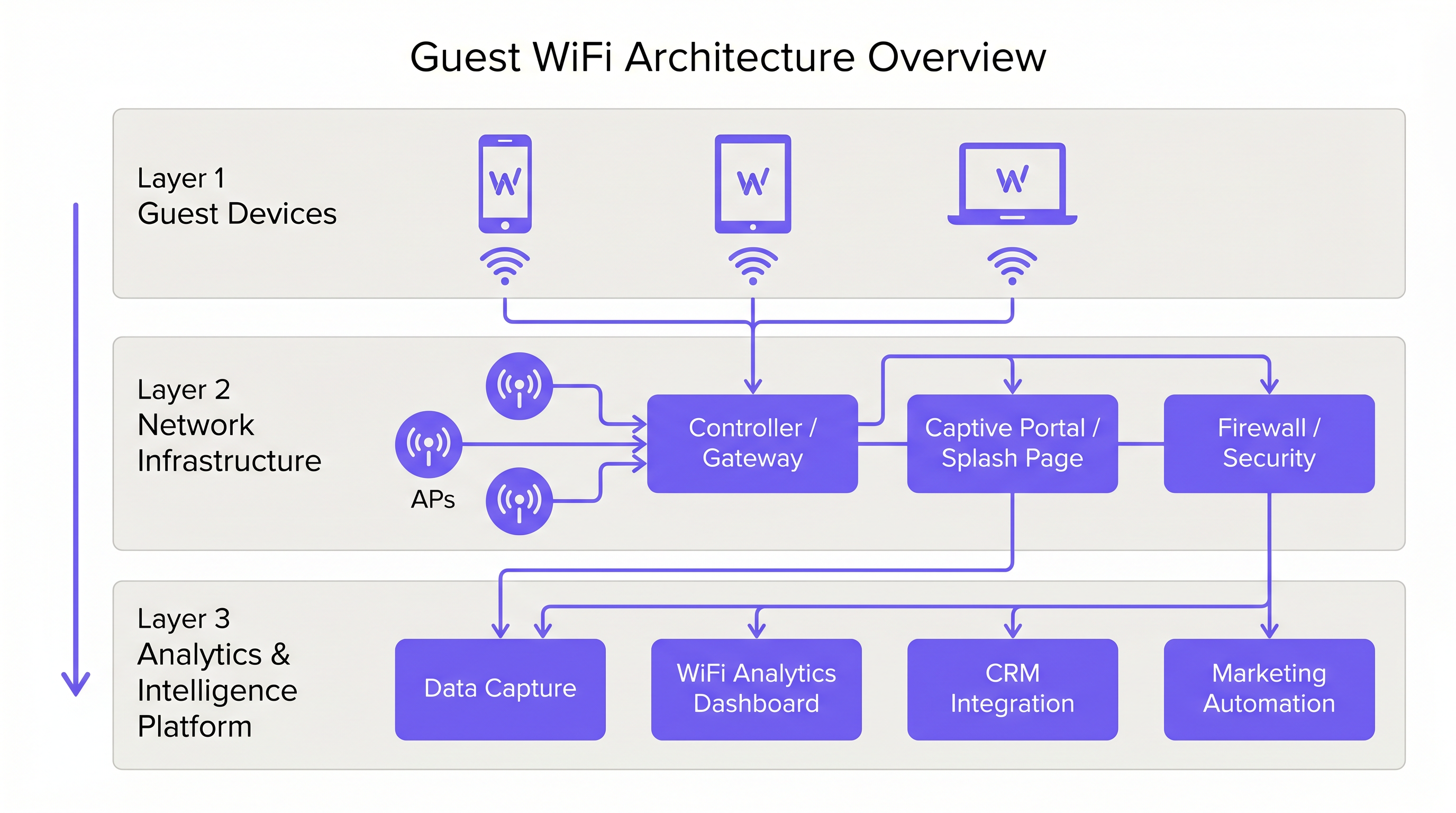
একটি পেশাদার গেস্ট WiFi স্থাপনার জন্য কর্পোরেট অবকাঠামো থেকে কঠোর লজিক্যাল পৃথকীকরণ প্রয়োজন। এটি VLAN সেগমেন্টেশন এবং একটি ডেডিকেটেড Service Set Identifier (SSID) এর মাধ্যমে অর্জন করা হয়। গেস্ট ট্র্যাফিককে একটি Captive Portal এর মাধ্যমে সরাসরি ইন্টারনেটে রুট করতে হবে, যাতে এটি Point of Sale (POS) টার্মিনাল বা ব্যাক-অফিস সার্ভারের মতো অভ্যন্তরীণ সিস্টেমগুলির সাথে কখনও সংযুক্ত না হয়। এই আর্কিটেকচারটি নিরাপত্তা এবং PCI DSS সম্মতি উভয়ের জন্যই মৌলিক।
অ্যাক্সেস পয়েন্ট স্থাপন এবং মান
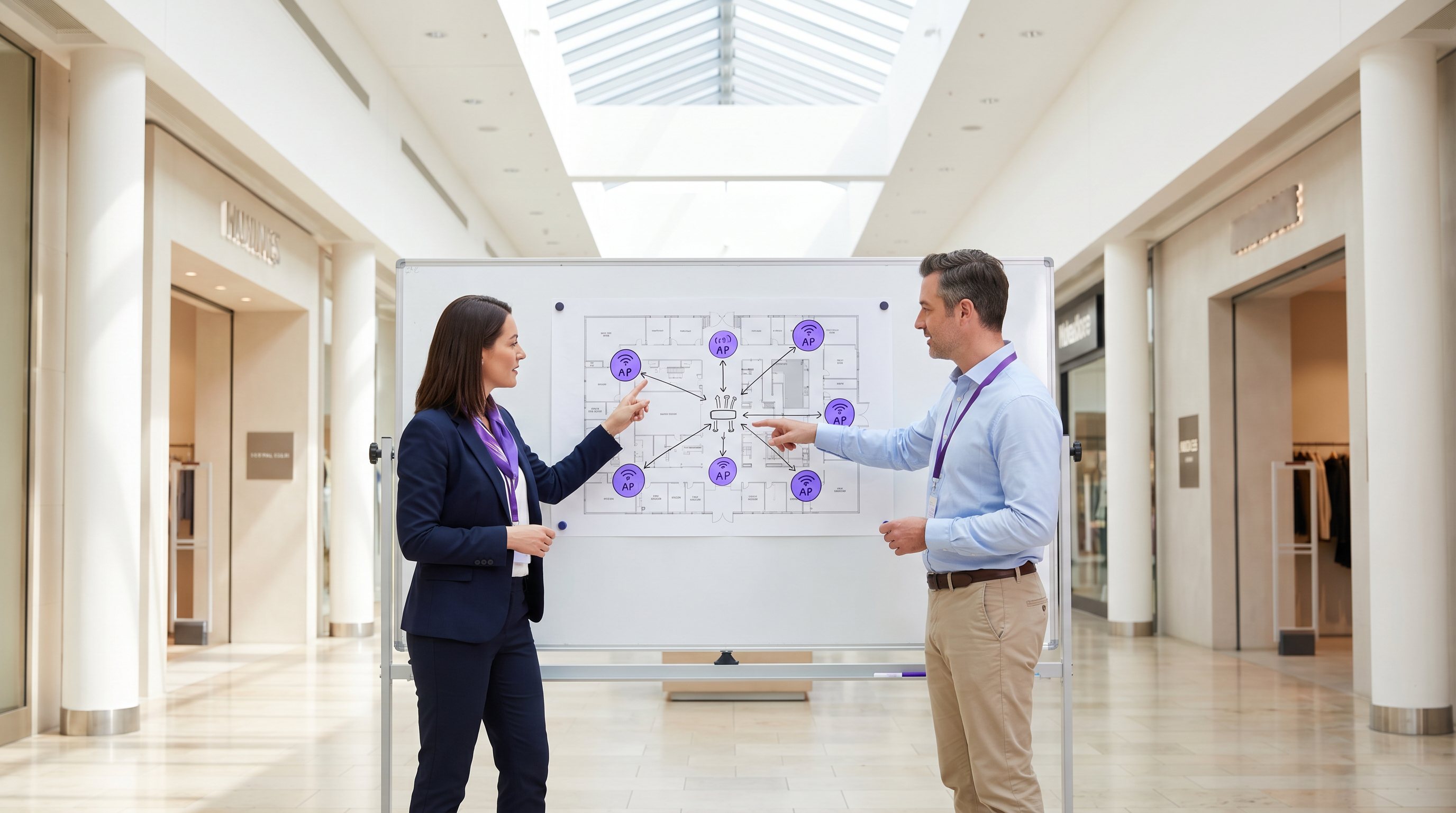
রেডিও স্তরটি গেস্ট নেটওয়ার্কের ভিত্তি তৈরি করে। Access Point (AP) স্থাপন একটি ব্যাপক সাইট সার্ভে দ্বারা নির্ধারিত হতে হবে, যা কভারেজ এলাকা, প্রত্যাশিত সমসাময়িক ডিভাইসের সংখ্যা এবং কাঠামোগত অ্যাটেন্যুয়েশন বিবেচনা করবে। স্টেডিয়াম বা বড় Transport হাবের মতো উচ্চ-ঘনত্বের পরিবেশের জন্য, IEEE 802.11ax (Wi-Fi 6) হল সর্বনিম্ন প্রস্তাবিত মান, যা প্রয়োজনীয় ক্ষমতা এবং দক্ষতা প্রদান করে। অত্যন্ত ডিভাইস ঘনত্বের পরিবেশগুলিতে 6 GHz ব্যান্ড ব্যবহার করার জন্য Wi-Fi 6E বিবেচনা করা উচিত।
নিরাপত্তা এবং এনক্রিপশন
প্রতিটি স্তরে নিরাপত্তা প্রয়োগ করতে হবে। WPA3 হল ওয়্যারলেস এনক্রিপশনের বর্তমান মান এবং সমস্ত নতুন স্থাপনার জন্য এটি প্রয়োগ করা উচিত। গুরুত্বপূর্ণভাবে, গেস্ট SSID-এ ক্লায়েন্ট আইসোলেশন সক্ষম করতে হবে যাতে ডিভাইসগুলি একে অপরের সাথে যোগাযোগ করতে না পারে, যা দূষিত অভিনেতাদের দ্বারা পার্শ্বীয় চলাচলের ঝুঁকি হ্রাস করে। গেটওয়ে স্তরে, পরিচিত দূষিত ডোমেইন এবং অনুপযুক্ত সামগ্রীতে অ্যাক্সেস ব্লক করার জন্য DNS ফিল্টারিং সুপারিশ করা হয়।
একটি ইন্টেলিজেন্স গেটওয়ে হিসাবে Captive Portal
Captive Portal, বা স্প্ল্যাশ পেজ, দুটি উদ্দেশ্য পূরণ করে: এটি নেটওয়ার্ক অ্যাক্সেসের জন্য গেটওয়ে এবং ফার্স্ট-পার্টি ডেটা সংগ্রহের প্রাথমিক প্রক্রিয়া। যখন ব্যবহারকারীরা ইমেল, সোশ্যাল লগইন বা SMS এর মাধ্যমে প্রমাণীকরণ করে, তখন প্ল্যাটফর্মটি যাচাইকৃত পরিচয় ডেটা সংগ্রহ করে। এই ডেটা, যখন একটি WiFi Analytics প্ল্যাটফর্মের মাধ্যমে প্রক্রিয়া করা হয়, তখন ভিজিটর ডেমোগ্রাফিক্স, থাকার সময় এবং ফিরে আসার ফ্রিকোয়েন্সি সম্পর্কে অন্তর্দৃষ্টি প্রদান করে।
বাস্তবায়ন নির্দেশিকা
ধাপ 1: প্রয়োজনীয়তা সংগ্রহ এবং সাইট সার্ভে
বাণিজ্যিক উদ্দেশ্য এবং প্রযুক্তিগত প্রয়োজনীয়তা সংজ্ঞায়িত করে শুরু করুন। সর্বোত্তম AP স্থাপন নির্ধারণের জন্য একটি ভবিষ্যদ্বাণীমূলক এবং শারীরিক সাইট সার্ভে পরিচালনা করুন। একটি 200-রুমের হোটেলের জন্য 40,000-সিটের স্টেডিয়ামের চেয়ে ভিন্ন স্থাপনা কৌশল প্রয়োজন।
ধাপ 2: নেটওয়ার্ক ডিজাইন এবং সেগমেন্টেশন
কঠোর আইসোলেশন নিশ্চিত করতে নেটওয়ার্ক অবকাঠামো কনফিগার করুন। কর্পোরেট এবং অপারেশনাল ট্র্যাফিক (যেমন, IoT ডিভাইস, নিরাপত্তা ক্যামেরা) থেকে গেস্ট ট্র্যাফিক আলাদা করতে VLANs প্রয়োগ করুন। গেস্ট ইন্টারনেট অ্যাক্সেসের উপর গুরুত্বপূর্ণ অপারেশনাল ট্র্যাফিককে অগ্রাধিকার দিতে Quality of Service (QoS) নীতিগুলি প্রয়োগ করুন।
ধাপ 3: Captive Portal কনফিগারেশন এবং সম্মতি
ভেন্যুর ব্র্যান্ড পরিচয় প্রতিফলিত করতে Captive Portal ডিজাইন করুন। গুরুত্বপূর্ণভাবে, UK এবং EU-তে GDPR এর মতো আঞ্চলিক ডেটা সুরক্ষা প্রবিধানগুলির সাথে সম্মতি নিশ্চিত করুন। স্প্ল্যাশ পেজে একটি স্পষ্ট গোপনীয়তা বিজ্ঞপ্তি এবং ডেটা সংগ্রহের জন্য একটি সুস্পষ্ট সম্মতি প্রক্রিয়া অন্তর্ভুক্ত থাকতে হবে। একটি কার্যকর পোর্টাল তৈরির নির্দেশনার জন্য, Comment créer une page de connexion WiFi invité বা So erstellen Sie eine Guest WiFi Login Page এর মতো সংস্থানগুলি দেখুন।
ধাপ 4: অ্যানালিটিক্স ইন্টিগ্রেশন
সংস্থার বৃহত্তর মার্কেটিং এবং CRM স্ট্যাকের সাথে গেস্ট WiFi প্ল্যাটফর্মকে একত্রিত করুন। ডেটা ওয়ার্কফ্লো সংজ্ঞায়িত করুন যাতে সংগৃহীত বুদ্ধিমত্তা মার্কেটিং অটোমেশন এবং গ্রাহক জড়িত উদ্যোগগুলির জন্য কার্যকর হয়।
সেরা অনুশীলন
- ক্লায়েন্ট আইসোলেশন প্রয়োগ করুন: ব্যবহারকারীদের একে অপরের থেকে রক্ষা করতে গেস্ট SSID-এ সর্বদা ক্লায়েন্ট আইসোলেশন সক্ষম করুন।
- ব্যান্ডউইথ ম্যানেজমেন্ট প্রয়োগ করুন: ব্যক্তিগত ব্যবহারকারীদের সংযোগ একচেটিয়া করা এবং অন্যদের জন্য অভিজ্ঞতা খারাপ করা থেকে বিরত রাখতে প্রতি-ডিভাইস ব্যান্ডউইথ সীমা প্রয়োগ করুন।
- QoS কে অগ্রাধিকার দিন: নিশ্চিত করুন যে পেমেন্ট প্রসেসিং এবং VoIP এর মতো অপারেশনাল ট্র্যাফিক গেস্ট ইন্টারনেট অ্যাক্সেসের উপর অগ্রাধিকার পায়।
- সম্মতি বজায় রাখুন: GDPR এবং অন্যান্য প্রাসঙ্গিক প্রবিধানগুলির সাথে চলমান সম্মতি নিশ্চিত করতে নিয়মিতভাবে ডেটা ধারণ নীতি এবং সম্মতি প্রক্রিয়াগুলি পর্যালোচনা করুন।
- SD-WAN ব্যবহার করুন: মাল্টি-সাইট স্থাপনার জন্য, কেন্দ্রীভূত ব্যবস্থাপনা এবং অপ্টিমাইজড রাউটিংয়ের জন্য SD-WAN এর সুবিধাগুলি বিবেচনা করুন। আরও বিস্তারিত জানতে The Core SD WAN Benefits for Modern Businesses (বা Die zentralen SD-WAN-Vorteile für moderne Unternehmen ) দেখুন।
সমস্যা সমাধান এবং ঝুঁকি প্রশমন
সাধারণ ব্যর্থতার ধরণ
- অপর্যাপ্ত কভারেজe: দুর্বল AP স্থাপন বা কাঠামোগত হস্তক্ষেপের হিসাব না রাখার কারণে ডেড জোন তৈরি হয়। প্রতিকার: স্থাপনার পর পুঙ্খানুপুঙ্খ সাইট সার্ভে পরিচালনা করুন এবং প্রয়োজন অনুযায়ী AP স্থাপন বা ট্রান্সমিট পাওয়ার সামঞ্জস্য করুন।
- IP Address Exhaustion: প্রচুর অস্থায়ী ডিভাইসের কারণে DHCP পুল শেষ হয়ে যায়। প্রতিকার: গেস্ট নেটওয়ার্কের জন্য সংক্ষিপ্ত DHCP লিজ টাইম (যেমন, 30-60 মিনিট) প্রয়োগ করুন এবং নিশ্চিত করুন যে সাবনেটটি সঠিকভাবে আকারযুক্ত।
- Captive Portal Bypasses: ভুলভাবে কনফিগার করা ওয়াল্ড গার্ডেন বা MAC অ্যাড্রেস স্পুফিংয়ের কারণে ডিভাইসগুলি স্প্ল্যাশ পেজ বাইপাস করছে। প্রতিকার: নিয়মিত ওয়াল্ড গার্ডেন কনফিগারেশন নিরীক্ষা করুন এবং শক্তিশালী প্রমাণীকরণ প্রক্রিয়া প্রয়োগ করুন।
ROI এবং ব্যবসায়িক প্রভাব
গেস্ট WiFi-এর জন্য বিনিয়োগের উপর রিটার্ন গ্রাহকের বর্ধিত ব্যস্ততা এবং কার্যকর ডেটা সংগ্রহের মাধ্যমে অর্জিত হয়।
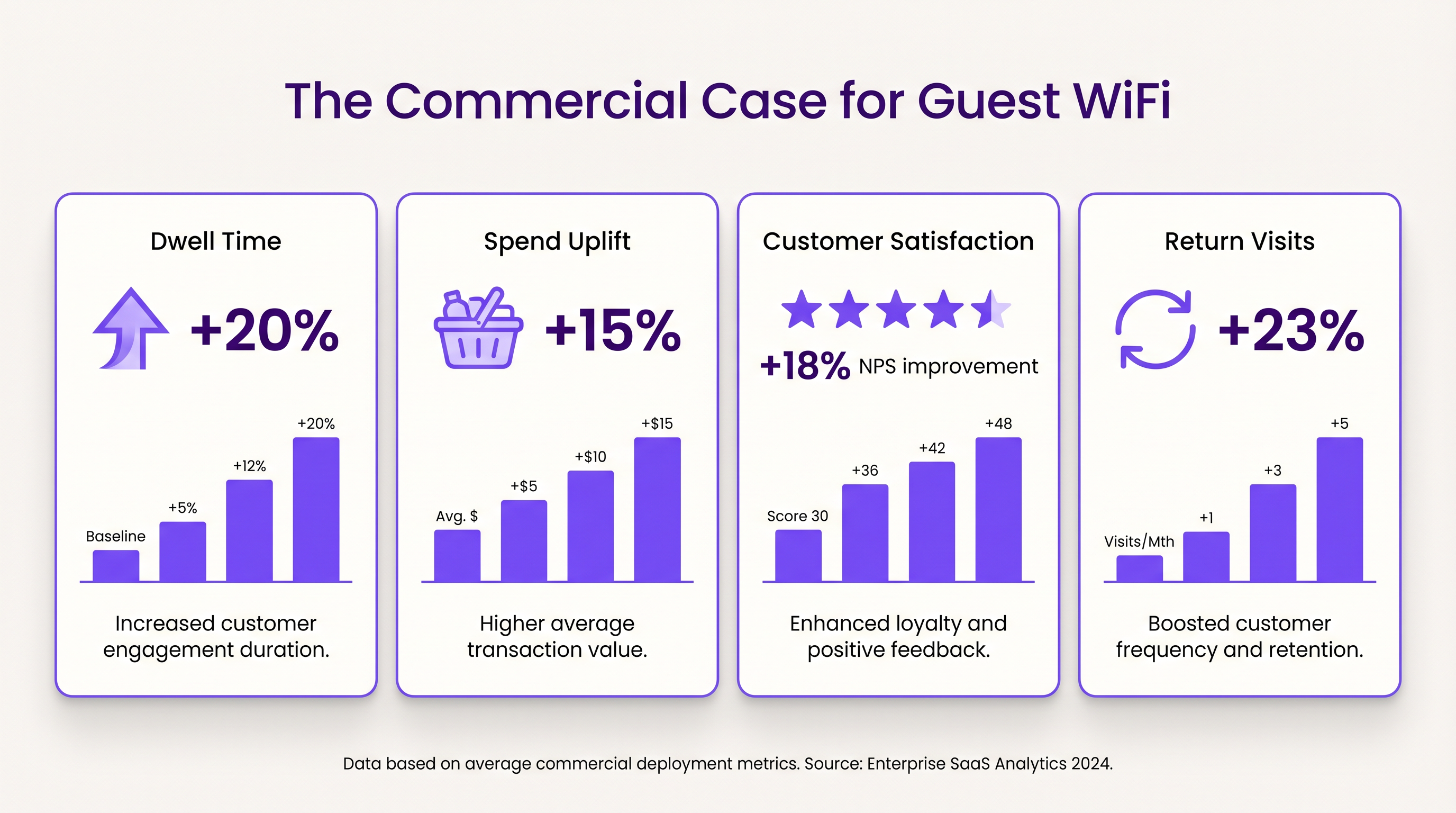
- Dwell Time এবং ব্যয় বৃদ্ধি: নির্ভরযোগ্য সংযোগ প্রদান গ্রাহকদের দীর্ঘক্ষণ সাইটে থাকতে উৎসাহিত করে। খুচরা পরিবেশে, বর্ধিত Dwell Time উচ্চ গড় লেনদেন মূল্যের সাথে দৃঢ়ভাবে সম্পর্কযুক্ত।
- গ্রাহক সন্তুষ্টি: আতিথেয়তায়, নির্বিঘ্ন WiFi অ্যাক্সেস ইতিবাচক পর্যালোচনা এবং বারবার বুকিংয়ের একটি প্রধান চালিকাশক্তি।
- ফার্স্ট-পার্টি ডেটার মূল্য: Captive Portal-এর মাধ্যমে সংগৃহীত ডেটা লক্ষ্যযুক্ত বিপণন প্রচারাভিযান সক্ষম করে, গ্রাহক অধিগ্রহণ খরচ কমায় এবং আজীবন মূল্য বৃদ্ধি করে। Purple-এর পদ্ধতি, যার মধ্যে প্রোফাইল-ভিত্তিক প্রমাণীকরণ অন্তর্ভুক্ত, গ্রাহক ডেটাবেসকে সমৃদ্ধ করার পাশাপাশি নির্বিঘ্ন, সুরক্ষিত অ্যাক্সেস সহজতর করে।
মূল শব্দ ও সংজ্ঞা
Captive Portal
A web page that the user of a public-access network is obliged to view and interact with before access is granted.
Used for authentication, presenting terms of service, and capturing first-party data.
VLAN (Virtual Local Area Network)
A logical subnetwork that groups a collection of devices from different physical LANs.
Essential for isolating guest WiFi traffic from corporate networks to maintain security.
Client Isolation
A security feature that prevents devices connected to the same AP from communicating with each other.
Critical for public networks to prevent malicious actors from scanning or attacking other guests' devices.
SSID (Service Set Identifier)
The primary name associated with an 802.11 wireless local area network (WLAN).
The network name guests select on their devices to connect.
QoS (Quality of Service)
The use of mechanisms or technologies that work on a network to control traffic and ensure the performance of critical applications.
Used to prioritize operational traffic (e.g., POS transactions) over guest internet browsing.
WPA3 (Wi-Fi Protected Access 3)
The latest generation of mainstream security for wireless networks, offering improved encryption.
The recommended security standard for all new wireless deployments to protect data in transit.
Dwell Time
The amount of time a visitor spends in a specific location or venue.
A key commercial metric; offering free WiFi typically increases dwell time, which often correlates with increased spend.
First-Party Data
Information a company collects directly from its customers and owns.
Captured via the captive portal, this data is highly valuable for targeted marketing and personalization.
কেস স্টাডিজ
A 200-room hotel needs to deploy guest WiFi while ensuring that corporate traffic (e.g., PMS, POS) remains secure and bandwidth is distributed fairly among guests.
- Deploy IEEE 802.11ax APs in hallways and common areas based on a site survey. 2. Configure a dedicated guest SSID on a separate VLAN, isolated from the corporate VLAN. 3. Enable client isolation on the guest SSID. 4. Implement a captive portal for authentication and terms of service acceptance. 5. Apply a per-device bandwidth limit (e.g., 5 Mbps down / 2 Mbps up) to prevent network saturation. 6. Configure QoS to prioritize corporate traffic.
A large retail chain wants to implement guest WiFi across 50 locations to capture customer data for marketing purposes, ensuring GDPR compliance.
- Standardize the network architecture across all sites, utilizing SD-WAN for centralized management. 2. Deploy a centralized captive portal integrated with a WiFi Analytics platform. 3. Design the splash page to offer multiple authentication methods (email, social). 4. Implement explicit opt-in checkboxes for marketing communications, distinct from the terms of service acceptance. 5. Define and enforce a data retention policy within the analytics platform.
দৃশ্যপট বিশ্লেষণ
Q1. A venue operator reports that their guest WiFi network frequently drops connections during busy periods, despite having strong signal strength throughout the building.
💡 ইঙ্গিত:Consider the difference between coverage (signal strength) and capacity (ability to handle concurrent devices), as well as IP addressing.
প্রস্তাবিত পদ্ধতি দেখুন
The issue is likely capacity-related rather than coverage-related. Potential causes include: 1) APs being overwhelmed by too many concurrent connections (requires upgrading to high-density APs like Wi-Fi 6). 2) DHCP pool exhaustion (requires reducing lease times or expanding the subnet). 3) Insufficient backhaul bandwidth to the ISP.
Q2. The marketing team wants to collect guest email addresses, phone numbers, and dates of birth via the captive portal to build customer profiles.
💡 ইঙ্গিত:Consider data minimization principles and the impact of friction on the user experience.
প্রস্তাবিত পদ্ধতি দেখুন
While technically possible, requiring excessive information increases friction, leading to higher drop-off rates at the portal. Furthermore, under GDPR, data collection must be proportionate to the service provided. The recommended approach is to offer multiple authentication methods (e.g., email or social login) and only mandate the minimum data necessary, using progressive profiling to gather more details on subsequent visits.
Q3. During a network audit, it is discovered that guest devices can ping the IP addresses of the venue's point-of-sale (POS) terminals.
💡 ইঙ্গিত:Focus on logical network separation and access control.
প্রস্তাবিত পদ্ধতি দেখুন
This indicates a critical failure in network segmentation. The guest SSID must be placed on a dedicated VLAN that is completely isolated from the corporate/operational VLAN. Firewall rules or Access Control Lists (ACLs) must be implemented at the gateway to explicitly deny traffic from the guest subnet to any internal subnets.




