

Warum Ihr Unternehmen Kunden kostenloses WiFi anbieten sollte
Dieser umfassende technische Leitfaden beschreibt die kommerziellen und architektonischen Gründe für das Angebot von Guest WiFi in physischen Veranstaltungsorten. Er bietet IT-Führungskräften und Betreibern von Veranstaltungsorten umsetzbare Einblicke in Bereitstellungsstrategien, Netzwerksegmentierung, Compliance und ROI-Messung.
🎧 Diesen Leitfaden anhören
Transkript anzeigen
Zusammenfassung für Führungskräfte
Für moderne physische Veranstaltungsorte – sei es im Einzelhandel , im Gastgewerbe oder im Gesundheitswesen – hat sich Guest WiFi von einer passiven Annehmlichkeit zu einem entscheidenden kommerziellen Gut entwickelt. Dieser Leitfaden untersucht die technische Architektur, Sicherheitsaspekte und geschäftlichen Auswirkungen der Bereitstellung einer robusten Guest WiFi-Lösung. Durch die Nutzung von Plattformen wie Guest WiFi und deren Integration mit einer WiFi Analytics -Plattform können IT-Führungskräfte anonymen Fußgängerverkehr in verwertbare Erstanbieterdaten umwandeln und gleichzeitig das Kundenerlebnis verbessern. Der geschäftliche Nutzen ist klar: gut konzipiertes Guest WiFi erhöht die Verweildauer, steigert die Ausgaben und liefert die Verhaltensintelligenz, die zur Optimierung des Betriebs am Veranstaltungsort erforderlich ist.
Technischer Einblick
Netzwerkarchitektur und Segmentierung
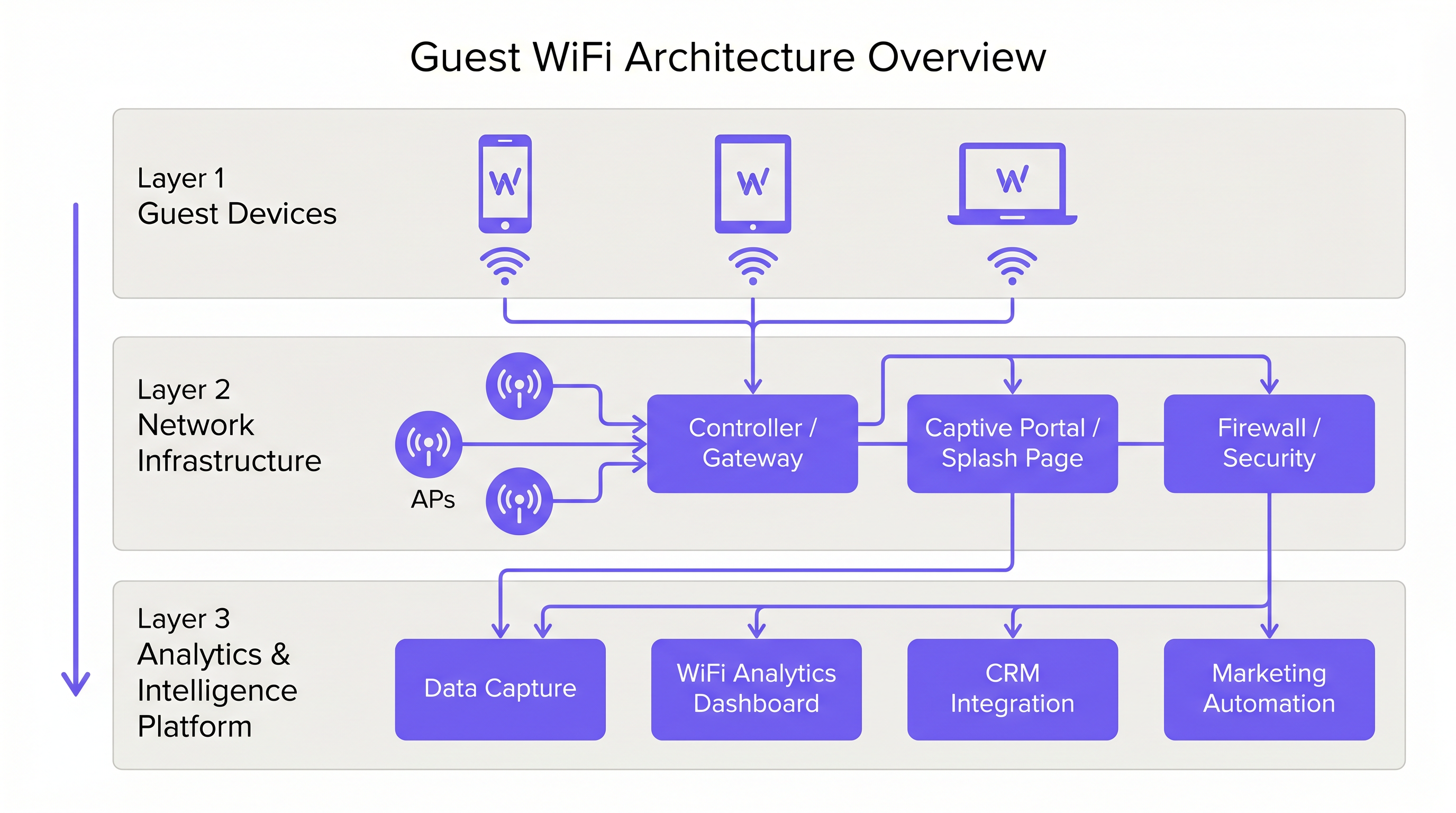
Eine professionelle Guest WiFi-Bereitstellung erfordert eine strikte logische Trennung von der Unternehmensinfrastruktur. Dies wird durch VLAN-Segmentierung und einen dedizierten Service Set Identifier (SSID) erreicht. Der Gastverkehr muss über ein Captive Portal direkt ins Internet geleitet werden, um sicherzustellen, dass er niemals interne Systeme wie Point of Sale (POS)-Terminals oder Back-Office-Server kreuzt. Diese Architektur ist sowohl für die Sicherheit als auch für die PCI DSS-Compliance von grundlegender Bedeutung.
Access Point-Bereitstellung und Standards
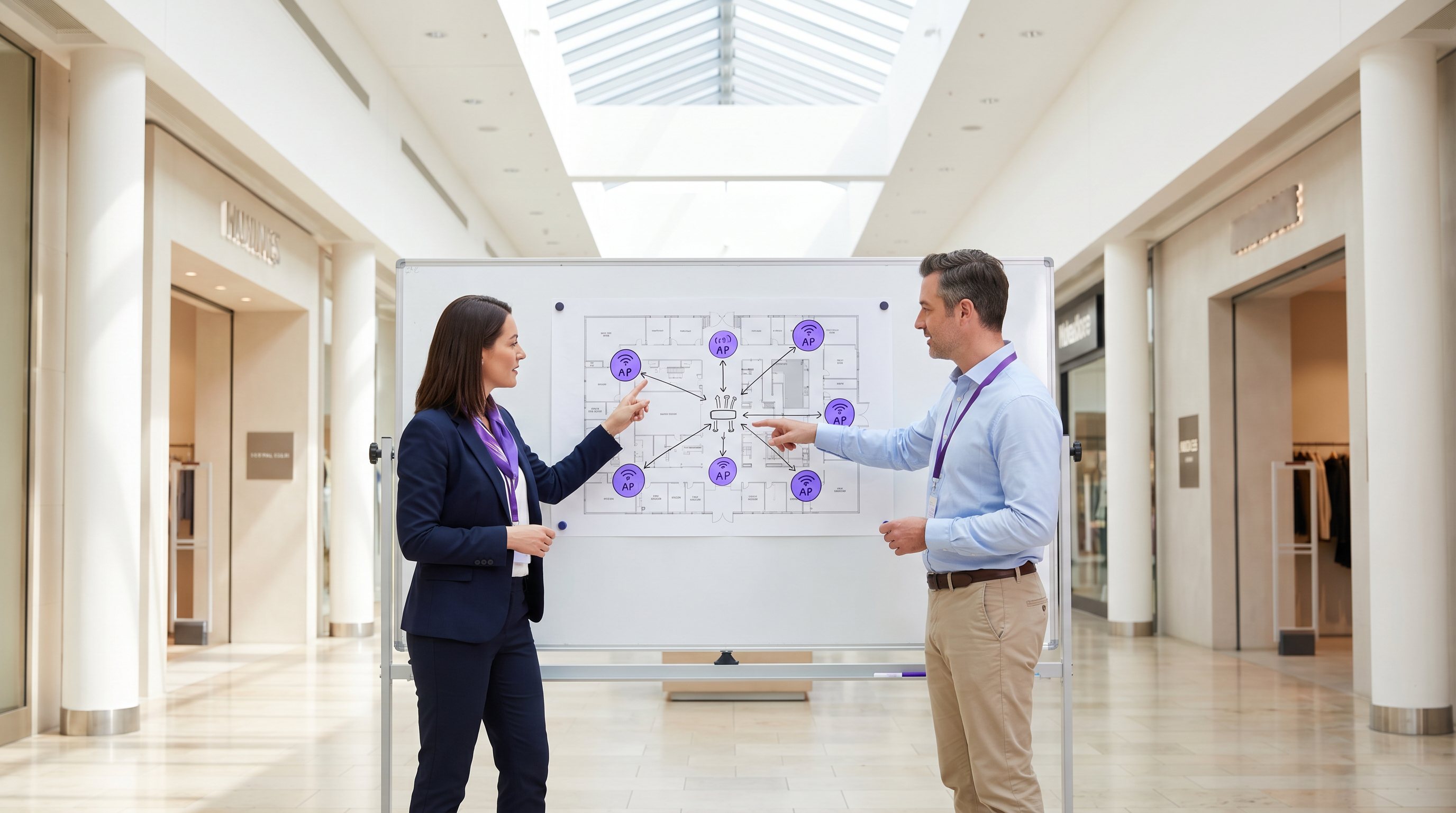
Die Funkschicht bildet die Grundlage des Gastnetzwerks. Die Platzierung von Access Points (AP) muss durch eine umfassende Standortuntersuchung bestimmt werden, die den Abdeckungsbereich, die erwartete Anzahl gleichzeitiger Geräte und die strukturelle Dämpfung berücksichtigt. Für Umgebungen mit hoher Dichte wie Stadien oder große Transport -Drehkreuze ist IEEE 802.11ax (Wi-Fi 6) der mindestens empfohlene Standard, der die notwendige Kapazität und Effizienz bietet. Umgebungen mit extremer Gerätedichte sollten Wi-Fi 6E in Betracht ziehen, um das 6-GHz-Band zu nutzen.
Sicherheit und Verschlüsselung
Sicherheit muss auf jeder Ebene durchgesetzt werden. WPA3 ist der aktuelle Standard für drahtlose Verschlüsselung und sollte für alle neuen Bereitstellungen implementiert werden. Entscheidend ist, dass die Client-Isolation auf der Guest SSID aktiviert sein muss, um zu verhindern, dass Geräte miteinander kommunizieren, und so das Risiko einer lateralen Bewegung durch böswillige Akteure zu mindern. Auf Gateway-Ebene wird DNS-Filterung empfohlen, um den Zugriff auf bekannte bösartige Domains und unangemessene Inhalte zu blockieren.
Das Captive Portal als Intelligenz-Gateway
Das Captive Portal, oder Splash Page, dient einem doppelten Zweck: Es ist das Gateway für den Netzwerkzugang und der primäre Mechanismus zur Erfassung von Erstanbieterdaten. Wenn Benutzer sich per E-Mail, Social Login oder SMS authentifizieren, erfasst die Plattform verifizierte Identitätsdaten. Diese Daten, wenn sie über eine WiFi Analytics -Plattform verarbeitet werden, liefern Einblicke in Besucherdemografie, Verweildauer und Wiederkehrhäufigkeiten.
Implementierungsleitfaden
Schritt 1: Anforderungserfassung und Standortuntersuchung
Beginnen Sie mit der Definition der kommerziellen Ziele und technischen Anforderungen. Führen Sie eine vorausschauende und physische Standortuntersuchung durch, um die optimale AP-Platzierung zu bestimmen. Ein Hotel mit 200 Zimmern erfordert eine andere Bereitstellungsstrategie als ein Stadion mit 40.000 Plätzen.
Schritt 2: Netzwerkdesign und Segmentierung
Konfigurieren Sie die Netzwerkinfrastruktur, um eine strikte Isolation zu gewährleisten. Implementieren Sie VLANs, um den Gastverkehr von Unternehmens- und Betriebsverkehr (z. B. IoT-Geräte, Überwachungskameras) zu trennen. Wenden Sie Quality of Service (QoS)-Richtlinien an, um kritischen Betriebsverkehr gegenüber dem Gast-Internetzugang zu priorisieren.
Schritt 3: Captive Portal-Konfiguration und Compliance
Gestalten Sie das Captive Portal so, dass es die Markenidentität des Veranstaltungsortes widerspiegelt. Entscheidend ist die Einhaltung regionaler Datenschutzbestimmungen, wie der GDPR in Großbritannien und der EU. Die Splash Page muss eine klare Datenschutzerklärung und einen expliziten Zustimmungsmechanismus für die Datenerfassung enthalten. Für Anleitungen zur Erstellung eines effektiven Portals verweisen wir auf Ressourcen wie Comment créer une page de connexion WiFi invité oder So erstellen Sie eine Guest WiFi Login Page .
Schritt 4: Analyse-Integration
Integrieren Sie die Guest WiFi-Plattform in den umfassenderen Marketing- und CRM-Stack der Organisation. Definieren Sie die Daten-Workflows, um sicherzustellen, dass die erfassten Informationen für Marketingautomatisierungs- und Kundenbindungsinitiativen nutzbar sind.
Best Practices
- Client-Isolation durchsetzen: Aktivieren Sie immer die Client-Isolation auf der Guest SSID, um Benutzer voreinander zu schützen.
- Bandbreitenmanagement implementieren: Wenden Sie Bandbreitenbegrenzungen pro Gerät an, um zu verhindern, dass einzelne Benutzer die Verbindung monopolisieren und das Erlebnis für andere beeinträchtigen.
- QoS priorisieren: Stellen Sie sicher, dass der Betriebsverkehr, wie z. B. Zahlungsabwicklung und VoIP, Vorrang vor dem Gast-Internetzugang hat.
- Compliance aufrechterhalten: Überprüfen Sie regelmäßig die Richtlinien zur Datenaufbewahrung und die Zustimmungsmechanismen, um die fortlaufende Einhaltung der GDPR und anderer relevanter Vorschriften zu gewährleisten.
- SD-WAN nutzen: Für Multi-Site-Bereitstellungen sollten Sie die Vorteile von SD-WAN für zentralisiertes Management und optimiertes Routing in Betracht ziehen. Weitere Details finden Sie unter The Core SD WAN Benefits for Modern Businesses (oder Die zentralen SD-WAN-Vorteile für moderne Unternehmen ).
Fehlerbehebung & Risikominderung
Häufige Fehlerursachen
- Unzureichende Abdeckune: Funklöcher, verursacht durch schlechte AP-Platzierung oder unzureichende Berücksichtigung struktureller Interferenzen. Abhilfe: Führen Sie gründliche Standortbegehungen nach der Bereitstellung durch und passen Sie die AP-Platzierung oder Sendeleistung nach Bedarf an.
- IP-Adressen-Erschöpfung: Der DHCP-Pool ist aufgrund einer hohen Anzahl temporärer Geräte erschöpft. Abhilfe: Implementieren Sie kürzere DHCP-Lease-Zeiten (z. B. 30-60 Minuten) für das Gastnetzwerk und stellen Sie sicher, dass das Subnetz angemessen dimensioniert ist.
- Captive Portal Umgehungen: Geräte umgehen die Splash-Seite aufgrund falsch konfigurierter Walled Gardens oder MAC-Adress-Spoofing. Abhilfe: Überprüfen Sie regelmäßig die Walled Garden-Konfigurationen und implementieren Sie robuste Authentifizierungsmechanismen.
ROI & Geschäftsauswirkungen
Der Return on Investment für Gast-WiFi wird durch eine erhöhte Kundenbindung und die Erfassung verwertbarer Daten realisiert.
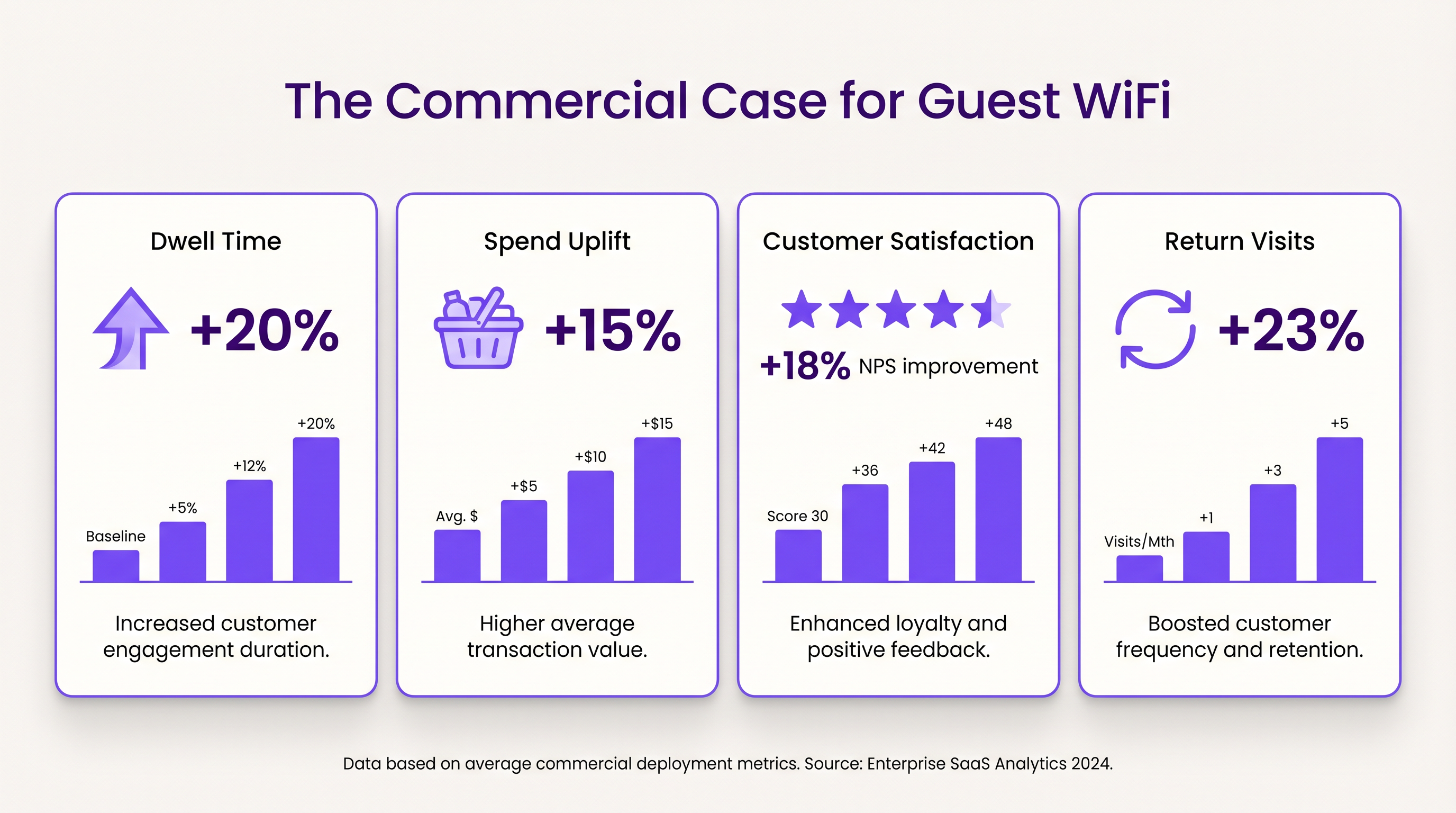
- Verweildauer und Umsatzsteigerung: Eine zuverlässige Konnektivität ermutigt Kunden, länger vor Ort zu bleiben. Im Einzelhandel korreliert eine erhöhte Verweildauer stark mit höheren durchschnittlichen Transaktionswerten.
- Kundenzufriedenheit: Im Gastgewerbe ist ein nahtloser WiFi-Zugang ein Hauptfaktor für positive Bewertungen und wiederholte Buchungen.
- Wert von Erstanbieterdaten: Die über das Captive Portal erfassten Daten ermöglichen gezielte Marketingkampagnen, reduzieren die Kosten für die Kundenakquise und erhöhen den Customer Lifetime Value. Der Ansatz von Purple, einschließlich profilbasierter Authentifizierung, ermöglicht einen nahtlosen, sicheren Zugang und bereichert gleichzeitig die Kundendatenbank.
Schlüsselbegriffe & Definitionen
Captive Portal
A web page that the user of a public-access network is obliged to view and interact with before access is granted.
Used for authentication, presenting terms of service, and capturing first-party data.
VLAN (Virtual Local Area Network)
A logical subnetwork that groups a collection of devices from different physical LANs.
Essential for isolating guest WiFi traffic from corporate networks to maintain security.
Client Isolation
A security feature that prevents devices connected to the same AP from communicating with each other.
Critical for public networks to prevent malicious actors from scanning or attacking other guests' devices.
SSID (Service Set Identifier)
The primary name associated with an 802.11 wireless local area network (WLAN).
The network name guests select on their devices to connect.
QoS (Quality of Service)
The use of mechanisms or technologies that work on a network to control traffic and ensure the performance of critical applications.
Used to prioritize operational traffic (e.g., POS transactions) over guest internet browsing.
WPA3 (Wi-Fi Protected Access 3)
The latest generation of mainstream security for wireless networks, offering improved encryption.
The recommended security standard for all new wireless deployments to protect data in transit.
Dwell Time
The amount of time a visitor spends in a specific location or venue.
A key commercial metric; offering free WiFi typically increases dwell time, which often correlates with increased spend.
First-Party Data
Information a company collects directly from its customers and owns.
Captured via the captive portal, this data is highly valuable for targeted marketing and personalization.
Fallstudien
A 200-room hotel needs to deploy guest WiFi while ensuring that corporate traffic (e.g., PMS, POS) remains secure and bandwidth is distributed fairly among guests.
- Deploy IEEE 802.11ax APs in hallways and common areas based on a site survey. 2. Configure a dedicated guest SSID on a separate VLAN, isolated from the corporate VLAN. 3. Enable client isolation on the guest SSID. 4. Implement a captive portal for authentication and terms of service acceptance. 5. Apply a per-device bandwidth limit (e.g., 5 Mbps down / 2 Mbps up) to prevent network saturation. 6. Configure QoS to prioritize corporate traffic.
A large retail chain wants to implement guest WiFi across 50 locations to capture customer data for marketing purposes, ensuring GDPR compliance.
- Standardize the network architecture across all sites, utilizing SD-WAN for centralized management. 2. Deploy a centralized captive portal integrated with a WiFi Analytics platform. 3. Design the splash page to offer multiple authentication methods (email, social). 4. Implement explicit opt-in checkboxes for marketing communications, distinct from the terms of service acceptance. 5. Define and enforce a data retention policy within the analytics platform.
Szenarioanalyse
Q1. A venue operator reports that their guest WiFi network frequently drops connections during busy periods, despite having strong signal strength throughout the building.
💡 Hinweis:Consider the difference between coverage (signal strength) and capacity (ability to handle concurrent devices), as well as IP addressing.
Empfohlenen Ansatz anzeigen
The issue is likely capacity-related rather than coverage-related. Potential causes include: 1) APs being overwhelmed by too many concurrent connections (requires upgrading to high-density APs like Wi-Fi 6). 2) DHCP pool exhaustion (requires reducing lease times or expanding the subnet). 3) Insufficient backhaul bandwidth to the ISP.
Q2. The marketing team wants to collect guest email addresses, phone numbers, and dates of birth via the captive portal to build customer profiles.
💡 Hinweis:Consider data minimization principles and the impact of friction on the user experience.
Empfohlenen Ansatz anzeigen
While technically possible, requiring excessive information increases friction, leading to higher drop-off rates at the portal. Furthermore, under GDPR, data collection must be proportionate to the service provided. The recommended approach is to offer multiple authentication methods (e.g., email or social login) and only mandate the minimum data necessary, using progressive profiling to gather more details on subsequent visits.
Q3. During a network audit, it is discovered that guest devices can ping the IP addresses of the venue's point-of-sale (POS) terminals.
💡 Hinweis:Focus on logical network separation and access control.
Empfohlenen Ansatz anzeigen
This indicates a critical failure in network segmentation. The guest SSID must be placed on a dedicated VLAN that is completely isolated from the corporate/operational VLAN. Firewall rules or Access Control Lists (ACLs) must be implemented at the gateway to explicitly deny traffic from the guest subnet to any internal subnets.




