

Perché la Tua Attività Dovrebbe Offrire WiFi Gratuito ai Clienti
Questa guida tecnica di riferimento completa illustra le motivazioni commerciali e architettoniche per offrire il WiFi agli ospiti in luoghi fisici. Fornisce ai leader IT e agli operatori delle sedi approfondimenti pratici sulle strategie di implementazione, la segmentazione della rete, la conformità e la misurazione del ROI.
🎧 Ascolta questa guida
Visualizza trascrizione
Sintesi Esecutiva
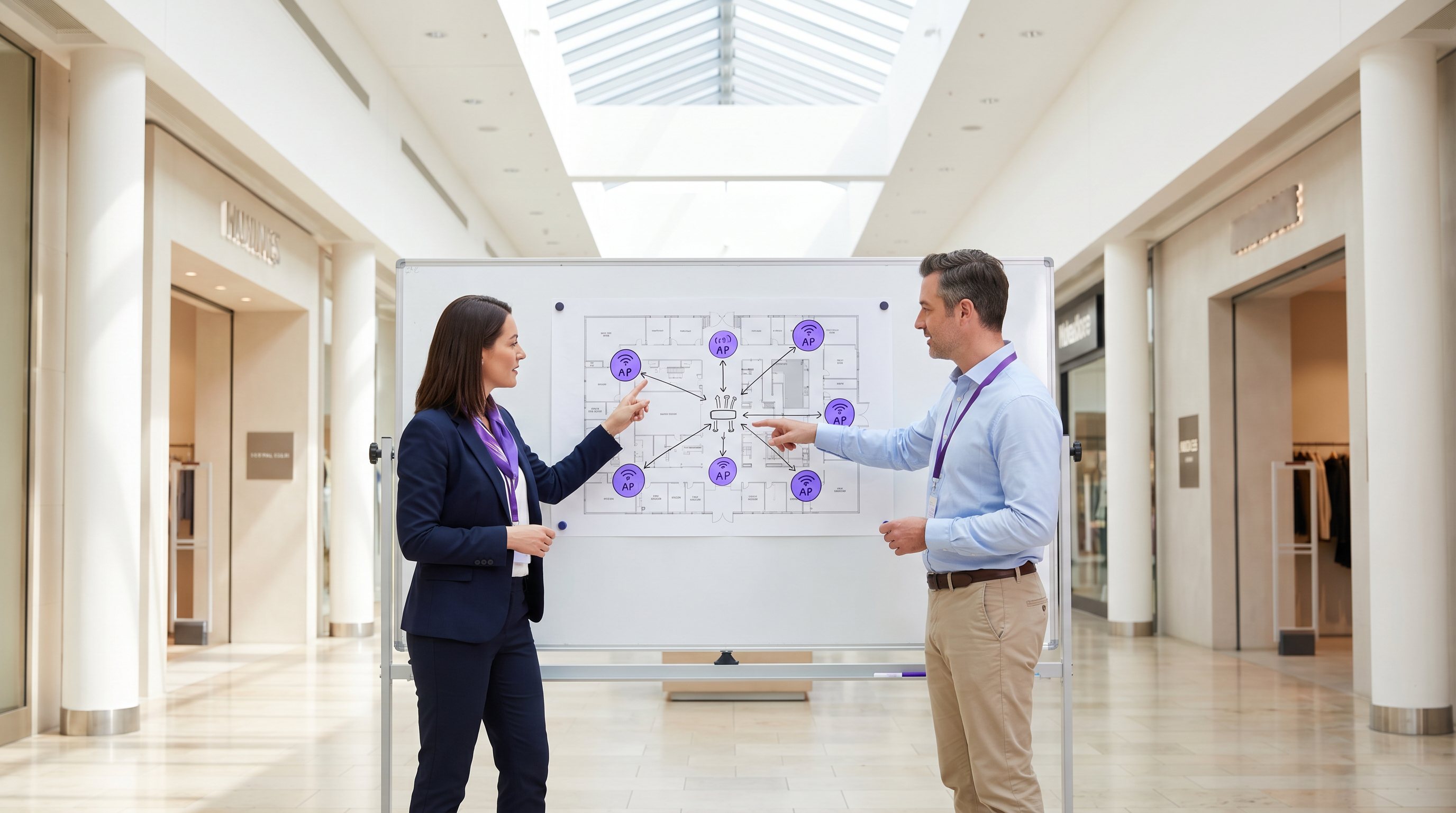
Per le moderne sedi fisiche, sia nel Retail , nell' Hospitality o nella Healthcare , il WiFi per gli ospiti è passato da un servizio passivo a una risorsa commerciale critica. Questa guida esplora l'architettura tecnica, le considerazioni sulla sicurezza e l'impatto aziendale dell'implementazione di una soluzione WiFi robusta per gli ospiti. Sfruttando piattaforme come Guest WiFi e integrandole con una piattaforma di WiFi Analytics , i responsabili IT possono trasformare il traffico pedonale anonimo in dati di prima parte utilizzabili, migliorando al contempo l'esperienza del cliente. Il caso commerciale è chiaro: un WiFi per gli ospiti ben architettato aumenta il tempo di permanenza, incrementa la spesa e fornisce l'intelligenza comportamentale necessaria per ottimizzare le operazioni della sede.
Approfondimento Tecnico
Architettura e Segmentazione della Rete
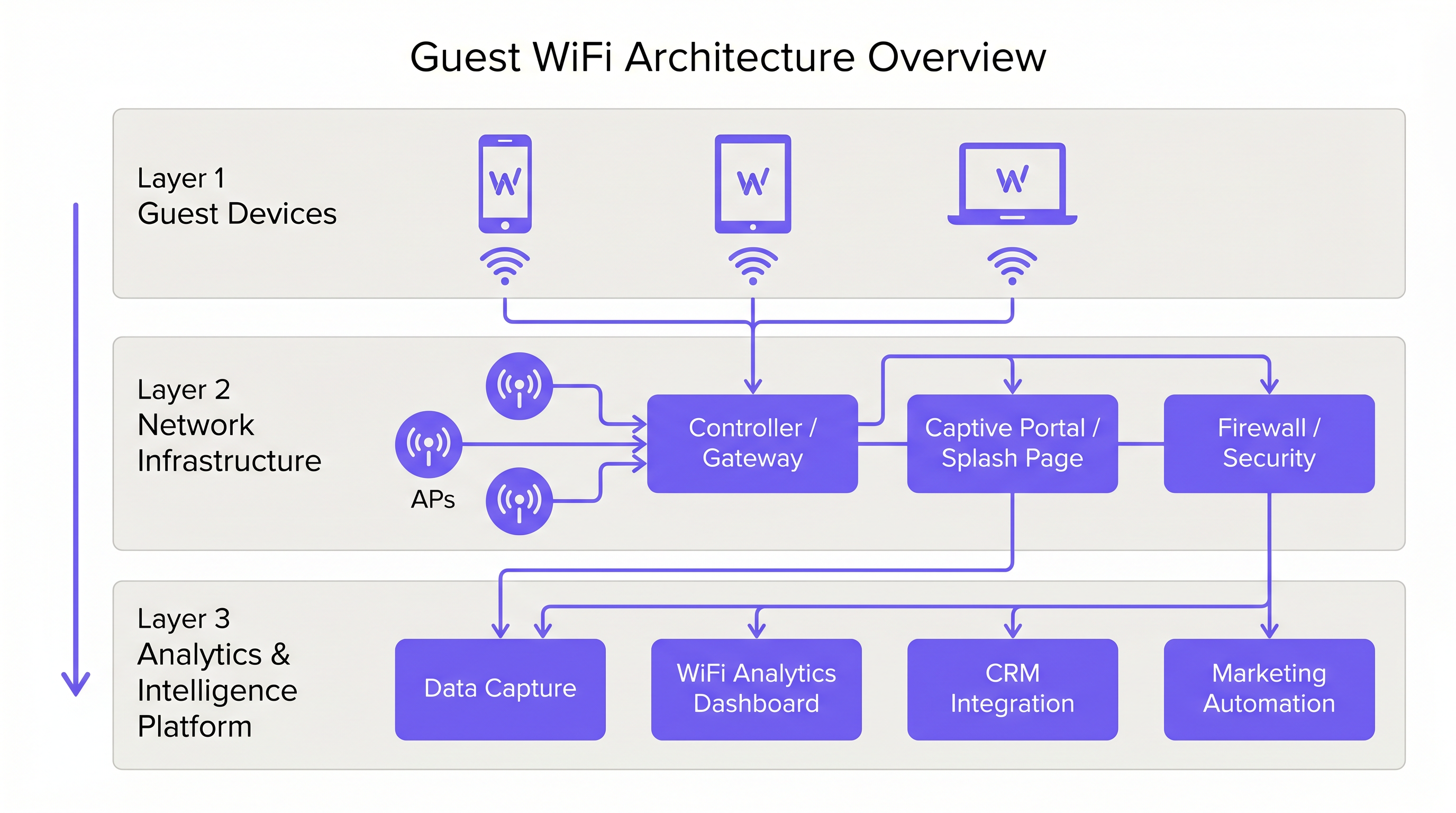
Un'implementazione professionale del WiFi per gli ospiti richiede una rigorosa separazione logica dall'infrastruttura aziendale. Ciò si ottiene tramite la segmentazione VLAN e un Service Set Identifier (SSID) dedicato. Il traffico degli ospiti deve essere instradato direttamente a internet tramite un Captive Portal, garantendo che non intersechi mai sistemi interni come i terminali Point of Sale (POS) o i server di back-office. Questa architettura è fondamentale sia per la sicurezza che per la conformità PCI DSS.
Implementazione e Standard degli Access Point
Lo strato radio costituisce la base della rete per gli ospiti. Il posizionamento degli Access Point (AP) deve essere dettato da un'indagine completa del sito, tenendo conto dell'area di copertura, del numero previsto di dispositivi concorrenti e dell'attenuazione strutturale. Per ambienti ad alta densità come stadi o grandi hub di Trasporto , IEEE 802.11ax (Wi-Fi 6) è lo standard minimo raccomandato, fornendo la capacità e l'efficienza necessarie. Gli ambienti con densità di dispositivi estrema dovrebbero considerare il Wi-Fi 6E per utilizzare la banda a 6 GHz.
Sicurezza e Crittografia
La sicurezza deve essere applicata a ogni livello. WPA3 è lo standard attuale per la crittografia wireless e dovrebbe essere implementato per tutte le nuove distribuzioni. Fondamentalmente, l'isolamento del client deve essere abilitato sull'SSID ospite per impedire ai dispositivi di comunicare tra loro, mitigando il rischio di movimento laterale da parte di attori malevoli. A livello di gateway, il filtraggio DNS è raccomandato per bloccare l'accesso a domini malevoli noti e contenuti inappropriati.
Il Captive Portal come Gateway di Intelligenza
Il Captive Portal, o splash page, ha un duplice scopo: è il gateway per l'accesso alla rete e il meccanismo primario per la raccolta di dati di prima parte. Quando gli utenti si autenticano tramite email, social login o SMS, la piattaforma acquisisce dati di identità verificati. Questi dati, quando elaborati tramite una piattaforma di WiFi Analytics , forniscono informazioni sulle demografie dei visitatori, i tempi di permanenza e le frequenze di ritorno.
Guida all'Implementazione
Fase 1: Raccolta dei Requisiti e Indagine del Sito
Iniziare definendo gli obiettivi commerciali e i requisiti tecnici. Condurre un'indagine predittiva e fisica del sito per determinare il posizionamento ottimale degli AP. Un hotel di 200 camere richiede una strategia di implementazione diversa rispetto a uno stadio da 40.000 posti.
Fase 2: Progettazione e Segmentazione della Rete
Configurare l'infrastruttura di rete per garantire un isolamento rigoroso. Implementare le VLAN per separare il traffico degli ospiti dal traffico aziendale e operativo (es. dispositivi IoT, telecamere di sicurezza). Applicare politiche di Quality of Service (QoS) per dare priorità al traffico operativo critico rispetto all'accesso a internet degli ospiti.
Fase 3: Configurazione e Conformità del Captive Portal
Progettare il Captive Portal per riflettere l'identità del marchio della sede. Fondamentalmente, garantire la conformità con le normative regionali sulla protezione dei dati, come il GDPR nel Regno Unito e nell'UE. La splash page deve includere un'informativa sulla privacy chiara e un meccanismo di consenso esplicito per la raccolta dei dati. Per indicazioni sulla creazione di un portale efficace, fare riferimento a risorse come Comment créer une page de connexion WiFi invité o So erstellen Sie eine Guest WiFi Login Page .
Fase 4: Integrazione degli Analytics
Integrare la piattaforma WiFi per gli ospiti con lo stack di marketing e CRM più ampio dell'organizzazione. Definire i flussi di lavoro dei dati per garantire che l'intelligenza acquisita sia utilizzabile per l'automazione del marketing e le iniziative di coinvolgimento dei clienti.
Migliori Pratiche
- Applicare l'Isolamento del Client: Abilitare sempre l'isolamento del client sull'SSID ospite per proteggere gli utenti l'uno dall'altro.
- Implementare la Gestione della Larghezza di Banda: Applicare limiti di larghezza di banda per dispositivo per impedire ai singoli utenti di monopolizzare la connessione e degradare l'esperienza per gli altri.
- Dare Priorità al QoS: Assicurarsi che il traffico operativo, come l'elaborazione dei pagamenti e il VoIP, abbia la precedenza sull'accesso a internet degli ospiti.
- Mantenere la Conformità: Rivedere regolarmente le politiche di conservazione dei dati e i meccanismi di consenso per garantire la conformità continua con il GDPR e altre normative pertinenti.
- Sfruttare l'SD-WAN: Per implementazioni multi-sito, considerare i vantaggi dell'SD-WAN per la gestione centralizzata e il routing ottimizzato. Vedere The Core SD WAN Benefits for Modern Businesses (o Die zentralen SD-WAN-Vorteile für moderne Unternehmen ) per maggiori dettagli.
Risoluzione dei Problemi e Mitigazione dei Rischi
Modalità di Guasto Comuni
- Copertura Inadeguatae: Zone morte causate da un posizionamento errato degli AP o dalla mancata considerazione delle interferenze strutturali. Mitigazione: Condurre indagini approfondite sul sito dopo l'implementazione e regolare il posizionamento degli AP o la potenza di trasmissione secondo necessità.
- Esaurimento degli indirizzi IP: Il pool DHCP è esaurito a causa di un elevato volume di dispositivi transitori. Mitigazione: Implementare tempi di lease DHCP più brevi (es. 30-60 minuti) per la rete guest e assicurarsi che la sottorete sia dimensionata in modo appropriato.
- Bypass del Captive Portal: Dispositivi che bypassano la splash page a causa di walled garden mal configurati o spoofing dell'indirizzo MAC. Mitigazione: Verificare regolarmente le configurazioni dei walled garden e implementare robusti meccanismi di autenticazione.
ROI e Impatto sul Business
Il ritorno sull'investimento per il WiFi guest si realizza attraverso un maggiore coinvolgimento dei clienti e l'acquisizione di dati utilizzabili.
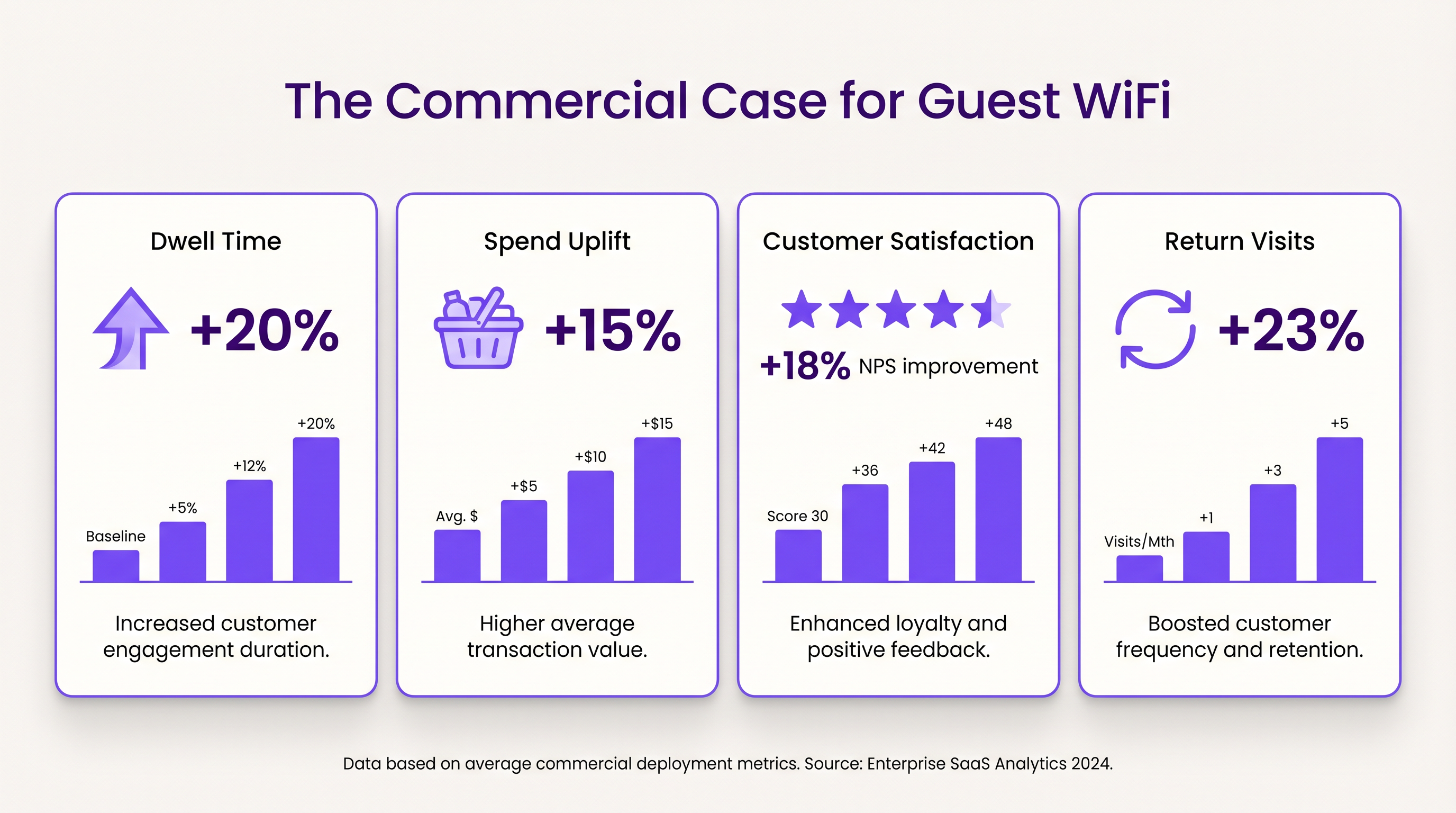
- Tempo di Permanenza e Aumento della Spesa: Fornire connettività affidabile incoraggia i clienti a rimanere più a lungo in loco. Negli ambienti retail, un maggiore tempo di permanenza è fortemente correlato a valori medi di transazione più elevati.
- Soddisfazione del Cliente: Nel settore dell'ospitalità, l'accesso WiFi senza interruzioni è un fattore primario di recensioni positive e prenotazioni ripetute.
- Valore dei Dati di Prima Parte: I dati acquisiti tramite il Captive Portal consentono campagne di marketing mirate, riducendo i costi di acquisizione dei clienti e aumentando il valore a vita. L'approccio di Purple, inclusa l'autenticazione basata su profilo, facilita un accesso sicuro e senza interruzioni, arricchendo al contempo il database dei clienti.
Termini chiave e definizioni
Captive Portal
A web page that the user of a public-access network is obliged to view and interact with before access is granted.
Used for authentication, presenting terms of service, and capturing first-party data.
VLAN (Virtual Local Area Network)
A logical subnetwork that groups a collection of devices from different physical LANs.
Essential for isolating guest WiFi traffic from corporate networks to maintain security.
Client Isolation
A security feature that prevents devices connected to the same AP from communicating with each other.
Critical for public networks to prevent malicious actors from scanning or attacking other guests' devices.
SSID (Service Set Identifier)
The primary name associated with an 802.11 wireless local area network (WLAN).
The network name guests select on their devices to connect.
QoS (Quality of Service)
The use of mechanisms or technologies that work on a network to control traffic and ensure the performance of critical applications.
Used to prioritize operational traffic (e.g., POS transactions) over guest internet browsing.
WPA3 (Wi-Fi Protected Access 3)
The latest generation of mainstream security for wireless networks, offering improved encryption.
The recommended security standard for all new wireless deployments to protect data in transit.
Dwell Time
The amount of time a visitor spends in a specific location or venue.
A key commercial metric; offering free WiFi typically increases dwell time, which often correlates with increased spend.
First-Party Data
Information a company collects directly from its customers and owns.
Captured via the captive portal, this data is highly valuable for targeted marketing and personalization.
Casi di studio
A 200-room hotel needs to deploy guest WiFi while ensuring that corporate traffic (e.g., PMS, POS) remains secure and bandwidth is distributed fairly among guests.
- Deploy IEEE 802.11ax APs in hallways and common areas based on a site survey. 2. Configure a dedicated guest SSID on a separate VLAN, isolated from the corporate VLAN. 3. Enable client isolation on the guest SSID. 4. Implement a captive portal for authentication and terms of service acceptance. 5. Apply a per-device bandwidth limit (e.g., 5 Mbps down / 2 Mbps up) to prevent network saturation. 6. Configure QoS to prioritize corporate traffic.
A large retail chain wants to implement guest WiFi across 50 locations to capture customer data for marketing purposes, ensuring GDPR compliance.
- Standardize the network architecture across all sites, utilizing SD-WAN for centralized management. 2. Deploy a centralized captive portal integrated with a WiFi Analytics platform. 3. Design the splash page to offer multiple authentication methods (email, social). 4. Implement explicit opt-in checkboxes for marketing communications, distinct from the terms of service acceptance. 5. Define and enforce a data retention policy within the analytics platform.
Analisi degli scenari
Q1. A venue operator reports that their guest WiFi network frequently drops connections during busy periods, despite having strong signal strength throughout the building.
💡 Suggerimento:Consider the difference between coverage (signal strength) and capacity (ability to handle concurrent devices), as well as IP addressing.
Mostra l'approccio consigliato
The issue is likely capacity-related rather than coverage-related. Potential causes include: 1) APs being overwhelmed by too many concurrent connections (requires upgrading to high-density APs like Wi-Fi 6). 2) DHCP pool exhaustion (requires reducing lease times or expanding the subnet). 3) Insufficient backhaul bandwidth to the ISP.
Q2. The marketing team wants to collect guest email addresses, phone numbers, and dates of birth via the captive portal to build customer profiles.
💡 Suggerimento:Consider data minimization principles and the impact of friction on the user experience.
Mostra l'approccio consigliato
While technically possible, requiring excessive information increases friction, leading to higher drop-off rates at the portal. Furthermore, under GDPR, data collection must be proportionate to the service provided. The recommended approach is to offer multiple authentication methods (e.g., email or social login) and only mandate the minimum data necessary, using progressive profiling to gather more details on subsequent visits.
Q3. During a network audit, it is discovered that guest devices can ping the IP addresses of the venue's point-of-sale (POS) terminals.
💡 Suggerimento:Focus on logical network separation and access control.
Mostra l'approccio consigliato
This indicates a critical failure in network segmentation. The guest SSID must be placed on a dedicated VLAN that is completely isolated from the corporate/operational VLAN. Firewall rules or Access Control Lists (ACLs) must be implemented at the gateway to explicitly deny traffic from the guest subnet to any internal subnets.




