

Why Your Business Should Offer Free WiFi to Customers
This comprehensive technical reference guide outlines the commercial and architectural rationale for offering guest WiFi in physical venues. It provides IT leaders and venue operators with actionable insights on deployment strategies, network segmentation, compliance, and ROI measurement.
🎧 Listen to this Guide
View Transcript
Executive Summary
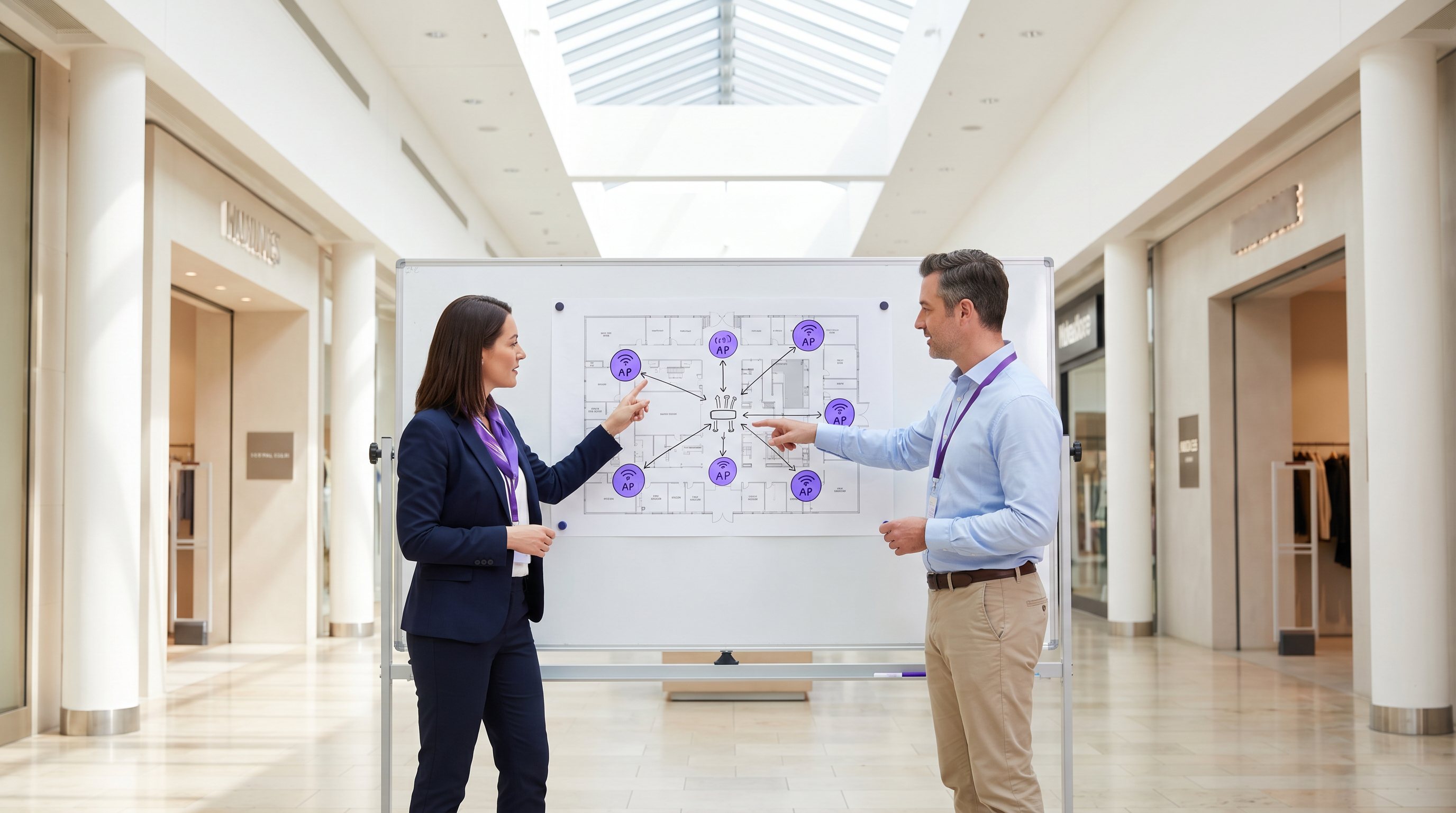
For modern physical venues—whether in Retail , Hospitality , or Healthcare —guest WiFi has transitioned from a passive amenity to a critical commercial asset. This guide explores the technical architecture, security considerations, and business impact of deploying a robust guest WiFi solution. By leveraging platforms like Guest WiFi and integrating them with a WiFi Analytics platform, IT leaders can transform anonymous foot traffic into actionable, first-party data while enhancing the customer experience. The commercial case is clear: well-architected guest WiFi increases dwell time, drives spend uplift, and provides the behavioral intelligence necessary to optimise venue operations.
Technical Deep-Dive
Network Architecture and Segmentation
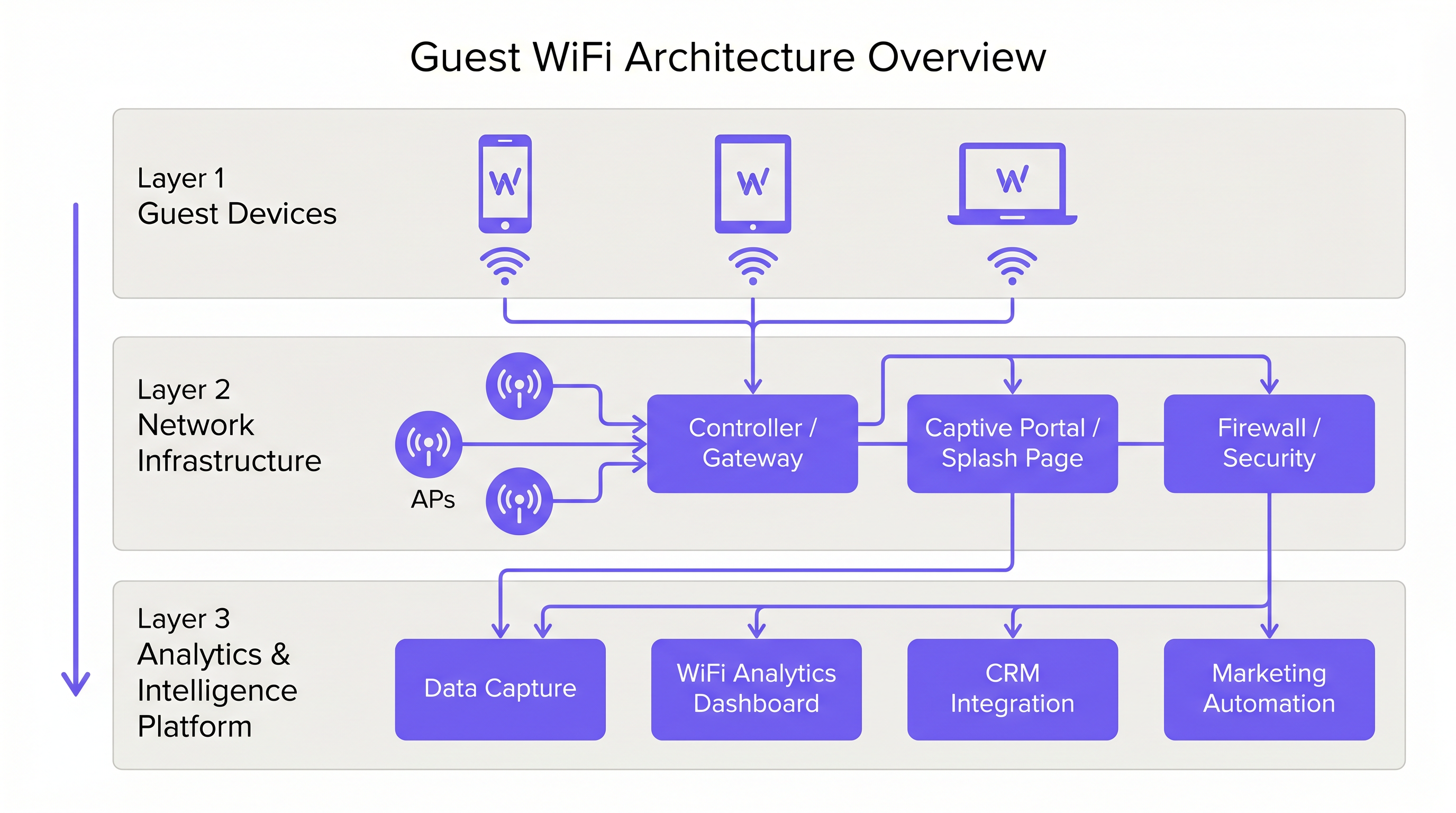
A professional guest WiFi deployment requires strict logical separation from corporate infrastructure. This is achieved through VLAN segmentation and a dedicated Service Set Identifier (SSID). Guest traffic must be routed directly to the internet via a captive portal, ensuring it never intersects with internal systems such as Point of Sale (POS) terminals or back-office servers. This architecture is fundamental for both security and PCI DSS compliance.
Access Point Deployment and Standards
The radio layer forms the foundation of the guest network. Access Point (AP) placement must be dictated by a comprehensive site survey, accounting for coverage area, expected concurrent device count, and structural attenuation. For high-density environments like stadiums or large Transport hubs, IEEE 802.11ax (Wi-Fi 6) is the minimum recommended standard, providing the necessary capacity and efficiency. Environments with extreme device density should consider Wi-Fi 6E to utilise the 6 GHz band.
Security and Encryption
Security must be enforced at every layer. WPA3 is the current standard for wireless encryption and should be implemented for all new deployments. Crucially, client isolation must be enabled on the guest SSID to prevent devices from communicating with one another, mitigating the risk of lateral movement by malicious actors. At the gateway level, DNS filtering is recommended to block access to known malicious domains and inappropriate content.
The Captive Portal as an Intelligence Gateway
The captive portal, or splash page, serves a dual purpose: it is the gateway for network access and the primary mechanism for first-party data collection. When users authenticate via email, social login, or SMS, the platform captures verified identity data. This data, when processed through a WiFi Analytics platform, provides insights into visitor demographics, dwell times, and return frequencies.
Implementation Guide
Step 1: Requirements Gathering and Site Survey
Begin by defining the commercial objectives and technical requirements. Conduct a predictive and physical site survey to determine optimal AP placement. A 200-room hotel requires a different deployment strategy than a 40,000-seat stadium.
Step 2: Network Design and Segmentation
Configure the network infrastructure to ensure strict isolation. Implement VLANs to separate guest traffic from corporate and operational traffic (e.g., IoT devices, security cameras). Apply Quality of Service (QoS) policies to prioritise critical operational traffic over guest internet access.
Step 3: Captive Portal Configuration and Compliance
Design the captive portal to reflect the venue's brand identity. Crucially, ensure compliance with regional data protection regulations, such as GDPR in the UK and EU. The splash page must include a clear privacy notice and an explicit consent mechanism for data collection. For guidance on creating an effective portal, refer to resources like Comment créer une page de connexion WiFi invité or So erstellen Sie eine Guest WiFi Login Page .
Step 4: Analytics Integration
Integrate the guest WiFi platform with the organisation's broader marketing and CRM stack. Define the data workflows to ensure that the captured intelligence is actionable for marketing automation and customer engagement initiatives.
Best Practices
- Enforce Client Isolation: Always enable client isolation on the guest SSID to protect users from each other.
- Implement Bandwidth Management: Apply per-device bandwidth limits to prevent individual users from monopolising the connection and degrading the experience for others.
- Prioritise QoS: Ensure that operational traffic, such as payment processing and VoIP, takes precedence over guest internet access.
- Maintain Compliance: Regularly review data retention policies and consent mechanisms to ensure ongoing compliance with GDPR and other relevant regulations.
- Leverage SD-WAN: For multi-site deployments, consider the benefits of SD-WAN for centralised management and optimised routing. See The Core SD WAN Benefits for Modern Businesses (or Die zentralen SD-WAN-Vorteile für moderne Unternehmen ) for more details.
Troubleshooting & Risk Mitigation
Common Failure Modes
- Inadequate Coverage: Dead zones caused by poor AP placement or failure to account for structural interference. Mitigation: Conduct thorough post-deployment site surveys and adjust AP placement or transmit power as needed.
- IP Address Exhaustion: The DHCP pool is depleted due to a high volume of transient devices. Mitigation: Implement shorter DHCP lease times (e.g., 30-60 minutes) for the guest network and ensure the subnet is appropriately sized.
- Captive Portal Bypasses: Devices bypassing the splash page due to misconfigured walled gardens or MAC address spoofing. Mitigation: Regularly audit walled garden configurations and implement robust authentication mechanisms.
ROI & Business Impact
The return on investment for guest WiFi is realised through increased customer engagement and the acquisition of actionable data.
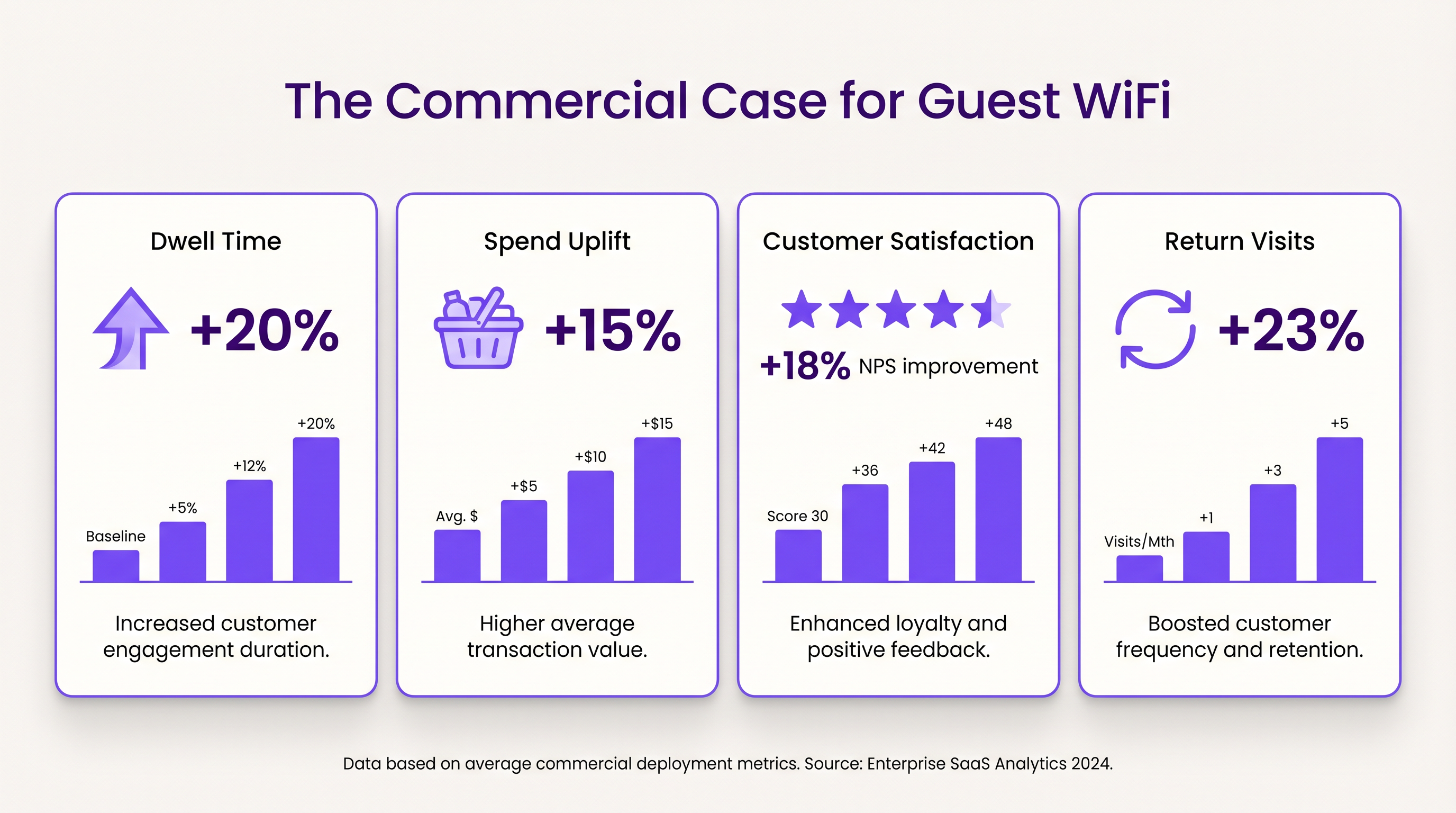
- Dwell Time and Spend Uplift: Providing reliable connectivity encourages customers to remain on-site longer. In retail environments, increased dwell time correlates strongly with higher average transaction values.
- Customer Satisfaction: In hospitality, seamless WiFi access is a primary driver of positive reviews and repeat bookings.
- First-Party Data Value: The data captured via the captive portal enables targeted marketing campaigns, reducing customer acquisition costs and increasing lifetime value. Purple's approach, including profile-based authentication, facilitates seamless, secure access while enriching the customer database.
Key Terms & Definitions
Captive Portal
A web page that the user of a public-access network is obliged to view and interact with before access is granted.
Used for authentication, presenting terms of service, and capturing first-party data.
VLAN (Virtual Local Area Network)
A logical subnetwork that groups a collection of devices from different physical LANs.
Essential for isolating guest WiFi traffic from corporate networks to maintain security.
Client Isolation
A security feature that prevents devices connected to the same AP from communicating with each other.
Critical for public networks to prevent malicious actors from scanning or attacking other guests' devices.
SSID (Service Set Identifier)
The primary name associated with an 802.11 wireless local area network (WLAN).
The network name guests select on their devices to connect.
QoS (Quality of Service)
The use of mechanisms or technologies that work on a network to control traffic and ensure the performance of critical applications.
Used to prioritize operational traffic (e.g., POS transactions) over guest internet browsing.
WPA3 (Wi-Fi Protected Access 3)
The latest generation of mainstream security for wireless networks, offering improved encryption.
The recommended security standard for all new wireless deployments to protect data in transit.
Dwell Time
The amount of time a visitor spends in a specific location or venue.
A key commercial metric; offering free WiFi typically increases dwell time, which often correlates with increased spend.
First-Party Data
Information a company collects directly from its customers and owns.
Captured via the captive portal, this data is highly valuable for targeted marketing and personalization.
Case Studies
A 200-room hotel needs to deploy guest WiFi while ensuring that corporate traffic (e.g., PMS, POS) remains secure and bandwidth is distributed fairly among guests.
- Deploy IEEE 802.11ax APs in hallways and common areas based on a site survey. 2. Configure a dedicated guest SSID on a separate VLAN, isolated from the corporate VLAN. 3. Enable client isolation on the guest SSID. 4. Implement a captive portal for authentication and terms of service acceptance. 5. Apply a per-device bandwidth limit (e.g., 5 Mbps down / 2 Mbps up) to prevent network saturation. 6. Configure QoS to prioritize corporate traffic.
A large retail chain wants to implement guest WiFi across 50 locations to capture customer data for marketing purposes, ensuring GDPR compliance.
- Standardize the network architecture across all sites, utilizing SD-WAN for centralized management. 2. Deploy a centralized captive portal integrated with a WiFi Analytics platform. 3. Design the splash page to offer multiple authentication methods (email, social). 4. Implement explicit opt-in checkboxes for marketing communications, distinct from the terms of service acceptance. 5. Define and enforce a data retention policy within the analytics platform.
Scenario Analysis
Q1. A venue operator reports that their guest WiFi network frequently drops connections during busy periods, despite having strong signal strength throughout the building.
💡 Hint:Consider the difference between coverage (signal strength) and capacity (ability to handle concurrent devices), as well as IP addressing.
Show Recommended Approach
The issue is likely capacity-related rather than coverage-related. Potential causes include: 1) APs being overwhelmed by too many concurrent connections (requires upgrading to high-density APs like Wi-Fi 6). 2) DHCP pool exhaustion (requires reducing lease times or expanding the subnet). 3) Insufficient backhaul bandwidth to the ISP.
Q2. The marketing team wants to collect guest email addresses, phone numbers, and dates of birth via the captive portal to build customer profiles.
💡 Hint:Consider data minimization principles and the impact of friction on the user experience.
Show Recommended Approach
While technically possible, requiring excessive information increases friction, leading to higher drop-off rates at the portal. Furthermore, under GDPR, data collection must be proportionate to the service provided. The recommended approach is to offer multiple authentication methods (e.g., email or social login) and only mandate the minimum data necessary, using progressive profiling to gather more details on subsequent visits.
Q3. During a network audit, it is discovered that guest devices can ping the IP addresses of the venue's point-of-sale (POS) terminals.
💡 Hint:Focus on logical network separation and access control.
Show Recommended Approach
This indicates a critical failure in network segmentation. The guest SSID must be placed on a dedicated VLAN that is completely isolated from the corporate/operational VLAN. Firewall rules or Access Control Lists (ACLs) must be implemented at the gateway to explicitly deny traffic from the guest subnet to any internal subnets.




