

Pourquoi votre entreprise devrait offrir le WiFi gratuit à ses clients
Ce guide de référence technique complet expose la logique commerciale et architecturale de l'offre de WiFi invité dans les lieux physiques. Il fournit aux responsables informatiques et aux exploitants de sites des informations exploitables sur les stratégies de déploiement, la segmentation du réseau, la conformité et la mesure du retour sur investissement.
🎧 Écouter ce guide
Voir la transcription
Résumé Exécutif
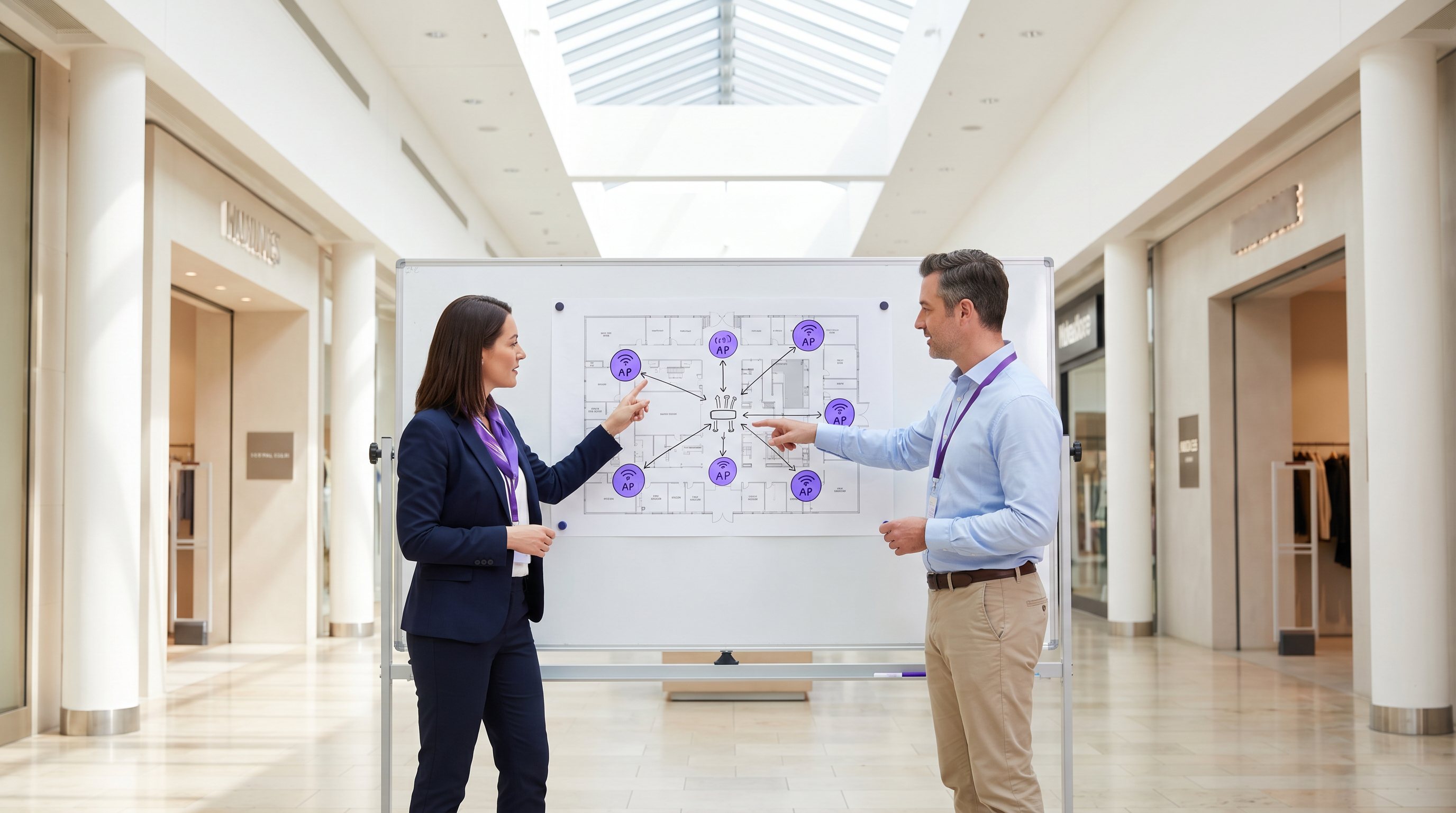
Pour les lieux physiques modernes – que ce soit dans le Commerce de détail , l' Hôtellerie ou la Santé – le WiFi invité est passé d'un service passif à un atout commercial essentiel. Ce guide explore l'architecture technique, les considérations de sécurité et l'impact commercial du déploiement d'une solution WiFi invité robuste. En tirant parti de plateformes comme Guest WiFi et en les intégrant à une plateforme WiFi Analytics , les responsables informatiques peuvent transformer le trafic piétonnier anonyme en données exploitables de première partie tout en améliorant l'expérience client. Le cas commercial est clair : un WiFi invité bien conçu augmente le temps de présence, stimule les dépenses et fournit l'intelligence comportementale nécessaire pour optimiser les opérations du site.
Approfondissement Technique
Architecture et Segmentation du Réseau
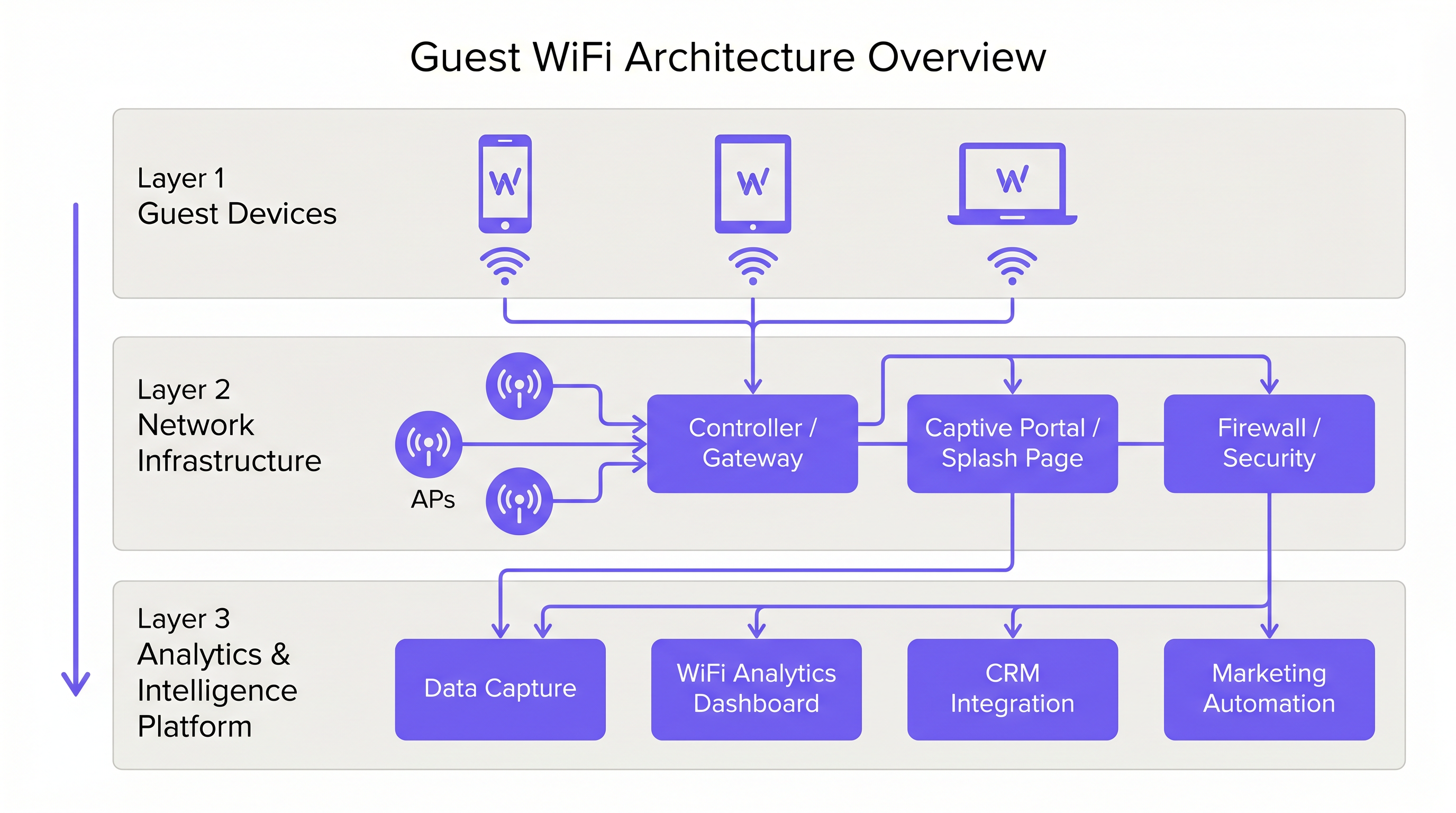
Un déploiement professionnel de WiFi invité exige une séparation logique stricte de l'infrastructure d'entreprise. Ceci est réalisé par la segmentation VLAN et un Service Set Identifier (SSID) dédié. Le trafic invité doit être acheminé directement vers Internet via un Captive Portal, garantissant qu'il n'interfère jamais avec les systèmes internes tels que les terminaux Point of Sale (POS) ou les serveurs de back-office. Cette architecture est fondamentale pour la sécurité et la conformité PCI DSS.
Déploiement et Normes des Points d'Accès
La couche radio constitue la base du réseau invité. Le placement des Access Point (AP) doit être dicté par une étude de site complète, tenant compte de la zone de couverture, du nombre attendu d'appareils simultanés et de l'atténuation structurelle. Pour les environnements à haute densité comme les stades ou les grands pôles de Transport , l'IEEE 802.11ax (Wi-Fi 6) est la norme minimale recommandée, offrant la capacité et l'efficacité nécessaires. Les environnements avec une densité d'appareils extrême devraient envisager le Wi-Fi 6E pour utiliser la bande 6 GHz.
Sécurité et Chiffrement
La sécurité doit être appliquée à chaque couche. WPA3 est la norme actuelle pour le chiffrement sans fil et devrait être implémentée pour tous les nouveaux déploiements. Il est crucial d'activer l'isolation des clients sur le SSID invité pour empêcher les appareils de communiquer entre eux, réduisant ainsi le risque de mouvement latéral par des acteurs malveillants. Au niveau de la passerelle, le filtrage DNS est recommandé pour bloquer l'accès aux domaines malveillants connus et aux contenus inappropriés.
Le Captive Portal comme Passerelle d'Intelligence
Le Captive Portal, ou page d'accueil, a un double objectif : c'est la passerelle d'accès au réseau et le mécanisme principal de collecte de données de première partie. Lorsque les utilisateurs s'authentifient par e-mail, connexion sociale ou SMS, la plateforme capture des données d'identité vérifiées. Ces données, lorsqu'elles sont traitées via une plateforme WiFi Analytics , fournissent des informations sur la démographie des visiteurs, les temps de présence et les fréquences de retour.
Guide d'Implémentation
Étape 1 : Collecte des Exigences et Étude de Site
Commencez par définir les objectifs commerciaux et les exigences techniques. Menez une étude de site prédictive et physique pour déterminer le placement optimal des AP. Un hôtel de 200 chambres nécessite une stratégie de déploiement différente de celle d'un stade de 40 000 places.
Étape 2 : Conception et Segmentation du Réseau
Configurez l'infrastructure réseau pour assurer une isolation stricte. Implémentez des VLANs pour séparer le trafic invité du trafic d'entreprise et opérationnel (par exemple, les appareils IoT, les caméras de sécurité). Appliquez des politiques de Quality of Service (QoS) pour prioriser le trafic opérationnel critique sur l'accès Internet invité.
Étape 3 : Configuration et Conformité du Captive Portal
Concevez le Captive Portal pour refléter l'identité de marque du lieu. Il est crucial d'assurer la conformité avec les réglementations régionales de protection des données, telles que le GDPR au Royaume-Uni et dans l'UE. La page d'accueil doit inclure une notice de confidentialité claire et un mécanisme de consentement explicite pour la collecte de données. Pour des conseils sur la création d'un portail efficace, consultez des ressources comme Comment créer une page de connexion WiFi invité ou So erstellen Sie eine Guest WiFi Login Page .
Étape 4 : Intégration des Analyses
Intégrez la plateforme WiFi invité à l'ensemble des outils marketing et CRM de l'organisation. Définissez les flux de données pour garantir que l'intelligence capturée est exploitable pour l'automatisation du marketing et les initiatives d'engagement client.
Bonnes Pratiques
- Appliquer l'Isolation des Clients : Toujours activer l'isolation des clients sur le SSID invité pour protéger les utilisateurs les uns des autres.
- Mettre en Œuvre la Gestion de la Bande Passante : Appliquer des limites de bande passante par appareil pour empêcher les utilisateurs individuels de monopoliser la connexion et de dégrader l'expérience des autres.
- Prioriser la QoS : Assurez-vous que le trafic opérationnel, tel que le traitement des paiements et la VoIP, a la priorité sur l'accès Internet invité.
- Maintenir la Conformité : Examinez régulièrement les politiques de conservation des données et les mécanismes de consentement pour assurer une conformité continue avec le GDPR et les autres réglementations pertinentes.
- Tirer Parti du SD-WAN : Pour les déploiements multi-sites, considérez les avantages du SD-WAN pour une gestion centralisée et un routage optimisé. Voir The Core SD WAN Benefits for Modern Businesses (ou Die zentralen SD-WAN-Vorteile für moderne Unternehmen ) pour plus de détails.
Dépannage et Atténuation des Risques
Modes de Défaillance Courants
- Couverture Insuffisantee: Zones mortes causées par un mauvais placement des points d'accès (AP) ou l'incapacité à tenir compte des interférences structurelles. Atténuation : Effectuer des études de site approfondies après le déploiement et ajuster le placement des AP ou la puissance de transmission si nécessaire.
- Épuisement des adresses IP : Le pool DHCP est épuisé en raison d'un volume élevé d'appareils transitoires. Atténuation : Mettre en œuvre des durées de bail DHCP plus courtes (par exemple, 30-60 minutes) pour le réseau invité et s'assurer que le sous-réseau est dimensionné de manière appropriée.
- Contournements du Captive Portal : Appareils contournant la page d'accueil en raison de "walled gardens" mal configurés ou d'usurpation d'adresse MAC. Atténuation : Auditer régulièrement les configurations des "walled gardens" et mettre en œuvre des mécanismes d'authentification robustes.
ROI et Impact Commercial
Le retour sur investissement du WiFi invité est réalisé grâce à un engagement client accru et à l'acquisition de données exploitables.
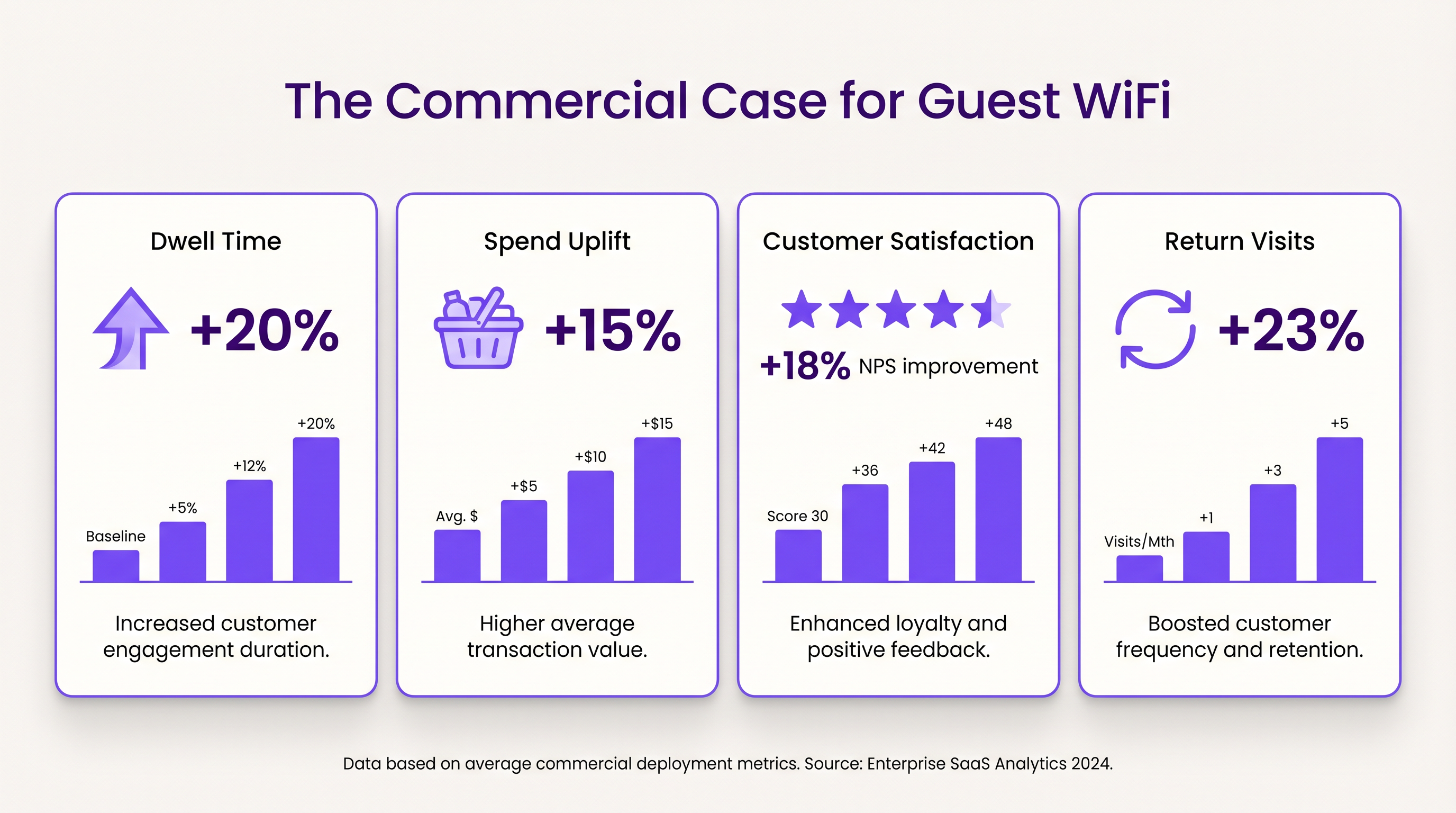
- Temps de Présence et Augmentation des Dépenses : Fournir une connectivité fiable encourage les clients à rester plus longtemps sur place. Dans les environnements de vente au détail, un temps de présence accru est fortement corrélé à des valeurs de transaction moyennes plus élevées.
- Satisfaction Client : Dans l'hôtellerie, un accès WiFi fluide est un facteur clé de critiques positives et de réservations répétées.
- Valeur des Données de Première Partie : Les données capturées via le Captive Portal permettent des campagnes marketing ciblées, réduisant les coûts d'acquisition client et augmentant la valeur à vie du client. L'approche de Purple, incluant l'authentification basée sur le profil, facilite un accès fluide et sécurisé tout en enrichissant la base de données clients.
Termes clés et définitions
Captive Portal
A web page that the user of a public-access network is obliged to view and interact with before access is granted.
Used for authentication, presenting terms of service, and capturing first-party data.
VLAN (Virtual Local Area Network)
A logical subnetwork that groups a collection of devices from different physical LANs.
Essential for isolating guest WiFi traffic from corporate networks to maintain security.
Client Isolation
A security feature that prevents devices connected to the same AP from communicating with each other.
Critical for public networks to prevent malicious actors from scanning or attacking other guests' devices.
SSID (Service Set Identifier)
The primary name associated with an 802.11 wireless local area network (WLAN).
The network name guests select on their devices to connect.
QoS (Quality of Service)
The use of mechanisms or technologies that work on a network to control traffic and ensure the performance of critical applications.
Used to prioritize operational traffic (e.g., POS transactions) over guest internet browsing.
WPA3 (Wi-Fi Protected Access 3)
The latest generation of mainstream security for wireless networks, offering improved encryption.
The recommended security standard for all new wireless deployments to protect data in transit.
Dwell Time
The amount of time a visitor spends in a specific location or venue.
A key commercial metric; offering free WiFi typically increases dwell time, which often correlates with increased spend.
First-Party Data
Information a company collects directly from its customers and owns.
Captured via the captive portal, this data is highly valuable for targeted marketing and personalization.
Études de cas
A 200-room hotel needs to deploy guest WiFi while ensuring that corporate traffic (e.g., PMS, POS) remains secure and bandwidth is distributed fairly among guests.
- Deploy IEEE 802.11ax APs in hallways and common areas based on a site survey. 2. Configure a dedicated guest SSID on a separate VLAN, isolated from the corporate VLAN. 3. Enable client isolation on the guest SSID. 4. Implement a captive portal for authentication and terms of service acceptance. 5. Apply a per-device bandwidth limit (e.g., 5 Mbps down / 2 Mbps up) to prevent network saturation. 6. Configure QoS to prioritize corporate traffic.
A large retail chain wants to implement guest WiFi across 50 locations to capture customer data for marketing purposes, ensuring GDPR compliance.
- Standardize the network architecture across all sites, utilizing SD-WAN for centralized management. 2. Deploy a centralized captive portal integrated with a WiFi Analytics platform. 3. Design the splash page to offer multiple authentication methods (email, social). 4. Implement explicit opt-in checkboxes for marketing communications, distinct from the terms of service acceptance. 5. Define and enforce a data retention policy within the analytics platform.
Analyse de scénario
Q1. A venue operator reports that their guest WiFi network frequently drops connections during busy periods, despite having strong signal strength throughout the building.
💡 Astuce :Consider the difference between coverage (signal strength) and capacity (ability to handle concurrent devices), as well as IP addressing.
Afficher l'approche recommandée
The issue is likely capacity-related rather than coverage-related. Potential causes include: 1) APs being overwhelmed by too many concurrent connections (requires upgrading to high-density APs like Wi-Fi 6). 2) DHCP pool exhaustion (requires reducing lease times or expanding the subnet). 3) Insufficient backhaul bandwidth to the ISP.
Q2. The marketing team wants to collect guest email addresses, phone numbers, and dates of birth via the captive portal to build customer profiles.
💡 Astuce :Consider data minimization principles and the impact of friction on the user experience.
Afficher l'approche recommandée
While technically possible, requiring excessive information increases friction, leading to higher drop-off rates at the portal. Furthermore, under GDPR, data collection must be proportionate to the service provided. The recommended approach is to offer multiple authentication methods (e.g., email or social login) and only mandate the minimum data necessary, using progressive profiling to gather more details on subsequent visits.
Q3. During a network audit, it is discovered that guest devices can ping the IP addresses of the venue's point-of-sale (POS) terminals.
💡 Astuce :Focus on logical network separation and access control.
Afficher l'approche recommandée
This indicates a critical failure in network segmentation. The guest SSID must be placed on a dedicated VLAN that is completely isolated from the corporate/operational VLAN. Firewall rules or Access Control Lists (ACLs) must be implemented at the gateway to explicitly deny traffic from the guest subnet to any internal subnets.




