

Por Que Sua Empresa Deve Oferecer WiFi Gratuito aos Clientes
Este guia de referência técnica abrangente descreve a lógica comercial e arquitetônica para oferecer WiFi para convidados em locais físicos. Ele fornece a líderes de TI e operadores de locais insights acionáveis sobre estratégias de implantação, segmentação de rede, conformidade e medição de ROI.
🎧 Ouça este Guia
Ver Transcrição
Resumo Executivo
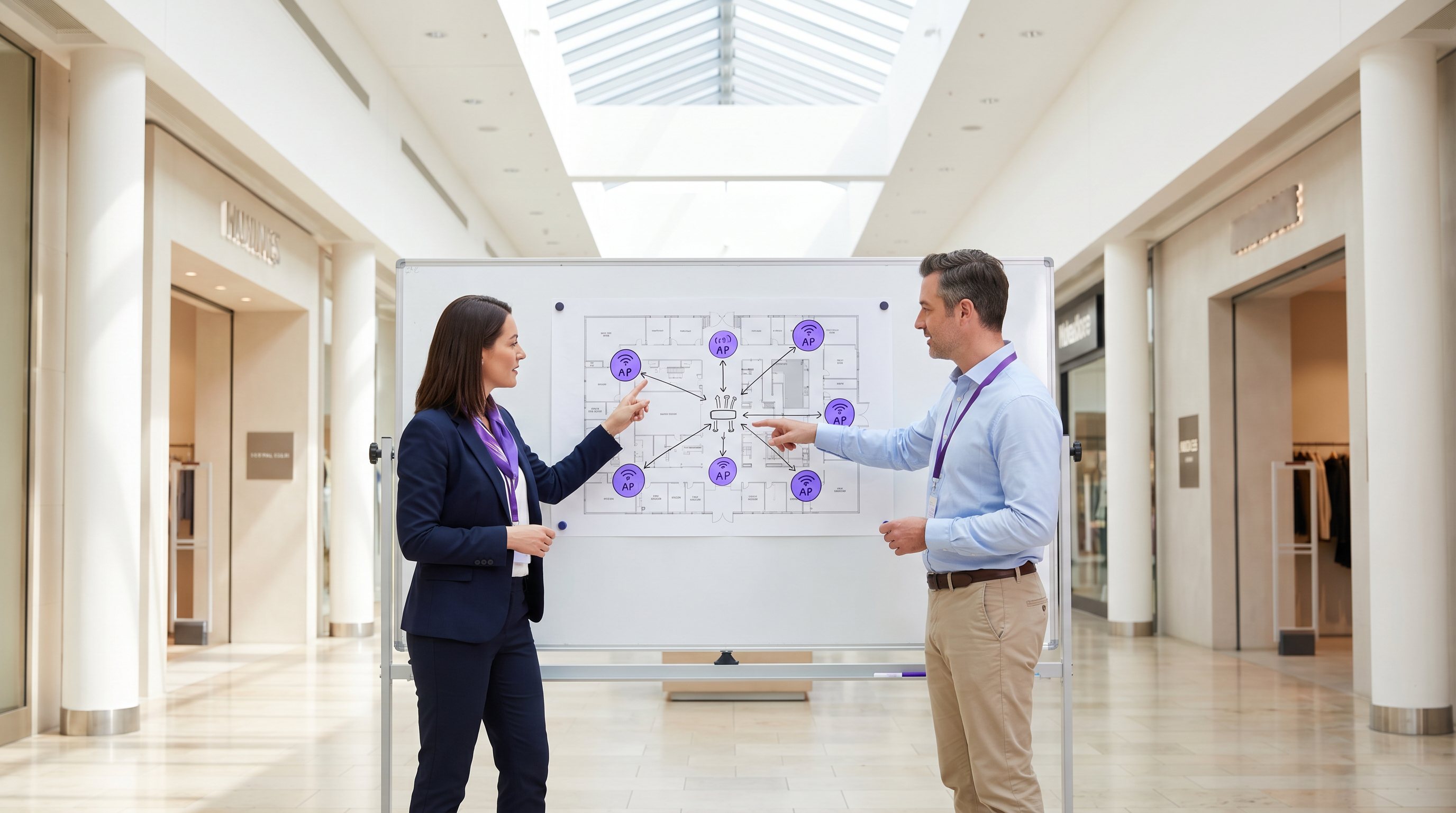
Para locais físicos modernos — seja em Varejo , Hotelaria ou Saúde — o guest WiFi deixou de ser uma comodidade passiva para se tornar um ativo comercial crítico. Este guia explora a arquitetura técnica, as considerações de segurança e o impacto nos negócios da implantação de uma solução robusta de guest WiFi. Ao alavancar plataformas como Guest WiFi e integrá-las com uma plataforma de WiFi Analytics , os líderes de TI podem transformar o tráfego anônimo de pedestres em dados acionáveis de primeira parte, ao mesmo tempo em que aprimoram a experiência do cliente. O caso comercial é claro: um guest WiFi bem arquitetado aumenta o tempo de permanência, impulsiona o aumento de gastos e fornece a inteligência comportamental necessária para otimizar as operações do local.
Análise Técnica Detalhada
Arquitetura e Segmentação de Rede
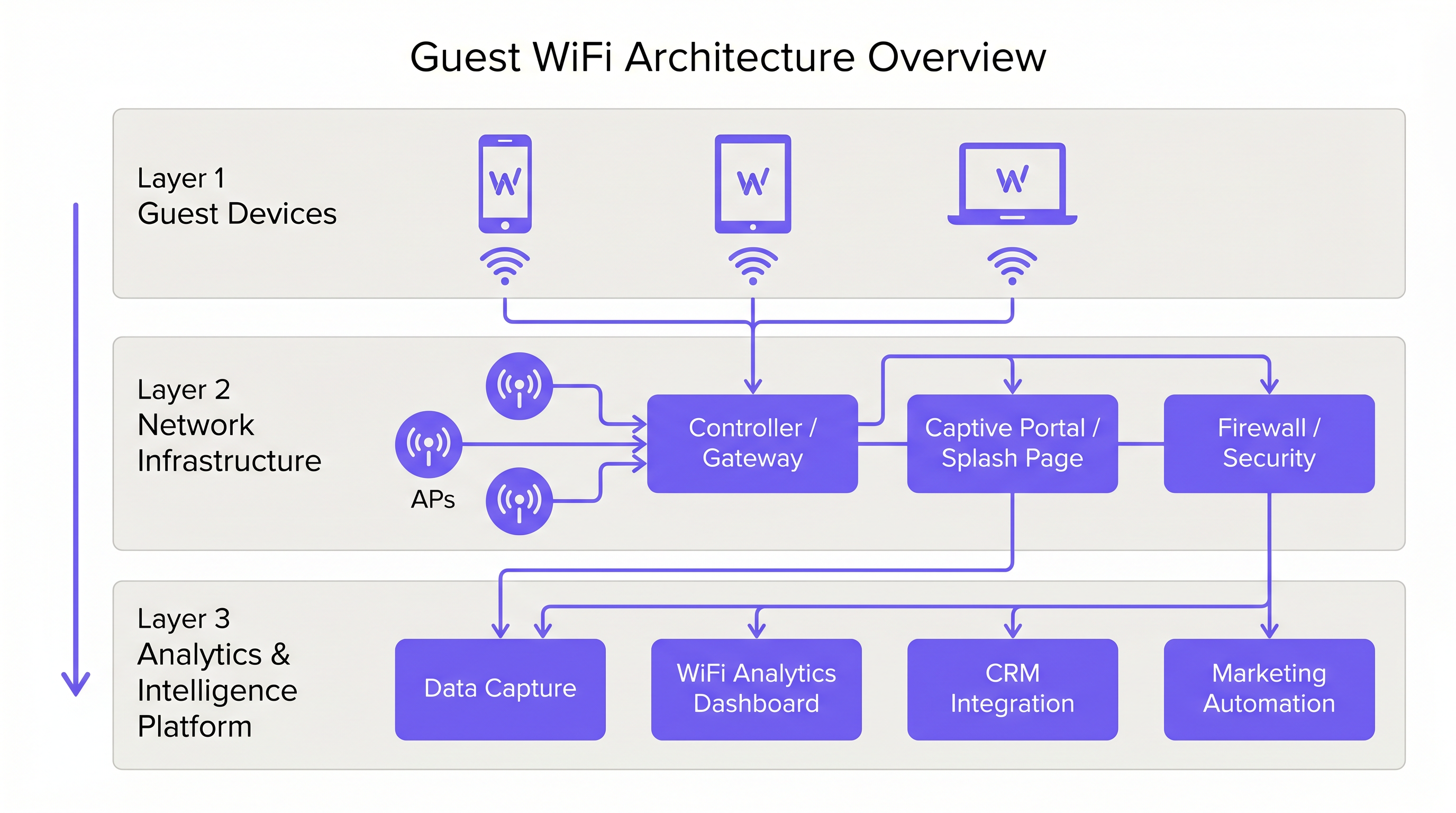
Uma implantação profissional de guest WiFi requer uma estrita separação lógica da infraestrutura corporativa. Isso é alcançado através da segmentação de VLAN e de um Service Set Identifier (SSID) dedicado. O tráfego de convidados deve ser roteado diretamente para a internet via um Captive Portal, garantindo que nunca se intercepte com sistemas internos, como terminais de Point of Sale (POS) ou servidores de back-office. Esta arquitetura é fundamental tanto para a segurança quanto para a conformidade com PCI DSS.
Implantação e Padrões de Access Point
A camada de rádio forma a base da rede de convidados. O posicionamento do Access Point (AP) deve ser ditado por uma pesquisa de site abrangente, considerando a área de cobertura, o número esperado de dispositivos simultâneos e a atenuação estrutural. Para ambientes de alta densidade, como estádios ou grandes centros de Transporte , o IEEE 802.11ax (Wi-Fi 6) é o padrão mínimo recomendado, fornecendo a capacidade e eficiência necessárias. Ambientes com densidade extrema de dispositivos devem considerar o Wi-Fi 6E para utilizar a banda de 6 GHz.
Segurança e Criptografia
A segurança deve ser aplicada em todas as camadas. WPA3 é o padrão atual para criptografia sem fio e deve ser implementado em todas as novas implantações. Crucialmente, o isolamento de cliente deve ser habilitado no guest SSID para evitar que os dispositivos se comuniquem entre si, mitigando o risco de movimento lateral por atores maliciosos. No nível do gateway, a filtragem de DNS é recomendada para bloquear o acesso a domínios maliciosos conhecidos e conteúdo inadequado.
O Captive Portal como Gateway de Inteligência
O Captive Portal, ou splash page, serve a um duplo propósito: é o gateway para acesso à rede e o principal mecanismo para coleta de dados de primeira parte. Quando os usuários se autenticam via email, social login ou SMS, a plataforma captura dados de identidade verificados. Esses dados, quando processados por meio de uma plataforma de WiFi Analytics , fornecem insights sobre a demografia dos visitantes, tempos de permanência e frequências de retorno.
Guia de Implementação
Passo 1: Coleta de Requisitos e Pesquisa de Site
Comece definindo os objetivos comerciais e os requisitos técnicos. Conduza uma pesquisa de site preditiva e física para determinar o posicionamento ideal do AP. Um hotel de 200 quartos requer uma estratégia de implantação diferente de um estádio com 40.000 lugares.
Passo 2: Projeto e Segmentação de Rede
Configure a infraestrutura de rede para garantir um isolamento rigoroso. Implemente VLANs para separar o tráfego de convidados do tráfego corporativo e operacional (por exemplo, dispositivos IoT, câmeras de segurança). Aplique políticas de Quality of Service (QoS) para priorizar o tráfego operacional crítico em detrimento do acesso à internet dos convidados.
Passo 3: Configuração e Conformidade do Captive Portal
Projete o Captive Portal para refletir a identidade da marca do local. Crucialmente, garanta a conformidade com as regulamentações regionais de proteção de dados, como o GDPR no Reino Unido e na UE. A splash page deve incluir um aviso de privacidade claro e um mecanismo de consentimento explícito para a coleta de dados. Para orientação sobre como criar um portal eficaz, consulte recursos como Comment créer une page de connexion WiFi invité ou So erstellen Sie eine Guest WiFi Login Page .
Passo 4: Integração de Análise
Integre a plataforma guest WiFi com o stack mais amplo de marketing e CRM da organização. Defina os fluxos de trabalho de dados para garantir que a inteligência capturada seja acionável para automação de marketing e iniciativas de engajamento do cliente.
Melhores Práticas
- Impor Isolamento de Cliente: Sempre habilite o isolamento de cliente no guest SSID para proteger os usuários uns dos outros.
- Implementar Gerenciamento de Largura de Banda: Aplique limites de largura de banda por dispositivo para evitar que usuários individuais monopolizem a conexão e degradem a experiência para os outros.
- Priorizar QoS: Garanta que o tráfego operacional, como processamento de pagamentos e VoIP, tenha precedência sobre o acesso à internet dos convidados.
- Manter a Conformidade: Revise regularmente as políticas de retenção de dados e os mecanismos de consentimento para garantir a conformidade contínua com o GDPR e outras regulamentações relevantes.
- Alavancar SD-WAN: Para implantações em vários locais, considere os benefícios do SD-WAN para gerenciamento centralizado e roteamento otimizado. Veja The Core SD WAN Benefits for Modern Businesses (ou Die zentralen SD-WAN-Vorteile für moderne Unternehmen ) para mais detalhes.
Solução de Problemas e Mitigação de Riscos
Modos de Falha Comuns
- Cobertura Inadequadae: Zonas mortas causadas por má colocação de APs ou falha em considerar interferência estrutural. Mitigação: Realize pesquisas de site pós-implantação completas e ajuste a colocação do AP ou a potência de transmissão conforme necessário.
- Esgotamento de Endereços IP: O pool DHCP é esgotado devido a um alto volume de dispositivos transitórios. Mitigação: Implemente tempos de concessão DHCP mais curtos (por exemplo, 30-60 minutos) para a rede de convidados e garanta que a sub-rede seja dimensionada adequadamente.
- Bypasses do Captive Portal: Dispositivos ignorando a página inicial devido a walled gardens mal configurados ou falsificação de endereço MAC. Mitigação: Audite regularmente as configurações de walled garden e implemente mecanismos de autenticação robustos.
ROI e Impacto nos Negócios
O retorno sobre o investimento para o WiFi de convidados é alcançado através do aumento do engajamento do cliente e da aquisição de dados acionáveis.
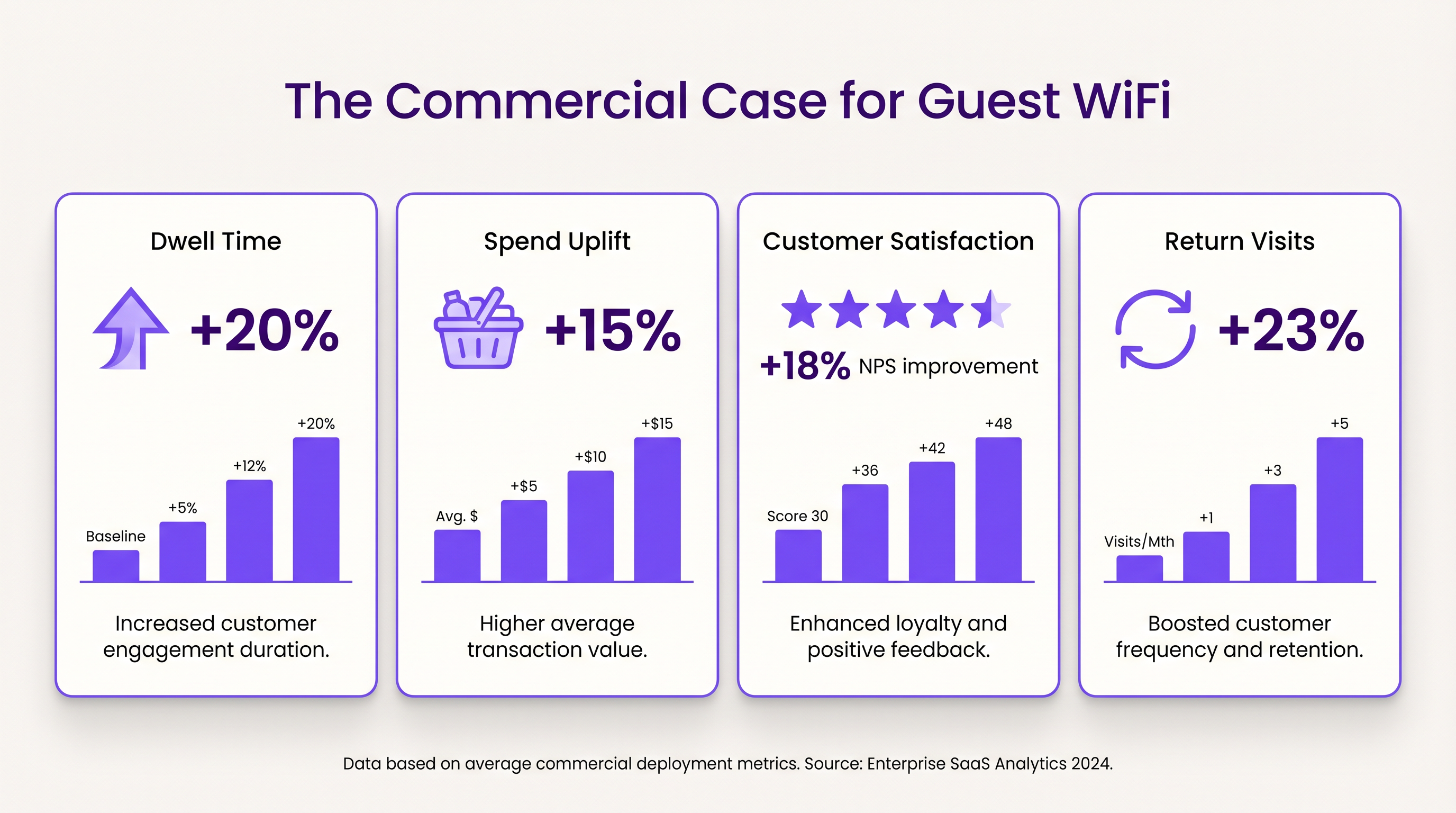
- Tempo de Permanência e Aumento de Gastos: Fornecer conectividade confiável incentiva os clientes a permanecerem no local por mais tempo. Em ambientes de varejo, o aumento do tempo de permanência correlaciona-se fortemente com valores médios de transação mais altos.
- Satisfação do Cliente: Na hotelaria, o acesso contínuo ao WiFi é um impulsionador principal de avaliações positivas e reservas repetidas.
- Valor dos Dados Primários: Os dados capturados via Captive Portal permitem campanhas de marketing direcionadas, reduzindo os custos de aquisição de clientes e aumentando o valor vitalício. A abordagem da Purple, incluindo autenticação baseada em perfil, facilita o acesso contínuo e seguro, ao mesmo tempo em que enriquece o banco de dados de clientes.
Termos-Chave e Definições
Captive Portal
A web page that the user of a public-access network is obliged to view and interact with before access is granted.
Used for authentication, presenting terms of service, and capturing first-party data.
VLAN (Virtual Local Area Network)
A logical subnetwork that groups a collection of devices from different physical LANs.
Essential for isolating guest WiFi traffic from corporate networks to maintain security.
Client Isolation
A security feature that prevents devices connected to the same AP from communicating with each other.
Critical for public networks to prevent malicious actors from scanning or attacking other guests' devices.
SSID (Service Set Identifier)
The primary name associated with an 802.11 wireless local area network (WLAN).
The network name guests select on their devices to connect.
QoS (Quality of Service)
The use of mechanisms or technologies that work on a network to control traffic and ensure the performance of critical applications.
Used to prioritize operational traffic (e.g., POS transactions) over guest internet browsing.
WPA3 (Wi-Fi Protected Access 3)
The latest generation of mainstream security for wireless networks, offering improved encryption.
The recommended security standard for all new wireless deployments to protect data in transit.
Dwell Time
The amount of time a visitor spends in a specific location or venue.
A key commercial metric; offering free WiFi typically increases dwell time, which often correlates with increased spend.
First-Party Data
Information a company collects directly from its customers and owns.
Captured via the captive portal, this data is highly valuable for targeted marketing and personalization.
Estudos de Caso
A 200-room hotel needs to deploy guest WiFi while ensuring that corporate traffic (e.g., PMS, POS) remains secure and bandwidth is distributed fairly among guests.
- Deploy IEEE 802.11ax APs in hallways and common areas based on a site survey. 2. Configure a dedicated guest SSID on a separate VLAN, isolated from the corporate VLAN. 3. Enable client isolation on the guest SSID. 4. Implement a captive portal for authentication and terms of service acceptance. 5. Apply a per-device bandwidth limit (e.g., 5 Mbps down / 2 Mbps up) to prevent network saturation. 6. Configure QoS to prioritize corporate traffic.
A large retail chain wants to implement guest WiFi across 50 locations to capture customer data for marketing purposes, ensuring GDPR compliance.
- Standardize the network architecture across all sites, utilizing SD-WAN for centralized management. 2. Deploy a centralized captive portal integrated with a WiFi Analytics platform. 3. Design the splash page to offer multiple authentication methods (email, social). 4. Implement explicit opt-in checkboxes for marketing communications, distinct from the terms of service acceptance. 5. Define and enforce a data retention policy within the analytics platform.
Análise de Cenário
Q1. A venue operator reports that their guest WiFi network frequently drops connections during busy periods, despite having strong signal strength throughout the building.
💡 Dica:Consider the difference between coverage (signal strength) and capacity (ability to handle concurrent devices), as well as IP addressing.
Mostrar Abordagem Recomendada
The issue is likely capacity-related rather than coverage-related. Potential causes include: 1) APs being overwhelmed by too many concurrent connections (requires upgrading to high-density APs like Wi-Fi 6). 2) DHCP pool exhaustion (requires reducing lease times or expanding the subnet). 3) Insufficient backhaul bandwidth to the ISP.
Q2. The marketing team wants to collect guest email addresses, phone numbers, and dates of birth via the captive portal to build customer profiles.
💡 Dica:Consider data minimization principles and the impact of friction on the user experience.
Mostrar Abordagem Recomendada
While technically possible, requiring excessive information increases friction, leading to higher drop-off rates at the portal. Furthermore, under GDPR, data collection must be proportionate to the service provided. The recommended approach is to offer multiple authentication methods (e.g., email or social login) and only mandate the minimum data necessary, using progressive profiling to gather more details on subsequent visits.
Q3. During a network audit, it is discovered that guest devices can ping the IP addresses of the venue's point-of-sale (POS) terminals.
💡 Dica:Focus on logical network separation and access control.
Mostrar Abordagem Recomendada
This indicates a critical failure in network segmentation. The guest SSID must be placed on a dedicated VLAN that is completely isolated from the corporate/operational VLAN. Firewall rules or Access Control Lists (ACLs) must be implemented at the gateway to explicitly deny traffic from the guest subnet to any internal subnets.




