

Por qué su negocio debería ofrecer WiFi gratuito a los clientes
Esta guía de referencia técnica integral describe la justificación comercial y arquitectónica para ofrecer WiFi para invitados en ubicaciones físicas. Proporciona a los líderes de TI y a los operadores de locales información práctica sobre estrategias de implementación, segmentación de red, cumplimiento y medición del ROI.
🎧 Escucha esta guía
Ver transcripción
Resumen Ejecutivo
Para los locales físicos modernos —ya sea en Comercio Minorista , Hostelería o Atención Médica — el WiFi para invitados ha pasado de ser un servicio pasivo a un activo comercial crítico. Esta guía explora la arquitectura técnica, las consideraciones de seguridad y el impacto comercial de implementar una solución robusta de WiFi para invitados. Al aprovechar plataformas como Guest WiFi e integrarlas con una plataforma de WiFi Analytics , los líderes de TI pueden transformar el tráfico peatonal anónimo en datos de primera mano procesables, al tiempo que mejoran la experiencia del cliente. El caso comercial es claro: un WiFi para invitados bien diseñado aumenta el tiempo de permanencia, impulsa el aumento del gasto y proporciona la inteligencia de comportamiento necesaria para optimizar las operaciones del local.
Análisis Técnico Detallado
Arquitectura de Red y Segmentación
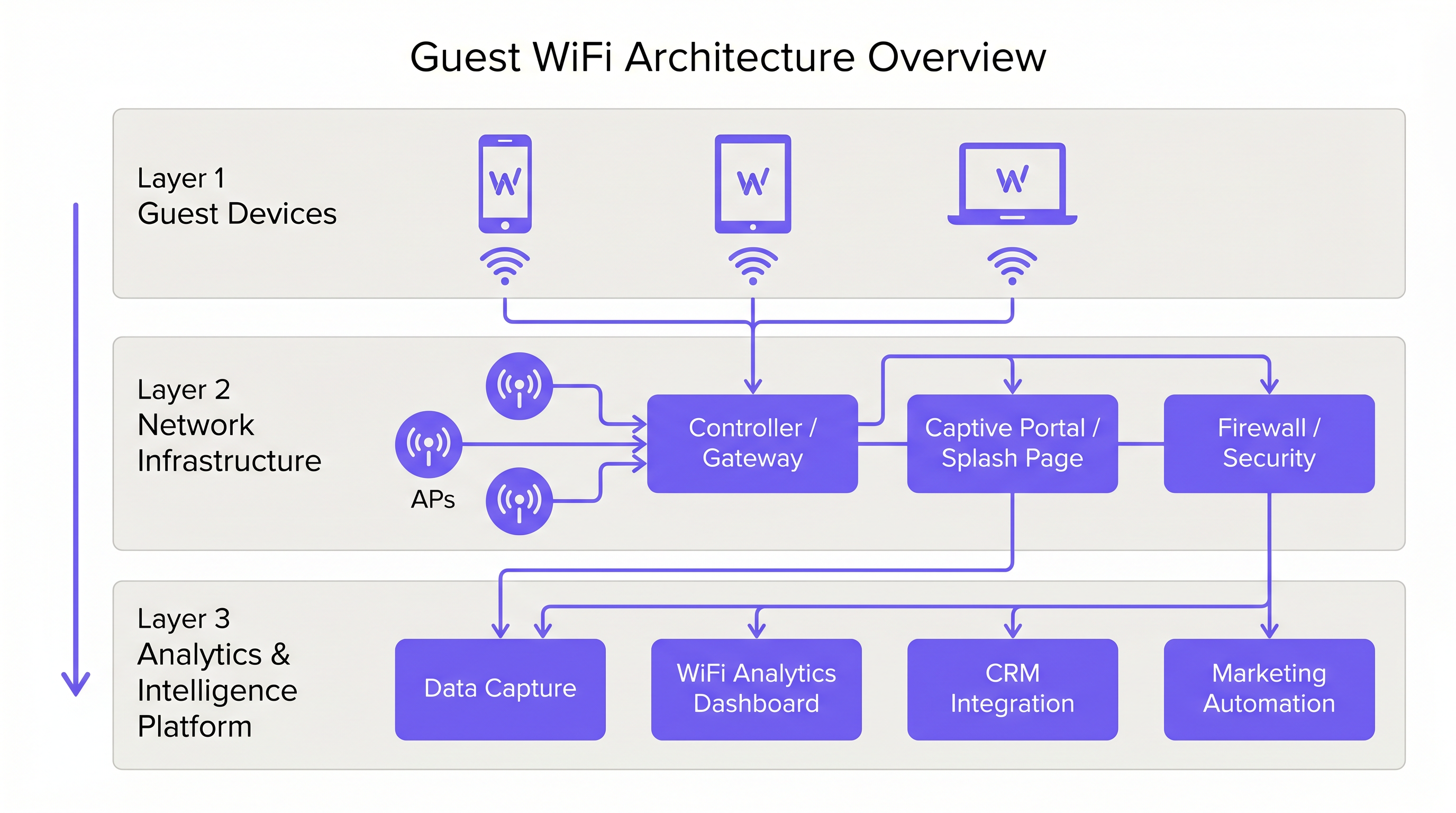
Una implementación profesional de WiFi para invitados requiere una estricta separación lógica de la infraestructura corporativa. Esto se logra mediante la segmentación de VLAN y un Service Set Identifier (SSID) dedicado. El tráfico de invitados debe enrutarse directamente a internet a través de un Captive Portal, asegurando que nunca se cruce con sistemas internos como terminales de Punto de Venta (POS) o servidores de back-office. Esta arquitectura es fundamental tanto para la seguridad como para el cumplimiento de PCI DSS.
Implementación y Estándares de Puntos de Acceso
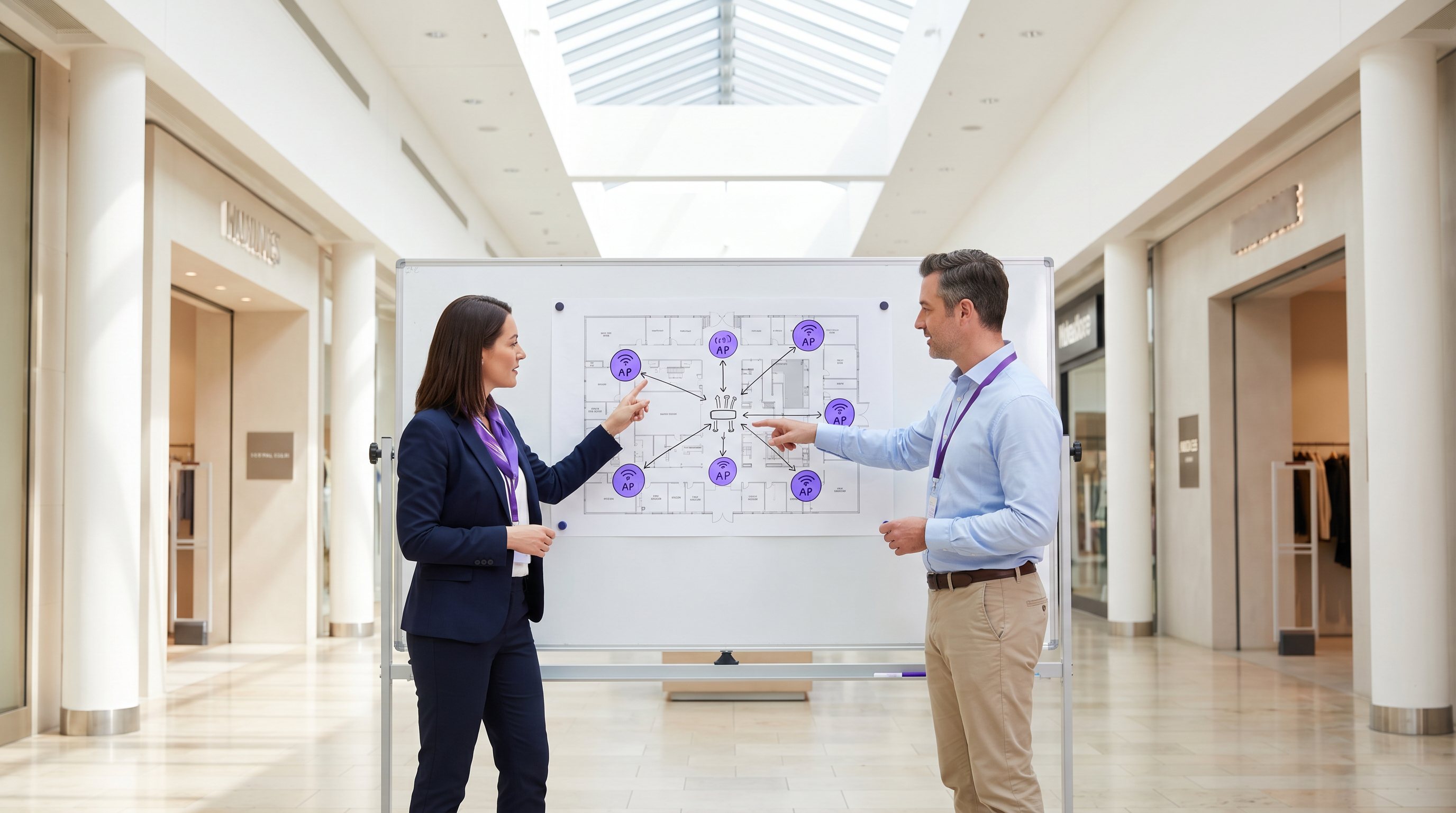
La capa de radio forma la base de la red de invitados. La ubicación del Punto de Acceso (AP) debe estar dictada por un estudio de sitio exhaustivo, teniendo en cuenta el área de cobertura, el número esperado de dispositivos concurrentes y la atenuación estructural. Para entornos de alta densidad como estadios o grandes centros de Transporte , IEEE 802.11ax (Wi-Fi 6) es el estándar mínimo recomendado, proporcionando la capacidad y eficiencia necesarias. Los entornos con densidad extrema de dispositivos deberían considerar Wi-Fi 6E para utilizar la banda de 6 GHz.
Seguridad y Cifrado
La seguridad debe aplicarse en cada capa. WPA3 es el estándar actual para el cifrado inalámbrico y debe implementarse en todas las nuevas implementaciones. Fundamentalmente, el aislamiento de clientes debe habilitarse en el SSID de invitados para evitar que los dispositivos se comuniquen entre sí, mitigando el riesgo de movimiento lateral por parte de actores maliciosos. A nivel de puerta de enlace, se recomienda el filtrado DNS para bloquear el acceso a dominios maliciosos conocidos y contenido inapropiado.
El Captive Portal como Puerta de Enlace de Inteligencia
El Captive Portal, o página de bienvenida, tiene un doble propósito: es la puerta de enlace para el acceso a la red y el mecanismo principal para la recopilación de datos de primera mano. Cuando los usuarios se autentican a través de correo electrónico, inicio de sesión social o SMS, la plataforma captura datos de identidad verificados. Estos datos, cuando se procesan a través de una plataforma de WiFi Analytics , proporcionan información sobre la demografía de los visitantes, los tiempos de permanencia y las frecuencias de retorno.
Guía de Implementación
Paso 1: Recopilación de Requisitos y Estudio de Sitio
Comience definiendo los objetivos comerciales y los requisitos técnicos. Realice un estudio de sitio predictivo y físico para determinar la ubicación óptima de los AP. Un hotel de 200 habitaciones requiere una estrategia de implementación diferente a la de un estadio de 40,000 asientos.
Paso 2: Diseño y Segmentación de la Red
Configure la infraestructura de red para garantizar un aislamiento estricto. Implemente VLAN para separar el tráfico de invitados del tráfico corporativo y operativo (por ejemplo, dispositivos IoT, cámaras de seguridad). Aplique políticas de Calidad de Servicio (QoS) para priorizar el tráfico operativo crítico sobre el acceso a internet de los invitados.
Paso 3: Configuración y Cumplimiento del Captive Portal
Diseñe el Captive Portal para reflejar la identidad de marca del local. Fundamentalmente, asegure el cumplimiento de las regulaciones regionales de protección de datos, como GDPR en el Reino Unido y la UE. La página de bienvenida debe incluir un aviso de privacidad claro y un mecanismo de consentimiento explícito para la recopilación de datos. Para obtener orientación sobre cómo crear un portal eficaz, consulte recursos como Cómo crear una página de inicio de sesión WiFi para invitados o Cómo crear una página de inicio de sesión WiFi para invitados .
Paso 4: Integración de Análisis
Integre la plataforma de WiFi para invitados con la pila de marketing y CRM más amplia de la organización. Defina los flujos de trabajo de datos para asegurar que la inteligencia capturada sea procesable para la automatización de marketing y las iniciativas de participación del cliente.
Mejores Prácticas
- Aplicar Aislamiento de Clientes: Siempre habilite el aislamiento de clientes en el SSID de invitados para proteger a los usuarios entre sí.
- Implementar Gestión de Ancho de Banda: Aplique límites de ancho de banda por dispositivo para evitar que usuarios individuales monopolicen la conexión y degraden la experiencia para otros.
- Priorizar QoS: Asegure que el tráfico operativo, como el procesamiento de pagos y VoIP, tenga prioridad sobre el acceso a internet de los invitados.
- Mantener el Cumplimiento: Revise regularmente las políticas de retención de datos y los mecanismos de consentimiento para asegurar el cumplimiento continuo con GDPR y otras regulaciones relevantes.
- Aprovechar SD-WAN: Para implementaciones multisitio, considere los beneficios de SD-WAN para una gestión centralizada y un enrutamiento optimizado. Consulte Los Beneficios Clave de SD-WAN para Empresas Modernas (o Los Beneficios Clave de SD-WAN para Empresas Modernas ) para más detalles.
Resolución de Problemas y Mitigación de Riesgos
Modos de Falla Comunes
- Cobertura Inadecuadae: Zonas muertas causadas por una mala ubicación de los AP o por no tener en cuenta las interferencias estructurales. Mitigación: Realice estudios de sitio exhaustivos después de la implementación y ajuste la ubicación de los AP o la potencia de transmisión según sea necesario.
- Agotamiento de direcciones IP: El grupo DHCP se agota debido a un alto volumen de dispositivos transitorios. Mitigación: Implemente tiempos de concesión DHCP más cortos (por ejemplo, 30-60 minutos) para la red de invitados y asegúrese de que la subred tenga el tamaño adecuado.
- Omisiones del Captive Portal: Dispositivos que omiten la página de bienvenida debido a configuraciones incorrectas de los "walled gardens" o a la suplantación de direcciones MAC. Mitigación: Audite regularmente las configuraciones de los "walled gardens" e implemente mecanismos de autenticación robustos.
ROI e Impacto Empresarial
El retorno de la inversión para el WiFi de invitados se logra a través de un mayor compromiso del cliente y la adquisición de datos procesables.
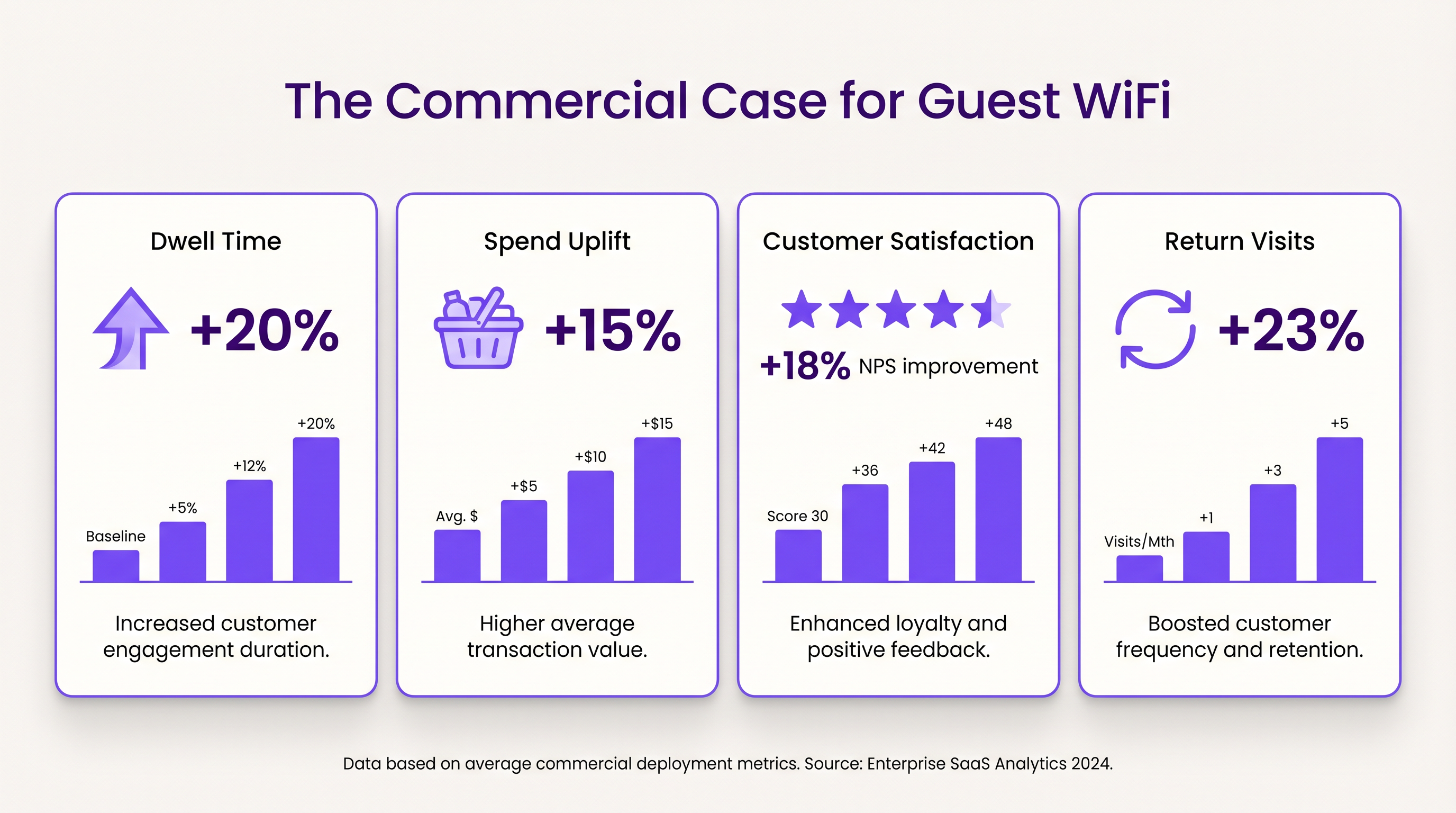
- Tiempo de Permanencia y Aumento del Gasto: Proporcionar conectividad fiable anima a los clientes a permanecer más tiempo en el lugar. En entornos minoristas, un mayor tiempo de permanencia se correlaciona fuertemente con valores de transacción promedio más altos.
- Satisfacción del Cliente: En la hostelería, el acceso WiFi sin interrupciones es un motor principal de reseñas positivas y reservas repetidas.
- Valor de los Datos de Primera Parte: Los datos capturados a través del Captive Portal permiten campañas de marketing dirigidas, reduciendo los costos de adquisición de clientes y aumentando el valor de vida del cliente. El enfoque de Purple, que incluye la autenticación basada en perfiles, facilita un acceso seguro y sin interrupciones al tiempo que enriquece la base de datos de clientes.
Términos clave y definiciones
Captive Portal
A web page that the user of a public-access network is obliged to view and interact with before access is granted.
Used for authentication, presenting terms of service, and capturing first-party data.
VLAN (Virtual Local Area Network)
A logical subnetwork that groups a collection of devices from different physical LANs.
Essential for isolating guest WiFi traffic from corporate networks to maintain security.
Client Isolation
A security feature that prevents devices connected to the same AP from communicating with each other.
Critical for public networks to prevent malicious actors from scanning or attacking other guests' devices.
SSID (Service Set Identifier)
The primary name associated with an 802.11 wireless local area network (WLAN).
The network name guests select on their devices to connect.
QoS (Quality of Service)
The use of mechanisms or technologies that work on a network to control traffic and ensure the performance of critical applications.
Used to prioritize operational traffic (e.g., POS transactions) over guest internet browsing.
WPA3 (Wi-Fi Protected Access 3)
The latest generation of mainstream security for wireless networks, offering improved encryption.
The recommended security standard for all new wireless deployments to protect data in transit.
Dwell Time
The amount of time a visitor spends in a specific location or venue.
A key commercial metric; offering free WiFi typically increases dwell time, which often correlates with increased spend.
First-Party Data
Information a company collects directly from its customers and owns.
Captured via the captive portal, this data is highly valuable for targeted marketing and personalization.
Casos de éxito
A 200-room hotel needs to deploy guest WiFi while ensuring that corporate traffic (e.g., PMS, POS) remains secure and bandwidth is distributed fairly among guests.
- Deploy IEEE 802.11ax APs in hallways and common areas based on a site survey. 2. Configure a dedicated guest SSID on a separate VLAN, isolated from the corporate VLAN. 3. Enable client isolation on the guest SSID. 4. Implement a captive portal for authentication and terms of service acceptance. 5. Apply a per-device bandwidth limit (e.g., 5 Mbps down / 2 Mbps up) to prevent network saturation. 6. Configure QoS to prioritize corporate traffic.
A large retail chain wants to implement guest WiFi across 50 locations to capture customer data for marketing purposes, ensuring GDPR compliance.
- Standardize the network architecture across all sites, utilizing SD-WAN for centralized management. 2. Deploy a centralized captive portal integrated with a WiFi Analytics platform. 3. Design the splash page to offer multiple authentication methods (email, social). 4. Implement explicit opt-in checkboxes for marketing communications, distinct from the terms of service acceptance. 5. Define and enforce a data retention policy within the analytics platform.
Análisis de escenarios
Q1. A venue operator reports that their guest WiFi network frequently drops connections during busy periods, despite having strong signal strength throughout the building.
💡 Sugerencia:Consider the difference between coverage (signal strength) and capacity (ability to handle concurrent devices), as well as IP addressing.
Mostrar enfoque recomendado
The issue is likely capacity-related rather than coverage-related. Potential causes include: 1) APs being overwhelmed by too many concurrent connections (requires upgrading to high-density APs like Wi-Fi 6). 2) DHCP pool exhaustion (requires reducing lease times or expanding the subnet). 3) Insufficient backhaul bandwidth to the ISP.
Q2. The marketing team wants to collect guest email addresses, phone numbers, and dates of birth via the captive portal to build customer profiles.
💡 Sugerencia:Consider data minimization principles and the impact of friction on the user experience.
Mostrar enfoque recomendado
While technically possible, requiring excessive information increases friction, leading to higher drop-off rates at the portal. Furthermore, under GDPR, data collection must be proportionate to the service provided. The recommended approach is to offer multiple authentication methods (e.g., email or social login) and only mandate the minimum data necessary, using progressive profiling to gather more details on subsequent visits.
Q3. During a network audit, it is discovered that guest devices can ping the IP addresses of the venue's point-of-sale (POS) terminals.
💡 Sugerencia:Focus on logical network separation and access control.
Mostrar enfoque recomendado
This indicates a critical failure in network segmentation. The guest SSID must be placed on a dedicated VLAN that is completely isolated from the corporate/operational VLAN. Firewall rules or Access Control Lists (ACLs) must be implemented at the gateway to explicitly deny traffic from the guest subnet to any internal subnets.




