

Wi-Fi 7 উচ্চ-ঘনত্বের স্থানগুলির জন্য: স্টেডিয়াম, সম্মেলন কক্ষ এবং টার্মিনাল
এই প্রযুক্তিগত রেফারেন্স গাইডটি আইটি নেতা এবং নেটওয়ার্ক স্থপতিদের স্টেডিয়াম এবং ট্রানজিট টার্মিনালের মতো উচ্চ-ঘনত্বের স্থানগুলিতে Wi-Fi 7 স্থাপনের জন্য কার্যকর কৌশল সরবরাহ করে। এটি অন্বেষণ করে কিভাবে মাল্টি-লিঙ্ক অপারেশন (MLO), 4K-QAM, এবং আন্ডার-সিট AP ডিজাইন ক্ষমতাকে নাটকীয়ভাবে উন্নত করে, হার্ডওয়্যারের প্রয়োজনীয়তা হ্রাস করে এবং পরিমাপযোগ্য ROI প্রদান করে।
🎧 এই গাইডটি শুনুন
ট্রান্সক্রিপ্ট দেখুন
কার্যনির্বাহী সারসংক্ষেপ
উচ্চ-ঘনত্বের স্থান—স্টেডিয়াম, ট্রানজিট টার্মিনাল এবং বড় সম্মেলন কেন্দ্র—পরিচালনাকারী আইটি ম্যানেজার এবং সিটিওদের জন্য Wi-Fi 7 (IEEE 802.11be) কেবল একটি গতি আপগ্রেড নয়, বরং একটি মৌলিক স্থাপত্যগত পরিবর্তন। প্রতি সেক্টরে ১,০০০+ সমসাময়িক ক্লায়েন্ট সহ পরিবেশে, উত্তরাধিকারসূত্রে প্রাপ্ত Wi-Fi স্ট্যান্ডার্ডগুলি এয়ারটাইম প্রতিযোগিতা এবং আপলিঙ্ক স্টারভেশনের কারণে ভেঙে পড়ে। Wi-Fi 7 মাল্টি-লিঙ্ক অপারেশন (MLO), 4096-QAM, এবং মাল্টি-রিসোর্স ইউনিট (MRU) পাংচারিংয়ের মাধ্যমে "স্টেডিয়াম স্কুইজ" সমস্যার সমাধান করে, যা নেটওয়ার্কগুলিকে কম ট্রান্সমিশনে আরও ডেটা প্যাক করতে এবং একই সাথে 2.4 GHz, 5 GHz, এবং 6 GHz ব্যান্ড জুড়ে ট্র্যাফিককে গতিশীলভাবে রুট করতে দেয়।
এই গাইডটি অতি-উচ্চ-ঘনত্বের পরিবেশে Wi-Fi 7 ডিজাইন এবং স্থাপনের জন্য একটি বিক্রেতা-নিরপেক্ষ ব্লুপ্রিন্ট সরবরাহ করে। আধুনিক আন্ডার-সিট স্থাপনার কৌশল গ্রহণ করে এবং নতুন স্ট্যান্ডার্ডের দক্ষতা বৃদ্ধিকে কাজে লাগিয়ে, ভেন্যু অপারেটররা Wi-Fi 6E এর তুলনায় ক্লায়েন্ট-টু-AP অনুপাত ৫০% পর্যন্ত বাড়াতে পারে, যা CAPEX উল্লেখযোগ্যভাবে হ্রাস করে এবং Guest WiFi নগদীকরণ এবং নির্বিঘ্ন মোবাইল টিকেটিংয়ের মাধ্যমে নতুন আয়ের উৎস উন্মোচন করে।
প্রযুক্তিগত গভীর বিশ্লেষণ
উচ্চ-ঘনত্বের Wi-Fi এর পদার্থবিদ্যা
একটি স্ট্যান্ডার্ড এন্টারপ্রাইজ স্থাপনায়, একটি অ্যাক্সেস পয়েন্ট ২০-৩০ জন ক্লায়েন্টকে পরিষেবা দিতে পারে। একটি স্টেডিয়াম বোল বা এয়ারপোর্ট গেট লাউঞ্জে, এই সংখ্যাটি সহজেই প্রতি AP তে ১০০+ সমসাময়িক অ্যাসোসিয়েশনে পৌঁছাতে পারে। এই পরিবেশগুলিতে প্রাথমিক ব্যর্থতার মোড ডাউনলিঙ্ক ব্যান্ডউইথ নয়, বরং আপলিঙ্ক এয়ারটাইম স্টারভেশন এবং কো-চ্যানেল ইন্টারফারেন্স (CCI)।
যখন হাজার হাজার ভক্ত একই সাথে সোশ্যাল মিডিয়ায় ভিডিও আপলোড করার চেষ্টা করে, তখন সংঘর্ষের ডোমেন দ্রুত প্রসারিত হয়। উত্তরাধিকারসূত্রে প্রাপ্ত স্ট্যান্ডার্ডগুলি ডিভাইসগুলিকে একটি একক ব্যান্ডে পরিষ্কার এয়ারটাইমের জন্য অপেক্ষা করতে বাধ্য করত। Wi-Fi 7 এই সমস্যার মোকাবিলায় তিনটি গুরুত্বপূর্ণ প্রক্রিয়া চালু করেছে:
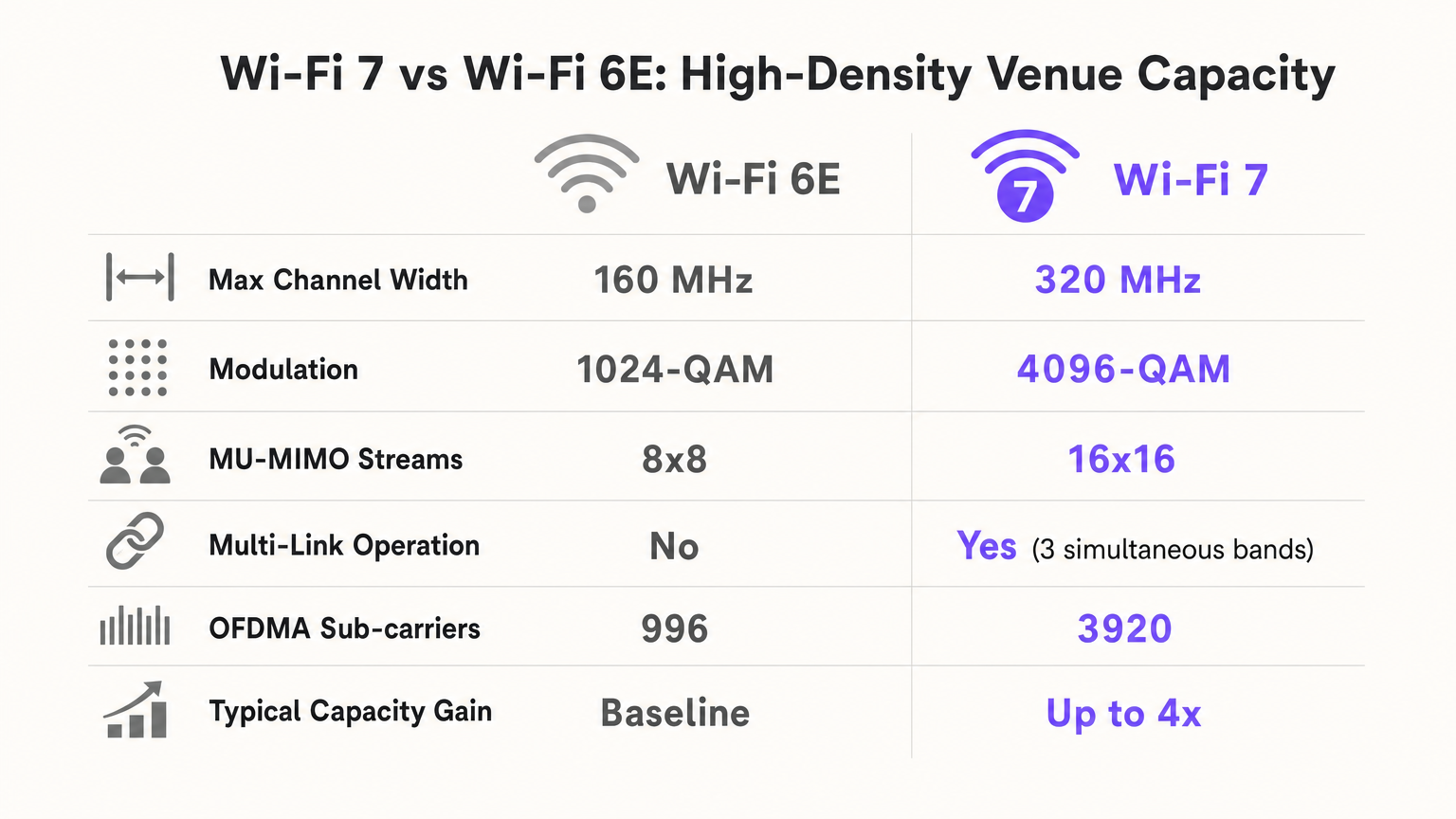
- মাল্টি-লিঙ্ক অপারেশন (MLO): MLO একটি মাল্টি-লিঙ্ক ডিভাইস (MLD) কে একাধিক ফ্রিকোয়েন্সি ব্যান্ড (2.4 GHz, 5 GHz, এবং 6 GHz) জুড়ে একই সাথে কাজ করতে সক্ষম করে। একটি স্টেডিয়ামে, এর অর্থ হল একটি ক্লায়েন্ট প্রায় শূন্য ল্যাটেন্সিতে সবচেয়ে পরিষ্কার উপলব্ধ স্পেকট্রামে প্যাকেটগুলিকে গতিশীলভাবে স্থানান্তরিত করতে পারে, যা ডিভাইস স্তরে RF পরিবেশকে কার্যকরভাবে লোড-ব্যালেন্স করে।
- 4096-QAM (4K-QAM): মডুলেশন ঘনত্ব 1024-QAM (Wi-Fi 6/6E) থেকে 4096-QAM এ বৃদ্ধি করে, Wi-Fi 7 প্রতিটি প্রতীক ট্রান্সমিশনে ২০% বেশি ডেটা প্যাক করে। একটি ঘন ভেন্যুতে যেখানে ক্লায়েন্টরা AP এর কাছাকাছি থাকে (যেমন, আন্ডার-সিট স্থাপনা), এটি ডিভাইসগুলিকে দ্রুত নেটওয়ার্কে প্রবেশ করতে এবং প্রস্থান করতে দেয়, যা গুরুত্বপূর্ণ এয়ারটাইম মুক্ত করে।
- মাল্টি-রিসোর্স ইউনিট (MRU) পাংচারিং: যদি একটি প্রশস্ত চ্যানেলের (যেমন, 160 MHz বা 320 MHz) একটি অংশ একটি উত্তরাধিকারসূত্রে প্রাপ্ত ডিভাইস বা রাডার ইন্টারফারেন্স দ্বারা দখল করা হয়, তাহলে পূর্ববর্তী স্ট্যান্ডার্ডগুলি পুরো চ্যানেলটিকে একটি সংকীর্ণ প্রস্থে নামিয়ে আনতে বাধ্য করত। MRU পাংচারিং AP কে কেবল হস্তক্ষেপকৃত অংশটি কেটে ফেলতে এবং অবশিষ্ট পরিষ্কার স্পেকট্রাম ব্যবহার করতে দেয়, যা কোলাহলপূর্ণ পরিবেশে থ্রুপুটকে সর্বাধিক করে তোলে।
বাস্তবায়ন নির্দেশিকা
স্থাপত্য কৌশল: আন্ডার-সিট বনাম ওভারহেড
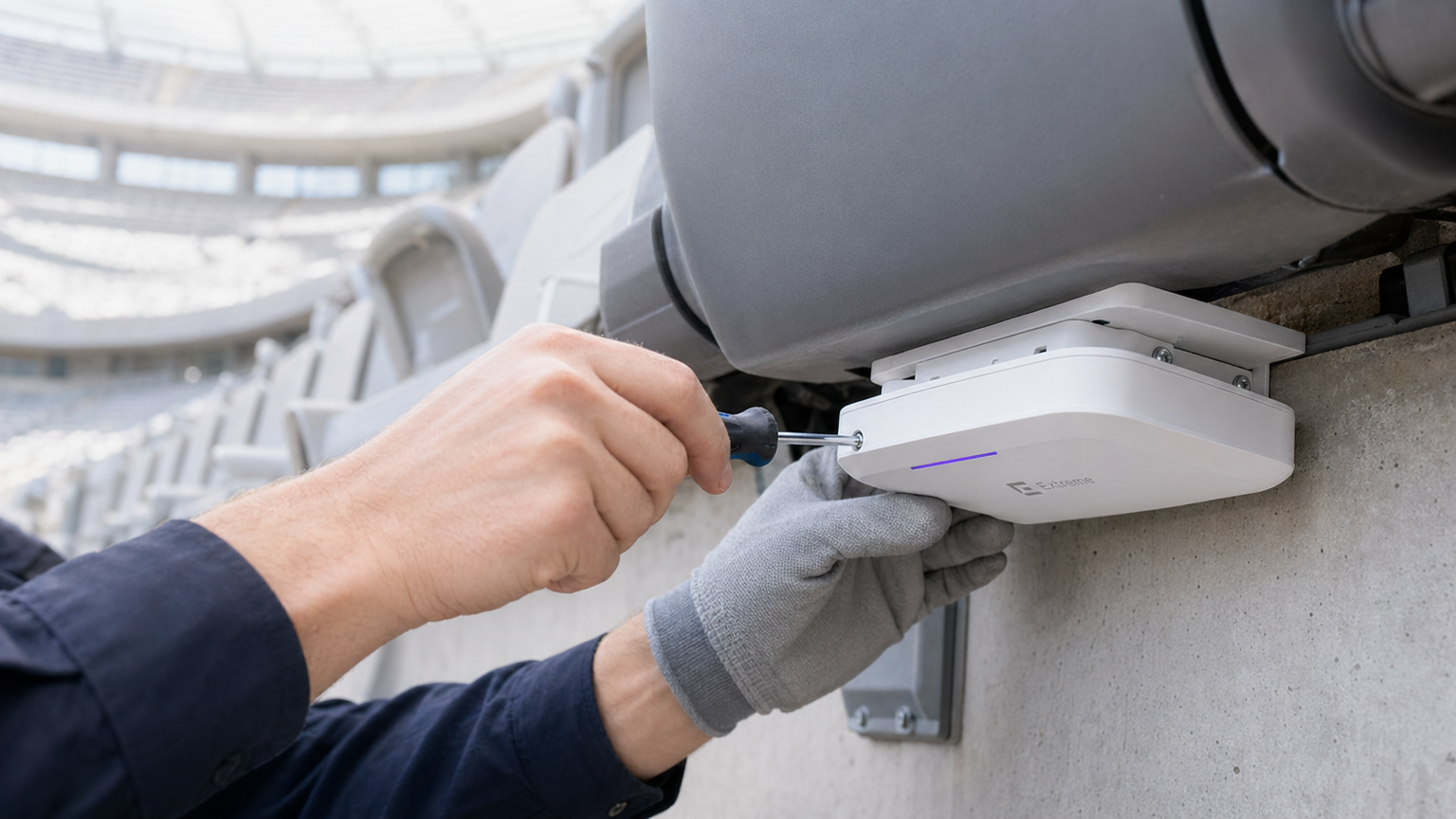
৫০,০০০ আসনের স্টেডিয়ামের জন্য, ওভারহেড সিলিং স্থাপনা বিপর্যয়কর। ১,০০০ আসন কভার করা একটি ওভারহেড AP একটি বিশাল CCI জোন এবং একটি নিয়ন্ত্রণহীন আপলিঙ্ক সংঘর্ষ ডোমেন তৈরি করে। আধুনিক গোল্ড স্ট্যান্ডার্ড হল আন্ডার-সিট স্থাপনা।
- "মিট শিল্ড" প্রভাব: মানুষের শরীর পার্শ্বীয় RF সংকেত শোষণ করে (5 GHz কে 5-15 dB দ্বারা অ্যাটেনুয়েট করে)। আসনগুলির নীচে AP স্থাপন করে, আপনি ভিড়কে একটি প্রাকৃতিক RF অ্যাটেনুয়েটর হিসাবে ব্যবহার করেন, যা ছোট, স্থানীয় মাইক্রো-সেল তৈরি করে (প্রায়শই "সফট বাবল" বলা হয়)।
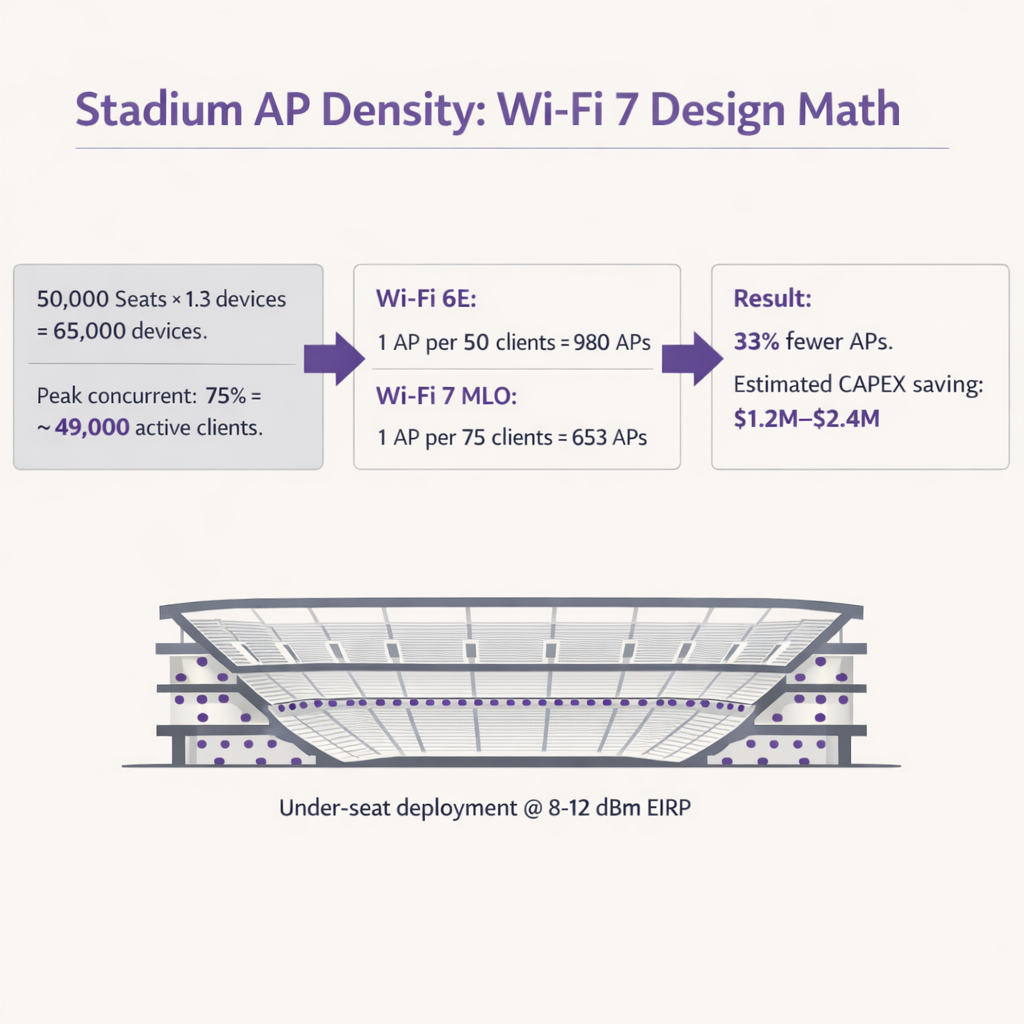
- AP ঘনত্ব গণিত: Wi-Fi 6E এর সাথে, স্থপতিরা সাধারণত প্রতি ৫০ জন ক্লায়েন্টের জন্য ১টি AP ডিজাইন করতেন। MLO এবং 4K-QAM এর দক্ষতার কারণে, Wi-Fi 7 প্রতি ৭৫-৮০ জন ক্লায়েন্টের জন্য ১টি AP এর ডিজাইন অনুমোদন করে। একটি ৫০,০০০ আসনের ভেন্যুতে (প্রতি ব্যক্তি ১.৩টি ডিভাইস এবং ৭৫% সমসাময়িকতা অনুমান করে), এটি প্রয়োজনীয় AP সংখ্যা ~৯৮০ থেকে ~৬৫০ এ হ্রাস করে, যা হার্ডওয়্যার, ক্যাবলিং এবং সুইচ পোর্টে বিশাল CAPEX সাশ্রয় করে।
ট্রানজিট টার্মিনাল এবং সম্মেলন কেন্দ্র
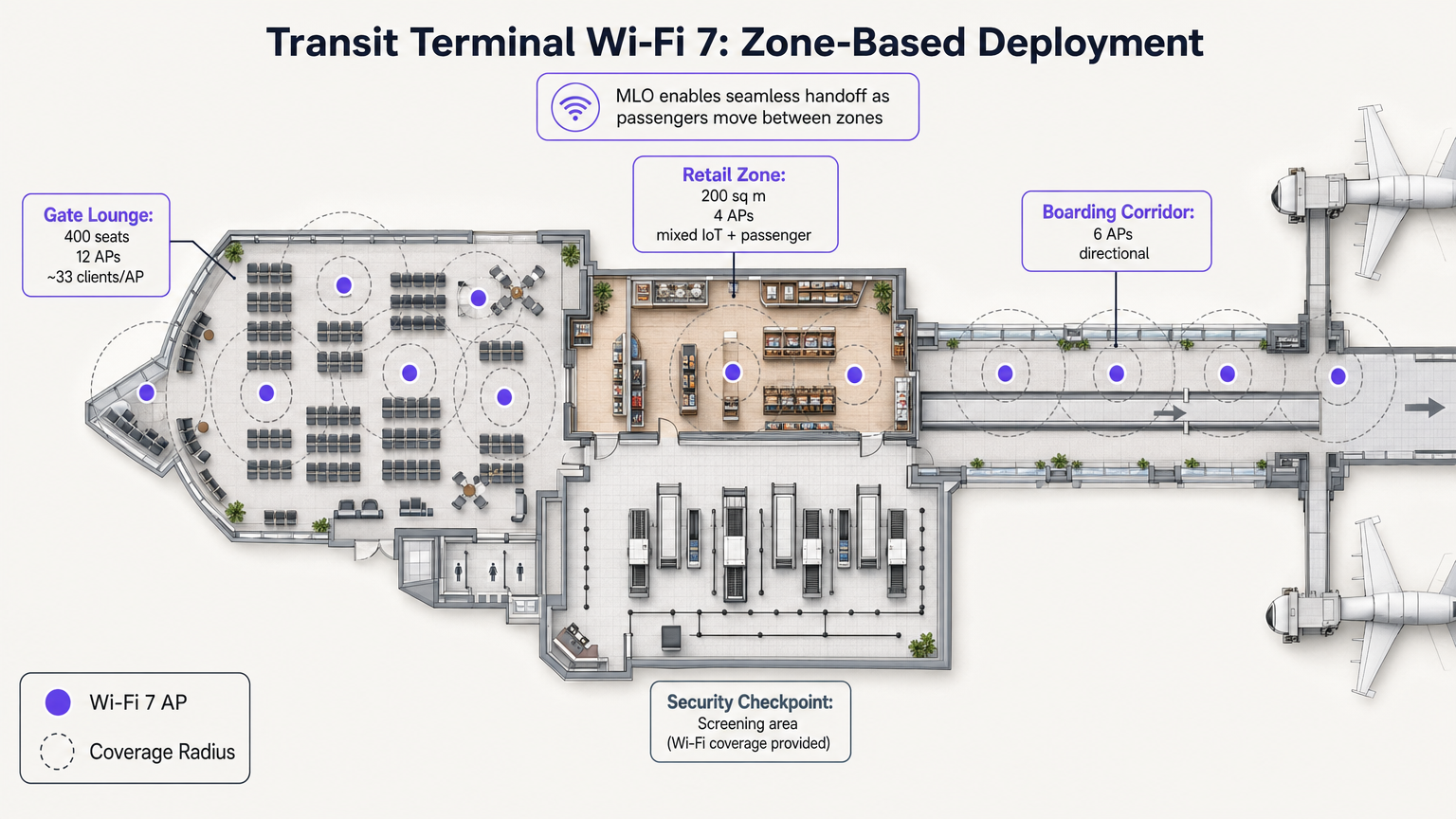
স্টেডিয়ামগুলির বিপরীতে, ট্রানজিট টার্মিনালগুলিতে বিভিন্ন ঘনত্বের প্রোফাইল সহ স্বতন্ত্র অপারেশনাল জোন থাকে। Wi-Fi 7 এর MLO এখানে বিশেষভাবে মূল্যবান, যা যাত্রীরা একটি উচ্চ-ঘনত্বের গেট লাউঞ্জ থেকে একটি খুচরা কনকোর্সে যাওয়ার সময় নির্বিঘ্ন হ্যান্ডঅফ সক্ষম করে।
উদাহরণস্বরূপ, বোর্ডিং করিডোরগুলিতে দিকনির্দেশক AP এবং খুচরা জোনগুলিতে সর্বদিকনির্দেশক AP স্থাপন নিশ্চিত করে যে WiFi Analytics প্ল্যাটফর্মগুলি সংযোগ বিচ্ছিন্ন না করে অবস্থানকাল এবং পদচারণা সঠিকভাবে ট্র্যাক করতে পারে। এই ডেটা Transport এবং Retail এর মতো সেক্টরগুলিতে অপারেশন অপ্টিমাইজ করার জন্য অত্যন্ত গুরুত্বপূর্ণ।
সর্বোত্তম অনুশীলন
- আপলিঙ্কের জন্য ট্রান্সমিট পাওয়ার টিউন করুন: স্টেডিয়াম Wi-Fi আপলিঙ্ক-সীমাবদ্ধ। একটি Wi-Fi 7 AP 30 dBm এ ট্রান্সমিট করতে পারে, কিন্তু একটি স্মার্টফোন কেবল ~10 dBm এ ট্রান্সমিট করতে পারে। যদি AP পাওয়ার খুব বেশি হয়, ক্লায়েন্ট একটি শক্তিশালী সংকেত দেখে কিন্তু AP ক্লায়েন্টের প্রতিক্রিয়া শুনতে পায় না। সর্বদা AP EIRP কে সবচেয়ে খারাপ-কেস ক্লায়েন্ট আপলিঙ্কের সাথে (সাধারণত 8-12 dBm) মেলাতে সেট করুন।
- আক্রমণাত্মক চ্যানেল পুনঃব্যবহার: একটি 5 GHz/6 GHz স্থাপনায়, শুধুমাত্র 20 MHz বা 40 MHz চ্যানেল ব্যবহার করুন। নন-ওভারল্যাপিং চ্যানেলের সংখ্যা সর্বাধিক করতে বোলে 80 MHz এবং 160/320 MHz নিষ্ক্রিয় করুন। প্রতি ২-৩টি বসার বিভাগে চ্যানেলগুলি পুনঃব্যবহার করুন।
- SSID কমিয়ে আনুন: প্রতিটি ব্রডকাস্ট SSID ম্যানেজমেন্ট ফ্রেম এয়ারটাইম ব্যবহার করে। একটি 600-AP স্থাপনায়, ৫টি SSID ব্রডকাস্ট করা একজন একক ব্যবহারকারী সংযোগ করার আগেই আপনার মোট এয়ারটাইমের ২০% ব্যবহার করতে পারে। নেটওয়ার্ককে ১-২টি SSID তে সীমাবদ্ধ করুন (যেমন, OWE foঅতিথিদের জন্য, এবং কর্মী/মিডিয়ার জন্য WPA3-Enterprise)। ৪. তারযুক্ত অবকাঠামো আপগ্রেড: Wi-Fi 7 AP-এর জন্য PoE++ (৬০W পর্যন্ত) এবং মাল্টি-গিগাবিট ব্যাকহল প্রয়োজন। তারযুক্ত বাধা এড়াতে এজ সুইচগুলি ৫ Gbps বা ১০ Gbps পোর্ট সমর্থন করে তা নিশ্চিত করুন।
সমস্যা সমাধান ও ঝুঁকি প্রশমন
| ব্যর্থতার ধরণ | লক্ষণ | মূল কারণ | প্রশমন কৌশল |
|---|---|---|---|
| Sticky Clients | ডিভাইসগুলি নতুন AP-এর কাছাকাছি থাকা সত্ত্বেও দূরবর্তী AP-এর সাথে সংযুক্ত থাকে। | দুর্বল রোমিং কনফিগারেশন; অতিরিক্ত AP ট্রান্সমিট পাওয়ার। | 802.11k/v/r সক্ষম করুন। AP Tx পাওয়ার ৮-১২ dBm-এ হ্রাস করুন। BSS কালারিং প্রয়োগ করুন। |
| Uplink Starvation | উচ্চ ডাউনলোড গতি, কিন্তু সোশ্যাল মিডিয়া আপলোড ব্যর্থ হয় বা সময়সীমা অতিক্রম করে। | হিডেন নোড সমস্যা; বড় সেল আকারের কারণে সংঘর্ষ। | সিটের নিচে স্থাপন করুন। AP Tx পাওয়ার ক্লায়েন্টের ক্ষমতার সাথে মেলে তা নিশ্চিত করুন। |
| Airtime Exhaustion | অল্প সংখ্যক সক্রিয় ব্যবহারকারী থাকা সত্ত্বেও উচ্চ লেটেন্সি এবং সংযোগ বিচ্ছিন্ন। | অনেক বেশি SSID; প্রশস্ত চ্যানেল (৮০+ MHz) অতিরিক্ত CCI সৃষ্টি করে। | ১-২টি SSID-তে হ্রাস করুন। অতি-ঘন অঞ্চলে ২০ MHz চ্যানেল ব্যবহার করুন। |
ROI এবং ব্যবসায়িক প্রভাব
উচ্চ-ঘনত্বের স্থানে Wi-Fi 7 স্থাপন একটি উল্লেখযোগ্য মূলধন ব্যয়, তবে হার্ডওয়্যার হ্রাস এবং নতুন রাজস্ব ক্ষমতা বিবেচনা করলে ROI অত্যন্ত যুক্তিযুক্ত।
১. CAPEX হ্রাস: ক্লায়েন্ট-টু-AP অনুপাত ৫০:১ থেকে ৭৫:১-এ বাড়িয়ে, স্থানগুলি হার্ডওয়্যার এবং ইনস্টলেশন খরচ ৩৩% পর্যন্ত কমাতে পারে। ৫০,০০০ আসনের স্টেডিয়ামের জন্য, এটি $১.২M থেকে $২.৪M পর্যন্ত সঞ্চয় হতে পারে। ২. মুদ্রাকরণ এবং বিশ্লেষণ: একটি শক্তিশালী, উচ্চ-ক্ষমতার নেটওয়ার্ক প্রথম-পক্ষ ডেটা সংগ্রহের ভিত্তি। একটি Captive Portal ব্যবহার করে, স্থানগুলি সমৃদ্ধ গ্রাহক প্রোফাইল তৈরি করতে পারে, যা আনুগত্য প্রোগ্রাম এবং লক্ষ্যযুক্ত বিপণন প্রচারাভিযানকে চালিত করে। EU AI Act and Guest WiFi: What Marketers Need to Know এর মতো সম্মতি কাঠামো নেভিগেট করার সময় এটি বিশেষভাবে প্রাসঙ্গিক। ৩. পরিচালনগত দক্ষতা: নির্ভরযোগ্য সংযোগ উচ্চ-ভলিউম POS লেনদেন, মোবাইল ফুড অর্ডারিং এবং ডিজিটাল টিকিটিং সমর্থন করে, যা ইভেন্টের সময় মাথাপিছু ব্যয় সরাসরি বৃদ্ধি করে। এটি উন্নত অবস্থান পরিষেবাগুলিও সক্ষম করে, যেমনটি আমাদের Indoor Positioning System: UWB, BLE, & WiFi Guide -এ বিস্তারিত আছে।
Wi-Fi 7 স্টেডিয়াম আর্কিটেকচার নিয়ে আমাদের গভীর-পর্যালোচনা পডকাস্ট ব্রিফিং শুনুন:
মূল শব্দ ও সংজ্ঞা
Multi-Link Operation (MLO)
A Wi-Fi 7 feature allowing devices to transmit and receive data simultaneously across multiple frequency bands (2.4, 5, and 6 GHz).
Crucial for stadiums, it acts as an RF load balancer, instantly shifting traffic away from congested bands to maintain low latency and high throughput.
4096-QAM (4K-QAM)
An advanced modulation scheme that packs 12 bits of data per symbol, a 20% increase over Wi-Fi 6's 1024-QAM.
Allows devices close to the AP (like in under-seat deployments) to transmit data faster, freeing up airtime for other users in the dense sector.
Multi-Resource Unit (MRU) Puncturing
The ability to block out specific segments of a channel affected by interference while continuing to transmit on the clean portions of that same channel.
Prevents a single legacy device or radar event from crippling the bandwidth of an entire 160 MHz or 320 MHz channel.
Co-Channel Interference (CCI)
Interference caused when multiple access points on the same channel can hear each other, forcing them to share airtime and wait their turn to transmit.
The primary cause of poor performance in poorly designed overhead stadium deployments. Mitigated by under-seat design and low transmit power.
Equivalent Isotropically Radiated Power (EIRP)
The total effective transmit power of an access point, combining the radio's output power with the antenna's gain.
Must be carefully tuned down (typically 8-12 dBm) in high-density venues to prevent APs from overpowering client device uplinks.
Uplink Starvation
A condition where clients can receive data from the AP but cannot successfully transmit data back due to collisions or weak signal strength.
The reason why fans can often load a webpage but fail to upload a photo or video during a game.
BSS Coloring
A spatial reuse technique that adds a 'color' tag to transmissions, allowing APs on the same channel to ignore traffic from neighboring cells if the signal is below a certain threshold.
Helps mitigate the impact of CCI in dense environments by allowing simultaneous transmissions when physically separated.
Opportunistic Wireless Encryption (OWE)
A standard that provides individualized encryption for open Wi-Fi networks without requiring a shared password.
Essential for modern Guest WiFi portals, providing security against passive eavesdropping while maintaining a frictionless onboarding experience.
কেস স্টাডিজ
A 2,500-capacity conference hall is upgrading to Wi-Fi 7. The current Wi-Fi 5 network uses 40 overhead APs transmitting at 20 dBm on 80 MHz channels. Users report excellent signal strength but cannot load basic web pages during keynote sessions. How should the architect redesign the RF plan?
- Reduce Channel Width: Drop from 80 MHz to 20 MHz or 40 MHz channels to increase the number of non-overlapping channels and reduce Co-Channel Interference (CCI).
- Lower Transmit Power: Reduce AP EIRP from 20 dBm to 10-12 dBm to match client uplink capabilities and shrink cell sizes.
- Leverage 6 GHz: Enable the 6 GHz band to offload Wi-Fi 6E/7 capable devices, freeing up 5 GHz airtime for legacy clients.
- Enable MLO: Configure Multi-Link Operation to allow capable devices to dynamically load-balance across available bands.
A luxury hotel brand (e.g., Ritz Carlton or W Hotels) is deploying Wi-Fi 7 in their high-density ballroom and adjacent pre-function areas. They need to ensure seamless roaming for VIP guests while supporting hundreds of IoT devices (digital signage, environmental sensors). What is the recommended SSID and band strategy?
- SSID Consolidation: Limit to two SSIDs: 'Guest_WiFi' (Open with OWE) and 'IoT_Secure' (WPA3-SAE/PSK).
- Band Steering: Configure the 'Guest_WiFi' SSID to prioritize 5 GHz and 6 GHz bands, utilizing MLO for Wi-Fi 7 clients to ensure high-bandwidth performance for video streaming and presentations.
- IoT Isolation: Restrict the 'IoT_Secure' SSID exclusively to the 2.4 GHz band. Most IoT devices only support 2.4 GHz, and isolating them prevents slow-talking devices from consuming valuable airtime on the high-performance bands.
- Roaming Optimization: Enable 802.11k/v/r on the Guest SSID to facilitate fast BSS transition as guests move from the ballroom to the pre-function area.
দৃশ্যপট বিশ্লেষণ
Q1. You are finalizing the RF design for a 20,000-seat indoor arena using Wi-Fi 7 APs. The client insists on using 160 MHz channels in the 6 GHz band to 'maximize speed for the fans.' Do you agree with this approach?
💡 ইঙ্গিত:Consider the relationship between channel width, the number of available non-overlapping channels, and Co-Channel Interference (CCI) in a dense environment.
প্রস্তাবিত পদ্ধতি দেখুন
No. In a high-density arena, the primary goal is capacity and airtime availability, not peak single-client throughput. Using 160 MHz channels drastically reduces the number of non-overlapping channels available. With 200+ APs in the bowl, this will cause massive Co-Channel Interference (CCI) as APs overlap and wait for airtime. The correct approach is to strictly use 20 MHz or 40 MHz channels, allowing for aggressive channel reuse and minimizing CCI.
Q2. During a live test event at a newly deployed Wi-Fi 7 stadium, the dashboard shows that 5 GHz channel utilization is at 85%, while the 6 GHz band is only at 15%. What Wi-Fi 7 feature should be verified or adjusted to resolve this imbalance?
💡 ইঙ্গিত:Which Wi-Fi 7 feature allows capable devices to dynamically utilize multiple bands simultaneously?
প্রস্তাবিত পদ্ধতি দেখুন
You should verify that Multi-Link Operation (MLO) is properly enabled and supported by the client devices. MLO allows Wi-Fi 7 clients to aggregate or dynamically switch between the 5 GHz and 6 GHz bands. If configured correctly, MLO will automatically load-balance the traffic, moving capable devices to the clean 6 GHz spectrum and freeing up the congested 5 GHz band for legacy clients.
Q3. A venue operator wants to deploy overhead Wi-Fi 7 APs attached to the stadium catwalk, 80 feet above the seating bowl, to save on the cabling costs associated with under-seat deployment. What is the primary technical risk of this design?
💡 ইঙ্গিত:Think about cell size, the 'Meat Shield' effect, and the difference between AP transmit power and client smartphone transmit power.
প্রস্তাবিত পদ্ধতি দেখুন
The primary risk is a massive uplink collision domain and severe Co-Channel Interference (CCI). An AP mounted 80 feet high will have a huge coverage footprint, potentially 'hearing' thousands of clients simultaneously. Furthermore, while the high-powered AP can reach the clients (downlink), the low-powered smartphones (uplink) will struggle to transmit back 80 feet through the RF noise. This results in uplink starvation. Under-seat deployment is required to create small, isolated micro-cells that utilize human bodies to attenuate lateral signal bleed.




