

Wi-Fi 7 für Veranstaltungsorte mit hoher Dichte: Stadien, Konferenzhallen und Terminals
Dieser technische Leitfaden bietet IT-Führungskräften und Netzwerkarchitekten umsetzbare Strategien für die Bereitstellung von Wi-Fi 7 an Veranstaltungsorten mit hoher Dichte wie Stadien und Verkehrsterminals. Er untersucht, wie Multi-Link Operation (MLO), 4K-QAM und das Design von APs unter Sitzen die Kapazität drastisch verbessern, Hardwareanforderungen reduzieren und einen messbaren ROI liefern.
🎧 Diesen Leitfaden anhören
Transkript anzeigen
Zusammenfassung für Führungskräfte
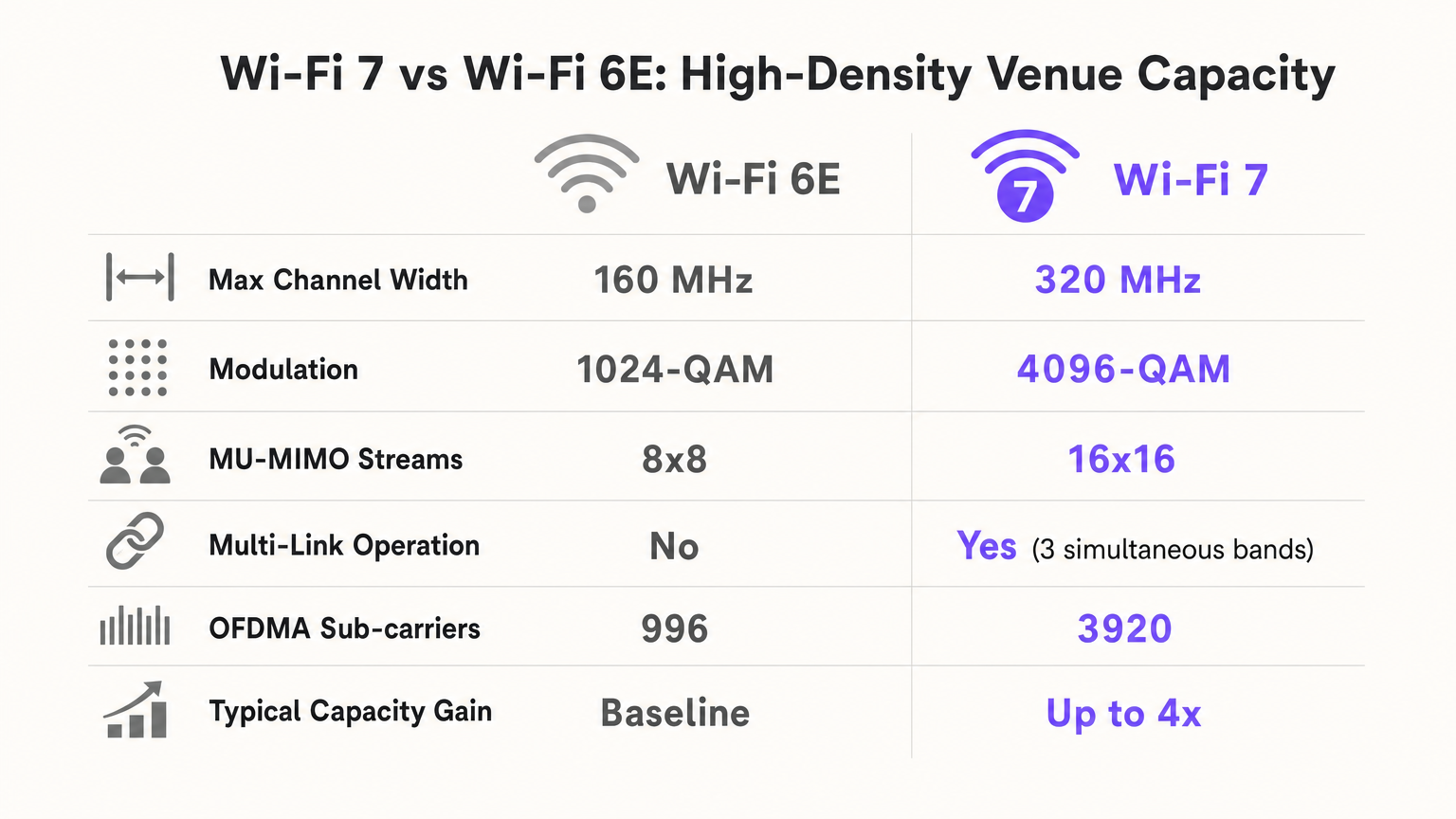
Für IT-Manager und CTOs, die Veranstaltungsorte mit hoher Dichte – Stadien, Verkehrsterminals und große Konferenzzentren – betreiben, stellt Wi-Fi 7 (IEEE 802.11be) eine grundlegende architektonische Verschiebung dar, nicht nur ein Geschwindigkeits-Upgrade. In Umgebungen mit über 1.000 gleichzeitigen Clients pro Sektor brechen ältere Wi-Fi-Standards unter der Last von Airtime-Konflikten und Uplink-Engpässen zusammen. Wi-Fi 7 löst das "Stadion-Engpass-Problem" durch Multi-Link Operation (MLO), 4096-QAM und Multi-Resource Unit (MRU) Puncturing, wodurch Netzwerke mehr Daten in kürzere Übertragungen packen und den Datenverkehr dynamisch gleichzeitig über die 2.4 GHz-, 5 GHz- und 6 GHz-Bänder leiten können.
Dieser Leitfaden bietet einen herstellerneutralen Entwurf für die Planung und Bereitstellung von Wi-Fi 7 in Umgebungen mit extrem hoher Dichte. Durch die Einführung moderner Bereitstellungsstrategien unter Sitzen und die Nutzung der Effizienzgewinne des neuen Standards können Betreiber von Veranstaltungsorten die Client-zu-AP-Verhältnisse im Vergleich zu Wi-Fi 6E um bis zu 50 % erhöhen, wodurch die CAPEX erheblich gesenkt und gleichzeitig neue Einnahmequellen durch die Monetarisierung von Guest WiFi und nahtloses mobiles Ticketing erschlossen werden.
Technischer Einblick
Die Physik von Wi-Fi mit hoher Dichte
In einer Standard-Unternehmensbereitstellung könnte ein Access Point 20-30 Clients bedienen. In einem Stadion oder einer Flughafen-Gate-Lounge kann diese Zahl leicht auf über 100 gleichzeitige Verbindungen pro AP ansteigen. Der primäre Ausfallmodus in diesen Umgebungen ist nicht die Downlink-Bandbreite, sondern Uplink-Airtime-Engpässe und Co-Channel Interference (CCI).
Wenn Tausende von Fans gleichzeitig versuchen, Videos in soziale Medien hochzuladen, erweitert sich die Kollisionsdomäne rapide. Ältere Standards zwangen Geräte, auf freie Airtime auf einem einzigen Band zu warten. Wi-Fi 7 führt drei entscheidende Mechanismen ein, um dem entgegenzuwirken:
- Multi-Link Operation (MLO): MLO ermöglicht einem Multi-Link Device (MLD), gleichzeitig über mehrere Frequenzbänder (2.4 GHz, 5 GHz und 6 GHz) zu operieren. In einem Stadion bedeutet dies, dass ein Client Pakete dynamisch mit nahezu null Latenz auf das sauberste verfügbare Spektrum verschieben kann, wodurch die RF-Umgebung auf Geräteebene effektiv lastverteilt wird.
- 4096-QAM (4K-QAM): Durch die Erhöhung der Modulationsdichte von 1024-QAM (Wi-Fi 6/6E) auf 4096-QAM packt Wi-Fi 7 20 % mehr Daten in jede Symbolübertragung. An einem dichten Veranstaltungsort, wo Clients nahe am AP sind (z. B. bei Bereitstellungen unter Sitzen), ermöglicht dies Geräten, sich schneller mit dem Netzwerk zu verbinden und wieder zu trennen, wodurch kritische Airtime freigegeben wird.
- Multi-Resource Unit (MRU) Puncturing: Wenn ein Teil eines breiten Kanals (z. B. 160 MHz oder 320 MHz) von einem älteren Gerät oder Radarstörungen belegt ist, erforderten frühere Standards, dass der gesamte Kanal auf eine geringere Breite reduziert wurde. MRU Puncturing ermöglicht es dem AP, das gestörte Segment einfach auszublenden und das verbleibende saubere Spektrum zu nutzen, wodurch der Durchsatz in lauten Umgebungen maximiert wird.
Implementierungsleitfaden
Architekturstrategie: Unter-Sitz vs. Überkopf
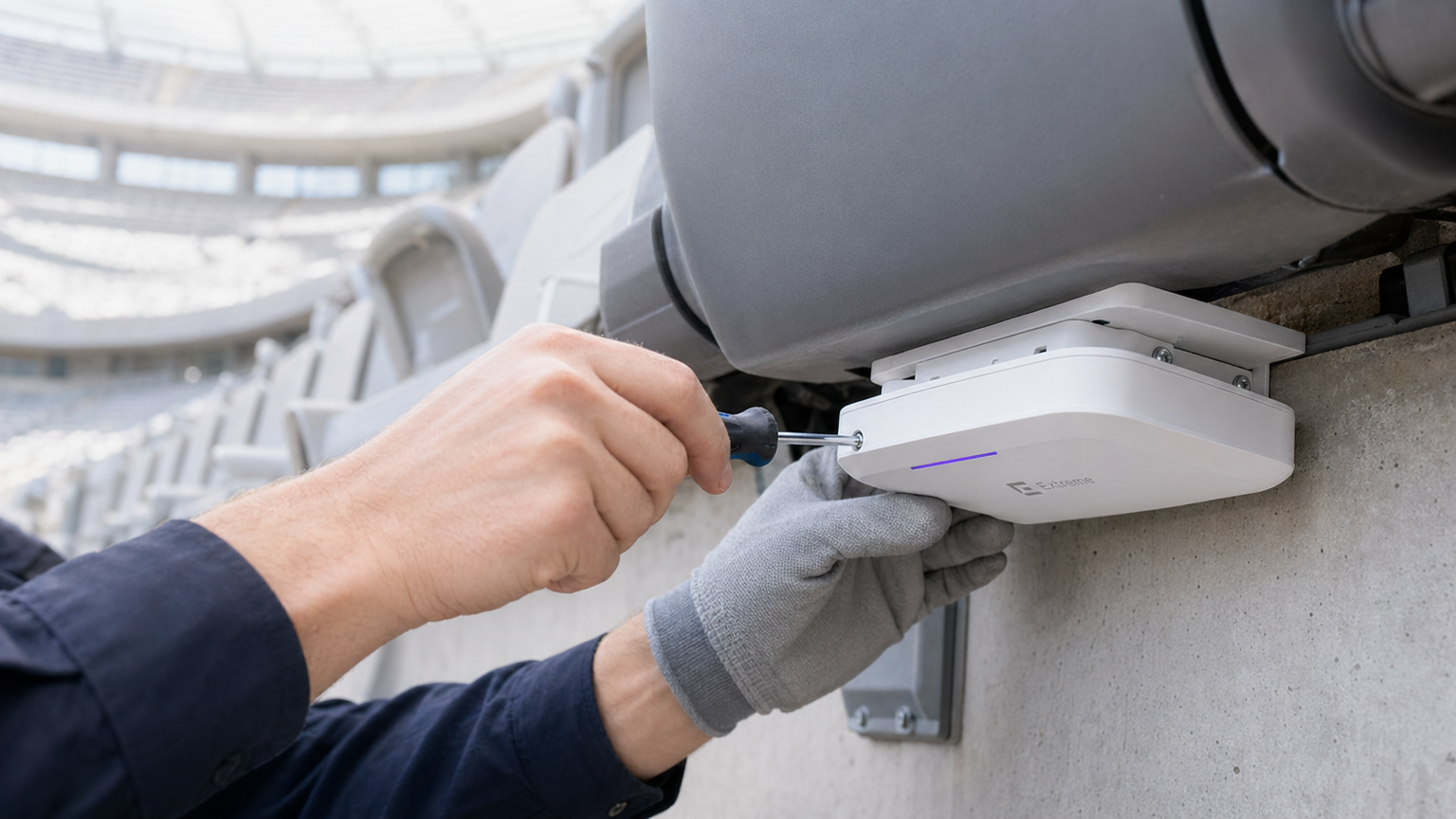
Für ein Stadion mit 50.000 Plätzen sind Überkopf-Deckeninstallationen katastrophal. Ein Überkopf-AP, der 1.000 Sitze abdeckt, erzeugt eine massive CCI-Zone und eine unkontrollierbare Uplink-Kollisionsdomäne. Der moderne Goldstandard ist die Unter-Sitz-Bereitstellung.
- Der "Fleischschild"-Effekt: Menschliche Körper absorbieren laterale RF-Signale (dämpfen 5 GHz um 5-15 dB). Indem APs unter den Sitzen platziert werden, wird die Menschenmenge als natürlicher RF-Dämpfer genutzt, wodurch kleine, lokalisierte Mikrozellen (oft als "Soft Bubbles" bezeichnet) entstehen.
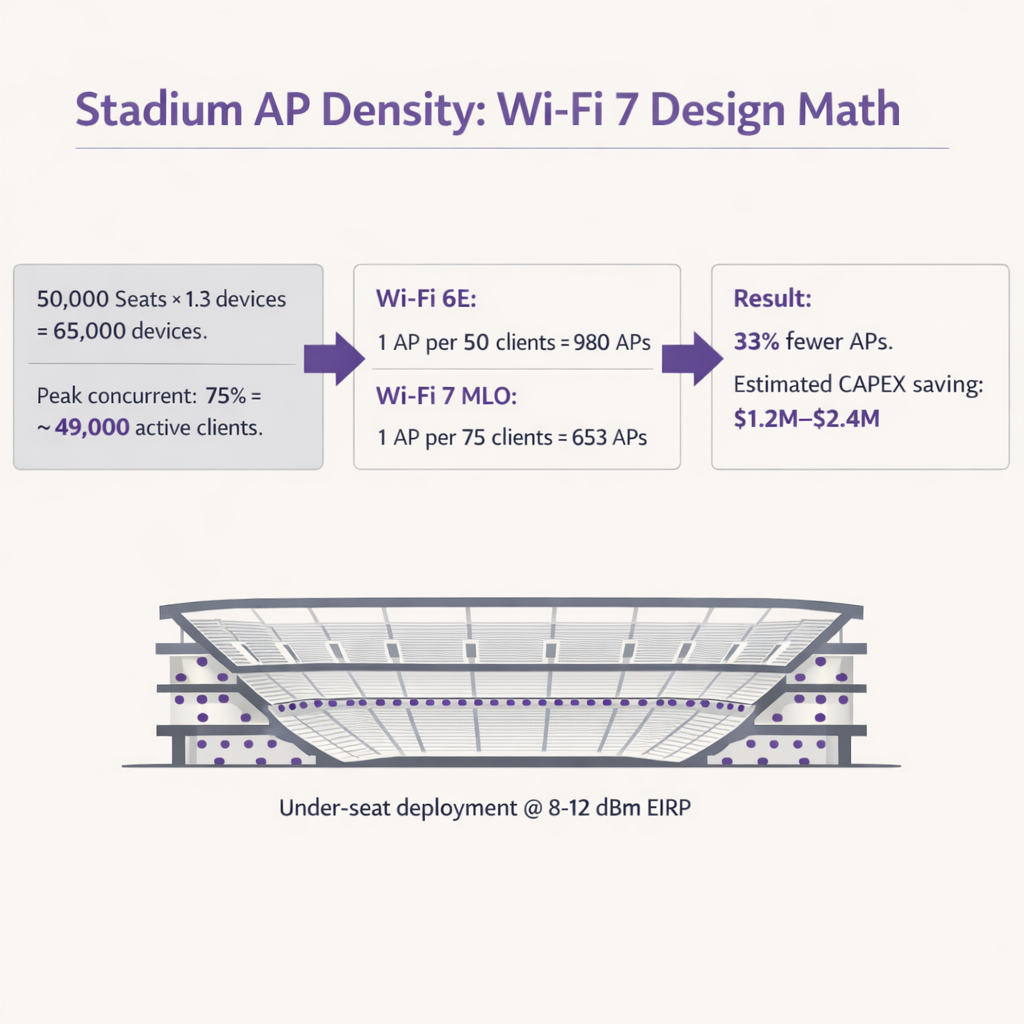
- AP-Dichte-Berechnung: Mit Wi-Fi 6E planten Architekten typischerweise 1 AP pro 50 Clients. Aufgrund der Effizienz von MLO und 4K-QAM ermöglicht Wi-Fi 7 Designs von 1 AP pro 75-80 Clients. An einem Veranstaltungsort mit 50.000 Plätzen (unter Annahme von 1,3 Geräten pro Person und 75 % Gleichzeitigkeit) reduziert dies die erforderliche AP-Anzahl von ~980 auf ~650, was massive CAPEX-Einsparungen bei Hardware, Verkabelung und Switch-Ports mit sich bringt.
Verkehrsterminals und Konferenzzentren
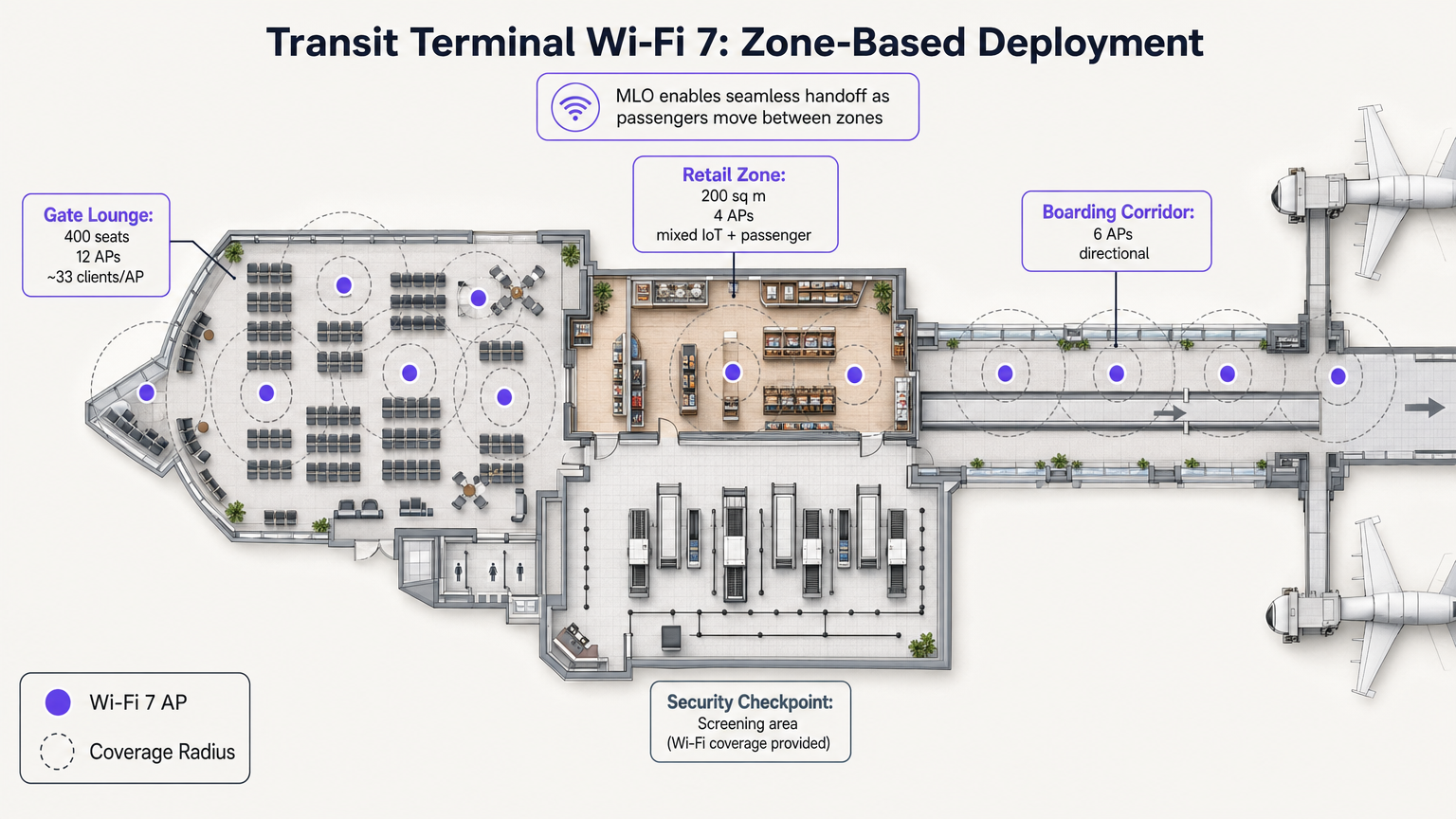
Im Gegensatz zu Stadien verfügen Verkehrsterminals über unterschiedliche Betriebszonen mit variierenden Dichteprofilen. Das MLO von Wi-Fi 7 ist hier besonders wertvoll, da es nahtlose Übergaben ermöglicht, wenn Passagiere von einer Gate-Lounge mit hoher Dichte zu einer Einzelhandels-Passage wechseln.
Zum Beispiel stellt die Bereitstellung von direktionalen APs in Boarding-Korridoren und omnidirektionalen APs in Einzelhandelszonen sicher, dass WiFi Analytics -Plattformen Verweilzeiten und Besucherfrequenzen ohne Verbindungsabbrüche genau verfolgen können. Diese Daten sind entscheidend für die Optimierung von Abläufen in Sektoren wie Transport und Retail .
Best Practices
- Sendeleistung für den Uplink abstimmen: Stadion-Wi-Fi ist uplink-limitiert. Ein Wi-Fi 7 AP kann mit 30 dBm senden, aber ein Smartphone kann nur mit ~10 dBm senden. Wenn die AP-Leistung zu hoch ist, sieht der Client ein starkes Signal, aber der AP kann die Antwort des Clients nicht hören. Stellen Sie die AP EIRP immer so ein, dass sie dem schlechtesten Client-Uplink entspricht (typischerweise 8-12 dBm).
- Aggressive Kanalwiederverwendung: In einer 5 GHz/6 GHz-Bereitstellung verwenden Sie ausschließlich 20 MHz- oder 40 MHz-Kanäle. Deaktivieren Sie 80 MHz und 160/320 MHz im Stadionbereich, um die Anzahl der nicht überlappenden Kanäle zu maximieren. Verwenden Sie Kanäle alle 2-3 Sitzbereiche wieder.
- SSIDs minimieren: Jede ausgestrahlte SSID verbraucht Airtime für Management-Frames. In einer 600-AP-Bereitstellung kann das Ausstrahlen von 5 SSIDs 20 % Ihrer gesamten Airtime verbrauchen, bevor sich ein einziger Benutzer verbindet. Beschränken Sie das Netzwerk auf 1-2 SSIDs (z. B. eine Open SSID mit OWE füfür Gäste und WPA3-Enterprise für Personal/Medien).
- Upgrades der kabelgebundenen Infrastruktur: Wi-Fi 7 APs benötigen PoE++ (bis zu 60W) und Multi-Gigabit-Backhaul. Stellen Sie sicher, dass Edge-Switches 5-Gbit/s- oder 10-Gbit/s-Ports unterstützen, um kabelgebundene Engpässe zu vermeiden.
Fehlerbehebung & Risikominderung
| Fehlermodus | Symptom | Grundursache | Minderungsstrategie |
|---|---|---|---|
| Sticky Clients | Geräte halten an einem entfernten AP fest, obwohl sie näher an einem neuen sind. | Schlechte Roaming-Konfiguration; übermäßige Sendeleistung des AP. | 802.11k/v/r aktivieren. Sendeleistung des AP auf 8-12 dBm reduzieren. BSS Coloring implementieren. |
| Uplink Starvation | Hohe Download-Geschwindigkeiten, aber Social Media-Uploads schlagen fehl oder laufen ab. | Problem des versteckten Knotens; große Zellengrößen verursachen Kollisionen. | Umstellung auf Unter-Sitz-Bereitstellung. Sicherstellen, dass die Sendeleistung des AP den Client-Fähigkeiten entspricht. |
| Airtime Exhaustion | Hohe Latenz und Verbindungsabbrüche, selbst bei wenigen aktiven Benutzern. | Zu viele SSIDs; breite Kanäle (80+ MHz) verursachen übermäßige CCI. | Auf 1-2 SSIDs reduzieren. 20-MHz-Kanäle in ultra-dichten Zonen verwenden. |
ROI & Geschäftsauswirkungen
Der Einsatz von Wi-Fi 7 in einem hochdichten Veranstaltungsort ist eine erhebliche Kapitalinvestition, aber der ROI ist angesichts der Hardware-Reduzierung und neuer Umsatzmöglichkeiten sehr gut zu rechtfertigen.
- CAPEX-Reduzierung: Durch die Erhöhung des Client-zu-AP-Verhältnisses von 50:1 auf 75:1 können Veranstaltungsorte die Hardware- und Installationskosten um bis zu 33 % senken. Für ein Stadion mit 50.000 Plätzen kann dies Einsparungen von 1,2 bis 2,4 Millionen US-Dollar bedeuten.
- Monetarisierung und Analysen: Ein robustes Hochleistungsnetzwerk ist die Grundlage für die Erfassung von Erstanbieterdaten. Durch die Nutzung eines Captive Portal können Veranstaltungsorte umfassende Kundenprofile erstellen, die Treueprogramme und gezielte Marketingkampagnen vorantreiben. Dies ist besonders relevant bei der Einhaltung von Compliance-Frameworks wie dem EU AI Act and Guest WiFi: What Marketers Need to Know .
- Betriebliche Effizienz: Zuverlässige Konnektivität unterstützt POS-Transaktionen mit hohem Volumen, mobile Essensbestellungen und digitale Tickets, wodurch die Pro-Kopf-Ausgaben während Veranstaltungen direkt erhöht werden. Es ermöglicht auch erweiterte Ortungsdienste, wie in unserem Indoor Positioning System: UWB, BLE, & WiFi Guide beschrieben.
Hören Sie unser ausführliches Podcast-Briefing zu Wi-Fi 7 Stadionarchitekturen:
Schlüsselbegriffe & Definitionen
Multi-Link Operation (MLO)
A Wi-Fi 7 feature allowing devices to transmit and receive data simultaneously across multiple frequency bands (2.4, 5, and 6 GHz).
Crucial for stadiums, it acts as an RF load balancer, instantly shifting traffic away from congested bands to maintain low latency and high throughput.
4096-QAM (4K-QAM)
An advanced modulation scheme that packs 12 bits of data per symbol, a 20% increase over Wi-Fi 6's 1024-QAM.
Allows devices close to the AP (like in under-seat deployments) to transmit data faster, freeing up airtime for other users in the dense sector.
Multi-Resource Unit (MRU) Puncturing
The ability to block out specific segments of a channel affected by interference while continuing to transmit on the clean portions of that same channel.
Prevents a single legacy device or radar event from crippling the bandwidth of an entire 160 MHz or 320 MHz channel.
Co-Channel Interference (CCI)
Interference caused when multiple access points on the same channel can hear each other, forcing them to share airtime and wait their turn to transmit.
The primary cause of poor performance in poorly designed overhead stadium deployments. Mitigated by under-seat design and low transmit power.
Equivalent Isotropically Radiated Power (EIRP)
The total effective transmit power of an access point, combining the radio's output power with the antenna's gain.
Must be carefully tuned down (typically 8-12 dBm) in high-density venues to prevent APs from overpowering client device uplinks.
Uplink Starvation
A condition where clients can receive data from the AP but cannot successfully transmit data back due to collisions or weak signal strength.
The reason why fans can often load a webpage but fail to upload a photo or video during a game.
BSS Coloring
A spatial reuse technique that adds a 'color' tag to transmissions, allowing APs on the same channel to ignore traffic from neighboring cells if the signal is below a certain threshold.
Helps mitigate the impact of CCI in dense environments by allowing simultaneous transmissions when physically separated.
Opportunistic Wireless Encryption (OWE)
A standard that provides individualized encryption for open Wi-Fi networks without requiring a shared password.
Essential for modern Guest WiFi portals, providing security against passive eavesdropping while maintaining a frictionless onboarding experience.
Fallstudien
A 2,500-capacity conference hall is upgrading to Wi-Fi 7. The current Wi-Fi 5 network uses 40 overhead APs transmitting at 20 dBm on 80 MHz channels. Users report excellent signal strength but cannot load basic web pages during keynote sessions. How should the architect redesign the RF plan?
- Reduce Channel Width: Drop from 80 MHz to 20 MHz or 40 MHz channels to increase the number of non-overlapping channels and reduce Co-Channel Interference (CCI).
- Lower Transmit Power: Reduce AP EIRP from 20 dBm to 10-12 dBm to match client uplink capabilities and shrink cell sizes.
- Leverage 6 GHz: Enable the 6 GHz band to offload Wi-Fi 6E/7 capable devices, freeing up 5 GHz airtime for legacy clients.
- Enable MLO: Configure Multi-Link Operation to allow capable devices to dynamically load-balance across available bands.
A luxury hotel brand (e.g., Ritz Carlton or W Hotels) is deploying Wi-Fi 7 in their high-density ballroom and adjacent pre-function areas. They need to ensure seamless roaming for VIP guests while supporting hundreds of IoT devices (digital signage, environmental sensors). What is the recommended SSID and band strategy?
- SSID Consolidation: Limit to two SSIDs: 'Guest_WiFi' (Open with OWE) and 'IoT_Secure' (WPA3-SAE/PSK).
- Band Steering: Configure the 'Guest_WiFi' SSID to prioritize 5 GHz and 6 GHz bands, utilizing MLO for Wi-Fi 7 clients to ensure high-bandwidth performance for video streaming and presentations.
- IoT Isolation: Restrict the 'IoT_Secure' SSID exclusively to the 2.4 GHz band. Most IoT devices only support 2.4 GHz, and isolating them prevents slow-talking devices from consuming valuable airtime on the high-performance bands.
- Roaming Optimization: Enable 802.11k/v/r on the Guest SSID to facilitate fast BSS transition as guests move from the ballroom to the pre-function area.
Szenarioanalyse
Q1. You are finalizing the RF design for a 20,000-seat indoor arena using Wi-Fi 7 APs. The client insists on using 160 MHz channels in the 6 GHz band to 'maximize speed for the fans.' Do you agree with this approach?
💡 Hinweis:Consider the relationship between channel width, the number of available non-overlapping channels, and Co-Channel Interference (CCI) in a dense environment.
Empfohlenen Ansatz anzeigen
No. In a high-density arena, the primary goal is capacity and airtime availability, not peak single-client throughput. Using 160 MHz channels drastically reduces the number of non-overlapping channels available. With 200+ APs in the bowl, this will cause massive Co-Channel Interference (CCI) as APs overlap and wait for airtime. The correct approach is to strictly use 20 MHz or 40 MHz channels, allowing for aggressive channel reuse and minimizing CCI.
Q2. During a live test event at a newly deployed Wi-Fi 7 stadium, the dashboard shows that 5 GHz channel utilization is at 85%, while the 6 GHz band is only at 15%. What Wi-Fi 7 feature should be verified or adjusted to resolve this imbalance?
💡 Hinweis:Which Wi-Fi 7 feature allows capable devices to dynamically utilize multiple bands simultaneously?
Empfohlenen Ansatz anzeigen
You should verify that Multi-Link Operation (MLO) is properly enabled and supported by the client devices. MLO allows Wi-Fi 7 clients to aggregate or dynamically switch between the 5 GHz and 6 GHz bands. If configured correctly, MLO will automatically load-balance the traffic, moving capable devices to the clean 6 GHz spectrum and freeing up the congested 5 GHz band for legacy clients.
Q3. A venue operator wants to deploy overhead Wi-Fi 7 APs attached to the stadium catwalk, 80 feet above the seating bowl, to save on the cabling costs associated with under-seat deployment. What is the primary technical risk of this design?
💡 Hinweis:Think about cell size, the 'Meat Shield' effect, and the difference between AP transmit power and client smartphone transmit power.
Empfohlenen Ansatz anzeigen
The primary risk is a massive uplink collision domain and severe Co-Channel Interference (CCI). An AP mounted 80 feet high will have a huge coverage footprint, potentially 'hearing' thousands of clients simultaneously. Furthermore, while the high-powered AP can reach the clients (downlink), the low-powered smartphones (uplink) will struggle to transmit back 80 feet through the RF noise. This results in uplink starvation. Under-seat deployment is required to create small, isolated micro-cells that utilize human bodies to attenuate lateral signal bleed.




