

Wi-Fi 7 para Locais de Alta Densidade: Estádios, Salas de Conferência e Terminais
Este guia de referência técnica fornece a líderes de TI e arquitetos de rede estratégias acionáveis para implantar Wi-Fi 7 em locais de alta densidade como estádios e terminais de transporte. Ele explora como a Operação Multi-Link (MLO), 4K-QAM e o design de APs sob os assentos melhoram drasticamente a capacidade, reduzem os requisitos de hardware e entregam um ROI mensurável.
🎧 Ouça este Guia
Ver Transcrição
Resumo Executivo
Para gerentes de TI e CTOs que operam locais de alta densidade — estádios, terminais de transporte e grandes centros de conferências — o Wi-Fi 7 (IEEE 802.11be) representa uma mudança arquitetônica fundamental, não apenas uma atualização de velocidade. Em ambientes com mais de 1.000 clientes simultâneos por setor, os padrões Wi-Fi legados colapsam sob a contenção de tempo de antena e a escassez de uplink. O Wi-Fi 7 resolve o "aperto do estádio" através da Operação Multi-Link (MLO), 4096-QAM e puncturing de Unidade de Múltiplos Recursos (MRU), permitindo que as redes compactem mais dados em transmissões mais curtas e roteiem dinamicamente o tráfego através das bandas de 2.4 GHz, 5 GHz e 6 GHz simultaneamente.
Este guia fornece um projeto neutro em relação a fornecedores para projetar e implantar Wi-Fi 7 em ambientes de ultra-alta densidade. Ao adotar estratégias modernas de implantação sob os assentos e aproveitar os ganhos de eficiência do novo padrão, os operadores de locais podem aumentar as proporções cliente-AP em até 50% em comparação com o Wi-Fi 6E, reduzindo significativamente o CAPEX e desbloqueando novas fontes de receita através da monetização de Guest WiFi e emissão de bilhetes móveis sem interrupções.
Análise Técnica Detalhada
A Física do Wi-Fi de Alta Densidade
Em uma implantação empresarial padrão, um ponto de acesso pode atender 20-30 clientes. Em uma arquibancada de estádio ou sala de embarque de aeroporto, esse número pode facilmente subir para mais de 100 associações simultâneas por AP. O principal modo de falha nesses ambientes não é a largura de banda de downlink, mas a escassez de tempo de antena de uplink e a Interferência Co-Canal (CCI).
Quando milhares de fãs tentam simultaneamente fazer upload de vídeos para as redes sociais, o domínio de colisão se expande rapidamente. Padrões legados forçavam os dispositivos a esperar por tempo de antena livre em uma única banda. O Wi-Fi 7 introduz três mecanismos críticos para combater isso:
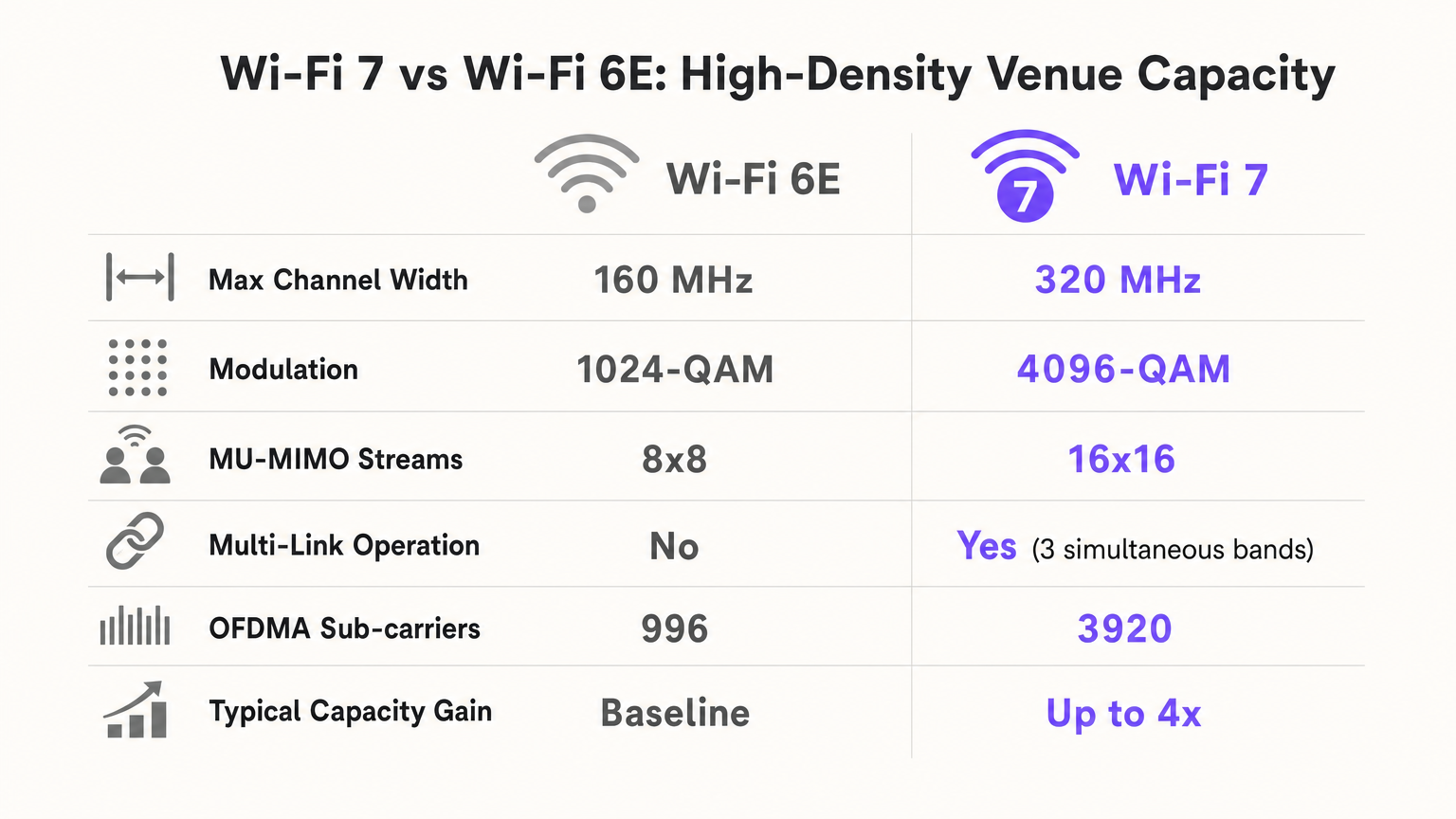
- Operação Multi-Link (MLO): A MLO permite que um Dispositivo Multi-Link (MLD) opere simultaneamente em múltiplas bandas de frequência (2.4 GHz, 5 GHz e 6 GHz). Em um estádio, isso significa que um cliente pode deslocar pacotes dinamicamente para o espectro mais limpo disponível com latência próxima de zero, balanceando efetivamente a carga do ambiente de RF no nível do dispositivo.
- 4096-QAM (4K-QAM): Ao aumentar a densidade de modulação de 1024-QAM (Wi-Fi 6/6E) para 4096-QAM, o Wi-Fi 7 compacta 20% mais dados em cada transmissão de símbolo. Em um local denso onde os clientes estão próximos ao AP (por exemplo, implantações sob os assentos), isso permite que os dispositivos entrem e saiam da rede mais rapidamente, liberando tempo de antena crítico.
- Puncturing de Unidade de Múltiplos Recursos (MRU): Se uma parte de um canal amplo (por exemplo, 160 MHz ou 320 MHz) estiver ocupada por um dispositivo legado ou interferência de radar, os padrões anteriores exigiam que o canal inteiro caísse para uma largura mais estreita. O puncturing de MRU permite que o AP simplesmente "recorte" o segmento interferido e utilize o espectro limpo restante, maximizando o throughput em ambientes ruidosos.
Guia de Implementação
Estratégia Arquitetônica: Sob os Assentos vs. Aérea
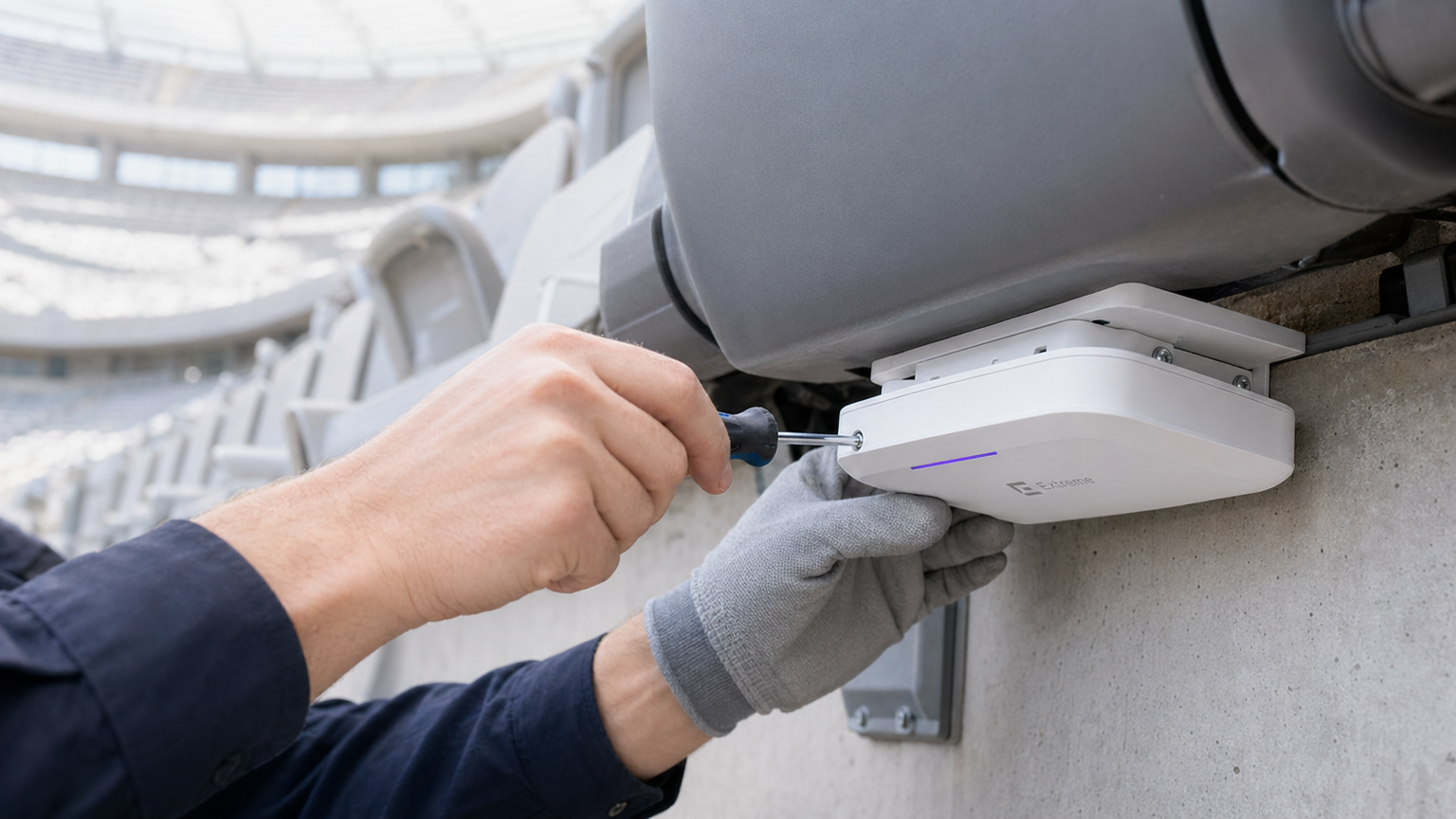
Para um estádio com 50.000 lugares, as implantações aéreas no teto são catastróficas. Um AP aéreo cobrindo 1.000 assentos cria uma zona de CCI massiva e um domínio de colisão de uplink incontrolável. O padrão ouro moderno é a implantação sob os assentos.
- O Efeito "Escudo Humano": Corpos humanos absorvem sinais de RF laterais (atenuando 5 GHz em 5-15 dB). Ao colocar APs sob os assentos, você utiliza a multidão como um atenuador de RF natural, criando microcélulas pequenas e localizadas (frequentemente chamadas de "bolhas suaves").
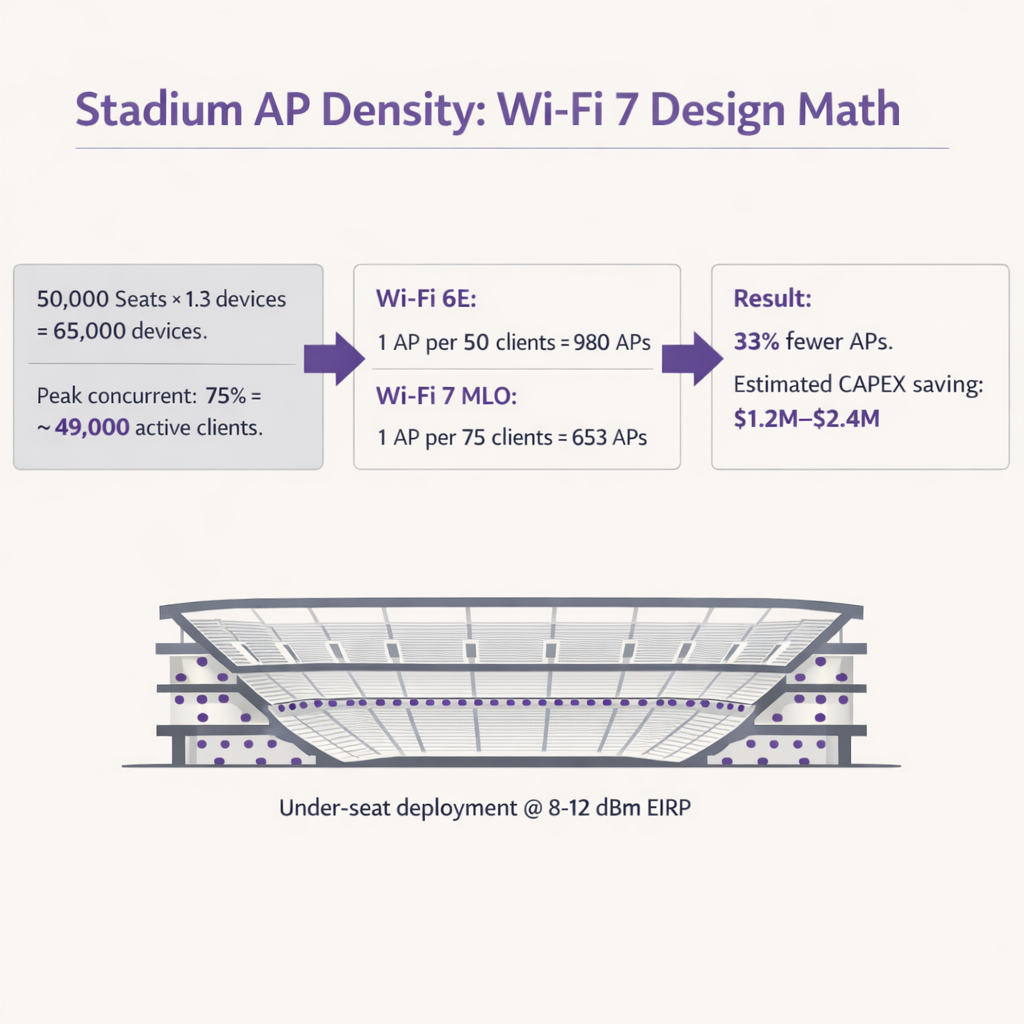
- Cálculo de Densidade de AP: Com o Wi-Fi 6E, os arquitetos tipicamente projetavam para 1 AP por 50 clientes. Devido à eficiência da MLO e 4K-QAM, o Wi-Fi 7 permite projetos de 1 AP por 75-80 clientes. Em um local com 50.000 lugares (assumindo 1.3 dispositivos por pessoa e 75% de concorrência), isso reduz o número de APs necessários de ~980 para ~650, gerando enormes economias de CAPEX em hardware, cabeamento e portas de switch.
Terminais de Transporte e Centros de Conferência
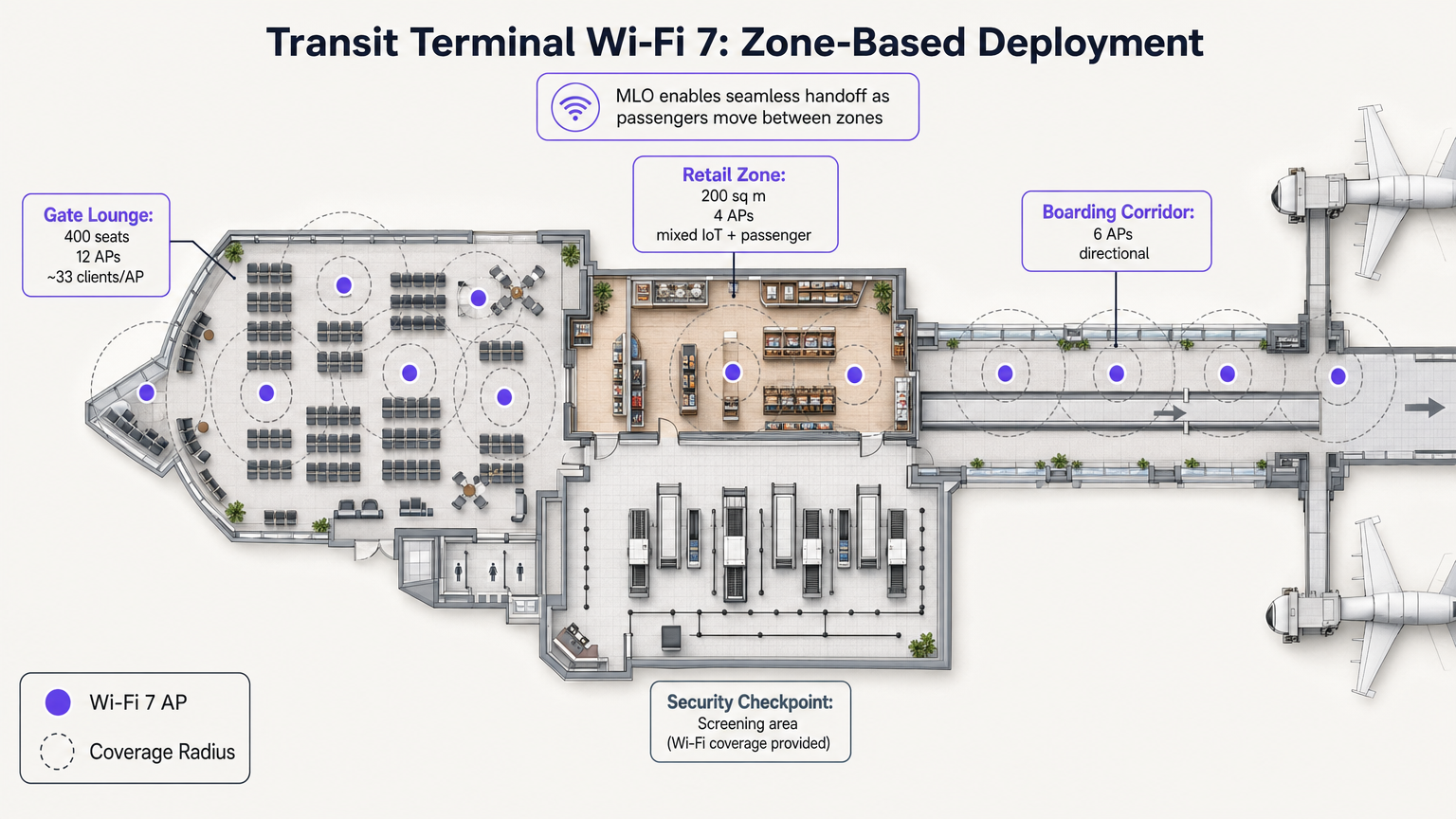
Ao contrário dos estádios, os terminais de transporte apresentam zonas operacionais distintas com perfis de densidade variados. A MLO do Wi-Fi 7 é particularmente valiosa aqui, permitindo transferências contínuas à medida que os passageiros se movem de uma sala de embarque de alta densidade para uma área de varejo.
Por exemplo, a implantação de APs direcionais em corredores de embarque e APs omnidirecionais em zonas de varejo garante que as plataformas de WiFi Analytics possam rastrear com precisão os tempos de permanência e o fluxo de pessoas sem quedas de conexão. Esses dados são críticos para otimizar as operações em setores como Transporte e Varejo .
Melhores Práticas
- Ajuste a Potência de Transmissão para o Uplink: O Wi-Fi de estádio é limitado pelo uplink. Um AP Wi-Fi 7 pode transmitir a 30 dBm, mas um smartphone só pode transmitir a ~10 dBm. Se a potência do AP for muito alta, o cliente vê um sinal forte, mas o AP não consegue ouvir a resposta do cliente. Sempre defina o EIRP do AP para corresponder ao uplink do cliente no pior cenário (tipicamente 8-12 dBm).
- Reutilização Agressiva de Canais: Em uma implantação de 5 GHz/6 GHz, use canais de 20 MHz ou 40 MHz exclusivamente. Desative 80 MHz e 160/320 MHz na arquibancada para maximizar o número de canais não sobrepostos. Reutilize os canais a cada 2-3 seções de assentos.
- Minimize SSIDs: Cada SSID transmitido consome tempo de antena do quadro de gerenciamento. Em uma implantação de 600 APs, a transmissão de 5 SSIDs pode consumir 20% do seu tempo de antena total antes que um único usuário se conecte. Limite a rede a 1-2 SSIDs (por exemplo, um SSID Aberto com OWE par convidados, e WPA3-Enterprise para funcionários/mídia).
- Atualizações de Infraestrutura Cabeada: Os APs Wi-Fi 7 exigem PoE++ (até 60W) e backhaul multi-gigabit. Garanta que os switches de borda suportem portas de 5 Gbps ou 10 Gbps para evitar gargalos na rede cabeada.
Solução de Problemas e Mitigação de Riscos
| Modo de Falha | Sintoma | Causa Raiz | Estratégia de Mitigação |
|---|---|---|---|
| Clientes Fixos | Dispositivos permanecem conectados a um AP distante, apesar de estarem mais próximos de um novo. | Configuração de roaming deficiente; potência de transmissão excessiva do AP. | Habilite 802.11k/v/r. Reduza a potência de transmissão do AP para 8-12 dBm. Implemente BSS coloring. |
| Esgotamento de Uplink | Altas velocidades de download, mas uploads de mídias sociais falham ou expiram. | Problema de nó oculto; grandes tamanhos de célula causando colisões. | Mude para implantação sob o assento. Garanta que a potência de transmissão do AP corresponda às capacidades do cliente. |
| Esgotamento de Tempo de Antena | Alta latência e conexões perdidas mesmo com poucos usuários ativos. | Muitos SSIDs; canais amplos (80+ MHz) causando CCI excessivo. | Reduza para 1-2 SSIDs. Use canais de 20 MHz em zonas ultradensas. |
ROI e Impacto nos Negócios
A implantação de Wi-Fi 7 em um local de alta densidade representa um investimento de capital significativo, mas o ROI é altamente defensável ao considerar a redução de hardware e novas capacidades de receita.
- Redução de CAPEX: Ao aumentar a proporção cliente-AP de 50:1 para 75:1, os locais podem reduzir os custos de hardware e instalação em até 33%. Para um estádio de 50.000 lugares, isso pode representar de US$ 1,2 milhão a US$ 2,4 milhões em economia.
- Monetização e Análise: Uma rede robusta e de alta capacidade é a base para a captura de dados primários. Ao utilizar um captive portal, os locais podem construir perfis de clientes ricos, impulsionando programas de fidelidade e campanhas de marketing direcionadas. Isso é especialmente relevante ao navegar em estruturas de conformidade como o EU AI Act and Guest WiFi: What Marketers Need to Know .
- Eficiência Operacional: A conectividade confiável suporta transações POS de alto volume, pedidos de comida móveis e emissão de bilhetes digitais, aumentando diretamente o gasto per capita durante os eventos. Também permite serviços de localização avançados, conforme detalhado em nosso Indoor Positioning System: UWB, BLE, & WiFi Guide .
Ouça nosso podcast aprofundado sobre arquiteturas de estádios com Wi-Fi 7:
Termos-Chave e Definições
Multi-Link Operation (MLO)
A Wi-Fi 7 feature allowing devices to transmit and receive data simultaneously across multiple frequency bands (2.4, 5, and 6 GHz).
Crucial for stadiums, it acts as an RF load balancer, instantly shifting traffic away from congested bands to maintain low latency and high throughput.
4096-QAM (4K-QAM)
An advanced modulation scheme that packs 12 bits of data per symbol, a 20% increase over Wi-Fi 6's 1024-QAM.
Allows devices close to the AP (like in under-seat deployments) to transmit data faster, freeing up airtime for other users in the dense sector.
Multi-Resource Unit (MRU) Puncturing
The ability to block out specific segments of a channel affected by interference while continuing to transmit on the clean portions of that same channel.
Prevents a single legacy device or radar event from crippling the bandwidth of an entire 160 MHz or 320 MHz channel.
Co-Channel Interference (CCI)
Interference caused when multiple access points on the same channel can hear each other, forcing them to share airtime and wait their turn to transmit.
The primary cause of poor performance in poorly designed overhead stadium deployments. Mitigated by under-seat design and low transmit power.
Equivalent Isotropically Radiated Power (EIRP)
The total effective transmit power of an access point, combining the radio's output power with the antenna's gain.
Must be carefully tuned down (typically 8-12 dBm) in high-density venues to prevent APs from overpowering client device uplinks.
Uplink Starvation
A condition where clients can receive data from the AP but cannot successfully transmit data back due to collisions or weak signal strength.
The reason why fans can often load a webpage but fail to upload a photo or video during a game.
BSS Coloring
A spatial reuse technique that adds a 'color' tag to transmissions, allowing APs on the same channel to ignore traffic from neighboring cells if the signal is below a certain threshold.
Helps mitigate the impact of CCI in dense environments by allowing simultaneous transmissions when physically separated.
Opportunistic Wireless Encryption (OWE)
A standard that provides individualized encryption for open Wi-Fi networks without requiring a shared password.
Essential for modern Guest WiFi portals, providing security against passive eavesdropping while maintaining a frictionless onboarding experience.
Estudos de Caso
A 2,500-capacity conference hall is upgrading to Wi-Fi 7. The current Wi-Fi 5 network uses 40 overhead APs transmitting at 20 dBm on 80 MHz channels. Users report excellent signal strength but cannot load basic web pages during keynote sessions. How should the architect redesign the RF plan?
- Reduce Channel Width: Drop from 80 MHz to 20 MHz or 40 MHz channels to increase the number of non-overlapping channels and reduce Co-Channel Interference (CCI).
- Lower Transmit Power: Reduce AP EIRP from 20 dBm to 10-12 dBm to match client uplink capabilities and shrink cell sizes.
- Leverage 6 GHz: Enable the 6 GHz band to offload Wi-Fi 6E/7 capable devices, freeing up 5 GHz airtime for legacy clients.
- Enable MLO: Configure Multi-Link Operation to allow capable devices to dynamically load-balance across available bands.
A luxury hotel brand (e.g., Ritz Carlton or W Hotels) is deploying Wi-Fi 7 in their high-density ballroom and adjacent pre-function areas. They need to ensure seamless roaming for VIP guests while supporting hundreds of IoT devices (digital signage, environmental sensors). What is the recommended SSID and band strategy?
- SSID Consolidation: Limit to two SSIDs: 'Guest_WiFi' (Open with OWE) and 'IoT_Secure' (WPA3-SAE/PSK).
- Band Steering: Configure the 'Guest_WiFi' SSID to prioritize 5 GHz and 6 GHz bands, utilizing MLO for Wi-Fi 7 clients to ensure high-bandwidth performance for video streaming and presentations.
- IoT Isolation: Restrict the 'IoT_Secure' SSID exclusively to the 2.4 GHz band. Most IoT devices only support 2.4 GHz, and isolating them prevents slow-talking devices from consuming valuable airtime on the high-performance bands.
- Roaming Optimization: Enable 802.11k/v/r on the Guest SSID to facilitate fast BSS transition as guests move from the ballroom to the pre-function area.
Análise de Cenário
Q1. You are finalizing the RF design for a 20,000-seat indoor arena using Wi-Fi 7 APs. The client insists on using 160 MHz channels in the 6 GHz band to 'maximize speed for the fans.' Do you agree with this approach?
💡 Dica:Consider the relationship between channel width, the number of available non-overlapping channels, and Co-Channel Interference (CCI) in a dense environment.
Mostrar Abordagem Recomendada
No. In a high-density arena, the primary goal is capacity and airtime availability, not peak single-client throughput. Using 160 MHz channels drastically reduces the number of non-overlapping channels available. With 200+ APs in the bowl, this will cause massive Co-Channel Interference (CCI) as APs overlap and wait for airtime. The correct approach is to strictly use 20 MHz or 40 MHz channels, allowing for aggressive channel reuse and minimizing CCI.
Q2. During a live test event at a newly deployed Wi-Fi 7 stadium, the dashboard shows that 5 GHz channel utilization is at 85%, while the 6 GHz band is only at 15%. What Wi-Fi 7 feature should be verified or adjusted to resolve this imbalance?
💡 Dica:Which Wi-Fi 7 feature allows capable devices to dynamically utilize multiple bands simultaneously?
Mostrar Abordagem Recomendada
You should verify that Multi-Link Operation (MLO) is properly enabled and supported by the client devices. MLO allows Wi-Fi 7 clients to aggregate or dynamically switch between the 5 GHz and 6 GHz bands. If configured correctly, MLO will automatically load-balance the traffic, moving capable devices to the clean 6 GHz spectrum and freeing up the congested 5 GHz band for legacy clients.
Q3. A venue operator wants to deploy overhead Wi-Fi 7 APs attached to the stadium catwalk, 80 feet above the seating bowl, to save on the cabling costs associated with under-seat deployment. What is the primary technical risk of this design?
💡 Dica:Think about cell size, the 'Meat Shield' effect, and the difference between AP transmit power and client smartphone transmit power.
Mostrar Abordagem Recomendada
The primary risk is a massive uplink collision domain and severe Co-Channel Interference (CCI). An AP mounted 80 feet high will have a huge coverage footprint, potentially 'hearing' thousands of clients simultaneously. Furthermore, while the high-powered AP can reach the clients (downlink), the low-powered smartphones (uplink) will struggle to transmit back 80 feet through the RF noise. This results in uplink starvation. Under-seat deployment is required to create small, isolated micro-cells that utilize human bodies to attenuate lateral signal bleed.




