

Wi-Fi 7 para recintos de alta densidad: Estadios, salas de conferencias y terminales
Esta guía de referencia técnica proporciona a los líderes de TI y a los arquitectos de red estrategias prácticas para implementar Wi-Fi 7 en recintos de alta densidad como estadios y terminales de transporte. Explora cómo la Operación Multi-Enlace (MLO), 4K-QAM y el diseño de AP bajo los asientos mejoran drásticamente la capacidad, reducen los requisitos de hardware y ofrecen un ROI medible.
🎧 Escuchar esta guía
Ver transcripción
Resumen Ejecutivo
Para los gerentes de TI y CTOs que operan recintos de alta densidad —estadios, terminales de transporte y grandes centros de conferencias—, Wi-Fi 7 (IEEE 802.11be) representa un cambio arquitectónico fundamental, no solo una mejora de velocidad. En entornos con más de 1.000 clientes concurrentes por sector, los estándares Wi-Fi heredados colapsan bajo la contención del tiempo de emisión y la saturación del enlace ascendente. Wi-Fi 7 resuelve el "estrangulamiento del estadio" mediante la Operación Multi-Enlace (MLO), 4096-QAM y la punción de Unidades de Recursos Múltiples (MRU), permitiendo a las redes empaquetar más datos en transmisiones más cortas y enrutar dinámicamente el tráfico a través de las bandas de 2.4 GHz, 5 GHz y 6 GHz simultáneamente.
Esta guía proporciona un plan de acción neutral respecto al proveedor para diseñar e implementar Wi-Fi 7 en entornos de ultra alta densidad. Al adoptar estrategias modernas de implementación bajo los asientos y aprovechar las ganancias de eficiencia del nuevo estándar, los operadores de recintos pueden aumentar las relaciones cliente-AP hasta en un 50% en comparación con Wi-Fi 6E, reduciendo significativamente el CAPEX y desbloqueando nuevas fuentes de ingresos a través de la monetización del Guest WiFi y la emisión de billetes móviles sin interrupciones.
Análisis Técnico Detallado
La Física del Wi-Fi de Alta Densidad
En una implementación empresarial estándar, un punto de acceso podría servir a 20-30 clientes. En un estadio o una sala de embarque de aeropuerto, ese número puede dispararse fácilmente a más de 100 asociaciones concurrentes por AP. El modo de fallo principal en estos entornos no es el ancho de banda del enlace descendente, sino la saturación del tiempo de emisión del enlace ascendente y la Interferencia Co-Canal (CCI).
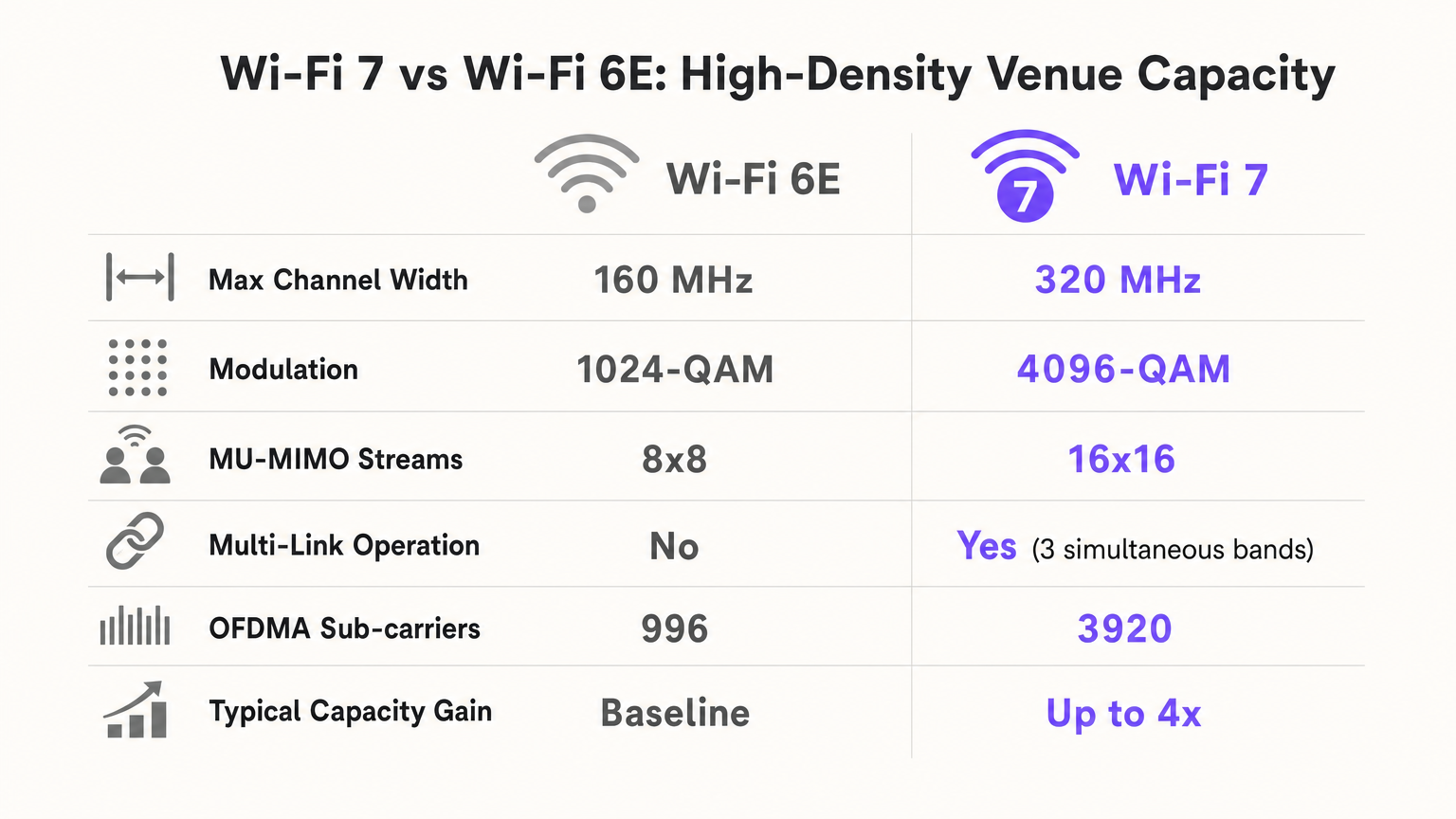
Cuando miles de aficionados intentan subir vídeos a las redes sociales simultáneamente, el dominio de colisión se expande rápidamente. Los estándares heredados obligaban a los dispositivos a esperar un tiempo de emisión libre en una sola banda. Wi-Fi 7 introduce tres mecanismos críticos para combatir esto:
- Operación Multi-Enlace (MLO): MLO permite que un Dispositivo Multi-Enlace (MLD) opere simultáneamente a través de múltiples bandas de frecuencia (2.4 GHz, 5 GHz y 6 GHz). En un estadio, esto significa que un cliente puede cambiar dinámicamente los paquetes al espectro más limpio disponible con una latencia casi nula, equilibrando eficazmente el entorno de RF a nivel de dispositivo.
- 4096-QAM (4K-QAM): Al aumentar la densidad de modulación de 1024-QAM (Wi-Fi 6/6E) a 4096-QAM, Wi-Fi 7 empaqueta un 20% más de datos en cada transmisión de símbolo. En un recinto denso donde los clientes están cerca del AP (por ejemplo, implementaciones bajo los asientos), esto permite que los dispositivos se conecten y desconecten de la red más rápidamente, liberando tiempo de emisión crítico.
- Punción de Unidades de Recursos Múltiples (MRU): Si una porción de un canal ancho (por ejemplo, 160 MHz o 320 MHz) está ocupada por un dispositivo heredado o interferencia de radar, los estándares anteriores requerían que todo el canal se redujera a un ancho más estrecho. La punción de MRU permite al AP simplemente "recortar" el segmento interferido y utilizar el espectro limpio restante, maximizando el rendimiento en entornos ruidosos.
Guía de Implementación
Estrategia Arquitectónica: Bajo los Asientos vs. Elevada
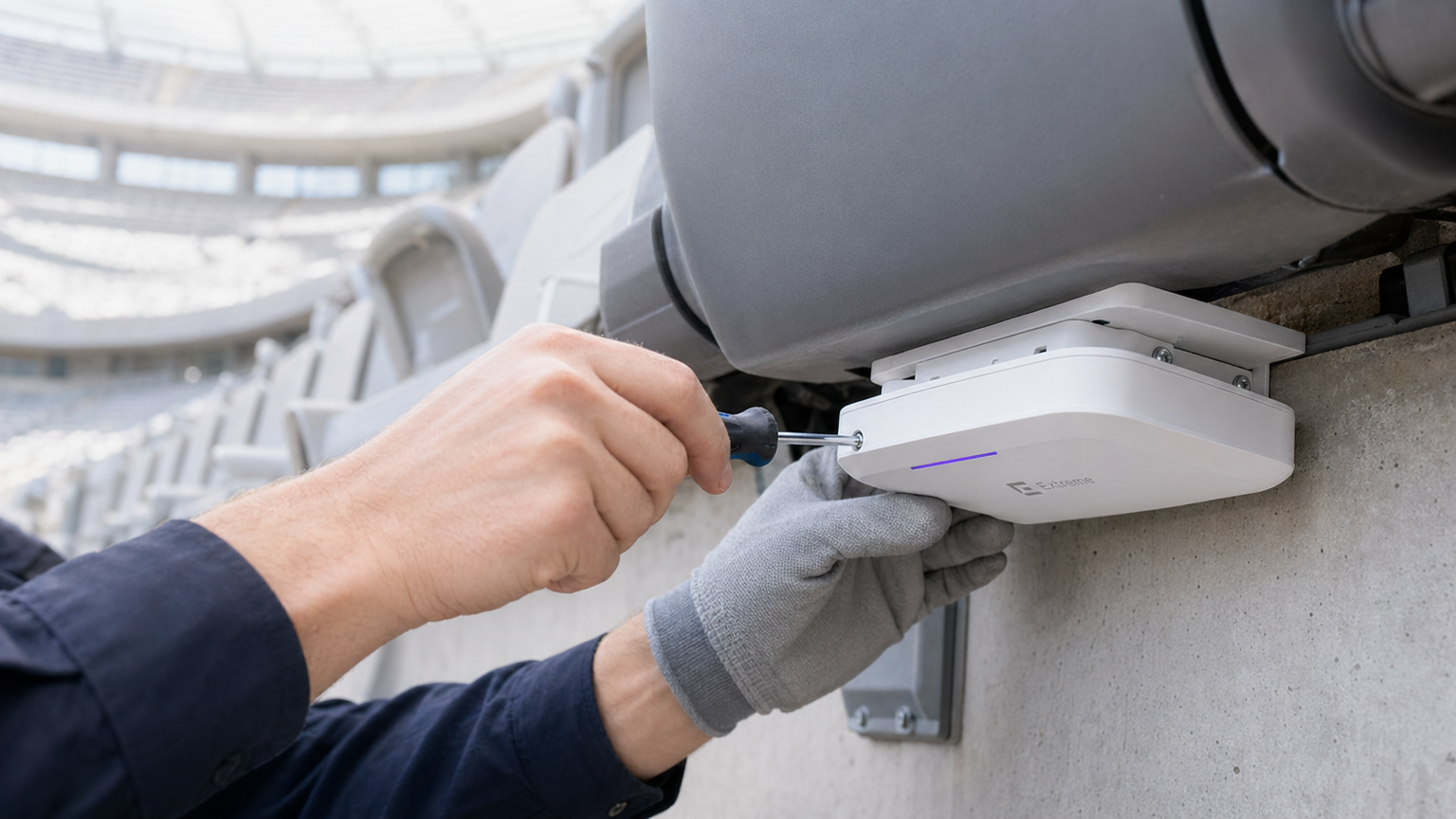
Para un estadio de 50.000 asientos, las implementaciones de techo elevadas son catastróficas. Un AP elevado que cubre 1.000 asientos crea una zona CCI masiva y un dominio de colisión de enlace ascendente inmanejable. El estándar de oro moderno es la implementación bajo los asientos.
- El Efecto "Escudo Humano": Los cuerpos humanos absorben las señales de RF laterales (atenuando 5 GHz en 5-15 dB). Al colocar los APs bajo los asientos, se utiliza a la multitud como un atenuador de RF natural, creando microcélulas pequeñas y localizadas (a menudo llamadas "burbujas suaves").
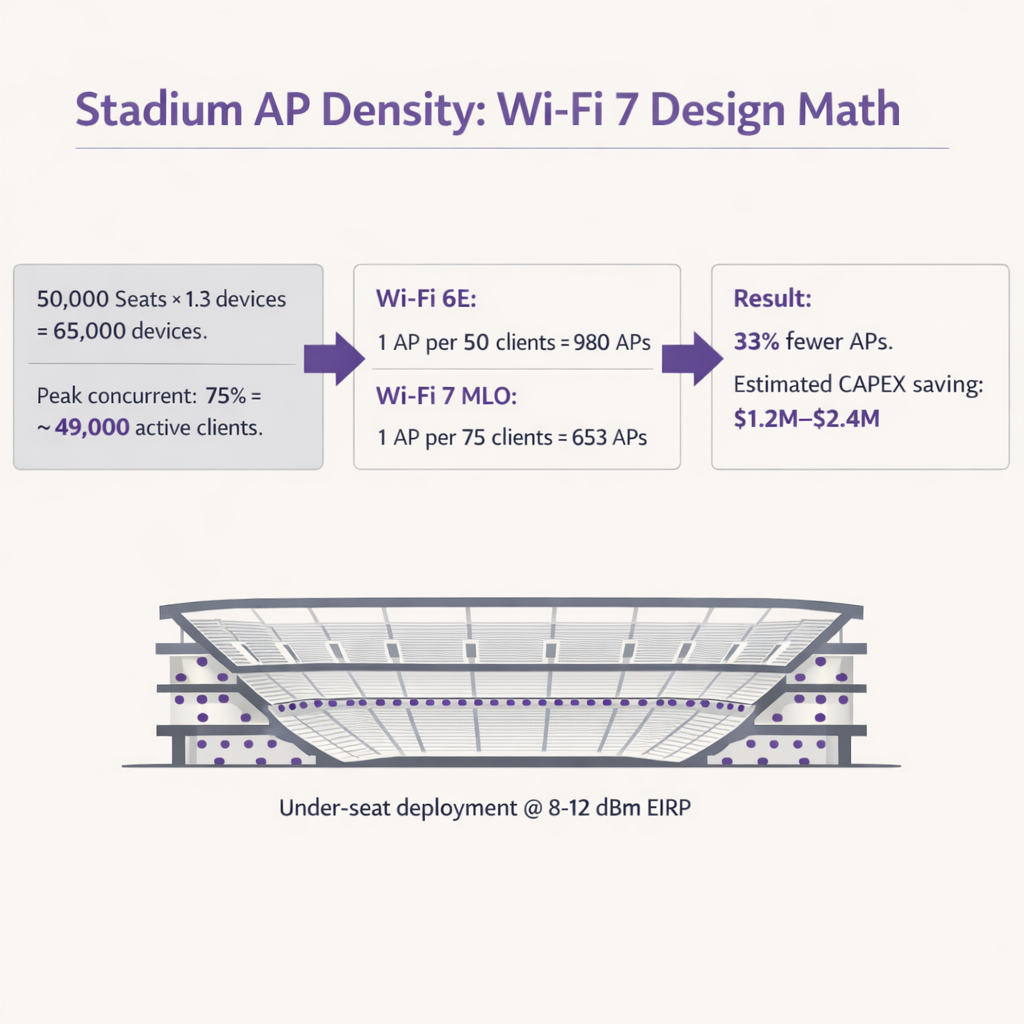
- Cálculo de Densidad de AP: Con Wi-Fi 6E, los arquitectos típicamente diseñaban para 1 AP por cada 50 clientes. Debido a la eficiencia de MLO y 4K-QAM, Wi-Fi 7 permite diseños de 1 AP por cada 75-80 clientes. En un recinto de 50.000 asientos (asumiendo 1.3 dispositivos por persona y 75% de concurrencia), esto reduce el número de APs requeridos de ~980 a ~650, generando ahorros masivos de CAPEX en hardware, cableado y puertos de switch.
Terminales de Transporte y Centros de Conferencias
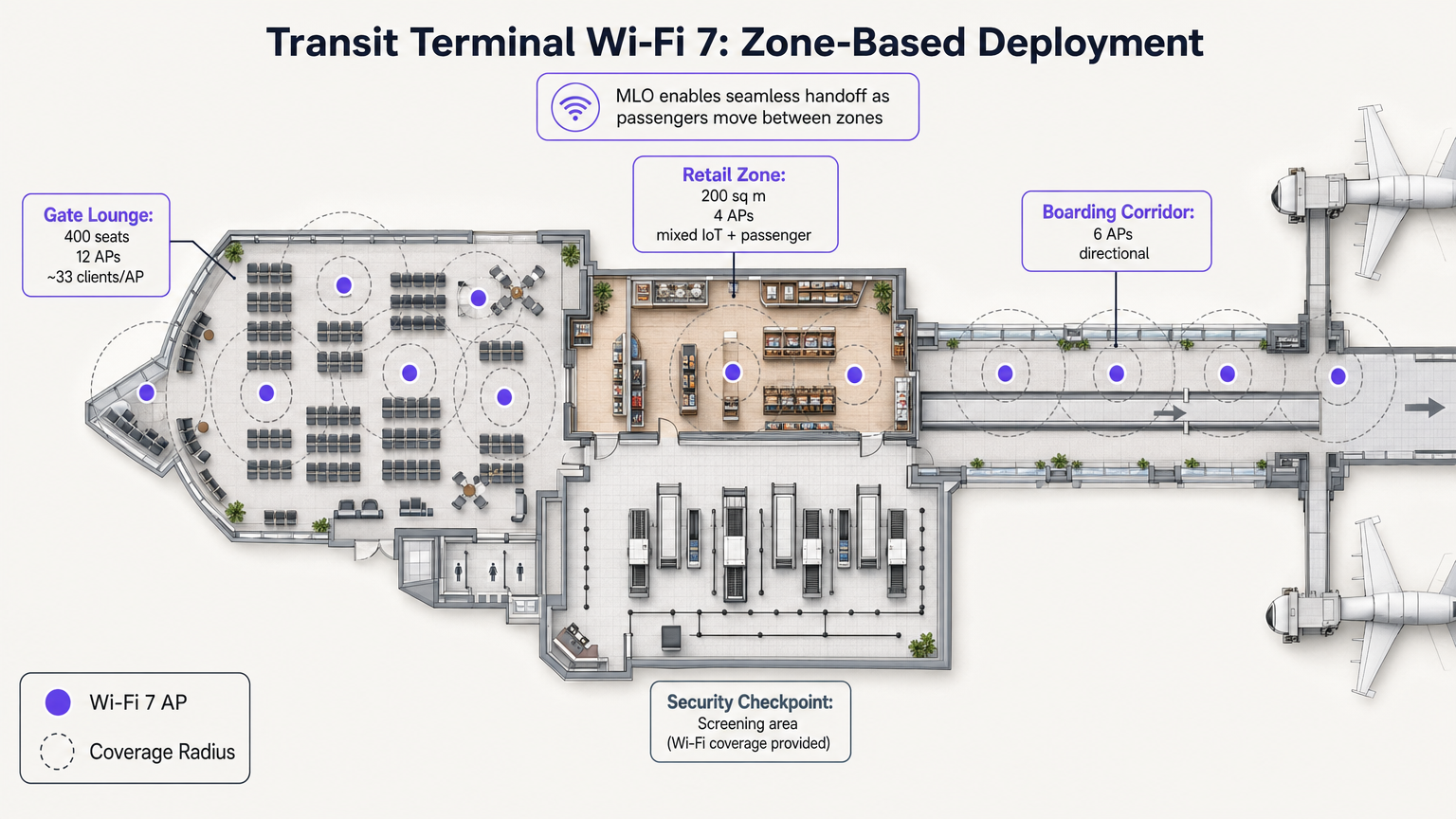
A diferencia de los estadios, las terminales de transporte presentan zonas operativas distintas con perfiles de densidad variables. La MLO de Wi-Fi 7 es particularmente valiosa aquí, permitiendo traspasos sin interrupciones a medida que los pasajeros se mueven de una sala de embarque de alta densidad a una zona comercial.
Por ejemplo, la implementación de APs direccionales en los pasillos de embarque y APs omnidireccionales en las zonas comerciales asegura que las plataformas de WiFi Analytics puedan rastrear con precisión los tiempos de permanencia y el flujo de personas sin caídas de conexión. Estos datos son críticos para optimizar las operaciones en sectores como Transporte y Retail .
Mejores Prácticas
- Ajustar la Potencia de Transmisión para el Enlace Ascendente: El Wi-Fi de estadio está limitado por el enlace ascendente. Un AP Wi-Fi 7 puede transmitir a 30 dBm, pero un smartphone solo puede transmitir a ~10 dBm. Si la potencia del AP es demasiado alta, el cliente ve una señal fuerte pero el AP no puede escuchar la respuesta del cliente. Siempre configure el EIRP del AP para que coincida con el enlace ascendente del cliente en el peor de los casos (típicamente 8-12 dBm).
- Reutilización Agresiva de Canales: En una implementación de 5 GHz/6 GHz, utilice exclusivamente canales de 20 MHz o 40 MHz. Deshabilite 80 MHz y 160/320 MHz en el tazón para maximizar el número de canales no superpuestos. Reutilice los canales cada 2-3 secciones de asientos.
- Minimizar los SSIDs: Cada SSID transmitido consume tiempo de emisión de tramas de gestión. En una implementación de 600 APs, transmitir 5 SSIDs puede consumir el 20% de su tiempo de emisión total antes de que un solo usuario se conecte. Limite la red a 1-2 SSIDs (por ejemplo, un SSID Abierto con OWE par invitados, y WPA3-Enterprise para personal/medios).
- Actualizaciones de infraestructura cableada: Los AP de Wi-Fi 7 requieren PoE++ (hasta 60W) y backhaul multigigabit. Asegúrese de que los switches de borde soporten puertos de 5 Gbps o 10 Gbps para evitar cuellos de botella en la red cableada.
Resolución de problemas y mitigación de riesgos
| Modo de fallo | Síntoma | Causa raíz | Estrategia de mitigación |
|---|---|---|---|
| Clientes pegajosos | Los dispositivos se mantienen conectados a un AP distante a pesar de estar más cerca de uno nuevo. | Mala configuración de roaming; potencia de transmisión excesiva del AP. | Habilitar 802.11k/v/r. Reducir la potencia de transmisión del AP a 8-12 dBm. Implementar BSS coloring. |
| Falta de ancho de banda de subida | Altas velocidades de descarga, pero las subidas a redes sociales fallan o expiran. | Problema de nodo oculto; tamaños de celda grandes que causan colisiones. | Cambiar a despliegue bajo los asientos. Asegurarse de que la potencia de transmisión del AP coincida con las capacidades del cliente. |
| Agotamiento del tiempo de aire | Alta latencia y conexiones caídas incluso con pocos usuarios activos. | Demasiados SSIDs; canales anchos (80+ MHz) que causan CCI excesiva. | Reducir a 1-2 SSIDs. Usar canales de 20 MHz en zonas ultradensas. |
ROI e impacto empresarial
Desplegar Wi-Fi 7 en un recinto de alta densidad es una inversión de capital significativa, pero el ROI es altamente defendible al considerar la reducción de hardware y las nuevas capacidades de ingresos.
- Reducción de CAPEX: Al aumentar la relación cliente-AP de 50:1 a 75:1, los recintos pueden reducir los costes de hardware e instalación hasta en un 33%. Para un estadio de 50.000 asientos, esto puede representar entre 1,2 y 2,4 millones de dólares en ahorros.
- Monetización y análisis: Una red robusta y de alta capacidad es la base para capturar datos de primera mano. Al utilizar un Captive Portal, los recintos pueden construir perfiles de clientes completos, impulsando programas de fidelización y campañas de marketing dirigidas. Esto es especialmente relevante al navegar por marcos de cumplimiento como la Ley de IA de la UE y WiFi para invitados: lo que los profesionales del marketing deben saber .
- Eficiencia operativa: La conectividad fiable soporta transacciones POS de alto volumen, pedidos de comida móvil y venta de entradas digital, aumentando directamente el gasto per cápita durante los eventos. También permite servicios de localización avanzados, como se detalla en nuestra Guía de sistemas de posicionamiento interior: UWB, BLE y WiFi .
Escuche nuestro podcast detallado sobre arquitecturas de estadios con Wi-Fi 7:
Términos clave y definiciones
Multi-Link Operation (MLO)
A Wi-Fi 7 feature allowing devices to transmit and receive data simultaneously across multiple frequency bands (2.4, 5, and 6 GHz).
Crucial for stadiums, it acts as an RF load balancer, instantly shifting traffic away from congested bands to maintain low latency and high throughput.
4096-QAM (4K-QAM)
An advanced modulation scheme that packs 12 bits of data per symbol, a 20% increase over Wi-Fi 6's 1024-QAM.
Allows devices close to the AP (like in under-seat deployments) to transmit data faster, freeing up airtime for other users in the dense sector.
Multi-Resource Unit (MRU) Puncturing
The ability to block out specific segments of a channel affected by interference while continuing to transmit on the clean portions of that same channel.
Prevents a single legacy device or radar event from crippling the bandwidth of an entire 160 MHz or 320 MHz channel.
Co-Channel Interference (CCI)
Interference caused when multiple access points on the same channel can hear each other, forcing them to share airtime and wait their turn to transmit.
The primary cause of poor performance in poorly designed overhead stadium deployments. Mitigated by under-seat design and low transmit power.
Equivalent Isotropically Radiated Power (EIRP)
The total effective transmit power of an access point, combining the radio's output power with the antenna's gain.
Must be carefully tuned down (typically 8-12 dBm) in high-density venues to prevent APs from overpowering client device uplinks.
Uplink Starvation
A condition where clients can receive data from the AP but cannot successfully transmit data back due to collisions or weak signal strength.
The reason why fans can often load a webpage but fail to upload a photo or video during a game.
BSS Coloring
A spatial reuse technique that adds a 'color' tag to transmissions, allowing APs on the same channel to ignore traffic from neighboring cells if the signal is below a certain threshold.
Helps mitigate the impact of CCI in dense environments by allowing simultaneous transmissions when physically separated.
Opportunistic Wireless Encryption (OWE)
A standard that provides individualized encryption for open Wi-Fi networks without requiring a shared password.
Essential for modern Guest WiFi portals, providing security against passive eavesdropping while maintaining a frictionless onboarding experience.
Casos de éxito
A 2,500-capacity conference hall is upgrading to Wi-Fi 7. The current Wi-Fi 5 network uses 40 overhead APs transmitting at 20 dBm on 80 MHz channels. Users report excellent signal strength but cannot load basic web pages during keynote sessions. How should the architect redesign the RF plan?
- Reduce Channel Width: Drop from 80 MHz to 20 MHz or 40 MHz channels to increase the number of non-overlapping channels and reduce Co-Channel Interference (CCI).
- Lower Transmit Power: Reduce AP EIRP from 20 dBm to 10-12 dBm to match client uplink capabilities and shrink cell sizes.
- Leverage 6 GHz: Enable the 6 GHz band to offload Wi-Fi 6E/7 capable devices, freeing up 5 GHz airtime for legacy clients.
- Enable MLO: Configure Multi-Link Operation to allow capable devices to dynamically load-balance across available bands.
A luxury hotel brand (e.g., Ritz Carlton or W Hotels) is deploying Wi-Fi 7 in their high-density ballroom and adjacent pre-function areas. They need to ensure seamless roaming for VIP guests while supporting hundreds of IoT devices (digital signage, environmental sensors). What is the recommended SSID and band strategy?
- SSID Consolidation: Limit to two SSIDs: 'Guest_WiFi' (Open with OWE) and 'IoT_Secure' (WPA3-SAE/PSK).
- Band Steering: Configure the 'Guest_WiFi' SSID to prioritize 5 GHz and 6 GHz bands, utilizing MLO for Wi-Fi 7 clients to ensure high-bandwidth performance for video streaming and presentations.
- IoT Isolation: Restrict the 'IoT_Secure' SSID exclusively to the 2.4 GHz band. Most IoT devices only support 2.4 GHz, and isolating them prevents slow-talking devices from consuming valuable airtime on the high-performance bands.
- Roaming Optimization: Enable 802.11k/v/r on the Guest SSID to facilitate fast BSS transition as guests move from the ballroom to the pre-function area.
Análisis de escenarios
Q1. You are finalizing the RF design for a 20,000-seat indoor arena using Wi-Fi 7 APs. The client insists on using 160 MHz channels in the 6 GHz band to 'maximize speed for the fans.' Do you agree with this approach?
💡 Sugerencia:Consider the relationship between channel width, the number of available non-overlapping channels, and Co-Channel Interference (CCI) in a dense environment.
Mostrar enfoque recomendado
No. In a high-density arena, the primary goal is capacity and airtime availability, not peak single-client throughput. Using 160 MHz channels drastically reduces the number of non-overlapping channels available. With 200+ APs in the bowl, this will cause massive Co-Channel Interference (CCI) as APs overlap and wait for airtime. The correct approach is to strictly use 20 MHz or 40 MHz channels, allowing for aggressive channel reuse and minimizing CCI.
Q2. During a live test event at a newly deployed Wi-Fi 7 stadium, the dashboard shows that 5 GHz channel utilization is at 85%, while the 6 GHz band is only at 15%. What Wi-Fi 7 feature should be verified or adjusted to resolve this imbalance?
💡 Sugerencia:Which Wi-Fi 7 feature allows capable devices to dynamically utilize multiple bands simultaneously?
Mostrar enfoque recomendado
You should verify that Multi-Link Operation (MLO) is properly enabled and supported by the client devices. MLO allows Wi-Fi 7 clients to aggregate or dynamically switch between the 5 GHz and 6 GHz bands. If configured correctly, MLO will automatically load-balance the traffic, moving capable devices to the clean 6 GHz spectrum and freeing up the congested 5 GHz band for legacy clients.
Q3. A venue operator wants to deploy overhead Wi-Fi 7 APs attached to the stadium catwalk, 80 feet above the seating bowl, to save on the cabling costs associated with under-seat deployment. What is the primary technical risk of this design?
💡 Sugerencia:Think about cell size, the 'Meat Shield' effect, and the difference between AP transmit power and client smartphone transmit power.
Mostrar enfoque recomendado
The primary risk is a massive uplink collision domain and severe Co-Channel Interference (CCI). An AP mounted 80 feet high will have a huge coverage footprint, potentially 'hearing' thousands of clients simultaneously. Furthermore, while the high-powered AP can reach the clients (downlink), the low-powered smartphones (uplink) will struggle to transmit back 80 feet through the RF noise. This results in uplink starvation. Under-seat deployment is required to create small, isolated micro-cells that utilize human bodies to attenuate lateral signal bleed.




