

Wi-Fi 7 per Luoghi ad Alta Densità: Stadi, Sale Conferenze e Terminal
Questa guida di riferimento tecnica fornisce a leader IT e architetti di rete strategie attuabili per l'implementazione del Wi-Fi 7 in luoghi ad alta densità come stadi e terminal di transito. Esplora come la Multi-Link Operation (MLO), il 4K-QAM e la progettazione di AP sotto i sedili migliorino drasticamente la capacità, riducano i requisiti hardware e forniscano un ROI misurabile.
🎧 Ascolta questa guida
Visualizza trascrizione
Riepilogo Esecutivo
Per i manager IT e i CTO che gestiscono luoghi ad alta densità—stadi, terminal di transito e grandi centri congressi—il Wi-Fi 7 (IEEE 802.11be) rappresenta un cambiamento architettonico fondamentale, non solo un aggiornamento di velocità. In ambienti con oltre 1.000 client concorrenti per settore, gli standard Wi-Fi legacy collassano sotto la contesa del tempo di trasmissione e la carenza di uplink. Il Wi-Fi 7 risolve la "compressione da stadio" tramite Multi-Link Operation (MLO), 4096-QAM e Multi-Resource Unit (MRU) puncturing, consentendo alle reti di inserire più dati in trasmissioni più brevi e di instradare dinamicamente il traffico attraverso le bande 2.4 GHz, 5 GHz e 6 GHz contemporaneamente.
Questa guida fornisce un modello neutrale rispetto al fornitore per la progettazione e l'implementazione del Wi-Fi 7 in ambienti a densità ultra-elevata. Adottando moderne strategie di implementazione sotto i sedili e sfruttando i guadagni di efficienza del nuovo standard, gli operatori dei luoghi possono aumentare i rapporti client-AP fino al 50% rispetto al Wi-Fi 6E, riducendo significativamente il CAPEX e sbloccando nuove fonti di reddito attraverso la monetizzazione del Guest WiFi e la biglietteria mobile senza interruzioni.
Approfondimento Tecnico
La Fisica del Wi-Fi ad Alta Densità
In un'implementazione aziendale standard, un access point potrebbe servire 20-30 client. In una conca di stadio o in una sala d'attesa di un gate aeroportuale, quel numero può facilmente salire a oltre 100 associazioni concorrenti per AP. La modalità di guasto principale in questi ambienti non è la larghezza di banda del downlink, ma la carenza di tempo di trasmissione in uplink e l'interferenza co-canale (CCI).
Quando migliaia di fan tentano contemporaneamente di caricare video sui social media, il dominio di collisione si espande rapidamente. Gli standard legacy costringevano i dispositivi ad attendere un tempo di trasmissione libero su una singola banda. Il Wi-Fi 7 introduce tre meccanismi critici per contrastare questo fenomeno:
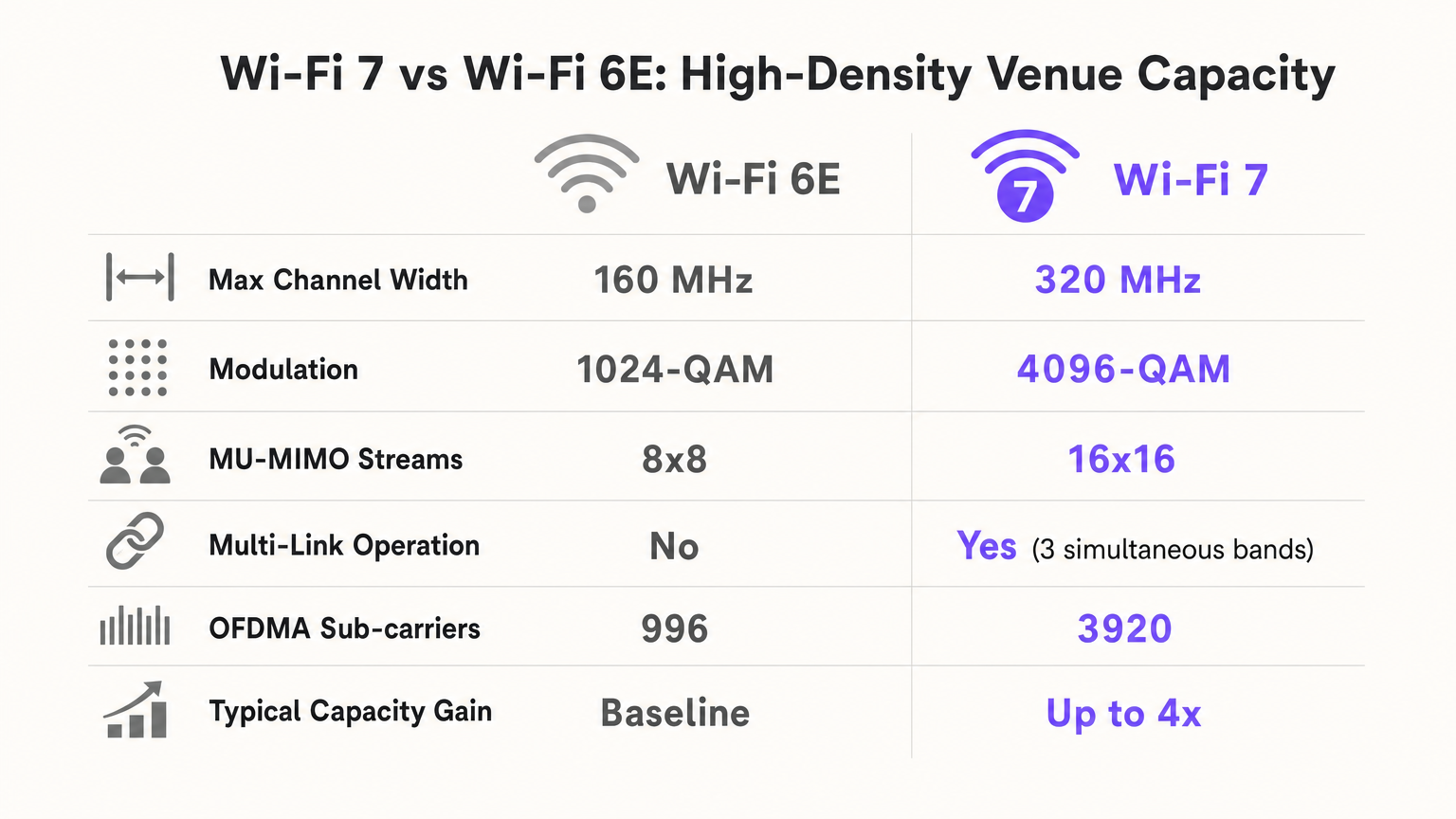
- Multi-Link Operation (MLO): L'MLO consente a un Multi-Link Device (MLD) di operare simultaneamente su più bande di frequenza (2.4 GHz, 5 GHz e 6 GHz). In uno stadio, ciò significa che un client può spostare dinamicamente i pacchetti sullo spettro più pulito disponibile con latenza quasi zero, bilanciando efficacemente il carico dell'ambiente RF a livello di dispositivo.
- 4096-QAM (4K-QAM): Aumentando la densità di modulazione da 1024-QAM (Wi-Fi 6/6E) a 4096-QAM, il Wi-Fi 7 inserisce il 20% in più di dati in ogni trasmissione di simbolo. In un luogo denso dove i client sono vicini all'AP (ad esempio, implementazioni sotto i sedili), ciò consente ai dispositivi di connettersi e disconnettersi dalla rete più velocemente, liberando tempo di trasmissione critico.
- Multi-Resource Unit (MRU) Puncturing: Se una porzione di un canale ampio (ad esempio, 160 MHz o 320 MHz) è occupata da un dispositivo legacy o da interferenze radar, gli standard precedenti richiedevano che l'intero canale si riducesse a una larghezza più stretta. Il MRU puncturing consente all'AP di ritagliare semplicemente il segmento interferito e utilizzare lo spettro pulito rimanente, massimizzando il throughput in ambienti rumorosi.
Guida all'Implementazione
Strategia Architettonica: Sotto i Sedili vs. Sopra la Testa
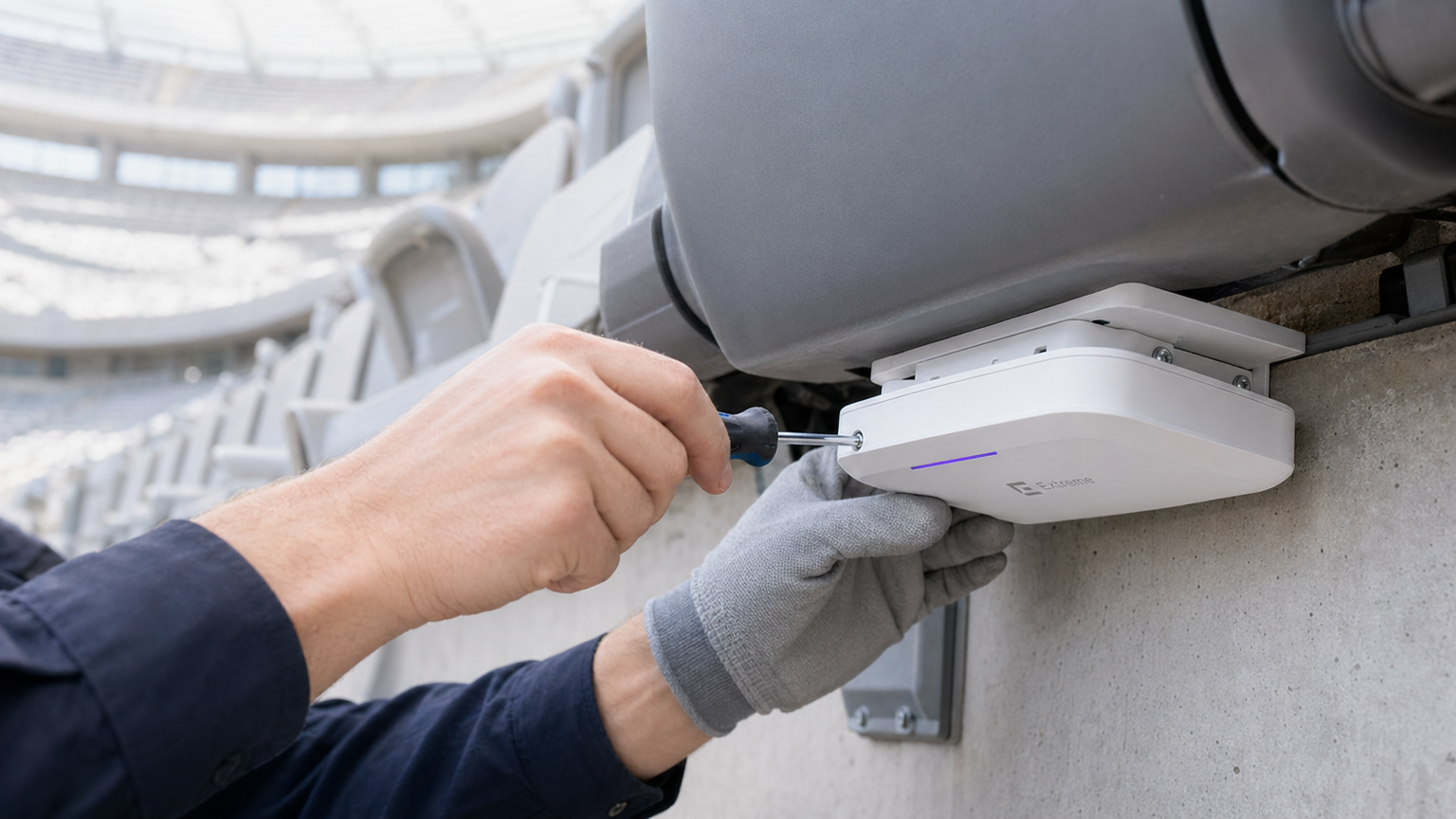
Per uno stadio da 50.000 posti, le implementazioni a soffitto sono catastrofiche. Un AP a soffitto che copre 1.000 posti crea una massiccia zona CCI e un dominio di collisione uplink ingestibile. Lo standard d'oro moderno è l'implementazione sotto i sedili.
- L'Effetto "Scudo Umano": I corpi umani assorbono i segnali RF laterali (attenuando i 5 GHz di 5-15 dB). Posizionando gli AP sotto i sedili, si utilizza la folla come attenuatore RF naturale, creando piccole micro-celle localizzate (spesso chiamate "bolle morbide").
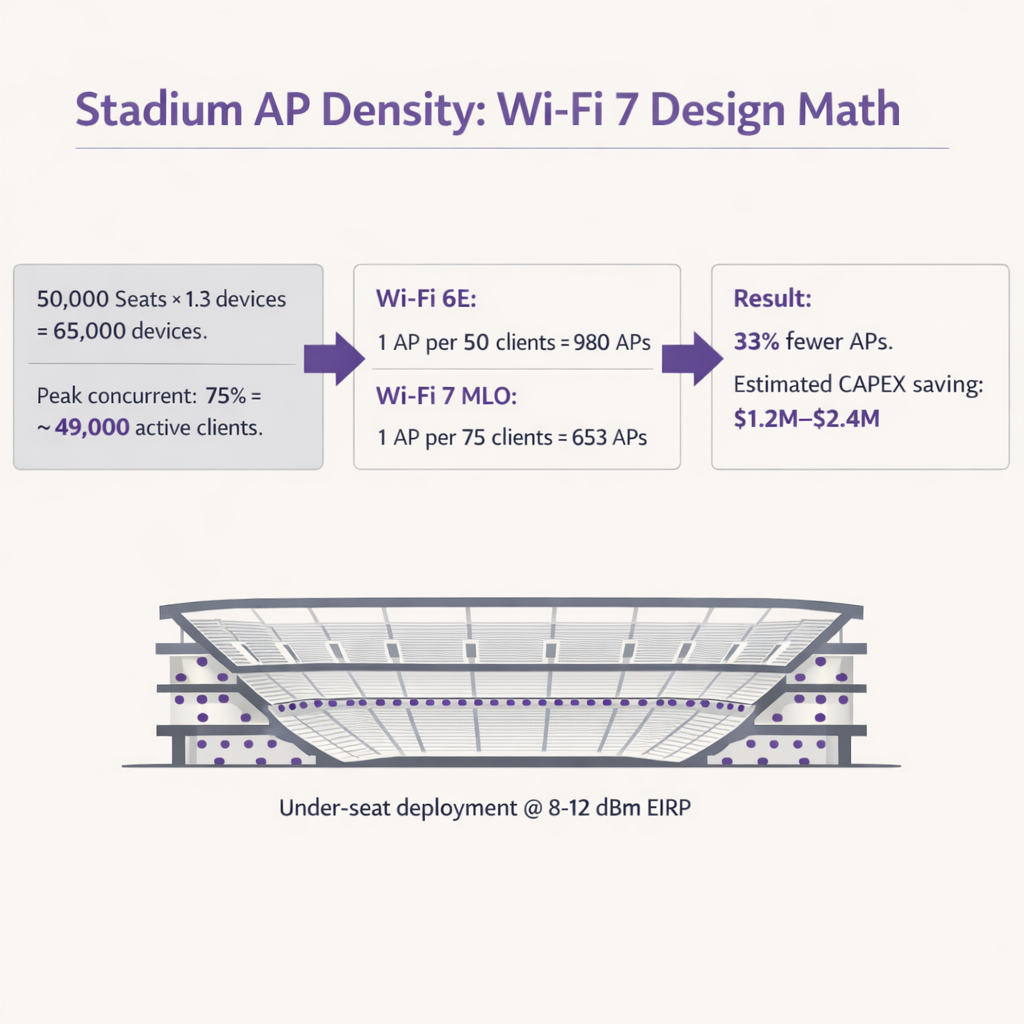
- Calcolo della Densità degli AP: Con il Wi-Fi 6E, gli architetti tipicamente progettavano per 1 AP ogni 50 client. Grazie all'efficienza di MLO e 4K-QAM, il Wi-Fi 7 consente progetti di 1 AP ogni 75-80 client. In un luogo da 50.000 posti (supponendo 1,3 dispositivi per persona e il 75% di concorrenza), ciò riduce il numero di AP richiesti da ~980 a ~650, generando enormi risparmi CAPEX su hardware, cablaggio e porte switch.
Terminal di Transito e Centri Congressi
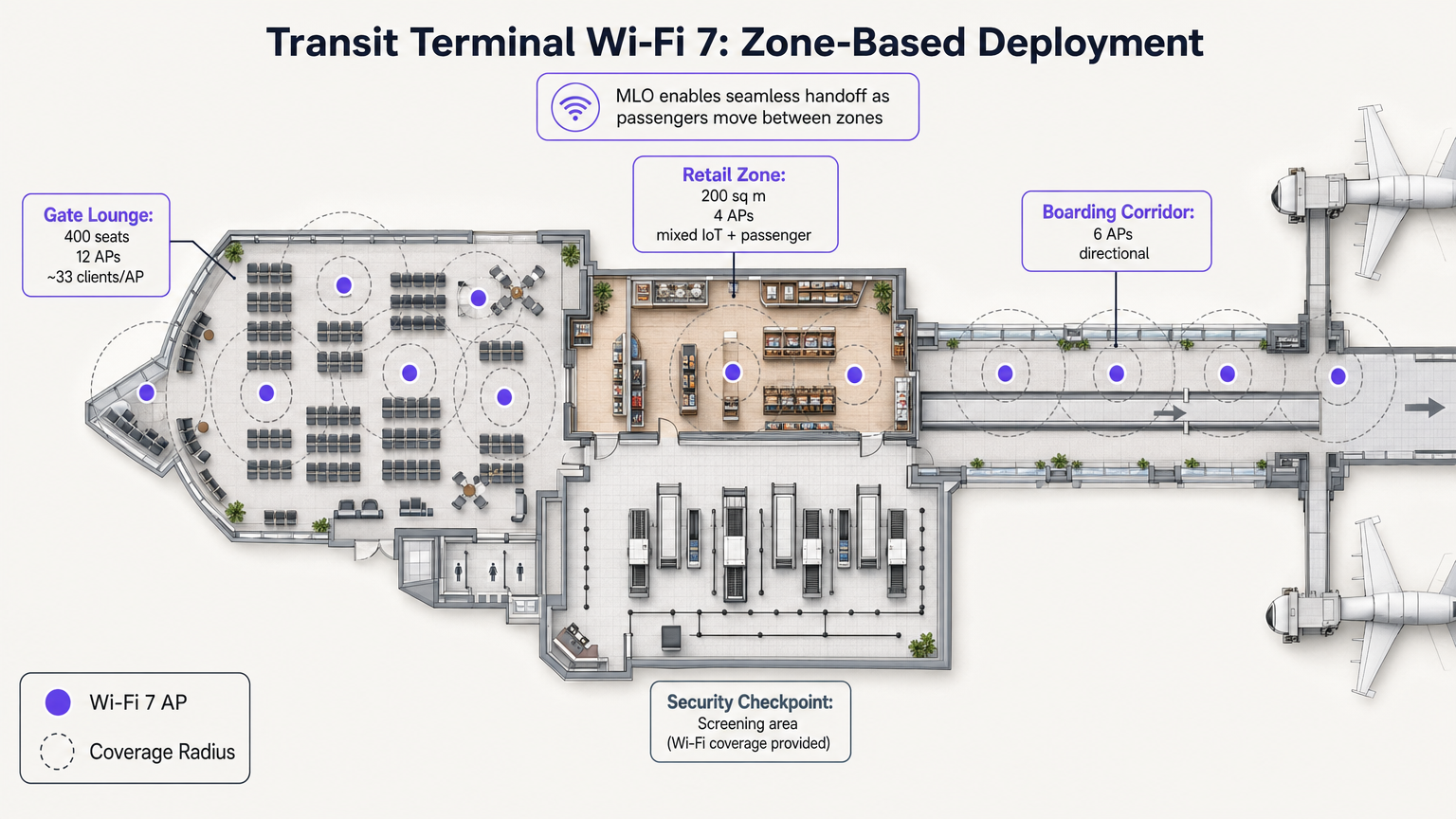
A differenza degli stadi, i terminal di transito presentano zone operative distinte con profili di densità variabili. L'MLO del Wi-Fi 7 è particolarmente prezioso qui, consentendo passaggi di consegna senza interruzioni mentre i passeggeri si spostano da una sala d'attesa ad alta densità a un'area commerciale.
Ad esempio, l'implementazione di AP direzionali nei corridoi d'imbarco e di AP omnidirezionali nelle zone commerciali assicura che le piattaforme di WiFi Analytics possano tracciare accuratamente i tempi di permanenza e il flusso di persone senza interruzioni di connessione. Questi dati sono fondamentali per ottimizzare le operazioni in settori come Trasporti e Retail .
Migliori Pratiche
- Regolare la Potenza di Trasmissione per l'Uplink: Il Wi-Fi degli stadi è limitato dall'uplink. Un AP Wi-Fi 7 può trasmettere a 30 dBm, ma uno smartphone può trasmettere solo a circa 10 dBm. Se la potenza dell'AP è troppo alta, il client vede un segnale forte ma l'AP non può sentire la risposta del client. Impostare sempre l'EIRP dell'AP in modo che corrisponda all'uplink del client nel caso peggiore (tipicamente 8-12 dBm).
- Riuso Aggressivo dei Canali: In un'implementazione a 5 GHz/6 GHz, utilizzare esclusivamente canali da 20 MHz o 40 MHz. Disabilitare 80 MHz e 160/320 MHz nella conca per massimizzare il numero di canali non sovrapposti. Riusare i canali ogni 2-3 sezioni di posti a sedere.
- Minimizzare gli SSID: Ogni SSID trasmesso consuma tempo di trasmissione per i frame di gestione. In un'implementazione con 600 AP, la trasmissione di 5 SSID può consumare il 20% del tempo di trasmissione totale prima che un singolo utente si connetta. Limitare la rete a 1-2 SSID (ad esempio, un Open SSID con OWE foper gli ospiti e WPA3-Enterprise per il personale/media).
- Aggiornamenti dell'infrastruttura cablata: Gli AP Wi-Fi 7 richiedono PoE++ (fino a 60W) e backhaul multi-gigabit. Assicurarsi che gli switch edge supportino porte da 5 Gbps o 10 Gbps per prevenire colli di bottiglia cablati.
Risoluzione dei problemi e mitigazione del rischio
| Modalità di guasto | Sintomo | Causa principale | Strategia di mitigazione |
|---|---|---|---|
| Clienti "appiccicosi" | I dispositivi si aggrappano a un AP distante nonostante siano più vicini a uno nuovo. | Configurazione di roaming scadente; potenza di trasmissione AP eccessiva. | Abilitare 802.11k/v/r. Ridurre la potenza di trasmissione AP a 8-12 dBm. Implementare il BSS coloring. |
| Esaurimento Uplink | Velocità di download elevate, ma i caricamenti sui social media falliscono o vanno in timeout. | Problema del nodo nascosto; grandi dimensioni delle celle che causano collisioni. | Passare alla distribuzione sotto il sedile. Assicurarsi che la potenza di trasmissione AP corrisponda alle capacità del client. |
| Esaurimento del tempo di trasmissione | Latenza elevata e connessioni interrotte anche con pochi utenti attivi. | Troppi SSID; canali ampi (80+ MHz) che causano eccessiva CCI. | Ridurre a 1-2 SSID. Utilizzare canali da 20 MHz in zone ultra-dense. |
ROI e impatto sul business
L'implementazione del Wi-Fi 7 in una sede ad alta densità rappresenta una spesa in conto capitale significativa, ma il ROI è altamente difendibile se si considerano la riduzione dell'hardware e le nuove capacità di generazione di entrate.
- Riduzione del CAPEX: Aumentando il rapporto client-AP da 50:1 a 75:1, le sedi possono ridurre i costi di hardware e installazione fino al 33%. Per uno stadio da 50.000 posti, ciò può rappresentare un risparmio da 1,2 a 2,4 milioni di dollari.
- Monetizzazione e analisi: Una rete robusta e ad alta capacità è la base per acquisire dati di prima parte. Utilizzando un captive portal, le sedi possono costruire profili clienti ricchi, promuovendo programmi fedeltà e campagne di marketing mirate. Ciò è particolarmente rilevante quando si naviga in framework di conformità come l' EU AI Act e Guest WiFi: cosa devono sapere i marketer .
- Efficienza operativa: La connettività affidabile supporta transazioni POS ad alto volume, ordinazioni di cibo tramite cellulare e biglietteria digitale, aumentando direttamente la spesa pro capite durante gli eventi. Abilita inoltre servizi di localizzazione avanzati, come dettagliato nella nostra Guida ai sistemi di posizionamento indoor: UWB, BLE e WiFi .
Ascolta il nostro podcast di approfondimento sulle architetture degli stadi Wi-Fi 7:
Termini chiave e definizioni
Multi-Link Operation (MLO)
A Wi-Fi 7 feature allowing devices to transmit and receive data simultaneously across multiple frequency bands (2.4, 5, and 6 GHz).
Crucial for stadiums, it acts as an RF load balancer, instantly shifting traffic away from congested bands to maintain low latency and high throughput.
4096-QAM (4K-QAM)
An advanced modulation scheme that packs 12 bits of data per symbol, a 20% increase over Wi-Fi 6's 1024-QAM.
Allows devices close to the AP (like in under-seat deployments) to transmit data faster, freeing up airtime for other users in the dense sector.
Multi-Resource Unit (MRU) Puncturing
The ability to block out specific segments of a channel affected by interference while continuing to transmit on the clean portions of that same channel.
Prevents a single legacy device or radar event from crippling the bandwidth of an entire 160 MHz or 320 MHz channel.
Co-Channel Interference (CCI)
Interference caused when multiple access points on the same channel can hear each other, forcing them to share airtime and wait their turn to transmit.
The primary cause of poor performance in poorly designed overhead stadium deployments. Mitigated by under-seat design and low transmit power.
Equivalent Isotropically Radiated Power (EIRP)
The total effective transmit power of an access point, combining the radio's output power with the antenna's gain.
Must be carefully tuned down (typically 8-12 dBm) in high-density venues to prevent APs from overpowering client device uplinks.
Uplink Starvation
A condition where clients can receive data from the AP but cannot successfully transmit data back due to collisions or weak signal strength.
The reason why fans can often load a webpage but fail to upload a photo or video during a game.
BSS Coloring
A spatial reuse technique that adds a 'color' tag to transmissions, allowing APs on the same channel to ignore traffic from neighboring cells if the signal is below a certain threshold.
Helps mitigate the impact of CCI in dense environments by allowing simultaneous transmissions when physically separated.
Opportunistic Wireless Encryption (OWE)
A standard that provides individualized encryption for open Wi-Fi networks without requiring a shared password.
Essential for modern Guest WiFi portals, providing security against passive eavesdropping while maintaining a frictionless onboarding experience.
Casi di studio
A 2,500-capacity conference hall is upgrading to Wi-Fi 7. The current Wi-Fi 5 network uses 40 overhead APs transmitting at 20 dBm on 80 MHz channels. Users report excellent signal strength but cannot load basic web pages during keynote sessions. How should the architect redesign the RF plan?
- Reduce Channel Width: Drop from 80 MHz to 20 MHz or 40 MHz channels to increase the number of non-overlapping channels and reduce Co-Channel Interference (CCI).
- Lower Transmit Power: Reduce AP EIRP from 20 dBm to 10-12 dBm to match client uplink capabilities and shrink cell sizes.
- Leverage 6 GHz: Enable the 6 GHz band to offload Wi-Fi 6E/7 capable devices, freeing up 5 GHz airtime for legacy clients.
- Enable MLO: Configure Multi-Link Operation to allow capable devices to dynamically load-balance across available bands.
A luxury hotel brand (e.g., Ritz Carlton or W Hotels) is deploying Wi-Fi 7 in their high-density ballroom and adjacent pre-function areas. They need to ensure seamless roaming for VIP guests while supporting hundreds of IoT devices (digital signage, environmental sensors). What is the recommended SSID and band strategy?
- SSID Consolidation: Limit to two SSIDs: 'Guest_WiFi' (Open with OWE) and 'IoT_Secure' (WPA3-SAE/PSK).
- Band Steering: Configure the 'Guest_WiFi' SSID to prioritize 5 GHz and 6 GHz bands, utilizing MLO for Wi-Fi 7 clients to ensure high-bandwidth performance for video streaming and presentations.
- IoT Isolation: Restrict the 'IoT_Secure' SSID exclusively to the 2.4 GHz band. Most IoT devices only support 2.4 GHz, and isolating them prevents slow-talking devices from consuming valuable airtime on the high-performance bands.
- Roaming Optimization: Enable 802.11k/v/r on the Guest SSID to facilitate fast BSS transition as guests move from the ballroom to the pre-function area.
Analisi degli scenari
Q1. You are finalizing the RF design for a 20,000-seat indoor arena using Wi-Fi 7 APs. The client insists on using 160 MHz channels in the 6 GHz band to 'maximize speed for the fans.' Do you agree with this approach?
💡 Suggerimento:Consider the relationship between channel width, the number of available non-overlapping channels, and Co-Channel Interference (CCI) in a dense environment.
Mostra l'approccio consigliato
No. In a high-density arena, the primary goal is capacity and airtime availability, not peak single-client throughput. Using 160 MHz channels drastically reduces the number of non-overlapping channels available. With 200+ APs in the bowl, this will cause massive Co-Channel Interference (CCI) as APs overlap and wait for airtime. The correct approach is to strictly use 20 MHz or 40 MHz channels, allowing for aggressive channel reuse and minimizing CCI.
Q2. During a live test event at a newly deployed Wi-Fi 7 stadium, the dashboard shows that 5 GHz channel utilization is at 85%, while the 6 GHz band is only at 15%. What Wi-Fi 7 feature should be verified or adjusted to resolve this imbalance?
💡 Suggerimento:Which Wi-Fi 7 feature allows capable devices to dynamically utilize multiple bands simultaneously?
Mostra l'approccio consigliato
You should verify that Multi-Link Operation (MLO) is properly enabled and supported by the client devices. MLO allows Wi-Fi 7 clients to aggregate or dynamically switch between the 5 GHz and 6 GHz bands. If configured correctly, MLO will automatically load-balance the traffic, moving capable devices to the clean 6 GHz spectrum and freeing up the congested 5 GHz band for legacy clients.
Q3. A venue operator wants to deploy overhead Wi-Fi 7 APs attached to the stadium catwalk, 80 feet above the seating bowl, to save on the cabling costs associated with under-seat deployment. What is the primary technical risk of this design?
💡 Suggerimento:Think about cell size, the 'Meat Shield' effect, and the difference between AP transmit power and client smartphone transmit power.
Mostra l'approccio consigliato
The primary risk is a massive uplink collision domain and severe Co-Channel Interference (CCI). An AP mounted 80 feet high will have a huge coverage footprint, potentially 'hearing' thousands of clients simultaneously. Furthermore, while the high-powered AP can reach the clients (downlink), the low-powered smartphones (uplink) will struggle to transmit back 80 feet through the RF noise. This results in uplink starvation. Under-seat deployment is required to create small, isolated micro-cells that utilize human bodies to attenuate lateral signal bleed.




