

WiFi ডেটা সংগ্রহ: আপনার নেটওয়ার্ক কী ডেটা সংগ্রহ করে এবং কীভাবে এটি ব্যবহার করবেন
এই প্রযুক্তিগত রেফারেন্স গাইডটি পরিচালিত এন্টারপ্রাইজ WiFi নেটওয়ার্ক দ্বারা সংগৃহীত ডেটার চারটি প্রধান বিভাগ বিস্তারিতভাবে বর্ণনা করে। এটি আইটি নেতা এবং ভেন্যু অপারেটরদের ব্যবহারিক স্থাপনার স্থাপত্য, সম্মতি কাঠামো এবং কাঁচা নেটওয়ার্ক টেলিমেট্রিকে পরিমাপযোগ্য ব্যবসায়িক মূল্যে রূপান্তর করার কৌশল সরবরাহ করে।
🎧 এই গাইডটি শুনুন
ট্রান্সক্রিপ্ট দেখুন

নির্বাহী সারসংক্ষেপ
এন্টারপ্রাইজ আইটি দল এবং ভেন্যু অপারেটরদের জন্য, গেস্ট WiFi নেটওয়ার্ক এখন কেবল একটি সংযোগ ইউটিলিটি নয়—এটি একটি গুরুত্বপূর্ণ ডেটা অধিগ্রহণ স্তর। তবে, অনেক সংস্থা ডেটা সংগ্রহ, সুরক্ষিত করা বা এর থেকে বাণিজ্যিক মূল্য আহরণের জন্য স্পষ্ট কৌশল ছাড়াই ব্যয়বহুল অবকাঠামো স্থাপন করে।
এই গাইডটি WiFi ডেটা সংগ্রহের উপর একটি সুনির্দিষ্ট প্রযুক্তিগত রেফারেন্স সরবরাহ করে। আমরা আপনার নেটওয়ার্ক দ্বারা সংগৃহীত সঠিক টেলিমেট্রি ভেঙে দেখাই, যা প্যাসিভ ডিভাইস শনাক্তকারী থেকে শুরু করে প্রমাণীকৃত পরিচয় রেকর্ড এবং স্থানিক গতিবিধি প্যাটার্ন পর্যন্ত বিস্তৃত। আরও গুরুত্বপূর্ণভাবে, আমরা এই ডেটা আইনত পরিচালনা করার জন্য প্রয়োজনীয় সম্মতি কাঠামো—যার মধ্যে GDPR, PCI DSS, এবং IEEE 802.1X অন্তর্ভুক্ত—রূপরেখা করি। একটি কাঠামোগত ডেটা পাইপলাইন বাস্তবায়নের মাধ্যমে, Retail , Hospitality , Healthcare , এবং Transport এর সংস্থাগুলি তাদের নেটওয়ার্ক অবকাঠামোকে একটি ব্যয় কেন্দ্র থেকে একটি রাজস্ব-উৎপাদনকারী সম্পদে রূপান্তরিত করতে পারে যা আনুগত্য, অপারেশনাল দক্ষতা এবং পরিমাপযোগ্য ROI চালিত করে।
প্রযুক্তিগত গভীর বিশ্লেষণ: আপনার নেটওয়ার্ক কী ডেটা সংগ্রহ করে
একটি সুরক্ষিত এবং মূল্যবান ডেটা সংগ্রহ কৌশল তৈরি করতে, আপনাকে একটি পরিচালিত WiFi নেটওয়ার্ক দ্বারা উত্পন্ন ডেটার চারটি স্বতন্ত্র বিভাগ বুঝতে হবে। এই বিভাগগুলিকে একত্রিত করলে ভুলভাবে কনফিগার করা সম্মতি প্রক্রিয়া এবং অব্যবহৃত ব্যবসায়িক মূল্য তৈরি হয়।
1. ডিভাইস শনাক্তকারী
একজন ব্যবহারকারী প্রমাণীকরণ করার আগেই, তার WiFi রেডিও সক্ষম করা যেকোনো ডিভাইস উপলব্ধ নেটওয়ার্কগুলি আবিষ্কার করতে প্রোব অনুরোধ সম্প্রচার করে। এই প্রোবগুলিতে গুরুত্বপূর্ণ হার্ডওয়্যার শনাক্তকারী থাকে।
- MAC ঠিকানা: মিডিয়া অ্যাক্সেস কন্ট্রোল ঠিকানা হল ডিভাইসের নেটওয়ার্ক ইন্টারফেস কার্ড (NIC) এ পোড়া অনন্য হার্ডওয়্যার শনাক্তকারী।
- সাংগঠনিকভাবে অনন্য শনাক্তকারী (OUI): MAC ঠিকানার প্রথম তিনটি অক্টেট হার্ডওয়্যার প্রস্তুতকারককে শনাক্ত করে (যেমন, Apple, Samsung, Intel)।
- প্রোটোকল ক্ষমতা: প্রোব অনুরোধ সমর্থিত মানগুলি নির্দেশ করে (যেমন, 802.11ac, Wi-Fi 6, Wi-Fi 6E), যা নেটওয়ার্ক ক্ষমতা পরিকল্পনার জন্য অপরিহার্য।
MAC র্যান্ডমাইজেশনের প্রভাব: iOS 14 এবং Android 10 থেকে, মোবাইল অপারেটিং সিস্টেমগুলি প্যাসিভ ট্র্যাকিং প্রতিরোধ করতে ডিফল্টরূপে MAC ঠিকানা র্যান্ডমাইজেশন প্রয়োগ করে। এর অর্থ হল দীর্ঘমেয়াদী বিশ্লেষণের জন্য শুধুমাত্র অপ্রমাণিত প্রোব অনুরোধের উপর নির্ভর করা আর কার্যকর নয়। সমাধানের জন্য ব্যবহারকারীদের প্রমাণীকৃত সেশনে স্থানান্তরিত করা প্রয়োজন।
2. সেশন ডেটা
একবার একটি ডিভাইস একটি SSID এর সাথে সংযুক্ত হয়ে প্রমাণীকরণ করলে, নেটওয়ার্ক কন্ট্রোলার বা RADIUS সার্ভার সেশন টেলিমেট্রি লগ করা শুরু করে। এটি নেটওয়ার্ক কর্মক্ষমতা পর্যবেক্ষণের ভিত্তি।
- সংযোগ মেট্রিক্স: সংযোগের টাইমস্ট্যাম্প, সেশনের সময়কাল এবং মোট স্থানান্তরিত বাইট (আপলিঙ্ক/ডাউনলিঙ্ক)।
- অবকাঠামো ডেটা: নির্দিষ্ট SSID যার সাথে সংযুক্ত এবং BSSID (ক্লায়েন্টকে হ্যান্ডেল করা নির্দিষ্ট অ্যাক্সেস পয়েন্টের MAC ঠিকানা)।
- সিগন্যাল মেট্রিক্স: প্রাপ্ত সিগন্যাল স্ট্রেংথ ইন্ডিকেটর (RSSI) এবং সিগন্যাল-টু-নয়েজ রেশিও (SNR), যা সংযোগের গুণমান নির্ধারণ করে এবং অবস্থান ট্রায়াঙ্গুলেশন সক্ষম করে।
- নেটওয়ার্ক অ্যাসাইনমেন্ট: DHCP-দ্বারা-নির্ধারিত IP ঠিকানা এবং VLAN ট্যাগ।
এই ডেটা থ্রুপুট ক্ষমতা পরিকল্পনা এবং প্রতি-ব্যবহারকারী ব্যান্ডউইথ ব্যবহার বোঝার জন্য অপরিহার্য, যা নিশ্চিত করে যে আপনার অবকাঠামো সর্বোচ্চ লোড সামলাতে পারে।
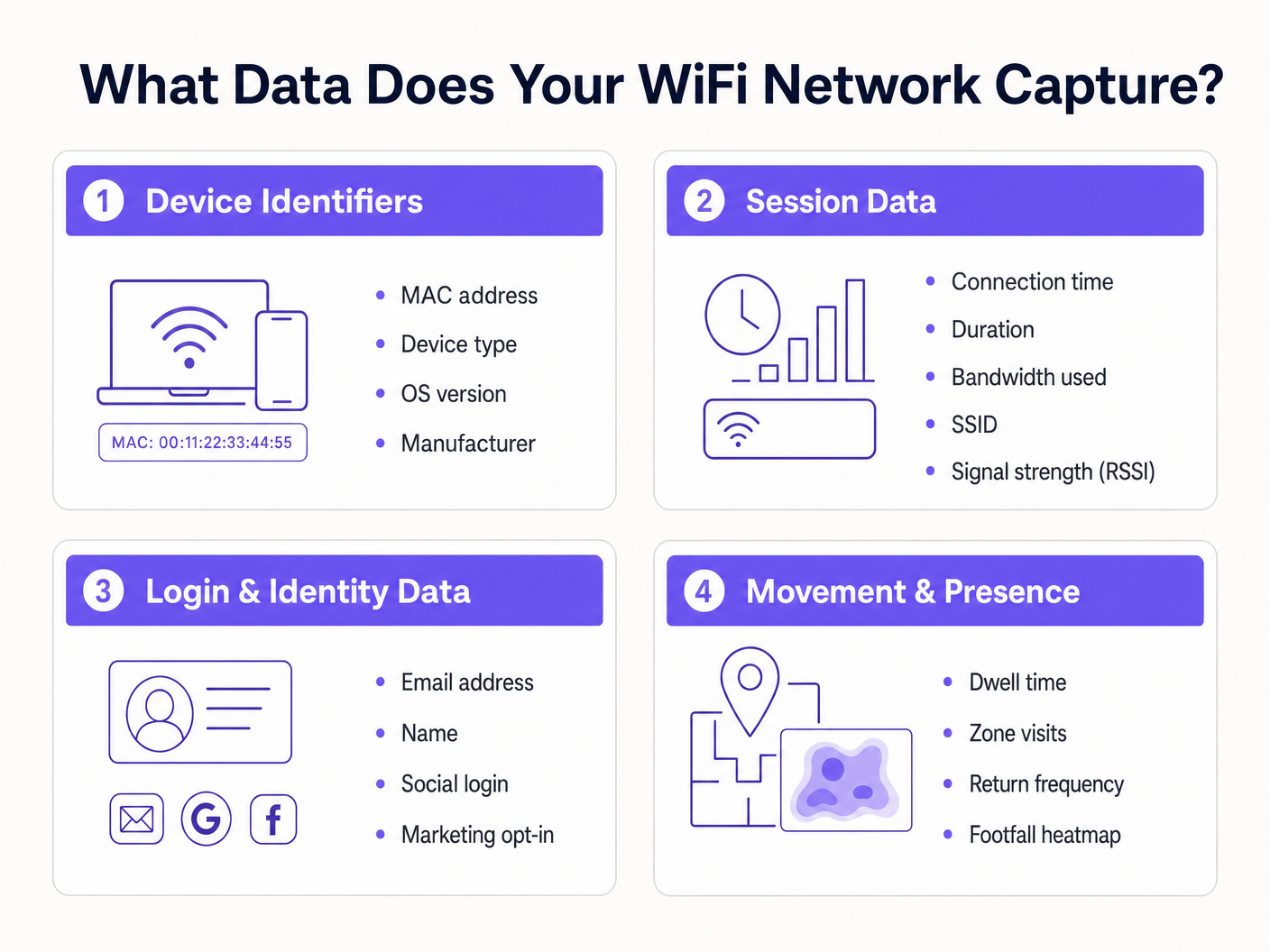
3. লগইন ও পরিচয় ডেটা
এখানেই নেটওয়ার্ক অবকাঠামো বিপণন এবং CRM এর সাথে মিলিত হয়। যখন একজন ব্যবহারকারী একটি Guest WiFi নেটওয়ার্ক অ্যাক্সেস করে একটি Captive Portal এর মাধ্যমে, তখন তারা সংযোগের বিনিময়ে প্রথম-পক্ষের পরিচয় ডেটা সরবরাহ করে।
- ব্যক্তিগতভাবে শনাক্তযোগ্য তথ্য (PII): নাম, ইমেল ঠিকানা, ফোন নম্বর, বা জন্ম তারিখ।
- প্রমাণীকরণ পদ্ধতি: ব্যবহারকারী একটি কাস্টম ফর্ম, SMS যাচাইকরণ, বা সামাজিক OAuth (Google, Facebook, LinkedIn) এর মাধ্যমে নিবন্ধন করেছেন কিনা।
- সম্মতি রেকর্ড: বিপণন যোগাযোগের জন্য সুস্পষ্ট অপ্ট-ইন এবং পরিষেবার শর্তাবলী গ্রহণ।
এই ডেটা সংগ্রহ ভেন্যুগুলিকে সমৃদ্ধ গ্রাহক প্রোফাইল তৈরি করতে দেয়। Purple এর Guest WiFi প্ল্যাটফর্ম পরিচয় প্রদানকারী হিসাবে কাজ করে, একটি ব্র্যান্ডেড স্প্ল্যাশ পৃষ্ঠা উপস্থাপন করে, বিস্তারিত সম্মতি রেকর্ড করে এবং ওয়েবহুক বা নেটিভ API এর মাধ্যমে পরিচয় রেকর্ড সরাসরি আপনার CRM বা বিপণন অটোমেশন প্ল্যাটফর্মে পাঠায়।
4. গতিবিধি ও উপস্থিতি ডেটা
গতিবিধি ডেটা হল সেশন এবং ডিভাইস টেলিমেট্রির উপর ভিত্তি করে প্রাপ্ত বিশ্লেষণ। একাধিক অ্যাক্সেস পয়েন্ট জুড়ে একটি একক ডিভাইস থেকে RSSI রিডিংগুলিকে সম্পর্কযুক্ত করে, নেটওয়ার্ক ডিভাইসের শারীরিক অবস্থান ট্রায়াঙ্গুলেট করতে পারে।
- অবস্থান সময়: একটি ডিভাইস একটি নির্দিষ্ট শারীরিক অঞ্চলে কতক্ষণ থাকে।
- ভিজিটর ফ্লো: একজন ব্যবহারকারী একটি ভেন্যুর মধ্য দিয়ে যে পথ নেয়, যা বাধা বা জনপ্রিয় রুটগুলিকে তুলে ধরে।
- পুনরাবৃত্তির হার: প্রমাণীকৃত পরিচয়ের উপর ভিত্তি করে পুনরাবৃত্ত দর্শকদের শনাক্ত করা (MAC randomisation সমস্যাগুলি বাইপাস করে)।
- ফুটফল হিটম্যাপ: সময়ের সাথে সাথে ভেন্যু ঘনত্বের ভিজ্যুয়াল উপস্থাপনা।
এই ডেটা ব্যবহার সম্পর্কে গভীর বিশ্লেষণের জন্য, আমাদের WiFi ফুটফল অ্যানালিটিক্স: ভিজিটর ডেটা কীভাবে পরিমাপ করবেন এবং সে অনুযায়ী কাজ করবেন গাইডটি দেখুন। (আমাদের স্প্যানিশ-ভাষী অপারেটরদের জন্য, দেখুন Análisis de afluencia WiFi: Cómo medir y actuar sobre los datos de los visitantes )। এই বুদ্ধিমত্তা Indoor Positioning System: UWB, BLE, & WiFi Guide স্থাপনার জন্য অত্যন্ত গুরুত্বপূর্ণ।
বাস্তবায়ন নির্দেশিকা: ডেটা পাইপলাইন তৈরি করা
একটি WiFi ডেটা সংগ্রহ স্থাপনction স্থাপত্যের জন্য সাধারণ সংযোগের বাইরে গিয়ে একটি সুরক্ষিত, অনুগত ডেটা পাইপলাইন স্থাপন করতে হবে।
ধাপ 1: নেটওয়ার্ক বিভাজন এবং স্থাপত্য
আপনার গেস্ট নেটওয়ার্ককে কর্পোরেট এবং পেমেন্ট পরিবেশ থেকে যৌক্তিকভাবে আলাদা করতে হবে। একটি বিচ্ছিন্ন VLAN-এ গেস্ট SSID স্থাপন করুন। নিশ্চিত করুন যে ফায়ারওয়াল নিয়মগুলি গেস্ট সাবনেট থেকে যেকোনো অভ্যন্তরীণ সংস্থানে পার্শ্বীয় চলাচলকে স্পষ্টভাবে অস্বীকার করে। এটি PCI DSS সম্মতির জন্য একটি মৌলিক প্রয়োজন।
ধাপ 2: Captive Portal কনফিগারেশন
Captive Portal হল প্রাথমিক ডেটা অধিগ্রহণ ইন্টারফেস।
- ঘর্ষণহীন অনবোর্ডিং: ড্রপ-অফ রেট কমাতে সোশ্যাল OAuth এবং নির্বিঘ্ন প্রমাণীকরণ (যেমন প্রোফাইল-ভিত্তিক প্রমাণীকরণ বা OpenRoaming) প্রয়োগ করুন।
- প্রগতিশীল প্রোফাইলিং: প্রথম পরিদর্শনে 10টি ডেটা পয়েন্ট জিজ্ঞাসা করবেন না। প্রথমে একটি ইমেল ঠিকানা জিজ্ঞাসা করুন, তারপর পরবর্তী পরিদর্শনে আরও বিশদ (যেমন জন্ম তারিখ) অনুরোধ করুন।
ধাপ 3: ইন্টিগ্রেশন এবং অটোমেশন
একটি WiFi কন্ট্রোলার ড্যাশবোর্ডে থাকা ডেটার সীমিত মূল্য রয়েছে। আপনার CRM (যেমন Salesforce, HubSpot) এবং মার্কেটিং অটোমেশন প্ল্যাটফর্মে রিয়েল-টাইমে পরিচয় এবং সেশন ডেটা পুশ করার জন্য ওয়েবহুক বা নেটিভ API ইন্টিগ্রেশন কনফিগার করুন। এটি স্বয়ংক্রিয় ওয়ার্কফ্লো সক্ষম করে, যেমন একজন ব্যবহারকারী লগ ইন করার 10 মিনিট পরে একটি স্বাগত ইমেল ট্রিগার করা।
সেরা অনুশীলন এবং সম্মতি কাঠামো
ডেটা সংগ্রহের সাথে উল্লেখযোগ্য নিয়ন্ত্রক বাধ্যবাধকতা জড়িত। একটি অনুগত স্থাপত্য অ-আলোচনাযোগ্য।
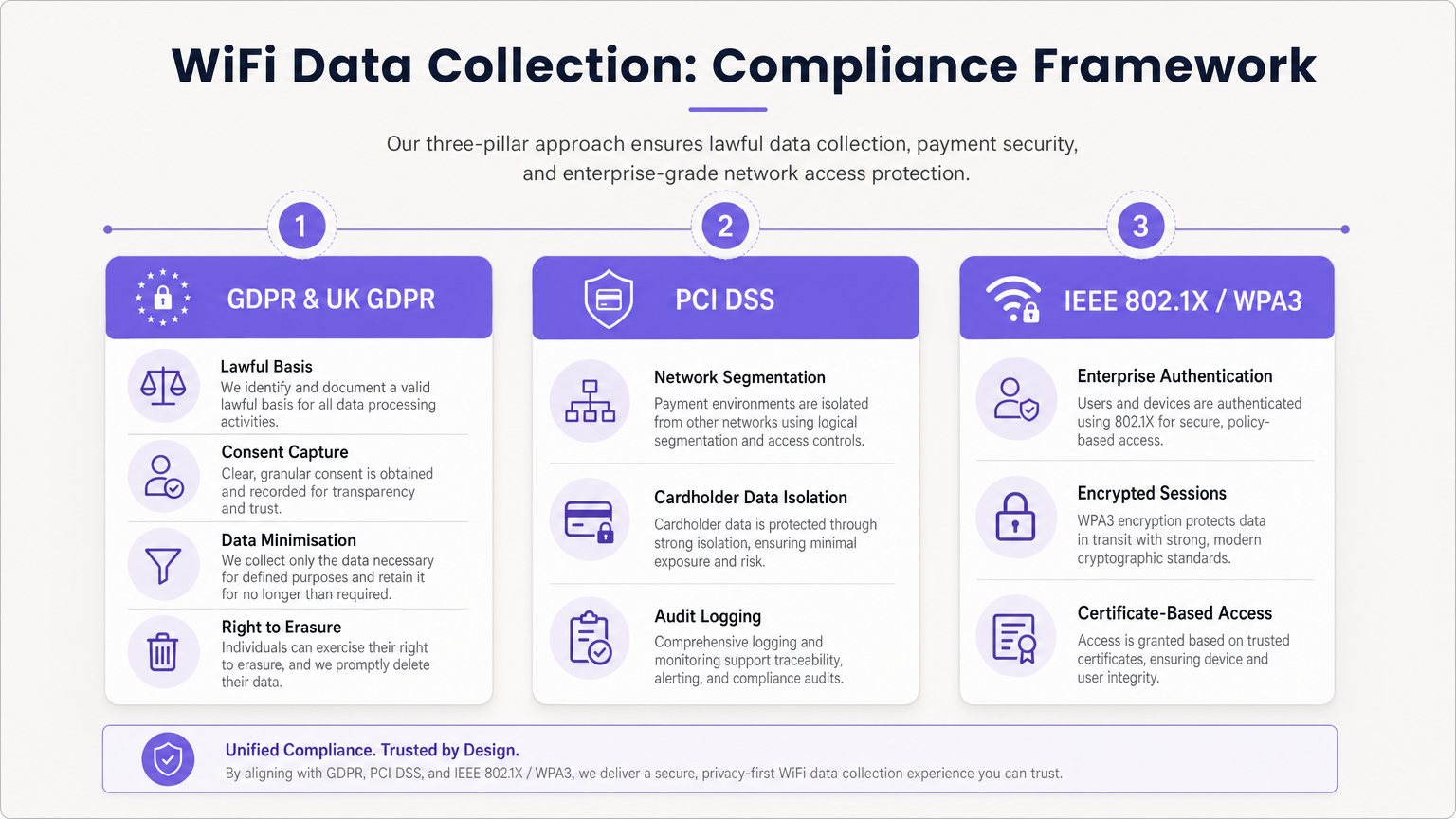
GDPR এবং UK GDPR আনুগত্য
যখন PII (ইমেল ঠিকানা এবং স্থায়ী ডিভাইস শনাক্তকারী সহ) ক্যাপচার করা হয়, তখন আপনাকে প্রক্রিয়াকরণের জন্য একটি বৈধ ভিত্তি স্থাপন করতে হবে।
- আনবান্ডেলড সম্মতি: Captive Portal-কে অবশ্যই পরিষেবার শর্তাবলী, গোপনীয়তা নীতি এবং বিপণন যোগাযোগের জন্য পৃথক, সুস্পষ্ট অপ্ট-ইন চেকবক্স উপস্থাপন করতে হবে। পূর্ব-টিক করা বক্সগুলি অবৈধ।
- ডেটা মিনিমাইজেশন: সংজ্ঞায়িত উদ্দেশ্যের জন্য প্রয়োজনীয় ডেটা শুধুমাত্র সংগ্রহ করুন।
- মুছে ফেলার অধিকার: ডেটা সাবজেক্ট অ্যাক্সেস অনুরোধ (DSAR) এবং মুছে ফেলার অনুরোধগুলি দ্রুত পরিচালনা করার জন্য স্বয়ংক্রিয় ওয়ার্কফ্লো প্রয়োগ করুন।
PCI DSS বিভাজন
যদি আপনার ভেন্যু ক্রেডিট কার্ড প্রক্রিয়া করে, তাহলে গেস্ট WiFi নেটওয়ার্ককে কার্ডহোল্ডার ডেটা এনভায়রনমেন্ট (CDE) এর সাথে যৌক্তিক অবকাঠামো ভাগ করা উচিত নয়। গেস্ট নেটওয়ার্ককে বিচ্ছিন্ন করতে ব্যর্থ হলে PCI DSS প্রয়োজনীয়তা 1 এবং 6 লঙ্ঘন হবে এবং অডিট ব্যর্থ হবে।
এন্টারপ্রাইজ নিরাপত্তা মান
অভ্যন্তরীণ বা সুরক্ষিত নেটওয়ার্কগুলির জন্য, সার্টিফিকেট-ভিত্তিক প্রমাণীকরণের জন্য WPA3 Enterprise সহ IEEE 802.1X প্রয়োগ করুন। গেস্ট নেটওয়ার্কগুলির জন্য, অফলাইন ডিকশনারি আক্রমণ থেকে রক্ষা করতে এবং ফরোয়ার্ড সিক্রেসি প্রদানের জন্য Simultaneous Authentication of Equals (SAE) সহ WPA3 Personal-এ স্থানান্তরিত করুন।
সমস্যা সমাধান এবং ঝুঁকি প্রশমন
"ডেটা লেক" সমস্যা
সমস্যা: সংস্থাগুলি টেরাবাইট সেশন এবং পরিচয় ডেটা ক্যাপচার করে কিন্তু কোনো ব্যবসায়িক মূল্য নিষ্কাশন করে না। প্রশমন: স্থাপনার আগে বাণিজ্যিক ব্যবহারের ক্ষেত্রে সংজ্ঞায়িত করুন। যদি আপনি ইমেল ঠিকানা সংগ্রহ করেন, তাহলে আপনার একটি সক্রিয় ইমেল মার্কেটিং কৌশল থাকতে হবে। যদি আপনি ফুটফল ট্র্যাক করেন, তাহলে একটি নির্দিষ্ট অপারেশনাল টিমের WiFi Analytics ড্যাশবোর্ডের মালিকানা থাকতে হবে।
MAC র্যান্ডমাইজেশন অ্যানালিটিক্স ড্রপ-অফ
সমস্যা: প্যাসিভ ফুটফল অ্যানালিটিক্স ডিভাইসের MAC ঠিকানা ঘোরানোর কারণে কৃত্রিমভাবে স্ফীত ভিজিটর সংখ্যা দেখায়। প্রশমন: অ্যানালিটিক্স কৌশলটি প্যাসিভ প্রোব ট্র্যাকিং থেকে প্রমাণীকৃত সেশন ট্র্যাকিংয়ে স্থানান্তরিত করুন। একটি স্থায়ী পরিচয় রেকর্ড স্থাপন করতে Captive Portal-এ লগ ইন করার জন্য ব্যবহারকারীদের উৎসাহিত করুন।
বাসি ডেটা ধারণ
সমস্যা: ব্যক্তিগত ডেটা অনির্দিষ্টকালের জন্য ধরে রাখা GDPR স্টোরেজ সীমাবদ্ধতা নীতি লঙ্ঘন করে এবং লঙ্ঘনের প্রভাব বাড়ায়। প্রশমন: স্বয়ংক্রিয় ডেটা ধারণ নীতি প্রয়োগ করুন। মার্কেটিং ডেটার জন্য একটি স্ট্যান্ডার্ড বেসলাইন হল 12-24 মাস (পুনরাবৃত্ত পরিদর্শনে রিফ্রেশ করা হয়) এবং কাঁচা সেশন লগগুলির জন্য 90 দিন।
ROI এবং ব্যবসায়িক প্রভাব
একটি সঠিকভাবে আর্কিটেকচার করা WiFi ডেটা সংগ্রহ কৌশল একটি ব্যয় কেন্দ্রকে একটি রাজস্ব চালকে রূপান্তরিত করে।
- মার্কেটিং ROI: ফার্স্ট-পার্টি ডেটা ক্যাপচার করে, ভেন্যুগুলি ব্যয়বহুল থার্ড-পার্টি বিজ্ঞাপনের উপর নির্ভরতা হ্রাস করে। WiFi এর মাধ্যমে ইমেল ক্যাপচার প্রায়শই ডিজিটাল বিজ্ঞাপনের চেয়ে কম কস্ট পার অ্যাকুইজিশন (CPA) গর্ব করে।
- অপারেশনাল দক্ষতা: মুভমেন্ট ডেটা ভেন্যুগুলিকে রিয়েল-টাইম অকুপেন্সি-এর উপর ভিত্তি করে কর্মীদের স্তর অপ্টিমাইজ করতে দেয়, শান্ত সময়ে ওভারহেড হ্রাস করে এবং পিক সময়ে পরিষেবা উন্নত করে।
- ভাড়াটে এবং স্পনসর মূল্য: খুচরা এবং স্টেডিয়াম পরিবেশে, ফুটফল অ্যানালিটিক্স এবং ডেমোগ্রাফিক ডেটা ভাড়াটেদের কাছে মূল্য প্রদর্শন করে বা Captive Portal স্প্ল্যাশ পৃষ্ঠায় লক্ষ্যযুক্ত ডিজিটাল বিজ্ঞাপনের স্থান বিক্রি করে নগদীকরণ করা যেতে পারে। আমাদের Wi Fi in Auto: The Complete 2026 Enterprise Guide এবং Internet of Things Architecture: A Complete Guide পোস্টগুলিতে আলোচনা করা হয়েছে, সংযুক্ত অবকাঠামো আধুনিক ভেন্যু নগদীকরণের ভিত্তি।
Purple-এর ব্যাপক প্ল্যাটফর্ম ব্যবহার করে, এন্টারপ্রাইজ অপারেটররা নিশ্চিত করতে পারে যে তাদের নেটওয়ার্ক কেবল নির্বিঘ্ন সংযোগই প্রদান করে না বরং একটি সুরক্ষিত, অনুগত এবং অত্যন্ত লাভজনক ডেটা অধিগ্রহণ ইঞ্জিন হিসাবে কাজ করে।
মূল শব্দ ও সংজ্ঞা
MAC Randomisation
A privacy feature in modern mobile OSs that generates a temporary, fake MAC address when scanning for networks, preventing persistent tracking.
Forces IT teams to rely on authenticated captive portal logins rather than passive probe requests for accurate visitor analytics.
BSSID (Basic Service Set Identifier)
The MAC address of the specific wireless access point radio that a client device is connected to.
Used in location analytics to determine exactly which access point in a venue a user is nearest to, enabling zone-based footfall tracking.
RSSI (Received Signal Strength Indicator)
A measurement of the power present in a received radio signal, typically expressed in negative decibels (-dBm).
The core metric used to triangulate a device's physical location within a venue; a signal closer to 0 indicates closer proximity to the AP.
Captive Portal
A web page that a user is forced to view and interact with before access is granted to a public network.
The primary mechanism for capturing first-party identity data and securing legal consent from network users.
IEEE 802.1X
An IEEE standard for port-based network access control, providing an authentication mechanism to devices wishing to attach to a LAN or WLAN.
The gold standard for enterprise network security, requiring unique credentials or certificates per user rather than a shared password.
VLAN (Virtual Local Area Network)
A logical subnetwork that groups a collection of devices on separate physical local area networks.
Essential for PCI DSS compliance to logically separate guest WiFi traffic from corporate or payment processing traffic on the same physical switches.
Data Minimisation
A GDPR principle stating that personal data collected must be adequate, relevant, and limited to what is necessary for the intended purpose.
Dictates that IT teams should not configure captive portals to ask for unnecessary information (e.g., home address) if the goal is simply email marketing.
OUI (Organisationally Unique Identifier)
The first 24 bits (three octets) of a MAC address, which uniquely identifies the vendor or manufacturer of the network adapter.
Used in network analytics dashboards to categorise the types of devices (e.g., Apple vs. Samsung) connecting to the network.
কেস স্টাডিজ
A 200-store retail chain is deploying a new guest WiFi network. They want to track repeat visitor frequency and trigger automated marketing emails. However, their current passive analytics show an impossibly high number of 'unique' visitors due to iOS/Android MAC randomisation. How should the network architect design the solution?
- Deploy a captive portal requiring user authentication (e.g., Email or Social OAuth) to access the internet.
- Configure the portal with GDPR-compliant, unbundled consent checkboxes for marketing communications.
- Integrate the WiFi platform's API with the retailer's CRM.
- When a user logs in, the platform links their authenticated identity (email) to their current session, bypassing the randomised MAC address.
- Configure the CRM to trigger a 'Welcome Back' email workflow when the API registers a new session for an existing identity.
A large conference centre wants to offer free guest WiFi but shares physical network switches with the venue's point-of-sale (POS) payment terminals. How must the IT manager configure the network to ensure PCI DSS compliance while collecting guest session data?
- Implement logical network segmentation using VLANs. Assign the guest WiFi SSID to VLAN 100 and the POS terminals to VLAN 200.
- Configure Access Control Lists (ACLs) and firewall rules at the core router/firewall to explicitly deny all traffic routing between VLAN 100 and VLAN 200.
- Route guest WiFi traffic directly to the internet gateway, bypassing internal corporate subnets entirely.
- Enable client isolation on the guest SSID to prevent guest devices from communicating with each other.
- Log all firewall drops for audit purposes.
দৃশ্যপট বিশ্লেষণ
Q1. A marketing director wants to use the guest WiFi network to track exactly how long individual, unnamed customers spend in the 'Shoes' department versus the 'Coats' department to optimise store layout. They plan to use MAC address tracking from probe requests. As the IT Manager, how do you advise them?
💡 ইঙ্গিত:Consider recent changes to mobile operating systems regarding privacy and MAC addresses.
প্রস্তাবিত পদ্ধতি দেখুন
I would advise the marketing director that relying on unauthenticated MAC address tracking via probe requests is no longer accurate due to MAC randomisation implemented in modern iOS and Android devices. Devices will appear as multiple unique visitors over time. Instead, we should deploy a captive portal to encourage authenticated sessions. Once a user authenticates, we can track their persistent identity and use RSSI triangulation from authenticated session data to accurately measure dwell time in specific zones.
Q2. During a network audit, the QSA notes that the guest WiFi VLAN can route traffic to the VLAN hosting the venue's Point of Sale (POS) terminals. The venue argues that the POS terminals have host-based firewalls enabled. What is the required remediation?
💡 ইঙ্গিত:Review PCI DSS requirements regarding network segmentation and shared infrastructure.
প্রস্তাবিত পদ্ধতি দেখুন
The required remediation is to implement strict network segmentation at the core router or firewall level. Relying solely on host-based firewalls on the POS terminals is insufficient for PCI DSS compliance. Access Control Lists (ACLs) must be configured to explicitly deny all routing between the guest WiFi VLAN and the Cardholder Data Environment (CDE) VLAN. The guest traffic must be routed directly to the internet gateway.
Q3. Your organisation is updating its captive portal splash page. The legal team suggests a single checkbox that says 'I agree to the Terms of Service, Privacy Policy, and to receive marketing emails' to reduce onboarding friction. Is this approach recommended?
💡 ইঙ্গিত:Consider GDPR requirements for valid consent.
প্রস্তাবিত পদ্ধতি দেখুন
No, this approach is highly discouraged and violates GDPR requirements for granular consent. Consent for marketing communications must be unbundled from the acceptance of general Terms of Service. If a user is forced to accept marketing to access the WiFi, the consent is not considered 'freely given'. The portal must present separate, unticked checkboxes for TOS/Privacy Policy and Marketing Opt-in.




