

WiFi Data Collection: What Data Your Network Captures and How to Use It
This technical reference guide details the four primary categories of data captured by managed enterprise WiFi networks. It provides IT leaders and venue operators with practical deployment architectures, compliance frameworks, and strategies to convert raw network telemetry into measurable business value.
🎧 Listen to this Guide
View Transcript

Executive Summary
For enterprise IT teams and venue operators, the guest WiFi network is no longer just a connectivity utility—it is a critical data acquisition layer. However, many organisations deploy expensive infrastructure without a clear strategy for what data to collect, how to secure it, or how to extract commercial value from it.
This guide provides a definitive technical reference on WiFi data collection. We break down the exact telemetry your network captures, from passive device identifiers to authenticated identity records and spatial movement patterns. More importantly, we outline the compliance frameworks—including GDPR, PCI DSS, and IEEE 802.1X—required to manage this data lawfully. By implementing a structured data pipeline, organisations in Retail , Hospitality , Healthcare , and Transport can transform their network infrastructure from a cost centre into a revenue-generating asset that drives loyalty, operational efficiency, and measurable ROI.
Technical Deep-Dive: What Data Your Network Captures
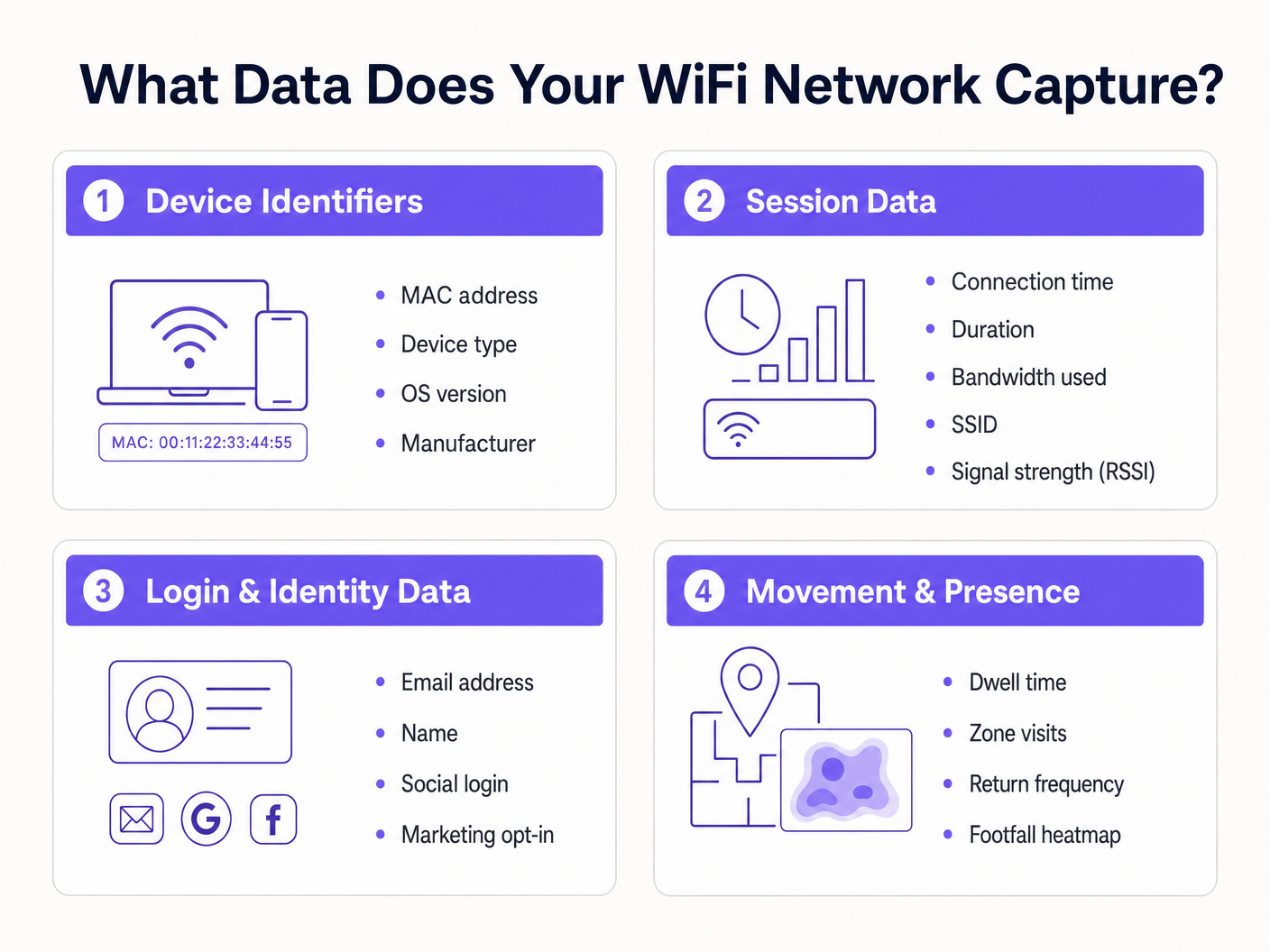
To architect a secure and valuable data collection strategy, you must understand the four distinct categories of data generated by a managed WiFi network. Conflating these categories leads to misconfigured consent mechanisms and unrealised business value.
1. Device Identifiers
Before a user even authenticates, any device with its WiFi radio enabled broadcasts probe requests to discover available networks. These probes contain critical hardware identifiers.
- MAC Address: The Media Access Control address is the unique hardware identifier burned into the device's Network Interface Card (NIC).
- Organisationally Unique Identifier (OUI): The first three octets of the MAC address identify the hardware manufacturer (e.g., Apple, Samsung, Intel).
- Protocol Capabilities: The probe request indicates supported standards (e.g., 802.11ac, Wi-Fi 6, Wi-Fi 6E), which is essential for network capacity planning.
The Impact of MAC Randomisation: Since iOS 14 and Android 10, mobile operating systems implement MAC address randomisation by default to prevent passive tracking. This means relying solely on unauthenticated probe requests for long-term analytics is no longer viable. The solution requires moving users to authenticated sessions.
2. Session Data
Once a device associates with an SSID and authenticates, the network controller or RADIUS server begins logging session telemetry. This is the foundation of network performance monitoring.
- Connection Metrics: Timestamp of association, session duration, and total bytes transferred (uplink/downlink).
- Infrastructure Data: The specific SSID connected to and the BSSID (the MAC address of the specific access point handling the client).
- Signal Metrics: Received Signal Strength Indicator (RSSI) and Signal-to-Noise Ratio (SNR), which dictate connection quality and enable location triangulation.
- Network Assignment: The DHCP-assigned IP address and VLAN tag.
This data is essential for throughput capacity planning and understanding per-user bandwidth consumption, ensuring your infrastructure can handle peak loads.
3. Login & Identity Data
This is where network infrastructure intersects with marketing and CRM. When a user accesses a Guest WiFi network through a captive portal, they provide first-party identity data in exchange for connectivity.
- Personal Identifiable Information (PII): Name, email address, phone number, or date of birth.
- Authentication Method: Whether the user registered via a custom form, SMS verification, or social OAuth (Google, Facebook, LinkedIn).
- Consent Records: Explicit opt-ins for marketing communications and acceptance of terms of service.
Capturing this data allows venues to build rich customer profiles. Purple's Guest WiFi platform acts as the identity provider, presenting a branded splash page, recording granular consent, and pushing the identity record directly into your CRM or marketing automation platform via webhooks or native APIs.
4. Movement & Presence Data
Movement data is derived analytics built upon session and device telemetry. By correlating RSSI readings from a single device across multiple access points, the network can triangulate the device's physical location.
- Dwell Time: How long a device remains in a specific physical zone.
- Visitor Flow: The path a user takes through a venue, highlighting bottlenecks or popular routes.
- Return Frequency: Identifying repeat visitors based on authenticated identity (bypassing MAC randomisation issues).
- Footfall Heatmaps: Visual representations of venue density over time.
For a deep dive into leveraging this data, refer to our WiFi Footfall Analytics: How to Measure and Act on Visitor Data guide. (For our Spanish-speaking operators, see Análisis de afluencia WiFi: Cómo medir y actuar sobre los datos de los visitantes ). This intelligence is crucial for Indoor Positioning System: UWB, BLE, & WiFi Guide deployments.
Implementation Guide: Building the Data Pipeline
Deploying a WiFi data collection architecture requires moving beyond simple connectivity to establish a secure, compliant data pipeline.
Step 1: Network Segmentation and Architecture
Your guest network must be logically separated from corporate and payment environments. Deploy the guest SSID on an isolated VLAN. Ensure firewall rules explicitly deny lateral movement from the guest subnet to any internal resources. This is a fundamental requirement for PCI DSS compliance.
Step 2: Captive Portal Configuration
The captive portal is the primary data acquisition interface.
- Frictionless Onboarding: Implement social OAuth and seamless authentication (such as Profile-based authentication or OpenRoaming) to reduce drop-off rates.
- Progressive Profiling: Do not ask for 10 data points on the first visit. Ask for an email address first, then request further details (like date of birth) on subsequent visits.
Step 3: Integration and Automation
Data sitting in a WiFi controller dashboard has limited value. Configure webhooks or native API integrations to push identity and session data in real-time to your CRM (e.g., Salesforce, HubSpot) and marketing automation platforms. This enables automated workflows, such as triggering a welcome email 10 minutes after a user logs in.
Best Practices & Compliance Framework
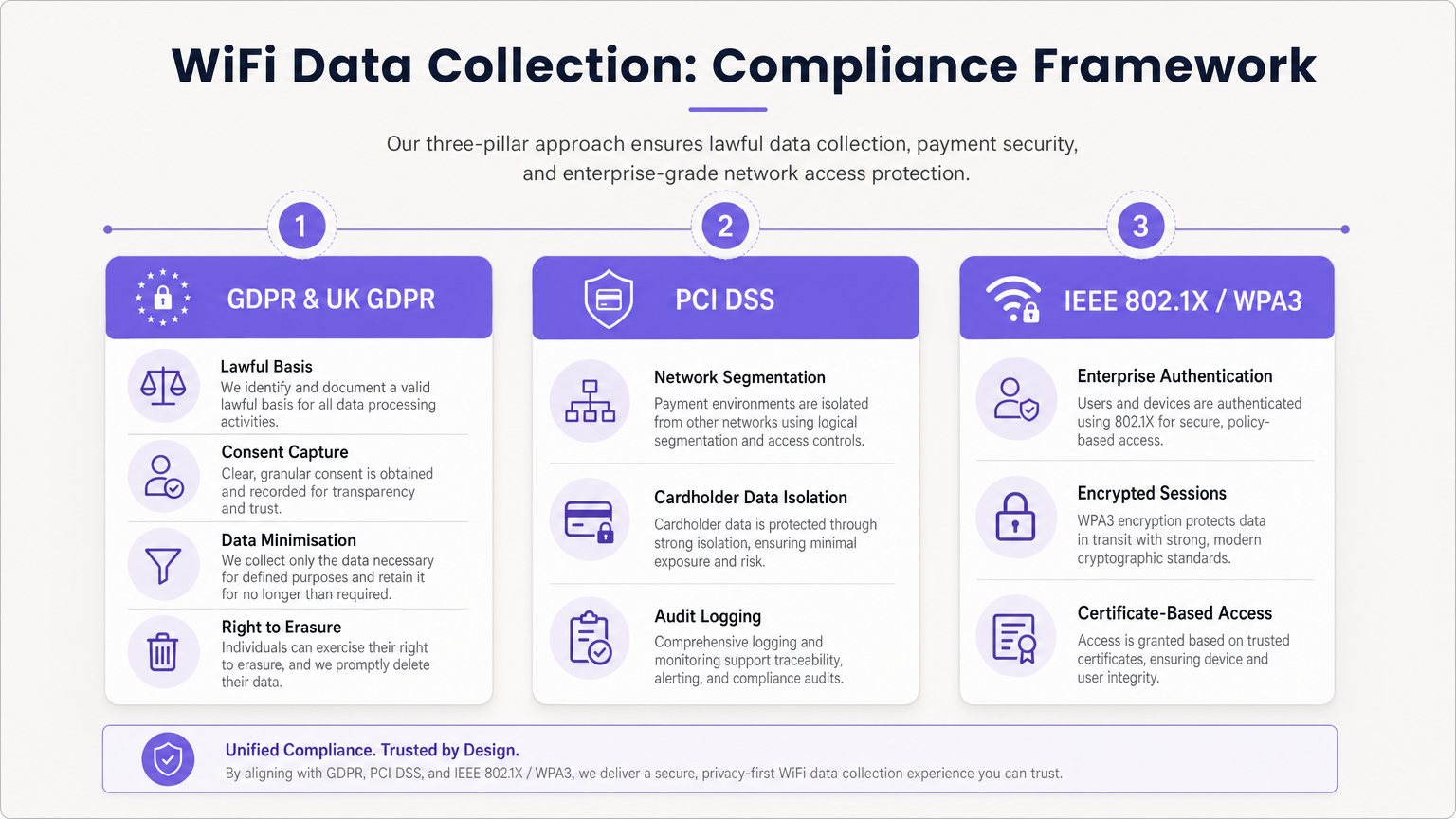
Data collection carries significant regulatory obligations. A compliant architecture is non-negotiable.
GDPR & UK GDPR Adherence
When capturing PII (including email addresses and persistent device identifiers), you must establish a lawful basis for processing.
- Unbundled Consent: The captive portal must present separate, explicit opt-in checkboxes for Terms of Service, Privacy Policy, and Marketing Communications. Pre-ticked boxes are illegal.
- Data Minimisation: Only collect data necessary for the defined purpose.
- Right to Erasure: Implement automated workflows to handle data subject access requests (DSARs) and deletion requests promptly.
PCI DSS Segmentation
If your venue processes credit cards, the guest WiFi network must not share logical infrastructure with the Cardholder Data Environment (CDE). Failure to isolate the guest network violates PCI DSS Requirements 1 and 6 and will result in audit failure.
Enterprise Security Standards
For internal or secure networks, implement IEEE 802.1X with WPA3 Enterprise for certificate-based authentication. For guest networks, transition to WPA3 Personal with Simultaneous Authentication of Equals (SAE) to protect against offline dictionary attacks and provide forward secrecy.
Troubleshooting & Risk Mitigation
The "Data Lake" Problem
Issue: Organisations capture terabytes of session and identity data but extract no business value. Mitigation: Define the commercial use cases before deployment. If you are collecting email addresses, you must have an active email marketing strategy. If you are tracking footfall, a specific operational team must own the WiFi Analytics dashboard.
MAC Randomisation Analytics Drop-off
Issue: Passive footfall analytics show artificially inflated visitor numbers due to devices rotating their MAC addresses. Mitigation: Shift the analytics strategy from passive probe tracking to authenticated session tracking. Incentivise users to log into the captive portal to establish a persistent identity record.
Stale Data Retention
Issue: Retaining personal data indefinitely violates GDPR storage limitation principles and increases breach impact. Mitigation: Implement automated data retention policies. A standard baseline is 12-24 months for marketing data (refreshed upon repeat visits) and 90 days for raw session logs.
ROI & Business Impact
A properly architected WiFi data collection strategy transforms a cost centre into a revenue driver.
- Marketing ROI: By capturing first-party data, venues reduce reliance on expensive third-party advertising. Email capture via WiFi often boasts a lower Cost Per Acquisition (CPA) than digital ads.
- Operational Efficiency: Movement data allows venues to optimise staffing levels based on real-time occupancy, reducing overhead during quiet periods and improving service during peaks.
- Tenant & Sponsor Value: In retail and stadium environments, footfall analytics and demographic data can be monetised by demonstrating value to tenants or selling targeted digital advertising space on the captive portal splash page. As discussed in our Wi Fi in Auto: The Complete 2026 Enterprise Guide and Internet of Things Architecture: A Complete Guide posts, connected infrastructure is the foundation of modern venue monetisation.
By leveraging Purple's comprehensive platform, enterprise operators can ensure their network not only provides seamless connectivity but acts as a secure, compliant, and highly profitable data acquisition engine.
Key Terms & Definitions
MAC Randomisation
A privacy feature in modern mobile OSs that generates a temporary, fake MAC address when scanning for networks, preventing persistent tracking.
Forces IT teams to rely on authenticated captive portal logins rather than passive probe requests for accurate visitor analytics.
BSSID (Basic Service Set Identifier)
The MAC address of the specific wireless access point radio that a client device is connected to.
Used in location analytics to determine exactly which access point in a venue a user is nearest to, enabling zone-based footfall tracking.
RSSI (Received Signal Strength Indicator)
A measurement of the power present in a received radio signal, typically expressed in negative decibels (-dBm).
The core metric used to triangulate a device's physical location within a venue; a signal closer to 0 indicates closer proximity to the AP.
Captive Portal
A web page that a user is forced to view and interact with before access is granted to a public network.
The primary mechanism for capturing first-party identity data and securing legal consent from network users.
IEEE 802.1X
An IEEE standard for port-based network access control, providing an authentication mechanism to devices wishing to attach to a LAN or WLAN.
The gold standard for enterprise network security, requiring unique credentials or certificates per user rather than a shared password.
VLAN (Virtual Local Area Network)
A logical subnetwork that groups a collection of devices on separate physical local area networks.
Essential for PCI DSS compliance to logically separate guest WiFi traffic from corporate or payment processing traffic on the same physical switches.
Data Minimisation
A GDPR principle stating that personal data collected must be adequate, relevant, and limited to what is necessary for the intended purpose.
Dictates that IT teams should not configure captive portals to ask for unnecessary information (e.g., home address) if the goal is simply email marketing.
OUI (Organisationally Unique Identifier)
The first 24 bits (three octets) of a MAC address, which uniquely identifies the vendor or manufacturer of the network adapter.
Used in network analytics dashboards to categorise the types of devices (e.g., Apple vs. Samsung) connecting to the network.
Case Studies
A 200-store retail chain is deploying a new guest WiFi network. They want to track repeat visitor frequency and trigger automated marketing emails. However, their current passive analytics show an impossibly high number of 'unique' visitors due to iOS/Android MAC randomisation. How should the network architect design the solution?
- Deploy a captive portal requiring user authentication (e.g., Email or Social OAuth) to access the internet.
- Configure the portal with GDPR-compliant, unbundled consent checkboxes for marketing communications.
- Integrate the WiFi platform's API with the retailer's CRM.
- When a user logs in, the platform links their authenticated identity (email) to their current session, bypassing the randomised MAC address.
- Configure the CRM to trigger a 'Welcome Back' email workflow when the API registers a new session for an existing identity.
A large conference centre wants to offer free guest WiFi but shares physical network switches with the venue's point-of-sale (POS) payment terminals. How must the IT manager configure the network to ensure PCI DSS compliance while collecting guest session data?
- Implement logical network segmentation using VLANs. Assign the guest WiFi SSID to VLAN 100 and the POS terminals to VLAN 200.
- Configure Access Control Lists (ACLs) and firewall rules at the core router/firewall to explicitly deny all traffic routing between VLAN 100 and VLAN 200.
- Route guest WiFi traffic directly to the internet gateway, bypassing internal corporate subnets entirely.
- Enable client isolation on the guest SSID to prevent guest devices from communicating with each other.
- Log all firewall drops for audit purposes.
Scenario Analysis
Q1. A marketing director wants to use the guest WiFi network to track exactly how long individual, unnamed customers spend in the 'Shoes' department versus the 'Coats' department to optimise store layout. They plan to use MAC address tracking from probe requests. As the IT Manager, how do you advise them?
💡 Hint:Consider recent changes to mobile operating systems regarding privacy and MAC addresses.
Show Recommended Approach
I would advise the marketing director that relying on unauthenticated MAC address tracking via probe requests is no longer accurate due to MAC randomisation implemented in modern iOS and Android devices. Devices will appear as multiple unique visitors over time. Instead, we should deploy a captive portal to encourage authenticated sessions. Once a user authenticates, we can track their persistent identity and use RSSI triangulation from authenticated session data to accurately measure dwell time in specific zones.
Q2. During a network audit, the QSA notes that the guest WiFi VLAN can route traffic to the VLAN hosting the venue's Point of Sale (POS) terminals. The venue argues that the POS terminals have host-based firewalls enabled. What is the required remediation?
💡 Hint:Review PCI DSS requirements regarding network segmentation and shared infrastructure.
Show Recommended Approach
The required remediation is to implement strict network segmentation at the core router or firewall level. Relying solely on host-based firewalls on the POS terminals is insufficient for PCI DSS compliance. Access Control Lists (ACLs) must be configured to explicitly deny all routing between the guest WiFi VLAN and the Cardholder Data Environment (CDE) VLAN. The guest traffic must be routed directly to the internet gateway.
Q3. Your organisation is updating its captive portal splash page. The legal team suggests a single checkbox that says 'I agree to the Terms of Service, Privacy Policy, and to receive marketing emails' to reduce onboarding friction. Is this approach recommended?
💡 Hint:Consider GDPR requirements for valid consent.
Show Recommended Approach
No, this approach is highly discouraged and violates GDPR requirements for granular consent. Consent for marketing communications must be unbundled from the acceptance of general Terms of Service. If a user is forced to accept marketing to access the WiFi, the consent is not considered 'freely given'. The portal must present separate, unticked checkboxes for TOS/Privacy Policy and Marketing Opt-in.




