

WiFi-Datenerfassung: Welche Daten Ihr Netzwerk erfasst und wie Sie diese nutzen können
Dieser technische Leitfaden beschreibt die vier primären Datenkategorien, die von verwalteten Enterprise WiFi-Netzwerken erfasst werden. Er bietet IT-Führungskräften und Betreibern von Veranstaltungsorten praktische Bereitstellungsarchitekturen, Compliance-Frameworks und Strategien, um Rohdaten der Netzwerktelemetrie in messbaren Geschäftswert umzuwandeln.
🎧 Diesen Leitfaden anhören
Transkript anzeigen

Zusammenfassung für die Geschäftsleitung
Für IT-Teams von Unternehmen und Betreiber von Veranstaltungsorten ist das Gast-WiFi-Netzwerk nicht länger nur ein Konnektivitätsdienst – es ist eine entscheidende Datenerfassungsebene. Viele Organisationen setzen jedoch teure Infrastruktur ein, ohne eine klare Strategie zu haben, welche Daten gesammelt, wie sie gesichert oder wie kommerzieller Wert daraus gewonnen werden sollen.
Dieser Leitfaden bietet eine umfassende technische Referenz zur WiFi-Datenerfassung. Wir schlüsseln die genaue Telemetrie auf, die Ihr Netzwerk erfasst, von passiven Gerätekennungen über authentifizierte Identitätsdatensätze bis hin zu räumlichen Bewegungsmustern. Noch wichtiger ist, dass wir die Compliance-Frameworks – einschließlich GDPR, PCI DSS und IEEE 802.1X – darlegen, die für die rechtmäßige Verwaltung dieser Daten erforderlich sind. Durch die Implementierung einer strukturierten Datenpipeline können Organisationen in den Bereichen Einzelhandel , Gastgewerbe , Gesundheitswesen und Transport ihre Netzwerkinfrastruktur von einem Kostenfaktor in einen umsatzgenerierenden Vermögenswert verwandeln, der Loyalität, betriebliche Effizienz und messbaren ROI fördert.
Technischer Deep-Dive: Welche Daten Ihr Netzwerk erfasst
Um eine sichere und wertvolle Datenerfassungsstrategie zu entwickeln, müssen Sie die vier verschiedenen Datenkategorien verstehen, die von einem verwalteten WiFi-Netzwerk generiert werden. Das Vermischen dieser Kategorien führt zu falsch konfigurierten Zustimmungsmechanismen und ungenutztem Geschäftswert.
1. Gerätekennungen
Bevor sich ein Benutzer überhaupt authentifiziert, sendet jedes Gerät mit aktiviertem WiFi-Funk Probeanfragen, um verfügbare Netzwerke zu entdecken. Diese Proben enthalten kritische Hardware-Identifikatoren.
- MAC Address: Die Media Access Control-Adresse ist die eindeutige Hardware-Kennung, die in die Netzwerkschnittstellenkarte (NIC) des Geräts eingebrannt ist.
- Organisationally Unique Identifier (OUI): Die ersten drei Oktette der MAC Address identifizieren den Hardwarehersteller (z.B. Apple, Samsung, Intel).
- Protokollfunktionen: Die Probeanfrage zeigt unterstützte Standards an (z.B. 802.11ac, Wi-Fi 6, Wi-Fi 6E), was für die Netzwerk-Kapazitätsplanung unerlässlich ist.
Die Auswirkungen der MAC-Randomisierung: Seit iOS 14 und Android 10 implementieren mobile Betriebssysteme standardmäßig die MAC Address-Randomisierung, um passives Tracking zu verhindern. Dies bedeutet, dass das alleinige Vertrauen auf nicht authentifizierte Probeanfragen für langfristige Analysen nicht mehr praktikabel ist. Die Lösung erfordert die Umstellung der Benutzer auf authentifizierte Sitzungen.
2. Sitzungsdaten
Sobald sich ein Gerät mit einer SSID verbindet und authentifiziert, beginnt der Netzwerk-Controller oder RADIUS-Server mit der Protokollierung der Sitzungstelemetrie. Dies ist die Grundlage für die Überwachung der Netzwerkleistung.
- Verbindungsmetriken: Zeitstempel der Verbindung, Sitzungsdauer und übertragene Gesamtbytes (Uplink/Downlink).
- Infrastrukturdaten: Die spezifische SSID, mit der verbunden wurde, und die BSSID (die MAC Address des spezifischen Access Points, der den Client bedient).
- Signalmetriken: Received Signal Strength Indicator (RSSI) und Signal-Rausch-Verhältnis (SNR), die die Verbindungsqualität bestimmen und die Standorttriangulation ermöglichen.
- Netzwerkzuweisung: Die DHCP-zugewiesene IP-Adresse und der VLAN-Tag.
Diese Daten sind unerlässlich für die Planung der Durchsatzkapazität und das Verständnis des Bandbreitenverbrauchs pro Benutzer, um sicherzustellen, dass Ihre Infrastruktur Spitzenlasten bewältigen kann.
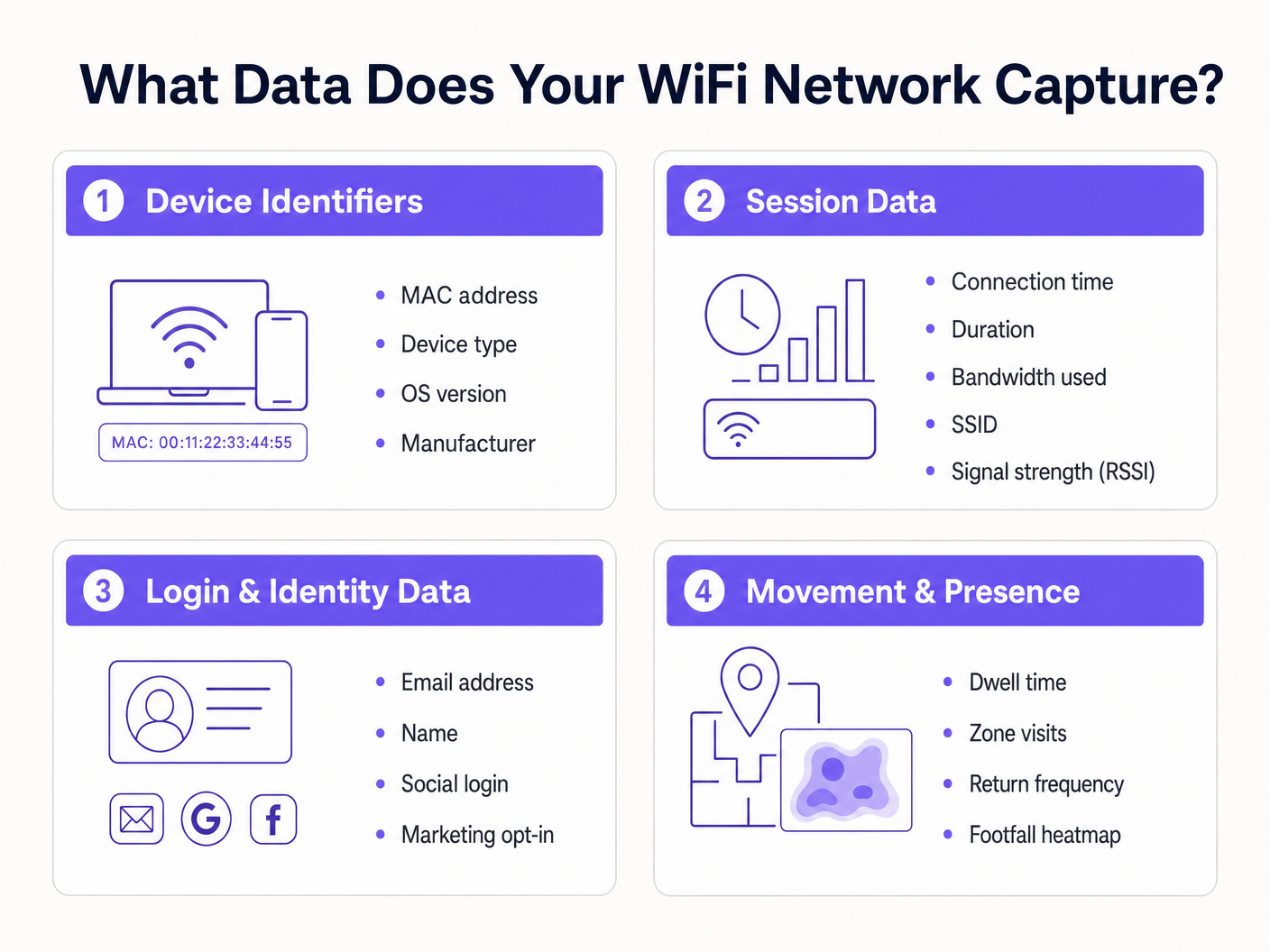
3. Login- & Identitätsdaten
Hier überschneidet sich die Netzwerkinfrastruktur mit Marketing und CRM. Wenn ein Benutzer über ein Captive Portal auf ein Gast-WiFi -Netzwerk zugreift, stellt er Erstanbieter-Identitätsdaten im Austausch für Konnektivität bereit.
- Persönlich identifizierbare Informationen (PII): Name, E-Mail-Adresse, Telefonnummer oder Geburtsdatum.
- Authentifizierungsmethode: Ob sich der Benutzer über ein benutzerdefiniertes Formular, SMS-Verifizierung oder soziale OAuth (Google, Facebook, LinkedIn) registriert hat.
- Einwilligungsnachweise: Explizite Opt-ins für Marketingkommunikation und die Annahme der Nutzungsbedingungen.
Die Erfassung dieser Daten ermöglicht es Veranstaltungsorten, umfassende Kundenprofile zu erstellen. Die Gast-WiFi -Plattform von Purple fungiert als Identitätsanbieter, präsentiert eine gebrandete Splash-Seite, zeichnet detaillierte Einwilligungen auf und überträgt den Identitätsdatensatz direkt über Webhooks oder native APIs in Ihr CRM oder Ihre Marketing-Automatisierungsplattform.
4. Bewegungs- & Präsenzdaten
Bewegungsdaten sind abgeleitete Analysen, die auf Sitzungs- und Geräte-Telemetriedaten basieren. Durch die Korrelation von RSSI-Messwerten eines einzelnen Geräts über mehrere Access Points hinweg kann das Netzwerk den physischen Standort des Geräts triangulieren.
- Verweildauer: Wie lange ein Gerät in einer bestimmten physischen Zone verbleibt.
- Besucherfluss: Der Weg, den ein Benutzer durch einen Veranstaltungsort nimmt, wobei Engpässe oder beliebte Routen hervorgehoben werden.
- Wiederkehrhäufigkeit: Identifizierung wiederkehrender Besucher basierend auf authentifizierter Identität (Umgehung von MAC-Randomisierungs-Problemen).
- Besucher-Heatmaps: Visuelle Darstellungen der Veranstaltungsortdichte im Zeitverlauf.
Für einen detaillierten Einblick in die Nutzung dieser Daten verweisen wir auf unseren Leitfaden WiFi Footfall Analytics: So messen und handeln Sie auf Basis von Besucherdaten . (Für unsere spanischsprachigen Betreiber siehe Análisis de afluencia WiFi: Cómo medir y actuar sobre los datos de los visitantes ). Diese Informationen sind entscheidend für Indoor Positioning System: UWB, BLE, & WiFi Guide -Implementierungen.
Implementierungsleitfaden: Aufbau der Datenpipeline
Die Bereitstellung einer WiFi-Datenerfassungsction Architektur erfordert, über einfache Konnektivität hinauszugehen, um eine sichere, konforme Datenpipeline zu etablieren.
Schritt 1: Netzwerksegmentierung und -architektur
Ihr Gastnetzwerk muss logisch von Unternehmens- und Zahlungsumgebungen getrennt sein. Stellen Sie die Gast-SSID in einem isolierten VLAN bereit. Stellen Sie sicher, dass Firewall-Regeln die laterale Bewegung vom Gast-Subnetz zu internen Ressourcen explizit unterbinden. Dies ist eine grundlegende Anforderung für die PCI DSS-Konformität.
Schritt 2: Captive Portal-Konfiguration
Das Captive Portal ist die primäre Schnittstelle zur Datenerfassung.
- Reibungsloses Onboarding: Implementieren Sie Social OAuth und nahtlose Authentifizierung (wie profilbasierte Authentifizierung oder OpenRoaming), um die Abbruchraten zu reduzieren.
- Progressives Profiling: Fragen Sie beim ersten Besuch nicht nach 10 Datenpunkten. Fragen Sie zuerst nach einer E-Mail-Adresse und fordern Sie bei späteren Besuchen weitere Details (wie das Geburtsdatum) an.
Schritt 3: Integration und Automatisierung
Daten, die in einem WiFi-Controller-Dashboard liegen, haben einen begrenzten Wert. Konfigurieren Sie Webhooks oder native API-Integrationen, um Identitäts- und Sitzungsdaten in Echtzeit an Ihr CRM (z. B. Salesforce, HubSpot) und Ihre Marketing-Automatisierungsplattformen zu übertragen. Dies ermöglicht automatisierte Workflows, wie das Auslösen einer Willkommens-E-Mail 10 Minuten nachdem sich ein Benutzer angemeldet hat.
Best Practices & Compliance-Framework
Die Datenerfassung ist mit erheblichen regulatorischen Verpflichtungen verbunden. Eine konforme Architektur ist nicht verhandelbar.
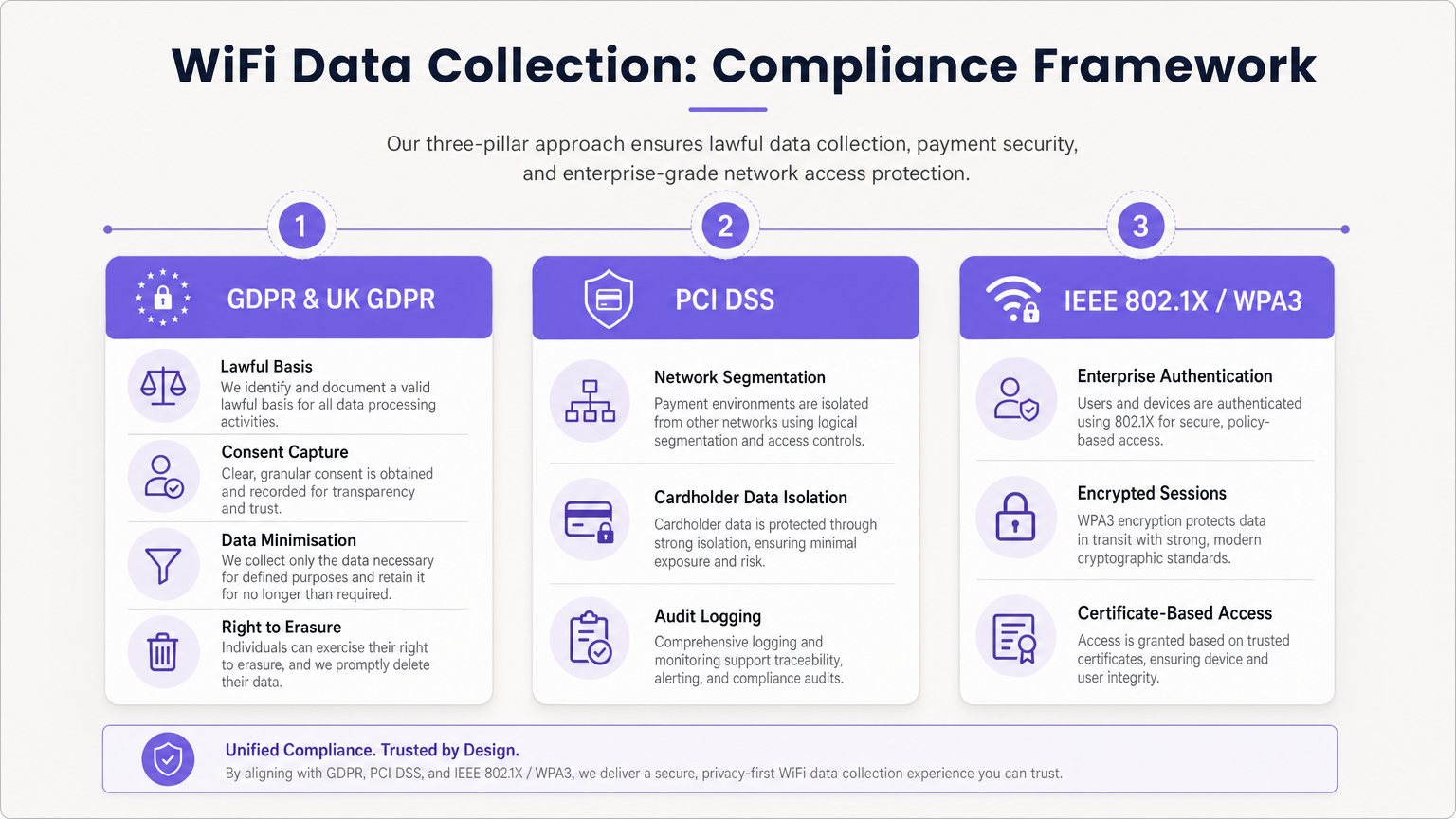
Einhaltung von GDPR & UK GDPR
Bei der Erfassung von PII (einschließlich E-Mail-Adressen und persistenten Gerätekennungen) müssen Sie eine rechtmäßige Grundlage für die Verarbeitung schaffen.
- Entbündelte Einwilligung: Das Captive Portal muss separate, explizite Opt-in-Kontrollkästchen für Nutzungsbedingungen, Datenschutzrichtlinien und Marketingkommunikation präsentieren. Vorab angekreuzte Kästchen sind illegal.
- Datenminimierung: Sammeln Sie nur Daten, die für den definierten Zweck erforderlich sind.
- Recht auf Löschung: Implementieren Sie automatisierte Workflows, um Anfragen von betroffenen Personen (DSARs) und Löschungsanfragen zeitnah zu bearbeiten.
PCI DSS-Segmentierung
Wenn Ihr Veranstaltungsort Kreditkarten verarbeitet, darf das Gast-WiFi-Netzwerk keine logische Infrastruktur mit der Cardholder Data Environment (CDE) teilen. Die Nichteinhaltung der Isolierung des Gastnetzwerks verstößt gegen die PCI DSS-Anforderungen 1 und 6 und führt zu einem Audit-Fehler.
Unternehmenssicherheitsstandards
Für interne oder sichere Netzwerke implementieren Sie IEEE 802.1X mit WPA3 Enterprise für die zertifikatbasierte Authentifizierung. Für Gastnetzwerke wechseln Sie zu WPA3 Personal mit Simultaneous Authentication of Equals (SAE), um sich vor Offline-Wörterbuchangriffen zu schützen und Forward Secrecy zu gewährleisten.
Fehlerbehebung & Risikominderung
Das „Data Lake“-Problem
Problem: Organisationen erfassen Terabytes an Sitzungs- und Identitätsdaten, ziehen aber keinen Geschäftswert daraus. Abhilfe: Definieren Sie die kommerziellen Anwendungsfälle vor der Bereitstellung. Wenn Sie E-Mail-Adressen sammeln, müssen Sie eine aktive E-Mail-Marketingstrategie haben. Wenn Sie die Besucherfrequenz verfolgen, muss ein spezifisches operatives Team das WiFi Analytics -Dashboard besitzen.
MAC-Randomisierungs-Analyse-Rückgang
Problem: Passive Besucherfrequenzanalysen zeigen künstlich erhöhte Besucherzahlen, da Geräte ihre MAC-Adressen rotieren. Abhilfe: Verlagern Sie die Analysestrategie von passivem Probe-Tracking auf authentifiziertes Sitzungs-Tracking. Motivieren Sie Benutzer, sich im Captive Portal anzumelden, um einen persistenten Identitätsdatensatz zu erstellen.
Veraltete Datenaufbewahrung
Problem: Die unbegrenzte Aufbewahrung personenbezogener Daten verstößt gegen die GDPR-Grundsätze der Speicherbegrenzung und erhöht die Auswirkungen von Datenschutzverletzungen. Abhilfe: Implementieren Sie automatisierte Datenaufbewahrungsrichtlinien. Ein Standard-Baselinewert sind 12-24 Monate für Marketingdaten (aktualisiert bei wiederholten Besuchen) und 90 Tage für Roh-Sitzungsprotokolle.
ROI & Geschäftsauswirkungen
Eine richtig konzipierte WiFi-Datenerfassungsstrategie verwandelt ein Kosten-Center in einen Umsatztreiber.
- Marketing-ROI: Durch die Erfassung von Erstanbieterdaten reduzieren Veranstaltungsorte die Abhängigkeit von teurer Drittanbieterwerbung. Die E-Mail-Erfassung über WiFi weist oft einen niedrigeren Cost Per Acquisition (CPA) auf als digitale Anzeigen.
- Operative Effizienz: Bewegungsdaten ermöglichen es Veranstaltungsorten, den Personalbestand basierend auf der Echtzeit-Auslastung zu optimieren, wodurch der Overhead in ruhigen Zeiten reduziert und der Service in Spitzenzeiten verbessert wird.
- Mieter- & Sponsorenwert: In Einzelhandels- und Stadionumgebungen können Besucherfrequenzanalysen und demografische Daten monetarisiert werden, indem der Wert für Mieter demonstriert oder gezielte digitale Werbeflächen auf der Captive Portal Splash Page verkauft werden. Wie in unseren Beiträgen Wi Fi in Auto: Der vollständige Unternehmensleitfaden 2026 und Internet of Things Architecture: Ein vollständiger Leitfaden erörtert, ist die vernetzte Infrastruktur die Grundlage der modernen Veranstaltungsort-Monetarisierung.
Durch die Nutzung der umfassenden Plattform von Purple können Unternehmensbetreiber sicherstellen, dass ihr Netzwerk nicht nur nahtlose Konnektivität bietet, sondern auch als sichere, konforme und hochprofitable Datenerfassungsmaschine fungiert.
Schlüsselbegriffe & Definitionen
MAC Randomisation
A privacy feature in modern mobile OSs that generates a temporary, fake MAC address when scanning for networks, preventing persistent tracking.
Forces IT teams to rely on authenticated captive portal logins rather than passive probe requests for accurate visitor analytics.
BSSID (Basic Service Set Identifier)
The MAC address of the specific wireless access point radio that a client device is connected to.
Used in location analytics to determine exactly which access point in a venue a user is nearest to, enabling zone-based footfall tracking.
RSSI (Received Signal Strength Indicator)
A measurement of the power present in a received radio signal, typically expressed in negative decibels (-dBm).
The core metric used to triangulate a device's physical location within a venue; a signal closer to 0 indicates closer proximity to the AP.
Captive Portal
A web page that a user is forced to view and interact with before access is granted to a public network.
The primary mechanism for capturing first-party identity data and securing legal consent from network users.
IEEE 802.1X
An IEEE standard for port-based network access control, providing an authentication mechanism to devices wishing to attach to a LAN or WLAN.
The gold standard for enterprise network security, requiring unique credentials or certificates per user rather than a shared password.
VLAN (Virtual Local Area Network)
A logical subnetwork that groups a collection of devices on separate physical local area networks.
Essential for PCI DSS compliance to logically separate guest WiFi traffic from corporate or payment processing traffic on the same physical switches.
Data Minimisation
A GDPR principle stating that personal data collected must be adequate, relevant, and limited to what is necessary for the intended purpose.
Dictates that IT teams should not configure captive portals to ask for unnecessary information (e.g., home address) if the goal is simply email marketing.
OUI (Organisationally Unique Identifier)
The first 24 bits (three octets) of a MAC address, which uniquely identifies the vendor or manufacturer of the network adapter.
Used in network analytics dashboards to categorise the types of devices (e.g., Apple vs. Samsung) connecting to the network.
Fallstudien
A 200-store retail chain is deploying a new guest WiFi network. They want to track repeat visitor frequency and trigger automated marketing emails. However, their current passive analytics show an impossibly high number of 'unique' visitors due to iOS/Android MAC randomisation. How should the network architect design the solution?
- Deploy a captive portal requiring user authentication (e.g., Email or Social OAuth) to access the internet.
- Configure the portal with GDPR-compliant, unbundled consent checkboxes for marketing communications.
- Integrate the WiFi platform's API with the retailer's CRM.
- When a user logs in, the platform links their authenticated identity (email) to their current session, bypassing the randomised MAC address.
- Configure the CRM to trigger a 'Welcome Back' email workflow when the API registers a new session for an existing identity.
A large conference centre wants to offer free guest WiFi but shares physical network switches with the venue's point-of-sale (POS) payment terminals. How must the IT manager configure the network to ensure PCI DSS compliance while collecting guest session data?
- Implement logical network segmentation using VLANs. Assign the guest WiFi SSID to VLAN 100 and the POS terminals to VLAN 200.
- Configure Access Control Lists (ACLs) and firewall rules at the core router/firewall to explicitly deny all traffic routing between VLAN 100 and VLAN 200.
- Route guest WiFi traffic directly to the internet gateway, bypassing internal corporate subnets entirely.
- Enable client isolation on the guest SSID to prevent guest devices from communicating with each other.
- Log all firewall drops for audit purposes.
Szenarioanalyse
Q1. A marketing director wants to use the guest WiFi network to track exactly how long individual, unnamed customers spend in the 'Shoes' department versus the 'Coats' department to optimise store layout. They plan to use MAC address tracking from probe requests. As the IT Manager, how do you advise them?
💡 Hinweis:Consider recent changes to mobile operating systems regarding privacy and MAC addresses.
Empfohlenen Ansatz anzeigen
I would advise the marketing director that relying on unauthenticated MAC address tracking via probe requests is no longer accurate due to MAC randomisation implemented in modern iOS and Android devices. Devices will appear as multiple unique visitors over time. Instead, we should deploy a captive portal to encourage authenticated sessions. Once a user authenticates, we can track their persistent identity and use RSSI triangulation from authenticated session data to accurately measure dwell time in specific zones.
Q2. During a network audit, the QSA notes that the guest WiFi VLAN can route traffic to the VLAN hosting the venue's Point of Sale (POS) terminals. The venue argues that the POS terminals have host-based firewalls enabled. What is the required remediation?
💡 Hinweis:Review PCI DSS requirements regarding network segmentation and shared infrastructure.
Empfohlenen Ansatz anzeigen
The required remediation is to implement strict network segmentation at the core router or firewall level. Relying solely on host-based firewalls on the POS terminals is insufficient for PCI DSS compliance. Access Control Lists (ACLs) must be configured to explicitly deny all routing between the guest WiFi VLAN and the Cardholder Data Environment (CDE) VLAN. The guest traffic must be routed directly to the internet gateway.
Q3. Your organisation is updating its captive portal splash page. The legal team suggests a single checkbox that says 'I agree to the Terms of Service, Privacy Policy, and to receive marketing emails' to reduce onboarding friction. Is this approach recommended?
💡 Hinweis:Consider GDPR requirements for valid consent.
Empfohlenen Ansatz anzeigen
No, this approach is highly discouraged and violates GDPR requirements for granular consent. Consent for marketing communications must be unbundled from the acceptance of general Terms of Service. If a user is forced to accept marketing to access the WiFi, the consent is not considered 'freely given'. The portal must present separate, unticked checkboxes for TOS/Privacy Policy and Marketing Opt-in.




