

Coleta de Dados WiFi: Quais Dados Sua Rede Captura e Como Usá-los
Este guia de referência técnica detalha as quatro categorias principais de dados capturados por redes WiFi empresariais gerenciadas. Ele fornece a líderes de TI e operadores de locais arquiteturas de implantação práticas, estruturas de conformidade e estratégias para converter telemetria de rede bruta em valor de negócio mensurável.
🎧 Ouça este Guia
Ver Transcrição

Resumo Executivo
Para equipes de TI empresariais e operadores de locais, a rede WiFi de convidados não é mais apenas uma utilidade de conectividade — é uma camada crítica de aquisição de dados. No entanto, muitas organizações implementam infraestruturas caras sem uma estratégia clara sobre quais dados coletar, como protegê-los ou como extrair valor comercial deles.
Este guia fornece uma referência técnica definitiva sobre a coleta de dados WiFi. Detalhamos a telemetria exata que sua rede captura, desde identificadores de dispositivos passivos até registros de identidade autenticada e padrões de movimento espacial. Mais importante, descrevemos as estruturas de conformidade — incluindo GDPR, PCI DSS e IEEE 802.1X — necessárias para gerenciar esses dados legalmente. Ao implementar um pipeline de dados estruturado, organizações em Varejo , Hotelaria , Saúde e Transporte podem transformar sua infraestrutura de rede de um centro de custo em um ativo gerador de receita que impulsiona a lealdade, a eficiência operacional e um ROI mensurável.
Análise Técnica Aprofundada: Quais Dados Sua Rede Captura
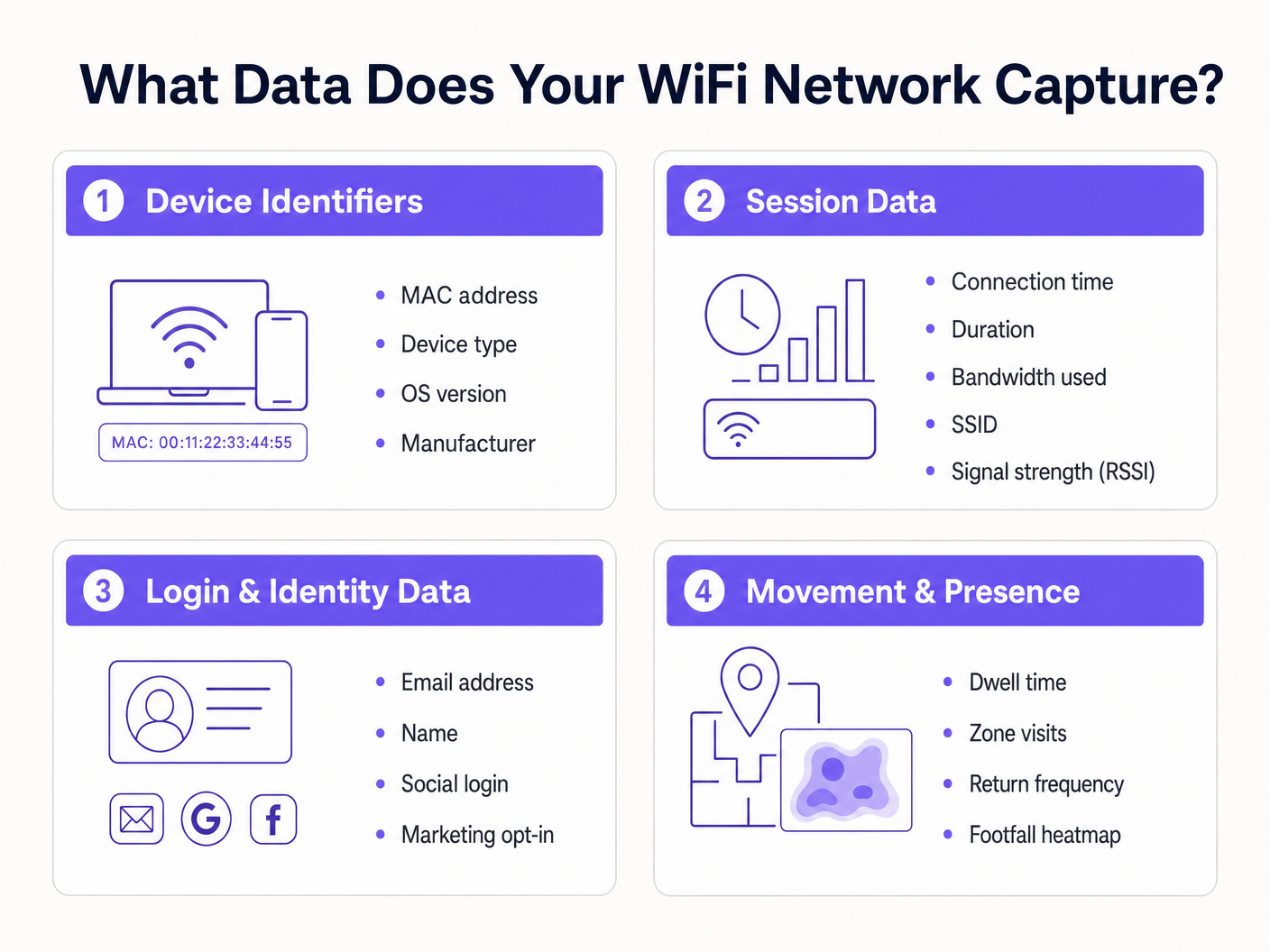
Para arquitetar uma estratégia de coleta de dados segura e valiosa, você deve entender as quatro categorias distintas de dados gerados por uma rede WiFi gerenciada. Confundir essas categorias leva a mecanismos de consentimento mal configurados e valor de negócio não realizado.
1. Identificadores de Dispositivo
Antes mesmo de um usuário se autenticar, qualquer dispositivo com seu rádio WiFi ativado transmite solicitações de sondagem para descobrir redes disponíveis. Essas sondagens contêm identificadores de hardware críticos.
- Endereço MAC: O endereço Media Access Control é o identificador de hardware exclusivo gravado na Placa de Interface de Rede (NIC) do dispositivo.
- Identificador Único Organizacional (OUI): Os três primeiros octetos do endereço MAC identificam o fabricante do hardware (por exemplo, Apple, Samsung, Intel).
- Capacidades de Protocolo: A solicitação de sondagem indica os padrões suportados (por exemplo, 802.11ac, Wi-Fi 6, Wi-Fi 6E), o que é essencial para o planejamento da capacidade da rede.
O Impacto da Randomização de MAC: Desde o iOS 14 e Android 10, os sistemas operacionais móveis implementam a randomização de endereço MAC por padrão para evitar o rastreamento passivo. Isso significa que depender apenas de solicitações de sondagem não autenticadas para análises de longo prazo não é mais viável. A solução exige mover os usuários para sessões autenticadas.
2. Dados de Sessão
Uma vez que um dispositivo se associa a um SSID e se autentica, o controlador de rede ou servidor RADIUS começa a registrar a telemetria da sessão. Esta é a base do monitoramento de desempenho da rede.
- Métricas de Conexão: Carimbo de data/hora da associação, duração da sessão e total de bytes transferidos (uplink/downlink).
- Dados de Infraestrutura: O SSID específico ao qual está conectado e o BSSID (o endereço MAC do ponto de acesso específico que atende o cliente).
- Métricas de Sinal: Indicador de Força do Sinal Recebido (RSSI) e Relação Sinal-Ruído (SNR), que ditam a qualidade da conexão e permitem a triangulação de localização.
- Atribuição de Rede: O endereço IP atribuído por DHCP e a tag VLAN.
Esses dados são essenciais para o planejamento da capacidade de throughput e para entender o consumo de largura de banda por usuário, garantindo que sua infraestrutura possa lidar com cargas de pico.
3. Dados de Login e Identidade
É aqui que a infraestrutura de rede se cruza com marketing e CRM. Quando um usuário acessa uma rede Guest WiFi através de um Captive Portal, ele fornece dados de identidade primários em troca de conectividade.
- Informações de Identificação Pessoal (PII): Nome, endereço de e-mail, número de telefone ou data de nascimento.
- Método de Autenticação: Se o usuário se registrou via formulário personalizado, verificação por SMS ou OAuth social (Google, Facebook, LinkedIn).
- Registros de Consentimento: Opt-ins explícitos para comunicações de marketing e aceitação dos termos de serviço.
A captura desses dados permite que os locais construam perfis de clientes ricos. A plataforma Guest WiFi da Purple atua como provedor de identidade, apresentando uma página de splash personalizada, registrando consentimento granular e enviando o registro de identidade diretamente para seu CRM ou plataforma de automação de marketing via webhooks ou APIs nativas.
4. Dados de Movimento e Presença
Os dados de movimento são análises derivadas construídas sobre telemetria de sessão e dispositivo. Ao correlacionar leituras de RSSI de um único dispositivo em vários pontos de acesso, a rede pode triangular a localização física do dispositivo.
- Tempo de Permanência: Quanto tempo um dispositivo permanece em uma zona física específica.
- Fluxo de Visitantes: O caminho que um usuário percorre em um local, destacando gargalos ou rotas populares.
- Frequência de Retorno: Identificação de visitantes recorrentes com base na identidade autenticada (ignorando problemas de randomização de MAC).
- Mapas de Calor de Fluxo de Pessoas: Representações visuais da densidade do local ao longo do tempo.
Para uma análise aprofundada sobre como alavancar esses dados, consulte nosso guia WiFi Footfall Analytics: Como Medir e Agir sobre os Dados dos Visitantes . (Para nossos operadores de língua espanhola, veja Análisis de afluencia WiFi: Cómo medir y actuar sobre los datos de los visitantes ). Esta inteligência é crucial para implantações de Sistema de Posicionamento Interno: UWB, BLE, & WiFi Guide .
Guia de Implementação: Construindo o Pipeline de Dados
Implantando uma coleta de dados WiFitura de arquitetura exige ir além da conectividade simples para estabelecer um pipeline de dados seguro e em conformidade.
Passo 1: Segmentação e Arquitetura de Rede
Sua rede de convidados deve ser logicamente separada dos ambientes corporativos e de pagamento. Implante o SSID de convidados em uma VLAN isolada. Garanta que as regras de firewall neguem explicitamente o movimento lateral da sub-rede de convidados para quaisquer recursos internos. Este é um requisito fundamental para a conformidade com o PCI DSS.
Passo 2: Configuração do Captive Portal
O Captive Portal é a interface principal de aquisição de dados.
- Onboarding Sem Atrito: Implemente OAuth social e autenticação contínua (como autenticação baseada em perfil ou OpenRoaming) para reduzir as taxas de abandono.
- Perfil Progressivo: Não solicite 10 pontos de dados na primeira visita. Peça um endereço de e-mail primeiro e, em seguida, solicite mais detalhes (como data de nascimento) em visitas subsequentes.
Passo 3: Integração e Automação
Dados em um painel de controle de WiFi têm valor limitado. Configure webhooks ou integrações de API nativas para enviar dados de identidade e sessão em tempo real para seu CRM (por exemplo, Salesforce, HubSpot) e plataformas de automação de marketing. Isso permite fluxos de trabalho automatizados, como o envio de um e-mail de boas-vindas 10 minutos após o login de um usuário.
Melhores Práticas e Estrutura de Conformidade
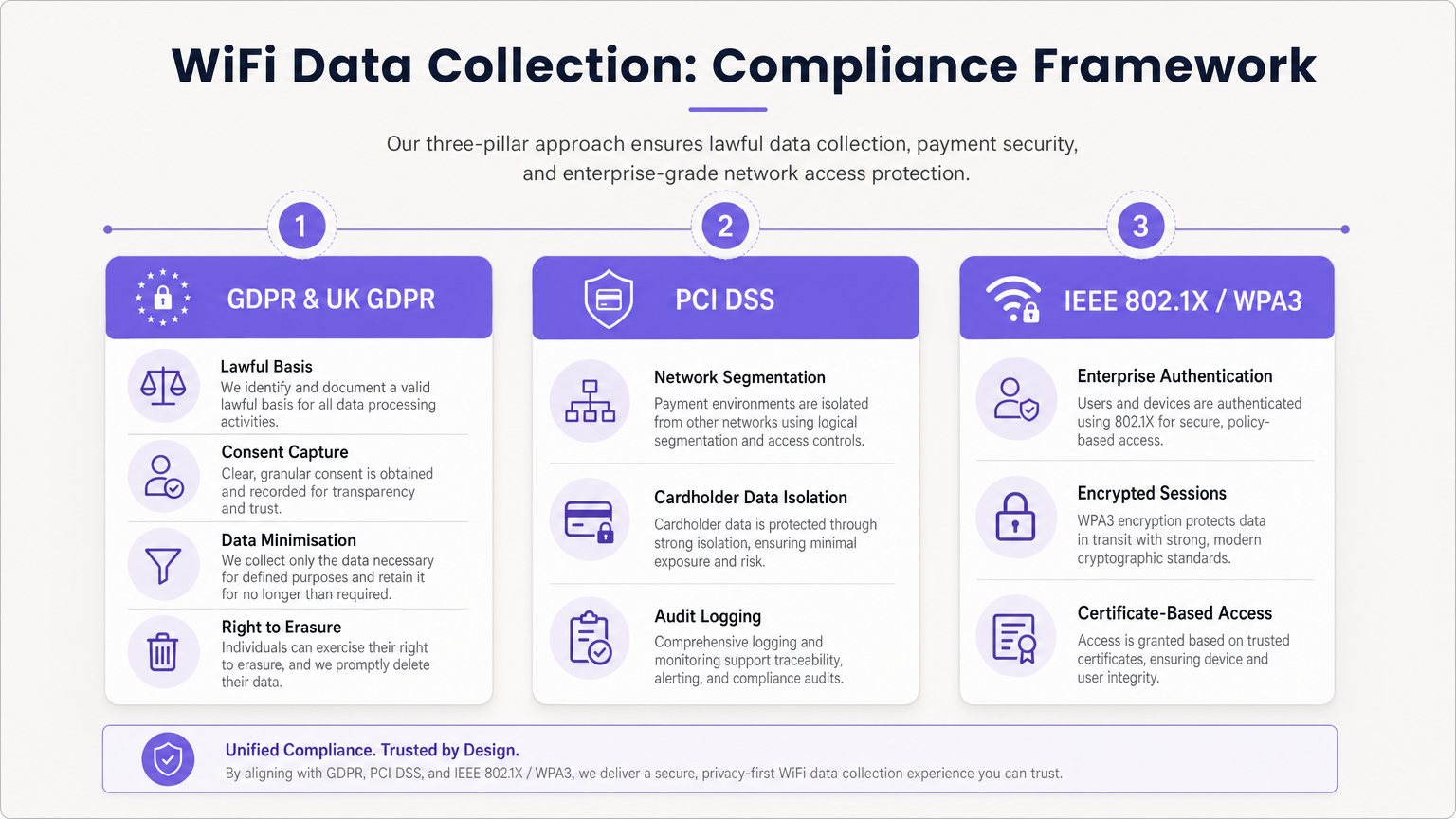
A coleta de dados acarreta obrigações regulatórias significativas. Uma arquitetura em conformidade é inegociável.
Conformidade com GDPR e UK GDPR
Ao capturar PII (incluindo endereços de e-mail e identificadores de dispositivo persistentes), você deve estabelecer uma base legal para o processamento.
- Consentimento Desagregado: O Captive Portal deve apresentar caixas de seleção de opt-in separadas e explícitas para Termos de Serviço, Política de Privacidade e Comunicações de Marketing. Caixas pré-selecionadas são ilegais.
- Minimização de Dados: Colete apenas os dados necessários para a finalidade definida.
- Direito ao Esquecimento: Implemente fluxos de trabalho automatizados para lidar prontamente com solicitações de acesso de titulares de dados (DSARs) e solicitações de exclusão.
Segmentação PCI DSS
Se o seu local processa cartões de crédito, a rede WiFi de convidados não deve compartilhar infraestrutura lógica com o Ambiente de Dados do Titular do Cartão (CDE). A falha em isolar a rede de convidados viola os Requisitos 1 e 6 do PCI DSS e resultará em falha na auditoria.
Padrões de Segurança Empresarial
Para redes internas ou seguras, implemente IEEE 802.1X com WPA3 Enterprise para autenticação baseada em certificado. Para redes de convidados, faça a transição para WPA3 Personal com Simultaneous Authentication of Equals (SAE) para proteger contra ataques de dicionário offline e fornecer sigilo de encaminhamento.
Solução de Problemas e Mitigação de Riscos
O Problema do "Data Lake"
Problema: Organizações capturam terabytes de dados de sessão e identidade, mas não extraem valor comercial. Mitigação: Defina os casos de uso comercial antes da implantação. Se você está coletando endereços de e-mail, deve ter uma estratégia ativa de marketing por e-mail. Se você está rastreando o fluxo de pessoas, uma equipe operacional específica deve ser responsável pelo painel de WiFi Analytics .
Queda na Análise de Randomização de MAC
Problema: A análise passiva de fluxo de pessoas mostra números de visitantes artificialmente inflacionados devido a dispositivos que rotacionam seus endereços MAC. Mitigação: Mude a estratégia de análise do rastreamento passivo de sondas para o rastreamento de sessões autenticadas. Incentive os usuários a fazer login no Captive Portal para estabelecer um registro de identidade persistente.
Retenção de Dados Obsoletos
Problema: Reter dados pessoais indefinidamente viola os princípios de limitação de armazenamento do GDPR e aumenta o impacto de uma violação. Mitigação: Implemente políticas automatizadas de retenção de dados. Uma linha de base padrão é de 12 a 24 meses para dados de marketing (atualizados em visitas repetidas) e 90 dias para logs de sessão brutos.
ROI e Impacto nos Negócios
Uma estratégia de coleta de dados WiFi adequadamente arquitetada transforma um centro de custo em um gerador de receita.
- ROI de Marketing: Ao capturar dados primários, os locais reduzem a dependência de publicidade de terceiros cara. A captura de e-mail via WiFi frequentemente apresenta um Custo Por Aquisição (CPA) menor do que os anúncios digitais.
- Eficiência Operacional: Dados de movimento permitem que os locais otimizem os níveis de pessoal com base na ocupação em tempo real, reduzindo custos gerais durante períodos de baixa e melhorando o serviço durante picos.
- Valor para Inquilinos e Patrocinadores: Em ambientes de varejo e estádios, a análise de fluxo de pessoas e dados demográficos podem ser monetizados demonstrando valor aos inquilinos ou vendendo espaço publicitário digital segmentado na página inicial do Captive Portal. Conforme discutido em nossas publicações Wi Fi in Auto: The Complete 2026 Enterprise Guide e Internet of Things Architecture: A Complete Guide , a infraestrutura conectada é a base da monetização moderna de locais.
Ao aproveitar a plataforma abrangente da Purple, os operadores empresariais podem garantir que sua rede não apenas forneça conectividade contínua, mas atue como um motor de aquisição de dados seguro, em conformidade e altamente lucrativo.
Termos-Chave e Definições
MAC Randomisation
A privacy feature in modern mobile OSs that generates a temporary, fake MAC address when scanning for networks, preventing persistent tracking.
Forces IT teams to rely on authenticated captive portal logins rather than passive probe requests for accurate visitor analytics.
BSSID (Basic Service Set Identifier)
The MAC address of the specific wireless access point radio that a client device is connected to.
Used in location analytics to determine exactly which access point in a venue a user is nearest to, enabling zone-based footfall tracking.
RSSI (Received Signal Strength Indicator)
A measurement of the power present in a received radio signal, typically expressed in negative decibels (-dBm).
The core metric used to triangulate a device's physical location within a venue; a signal closer to 0 indicates closer proximity to the AP.
Captive Portal
A web page that a user is forced to view and interact with before access is granted to a public network.
The primary mechanism for capturing first-party identity data and securing legal consent from network users.
IEEE 802.1X
An IEEE standard for port-based network access control, providing an authentication mechanism to devices wishing to attach to a LAN or WLAN.
The gold standard for enterprise network security, requiring unique credentials or certificates per user rather than a shared password.
VLAN (Virtual Local Area Network)
A logical subnetwork that groups a collection of devices on separate physical local area networks.
Essential for PCI DSS compliance to logically separate guest WiFi traffic from corporate or payment processing traffic on the same physical switches.
Data Minimisation
A GDPR principle stating that personal data collected must be adequate, relevant, and limited to what is necessary for the intended purpose.
Dictates that IT teams should not configure captive portals to ask for unnecessary information (e.g., home address) if the goal is simply email marketing.
OUI (Organisationally Unique Identifier)
The first 24 bits (three octets) of a MAC address, which uniquely identifies the vendor or manufacturer of the network adapter.
Used in network analytics dashboards to categorise the types of devices (e.g., Apple vs. Samsung) connecting to the network.
Estudos de Caso
A 200-store retail chain is deploying a new guest WiFi network. They want to track repeat visitor frequency and trigger automated marketing emails. However, their current passive analytics show an impossibly high number of 'unique' visitors due to iOS/Android MAC randomisation. How should the network architect design the solution?
- Deploy a captive portal requiring user authentication (e.g., Email or Social OAuth) to access the internet.
- Configure the portal with GDPR-compliant, unbundled consent checkboxes for marketing communications.
- Integrate the WiFi platform's API with the retailer's CRM.
- When a user logs in, the platform links their authenticated identity (email) to their current session, bypassing the randomised MAC address.
- Configure the CRM to trigger a 'Welcome Back' email workflow when the API registers a new session for an existing identity.
A large conference centre wants to offer free guest WiFi but shares physical network switches with the venue's point-of-sale (POS) payment terminals. How must the IT manager configure the network to ensure PCI DSS compliance while collecting guest session data?
- Implement logical network segmentation using VLANs. Assign the guest WiFi SSID to VLAN 100 and the POS terminals to VLAN 200.
- Configure Access Control Lists (ACLs) and firewall rules at the core router/firewall to explicitly deny all traffic routing between VLAN 100 and VLAN 200.
- Route guest WiFi traffic directly to the internet gateway, bypassing internal corporate subnets entirely.
- Enable client isolation on the guest SSID to prevent guest devices from communicating with each other.
- Log all firewall drops for audit purposes.
Análise de Cenário
Q1. A marketing director wants to use the guest WiFi network to track exactly how long individual, unnamed customers spend in the 'Shoes' department versus the 'Coats' department to optimise store layout. They plan to use MAC address tracking from probe requests. As the IT Manager, how do you advise them?
💡 Dica:Consider recent changes to mobile operating systems regarding privacy and MAC addresses.
Mostrar Abordagem Recomendada
I would advise the marketing director that relying on unauthenticated MAC address tracking via probe requests is no longer accurate due to MAC randomisation implemented in modern iOS and Android devices. Devices will appear as multiple unique visitors over time. Instead, we should deploy a captive portal to encourage authenticated sessions. Once a user authenticates, we can track their persistent identity and use RSSI triangulation from authenticated session data to accurately measure dwell time in specific zones.
Q2. During a network audit, the QSA notes that the guest WiFi VLAN can route traffic to the VLAN hosting the venue's Point of Sale (POS) terminals. The venue argues that the POS terminals have host-based firewalls enabled. What is the required remediation?
💡 Dica:Review PCI DSS requirements regarding network segmentation and shared infrastructure.
Mostrar Abordagem Recomendada
The required remediation is to implement strict network segmentation at the core router or firewall level. Relying solely on host-based firewalls on the POS terminals is insufficient for PCI DSS compliance. Access Control Lists (ACLs) must be configured to explicitly deny all routing between the guest WiFi VLAN and the Cardholder Data Environment (CDE) VLAN. The guest traffic must be routed directly to the internet gateway.
Q3. Your organisation is updating its captive portal splash page. The legal team suggests a single checkbox that says 'I agree to the Terms of Service, Privacy Policy, and to receive marketing emails' to reduce onboarding friction. Is this approach recommended?
💡 Dica:Consider GDPR requirements for valid consent.
Mostrar Abordagem Recomendada
No, this approach is highly discouraged and violates GDPR requirements for granular consent. Consent for marketing communications must be unbundled from the acceptance of general Terms of Service. If a user is forced to accept marketing to access the WiFi, the consent is not considered 'freely given'. The portal must present separate, unticked checkboxes for TOS/Privacy Policy and Marketing Opt-in.




