

Recopilación de datos WiFi: Qué datos captura su red y cómo utilizarlos
Esta guía de referencia técnica detalla las cuatro categorías principales de datos capturados por las redes WiFi empresariales gestionadas. Proporciona a los líderes de TI y a los operadores de recintos arquitecturas de implementación prácticas, marcos de cumplimiento y estrategias para convertir la telemetría de red en bruto en valor empresarial medible.
🎧 Escuchar esta guía
Ver transcripción

Resumen Ejecutivo
Para los equipos de TI empresariales y los operadores de recintos, la red WiFi para invitados ya no es solo una utilidad de conectividad, es una capa crítica de adquisición de datos. Sin embargo, muchas organizaciones implementan infraestructuras costosas sin una estrategia clara sobre qué datos recopilar, cómo protegerlos o cómo extraer valor comercial de ellos.
Esta guía proporciona una referencia técnica definitiva sobre la recopilación de datos WiFi. Desglosamos la telemetría exacta que su red captura, desde identificadores de dispositivos pasivos hasta registros de identidad autenticados y patrones de movimiento espacial. Más importante aún, describimos los marcos de cumplimiento —incluidos GDPR, PCI DSS e IEEE 802.1X— necesarios para gestionar estos datos legalmente. Al implementar una canalización de datos estructurada, las organizaciones en Retail , Hospitality , Healthcare y Transport pueden transformar su infraestructura de red de un centro de costes en un activo generador de ingresos que impulse la lealtad, la eficiencia operativa y un ROI medible.
Análisis Técnico Detallado: Qué Datos Captura Su Red
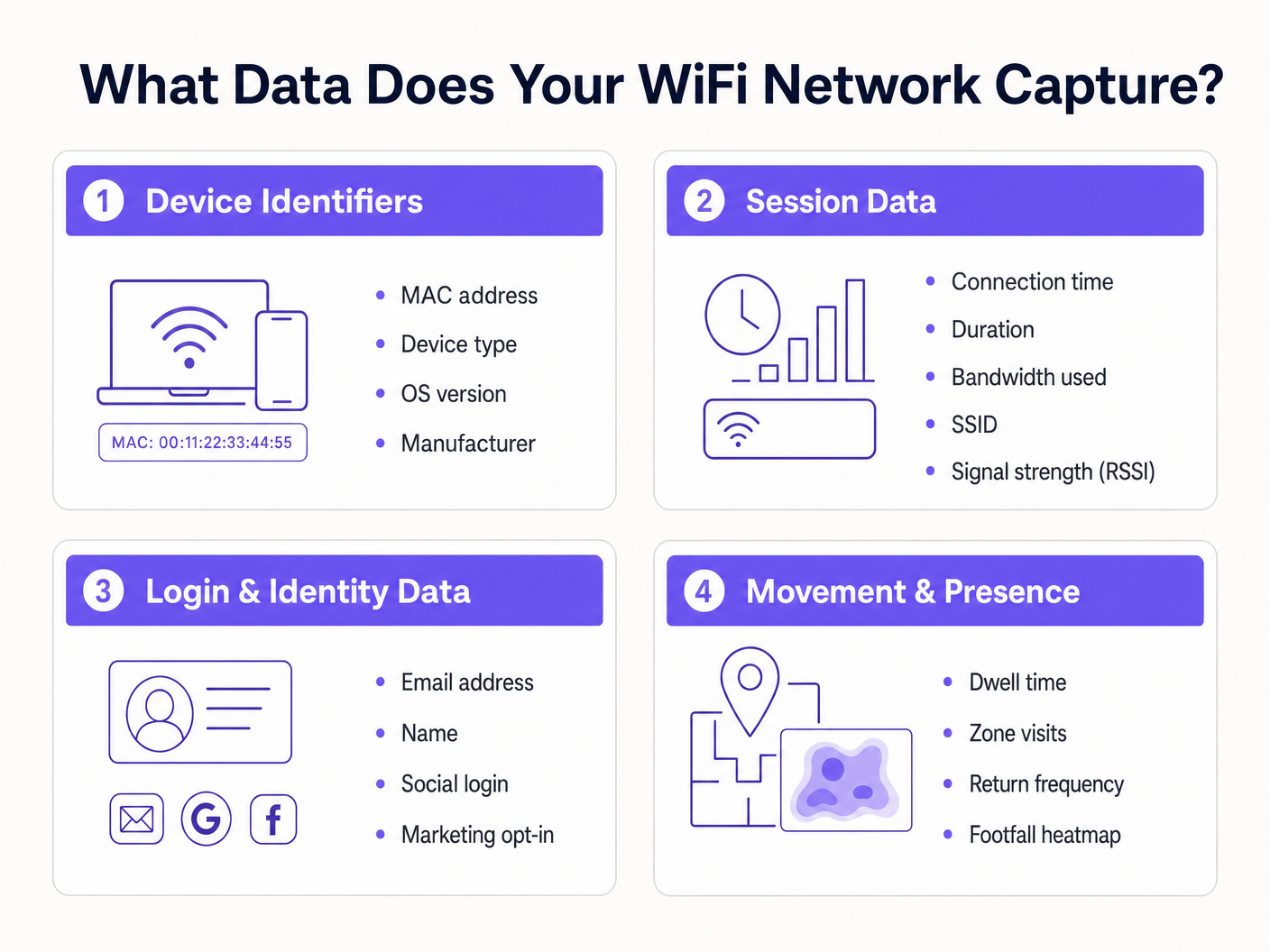
Para diseñar una estrategia de recopilación de datos segura y valiosa, debe comprender las cuatro categorías distintas de datos generados por una red WiFi gestionada. Confundir estas categorías conduce a mecanismos de consentimiento mal configurados y a un valor empresarial no realizado.
1. Identificadores de Dispositivo
Antes de que un usuario se autentique, cualquier dispositivo con su radio WiFi activada emite solicitudes de sondeo para descubrir redes disponibles. Estas sondas contienen identificadores de hardware críticos.
- MAC Address: La dirección Media Access Control es el identificador de hardware único grabado en la tarjeta de interfaz de red (NIC) del dispositivo.
- Organisationally Unique Identifier (OUI): Los tres primeros octetos de la dirección MAC identifican al fabricante del hardware (por ejemplo, Apple, Samsung, Intel).
- Capacidades del Protocolo: La solicitud de sondeo indica los estándares compatibles (por ejemplo, 802.11ac, Wi-Fi 6, Wi-Fi 6E), lo cual es esencial para la planificación de la capacidad de la red.
El Impacto de la Aleatorización de MAC: Desde iOS 14 y Android 10, los sistemas operativos móviles implementan la aleatorización de direcciones MAC por defecto para evitar el seguimiento pasivo. Esto significa que depender únicamente de solicitudes de sondeo no autenticadas para análisis a largo plazo ya no es viable. La solución requiere mover a los usuarios a sesiones autenticadas.
2. Datos de Sesión
Una vez que un dispositivo se asocia con un SSID y se autentica, el controlador de red o el servidor RADIUS comienza a registrar la telemetría de la sesión. Esta es la base de la monitorización del rendimiento de la red.
- Métricas de Conexión: Marca de tiempo de asociación, duración de la sesión y total de bytes transferidos (subida/bajada).
- Datos de Infraestructura: El SSID específico al que está conectado y el BSSID (la dirección MAC del punto de acceso específico que gestiona al cliente).
- Métricas de Señal: Indicador de Intensidad de Señal Recibida (RSSI) y Relación Señal/Ruido (SNR), que dictan la calidad de la conexión y permiten la triangulación de la ubicación.
- Asignación de Red: La dirección IP asignada por DHCP y la etiqueta VLAN.
Estos datos son esenciales para la planificación de la capacidad de rendimiento y para comprender el consumo de ancho de banda por usuario, asegurando que su infraestructura pueda manejar cargas máximas.
3. Datos de Inicio de Sesión e Identidad
Aquí es donde la infraestructura de red se cruza con el marketing y el CRM. Cuando un usuario accede a una red Guest WiFi a través de un Captive Portal, proporciona datos de identidad de primera parte a cambio de conectividad.
Información de Identificación Personal (PII): Nombre, dirección de correo electrónico, número de teléfono o fecha de nacimiento.
Método de Autenticación: Si el usuario se registró a través de un formulario personalizado, verificación por SMS o OAuth social (Google, Facebook, LinkedIn).
Registros de Consentimiento: Opt-ins explícitos para comunicaciones de marketing y aceptación de los términos de servicio.
La captura de estos datos permite a los recintos construir perfiles de clientes enriquecidos. La plataforma Guest WiFi de Purple actúa como proveedor de identidad, presentando una página de bienvenida de marca, registrando el consentimiento granular e impulsando el registro de identidad directamente a su CRM o plataforma de automatización de marketing a través de webhooks o APIs nativas.
4. Datos de Movimiento y Presencia
Los datos de movimiento son análisis derivados construidos sobre la telemetría de sesión y dispositivo. Al correlacionar las lecturas de RSSI de un solo dispositivo a través de múltiples puntos de acceso, la red puede triangular la ubicación física del dispositivo.
- Tiempo de Permanencia: Cuánto tiempo permanece un dispositivo en una zona física específica.
- Flujo de Visitantes: La ruta que toma un usuario a través de un recinto, destacando cuellos de botella o rutas populares.
- Frecuencia de Retorno: Identificación de visitantes recurrentes basada en la identidad autenticada (evitando problemas de aleatorización de MAC).
- Mapas de Calor de Afluencia: Representaciones visuales de la densidad del recinto a lo largo del tiempo.
Para una inmersión profunda en el aprovechamiento de estos datos, consulte nuestra guía Análisis de Afluencia WiFi: Cómo Medir y Actuar sobre los Datos de los Visitantes . (Para nuestros operadores de habla hispana, consulte Análisis de afluencia WiFi: Cómo medir y actuar sobre los datos de los visitantes ). Esta inteligencia es crucial para las implementaciones de Sistema de Posicionamiento Interior: Guía UWB, BLE y WiFi .
Guía de Implementación: Construyendo la Canalización de Datos
La implementación de una recopilación de datos WiFiLa arquitectura de recolección requiere ir más allá de la conectividad simple para establecer una canalización de datos segura y conforme.
Paso 1: Segmentación y Arquitectura de Red
Su red de invitados debe estar lógicamente separada de los entornos corporativos y de pago. Despliegue el SSID de invitados en una VLAN aislada. Asegúrese de que las reglas del firewall denieguen explícitamente el movimiento lateral desde la subred de invitados a cualquier recurso interno. Este es un requisito fundamental para el cumplimiento de PCI DSS.
Paso 2: Configuración del Captive Portal
El Captive Portal es la interfaz principal de adquisición de datos.
- Incorporación sin fricciones: Implemente OAuth social y autenticación sin interrupciones (como la autenticación basada en perfiles o OpenRoaming) para reducir las tasas de abandono.
- Perfilado progresivo: No solicite 10 puntos de datos en la primera visita. Pida primero una dirección de correo electrónico y luego solicite más detalles (como la fecha de nacimiento) en visitas posteriores.
Paso 3: Integración y Automatización
Los datos que residen en un panel de control de un controlador WiFi tienen un valor limitado. Configure webhooks o integraciones nativas de API para enviar datos de identidad y sesión en tiempo real a su CRM (por ejemplo, Salesforce, HubSpot) y plataformas de automatización de marketing. Esto permite flujos de trabajo automatizados, como el envío de un correo electrónico de bienvenida 10 minutos después de que un usuario inicie sesión.
Mejores Prácticas y Marco de Cumplimiento
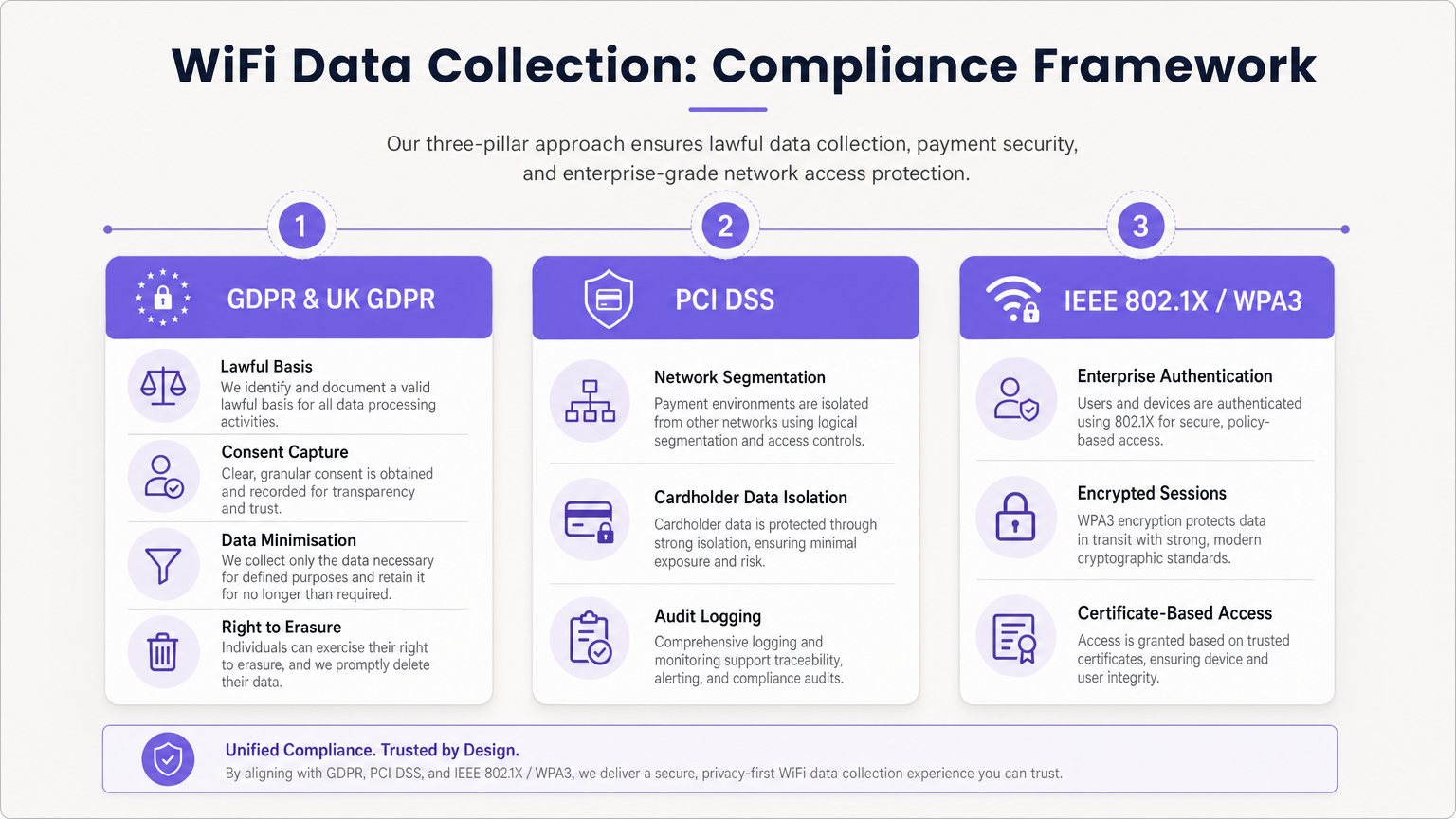
La recopilación de datos conlleva importantes obligaciones regulatorias. Una arquitectura conforme es innegociable.
Adherencia a GDPR y UK GDPR
Al capturar PII (incluidas direcciones de correo electrónico e identificadores de dispositivos persistentes), debe establecer una base legal para el procesamiento.
- Consentimiento desagregado: El Captive Portal debe presentar casillas de verificación de aceptación separadas y explícitas para los Términos de Servicio, la Política de Privacidad y las Comunicaciones de Marketing. Las casillas premarcadas son ilegales.
- Minimización de datos: Recopile solo los datos necesarios para el propósito definido.
- Derecho de supresión: Implemente flujos de trabajo automatizados para gestionar las solicitudes de acceso de los interesados (DSAR) y las solicitudes de eliminación de forma rápida.
Segmentación PCI DSS
Si su establecimiento procesa tarjetas de crédito, la red WiFi de invitados no debe compartir infraestructura lógica con el Entorno de Datos del Titular de la Tarjeta (CDE). No aislar la red de invitados viola los Requisitos 1 y 6 de PCI DSS y resultará en un fallo de auditoría.
Estándares de Seguridad Empresarial
Para redes internas o seguras, implemente IEEE 802.1X con WPA3 Enterprise para autenticación basada en certificados. Para redes de invitados, haga la transición a WPA3 Personal con Simultaneous Authentication of Equals (SAE) para proteger contra ataques de diccionario fuera de línea y proporcionar secreto hacia adelante.
Resolución de Problemas y Mitigación de Riesgos
El problema del "Data Lake"
Problema: Las organizaciones capturan terabytes de datos de sesión e identidad, pero no extraen ningún valor comercial. Mitigación: Defina los casos de uso comerciales antes del despliegue. Si está recopilando direcciones de correo electrónico, debe tener una estrategia de marketing por correo electrónico activa. Si está rastreando el tráfico peatonal, un equipo operativo específico debe ser el propietario del panel de control de WiFi Analytics .
Caída en los Análisis por Aleatorización de MAC
Problema: Los análisis pasivos de tráfico peatonal muestran cifras de visitantes infladas artificialmente debido a que los dispositivos rotan sus direcciones MAC. Mitigación: Cambie la estrategia de análisis del seguimiento pasivo de sondas al seguimiento de sesiones autenticadas. Incentive a los usuarios a iniciar sesión en el Captive Portal para establecer un registro de identidad persistente.
Retención de Datos Obsoletos
Problema: Retener datos personales indefinidamente viola los principios de limitación de almacenamiento de GDPR y aumenta el impacto de una brecha. Mitigación: Implemente políticas automatizadas de retención de datos. Una línea base estándar es de 12 a 24 meses para datos de marketing (actualizados con visitas repetidas) y 90 días para registros de sesión brutos.
ROI e Impacto Comercial
Una estrategia de recopilación de datos WiFi correctamente diseñada transforma un centro de costes en un motor de ingresos.
- ROI de Marketing: Al capturar datos de primera parte, los establecimientos reducen la dependencia de la publicidad de terceros costosa. La captura de correos electrónicos a través de WiFi a menudo presume de un Coste por Adquisición (CPA) más bajo que los anuncios digitales.
- Eficiencia Operativa: Los datos de movimiento permiten a los establecimientos optimizar los niveles de personal basándose en la ocupación en tiempo real, reduciendo los gastos generales durante los períodos de baja actividad y mejorando el servicio durante los picos.
- Valor para Inquilinos y Patrocinadores: En entornos minoristas y de estadios, los análisis de tráfico peatonal y los datos demográficos pueden monetizarse demostrando valor a los inquilinos o vendiendo espacio publicitario digital dirigido en la página de inicio del Captive Portal. Como se discute en nuestras publicaciones Wi Fi en Automoción: La Guía Empresarial Completa 2026 e Arquitectura del Internet de las Cosas: Una Guía Completa , la infraestructura conectada es la base de la monetización moderna de los establecimientos.
Al aprovechar la plataforma integral de Purple, los operadores empresariales pueden asegurar que su red no solo proporciona conectividad sin interrupciones, sino que actúa como un motor de adquisición de datos seguro, conforme y altamente rentable.
Términos clave y definiciones
MAC Randomisation
A privacy feature in modern mobile OSs that generates a temporary, fake MAC address when scanning for networks, preventing persistent tracking.
Forces IT teams to rely on authenticated captive portal logins rather than passive probe requests for accurate visitor analytics.
BSSID (Basic Service Set Identifier)
The MAC address of the specific wireless access point radio that a client device is connected to.
Used in location analytics to determine exactly which access point in a venue a user is nearest to, enabling zone-based footfall tracking.
RSSI (Received Signal Strength Indicator)
A measurement of the power present in a received radio signal, typically expressed in negative decibels (-dBm).
The core metric used to triangulate a device's physical location within a venue; a signal closer to 0 indicates closer proximity to the AP.
Captive Portal
A web page that a user is forced to view and interact with before access is granted to a public network.
The primary mechanism for capturing first-party identity data and securing legal consent from network users.
IEEE 802.1X
An IEEE standard for port-based network access control, providing an authentication mechanism to devices wishing to attach to a LAN or WLAN.
The gold standard for enterprise network security, requiring unique credentials or certificates per user rather than a shared password.
VLAN (Virtual Local Area Network)
A logical subnetwork that groups a collection of devices on separate physical local area networks.
Essential for PCI DSS compliance to logically separate guest WiFi traffic from corporate or payment processing traffic on the same physical switches.
Data Minimisation
A GDPR principle stating that personal data collected must be adequate, relevant, and limited to what is necessary for the intended purpose.
Dictates that IT teams should not configure captive portals to ask for unnecessary information (e.g., home address) if the goal is simply email marketing.
OUI (Organisationally Unique Identifier)
The first 24 bits (three octets) of a MAC address, which uniquely identifies the vendor or manufacturer of the network adapter.
Used in network analytics dashboards to categorise the types of devices (e.g., Apple vs. Samsung) connecting to the network.
Casos de éxito
A 200-store retail chain is deploying a new guest WiFi network. They want to track repeat visitor frequency and trigger automated marketing emails. However, their current passive analytics show an impossibly high number of 'unique' visitors due to iOS/Android MAC randomisation. How should the network architect design the solution?
- Deploy a captive portal requiring user authentication (e.g., Email or Social OAuth) to access the internet.
- Configure the portal with GDPR-compliant, unbundled consent checkboxes for marketing communications.
- Integrate the WiFi platform's API with the retailer's CRM.
- When a user logs in, the platform links their authenticated identity (email) to their current session, bypassing the randomised MAC address.
- Configure the CRM to trigger a 'Welcome Back' email workflow when the API registers a new session for an existing identity.
A large conference centre wants to offer free guest WiFi but shares physical network switches with the venue's point-of-sale (POS) payment terminals. How must the IT manager configure the network to ensure PCI DSS compliance while collecting guest session data?
- Implement logical network segmentation using VLANs. Assign the guest WiFi SSID to VLAN 100 and the POS terminals to VLAN 200.
- Configure Access Control Lists (ACLs) and firewall rules at the core router/firewall to explicitly deny all traffic routing between VLAN 100 and VLAN 200.
- Route guest WiFi traffic directly to the internet gateway, bypassing internal corporate subnets entirely.
- Enable client isolation on the guest SSID to prevent guest devices from communicating with each other.
- Log all firewall drops for audit purposes.
Análisis de escenarios
Q1. A marketing director wants to use the guest WiFi network to track exactly how long individual, unnamed customers spend in the 'Shoes' department versus the 'Coats' department to optimise store layout. They plan to use MAC address tracking from probe requests. As the IT Manager, how do you advise them?
💡 Sugerencia:Consider recent changes to mobile operating systems regarding privacy and MAC addresses.
Mostrar enfoque recomendado
I would advise the marketing director that relying on unauthenticated MAC address tracking via probe requests is no longer accurate due to MAC randomisation implemented in modern iOS and Android devices. Devices will appear as multiple unique visitors over time. Instead, we should deploy a captive portal to encourage authenticated sessions. Once a user authenticates, we can track their persistent identity and use RSSI triangulation from authenticated session data to accurately measure dwell time in specific zones.
Q2. During a network audit, the QSA notes that the guest WiFi VLAN can route traffic to the VLAN hosting the venue's Point of Sale (POS) terminals. The venue argues that the POS terminals have host-based firewalls enabled. What is the required remediation?
💡 Sugerencia:Review PCI DSS requirements regarding network segmentation and shared infrastructure.
Mostrar enfoque recomendado
The required remediation is to implement strict network segmentation at the core router or firewall level. Relying solely on host-based firewalls on the POS terminals is insufficient for PCI DSS compliance. Access Control Lists (ACLs) must be configured to explicitly deny all routing between the guest WiFi VLAN and the Cardholder Data Environment (CDE) VLAN. The guest traffic must be routed directly to the internet gateway.
Q3. Your organisation is updating its captive portal splash page. The legal team suggests a single checkbox that says 'I agree to the Terms of Service, Privacy Policy, and to receive marketing emails' to reduce onboarding friction. Is this approach recommended?
💡 Sugerencia:Consider GDPR requirements for valid consent.
Mostrar enfoque recomendado
No, this approach is highly discouraged and violates GDPR requirements for granular consent. Consent for marketing communications must be unbundled from the acceptance of general Terms of Service. If a user is forced to accept marketing to access the WiFi, the consent is not considered 'freely given'. The portal must present separate, unticked checkboxes for TOS/Privacy Policy and Marketing Opt-in.




