
Mejores prácticas de segmentación de VLAN para entornos multi-inquilino
Esta guía proporciona a los gerentes de TI, arquitectos de red, Directores de Tecnología y directores de operaciones de recintos un plan de trabajo autoritativo y neutral respecto al proveedor para implementar la segmentación de VLAN en entornos de WiFi multi-inquilino. Cubre el estándar IEEE 802.1Q, la asignación dinámica de VLAN a través de 802.1X y RADIUS, y orientación de implementación paso a paso para recintos de hotelería, retail, estadios y el sector público. La segmentación de VLAN adecuada es el control fundacional para el cumplimiento de PCI-DSS y GDPR, la prevención del movimiento lateral y la entrega de conectividad inalámbrica de alto rendimiento a través de una infraestructura física compartida.
Video overview
Escucha esta guía
Ver transcripción del podcast
Parte de nuestra serie principal: Guía de WiFi Multi-Inquilino →
Resumen Ejecutivo
Para los entornos físicos empresariales modernos — que van desde portafolios de Retail de múltiples sucursales y extensas propiedades de Hospitality hasta estadios de alta densidad e instalaciones de Healthcare — la segmentación de red ya no es una práctica recomendada opcional; es un requisito arquitectónico fundamental. Administrar un entorno multi-inquilino en una sola red física plana es una responsabilidad operativa crítica. Expone los datos corporativos confidenciales a amenazas de seguridad laterales, degrada el rendimiento inalámbrico debido a la congestión de difusión y complica las auditorías de cumplimiento normativo.
Las Redes de Área Local Virtuales (VLANs), definidas bajo el estándar IEEE 802.1Q, proporcionan la partición lógica necesaria para aislar distintos grupos de usuarios, organizaciones de inquilinos y tipos de dispositivos a través de una infraestructura física compartida. Al mapear Identificadores de Conjuntos de Servicios (SSIDs) inalámbricos específicos a VLANs dedicadas, los arquitectos de red pueden aplicar políticas de seguridad granulares y contención de tráfico en la estructura de switches de cable. Además, la implementación de técnicas avanzadas como la Asignación Dinámica de VLAN a través de IEEE 802.1X y RADIUS permite a los recintos consolidar su entorno de radiofrecuencia (RF) en un solo SSID seguro, eliminando la grave degradación del rendimiento causada por la difusión de múltiples SSIDs.
Esta guía sirve como una referencia técnica autorizada para gerentes de TI, arquitectos de red, CTOs y directores de operaciones de recintos. Proporciona planes de acción independientes del proveedor y listos para implementar con el fin de diseñar y establecer una arquitectura de segmentación de VLAN segura y escalable. Al integrar estas prácticas con las plataformas empresariales de Guest WiFi y WiFi Analytics de Purple, las organizaciones pueden lograr un aislamiento sólido de Capa 2, agilizar el cumplimiento de PCI-DSS y GDPR, y ofrecer una experiencia inalámbrica segura y de alto rendimiento que impulse el ROI del recinto.
Análisis Técnico Detallado
La transición de una red de un solo ocupante a una arquitectura multi-inquilino segura requiere un cambio de un modelo plano de confianza implícita a un marco segmentado de cero confianza. El objetivo es garantizar que múltiples inquilinos independientes, redes de invitados y dispositivos operativos coexistan en una infraestructura física compartida sin comprometer la seguridad, el rendimiento o la privacidad.
El Protocolo de Etiquetado de VLAN 802.1Q
La base de la segmentación de red lógica es la Red de Área Local Virtual (VLAN), estandarizada bajo IEEE 802.1Q. En una trama Ethernet estándar, una cabecera 802.1Q inserta una etiqueta de 4 bytes entre los campos de Dirección MAC de Origen y EtherType. Esta etiqueta contiene un Identificador de VLAN (VID) de 12 bits, que admite hasta 4,094 segmentos lógicos únicos (los IDs de VLAN 1 y 4095 están reservados).
Cuando un cliente inalámbrico se conecta a un Punto de Acceso (AP), el AP asocia el tráfico de ese cliente con un SSID específico. Luego, el AP encapsula las tramas inalámbricas del cliente en tramas de Ethernet, etiquetándolas con el ID de VLAN asignado antes de reenviarlas al puerto del switch. Los puertos físicos del switch que se conectan a los AP deben configurarse como 802.1Q Trunk Ports para transportar el tráfico de múltiples VLANs simultáneamente, mientras que los puertos que se conectan a dispositivos cableados de un solo inquilino se configuran como Access Ports asignados a una sola VLAN.
El impacto de rendimiento y sobrecarga de múltiples SSIDs
Un enfoque común pero defectuoso para la segmentación multi-inquilino es transmitir un SSID único para cada inquilino (por ejemplo, TenantA_WiFi, TenantB_WiFi, TenantC_WiFi). Cada SSID transmitido por un AP debe enviar tramas de baliza (beacon frames) - típicamente cada 102.4 milisegundos - a la velocidad de datos básica obligatoria más baja (a menudo 1 Mbps o 6 Mbps) para garantizar la compatibilidad con clientes heredados.
A medida que aumenta el número de SSIDs, el tiempo de aire consumido por la sobrecarga de gestión crece sustancialmente. Transmitir 8 SSIDs en un solo AP puede consumir hasta el 30% del tiempo de aire inalámbrico disponible solo para la sobrecarga de balizas, dejando únicamente el 70% para los datos reales de los usuarios. En entornos de alta densidad como centros comerciales o centros de conferencias, esto provoca una alta latencia, pérdida de paquetes y una degradación severa del rendimiento. Las mejores prácticas dictan limitar el número de SSIDs transmitidos a un máximo de 3 a 4 por banda de radio.
Asignación dinámica de VLAN a través de 802.1X y RADIUS
Para eludir las limitaciones de múltiples SSIDs y al mismo tiempo mantener un aislamiento estricto de los inquilinos, los arquitectos de red implementan la Asignación Dinámica de VLAN (DVA). Esta arquitectura consolida el entorno inalámbrico en un solo SSID seguro (por ejemplo, Enterprise_Secure) utilizando autenticación IEEE 802.1X.
El marco de trabajo 802.1X consta de tres componentes clave:
- Suplicante (Supplicant): El dispositivo cliente que ejecuta software compatible con 802.1X (por ejemplo, Windows, macOS, iOS, Android).
- Autenticador (Authenticator): El AP inalámbrico o controlador de LAN inalámbrica (WLC) que bloquea todo el tráfico que no sea de autenticación del cliente hasta que esté autorizado.
- Servidor de autenticación (Authentication Server): Un servidor RADIUS (Remote Authentication Dial-In User Service) integrado con un almacén de identidades (por ejemplo, Active Directory, LDAP o proveedores de identidad en la nube).
Durante el proceso de autenticación (handshake), el cliente se conecta al único SSID seguro y proporciona credenciales o un certificado de cliente (a través de EAP-TLS o PEAP). El AP reenvía esto al servidor RADIUS. Tras una validación exitosa, el servidor RADIUS devuelve un mensaje Access-Accept que contiene atributos estándar de la IETF específicos que indican al AP que asigne dinámicamente la sesión del cliente a su VLAN designada:
- Tunnel-Type (64): Establecido en
VLAN(Valor 13) - Tunnel-Medium-Type (65): Establézcalo en
802(Valor 6) - Tunnel-Private-Group-ID (81): Establézcalo en la cadena de ID de VLAN específica (por ejemplo,
"101"para el Inquilino A,"102"para el Inquilino B)
El AP recibe estos atributos, desbloquea el puerto y mapea todo el tráfico posterior de la dirección MAC de ese cliente a la VLAN especificada. Esto permite que cientos de usuarios de diferentes organizaciones se conecten exactamente al mismo SSID en el mismo AP físico mientras permanecen completamente aislados entre sí en la Capa 2. Para obtener una guía detallada sobre la implementación de esta arquitectura, consulte la guía sobre Cómo implementar la autenticación 802.1X con Cloud RADIUS.
Contención del dominio de broadcast y seguridad de Capa 2
Al segmentar una red física en VLAN lógicas más pequeñas, los dominios de broadcast quedan limitados. Los protocolos de red estándar como ARP, DHCP y mDNS dependen de tramas de broadcast que se envían a todos los dispositivos del dominio de broadcast. En una red grande y plana con miles de dispositivos, este "parloteo" consume un tiempo de transmisión inalámbrica y ciclos de procesamiento sustanciales en los dispositivos clientes. Limitar los broadcasts a subredes VLAN individuales reduce drásticamente el consumo de recursos, evita tormentas de broadcast y aumenta el rendimiento general de la red.
Además, la seguridad de la Capa 2 se mejora al habilitar Client Isolation (también conocido como bloqueo Peer-to-Peer) en los SSID de invitados. Esto evita que los clientes inalámbricos en la misma VLAN se comuniquen directamente entre sí, lo que mitiga el riesgo de escaneo lateral, rastreo de paquetes (packet sniffing) y ataques de intermediario (man-in-the-middle).
¿Tiene preguntas sobre su configuración específica?
Nuestro equipo trabaja con gestores de espacios, responsables de TI e ingenieros de redes en 80 000 establecimientos. Reserve una llamada de 20 minutos y le mostraremos cómo lo resolvieron otros profesionales como usted.
Guía de implementación
La implementación de una arquitectura VLAN multi-tenant segura requiere una configuración coordinada en el extremo inalámbrico, la infraestructura de switches cableados y el firewall central. El siguiente plan de implementación paso a paso es independiente del proveedor y está alineado con los estándares empresariales.
Paso 1: Diseño lógico y asignación de subredes IP
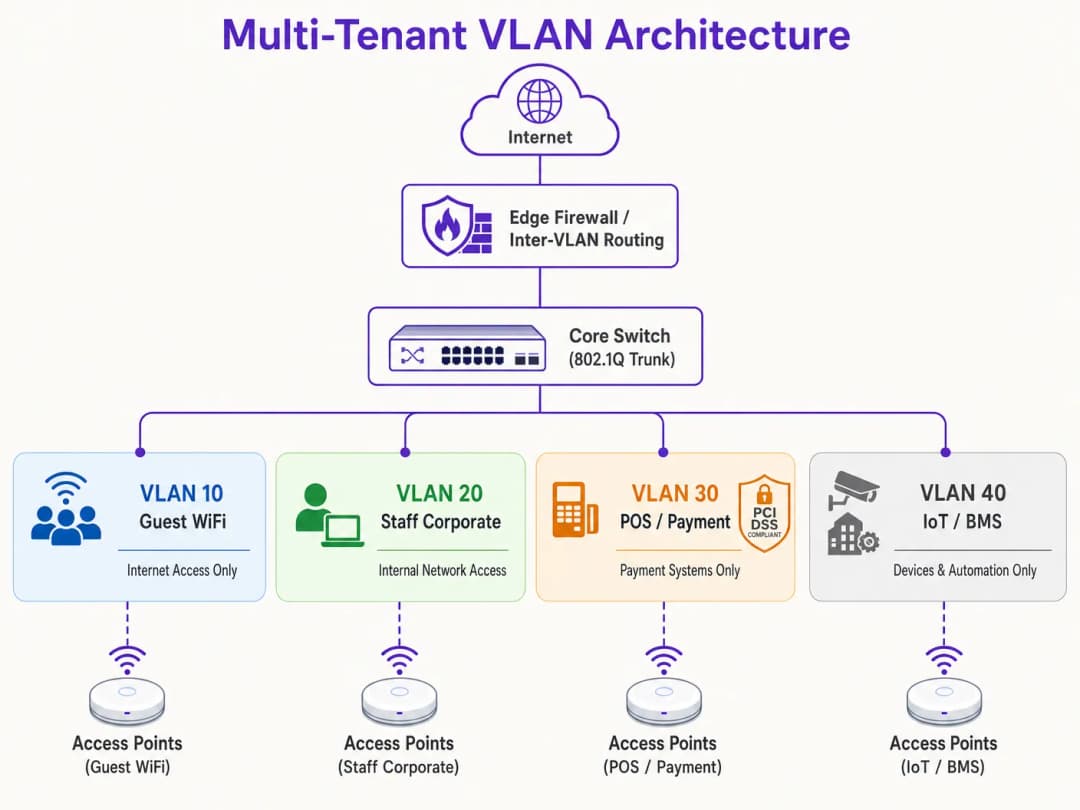
Antes de configurar cualquier hardware, establezca un mapa lógico de red completo. Asigne ID de VLAN, subredes IP y zonas de seguridad distintas a cada clase de tráfico.
| Nombre del segmento | ID de VLAN | Subred IP / CIDR | Zona de seguridad | Autenticación primaria |
|---|---|---|---|---|
| Gestión de red | VLAN 10 | 10.10.10.0/24 | Gestión | Estática / Fuera de banda |
| Guest WiFi (Purple) | VLAN 20 | 172.16.0.0/20 | Invitado (Solo Internet) | Abierto + Captive Portal |
| Personal corporativo | VLAN 30 | 10.10.30.0/23 | Corporativo interno | WPA3-Enterprise (802.1X) |
| POS / Pagos | VLAN 40 | 192.168.40.0/24 | PCI-CDE (Restringido) | WPA3-Enterprise / MAB |
| IoT / Sistemas de edificios | VLAN 50 | 10.10.50.0/24 | IoT (Restringido) | WPA3-SAE / Dynamic PSK |
Regla crítica: Nunca use la VLAN 1 para ningún tráfico activo o gestión. Deshabilite la VLAN 1 en todos los puertos de enlace troncal (trunk) y cambie la VLAN nativa a un ID de VLAN no utilizado y no enrutable (por ejemplo, VLAN 999) para evitar ataques de salto de VLAN (VLAN hopping).
Paso 2: Configuración de la infraestructura de switches cableados
Configure los switches de núcleo, distribución y acceso para soportar la estructura lógica de VLAN. Los puertos de switch conectados directamente a los AP deben transportar múltiples VLAN y deben configurarse como puertos troncales 802.1Q. Defina explícitamente qué VLAN están permitidas en cada enlace troncal para minimizar la superficie de exposición de seguridad. Los puertos que se conectan a dispositivos cableados individuales (como una terminal de POS estática o la PC de un recepcionista) deben establecerse en modo de acceso y asignarse a una sola VLAN.
Paso 3: Configuración del Controlador LAN Inalámbrico y AP
Asocie los SSID inalámbricos a sus respectivas VLAN y configure los controles de seguridad perimetral. Para el SSID de Invitados, configure la seguridad como Abierta o WPA3-Enhanced Open (OWE) para proporcionar cifrado inalámbrico oportunista, habilite el aislamiento de clientes y redirija al Captive Portal gestionado en la nube de Purple para el registro de usuarios y analíticas en conformidad con GDPR. Para el SSID Corporativo, configure WPA3-Enterprise con 802.1X, defina las direcciones de servidor RADIUS primaria y secundaria, y habilite la transición rápida de BSS 802.11r y el almacenamiento en caché de claves oportunistas para un roaming continuo. Para los dispositivos IoT, implemente WPA3-SAE con una frase de contraseña sólida y rotativa, o implemente Multi-PSK (MPSK) para asignar claves únicas a dispositivos individuales y asociarlos dinámicamente a sub-VLAN.
Paso 4: Firewall de Núcleo y Política de Enrutamiento Inter-VLAN
La seguridad de una arquitectura VLAN depende completamente de las reglas de firewall que rigen el enrutamiento inter-VLAN. Se debe aplicar una política estricta de Denegación por Defecto en el firewall, permitiendo únicamente los flujos explícitamente autorizados.

Para la Zona de Invitados (VLAN 20), permita el tráfico saliente hacia la WAN en los puertos 80 y 443, y permita el tráfico UDP hacia los servicios DNS y DHCP. Deniegue todo el tráfico hacia las subredes internas. Para la Zona de POS (VLAN 40), permita el tráfico TCP saliente únicamente hacia las direcciones IP de la pasarela de pago designadas en el puerto 443, y deniegue todo el tráfico desde y hacia todas las demás VLAN. Para la Zona de IoT (VLAN 50), permita el tráfico saliente únicamente hacia servidores de actualización de fabricantes específicos y controladores de gestión local, y deniegue todo el demás tráfico interno y externo.
Mejores Prácticas
Para garantizar la estabilidad a largo plazo, el alto rendimiento y una seguridad estricta, respete estos principios de diseño de VLAN estándar de la industria.
El Aislamiento del Plano de Gestión no es negociable. Nunca permita el tráfico de usuarios finales en la VLAN de gestión de red. Los AP, switches, routers y WLC deben obtener sus direcciones IP en una VLAN de Gestión dedicada y altamente restringida. El acceso a esta VLAN debe limitarse a los dispositivos de administración autorizados, idealmente a través de una VPN segura o un puerto de consola física. Si un atacante obtiene acceso al plano de gestión, tendrá el control efectivo sobre toda la infraestructura de la red.
Un Esquema de VLAN Estandarizado es esencial para los operadores de múltiples sitios. Para las organizaciones que gestionan carteras de múltiples sitios - como una cadena de retail con 500 tiendas o una marca de hoteles con 50 propiedades - implemente un esquema de VLAN con plantillas aplicado de manera consistente en cada sitio. El uso de un tercer octeto consistente en la dirección IP para que coincida con el ID de VLAN simplifica la resolución de problemas remota, la implementación de plantillas de WLC y la gestión de reglas de firewall en todo el patrimonio. Este enfoque también reduce drásticamente el tiempo necesario para incorporar nuevos sitios.
La Optimización del Tiempo de Concesión de DHCP evita el agotamiento de las direcciones IP. En entornos de alta densidad, los tiempos de concesión de DHCP deben gestionarse con cuidado. Para el segmento de WiFi de invitados, donde los usuarios entran y salen con frecuencia, configure el tiempo de concesión de DHCP de 1 a 2 horas. Para las redes corporativas internas, es adecuado un tiempo de concesión estándar de 8 a 24 horas. Asegúrese de que los servidores DNS locales no estén expuestos a las redes de invitados; configure las VLAN de invitados para utilizar solucionadores DNS públicos y filtrados para reducir la carga del servidor interno.
La Alineación de Cumplimiento debe integrarse en la arquitectura desde el primer día. El Requisito 1.2 de PCI-DSS exige la instalación de firewalls para restringir el tráfico entre el Entorno de Datos de Tarjetahabientes (CDE) y otras redes. Al aislar las terminales de punto de venta (POS) en una VLAN dedicada, el resto de la red del establecimiento queda excluido de la rigurosa y costosa evaluación de cumplimiento de PCI. El principio de "Privacidad por Diseño" de GDPR se cumple al aislar el tráfico de los usuarios invitados y gestionar el consentimiento a través del Captive Portal de Purple. La adopción de WPA3 debe acelerarse en todos los SSIDs, ya que el protocolo de Autenticación Simultánea de Iguales (SAE) de WPA3-Personal elimina la vulnerabilidad de ataque de diccionario fuera de línea presente en WPA2-PSK. Para obtener más orientación sobre la arquitectura de control de acceso, consulte las 10 mejores soluciones de control de acceso a la red (NAC) para 2026.
Resolución de problemas y mitigación de riesgos
Incluso una arquitectura VLAN diseñada meticulosamente puede presentar problemas operativos. Los siguientes son los modos de falla más comunes y sus mitigaciones técnicas.
La Filtración de VLAN y Puertos de Enlace Troncal Mal Configurados es la causa raíz más frecuente de los tickets de soporte posteriores a la implementación. El síntoma es que los clientes inalámbricos se autentican correctamente en un SSID específico pero no reciben una dirección IP. La causa raíz es que el puerto del switch conectado al AP está mal configurado: o bien la VLAN de destino no está permitida en el enlace troncal 802.1Q, o la VLAN no se ha creado en la base de datos local del switch. Verifique la configuración del enlace troncal del switch y asegúrese de que la lista de VLAN permitidas en el puerto del switch coincida con los SSIDs configurados en el AP. Realice siempre una auditoría de las configuraciones de los switches después de cualquier cambio y valídelas durante la puesta en marcha.Fallas de Relevo DHCP ocurren cuando una VLAN recién creada no tiene una Dirección IP Helper correspondiente configurada en la interfaz de Capa 3. Dado que las solicitudes DHCP son paquetes de difusión, no pueden cruzar los límites de la VLAN sin un agente de relevo. Si el servidor DHCP reside en una VLAN diferente a la de los clientes, el router o switch de Capa 3 debe configurarse con una Dirección IP Helper que apunte al servidor DHCP centralizado.
Vencimiento de Certificados RADIUS es un riesgo silencioso que puede hacer que toda una red empresarial falle simultáneamente. El síntoma es que todos los clientes autenticados mediante 802.1X de repente no pueden conectarse, mostrando errores de advertencia de certificado en los dispositivos cliente. Implemente alertas de monitoreo automatizadas que se activen 30 días antes del vencimiento del certificado y establezca flujos de trabajo de renovación automática de certificados para evitar descuidos manuales.
Proliferación de SSIDs y Congestión de RF se manifiesta como una alta latencia y velocidades lentas a pesar de tener una excelente intensidad de señal y un backhaul de alta velocidad. La causa raíz es la utilización excesiva del canal debido a la sobrecarga de gestión y la interferencia de canal compartido. Consolide los SSIDs, migre a una Asignación Dinámica de VLAN, desactive la radio de 2.4 GHz en un subconjunto de APs en áreas de alta densidad y aplique band steering para dirigir a los clientes de doble banda a las bandas más limpias de 5 GHz y 6 GHz.
-
ROI e Impacto Comercial
Implementar una estrategia sólida de segmentación de VLAN genera un valor comercial significativo y medible para los operadores de recintos y las organizaciones empresariales.
Minimización del Alcance de la Auditoría PCI ofrece ahorros de costos directos. Para los recintos que procesan pagos con tarjeta de crédito, una red plana pone a toda la infraestructura dentro del alcance del cumplimiento de PCI DSS. Esto significa que cada switch, AP, servidor y PC de oficina debe ser auditado, lo que cuesta decenas de miles de libras anuales en evaluaciones de cumplimiento, pruebas de penetración y gastos administrativos. Al segmentar la red e aislar el Entorno de Datos de Tarjetahabientes en una VLAN dedicada para POS con controles estrictos de firewall, el alcance de la auditoría se restringe únicamente a esa VLAN. Esta reducción en el alcance puede disminuir los costos de cumplimiento hasta en un 70% y reducir drásticamente el riesgo de penalizaciones por incumplimiento.
Mitigación del Costo de Brechas de Seguridad es el resultado de seguridad de mayor valor. El principal factor que impulsa las brechas de datos graves es el movimiento lateral, donde un atacante obtiene acceso a un dispositivo de baja seguridad y navega a través de una red plana para comprometer bases de datos de alto valor o sistemas POS. La segmentación de VLAN, combinada con reglas estrictas de firewall inter-VLAN, elimina por completo este vector. Si un dispositivo IoT en la VLAN 50 se ve comprometido, el atacante queda atrapado dentro de ese segmento lógico. El radio de impacto de la brecha se minimiza, protegiendo los activos corporativos confidenciales. Guest Analytics and Revenue Monetisation transforma la red de un centro de costos a un activo estratégico. Una red correctamente segmentada permite a los operadores de los establecimientos ofrecer de manera segura Guest WiFi de alta calidad sin arriesgar la seguridad interna. Al enrutar el tráfico de invitados a través de una VLAN dedicada a la plataforma de Purple, los establecimientos pueden capturar valiosos datos de clientes de primera fuente mediante un Captive Portal personalizado, integrado directamente con sistemas CRM y plataformas de automatización de marketing. Esto permite realizar campañas de marketing dirigidas, aumentar la lealtad de los clientes y permite a los operadores monetizar su infraestructura inalámbrica a través de mejoras de ancho de banda por niveles y publicidad en la página de inicio del Captive Portal. Para obtener una perspectiva más profunda sobre cómo las analíticas impulsan los resultados de negocio, consulte la documentación de la plataforma WiFi Analytics de Purple.
-
Referencias
- Cisco Wireless APs: 2026 Guide to Products & Deployment
- 10 Best Network Access Control (NAC) Solutions for 2026
- WiFi in Schools: The 2026 Administrator & IT Guide
- How to Implement 802.1X Authentication with Cloud RADIUS
- Purple Guest WiFi Platform
- Purple WiFi Analytics Platform
- Hospitality WiFi Solutions
- Retail WiFi Solutions
- Transport WiFi Solutions
Definiciones clave
VLAN (Red de Área Local Virtual)
Una agrupación lógica de dispositivos de red que se comunican como si estuvieran en la misma LAN física, independientemente de su ubicación física. Definidas bajo IEEE 802.1Q, las VLANs dividen una única estructura de switch físico en múltiples dominios de transmisión aislados utilizando un identificador de VLAN (VID) de 12 bits incrustado en el encabezado de la trama Ethernet.
Los equipos de TI se encuentran con las VLANs como el mecanismo principal para separar el tráfico de invitados, personal, POS e IoT en una infraestructura física compartida. Sin VLANs, todos los dispositivos comparten un único dominio de transmisión, lo que genera riesgos de seguridad y rendimiento.
Puerto de Enlace Troncal 802.1Q
Un puerto de switch configurado para transportar tráfico para múltiples VLANs simultáneamente etiquetando cada trama Ethernet con su ID de VLAN correspondiente. El puerto troncal transporta tramas etiquetadas entre switches y hacia los puntos de acceso, mientras que los puertos de acceso transportan únicamente tramas no etiquetadas para una sola VLAN.
Los ingenieros de red configuran puertos de enlace troncal (trunk ports) en las interfaces de los switches conectadas a los puntos de acceso y en los puertos de enlace ascendente entre switches. Un puerto de enlace troncal mal configurado - donde la lista de VLANs permitidas no incluye una VLAN requerida - es la causa más común de fallas de conectividad después del despliegue.
Asignación Dinámica de VLAN (DVA)
Una arquitectura que utiliza autenticación IEEE 802.1X y un servidor RADIUS para asignar dinámicamente un cliente inalámbrico a una VLAN específica en función de su identidad autenticada, en lugar del SSID al que se conectó. El servidor RADIUS devuelve atributos estándar de IETF (Tunnel-Type, Tunnel-Medium-Type, Tunnel-Private-Group-ID) en el mensaje Access-Accept para indicar al AP qué VLAN asignar.
DVA es el enfoque recomendado para edificios de múltiples inquilinos donde transmitir múltiples SSIDs degradaría el rendimiento de RF. Permite que un solo SSID dé servicio a múltiples organizaciones inquilinas con un aislamiento completo de Capa 2 entre ellas.
RADIUS (Remote Authentication Dial-In User Service)
Un protocolo de red cliente-servidor que proporciona administración centralizada de Autenticación, Autorización y Contabilidad (AAA) para el acceso a la red. En un contexto de WiFi, el controlador inalámbrico actúa como el cliente RADIUS, reenviando las solicitudes de autenticación de los clientes inalámbricos al servidor RADIUS, el cual valida las credenciales contra un almacén de identidades (Active Directory, LDAP, etc.) y devuelve atributos de autorización que incluyen asignaciones de VLAN.
RADIUS es la columna vertebral de la seguridad WiFi empresarial. Los equipos de TI implementan servidores RADIUS (como Microsoft NPS, FreeRADIUS o servicios RADIUS en la nube) para aplicar políticas de red por usuario y por dispositivo, incluida la Asignación Dinámica de VLAN y la autenticación basada en certificados.
PCI DSS (Payment Card Industry Data Security Standard)
Un conjunto de estándares de seguridad diseñado para garantizar que todas las empresas que aceptan, procesan, almacenan o transmiten información de tarjetas de crédito mantengan un entorno seguro. El Requisito 1 de PCI DSS exige la instalación y el mantenimiento de controles de seguridad de red, incluidos firewalls que restrinjan el tráfico entre el Entorno de Datos de Tarjetas de Pago (CDE) y otras redes.
Los operadores de recintos con terminales de punto de venta (POS) o sistemas de procesamiento de pagos deben cumplir con PCI DSS. La segmentación de VLAN adecuada aísla el CDE a una VLAN dedicada, reduciendo el alcance de la auditoría de PCI únicamente a ese segmento y a las políticas de firewall que lo rigen, en lugar de a toda la red.
Dominio de Broadcast
El conjunto de todos los dispositivos de red que recibirán una trama de broadcast enviada por cualquiera de los dispositivos del grupo. En una red plana y no segmentada, todos los dispositivos comparten un único dominio de broadcast. Las VLANs dividen la red en dominios de broadcast más pequeños, limitando el tráfico de broadcast (ARP, DHCP, mDNS) únicamente a los dispositivos dentro de esa VLAN.
En recintos de alta densidad con cientos o miles de dispositivos conectados, un solo dominio de broadcast grande genera enormes volúmenes de tráfico de broadcast que consumen tiempo de aire inalámbrico y degradan el rendimiento. Reducir el tamaño del dominio de broadcast a través de VLANs es una técnica de optimización de rendimiento primordial.
WPA3-Enterprise
El estándar de seguridad WiFi de nivel empresarial actual, que utiliza autenticación IEEE 802.1X y EAP (Protocolo de Autenticación Extensible) para la autenticación por usuario o por dispositivo. WPA3-Enterprise proporciona protección criptográfica de 128 bits (estándar) o de 192 bits (modo de alta seguridad) y elimina las vulnerabilidades asociadas con el saludo de 4 vías de WPA2.
Los equipos de TI deben implementar WPA3-Enterprise en todos los SSIDs corporativos y regulados (personal, POS). Requiere un servidor RADIUS y certificados de cliente (EAP-TLS) o credenciales de usuario y contraseña (PEAP-MSCHAPv2). WPA3-Enterprise es el estándar de autenticación requerido para implementaciones inalámbricas que cumplen con PCI DSS.
Aislamiento de Clientes (Bloqueo Peer-to-Peer)
Función de un punto de acceso inalámbrico que evita que los dispositivos conectados al mismo SSID se comuniquen directamente entre sí en la Capa 2. Cuando está habilitada, todo el tráfico entre clientes se bloquea en el AP, lo que lo obliga a atravesar el firewall antes de llegar a otro dispositivo.
El aislamiento de clientes es una configuración obligatoria en todos los SSID de WiFi para invitados. Sin esta medida, un usuario malintencionado en la red de invitados puede escanear, sondear y atacar otros dispositivos de invitados en el mismo SSID. También es un requisito para el cumplimiento de GDPR, ya que evita que un invitado intercepte el tráfico no cifrado de otro.
MAC Authentication Bypass (MAB)
Mecanismo de autenticación de respaldo que permite que los dispositivos que no pueden realizar la autenticación 802.1X (como impresoras, smart TVs y sensores IoT) se autentiquen en la red utilizando su dirección MAC. El servidor RADIUS se preconfigura con las direcciones MAC de los dispositivos autorizados y devuelve la asignación de VLAN adecuada tras una solicitud MAB exitosa.
Los equipos de TI utilizan MAB para dispositivos IoT y heredados en entornos multi-inquilino. Debido a que las direcciones MAC se pueden suplantar, MAB siempre debe combinarse con ACL de firewall estrictas en la VLAN asignada, limitando el acceso a la red del dispositivo únicamente a los servicios externos específicos que requiere.
Native VLAN
La VLAN asignada al tráfico sin etiquetar en un puerto troncal 802.1Q. Por defecto en la mayoría de los switches, la VLAN 1 es la native VLAN. Las tramas sin etiquetar que llegan a un puerto troncal se asignan a la native VLAN. Este es un vector de ataque muy conocido para el salto de VLAN, donde un atacante envía tramas con doble etiqueta para escapar de su VLAN.
La mejor práctica es cambiar la native VLAN en todos los puertos troncales a un ID de VLAN no utilizado y no enrutable (por ejemplo, VLAN 999) y garantizar que no se asignen dispositivos activos a la VLAN 1. Este es un paso obligatorio de endurecimiento en cualquier diseño de red que cumpla con PCI-DSS.
Ejemplos resueltos
Un grupo hotelero de 350 habitaciones que opera 12 propiedades necesita consolidar su infraestructura de red. Actualmente, cada propiedad ejecuta una única red plana que brinda servicio a las habitaciones de los huéspedes, laptops del personal, terminales de punto de venta (POS) de restaurantes, cámaras de CCTV, controladores HVAC y un centro de conferencias con múltiples organizadores de eventos simultáneos. El director de TI ha señalado que toda la red está dentro del alcance para el cumplimiento de PCI-DSS, lo que le cuesta al grupo aproximadamente £45,000 al año en tarifas de auditoría y trabajos de remediación. ¿Cómo se debería rediseñar la red?
La solución es una arquitectura de cinco VLAN implementada de manera consistente en las 12 propiedades utilizando una plantilla estandarizada. La VLAN 10 (Administración, 10.XX.10.0/24) transporta únicamente el tráfico de administración de switches, AP y controladores de red inalámbrica, accesible exclusivamente a través de una VPN de administración dedicada. La VLAN 20 (WiFi de huéspedes, 172.16.0.0/20) enruta todo el tráfico de los huéspedes a través del Captive Portal de Purple para un registro y analíticas que cumplen con GDPR, con aislamiento de clientes habilitado y un tiempo de concesión DHCP de 2 horas para evitar el agotamiento de direcciones IP. La VLAN 30 (Personal corporativo, 10.XX.30.0/23) utiliza WPA3 con autenticación 802.1X contra el Microsoft Entra ID del grupo a través de un servicio RADIUS en la nube. La VLAN 40 (POS/Pagos, 192.168.40.0/24) es un segmento PCI-CDE estrictamente aislado con una política de firewall de denegación predeterminada que permite únicamente HTTPS saliente a las direcciones IP del proveedor de la pasarela de pago. La VLAN 50 (IoT/BMS, 10.XX.50.0/24) aísla todos los dispositivos de CCTV, HVAC, cerraduras inteligentes y gestión de edificios con filtrado de salida restringido a sus respectivas plataformas de administración. El centro de conferencias se gestiona mediante el aprovisionamiento de VLAN de eventos temporales (VLAN 60 a 99) a través del panel del controlador de red inalámbrica, cada una con un Captive Portal de Purple personalizado y límites de ancho de banda. El esquema estandarizado de IP en el tercer octeto (XX = número de sitio) permite al equipo del NOC identificar el sitio y segmento de cualquier dispositivo únicamente a partir de su dirección IP, reduciendo drásticamente el tiempo de resolución de problemas.
Una cadena minorista nacional con 220 tiendas está experimentando quejas generalizadas sobre el rendimiento de su WiFi. A pesar de contar con conexiones de fibra de 200 Mbps en cada tienda, los clientes y el personal reportan velocidades inferiores a 5 Mbps. Una auditoría revela que los puntos de acceso de cada tienda transmiten 9 SSIDs: uno para clientes, uno para el personal, uno para el POS, uno para CCTV, uno para señalización digital, uno para dispositivos portátiles de gestión de inventario, uno para un socio logístico externo, uno para una concesión de cafetería y un SSID heredado de un proveedor anterior que nunca se dio de baja. ¿Cómo se debería rediseñar la red para resolver los problemas de rendimiento manteniendo la seguridad?
La solución es una consolidación en tres fases. Fase 1 (Inmediata): Dar de baja inmediatamente el SSID heredado y cualquier SSID con cero clientes activos. Esto por sí solo reduce la sobrecarga de balizas de 9 SSIDs a 7. Fase 2 (despliegue en 30 días): Consolidar los SSIDs del personal, los dispositivos portátiles de gestión de inventario, el socio logístico y la señalización digital en un único SSID empresarial mediante la asignación dinámica de VLAN a través de 802.1X y RADIUS. Cada grupo de usuarios se autentica con sus credenciales corporativas o certificado de dispositivo, y el servidor RADIUS devuelve el atributo Tunnel-Private-Group-ID adecuado para asignarlos a su VLAN dedicada (VLAN 30 para el personal, VLAN 50 para IoT/dispositivos portátiles, VLAN 60 para logística, VLAN 70 para señalización). Esto reduce el recuento de SSIDs de 7 a 4. Fase 3 (despliegue en 60 días): Migrar la concesión de la cafetería a una VLAN dedicada con una instancia separada del portal cautivo de Purple, y consolidar los SSIDs de POS y CCTV en sus respectivas VLANs aisladas. La arquitectura final transmite 3 SSIDs: un SSID empresarial con asignación dinámica de VLAN, un WiFi para invitados/clientes a través del portal cautivo de Purple y un SSID de POS. Habilite el direccionamiento de banda (band steering) en todos los APs para dirigir a los clientes de doble banda a 5 GHz, y configure la limitación de velocidad por cliente en la VLAN de invitados (10 Mbps de bajada) para evitar que un solo usuario sature el enlace de subida.
Preguntas de práctica
Q1. El operador de un centro de conferencias gestiona un recinto de 50,000 pies cuadrados con 200 puntos de acceso. Actualmente transmiten 6 SSIDs: uno para los asistentes al evento, uno para los expositores, uno para el personal del recinto, uno para el equipo de AV, uno para las terminales de punto de venta (POS) de banquetes y uno para los sistemas de gestión del edificio. El gerente de TI informa que el rendimiento de WiFi es deficiente durante los grandes eventos, y las velocidades promedio de los clientes caen por debajo de los 3 Mbps a pesar de tener un enlace ascendente de fibra de 1 Gbps. El recinto también se está preparando para una auditoría PCI-DSS. ¿Cómo rediseñaría la arquitectura inalámbrica para resolver tanto los problemas de rendimiento como los de cumplimiento?
Sugerencia: Considere qué SSIDs se pueden consolidar utilizando la asignación dinámica de VLAN, qué clases de tráfico tienen implicaciones de PCI-DSS y cómo la sobrecarga de balizas SSID contribuye al problema de rendimiento en un entorno de alta densidad.
Ver respuesta modelo
El rediseño consolida los 6 SSIDs a 3 utilizando la asignación dinámica de VLAN para los segmentos corporativos. SSID 1 (Asistentes al evento): SSID abierto con WPA3-Enhanced Open, asignado a la VLAN 20, enrutado a través del Captive Portal de Purple para un registro que cumpla con GDPR y limitación de ancho de banda por cliente (10 Mbps de bajada). Aislamiento de clientes habilitado. SSID 2 (Empresa segura): Un único SSID WPA3-Enterprise que utiliza 802.1X con asignación dinámica de VLAN. Los expositores se autentican con credenciales temporales emitidas en el registro y se colocan en la VLAN 60 (solo internet, aislada). El personal del recinto se autentica con credenciales corporativas de AD y se coloca en la VLAN 30 (acceso interno). El equipo de AV utiliza MAC Authentication Bypass y se coloca en la VLAN 50 (restringida a los servidores de gestión de AV). SSID 3 (POS seguro): SSID WPA3-Enterprise dedicado para las terminales de punto de venta (POS) de banquetes, asignado a la VLAN 40 (PCI-CDE). Reglas estrictas de firewall permiten únicamente HTTPS saliente hacia la pasarela de pago. Los sistemas de gestión del edificio se migran a una conexión por cable en la VLAN 50 de ser posible, o a un SSID IoT dedicado si se requiere conexión inalámbrica. Reducir de 6 a 3 SSIDs elimina aproximadamente del 15% al 20% de la sobrecarga de balizas, mejorando directamente el tiempo de uso del canal y el rendimiento de los clientes. El alcance de la auditoría PCI se reduce a la VLAN 40 y sus políticas de firewall, satisfaciendo los requisitos 1.2 y 1.3 de PCI-DSS.
Q2. Un arquitecto de red está diseñando la infraestructura de WiFi para un nuevo edificio comercial de uso mixto de 80 unidades. El edificio albergará a 15 inquilinos comerciales independientes, una cafetería en la planta baja y espacios compartidos de coworking. Cada inquilino requiere un aislamiento de red completo frente a los demás inquilinos, su propia asignación de ancho de banda y la capacidad de conectar sus propios dispositivos. El propietario del edificio desea gestionar toda la infraestructura de forma centralizada y dar de alta a nuevos inquilinos en menos de 30 minutos. ¿Qué arquitectura recomendaría y cuáles son las decisiones de diseño clave?
Sugerencia: Considere las ventajas y desventajas de las VLAN por inquilino con SSID dedicados frente a la asignación dinámica de VLAN con un solo SSID. Piense en los requisitos operativos para el aprovisionamiento rápido de inquilinos y la gestión centralizada.
Ver respuesta modelo
La arquitectura recomendada es un modelo de asignación dinámica de VLAN con un único SSID corporativo para todos los inquilinos comerciales, complementado por un SSID de invitados independiente para la cafetería y los espacios de coworking. A cada inquilino se le asigna un ID de VLAN único (por ejemplo, VLAN 101 a 115 para inquilinos, VLAN 200 para coworking y VLAN 201 para la cafetería). El servidor RADIUS se integra con un proveedor de identidad en la nube que admite directorios de usuarios por inquilino. Cuando se da de alta a un nuevo inquilino, el administrador crea una nueva VLAN en el switch principal, configura un rango DHCP para la nueva subred, añade la VLAN a la lista de permitidas en todos los puertos troncales, crea un nuevo grupo de inquilinos en el proveedor de identidad y configura el servidor RADIUS para que devuelva el nuevo ID de VLAN para los usuarios de ese inquilino. Todo este proceso se puede automatizar mediante plantillas y completarse en menos de 30 minutos. La VLAN de cada inquilino está aislada de las demás VLAN de inquilinos mediante una política de firewall entre VLAN de denegación predeterminada (default-deny). Las políticas de ancho de banda por inquilino se aplican en la controladora de LAN inalámbrica (WLC) mediante perfiles QoS, lo que garantiza a cada inquilino su nivel de ancho de banda contratado. El SSID de invitados de la cafetería y del coworking se enruta a través del Captive Portal de Purple en la VLAN 200, lo que proporciona al propietario del edificio analíticas de visitantes y una experiencia de acceso personalizada con su marca. La decisión de diseño clave es utilizar un único SSID corporativo en lugar de SSID por inquilino, lo que requeriría transmitir hasta 15 SSID y degradaría gravemente el rendimiento de RF en un entorno de edificio de alta densidad.
Q3. Un gerente de TI de una gran cadena de tiendas departamentales descubre durante una auditoría de red de rutina que la VLAN 1 se está utilizando como VLAN nativa en todos los puertos troncales de 300 tiendas, y que el SSID de gestión para acceder a las controladoras inalámbricas está en la misma subred que la red de WiFi de invitados. El equipo de seguridad ha clasificado esto como una vulnerabilidad crítica. ¿Qué pasos inmediatos de mitigación se deben tomar y cuál es el riesgo si estos problemas no se resuelven?
Sugerencia: Considere los vectores de ataque específicos que permite la VLAN 1 como VLAN nativa (salto de VLAN) y las implicaciones de que el tráfico de gestión sea accesible desde la red de invitados. Priorice los pasos de mitigación según la gravedad del riesgo.
Ver respuesta modelo
Remediación inmediata en orden de prioridad: Paso 1 (Crítico - el mismo día): Aislar el SSID de administración. Deshabilitar por completo el SSID de administración si es accesible desde la red de invitados. Mover todo el acceso de administración de la controladora inalámbrica a una VLAN de administración dedicada (por ejemplo, VLAN 10) con acceso restringido a dispositivos de administradores mediante una VPN de sitio a sitio o estaciones de trabajo de administración dedicadas. Esto elimina el riesgo más crítico: que un usuario invitado o un atacante en la red de invitados obtenga acceso a las controladoras inalámbricas y reconfigure o deshabilite toda la infraestructura inalámbrica. Paso 2 (Alto - dentro de 1 semana): Cambiar la VLAN nativa en todos los puertos troncales de la VLAN 1 a una VLAN no utilizada y no enrutable (por ejemplo, VLAN 999). Asegurarse de que no se asignen dispositivos activos a la VLAN 1. Esto mitiga el vector de ataque de salto de VLAN (VLAN hopping), donde un atacante envía tramas 802.1Q con doble etiqueta para escapar de su VLAN y obtener acceso al tráfico de otra VLAN. Paso 3 (Medio - dentro de 30 días): Realizar una auditoría completa de puertos troncales en las 300 tiendas para verificar que la lista de VLAN permitidas en cada puerto tronco esté definida explícitamente y coincida con la documentación de diseño. Eliminar de los puertos troncales cualquier VLAN que no sea necesaria en esa ubicación. El riesgo de dejar estos problemas sin resolver es grave: un atacante en la red WiFi de invitados podría potencialmente llegar a la interfaz de administración de la controladora inalámbrica, modificar las configuraciones de SSID, extraer claves precompartidas, redireccionar el tráfico o deshabilitar toda la infraestructura inalámbrica. La vulnerabilidad de la VLAN nativa en la VLAN 1 podría permitir a un atacante escapar de la VLAN de invitados y acceder a terminales de punto de venta (POS) o servidores internos, lo que resultaría en un incumplimiento de PCI-DSS con multas potenciales de hasta £100,000 por mes de incumplimiento.
Continúe leyendo esta serie
Diseño de redes WiFi para edificios de oficinas multi-inquilino
Esta guía proporciona a los directores de TI, arquitectos de red y CTO un plano neutral respecto a proveedores para diseñar redes WiFi escalables, seguras e aisladas en edificios de oficinas multi-inquilino. Abarca la segmentación de VLAN bajo IEEE 802.1Q, la asignación dinámica de VLAN a través de 802.1X y RADIUS, la planificación de RF para entornos de alta densidad y consideraciones de cumplimiento bajo GDPR y PCI-DSS. Los operadores de recintos y administradores de edificios encontrarán orientación de arquitectura accionable, casos de estudio del mundo real y errores de configuración que deben evitar antes de la implementación.
Tiempo promedio de inocencia: cómo demostrar que no es un problema de WiFi
El tiempo promedio de inocencia (MTTI) es la métrica crítica que define cuánto tiempo dedican los equipos de TI a demostrar que un problema de red no es su culpa. Esta guía detalla una metodología de observabilidad de cinco pasos para eliminar el juego de culpas en entornos multi-tenant, reemplazando los señalamientos con evidencia compartida para reducir el tiempo promedio de resolución (MTTR).
Requisitos legales y de cumplimiento para infraestructura de WiFi compartida
Esta guía técnica de referencia autorizada describe los requisitos críticos legales, regulatorios y arquitectónicos para implementar y administrar una infraestructura de WiFi compartida. Proporciona a los directores de TI, arquitectos de red y operadores de recintos marcos de trabajo prácticos para garantizar una sólida protección de datos, un estricto cumplimiento de la seguridad de los pagos y un aislamiento de inquilinos de alto rendimiento utilizando estándares empresariales.
¿Tiene preguntas sobre su configuración específica?
Nuestro equipo trabaja con gestores de espacios, responsables de TI e ingenieros de redes en 80 000 establecimientos. Reserve una llamada de 20 minutos y le mostraremos cómo lo resolvieron otros profesionales como usted.