

Cómo configurar políticas NAC para la dirección de VLAN en Cisco Meraki
Esta guía autorizada proporciona a líderes de TI, arquitectos de red y directores de operaciones de recintos un marco práctico y paso a paso para configurar políticas NAC y la dirección de VLAN en entornos Cisco Meraki. Cubre la implementación de 802.1X, el aislamiento de dispositivos IoT mediante MAC Authentication Bypass, y la integración perfecta con la plataforma de análisis de guest WiFi de Purple para garantizar una segmentación de red segura, conforme y de alto rendimiento en implementaciones de hostelería, comercio minorista y sector público.
Listen to this guide
View podcast transcript
Resumen Ejecutivo
Para recintos empresariales —desde estadios de alta densidad hasta complejos hoteleros extensos— una red plana es una red comprometida. Transmitir múltiples SSIDs para segmentar el tráfico degrada el rendimiento de RF, desperdicia tiempo de aire valioso y crea una carga administrativa que no escala bien en implementaciones multisitio. El estándar moderno es la segmentación dinámica: transmitir un único SSID seguro y depender del Control de Acceso a la Red (NAC) para perfilar, autenticar y dirigir automáticamente los dispositivos a la VLAN correcta.
Esta guía proporciona a arquitectos de TI senior y directores de operaciones un plan práctico para configurar políticas NAC para la dirección de VLAN en Cisco Meraki. Omitimos la teoría académica para centrarnos en las realidades de la implementación: la implementación de IEEE 802.1X para dispositivos corporativos, la utilización de MAC Authentication Bypass (MAB) para sistemas IoT sin interfaz, y la integración perfecta con plataformas de Guest WiFi como Purple para garantizar un acceso seguro y conforme en Comercio Minorista , Hostelería y otros entornos empresariales. Al dominar estas configuraciones, las organizaciones pueden mitigar los riesgos de seguridad, garantizar el cumplimiento de PCI DSS y optimizar el rendimiento de la red, todo desde un único SSID gestionado centralmente.
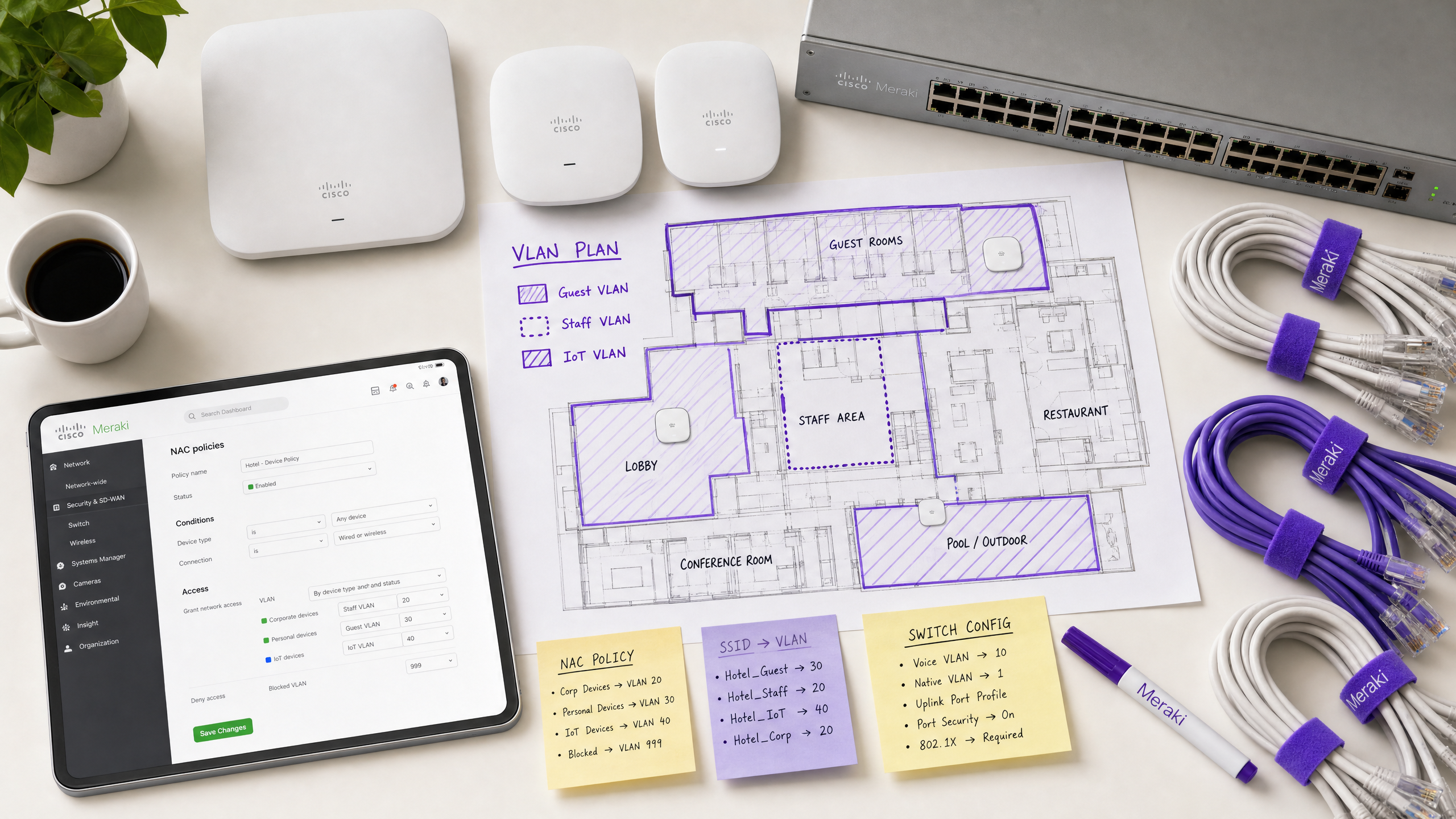
Análisis Técnico Detallado
La Arquitectura de la Dirección Dinámica de VLAN
La dirección de VLAN en un entorno Meraki se basa en la interacción entre tres componentes principales: el Punto de Acceso Meraki (que actúa como autenticador), el dispositivo cliente (el suplicante) y el servidor NAC/RADIUS (el servidor de autenticación). Este modelo de tres partes está definido por el estándar IEEE 802.1X y constituye la columna vertebral de cualquier implementación de control de acceso de nivel empresarial.
Cuando un dispositivo se asocia con la red, el AP intercepta el tráfico y reenvía una solicitud de acceso (Access-Request) al servidor RADIUS. Tras una autenticación exitosa, el servidor RADIUS responde con un mensaje de aceptación de acceso (Access-Accept). Fundamentalmente, para que se produzca la dirección de VLAN, este mensaje debe incluir atributos RADIUS estándar IETF específicos que instruyan al AP sobre qué VLAN aplicar:
| Atributo RADIUS | ID | Valor | Propósito |
|---|---|---|---|
| Tunnel-Type | 64 | 13 (VLAN) | Especifica el protocolo de túnel |
| Tunnel-Medium-Type | 65 | 6 (802) | Especifica el medio de transporte |
| Tunnel-Private-Group-ID | 81 | e.g., 20 |
Especifica el ID de VLAN de destino |
Cuando el AP Meraki recibe estos atributos, etiqueta dinámicamente el tráfico del cliente con el ID de VLAN especificado antes de reenviarlo al puerto del switch. Este proceso es transparente para el usuario final y se completa en milisegundos desde la asociación.
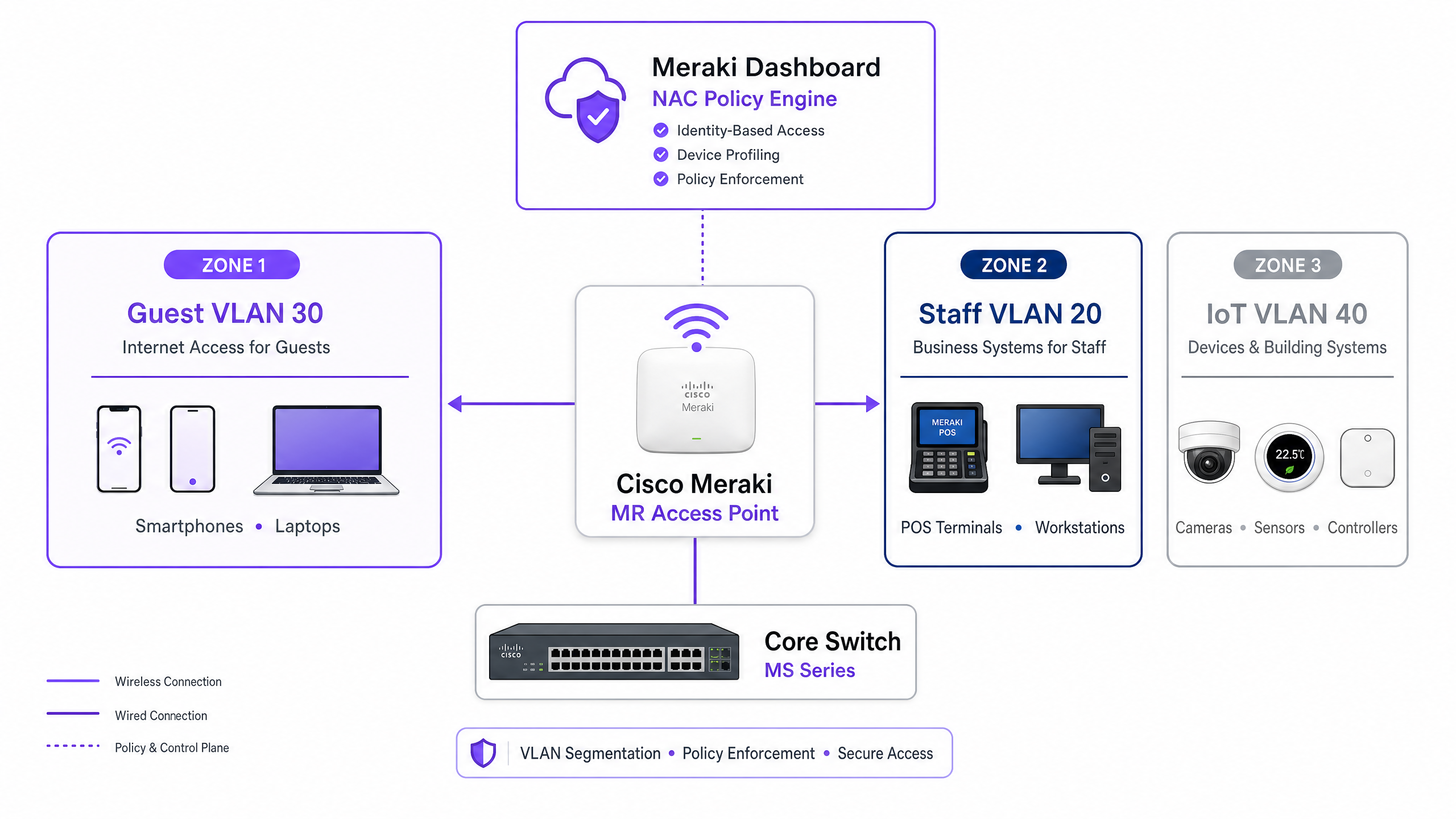
Mecanismos de Autenticación
Las redes empresariales suelen requerir un enfoque de autenticación de múltiples niveles, ya que la población de dispositivos en cualquier recinto dado es heterogénea. Los tres mecanismos principales son:
IEEE 802.1X (EAP-TLS o PEAP) es el estándar de oro para dispositivos corporativos y del personal. La autenticación se basa en certificados digitales (EAP-TLS) o credenciales seguras (PEAP-MSCHAPv2), proporcionando un cifrado robusto y validación de identidad. Este es el enfoque recomendado para cualquier dispositivo gestionado por la plataforma MDM de la organización.
MAC Authentication Bypass (MAB) es esencial para dispositivos sin interfaz —cámaras IP, terminales POS, sensores de gestión de edificios y televisores inteligentes— que no pueden ejecutar un suplicante 802.1X. La dirección MAC se utiliza como identificador. Aunque menos seguro que la autenticación basada en certificados (las direcciones MAC pueden ser falsificadas), MAB combinado con ACLs de VLAN estrictas proporciona una postura de seguridad aceptable para segmentos IoT aislados. Para un tratamiento exhaustivo de este tema, consulte nuestra guía sobre Gestión de la seguridad de dispositivos IoT con NAC y MPSK .
Captive Portal Authentication se utiliza para el acceso de invitados. Los dispositivos se colocan en un estado restringido de preautenticación hasta que el usuario completa un flujo de inicio de sesión —típicamente inicio de sesión social, registro por correo electrónico o un simple clic— alojado por una plataforma como Purple. Esto captura datos de primera parte mientras dirige el dispositivo a una VLAN de invitado aislada.
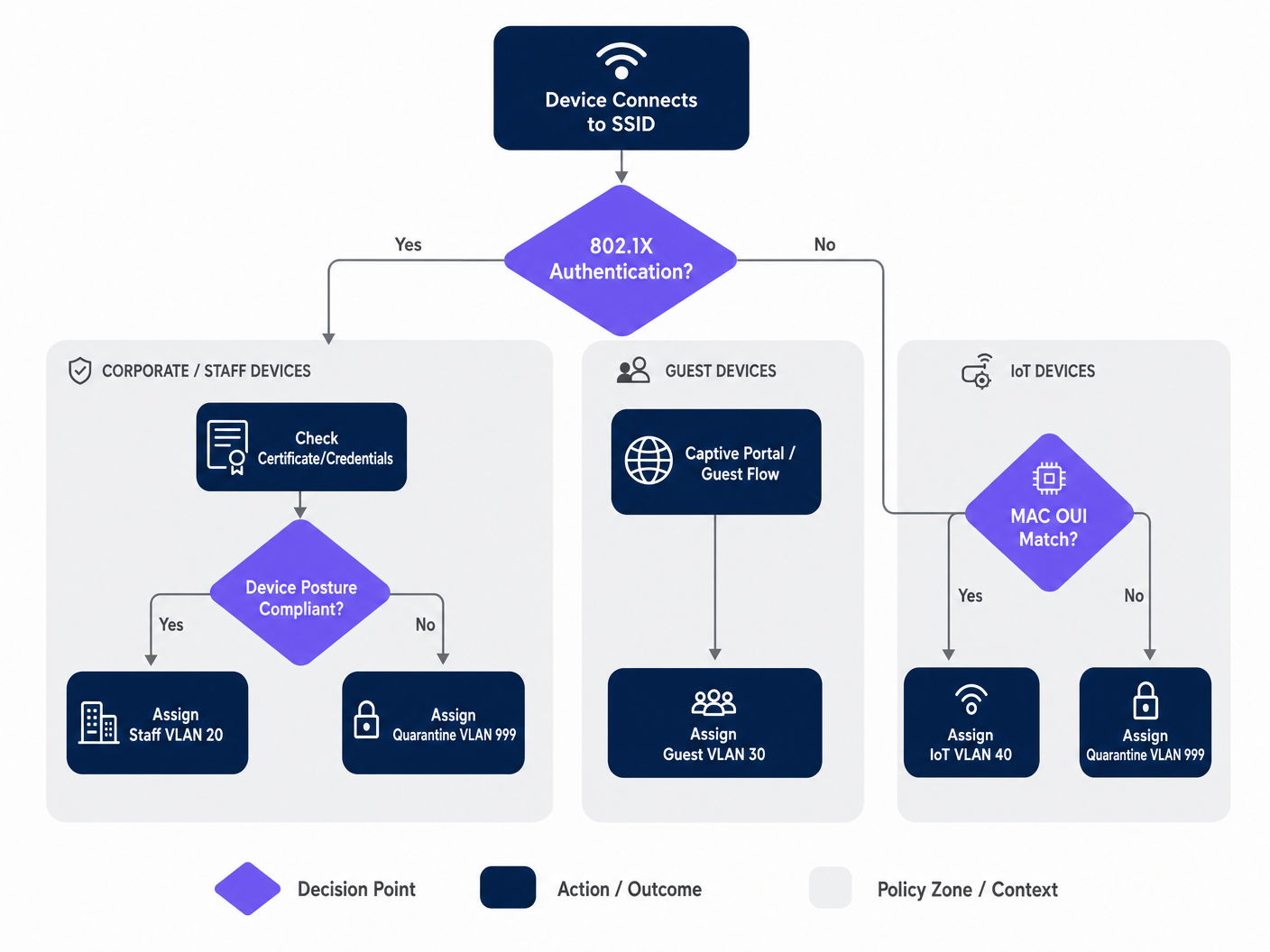
Guía de Implementación
Paso 1: Planifique su Arquitectura de VLAN
Antes de acceder al Dashboard de Meraki, defina su estrategia de segmentación de VLAN. Una implementación típica en un recinto empresarial utiliza la siguiente estructura:
| ID de VLAN | Nombre | Propósito | Método de Autenticación |
|---|---|---|---|
| 10 | Gestión | Infraestructura de red | Estático |
| 20 | Personal | Dispositivos corporativos, sistemas internos | 802.1X (EAP-TLS) |
| 30 | Invitados | Acceso a internet para visitantes | Captive Portal (Purple) |
| 40 | IoT | Cámaras, sensores, dispositivos inteligentes | MAB |
| 50 | POS | Terminales de pago (alcance PCI) | 802.1X (Certificate) |
| 999 | Cuarentena | Autenticación fallida, dispositivos desconocidos | Ninguno |
Paso 2: Configure la Infraestructura del Switch
Antes de configurar los ajustes inalámbricos, la infraestructura cableada debe estar preparada. Los puertos del switch que se conectan a los APs Meraki deben configurarse como puertos trunk, permitiendo todas las VLAN que el AP pueda asignar dinámicamente. Este es el error más común en implementaciones fallidas.
En el Dashboard de Meraki, navegue a Switch > Monitor > Switch ports, seleccione los puertos conectados a sus APs, establezca el Tipo en Trunk, configure la VLAN Nativa (típicamente su VLAN de gestión), y en el campo VLANs Permitidas, especifique todas las potencia las VLAN de cliente explícitamente (p. ej., 20,30,40,50,999).
Paso 3: Configurar el SSID de Meraki para 802.1X
Navegue a Wireless > Configure > Access control y seleccione el SSID de destino. En Network access, seleccione Enterprise with 802.1X. Desplácese hasta la sección RADIUS servers y añada los detalles de su servidor NAC: dirección IP, puerto (1812 por defecto para autenticación, 1813 para contabilidad) y la clave compartida. Para redundancia, añada un servidor RADIUS secundario.
Paso 4: Habilitar la anulación de RADIUS para el etiquetado de VLAN
Este es el paso crítico que permite al AP de Meraki aceptar asignaciones de VLAN del servidor NAC. En la misma página de Access control, desplácese hasta la sección Addressing and traffic. Establezca Client IP assignment en Bridge mode — esto asegura que los clientes reciban direcciones IP del servidor DHCP local en su VLAN asignada, no del NAT del AP. En VLAN tagging, seleccione Use VLAN tag from RADIUS.
Paso 5: Configurar el acceso de invitados con Purple
Para redes de invitados, cree un SSID separado configurado con una asociación abierta y una integración de Captive Portal. Establezca Network access en Open (no encryption) y configure la Splash page para que apunte a la URL de su portal Purple. Establezca el VLAN tagging para asignar todo el tráfico preautenticado a una VLAN de invitado dedicada y aislada (p. ej., VLAN 30) y habilite Client isolation para evitar el movimiento lateral entre dispositivos de invitados. La plataforma WiFi Analytics de Purple gestionará el flujo de autenticación y la captura de datos.
Mejores prácticas
Implemente una postura de "Fail-Closed" con VLAN de autenticación críticas. Si el servidor RADIUS deja de ser accesible, no permita el acceso total a la red. Configure una VLAN de autenticación crítica que proporcione conectividad básica a internet pero bloquee el acceso a todos los recursos internos hasta que se restaure el servidor NAC. Esto es especialmente importante para entornos minoristas donde los terminales POS deben seguir procesando pagos incluso durante una interrupción de RADIUS.
Habilite la transición rápida de BSS (802.11r) para un roaming sin interrupciones. La asignación dinámica de VLAN puede introducir latencia durante el roaming, ya que el dispositivo debe volver a autenticarse en cada AP. La habilitación de 802.11r garantiza transferencias fluidas para aplicaciones de voz y video en todo el recinto. Esto es innegociable para entornos hoteleros donde los huéspedes se mueven continuamente por la propiedad. Comprender Wi Fi Frequencies: A Guide to Wi-Fi Frequencies in 2026 también puede ayudar a optimizar la planificación de canales para implementaciones densas.
Segmente el tráfico IoT de forma agresiva. Nunca mezcle dispositivos IoT con tráfico corporativo o de invitados. Utilice MAB para identificar estos dispositivos y dirigirlos a VLAN dedicadas con reglas estrictas de firewall de Capa 3 que permitan solo los puertos y destinos específicos requeridos para el funcionamiento del dispositivo. Una cámara IP comprometida nunca debería poder acceder a su red POS o a los servidores de archivos corporativos.
Aplique WPA3 en los SSIDs corporativos. Cuando la compatibilidad del dispositivo lo permita, configure los SSIDs corporativos para usar WPA3-Enterprise. Esto proporciona un cifrado más fuerte y elimina las vulnerabilidades asociadas con los ataques WPA2 PMKID.
Solución de problemas y mitigación de riesgos
Modos de falla comunes
Los clientes no obtienen una dirección IP. Esto es casi siempre un problema de configuración del puerto del switch. Verifique que el puerto del switch conectado al AP esté configurado como un trunk y que la VLAN asignada dinámicamente esté permitida en ese trunk. Además, verifique que el servidor DHCP tenga un ámbito activo para esa VLAN y que el agente de retransmisión DHCP (si corresponde) esté configurado correctamente.
Tiempos de espera de autenticación. Si los dispositivos agotan el tiempo de espera durante el handshake 802.1X, verifique la latencia de la red entre los AP de Meraki y el servidor RADIUS. Una latencia alta puede hacer que los temporizadores EAP expiren. El Event Log del Dashboard de Meraki mostrará eventos 8021x_auth_timeout si esto ocurre.
Asignación de VLAN incorrecta. Utilice el Event Log del Dashboard de Meraki para ver los mensajes RADIUS Access-Accept. Verifique que el servidor NAC esté enviando el atributo Tunnel-Private-Group-ID correcto. Si falta o es incorrecto, el problema reside en la configuración de la política NAC, no en el AP de Meraki. La mayoría de las plataformas NAC (Cisco ISE, ClearPass) proporcionan registros detallados de autenticación RADIUS que mostrarán exactamente qué atributos se devolvieron.
La aleatorización de MAC interrumpe MAB. Los dispositivos modernos iOS y Android aleatorizan sus direcciones MAC por defecto. Para las redes de invitados gestionadas por Purple, esto se maneja con elegancia a través del flujo del Captive Portal — la identidad se establece por el inicio de sesión del usuario, no por la dirección MAC. Para los dispositivos IoT que utilizan MAB, asegúrese de que la dirección MAC de hardware real esté registrada en la base de datos de endpoints, ya que estos dispositivos no se aleatorizan.
ROI e impacto empresarial
La implementación de la dirección de VLAN basada en NAC ofrece un valor empresarial medible para los recintos empresariales en múltiples dimensiones:
| Resultado empresarial | Mecanismo | Impacto medible |
|---|---|---|
| Reducción de la sobrecarga operativa | Menos SSIDs que gestionar | Reducción del 60-70% en el número de SSIDs |
| Postura de seguridad mejorada | Microsegmentación automatizada | Radio de impacto contenido para las brechas |
| Habilitación del cumplimiento | Control de acceso basado en identidad | Alineación con PCI DSS, GDPR, ISO 27001 |
| Captura de datos de invitados | Integración de Captive Portal de Purple | Datos de primera parte a escala |
| Rendimiento de la red | Reducción de la sobrecarga de tramas de gestión | Rendimiento mejorado en áreas de alta densidad |
Para los operadores de Healthcare y Transport , el argumento del cumplimiento por sí solo justifica la inversión. La capacidad de demostrar que los registros de pacientes están en una VLAN estrictamente aislada, o que los sistemas de venta de boletos están segregados del WiFi público, es una mitigación de riesgo material que satisface tanto la auditoría interna como los requisitos regulatorios externos.
Para los operadores de hostelería y minoristas, la integración con la plataforma de WiFi para invitados de Purple transforma la red de invitados de un centro de costos en un generador de ingresosactivo operativo. Cada sesión de invitado autenticado se convierte en un punto de datos, alimentando la automatización de marketing, los programas de lealtad y el análisis de la sede, todo mientras la política NAC subyacente garantiza que el tráfico de invitados nunca toque los sistemas internos.
Escuche el Informe
Para una inmersión más profunda en las estrategias de implementación y los errores comunes, escuche nuestro podcast de informe técnico de 10 minutos:
Key Definitions
Network Access Control (NAC)
A security architecture that enforces policy on devices seeking to access network resources, typically evaluating identity, device posture, and compliance status before granting access and assigning a network segment.
IT teams deploy NAC platforms (such as Cisco ISE or Aruba ClearPass) to act as the central policy engine, deciding which VLAN a device belongs in based on who or what it is, and what state it is in.
VLAN Steering (Dynamic VLAN Assignment)
The process of automatically assigning a client device to a specific Virtual Local Area Network (VLAN) upon successful authentication, regardless of which physical port or SSID they connect to.
Essential for high-density venues to reduce the number of broadcasted SSIDs while maintaining strict security segmentation between guest, staff, and IoT device populations.
IEEE 802.1X
An IEEE standard for port-based network access control that provides an authentication mechanism to devices wishing to attach to a LAN or WLAN, using the Extensible Authentication Protocol (EAP) framework.
The gold standard for authenticating corporate laptops and staff smartphones, ensuring only verified users with valid credentials or certificates can access internal resources.
MAC Authentication Bypass (MAB)
A fallback authentication method where a device's MAC address is used as its identity credential when it cannot support 802.1X. The MAC address is sent to the RADIUS server as both the username and password.
Crucial for onboarding headless IoT devices — printers, cameras, sensors, and POS terminals — onto a secure, segmented network without requiring user intervention.
RADIUS (Remote Authentication Dial-In User Service)
A networking protocol that provides centralised Authentication, Authorisation, and Accounting (AAA) management for users and devices connecting to a network service.
The protocol used by the Meraki AP to communicate with the NAC server. The AP sends Access-Request messages; the NAC server responds with Access-Accept (including VLAN attributes) or Access-Reject.
Captive Portal
A web page that a user of a public-access network is obliged to view and interact with before full network access is granted. Typically used for terms acceptance, login, or data capture.
The primary method for onboarding guest users in hospitality, retail, and public-sector environments. Platforms like Purple host the captive portal, capturing analytics data and enforcing terms of service.
Client Isolation
A wireless security feature that prevents devices connected to the same SSID or VLAN from communicating directly with each other, forcing all traffic through the gateway.
A mandatory setting for Guest VLANs to prevent malicious actors from scanning or attacking other guests' devices. Should be enabled on any SSID where untrusted devices are expected.
Fast BSS Transition (802.11r)
An IEEE 802.11 amendment that enables fast and secure handoffs from one access point to another by pre-caching authentication keys, reducing roaming latency from hundreds of milliseconds to under 50ms.
Must be enabled when using 802.1X and dynamic VLAN assignment in venues where users are mobile, to prevent voice calls or video streams from dropping as users move between access points.
EAP-TLS (Extensible Authentication Protocol - Transport Layer Security)
A mutual authentication method within the 802.1X framework that uses digital certificates on both the client and the authentication server, providing the highest level of security for wireless authentication.
The recommended authentication method for PCI DSS-scoped devices and any environment where credential theft is a significant risk. Requires a PKI infrastructure to issue and manage client certificates.
Worked Examples
A 400-room hotel needs to deploy a secure wireless network. They require staff to access internal booking systems securely, guests to access the internet via a branded captive portal, and smart TVs in the rooms to connect to a local media server. They want to minimise SSID broadcast overhead to ensure optimal performance in high-density areas.
The IT team should deploy two SSIDs. SSID 1: 'Hotel_Secure' configured for 802.1X. Staff authenticate using EAP-TLS with corporate certificates issued by the hotel's PKI. The NAC server (Cisco ISE) recognises the staff identity and returns RADIUS attributes assigning them to VLAN 20 (Staff), which has full access to the PMS and booking systems. The Smart TVs, lacking 802.1X capabilities, are profiled using MAC Authentication Bypass (MAB). The NAC server recognises the TV MAC OUI prefixes and assigns them to VLAN 40 (IoT), which has ACLs permitting access only to the media server on port 8080 and the internet. SSID 2: 'Hotel_Guest' configured as Open with a Purple captive portal. Guests connect, are redirected to the Purple splash page, and upon successful social login or email registration, are assigned to VLAN 30 (Guest) with client isolation enabled. The Purple platform captures first-party data for the hotel's CRM and marketing automation.
A retail chain is rolling out new wireless Point-of-Sale (POS) terminals across 50 locations. These devices must be strictly segmented to comply with PCI DSS requirements. However, the IT team is concerned about what happens if the central RADIUS server goes offline during peak trading hours.
The POS terminals should connect to an 802.1X-enabled SSID, utilising certificate-based authentication (EAP-TLS) to ensure strong identity validation. The NAC policy will steer these devices into a dedicated, highly restricted POS VLAN (VLAN 50) with Layer 3 firewall rules permitting traffic only to the payment gateway IPs on the required ports. To mitigate the risk of RADIUS server failure, the IT team must configure a Critical Authentication VLAN on the Meraki access points. If the AP cannot reach the RADIUS server within the configured timeout, it will automatically drop the POS terminals into this critical VLAN. This VLAN should be configured with strict ACLs that allow traffic only to the essential payment processing gateways, ensuring transactions can continue while blocking all other network access. A secondary RADIUS server at each location provides an additional layer of redundancy.
Practice Questions
Q1. A hospital IT director reports that newly installed wireless IP cameras are failing to connect to the 'Med_Secure' SSID, which is configured for 802.1X. The cameras do not support certificate-based authentication and have no user interface. How should the network architecture be adjusted to securely onboard these devices?
Hint: Consider how headless devices are profiled and authenticated when they cannot run an 802.1X supplicant.
View model answer
The IT team must utilise MAC Authentication Bypass (MAB) on the NAC server. The cameras' MAC addresses should be added to the endpoint database and profiled as 'IoT_Camera'. When a camera attempts to connect, the NAC server will use the MAC address as the authentication credential and return the RADIUS attributes to steer the camera into an isolated IoT VLAN. Strict Layer 3 ACLs should be applied to this VLAN, permitting traffic only to the camera management server and blocking all other internal network access. The hospital should also consider using DHCP fingerprinting as a secondary profiling method to verify the device type matches the expected profile for the registered MAC address.
Q2. During a network audit at a retail chain, it is discovered that staff laptops on the dynamic VLAN are successfully authenticating via 802.1X (the Event Log shows Access-Accept messages with the correct VLAN ID) but are not receiving IP addresses. Guest devices on a separate SSID are functioning normally. What is the most likely configuration error and how would you resolve it?
Hint: The authentication is succeeding — the issue is in the data path after the VLAN tag is applied.
View model answer
The most likely issue is that the physical switchport connecting the Meraki AP to the core switch is not configured correctly. While the AP is successfully authenticating the client and tagging the traffic with the Staff VLAN ID, the switchport is likely configured as an access port (or a trunk port that is missing the Staff VLAN in its allowed list). The switchport must be configured as a trunk, and the dynamically assigned Staff VLAN must be explicitly listed in the allowed VLANs. The IT team should navigate to Switch > Monitor > Switch ports in the Meraki Dashboard, select the port connected to the AP, verify it is set to Trunk type, and confirm the Staff VLAN ID is included in the Allowed VLANs field.
Q3. A stadium wants to offer seamless WiFi to 50,000 fans during events while securely connecting point-of-sale terminals and digital signage. The current network team proposes broadcasting five different SSIDs to separate the traffic. Why is this a poor design for a high-density environment, and what is the recommended architecture?
Hint: Consider the impact of management frames on wireless airtime in a high-density environment.
View model answer
Broadcasting five SSIDs creates excessive management frame overhead — each SSID requires its own beacon frames broadcast at regular intervals by every access point. In a high-density environment like a stadium with hundreds of APs, this management frame overhead consumes a significant proportion of available airtime, directly reducing the throughput available for user data. The recommended approach is to broadcast a maximum of two SSIDs: one Open SSID with a Purple captive portal for the 50,000 fans, steering them to a Guest VLAN with client isolation; and one 802.1X-enabled secure SSID for all corporate devices. The NAC policy will then dynamically steer POS terminals into a PCI-compliant VLAN and digital signage into an IoT VLAN based on their identity, without requiring additional SSIDs.