

Cómo funciona la asignación dinámica de VLAN en edificios multi-inquilino
Esta guía de referencia técnica detalla la arquitectura e implementación de la asignación dinámica de VLAN utilizando 802.1X y RADIUS en entornos multi-inquilino. Ofrece orientación práctica para gerentes de TI y arquitectos de red para reducir la sobrecarga de SSID, aplicar el aislamiento de Capa 2 y garantizar una conectividad segura y escalable en edificios compartidos.
Escucha esta guía
Ver transcripción del podcast
Resumen Ejecutivo
Para los gerentes de TI y arquitectos de red que supervisan edificios multi-inquilino —como oficinas comerciales, complejos minoristas o grandes recintos hoteleros—, la gestión de la segmentación de red es un desafío crítico. Históricamente, aislar el tráfico de los inquilinos significaba desplegar una infraestructura física separada o transmitir un SSID único para cada inquilino. Ambos enfoques son fundamentalmente defectuosos. La separación física es prohibitiva en costos e inflexible, mientras que la transmisión de múltiples SSIDs degrada severamente el rendimiento de RF debido a la excesiva sobrecarga de tramas de gestión.
La asignación dinámica de VLAN resuelve esto consolidando el entorno inalámbrico en un único y seguro SSID. Aprovechando la autenticación IEEE 802.1X y RADIUS, la red asigna dinámicamente a los usuarios a su Red de Área Local Virtual (VLAN) dedicada basándose en su identidad, no en la red que eligen. Esta guía proporciona un análisis técnico exhaustivo sobre la arquitectura, el despliegue y la resolución de problemas de la asignación dinámica de VLAN, garantizando un aislamiento seguro de Capa 2, el cumplimiento de estándares como PCI DSS y GDPR, y un sólido ROI para los operadores de recintos.
Análisis Técnico Detallado
El Problema con Múltiples SSIDs
En un edificio compartido, es común ver docenas de SSIDs transmitidos (p. ej., "TenantA_Corp", "TenantB_Secure", "Building_Guest"). Cada SSID transmitido por un Punto de Acceso (AP) debe enviar tramas de baliza a la velocidad de datos obligatoria más baja (típicamente 1 Mbps o 6 Mbps). A medida que aumenta el número de SSIDs, la proporción de tiempo de aire consumido por la sobrecarga de gestión crece exponencialmente, dejando menos tiempo de aire para la transmisión de datos real. Esto resulta en alta latencia, bajo rendimiento y una mala experiencia de usuario, independientemente de la velocidad de conexión a internet subyacente.
La Arquitectura 802.1X y RADIUS
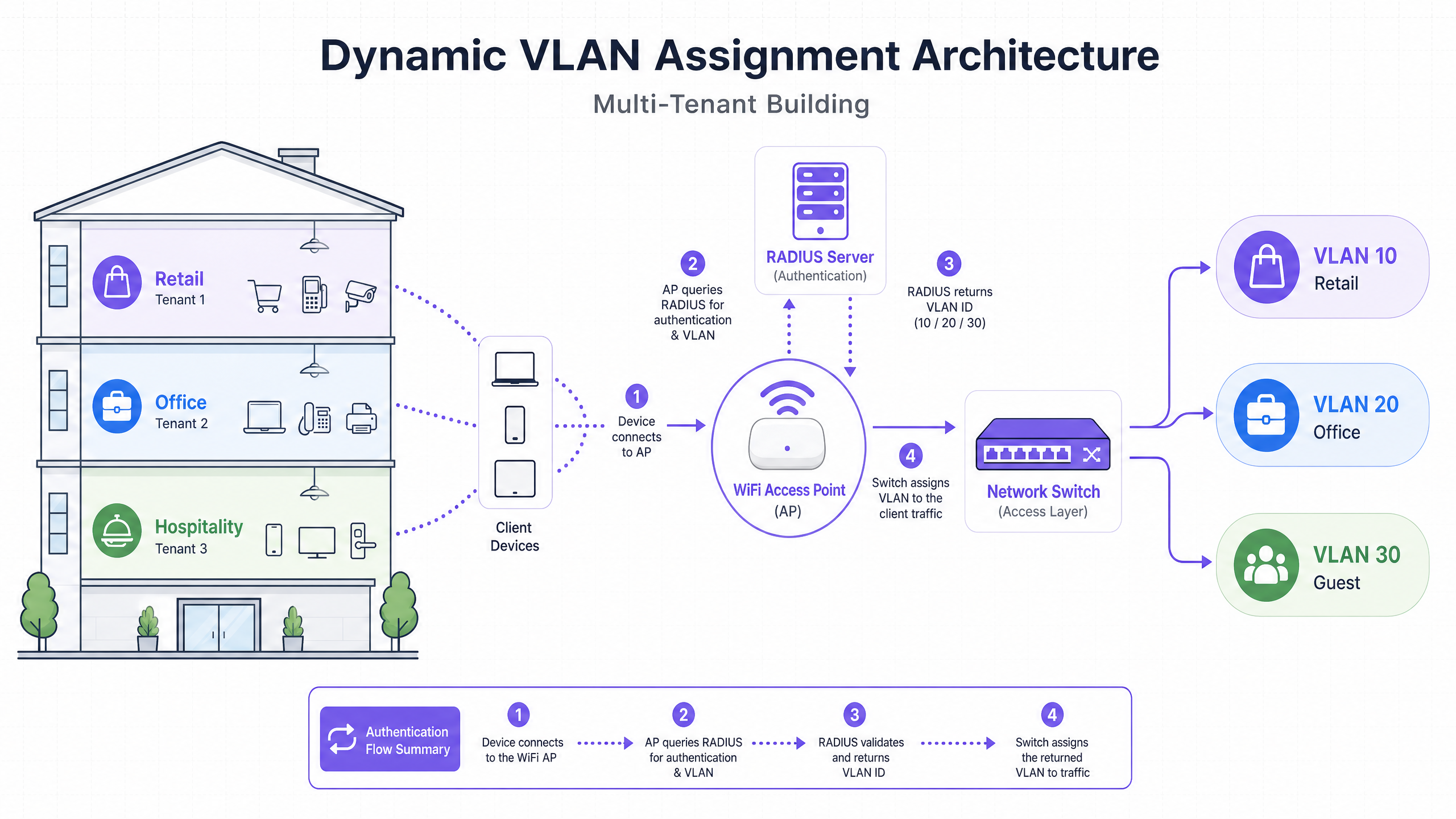
La asignación dinámica de VLAN traslada la lógica de segmentación de la capa RF a la capa de autenticación. Se basa en el estándar IEEE 802.1X para el control de acceso a la red basado en puertos, integrado con un servidor RADIUS (Remote Authentication Dial-In User Service).
La arquitectura consta de tres componentes principales:
- Solicitante: El dispositivo cliente (laptop, smartphone) que solicita acceso a la red.
- Autenticador: El dispositivo de acceso a la red, típicamente el Punto de Acceso WiFi o controlador inalámbrico, que bloquea el tráfico hasta que la autenticación es exitosa.
- Servidor de Autenticación: El servidor RADIUS que valida las credenciales contra un almacén de identidades (p. ej., Active Directory, LDAP) y dicta las políticas de red.
El Flujo de Autenticación
Cuando un solicitante intenta conectarse al SSID unificado, ocurre el siguiente flujo:
- Inicialización EAPOL: El solicitante se conecta al AP. El AP bloquea todo el tráfico excepto los paquetes del Protocolo de Autenticación Extensible sobre LAN (EAPOL).
- Solicitud de Acceso RADIUS: El AP encapsula los datos EAP y los reenvía al servidor RADIUS como un
Access-Request. - Validación de Credenciales: El servidor RADIUS verifica las credenciales del usuario (a través de EAP-TLS, PEAP, etc.).
- Aceptación de Acceso RADIUS: Tras una validación exitosa, el servidor RADIUS responde con un mensaje
Access-Accept. Crucialmente, este mensaje incluye atributos RADIUS estándar IETF específicos que instruyen al AP sobre qué VLAN asignar al usuario.
Los atributos RADIUS críticos requeridos para la asignación dinámica de VLAN son:
Tunnel-Type(64): Set toVLAN(Value 13)Tunnel-Medium-Type(65): Set to802(Value 6)Tunnel-Private-Group-ID(81): Establecido en el ID de VLAN específico (p. ej., "20" para Inquilino A, "30" para Inquilino B)
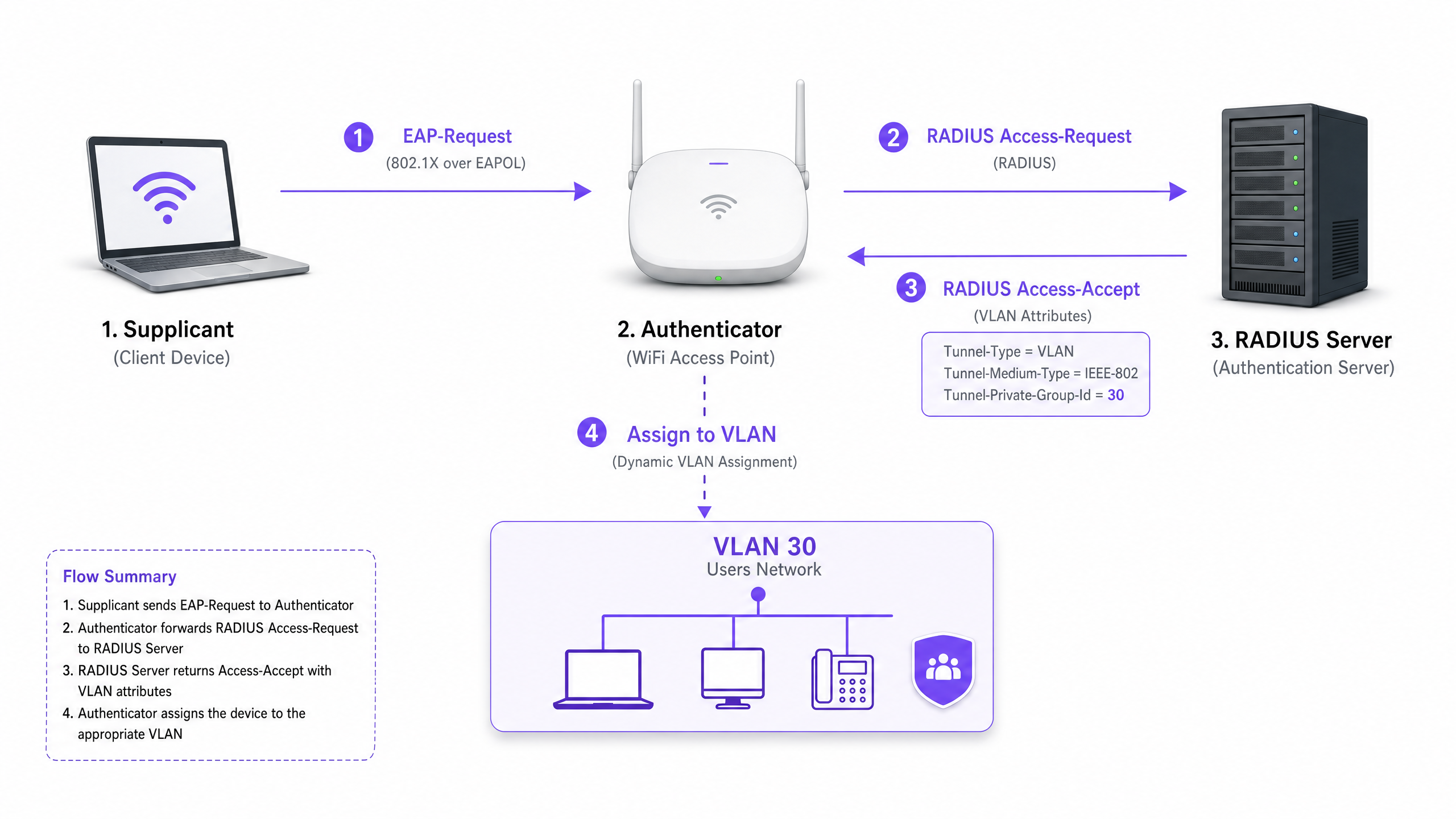
Una vez que el AP recibe estos atributos, dirige el tráfico del usuario directamente a la VLAN especificada. Los switches de red ascendentes manejan el tráfico como si el usuario estuviera físicamente conectado a un puerto dedicado para ese inquilino, asegurando un aislamiento completo de Capa 2.
Guía de Implementación
El despliegue de la asignación dinámica de VLAN requiere una cuidadosa coordinación entre la infraestructura inalámbrica, los switches de borde y el proveedor de identidad. Siga esta secuencia de implementación neutral al proveedor.
Fase 1: Preparación de la Infraestructura de Red
- Aprovisionamiento de VLAN: Defina y cree las VLAN necesarias en su infraestructura de enrutamiento central y servidores DHCP. Asegúrese de que cada VLAN de inquilino tenga su propia subred distinta y políticas de enrutamiento apropiadas (p. ej., enrutamiento a internet, pero descartando el tráfico inter-VLAN).
- Troncalización de Switch: Este es un paso crítico. Los puertos del switch que se conectan a sus Puntos de Acceso deben configurarse como puertos troncales 802.1Q. Debe etiquetar todas las VLAN de inquilino potenciales que el AP podría necesitar asignar. Si el servidor RADIUS asigna la VLAN 40, pero la VLAN 40 no está etiquetada en el puerto del switch, el cliente se autenticará pero no logrará recibir una dirección IP.
- Configuración del AP: Configure los APs para transmitir un único SSID habilitado para 802.1X (p. ej., WPA3-Enterprise). Habilite la configuración específica en su controlador inalámbrico o APs que les permita aceptar atributos de anulación RADIUS (a menudo etiquetados como "AAA Override" o "Dynamic VLAN").
Fase 2: Integración de RADIUS e Identidad
- Integración del Almacén de Identidades: Conecte su servidor RADIUS al servicio de directorio que contiene las identidades de usuario y sus asociaciones de inquilino.
- Creación de Políticas de Red: Cree políticas dentro del servidor RADIUS que mapeen grupos de usuarios a IDs de VLAN. Por ejemplo, una política que establezca: Si el usuario pertenece al Grupo 'Retail_Staff', devolver Tunnel-Private-Group-ID = 10.
- Gestión de Certificados: Si utiliza EAP-TLS (recomendado para dispositivos corporativos), implemente certificados de cliente. Si utiliza PEAP-MSCHAPv2 (común para BYOD), asegúrese de que haya un certificado de servidor válido y de confianza instalado en el servidor RADIUS.
Fase 3: Pruebas e Implementación por Fases
- Pruebas Piloto: Realice pruebas con un pequeño grupo de dispositivos en diferentes inquilinos. Verifique que, al conectarse, el dispositivo reciba una dirección IP de la subred correcta y no pueda hacer ping a dispositivos en otras VLAN de inquilinos.
- Dispositivos IoT y sin Interfaz: Para dispositivos que no admiten 802.1X (impresoras, smart TVs), implemente la Omisión de Autenticación MAC (MAB). El servidor RADIUS autentica el dispositivo basándose en su dirección MAC y asigna la VLAN adecuada. Nota: Coloque estos dispositivos en VLAN estrictamente aisladas, ya que las direcciones MAC pueden ser suplantadas.
Mejores Prácticas
- Consolidar SSIDs: Apunte a un máximo absoluto de tres SSIDs: un SSID 802.1X para todos los inquilinos, uno para dispositivos IoT heredados (usando PSK o MAB), y uno para Guest WiFi (usando un Captive Portal).
- Imponer Aislamiento de Cliente: Dentro de la red de invitados y las redes de inquilinos no confiables, habilite el aislamiento de cliente de Capa 2 a nivel del AP para evitar que los dispositivos se comuniquen entre sí, mitigando los riesgos de movimiento lateral.
- Aprovechar Análisis Avanzados: Integre su flujo de autenticación con una sólida plataforma de WiFi Analytics para obtener visibilidad sobre la utilización del lugar, los tiempos de permanencia y el rendimiento de la red de inquilinos.
- Estandarizar en WPA3: Donde el soporte del cliente lo permita, exija WPA3-Enterprise para el SSID 802.1X para garantizar el más alto nivel de cifrado y protección contra ataques de diccionario.
- Contexto de la Industria: Adapte la implementación al sector vertical. En entornos de Retail , asegúrese de que los sistemas POS estén en una VLAN estrictamente aislada para mantener el cumplimiento de PCI DSS. En Hospitality , asegúrese de que las VLAN de invitados estén completamente separadas de las operaciones internas.
Solución de Problemas y Mitigación de Riesgos
Modos de Falla Comunes
El Escenario "Autenticado pero sin IP":
- Síntoma: El cliente se conecta, la autenticación es exitosa, pero el dispositivo se autoasigna una dirección APIPA (169.254.x.x).
- Causa Raíz: El servidor RADIUS asignó una VLAN, pero esa VLAN no está creada en el servidor DHCP o, más comúnmente, la VLAN no está etiquetada en el puerto troncal que conecta el switch al AP.
- Solución: Verifique las configuraciones de troncal 802.1Q en el switch de borde.
Tiempo de Espera de RADIUS / Inaccesible:
- Síntoma: Los clientes se quedan en "Conectando..." o se les solicita repetidamente las credenciales.
- Causa Raíz: El AP no puede alcanzar el servidor RADIUS, o el secreto compartido de RADIUS no coincide entre el AP y el servidor.
- Solución: Verifique la conectividad de red entre la IP de administración del AP y el servidor RADIUS. Vuelva a verificar el secreto compartido.
Vencimiento del Certificado:
- Síntoma: Fallas de autenticación repentinas y generalizadas para todos los usuarios en PEAP o EAP-TLS.
- Causa Raíz: El certificado del servidor RADIUS ha caducado, lo que provoca que los clientes rechacen la conexión.
- Solución: Implemente monitoreo y alertas agresivas para los certificados RADIUS. Renueve los certificados al menos 30 días antes de su vencimiento.
Estrategias de Mitigación de Riesgos
- Falla Abierta vs. Falla Cerrada: Defina una política clara para cuando el servidor RADIUS sea inaccesible. Para las redes corporativas de inquilinos, la falla cerrada (denegar acceso) es necesaria por seguridad. Para el acceso de invitados, podría configurar una política de falla abierta que dirija a los usuarios a una VLAN de "cuarentena" altamente restringida, solo con acceso a internet.
- Redundancia: Siempre implemente servidores RADIUS en un par de alta disponibilidad (HA), preferiblemente distribuidos geográficamente si soporta múltiples sitios.
ROI e Impacto Comercial
La implementación de la asignación dinámica de VLAN ofrece resultados comerciales significativos y medibles para los operadores de recintos:
- OpEx Reducido: La gestión centralizada de un único SSID reduce drásticamente la sobrecarga de TI asociada con el aprovisionamiento, la actualización y la solución de problemas de redes de inquilinos individuales.
- Espectro RF Optimizado: La eliminación del exceso de SSIDs recupera tiempo de aire valioso. Para una guía sobre la gestión del espectro, consulte nuestro artículo sobre Wi Fi Frequencies: A Guide to Wi-Fi Frequencies in 2026 . Esto conduce a un mayor rendimiento y menos tickets de soporte relacionados con "WiFi lento".
- Seguridad y Cumplimiento Mejorados: El estricto aislamiento de Capa 2 asegura que una vulneración en la red de un inquilino no se propague a otras. Esto es crítico para cumplir con requisitos regulatorios como PCI DSS y GDPR.
- Escalabilidad: La incorporación de un nuevo inquilino no requiere cambios en la infraestructura física o la configuración inalámbrica; es simplemente una cuestión de crear una nueva política en el servidor RADIUS.
Para estrategias más completas sobre el diseño de redes para espacios compartidos, revise nuestra guía sobre Designing a Multi-Tenant WiFi Architecture for MDU .
Definiciones clave
802.1X
An IEEE standard for port-based network access control that provides an authentication mechanism to devices wishing to attach to a LAN or WLAN.
The foundational protocol that allows the network to demand identity before granting access, enabling dynamic policies.
RADIUS (Remote Authentication Dial-In User Service)
A networking protocol that provides centralized Authentication, Authorization, and Accounting (AAA) management for users who connect and use a network service.
The decision engine that validates credentials and tells the network which VLAN to assign to a user.
Supplicant
The client device (e.g., laptop, smartphone) or software that requests access to the network and provides credentials.
The endpoint that must be configured to support 802.1X (e.g., selecting PEAP or EAP-TLS in WiFi settings).
Authenticator
The network device (e.g., WiFi Access Point or switch) that facilitates the authentication process by relaying messages between the supplicant and the authentication server.
The gatekeeper that blocks traffic until RADIUS gives the green light, and then applies the assigned VLAN.
EAP (Extensible Authentication Protocol)
An authentication framework frequently used in wireless networks and point-to-point connections, supporting multiple authentication methods (e.g., EAP-TLS, PEAP).
The language spoken between the supplicant and the RADIUS server to securely exchange credentials.
MAB (MAC Authentication Bypass)
A technique used to authenticate devices that do not support 802.1X by using their MAC address as the credential.
Used for onboarding legacy IoT devices, printers, or smart TVs in a multi-tenant environment.
Tunnel-Private-Group-ID
The specific RADIUS attribute (Attribute 81) used to transmit the VLAN ID from the RADIUS server to the Authenticator.
The critical piece of data that actually dictates which network segment the user is dropped into.
Layer 2 Isolation
A security measure that prevents devices on the same network segment or VLAN from communicating directly with each other.
Essential for guest networks and untrusted tenant networks to prevent lateral movement of malware or unauthorized access.
Ejemplos resueltos
A large conference centre hosts three simultaneous events. Event A requires secure corporate access, Event B requires open access for attendees, and Event C requires access to specific internal presentation servers. How should the network architect deploy this using dynamic VLANs?
The architect configures a single 802.1X SSID for staff and secure attendees, and a separate open SSID with a captive portal for general guests.
For the 802.1X SSID, the RADIUS server is configured with three policies:
- If User Group = 'Event_A_Staff', assign VLAN 100 (Internet + Corporate VPN access).
- If User Group = 'Event_C_Presenters', assign VLAN 102 (Internet + Presentation Server access).
For Event B, attendees use the open Guest SSID, which drops them into VLAN 101 (Internet only, client isolation enabled).
A retail chain operates a shared building with a coffee shop, a clothing store, and a pharmacy. The pharmacy must comply with HIPAA, and the clothing store requires PCI DSS compliance for its wireless POS terminals. How is isolation guaranteed?
The IT team deploys a single WPA3-Enterprise SSID.
- Pharmacy staff authenticate via 802.1X, and RADIUS assigns them to VLAN 50, which has strict firewall rules preventing access to any other internal subnets.
- The clothing store's POS terminals authenticate using EAP-TLS (certificate-based) and are assigned to VLAN 60. VLAN 60 is routed directly to the payment processor gateway and isolated from all other traffic.
- The coffee shop uses a separate Guest SSID for patrons, terminating on VLAN 70 with client isolation.
Preguntas de práctica
Q1. A tenant reports that they can successfully authenticate to the 802.1X SSID, but their device self-assigns an IP address (169.254.x.x) and cannot reach the internet. What is the most likely configuration error?
Sugerencia: Think about the path between the Access Point and the core network services.
Ver respuesta modelo
The most likely cause is that the VLAN assigned by the RADIUS server is not tagged on the 802.1Q trunk port connecting the edge switch to the Access Point. The AP is trying to drop the traffic onto the correct VLAN, but the switch drops the frames because it is not configured to accept them on that port.
Q2. You are designing a multi-tenant network for a shared office space. The client wants to broadcast a unique SSID for each of the 15 tenants to 'make it easy for them to find their network'. How do you advise the client?
Sugerencia: Consider the impact of management frame overhead on RF performance.
Ver respuesta modelo
Advise the client strongly against this approach. Broadcasting 15 SSIDs will consume a massive amount of airtime with beacon frames, severely degrading network performance, increasing latency, and reducing throughput for all users. Recommend deploying a single 802.1X SSID and using Dynamic VLAN Assignment via RADIUS to securely segment the tenants on the backend.
Q3. A multi-tenant building requires network access for several headless IoT devices (e.g., smart thermostats, digital signage) that do not support 802.1X supplicants. How can these devices be securely onboarded onto the correct tenant VLANs?
Sugerencia: Consider alternative authentication methods supported by RADIUS.
Ver respuesta modelo
Implement MAC Authentication Bypass (MAB). The Access Point will send the device's MAC address to the RADIUS server as the username and password. The RADIUS server can be configured to recognize these specific MAC addresses and return the appropriate VLAN ID. Because MAC addresses can be spoofed, these devices should be placed in strictly isolated VLANs with limited network access.