
Términos y condiciones de WiFi para el personal: Aspectos legales y de cumplimiento esenciales
Esta guía cubre los aspectos legales y técnicos esenciales para redactar y hacer cumplir los términos y condiciones de WiFi para el personal en espacios empresariales. Detalla qué incluir en una Política de Uso Aceptable (AUP), cómo cumplir con los requisitos de GDPR y PCI-DSS, y cómo implementar la autenticación basada en identidad y la segmentación de red para proteger los activos corporativos. Los gerentes de TI, equipos de recursos humanos y directores de operaciones en hoteles, cadenas de retail, estadios y organizaciones del sector público encontrarán orientación práctica que podrán implementar este trimestre.
Video overview
Escucha esta guía
Ver transcripción del podcast
Parte de nuestra serie principal: Guía de seguridad de WiFi empresarial →
Resumen ejecutivo
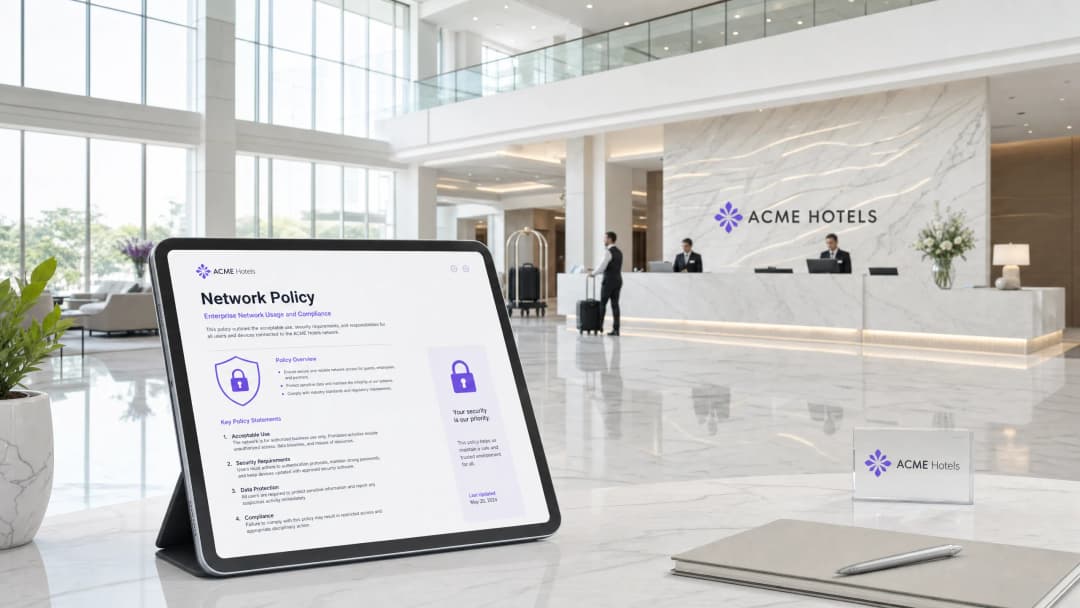
Garantizar el acceso seguro de los empleados a la red requiere más que controles técnicos. Exige una Política de Uso Aceptable (AUP) clara y aplicable, respaldada por una autenticación basada en identidad, segmentación de red y filtrado de contenido a nivel de DNS. A medida que los establecimientos crecen en los sectores de hospitalidad, comercio minorista y el sector público, la superficie de riesgo se expande de manera proporcional. Un solo dispositivo de empleado comprometido en una red compartida puede vulnerar los requisitos de PCI-DSS y GDPR, lo que provoca multas e interrupciones operativas.
Esta guía proporciona a los gerentes de TI, arquitectos de red y directores de operaciones de establecimientos un marco de trabajo definitivo para redactar y hacer cumplir los términos y condiciones de la red WiFi para empleados. Cubrimos los aspectos legales esenciales de la transparencia en el monitoreo de empleados, la arquitectura técnica necesaria para el cumplimiento y cómo las Redes Basadas en Identidad de Purple protegen los activos corporativos contra el uso indebido interno. El principio fundamental es sencillo: la política de WiFi para empleados debe ser específica, transparente y aplicarse técnicamente. Una política que solo existe en papel no es una política.
Análisis técnico profundo
Por qué fallan las contraseñas compartidas
La mayoría de las redes WiFi para el personal en los sectores de hotelería y comercio minorista todavía funcionan con WPA2-Personal con una sola contraseña compartida. Esa contraseña se escribe en pizarrones, se comparte en canales de Slack y nunca se cambia cuando la gente se va de la empresa. Esto no es un inconveniente menor. Es una falla de seguridad estructural. Cuando un empleado se marcha, su acceso a la red corporativa persiste indefinidamente. No hay un registro de auditoría, no hay una clave de sesión por usuario y no hay forma de aislar un dispositivo comprometido sin interrumpir a todos los demás.
El estándar 802.1X de la IEEE, combinado con el cifrado WPA3-Enterprise, resuelve esto. Cada usuario se autentica con credenciales individuales vinculadas a un directorio central. Cada sesión utiliza claves de cifrado únicas, por lo que un dispositivo en el mismo punto de acceso no puede interceptar el tráfico de otro usuario. Purple implementa esto a través de redes basadas en la identidad (Identity-Based Networks), reemplazando las contraseñas compartidas con un acceso basado en certificados administrado a través de Microsoft Entra ID, Okta o Google Workspace. Cuando el departamento de recursos humanos elimina a un miembro del personal del directorio, Purple revoca su acceso a la WiFi en cuestión de minutos a través de SCIM (System for Cross-domain Identity Management). Sin tickets que generar. Sin contraseñas que rotar en toda la empresa.
Segmentación de red y cumplimiento de PCI DSS
La seguridad eficaz de la WiFi para el personal comienza con el aislamiento. Debe separar el tráfico del personal de las redes de invitados y de pago para limitar el alcance de las auditorías de cumplimiento y contener posibles brechas de seguridad. La implementación de VLAN (Virtual Local Area Networks) es el enfoque estándar y es un requisito fundamental para el cumplimiento de PCI DSS.
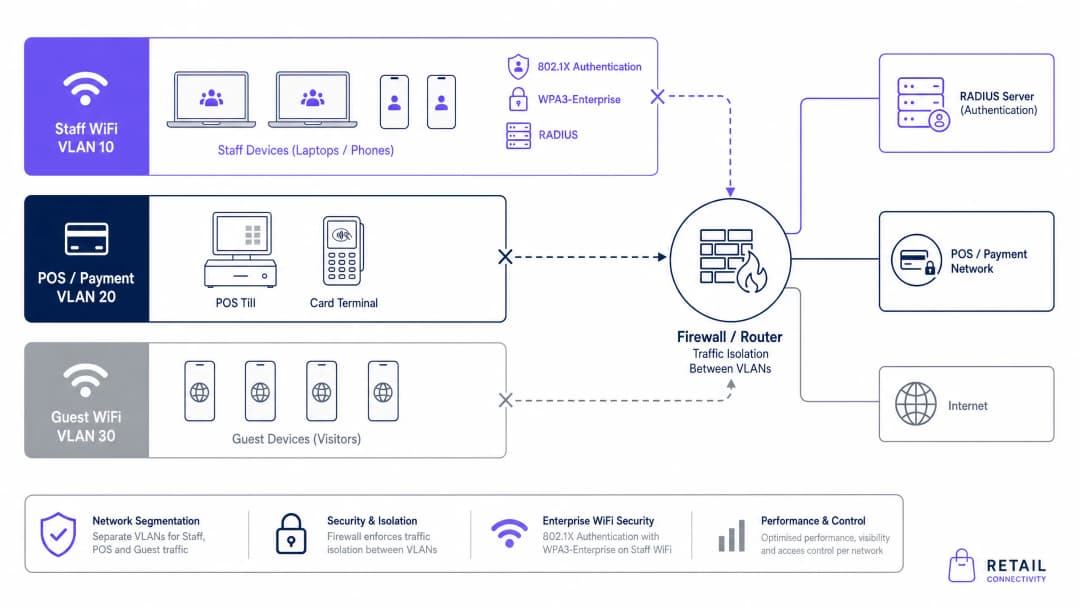
Para un entorno de comercio minorista, necesita como mínimo tres VLAN diferentes: WiFi de invitados, WiFi de personal y Punto de Venta (POS). Esta segmentación garantiza que un dispositivo de personal comprometido no pueda acceder al entorno de datos de los titulares de tarjetas. PCI DSS v4.0 exige que la segmentación de la red se valide anualmente como parte de la evaluación de cumplimiento. Purple se integra con todos los principales proveedores inalámbricos empresariales - Cisco Meraki, HPE Aruba, Ruckus, Juniper Mist, Ubiquiti UniFi, Cambium, Extreme Networks y Fortinet - a través de RADIUS estándar y etiquetado de VLAN, por lo que no necesita reemplazar su hardware existente para cumplir con las normas.
GDPR y transparencia en el monitoreo
El UK GDPR y la Ley de Protección de Datos de 2018 imponen requisitos estrictos sobre el monitoreo de los empleados. El monitoreo está permitido, pero solo cuando es legal, proporcionado y transparente. La Oficina del Comisionado de Información (ICO) es clara: el simple hecho de tener la capacidad técnica para monitorear al personal no le otorga el derecho legal de hacerlo. Para establecer una base jurídica, la mayoría de las organizaciones recurren a los intereses legítimos. Esto requiere documentar que el monitoreo cumple con un propósito operativo o de seguridad específico, que es necesario para lograr ese propósito y que la intrusión en la privacidad es proporcional. Por lo general, el consentimiento no es adecuado en el contexto laboral debido a que el desequilibrio de poder entre el empleador y el empleado impide que se otorgue de manera libre.
La implicación práctica es que los términos y condiciones de su WiFi para el personal deben especificar claramente qué datos se recopilan (horas de conexión, identificadores de dispositivos, uso de ancho de banda, consultas DNS), por qué se recopilan, quién tiene acceso a ellos y durante cuánto tiempo se conservan. Esta información debe incluirse en la política de uso aceptable (AUP), en el manual del empleado y en el contrato de trabajo. El personal debe confirmar su recepción. Si no puede demostrar que se informó a los empleados antes de iniciar el monitoreo, queda expuesto.
-
¿Tiene preguntas sobre su configuración específica?
Nuestro equipo trabaja con gestores de espacios, responsables de TI e ingenieros de redes en 80 000 establecimientos. Reserve una llamada de 20 minutos y le mostraremos cómo lo resolvieron otros profesionales como usted.
Guía de implementación
Redacción de la Política de Uso Aceptable
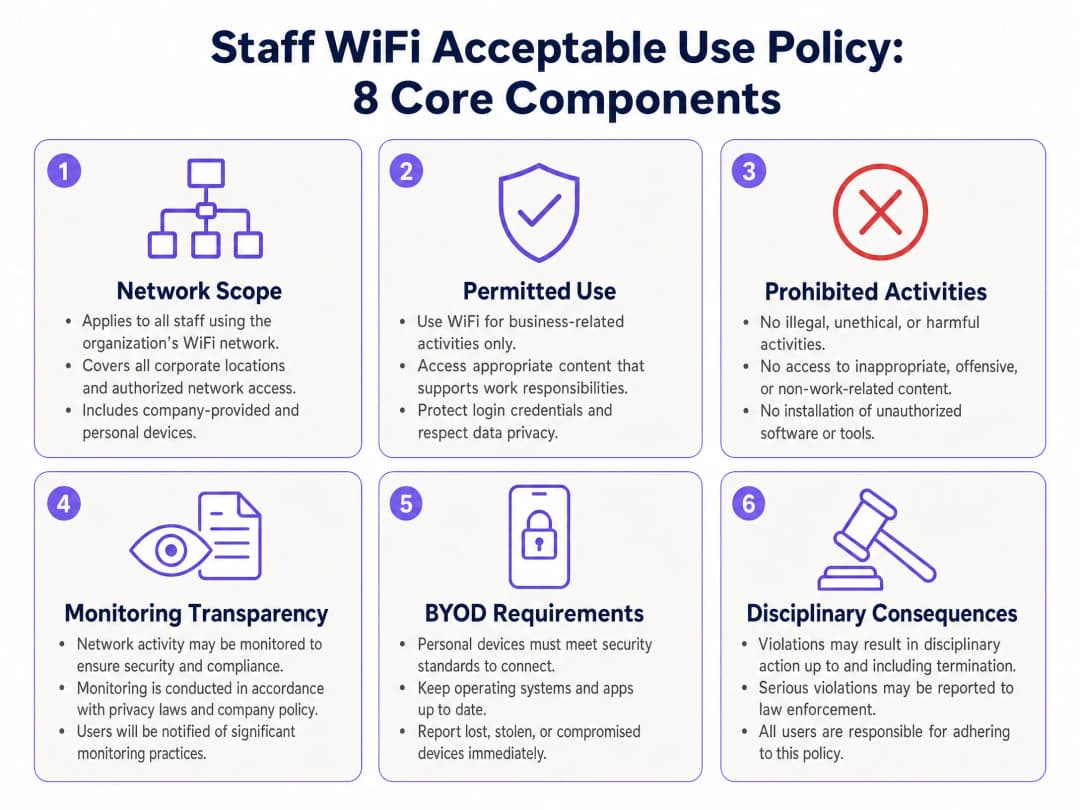
Su política de uso aceptable es el fundamento legal para el monitoreo de la red y las medidas disciplinarias. Debe cubrir ocho áreas principales.
1. Alcance de la red. Especifique que la política se aplica a todos los empleados, contratistas y usuarios autorizados que se conecten a la red corporativa, independientemente de si utilizan un dispositivo proporcionado por la empresa o su propio dispositivo personal (BYOD).
2. Uso permitido. Establezca claramente que la red se proporciona para fines comerciales. El uso personal incidental puede tolerarse, pero no debe interferir con la productividad ni consumir un ancho de banda excesivo.
3. Actividades prohibidas. Prohíba explícitamente las actividades ilegales, el acceso a contenido inapropiado, la instalación de software no autorizado, los intentos de eludir los controles de seguridad y el uso de la red para acceder a sistemas de la competencia.
4. Transparencia del monitoreo. Declare que la actividad de la red puede ser monitoreada para la gestión de la seguridad y el rendimiento. Detalle qué datos se recopilan y cómo se utilizan. Esta es su declaración de base jurídica para el GDPR.
5. Requisitos de BYOD. Si el personal utiliza dispositivos personales, especifique los requisitos mínimos de seguridad: sistema operativo compatible, parches de seguridad actualizados y bloqueo de pantalla activado. Solicite al personal que notifique de inmediato la pérdida o el robo de dispositivos.
6. Obligaciones de manejo de datos. Recuerde al personal que no debe transmitir datos confidenciales de clientes o corporativos a través de conexiones no seguras, y que la red corporativa no sustituye a los controles de clasificación de datos.
7. Consecuencias disciplinarias. Establezca claramente las consecuencias de las violaciones a la política, que van desde advertencias verbales hasta el despido y la notificación a las autoridades policiales en caso de infracciones graves.
8. Ciclo de revisión de la política. Comprométase a revisar la política de uso aceptable al menos una vez al año y a comunicar los cambios a todo el personal.
Implementación de controles técnicos
La política por sí sola es insuficiente. Debe hacerla cumplir de forma técnica. La siguiente secuencia se aplica a la mayoría de los establecimientos empresariales.
Primero, integre su proveedor de identidad con el RADIUS en la nube de Purple. Conecte Microsoft Entra ID, Okta o Google Workspace a la infraestructura de autenticación de Purple. Esto elimina la necesidad de servidores RADIUS locales y proporciona redundancia multirregión con un SLA de tiempo de actividad del 99.999% (datos propios de Purple).
Segundo, configure sus puntos de acceso para transmitir un SSID exclusivo para el personal protegido con WPA3-Enterprise. Asigne los dispositivos del personal a una VLAN dedicada en función de su identidad autenticada. La asignación de VLAN basada en roles le permite ofrecer a gerentes, contratistas y personal general diferentes niveles de acceso a la red desde la misma infraestructura.
Tercero, habilite la sincronización SCIM entre su directorio y Purple. Esto automatiza tanto la incorporación como la desincorporación. Cuando un nuevo empleado se incorpora, su cuenta en el directorio le otorga automáticamente acceso WiFi. Cuando se marcha, el acceso se revoca en cuestión de minutos.
Cuarto, implemente Purple Shield para el filtrado de contenido a nivel de DNS. Shield bloquea dominios maliciosos y contenido inapropiado antes de que se carguen, haciendo cumplir la cláusula de actividades prohibidas de su AUP sin requerir una inspección profunda de paquetes. Shield elimina anuncios y rastreadores en la capa de DNS, lo que reduce el total de datos descargados en un 44% y recorta las consultas DNS en un 62% (datos propios de Purple). Durante los periodos de alta demanda, puede limitar los servicios de streaming de gran ancho de banda para proteger el ancho de banda de las aplicaciones críticas.
-
Mejores prácticas
Automatice la desincorporación. Vincule el acceso a la red directamente con su sistema de recursos humanos. Cuando el estado de un empleado cambia a inactivo, su acceso WiFi debe finalizar al instante. Los procesos manuales generan brechas de seguridad. Los equipos de TI que utilizan Purple suelen ver una reducción del 80% en los tickets de soporte de WiFi tras automatizar la gestión de accesos (datos propios de Purple).
Realice una Evaluación de Impacto de Protección de Datos (DPIA). Antes de implementar cualquier nueva función de monitoreo, complete una DPIA, tal como lo requiere el UK GDPR para actividades de procesamiento de alto riesgo. El monitoreo de empleados se clasifica como de alto riesgo porque implica el seguimiento sistemático de personas. Documente la evaluación y consérvela para fines de auditoría.
Segmente por rol, no solo por tipo de dispositivo. Utilice la asignación de VLAN basada en roles para dar a los contratistas un acceso con límite de tiempo que expire automáticamente. Esto es especialmente relevante en entornos de hospitalidad donde el personal de agencias y los trabajadores temporales son comunes.
Revise las políticas anualmente. Las normativas evolucionan. PCI DSS v4.0 introdujo nuevos requisitos en 2024. La guía del UK GDPR de la ICO se actualiza con regularidad. Programe una revisión anual de políticas en la que participen los equipos de TI, recursos humanos y legal.
Capacite al personal, no solo a los gerentes. No oculte la AUP en un manual de inducción. Imparta sesiones de capacitación breves y prácticas que expliquen los riesgos de una red WiFi no segura y los motivos detrás de las políticas de red. El personal que comprende el porqué es mucho más propenso a cumplir las normas.
-
Resolución de problemas y mitigación de riesgos
| Modo de falla | Riesgo | Mitigación |
|---|---|---|
| Contraseña WPA2 compartida | Los ex-empleados conservan el acceso indefinidamente | Migrar a 802.1X con integración de proveedor de identidad |
| Personal y POS en la misma subred | Violación del alcance de PCI-DSS, falla en la contención de brechas de seguridad | Implementar una segmentación estricta de VLAN |
| Sin divulgación de monitoreo en la AUP | Violación de GDPR, evidencia inadmisible en acciones disciplinarias | Actualizar la AUP y obtener un reconocimiento firmado |
| Proceso de baja manual | El acceso persiste después de la salida del empleado | Habilitar la sincronización SCIM con el sistema de RR. HH. |
| Sin filtrado de contenido | Ingreso de malware, agotamiento del ancho de banda, brecha en el cumplimiento de la AUP | Desplegar Purple Shield en la capa de DNS |
| BYOD sin estándares mínimos de seguridad | Dispositivos personales comprometidos en la red corporativa | Definir y hacer cumplir los requisitos de BYOD en la AUP |
Para una visión más amplia de la arquitectura de seguridad de WiFi empresarial, consulte nuestra Guía completa de seguridad WiFi empresarial para 2026. Si su principal preocupación son las redes de back-of-house en el sector minorista, la guía Políticas de WiFi para el personal en el sector minorista: Asegurando las redes de back-of-house cubre en detalle los escenarios de despliegue específicos para retail.
ROI e impacto empresarial
La implementación de una política de WiFi para el personal sólida y una arquitectura segura ofrece resultados medibles. La automatización de las altas y bajas a través de la integración con proveedores de identidad reduce los tickets de soporte de TI relacionados con el acceso a WiFi hasta en un 80% (datos propios de Purple de más de 80,000 establecimientos activos). Esta eficiencia permite a los equipos de TI concentrarse en el trabajo estratégico en lugar de en el restablecimiento de contraseñas.
El despliegue de Purple Shield reduce el total de datos descargados en un 44% y mejora los tiempos de carga de las páginas en un 53% (datos propios de Purple). En un establecimiento donde el personal depende de aplicaciones basadas en la nube, esto mejora directamente la productividad. En un entorno de retail, protege el rendimiento de los POS durante las horas pico de ventas.
Desde la perspectiva del cumplimiento, el costo de una falla en la auditoría de PCI-DSS o de una acción de cumplimiento de GDPR supera con creces el costo de implementar los controles adecuados. La ICO emitió multas por un total de más de £7.5 millones de libras en 2023 por violaciones a la protección de datos. El monitoreo de red sin transparencia y la segmentación adecuada sin documentación son fallas de auditoría inminentes.
Purple cuenta con las certificaciones ISO 27001, GDPR, CCPA y Cyber Essentials, y opera en más de 80,000 establecimientos activos con 350 millones de usuarios únicos. Para los establecimientos en entornos de transporte y atención médica donde los requisitos de cumplimiento son particularmente estrictos, el registro de auditoría de Purple - que registra cada evento de autenticación con usuario, dispositivo, hora y ubicación - proporciona la documentación que sus auditores requieren.
Para obtener más información sobre cómo medir la efectividad de su infraestructura WiFi, consulte Análisis de WiFi.
Definiciones clave
Política de Uso Aceptable (AUP)
Un conjunto documentado de reglas que definen los usos permitidos y prohibidos de los recursos de TI de una organización, incluida su red WiFi.
La base legal para el monitoreo de empleados y las medidas disciplinarias. Sin una AUP vigente y firmada, los datos de monitoreo pueden no ser admisibles en los procedimientos disciplinarios.
IEEE 802.1X
Un estándar IEEE para el control de acceso a la red basado en puertos que requiere la autenticación de usuarios individuales antes de otorgar acceso a la red.
El estándar de autenticación que reemplaza las contraseñas compartidas con credenciales únicas por usuario, lo que permite altas y bajas de acceso automatizadas.
WPA3-Enterprise
El protocolo de seguridad WiFi más reciente para redes corporativas, que proporciona cifrado individualizado para cada sesión de usuario mediante la autenticación 802.1X.
Garantiza que incluso en el mismo punto de acceso, los usuarios no puedan interceptar el tráfico de los demás. Es un requisito para la seguridad de WiFi para el personal de nivel empresarial.
VLAN (Red de Área Local Virtual)
Una subred lógica que agrupa dispositivos de diferentes ubicaciones físicas en un dominio de difusión aislado.
Se utiliza para segmentar el tráfico del personal de las redes de invitados y de pagos, conteniendo las brechas de seguridad y cumpliendo con los requisitos de segmentación de PCI-DSS.
RADIUS (Servicio de Usuario de Marcación de Autenticación Remota)
Un protocolo de red que proporciona una gestión centralizada de Autenticación, Autorización y Contabilidad (AAA) para el acceso a la red.
El motor detrás de 802.1X, que verifica las credenciales de los usuarios en un directorio central y asigna la pertenencia a la VLAN según la identidad.
SCIM (Sistema para la Gestión de Identidades entre Dominios)
Un estándar abierto que automatiza el intercambio de información de identidad de usuarios entre sistemas de TI, como una plataforma de RR. HH. y un controlador de acceso a la red.
Permite a Purple revocar instantáneamente el acceso a WiFi cuando se elimina a un empleado del directorio corporativo, cerrando la brecha en el proceso de desvinculación.
Filtrado de DNS
El proceso de bloquear el acceso a dominios específicos en la capa de resolución del Sistema de Nombres de Dominio, antes de que se establezca una conexión.
La forma en que Purple Shield hace cumplir la política de uso aceptable al evitar el acceso a contenido malicioso o inapropiado sin necesidad de una inspección profunda de paquetes.
PCI-DSS (Estándar de Seguridad de Datos para la Industria de Tarjetas de Pago)
Un estándar de seguridad de la información para organizaciones que procesan, almacenan o transmiten datos de titulares de tarjetas.
Requiere una segmentación de red estricta para garantizar que los dispositivos del personal no puedan acceder al entorno de pagos. Se valida anualmente como parte de la evaluación de cumplimiento.
DPIA (Evaluación de Impacto de la Protección de Datos)
Un proceso requerido por el UK GDPR para las actividades de procesamiento que probablemente resulten en un alto riesgo para los derechos y libertades de las personas.
Obligatoria antes de implementar el monitoreo de la red de los empleados. Documenta la base de interés legítimo y la proporcionalidad del monitoreo.
BYOD (Trae Tu Propio Dispositivo)
Una política que permite a los empleados utilizar dispositivos de su propiedad para conectarse a la red corporativa.
Requiere cláusulas específicas en la política de uso aceptable que definan los requisitos mínimos de seguridad para los dispositivos personales que se conectan a la red WiFi del personal.
Ejemplos resueltos
Un hotel de 200 habitaciones necesita asegurar la red WiFi de su personal. Actualmente, el personal de limpieza, los recepcionistas y la administración comparten una única contraseña WPA2. Al gerente de TI le preocupa que los ex-empleados conserven el acceso y el riesgo de que los dispositivos del personal infecten el sistema de gestión de la propiedad.
El hotel migra de un modelo de contraseña compartida a la autenticación 802.1X. Primero, integran su directorio existente de Microsoft Entra ID con el RADIUS-as-a-Service en la nube de Purple. Luego, configuran sus puntos de acceso Cisco Meraki para transmitir un SSID dedicado para el personal protegido con WPA3-Enterprise. El personal se autentica utilizando sus credenciales individuales de Microsoft a través de la aplicación de Purple. La red se segmenta, colocando los dispositivos del personal en la VLAN 10, el sistema de gestión de la propiedad en la VLAN 20 y el WiFi de invitados en la VLAN 30. Se habilita la sincronización SCIM para que, cuando recursos humanos desactive una cuenta, el acceso a la red WiFi se revoque en cuestión de minutos. Se implementa Purple Shield para filtrar contenido malicioso y limitar el streaming de alto ancho de banda durante el horario operativo.
Una cadena de retail con 50 ubicaciones desea implementar una Política de Uso Aceptable de WiFi para el personal, pero le preocupa el cumplimiento del GDPR en relación con el monitoreo de los empleados en sus tiendas del Reino Unido. El documento de política actual tiene cinco años de antigüedad y no hace referencia al monitoreo de la red.
El minorista actualiza su AUP para establecer explícitamente que los registros de conexión, el uso de ancho de banda y los datos de consultas DNS se registran para la gestión de la seguridad y el rendimiento. Esta política actualizada se distribuye a todos los empleados, quienes deben firmar un acuse de recibo. El minorista realiza una DPIA que documenta la base de interés legítimo para el monitoreo. Técnicamente, Purple registra los eventos de autenticación (usuario, dispositivo, hora, ubicación) y Shield registra la actividad a nivel de DNS, lo que proporciona un historial de auditoría completo sin inspeccionar los contenidos de tráfico cifrados. El minorista limita la retención de datos a 90 días, de acuerdo con el principio de minimización de datos.
Preguntas de práctica
Q1. Un gerente regional solicita que la nueva red WiFi del personal utilice una única contraseña que cambie mensualmente para simplificar el acceso de los empleados que visitan desde otras sucursales. ¿Cómo debería responder el arquitecto de TI y qué alternativa debería proponer?
Sugerencia: Considere la carga de trabajo operativa que implica rotar las contraseñas en un conjunto de instalaciones de múltiples sitios y la brecha de seguridad que persiste durante cada ciclo mensual.
Ver respuesta modelo
El arquitecto de TI debe rechazar la solicitud. Una contraseña compartida, incluso si se rota mensualmente, deja la red expuesta hasta por 30 días después de cualquier salida de personal. Distribuir una nueva contraseña mensualmente en un conjunto de instalaciones de múltiples sitios genera una carga de trabajo operativa significativa y produce tickets de soporte en cada ciclo de rotación. La alternativa correcta es la autenticación 802.1X integrada con el directorio central. Los empleados visitantes utilizan sus credenciales corporativas existentes para conectarse automáticamente en cualquier sitio. No hay contraseña que distribuir, ni ciclo de rotación que gestionar, ni brechas de acceso cuando alguien se marcha de la empresa. Esto ofrece simultáneamente una mejor seguridad y una mejor experiencia de usuario.
Q2. Durante una auditoría de PCI-DSS, el asesor observa que los dispositivos del personal y las terminales de punto de venta están en el mismo segmento de red. ¿Cuál es el riesgo inmediato y qué pasos de remediación se requieren?
Sugerencia: Enfóquese en las implicaciones de alcance para el entorno de datos de titulares de tarjetas y el cronograma para la remediación.
Ver respuesta modelo
El riesgo inmediato es que toda la red del personal quede dentro del alcance del entorno de datos de titulares de tarjetas de PCI-DSS, lo que expande significativamente el área de auditoría y el costo de remediación. Cualquier dispositivo del personal que se vea comprometido podría alcanzar las terminales de punto de venta (POS). La remediación requiere implementar una segmentación estricta de VLAN: una VLAN dedicada para los dispositivos del personal, una VLAN separada para las terminales POS y reglas de firewall que eviten el movimiento lateral entre ellas. Esto debe ser validado y documentado antes de que se pueda cerrar la auditoría. En adelante, la asignación de VLAN basada en roles a través de 802.1X garantiza que los dispositivos se ubiquen automáticamente en el segmento correcto según la identidad autenticada.
Q3. Una organización desea implementar el monitoreo de red para detectar un consumo inusual de ancho de banda que pueda indicar una filtración de datos. El manual de sus empleados no se ha actualizado en tres años y no contiene ninguna referencia al monitoreo de red. ¿Qué debe ocurrir antes de que se activen las herramientas de monitoreo?
Sugerencia: Considere la secuencia de requisitos legales bajo el UK GDPR antes de que comience cualquier monitoreo.
Ver respuesta modelo
Antes de activar cualquier herramienta de monitoreo, la organización debe completar tres pasos. Primero, actualizar la Política de Uso Aceptable (AUP) y el manual del empleado para establecer de manera explícita que se monitorea la actividad de la red, qué datos se recopilan, por qué se recopilan y cuánto tiempo se retienen. Segundo, realizar una DPIA que documente la base de interés legítimo para el monitoreo y demuestre que la intrusión a la privacidad es proporcional al objetivo de seguridad. Tercero, distribuir la política actualizada a todo el personal y obtener una confirmación firmada de recibido. Solo después de que estos pasos estén completos y documentados será legal activar el monitoreo. El monitoreo sin transparencia previa es una violación al UK GDPR, independientemente de la justificación de seguridad.
Q4. Al equipo de TI de un hotel se le solicita permitir que el personal de limpieza de una agencia externa se conecte al WiFi del personal durante sus turnos, pero estos trabajadores no están en el directorio corporativo. ¿Cómo se debe aprovisionar y controlar el acceso?
Sugerencia: Considere el acceso limitado por tiempo, el aislamiento de la red y el desafío de la salida de la empresa (offboarding) para trabajadores temporales.
Ver respuesta modelo
Al personal de la agencia se le deben aprovisionar credenciales de invitado limitadas en el tiempo que expiren automáticamente al finalizar su periodo de contratación, en lugar de agregarlos al directorio corporativo. Purple admite la gestión de acceso de contratistas con expiración automática, por lo que el acceso termina sin intervención manual. Estas credenciales deben otorgar acceso a una VLAN restringida únicamente con acceso a internet, aislada de los sistemas internos. La AUP debe cubrir a los contratistas de manera explícita, y el personal de la agencia debe aceptar la política antes de recibir las credenciales. Este enfoque evita el riesgo de offboarding asociado con los trabajadores temporales, manteniendo al mismo tiempo un registro de auditoría completo.
Continúe leyendo esta serie
Cómo segmentar de forma segura las redes WiFi del personal y de invitados: mejores prácticas para LAN empresariales
Esta guía proporciona a los administradores de TI y arquitectos de red un modelo técnico e independiente de proveedores para proteger las LAN empresariales mediante la segmentación adecuada del tráfico de WiFi del personal y de invitados. Abarca la autenticación 802.1X, RADIUS en la nube, el aislamiento de VLAN y la gestión del ciclo de vida de las credenciales necesaria para eliminar las contraseñas compartidas y proteger los activos corporativos.
Best DNS filtering: a comprehensive guide for businesses
Esta guía de referencia técnica explica cómo el filtrado DNS empresarial protege las redes públicas al bloquear dominios maliciosos en la capa de resolución, antes de que se establezca una conexión. Ofrece a los directores de TI, arquitectos de red y equipos de operaciones de establecimientos la arquitectura de implementación, la configuración de firewall y el contexto de cumplimiento que necesitan para proteger el WiFi de invitados en entornos de hotelería, comercio minorista y sector público. Purple Shield bloquea malware, botnets y contenido inapropiado a nivel DNS en más de 80,000 establecimientos activos.
Comprensión de Cisco SUDI: Identidad anclada por hardware en el control de acceso seguro a la red
Esta guía explica cómo Cisco SUDI proporciona una identidad criptográficamente segura y anclada por hardware para la infraestructura de red empresarial. Aprenda cómo reemplazar las direcciones MAC vulnerables a la suplantación por certificados 802.1AR inmutables para proteger el control de acceso a la red de su recinto.
¿Tiene preguntas sobre su configuración específica?
Nuestro equipo trabaja con gestores de espacios, responsables de TI e ingenieros de redes en 80 000 establecimientos. Reserve una llamada de 20 minutos y le mostraremos cómo lo resolvieron otros profesionales como usted.