
Captive Portal personalizado: Guía de HTML y CSS
Esta guía de referencia técnica autorizada describe los estándares de desarrollo, la arquitectura CSS y las restricciones a nivel de red requeridas para diseñar y codificar una página de inicio de Captive Portal personalizada. Proporciona a los desarrolladores frontend y arquitectos de red estrategias prácticas para navegar en los entornos de Apple CNA y webview de Android, garantizando experiencias de WiFi para invitados de pixel-perfect, conformes y de alto rendimiento.
Video overview
Escucha esta guía
Ver transcripción del podcast
Parte de nuestra serie principal: Guía de Captive Portal →
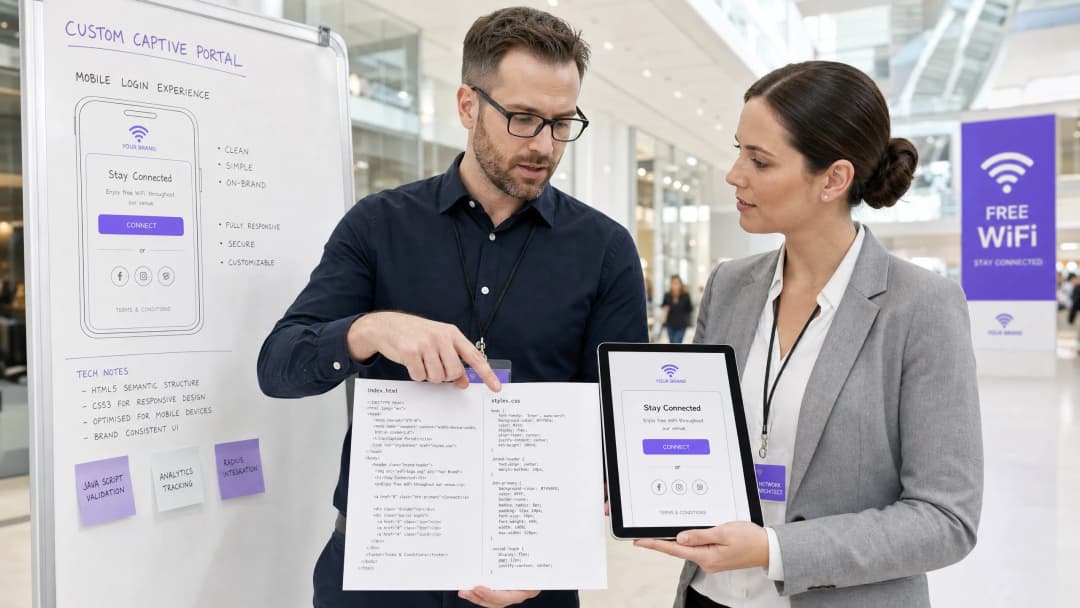
Resumen Ejecutivo
Para los establecimientos empresariales - que abarcan desde hoteles de lujo Hospitality y cadenas de tiendas Retail hasta centros de tránsito Transport y campus médicos modernos Healthcare - la página de inicio de la red WiFi para invitados es la puerta de entrada digital. Sin embargo, más del 90% de los inicios de sesión en redes WiFi para invitados se realizan en dispositivos móviles, donde la visualización no está regulada por navegadores estándar como Safari o Chrome, sino por entornos webview sumamente restringidos de asistentes de red cautiva (CNA) [1]. Estos "mini navegadores" imponen estrictas limitaciones de sandbox: bloquean CDNs externas, desactivan cookies persistentes, ignoran fuentes web externas y restringen de forma severa la ejecución de JavaScript para mitigar riesgos de seguridad y prevenir el secuestro de sesiones [2].
Cuando un desarrollador diseña una página de inicio utilizando estándares web tradicionales, estas restricciones provocan diseños rotos, pérdida de elementos de marca y botones de inicio de sesión inoperativos, lo que afecta directamente la satisfacción del cliente y la interacción digital. Esta guía proporciona soluciones a estos desafíos, presentando prácticas de desarrollo defensivas - como CSS en línea, codificación de elementos en Base64, conjuntos de fuentes del sistema y protocolos de autenticación explícitos basados en navegación - para garantizar una visualización multiplataforma perfecta. Además, analizamos cómo el uso de una solución gestionada como el creador de portales de Purple permite a los desarrolladores mantener el control creativo completo de HTML/CSS mientras delegan la autenticación RADIUS, el escalamiento de bases de datos, el cumplimiento de GDPR/PCI y las integraciones de AP de múltiples proveedores [3].
Análisis Técnico Detallado
Para desarrollar un Captive Portal personalizado y resistente, los desarrolladores deben comprender la interceptación a nivel de red y la virtualización del navegador que ocurren cuando un invitado se conecta a un Identificador de Conjunto de Servicios (SSID) abierto.
El Ciclo de Vida del Captive Portal
Cuando un dispositivo cliente se asocia con un SSID cautivo, se activa la siguiente secuencia:
- Asociación de IP: El dispositivo completa un protocolo de enlace de 3 vías y solicita una dirección IP a través de DHCP.
- Prueba de Conectividad Activa: El administrador de red en segundo plano del sistema operativo envía inmediatamente una solicitud HTTP GET a una URL de prueba dedicada e independiente del proveedor (por ejemplo,
http://captive.apple.com/hotspot-detect.htmlde Apple ohttp://connectivitycheck.gstatic.com/generate_204de Google) [1]. - Interceptación de DNS/HTTP: El controlador de LAN inalámbrica local (WLC) o el punto de acceso (AP) intercepta esta solicitud HTTP del puerto 80. En lugar de devolver el estado HTTP 200 o 204 esperado, la puerta de enlace redirige el tráfico del cliente a la URL de la página de destino del Captive Portal a través de un redireccionamiento HTTP 302 [2].
- Generación de Webview: Al detectar el redireccionamiento, el sistema operativo genera su mini navegador nativo de asistencia de red cautiva (CNA) para mostrar la página de inicio redirigida, evitando la necesidad de que el usuario abra manualmente un navegador completo.5. Autenticación y transición de estado: El usuario completa el formulario de inicio de sesión, enviando las credenciales de vuelta al servidor del portal, el cual instruye a la puerta de enlace (a menudo a través de un RADIUS Access-Accept o una llamada de API externa) para autorizar la dirección MAC.
- Apretón de manos de salida de CNA: El mini-navegador CNA realiza otro HTTP GET a su URL canaria. Si recibe la respuesta 200/204 esperada, cambia su botón superior derecho de "Cancelar" a "Listo" y establece la conexión WiFi como la interfaz de red principal.
Restricciones del mini-navegador específicas de la plataforma
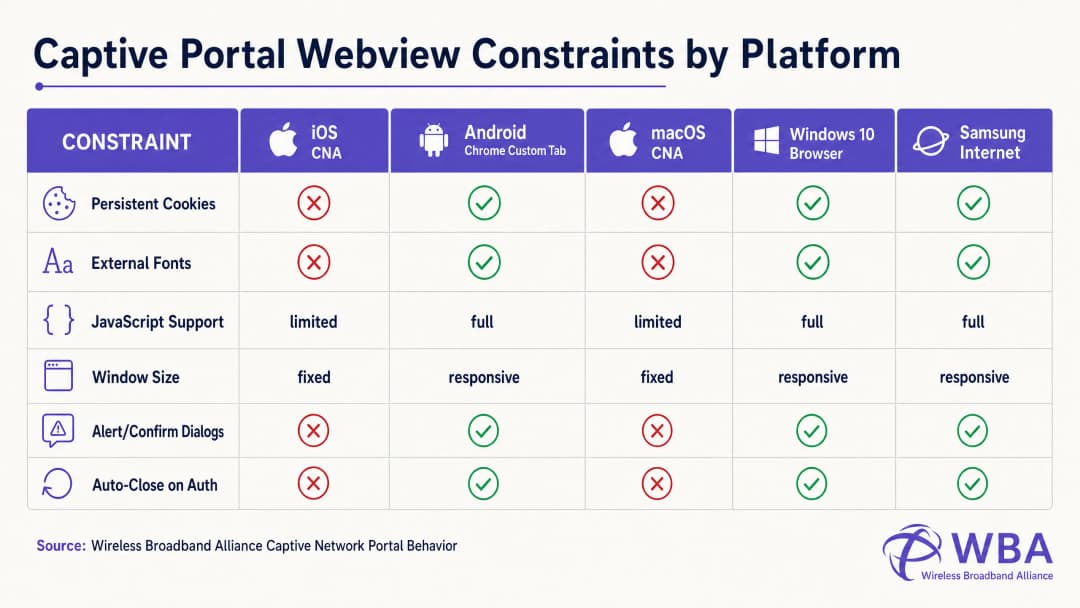
Cada sistema operativo maneja este ciclo de vida dentro de diferentes entornos de vista web, lo que resulta en un comportamiento altamente fragmentado. La siguiente tabla detalla estas restricciones críticas:
| Plataforma / Vista web | Método de visualización | Cookies persistentes | Fuentes web externas | Ejecución de JavaScript | Dimensiones de la ventana | Activador de apretón de manos de salida |
|---|---|---|---|---|---|---|
| Apple iOS CNA (Websheet) | Emergente de mini-navegador | Bloqueado (Destruido al cerrar) | Bloqueado (Sin conexión) | Limitado (Sin localStorage/sessionStorage) | Adaptable (Ancho del dispositivo) | Solo redirección HTTP de página completa [1] |
| Apple macOS CNA (Captive Network Assistant) | Emergente de mini-navegador | Bloqueado | Bloqueado | Limitado (Sin diálogos alert/confirm) | Fijo (900px x 572px) | Solo redirección HTTP de página completa |
| Android (Google) (CaptivePortalLogin) | Notificación push -> Pestaña personalizada de Chrome | Permitido (Compartido con Chrome) | Permitido (Si está en la lista de permitidos dentro del walled garden) | Completo | Adaptable | Automático (API de Captive Portal / Verificación 204) [2] |
| Samsung Android (Samsung Internet) | Notificación push -> Mini-navegador | Permitido | Permitido | Completo | Adaptable | Automático |
| Windows 10/11 (Navegador predeterminado) | Inicio automático del navegador predeterminado | Permitido (Contexto completo del navegador) | Permitido | Completo | Adaptable | Manual / Automático |
Cómo programar evitando la trampa del botón "Listo" de Apple CNA
Uno de los modos de fallo más frecuentes en el desarrollo de portales personalizados es la Trampa del botón "Listo" en dispositivos iOS. Cuando un usuario se autentica, la vista web iOS Websheet debe detectar que la red ya no es cautiva. Esto lo hace monitoreando el éxito de sus solicitudes canarias en segundo plano.
De manera fundamental, el CNA de iOS solo activará esta comprobación tras una navegación HTTP de página completa (redirección de ubicación). Si un desarrollador crea una Single Page Application (SPA) moderna que envía datos de formulario a través de una llamada AJAX asíncrona (por ejemplo, fetch() o Axios) y actualiza el DOM de forma dinámica sin cambiar la URL, el CNA nunca volverá a ejecutar su comprobación de conectividad. El usuario se autenticará a nivel de gateway, pero el botón del CNA en la esquina superior derecha seguirá apareciendo como "Cancelar". Si el usuario frustrado hace clic en "Cancelar", el dispositivo iOS se desasociará de inmediato del SSID, finalizando la sesión de WiFi [1].
Para evitar esto, el controlador de éxito de autenticación debe realizar una redirección de página completa a una página de destino física (por ejemplo, window.location.href = '/success') o enviar el formulario de inicio de sesión de forma nativa mediante una acción HTTP POST estándar.
Guía de implementación
Para garantizar un renderizado consistente en todas las plataformas, los desarrolladores deben hacer la transición de un diseño web moderno y pesado en recursos a un estilo de codificación altamente autocontenido y defensivo.
La regla de oro: Diseñar para cero conectividad a Internet
Durante el estado cautivo, el dispositivo cliente no tiene acceso a la red de internet en general. Solo puede resolver y acceder a direcciones IP y dominios explícitamente incluidos en la lista de permitidos (Walled Garden) del controlador inalámbrico (como la propia IP del servidor del Captive Portal). Por lo tanto, cualquier recurso externo referenciado en su HTML no se cargará, lo que provocará un diseño roto.
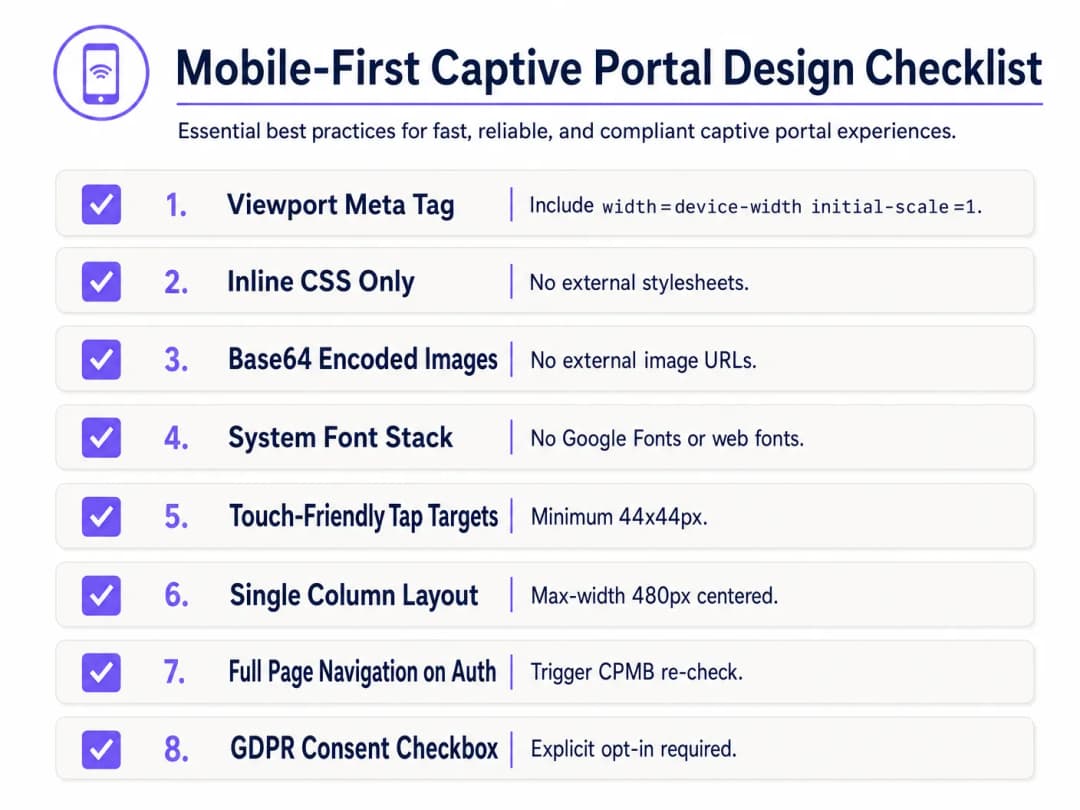
Para diseñar de forma defensiva, implemente la siguiente Lista de verificación de diseño de Captive Portal priorizando dispositivos móviles:
1. Configuración del Viewport
Para evitar que los dispositivos móviles reduzcan la escala del viewport al ancho de una pantalla de escritorio (normalmente 980px), el <head> del HTML debe incluir una etiqueta meta de viewport responsiva. Sin esto, el texto y los campos de entrada aparecerán microscópicos en los dispositivos móviles:
<meta name="viewport" content="width=device-width, initial-scale=1.0, maximum-scale=1.0, user-scalable=no">
2. Integración de CSS en línea y eliminación de dependencias externas
Nunca enlace a archivos CSS externos o CDNs (por ejemplo, Bootstrap, Tailwind o Google Fonts). Todo el CSS debe estar incrustado dentro de un bloque <style> en el <head> del HTML.
Para la tipografía, utilice una pila de fuentes del sistema que haga referencia a fuentes preinstaladas en el sistema operativo local. Esto evita por completo las peticiones HTTP y garantiza que la página se cargue de forma instantánea utilizando la tipografía sans-serif nativa y de alta calidad del dispositivo:
body {
    font-family: -apple-system, BlinkMacSystemFont, "Segoe UI", Roboto, Helvetica, Arial, sans-serif;
    background-color: #F5F1ED; /* Color de marca Pearl White */
    color: #011638; /* Color de marca Dark Blue */
    margin: 0;
    padding: 0;
    display: flex;
    flex-direction: column;
    align-items: center;
    justify-content: center;
    min-height: 100vh;
}
3. Codificación de recursos en Base64
No se debe hacer referencia a imágenes, logotipos ni iconos mediante URL HTTP externas a menos que el dominio de alojamiento esté en la lista de permitidos (walled garden) de la puerta de enlace. El método más confiable es codificar pequeños recursos visuales (como logotipos PNG o SVG) directamente en el HTML o CSS como Data URIs de Base64:
<!-- Inline Base64 Logo Example -->
<img src="data:image/svg+xml;base64,PHN2ZyB4bWxucz0iaHR0cDovL3d3dy53My5vcmcvMjAwMC9zdmciIHZpZXdCb3g9IjAgMCAxMDAgMTAwIj48Y2lyY2xlIGN4PSI1MCIgY3k9IjUwIiByPSI0MCIgZmlsbD0iIzc0NThGRCIvPjwvc3ZnPg==" alt="Purple Logo" class="brand-logo">
4. Optimización de campos de entrada y objetivos táctiles
Para cumplir con los estándares de usabilidad móvil (como las Directrices de interfaz humana de Apple), todos los elementos interactivos deben optimizarse para la entrada táctil:
- Tamaño de fuente de entrada: El tamaño de fuente del texto de entrada debe ser de al menos 16px. Si el tamaño de fuente es menor (por ejemplo, 14px), iOS Safari y la CNA ampliarán automáticamente el campo de entrada al enfocarlo, lo que distorsionará el diseño de la página [1].
- Objetivos táctiles: Los botones, las casillas de verificación y los enlaces deben tener un área de objetivo táctil mínima de 44px x 44px para evitar clics accidentales o la frustración del usuario.
5. Consentimiento legal y cumplimiento de GDPR
Al capturar datos de invitados (por ejemplo, correo electrónico, número de teléfono o perfiles sociales), la estructura HTML debe admitir el consentimiento legal explícito. Según el GDPR, las casillas de verificación preseleccionadas o las declaraciones de consentimiento implícito (por ejemplo, "Al iniciar sesión, acepta nuestros términos") no cumplen con la normativa [3].
- Proporcione una casilla de verificación desmarcada por defecto para los Términos y condiciones y las Políticas de privacidad.
- Envuelva el texto legal detallado en un contenedor de altura limitada y con desplazamiento (
max-height: 120px; overflow-y: auto;) para mantener el formulario de inicio de sesión principal por encima del pliegue de la página.
<div class="consent-container">
    <input type="checkbox" id="terms_consent" name="terms_consent" required>
    <label for="terms_consent">
        I explicitly agree to the <a href="#" onclick="showTerms()">Terms of Service</a> and consent to the processing of my data in accordance with the <a href="#" onclick="showPrivacy()">Privacy Policy</a>.
    </label>
</div>
¿Tiene preguntas sobre su configuración específica?
Nuestro equipo trabaja con gestores de espacios, responsables de TI e ingenieros de redes en 80 000 establecimientos. Reserve una llamada de 20 minutos y le mostraremos cómo lo resolvieron otros profesionales como usted.
Plantilla personalizada HTML/CSS de Captive Portal
A continuación, se muestra una plantilla completa de un solo archivo HTML/CSS, lista para producción, que incorpora todas las mejores prácticas adaptadas para dispositivos móviles y compatibles con CNA. Cuenta con un diseño adaptivo, un conjunto de fuentes del sistema, marcadores de posición de recursos listos para Base64, entradas optimizadas para el tacto y estructuras de consentimiento explícitas que cumplen con el GDPR:
<!DOCTYPE html>
<html lang="en">
<head>
    <meta charset="UTF-8">
    <meta name="viewport" content="width=device-width, initial-scale=1.0, maximum-scale=1.0, user-scalable=no">
    <title>Guest WiFi Login</title>
    <style>
        /* CSS Reset & Variable Declarations */
        :root {
            --color-primary: #7458FD; /* Purple Brand Colour */
            --color-dark: #011638; /* Dark Blue */
            --color-light: #F5F1ED; /* Pearl White */
            --color-white: #FFFFFF;
            --color-border: #D1D5DB;
            --radius-container: 12px;
            --radius-element: 6px;
        }

        * {
            box-sizing: border-box;
            -webkit-tap-highlight-color: transparent;
        }

        body {
            font-family: -apple-system, BlinkMacSystemFont, "Segoe UI", Roboto, Helvetica, Arial, sans-serif;
            background-color: var(--color-light);
            color: var(--color-dark);
            margin: 0;
            padding: 20px;
            display: flex;
            flex-direction: column;
            align-items: center;
            justify-content: center;
            min-height: 100vh;
        }

        /* Diseño de Tarjeta Responsivo */
        .portal-card {
            background-color: var(--color-white);
            width: 100%;
            max-width: 420px;
            padding: 32px 24px;
            border-radius: var(--radius-container);
            box-shadow: 0 4px 20px rgba(1, 22, 56, 0.05);
            text-align: center;
        }

        .logo-container {
            margin-bottom: 24px;
        }

        /* Marcador de Posición para Logotipo Base64 Integrado */
        .logo {
            width: 120px;
            height: auto;
        }

        h1 {
            font-size: 24px;
            font-weight: 700;
            margin: 0 0 8px 0;
            color: var(--color-dark);
        }

        p {
            font-size: 14px;
            color: #4B5563;
            margin: 0 0 24px 0;
            line-height: 1.5;
        }

        /* Estilos de Formulario */
        .form-group {
            text-align: left;
            margin-bottom: 16px;
        }

        label {
            display: block;
            font-size: 14px;
            font-weight: 600;
            margin-bottom: 6px;
            color: var(--color-dark);
        }

        /* Crítico: el tamaño de fuente debe ser de al menos 16px para evitar el zoom automático de iOS */
        input[type="email"],
        input[type="text"] {
            width: 100%;
            height: 48px;
            padding: 12px 16px;
            font-size: 16px;
            border: 1px solid var(--color-border);
            border-radius: var(--radius-element);
            background-color: var(--color-white);
            color: var(--color-dark);
            outline: none;
            transition: border-color 0.2s;
        }

        input[type="email"]:focus,
        input[type="text"]:focus {
            border-color: var(--color-primary);
            box-shadow: 0 0 0 3px rgba(116, 88, 253, 0.15);
        }

        /* Estilos de Consentimiento */
        .consent-group {
            display: flex;
            align-items: flex-start;
            text-align: left;
            margin: 20px 0;
        }

        /* Tamaño de destino adaptado para pantallas táctiles */
        input[type="checkbox"] {
            width: 20px;
            height: 20px;
            margin: 2px 12px 0 0;
            flex-shrink: 0;
            cursor: pointer;
            accent-color: var(--color-primary);
        }

        .consent-label {
            font-size: 13px;
            line-height: 1.4;
            color: #4B5563;
            user-select: none;
        }

        .consent-label a {
            color: var(--color-primary);
            text-decoration: none;
            font-weight: 600;
        }

        .consent-label a:hover {
            text-decoration: underline;
        }

        /* Touch-Friendly CTA Button (Minimum 44px height) */
        .btn-submit {
            width: 100%;
            height: 48px;
            background-color: var(--color-primary);
            color: var(--color-white);
            border: none;
            border-radius: var(--radius-element);
            font-size: 16px;
            font-weight: 600;
            cursor: pointer;
            transition: background-color 0.2s;
            display: flex;
            align-items: center;
            justify-content: center;
        }

        .btn-submit:hover {
            background-color: #5B3EE3;
        }

        .btn-submit:active {
            background-color: #4A2FD4;
        }

        /* Legal Terms Scrollbox */
        .terms-scrollbox {
            display: none; /* Toggled via JS */
            text-align: left;
            font-size: 11px;
            color: #6B7280;
            background-color: var(--color-light);
            padding: 12px;
            border-radius: var(--radius-element);
            max-height: 100px;
            overflow-y: auto;
            margin-bottom: 16px;
            border: 1px solid var(--color-border);
        }

        .footer {
            margin-top: 24px;
            font-size: 11px;
            color: #9CA3AF;
        }
    </style>
</head>
<body>

    <div class="portal-card">
        <div class="logo-container">
            <!-- Replace src with your actual Base64-encoded SVG or PNG -->
            <svg class="logo" xmlns="http://www.w3.org/2000/svg" viewBox="0 0 100 30">
                <rect width="100" height="30" rx="6" fill="#7458FD"/>
                <text x="50" y="20" font-family="sans-serif" font-size="12" fill="#FFFFFF" font-weight="bold" text-anchor="middle">SU MARCA</text>
            </svg>
        </div>

        <h1>Bienvenido a la red WiFi de invitados</h1>
        <p>Por favor, ingrese sus datos a continuación para obtener acceso seguro a internet de alta velocidad.</p>

        <!-- Form must submit natively (full page navigation) to clear Apple CNA -->
        <form action="/login/submit" method="POST" onsubmit="return validateForm()">
            <div class="form-group">
                <label for="guest_name">Nombre completo</label>
                <input type="text" id="guest_name" name="name" placeholder="Juan Pérez" required autocomplete="name">
            </div>

            <div class="form-group">
                <label for="guest_email">Correo electrónico</label>
                <input type="email" id="guest_email" name="email" placeholder="juan@ejemplo.com" required autocomplete="email">
            </div>

            <div class="consent-group">
                <input type="checkbox" id="terms_consent" name="terms_accepted" required>
                <label for="terms_consent" class="consent-label">
                    Acepto los <a href="#" onclick="toggleTerms(event)">Términos de servicio</a> y doy mi consentimiento para el procesamiento de datos de conformidad con las regulaciones de la GDPR.
                </label>
            </div>

            <div id="terms_box" class="terms-scrollbox">
                <strong>Términos de servicio de WiFi:</strong><br>
                1. Este servicio se proporciona tal cual, sin garantías.<br>
                2. Los usuarios no deben participar en actividades ilegales que consuman mucho ancho de banda.<br>
                3. Los datos personales se recopilan únicamente con fines de autenticación y aceptación de marketing de conformidad con nuestra Política de privacidad.
            </div>

            <button type="submit" class="btn-submit">Conectarse a WiFi</button>
        </form>

        <div class="footer">
            Tecnología de Purple | Secure Guest WiFi
        </div>
    </div>

    <script>
        function toggleTerms(e) {
            e.preventDefault();
            var box = document.getElementById('terms_box');
            box.style.display = (box.style.display === 'block') ? 'none' : 'block';
        }

        function validateForm() {
            var consent = document.getElementById('terms_consent');
            if (!consent.checked) {
                alert('Debe aceptar los Términos de servicio para conectarse.');
                return false;
            }
            return true;
        }
    </script>
</body>
</html>
Solución de problemas y mitigación de riesgos
Al implementar portales cautivos con HTML/CSS codificados a la medida, los equipos de operaciones de TI suelen encontrarse con varios riesgos operativos graves:
1. El bucle de advertencia del certificado SSL/TLS
Debido a que los portales cautivos funcionan interceptando el tráfico, presentan un conflicto fundamental con la seguridad web HTTPS moderna. Cuando un usuario intenta visitar un sitio HTTPS (por ejemplo, https://www.google.com) y la puerta de enlace intenta redirigir ese tráfico a un portal cautivo HTTP, el navegador detecta una discrepancia en el certificado SSL y muestra una advertencia de seguridad crítica de "La conexión no es privada".
- Mitigación: Nunca intente interceptar el tráfico HTTPS directamente. Dependa por completo del asistente nativo CNA del sistema operativo (que realiza una solicitud HTTP no cifrada para activar la redirección). Asegúrese de que el dominio de su portal cautivo tenga un certificado SSL válido y de confianza pública (por ejemplo, Let's Encrypt o DigiCert) y se sirva a través de HTTPS solo después de que la redirección HTTP inicial haya dirigido correctamente al usuario al dominio de su portal [2].
2. Fallas en la resolución de DNS (La trampa del jardín amurallado o Walled Garden)
Si su página HTML personalizada hace referencia a recursos externos - como un endpoint OAuth de inicio de sesión social (por ejemplo, Facebook, Google) o una pasarela de pago - las solicitudes DNS para estos dominios fallarán a menos que estén explícitamente permitidas en el Walled Garden del controlador inalámbrico. Si falta un dominio en la lista de permitidos, el flujo de inicio de sesión se detendrá, mostrando una pantalla en blanco.
- Mitigación: Mantenga una lista de Walled Garden estricta y mínima. Si utiliza inicios de sesión sociales, incluya en la lista de permitidos los dominios comodín específicos recomendados por los proveedores de identidad (por ejemplo,
*.google.com,*.gstatic.com).
3. Vulnerabilidades de tiempo de espera de sesión y suplantación de MAC
Los portales cautivos estándar autentican los dispositivos basándose en sus direcciones MAC. Sin embargo, los sistemas operativos móviles modernos (iOS 14+ y Android 10+) utilizan direcciones MAC aleatorias (direcciones WiFi privadas) de forma predeterminada, rotándolas periódicamente. Esto puede provocar que se solicite repetidamente a los invitados que se vuelvan a autenticar, destruyendo la experiencia del usuario [1].
- Mitigación: Implemente tiempos de espera de sesión razonables (por ejemplo, 24 horas) en el servidor RADIUS para evitar sesiones inactivas, y utilice estándares de autenticación modernos como Passpoint (Hotspot 2.0) o WPA3-Enterprise para una incorporación fluida y segura que evite por completo los portales cautivos basados en MAC.
Relevancia de los productos de Purple: Desarrollar frente a comprar
Aunque codificar una sola página HTML es sencillo, alojar, asegurar y escalar una infraestructura de Captive Portal personalizada presenta enormes obstáculos técnicos y de cumplimiento. La siguiente tabla compara las realidades operativas y de ingeniería de autoalojar un portal personalizado frente a utilizar la plataforma empresarial gestionada de Purple:
| Característica / Requisito operativo | Portal personalizado autoalojado | Plataforma de WiFi empresarial de Purple |
|---|---|---|
| Personalización de HTML/CSS | Codificación totalmente manual, subiendo archivos a los AP individuales o servidores web locales. | Editor para desarrolladores con precisión de píxel que permite inyecciones personalizadas de HTML/CSS, combinado con un constructor visual de arrastrar y soltar. |
| Infraestructura RADIUS | Debe desplegar, configurar y mantener servidores FreeRADIUS o Cloud RADIUS de alta disponibilidad [4]. | RADIUS nativo de la nube, integrado y distribuido globalmente con redundancia activo-activo y SLA de tiempo de actividad del 99.99%. |
| Soporte para AP de múltiples proveedores | Se requieren scripts de integración personalizados para cada proveedor de hardware (Cisco, Aruba, Meraki, Ruckus) [5]. | Integración nativa y lista para usar con más de 200 modelos de hardware; despliegue de portal unificado en entornos de hardware mixto. |
| Privacidad de datos y cumplimiento | El establecimiento asume el 100% de la responsabilidad legal para el cumplimiento de GDPR, CCPA y PCI DSS, incluyendo el cifrado seguro de bases de datos y los flujos de trabajo de eliminación de datos. | Totalmente conforme por diseño. Gestión de consentimiento integrada, solicitudes automatizadas de eliminación de datos de los interesados y alojamiento seguro con certificación ISO 27001. |
| Analytics & Marketing | Requiere la creación de pipelines personalizados de ingesta de datos y la integración de herramientas de marketing de terceros. | Tablero de analíticas de nivel empresarial con seguimiento de afluencia en tiempo real, métricas de tasa de retorno y activadores automáticos de campañas de marketing [6]. |
| Identity Provider Integrations | Integraciones manuales de OAuth2 con Google, Facebook, Apple y pasarelas de SMS locales. | Integraciones en un solo clic con las principales plataformas sociales, pasarelas de SMS y Azure AD / Okta para invitados corporativos. |
La plataforma de Purple resuelve el dilema de "Crear frente a Comprar". Proporciona a los desarrolladores la total libertad creativa de un espacio de trabajo HTML/CSS personalizado, al tiempo que elimina la ingeniería de infraestructura backend compleja y de alto riesgo que se requiere para admitir la autenticación segura RADIUS a escala.
ROI e impacto empresarial
Invertir en un Captive Portal personalizado, diseñado profesionalmente y adaptativo ofrece retornos cuantificables en las operaciones de TI, el marketing y el cumplimiento legal.
1. Reducción de costos operativos (tickets de soporte de TI)
En implementaciones a gran escala, como un estadio o una cadena minorista con múltiples sedes, un Captive Portal que no funciona es una de las principales causas de derivación de tickets al soporte de TI. Cuando los invitados se encuentran con una "pantalla en blanco" o un botón de inicio de sesión que no responde, saturan al personal en el sitio o envían tickets de soporte.
$$\text{Ahorro anual en soporte} = (\text{Total de visitas anuales de invitados} \times \text{Tasa de fallas del portal} \times \text{Tasa de contacto con soporte}) \times \text{Costo por ticket de soporte}$$
- Escenario: Un centro de convenciones con 1,000,000 de visitantes al año. Un portal mal codificado tiene una tasa de fallas del 5% en dispositivos iOS más antiguos, lo que genera una tasa de contacto con soporte del 10%. A un costo estándar de la industria de $15 USD por ticket de soporte, el costo operativo es de: $$(1,000,000 \times 0.05 \times 0.10) \times $15 = $75,000 \text{ USD anuales en gastos de soporte evitables}$$
- Resultado: La transición a una plantilla optimizada para CNA y diseñada para dispositivos móviles reduce la tasa de fallas del portal a <0.1%, eliminando prácticamente este desgaste operativo.
2. Captura de datos de marketing y optimización de suscripciones
Para los sectores de retail y hotelería, el portal de WiFi para invitados es el mecanismo principal para capturar datos limpios y directos del cliente (first-party data). Una interfaz de usuario mal diseñada, con texto microscópico o un diseño de formulario ineficiente, provoca altas tasas de rebote - los usuarios abandonan el proceso de inicio de sesión por completo, lo que resulta en la pérdida de oportunidades de marketing.
- Caso de estudio (Retail): Una cadena minorista nacional implementó un Captive Portal optimizado para dispositivos móviles utilizando la plataforma de Purple. Al reemplazar un formulario de inicio de sesión de varios pasos con un campo único para ingresar el correo electrónico (tamaño de fuente: 16px) y un botón de interacción optimizado de 48px, observaron un incremento del 42% en los registros completados y un aumento del 28% en las suscripciones a boletines de marketing dentro del primer trimestre [6].
3. Mitigación de riesgos legales y regulatorios
Bajo el GDPR y la CCPA, la recopilación de datos que no cumple con las normativas conlleva severas sanciones financieras (hasta el 4% de la facturación anual global bajo el GDPR). Confiar en casillas de verificación previamente marcadas o no proporcionar una Política de Privacidad clara y de fácil acceso en su splash page expone a la empresa a una inmensa responsabilidad legal.
- ROI de la mitigación: Implementar una casilla de consentimiento explícita y desmarcada, y alojar los términos dentro de un cuadro de desplazamiento optimizado garantiza el 100% de cumplimiento normativo, mitigando el riesgo de multas regulatorias multimillonarias y protegiendo la reputación de la marca.
Resumen de puntos clave
- El Sandbox de CNA es restrictivo: El Websheet de iOS de Apple y el CNA de macOS son entornos fuertemente aislados (sandboxed) que bloquean recursos externos, cookies y fuentes web. Todos los estilos y recursos deben ser autónomos (CSS en línea, imágenes en Base64, fuentes del sistema) [1].
- AJAX interrumpe el saludo de salida de iOS: Para realizar con éxito la transición del dispositivo iOS de "cautivo" a "conectado" (cambiando el botón superior derecho de "Cancelar" a "Listo"), debe activar una redirección HTTP de página completa. Las actualizaciones asíncronas del DOM dejarán al dispositivo en un bucle cautivo.
- El enfoque Mobile-First es obligatorio: Más del 90% de los inicios de sesión ocurren en dispositivos móviles. Diseñe un diseño de una sola columna (ancho máximo: 480px), utilice objetivos táctiles fáciles de presionar (mínimo 44px x 44px) y aplique un tamaño de fuente mínimo de 16px en todas las entradas de texto para evitar el zoom automático del navegador de iOS.
- Los Walled Gardens controlan el DNS: Cualquier dominio externo referenciado durante el inicio de sesión (por ejemplo, las API de inicio de sesión social) debe estar explícitamente en la lista blanca del walled garden del controlador inalámbrico, o la página no se cargará.
- Purple elimina la complejidad del backend: El uso del constructor de portales de Purple otorga a los desarrolladores un control total de HTML/CSS a través de un editor personalizado, al tiempo que delega las inmensas cargas de seguridad, escalabilidad y cumplimiento de RADIUS, integraciones de AP de múltiples proveedores y gestión de bases de datos que cumplen con el GDPR [3].
Referencias
- [1] Wireless Broadband Alliance: Captive Network Portal Behaviour
- [2] Android Open Source Project: Captive Portal Login Webview Integration
- [3] European Data Protection Board: Guidelines on Consent under Regulation 2016/679
- [4] Cómo implementar la autenticación 802.1X con Cloud RADIUS
- [5] Cisco Wireless APs: Guía 2026 de productos e implementación
- [6] Plataforma de WiFi Marketing y Analytics de Purple
-
Escuche el informe técnico
Escuche a un arquitecto de soluciones senior analizar las limitaciones técnicas y las estrategias de implementación para los portales cautivos personalizados:
Definiciones clave
Captive Portal
Una página web que se muestra a los usuarios recién conectados a una red WiFi antes de que se les otorgue un acceso más amplio a los recursos de la red, utilizada normalmente para autenticación, pago o visualización de términos de servicio.
Los equipos de TI implementan Captive Portals a nivel de puerta de enlace para controlar el acceso de invitados, capturar datos de usuarios y hacer cumplir el cumplimiento legal.
Captive Network Assistant (CNA)
Un mininavegador aislado y altamente restringido que los sistemas operativos (como Apple iOS y macOS) abren automáticamente al detectar una redirección de red cautiva, diseñado únicamente para facilitar la autenticación del portal.
Las vistas web de CNA imponen limitaciones estrictas, incluido el bloqueo de CDNs externas, cookies persistentes y almacenamiento local, lo que con frecuencia rompe los diseños web estándar.
Walled Garden
Una lista restringida de direcciones IP, subredes o nombres de dominio a los que un usuario invitado no autenticado tiene permiso para acceder a través de la puerta de enlace antes de completar el proceso de inicio de sesión del Captive Portal.
Los desarrolladores deben asegurarse de que cualquier recurso externo (como las API de inicio de sesión social o las pasarelas de pago) esté incluido en la lista de permitidos en el walled garden para evitar que el flujo de inicio de sesión se detenga.
Codificación Base64
Un esquema de codificación de binario a texto que representa datos binarios (como imágenes) como una cadena ASCII, lo que permite incrustar recursos directamente dentro de documentos HTML o CSS.
El uso de la codificación Base64 para logotipos e íconos elimina las solicitudes HTTP externas, lo que garantiza que los recursos se rendericen perfectamente dentro de entornos CNA sin conexión.
RADIUS (Remote Authentication Dial-In User Service)
Un protocolo de red que proporciona una gestión centralizada de autenticación, autorización y contabilidad (AAA) para los usuarios que se conectan y utilizan un servicio de red.
El servidor del Captive Portal se comunica con un servidor RADIUS para autorizar la dirección MAC del invitado en la puerta de enlace de la red una vez que se cumplen los criterios de autenticación.
Pila de fuentes del sistema
Una declaración CSS font-family que prioriza las fuentes preinstaladas del sistema operativo (como San Francisco en iOS, Segoe UI en Windows y Roboto en Android) sobre las fuentes web externas.
La implementación de una pila de fuentes del sistema garantiza una representación tipográfica inmediata sin activar solicitudes HTTP externas bloqueadas a servicios como Google Fonts.
Canary URL
Una URL HTTP dedicada y no cifrada, mantenida por los proveedores de sistemas operativos (por ejemplo, captive.apple.com) para probar si un dispositivo tiene conectividad a internet sin restricciones.
El administrador de red en segundo plano del sistema operativo comprueba esta URL para detectar la presencia de un Captive Portal y activar la ventana emergente del asistente CNA.
Passpoint (Hotspot 2.0)
Un estándar de la industria desarrollado por la WiFi Alliance que permite a los dispositivos móviles descubrir de forma automática y autenticarse de manera segura en puntos de acceso WiFi, evitando los inicios de sesión manuales en un Captive Portal.
Las empresas utilizan Passpoint junto con plataformas como Purple para que los invitados dejen de usar páginas de bienvenida complejas y pasen a tener experiencias de roaming seguras y fluidas, similares a las de las redes celulares.
Ejemplos resueltos
Una cadena de hoteles de lujo de 250 habitaciones [Hospitality](/industries/hotels) desea implementar una página de inicio de sesión de WiFi para invitados personalizada que coincida perfectamente con las pautas de su marca premium. Su agencia creativa diseñó una página de bienvenida utilizando tipografía de marca personalizada (alojada en Adobe Fonts), múltiples imágenes de fondo de alta resolución (alojadas en un contenedor público de AWS S3) y un asistente de JavaScript animado de varios pasos. Al implementarse, los invitados de iOS se conectan al SSID, pero el portal aparece como una pantalla blanca en blanco y los usuarios no pueden autenticarse.
Para resolver la pantalla en blanco y la identidad de marca rota, debemos reestructurar la arquitectura frontend del portal para cumplir con las restricciones del sandbox de Apple CNA:
- Remediación de tipografía: Dado que Adobe Fonts requiere una solicitud HTTP externa que está bloqueada por el CNA, reemplazamos la llamada de fuente personalizada con una pila de fuentes del sistema nativas y de calidad premium (
font-family: -apple-system, BlinkMacSystemFont, 'Segoe UI', Roboto, Helvetica, Arial, sans-serif;). Esto garantiza una representación instantánea sin llamadas de red externas. - Optimización de recursos: Las imágenes de fondo en AWS S3 están bloqueadas porque S3 no está en el walled garden de la puerta de enlace. Comprimimos el logotipo principal de la marca, lo convertimos en un SVG ligero y lo codificamos directamente en el HTML como un Data URI Base64. Para el fondo, reemplazamos las imágenes pesadas con un gradiente CSS limpio y responsivo utilizando los colores de la marca del hotel, reduciendo significativamente el peso de la página.
- Simplificación de JavaScript: El asistente animado de varios pasos depende de bibliotecas externas de jQuery y GSAP. Eliminamos estas dependencias externas y reestructuramos el formulario en una estructura HTML de una sola columna y una sola página. La validación del formulario se reescribe en JavaScript nativo y ligero.
- Handshake de autenticación: El envío del formulario se modifica de un envío basado en AJAX a un formulario HTML nativo
<form action="/submit" method="POST">para activar una redirección de página completa, lo que permite que el Websheet de iOS ejecute su comprobación canary y muestre el botón 'Listo'.
Una cadena minorista nacional [Retail](/industries/retail) con 450 tiendas desea capturar los correos electrónicos de los invitados a través de páginas de bienvenida de WiFi para alimentar su CRM. Requieren que los invitados acepten recibir boletines de marketing. El diseño inicial tiene una casilla de verificación previamente marcada que dice 'Acepto recibir correos electrónicos de marketing'. Además, el portal está alojado en un único servidor local en su sede central. Durante las horas pico (sábado por la tarde), los invitados de todo el país experimentan retrasos graves y muchos no pueden cargar la página de inicio de sesión, lo que provoca una caída masiva en las tasas de captura de datos.
Debemos abordar tanto la violación de cumplimiento como el cuello de botella de la infraestructura:
- Remediación de cumplimiento: Bajo el GDPR y la CCPA, las casillas de consentimiento premarcadas son ilegales. Modificamos el HTML para que la casilla de consentimiento de marketing esté desmarcada por defecto (
<input type="checkbox" id="marketing_consent">). También agregamos una casilla de verificación obligatoria y separada para los Términos de servicio para desvincular el acuerdo legal del consentimiento de marketing. - Escalamiento de la infraestructura: Alojar un Captive Portal nacional en un solo servidor centralizado crea un punto único de falla y un cuello de botella de latencia masivo. Migramos el frontend del portal a una red de distribución de contenido (CDN) altamente disponible y distribuida globalmente con almacenamiento en caché perimetral.
- Integración RADIUS: Configuramos los puntos de acceso de la tienda local para que apunten a un clúster RADIUS nativo de la nube con redundancia activo-activo, garantizando que las solicitudes de autenticación se procesen localmente en el extremo con una latencia inferior a 50 ms, incluso durante el tráfico pico de los sábados.
- Migración a Purple: Para eliminar toda esta carga de ingeniería, el minorista se migra a Purple. Las herramientas de consentimiento GDPR integradas de Purple gestionan automáticamente los registros conformes, y su infraestructura en la nube distribuida globalmente maneja millones de autenticaciones diarias con un tiempo de actividad del 99.99%, resolviendo por completo el cuello de botella de escalamiento.
Preguntas de práctica
Q1. Un equipo de TI en un aeropuerto internacional importante [Transporte](/industries/trains) implementa un Captive Portal con código personalizado. Notan que, mientras los usuarios de Android se conectan sin problemas, una parte significativa de los usuarios de iOS experimenta un problema en el que se autentican correctamente pero no pueden navegar por la web. Al analizar de cerca, los dispositivos iOS muestran que están conectados al SSID, pero el botón superior derecho en la ventana emergente cautiva sigue diciendo 'Cancelar' en lugar de 'Listo'. ¿Cuál es la causa raíz de este problema y cómo debería solucionarlo el desarrollador?
Sugerencia: Analice cómo el asistente CNA de Apple detecta que una red ha pasado de cautiva a autenticada y qué acción del navegador se requiere para activar esta comprobación.
Ver respuesta modelo
La causa raíz es que la página de éxito del portal actualiza la interfaz de usuario de forma dinámica a través de JavaScript (enrutamiento AJAX/SPA) en lugar de realizar una navegación HTTP de página completa. El mini-navegador Captive Network Assistant (CNA) de Apple iOS solo vuelve a ejecutar su comprobación de conectividad en segundo plano (la solicitud de canary a captive.apple.com) cuando ocurre una redirección o navegación de URL de página completa. Si el desarrollador envía el formulario de inicio de sesión a través de AJAX y simplemente muestra un mensaje de 'Éxito' en el DOM, el CNA no se entera de que la red se ha desbloqueado. Por consiguiente, el botón superior derecho permanece como 'Cancelar'. Si el usuario hace clic en 'Cancelar' para salir, el sistema operativo asume que el inicio de sesión falló y se desconecta de la red WiFi.
Solución: El desarrollador debe modificar el controlador de éxito de autenticación para forzar un redireccionamiento de página completa. Esto se puede lograr enviando el formulario de inicio de sesión de forma nativa a través de un HTML estándar <form action="/submit" method="POST"> o ejecutando window.location.href = '/success_landing_page' en JavaScript una vez que la API devuelva una respuesta de autenticación exitosa. Esto activa la carga de página completa requerida, obligando al asistente CNA a reevaluar el estado de la red, verificar que la Canary URL ahora es accesible y cambiar el botón superior derecho a 'Listo'.
Q2. Un equipo de operaciones de un estadio [Eventos] desea lanzar una red WiFi para invitados que recopile opciones de aceptación de marketing. El responsable de cumplimiento insiste en que el portal debe cumplir al 100% con el GDPR. El equipo de desarrollo presenta una maqueta donde el formulario de inicio de sesión tiene una casilla previamente marcada que dice 'Acepto los Términos de Servicio y doy mi consentimiento para recibir boletines informativos de marketing'. ¿Por qué este diseño no cumple con los requisitos y cómo se debería reestructurar el HTML/CSS y la estructura del formulario para cumplir con el GDPR manteniendo al mismo tiempo una alta tasa de conversión?
Sugerencia: Considere los requisitos estrictos del GDPR con respecto al consentimiento explícito, la separación de las opciones de aceptación de marketing de los términos de servicio y la visibilidad física del texto legal en las pantallas móviles.
Ver respuesta modelo
El diseño propuesto infringe el GDPR en dos aspectos principales: en primer lugar, las casillas de verificación premarcadas no constituyen un consentimiento válido, el cual debe ser libre, específico, informado e inequívoco. En segundo lugar, agrupar el consentimiento de marketing con la aceptación de los Términos de Servicio no cumple con la normativa; no se puede obligar a un usuario a aceptar correos de marketing como condición para usar el servicio de WiFi.
Estrategia de reestructuración:
- Desacoplar el consentimiento: Divida la casilla de verificación en dos casillas separadas. La casilla A es obligatoria y cubre los Términos de Servicio y la Política de Privacidad. La casilla B es opcional y cubre la suscripción al boletín de marketing.
- Establecer como desmarcado: Asegúrese de que ambas casillas estén desmarcadas por defecto en el HTML (omitiendo el atributo
checked). - Visibilidad CSS: Dado que más del 90% de los usuarios están en dispositivos móviles, coloque las casillas directamente encima del botón "Conectar" para que estén visibles sin necesidad de hacer scroll. Utilice una pila de fuentes del sistema y configure el tamaño de fuente de la etiqueta a 14px con una altura de línea de 1.4 para mejorar la legibilidad.
- Cuadro de scroll para los Términos: Para evitar que el texto legal desplace los elementos del formulario fuera de la pantalla, coloque los Términos de Servicio detallados en un contenedor con scroll de altura fija (
max-height: 100px; overflow-y: auto; background-color: #F5F1ED; border: 1px solid #D1D5DB; border-radius: 6px;) que se pueda abrir o cerrar mediante un enlace de texto. Esto mantiene un diseño limpio y de alta conversión, garantizando al mismo tiempo el cumplimiento legal absoluto.
Q3. Una cadena de tiendas [Retail](/industries/retail) está implementando una página de inicio personalizada en 100 tiendas. El diseñador utilizó Google Fonts (Montserrat) y vinculó a una hoja de estilo Bootstrap alojada en CDN en el encabezado HTML. Durante las pruebas en una red corporativa, la página se visualiza correctamente. Sin embargo, al implementarse en un AP de tienda de prueba con una configuración de red cautiva, la página se muestra con texto en Times New Roman sin estilo, desalineaciones e íconos faltantes. ¿Por qué ocurre esto y cómo se deben reestructurar los recursos?
Sugerencia: Analice el estado de la conexión de red antes de que un usuario sea autenticado y determine cómo maneja el navegador las solicitudes HTTP externas a dominios fuera del walled garden.
Ver respuesta modelo
Este fallo ocurre porque el dispositivo se encuentra en un estado cautivo no autenticado cuando se carga la página de inicio. En este estado, la puerta de enlace inalámbrica bloquea todo el tráfico de internet saliente, permitiendo solicitudes únicamente a los dominios explícitamente autorizados en el Walled Garden de la puerta de enlace. Dado que los dominios de CDN para Bootstrap (cdn.jsdelivr.net) y Google Fonts (fonts.googleapis.com) no están autorizados, las solicitudes del navegador para obtener la hoja de estilo y los archivos de fuentes fallan silenciosamente. Por consecuencia, el navegador recurre a su motor de renderizado predeterminado, lo que resulta en un HTML sin estilo (texto en Times New Roman) y diseños desestructurados.
Estrategia de reestructuración:
- CSS en línea: Elimine el enlace externo a la hoja de estilo de Bootstrap. Copie las reglas necesarias de CSS grid/flexbox directamente en un bloque
<style>en el<head>del HTML. Esto asegura que todas las instrucciones de diseño se entreguen en la carga inicial de la página única. - Implementar pila de fuentes del sistema: Elimine la llamada
@importo<link>de Google Fonts. Reemplácela con una pila de fuentes nativas del sistema en el CSS (font-family: -apple-system, BlinkMacSystemFont, 'Segoe UI', Roboto, sans-serif;). Esto obliga al dispositivo a usar fuentes de alta calidad que ya están preinstaladas en el sistema operativo, eliminando por completo la dependencia de una red externa. - Codificar íconos/logotipos en Base64: Si el diseño depende de imágenes externas o bibliotecas de íconos (como FontAwesome), convierta estos íconos al formato SVG e intégrelos en línea dentro del HTML o como URIs de datos Base64 en el CSS. Esto garantiza que la página sea 100% autónoma y se visualice perfectamente incluso con cero conectividad a internet.
Preguntas frecuentes
¿Qué es el Captive Network Assistant (CNA) y por qué el HTML y CSS del Captive Portal personalizado se comportan de manera diferente en él?
El Captive Network Assistant (CNA) es un webview restringido y aislado que se ejecuta automáticamente en sistemas operativos como iOS, macOS, Android y Windows al detectar la interceptación de la red. Los CNAs carecen de las funciones completas de un navegador: con frecuencia bloquean ventanas emergentes, restringen el almacenamiento de cookies persistentes, limitan la velocidad de ejecución de JavaScript, desactivan las descargas de archivos y aplican límites estrictos al área de visualización (viewport). El HTML y CSS del Captive Portal personalizado deben ser ligeros, autónomos y evitar redirecciones externas que puedan finalizar la sesión del CNA antes de tiempo.
¿Qué dominios e direcciones IP deben incluirse en el walled garden de un Captive Portal?
Un walled garden (lista de permitidos previa a la autenticación) permite que los clientes inalámbricos no autenticados accedan a recursos críticos antes de iniciar sesión. Debe incluir los nombres de host para cualquier hoja de estilo CSS, paquetes de JavaScript, fuentes web o recursos de CDN alojados externamente que se utilicen en la página de inicio. Si ofrece inicio de sesión social o verificación por SMS, también debe permitir los endpoints de autenticación para Apple, Google o pasarelas de SMS, así como la redirección del controlador y los endpoints de la API RFC 8908.
¿Cómo modernizan las normas RFC 8908 y RFC 8910 la detección del Captive Portal en comparación con la redirección HTTP heredada?
Los portales cautivos tradicionales interceptan solicitudes HTTP en texto plano (puerto 80) y devuelven una redirección HTTP 302, lo que provoca advertencias de certificados SSL/TLS si el cliente intenta una conexión HTTPS. Las normas RFC 8908 y RFC 8910 establecen una API de Captive Portal estandarizada donde la red inalámbrica anuncia una URL de API mediante la opción DHCP 114 o la opción 38 de anuncio de enrutador IPv6. El sistema operativo del cliente consulta directamente este endpoint JSON, recibiendo de forma explícita el estado cautivo, los términos del establecimiento y las URLs de autenticación sin manipulación de paquetes ni errores de certificado.
¿Qué patrones de diseño CSS funcionan mejor para las páginas de inicio de un Captive Portal en dispositivos móviles?
Las mejores prácticas de CSS para un Captive Portal incluyen el uso de diseños fluidos con Flexbox o CSS Grid, establecer elementos interactivos de un tamaño mínimo de 48x48 píxeles para mejorar la ergonomía táctil, utilizar tipografías del sistema (como -apple-system, BlinkMacSystemFont, Segoe UI) para evitar descargas de fuentes web que bloqueen el renderizado, insertar iconos SVG críticos en línea para minimizar las solicitudes HTTP y definir una etiqueta meta de viewport móvil estricta (width=device-width, initial-scale=1) para evitar el incómodo desplazamiento horizontal en mini-navegadores.
¿Cómo simplifica Purple la implementación de un Captive Portal personalizado y la gestión de walled gardens?
Purple reemplaza los frágiles servidores web locales por una plataforma empresarial en la nube para Captive Portal. Purple ofrece herramientas de branding dinámico, orquestación automatizada de walled gardens en entornos Cisco Meraki, HPE Aruba, Ruckus, Ubiquiti UniFi y Fortinet, soporte completo del estándar RFC 8908 y rigurosas pruebas de compatibilidad en las vistas web CNA de iOS y Android, todo respaldado por un tiempo de actividad en la nube del 99.99% e integraciones de marketing con CRM.
Continúe leyendo esta serie
El portal de invitados de Ubiquiti UniFi no redirige: causas y soluciones
Esta guía aisla una falla de redirección en el portal de invitados de UniFi siguiendo en secuencia el estado del invitado, la redirección, la ruta de preautorización y la autorización del controlador. Ofrece a los equipos de TI de los establecimientos un método estructurado para abordar la confusión entre red de invitados y Hotspot, integraciones con portales externos, los requisitos actuales de cuenta de UniFi OS y pruebas de aislamiento de DNS.
La página de inicio de Cisco Meraki no funciona: diagrama de flujo para la resolución de problemas
Esta guía práctica de soporte posterior a la instalación aísla en qué punto ha fallado el flujo de inicio de Cisco Meraki: autorización del cliente, inicio de la redirección HTTP, accesibilidad del walled garden o inicio de sesión RADIUS. Ofrece a los equipos de TI de los establecimientos una ruta de validación controlada para restablecer el WiFi de invitados sin realizar cambios drásticos en toda la red activa.
Guía de configuración de WiFi para invitados empresarial: segmentación de VLAN, seguridad y Captive Portals
Esta guía técnica muestra a los equipos de TI cómo configurar el WiFi para invitados como un servicio de acceso controlado a internet, utilizando segmentación de VLAN, políticas de firewall y un Captive Portal. También explica cómo los formularios de registro y los controles de incorporación de Purple respaldan una experiencia de visitante proporcionada sin debilitar el límite en torno a los sistemas operativos, de pago y del personal.
¿Tiene preguntas sobre su configuración específica?
Nuestro equipo trabaja con gestores de espacios, responsables de TI e ingenieros de redes en 80 000 establecimientos. Reserve una llamada de 20 minutos y le mostraremos cómo lo resolvieron otros profesionales como usted.