

Convirtiendo Datos de WiFi para Invitados en Disparadores de Automatización de Marketing
Esta guía de referencia proporciona un manual técnico para convertir datos brutos de WiFi para invitados en disparadores de automatización de marketing basados en eventos. Cubre la arquitectura completa —desde la captura de datos del Captive Portal y las reglas de LogicFlow hasta el envío de webhooks y la integración con CRM— con escenarios de implementación reales para hostelería y comercio minorista. Los equipos de TI y los especialistas en automatización de marketing obtendrán un marco concreto y desplegable para construir campañas basadas en la presencia, incluyendo flujos de bienvenida, ofertas por tiempo de permanencia y recuperaciones de visitantes inactivos.
🎧 Escucha esta guía
Ver transcripción
Resumen Ejecutivo
Para los establecimientos empresariales, el WiFi para invitados ya no es solo un centro de costos de conectividad; es la capa de datos fundamental para todo el ciclo de vida del cliente. Cuando se configura correctamente, la infraestructura del punto de acceso captura datos precisos de presencia, permanencia y retorno que pueden activar flujos de trabajo de automatización de marketing altamente dirigidos. Esta guía describe la arquitectura técnica necesaria para convertir eventos de red brutos —incluidos los handshakes de autenticación 802.11 y los inicios de sesión del Captive Portal— en disparadores de CRM accionables. Al aprovechar WiFi para Invitados y las integraciones de webhooks, los equipos de TI y marketing pueden implementar campañas basadas en eventos —desde ofertas de tiempo de permanencia en tiempo real hasta recuperaciones de visitantes inactivos— sin comprometer el rendimiento de la red o el cumplimiento de la privacidad de los datos. El resultado es un aumento medible en la relevancia de la campaña, las tasas de conversión y el valor de vida del cliente, todo impulsado por la infraestructura que ya posee.
Análisis Técnico Detallado
La transformación de los eventos de WiFi en disparadores de automatización de marketing se basa en una arquitectura en capas que une la infraestructura de red y el stack de marketing. Comprender cada capa es esencial antes de que comience cualquier trabajo de integración.
La Capa de Captura de Datos
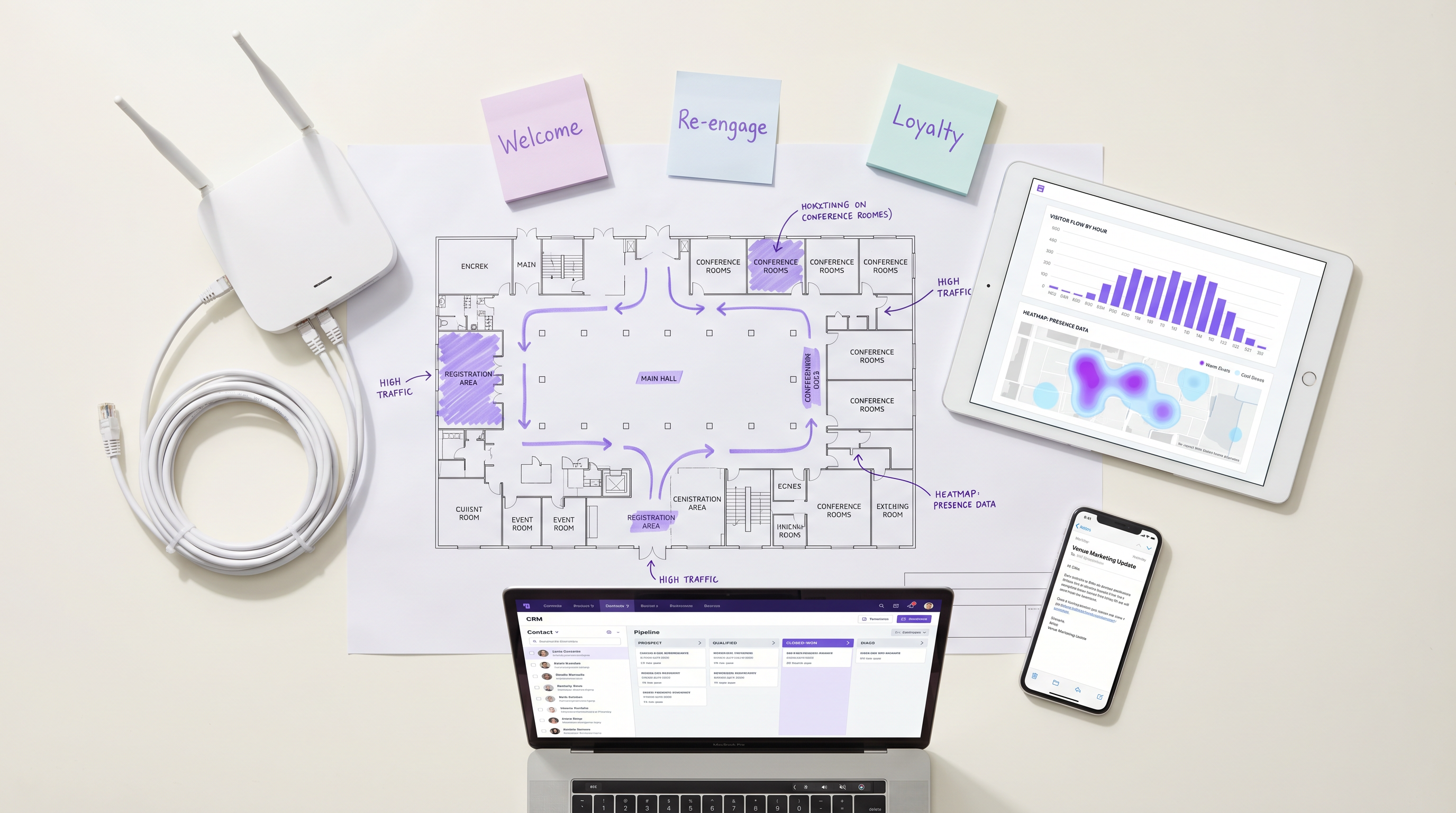
Cuando un dispositivo entra en un establecimiento y se conecta a la red WiFi, se generan simultáneamente dos flujos de datos distintos. El primero son los datos de presencia: el punto de acceso registra una solicitud de sondeo o un evento de asociación, capturando la dirección MAC del dispositivo, la intensidad de la señal (RSSI) y una marca de tiempo precisa. Este flujo es pasivo y continuo —no requiere ninguna acción del invitado. El segundo son los datos de identidad: cuando el invitado se autentica a través del Captive Portal, la plataforma captura su identidad declarada (dirección de correo electrónico o número de teléfono), su perfil demográfico si se recopila y, fundamentalmente, su consentimiento explícito de marketing.
Para los establecimientos de Comercio Minorista u Hostelería , este enfoque de doble flujo proporciona una visión determinista del comportamiento del cliente que ningún otro canal puede replicar. El Captive Portal sirve como punto de ingesta principal para los datos de primera parte, y su configuración debe tratarse como un componente crítico para el cumplimiento. Bajo GDPR, el consentimiento debe ser libremente dado, específico, informado e inequívoco. Bajo CCPA, los usuarios deben tener derecho a optar por no participar. Consulte la guía CCPA vs GDPR: Cumplimiento Global de la Privacidad para Datos de WiFi para Invitados para conocer los requisitos de configuración detallados.
Procesamiento de Eventos y el Motor LogicFlow
Los eventos de red brutos no son directamente accionables. Deben normalizarse, evaluarse según reglas predefinidas y traducirse en disparadores con significado empresarial. El motor LogicFlow de Purple actúa como esta capa intermedia. Ingresa el flujo de eventos desde los puntos de acceso y el Captive Portal, evalúa cada evento según un conjunto de reglas y determina si se ha cumplido una condición de disparador.
Una regla de LogicFlow se compone de tres elementos: una condición (el evento o estado de la red), un calificador (parámetros adicionales como el número de visitas, la duración de la permanencia o los días desde la última visita) y una acción (típicamente un envío de webhook). Por ejemplo: Condición = 'Inicio de Sesión', Calificador = 'Primera visita Y consentimiento de marketing = Verdadero', Acción = 'POST webhook a CRM después de un retraso de 15 minutos'. Este modelo declarativo permite a los equipos de operaciones de marketing definir la lógica de los disparadores sin requerir la participación de ingeniería de red para cada cambio de campaña.
Envío de Webhooks e Integración con CRM
Cuando se cumple una regla de LogicFlow, el despachador de webhooks envía una carga útil JSON estructurada al endpoint configurado. La carga útil debe incluir, como mínimo: el identificador único del usuario (correo electrónico o teléfono), el tipo de evento, el identificador del establecimiento, la marca de tiempo del evento y cualquier dato contextual relevante, como la duración de la permanencia o el número de visitas. El sistema receptor —ya sea Salesforce, HubSpot, Klaviyo o un CDP personalizado— ejecuta entonces el flujo de automatización correspondiente.
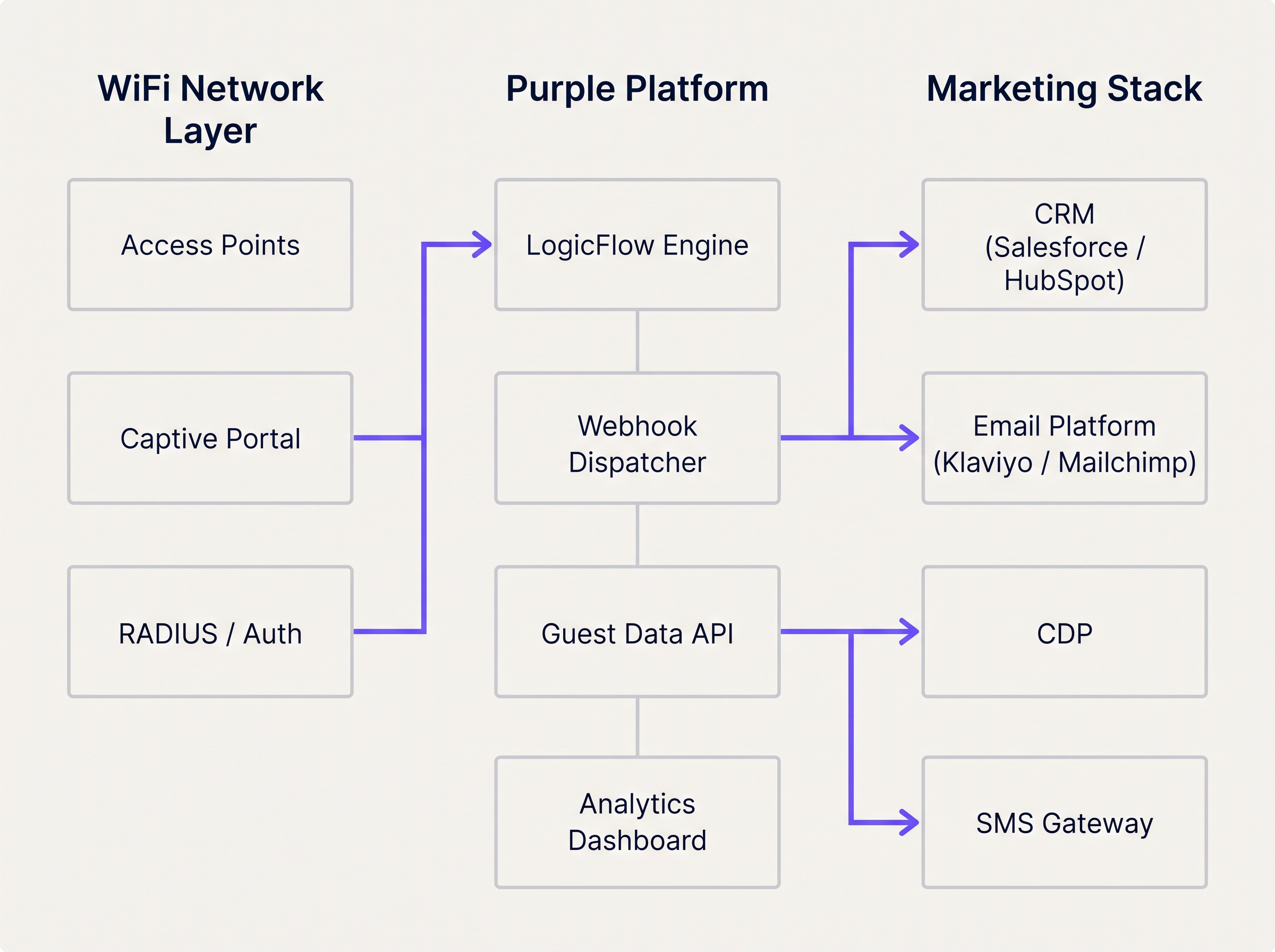
La plataforma Análisis de WiFi proporciona la capa de observabilidad, permitiendo a los equipos monitorear los volúmenes de eventos, las tasas de disparadores y las métricas de éxito de entrega en un panel unificado. Esto es esencial para diagnosticar problemas de integración y optimizar los umbrales de los disparadores.
Guía de Implementación
La implementación de un flujo de automatización de marketing activado por WiFi requiere una estrecha coordinación entre la ingeniería de red y las operaciones de marketing. El siguiente enfoque paso a paso garantiza una entrega fiable y una atribución precisa desde el primer día.
Paso 1: Definir la Taxonomía de Disparadores
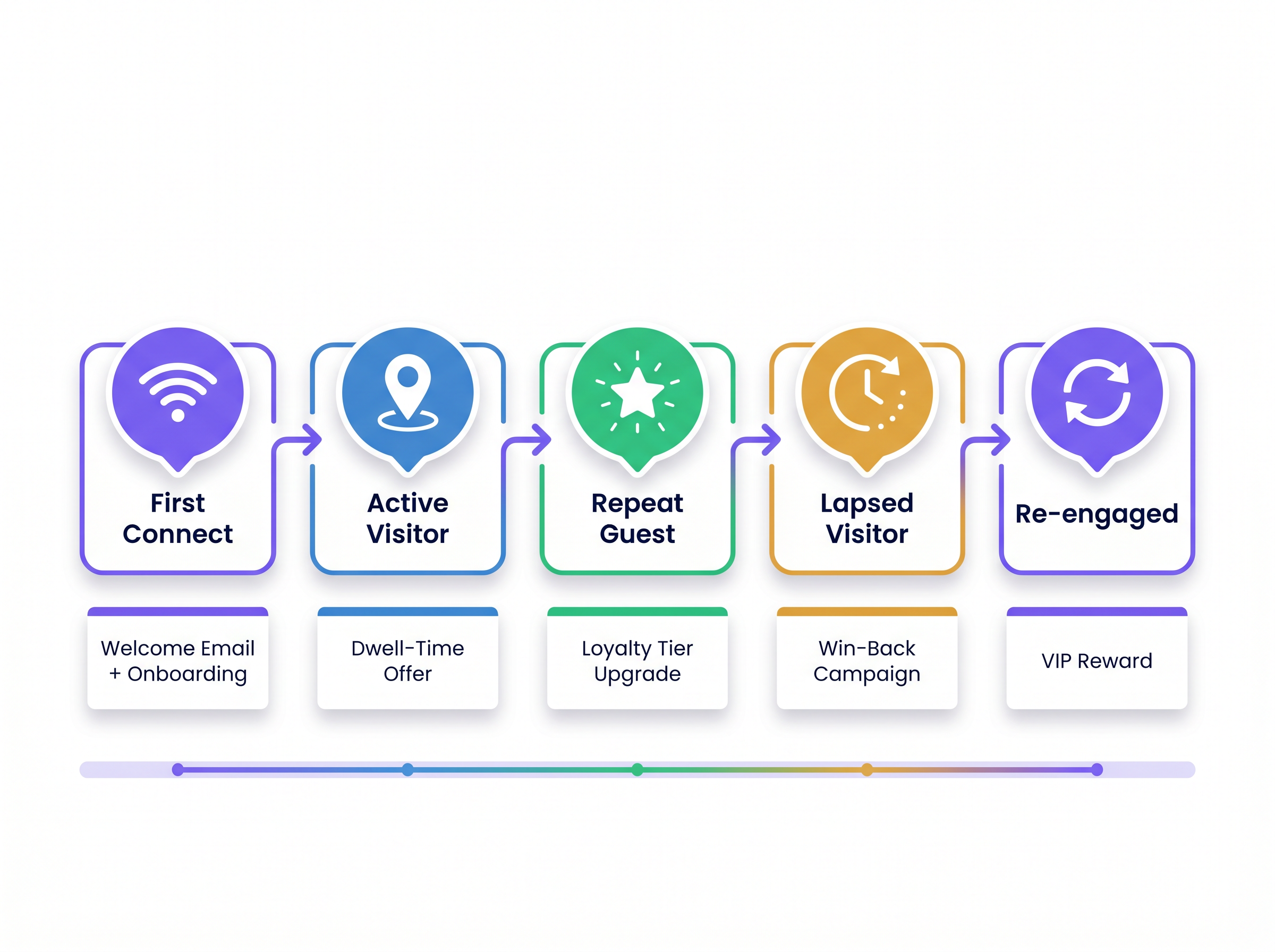
Antes de que comience cualquier configuración técnica, mapee los eventos de red a las etapas del ciclo de vida del cliente. Esta taxonomía se convierte en el contrato entre el equipo de red y el equipo de marketing. La siguiente tabla proporciona un punto de partida estándar.
| Etapa del Ciclo de Vida | Evento de Red | Condición del Disparador | Acción Recomendada |
|---|---|---|---|
| Visitante por Primera Vez | Inicio de Sesión | Primera autenticación, consentimiento = Verdadero | Correo electrónico de bienvenida + incorporación a la lealtad |
| Visitante Activo | Presencia de Permanencia | Tiempo de permanencia > 45 minutos | Oferta por SMS o notificación en la aplicación |
| Invitado Recurrente | Inicio de Sesión | Número de visitas = 5 o 10 | Notificación de mejora de nivel de lealtad |
| Visitante Inactivo | Ausencia | Sin evento de presencia durante 60–90 días | Campaña de recuperación por correo electrónico o SMS |
| Visitante Reenganchado | Inicio de Sesión | Primera visita después de la campaña de inactividad | Recompensa VIP u oferta personalizada |
Paso 2: Configurar el Captive Portal
Asegúrese de que el portal recopile los campos mínimos requeridos: dirección de correo electrónico (o teléfono), casilla de verificación de consentimiento de marketing y, opcionalmente, un identificador de programa de lealtad. Mantenga el formulario conciso: cada campo adicional reduce las tasas de finalización. Configure el portal para que pase la bandera de consentimiento a la plataforma de análisis para que pueda ser evaluada por las reglas de LogicFlow.
Paso 3: Construir y Probar Reglas de LogicFlow
Cree reglas de forma incremental, comenzando con el disparador de mayor valor (típicamente Primera Conexión). Pruebe cada regla en un entorno de prueba antes de implementarla en producción. Verifique que la carga útil del webhook esté correctamente estructurada y que el endpoint de CRM receptor devuelva una respuesta 200 OK. Implemente una cola de mensajes fallidos para capturar cualquier carga útil que no se entregue durante interrupciones transitorias.
Paso 4: Mapear Campos de Datos y Validar Esquema
Alinee el esquema de datos entre la plataforma WiFi y el CRM. El identificador único capturado en el portal debe coincidir con la clave principal en el CRM. Las discrepancias en los nombres de campo, tipos de datos o codificación causan fallas silenciosas donde el webhook se recibe pero la automatización no se activa. Documente el mapeo completo de campos y revíselo cada vez que se actualice cualquiera de los sistemas.
Paso 5: Implementar Limitación de Frecuencia
Configure la limitación de frecuencia a nivel de CRM para evitar el envío excesivo de mensajes. Defina frecuencias máximas de envío por tipo de campaña; por ejemplo, un correo electrónico de bienvenida solo se puede enviar una vez por usuario, y una oferta por tiempo de permanencia solo se puede enviar una vez por período de 7 días. Esta lógica debe aplicarse en el CRM, no únicamente en LogicFlow, para tener en cuenta casos extremos en los que múltiples disparadores se activan en rápida sucesión.
Mejores Prácticas
Las siguientes recomendaciones se basan en implementaciones en entornos de hospitalidad, comercio minorista y Transporte y representan el estándar actual de la industria para la automatización de marketing basada en presencia.
Activar por Cambio de Estado, No por Presencia Continua. El error arquitectónico más común es configurar reglas para evaluar la presencia en cada latido del AP. Esto inunda el motor de reglas y genera llamadas API excesivas al CRM. Las reglas deben evaluar las transiciones de estado: de 'No Presente' a 'Presente', de 'Activo' a 'Inactivo', o de 'Anónimo' a 'Identificado'. Este enfoque reduce la carga del sistema y asegura que cada disparador sea significativo.
Confíe en la Identidad Autenticada para el Seguimiento a Largo Plazo. Los sistemas operativos móviles modernos emplean la aleatorización de direcciones MAC para proteger la privacidad del usuario. iOS ha aleatorizado las direcciones MAC desde iOS 14, y Android le siguió a partir de la versión 10. Cualquier arquitectura que dependa de la dirección MAC del hardware como identificador principal del CRM experimentará una degradación significativa en la identificación de visitantes recurrentes. La identidad autenticada —correo electrónico o teléfono— capturada en el Captive Portal debe ser el identificador canónico para todo el seguimiento y la atribución a largo plazo.
Incluya el Contexto del Lugar en Cada Carga Útil. Para operadores con múltiples ubicaciones, el identificador del lugar es un parámetro de enrutamiento crítico. Sin él, el CRM no puede determinar qué plantilla, oferta o campaña aplicar. Incluya el ID del lugar, el nombre del lugar y, opcionalmente, la zona o el piso en cada carga útil del webhook.
Monitoree Continuamente la Salud del Webhook. Las fallas en la entrega de webhooks son silenciosas por defecto. Implemente monitoreo tanto en la plataforma de envío (alerta sobre tasas de falla de entrega por encima de un umbral definido) como en el CRM receptor (alerta sobre caídas inesperadas en el volumen de disparadores entrantes). Para implementaciones en Salud , donde las comunicaciones operativas pueden ser críticas para la seguridad, este monitoreo no es negociable.
Alinee las Actualizaciones de Red con los Requisitos de Integración. Al planificar la modernización de la red —por ejemplo, al evaluar Los Beneficios Clave de SD WAN para Empresas Modernas — asegúrese de que las capacidades de análisis y webhook de la plataforma WiFi se incluyan en la revisión de la arquitectura. Las implementaciones de SD-WAN pueden afectar la latencia y la confiabilidad de la transmisión de eventos en tiempo real desde ubicaciones periféricas.
Resolución de Problemas y Mitigación de Riesgos
Incluso con una arquitectura robusta, ocurren fallas de integración. Los siguientes modos de falla son los más frecuentemente encontrados en implementaciones de producción.
Fallas en la Entrega de Cargas Útiles. Los errores HTTP 4xx suelen indicar un problema de autenticación o esquema con el endpoint del webhook. Los errores HTTP 5xx indican un problema en el sistema receptor. Implemente una lógica de reintento con retroceso exponencial (reintento inicial a los 30 segundos, luego 2 minutos, luego 10 minutos) y dirija las cargas útiles no entregables a una cola de mensajes fallidos para revisión manual.
Activaciones de Disparadores Duplicadas. Si un usuario se reconecta al WiFi varias veces en un corto período —por ejemplo, moviéndose entre pisos en una implementación multi-AP— el evento 'Inicio de Sesión' puede activarse varias veces. Implemente claves de idempotencia en la carga útil del webhook (un ID de evento único compuesto por el identificador de usuario y una marca de tiempo) y configure el CRM para deduplicar con esta clave.
Retrasos en la Propagación de la Bandera de Consentimiento. En entornos de alto rendimiento, puede haber un breve retraso entre que un usuario envía el formulario del portal y la bandera de consentimiento está disponible para el motor de LogicFlow. Configure un retraso mínimo de 60 segundos en todos los disparadores de Primera Conexión para asegurar que el estado de consentimiento se haya propagado antes de que se active el webhook.
Conflictos de Registros de Contacto del CRM. Cuando un webhook crea un nuevo contacto en el CRM, puede entrar en conflicto con un registro existente si el usuario ha interactuado previamente a través de un canal diferente. Implemente una estrategia de fusión en el CRM que priorice la identidad capturada por WiFi y enriquezca el registro existente en lugar de crear un duplicado.
ROI e Impacto en el Negocio
El caso de negocio para la automatización de marketing activada por WiFi está bien establecido en todas las categorías de lugares. Los disparadores basados en presencia superan consistentemente a las campañas por lotes en las métricas que más importan a los operadores comerciales.
Para una comprenmarco integral para cuantificar y presentar este ROI a los altos directivos, consulte Medición del ROI en WiFi para Invitados: Un Marco para CMOs . Los indicadores clave de rendimiento a seguir son los siguientes.
| KPI | Descripción | Referencia Típica |
|---|---|---|
| Tasa de Apertura por Activación | % de correos electrónicos activados abiertos por los destinatarios | 35–55% (vs. 15–25% para envíos masivos) |
| Tasa de Canje de Ofertas | % de ofertas activadas canjeadas en el lugar | 8–15% (vs. 2–4% para envíos masivos) |
| Conversión de Recuperación | % de visitantes inactivos que regresan después de la campaña | 12–20% |
| Tasa de Captura de Datos | % de usuarios de WiFi que completan el registro en el portal | 60–80% con portal optimizado |
| Aumento de la Frecuencia Media de Visitas | Incremento en las visitas por cliente por trimestre | 15–25% para invitados inscritos en programas de lealtad |
El efecto compuesto de estas métricas es significativo. Una cadena minorista con 50 ubicaciones, cada una capturando 500 registros de WiFi por semana, genera 25,000 nuevos contactos de CRM por semana. Una tasa de conversión de recuperación del 15% en un segmento inactivo de 90 días, combinada con una tasa de canje de ofertas del 10% en activadores de tiempo de permanencia, produce un aumento de ingresos medible y atribuible que justifica la inversión en integración en un solo trimestre.
Términos clave y definiciones
LogicFlow
Purple's event rules engine that evaluates incoming network events against predefined conditions to determine whether a marketing trigger action should be executed.
IT teams configure LogicFlow to define the exact conditions under which a webhook fires, without requiring code changes to the marketing stack.
Webhook
An HTTP callback mechanism that automatically sends a structured JSON payload to a specified URL endpoint when a defined event occurs on the source system.
The primary integration mechanism for transmitting real-time WiFi presence events to CRM, email, and SMS platforms.
Captive Portal
A web-based authentication page that users must interact with before being granted access to a public WiFi network. Used to capture identity and marketing consent.
The compliance-critical touchpoint for first-party data collection. Portal configuration directly determines the quality and legality of downstream marketing triggers.
Presence Data
Network telemetry derived from wireless device probe requests and association events, indicating that a device is physically within the coverage area of an access point.
Enables passive tracking of dwell time and return visit frequency without requiring active user authentication on every visit.
MAC Address Randomisation
A privacy feature implemented in iOS (since version 14) and Android (since version 10) that periodically rotates the device's MAC address to prevent persistent tracking by network operators.
Requires all long-term customer identification and CRM matching to be based on authenticated identity (email/phone) rather than hardware device addresses.
Dwell Time
The total duration a device remains within the detectable coverage area of a venue's WiFi network during a single session.
A key trigger qualifier for in-venue offers. A dwell time threshold (e.g., 45 minutes) indicates genuine engagement and increases offer relevance and redemption rates.
First-Party Data
Customer information collected directly by the venue from the customer, with their explicit consent, through owned channels such as the captive portal.
Increasingly valuable as third-party cookies are deprecated and data privacy regulations tighten. WiFi-captured first-party data is among the highest-quality inputs available to venue operators.
Dead-Letter Queue (DLQ)
A message storage buffer that captures webhook payloads that could not be successfully delivered to the target endpoint after all retry attempts have been exhausted.
Essential for ensuring marketing triggers are not permanently lost during CRM outages or endpoint failures. DLQ contents should be reviewed and replayed once the receiving system recovers.
Idempotency Key
A unique identifier included in each webhook payload that allows the receiving system to detect and discard duplicate requests, ensuring a trigger is processed exactly once.
Critical in high-availability deployments where webhook retry logic may cause the same event to be delivered multiple times, potentially resulting in duplicate emails or SMS messages.
Frequency Capping
A constraint applied at the CRM or marketing automation layer that limits how many times a given user can receive a specific campaign type within a defined time window.
Prevents over-messaging and subscriber fatigue. Must be configured independently of the LogicFlow trigger rules, as the rules engine does not have visibility into CRM send history.
Casos de éxito
A 200-room hotel wants to trigger a personalised welcome email offering a spa discount 15 minutes after a guest authenticates on the guest WiFi for the first time during their stay. The hotel uses Salesforce as its CRM and Klaviyo for email delivery.
Configure the captive portal to capture the guest's email address and a GDPR-compliant marketing consent checkbox. Ensure the consent flag is passed to the Purple analytics platform in real time.
In LogicFlow, create a rule with the following parameters: Condition = 'Session Start', Qualifier = 'First authentication at this venue AND marketing consent = True', Delay = '15 minutes', Action = 'POST webhook to Salesforce endpoint'.
Configure the webhook payload to include: user_email, user_first_name, venue_id, event_type ('first_connect'), event_timestamp, and a unique event_id for idempotency.
In Salesforce, create a process builder flow that triggers on receipt of the webhook. The flow checks whether a contact record exists for the email address. If yes, it enriches the record with the WiFi visit data. If no, it creates a new contact.
The Salesforce flow then triggers a Klaviyo transactional email via the Klaviyo API, passing the venue_id as a dynamic variable to select the correct spa offer template for that property.
Configure a suppression list in Klaviyo to ensure the welcome email is only sent once per guest per stay (keyed on email + check-in date).
A fashion retail chain with 80 UK stores wants to send a 'We miss you' SMS with a 20% discount code to loyalty members who have not visited any store in over 90 days. The chain uses a custom CDP and an SMS gateway.
In the Purple platform, configure a 'Lapsed Visitor' rule: Condition = 'Absence', Qualifier = 'No presence event recorded for this user across any venue in the estate for 90 consecutive days AND loyalty_member = True', Action = 'POST webhook to CDP endpoint'.
The rule evaluates the absence condition daily at 02:00 UTC against the full estate's presence data. This batch evaluation approach is more efficient than real-time evaluation for absence-based triggers.
The webhook payload includes: user_phone, user_email, loyalty_tier, days_since_last_visit, last_visited_venue_id, and a campaign_id.
The CDP receives the payload and generates a unique discount code for the user, then passes the code and the user's phone number to the SMS gateway.
The SMS gateway sends the win-back message. The CDP updates the user's record with a 'win_back_sent' flag and the send timestamp to prevent duplicate sends.
When the user next connects to any store's WiFi, the 'Re-engaged Visitor' trigger fires, the CDP clears the lapsed flag, and the user is enrolled in a re-engagement nurture sequence.
Análisis de escenarios
Q1. A retail client reports that their CRM is hitting API rate limits during peak trading hours on Saturdays. Investigation reveals the WiFi platform is sending thousands of webhooks per hour. The current LogicFlow rule fires every time any device is detected by an access point. How should the IT manager reconfigure the system to resolve the issue without losing marketing trigger coverage?
💡 Sugerencia:Consider the difference between continuous presence detection and meaningful state transitions. Also consider whether every device detection event has marketing value.
Mostrar enfoque recomendado
The IT manager should reconfigure the LogicFlow rule to trigger only on state change events — specifically 'Session Start' (device transitions from Not Present to Present) and 'Session End' — rather than on every AP detection heartbeat. Additionally, a frequency cap should be applied at the rule level to ensure a single device only generates a webhook once per 24-hour period. For anonymous devices (those without an authenticated identity), webhooks should be suppressed entirely, as they cannot be actioned by the CRM. These three changes — state-change triggers, frequency capping, and identity filtering — will reduce webhook volume by an estimated 90% while preserving all commercially relevant trigger events.
Q2. A hospital trust wants to send a wayfinding SMS to outpatients when they connect to the guest WiFi, directing them to their appointment department. However, the trust has multiple buildings on the same network estate, and the wayfinding message must be specific to the building where the patient connected. How is this achieved architecturally?
💡 Sugerencia:Think about how physical location is represented within the WiFi platform's data model and how it can be included in the webhook payload.
Mostrar enfoque recomendado
The solution requires zone-based trigger configuration. Each building's access points must be assigned to a named zone within the Purple platform (e.g., 'Main Hospital', 'Outpatients Wing', 'Oncology Centre'). The LogicFlow rule is configured to evaluate the zone of the authenticating access point and include the zone identifier in the webhook payload. The SMS gateway or CRM then uses the zone identifier to select the appropriate wayfinding message template for that building. This approach ensures the SMS is contextually accurate regardless of which building the patient enters first. For a healthcare deployment, the IT team should also ensure the trigger only fires for users who have authenticated (not anonymous presence) and that the data handling complies with applicable healthcare data regulations.
Q3. Following an iOS 17 update rolled out across a venue's visitor base, the marketing team reports a significant drop in repeat visitor identification, causing loyalty tier upgrade triggers to stop firing for a large segment of their customer base. What is the technical root cause, and what architectural changes are required to restore accurate repeat visitor tracking?
💡 Sugerencia:Consider what changed in iOS 17's networking behaviour and which identifier the current architecture relies upon for repeat visitor recognition.
Mostrar enfoque recomendado
The root cause is MAC address randomisation. iOS 17 introduced per-network MAC randomisation, meaning the device presents a unique, randomised MAC address for each WiFi network it connects to, even if it has connected to that network before. Any architecture that uses the MAC address as the primary identifier for repeat visitor recognition will fail to match the returning device to the existing CRM record. The required architectural change is to shift the primary identifier from the MAC address to the authenticated identity captured at the captive portal — specifically the email address or phone number. The CRM must be updated to use this authenticated identity as the canonical customer key. For users who have previously been tracked by MAC address only, a re-authentication campaign (prompting users to log in via the portal again) will be required to re-establish the identity link. Going forward, the MAC address should be used only for session-level analytics within a single visit, not for cross-visit customer recognition.
Conclusiones clave
- ✓Guest WiFi infrastructure generates two distinct and complementary data streams: presence data (from access points) and identity data (from the captive portal). Both are required for effective marketing automation.
- ✓LogicFlow rules should evaluate state transitions — not continuous presence — to prevent API rate limit issues and ensure every trigger is commercially meaningful.
- ✓MAC address randomisation in iOS 14+ and Android 10+ makes hardware device addresses unreliable for long-term customer identification. Authenticated email or phone must be the canonical CRM key.
- ✓Webhook payloads must include venue context (venue ID, zone, timestamp) to enable accurate routing and personalisation in multi-venue deployments.
- ✓Frequency capping must be enforced at the CRM level, not solely in the rules engine, to prevent over-messaging when multiple triggers fire in close succession.
- ✓Dead-letter queues and idempotency keys are non-negotiable in production deployments to ensure trigger reliability and prevent duplicate communications.
- ✓The compounding ROI of presence-based triggers — higher open rates, redemption rates, and win-back conversions — typically justifies the integration investment within a single quarter for estate-scale deployments.




