

Turning Guest WiFi Data into Marketing Automation Triggers
This reference guide provides a technical playbook for converting raw guest WiFi data into event-driven marketing automation triggers. It covers the full architecture — from captive portal data capture and LogicFlow rules through to webhook dispatch and CRM integration — with real-world implementation scenarios for hospitality and retail. IT teams and marketing automation specialists will leave with a concrete, deployable framework for building presence-based campaigns including welcome flows, dwell-time offers, and lapsed-visitor win-backs.
🎧 Listen to this Guide
View Transcript
Executive Summary
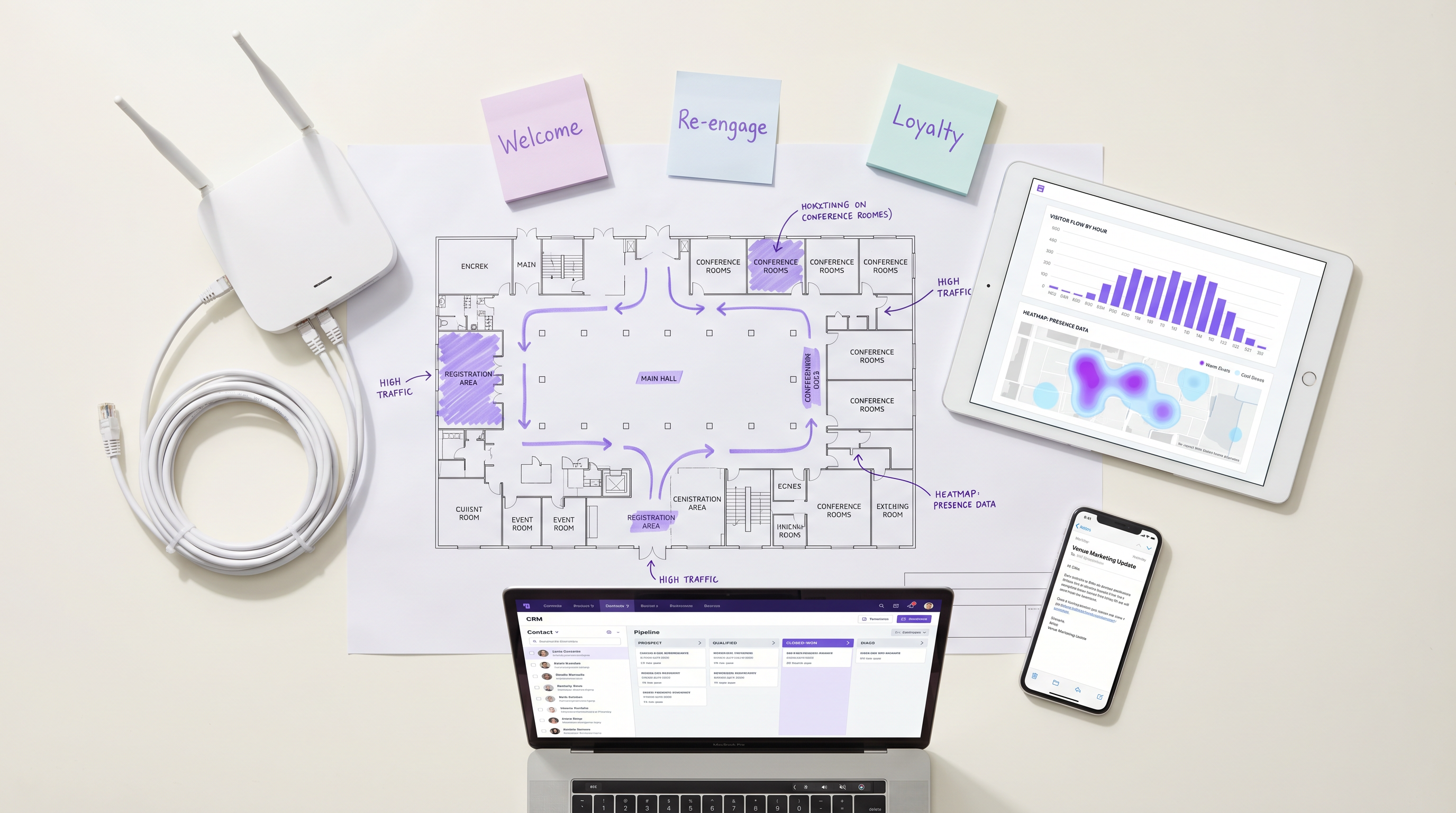
For enterprise venues, guest WiFi is no longer just a connectivity cost centre; it is the foundational data layer for the entire customer lifecycle. When configured correctly, the access point infrastructure captures precise presence, dwell, and return data that can trigger highly targeted marketing automation workflows. This guide outlines the technical architecture required to turn raw network events — including 802.11 authentication handshakes and captive portal logins — into actionable CRM triggers. By leveraging Guest WiFi and webhook integrations, IT and marketing teams can deploy event-driven campaigns — from real-time dwell-time offers to lapsed-visitor win-backs — without compromising network performance or data privacy compliance. The result is a measurable uplift in campaign relevance, conversion rates, and customer lifetime value, all driven by infrastructure you already own.
Technical Deep-Dive
The transformation of WiFi events into marketing automation triggers relies on a layered architecture that bridges the network infrastructure and the marketing stack. Understanding each layer is essential before any integration work begins.
The Data Capture Layer
When a device enters a venue and connects to the WiFi network, two distinct data streams are generated simultaneously. The first is presence data: the access point logs a probe request or association event, capturing the device's MAC address, signal strength (RSSI), and a precise timestamp. This stream is passive and continuous — it does not require any action from the guest. The second is identity data: when the guest authenticates through the captive portal, the platform captures their declared identity (email address or phone number), their demographic profile if collected, and crucially, their explicit marketing consent.
For venues in Retail or Hospitality , this dual-stream approach provides a deterministic view of customer behaviour that no other channel can replicate. The captive portal serves as the primary ingestion point for first-party data, and its configuration must be treated as a compliance-critical component. Under GDPR, consent must be freely given, specific, informed, and unambiguous. Under CCPA, users must be given the right to opt out. Consult the CCPA vs GDPR: Global Privacy Compliance for Guest WiFi Data guide for detailed configuration requirements.
Event Processing and the LogicFlow Engine
Raw network events are not directly actionable. They must be normalised, evaluated against predefined rules, and translated into business-meaningful triggers. Purple's LogicFlow engine acts as this intermediary layer. It ingests the event stream from the access points and captive portal, evaluates each event against a rule set, and determines whether a trigger condition has been met.
A LogicFlow rule is composed of three elements: a condition (the network event or state), a qualifier (additional parameters such as visit count, dwell duration, or days since last visit), and an action (typically a webhook dispatch). For example: Condition = 'Session Start', Qualifier = 'First visit AND marketing consent = True', Action = 'POST webhook to CRM after 15-minute delay'. This declarative model allows marketing operations teams to define trigger logic without requiring network engineering involvement for every campaign change.
Webhook Dispatch and CRM Integration
When a LogicFlow rule is matched, the webhook dispatcher fires a structured JSON payload to the configured endpoint. The payload should include, at a minimum: the user's unique identifier (email or phone), the event type, the venue identifier, the event timestamp, and any relevant contextual data such as dwell duration or visit count. The receiving system — whether Salesforce, HubSpot, Klaviyo, or a custom CDP — then executes the corresponding automation flow.
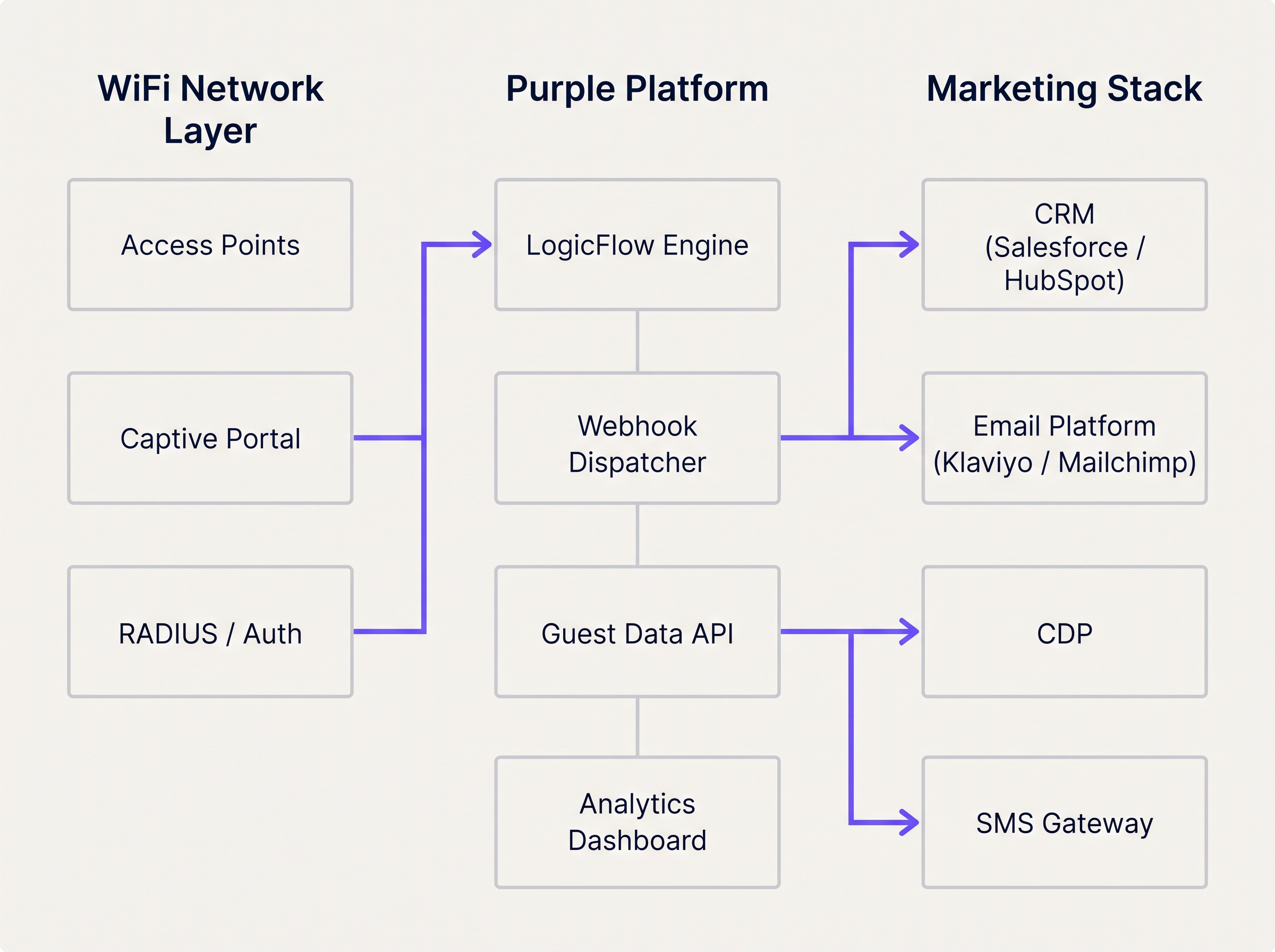
The WiFi Analytics platform provides the observability layer, allowing teams to monitor event volumes, trigger rates, and delivery success metrics in a unified dashboard. This is essential for diagnosing integration issues and optimising trigger thresholds.
Implementation Guide
Deploying a WiFi-triggered marketing automation flow requires tight coordination between network engineering and marketing operations. The following step-by-step approach ensures reliable delivery and accurate attribution from day one.
Step 1: Define the Trigger Taxonomy
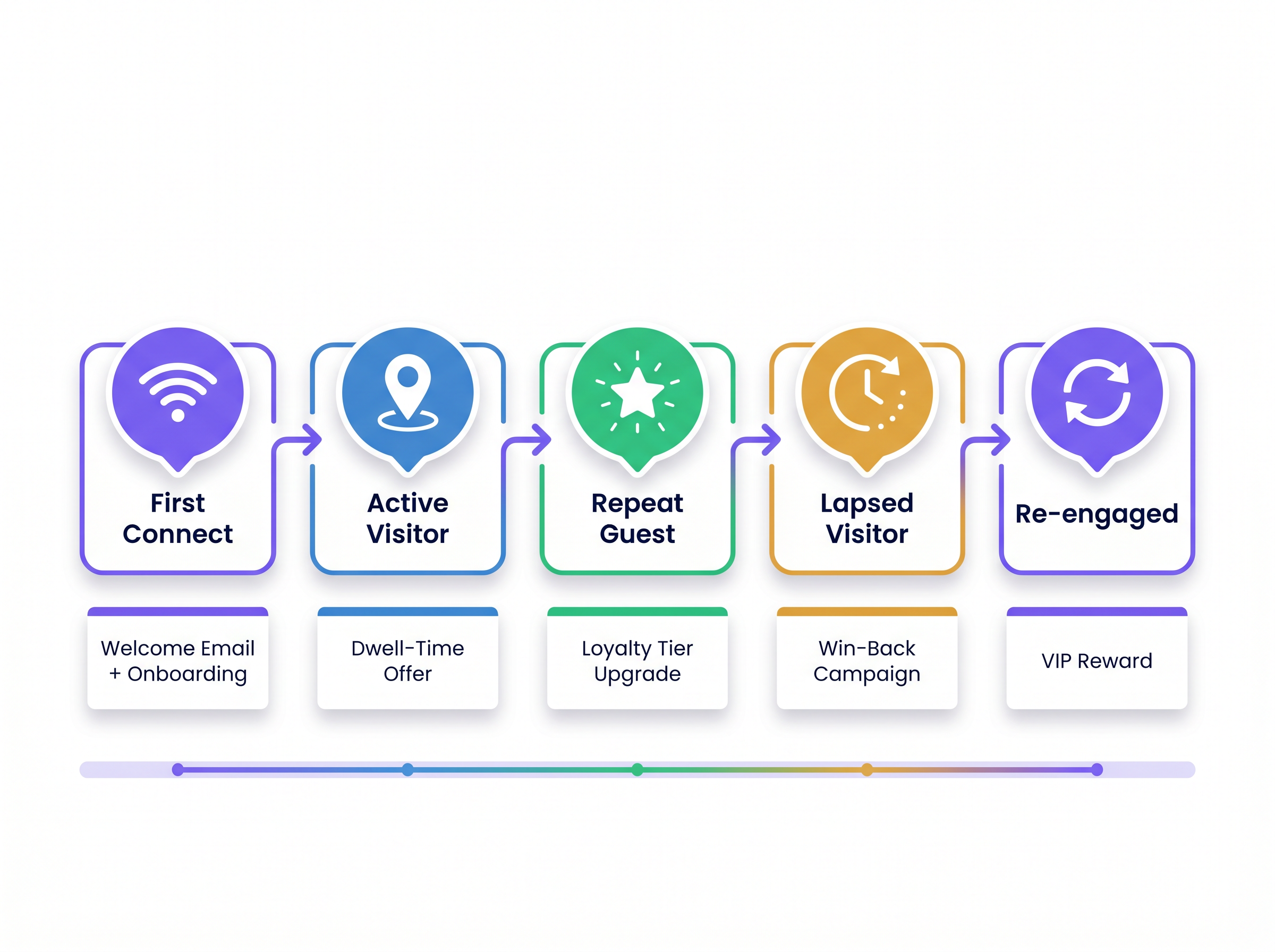
Before any technical configuration begins, map network events to customer lifecycle stages. This taxonomy becomes the contract between the network team and the marketing team. The table below provides a standard starting point.
| Lifecycle Stage | Network Event | Trigger Condition | Recommended Action |
|---|---|---|---|
| First-Time Visitor | Session Start | First authentication, consent = True | Welcome email + loyalty onboarding |
| Active Visitor | Dwell Presence | Dwell time > 45 minutes | SMS offer or in-app notification |
| Repeat Guest | Session Start | Visit count = 5 or 10 | Loyalty tier upgrade notification |
| Lapsed Visitor | Absence | No presence event for 60–90 days | Win-back email or SMS campaign |
| Re-engaged Visitor | Session Start | First visit after lapsed campaign | VIP reward or personalised offer |
Step 2: Configure the Captive Portal
Ensure the portal collects the minimum required fields: email address (or phone), marketing consent checkbox, and optionally a loyalty programme identifier. Keep the form concise — every additional field reduces completion rates. Configure the portal to pass the consent flag through to the analytics platform so it can be evaluated by LogicFlow rules.
Step 3: Build and Test LogicFlow Rules
Create rules incrementally, starting with the highest-value trigger (typically First Connect). Test each rule in a staging environment before deploying to production. Verify that the webhook payload is correctly structured and that the receiving CRM endpoint returns a 200 OK response. Implement a dead-letter queue to capture any payloads that fail to deliver during transient outages.
Step 4: Map Data Fields and Validate Schema
Align the data schema between the WiFi platform and the CRM. The unique identifier captured at the portal must match the primary key in the CRM. Mismatches in field names, data types, or encoding cause silent failures where the webhook is received but the automation does not trigger. Document the full field mapping and review it whenever either system is updated.
Step 5: Deploy Frequency Capping
Configure frequency capping at the CRM level to prevent over-messaging. Define maximum send frequencies per campaign type — for example, a welcome email can only be sent once per user, and a dwell-time offer can only be sent once per 7-day period. This logic should be enforced in the CRM, not solely in LogicFlow, to account for edge cases where multiple triggers fire in quick succession.
Best Practices
The following recommendations are drawn from deployments across hospitality, retail, and Transport environments and represent the current industry standard for presence-based marketing automation.
Trigger on State Change, Not Continuous Presence. The most common architectural mistake is configuring rules to evaluate presence on every AP heartbeat. This floods the rules engine and generates excessive API calls to the CRM. Rules should evaluate state transitions: from 'Not Present' to 'Present', from 'Active' to 'Lapsed', or from 'Anonymous' to 'Identified'. This approach reduces system load and ensures each trigger is meaningful.
Rely on Authenticated Identity for Long-Term Tracking. Modern mobile operating systems employ MAC address randomisation to protect user privacy. iOS has randomised MAC addresses since iOS 14, and Android followed from version 10. Any architecture that relies on the hardware MAC address as the primary CRM identifier will experience significant degradation in repeat visitor identification. The authenticated identity — email or phone — captured at the captive portal must be the canonical identifier for all long-term tracking and attribution.
Include Venue Context in Every Payload. For multi-venue operators, the venue identifier is a critical routing parameter. Without it, the CRM cannot determine which template, offer, or campaign to apply. Include the venue ID, venue name, and optionally the zone or floor in every webhook payload.
Monitor Webhook Health Continuously. Webhook delivery failures are silent by default. Implement monitoring on both the sending platform (alert on delivery failure rates above a defined threshold) and the receiving CRM (alert on unexpected drops in incoming trigger volume). For Healthcare deployments, where operational communications may be safety-critical, this monitoring is non-negotiable.
Align Network Upgrades with Integration Requirements. When planning network modernisation — for example, evaluating The Core SD WAN Benefits for Modern Businesses — ensure the analytics and webhook capabilities of the WiFi platform are included in the architecture review. SD-WAN deployments can affect the latency and reliability of real-time event streaming from edge locations.
Troubleshooting & Risk Mitigation
Even with a robust architecture, integration failures occur. The following failure modes are the most frequently encountered in production deployments.
Payload Delivery Failures. HTTP 4xx errors typically indicate an authentication or schema issue with the webhook endpoint. HTTP 5xx errors indicate a problem on the receiving system. Implement retry logic with exponential backoff (initial retry at 30 seconds, then 2 minutes, then 10 minutes) and route undeliverable payloads to a dead-letter queue for manual review.
Duplicate Trigger Fires. If a user reconnects to the WiFi multiple times in a short period — for example, moving between floors in a multi-AP deployment — the 'Session Start' event may fire multiple times. Implement idempotency keys in the webhook payload (a unique event ID composed of the user identifier and a timestamp) and configure the CRM to deduplicate on this key.
Consent Flag Propagation Delays. In high-throughput environments, there may be a brief delay between a user submitting the portal form and the consent flag being available to the LogicFlow engine. Configure a minimum delay of 60 seconds on all First Connect triggers to ensure the consent status has propagated before the webhook fires.
CRM Contact Record Conflicts. When a webhook creates a new contact in the CRM, it may conflict with an existing record if the user has previously interacted via a different channel. Implement a merge strategy in the CRM that prioritises the WiFi-captured identity and enriches the existing record rather than creating a duplicate.
ROI & Business Impact
The business case for WiFi-triggered marketing automation is well-established across venue categories. Presence-based triggers consistently outperform batch campaigns on the metrics that matter most to commercial operators.
For a comprehensive framework for quantifying and presenting this ROI to senior stakeholders, refer to Measuring ROI on Guest WiFi: A Framework for CMOs . The key performance indicators to track are as follows.
| KPI | Description | Typical Benchmark |
|---|---|---|
| Trigger-to-Open Rate | % of triggered emails opened by recipients | 35–55% (vs. 15–25% for batch) |
| Offer Redemption Rate | % of triggered offers redeemed in-venue | 8–15% (vs. 2–4% for batch) |
| Win-Back Conversion | % of lapsed visitors who return after campaign | 12–20% |
| Data Capture Rate | % of WiFi users who complete portal registration | 60–80% with optimised portal |
| Average Visit Frequency Uplift | Increase in visits per customer per quarter | 15–25% for loyalty-enrolled guests |
The compounding effect of these metrics is significant. A retail chain with 50 locations, each capturing 500 WiFi registrations per week, generates 25,000 new CRM contacts per week. A 15% win-back conversion rate on a 90-day lapsed segment, combined with a 10% offer redemption rate on dwell-time triggers, produces a measurable and attributable revenue uplift that justifies the integration investment within a single quarter.
Key Terms & Definitions
LogicFlow
Purple's event rules engine that evaluates incoming network events against predefined conditions to determine whether a marketing trigger action should be executed.
IT teams configure LogicFlow to define the exact conditions under which a webhook fires, without requiring code changes to the marketing stack.
Webhook
An HTTP callback mechanism that automatically sends a structured JSON payload to a specified URL endpoint when a defined event occurs on the source system.
The primary integration mechanism for transmitting real-time WiFi presence events to CRM, email, and SMS platforms.
Captive Portal
A web-based authentication page that users must interact with before being granted access to a public WiFi network. Used to capture identity and marketing consent.
The compliance-critical touchpoint for first-party data collection. Portal configuration directly determines the quality and legality of downstream marketing triggers.
Presence Data
Network telemetry derived from wireless device probe requests and association events, indicating that a device is physically within the coverage area of an access point.
Enables passive tracking of dwell time and return visit frequency without requiring active user authentication on every visit.
MAC Address Randomisation
A privacy feature implemented in iOS (since version 14) and Android (since version 10) that periodically rotates the device's MAC address to prevent persistent tracking by network operators.
Requires all long-term customer identification and CRM matching to be based on authenticated identity (email/phone) rather than hardware device addresses.
Dwell Time
The total duration a device remains within the detectable coverage area of a venue's WiFi network during a single session.
A key trigger qualifier for in-venue offers. A dwell time threshold (e.g., 45 minutes) indicates genuine engagement and increases offer relevance and redemption rates.
First-Party Data
Customer information collected directly by the venue from the customer, with their explicit consent, through owned channels such as the captive portal.
Increasingly valuable as third-party cookies are deprecated and data privacy regulations tighten. WiFi-captured first-party data is among the highest-quality inputs available to venue operators.
Dead-Letter Queue (DLQ)
A message storage buffer that captures webhook payloads that could not be successfully delivered to the target endpoint after all retry attempts have been exhausted.
Essential for ensuring marketing triggers are not permanently lost during CRM outages or endpoint failures. DLQ contents should be reviewed and replayed once the receiving system recovers.
Idempotency Key
A unique identifier included in each webhook payload that allows the receiving system to detect and discard duplicate requests, ensuring a trigger is processed exactly once.
Critical in high-availability deployments where webhook retry logic may cause the same event to be delivered multiple times, potentially resulting in duplicate emails or SMS messages.
Frequency Capping
A constraint applied at the CRM or marketing automation layer that limits how many times a given user can receive a specific campaign type within a defined time window.
Prevents over-messaging and subscriber fatigue. Must be configured independently of the LogicFlow trigger rules, as the rules engine does not have visibility into CRM send history.
Case Studies
A 200-room hotel wants to trigger a personalised welcome email offering a spa discount 15 minutes after a guest authenticates on the guest WiFi for the first time during their stay. The hotel uses Salesforce as its CRM and Klaviyo for email delivery.
Configure the captive portal to capture the guest's email address and a GDPR-compliant marketing consent checkbox. Ensure the consent flag is passed to the Purple analytics platform in real time.
In LogicFlow, create a rule with the following parameters: Condition = 'Session Start', Qualifier = 'First authentication at this venue AND marketing consent = True', Delay = '15 minutes', Action = 'POST webhook to Salesforce endpoint'.
Configure the webhook payload to include: user_email, user_first_name, venue_id, event_type ('first_connect'), event_timestamp, and a unique event_id for idempotency.
In Salesforce, create a process builder flow that triggers on receipt of the webhook. The flow checks whether a contact record exists for the email address. If yes, it enriches the record with the WiFi visit data. If no, it creates a new contact.
The Salesforce flow then triggers a Klaviyo transactional email via the Klaviyo API, passing the venue_id as a dynamic variable to select the correct spa offer template for that property.
Configure a suppression list in Klaviyo to ensure the welcome email is only sent once per guest per stay (keyed on email + check-in date).
A fashion retail chain with 80 UK stores wants to send a 'We miss you' SMS with a 20% discount code to loyalty members who have not visited any store in over 90 days. The chain uses a custom CDP and an SMS gateway.
In the Purple platform, configure a 'Lapsed Visitor' rule: Condition = 'Absence', Qualifier = 'No presence event recorded for this user across any venue in the estate for 90 consecutive days AND loyalty_member = True', Action = 'POST webhook to CDP endpoint'.
The rule evaluates the absence condition daily at 02:00 UTC against the full estate's presence data. This batch evaluation approach is more efficient than real-time evaluation for absence-based triggers.
The webhook payload includes: user_phone, user_email, loyalty_tier, days_since_last_visit, last_visited_venue_id, and a campaign_id.
The CDP receives the payload and generates a unique discount code for the user, then passes the code and the user's phone number to the SMS gateway.
The SMS gateway sends the win-back message. The CDP updates the user's record with a 'win_back_sent' flag and the send timestamp to prevent duplicate sends.
When the user next connects to any store's WiFi, the 'Re-engaged Visitor' trigger fires, the CDP clears the lapsed flag, and the user is enrolled in a re-engagement nurture sequence.
Scenario Analysis
Q1. A retail client reports that their CRM is hitting API rate limits during peak trading hours on Saturdays. Investigation reveals the WiFi platform is sending thousands of webhooks per hour. The current LogicFlow rule fires every time any device is detected by an access point. How should the IT manager reconfigure the system to resolve the issue without losing marketing trigger coverage?
💡 Hint:Consider the difference between continuous presence detection and meaningful state transitions. Also consider whether every device detection event has marketing value.
Show Recommended Approach
The IT manager should reconfigure the LogicFlow rule to trigger only on state change events — specifically 'Session Start' (device transitions from Not Present to Present) and 'Session End' — rather than on every AP detection heartbeat. Additionally, a frequency cap should be applied at the rule level to ensure a single device only generates a webhook once per 24-hour period. For anonymous devices (those without an authenticated identity), webhooks should be suppressed entirely, as they cannot be actioned by the CRM. These three changes — state-change triggers, frequency capping, and identity filtering — will reduce webhook volume by an estimated 90% while preserving all commercially relevant trigger events.
Q2. A hospital trust wants to send a wayfinding SMS to outpatients when they connect to the guest WiFi, directing them to their appointment department. However, the trust has multiple buildings on the same network estate, and the wayfinding message must be specific to the building where the patient connected. How is this achieved architecturally?
💡 Hint:Think about how physical location is represented within the WiFi platform's data model and how it can be included in the webhook payload.
Show Recommended Approach
The solution requires zone-based trigger configuration. Each building's access points must be assigned to a named zone within the Purple platform (e.g., 'Main Hospital', 'Outpatients Wing', 'Oncology Centre'). The LogicFlow rule is configured to evaluate the zone of the authenticating access point and include the zone identifier in the webhook payload. The SMS gateway or CRM then uses the zone identifier to select the appropriate wayfinding message template for that building. This approach ensures the SMS is contextually accurate regardless of which building the patient enters first. For a healthcare deployment, the IT team should also ensure the trigger only fires for users who have authenticated (not anonymous presence) and that the data handling complies with applicable healthcare data regulations.
Q3. Following an iOS 17 update rolled out across a venue's visitor base, the marketing team reports a significant drop in repeat visitor identification, causing loyalty tier upgrade triggers to stop firing for a large segment of their customer base. What is the technical root cause, and what architectural changes are required to restore accurate repeat visitor tracking?
💡 Hint:Consider what changed in iOS 17's networking behaviour and which identifier the current architecture relies upon for repeat visitor recognition.
Show Recommended Approach
The root cause is MAC address randomisation. iOS 17 introduced per-network MAC randomisation, meaning the device presents a unique, randomised MAC address for each WiFi network it connects to, even if it has connected to that network before. Any architecture that uses the MAC address as the primary identifier for repeat visitor recognition will fail to match the returning device to the existing CRM record. The required architectural change is to shift the primary identifier from the MAC address to the authenticated identity captured at the captive portal — specifically the email address or phone number. The CRM must be updated to use this authenticated identity as the canonical customer key. For users who have previously been tracked by MAC address only, a re-authentication campaign (prompting users to log in via the portal again) will be required to re-establish the identity link. Going forward, the MAC address should be used only for session-level analytics within a single visit, not for cross-visit customer recognition.
Key Takeaways
- ✓Guest WiFi infrastructure generates two distinct and complementary data streams: presence data (from access points) and identity data (from the captive portal). Both are required for effective marketing automation.
- ✓LogicFlow rules should evaluate state transitions — not continuous presence — to prevent API rate limit issues and ensure every trigger is commercially meaningful.
- ✓MAC address randomisation in iOS 14+ and Android 10+ makes hardware device addresses unreliable for long-term customer identification. Authenticated email or phone must be the canonical CRM key.
- ✓Webhook payloads must include venue context (venue ID, zone, timestamp) to enable accurate routing and personalisation in multi-venue deployments.
- ✓Frequency capping must be enforced at the CRM level, not solely in the rules engine, to prevent over-messaging when multiple triggers fire in close succession.
- ✓Dead-letter queues and idempotency keys are non-negotiable in production deployments to ensure trigger reliability and prevent duplicate communications.
- ✓The compounding ROI of presence-based triggers — higher open rates, redemption rates, and win-back conversions — typically justifies the integration investment within a single quarter for estate-scale deployments.




