

Transformando Dados de WiFi de Convidados em Gatilhos de Automação de Marketing
Este guia de referência oferece um manual técnico para converter dados brutos de WiFi de convidados em gatilhos de automação de marketing orientados por eventos. Ele abrange a arquitetura completa — desde a captura de dados do Captive Portal e regras LogicFlow até o envio de webhooks e integração com CRM — com cenários de implementação reais para hotelaria e varejo. Equipes de TI e especialistas em automação de marketing sairão com uma estrutura concreta e implementável para construir campanhas baseadas em presença, incluindo fluxos de boas-vindas, ofertas por tempo de permanência e recuperação de visitantes inativos.
🎧 Ouça este Guia
Ver Transcrição
Resumo Executivo
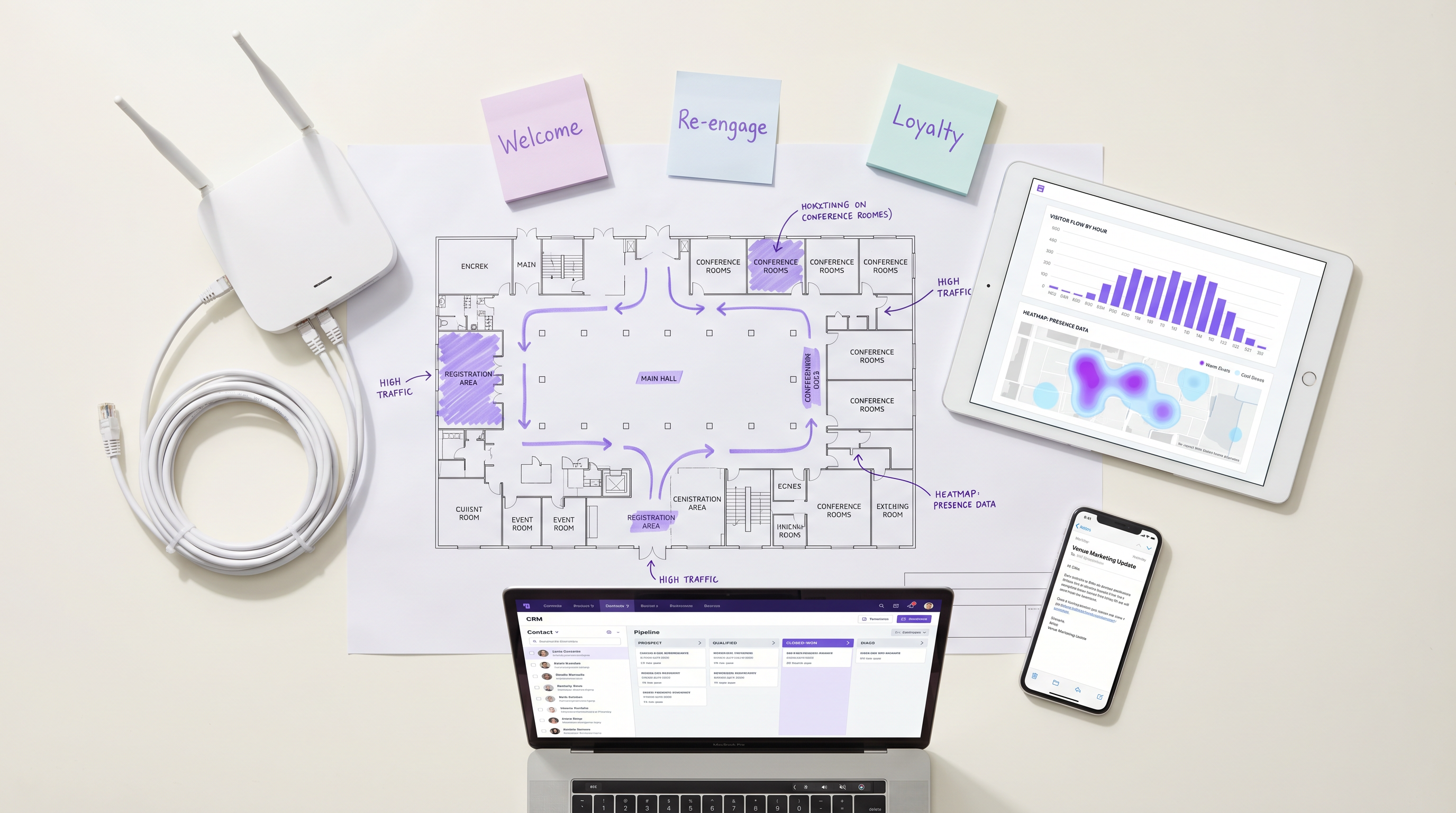
Para estabelecimentos corporativos, o WiFi de convidados não é mais apenas um centro de custo de conectividade; é a camada de dados fundamental para todo o ciclo de vida do cliente. Quando configurada corretamente, a infraestrutura de pontos de acesso captura dados precisos de presença, permanência e retorno que podem acionar fluxos de trabalho de automação de marketing altamente segmentados. Este guia descreve a arquitetura técnica necessária para transformar eventos de rede brutos — incluindo handshakes de autenticação 802.11 e logins de Captive Portal — em gatilhos de CRM acionáveis. Ao aproveitar Guest WiFi e integrações de webhook, as equipes de TI e marketing podem implementar campanhas orientadas por eventos — desde ofertas de tempo de permanência em tempo real até a recuperação de visitantes inativos — sem comprometer o desempenho da rede ou a conformidade com a privacidade de dados. O resultado é um aumento mensurável na relevância da campanha, nas taxas de conversão e no valor vitalício do cliente, tudo impulsionado por uma infraestrutura que você já possui.
Análise Técnica Detalhada
A transformação de eventos de WiFi em gatilhos de automação de marketing depende de uma arquitetura em camadas que conecta a infraestrutura de rede e o stack de marketing. Compreender cada camada é essencial antes que qualquer trabalho de integração comece.
A Camada de Captura de Dados
Quando um dispositivo entra em um local e se conecta à rede WiFi, dois fluxos de dados distintos são gerados simultaneamente. O primeiro são os dados de presença: o ponto de acesso registra uma solicitação de sonda ou evento de associação, capturando o endereço MAC do dispositivo, a intensidade do sinal (RSSI) e um timestamp preciso. Este fluxo é passivo e contínuo — não requer nenhuma ação do convidado. O segundo são os dados de identidade: quando o convidado se autentica através do Captive Portal, a plataforma captura sua identidade declarada (endereço de e-mail ou número de telefone), seu perfil demográfico, se coletado, e, crucialmente, seu consentimento explícito para marketing.
Para estabelecimentos em Varejo ou Hotelaria , esta abordagem de fluxo duplo oferece uma visão determinística do comportamento do cliente que nenhum outro canal pode replicar. O Captive Portal serve como o ponto de ingestão primário para dados de primeira parte, e sua configuração deve ser tratada como um componente crítico para conformidade. Sob o GDPR, o consentimento deve ser dado livremente, ser específico, informado e inequívoco. Sob o CCPA, os usuários devem ter o direito de optar por não participar. Consulte o guia CCPA vs GDPR: Conformidade Global de Privacidade para Dados de Guest WiFi para requisitos de configuração detalhados.
Processamento de Eventos e o Motor LogicFlow
Eventos de rede brutos não são diretamente acionáveis. Eles devem ser normalizados, avaliados em relação a regras predefinidas e traduzidos em gatilhos com significado para o negócio. O motor LogicFlow da Purple atua como esta camada intermediária. Ele ingere o fluxo de eventos dos pontos de acesso e do Captive Portal, avalia cada evento em relação a um conjunto de regras e determina se uma condição de gatilho foi atendida.
Uma regra LogicFlow é composta por três elementos: uma condição (o evento ou estado da rede), um qualificador (parâmetros adicionais como contagem de visitas, duração da permanência ou dias desde a última visita) e uma ação (tipicamente um envio de webhook). Por exemplo: Condição = 'Início da Sessão', Qualificador = 'Primeira visita E consentimento de marketing = Verdadeiro', Ação = 'POST webhook para CRM após atraso de 15 minutos'. Este modelo declarativo permite que as equipes de operações de marketing definam a lógica de gatilho sem exigir o envolvimento da engenharia de rede para cada alteração de campanha.
Envio de Webhook e Integração com CRM
Quando uma regra LogicFlow é correspondida, o despachante de webhook envia um payload JSON estruturado para o endpoint configurado. O payload deve incluir, no mínimo: o identificador único do usuário (e-mail ou telefone), o tipo de evento, o identificador do local, o timestamp do evento e quaisquer dados contextuais relevantes, como duração da permanência ou contagem de visitas. O sistema receptor — seja Salesforce, HubSpot, Klaviyo ou um CDP personalizado — então executa o fluxo de automação correspondente.
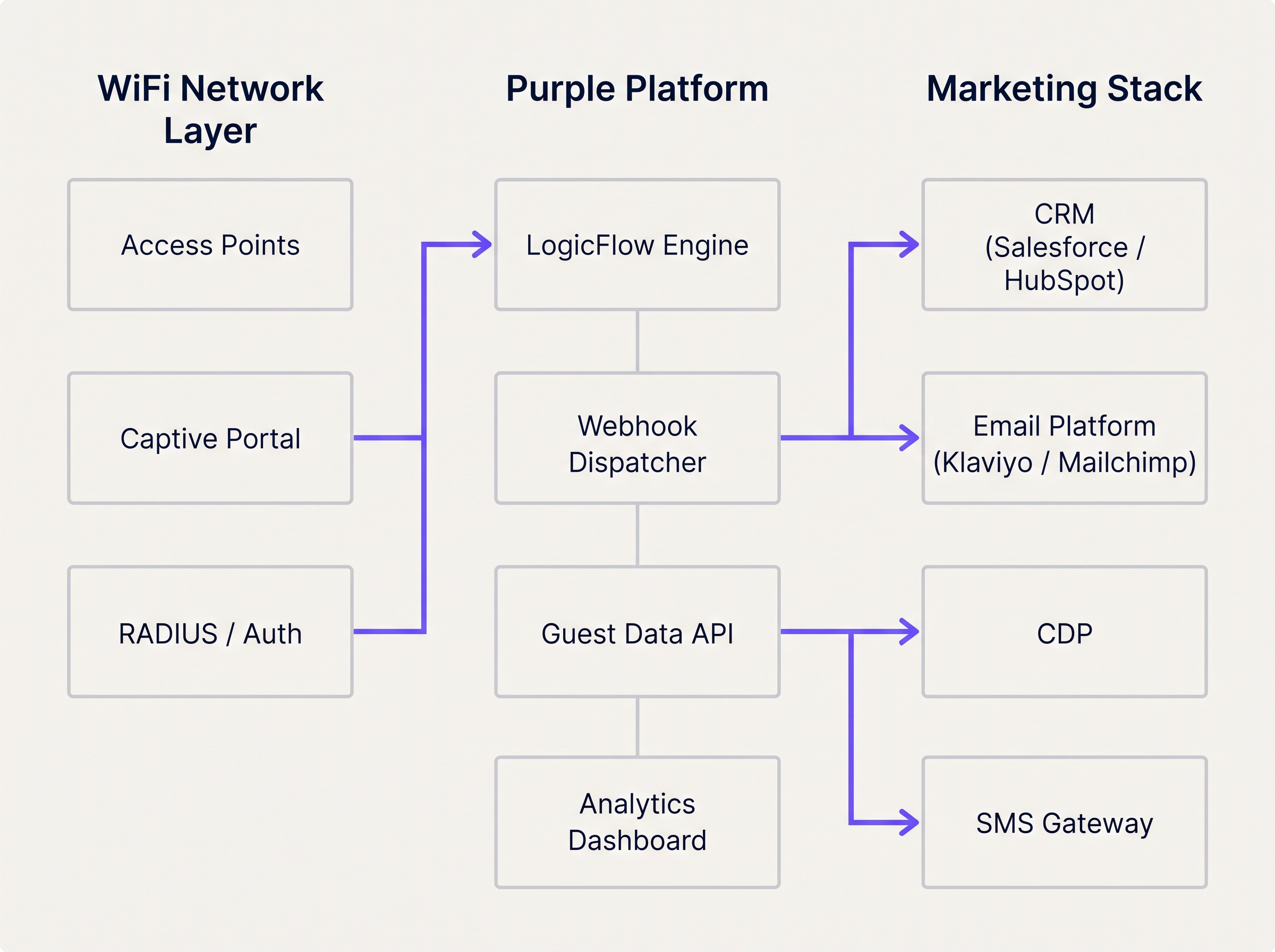
A plataforma WiFi Analytics fornece a camada de observabilidade, permitindo que as equipes monitorem volumes de eventos, taxas de gatilho e métricas de sucesso de entrega em um painel unificado. Isso é essencial para diagnosticar problemas de integração e otimizar os limites de gatilho.
Guia de Implementação
A implantação de um fluxo de automação de marketing acionado por WiFi requer uma coordenação estreita entre a engenharia de rede e as operações de marketing. A abordagem passo a passo a seguir garante entrega confiável e atribuição precisa desde o primeiro dia.
Passo 1: Definir a Taxonomia de Gatilhos
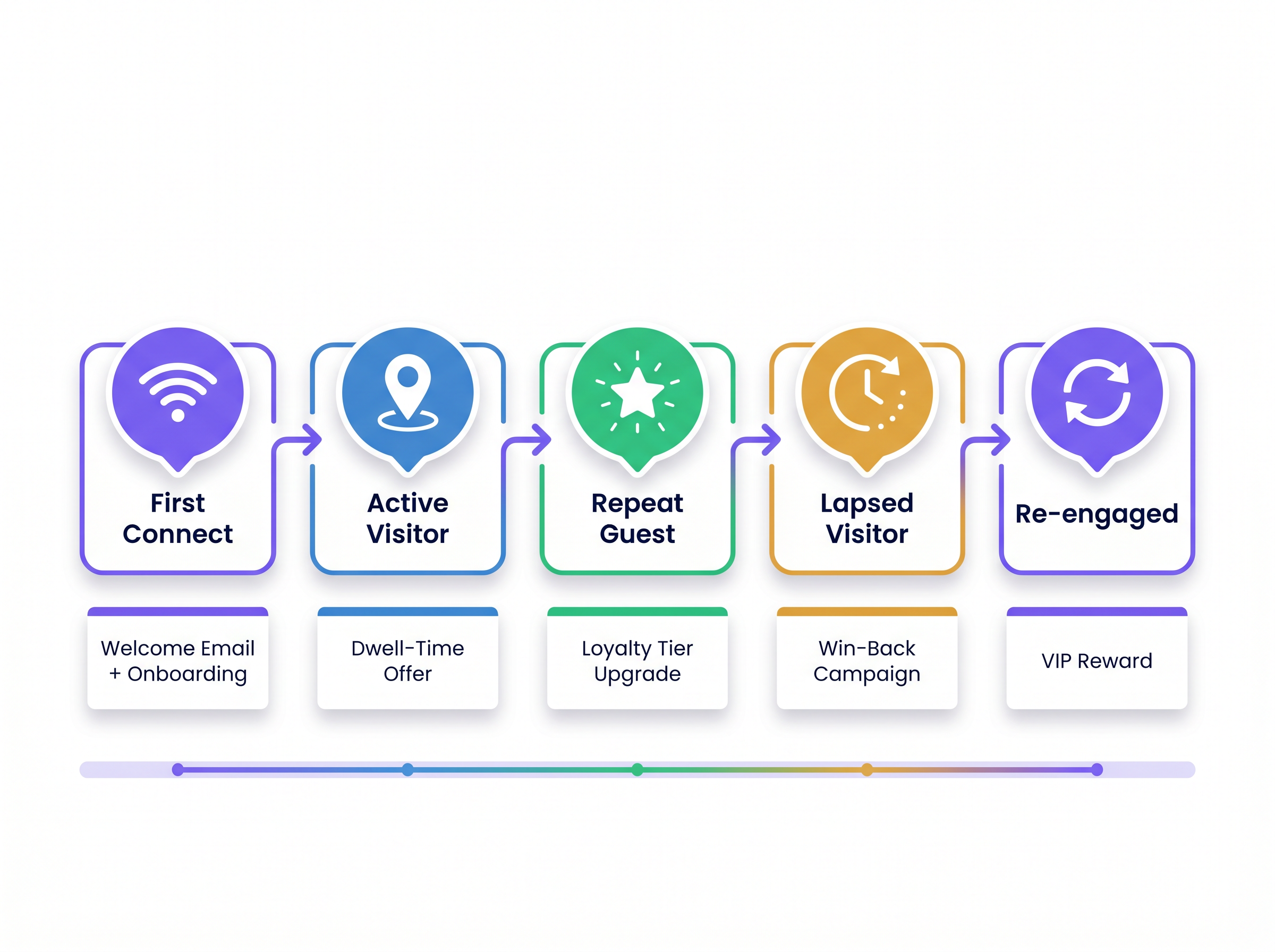
Antes que qualquer configuração técnica comece, mapeie os eventos de rede para os estágios do ciclo de vida do cliente. Esta taxonomia se torna o contrato entre a equipe de rede e a equipe de marketing. A tabela abaixo fornece um ponto de partida padrão.
| Estágio do Ciclo de Vida | Evento de Rede | Condição de Gatilho | Ação Recomendada |
|---|---|---|---|
| Visitante de Primeira Viagem | Início da Sessão | Primeira autenticação, consentimento = Verdadeiro | E-mail de boas-vindas + integração de fidelidade |
| Visitante Ativo | Presença de Permanência | Tempo de permanência > 45 minutos | Oferta por SMS ou notificação no aplicativo |
| Convidado Recorrente | Início da Sessão | Contagem de visitas = 5 ou 10 | Notificação de upgrade de nível de fidelidade |
| Visitante Inativo | Ausência | Nenhum evento de presença por 60–90 dias | E-mail de recuperação ou campanha por SMS |
| Visitante Reengajado | Início da Sessão | Primeira visita após campanha de inatividade | Recompensa VIP ou oferta personalizada |
Passo 2: Configurar o Captive Portal
Certifique-se de que o portal colete os campos mínimos necessários: endereço de e-mail (ou telefone), caixa de seleção de consentimento de marketing e, opcionalmente, um identificador de programa de fidelidade. Mantenha o formulário conciso — cada campo adicional reduz as taxas de conclusão. Configure o portal para passar o sinalizador de consentimento para a plataforma de análise para que possa ser avaliado pelas regras do LogicFlow.
Passo 3: Criar e Testar Regras do LogicFlow
Crie regras incrementalmente, começando com o gatilho de maior valor (geralmente Primeira Conexão). Teste cada regra em um ambiente de teste antes de implantar em produção. Verifique se o payload do webhook está corretamente estruturado e se o endpoint do CRM receptor retorna uma resposta 200 OK. Implemente uma fila de mensagens mortas (dead-letter queue) para capturar quaisquer payloads que falhem na entrega durante interrupções transitórias.
Passo 4: Mapear Campos de Dados e Validar Esquema
Alinhe o esquema de dados entre a plataforma WiFi e o CRM. O identificador exclusivo capturado no portal deve corresponder à chave primária no CRM. Incompatibilidades em nomes de campos, tipos de dados ou codificação causam falhas silenciosas onde o webhook é recebido, mas a automação não é acionada. Documente o mapeamento completo dos campos e revise-o sempre que qualquer um dos sistemas for atualizado.
Passo 5: Implementar Limitação de Frequência
Configure a limitação de frequência no nível do CRM para evitar o excesso de mensagens. Defina frequências máximas de envio por tipo de campanha — por exemplo, um e-mail de boas-vindas pode ser enviado apenas uma vez por usuário, e uma oferta de tempo de permanência pode ser enviada apenas uma vez por período de 7 dias. Essa lógica deve ser aplicada no CRM, não apenas no LogicFlow, para considerar casos extremos em que vários gatilhos são acionados em rápida sucessão.
Melhores Práticas
As seguintes recomendações são baseadas em implementações em ambientes de hospitalidade, varejo e Transporte e representam o padrão atual da indústria para automação de marketing baseada em presença.
Acionar na Mudança de Estado, Não na Presença Contínua. O erro arquitetônico mais comum é configurar regras para avaliar a presença a cada batimento cardíaco do AP. Isso sobrecarrega o motor de regras e gera chamadas de API excessivas para o CRM. As regras devem avaliar as transições de estado: de 'Não Presente' para 'Presente', de 'Ativo' para 'Inativo', ou de 'Anônimo' para 'Identificado'. Essa abordagem reduz a carga do sistema e garante que cada gatilho seja significativo.
Confie na Identidade Autenticada para Rastreamento de Longo Prazo. Sistemas operacionais móveis modernos empregam a randomização de endereços MAC para proteger a privacidade do usuário. iOS tem endereços MAC randomizados desde o iOS 14, e Android seguiu a partir da versão 10. Qualquer arquitetura que dependa do endereço MAC do hardware como identificador primário do CRM experimentará uma degradação significativa na identificação de visitantes recorrentes. A identidade autenticada — e-mail ou telefone — capturada no Captive Portal deve ser o identificador canônico para todo o rastreamento e atribuição de longo prazo.
Inclua o Contexto do Local em Cada Payload. Para operadores com múltiplos locais, o identificador do local é um parâmetro de roteamento crítico. Sem ele, o CRM não pode determinar qual modelo, oferta ou campanha aplicar. Inclua o ID do local, o nome do local e, opcionalmente, a zona ou andar em cada payload do webhook.
Monitore a Saúde do Webhook Continuamente. Falhas na entrega de webhooks são silenciosas por padrão. Implemente o monitoramento tanto na plataforma de envio (alerta sobre taxas de falha de entrega acima de um limite definido) quanto no CRM receptor (alerta sobre quedas inesperadas no volume de gatilhos recebidos). Para implementações em Saúde , onde as comunicações operacionais podem ser críticas para a segurança, este monitoramento é inegociável.
Alinhe as Atualizações de Rede com os Requisitos de Integração. Ao planejar a modernização da rede — por exemplo, avaliando Os Principais Benefícios do SD WAN para Empresas Modernas — garanta que as capacidades de análise e webhook da plataforma WiFi sejam incluídas na revisão da arquitetura. As implementações de SD-WAN podem afetar a latência e a confiabilidade do streaming de eventos em tempo real de locais de borda.
Solução de Problemas e Mitigação de Riscos
Mesmo com uma arquitetura robusta, falhas de integração ocorrem. Os seguintes modos de falha são os mais frequentemente encontrados em implementações de produção.
Falhas na Entrega de Payload. Erros HTTP 4xx geralmente indicam um problema de autenticação ou esquema com o endpoint do webhook. Erros HTTP 5xx indicam um problema no sistema receptor. Implemente uma lógica de repetição com backoff exponencial (tentativa inicial em 30 segundos, depois 2 minutos, depois 10 minutos) e direcione os payloads não entregáveis para uma fila de mensagens mortas (dead-letter queue) para revisão manual.
Acionamentos de Gatilho Duplicados. Se um usuário se reconectar ao WiFi várias vezes em um curto período — por exemplo, movendo-se entre andares em uma implementação multi-AP — o evento 'Início de Sessão' pode ser acionado várias vezes. Implemente chaves de idempotência no payload do webhook (um ID de evento exclusivo composto pelo identificador do usuário e um timestamp) e configure o CRM para deduplicar com base nesta chave.
Atrasos na Propagação do Sinalizador de Consentimento. Em ambientes de alto rendimento, pode haver um breve atraso entre o usuário enviar o formulário do portal e o sinalizador de consentimento estar disponível para o motor LogicFlow. Configure um atraso mínimo de 60 segundos em todos os gatilhos de Primeira Conexão para garantir que o status de consentimento tenha sido propagado antes que o webhook seja acionado.
Conflitos de Registro de Contato no CRM. Quando um webhook cria um novo contato no CRM, ele pode entrar em conflito com um registro existente se o usuário já interagiu anteriormente por um canal diferente. Implemente uma estratégia de mesclagem no CRM que priorize a identidade capturada pelo WiFi e enriqueça o registro existente em vez de criar um duplicado.
ROI e Impacto nos Negócios
O caso de negócios para a automação de marketing acionada por WiFi está bem estabelecido em todas as categorias de locais. Gatilhos baseados em presença superam consistentemente as campanhas em lote nas métricas que mais importam para os operadores comerciais.
Para uma compreestrutura abrangente para quantificar e apresentar este ROI a stakeholders seniores, consulte Medindo o ROI do WiFi para Convidados: Uma Estrutura para CMOs . Os principais indicadores de desempenho a serem monitorados são os seguintes.
| KPI | Descrição | Referência Típica |
|---|---|---|
| Taxa de Abertura de Gatilho | % de e-mails acionados abertos pelos destinatários | 35–55% (vs. 15–25% para lote) |
| Taxa de Resgate de Ofertas | % de ofertas acionadas resgatadas no local | 8–15% (vs. 2–4% para lote) |
| Conversão de Reconquista | % de visitantes inativos que retornam após a campanha | 12–20% |
| Taxa de Captura de Dados | % de usuários de WiFi que completam o registro no portal | 60–80% com portal otimizado |
| Aumento da Frequência Média de Visitas | Aumento de visitas por cliente por trimestre | 15–25% para convidados inscritos em programas de fidelidade |
O efeito composto dessas métricas é significativo. Uma rede de varejo com 50 unidades, cada uma capturando 500 registros de WiFi por semana, gera 25.000 novos contatos de CRM por semana. Uma taxa de conversão de reconquista de 15% em um segmento inativo de 90 dias, combinada com uma taxa de resgate de ofertas de 10% em gatilhos de tempo de permanência, produz um aumento de receita mensurável e atribuível que justifica o investimento na integração dentro de um único trimestre.
Termos-Chave e Definições
LogicFlow
Purple's event rules engine that evaluates incoming network events against predefined conditions to determine whether a marketing trigger action should be executed.
IT teams configure LogicFlow to define the exact conditions under which a webhook fires, without requiring code changes to the marketing stack.
Webhook
An HTTP callback mechanism that automatically sends a structured JSON payload to a specified URL endpoint when a defined event occurs on the source system.
The primary integration mechanism for transmitting real-time WiFi presence events to CRM, email, and SMS platforms.
Captive Portal
A web-based authentication page that users must interact with before being granted access to a public WiFi network. Used to capture identity and marketing consent.
The compliance-critical touchpoint for first-party data collection. Portal configuration directly determines the quality and legality of downstream marketing triggers.
Presence Data
Network telemetry derived from wireless device probe requests and association events, indicating that a device is physically within the coverage area of an access point.
Enables passive tracking of dwell time and return visit frequency without requiring active user authentication on every visit.
MAC Address Randomisation
A privacy feature implemented in iOS (since version 14) and Android (since version 10) that periodically rotates the device's MAC address to prevent persistent tracking by network operators.
Requires all long-term customer identification and CRM matching to be based on authenticated identity (email/phone) rather than hardware device addresses.
Dwell Time
The total duration a device remains within the detectable coverage area of a venue's WiFi network during a single session.
A key trigger qualifier for in-venue offers. A dwell time threshold (e.g., 45 minutes) indicates genuine engagement and increases offer relevance and redemption rates.
First-Party Data
Customer information collected directly by the venue from the customer, with their explicit consent, through owned channels such as the captive portal.
Increasingly valuable as third-party cookies are deprecated and data privacy regulations tighten. WiFi-captured first-party data is among the highest-quality inputs available to venue operators.
Dead-Letter Queue (DLQ)
A message storage buffer that captures webhook payloads that could not be successfully delivered to the target endpoint after all retry attempts have been exhausted.
Essential for ensuring marketing triggers are not permanently lost during CRM outages or endpoint failures. DLQ contents should be reviewed and replayed once the receiving system recovers.
Idempotency Key
A unique identifier included in each webhook payload that allows the receiving system to detect and discard duplicate requests, ensuring a trigger is processed exactly once.
Critical in high-availability deployments where webhook retry logic may cause the same event to be delivered multiple times, potentially resulting in duplicate emails or SMS messages.
Frequency Capping
A constraint applied at the CRM or marketing automation layer that limits how many times a given user can receive a specific campaign type within a defined time window.
Prevents over-messaging and subscriber fatigue. Must be configured independently of the LogicFlow trigger rules, as the rules engine does not have visibility into CRM send history.
Estudos de Caso
A 200-room hotel wants to trigger a personalised welcome email offering a spa discount 15 minutes after a guest authenticates on the guest WiFi for the first time during their stay. The hotel uses Salesforce as its CRM and Klaviyo for email delivery.
Configure the captive portal to capture the guest's email address and a GDPR-compliant marketing consent checkbox. Ensure the consent flag is passed to the Purple analytics platform in real time.
In LogicFlow, create a rule with the following parameters: Condition = 'Session Start', Qualifier = 'First authentication at this venue AND marketing consent = True', Delay = '15 minutes', Action = 'POST webhook to Salesforce endpoint'.
Configure the webhook payload to include: user_email, user_first_name, venue_id, event_type ('first_connect'), event_timestamp, and a unique event_id for idempotency.
In Salesforce, create a process builder flow that triggers on receipt of the webhook. The flow checks whether a contact record exists for the email address. If yes, it enriches the record with the WiFi visit data. If no, it creates a new contact.
The Salesforce flow then triggers a Klaviyo transactional email via the Klaviyo API, passing the venue_id as a dynamic variable to select the correct spa offer template for that property.
Configure a suppression list in Klaviyo to ensure the welcome email is only sent once per guest per stay (keyed on email + check-in date).
A fashion retail chain with 80 UK stores wants to send a 'We miss you' SMS with a 20% discount code to loyalty members who have not visited any store in over 90 days. The chain uses a custom CDP and an SMS gateway.
In the Purple platform, configure a 'Lapsed Visitor' rule: Condition = 'Absence', Qualifier = 'No presence event recorded for this user across any venue in the estate for 90 consecutive days AND loyalty_member = True', Action = 'POST webhook to CDP endpoint'.
The rule evaluates the absence condition daily at 02:00 UTC against the full estate's presence data. This batch evaluation approach is more efficient than real-time evaluation for absence-based triggers.
The webhook payload includes: user_phone, user_email, loyalty_tier, days_since_last_visit, last_visited_venue_id, and a campaign_id.
The CDP receives the payload and generates a unique discount code for the user, then passes the code and the user's phone number to the SMS gateway.
The SMS gateway sends the win-back message. The CDP updates the user's record with a 'win_back_sent' flag and the send timestamp to prevent duplicate sends.
When the user next connects to any store's WiFi, the 'Re-engaged Visitor' trigger fires, the CDP clears the lapsed flag, and the user is enrolled in a re-engagement nurture sequence.
Análise de Cenário
Q1. A retail client reports that their CRM is hitting API rate limits during peak trading hours on Saturdays. Investigation reveals the WiFi platform is sending thousands of webhooks per hour. The current LogicFlow rule fires every time any device is detected by an access point. How should the IT manager reconfigure the system to resolve the issue without losing marketing trigger coverage?
💡 Dica:Consider the difference between continuous presence detection and meaningful state transitions. Also consider whether every device detection event has marketing value.
Mostrar Abordagem Recomendada
The IT manager should reconfigure the LogicFlow rule to trigger only on state change events — specifically 'Session Start' (device transitions from Not Present to Present) and 'Session End' — rather than on every AP detection heartbeat. Additionally, a frequency cap should be applied at the rule level to ensure a single device only generates a webhook once per 24-hour period. For anonymous devices (those without an authenticated identity), webhooks should be suppressed entirely, as they cannot be actioned by the CRM. These three changes — state-change triggers, frequency capping, and identity filtering — will reduce webhook volume by an estimated 90% while preserving all commercially relevant trigger events.
Q2. A hospital trust wants to send a wayfinding SMS to outpatients when they connect to the guest WiFi, directing them to their appointment department. However, the trust has multiple buildings on the same network estate, and the wayfinding message must be specific to the building where the patient connected. How is this achieved architecturally?
💡 Dica:Think about how physical location is represented within the WiFi platform's data model and how it can be included in the webhook payload.
Mostrar Abordagem Recomendada
The solution requires zone-based trigger configuration. Each building's access points must be assigned to a named zone within the Purple platform (e.g., 'Main Hospital', 'Outpatients Wing', 'Oncology Centre'). The LogicFlow rule is configured to evaluate the zone of the authenticating access point and include the zone identifier in the webhook payload. The SMS gateway or CRM then uses the zone identifier to select the appropriate wayfinding message template for that building. This approach ensures the SMS is contextually accurate regardless of which building the patient enters first. For a healthcare deployment, the IT team should also ensure the trigger only fires for users who have authenticated (not anonymous presence) and that the data handling complies with applicable healthcare data regulations.
Q3. Following an iOS 17 update rolled out across a venue's visitor base, the marketing team reports a significant drop in repeat visitor identification, causing loyalty tier upgrade triggers to stop firing for a large segment of their customer base. What is the technical root cause, and what architectural changes are required to restore accurate repeat visitor tracking?
💡 Dica:Consider what changed in iOS 17's networking behaviour and which identifier the current architecture relies upon for repeat visitor recognition.
Mostrar Abordagem Recomendada
The root cause is MAC address randomisation. iOS 17 introduced per-network MAC randomisation, meaning the device presents a unique, randomised MAC address for each WiFi network it connects to, even if it has connected to that network before. Any architecture that uses the MAC address as the primary identifier for repeat visitor recognition will fail to match the returning device to the existing CRM record. The required architectural change is to shift the primary identifier from the MAC address to the authenticated identity captured at the captive portal — specifically the email address or phone number. The CRM must be updated to use this authenticated identity as the canonical customer key. For users who have previously been tracked by MAC address only, a re-authentication campaign (prompting users to log in via the portal again) will be required to re-establish the identity link. Going forward, the MAC address should be used only for session-level analytics within a single visit, not for cross-visit customer recognition.
Principais Conclusões
- ✓Guest WiFi infrastructure generates two distinct and complementary data streams: presence data (from access points) and identity data (from the captive portal). Both are required for effective marketing automation.
- ✓LogicFlow rules should evaluate state transitions — not continuous presence — to prevent API rate limit issues and ensure every trigger is commercially meaningful.
- ✓MAC address randomisation in iOS 14+ and Android 10+ makes hardware device addresses unreliable for long-term customer identification. Authenticated email or phone must be the canonical CRM key.
- ✓Webhook payloads must include venue context (venue ID, zone, timestamp) to enable accurate routing and personalisation in multi-venue deployments.
- ✓Frequency capping must be enforced at the CRM level, not solely in the rules engine, to prevent over-messaging when multiple triggers fire in close succession.
- ✓Dead-letter queues and idempotency keys are non-negotiable in production deployments to ensure trigger reliability and prevent duplicate communications.
- ✓The compounding ROI of presence-based triggers — higher open rates, redemption rates, and win-back conversions — typically justifies the integration investment within a single quarter for estate-scale deployments.




