

Trasformare i dati del WiFi Ospiti in trigger per l'automazione del marketing
Questa guida di riferimento fornisce un manuale tecnico per convertire i dati grezzi del WiFi ospiti in trigger di automazione del marketing basati su eventi. Copre l'intera architettura — dall'acquisizione dei dati del captive portal e le regole di LogicFlow fino all'invio di webhook e all'integrazione CRM — con scenari di implementazione reali per l'ospitalità e la vendita al dettaglio. I team IT e gli specialisti di automazione del marketing avranno a disposizione un framework concreto e implementabile per la creazione di campagne basate sulla presenza, inclusi flussi di benvenuto, offerte basate sul tempo di permanenza e recupero di visitatori inattivi.
🎧 Ascolta questa guida
Visualizza trascrizione
Riepilogo Esecutivo
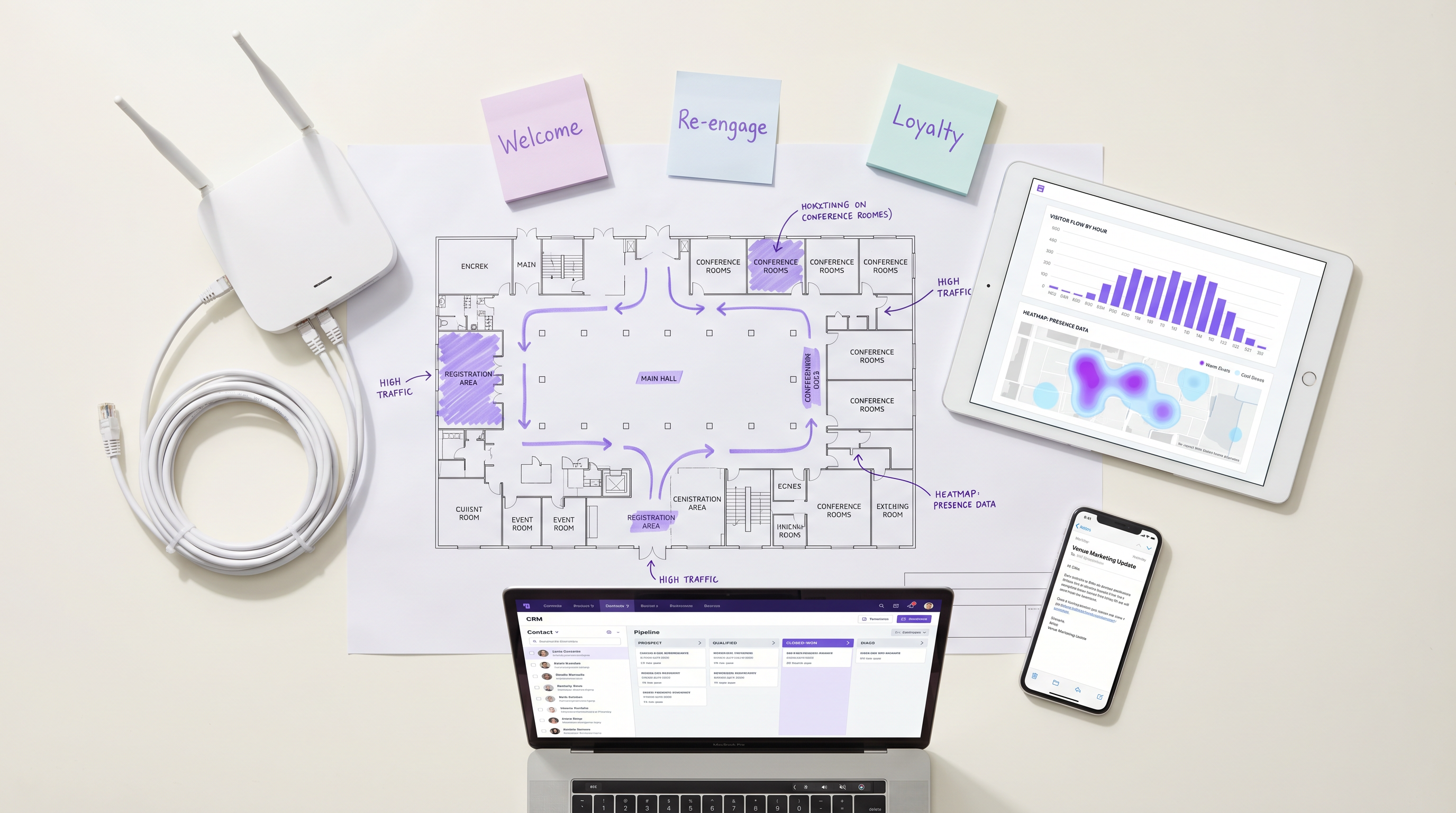
Per le sedi aziendali, il WiFi ospiti non è più solo un centro di costo per la connettività; è lo strato di dati fondamentale per l'intero ciclo di vita del cliente. Se configurata correttamente, l'infrastruttura del punto di accesso acquisisce dati precisi sulla presenza, sulla permanenza e sul ritorno che possono attivare flussi di lavoro di automazione del marketing altamente mirati. Questa guida delinea l'architettura tecnica necessaria per trasformare gli eventi di rete grezzi — inclusi gli handshake di autenticazione 802.11 e i login del captive portal — in trigger CRM azionabili. Sfruttando Guest WiFi e le integrazioni webhook, i team IT e marketing possono implementare campagne basate su eventi — dalle offerte in tempo reale basate sul tempo di permanenza al recupero di visitatori inattivi — senza compromettere le prestazioni della rete o la conformità alla privacy dei dati. Il risultato è un aumento misurabile della pertinenza delle campagne, dei tassi di conversione e del valore a vita del cliente, il tutto guidato da un'infrastruttura che già possiedi.
Approfondimento Tecnico
La trasformazione degli eventi WiFi in trigger di automazione del marketing si basa su un'architettura a strati che collega l'infrastruttura di rete e lo stack di marketing. Comprendere ogni strato è essenziale prima di iniziare qualsiasi lavoro di integrazione.
Lo Strato di Acquisizione Dati
Quando un dispositivo entra in una sede e si connette alla rete WiFi, vengono generati simultaneamente due distinti flussi di dati. Il primo sono i dati di presenza: il punto di accesso registra una richiesta di sonda o un evento di associazione, acquisendo l'indirizzo MAC del dispositivo, la potenza del segnale (RSSI) e un timestamp preciso. Questo flusso è passivo e continuo — non richiede alcuna azione da parte dell'ospite. Il secondo sono i dati di identità: quando l'ospite si autentica tramite il captive portal, la piattaforma acquisisce la sua identità dichiarata (indirizzo email o numero di telefono), il suo profilo demografico se raccolto e, in modo critico, il suo esplicito consenso al marketing.
Per le sedi nel Retail o nell' Hospitality , questo approccio a doppio flusso fornisce una visione deterministica del comportamento del cliente che nessun altro canale può replicare. Il captive portal funge da punto di ingresso primario per i dati di prima parte e la sua configurazione deve essere trattata come un componente critico per la conformità. Ai sensi del GDPR, il consenso deve essere dato liberamente, in modo specifico, informato e inequivocabile. Ai sensi del CCPA, agli utenti deve essere concesso il diritto di rinunciare. Consultare la guida CCPA vs GDPR: Global Privacy Compliance for Guest WiFi Data per i requisiti di configurazione dettagliati.
Elaborazione Eventi e Motore LogicFlow
Gli eventi di rete grezzi non sono direttamente azionabili. Devono essere normalizzati, valutati rispetto a regole predefinite e tradotti in trigger significativi per il business. Il motore LogicFlow di Purple agisce come questo strato intermedio. Ingerisce il flusso di eventi dai punti di accesso e dal captive portal, valuta ogni evento rispetto a un set di regole e determina se una condizione di trigger è stata soddisfatta.
Una regola LogicFlow è composta da tre elementi: una condizione (l'evento o lo stato di rete), un qualificatore (parametri aggiuntivi come il numero di visite, la durata della permanenza o i giorni dall'ultima visita) e un'azione (tipicamente un invio di webhook). Ad esempio: Condizione = 'Inizio Sessione', Qualificatore = 'Prima visita E consenso marketing = Vero', Azione = 'POST webhook al CRM dopo un ritardo di 15 minuti'. Questo modello dichiarativo consente ai team di marketing operations di definire la logica dei trigger senza richiedere il coinvolgimento dell'ingegneria di rete per ogni modifica della campagna.
Invio Webhook e Integrazione CRM
Quando una regola LogicFlow viene soddisfatta, il dispatcher webhook invia un payload JSON strutturato all'endpoint configurato. Il payload dovrebbe includere, come minimo: l'identificatore unico dell'utente (email o telefono), il tipo di evento, l'identificatore della sede, il timestamp dell'evento e qualsiasi dato contestuale rilevante come la durata della permanenza o il numero di visite. Il sistema ricevente — che sia Salesforce, HubSpot, Klaviyo o un CDP personalizzato — esegue quindi il flusso di automazione corrispondente.
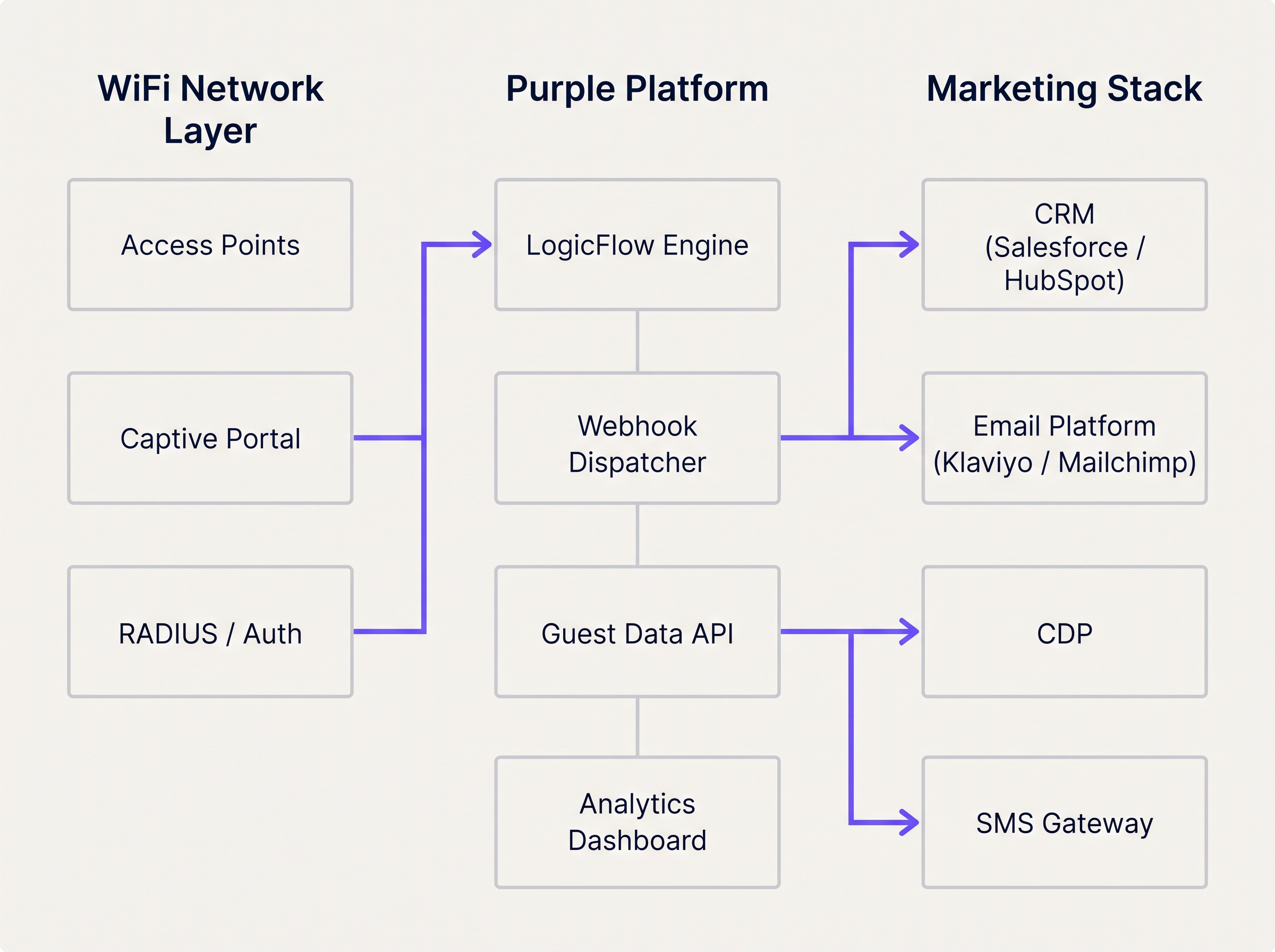
La piattaforma WiFi Analytics fornisce lo strato di osservabilità, consentendo ai team di monitorare i volumi degli eventi, i tassi di trigger e le metriche di successo della consegna in una dashboard unificata. Questo è essenziale per diagnosticare i problemi di integrazione e ottimizzare le soglie dei trigger.
Guida all'Implementazione
L'implementazione di un flusso di automazione del marketing attivato dal WiFi richiede una stretta coordinazione tra l'ingegneria di rete e le operazioni di marketing. Il seguente approccio passo-passo garantisce una consegna affidabile e un'attribuzione accurata fin dal primo giorno.
Fase 1: Definire la Tassonomia dei Trigger
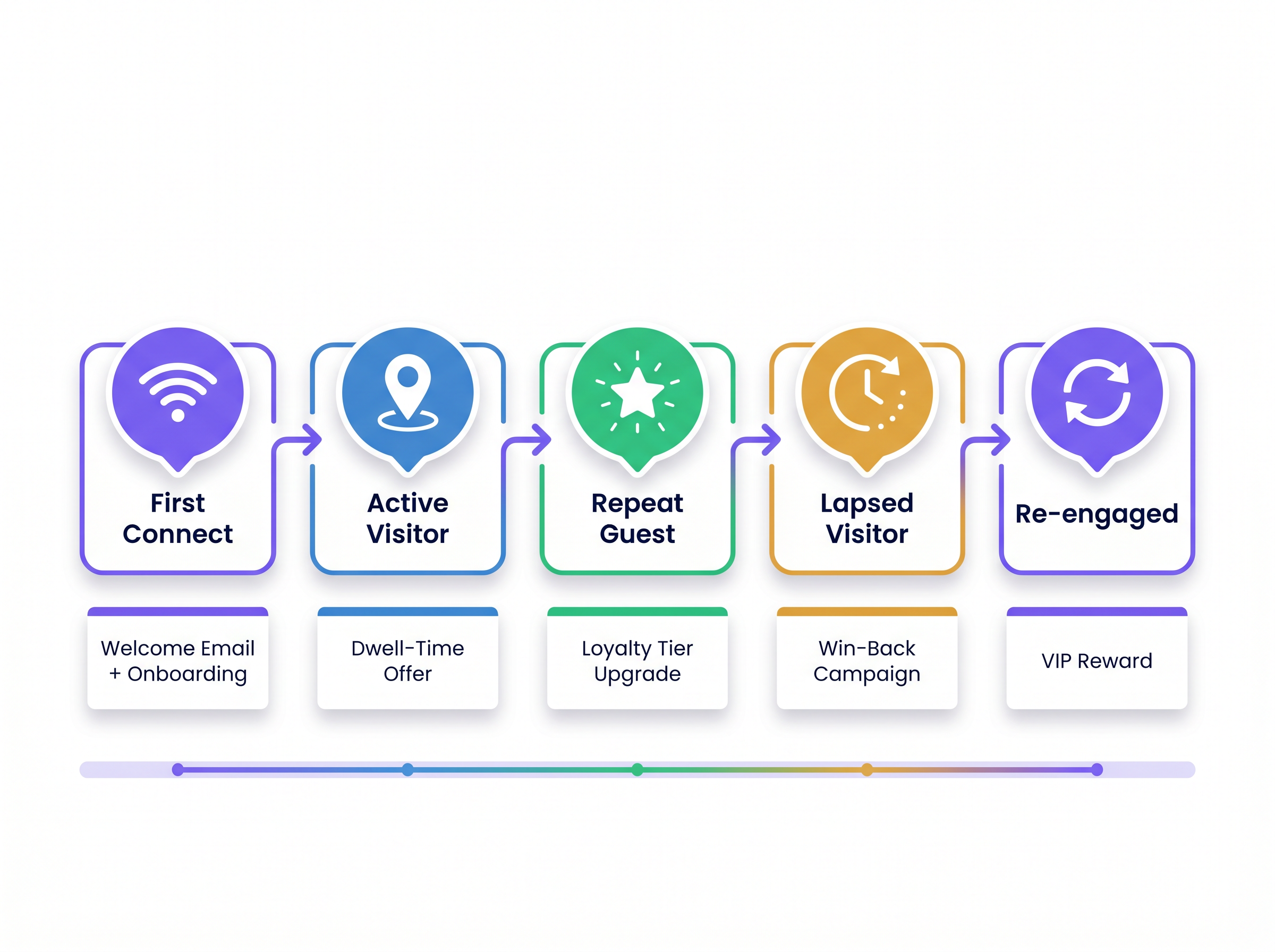
Prima di iniziare qualsiasi configurazione tecnica, mappare gli eventi di rete alle fasi del ciclo di vita del cliente. Questa tassonomia diventa il contratto tra il team di rete e il team di marketing. La tabella seguente fornisce un punto di partenza standard.
| Fase del Ciclo di Vita | Evento di Rete | Condizione di Trigger | Azione Consigliata |
|---|---|---|---|
| Visitatore per la Prima Volta | Inizio Sessione | Prima autenticazione, consenso = Vero | Email di benvenuto + onboarding fedeltà |
| Visitatore Attivo | Presenza di Permanenza | Tempo di permanenza > 45 minuti | Offerta SMS o notifica in-app |
| Ospite Ricorrente | Inizio Sessione | Numero di visite = 5 o 10 | Notifica di upgrade del livello fedeltà |
| Visitatore Inattivo | Assenza | Nessun evento di presenza per 60–90 giorni | Email di recupero o campagna SMS |
| Visitatore Ri-coinvolto | Inizio Sessione | Prima visita dopo campagna di recupero | Ricompensa VIP o offerta personalizzata |
Fase 2: Configurare il Captive Portal
Assicurarsi che il portale raccolga i campi minimi richiesti: indirizzo email (o telefono), casella di controllo per il consenso marketing e, facoltativamente, un identificatore del programma fedeltà. Mantenere il modulo conciso: ogni campo aggiuntivo riduce i tassi di completamento. Configurare il portale per passare il flag di consenso alla piattaforma di analisi in modo che possa essere valutato dalle regole di LogicFlow.
Fase 3: Costruire e testare le regole di LogicFlow
Creare le regole in modo incrementale, partendo dal trigger di maggior valore (tipicamente First Connect). Testare ogni regola in un ambiente di staging prima di distribuirla in produzione. Verificare che il payload del webhook sia correttamente strutturato e che l'endpoint CRM ricevente restituisca una risposta 200 OK. Implementare una coda di messaggi non recapitabili (dead-letter queue) per catturare eventuali payload che non riescono a essere consegnati durante interruzioni temporanee.
Fase 4: Mappare i campi dati e convalidare lo schema
Allineare lo schema dei dati tra la piattaforma WiFi e il CRM. L'identificatore univoco acquisito sul portale deve corrispondere alla chiave primaria nel CRM. Le mancate corrispondenze nei nomi dei campi, nei tipi di dati o nella codifica causano errori silenziosi in cui il webhook viene ricevuto ma l'automazione non si attiva. Documentare la mappatura completa dei campi e rivederla ogni volta che uno dei due sistemi viene aggiornato.
Fase 5: Implementare il Frequency Capping
Configurare il frequency capping a livello di CRM per prevenire l'eccesso di messaggi. Definire le frequenze massime di invio per tipo di campagna — ad esempio, un'email di benvenuto può essere inviata una sola volta per utente, e un'offerta basata sul tempo di permanenza può essere inviata una sola volta ogni 7 giorni. Questa logica dovrebbe essere applicata nel CRM, non solo in LogicFlow, per tenere conto dei casi limite in cui più trigger si attivano in rapida successione.
Migliori Pratiche
Le seguenti raccomandazioni derivano da implementazioni in ambienti di ospitalità, vendita al dettaglio e Trasporti e rappresentano lo standard di settore attuale per l'automazione del marketing basata sulla presenza.
Attivare al Cambiamento di Stato, Non alla Presenza Continua. L'errore architetturale più comune è configurare le regole per valutare la presenza ad ogni heartbeat dell'AP. Questo sovraccarica il motore delle regole e genera chiamate API eccessive al CRM. Le regole dovrebbero valutare le transizioni di stato: da 'Non Presente' a 'Presente', da 'Attivo' a 'Scaduto', o da 'Anonimo' a 'Identificato'. Questo approccio riduce il carico del sistema e assicura che ogni trigger sia significativo.
Affidarsi all'Identità Autenticata per il Tracciamento a Lungo Termine. I moderni sistemi operativi mobili impiegano la randomizzazione dell'indirizzo MAC per proteggere la privacy dell'utente. iOS ha randomizzato gli indirizzi MAC da iOS 14, e Android ha seguito dalla versione 10. Qualsiasi architettura che si affida all'indirizzo MAC hardware come identificatore CRM primario subirà un significativo degrado nell'identificazione dei visitatori di ritorno. L'identità autenticata — email o telefono — acquisita al captive portal deve essere l'identificatore canonico per tutto il tracciamento e l'attribuzione a lungo termine.
Includere il Contesto della Sede in Ogni Payload. Per gli operatori multi-sede, l'identificatore della sede è un parametro di routing critico. Senza di esso, il CRM non può determinare quale template, offerta o campagna applicare. Includere l'ID della sede, il nome della sede e, facoltativamente, la zona o il piano in ogni payload del webhook.
Monitorare Continuamente lo Stato dei Webhook. I fallimenti nella consegna dei webhook sono silenziosi per impostazione predefinita. Implementare il monitoraggio sia sulla piattaforma di invio (allerta sui tassi di fallimento della consegna superiori a una soglia definita) sia sul CRM ricevente (allerta su cali inattesi nel volume dei trigger in ingresso). Per le implementazioni Sanitarie , dove le comunicazioni operative possono essere critiche per la sicurezza, questo monitoraggio è non negoziabile.
Allineare gli Aggiornamenti di Rete con i Requisiti di Integrazione. Quando si pianifica la modernizzazione della rete — ad esempio, valutando I Vantaggi Chiave dell'SD WAN per le Aziende Moderne — assicurarsi che le capacità di analisi e webhook della piattaforma WiFi siano incluse nella revisione dell'architettura. Le implementazioni SD-WAN possono influenzare la latenza e l'affidabilità dello streaming di eventi in tempo reale dalle posizioni periferiche.
Risoluzione dei Problemi e Mitigazione del Rischio
Anche con un'architettura robusta, si verificano fallimenti di integrazione. Le seguenti modalità di fallimento sono le più frequentemente riscontrate nelle implementazioni di produzione.
Fallimenti nella Consegna del Payload. Gli errori HTTP 4xx indicano tipicamente un problema di autenticazione o di schema con l'endpoint del webhook. Gli errori HTTP 5xx indicano un problema sul sistema ricevente. Implementare una logica di retry con backoff esponenziale (primo tentativo dopo 30 secondi, poi 2 minuti, poi 10 minuti) e instradare i payload non consegnabili a una coda di messaggi non recapitabili (dead-letter queue) per la revisione manuale.
Attivazioni di Trigger Duplicati. Se un utente si riconnette al WiFi più volte in un breve periodo — ad esempio, spostandosi tra i piani in un'implementazione multi-AP — l'evento 'Session Start' potrebbe attivarsi più volte. Implementare chiavi di idempotenza nel payload del webhook (un ID evento univoco composto dall'identificatore utente e un timestamp) e configurare il CRM per deduplicare su questa chiave.
Ritardi nella Propagazione del Flag di Consenso. In ambienti ad alto throughput, potrebbe esserci un breve ritardo tra l'invio del modulo del portale da parte di un utente e la disponibilità del flag di consenso per il motore LogicFlow. Configurare un ritardo minimo di 60 secondi su tutti i trigger First Connect per assicurarsi che lo stato del consenso si sia propagato prima che il webhook si attivi.
Conflitti nei Record di Contatto del CRM. Quando un webhook crea un nuovo contatto nel CRM, potrebbe entrare in conflitto con un record esistente se l'utente ha precedentemente interagito tramite un canale diverso. Implementare una strategia di unione nel CRM che dia priorità all'identità acquisita tramite WiFi e arricchisca il record esistente anziché crearne un duplicato.
ROI e Impatto Commerciale
Il business case per l'automazione del marketing attivata dal WiFi è ben consolidato in tutte le categorie di sedi. I trigger basati sulla presenza superano costantemente le campagne batch sulle metriche più importanti per gli operatori commerciali.
Per una comprequadro completo per quantificare e presentare questo ROI agli stakeholder senior, fare riferimento a Misurare il ROI del WiFi per gli ospiti: Un framework per i CMO . Gli indicatori chiave di performance da monitorare sono i seguenti.
| KPI | Descrizione | Benchmark tipico |
|---|---|---|
| Tasso di apertura dei trigger | % di email attivate aperte dai destinatari | 35–55% (vs. 15–25% per invii di massa) |
| Tasso di riscatto delle offerte | % di offerte attivate riscattate in sede | 8–15% (vs. 2–4% per invii di massa) |
| Conversione di recupero | % di visitatori inattivi che tornano dopo la campagna | 12–20% |
| Tasso di acquisizione dati | % di utenti WiFi che completano la registrazione al portale | 60–80% con portale ottimizzato |
| Aumento della frequenza media delle visite | Aumento delle visite per cliente per trimestre | 15–25% per gli ospiti iscritti al programma fedeltà |
L'effetto cumulativo di queste metriche è significativo. Una catena di negozi con 50 sedi, ognuna delle quali acquisisce 500 registrazioni WiFi a settimana, genera 25.000 nuovi contatti CRM a settimana. Un tasso di conversione di recupero del 15% su un segmento inattivo da 90 giorni, combinato con un tasso di riscatto delle offerte del 10% sui trigger basati sul tempo di permanenza, produce un aumento dei ricavi misurabile e attribuibile che giustifica l'investimento nell'integrazione entro un singolo trimestre.
Termini chiave e definizioni
LogicFlow
Purple's event rules engine that evaluates incoming network events against predefined conditions to determine whether a marketing trigger action should be executed.
IT teams configure LogicFlow to define the exact conditions under which a webhook fires, without requiring code changes to the marketing stack.
Webhook
An HTTP callback mechanism that automatically sends a structured JSON payload to a specified URL endpoint when a defined event occurs on the source system.
The primary integration mechanism for transmitting real-time WiFi presence events to CRM, email, and SMS platforms.
Captive Portal
A web-based authentication page that users must interact with before being granted access to a public WiFi network. Used to capture identity and marketing consent.
The compliance-critical touchpoint for first-party data collection. Portal configuration directly determines the quality and legality of downstream marketing triggers.
Presence Data
Network telemetry derived from wireless device probe requests and association events, indicating that a device is physically within the coverage area of an access point.
Enables passive tracking of dwell time and return visit frequency without requiring active user authentication on every visit.
MAC Address Randomisation
A privacy feature implemented in iOS (since version 14) and Android (since version 10) that periodically rotates the device's MAC address to prevent persistent tracking by network operators.
Requires all long-term customer identification and CRM matching to be based on authenticated identity (email/phone) rather than hardware device addresses.
Dwell Time
The total duration a device remains within the detectable coverage area of a venue's WiFi network during a single session.
A key trigger qualifier for in-venue offers. A dwell time threshold (e.g., 45 minutes) indicates genuine engagement and increases offer relevance and redemption rates.
First-Party Data
Customer information collected directly by the venue from the customer, with their explicit consent, through owned channels such as the captive portal.
Increasingly valuable as third-party cookies are deprecated and data privacy regulations tighten. WiFi-captured first-party data is among the highest-quality inputs available to venue operators.
Dead-Letter Queue (DLQ)
A message storage buffer that captures webhook payloads that could not be successfully delivered to the target endpoint after all retry attempts have been exhausted.
Essential for ensuring marketing triggers are not permanently lost during CRM outages or endpoint failures. DLQ contents should be reviewed and replayed once the receiving system recovers.
Idempotency Key
A unique identifier included in each webhook payload that allows the receiving system to detect and discard duplicate requests, ensuring a trigger is processed exactly once.
Critical in high-availability deployments where webhook retry logic may cause the same event to be delivered multiple times, potentially resulting in duplicate emails or SMS messages.
Frequency Capping
A constraint applied at the CRM or marketing automation layer that limits how many times a given user can receive a specific campaign type within a defined time window.
Prevents over-messaging and subscriber fatigue. Must be configured independently of the LogicFlow trigger rules, as the rules engine does not have visibility into CRM send history.
Casi di studio
A 200-room hotel wants to trigger a personalised welcome email offering a spa discount 15 minutes after a guest authenticates on the guest WiFi for the first time during their stay. The hotel uses Salesforce as its CRM and Klaviyo for email delivery.
Configure the captive portal to capture the guest's email address and a GDPR-compliant marketing consent checkbox. Ensure the consent flag is passed to the Purple analytics platform in real time.
In LogicFlow, create a rule with the following parameters: Condition = 'Session Start', Qualifier = 'First authentication at this venue AND marketing consent = True', Delay = '15 minutes', Action = 'POST webhook to Salesforce endpoint'.
Configure the webhook payload to include: user_email, user_first_name, venue_id, event_type ('first_connect'), event_timestamp, and a unique event_id for idempotency.
In Salesforce, create a process builder flow that triggers on receipt of the webhook. The flow checks whether a contact record exists for the email address. If yes, it enriches the record with the WiFi visit data. If no, it creates a new contact.
The Salesforce flow then triggers a Klaviyo transactional email via the Klaviyo API, passing the venue_id as a dynamic variable to select the correct spa offer template for that property.
Configure a suppression list in Klaviyo to ensure the welcome email is only sent once per guest per stay (keyed on email + check-in date).
A fashion retail chain with 80 UK stores wants to send a 'We miss you' SMS with a 20% discount code to loyalty members who have not visited any store in over 90 days. The chain uses a custom CDP and an SMS gateway.
In the Purple platform, configure a 'Lapsed Visitor' rule: Condition = 'Absence', Qualifier = 'No presence event recorded for this user across any venue in the estate for 90 consecutive days AND loyalty_member = True', Action = 'POST webhook to CDP endpoint'.
The rule evaluates the absence condition daily at 02:00 UTC against the full estate's presence data. This batch evaluation approach is more efficient than real-time evaluation for absence-based triggers.
The webhook payload includes: user_phone, user_email, loyalty_tier, days_since_last_visit, last_visited_venue_id, and a campaign_id.
The CDP receives the payload and generates a unique discount code for the user, then passes the code and the user's phone number to the SMS gateway.
The SMS gateway sends the win-back message. The CDP updates the user's record with a 'win_back_sent' flag and the send timestamp to prevent duplicate sends.
When the user next connects to any store's WiFi, the 'Re-engaged Visitor' trigger fires, the CDP clears the lapsed flag, and the user is enrolled in a re-engagement nurture sequence.
Analisi degli scenari
Q1. A retail client reports that their CRM is hitting API rate limits during peak trading hours on Saturdays. Investigation reveals the WiFi platform is sending thousands of webhooks per hour. The current LogicFlow rule fires every time any device is detected by an access point. How should the IT manager reconfigure the system to resolve the issue without losing marketing trigger coverage?
💡 Suggerimento:Consider the difference between continuous presence detection and meaningful state transitions. Also consider whether every device detection event has marketing value.
Mostra l'approccio consigliato
The IT manager should reconfigure the LogicFlow rule to trigger only on state change events — specifically 'Session Start' (device transitions from Not Present to Present) and 'Session End' — rather than on every AP detection heartbeat. Additionally, a frequency cap should be applied at the rule level to ensure a single device only generates a webhook once per 24-hour period. For anonymous devices (those without an authenticated identity), webhooks should be suppressed entirely, as they cannot be actioned by the CRM. These three changes — state-change triggers, frequency capping, and identity filtering — will reduce webhook volume by an estimated 90% while preserving all commercially relevant trigger events.
Q2. A hospital trust wants to send a wayfinding SMS to outpatients when they connect to the guest WiFi, directing them to their appointment department. However, the trust has multiple buildings on the same network estate, and the wayfinding message must be specific to the building where the patient connected. How is this achieved architecturally?
💡 Suggerimento:Think about how physical location is represented within the WiFi platform's data model and how it can be included in the webhook payload.
Mostra l'approccio consigliato
The solution requires zone-based trigger configuration. Each building's access points must be assigned to a named zone within the Purple platform (e.g., 'Main Hospital', 'Outpatients Wing', 'Oncology Centre'). The LogicFlow rule is configured to evaluate the zone of the authenticating access point and include the zone identifier in the webhook payload. The SMS gateway or CRM then uses the zone identifier to select the appropriate wayfinding message template for that building. This approach ensures the SMS is contextually accurate regardless of which building the patient enters first. For a healthcare deployment, the IT team should also ensure the trigger only fires for users who have authenticated (not anonymous presence) and that the data handling complies with applicable healthcare data regulations.
Q3. Following an iOS 17 update rolled out across a venue's visitor base, the marketing team reports a significant drop in repeat visitor identification, causing loyalty tier upgrade triggers to stop firing for a large segment of their customer base. What is the technical root cause, and what architectural changes are required to restore accurate repeat visitor tracking?
💡 Suggerimento:Consider what changed in iOS 17's networking behaviour and which identifier the current architecture relies upon for repeat visitor recognition.
Mostra l'approccio consigliato
The root cause is MAC address randomisation. iOS 17 introduced per-network MAC randomisation, meaning the device presents a unique, randomised MAC address for each WiFi network it connects to, even if it has connected to that network before. Any architecture that uses the MAC address as the primary identifier for repeat visitor recognition will fail to match the returning device to the existing CRM record. The required architectural change is to shift the primary identifier from the MAC address to the authenticated identity captured at the captive portal — specifically the email address or phone number. The CRM must be updated to use this authenticated identity as the canonical customer key. For users who have previously been tracked by MAC address only, a re-authentication campaign (prompting users to log in via the portal again) will be required to re-establish the identity link. Going forward, the MAC address should be used only for session-level analytics within a single visit, not for cross-visit customer recognition.
Punti chiave
- ✓Guest WiFi infrastructure generates two distinct and complementary data streams: presence data (from access points) and identity data (from the captive portal). Both are required for effective marketing automation.
- ✓LogicFlow rules should evaluate state transitions — not continuous presence — to prevent API rate limit issues and ensure every trigger is commercially meaningful.
- ✓MAC address randomisation in iOS 14+ and Android 10+ makes hardware device addresses unreliable for long-term customer identification. Authenticated email or phone must be the canonical CRM key.
- ✓Webhook payloads must include venue context (venue ID, zone, timestamp) to enable accurate routing and personalisation in multi-venue deployments.
- ✓Frequency capping must be enforced at the CRM level, not solely in the rules engine, to prevent over-messaging when multiple triggers fire in close succession.
- ✓Dead-letter queues and idempotency keys are non-negotiable in production deployments to ensure trigger reliability and prevent duplicate communications.
- ✓The compounding ROI of presence-based triggers — higher open rates, redemption rates, and win-back conversions — typically justifies the integration investment within a single quarter for estate-scale deployments.




