
Guía de configuración de SCEP empresarial: Autenticación Wi-Fi basada en certificados para educación superior y grandes redes
Esta guía proporciona un plan técnico integral para implementar la autenticación WiFi basada en certificados mediante SCEP. Cubre la transición arquitectónica de claves precompartidas a EAP-TLS, las secuencias de implementación en plataformas MDM y las estrategias críticas de mitigación de riesgos para redes a gran escala.
Escucha esta guía
Ver transcripción del podcast

Resumen ejecutivo
Para los entornos empresariales —ya sea un campus de educación superior moderno, una operación minorista multisitio o un importante grupo hotelero—, depender de claves precompartidas para el WiFi del personal y operativo introduce vulnerabilidades de seguridad inaceptables y una gran carga operativa. La arquitectura de red moderna exige una autenticación 802.1X mediante EAP-TLS, lo que garantiza que cada dispositivo se verifique criptográficamente antes de acceder a la red.
El desafío radica en la distribución: implementar certificados de cliente únicos en miles de dispositivos Windows, iOS y Android sin saturar a su mesa de ayuda con tickets de soporte. Microsoft Intune, Jamf y otras plataformas MDM resuelven esto mediante la gestión automatizada del ciclo de vida de los certificados. Al aprovechar SCEP (Simple Certificate Enrollment Protocol), los equipos de TI pueden enviar de forma silenciosa certificados raíz y de cliente de confianza a los endpoints gestionados.
Esta guía proporciona un plan arquitectónico definitivo y una estrategia de implementación paso a paso para la distribución de certificados SCEP empresariales. Exploraremos la secuencia de implementación necesaria para el éxito, describiremos estrategias de mitigación de riesgos del mundo real y detallaremos cómo el enfoque de red basado en la identidad de Purple se alinea con estos requisitos.
Análisis técnico profundo: Arquitectura SCEP y 802.1X
Al diseñar una estrategia de implementación de WiFi basada en certificados, es fundamental comprender la interacción de los protocolos subyacentes. SCEP es el mecanismo de entrega; EAP-TLS es el protocolo de autenticación.
SCEP (Simple Certificate Enrollment Protocol)
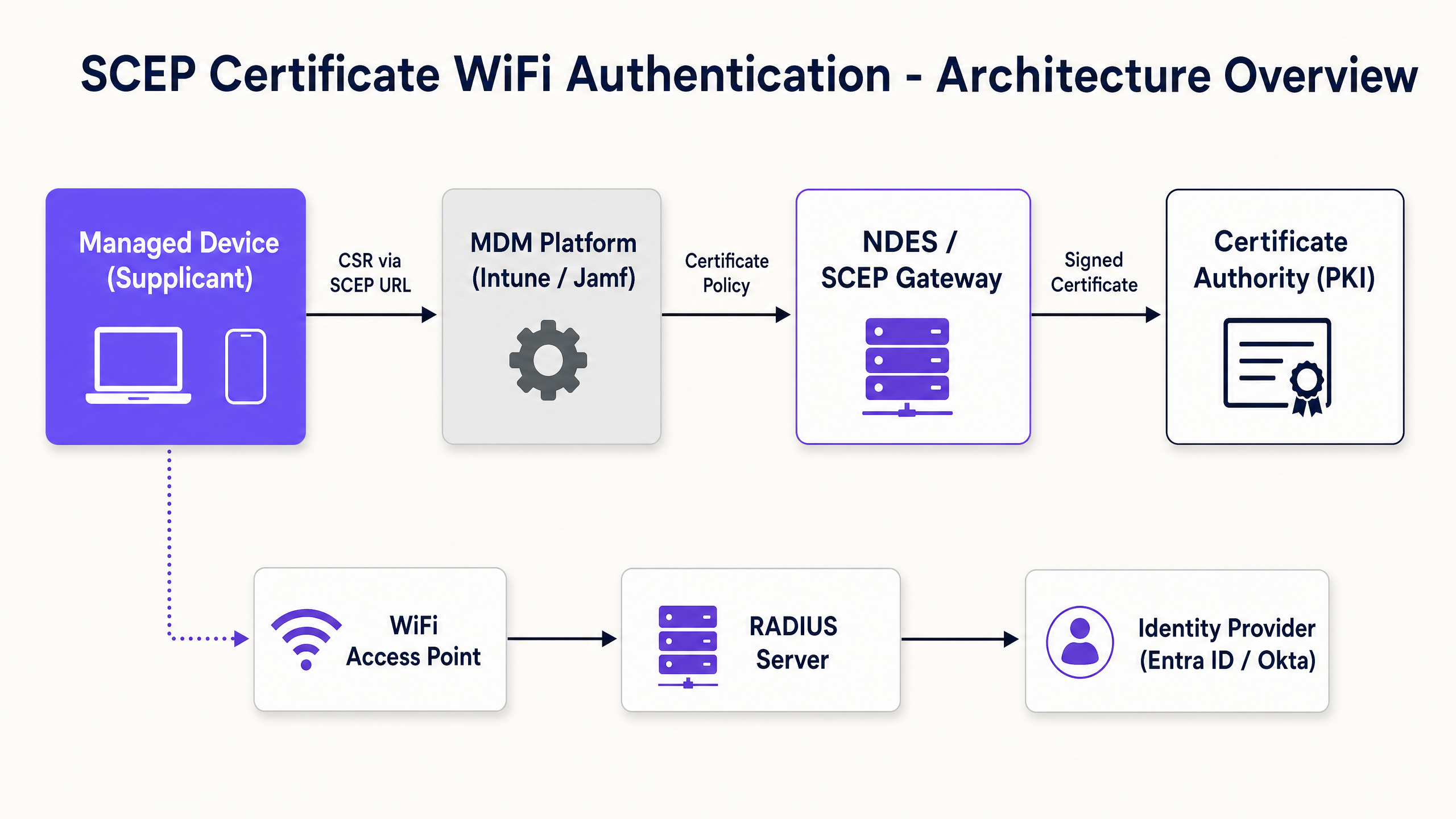
SCEP es el estándar de la industria para el registro de dispositivos empresariales. En un flujo de trabajo de SCEP, el servicio MDM indica al endpoint que genere su propio par de claves pública y privada. El dispositivo crea una Solicitud de Firma de Certificado (CSR) y la envía a través de un servidor de Servicio de Registro de Dispositivos de Red (NDES) o una puerta de enlace en la nube a su Autoridad de Certificación (CA). La CA firma la solicitud y devuelve el certificado público al dispositivo.
La ventaja de seguridad crítica de SCEP es que la clave privada nunca sale del dispositivo. Se genera localmente, se almacena en el enclave de hardware seguro del dispositivo y nunca se transmite a través de la red. Esto hace que SCEP sea el enfoque altamente recomendado para la autenticación 802.1X.
EAP-TLS y autenticación mutua
EAP-TLS (Extensible Authentication Protocol con Transport Layer Security) se encuentra dentro del marco 802.1X. EAP-TLS es ampliamente considerado como el método de autenticación más seguro para redes inalámbricas empresariales porque requiere autenticación mutua. Tanto el dispositivo cliente como el servidor RADIUS deben presentar certificados válidos. Ninguna de las partes confía en la otra sin una prueba criptográfica. Esta autenticación mutua protege la red contra puntos de acceso no autorizados y el robo de credenciales.
Cuando un dispositivo se conecta a su SSID de WiFi, presenta su certificado al servidor RADIUS. El servidor RADIUS valida el certificado contra su cadena de confianza de la CA, verifica la Lista de Revocación de Certificados (CRL) para confirmar que el certificado no haya sido revocado y, si tiene éxito, envía un mensaje de aceptación al punto de acceso.
Guía de implementación: La secuencia de distribución
Configurar con éxito un perfil de WiFi de MDM para 802.1X requiere un cumplimiento estricto de una secuencia de distribución específica. Las dependencias del perfil dictan que se debe establecer la confianza antes de poder configurar la autenticación.
Paso 1: Distribuir el perfil de certificado raíz de confianza
Antes de que cualquier dispositivo pueda solicitar un certificado de cliente o confiar en su servidor RADIUS, debe confiar en la Autoridad de Certificación emisora.
- Exporte su certificado de CA raíz como un archivo .cer.
- En su MDM (por ejemplo, Intune o Jamf), cree un perfil de Certificado de confianza.
- Suba el archivo .cer y distribuya este perfil a sus grupos de dispositivos de destino.
Paso 2: Configurar el perfil de certificado SCEP
Una vez establecida la confianza, configure el perfil SCEP para indicar a los dispositivos cómo obtener su certificado de cliente.
- Cree un nuevo perfil de configuración y seleccione el certificado SCEP.
- Configure el formato del nombre del sujeto (Subject name). Para la autenticación basada en el usuario, use el Nombre principal del usuario (User Principal Name).
- Establezca el Uso de clave (Key usage) en Firma digital y Cifrado de clave.
- En Uso de clave extendido (Extended key usage), especifique Autenticación de cliente.
- Vincule este perfil al perfil de certificado raíz de confianza creado en el Paso 1.
- Proporcione la URL externa de su servidor NDES o puerta de enlace SCEP.
Paso 3: Distribuir el perfil WiFi 802.1X
El paso final es enviar la configuración de WiFi que vincula los certificados al SSID de la red.
- Cree un perfil de configuración de Wi-Fi.
- Ingrese el Nombre de la red (SSID) exactamente como lo transmiten sus puntos de acceso.
- Seleccione WPA2-Enterprise o WPA3-Enterprise como tipo de seguridad.
- Establezca el tipo de EAP en EAP-TLS.
- Seleccione el perfil de certificado SCEP creado en el Paso 2 como el certificado de autenticación del cliente.
- Especifique el certificado raíz de confianza para la validación del servidor.
Mejores prácticas y estándares de la industria
Al implementar la distribución de certificados SCEP, siga estas mejores prácticas independientes del proveedor para garantizar el cumplimiento y la confiabilidad.
Ubicación y seguridad del servidor NDES
El servidor NDES debe ser accesible desde internet para permitir que los dispositivos remotos to aprovisionar certificados antes de llegar al sitio. Sin embargo, exponer un servidor interno directamente a internet es un riesgo de seguridad significativo. Publique la URL de NDES utilizando Azure AD Application Proxy o utilice una puerta de enlace SCEP alojada en la nube. Esto proporciona un acceso remoto seguro sin abrir puertos de firewall entrantes.
Verificación de RADIUS y CRL
El despliegue de certificados es solo la mitad de la ecuación de seguridad; la revocación es igualmente crítica. Si un empleado se va, deshabilitar su cuenta de Active Directory puede no revocar de inmediato su acceso a WiFi si su certificado de cliente sigue siendo válido y el servidor RADIUS no está verificando estrictamente la Lista de Revocación de Certificados (CRL). Configure su servidor RADIUS para exigir una verificación estricta de CRL y asegúrese de que sus Puntos de Distribución de CRL tengan una alta disponibilidad.
Despliegue agnóstico de hardware
SCEP y EAP-TLS son estándares neutrales respecto al proveedor. Su despliegue debe ser agnóstico de hardware, funcionando sin problemas en infraestructuras Cisco Meraki, HPE Aruba, Ruckus, Juniper Mist, Ubiquiti UniFi, Cambium, Extreme y Fortinet.
Resolución de problemas y mitigación de riesgos
Incluso con una planificación meticulosa, el despliegue de certificados puede presentar problemas.
Problema: El perfil de WiFi no se aplica
Esto casi siempre se debe a una discrepancia en la asignación de grupos. Si el perfil SCEP está asignado a un Grupo de usuarios, pero el perfil de WiFi está asignado a un Grupo de dispositivos, el MDM no puede resolver la dependencia. Asegúrese de que los perfiles de Raíz de confianza, SCEP y WiFi estén desplegados exactamente en el mismo grupo.
Problema: Errores NDES 403 Forbidden
Los dispositivos no logran recuperar el certificado SCEP. Es probable que la cuenta de servicio de Intune Certificate Connector carezca de los permisos necesarios en la plantilla de certificado, o que el filtrado de URL en su firewall esté bloqueando los parámetros de cadena de consulta específicos utilizados por SCEP.
ROI e impacto empresarial
La transición al despliegue de certificados SCEP 802.1X ofrece retornos medibles en seguridad y operaciones.
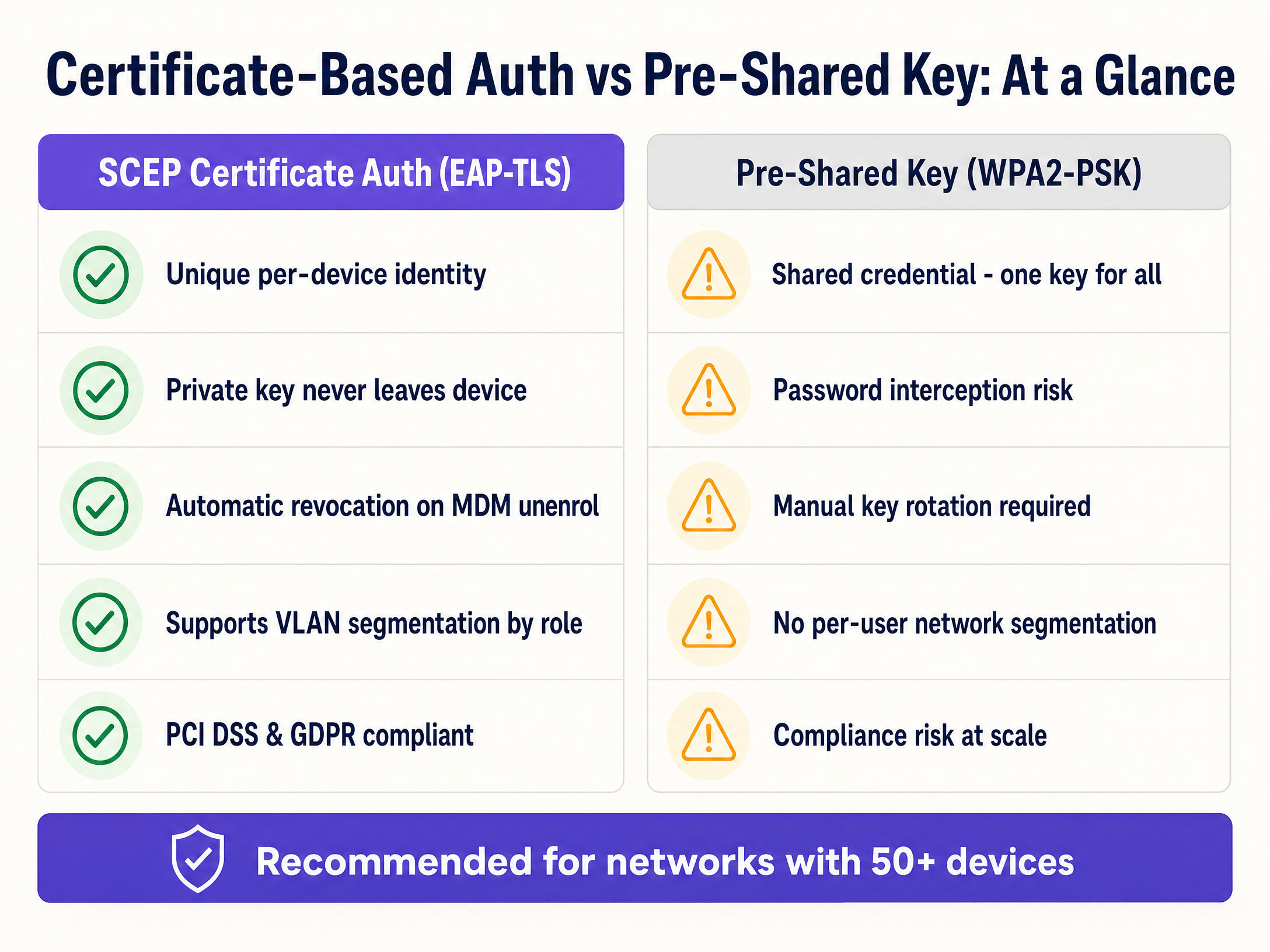
- Reducción de tickets de soporte: El WiFi basado en contraseñas genera un volumen significativo de tickets de soporte. La autenticación basada en certificados es invisible para el usuario, lo que normalmente reduce el volumen de soporte relacionado con WiFi en un 70%.
- Mejora de la postura de seguridad: EAP-TLS elimina el riesgo de robo de credenciales y ataques Man-in-the-Middle. Esto es fundamental para el cumplimiento de marcos como PCI DSS y GDPR.
- Incorporación fluida: Para las organizaciones que gestionan grandes flotas de dispositivos Apple junto con Windows, la integración con los flujos de trabajo de MDM existentes garantiza una experiencia de aprovisionamiento unificada y sin intervención (zero-touch).
- Segmentación dinámica: Admite la asignación dinámica de VLAN basada en la identidad, aislando los dispositivos IoT de los datos corporativos sin necesidad de SSIDs independientes.
Para obtener más información, explore nuestras guías relacionadas sobre Seguridad WiFi empresarial: Una guía completa para 2026 y Cómo revocar el acceso a WiFi cuando un empleado se va .
Definiciones clave
SCEP (Simple Certificate Enrollment Protocol)
A protocol that automates the request and issuance of digital certificates to managed devices without human intervention.
Used by MDM platforms to securely provision unique identities to devices for network authentication.
EAP-TLS (Extensible Authentication Protocol - Transport Layer Security)
The most secure 802.1X authentication method, requiring both the client and the RADIUS server to present valid digital certificates.
The target authentication protocol that SCEP certificates are provisioned to support.
802.1X
An IEEE standard for port-based network access control that provides an authentication mechanism to devices wishing to attach to a LAN or WLAN.
The overarching framework that secures enterprise networks against unauthorized access.
RADIUS
A networking protocol that provides centralized Authentication, Authorization, and Accounting management for users who connect and use a network service.
The server component that validates the client certificate and determines which VLAN the device should join.
CSR (Certificate Signing Request)
A block of encoded text given to a Certificate Authority when applying for an SSL/TLS certificate, containing the public key and identity information.
Generated locally on the device during the SCEP enrollment process.
NDES (Network Device Enrollment Service)
A Microsoft Windows Server role that acts as a bridge, allowing devices to obtain certificates via SCEP.
The gateway that receives the CSR from the device and forwards it to the internal Certificate Authority.
CRL (Certificate Revocation List)
A list published by the Certificate Authority containing the serial numbers of certificates that have been revoked and should no longer be trusted.
Checked by the RADIUS server during authentication to ensure a terminated employee's device cannot connect.
VLAN (Virtual Local Area Network)
A logical subnetwork that groups a collection of devices from different physical LANs.
Used in conjunction with RADIUS to dynamically segment network traffic based on the identity presented in the SCEP certificate.
Ejemplos resueltos
A 400-room hotel needs to deploy secure operational WiFi for 150 staff devices (tablets and laptops) while ensuring strict separation from the Guest WiFi network.
The IT team configures a cloud SCEP gateway integrated with their MDM. They deploy a Trusted Root profile, followed by a SCEP profile targeting the 'Hotel Operations' device group. A WiFi profile for the 'Staff-Secure' SSID is then deployed, configured for WPA3-Enterprise and EAP-TLS. The RADIUS server is configured to assign these authenticated devices to VLAN 40, completely isolating them from the Guest WiFi (VLAN 50).
A large university campus with 25,000 students and 3,000 staff needs to secure its 'Edu-Secure' network. They currently use PEAP with usernames and passwords, resulting in 500+ helpdesk tickets per month due to password expirations.
The university migrates staff and faculty devices to EAP-TLS using Intune and SCEP. They deploy the certificate profiles in the strict sequence (Root -> SCEP -> WiFi) to the staff user groups. For unmanaged student BYOD devices, they deploy a separate onboarding portal that provisions temporary certificates, or utilize Purple's Guest WiFi platform with profile-based authentication for seamless, secure access.
Preguntas de práctica
Q1. Your team is deploying a new SCEP certificate profile to a fleet of 500 Windows laptops. The Trusted Root profile was deployed to the 'All Corporate Devices' group. The SCEP profile was deployed to the 'All Corporate Users' group. The WiFi profile is showing as 'Not Applicable' on the laptops. What is the root cause?
Sugerencia: Consider the Intune profile dependency rules and group targeting requirements.
Ver respuesta modelo
The root cause is a mismatch in group targeting. Intune requires that dependent profiles (Root, SCEP, WiFi) be deployed to the exact same group type. Because the Root profile targets devices and the SCEP profile targets users, the dependency chain is broken. All three profiles must target either the same Device group or the same User group.
Q2. A hotel operations director wants to secure the staff WiFi network using EAP-TLS. They suggest using PKCS instead of SCEP because it does not require an NDES server. As the network architect, why should you advise against this for WiFi authentication?
Sugerencia: Think about where the private key is generated and how it travels.
Ver respuesta modelo
You should advise against PKCS for WiFi authentication because it requires the private key to be generated centrally by the CA and transmitted over the network to the device. SCEP is significantly more secure because the device generates the private key locally and stores it in a secure hardware enclave; the private key never leaves the device.
Q3. During a network audit, you discover that the RADIUS server is configured to ignore CRL (Certificate Revocation List) checking errors. What specific security risk does this introduce when an employee is terminated?
Sugerencia: Consider what happens to the validity of the certificate if the MDM unenrols the device but the RADIUS server cannot verify revocation status.
Ver respuesta modelo
If CRL checking is ignored or fails open, a terminated employee whose device has been unenrolled (and certificate revoked by the CA) may still be able to connect to the WiFi network. The RADIUS server will see a cryptographically valid certificate and, without checking the CRL, will grant access, creating a severe security vulnerability.
Continúe leyendo esta serie
Gestión de ancho de banda para WiFi de personal: modelado, QoS y reducción de tráfico
Esta guía detalla métodos prácticos para gestionar el ancho de banda para el WiFi de personal en entornos corporativos. Cubre el modelado de tráfico, la implementación de QoS y cómo el despliegue de Purple Shield reduce la carga de la red sin requerir actualizaciones de infraestructura.
Cómo configurar WiFi de invitados y Captive Portals en Ruijie Networks
Esta guía técnica detalla la configuración de WiFi de invitados y Captive Portals en el hardware de Ruijie Networks, abarcando tanto los portales en la nube nativos como las integraciones RADIUS externas. Proporciona a los gerentes de TI y arquitectos de redes pasos prácticos para el aislamiento de VLAN, la configuración de walled garden y la integración de plataformas de terceros para impulsar la analítica y los ingresos.
PSK por dispositivo por proveedor: comparación de iPSK, DPSK, MPSK y PPSK (y soporte de WPA3)
Una comparación exhaustiva de las implementaciones de PSK por dispositivo en Cisco Meraki, HPE Aruba, Ruckus, Juniper Mist, Extreme, Fortinet y Ubiquiti UniFi. Conozca cómo WPA3-SAE afecta las estrategias de claves por dispositivo y cuándo implementar modos de transición en lugar de migrar a 802.1X.