
Cómo mejorar la velocidad de WiFi sin comprar nuevos puntos de acceso
Esta guía detalla cómo los recintos empresariales pueden recuperar más del 30% de su ancho de banda de WiFi sin adquirir nuevos puntos de acceso. Al implementar filtrado de DNS, band steering y políticas de QoS, los equipos de TI pueden extender la vida útil del hardware, reducir el CapEx y mejorar el rendimiento y la seguridad de la red.
Escucha esta guía
Ver transcripción del podcast
कार्यकारी सारांश (Executive Summary)
मोठ्या प्रमाणावर व्हेन्यू नेटवर्क्स व्यवस्थापित करणाऱ्या IT डायरेक्टर्स आणि CTOs साठी, बँडविड्थ संपल्यावर सहसा नवीन हार्डवेअर खरेदी करणे हाच खर्चिक पर्याय निवडला जातो. तथापि, गेस्ट नेटवर्क बँडविड्थचा साधारणपणे ४०% पर्यंतचा भाग हा निरुपयोगी बॅकग्राउंड टेलिमेट्री, जाहिरात ट्रॅकर्स आणि मालवेअर ट्रॅफिकद्वारे वापरला जातो. सॉफ्टवेअर-लेअर ऑप्टिमायझेशन लागू करून—विशेषतः DNS फिल्टरिंग, इंटेलिजेंट बँड स्टीयरिंग आणि QoS पॉलिसी अंमलबजावणीद्वारे—व्हेन्यूज एकही नवीन ॲक्सेस पॉईंट न जोडता सध्याच्या बँडविड्थपैकी ३०%+ पेक्षा जास्त बँडविड्थ पुन्हा मिळवू शकतात.
हे मार्गदर्शक सध्याच्या हार्डवेअरचे आयुष्य वाढवण्यासाठी, CapEx कमी करण्यासाठी आणि Hospitality , Retail , Healthcare , आणि Transport वातावरणात वापरकर्त्याचा अनुभव सुधारण्यासाठी हे ऑप्टिमायझेशन कसे लागू करावे याचे सविस्तर वर्णन करते.
तांत्रिक सखोल विश्लेषण (Technical Deep-Dive)
बँडविड्थचा अपव्यय: टेलिमेट्री आणि ट्रॅकर्स
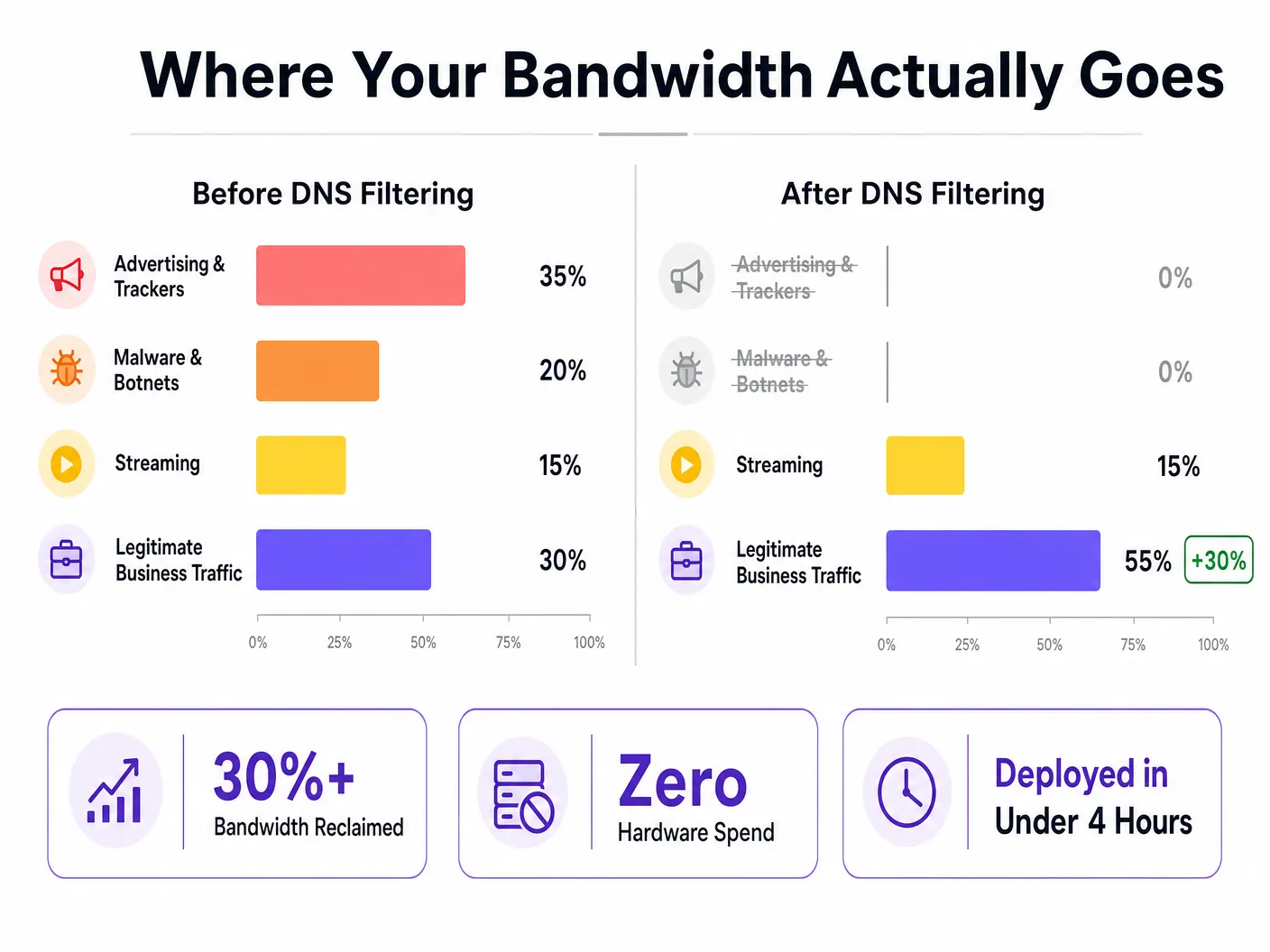
एका सामान्य Guest WiFi नेटवर्कच्या ट्रॅफिक प्रोफाइलचे परीक्षण करताना, वापरकर्त्याद्वारे सुरू न केलेल्या ट्रॅफिकचे प्रमाण लक्षणीय असते. जाहिरात नेटवर्क्स आणि थर्ड-पार्टी ट्रॅकर्स हे DNS क्वेरी व्हॉल्यूमच्या २५% ते ४०% भाग व्यापतात. प्रत्येक ॲप सुरू झाल्यावर ॲनालिटिक्स प्लॅटफॉर्म्स आणि ट्रॅकिंग पिक्सेल्ससाठी बॅकग्राउंडमध्ये डझनभर लुकअप्स सुरू होतात, ज्याचा गेस्टला कोणताही फायदा होत नाही परंतु ते अपलिंक क्षमता मात्र वापरतात.
याव्यतिरिक्त, नेटवर्कवरील तडजोड केलेली (compromised) डिव्हाइसेस मालवेअर आणि बॉटनेत ट्रॅफिक तयार करतात, जे सतत कमांड-अँड-कंट्रोल सर्व्हरशी संपर्क साधण्याचा प्रयत्न करत असतात. यामुळे बँडविड्थ वाया जाते आणि गंभीर अनुपालन (compliance) आणि सुरक्षा धोके निर्माण होतात.
DNS फिल्टरिंग सोल्यूशन
DNS फिल्टरिंग हे रिझोल्यूशन लेअरवर काम करते. ते DNS क्वेरी अपलिंकपर्यंत पोहोचण्यापूर्वीच अडवते. जर एखादे डोमेन जाहिरात नेटवर्क, ज्ञात मालवेअर होस्ट किंवा पॉलिसी-प्रतिबंधित श्रेणीशी संबंधित असेल, तर ती क्वेरी ब्लॉक केली जाते आणि डिव्हाइसला शून्य (null) प्रतिसाद मिळतो. कोणताही डेटा ट्रान्सफर होत नाही; कोणतीही बँडविड्थ वापरली जात नाही.
पॅकेट्स आल्यानंतर त्यांची तपासणी करणाऱ्या फायरवॉल्स किंवा प्रवासाच्या मध्यभागी अडवणाऱ्या प्रॉक्सीजच्या तुलनेत, DNS फिल्टरिंग विनंती (request) सुरू होण्यापासूनच रोखते. हा आर्किटेक्चरल फायदा बँडविड्थ पुन्हा मिळवण्यासाठी अत्यंत कार्यक्षम ठरतो.
DNS over HTTPS (DoH) चे व्यवस्थापन
एक महत्त्वाचा तांत्रिक विचार म्हणजे DNS over HTTPS (DoH) चा वाढता वापर. DoH हे DNS क्वेरी एन्क्रिप्ट करते, ज्यामुळे नेटवर्क-स्तरीय DNS बायपास होतो आणि पारंपारिक फिल्टरिंग नियमांना बगल दिली जाते. फिल्टरिंगची प्रभावीता राखण्यासाठी, नेटवर्क्सनी DoH ट्रॅफिक ओळखून (सहसा ज्ञात रिझॉल्व्हर्सच्या पोर्ट ४४३ वर) आणि ते DoH-सक्षम फिल्टरिंग रिझॉल्व्हरकडे रिडायरेक्ट करून DoH इंटरसेप्शन लागू केले पाहिजे. अधिक तपशीलांसाठी, आमचे DNS Over HTTPS (DoH): Implications for Public WiFi Filtering (किंवा पोर्तुगीज आवृत्ती: DNS Over HTTPS (DoH): Implicações para a Filtragem de WiFi Público ) हे मार्गदर्शक पहा.
अंमलबजावणी मार्गदर्शक (Implementation Guide)
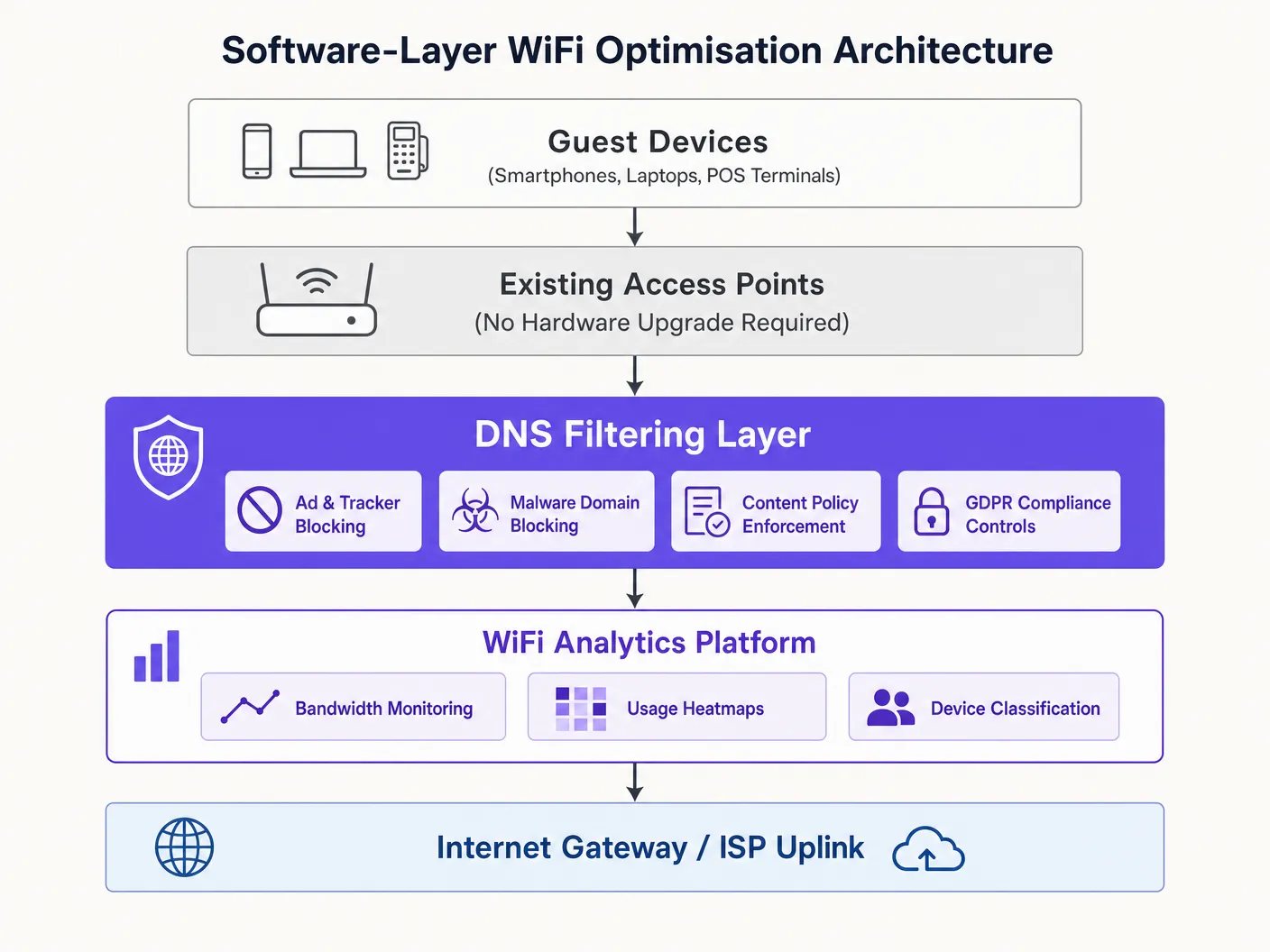
सॉफ्टवेअर-लेअर ऑप्टिमायझेशन तैनात करणे सोपे आहे आणि प्रभावाचे निरीक्षण करण्यासाठी WiFi Analytics सारख्या प्लॅटफॉर्मचा वापर करून मल्टि-साइट ऑपरेटर्ससाठी हे मध्यवर्ती पद्धतीने व्यवस्थापित केले जाऊ शकते.
- बेसलाइन मोजमाप: श्रेणीनुसार DNS क्वेरी व्हॉल्यूम आणि प्रति-क्लायंट बँडविड्थ वापर कॅप्चर करण्यासाठी नेटवर्क सज्ज करा. यामुळे ROI च्या गणनेसाठी बेसलाइन तयार होते.
- मॉनिटरिंग मोड: ब्लॉक न करता ट्रॅफिकचे स्वरूप समजून घेण्यासाठी आणि चुकीचे ब्लॉक्स (false positives) टाळण्यासाठी ४८-७२ तास पॅसिव्ह मॉनिटरिंग मोडमध्ये DNS फिल्टरिंग तैनात करा.
- टप्प्याटप्प्याने ब्लॉकिंग: प्रथम उच्च-विश्वास श्रेणींसाठी (उदा. ज्ञात मालवेअर, बॉटनेट्स, जाहिरात नेटवर्क्स) ब्लॉकिंग सक्षम करा. पॉलिसी समायोजित करण्यासाठी दररोज लॉगचे पुनरावलोकन करा.
- पूरक ऑप्टिमायझेशन:
- बँड स्टीयरिंग: गर्दीच्या २.४GHz बँडवरील भार कमी करण्यासाठी सक्षम डिव्हाइसेसना ५GHz बँडकडे वळवा.
- SSID एकत्रीकरण: SSIDs एकत्रित करून आणि विभाजनासाठी VLAN टॅगिंग वापरून व्यवस्थापन ओव्हरहेड कमी करा.
- QoS अंमलबजावणी: व्यवसाय-गंभीर ट्रॅफिकचे (उदा. VoIP, POS) मोठ्या प्रमाणावरील स्ट्रीमिंगपासून संरक्षण करण्यासाठी प्रति-क्लायंट रेट मर्यादा लागू करा.
- दस्तऐवजीकरण आणि मोजमाप: ३० दिवसांनंतर, ROI चे प्रमाण निश्चित करण्यासाठी बेसलाइनशी बँडविड्थ वापराची तुलना करा.
सर्वोत्तम पद्धती (Best Practices)
- IoT ट्रॅफिकचे विभाजन करा: IoT डिव्हाइसेस सहसा मोठ्या प्रमाणात टेलिमेट्री तयार करतात. नियम कडक करताना त्यांची कार्यक्षमता खंडित होऊ नये म्हणून त्यांना योग्य फिल्टरिंग पॉलिसीसह स्वतंत्र VLAN वर ठेवा.
- अति-ब्लॉकिंग टाळा: कायदेशीर व्यावसायिक SaaS ॲप्लिकेशन्समध्ये व्यत्यय येऊ नये म्हणून सावधगिरीच्या ब्लॉकिंग पॉलिसीसह सुरुवात करा आणि लॉग पुनरावलोकनांच्या आधारे हळूहळू विस्तार करा.
- नियमित RF सर्व्हे: भौतिक वातावरण बदलत असताना को-चॅनेल हस्तक्षेप कमी करण्यासाठी वेळोवेळी चॅनेल असाइनमेंट्स आणि ट्रान्समिट पॉवर पुन्हा ऑप्टिमाइझ करा.
त्रुटी निवारण आणि जोखीम कमी करणे (Troubleshooting & Risk Mitigation)
- कायदेशीर सेवा ब्लॉक होणे: वापरकर्त्यांनी ॲप्लिकेशन्स चालत नसल्याचे कळवल्यास, आवश्यक डोमेन्सवर (उदा. क्लाउड स्टोरेज, पेमेंट गेटवे) परिणाम करणाऱ्या व्यापक श्रेणी ब्लॉक्ससाठी DNS लॉग तपासा आणि त्यांना व्हाइटलिस्ट करा.
- फिल्टरिंगची प्रभावीता कमी होणे: बँडविड्थचा वापर पुन्हा वाढल्यास, DoH बायपास पॉलिसी सक्रियपणे एन्क्रिप्टेड DNS क्वेरी अडवून रिडायरेक्ट करत आहेत की नाही याची पडताळणी करा.
- जुन्या डिव्हाइसेसच्या कनेक्टिव्हिटी समस्या: बँड स्टीयरिंग सक्षम केल्यानंतर जुन्या डिव्हाइसेसना कनेक्ट होण्यास त्रास होत असल्यास, २.४GHz बँड अजूनही पुरेसा उपलब्ध असल्याची खात्री करा आणि स्टीयरिंगची आक्रमकता समायोजित करण्याचा विचार करा.
ROI आणि व्यावसायिक प्रभाव (ROI & Business Impact)
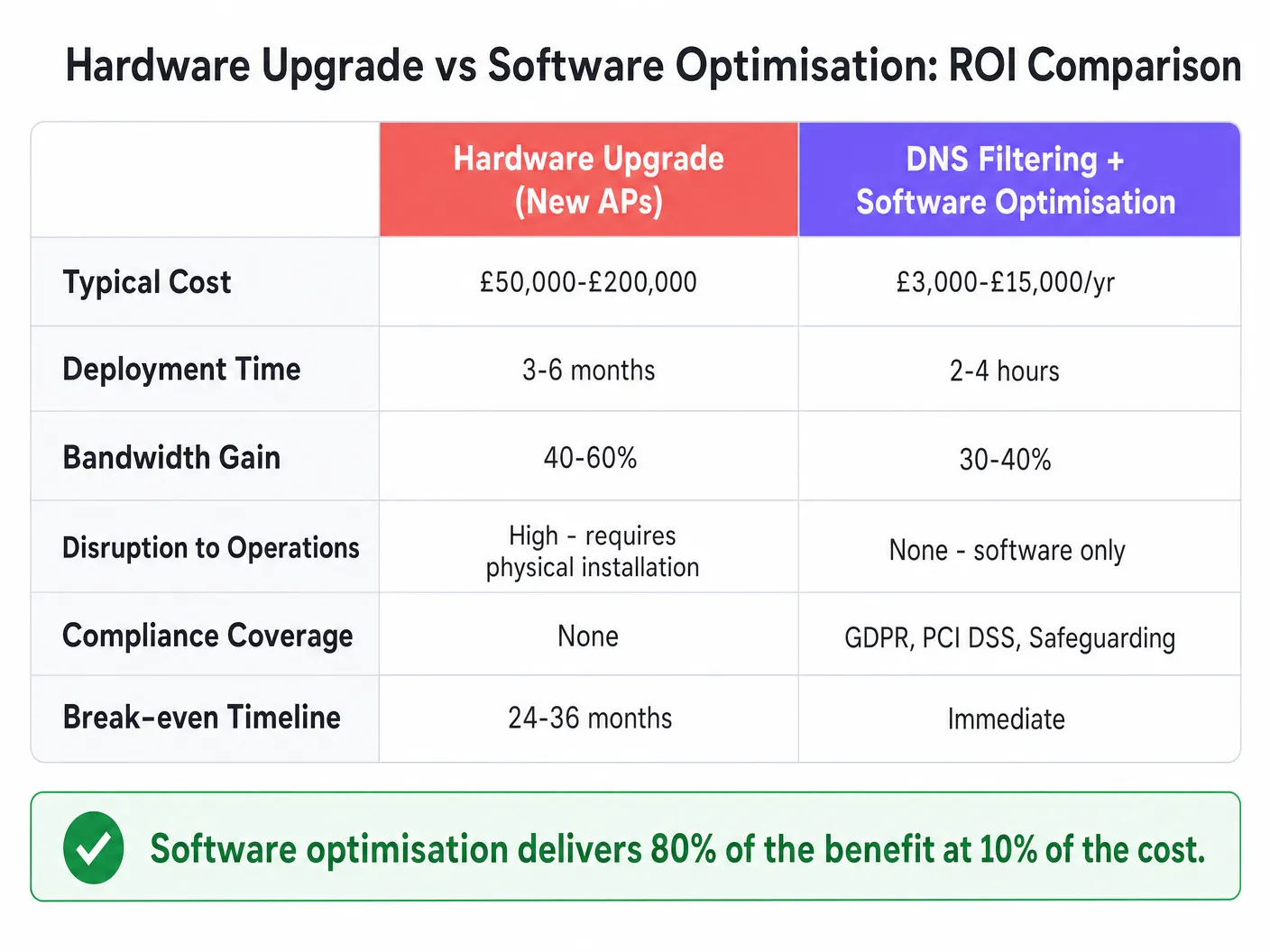
सॉफ्टवेअर ऑप्टिमायझेशन त्वरित ROI देते. हार्डवेअर अपग्रेडसाठी £५०,०००-£२००,००० खर्च येऊ शकतो आणि महिने लागू शकतात उपयोजित करण्यासाठी, DNS फिल्टरिंग आणि कॉन्फिगरेशन बदलांचा खर्च त्याच्या अगदी अल्प प्रमाणात येतो आणि ते काही तासांत उपयोजित होतात. ठिकाणांना सामान्यतः अपलिंक वापरामध्ये ३०-४०% घट दिसून येते, ज्यामुळे विद्यमान APs चे आयुष्य २-४ वर्षांनी वाढते आणि त्याच वेळी GDPR आणि PCI DSS चे पालन अधिक मजबूत होते.
आमचे संपूर्ण तांत्रिक ब्रीफिंग ऐका:
Definiciones clave
Filtrado de DNS
El proceso de bloquear el acceso a ciertos dominios en la etapa de resolución de DNS, evitando la conexión antes de que se transfieran los datos.
Se utiliza para recuperar ancho de banda al detener el tráfico de anuncios, rastreadores y malware antes de que consuma la capacidad de subida.
Band Steering
Una función de red inalámbrica que incentiva a los clientes con capacidad de doble banda a conectarse a la banda de 5GHz, menos congestionada, en lugar de a la banda de 2.4GHz.
Crucial para optimizar el tiempo de aire y mejorar el rendimiento en entornos densos.
DNS sobre HTTPS (DoH)
Un protocolo para realizar la resolución remota del Sistema de Nombres de Dominio a través del protocolo HTTPS, cifrando los datos.
Plantea desafíos para los administradores de red, ya que puede eludir los controles tradicionales de filtrado de DNS sin cifrar.
Consolidación de SSID
Reducir el número de nombres de red transmitidos (SSIDs) para minimizar la sobrecarga de las tramas de gestión.
Cada SSID consume tiempo de aire; menos SSIDs significan más tiempo de aire disponible para la transmisión de datos real.
Calidad de Servicio (QoS)
Tecnologías que gestionan el tráfico de datos para reducir la pérdida de paquetes, la latencia y el jitter en la red.
Se utiliza para priorizar el tráfico comercial crítico (como las transacciones de POS) sobre la transmisión de video de los invitados.
Etiquetado VLAN
La práctica de insertar un ID de VLAN en el encabezado de un paquete para identificar a qué LAN virtual pertenece dicho paquete.
Permite la segmentación lógica del tráfico de red (por ejemplo, invitados frente a personal) sin requerir redes físicas o SSIDs independientes.
Tramas Beacon
Tramas de gestión en WLANs basadas en IEEE 802.11 que contienen información sobre la red.
Transmitir demasiados SSIDs genera un exceso de tramas beacon, lo que consume un valioso tiempo de aire y ralentiza la red.
Interferencia de cocanal
Diafonía de dos transmisores de radio diferentes que utilizan el mismo canal de frecuencia.
Se mitiga mediante una planificación adecuada de canales y la optimización de la potencia de transmisión para garantizar que los APs no se superpongan entre sí.
Ejemplos resueltos
Un hotel de 200 habitaciones experimenta quejas graves sobre el WiFi durante las horas pico de la noche. El proveedor de infraestructura recomienda una actualización de AP de £80,000. ¿Cómo puede resolver esto la optimización de software?
- Implementar filtrado de DNS para bloquear redes de anuncios y malware, recuperando aproximadamente el 30% del ancho de banda. 2. Habilitar band steering para mover los dispositivos compatibles a 5GHz. 3. Implementar QoS para limitar la velocidad de transmisión de video a 5Mbps por cliente, priorizando el tráfico operativo y de VoIP. 4. Consolidar de 8 SSIDs a 3 utilizando etiquetado VLAN.
Una gran cadena minorista con 500 tiendas necesita mejorar el rendimiento de la red para las terminales de punto de venta (POS) sin dejar de ofrecer WiFi para invitados.
- Segmentar los dispositivos POS y el WiFi para invitados en VLANs separadas. 2. Aplicar un filtrado de DNS estricto en la VLAN de invitados para bloquear el tráfico no esencial de alto ancho de banda. 3. Configurar reglas estrictas de QoS que prioricen el tráfico de la VLAN de POS sobre la VLAN de invitados. 4. Administrar las políticas de forma centralizada a través de un panel unificado.
Preguntas de práctica
Q1. La red de un estadio experimenta una congestión grave en la banda de 2.4GHz, mientras que la banda de 5GHz está subutilizada. ¿Cuál es la acción más inmediata a nivel de capa de software que se debe tomar?
Sugerencia: Considere cómo obligar a los dispositivos compatibles a utilizar la mejor frecuencia.
Ver respuesta modelo
Habilitar y configurar Band Steering en el controlador inalámbrico para empujar activamente a los clientes con capacidad de doble banda a la banda de 5GHz, liberando capacidad en 2.4GHz para dispositivos heredados.
Q2. Después de implementar el filtrado de DNS, nota que el consumo general de ancho de banda solo ha disminuido un 5%, mucho menos del 30% esperado. ¿Cuál es la razón técnica más probable de esto?
Sugerencia: Piense en los comportamientos predeterminados de los navegadores modernos con respecto al DNS.
Ver respuesta modelo
Es probable que los dispositivos cliente estén utilizando DNS sobre HTTPS (DoH), eludiendo el resolutor de DNS estándar de la red. La red debe configurarse para interceptar el tráfico DoH y redirigirlo al resolutor de filtrado.
Q3. El equipo de TI de un hospital desea implementar el filtrado de DNS, pero le preocupa bloquear la telemetría médica crítica de los dispositivos IoT. ¿Cómo deberían diseñar la arquitectura de la implementación?
Sugerencia: ¿Cómo se pueden aplicar diferentes reglas a diferentes tipos de dispositivos?
Ver respuesta modelo
Segmentar los dispositivos IoT en una VLAN dedicada. Aplicar una política de filtrado de DNS muy específica y permisiva a la VLAN de IoT que permita la telemetría requerida, mientras se aplica la política más estricta de bloqueo de anuncios y malware a las VLANs de invitados y del personal.
Continúe leyendo esta serie
Entendiendo el RSSI y la potencia de la señal para una planificación de canales óptima
Esta guía ofrece un análisis técnico profundo y detallado sobre el RSSI, la relación señal/ruido (SNR) y los principios de propagación de RF para una planificación de canales óptima. Equipa a los gerentes de TI, arquitectos de red y directores de operaciones de recintos con estrategias prácticas para mitigar la interferencia de canal adyacente y cocanal, optimizar la ubicación de los AP y aprovechar la analítica para lograr un impacto empresarial medible en los sectores de hotelería, retail y sector público.
20MHz vs 40MHz vs 80MHz: ¿Qué ancho de canal deberías usar?
Esta guía proporciona una referencia técnica definitiva y neutral con respecto al proveedor para gerentes de TI, arquitectos de red y directores de operaciones de recintos sobre cómo seleccionar el ancho de canal de WiFi correcto (20MHz, 40MHz u 80MHz) en implementaciones empresariales en los sectores de hotelería, retail, eventos y sector público. Cubre la mecánica subyacente de IEEE 802.11, las compensaciones de capacidad en el mundo real y una guía de implementación paso a paso para ayudar a los equipos a tomar la decisión correcta este trimestre. Comprender la selección del ancho de canal es una de las decisiones de mayor impacto en cualquier diseño de LAN inalámbrica, ya que afecta directamente el rendimiento, la interferencia, el soporte de densidad de clientes y la confiabilidad de los servicios orientados a los huéspedes.
Wi-Fi 6 vs Wi-Fi 5: Does it Solve Channel Interference?
Esta guía ofrece un análisis técnico profundo sobre cómo Wi-Fi 6 (802.11ax) aborda la interferencia de canales en entornos empresariales de alta densidad a través de OFDMA y BSS Coloring. Equipa a gerentes de TI, arquitectos de red y CTOs con estrategias de implementación accionables, casos de estudio reales de los sectores de hospitalidad y salud, y un marco para evaluar el ROI de las actualizaciones de infraestructura en recintos donde el rendimiento inalámbrico es crítico para el negocio.