
Allied Telesis Access Points Integration with Purple WiFi
Esta guía proporciona un manual de configuración completo para integrar los puntos de acceso de la serie TQ de Allied Telesis con Purple WiFi. Cubre la redirección externa de Captive Portal, la autenticación RADIUS 802.1X y el direccionamiento dinámico de VLAN mediante claves precompartidas privadas (PPSK) para implementaciones multiinquilino seguras.
Escucha esta guía
Ver transcripción del podcast
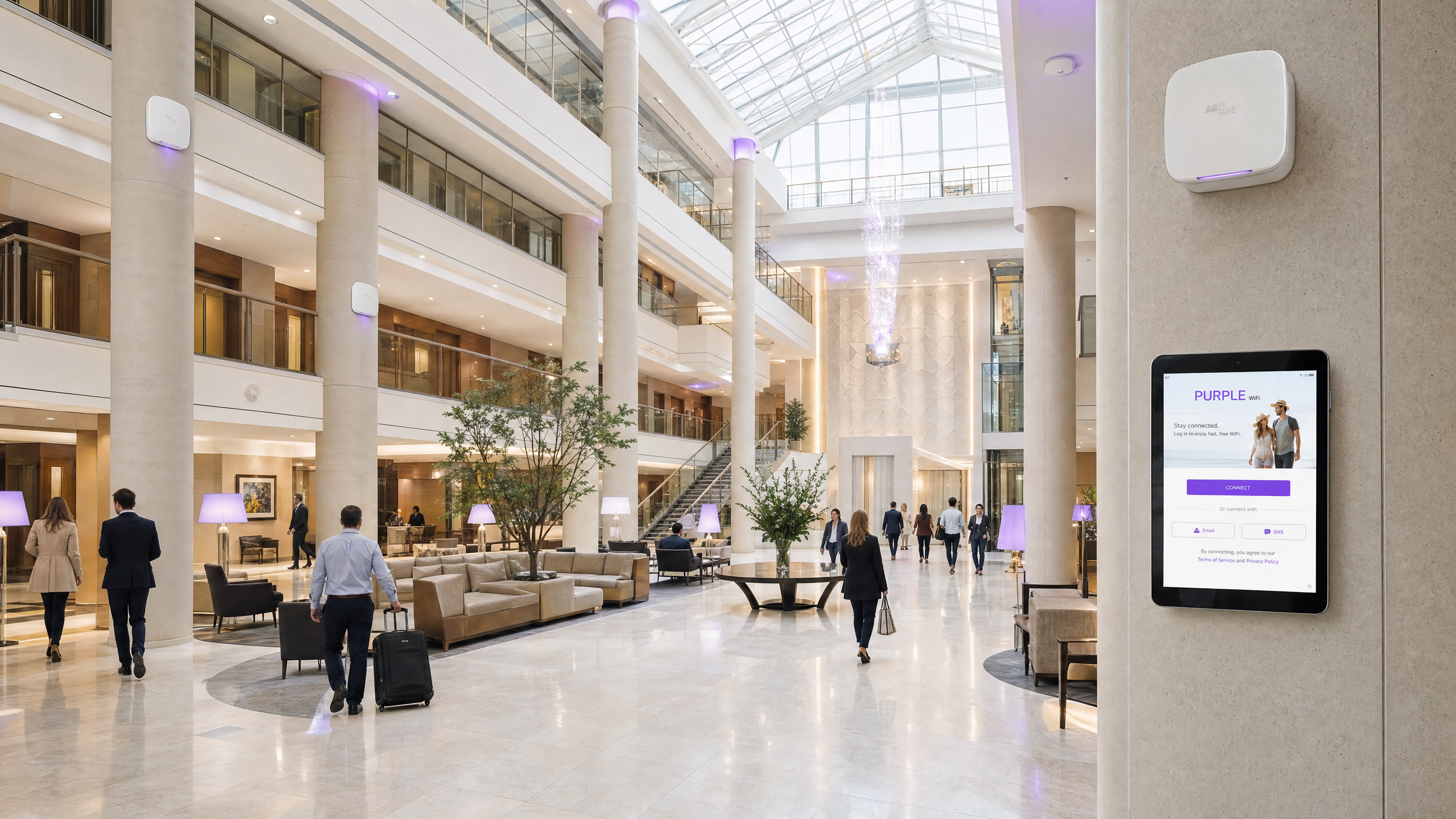
Resumen ejecutivo
Implementar puntos de acceso de la serie TQ de Allied Telesis con Purple proporciona una arquitectura de red escalable, segura y altamente configurable. Este manual de integración detalla la configuración de la redirección externa de Captive Portal para Guest WiFi, la autenticación 802.1X para Staff WiFi y el mapeo de claves precompartidas privadas (PPSK) para el aislamiento de redes multiinquilino. Al combinar el hardware de Allied Telesis con Purple RADIUS como servicio, centraliza la gestión de identidades y elimina la necesidad de servidores RADIUS locales. Esta guía cubre los atributos RADIUS específicos requeridos para el direccionamiento dinámico de VLAN, la configuración de Walled Garden para una entrega fluida de la página de inicio (splash page) y las mejores prácticas para escalar redes basadas en identidad en entornos de hotelería, comercio minorista y sector público.
Análisis técnico detallado
Los puntos de acceso de Allied Telesis, como el TQ6702 GEN2 y el TQ5403, ejecutan el firmware AlliedWare Plus. Admiten funciones empresariales robustas que incluyen WPA3, Passpoint (Hotspot 2.0) e integración completa con RADIUS. Cuando se integra con Purple, el punto de acceso actúa como el servidor de acceso a la red (NAS) y el autenticador 802.1X, mientras que Purple opera como el servidor RADIUS alojado en la nube y el proveedor de Captive Portal.
Redirección de Captive Portal de invitados
Para Guest WiFi, el punto de acceso intercepta el tráfico de clientes no autenticados y redirecciona las solicitudes HTTP/HTTPS a la página de inicio de Purple. Esto requiere configurar el modo de Captive Portal en External Page Redirect.
Cuando un invitado se conecta, el AP hace referencia a su configuración de Walled Garden. El Walled Garden debe incluir en la lista de permitidos los dominios de Purple, los endpoints de CDN y cualquier proveedor de inicio de sesión social configurado (como Google Workspace o Microsoft Entra ID). Una vez que el invitado completa el flujo de autenticación en la página de inicio, el servidor RADIUS de Purple envía un mensaje RADIUS Access-Accept (puerto UDP 1812) al punto de acceso, que luego otorga acceso completo a la red.
Direccionamiento dinámico de VLAN a través de RADIUS
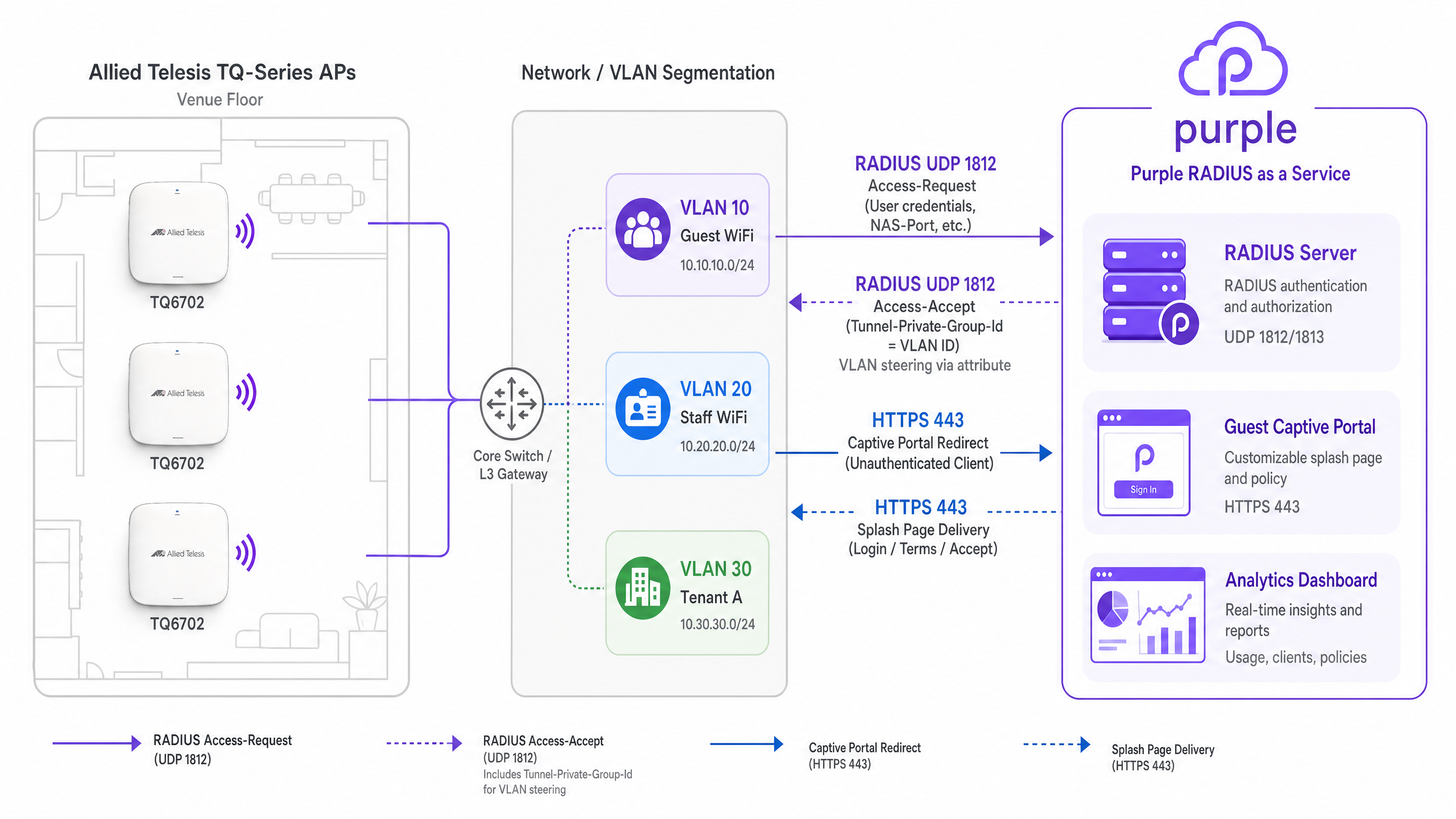
La asignación dinámica de VLAN es fundamental para la segmentación de la red. Al configurar Staff WiFi mediante WPA Enterprise, el punto de acceso reenvía las credenciales EAP al servicio RADIUS SecurePass de Purple.
Tras una autenticación exitosa, el servidor RADIUS de Purple devuelve un paquete Access-Accept que contiene tres atributos RADIUS estándar de la IETF definidos en RFC 3580:
Tunnel-Type(Atributo 64): Establecido enVLAN(13).Tunnel-Medium-Type(Atributo 65): Establecido enIEEE-802(6).Tunnel-Private-Group-Id(Atributo 81): Establecido en el ID de VLAN asignado (por ejemplo,20).
El AP de Allied Telesis lee estos atributos y coloca dinámicamente el dispositivo cliente en la VLAN especificada. Nota: La VLAN dinámica debe habilitarse explícitamente en la configuración de seguridad avanzada de VAP dentro de la GUI de Allied Telesis.
Aislamiento multiinquilino con PPSK
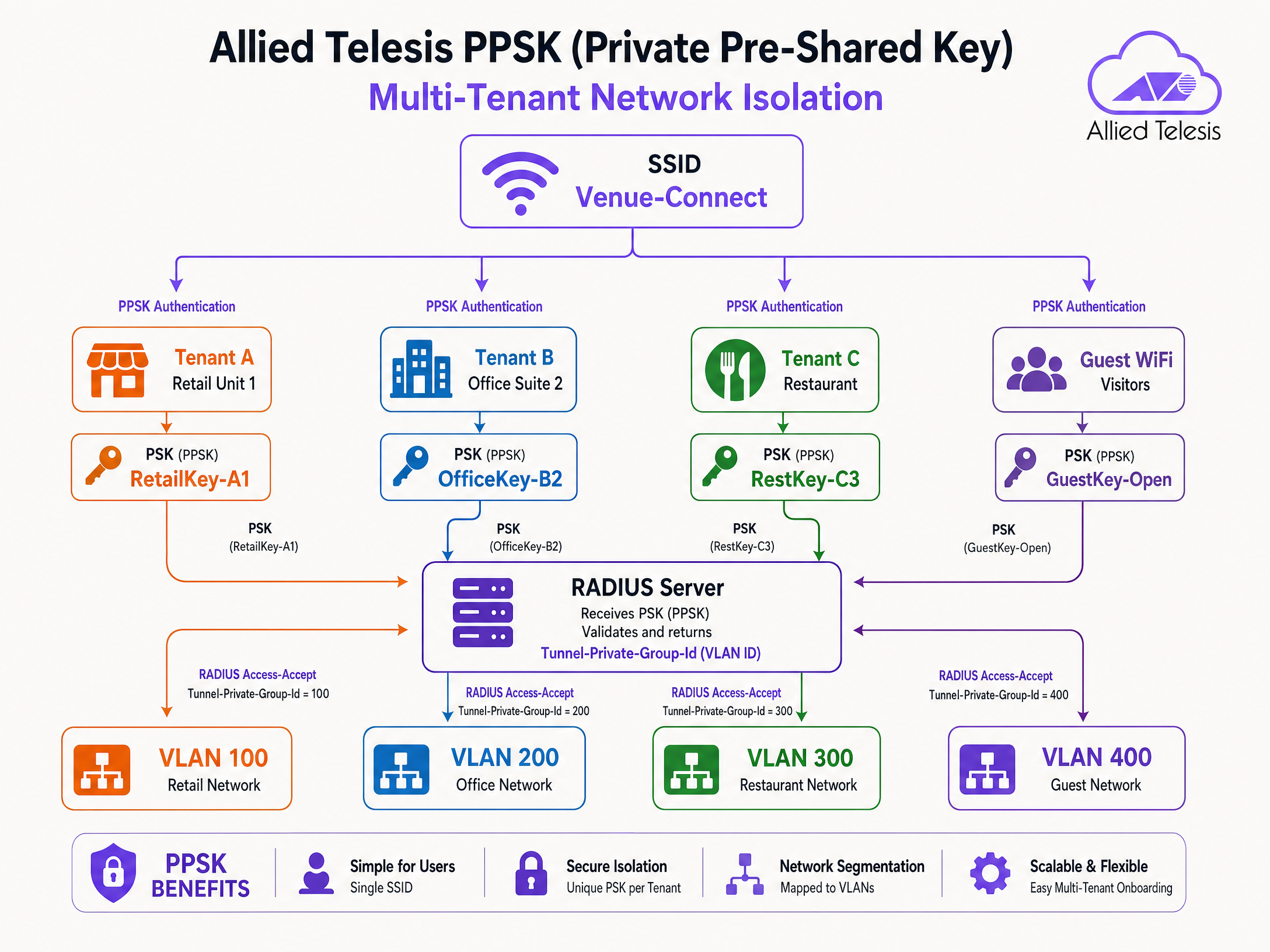
La clave precompartida privada (PPSK) le permite utilizar un único SSID mientras asigna diferentes contraseñas a diferentes usuarios o inquilinos. Esto es altamente efectivo en unidades de viviendas múltiples (MDU), espacios de coworking y parques comerciales.
Cuando un dispositivo se asocia mediante una PPSK específica, el punto de acceso envía la contraseña al servidor RADIUS de Purple. Purple mapea la contraseña a un perfil de inquilino específico y devuelve el atributo Tunnel-Private-Group-Id. Esto dirige los dispositivos del inquilino a su VLAN dedicada, lo que garantiza el aislamiento de Capa 2 sin transmitir múltiples SSIDs.
Guía de implementación
Siga estos pasos para configurar los puntos de acceso de Allied Telesis para la integración con Purple.
Paso 1: Configurar el perfil del servidor RADIUS
- Inicie sesión en la GUI del dispositivo AP de Allied Telesis.
- Vaya a Network Services > RADIUS.
- Agregue un nuevo servidor RADIUS externo utilizando la dirección IP proporcionada en su panel de control de Purple.
- Establezca el puerto de autenticación en
1812y el puerto de contabilidad (accounting) en1813. - Ingrese el Secreto compartido exacto proporcionado por Purple.
- Configure el Identificador NAS para que coincida con la IP de administración o el nombre de host del AP.
Paso 2: Configurar Guest WiFi (Captive Portal)
- Vaya a Wireless > Radio1 (o Radio2).
- Haga clic en Edit para el VAP de destino (por ejemplo, VAP0).
- Establezca el nombre del SSID (por ejemplo, "Guest WiFi").
- Vaya a la pestaña Advanced Settings > Security.
- Establezca Captive Portal en External Page Redirect.
- Ingrese la URL de la página de inicio de Purple en el campo External Page URL.
- En Walled Garden, agregue los dominios de Purple requeridos y las IP de inicio de sesión social.
Paso 3: Configurar Staff WiFi (802.1X y VLAN dinámica)
- Edite un VAP independiente para Staff WiFi.
- Establezca la seguridad en WPA Enterprise.
- Seleccione el perfil del servidor RADIUS de Purple en el menú desplegable RADIUS Authentication Group.
- Vaya a Advanced Settings > Security.
- Habilite Dynamic VLAN.
- Asegúrese de que los switches de red de respaldo estén configurados para enlazar (trunk) las VLAN asignadas dinámicamente a los puertos del AP.
Paso 4: Configurar PPSK para multiinquilino
- Edite el VAP destinado al uso multiinquilino.
- Habilite PPSK (a menudo se configura junto con la autenticación MAC o configuraciones específicas de WPA, según la versión del firmware).
- Asegúrese de que el perfil del servidor RADIUS esté seleccionado.
- En el panel de control de Purple, cree los registros de usuario de PPSK, mapeando cada contraseña al ID de VLAN correcto.
Mejores prácticas
- Mantenimiento de Walled Garden: Regularmente revise y actualice las entradas de Walled Garden. Los proveedores de inicio de sesión social cambian frecuentemente sus rangos de IP y dominios de CDN.
- Redundancia: Configure siempre las direcciones IP del servidor RADIUS de Purple principal y secundario en el grupo RADIUS del AP para garantizar una alta disponibilidad.
- Actualizaciones de firmware: Mantenga actualizado el firmware de AlliedWare Plus. El soporte para WPA3 CCMP y las funciones avanzadas de PPSK requieren la versión 5.5.4-2.3 o posterior.
- Troncalización de VLAN: Verifique que los puertos del switch conectados a los puntos de acceso estén configurados como troncales 802.1Q y permitan todas las VLAN que el servidor RADIUS pueda asignar dinámicamente.
Resolución de problemas y mitigación de riesgos
- Fallos de autenticación silenciosos: Si los dispositivos no pueden conectarse a la red 802.1X o PPSK, verifique el secreto compartido de RADIUS. Una discrepancia hace que el AP descarte silenciosamente los paquetes Access-Reject.
- Error al cargar la página de bienvenida: Si el redireccionamiento del Captive Portal entra en un bucle o no carga los recursos, es probable que falten dominios requeridos en el Walled Garden. Inspeccione la consola de desarrollador del navegador para identificar las solicitudes bloqueadas.
- Clientes asignados a la VLAN incorrecta: Si el direccionamiento dinámico de VLAN falla, verifique que la VLAN dinámica esté habilitada explícitamente en el VAP. Utilice la captura de paquetes para verificar que Purple esté devolviendo el atributo
Tunnel-Private-Group-Id.
ROI e impacto empresarial
La integración de Allied Telesis con Purple transforma la conectividad inalámbrica básica en una plataforma inteligente impulsada por datos.
Para los equipos de TI, centralizar la autenticación a través de Purple RADIUS como servicio elimina la sobrecarga de administrar servidores RADIUS locales e integraciones de Active Directory en el extremo. El uso de PPSK reduce la sobrecarga de SSID, lo que mejora el rendimiento de RF y simplifica la incorporación de inquilinos.
Para las operaciones del recinto, el Captive Portal recopila datos de primera mano verificados, lo que impulsa el crecimiento del CRM y permite el marketing dirigido. Con más de 29 mil millones de puntos de datos recopilados en la plataforma Purple, los recintos obtienen información útil sobre el comportamiento de los visitantes, los tiempos de permanencia y la utilización del espacio, respaldando directamente los objetivos comerciales.
Definiciones clave
PPSK (Private Pre-Shared Key)
A security mechanism where multiple unique passphrases can be used on a single SSID, with each passphrase mapped to specific network policies or VLANs.
Used in multi-tenant environments to provide secure, isolated network access without broadcasting multiple SSIDs.
Tunnel-Private-Group-Id
RADIUS Attribute 81, defined in RFC 2868, used to specify the VLAN ID that a user or device should be assigned to upon successful authentication.
Essential for dynamic VLAN steering in both 802.1X and PPSK deployments.
Walled Garden
A restricted network environment that allows unauthenticated users access to a specific whitelist of IP addresses or domains.
Required for captive portals to allow devices to load the splash page and authenticate via social login providers before gaining full internet access.
RADIUS as a Service
A cloud-hosted RADIUS infrastructure managed by a third party (like Purple), eliminating the need for on-premises authentication servers.
Simplifies 802.1X deployments for distributed venues by centralising identity management in the cloud.
Captive Portal
A web page that users are forced to view and interact with before access is granted to a public WiFi network.
Used to capture first-party data, enforce terms of service, and display venue branding.
VAP (Virtual Access Point)
A logical entity within a physical access point that broadcasts its own SSID and maintains its own security and policy configurations.
Allows a single Allied Telesis AP to simultaneously provide Guest WiFi, Staff WiFi, and IoT connectivity.
EAP-PEAP
Protected Extensible Authentication Protocol, a secure method for transmitting authentication credentials inside an encrypted TLS tunnel.
The most common authentication protocol used for Staff WiFi (802.1X) when verifying usernames and passwords against a directory.
Access-Accept
A standard RADIUS packet sent by the server to the authenticator (AP) indicating that authentication was successful.
Often includes additional attributes, such as VLAN assignments or bandwidth limits, to enforce network policy.
Ejemplos resueltos
A 250-room hotel needs to deploy a secure staff network and a branded guest network. The IT team wants to manage staff access via Microsoft Entra ID without deploying a local RADIUS server, while guests must accept terms and conditions via a captive portal.
Deploy Allied Telesis TQ6702 GEN2 APs. Configure VAP0 as an open network with Captive Portal set to 'External Page Redirect', pointing to the Purple splash page URL. Configure VAP1 with WPA Enterprise, pointing the RADIUS Authentication Group to Purple's SecurePass RADIUS servers. Integrate Purple SecurePass with Microsoft Entra ID in the cloud. Enable Dynamic VLAN on VAP1 so staff are automatically steered to the internal VLAN upon successful EAP authentication.
A retail park landlord wants to provide WiFi to 12 independent retail units using a single hardware deployment. Each unit requires its own secure, isolated network segment.
Configure a single SSID (e.g., 'Retail-Park-Secure') on the Allied Telesis APs. Enable PPSK (Private Pre-Shared Key) and point authentication to the Purple RADIUS server. In the Purple dashboard, generate a unique passphrase for each retail unit and map it to a specific VLAN ID (e.g., Unit 1 = VLAN 101, Unit 2 = VLAN 102). When a device connects, the AP sends the passphrase to Purple, which returns the Tunnel-Private-Group-Id attribute, steering the device to the correct tenant VLAN.
Preguntas de práctica
Q1. A venue reports that Android devices can connect to the Guest WiFi and see the splash page, but Apple iOS devices show a blank white screen. What is the most likely configuration issue?
Sugerencia: Consider how different operating systems detect captive portals and what domains they need to reach.
Ver respuesta modelo
The Walled Garden is likely missing the specific domains Apple uses for captive portal detection (e.g., captive.apple.com). If the AP blocks these domains before authentication, the iOS Captive Network Assistant cannot trigger the mini-browser correctly.
Q2. You have configured WPA Enterprise on the AP and pointed it to Purple's RADIUS server. The RADIUS logs show successful authentication (Access-Accept), but the client device does not receive an IP address on the expected VLAN. What are the two most likely causes?
Sugerencia: Check both the AP configuration and the physical switch port configuration.
Ver respuesta modelo
- 'Dynamic VLAN' is not enabled in the VAP Advanced Security settings on the Allied Telesis AP. 2. The switch port connecting the AP is not configured as an 802.1Q trunk, or the target VLAN is not allowed on the trunk, preventing DHCP traffic from reaching the client.
Q3. A retail park wants to deploy PPSK for 50 tenants. They ask if they should create 50 separate VAPs or use a single VAP. What is your recommendation and why?
Sugerencia: Consider the impact of management frames on wireless airtime.
Ver respuesta modelo
Recommend using a single VAP with PPSK. Broadcasting 50 separate SSIDs generates excessive beacon frames and management overhead, severely degrading RF performance and available airtime. A single SSID with PPSK provides the same Layer 2 isolation via dynamic VLAN assignment without the RF penalty.
Continúe leyendo esta serie
Integración de CommScope Ruckus con Purple WiFi: Guía de instalación y configuración
Esta guía de referencia técnica proporciona un manual de configuración definitivo para integrar arquitecturas de CommScope Ruckus con Purple WiFi. Detalla implementaciones paso a paso para Captive Portals de Guest WiFi, WiFi seguro para el personal a través de 802.1X y aislamiento de red multi-inquilino mediante Dynamic PSK de Ruckus.
Grandstream GWN Access Points Integration with Purple WiFi
Esta guía de referencia técnica autorizada detalla cómo integrar los puntos de acceso Grandstream GWN con la plataforma de análisis y Guest WiFi de Purple. Cubre la configuración del Captive Portal de Grandstream, los ajustes de RADIUS AAA, la configuración de walled garden, la autenticación segura 802.1X para el personal con direccionamiento dinámico de VLAN y la segmentación PPSK multi-tenant, proporcionando orientación práctica paso a paso para MSP y equipos de TI que implementan WiFi para invitados y personal a escala.
Integración de firmware personalizado OpenWrt con Purple WiFi
Esta guía proporciona el manual de integración completo para implementar el firmware personalizado OpenWrt con Purple WiFi. Cubre la configuración del Captive Portal CoovaChilli, la gestión de walled garden con iptables, WiFi seguro para el personal con 802.1X mediante hostapd y la segmentación PPSK multiinquilino con asignación dinámica de VLAN, lo que brinda a los equipos de TI los pasos de configuración exactos necesarios para crear una red basada en la identidad en cualquier hardware compatible con OpenWrt.