
OpenWrt Custom Firmware Integration with Purple WiFi
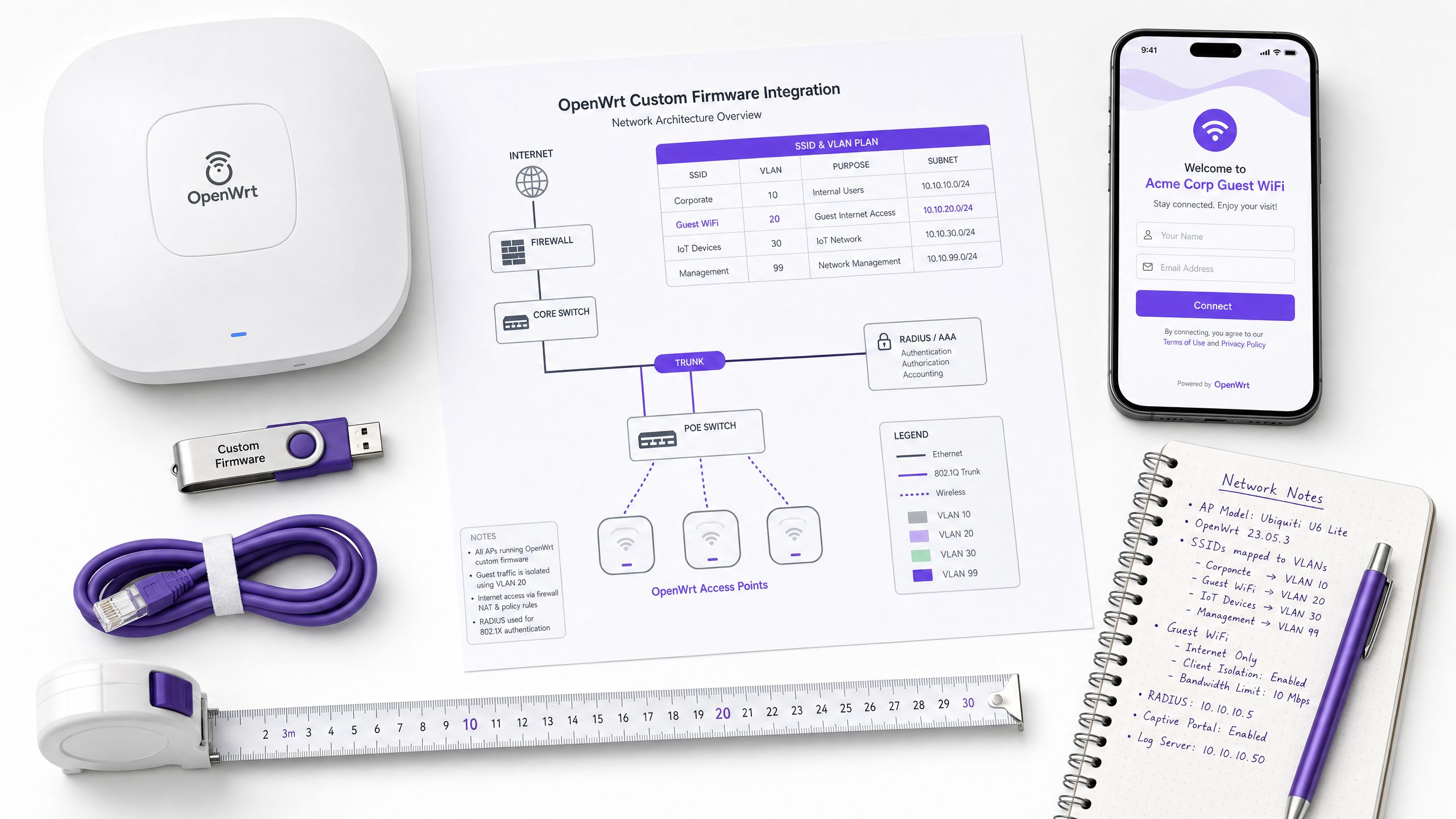
This guide provides the complete integration playbook for deploying OpenWrt custom firmware with Purple WiFi. It covers CoovaChilli captive portal configuration, iptables walled garden management, 802.1X secure staff WiFi with hostapd, and multi-tenant PPSK segmentation with dynamic VLAN assignment - giving IT teams the exact configuration steps needed to build an Identity-Based Network on any OpenWrt-capable hardware.
Listen to this guide
View podcast transcript
Executive summary
OpenWrt is the firmware of choice for IT teams who need hardware independence without sacrificing enterprise-grade control. Deployed across hospitality, retail, and public-sector venues, it provides a fully configurable Linux-based network stack. But out of the box, OpenWrt is a blank canvas. Without a structured identity layer, guest networks become unmanageable, staff networks remain insecure, and multi-tenant environments collapse into a single flat network.
This guide provides the definitive integration playbook for connecting OpenWrt to Purple's cloud RADIUS and captive portal platform. We cover four distinct deployment scenarios: guest captive portal redirection using CoovaChilli, iptables walled garden configuration, secure staff WiFi using hostapd with IEEE 802.1X, and multi-tenant segmentation using Private Pre-Shared Keys (PPSK) with dynamic VLAN assignment. By the end, you will have the exact configuration parameters, the common failure modes, and the decision frameworks needed to deploy a production-ready, GDPR-compliant, identity-driven network on any OpenWrt-capable hardware.
Purple operates across 80,000+ live venues and has processed 440 million logins in 2024 (Purple internal data, 2024). The architecture described here is the same one deployed at scale across hospitality chains, retail estates, and transport hubs.
Technical deep-dive
The CoovaChilli captive portal architecture
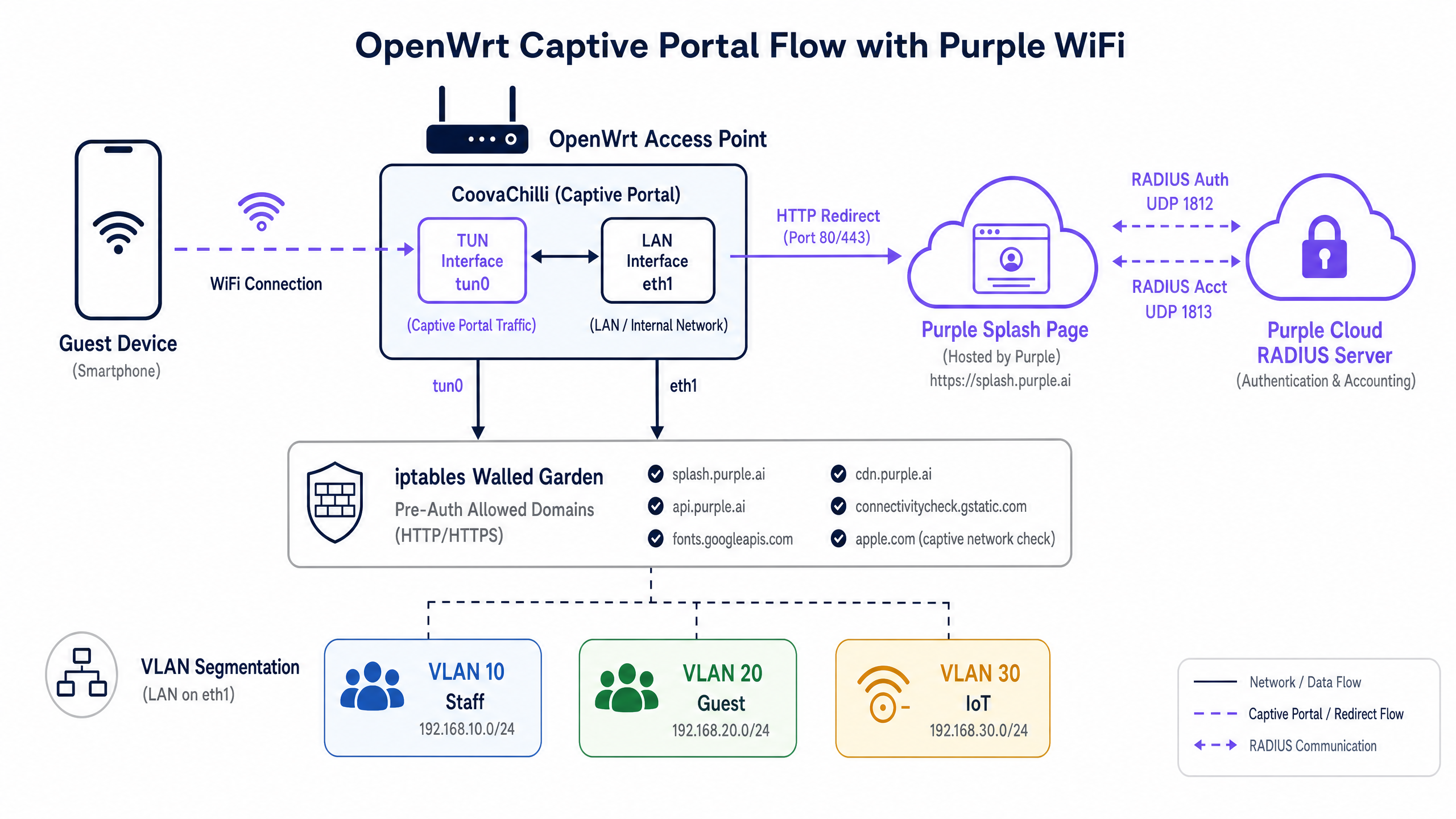
When deploying Guest WiFi on OpenWrt, CoovaChilli is the industry-standard access controller. It operates as a captive portal daemon that intercepts unauthenticated client traffic, provisions IP addresses via its internal DHCP server on the tun0 virtual interface, and enforces walled garden policies using iptables rules it manages directly.
The authentication flow works as follows. A guest device associates with the open SSID. CoovaChilli assigns the device an IP address from its internal pool (typically 10.1.0.0/24). When the device sends its first HTTP request, CoovaChilli intercepts it and issues an HTTP 302 redirect to the Purple splash page URL. During this pre-authentication phase, the device is isolated - it can only reach the domains explicitly listed in the walled garden.
Once the guest authenticates on the Purple portal, Purple's cloud RADIUS server sends an Access-Accept message to CoovaChilli on UDP port 1812. CoovaChilli then updates its iptables rules to permit internet access for that specific MAC address and begins transmitting accounting data (session duration, bytes transferred) to the Purple RADIUS accounting server on UDP port 1813. Accounting is not optional - it is the mechanism by which Purple populates your WiFi Analytics dashboard with session data.
Walled garden: iptables and domain allowlists
The walled garden is the most operationally critical configuration element in any captive portal deployment. CoovaChilli manages the walled garden through two mechanisms: the uamallowed parameter for individual IP addresses and the uamdomains parameter for domain-based allowlisting with DNS inspection.
For a Purple integration, the minimum required walled garden entries are:
| Domain | Purpose |
|---|---|
*.purple.ai |
Portal assets, API, and authentication endpoints |
*.googleapis.com |
Google Fonts and Google Sign-In |
*.gstatic.com |
Google connectivity check and static assets |
*.facebook.com |
Facebook Login API |
*.fbcdn.net |
Facebook CDN for login assets |
captive.apple.com |
Apple CNA detection (see note below) |
connectivitycheck.gstatic.com |
Android captive portal detection |
Note on Apple CNA management: If you include captive.apple.com in the walled garden, iOS devices will detect internet connectivity pre-authentication and suppress the Captive Network Assistant pop-up. Most hospitality deployments deliberately exclude this domain to trigger the automatic portal prompt. The correct choice depends on your guest experience design.
Secure staff WiFi: hostapd and IEEE 802.1X
Guest networks demand frictionless onboarding. Staff networks demand absolute security. For internal users, OpenWrt uses hostapd to facilitate IEEE 802.1X authentication. In this architecture, the OpenWrt access point acts as the Authenticator, forwarding Extensible Authentication Protocol (EAP) messages between the client device (Supplicant) and the Purple RADIUS server.
For corporate devices, EAP-TLS is the mandated standard. It relies on mutual certificate authentication - both the server and the client device present digital certificates - entirely eliminating passwords and the associated risks of credential theft or phishing. For environments not yet ready for a full Public Key Infrastructure (PKI), PEAP-MSCHAPv2 provides a reasonable interim option, using an encrypted tunnel to protect username and password credentials.
When a staff member authenticates successfully, the RADIUS server returns authorisation attributes. The key attribute for network segmentation is Tunnel-Private-Group-ID, which instructs OpenWrt to dynamically assign the user to the correct VLAN. This is the mechanism behind Identity-Based Networks: the user's identity, not their physical location, determines their network access.
Multi-tenant segmentation: OpenWrt PPSK configuration
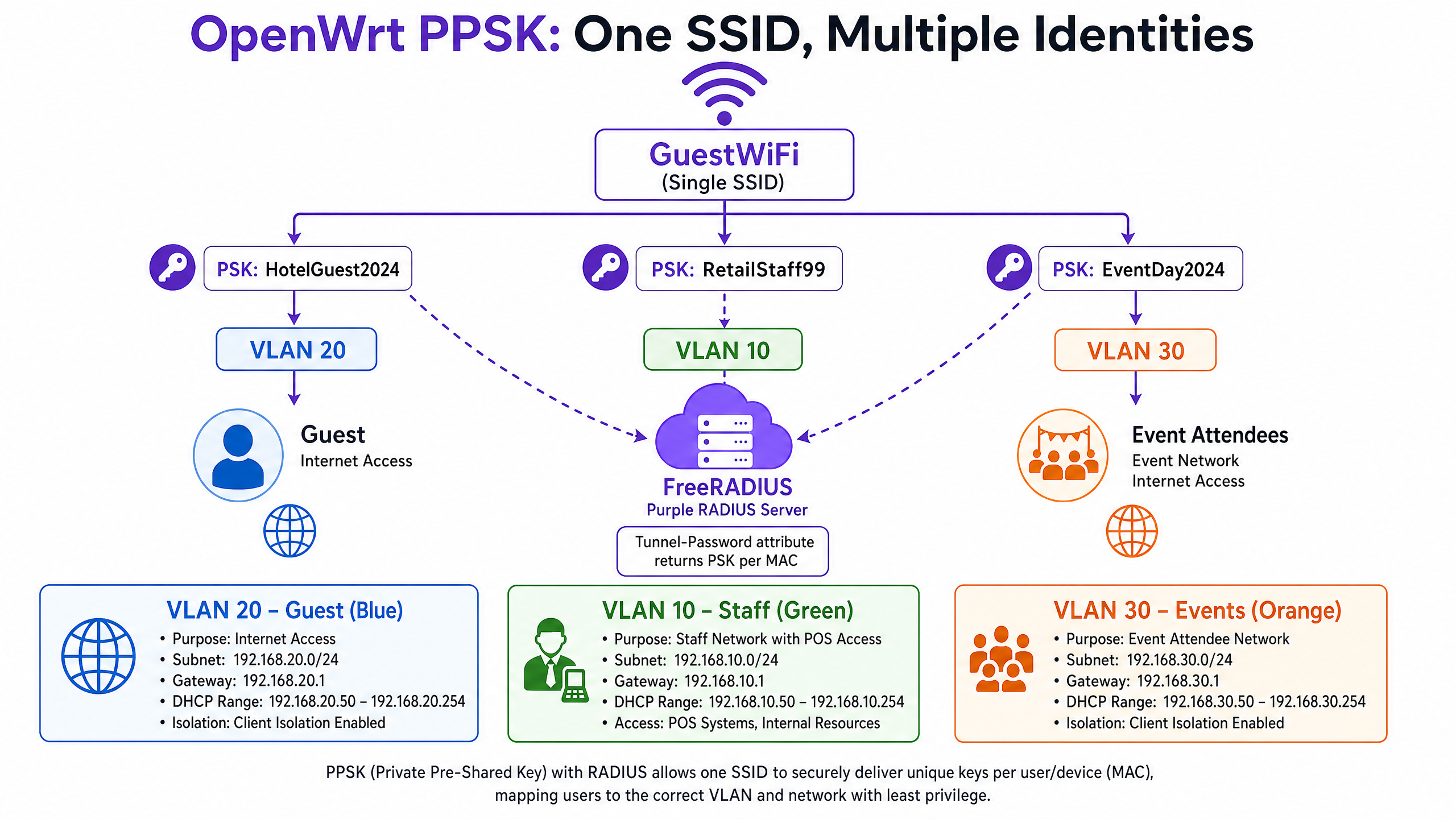
In multi-tenant environments – co-working spaces, build-to-rent (BTR) properties, retail centres with multiple vendors, or stadiums with separate sponsor zones – broadcasting multiple SSIDs is operationally expensive and RF-inefficient. Each additional SSID adds management frame overhead, reducing available airtime for data traffic.
Private Pre-Shared Keys (PPSK), sometimes called dynamic PSK, solve this. You broadcast a single SSID. When a device attempts to connect, hostapd sends the device's MAC address to the RADIUS server via a standard Access-Request. The RADIUS server validates the MAC address against its database and returns an Access-Accept containing two critical attributes: the Tunnel-Password attribute (the unique passphrase for that device) and the Tunnel-Private-Group-ID attribute (the VLAN assignment). The device connects using its unique passphrase and is placed directly onto its assigned VLAN.
This means a retail manager and an event attendee can connect to the identical SSID but be routed to entirely separate, isolated networks based on their unique identity.
Implementation guide
Step 1: Retrieve Purple RADIUS credentials
Before touching the OpenWrt configuration, retrieve the following from the Purple portal admin console:
- Primary RADIUS Server IP address
- Secondary RADIUS Server IP address (for failover)
- RADIUS Shared Secret
- Captive Portal Splash Page URL
- Post-authentication redirect URL
Step 2: Install and configure CoovaChilli for guest WiFi
Install the coova-chilli package via opkg:
opkg update && opkg install coova-chilli
The primary configuration file is /etc/chilli/defaults. Define the core network parameters:
# Network interfaces
HS_WANIF=eth0           # Upstream internet interface
HS_LANIF=wlan0          # The guest WiFi interface (or a VLAN sub-interface)

# Guest subnet
HS_NETWORK=10.10.20.0
HS_NETMASK=255.255.255.0
HS_UAMLISTEN=10.10.20.1 # CoovaChilli's IP on the guest network
HS_UAMPORT=3990

# Purple RADIUS integration
HS_RADIUS=
HS_RADIUS2=
HS_RADSECRET=
HS_NASID=venue-openwrt-01

# Purple splash page
HS_UAMSERVER=

# Walled garden - domain-based allowlisting
HS_UAMDOMAINS=".purple.ai,.googleapis.com,.gstatic.com,.facebook.com,.fbcdn.net"
Enable and start the service:
/etc/init.d/chilli enable
/etc/init.d/chilli start
Step 3: Configure the OpenWrt wireless interface for the guest SSID
In /etc/config/wireless, define the guest SSID as an open network bound to the interface CoovaChilli will manage:
config wifi-iface 'guest_wifi'
    option device 'radio0'
    option network 'guest'
    option mode 'ap'
    option ssid 'Venue_Guest'
    option encryption 'none'
    option isolate '1'
Client isolation (isolate '1') prevents guest devices from communicating with each other – a mandatory security control for any shared network.
Step 4: Configure hostapd for 802.1X staff WiFi
For the staff SSID, configure WPA2-Enterprise in /etc/config/wireless:
config wifi-iface 'staff_wifi'
    option device 'radio0'
    option network 'staff_vlan10'
    option mode 'ap'
    option ssid 'Venue_Staff'
    option encryption 'wpa2'
    option server ''
    option port '1812'
    option key ''
    option dynamic_vlan '2'
    option vlan_tagged_interface 'eth0'
    option vlan_bridge 'br-vlan'
    option vlan_naming '0'
Setting dynamic_vlan '2' instructs hostapd to enforce the VLAN assignment returned by the RADIUS server, and to reject authentication if no VLAN is returned.
Package requirement: The standard wpad-mini package does not support WPA2-Enterprise. You must install wpad or wpad-openssl:
opkg remove wpad-mini && opkg install wpad-openssl
Step 5: Configure PPSK for multi-tenant segmentation
PPSK requires hostapd to perform MAC address authentication against the RADIUS server, which then returns the per-device passphrase. In /etc/config/wireless:
config wifi-iface 'ppsk_ssid'
    option device 'radio0'
    option mode 'ap'
    option ssid 'Venue_Connect'
    option encryption 'psk2'
    option key 'default_fallback_key'
    option macfilter 'radius'
    option server ''
    option port '1812'
    option key ''
    option dynamic_vlan '2'
    option vlan_tagged_interface 'eth0'
    option wpa_psk_radius '2'
The wpa_psk_radius '2' parameter instructs hostapd to require the Tunnel-Password attribute from the RADIUS response. If the RADIUS server does not return a passphrase, authentication is rejected.
On the Purple RADIUS side, the authorize section of your FreeRADIUS configuration (or equivalent) maps MAC addresses to passphrases and VLAN IDs:
# Example RADIUS authorize entry for PPSK
AA:BB:CC:DD:EE:FF   Auth-Type := Accept
    Tunnel-Password = "GuestPass2024",
    Tunnel-Type = VLAN,
    Tunnel-Medium-Type = IEEE-802,
    Tunnel-Private-Group-ID = "20"
Step 6: Configure dynamic VLAN assignment
For dynamic VLAN assignment to function, your OpenWrt switch must be configured to carry the relevant VLANs as tagged traffic on the trunk port connecting to your core switch. In /etc/config/network:
config interface 'vlan10'
    option ifname 'eth0.10'
    option proto 'dhcp'

config interface 'vlan20'
    option ifname 'eth0.20'
    option proto 'dhcp'

config interface 'vlan30'
    option ifname 'eth0.30'
    option proto 'dhcp'
Ensure your core switch port is configured as a trunk, passing VLANs 10, 20, and 30 tagged.
Best practices
Absolute network segregation. Never bridge guest interfaces with internal networks. Guest traffic must be isolated on a dedicated VLAN and routed directly to the internet firewall. This is a non-negotiable requirement for PCI DSS 4.0 compliance, which mandates that guest WiFi networks be completely isolated from any network segment handling cardholder data.
Walled garden precision. An incomplete walled garden is the primary cause of captive portal failures. Use your browser's developer tools on a test device connected to the guest SSID to identify which requests are blocked pre-authentication. Every blocked domain is a potential portal failure.
RADIUS accounting intervals. Configure the CoovaChilli accounting interim interval to 120 seconds. This provides near real-time session data in the Purple analytics dashboard without generating excessive RADIUS traffic.
Secondary RADIUS server. Always configure HS_RADIUS2 in your CoovaChilli config. If the primary Purple RADIUS server is unreachable, CoovaChilli will fail to authenticate new sessions. The secondary server provides automatic failover with no configuration change required at the access point.
Package selection. The wpad-mini package bundled with many OpenWrt builds does not support WPA2-Enterprise or dynamic VLAN assignment. Always install wpad-openssl for any deployment requiring 802.1X or PPSK.
For further guidance on enterprise WiFi security architecture, see our Enterprise WiFi Security: A Complete Guide for 2026 .
Troubleshooting & risk mitigation
| Symptom | Likely Cause | Resolution |
|---|---|---|
| Portal fails to load after redirect | Incomplete walled garden | Add missing CDN/API domains to HS_UAMDOMAINS |
| Authentication fails silently | RADIUS shared secret mismatch | Verify HS_RADSECRET matches exactly in both CoovaChilli and the Purple portal |
| No data in Purple analytics | RADIUS accounting blocked | Verify outbound UDP 1813 is permitted; check HS_RADIUS2 accounting config |
| iOS does not show portal pop-up | captive.apple.com in walled garden |
Remove Apple detection domains from HS_UAMDOMAINS |
| PPSK clients land on wrong VLAN | vlan_tagged_interface misconfigured |
Verify trunk port config on both OpenWrt and the core switch |
| 802.1X auth fails with wpad error | wpad-mini installed |
Remove wpad-mini, install wpad-openssl |
| Dynamic VLAN fails on ath10k | Known driver issue in older builds | Update to OpenWrt 21.02 or later; use non-CT ath10k firmware |
GDPR compliance note: CoovaChilli itself does not capture or store personal data. All consent capture, data processing, and GDPR compliance mechanisms are handled by the Purple platform at the portal layer. Ensure your Purple portal is configured with your venue's terms and conditions and data processing notice before go-live.
For related hardware integration patterns, see our guides on EnGenius Cloud Access Points Integration with Purple WiFi and DrayTek Vigor Routers and Access Points Integration with Purple WiFi .
ROI & business impact
Transitioning from basic PSK networks to a Purple-managed OpenWrt architecture delivers measurable impact across three dimensions.
Data capture and marketing. By enforcing captive portal authentication, venues capture compliant, first-party demographic data - names, email addresses, social profiles - at the point of WiFi connection. This data feeds directly into CRM and email marketing platforms, driving loyalty programme sign-ups and enabling targeted campaigns. Purple has processed 440 million logins in 2024 (Purple internal data), demonstrating the scale of first-party data capture possible at the network edge.
Operational efficiency. Implementing PPSK reduces SSID overhead, improving WiFi performance in dense environments. For a 200-location retail chain, centrally managing identity via Purple's cloud RADIUS - rather than updating local router configurations at each site - saves hundreds of engineering hours annually. A single RADIUS policy change propagates to all 200 locations instantly.
Security and compliance. Dynamic VLAN assignment enforces least-privilege access at the edge. Staff are isolated from guests. IoT devices are isolated from staff. POS terminals are isolated from all other traffic. This segmentation satisfies PCI DSS 4.0 network isolation requirements and provides a clear, auditable network topology for GDPR compliance reviews.
For vertical-specific deployment patterns, see our guides for Retail , Hospitality , Healthcare , and Transport environments. You may also find our guide on What Is Wireless Display: Protocols & Best Practices 2026 useful for understanding complementary wireless technologies in venue deployments.
Key Definitions
CoovaChilli
An open-source software access controller that provides a captive portal and walled-garden environment for wireless networks, using RADIUS for authentication and accounting.
IT teams deploy CoovaChilli on OpenWrt to intercept guest HTTP traffic and redirect it to the Purple splash page. It manages the iptables rules that enforce the walled garden and grant post-authentication internet access.
Walled garden
A strict allowlist of IP addresses or domains that an unauthenticated user can access before completing captive portal authentication.
Critical for allowing guest devices to load the Purple portal graphics and reach social media login APIs while blocking general internet access. An incomplete walled garden is the most common cause of captive portal failures.
PPSK (Private Pre-Shared Key)
A security mechanism where individual users or devices are assigned unique passphrases for the same WiFi SSID, with RADIUS returning the correct passphrase and VLAN assignment per device MAC address.
Used to segment multi-tenant environments without broadcasting multiple SSIDs. Supported in OpenWrt via the wpa_psk_radius parameter in hostapd.
Dynamic VLAN assignment
The process where a RADIUS server instructs the access point to place a specific authenticated user onto a specific virtual LAN, using the Tunnel-Type, Tunnel-Medium-Type, and Tunnel-Private-Group-ID RADIUS attributes.
The core mechanism for Identity-Based Networks. The user's identity, not their physical port, determines their network segment and access rights.
IEEE 802.1X
The IEEE standard for port-based network access control, defining the Authenticator (access point), Supplicant (client device), and Authentication Server (RADIUS) roles in enterprise WiFi authentication.
The underlying protocol for secure staff WiFi on OpenWrt. Requires the full wpad or wpad-openssl package - wpad-mini does not support it.
EAP-TLS (Extensible Authentication Protocol - Transport Layer Security)
An 802.1X authentication method that uses mutual certificate-based authentication, requiring both the RADIUS server and the client device to present valid digital certificates.
The gold standard for corporate device authentication. Eliminates passwords entirely, neutralising credential theft and phishing attacks. Requires a PKI infrastructure to issue client certificates.
Captive Network Assistant (CNA)
The pseudo-browser that iOS and Android devices automatically display when they detect they are behind a captive portal, based on probing specific detection URLs.
Network engineers must manage their walled gardens carefully to control whether the CNA triggers automatically. Most hospitality deployments exclude Apple and Google detection domains to force the CNA pop-up.
RADIUS accounting
The third pillar of the AAA (Authentication, Authorization, Accounting) framework, tracking network resource consumption by recording session start, interim updates, and session stop events on UDP port 1813.
Required by Purple to populate the analytics dashboard with session duration and bandwidth data. Configured in CoovaChilli via HS_RADIUS2 and the radiusacctport parameter.
hostapd
The open-source IEEE 802.11 access point daemon used by OpenWrt to manage wireless interfaces, supporting WPA2/WPA3-Enterprise, 802.1X, and PPSK authentication modes.
The core daemon for staff and PPSK WiFi on OpenWrt. The wpad-openssl package provides the full-featured hostapd build required for enterprise authentication.
Tunnel-Password attribute
A RADIUS attribute (attribute 69) used in PPSK deployments to return a per-device passphrase from the RADIUS server to the access point during MAC authentication.
The mechanism by which Purple's RADIUS server delivers unique PSKs to OpenWrt's hostapd daemon for PPSK-based multi-tenant segmentation.
Worked Examples
A 200-room hotel needs to provide tiered WiFi access: free basic internet for guests, high-speed access for loyalty members, and secure access for staff point-of-sale devices. The IT team wants to minimise SSID overhead and enforce PCI DSS network isolation between the POS terminals and guest traffic.
Deploy OpenWrt access points broadcasting two SSIDs: 'Hotel_Guest' (open, CoovaChilli-managed) and 'Hotel_Secure' (PPSK-managed via hostapd). On 'Hotel_Guest', CoovaChilli redirects all unauthenticated traffic to the Purple splash page. Guests authenticate via the portal and land on VLAN 20 (internet-only). On 'Hotel_Secure', configure hostapd with wpa_psk_radius=2. When a loyalty member's device connects, the RADIUS server returns their unique PSK and VLAN 21 (higher bandwidth tier). When a POS terminal connects, the RADIUS server returns the POS device PSK and VLAN 10 (internal network access, internet blocked). The VLAN segmentation enforces PCI DSS isolation between cardholder data (VLAN 10) and guest traffic (VLANs 20 and 21) at the access point level.
A retail chain is rolling out OpenWrt routers to 50 locations. During UAT at the first site, the Purple splash page loads correctly after redirect, but clicking the Facebook login button results in a connection timeout. The Google Sign-In button works correctly.
The issue is an incomplete CoovaChilli walled garden. Facebook's authentication flow requires access to multiple domains: facebook.com, connect.facebook.net, and fbcdn.net (Facebook's CDN for login assets). Google Sign-In works because googleapis.com and gstatic.com are already in the walled garden. Update the HS_UAMDOMAINS parameter in /etc/chilli/defaults to add '.facebook.com,.connect.facebook.net,.fbcdn.net'. Reload the chilli daemon with '/etc/init.d/chilli restart' and retest. To diagnose future walled garden issues systematically, connect a test device to the guest SSID and use browser developer tools (Network tab) to identify which requests return connection errors before authentication.
Practice Questions
Q1. You have deployed OpenWrt with CoovaChilli at a Premier Inn property. Guests report that their iPhones do not automatically prompt them to log in when they connect to the guest WiFi. They must manually open Safari and navigate to an HTTP site to trigger the portal. What configuration change causes this, and how do you resolve it?
Hint: Consider how iOS determines whether a network has full internet access upon association.
View model answer
The engineer has included Apple's captive portal detection domain (captive.apple.com) in the CoovaChilli walled garden via HS_UAMDOMAINS. When an iPhone connects, iOS sends a probe to captive.apple.com. Because this domain is in the walled garden, the probe succeeds pre-authentication, and iOS concludes it has full internet access - suppressing the Captive Network Assistant pop-up. To resolve this, remove captive.apple.com from HS_UAMDOMAINS and restart the chilli daemon. iOS devices will then receive a failed probe response, correctly identify the captive portal, and display the login prompt automatically.
Q2. A coworking space operator wants to deploy IoT smart thermostats across their estate. They already broadcast a 'Cowork_Guest' SSID (CoovaChilli) and a 'Cowork_Staff' SSID (802.1X). The thermostats do not support WPA2-Enterprise. How do you securely onboard them without adding a third SSID?
Hint: IoT devices typically support only WPA2-PSK. Consider which existing SSID can be extended to support per-device passphrases.
View model answer
Configure PPSK on the 'Cowork_Staff' SSID by enabling wpa_psk_radius=2 in the hostapd configuration. Register each thermostat's MAC address in the Purple RADIUS server with a unique passphrase and VLAN 40 (IoT VLAN) as the Tunnel-Private-Group-ID. When a thermostat connects, hostapd queries the RADIUS server with the device MAC, receives the unique PSK and VLAN assignment, and places the thermostat on VLAN 40 - completely isolated from staff traffic on VLAN 10. This approach avoids a third SSID, maintains RF efficiency, and enforces least-privilege access for IoT devices without requiring 802.1X certificate infrastructure.
Q3. After deploying OpenWrt with CoovaChilli at a retail venue, the Purple analytics dashboard shows zero active sessions and no bandwidth data, despite guests successfully connecting and browsing the internet. What is the most likely cause, and what are the two steps to diagnose it?
Hint: Authentication (port 1812) and accounting (port 1813) are separate RADIUS functions.
View model answer
The RADIUS accounting configuration is either missing or blocked. Step 1: Verify the CoovaChilli configuration. Check that HS_RADIUS and HS_RADIUS2 are set correctly in /etc/chilli/defaults, and confirm that the radiusacctport is set to 1813. If HS_RADIUS2 is not configured, there is no accounting server defined. Step 2: Verify firewall rules. Confirm that outbound UDP port 1813 traffic from the OpenWrt router to the Purple RADIUS server IP addresses is permitted by the venue's edge firewall. Use 'tcpdump -i eth0 udp port 1813' on the OpenWrt device to confirm whether accounting packets are being sent. If packets appear in tcpdump but the dashboard remains empty, the issue is a firewall blocking the traffic between the router and Purple's cloud RADIUS servers.
Q4. An OpenWrt deployment at a stadium uses dynamic VLAN assignment via RADIUS to segment fan WiFi (VLAN 30), media (VLAN 40), and operations (VLAN 50). After upgrading the access points to new hardware running OpenWrt 19.07 with ath10k drivers, VLAN assignment stops working. Authenticated users all land on the default VLAN regardless of RADIUS attributes. What is the known cause?
Hint: Consider driver-level support for AP/VLAN mode in ath10k.
View model answer
This is a known regression in ath10k-ct (Candela Technologies) firmware included in OpenWrt 19.07. The ath10k-ct driver in this release has a bug that breaks AP/VLAN mode, preventing dynamic VLAN assignment from functioning. The resolution is to upgrade to OpenWrt 21.02 or later, where the ath10k-ct driver was updated to restore AP/VLAN functionality. Alternatively, replace the ath10k-ct firmware with the standard ath10k firmware (non-CT variant) on the 19.07 build. This issue does not affect ath9k-based hardware, which handles AP/VLAN mode correctly across all OpenWrt versions.
Continue reading in this series
Huawei AirEngine and CloudCampus Integration with Purple WiFi
This guide provides step-by-step instructions for integrating Huawei AirEngine access points and iMaster NCE-Campus with Purple WiFi. It covers captive portal configuration, 802.1X staff authentication, and PPSK dynamic VLAN steering for enterprise networks.
Huawei AirEngine and CloudCampus Integration with Purple WiFi
This guide provides step-by-step instructions for integrating Huawei AirEngine access points and iMaster NCE-Campus with Purple WiFi. It covers captive portal configuration, 802.1X staff authentication, and PPSK dynamic VLAN steering for enterprise networks.
EnGenius Cloud Access Points Integration with Purple WiFi
This technical reference details the step-by-step integration of EnGenius Cloud Access Points and ECS switches with Purple's guest WiFi platform. It covers guest captive portal redirection via an external splash page, Walled Garden configuration, secure staff WiFi using IEEE 802.1X, and multi-tenant network isolation using EnGenius MyPSK with dynamic VLAN assignment. IT installers and network architects will find actionable configuration sequences, real-world case studies, and a troubleshooting framework for deploying Purple across EnGenius hardware estates.